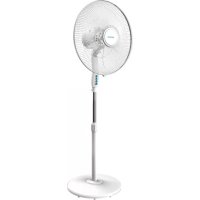
Energy Silence 600 Max Flow - Fan CECOTEC - Free user manual and instructions
Find the device manual for free Energy Silence 600 Max Flow CECOTEC in PDF.



| Product Type | Tower Fan |
| Brand | Cecotec |
| Model | Energy Silence 600 Max Flow |
| Dimensions (H x W x D) | Approx. 75 x 30 x 30 cm |
| Weight | Approx. 4 kg |
| Power Supply | 220-240 V ~ 50/60 Hz |
| Power | 40 W |
| Max Airflow | 600 m³/h |
| Noise Level | 22 dB (silent) |
| Speeds | 3 adjustable speeds |
| Modes | Normal, breeze, night |
| Oscillation | Automatic horizontal oscillation (80°) |
| Timer | From 1 to 8 hours |
| Remote Control | Yes, with infrared remote control |
| LED Display | Displays temperature and settings |
| Material | ABS plastic and metal |
| Color | White and black |
| Cleaning | Removable front grille for blade cleaning |
| Safety | Anti-tip base, overheat protection |
Frequently Asked Questions - Energy Silence 600 Max Flow CECOTEC
User questions about Energy Silence 600 Max Flow CECOTEC
0 question about this device. Answer the ones you know or ask your own.
Ask a new question about this device
Download the instructions for your Fan in PDF format for free! Find your manual Energy Silence 600 Max Flow - CECOTEC and take your electronic device back in hand. On this page are published all the documents necessary for the use of your device. Energy Silence 600 Max Flow by CECOTEC.
USER MANUAL Energy Silence 600 Max Flow CECOTEC
natural_image
White C800 BC air conditioner unit with digital display showing 23 seconds (no text or symbols on body)-
Safety Instructions, 62
-
Parts and components 66
-
Before use 67
-
Product installation 67
-
Operation 79
-
Connectivity 84
-
Cleaning and maintenance 92
-
Troubleshooting 93
-
Technical specifications 101
-
Disposal of old electrical appliances 102
SOMMAIRE
Fig./Img./Abb./Afb./Rys./Obr.1
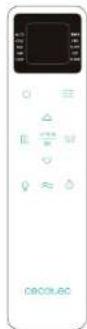
Fig./Img./Abb./Afb./Rys./Obr.2
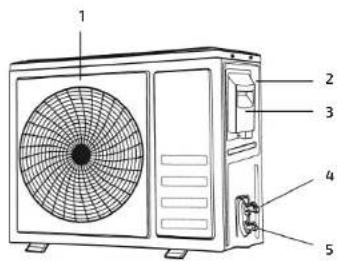
Fig./Img./Abb./Afb./Rys./Obr.3
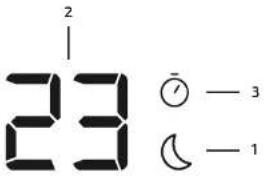
Fig./Img./Abb./Afb./Rys./Obr.4
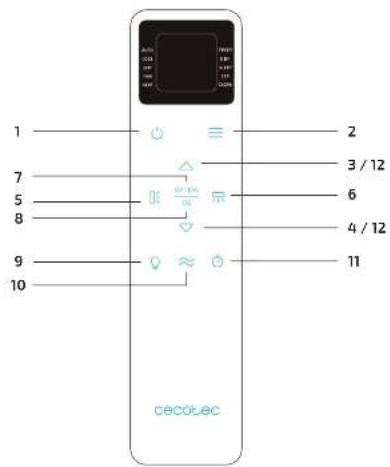
Fig./Img./Abb./Afb./Rys./Obr. 5 Fig./Img./Abb./Afb./Rys./Obr. 7
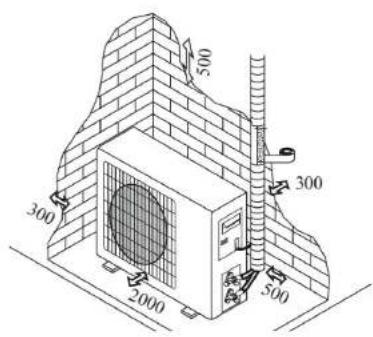
Fig./Img./Abb./Afb./Rys./Obr. 10 Fig./Img./Abb./Afb./Rys./Obr. 11
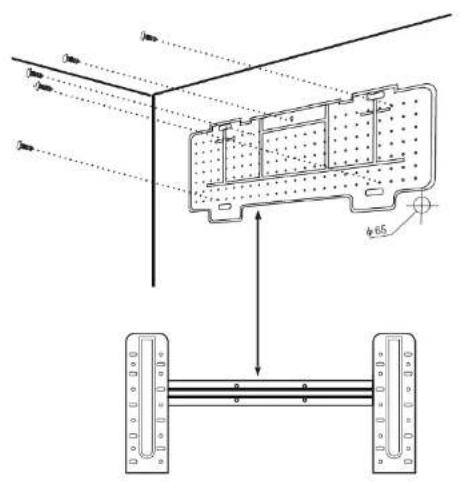
Fig./Img./Abb./Afb./Rys./Obr.9
natural_image
Technical line drawing of two views of a cylindrical device with internal components and connectors (no text or symbols)Fig./Img./Abb./Afb./Rys./Obr.12
natural_image
Two diagrams showing a coiled cable with connectors, one with rotation arrows and the other with directional arrows (no text or symbols)Fig./Img./Abb./Afb./Rys./Obr.13
natural_image
Illustration of three different types of pipe fittings: threaded, open section, and clamped (no text or symbols)Fig./Img./Abb./Afb./Rys./Obr.14
natural_image
Illustration of a hand using a tool to lift a brick wall component (no text or symbols)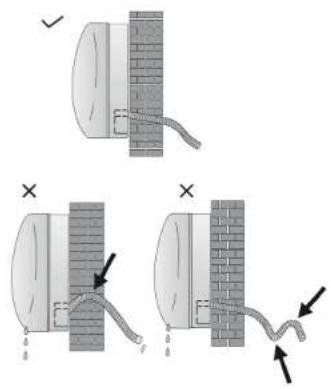
Fig./Img./Abb./Afo./Rys./Obr. 16
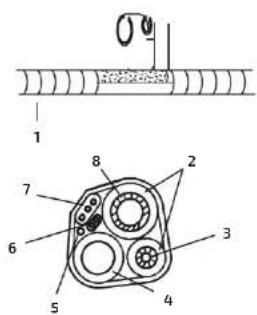
Fig./Img./Abb./Afb./Rys./Obr. 17 Fig./Img./Abb./Afb./Rys./Obr. 15
natural_image
Diagram showing a brick wall with a tool and directional arrow, no text or symbols present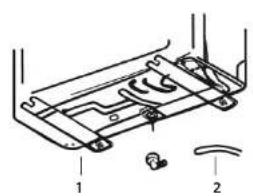
Fig./Img./Abb./Afb./Rys./Obr. 18 Fig./Img./Abb./Afb./Rys./Obr. 19
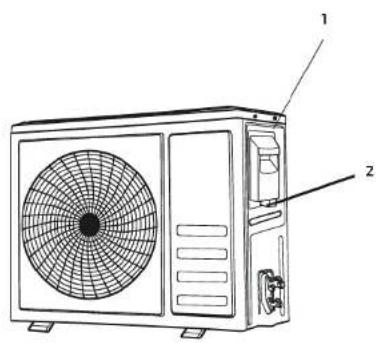
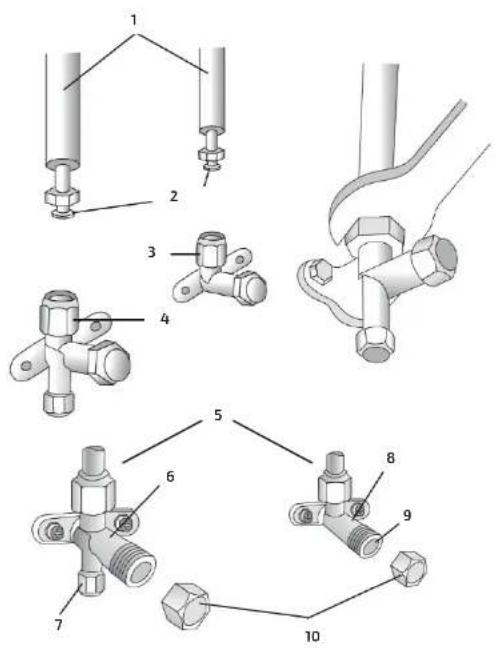
Fig./Img./Abb./Afb./Rys./Obr. 21 Fig./Img./Abb./Afb./Rys./Obr. 20
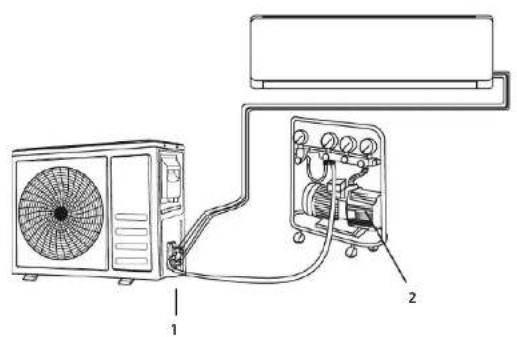
Fig./Img./Abb./Afb./Rys./Obr. 22 Fig./Img./Abb./Afb./Rys./Obr. 24
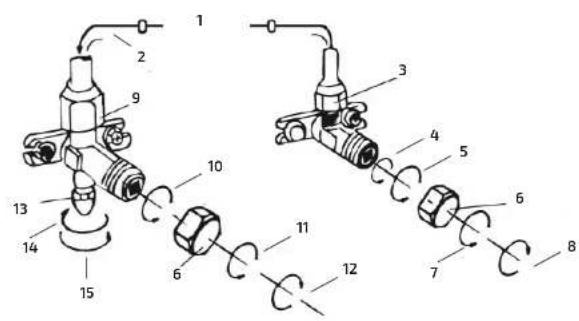
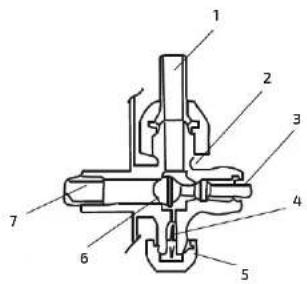
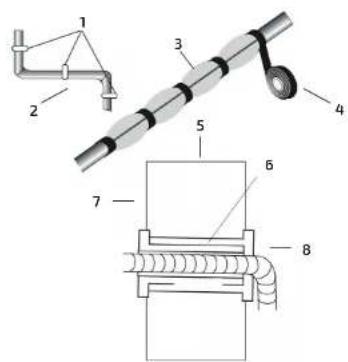
Fig./Img./Abb./Afb./Rys/Obr.25Fig./Img./Abb./Afb./Rys/Obr.23
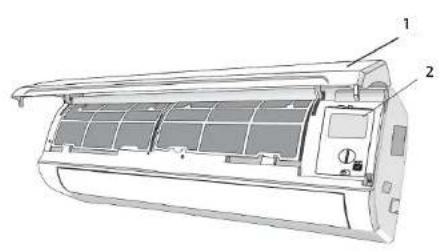
Fig./img./Abb./Afb./Rys./Obr. 26
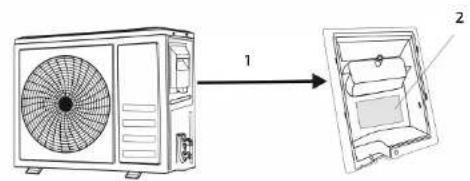
Fig./img./Abb./Afb./Rys./Obr.27
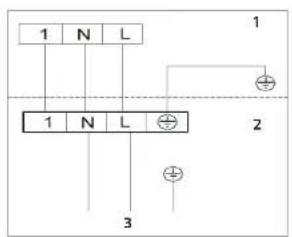
Fig./Img./Abb./Afb./Rys./Obr. 28
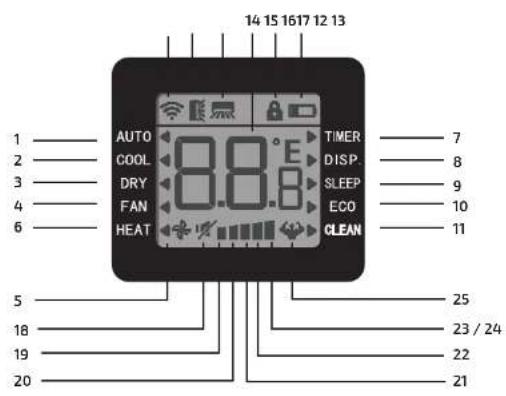
Fig./Img./Abb./Afb./Rys./Obr. 29
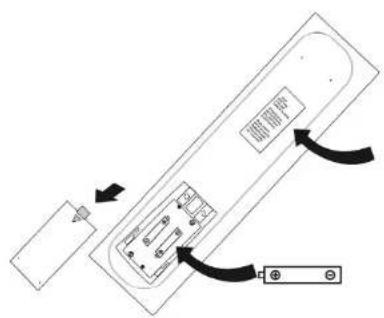
Fig./Img./Abb./Afb./Rys./Obr. 30
natural_image
Diagram of a car air conditioner with a remote control and a screen, showing airflow direction (no text or symbols)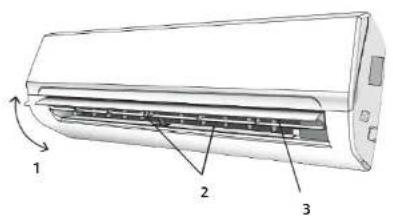
Fig./Img./Abb./Afb./Rys./Obr. 33 Fig./Img./Abb./Afb./Rys./Obr. 31
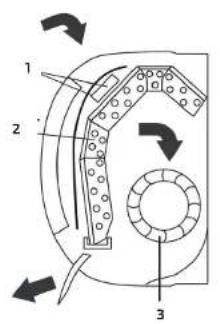
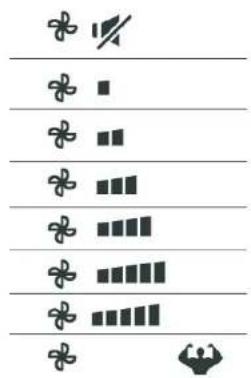
Fig./Img./Abb./Afb./Rys./Obr. 34 Fig./Img./Abb./Afb./Rys./Obr. 32
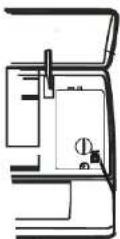
Fig./img./Abb./Afb./Rys./Obr. 35
natural_image
Cross-sectional diagram of a mechanical or structural component with internal layers and a downward arrow indicating a specific section (no text or symbols present)Fig./Img./Abb./Afb./Rys./Obr. 36
ESPAÑOL
- Pulse Electricity Monitoring.
B. Pulse Self-Cleaning.
1. SAFETY INSTRUCTIONS
Read these instructions thoroughly before using the appliance. Keep this instruction manual for future reference or new users.
Installation
During the installation of the indoor and outdoor units the access to the working area should be forbidden to children. Unforeseeable accidents could happen.
Make sure that the base of the outdoor unit is firmly fixed.
Check that air cannot enter the refrigerant system and check for refrigerant leaks when moving the air conditioner.
Carry out a test cycle after installing the air conditioner and record the operating data.
The ratings of the fuse installed in the built-in control unit are 4 A / 250 V.
Protect the indoor unit with a fuse of suitable capacity for the maximum input current or with another overload protection device.
Ensure that the mains voltage corresponds to that stamped on the rating plate. Keep the switch or power plug clean. Insert the power plug correctly and firmly into the socket, thereby avoiding the risk of electric shock or fire due to insufficient contact.
Check that the socket is suitable for the plug, otherwise have the socket changed.
The appliance must be fitted with means for disconnection from the supply mains having a contact separation in all poles that provide full disconnection under overvoltage category III conditions, and these means must be incorporated in the fixed wiring in accordance with the wiring rules.
The air conditioner must be installed by professional or qualified persons.
Do not install the appliance at a distance of less than 50 cm from inflammable substances (alcohol, etc.) or from pressurised containers (e.g. spray cans).
If the appliance is used in areas without the possibility of ventilation, precautions must be taken to prevent any leaks of refrigerant gas from remaining in the environment and creating a danger of fire.
Packaging materials are recyclable and should be disposed of in the separate waste bins. Take the air conditioner at the end of its useful life to a special waste collection centre for disposal.
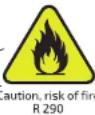
Only use the air conditioner as indicated in this instruction manual. As with any electrical household appliance, common sense and caution are therefore always recommended for installation, operation and maintenance.
The appliance must be installed in accordance with applicable national wiring regulations.
Before accessing the terminals, all the power circuits must be disconnected from the power supply.
User
Do not try to install the conditioner alone; always contact specialized technical personnel.
Make sure that the mains voltage matches the voltage stated on the rating label of the appliance and that the outlet is grounded. This appliance is intended for domestic use only. It is not suitable for commercial or industrial use.
Check the power cord regularly for visible damage. If the cord is damaged, it must be replaced by the official Technical Support Service of Cecotec in order to avoid any type of danger.
Cleaning and maintenance tasks must be carried out by
ENGLISHENGLISH
qualified personnel. In any case, disconnect the unit from the power supply before carrying out any cleaning or maintenance. Always turn off and disconnect the appliance from the power supply before assembling, disassembling, cleaning it or if it is not going to be used for a long period of time. Pull from the plug and not the cord to disconnect it.
Do not touch or operate the device with wet hands.
Do not repair or remove any fixed part of the product. Contact the Technical Support Service of Cecotec for help or advice.
Always make sure all the detachable parts are properly placed and fixed before operating it. If any of the parts are damaged, do not use it.
Do not pull out the plug to switch off the appliance when it is in operation, since this could create a spark and cause a fire, etc. The appliance has been made for air conditioning domestic environments and must not be used for any other purpose, such as for drying clothes, cooling food, etc.
Always use the appliance with the air filter mounted. The use of the conditioner without air filter could cause an excessive accumulation of dust or waste on the inner parts of the device with possible subsequent failures.
Do not touch the appliance when barefoot or parts of the body are wet or damp.
Do not obstruct the air inlet or outlet of the indoor or the outdoor unit. The obstruction of these openings causes a reduction in the operative efficiency of the conditioner with possible consequent failures or damages.
Do not alter any of the characteristics of the device.
Do not expose or immerse the cord, plug, electrical elements or any non-removable part of the appliance in water or any other liquid.
Do not install the appliance in environments where the air could contain gas, oil or Sulphur or near sources of heat.
Do not place any heavy or hot objects on top of the appliance. Do not leave windows or doors open for long when the air conditioner is operating.
Do not direct the airflow onto plants or animals.
Do not insert objects through the air inlet or outlet.
The user is responsible for having the appliance installed by a qualified technician, who must check that it is earthed in accordance with current legislation and insert a thermomagnetic circuit breaker.
Never remain directly exposed to the flow of cold air for a long time. The direct and prolonged exposition to cold air could be dangerous for your health. Particular care should be taken in the rooms where there are children, old or sick people.
If the appliance gives off smoke or there is a smell of burning, immediately cut off the power supply and contact the Technical Support Service of Cecotec. The prolonged use of the device in such conditions could cause fire or electrocution.
Unhook the automatic switch if you foresee not to use the device for a long time. The airflow direction must be properly adjusted.
Flaps must be directed downwards in the heating mode and upwards in the cooling mode.
Selecting the most suitable temperature can prevent damage to the appliance.
The appliance is not intended to be used by children under the age of 8. It can be used by children over the age of 8, as long as they are given continuous supervision.
This appliance is not intended to be used by persons with reduced physical, sensory, or mental capabilities, or lack of experience or knowledge, unless they have been given supervision or instruction
ENGLISHENGLISH
concerning the use of the appliance in a safe way by a person responsible for their safety, and understand the hazards involved. Supervise young children to make sure that they do not play with the appliance. Close supervision is necessary when the appliance is being used by or near children.
2. PARTS AND COMPONENTS
Indoor unit
Fig. 1
-
Front panel
-
Air filter
-
LED display
-
Signal receiver
-
Terminal block cover
-
Deflectors
-
Emergency button
B. Airflow direction louver
Remote controller
Fig. 2.
Outdoor unit
Fig. 3
-
Air outlet grille
-
Outdoor unit rating label
-
Terminal block cover
-
Gas valve
-
Liquid valve
Note: The above figures are only intended to be a simple diagram of the appliance and may not correspond to the appearance of the units that have been purchased.
Display
Fig. 4.
-
Sleep mode
-
Temperature/error code display
-
Timer
Remote control
Fig. 5.
-
On/off
-
Mode: Auto, Cool, Dehumidifier, Fan, Heat
-
Increase
-
Decrease
-
Air flow up and down
-
Air flow right and left (only some models).
-
Option: Sleep, Eco, Auto-clean
B. Confirm
-
On/off indoor display
-
Fan speed: Mute/Low/Low-mid/Mid/Mid-high/High/Turbo/Auto
-
Timer
-
Lock function (Hold down the increase and decrease keys to activate or deactivate it)
3. BEFORE USE
Take the product out of the box.
Clean the outside and inside of the machine with a damp cloth and wipe dry.
Check for any visible damage, if any is observed, contact as soon as possible the Technical Support Service of Cecotec for advice or reparation.
4. PRODUCT INSTALLATION
Note:
The air conditioner must be installed by professional personnel. The installation specifications should be subject to our after-sale service regulations.
When filling the combustible refrigerant, any sudden movement or may cause serious injuries to human bodies objects.
A leak test must be done after the installation is completed and before the device is operated. It is a must to do the safety inspection before maintaining or repairing an air conditioner using combustible refrigerant in order to ensure that the fire risk is reduced to minimum.
It is necessary to operate the machine under a controlled procedure in order to ensure that any risk arising from the combustible gas or vapour during the operation is reduced to minimum.
Requirements for the total weight of filled refrigerant and the area of a room to be equipped with an air conditioner are shown as in the following tables.
Maximum charge and required minimum floor area
m = (4m^2)× LFL,m = (26m^2)× LFL,m = (130m^2)× LFL
Where LFL is the lower flammable limit in kg/m ^2 , R290 LFL is 0.038 kg/m ^2 , R32 LFL is 0.038
ENGLISHENGLISH
kg/m³.
For the appliances with a charge amount m < M = m.
The maximum charge in a room shall be in accordance with the following: m_max = 2.5 × (LFL)^0.1 |x h_c × (A)^1/2
The required minimum floor area A_in to install an appliance with refrigerant charge M (kg) shall be in accordance with following:
A_m,n = (M / (2.5 × (LFL)^2n) × h_n))^2
Where:
m_max is the allowable maximum charge in a room, in kg;
M is the refrigerant charge amount in appliance, in kg;
Amin is the required minimum room area, in m ^2 ;
A is the room area, in m;
LFL is the lower flammable limit, in kg/m
H_b is the installation height of the appliance, in meters for calculating m_max or A_min , 1.8 m for wall mounted;
Maximum charge (kg)
| Category | UFL (kg/m.) | n. (m) | Floor area (m2) | ||||||
| R290 | 0.038 | 0.6 | 0.05 | 0.07 | 0.08 | 0.1 | 0.11 | 0.14 | 0.18 |
| 1 | 0.08 | 0.11 | 0.13 | 0.16 | 0.19 | 0.2 | 0.3 | ||
| 1.8 | 0.15 | 0.2 | 0.24 | 0.29 | 0.34 | 0.41 | 0.53 | ||
| 2.2 | 0.18 | 0.24 | 0.29 | 0.36 | 0.41 | 0.51 | 0.65 | ||
| R32 | 0.306 | 0.6 | 0.68 | 0.9 | 1.08 | 0.32 | 1.53 | 1.87 | 2.41 |
| 1 | 1.14 | 1.51 | 1.8 | 2.2 | 2.54 | 3.12 | 4.02 | ||
| 1.8 | 2.05 | 2.71 | 3.24 | 3.97 | 4.58 | 5.61 | 7.254 | ||
| 2.2 | 2.5 | 3.31 | 3.96 | 4.85 | 5.6 | 6.86 | 8.85 | ||
Minimum room area (m²)
| Category | FL(kg/m.) | h.(m) | Charge amount (M) (kg)Minimum room area (m.) | ||||||
| R290 | 0.038 | 0.152kg | 0.228kg | 0.304kg | 0.456kg | 0.608kg | 0.76kg | 0.988kg | |
| 0.6 | 82 | 146 | 328 | 584 | 912 | 1514 | |||
| 1 | 30 | 53 | 118 | 210 | 328 | 555 | |||
| 1.8 | 9 | 16 | 36 | 65 | 101 | 171 | |||
| 2.2 | 6 | 11 | 24 | 43 | 68 | 115 | |||
| R32 | 0.306 | 1.224kg | 1.836kg | 2.448kg | 3.672kg | 4.896kg | 6.12kg | 7.956kg | |
| 0.6 | 29 | 51 | 116 | 206 | 321 | 543 | |||
| 1 | 10 | 19 | 42 | 74 | 116 | 196 | |||
| 1.8 | 3 | 6 | 13 | 23 | 36 | 60 | |||
| 2.2 | 2 | 4 | 9 | 15 | 24 | 40 | |||
Warnings:
-
The installation site should be in a well-ventilated condition.
-
The sites for installing and maintaining an air conditioner using Refrigerant R290 should be free from open fire or welding, smoking, drying oven or any other heat source higher than 370°C which easily produces open fire; the sites for installing and maintaining an air conditioner using Refrigerant R32 should be free from open fire or welding, smoking, drying oven or any other heat source higher than 548 which easily produces open fire.
-
When installing an air conditioner, it is necessary to take appropriate anti-static measures such as wear anti-static clothing and/or gloves.
-
It is necessary to choose the site convenient for installation or maintenance wherein the air inlets and outlets of the indoor and outdoor units should be not surrounded by obstacles or close to any heat source or combustible and/or explosive environment.
-
If the indoor unit suffers refrigerant leak during the installation, it is necessary to immediately turn off the valve of the outdoor unit and all the personnel should go out until the refrigerant leaks completely for 15 minutes. If the product is damaged, it is a must to send such damaged product back to the Technical Support Service of Cecotec and it is prohibited to weld the refrigerant pipe or conduct other operations on the user's site.
-
It is necessary to choose the place where the inlet and outlet air of the indoor unit are at the same level.
-
It is necessary to avoid the places where there are other electrical products, power switch plugs and sockets, kitchen cabinet, bed, sofa and other valuables right under the lines on two sides of the indoor unit.
ENGLISHENGLISH
| Tool Requirement for use | |
| Mini vacuum pump It should be an explosion | -proof vacuum pump; can ensure certain precision and its vacuum degree should be lower than 10 Pa. |
| Filling device It should be a special explosion | -proof filling device; have certain precision and its filling deviation should be less than 5 g. |
| Concentration detector The maintenance | site should be equipped with a fixed-type combustible refrigerant concentration detector and connected to a safeguard alarm system; its error must be not more than 5%.The installation site should be equipped with a portable combustible refrigerant concentration detector which can realize two-level audible and visual alarm, its error must be not more than 10%.The concentration detectors should be calibrated regularly.It is necessary to check and confirm the functions before using the concentration detectors. |
| Pressure gauge The pressure gauges should be calibrated regularly.The pressure gauge used for Refrigerant 22 can be used for Refrigerants R290 and R161; the pressure gauge used for R410A can be used for Refrigerant 32. | |
| Fire extinguisher It is necessary to carry | fire extinguisher(s)when installing and maintaining an air conditioner. On the maintenance site, there should be two or more kinds of dry powder, carbon dioxide and foam fire extinguishers and that such fire extinguishers should be placed at stipulated positions, with eye-catching labels and in handy places. |
Indoor unit installation
Note:
The purchaser must ensure that the person and/or company who is to install, maintain or repair this air conditioner has qualifications and experience in refrigerant products. It must be a authorized installer or company.
Install the indoor unit on a strong wall that is not subject to vibrations
The inlet and outlet ports should not be obstructed: the air should be able to blow all over the room.
Do not install the unit near a source of heat, steam, or flammable gas.
Install the unit near an electric socket or private circuit.
Do not install the unit where it will be exposed to direct sunlight.
Select a site where the condensed water can be easily drained out, and where it is easily connected to outdoor unit.
Check the machine operation regularly and reserve the necessary spaces as shown in the picture.
Select a place where the filter can be easily taken out.
Fig.7.
-
Mounting plate
-
Condensed water drain pipe
-
Sleeve
-
Insulating covering
-
Electrical cable
-
Water drain pipe
Installation diagram
Fig. 8.
-
Outdoor unit
-
Indoor unit
Installation of the mounting plate
Fig. 9.
ENGLISHENGLISH
- Always mount the rear panel in such way that it is levelled, horizontally and vertically.
- Drill 32 mm deep holes in the wall to fix the plate.
- Insert the plastic anchors into the hole.
- Fix the rear panel on the wall with provided tapping screws.
- Be sure that the rear panel has been fixed firmly enough to withstand the weight.
Drilling a hole in the wall for the piping
Fig. 10.
-
Indoars
-
Outdoors
-
Make the piping hole (065mm) in the wall at a slight downward slant to the outdoor side.
- Insert the piping-hole sleeve into the hole to prevent the connection piping and wiring from being damaged when passing through the hole.
Warning:
The hole must slope downwards towards the exterior
Keep the drain pipe down towards the direction of the wall hole to prevent leakage and to facilitate water discharge.
Electrical connections
Fig. 11.
-
Front panel
-
Wiring diagram
-
Terminal block cover
-
Open the front panel.
-
Take off the cover as indicated in the picture (by removing a screw or breaking the hooks).
-
For the electrical connections, see the circuit diagram on the right part of the unit under the front panel.
-
Connect the cable wires to the screw terminals by following the numbering. Use wire size suitable to the electric power input (see name plate on the unit) and according to all current national safety code requirements.
Note:
The cable connecting the outdoor and indoor units must be suitable for outdoor use.
The plug must be accessible also after the appliance has been installed so that it can be pulled out if necessary.
An efficient earth connection must be ensured.
The wires can be connected to the main PCB of indoor unit by the manufacturer according to the model without terminal block.
Refrigerant piping connection
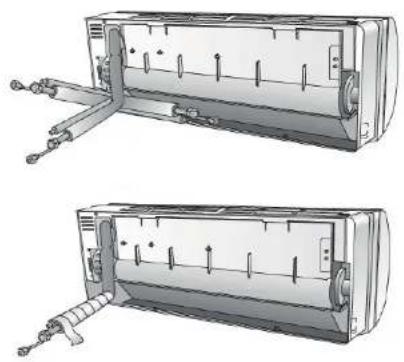
Fig. 12.
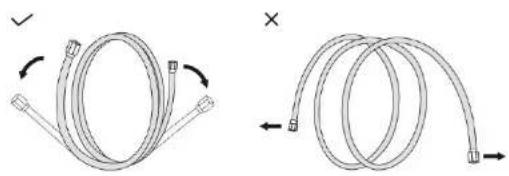
Extending the rolled pipe
Fig. 13.
The piping can be run in the 3 directions indicated by numbers in Fig12. When the piping is run in direction 1 or 3, if necessary, cut a notch along the groove on the side of the indoor unit with a cutter. Run the piping in the direction of the wall hole and bind the copper pipes, the drain pipe and the power cables together with the tape with the drain pipe at the bottom, so that water can flow freely.
Note:
Do not remove the cap from the pipe until connecting it, to avoid dampness or dirt from entering.
If the pipe is bent or pulled too often, it will damage. Do not bend the pipe more than three times at one point.
When extending the rolled pipe, straighten the pipe by unwinding it gently as shown in Fig. 13.
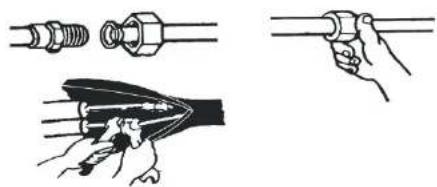
Connections to the indoor unit
- Torque wrench
Fig. 14.
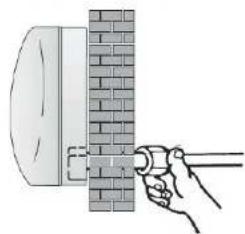
The connectors should be outdoors
Fig. 15.
- Remove the indoor unit pipe cap (check that there is no debris inside).
- Insert the flare nut and create a flange at the extreme end of the connection pipe for the other tube to fit in it.
- Tighten the connections by using two wrenches working in opposite directions.
- For R32/R290 refrigerants, mechanical connectors should be outdoors.
Indoor unit condensed water drainage
Fig. 15.
The indoor unit condensed water drainage is fundamental for the success of the installation.
-
Insert the pipe connection into the relative slot.
-
Press to join the pipe connection to the base,
Note:
ENGLISHENGLISH
Place the drain hose below the piping, taking care not to create siphons.
The drain hose must slant downwards to aid drainage.
Do not bend the drain hose or leave it protruding or twisted and do not put the end of it in water. If an extension is connected to the drain hose, ensure that it is lagged when it passes into the indoor unit.
If the piping is installed to the right, the pipes, power cable and drain hose must be lagged and secured onto the rear of the unit with a pipe connection.
After having connected the pipe according to the instructions, install the connection cables. Now install the drain pipe. After connection, lag the pipe, cables and drain pipe with the insulating material.
- Arrange the pipes, cables and drain hose well.
- Lag the pipe joints with insulating material, securing it with vinyl tape.
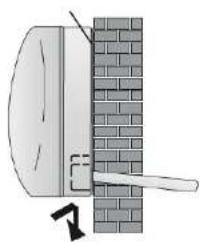
- Run the bound pipe, power cables and drain pipe through the wall hole and mount the indoor unit onto the upper part of the mounting plate securely.
- Press and push the lower part of the indoor unit tightly against the mounting plate.
Fig. 17.
- Vinyl tape cover
- Insulation sleeve
- Refrigerant pipe
- Condensed water drain pipe
- Probe cable (for heat-pump)
- Connection cable 1 (for heat-pump)
- Connection cable
- Refrigerant pipe
Mounting plate
Fig.18
Outdoor unit installation
Safety distance for installation (mm)
Fig. 6.
Do not install the outdoor unit near sources of heat, steam or flammable gas.
Do not install the unit in too windy or dusty places.
Do not install the unit where people often pass. Select a place where the air discharge and operating sound will not disturb the neighbours.
Avoid installing the unit where it will be exposed to direct sunlight (other wise use a protection, if necessary, that should not interfere with the air flow).
Reserve the spaces as shown in the picture for air to circulate freely.
Install the outdoor unit in a safe and solid place.
If the outdoor unit is subject to vibration, place rubber gaskets onto the feet of the unit or no the wall fixings.
The outdoor unit should be installed on a solid wall and fastened securely.
The following procedure must be observed before connecting the pipes and connecting cables: decide which is the best position on the wall and leave enough space to be able to carry out maintenance easily.
Fasten the support to the wall using screw anchors which are particularly suited to the type of wall.
Use a larger quantity of screw anchors than normally required for the weight they have to bear to avoid vibration during operation and remain fastened in the same position for years without the screws becoming loose.
The unit must be installed following the national regulations.
Outdoor unit condensed water drainage (only for heat pump models)
Fig. 19.
- Drain port
- Drain pipe
The condensed water and the ice formed in the outdoor unit during heating operation can be drained away through the drain pipe.
- Fasten the drain port in the 25-mm hole placed in the part of the unit as shown in the picture.
- Connect the drain port and the drain pipe.
Make sure that water is drained in a suitable place.
Electrical connections
Fig. 20.
- Wiring diagram on the back of the cover
-
Screw
-
Remove the handle on the right-side plate of outdoor unit.
- Connect the power connection cord to the terminal board. Wiring should fit that of indoor unit.
- Fix the power connection cord with wire clamp.
- Check if the wire has been fixed properly.
- An efficient earth connection must be ensured.
- Recover the handle.
Connecting the pipes
Fig. 21.
1. Connection pipes
ENGLISHENGLISH
- Flare nuts
- Liquid tap
- Gas tap
- Indoor unit
- Gas valve
- Service port nut
B. Liquid valve - Tap
- Protection caps
Screw the flare nuts to the outdoor unit coupling with the same tightening procedures described for the indoor unit.
To avoid leakage, pay attention to the following points:
- Tighten the flare nuts using two wrenches. Pay attention not to damage the pipes.
- If the tightening torque is not sufficient, there will probably be some leakage. With excessive tightening torque, there will also be some leakage, as the flange could be damaged.
- The surest system consists in tightening the connection by using a fix wrench and a torque wrench.
Refrigerant pressure inspection
Fig. 22.
1. Service port
2. Vacuum pump
Air-returning Low-pressure Range of Refrigerant R290: 0.4-0.6Mpa; Air-exhausting High-pressure Range: 1.5-2.0Mpa;
Air-returning Low pressure Range of Refrigerant R32: 0.8-1.2Mpa; Air-exhausting High-pressure Range: 3.2-3.7Mpa;
It means that the refrigerating system or refrigerant of an air conditioner is abnormal if the air-exhausting and air-returning pressure ranges of the detected compressor exceed the normal ranges to a large extent.
Bleeding
Air and humidity left inside the refrigerant circuit can cause compressor malfunction. After having connected the indoor and outdoor units, bleed the air and humidity from the refrigerant circuit by using a vacuum pump.
Fig. 23.
3-way valve diagram
1. Connect to indoor unit
2. Open position
-
Spindle
-
Needle valve
- Service port cap
- Valve core
- Connect to outdoor unit
Fig. 24.
- Indoor unit
- Refrigerant flow direction
- 2-way valve
- (6) Open 14 turn
- (7) Turn to fully open the valve
- Valve cap
- (1) Turn
- (8) Tighten
- 3-way valve
- (7) Turn to fully open the valve
- (1) Turn
- (8) Tighten
- Service port nut
- (2) Turn
- (8) Tighten
(1) Unscrew and remove the caps from the 2-way and 3-way valves.
(2) Unscrew and remove the cap from the service port.
(3) Connect the vacuum pump hose to the service port.
(4) Operate the vacuum pump for 10 - 15 minutes until an absolute vacuum of 10 mm Hg has been reached.
(5) With the vacuum pump still in operation, close the low-pressure knob on the vacuum pump coupling. Stop the vacuum pump.
(6) Open the 2-way valve by 1/4 turn and then close it after 10 seconds. Check all the joints for leaks using liquid soap or an electronic leak device.
(7) Turn the body of the 2-way and 3-way valves. Disconnect the vacuum pump hose.
(B) Replace and tighten all the caps on the valves.
Operation test
Fig. 25.
- Pipe clamps
- Piping
- Insulating covering
- Insulating tape
ENGLISHENGLISH
-
Piping
-
Gasket
-
Indoor
-
Outdoor
Wind insulating covering around the joints of the indoor unit and fix it with insulating tape.
Fix the exceeding part of the signal cable to the piping or to the outdoor unit.
Fix the piping to the wall (after having coated it with insulating tape) using clamps or any other fixing element.
Seal the hole in the wall through which the piping is passed so that no air or water can fill.
Indoor unit test
Do the On/Off and fan operate normally?
Does the mode operate normally?
Do the set point and timer operate properly?
Do the light indicators light normally?
Does the air flow direction flap operate normally?
Is condensed water drained regularly?
Outdoor unit test
Is there any abnormal noise or vibration during operation?
Could the noise, the air flow or the condensed water drainage disturb the neighbours?
Is there any coolant leakage?
Note: The electronic controller allows the compressor to start only three minutes after voltage has reached the system.
Information for the installer
Length of pipe with standard charge: 5 m
Maximum distance between indoor and outdoor unit: 25 m
Additional refrigerant charge: 15 g/m
Max. diff. in level between indoor and outdoor unit: 10 m
Type of refrigerant (1): R290
(1) Refer to the data rating label stuck onto the outdoor unit.
| Pipe Tightening torque (N x m) | Corresponding stress(using a 20-cmwrench) | Tightening torque (N x m) | |
| 1/4" (05 mm) | 15-20 Wrist strength Service port nut | 7-9 |
| 3/8" (∅9.52 mm) | 31 35 Arm strength | Protection caps | 25 30 | |
| 1/2" (∅12 mm) | 35-45 | Arm strength | ||
| 5/8" (∅15.08 mm) | 75.80 | Arm strength |
Wiring diagram
Fig. 26.
- Front panel
- Wiring diagram
On indoor unit, the wiring diagram is pasted under the front panel;
On outdoor unit, the wiring diagram is pasted on the backside of the outdoor handle cover
Fig. 27.
- Outdoor handle cover
- Wiring diagram
Type of connection
Fig. 28.
1. Outdoor
2. Indoor
3. Power supply
5. OPERATION
Remote control display
Fig. 29.
- Auto mode
- Cooling mode
- Dehumidifier mode
- Fan mode
- LED display
- Healing mode
- Timer
- Indoor display on
- Sleep function
- Eco function
- Self-clean function
ENGLISHENGLISH
- Up-down auto-swing
- Left-right auto-swing (Not available on the remote control)
- Temperature or time indicator
- Lock function
- Low battery indicator
- Mute (with low speed)
- Low fan speed
- Low-mid fan speed
- Mid fan speed
- Mid-high fan speed
- High fan speed
- Automatic fan speed
2/1. Turbo (with high fan speed)
Replacement of remote control batteries
Remove the battery cover plate from the rear of the remote controller, by sliding it in the direction of the arrow.
Install the batteries according the direction (+ and -) shown on the remote controller.
Reinstall the battery cover by sliding it into place
Use 2 LRO 3 AAA (1.5V) batteries. Do not use rechargeable batteries. Replace the old batteries with new ones of the same type when the display is no longer legible.
Do not dispose batteries as unsorted municipal waste. Collection of such waste separately for special treatment is necessary.
Fig. 30.
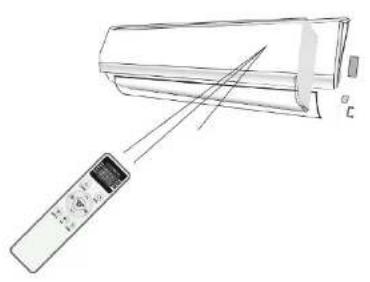
Direct the remote controller toward the Air conditioner.
Check that there are no objects between the remote control and the Signal receptor in the indoor unit.
Never leave the remote controller exposed to the rays of the sun.
Keep the remote controller at a distance of at least 1m from the television or other electrical appliances.
Fig. 31.
General operating
The air sucked by the fan enters from the grill and passes through the filter, then it is cooled/dehumidified or heated through the heat exchanger.
The direction of the air outlet is motorized up and down by flaps, and manually moved right and left by the vertical deflectors, for some models, the vertical deflectors could be controlled by motor as well.
Fig. 32.
- Filter
- Heat exchanger
- Fan
Modes and functions
Child-lock function
Press the up and down buttons at once for 2 seconds to activate the child lock.
Controlling air flow direction
To change the vertical airflow direction, press icon. 2. Press once to activate the horizontal flaps to swing from up to down, and press again to return it to a fixed angle. The icon will be displayed on the remote controller screen when the functions is activated.
To change the horizontal airflow direction, make sure the horizontal flaps are not moving and manually change the vertical deflectors direction. Then, press icon. 3. to enable the vertical deflectors to swing from left to right, and press again to return it to a fixed angle. The icon will be displayed on the remote controller screen when the functions is activated (only some models).
Note: Never adjust Horizontal flaps manually, it may not close completely when you turn off the air conditioner.
Never poke fingers, sticks or other objects in the air inlet or outlet vents. Such accidental contact with live parts might cause unforeseeable damage or injury.
Fig. 33.
- Flap movement
- Vertical deflectors
- Horizontal flaps
Modes
Press the mode button to select between its different operating modes.
Cooling mode
This mode cools the room and reduces air humidity in it. To activate it, press the mode button (icon. 4.) until the arrow points at COOL. Then, use the up and down buttons to increase or decrease the temperature.
Heating mode
This mode is used to heat the room or house. To activate it, press the mode button (icon. 4.) until the arrow points at HEAT. Then, use the up and down buttons to increase or decrease the temperature.
ENGLISHENGLISH
Note: Under the heating mode, the appliance can automatically activate a defrost cycle, which is essential to clean the frost on the condenser so as to recover its heat exchange function. This procedure usually lasts for 2–10 minutes. During defrosting, indoor unit fan stops operation. After defrosting, it automatically operates under the heating mode again.
Dehumidifier mode
This mode reduces humidity in the air. To activate it, press the mode button (icon. 4.) until the arrow points at DRY. Automatic pre-settings will be activated by default.
Fan mode
The fan mode activates air ventilation only. To activate it, press the mode button (icon. 4.) until the arrow points at FAN.
Select the fan speed while the device is running under Auto, Fan, Cooling or Heating modes. Press icon. 7. To select the fan speed: Auto/Mute/Low/Low-mid/Mid/mid-high/High/Turbo. Fig. 34.
Auto mode
To activate it, press the mode button (icon. 4.) until the arrow points at AUTO. With this mode, the device will automatically adjust its setting according to the room temperature.
Indoor unit display
Turn on the indoor unit LED display by pressing icon. 5. The arrow on the display will point at "DIP." Press it again to turn it off.
Eco function
When this function is activated, the air conditioner automatically adjusts all the settings in order to save energy during operation. Press the option button (icon 6.), and then press the up and down buttons until the arrow points at ECO and flashes. Then, press OK to confirm you want to activate the Eco function. Repeat the previous steps to deactivate it.
Note: The Eco function is available on both the cooling and heating modes.
Sleep function
This function operates with automatic pre-set setting. Press the option button (icon, 6), and then press the up and down buttons until the arrow points at SLEEP. Then, press OK to confirm you want to activate the Sleep function. Repeat the previous steps to deactivate it.
Note:
The Sleep function is available on both the cooling and heating modes.
After 10 hours running in sleep mode, the air conditioner will switch to the previously set mode.
Self-clean function
When this function is activated, *AC* will appear on the display as it operates.
To activate it, switch off the mode, press the option button (icon. 6.) until the arrow points at CLEAN and it flashes. Then, press OK to confirm you want to activate the Self-clean function.
This function helps carry away the accumulated dirt, bacteria, etc. from the evaporator.
This function will run for about 30 minutes, and it will return to the previously set mode after running. The function can be cancelled during the process by operating it normally or by pressing the power button to switch it on. It will beep twice when the cycle is finished or cancelled.
It is normal noise is heard during this function process, as plastic materials expand with heat and contract with cold.
It is suggested to operate this function in the following conditions for greater safety:
Indoor unit: Temp. <30 °C
Outdoor unit: 5 °C <Temp<30 °C
It is also suggested to operate this function every 3 months approx.
Timer function
Use this function to switch the device on and off at the desired time.
While the device is turned off, follow the below steps to set the timer for it to automatically turn the unit on at the set time.
- Make sure the air conditioner is off.
- Press the timer button (icon. 8.), set the desired mode/fan speed/temperature and Eco/Sleep function.
- Then, press the timer button (icon. 8.), the display will show the time digits flashing. Press the up and down buttons to set the desired time between 0.5 hrs. and 24 hrs.
- Press the timer button (icon. 8.) a third time to confirm the timer function.
While the device is turned on, follow the below steps to set the timer for it to automatically turn the unit off at the set time.
- Make sure the air conditioner is on.
- Press the timer button (icon. 8.), the display will show the time digits flashing. Press the up and down buttons to set the desired time between 0.5 hrs. and 24 hrs.
- Press the timer button (icon. 8.) again to confirm the timer function.
- To cancel the timer function, press the timer button (icon. 8.) twice.
Note: All programming should be operated within 5 seconds, otherwise the setting will be cancelled.
Operating temperature
ENGLISHENGLISH
The air conditioner is programmed for comfortable and suitable living conditions as below.
If used outside the conditions, certain safety protection features might come into effect.
| Temperature / Mode Cooling operating Heating operating Drying operating | |
| Room temperature 17 °C-32 °C, 0 °C-30 °C, 17 °C-32 °C | |
| Outdoor temperature 15 °C-53 °C, -20 °C-30 °C, 15 °C-53 °C | |
Emergency function
If the remote controller fails to work or maintenance is necessary, proceed as following: Open and lift the front panel up to an angle to reach the emergency button.
Press the emergency button once, the unit will operate in cooling mode. Press again within 3 seconds, the unit will operate in heating mode. Press a third time after 5 seconds, the unit will turn off.
The emergency button is located on the E-box cover on the unit, under the front panel.
Fig. 35.
Auto-restart function
The appliance is designed with an auto-restart function. In case of a sudden power failure, the device memorises the settings before the power failure. When the power restores, the unit will restart automatically with the previous settings preserved by the memory function.
6. CONNECTIVITY
- Wi-Fi module specification and basic information
1.1.
Minimum requirements for a Smart phone:
Android 5.0 version or higher
105 9.0 version or higher
1.2. Basic parameters
Network frequency: 2.400 - 2.500GHz
WLAN Standards: IEEE 802.11 b/g/n (channels 1-14)
Protocol stack support: IPv4/IPv6/TCP/UDP/HTTPS/TLS/MulticastDNS
Security support: WEP/WPA/WPA2/AES128
Network type support: STA/AP/STA+AP
1.3.
Wi-Fi module location and appearance in indoor unit.
Open the front panel, the Wi-Fi module should be by the electric box cover or on the panel.
- Download and install the App
Far Android
Method 1: Scan the QR code and then download and install the App
Method 2: Open Google's "Play Store" on your smartphone and search "Smart Life", then download and install the APP.
For IOS
Method 1: Scan the QR code and then download and install the App
Method 2: Open Apple's "App Store" on your smartphone and search "Smart Life", then download and install the APP.
Note:
Enable the permissions of storage, location and camera for this App when installing, otherwise it will have some problems when operating.
- Activate App
Note: When the App is used for the first time, it will need to be activated.
3.1
Open the App "Smart Life" on your smartphone.
3.2.
Method 1: Tap on the 'Scan' button and scan the Activate QR code
Method 2: Tap on on "Enter Activation Code" in bottom of the screen, then enter the activating code and tap on "CONFIRM".
-
Registration
-
If you have not created any account yet, tap on the 'Register' button.
-
Read the Privacy Policy and tap on the "Agree" button.
-
Tap on ">" and choose the country.
-
Introduce your phone number or e-mail address.
-
Tap on the "Obtain verification code" button.
-
Enter the verification code, received from a phone message or an e-mail.
-
Set the Password with 6-20 characters including letters and numbers.
-
Tap on 'Done'
-
Login
Note: When using the App for the first time, "Create family" will be needed;
-
Tap on on "Log in with existing account".
-
Enter your registered account and password.
ENGLISHENGLISH
-
Tap on on the "Log in" button.
-
Tap on on "Create family".
-
Create a name for the family.
-
Set the location.
-
Choose default rooms or add new rooms.
B. Tap on on "Done" and "Completed".
Forgot the password
In case you forgot your password, you can login following these steps:
(Only for accounts with phone number)
-
Tap on on "verify SMS and sign in".
-
Enter your phone number and tap on on "Obtain verification code".
-
Enter the verification code received in your phone.
Or you can reset the password as below:
-
Tap on an "Forgot password".
-
Enter your phone or e-mail account and tap on on "Obtain verification code".
-
Enter the verification code received on your phone or e-mail.
-
Set the new password and tap on on "Done"
-
Add device
There are 2 methods for adding a device: CF (Quick connection) and AP (Access Point).
CF made
-
Power is displayed on the indoor unit, so there is no need to start the air conditioner.
-
Tap on "+" in the upper right corner of the "Home" screen or tap on on "Add device" in a room where there is no device connected.
-
Tap on the "Split Air conditioner" logo.
-
Reset the Wi-Fi module by tapping on "DISPLAY" on the remote controller 6 times or use a suitable tool to press the reset button on the Wi-Fi module, until it shows "CF" on the indoor display, then tap on on "Next Step".
-
Introduce your Wi-Fi password and tap on on 'Confirm'(You can change the network if needed).
-
You can now see the percentage rate of the connecting process, seeing at the same time PP","5A","AP" on the indoor display.
"PP" means "Searching the router"
*SA* means "Connected to the router"
*AP* means 'Connected to the server'
AP mode
-
Power is displayed on the indoor unit, so there is no need to start the air conditioner.
-
Tap on '+' in the upper right corner of the 'Home' screen or tap on 'Add device' in a room where there is no device connected.
-
Tap on the "Split Air conditioner" logo.
-
Reset the Wi-Fi module by tapping on 'DISPLAY' on the remote controller 6 times or use a suitable tool to press the reset button on the Wi-Fi module, until it shows "AP" on the indoor display, then tap on "Next Step".
-
Introduce your Wi-Fi password and tap on on "Confirm" (You can change the network if needed).
-
In the network setting screen, select "SmartLife-****", and tap on the arrow pointing to the left.
-
You can see the percent rate of connecting process, at the same time "PP", "SA", "AP".
*PP" means "Searching the router"
"SA" means "connected to the router"
*AP* means "connected to the server"
Air conditioner control
The device's control screen will pop up automatically after adding the device.
The device's control screen will also pop up by tapping on the device's name in the home screen.
There are two ways of managing the device singing into Wi-Fi:
1° display
Main control interface:
-
Back to home screen
-
Temperature indicator
-
Decreasing the setting temperature
-
Device details and management
-
Turning on/off the air conditioner
-
Selected Mode/Fan speed/ Functions indicator
-
Increasing the setting temperature
Mode setting
-
Tap on Mode to open the Mode screen.
-
Select one of the modes among Feel/Cool/Heat/Dry/Fan.
-
Tap anywhere around the set temperature to cancel the Mode setting
Setting fan speed
-
Tap on Fan to open the Fan screen.
-
Select one of the fan speeds among High/med/Low/Auto.
-
Tap anywhere around the set temperature to cancel the selection.
ENGLISHENGLISH
Function setting
-
Tap on Function to open the Function screen.
-
Select one of the functions among Sleep/Turbo/ECO.
-
Select UP-DOWN/LEFT-RIGHT to activate the auto swing and set the direction.
-
Tap on anywhere around the setting temperature to cancel the Function setting.
Adding Timer
-
Tap on Timer to open the Add Timer screen.
-
Tap on Add Timer.
-
Select the time and select the number of days
-
Select the Mode/Fan speed/Function and select the setting temperature for the Timer.
-
Tap on Save to add the timer.
Timer
-
Time cancel
-
Hour setting
-
Made setting
-
Fan speed setting
-
Temperature setting
-
Saving timer
-
Minute setting
-
Weekly setting
-
Timer on/off
Timer management
-
Tap on the timer bar to edit the Timer.
-
Tap on the timer bar to enable or disable the Timer.
-
Hold the Timer bar for about 3 seconds to open the Remove Timer screen
Tap on CONFIRM and remove the Timer.
2° display
The main control interface
-
Back to home screen
-
Decreasing the set temperature
-
Selected functions indicator
-
Power on/off
5. Tips
-
Name of the device
-
Current mode
-
Increasing the set temperature
-
Different backgrounds depending on the mode: Cool/Heat/Dry/Fan/Auto
Made setting
-
Tap on Mode.
-
There are 5 modes on the Mode screen: Cool/Heat/Dry/Fan/Auto
-
Tap on the X to return to the main screen
Fan speed selection
-
Tap on Fan speed.
-
Choose the desired fan speed and tap on it.
-
Tap on the X to return to the main screen
-
The selected fan speed indicator will appear on the screen.
Air flow control
-
Tap on Precision Air Flow or Swing Flow.
-
Choose the desired air flow and tap on it.
-
Tap on the X to return to the main screen.
-
The selected air flow indicator will appear on the screen.
ECO function
-
To activate the Eco function, just tap on ECO to activate it. Its indicator will appear on the screen.
-
Tap on it again to disable the function.
-
In Cooling mode, the new setting temperature will be >26.
In Heating mode, the new setting temperature will be <25.
Sleep function
-
Tap on Sleep.
-
Choose your desired sleep mode and tap on it.
-
Tap on the X to return to the main screen.
-
The selected sleep mode indicator will appear on the screen.
Timer (on) setting
-
Tap on the Timer button.
-
Tap on + in the upper right corner of the Timer main screen.
-
Choose between Time/Repeal/Switch OFF then lap on Save.
-
The timer(off) will appear on the Timer main screen.
Timer (off) setting
-
Tap on the Timer button.
-
Tap on + in the upper right corner of the Timer main screen.
-
Choose between Time/Repeat Date/Switch(ON)/Temperature/Mode/Fan speed/Air Flow
ENGLISHENGLISH
and then tap on Save.
- The timer will appear on the Timer main screen.
Timer management
- Change the Timer setting:
Tap anywhere, except on the switch bar to get into the Timer setting screen, change the setting and then tap on Save.
- Enable or Disable the Timer:
Slide left part of the switch to disable the Timer.
Slide right part of the switch to enable the Timer.
- Delete the Timer:
Slide the Timer's bar from right to left until the Delete option appears, then tap on Delete.
More functions
-
Tap on More to choose additional functions.
-
Tap on Display to switch on/off the indoor LED display
-
Tap on Buzzer to switch on/off the buzzing when operating through the Wi-Fi APP.
-
Tap on Anti-Mildew to activate the Anti-Mildew function. The device will start drying, reducing
the residual moisture and prevent moulding. After this function finish, it will automatically turn
off.
- Tap on Health to switch on/off the healthy function.
It will activate the antibacterial ioniser function. This function is only available for devices with
the ioniser generator.
- Tap on GEN Mode. In this mode, you can choose one of the three levels of air flow.
The air conditioner will operate while saving energy.
- Tap on Electricity Monitoring.
In this function, you can monitor the air conditioner electricity consumption.
- Tap on Self-Cleaning.
Check the details of the Self-Cleaning function on the user manual.
- Tap on 8 °C Heat.
This function helps keeping the room temperature over 8.
Check the details of the 8 °C Heat function on the user manual.
- Tap on Reservation.
You can set the time, number of days, temperature, mode, fan speed, air flow as you desire and then tap on Save to activate the function.
The air conditioner will automatically reach your settings at the appointed time.
- Tap on Self-diagnosis
The air conditioner will automatically self-diagnosis, indicate the Error code and the problem instructions if possible.
- Tap on Electricity Management if it is available on the screen.
Device details and management
Tap on the pencil when in the first display or tap on “...” when using the second display for opening the device details screen.
Here you can get some useful information and share the device with other accounts.
Check the following pictures and instructions carefully.
How to share the devices to other accounts
-
Tap on Device Sharing.
-
Tap on Add Sharing.
-
Select your region and enter the account with which you want to share the device.
-
Tap on Completed. The account will appear on your sharing list.
-
The receiving members should tap and press the home screen button and slide down to refresh the device list. The device will appear on the device list.
Home management
- Tap on My Home on the left upper corner of the Home Screen and select the Home Management.
You can also tap on Me on the right lower corner and tap on Home Management.
-
Tap on one of the families in the family list and to open the Family Settings display.
-
Set your family following these steps
Notice
-
Smart air conditioner App can be updated without notice for quality improvement and also be deleted, depending on the circumstances of manufacturing firms.
-
In case Wi-Fi signal strength is weak, the Smart App may be disconnected. Make sure the indoor unit is close to a wireless router.
-
DHCP server function should be activated when using a wireless router.
-
Internet connection may fail because of a firewall problem. In this case, contact your internet service provider.
Troubleshooting
Description
-
Air conditioner can't be set successfully.
-
Smartphone can't control the air conditioner.
-
Smartphone can't find the air conditioner.
Analysis of cause
1.1. Check that the Wi-Fi address and password are correct.
1.2. Check the configuration status of the air conditioner
ENGLISHENGLISH
1.3. Check if any firewall or any other restrictions have been set or not.
1. 4. Check that the router works normally.
1.5. Make sure the air conditioner, router and mobile work within signal scope.
1. 6. Check if the router protector is connected or not.
2.1. If the software displays Identification failed, this means that the air conditioner has been reset, and the mobile phone has lost control permission.
You need to reconnect the Wi-Fi network to get permission again.
Connect to local network and refresh.
If the problem persists, delete the air conditioner from the App and try to connect it again after refreshing the App.
3.
The Software displays Air conditioner out of line,
Please check if the network is working properly.
3.1. Air conditioner has been reset.
3.2. Air conditioner is out of power.
3.3. Router is out of power.
3.4. Air conditioner can't connect to router.
3.5. Air conditioner can't connect to network through the router (under remote control mode)
3. 6. Smartphone can't connect to router (Under local control mode);
3.7. Smartphone can't connect to network (under remote control mode).
7. CLEANING AND MAINTENANCE
Periodic maintenance is essential for keeping your air conditioner efficient.
Before carrying out any maintenance, disconnect the power supply by taking the plug out from the socket.
Indoor unit
Fig. 36.
Anti-dust filters
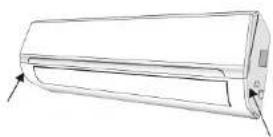
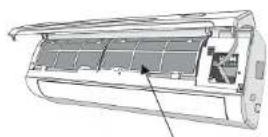
- Open the front panel following the direction of the arrow.
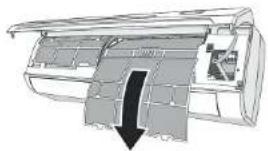
- Keeping the front panel raised with one hand, take out the air filter with the other hand.
- Clean the filter with water; if the filter is soiled with oil, it can be washed with warm water (not exceeding 45 °C). Leave to dry in a cool and dry place.
- Keeping the front panel raised with one hand, insert the air filter with the other hand.
- Close.
Note: The electrostatic and the deodorant filter (if installed) cannot be washed or regenerated
and must be replaced with new filters after every 6 months.
Cleaning the heat exchanger
- Open the front panel of the unit, lift it as much as it is allowed and then unhook it from the hinges to make the cleaning easier.
- Clean the indoor unit using a cloth with water (not higher than 40 °C) and neutral soap. Never use aggressive solvents or detergents.
- If the outdoor unit is clogged, remove the leaves and the waste and remove the dust with air jet or a bit of water.
End of season maintenance
- Disconnect the automatic switch or the plug.
- Clean and replace the filters.
- On a sunny day, let the conditioner work in ventilation for some hours, so that the inside of the unit dries completely.
Replacing the batteries
When:
There is no confirmation beep heard from the indoor unit.
The LCD does not work.
How:
Take off the back cover
Insert the new batteries paying attention to the + an - symbols.
Note: Use only new batteries. Remove the batteries from the remote controller when the conditioner is not operating.
8. TROUBLESHOOTING
Problem 1
The appliance does not operate
Causes
Power failure/plug pulled out.
Damaged indoor/outdoor unit fan motor.
Faulty compressor thermomagnetic circuit breaker.
Faulty protective device or fuses.
Loose connections or plug pulled out.
It sometimes stops operating to protect the appliance.
Voltage higher or lower than the voltage range.
Active timer-on function.
Damaged electronic control board.
ENGLISHENGLISH
Problem 2
Strange odour
Cause
Dirty air filter.
Problem 3
Noise of running water
Cause
Back flow of liquid in the refrigerant circulation.
Problem 3
A fine mist comes from the air outlet
This occurs when the air in the room becomes very cold, as with the cooling or dehumidifying
mode.
Problem 4
A strange noise can be heard
Cause
This noise is made by the expansion or contraction of the front panel due to variations in
temperature and does not indicate a problem.
Problem 5
Insufficient airflow, either hot or cold
Causes
Unsuitable temperature setting.
Obstructed air conditioner intakes and outlets.
Dirty air filter.
Fan speed set at minimum.
Other sources of heat in the room.
No refrigerant.
Problem 6
The appliance does not respond to commands
Causes
Remote control is not close enough to indoor unit.
The batteries of remote control need to be replaced.
Obstacles between remote control and signal receiver in indoor unit.
Problem 7
The display is off
Causes
Inactive light function
Power failure.
Note:
Switch off the air conditioner immediately and cut off the power supply in the event of:
Strange noises during operation.
Faulty electronic control board
Faulty fuses or switches.
Spraying water or objects inside the appliance.
Overheated cables or plugs.
Very strong smells coming from the appliance.
Possible error signals
El: Indoor temperature sensor fault
E2: Indoor pipe temperature sensor fault
E3: Outdoor pipe temperature sensor fault
E4: Refrigerant system leakage or fault
E6: Malfunction of Indoor fan motor
E7: Outdoor air temperature sensor fault
E8: Outdoor discharge temperature sensor fault
E9: Outdoor IPM module fault
EA: Outdoor current detect fault
EE: Outdoor PCB EEPROM fault
EF: Outdoor fan motor fault
EH: Outdoor suction temperature sensor fault
Maintenance instructions
-
Check the information in this manual to find out the dimensions of space needed for proper installation of the device, including the minimum distances allowed compared to adjacent structures.
-
Appliance shall be installed, operated and stored in a room with a floor area larger than 4 m².
-
The installation of pipe-work shall be kept to a minimum.
-
The pipe-work shall be protected from physical damage, and shall not be installed in an unventilated space if the space is smaller than 4 m^2 .
-
The compliance with national gas regulations shall be observed.
-
The mechanical connections shall be accessible for maintenance purposes.
-
Follow the instructions given in this manual for handling, installing, cleaning, maintaining and disposing of the refrigerant.
B. Make sure ventilation openings are clear of obstruction.
-
Servicing shall be performed only as recommended by the Technical Support Service of Cecotec.
-
The appliance shall be stored so as to prevent mechanical damage from occurring.
ENGLISHENGLISH
- It is appropriate that anyone who is called upon to work on a refrigerant circuit should hold a valid and up-to-date certificate from an assessment authority accredited by the industry and recognizing their competence to handle refrigerants, in accordance with the assessment specification recognized in the industrial sector concerned. Service operations should only be carried out in accordance with the recommendations and components of Cecotec. Maintenance and repair operations that require the assistance of other qualified persons must be conducted under the supervision of the person competent for the use of flammable refrigerants.
- Every working procedure that affects safety means shall only be carried out by competent persons.
Checks to the area
Prior to beginning work on systems containing flammable refrigerants, safety checks are necessary to ensure that the risk of ignition is minimized. When repairing the refrigerating system, the following precautions shall be complied with prior to conducting work on the system.
Work procedure
Work shall be undertaken under a controlled procedure so as to minimize the risk of a flammable gas or vapour being present while the work is being performed.
General work area
All maintenance staff and others working in the local area shall be instructed on the nature of work being carried out. Work in confined spaces shall be avoided. The area around the workspace shall be sectioned off. Ensure that the conditions within the area have been made safe by control of flammable material.
Checking for presence of refrigerant
The area shall be checked with an appropriate refrigerant detector prior to and during work, to ensure the technician is aware of potentially flammable atmospheres. Ensure that the leak detection equipment being used is suitable for use with flammable refrigerants, i.e. non-sparking, adequately sealed or intrinsically safe.
Presence of fire extinguisher
If any hot work is to be conducted on the refrigeration equipment or any associated parts, appropriate fire extinguishing equipment shall be available to hand. Have a dry powder or CO2 fire extinguisher adjacent to the charging area.
No ignition sources
No person carrying out work in relation to a refrigeration system which involves exposing any pipe work shall use any sources of ignition in such a manner that it may lead to the risk of fire or explosion. All possible ignition sources, including cigarette smoking, should be kept
sufficiently far away from the site of installation, repairing, removing and disposal, during which refrigerant can possibly be released to the surrounding space. Prior to work taking place, the area around the equipment is to be surveyed to make sure that there are no flammable hazards or ignition risks. No smoking signs shall be displayed.
Ventilated area
Ensure that the area is in the open or that it is adequately ventilated before breaking into the system or conducting any hot work. A degree of ventilation shall continue during the period that the work is carried out. The ventilation should safely disperse any released refrigerant and preferably expel it externally into the atmosphere.
Checks to the refrigeration equipment
Where electrical components are being changed, they shall be fit for the purpose and to the correct specification. At all times, Cecotec's maintenance and service guidelines shall be followed. If in doubt consult the Technical Support Service of Cecotec.
The following checks shall be applied to installations using flammable refrigerants:
The charge size must be in accordance with the room size within which the refrigerant containing parts are installed;
The ventilation machinery and outlets are operating adequately and are not obstructed;
If an indirect refrigerating circuit is being used, the secondary circuit shall be checked for the presence of refrigerant:
Marking to the equipment continues to be visible and legible. Markings and signs that are illegible shall be corrected;
Refrigeration pipe or components are installed in a position where they are unlikely to be exposed to any substance which may corrode refrigerant containing components, unless the components are constructed of materials which are inherently resistant to being corroded or are suitably protected against being so corroded.
Checks to electrical devices
Repair and maintenance to electrical components shall include initial safety checks and component inspection procedures. If a fault exists that could compromise safety, then no electrical supply shall be connected to the circuit until it is satisfactorily dealt with. If the fault cannot be corrected immediately but it is necessary to continue operation, an adequate temporary solution shall be used. This shall be reported to the owner of the equipment so all parties are advised.
Initial safety checks shall include:
That capacitors are discharged: this shall be done in a safe manner to avoid possibility of sparking;
That there are no live electrical components and wiring are exposed while charging, recovering or purging the system;
ENGLISHENGLISH
That there is continuity of earth bonding.
Repairs to sealed components
- During repairs to sealed components, all electrical supplies shall be disconnected from the equipment being worked upon prior to any removal of sealed covers, etc. If it is absolutely necessary to have an electrical supply to equipment during servicing, then a permanently operating form of leak detection shall be located at the most critical point to warn of a potentially hazardous situation.
2) Particular attention shall be paid to the following to ensure that by working on electrical components, the casing is not altered in such a way that the level of protection is affected. This shall include damage to cables, excessive number of connections, terminals not made to original.
specification, damage to seals, incorrect fitting of glands, etc.
Ensure that apparatus is mounted securely.
Ensure that seals or sealing materials have not degraded such that they no longer serve the purpose of preventing the ingress of flammable atmospheres. Replacement parts shall be in accordance with the Cecotec's specifications.
Warning: The use of silicon sealant may inhibit the effectiveness of some types of leak detection equipment. Intrinsically safe components do not have to be isolated prior to working on them.
Repair to intrinsically safe components
Do not apply any permanent inductive or capacitance loads to the circuit without ensuring that this will not exceed the permissible voltage and current permitted for the equipment in use. Intrinsically safe components are the only types that can be worked on while live in the presence of a flammable atmosphere. The test apparatus shall be at the correct rating.
Replace components only with parts specified by Cecotec. Other parts may result in the ignition of refrigerant in the atmosphere from a leak.
Cabling
Check that cabling will not be subject to wear, corrosion, excessive pressure, vibration, sharp edges or any other adverse environmental effects. The check shall also take into account the effects of aging or continual vibration from sources such as compressors or fans.
Detection of flammable refrigerants
Under no circumstances shall potential sources of ignition be used in the searching for or detection of refrigerant leaks. A halide torch (or any other detector using a naked flame) shall not be used.
Leak detection methods
The following leak detection methods are deemed acceptable for systems containing flammable refrigerants.
Electronic leak detectors shall be used to detect flammable refrigerants, but the sensitivity may not be adequate, or may need re-calibration. (Detection equipment shall be calibrated in a refrigerant-free area.) Ensure that the detector is not a potential source of ignition and is suitable for the refrigerant used. Leak detection equipment shall be set at a percentage of the LFL of the refrigerant and shall be calibrated to the refrigerant employed and the appropriate percentage of gas (25% maximum).
Leak detection fluids are suitable for use with most refrigerants but the use of detergents containing chlorine shall be avoided as the chlorine may react with the refrigerant and corrode the copper pipe-work.
If a leak is suspected, all naked flames shall be removed/ extinguished.
If a leakage of refrigerant is found which requires brazing, all of the refrigerant shall be recovered from the system, or isolated (by means of shut off valves) in a part of the system remote from the leak. Oxygen free nitrogen (OFN) shall then be purged through the system both before and during the brazing process.
Removal and evacuation
When breaking into the refrigerant circuit to make repairs or for any other purpose conventional procedures shall be used. However, it is important that best practice is followed since flammability is a consideration. The following procedure shall be adhered to:
Remove refrigerant;
Purge the circuit with inert gas;
Evacuate;
Purge again with inert gas;
Open the circuit by cutting or brazing.
The refrigerant charge shall be recovered into the correct recovery cylinders. The system shall be flushed with OFN to render the unit safe. This process may need to be repeated several times.
Compressed air or oxygen shall not be used for this task.
Flushing shall be achieved by breaking the vacuum in the system with OFN and continuing to fill until the working pressure is achieved, then venting to atmosphere, and finally pulling down to a vacuum. This process shall be repeated until no refrigerant is within the system. When the final OFN charge is used, the system shall be vented down to atmospheric pressure to enable work to take place. This operation is absolutely vital if brazing operations on the pipe-work are to take place.
Ensure that the outlet for the vacuum pump is not close to any ignition sources and there is ventilation available.
ENGLISHENGLISH
Decommissioning
Before carrying out this procedure, it is essential that the technician is completely familiar with the equipment and all its detail. It is recommended good practice that all refrigerants are recovered safely. Prior to the task being carried out, an oil and refrigerant sample shall be taken in case analysis is required prior to re-use of reclaimed refrigerant. It is essential that electrical power is available before the task is commented.
Become familiar with the equipment and its operation.
Isolate system electrically.
Before attempting the procedure, ensure that: mechanical handling equipment is available, if required, for handling refrigerant cylinders; all personal protective equipment is available and being used correctly; the recovery process is supervised at all times by a competent person; recovery equipment and cylinders conform to the appropriate standards.
Pump down refrigerant system, if possible.
If a vacuum is not possible, place a manifold so that refrigerant can be removed from various parts of the system.
Make sure that cylinder is situated on the scales before recovery takes place.
Start the recovery machine and operate in accordance with the instructions in this manual.
Do not overfill cylinders. (No more than 80 % volume liquid charge).
Do not exceed the maximum working pressure of the cylinder, even temporarily.
When the cylinders have been filled correctly and the process completed, make sure that the cylinders and the equipment are removed from site promptly and all isolation valves on the equipment are closed off.
Recovered refrigerant shall not be charged into another refrigeration system unless it has been cleaned and checked.
Labelling
Equipment shall be labelled stating that it has been de-commissioned and emptied of refrigerant.
The label shall be dated and signed. Ensure that there are labels on the equipment stating the equipment contains flammable refrigerant.
Recovery
When removing refrigerant from a system, either for servicing or decommissioning, it is recommended good practice that all refrigerants are removed safely.
When transferring refrigerant into cylinders, ensure that only appropriate refrigerant recovery cylinders are employed. Ensure that the correct number of cylinders for holding the total system charge are available. All cylinders to be used are designated for the recovered refrigerant and labelled for that refrigerant (i.e., special cylinders for the recovery of refrigerant).
Cylinders shall be completed with pressure-relief valve and associated shut-off valves in good working order. Empty recovery cylinders are evacuated and, if possible, cooled before recovery occurs.
The recovery equipment shall be in good working order with a set of instructions concerning the equipment that is at hand and shall be suitable for the recovery of all appropriate refrigerants including, when applicable, flammable refrigerants. In addition, a set of calibrated weighing scales shall be available and in good working order. Hoses shall be completed with leak-free disconnect couplings and in good condition. Before using the recovery machine, check that it is in satisfactory working order, has been properly maintained and that any associated electrical components are sealed to prevent ignition in the event of a refrigerant release. Consult the Technical Support Service of Cecotec if in doubt.
The recovered refrigerant shall be returned to the refrigerant supplier in the correct recovery cylinder, and the relevant waste transfer note arranged. Do not mix refrigerants in recovery units and especially not in cylinders.
If compressors or compressor oils are to be removed, ensure that they have been evacuated to an acceptable level to make certain that flammable refrigerant does not remain within the lubricant. The evacuation process shall be carried out prior to returning the compressor to the suppliers. Only electric heating to the compressor body shall be employed to accelerate this process. When oil is drained from a system, it shall be carried out safely.
- TECHNICAL SPECIFICATIONS
Cable wires specification
| Inverter type 05291 | ||
| Model capacity (Btu/h) 12000 | ||
| Power supply cable N | 5 mm | ' |
| L 1.5 mm | ^2 | |
| E 1.5 mm | ' | |
| Connection supply cable | N 1.5 mm | ' |
| L 1.5 mm | ' | |
| 11.5 mm | ^2 | |
| Icon, 1, 1.5 mm | ' | |
10. DISPOSAL OF OLD ELECTRICAL APPLIANCES

The European directive 2012/19/EU on Waste Electrical and Electronic Equipment (WEEE), specifies that old household electrical appliances must not be disposed of with the normal unsorted municipal waste. Old appliances must be collected separately, in order to optimize the recovery and recycling of the materials they contain and reduce the impact on human health and the environment.
The crossed out 'wheeled bin' symbol on the product reminds you of your
obligation to dispose of the appliance correctly. If the product has a built-in battery or uses batteries, they should be removed from the appliance and disposed of appropriately.
Consumers must contact their local authorities or retailer for information concerning the correct disposal of old appliances and/or their batteries.
11. TECHNICAL SUPPORT SERVICE AND WARRANTY
This product is under warranty for 2 years from the date of purchase, as long as the proof of purchase is submitted, the product is in perfect physical condition, and it has been given proper use, as explained in this Instruction manual.
The warranty will not cover the following situations:
• The product has been used for purposes other than those intended for it, misused, beaten, exposed to moisture, immersed in liquid or corrosive substances, as well as any other fault attributable to the customer.
• The product has been disassembled, modified, or repaired by persons, not authorised by the official Technical Support Service of Cecotec.
- Faults deriving from the normal wear and tear of its parts, due to use.
The warranty service covers every manufacturing defects of your appliance for 2 years, based on current legislation, except consumable parts. In the event of misuse, the warranty will not apply.
If at any moment you detect any problem with your product or have any doubt, do not hesitate to contact Cecotec Technical Support Service at +34 963 210 728.
1. INSTRUCTIONS DE SÉCURITÉ
4. INSTALLATION DU PRODUIT
Function Nuit (Sleep)
Caution, risk of fire
m = (4 m^2) × UEG, m = (26 m^2) × UEG, m = (130 m^2) × UEG
m_max = 2.5 × (UEG)^1/2 × h_0 × (A)^1/2
- Premere Electricity Monitoring.
B. Premere Self-Cleaning.
- Premere Self-diagnosis.
- Premere Electricity Management.
- Premere Device Sharing.
- Premere Add Sharing.
ITALIANOITALIANO
- Pressione Electricity Monitoring
B Pressione Self-Cleaning.
- Pressione Reservation
- Pressione Self-diagnosis.
- Pressione Electricity Management
- Pressione Device Sharing
PORTUGUÊSPORTUGUÊS
B. Druk op Self-Cleaning
8. PROBLEEMOPLOSSING
Problem 1
Over- of onderspanning.
De timer is ingeschakeld.
m = (4 m^2) × GW, m = (26 m^2) × GW, m = (130 m^2) × GW
A_min = (M / (2.5 × (GW)^(5/4) × h_n))^2
Dlatego:
B. Wybierz Self-Cleaning.
4. INSTALACE PRODUKTU
Upozornění
Quart de Poblet, Valencia (Spain)
YV01200129
- SOMMAIRE
- SAFETY INSTRUCTIONS
- Installation
- User
- ENGLISHENGLISH
- PARTS AND COMPONENTS
- BEFORE USE
- PRODUCT INSTALLATION
- Fig. 17.
- Bleeding
- OPERATION
- Dehumidifier mode
- Fan mode
- Auto mode
- Indoor unit display
- Eco function
- Sleep function
- Note:
- Self-clean function
- Timer function
- CONNECTIVITY
- Function setting
- Adding Timer
- Timer
- Timer management
- 2° display
- Tips
- Made setting
- Fan speed selection
- Air flow control
- Timer (on) setting
- Timer (off) setting
- CLEANING AND MAINTENANCE
- TROUBLESHOOTING
- Checks to the area
- Work procedure
- General work area
- Checking for presence of refrigerant
- Presence of fire extinguisher
- No ignition sources
- Ventilated area
- Checks to the refrigeration equipment
- Checks to electrical devices
- Decommissioning
- Labelling
- Recovery
- DISPOSAL OF OLD ELECTRICAL APPLIANCES
- TECHNICAL SUPPORT SERVICE AND WARRANTY
- INSTRUCTIONS DE SÉCURITÉ
- INSTALLATION DU PRODUIT
- ITALIANOITALIANO
- PORTUGUÊSPORTUGUÊS
- PROBLEEMOPLOSSING
- INSTALACE PRODUKTU
Brand : CECOTEC
Model : Energy Silence 600 Max Flow
Category : Fan