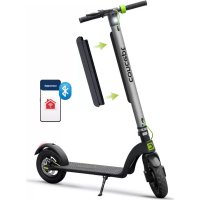
Crossader SC4010 - Scooter Concept - Free user manual and instructions
Find the device manual for free Crossader SC4010 Concept in PDF.


| Product type | Folding electric scooter |
| Brand | Concept |
| Model | Crossader SC4010 |
| Dimensions (assembled) | 1083 × 401 × 460 mm |
| Dimensions (disassembled) | 1083 × 401 × 1186 mm |
| Height from ground to board | 115 mm |
| Weight | 15 kg |
| Wheel size | 10 inches |
| Motor power | 350 W |
| Maximum speed | 25 km/h |
| Range (depending on weight) | Up to 40 km (for 45 kg); 30 km (for 100 kg) |
| Maximum load capacity | 120 kg |
| Maximum slope | 15° |
| Battery | Li-ion 36 V, 10 Ah |
| Charging time | 5 to 7 hours |
| Operating temperature | 0 °C to 35 °C |
| Riding modes | Beginner, Advanced, Sport |
| Brakes | Rear disc brake + brake lever |
| Connectivity | Concept Home app (Bluetooth) |
| Included accessories | Charger, battery, user manual |
| Spare parts | Available via authorized service (bag, phone holder, replacement battery) |
| Repairability | Repairs by authorized center only |
| Warranty | Warranty void if instructions not followed |
Frequently Asked Questions - Crossader SC4010 Concept
User questions about Crossader SC4010 Concept
0 question about this device. Answer the ones you know or ask your own.
Ask a new question about this device
Download the instructions for your Scooter in PDF format for free! Find your manual Crossader SC4010 - Concept and take your electronic device back in hand. On this page are published all the documents necessary for the use of your device. Crossader SC4010 by Concept.
USER MANUAL Crossader SC4010 Concept
natural_image
Exterior view of a concept electric scooter with green accents and a black body (no text or symbols visible)SC4000, SC4010
CZ
The image contains no text or characters.
The image contains no text or characters.
HU
V DE
FRENS
PL
The Ground Truth image displays a single, solid horizontal line. According to Rule 2 (UNDERSCORE & LINE RULES), this is a stylistic or background line, not a placeholder underscore. Therefore, the OCR result must ignore it and output nothing or only meaningful text. The provided OCR content is "____", which consists of four underscores. This is an incorrect interpretation of the line as a placeholder, violating the rule that stylistic lines must be ignored. The OCR has hallucinated underscores where none should exist based on the GT's visual context. Hence, the OCR result is inconsistent with the Ground Truth.
IT E
The image contains no text or characters.
RO
concept
concept
CZ
PŘIPOJENÍ ELEKTROKOLOBĚŽKY K APLIKACI
PRIPOJENIE ELEKTROKOLOBEŽKY K APLIKÁCII
PODŁACZANIE SKUTERA ELEKTRYCZNEGO DO APLIKACJI
AZ ELEKTROMOS ROLLER CSATLAKOZTATÁSA AZ ALKALMAZÁSHOZ
ELEKTRISKÄ SKREJRITEÑA PIEVIENOŠANA LIETOJUMPROGRAMMAI
CONNECTING THE ELECTRIC SCOOTER TO THE APPLICATION



PODĚKOVÁNÍ
POPIS ŘIDÍTEK A OVLÁDÁNÍ
1. Brzdová páka
natural_image
Line drawing of a two-wheeled scooter with wheels and rear suspension (no text or symbols)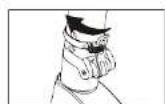

natural_image
Line drawing of a scooter with wheels and a plug, no text or symbols presentPOPIS RIADIDIEL A OVLÁDANIA
1. Brzdová páka
Pridržaním rukoväte brzdy zastavite. Pre pribrzdenie zlahka zošliapnite zadný blatník.
2. LED displej
Ak sa rozsvieti kontrolka „Označenie poruchy“, kontaktujte vášho predajcu, poradi vám, ako dalej postupovat.
3. Tlačidlo funkci
natural_image
Line drawing of a two-wheeled scooter with wheels and rear suspension (no text or symbols)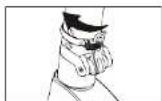
1. Uvolnite upevnovaci krúžok.
OPIS KIEROWNICY ORAZ OBSŁUGI
- Dźwignia hamulca
natural_image
Line drawing of a two-wheeled scooter with wheels and suspension components (no text or symbols)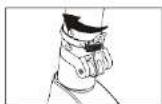
natural_image
Line drawing of a scooter with wheels and a cable (no text or symbols)PL
concept
concept
PL
natural_image
Line drawing of a two-wheeled scooter with wheels and suspension components (no text or symbols)natural_image
Line drawing of a scooter with wheels and a cable, no text or symbols presentHU
concept
concept
HU
STÜRES UN VADİBAS IERİCES APRAKSTS
natural_image
Line drawing of a two-wheeled scooter with wheels and rear suspension (no text or symbols)
natural_image
Line drawing of a scooter with wheels and attached cable (no text or symbols)58
LV
concept
concept
LV
Thank you for purchasing a Concept product. We wish you much joy with your new appliance every day you use it. Please read the instruction manual carefully before initial use. To refer to this manual any time you need to, we recommend you to keep it in a safe place. And please pass it to any future owner of the appliance.
| Technical specifications | |
| Unfolded scooter size 1083*401*1186 mm | |
| Folded scooter size 1083*401*460 mm | |
| Height from ground to the deck 115 mm | |
| Weight 15 kg | |
| Wheel size | 10 inches |
| Battery capacity 10 Ah | |
| Motor power 350 W | |
| Range per charge Up to 40 km | |
| Maximum speed 25 km/h | |
| Maximum load 100 kg (120 kg) | |
| Maximum incline 15° | |
| Frequency range (MHz) | 2400-2483.5 |
| Transmitter power (max) 10 dBm | |
IMPORTANT SAFETY PRECAUTIONS
- Do not use the electric scooter in any other way than as described in this manual.
- It is forbidden to drive a scooter with one hand!
- For your own safety, follow the local road traffic code. Before using the electric scooter, check the condition of your electric scooter, check for a damaged tire or any other part and check that all parts are properly tightened.
• No more than one person or children on a scooter - When using the electric scooter, always be careful not to hurt yourself, other people or damage other people's property.
- It is forbidden to modify or rebuilt the electric scooter as it may damage the electric scooter or change the power of the motor, which may result in serious injury.
- Do not leave the electric scooter unattended.
SC4000, SC4010
63
EN
concept
concept
EN
- When disconnecting the unit from the wall outlet, never pull the power cord, grasp the charger and disconnect it by removing it from the receptacle.
- Do not allow children or unauthorized people to handle the electric scooter, use it out of their reach.
- Pay extra attention when the using the electric scooter near children.
- Do not allow the electric scooter to be used as a toy.
- Do not use any accessories other than those recommended by the manufacturer.
- Do not insert any objects into the openings. Do not use the electric scooter if any of the openings is clogged.
- Do not immerse the electric scooter in water or any other liquid. This would damage the electric scooter and lead to an accident.
- Check the electric scooter and the charger cord for damage regularly.
- Do not throw the battery of the electric scooter into a fire or expose it to temperatures above 35 °C.
- Do not touch the driven moving parts of the electric scooter during operation. When riding the electric scooter, do not touch the brake discs.
- Do not attempt to repair the electric scooter by yourself. Contact an authorized service centre.
- This electric scooter can be used by children aged from 15 years and above and persons with reduced physical, sensory or mental capabilities or lack of experience and knowledge if they have been given supervision or instruction concerning the use of the device in a safe way and understand the hazards involved.
- Please bear in mind that when riding the electric scooter, you can lose balance, bump into something or fall. In order to prevent an injury, read and understand this manual and keep the scooter in good condition!
- Before riding the electric scooter, put on safety elbow pads, knee pads and a helmet. Wear appropriate clothing – we recommend sportswear.
- Do not use the electric scooter in a bad weather (rain, snow, strong wind...).
- Do not use the scooter to transport other people or children. The electric scooter is intended for one person only.
- The electric scooter can be used by people over 15 years of age. DO NOT USE the electric scooter if you are pregnant.
• The maximum load of the electric scooter is 120 kg.
- Do not consume alcohol or use any other addictive substances before or during riding the electric scooter. Do not smoke while riding the electric scooter.
- Do not make calls or use headphones while riding the electric scooter. Always pay full attention to driving.
- Pay attention to the state of the roads, any uneven road surface can negatively affect your ride – mud, ice, snow, wet ground, potholes.
- The electric scooter is designed to climb to an angle that is less than 15^ .
- Do not use the electric scooter on roads intended for cars.
- Do not park your electric scooter in front of safety exits, evacuation corridors and spaces reserved for emergency services.
WARNING! IMPROPER USE OF THE ELECTRIC SCOOTER OR FAILURE TO READ THIS INSTRUCTION MANUAL MAY RESULT IN SERIOUS INJURY. THE DEALER OR THE DISTRIBUTOR ASSUME NO RESPONSIBILITY FOR INJURY, FINANCIAL DAMAGE, DISAGREEMENTS, LEGAL DISPUTES OR CONFLICTS CAUSED BY IMPROPER USE AND FAILURE TO FOLLOW INSTRUCTIONS OF THIS MANUAL.
Damages from failure to follow the manufacturer's instructions are not covered by the warranty.
PACKAGE CONTENTS
1x Electric scooter SC4000 (SC4010)
1x Charger
1x Battery
1x M5 Allen key
1x User manual
EN
concept
concept
EN
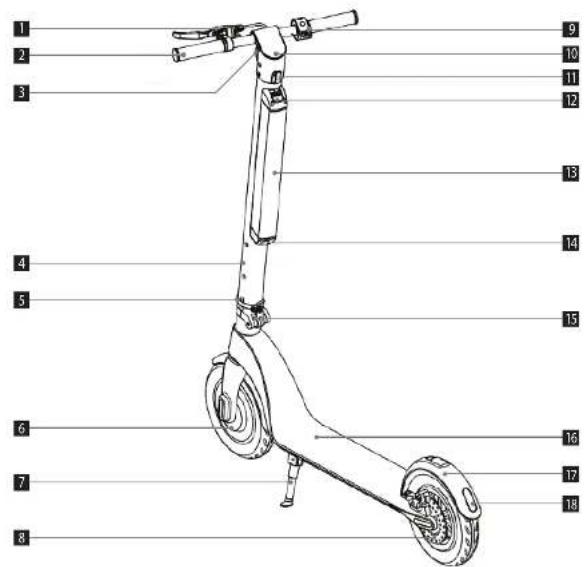
PRODUCT DESCRIPTION
1 Brake
10 LED display
2 Handlebars
11 Hook
3 Headlight
12 Battery cover
4 Column
13 Battery
5 Locking ring
14 Charging port
6 Motor
15 Safety lock
7 Kickstand
16 Anti-slip deck
8 Disc brake
17 Mudquard
9 Accelerator
18 Tail lights
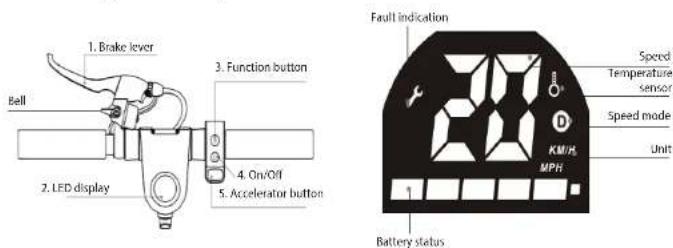
HANDLEBARS AND CONTROL DESCRIPTION
1. Brake lever
Hold the brake handle to stop. Lightly step on the rear mudguard to brake a little.
2. LED display
If the "Fault indication" light lights up, contact your dealer and ask him for an advice on how to proceed.
3. Function button
A Short press the function button to switch gears.
- Beginner mode: the speed mode indicator is off.
- Advanced mode: the speed mode indicator @ white.
- Sports mode: the speed mode indicator red.
Short press the function button twice to turn on/off the headlights. The tail lights turn on automatically when braking.
4. On/Off button
Long press the button to switch the electric scooter on/off.
5. Accelerator button
Press the accelerator button to start the electric scooter and press it again to accelerate.
6. Cruise control function
The cruise control is automatically activated if you maintain a constant speed for 6 seconds. If you want to deactivate the cruise control, simply accelerate or step on a brake.
EN
concept
concept
EN
OPERATING INSTRUCTIONS
ELECTRIC SCOOTER ASSEMBLY
Warning
Always switch off the electric scooter and disconnect the charger from wall socket before assembling or removing accessories!
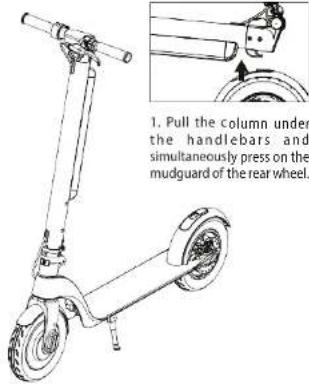
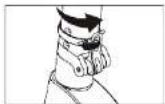
2. Put the column upright and use the locking ring to secure the lock.
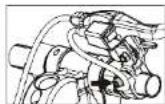
3. Secure the brake lever with an MS Allen key.
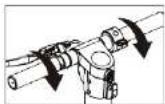
4. Tighten the handlebars (pay attention to the direction when tightening).
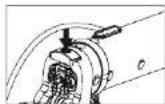
5. Tighten the bolt at the column so that it is stationary.
ELECTRIC SCOOTER ASSEMBLY
natural_image
Line drawing of a scooter with two wheels and a handle (no text or symbols)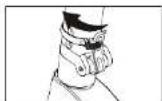
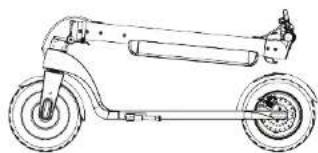
1. Loosen the locking ring. 2. Loosen the safety lock.
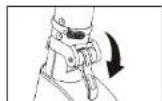
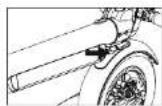
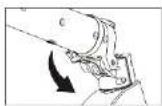
3. Lower the column. 4. The hook must fit into
ok must fit into the opening on the rear mudguard, press to secure it.
CONNECTING THE ELECTRIC SCOOTER TO THE APPLICATION
- Download the Concept Home app on Google Play or the App Store.
- Sign up or sign in.
- Switch on the electric scooter and click Add device in the app.
- When the electric scooter appears at the top of the screen, click Add - Or click on Outdoor Travel -> Scooter on the left hand side.
- Now click on + (pair with electric scooter).
- The scooter is now successfully connected.
HOW TO RIDE THE ELECTRIC SCOOTER
- Press and hold the On/Off button for 2 seconds.
- Place one foot on the deck and use the other one to kick off the ground.
- After you reach a sufficient speed and you feel stable, place your other foot on the deck of the electric scooter.
- After start, slightly press the accelerator and carefully turn the handlebars to change direction.
- Press the ACCELERATOR button to accelerate. Be careful and do not ride too fast!
- Press the brake lever and lightly step on the rear brake to brake.
- When the electric scooter slows down enough, remove your foot from the deck. After the electric scooter stops completely, put both your feet on the ground.
RANGE OF THE ELECTRIC SCOOTER
The range of the electric scooter can be affected by several factors, such as the weather, weight, battery charge and state of the road. These are just main examples, each factor can affect the range and many of them can combine with each other. Please bear in mind that the total range given in specifications is for reference only. The actual range can vary greatly. Bear it in mind when using the electric scooter.
Scooter range depending on weight
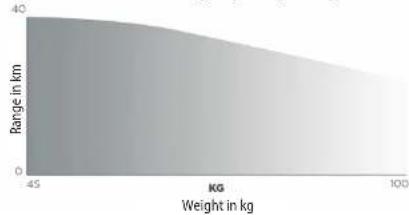
area
| Weight in kg | Range in km | |---|---| | -45 | 40 | | 100 | 30 |68
EN
concept
concept
EN
BATTERY SPECIFICATIONS
Follow these storage and charge instructions to extend battery lifespan and performance. Please pay special attention to safety precautions and other specifications.
| Battery specifications | |
| Type Li-ion battery | |
| Charging time 5-7 hours | |
| Voltage 36 V | |
| Operating temperature 0 °C–35 °C | |
| Charge temperature 0 °C–35 °C | |
| Maximum charging voltage 42 V | |
| Recommended storage time (-8 °C – 35 °C) 3 months when fully charged | |
| Battery capacity 10 Ah | |
| Maximum charging current 2 A | |
| Input voltage 100-240 V | |
| Frequency | 50-60 Hz |
| Output voltage | 42 V |
| Output current | 2 A |
| Storage temperature | -8 °C–35 °C |
SAFE USING OF THE BATTERY
Stop using the battery in the following cases:
- Use the battery of the electric scooter only in accordance with local laws. Contact a qualified person to remove and replace the battery.
- Do not touch any substances leaking from the battery. If the battery starts to produce an unpleasant odour or gets too hot, stop using it.
- Do not use the electric scooter during charging. Always disconnect the battery from the charger before ride and installation.
• Do not let children and animals touch the battery! - To ensure proper operation of the battery, pay attention to the storage and charge temperature. Always observe the temperature range given in the specifications.
• Always follow local laws when transporting lithium batteries. Lithium batteries are considered dangerous.
• The battery contains dangerous substances, never open the battery. Do not insert anything into the battery. - It is forbidden to charge a lithium battery that has been over-discharged. These batteries represent a safety hazard, hand them over to the appropriate collection point.
- If the internal temperature of the battery exceeds 45 °C, the protection system will be automatically activated.
- Do not charge the battery if the outdoor or indoor temperature exceeds 40 °C.
- Never leave the electric scooter on a direct sunlight. This could damage the battery.
• Use only original chargers to charge the electric scooter.
CHARGING PROCEDURE
First charging method:
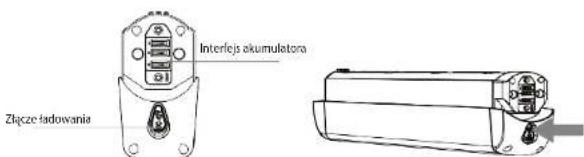
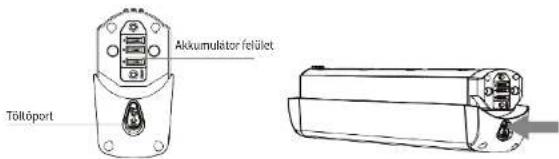
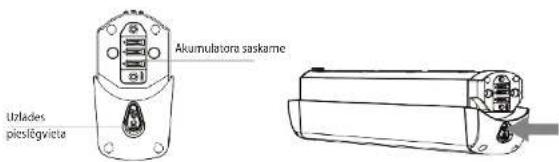
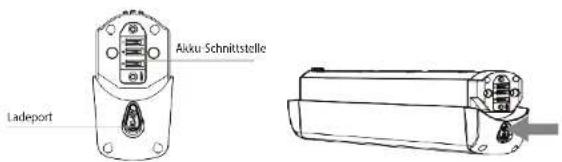
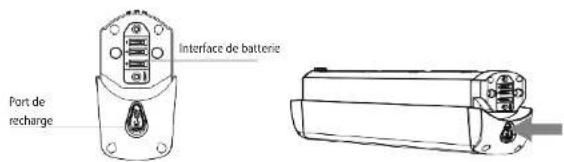
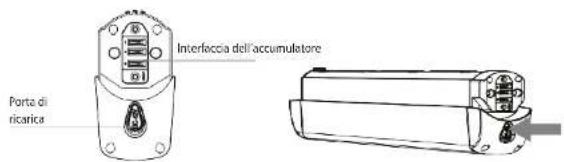
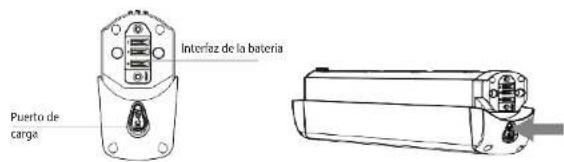
- Open the charging port cover and make sure that the charging port is clean and dry.
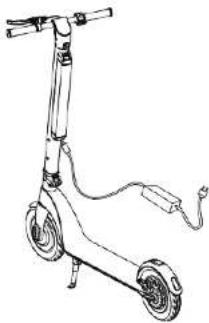
- Connect the charging device to the battery and the other end to the power supply (100-240 V).
- If the indicator on the charger lights up red, the battery is charging properly. If the indicator does not light up, check the connection to the mains.
- If the indicator on the charger lights up green, the battery is charged to 99%. Stop charging the battery. Prolonged charging of the battery affects its lifespan.
Second charging method:
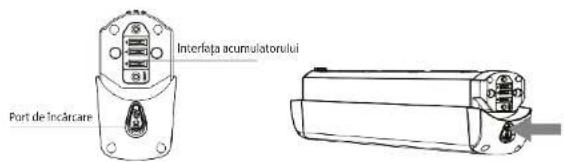
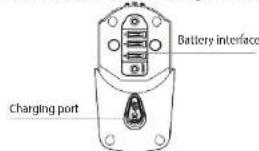
- Remove the battery from the electric scooter. Remove the silicone cover from the charging port, then connect the DC connector of the charger to the charging port of the battery.
- Plug the power cord into the charger and the second port into a wall outlet (100-240 V). Check whether the charger indicator is on.
natural_image
Line drawing of a scooter with wheels and attached cable (no text or symbols)• Once the indicator lights up green, charging is complete.
- After charging, cover the charging port with the silicone cover which protects the port from dust and prevents contact with foreign metal objects that could cause a short circuit.
EN
concept
concept
EN
BATTERY REPLACEMENT
1. Removing the battery from the electric scooter
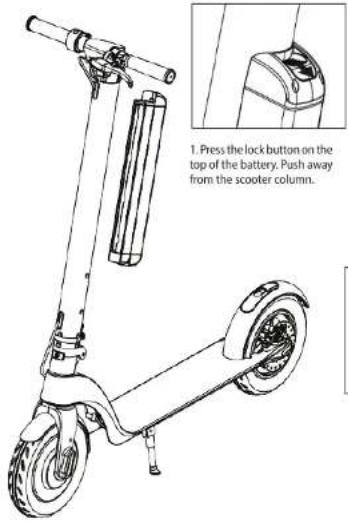
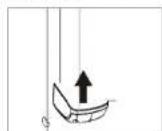
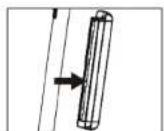
1. Press the lock button on the top of the battery. Push away from the scooter column.
2. Pull the battery upwards.
3. Remove the battery from the column.
- Installing the battery into the electric scooter
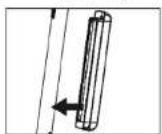
- Slide the battery into the column.
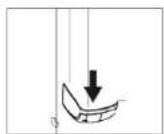
2. Insert the battery into the grooves on the column and slide it down the column until the lock button clicks.
CLEANING AND MAINTENANCE
• Always make sure that the battery and charger of the electric scooter are disconnected from the power supply. The electric scooter must be switched off.
- Dampen a soft cloth with clean water and use it to clean the electric scooter. Never use an excessive amount of lubricating oil when performing bearing maintenance.
- It is forbidden to clean the electric scooter using water spray or immerse it into water and other liquids. This would permanently damage the electrical components.
STORAGE
- Before storage, fully charge the battery to prevent damage to the battery caused by over-discharge during long-term storage.
• Recharge the battery at least once every three months. - Do not charge the battery if the storage temperature is below 0 °C. Move the battery to a room with a room temperature and then charge it.
- Store your electric scooter in a suitable dry interior. The electric scooter can be covered to prevent dust on settling on it.
TROUBLESHOOTING
| Problem Remedy | |
| The electric scooter does not start Charge the battery. | |
| The electric scooter does not charge | Make sure that the charger is correctly connected to the wall outlet, if not, connect the charger to the mains. |
| Make sure that the charger of the electric scooter works (the indicator is on). | |
| Make sure that the plug of the charger and the charging port of the electric scooter are correctly connected. | |
| Reduced performance of the battery | The battery life is over – replace the battery with a new one. Contact an authorized service centre. |
| The motor is not working Contact an authorized service centre. | |
| Brakes | The brakes make a grinding or whistling noise – check their adjustment. |
| If the clamping element of the brakes is loosened, tighten the bolts and adjust the brakes. | |
| If the brakes and brake pads are dirty and offer poor braking power, clean the brakes with clean water. | |
If the instructions in the table above do not help you to solve the problem, contact your dealer or an authorized service centre. Any modifications and repairs you make to the electric scooter may damage the appliance and subsequent warranty claims will not be accepted!
OPTIONAL ACCESSORIES
Bag product code 42393855
Mobile phone holder product code 42393856
Spare battery product code 42393861
BATTERY DISPOSAL
The appliance contains a Li-ion battery. This type of battery contains substances that can damage the environment in their disintegration. Before disposing of the appliance or replacing the battery, the original battery must be removed and returned to an appropriate collection point.
EN
concept
concept
DE
SERVICE
Extensive maintenance or repair, which requires access to internal parts of the product, has to be performed by a qualified service centre.
ENVIRONMENTAL CONCERNS
- Packaging materials and old appliances should be recycled.
• Packaging materials may be disposed of as sorted waste. - Dispose the plastic bags made of polyethylene (PE) of as sorted waste.
Recycling of the appliance at the end of its lifespan

This appliance is labelled in accordance with European Directive 2012/19/EU concerning used electrical and electronic appliances (Waste Electrical and Electronic Equipment - WEEE). The symbol on the product or on its packaging indicates that this product may not be treated as household waste. Instead, it should be taken to the appropriate collection point for the recycling of electrical and electronic equipment. By ensuring this product is disposed of correctly, you will help prevent potential negative consequences for the environment and human health, which could otherwise be caused by inappropriate waste handling of this product. The disposal of such material has to be done according to the recycling regulations. For more detailed information about recycling of this appliance see the authorized local office or service for household waste disposal or the shop, where you purchased the appliance.

The product meets all the necessary requirements of the EU directives applicable to the specific product.
Changes in text, design, and technical specifications are subject to change without notice and we reserve the right to change them.

SC4000, SC4010
DANKSAGUNG
natural_image
Line drawing of a two-wheeled scooter with wheels and suspension components (no text or symbols)area
| KG | Reichweite in km | | --- | --- | | 45 | 40 | | 100 | 30 |Gewicht in kg
80
DE
concept
concept
DE
SPEZIFIKATION DES AKKUS
natural_image
Line drawing of a scooter with wheels and a cable, no text or symbols presentDE
concept
concept
DE
DESCRIPTION DES GUIDONS ET DES COMMANDES
1. Levier de frein
natural_image
Line drawing of a scooter with two wheels and a handle (no text or symbols)natural_image
Line drawing of a three-wheeled scooter with a cable and plug (no text or symbols)FR
concept
concept
FR
natural_image
Line drawing of a two-wheeled scooter with wheels and rear suspension (no text or symbols)natural_image
Line drawing of a small electric scooter with wheels and a plug (no text or symbols)IT
concept
concept
IT
natural_image
Line drawing of a two-wheeled scooter with wheels and suspension components (no text or symbols)natural_image
Line drawing of a three-wheeled scooter with a cable and power cord (no text or symbols)118
ES
concept
concept
ES
DESCRIEREA GHIDONULUI ŞI A COMENZILOR
natural_image
Line drawing of a scooter with wheels and suspension components (no text or symbols)
natural_image
Line drawing of a three-wheeled scooter with a cable and power cord (no text or symbols)RO
concept
concept
RO