EasyManual
IGP1061 - Smart Home LEVELONE - Free user manual and instructions
Find the device manual for free IGP1061 LEVELONE in PDF.



User questions about IGP1061 LEVELONE
0 question about this device. Answer the ones you know or ask your own.
Ask a new question about this device
Download the instructions for your Smart Home in PDF format for free! Find your manual IGP1061 - LEVELONE and take your electronic device back in hand. On this page are published all the documents necessary for the use of your device. IGP1061 by LEVELONE.
USER MANUAL IGP1061 LEVELONE
Quick Installation Guide ( Industrial Managed Switches )- 1 -
This Quick Installation Guide only describes the most basic situations and settings. All detailed information is described in the user manual.- 2 -
English Package Contents This product is provided with the following accessories in the box; please check them carefully. If any of the accessories is missing or damaged, please contact with your local dealer timely. Serial number Name Quantity Note
Declaration of Conformity
Console Cable (For model with console port)
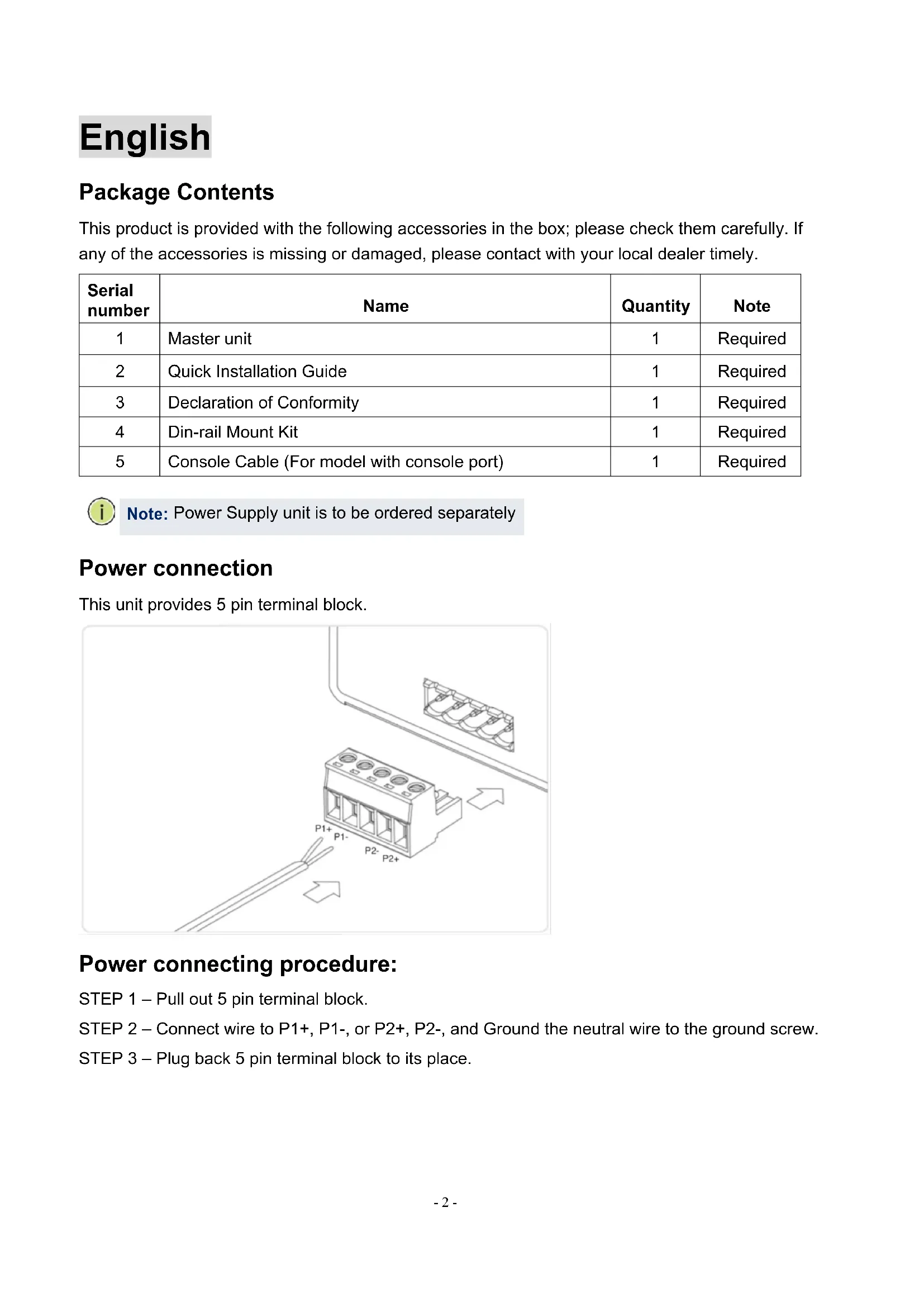
Power connection This unit provides 5 pin terminal block. Power connecting procedure: STEP 1 – Pull out 5 pin terminal block. STEP 2 – Connect wire to P1+, P1-, or P2+, P2-, and Ground the neutral wire to the ground screw. STEP 3 – Plug back 5 pin terminal block to its place. Note: Power Supply unit is to be ordered separately- 3 -
Perform Initial Configuration (For model with console port)
1. Connect a PC to the switch console port using the included console cable.
3. Log in to the CLI using default settings: Username “admin” and password “admin.”
Logging on to the equipment
Connect the RJ-45 interface cable of a switch with a computer using a network cable.
Set the TCP/IP properties of the computer, see the Appendix: Setting up your computer.
Logging on to the equipment: Open a browser and type 192.168.1.1 in the address bar, and then press Enter; in the pop-up login interface, enter the factory logon username "admin", password "admin" and click OK. Note: For further information on switch configuration, refer to the Web Management Guide and CLI Reference Guide.- 4 -
Appendix: Setting up your computer ■ Windows
Set the computer's IP address: The computer's IP address should be any one of the following free IP addresses 192.168.1.2 ~ 192.168.1.253, and then click OK, to return to the previous page, click OK.- 5 -
marking is a certification mark that indicates conformity with health, safety, and environmental protection standards for products sold within the European Economic Area (EEA).The CE marking is also found on products sold outside the EEA that have been manufactured to EEA standards. This makes the CE marking recognizable worldwide even to people who are not familiar with the European Economic Area.
WEEE is waste electrical and electronic equipment. It is end-of-life electrical and electronic equipment and covers virtually everything with a plug or battery. ... The EC introduced the WEEE Directive in 2002 to address the environmental impacts of unwanted electrical and electronic equipment at end-of-life disposal. Dispose the product at a recycling point. Do not dispose together with household waste. Incorrect storage/disposal can harm the environment and/or cause injury. CE, UKCA: LevelOne declares that this product complies with the directives listed in the section 'Declaration of Conformity'.