
X3Laser Pro - Laser pointer Laserliner - Free user manual and instructions
Find the device manual for free X3Laser Pro Laserliner in PDF.



| Product Type | 3D laser level with 3 circles |
| Brand | Laserliner |
| Model | X3Laser Pro |
| Dimensions (w x h x d) | 140 x 125 x 103 mm |
| Weight (with battery) | 925 g |
| Power supply | Li-ion battery 3.7 V / 4.5 Ah |
| External power supply voltage | 5V/DC / 1A or 2A |
| Charging time | Approx. 6 h |
| Operating time (3 planes/2 planes/1 plane) | Approx. 3 h / 5.5 h / 8 h |
| Self-leveling range | ± 3° |
| Accuracy | ± 0.2 mm/m |
| Laser wavelength | 515 nm (green laser) |
| Laser class | 2 / < 1 mW (EN 60825-1:2014/AC:2017) |
| Typical visibility (horizontal/vertical) | 60 m / 40 m (at 300 lx max.) |
| Working range with receiver | Up to 60 m |
| Laser technology | PowerGreen+ (ultra-bright green laser) |
| Special functions | Tilt mode, Transport LOCK, GRX-READY, Out-Of-Level |
| Maintenance and cleaning | Clean with a slightly damp cloth; no solvents. Remove battery for prolonged storage. |
| Operating conditions | 0°C ... 50°C, max. 80% RH non-condensing, max. altitude 4000 m |
| Storage conditions | -10°C ... 70°C, max. 80% RH |
| Spare parts and service | UMAREX-LASERLINER after-sales service; annual calibration recommended |
| Compliance | EMC Directive 2014/30/EU, WEEE directive |
Frequently Asked Questions - X3Laser Pro Laserliner
User questions about X3Laser Pro Laserliner
0 question about this device. Answer the ones you know or ask your own.
Ask a new question about this device
Download the instructions for your Laser pointer in PDF format for free! Find your manual X3Laser Pro - Laserliner and take your electronic device back in hand. On this page are published all the documents necessary for the use of your device. X3Laser Pro by Laserliner.
USER MANUAL X3Laser Pro Laserliner
Completely read through the operating instructions, the „Warranty and Additional Information“ booklet as well as the latest information under the internet link at the end of these instructions. Follow the instructions they contain. This document must be kept in a safe place and if the laser device is passed on, this document must be passed on with it.
Function / Application
Three-dimensional laser with three 360^ laser circles.
- The slope-mode feature is an extra that permits gradients to be laid out.
- Straight forward plumb function using laser crosses
- Optimised for work close to the ceiling
- Out-Of-Level: is indicated by optical signals when the unit is outside its self-levelling range.
- With the magnetic clamp and wall bracket the device can be used as a standalone unit, in a combination as well as in horizontal and vertical position.
- Automatic levelling range 3^ , Accuracy 0.2 mm / m
General safety instructions
- The device must only be used in accordance with its intended purpose and within the scope of the specifications.
- The measuring tools and accessories are not toys. Keep out of reach of children.
- Modifications or changes to the device are not permitted, this will otherwise invalidate the approval and safety specifications.
- Do not expose the device to mechanical stress, extreme temperatures, moisture or significant vibration.
- The device must no longer be used if one or more of its functions fail or the battery charge is weak.
Safety instructions
Using class 2 lasers

Laser radiation!
Do not stare into the beam!
Class 2 laser
<1 mW·515 nm
EN 60825-1:2014/AC:2017
- Attention: Do not look into the direct or reflected beam.
- Do not point the laser beam towards persons.
- If a person's eyes are exposed to class 2 laser radiation, they should shut their eyes and immediately move away from the beam.
- Under no circumstances should optical instruments (magnifying glass, microscope, binoculars) be used to look at the laser beam or reflections.
- Do not use the laser at eye level (1.40 ... 1.90 m)
- Reflective, specular or shiny surfaces must be covered whilst laser devices are in operation.
- In public areas shield off the laser beam with barriers and partitions wherever possible and identify the laser area with warning signs.
Safety instructions
Dealing with electromagnetic radiation
- The measuring device complies with electromagnetic compatibility regulations and limits in accordance with the EMC Directive 2014/30/EU.
- Local operating restrictions – for example, in hospitals, aircraft, petrol stations or in the vicinity of people with pacemakers – may apply. Electronic devices can potentially cause hazards or interference or be subject to hazards or interference.

When transporting always switch off all lasers, secure the pendulum and set the slide switch to „OFF“!
Special product features
AUTOMATIC LEVEL
Automatic alignment of the device with a magnetically dampened pendulum system. The device is brought into initial position and aligns itself autonomously.

Transport LOCK: The device is protected with a pendulum lock during transport.

GRX-READY technology enables line lasers to be used even in unfavourable light conditions. The laser lines pulsate at a high frequency and this can be picked up by special laser receivers over long distances.
Green laser technology

Devices with the PowerGreen+ technology have very bright, green high-performance diodes which provide outstanding visibility of the laser lines at great distances, on dark surfaces and in bright ambient lighting conditions.

Approx. 6 times brighter than a typical red laser with 630 - 660nm
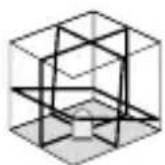
Number and direction of the lasers
H = horizontal laser V = vertical laser S = Slopefunction
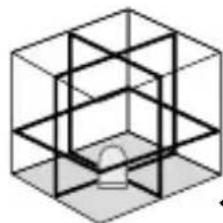
1H360° 2V360° S
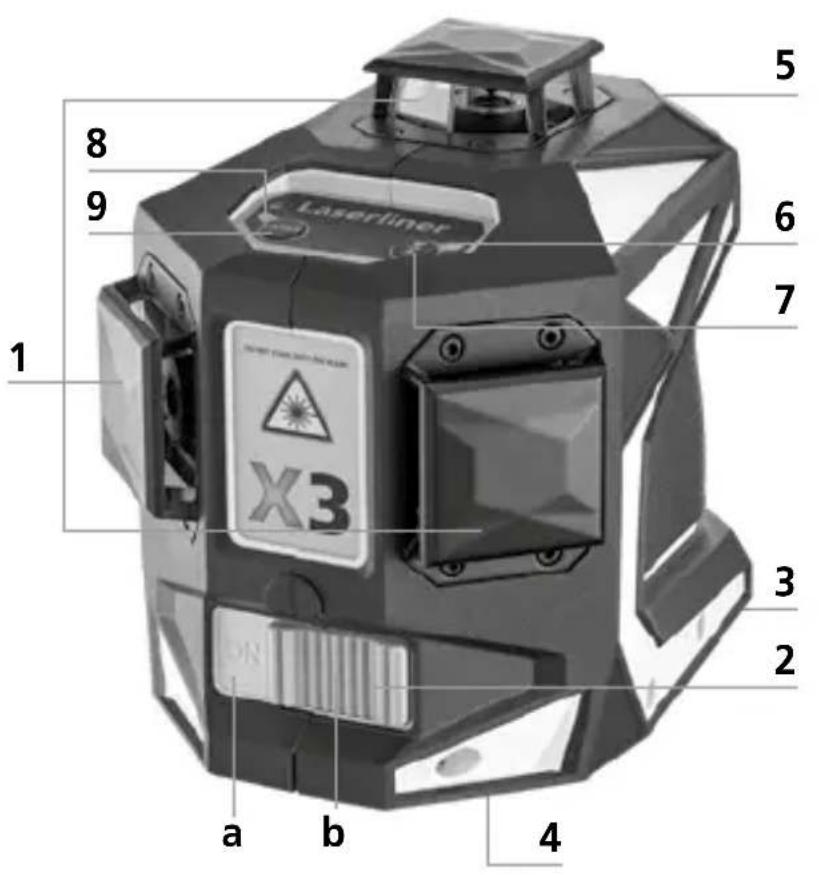
1 Laser emitting window
2 Slide switch
a ON
b OFF / Slope mode /
Transport lock
3 Rechargeable battery compartment (bottom)
4 1/4"/5/8"-tripod threads (bottom)
5 Connecting socket for mains adapter (5V/DC / 1A)
6 LED Hand receiver mode
7 Hand receiver mode
8 LED Status indicator / Battery charge
9 Laser line selection button
1 Use of lithium-ion rechargeable battery
- Use the power supply/charger unit only in closed rooms; do not expose to moisture or rain otherwise risk of electric shock.
- Charge the device's battery completely prior to use.
- Connect the power pack/charger to the mains power supply and the socket in the battery pack. Please only use the power pack/charger supplied. Using any other power pack/charger will invalidate the warranty.
- The LED on the battery pack lights up red while the battery is charging. When the LED changes to green, charging is complete.
- The status indicator (8) flashes when the battery charge is low.
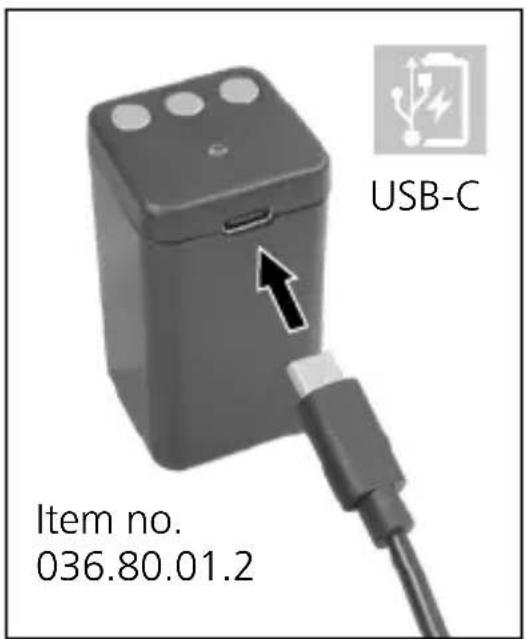
Laserliner
!
The battery may only be charged with the battery charger provided and used only in this laser device. Any other use may cause injury or fire.
!
Make sure there are no conductive objects in the vicinity of the battery contacts. Short-circuiting of these contacts can cause burn injuries or fire.
!
Do not open the rechargeable battery. This could cause short-circuits.
2 Power supply
To insert the lithium-ion rechargeable battery
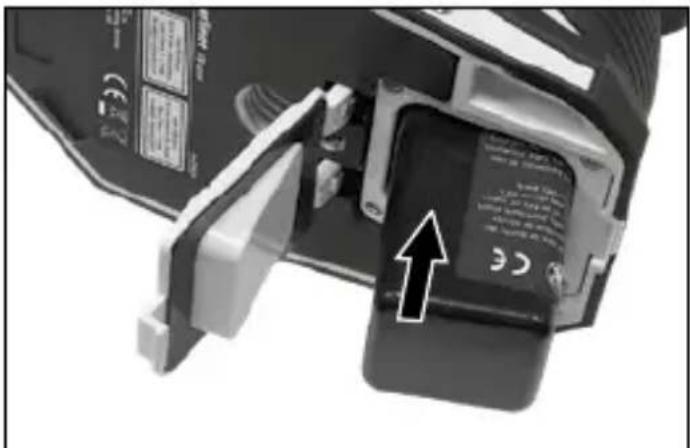
Open the battery compartment and insert the lithium-ion battery as illustrated.
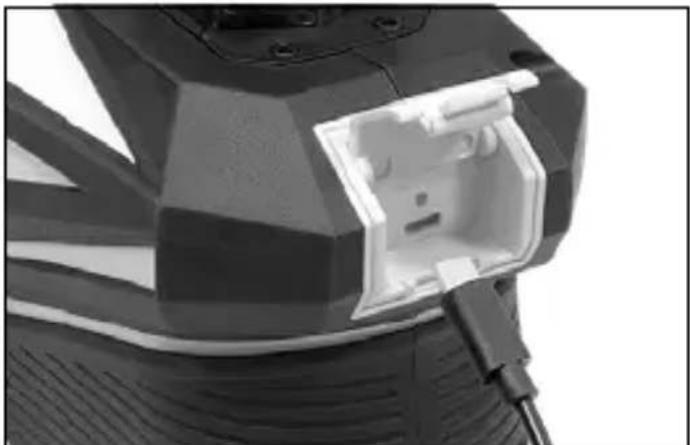
Operation with power supply unit
The LED on the device shines red if the battery has not been inserted and the device cannot therefore be switched on.
The LED on the device shines green when the battery has been inserted and the device can be switched on.
!
The rechargeable battery can be charged when it is not inserted in the device or when the device is in use. The charging status can only be read from the battery itself.
3 horizontal and vertical levelling
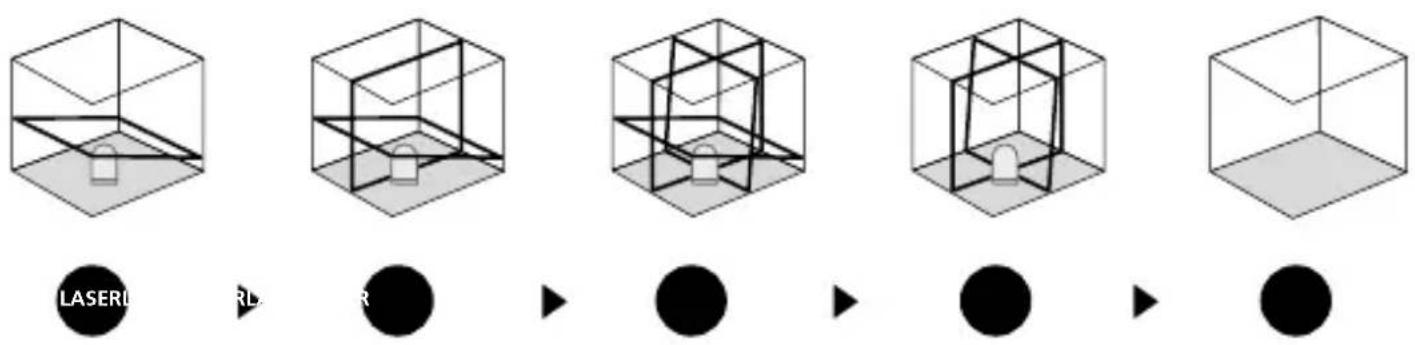
Release the transport restraint, set slide switch (2) to "ON". The horizontal laser line appears. The laser lines can be switched individually with the selection button.
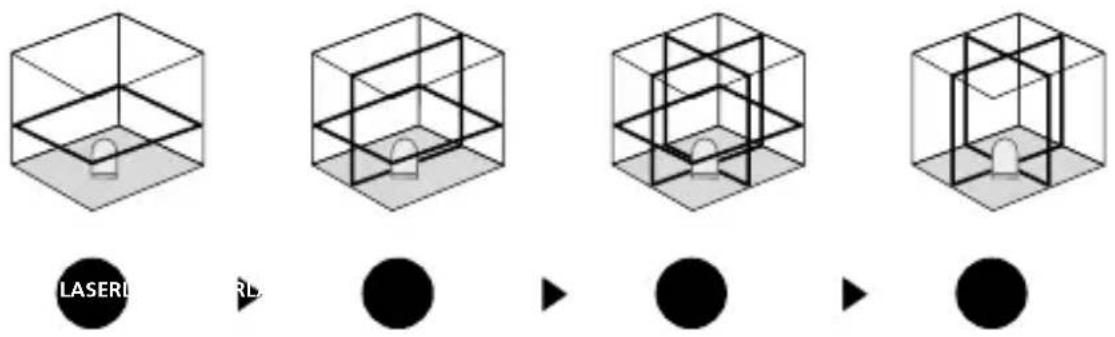
The transport restraint must be released for horizontal and vertical levelling. The laser lines flash when the device is outside the automatic levelling range of 3^ . Position the device such that it is within the levelling range.
4 lope mode
Do not release the transport restraint, set slide switch (2) to „OFF". Select the laser with the selector button (9). Sloping planes and tilts can now be measured. In this mode, the laser lines no longer align automatically. This is signalised by the laser lines flashing.
5 a06fceiver mode
Optional: Working with the laser receiver GRX
Use an GRX laser receiver (optional) to carry out levelling at great distances or when the laser lines are no longer visible. To work with a laser receiver, switch the line laser to hand-held receiver mode by keeping button 7 (hand-held receiver mode on / off) pressed. The laser lines will now pulsate with high frequency, making the laser lines darker. The laser receiver can detect these pulsating laser lines.
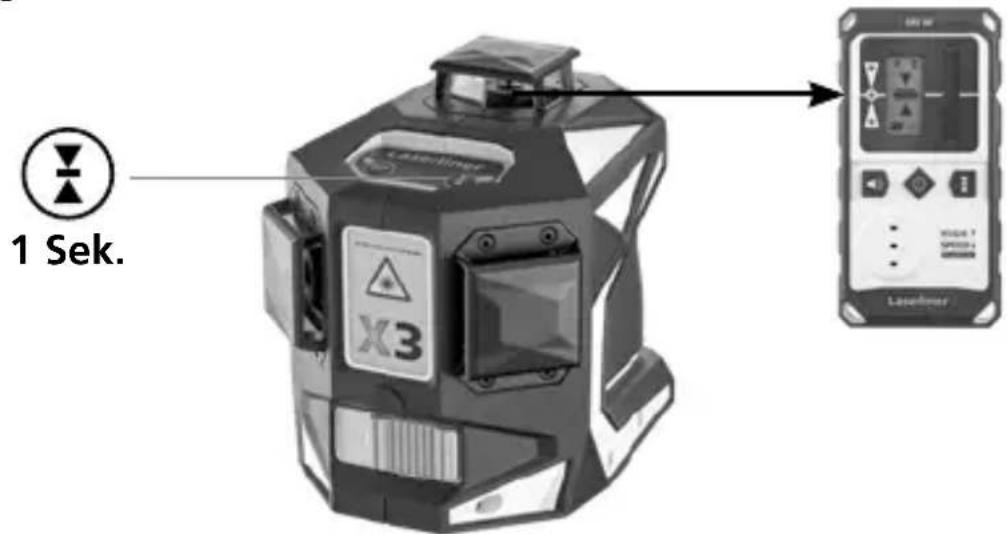
! Observe the laser receiver's operating instructions for line lasers.
Due to the special optics required to generate a continuous 360^ laser line, the underlying technology may cause differences in brightness in different areas of the line. This may lead to different ranges in hand receiver mode.
Preparing the calibration check
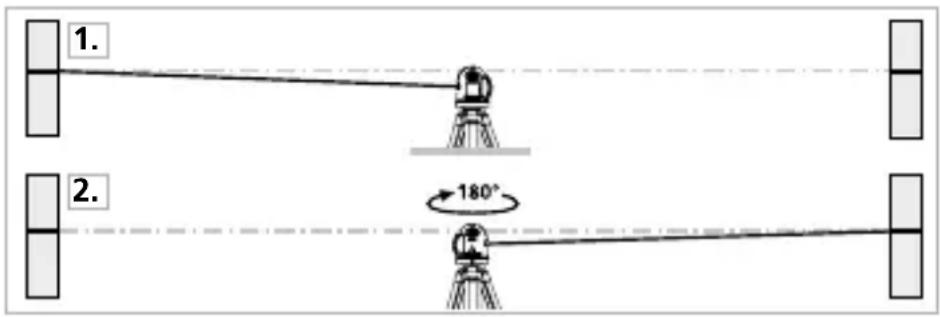
It is possible for you to check the calibration of the laser. To do this, position the device midway between 2 walls, which must be at least 5 metres apart. Switch the device on (Laser cross ON). The best calibration results are achieved if the device is mounted on a tripod.
- Mark point A1 on the wall.
- Turn the device through 180^ and mark point A2. You now have a horizontal reference between points A1 and A2.
Performing the calibration check
- Position the device as near as possible to the wall at the height of point A1.
- Turn the device through 180^ and mark point A3. The difference between points A2 and A3 is the tolerance.
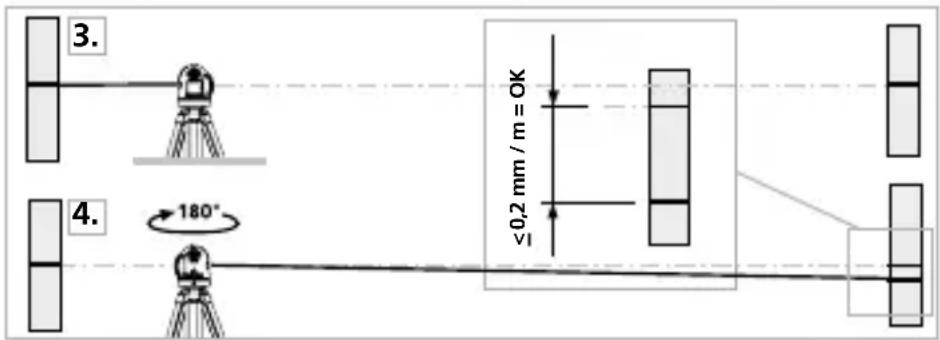

When A2 and A3 are more than 0.2mm / m apart, an adjustment is necessary. Contact your authorised dealer or else the UMAREX-LASERLINER Service Department.
Checking the vertical line
Position the device about 5m from a wall. Fix a plumb bob with a line of 2.5m length on the wall, making sure that the bob can swing freely. Switch on the device and align the vertical laser to the plumb line. The precision is within the specified tolerance if the deviation between the laser line and the plumb line is not greater than ± 1mm .
Checking the horizontal line
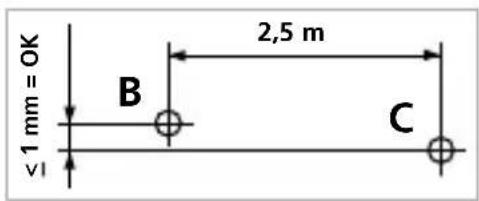
Position the device about 5m from a wall and switch on the cross laser. Mark point B on the wall. Turn the laser cross approx. 2.5m to the right and mark point C. Check whether the
horizontal line from point C is level with point B to within ± 1 mm. Repeat the process by turning the laser to the left.

Regularly check the calibration before use, after transport and after extended periods of storage.
Calibration
The meter needs to be calibrated on a regular basis to ensure it produces accurate measurement results. We recommend carrying out calibration once a year.
Information on maintenance and care
Clean all components with a damp cloth and do not use cleaning agents, scouring agents and solvents. Remove the battery pack before storing for longer periods. Store the device in a clean and dry place.
| Technical data (Subject to technical changes without notice. Rev22W12) | |
| Self-leveling range | ± 3° |
| Accuracy | ± 0.2 mm / m |
| Levelling | automatic |
| Visibility (typical)* | vertical: 40 m / horizontal: 60 m |
| Working range with hand receiver | (depends on how the technology affects the difference in brightness) 60 m |
| Laser wavelength | 515 nm |
| Laser class | 2 / < 1 mW (EN 60825-1:2014/AC:2017) |
| Power supply | Li-ion battery pack 3.7V / 4.5 Ah; Power pack 5V/DC / 1A Power pack 5V/DC / 2A |
| Charging time | approx. 6 hours |
| Operating time with 3 laser levels with 2 laser levels with 1 laser level | approx. 3 hours approx. 5.5 hours approx. 8 hours |
| Operating conditions | 0°C ... 50°C, max. humidity 80% rH, no condensation, max. working altitude 4000 m above sea level |
| Storage conditions | -10°C ... 70°C, max. humidity 80% rH |
| Dimensions (W x H x D) | 140 x 125 x 103 mm |
| Weight | 925 g (including battery pack) |
* at max. 300 lux
EU directives and disposal
This device complies with all necessary standards for the free movement of goods within the EU.
This product is an electric device and must be collected separately for disposal according to the European Directive on waste electrical and electronic equipment.
Further safety and supplementary notices at:
https://laserliner.com
!

- Function / Application
- General safety instructions
- Safety instructions
- Special product features
- AUTOMATIC LEVEL
- Green laser technology
- Number and direction of the lasers
- Use of lithium-ion rechargeable battery
- Laserliner
- Power supply
- To insert the lithium-ion rechargeable battery
- Operation with power supply unit
- horizontal and vertical levelling
- lope mode
- a06fceiver mode
- Optional: Working with the laser receiver GRX
- Preparing the calibration check
- Performing the calibration check
- Checking the vertical line
- Checking the horizontal line
- Calibration
- Information on maintenance and care
- EU directives and disposal
- !
Brand : Laserliner
Model : X3Laser Pro
Category : Laser pointer