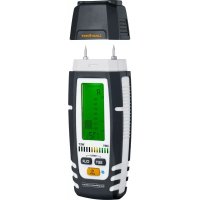
DampMaster Compact Plus - Measuring equipment Laserliner - Free user manual and instructions
Find the device manual for free DampMaster Compact Plus Laserliner in PDF.


| Product type | Moisture meter for wood and building materials |
| Brand | Laserliner |
| Model | DampMaster Compact Plus |
| Category | Measuring equipment |
| Measurement principle | Resistive (material moisture) |
| Measurement modes | Wood (3 groups A, B, C), Building materials (8 types), Index mode (31 materials), Test mode |
| Measurement ranges (wood) | Groups A, B, C: according to built-in table |
| Accuracy (wood) | ±1% (5% … 30%), ±2% (<5% and >30%) |
| Accuracy (building materials) | ±0.15% (depending on type) |
| Display | Digital LCD with adjustable backlight (Auto/On/Off) |
| Dry/wet indicator | 12 levels, programmable in Index mode |
| Temperature compensation | Automatic (ambient temperature) or manual |
| Special functions | MIN/MAX values, auto-off (3 min), radio transmission |
| Radio interface | IEEE 802.15.4 (Digital Connection), max. range 10 m |
| Power supply | 4 batteries 1.5 V LR03 (AAA) |
| Dimensions (L × W × H) | 58 mm × 155 mm × 38 mm |
| Weight (with batteries) | 186 g |
| Operating conditions | 0 °C … 40 °C, max. RH 85% (non-condensing) |
| Storage conditions | -10 °C … 60 °C, max. RH 85% |
| Maintenance | Clean with a slightly damp cloth; remove batteries if not used for extended periods |
| Calibration | Recommended once a year (contact customer service) |
| Safety | Avoid mechanical stress, extreme temperatures, humidity; do not insert electrodes forcibly |
| Warranty | According to general terms (see complete manual) |
Frequently Asked Questions - DampMaster Compact Plus Laserliner
User questions about DampMaster Compact Plus Laserliner
0 question about this device. Answer the ones you know or ask your own.
Ask a new question about this device
Download the instructions for your Measuring equipment in PDF format for free! Find your manual DampMaster Compact Plus - Laserliner and take your electronic device back in hand. On this page are published all the documents necessary for the use of your device. DampMaster Compact Plus by Laserliner.
USER MANUAL DampMaster Compact Plus Laserliner
m = 311
Read the operating instructions and the enclosed brochure „Guarantee and additional notices" completely. Follow the instructions they contain. This document must be kept in a safe place and passed on together with the device.
Intended use
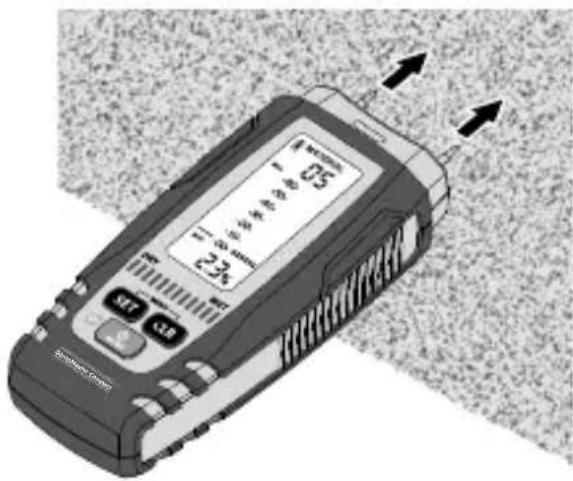
This material moisture device detects and evaluates the material moisture content of wood and building materials by way of electric resistance measurement. The displayed value is material moisture in % with respect to dry mass.
Example: 100% material moisture for 1kg of wet wood = 500g water.
General safety instructions
- The device must only be used in accordance with its intended purpose and within the scope of the specifications.
- The measuring tools and accessories are not toys.
Keep out of reach of children.
- Modifications or changes to the device are not permitted, this will otherwise invalidate the approval and safety specifications.
- Do not expose the device to mechanical stress, extreme temperatures, moisture or significant vibration.
- Do not use the measuring probe with an external voltage.
- The device must no longer be used if one or more of its functions fail or the battery charge is weak.
- Please ensure compliance with the safety regulations set out by local and national authorities with regard to the correct and proper use of the device.
Safety instructions
Dealing with electromagnetic radiation
- Local operating restrictions – for example, in hospitals, aircraft, petrol stations or in the vicinity of people with pacemakers – may apply. There is a possibility of a dangerous impact on – or interference with – electronic devices.
- The measuring accuracy may be affected when working close to high voltages or high electromagnetic alternating fields.
Safety instructions
Dealing with RF radiation
- The measuring device is equipped with a wireless interface. The measuring device complies with electromagnetic compatibility and wireless radiation regulations and limits in accordance with the RED 2014/53/EU.
- Umarex GmbH & Co. KG hereby declares that the DampMaster Compact Plus radio equipment complies with the essential requirements and other provisions of the European Radio Equipment Directive 2014/53/EU (RED). The EU Declaration of Conformity can be found in its entirety at the following address: https://www.laserliner.com/info?an=damacopl
Information on maintenance and care
Clean all components with a damp cloth and do not use cleaning agents, scouring agents and solvents. Remove the battery(ies) before storing for longer periods. Store the device in a clean and dry place.
Calibration
The meter needs to be calibrated and tested on a regular basis to ensure it produces accurate measurement results. We recommend carrying out calibration once a year. Contact your distributor or the UMAREX-LASERLINER service department.
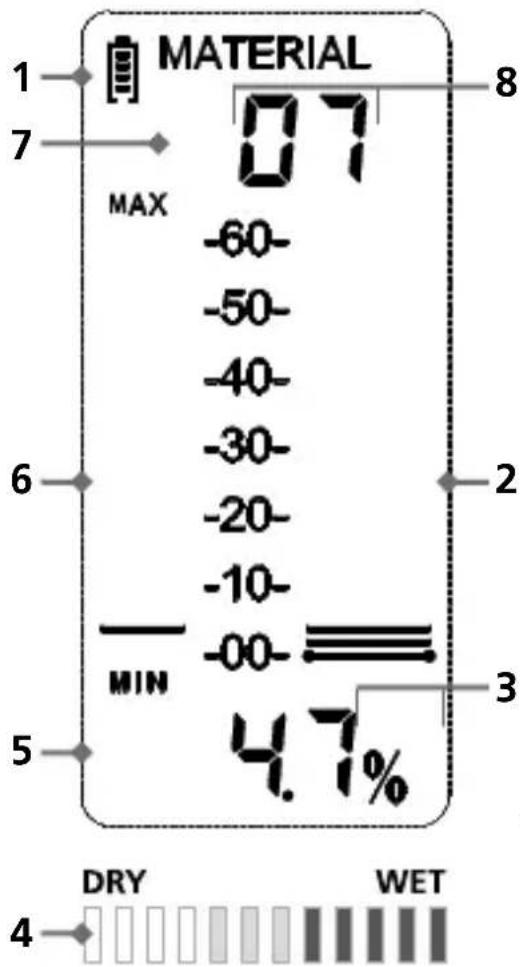
1 Battery charge
2 Measurement scale; bar-graph display of measured value
3 Temperature units of measure setting
4 Wet/dry indicator
5 Numeric measurement value in %
6 Bar-graph display of measured MIN/MAX values
7 Wood groups (A, B, C)
8 Building materials (01, 02, 03, 04, 05, 06, 07, 08)
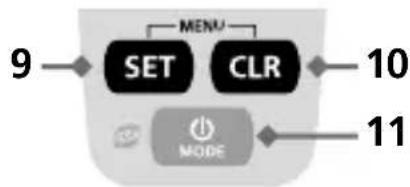
9 Change wood/building materials
0 Delete MIN/MAX values
9+10 Menu
11 ON/OFF
Mode selection: Wood, building materials, Index mode, Test mode
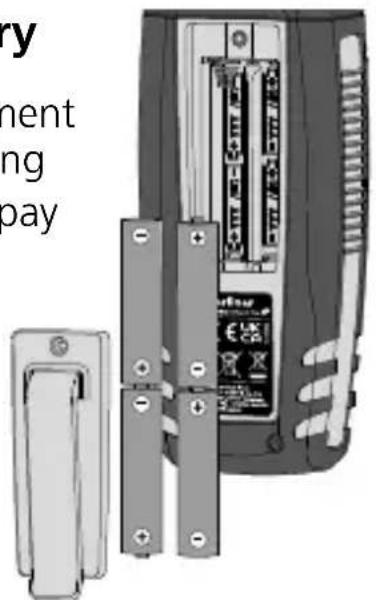
1 Inserting the battery
Open the battery compartment and insert batteries according to the symbols. Be sure to pay attention to polarity.
2
BaON OFF
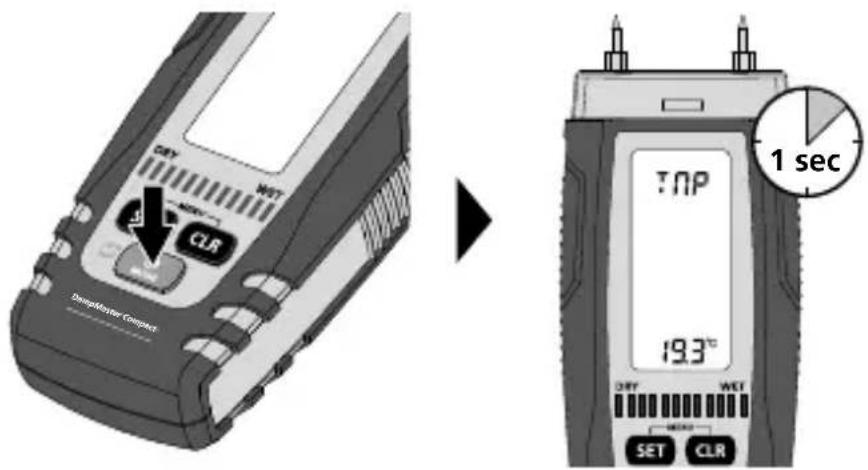
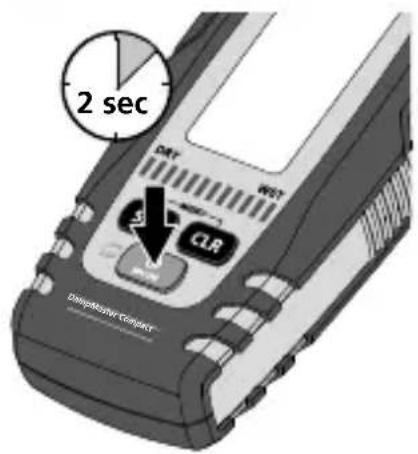
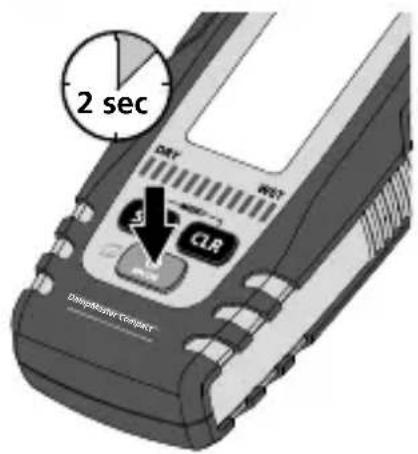
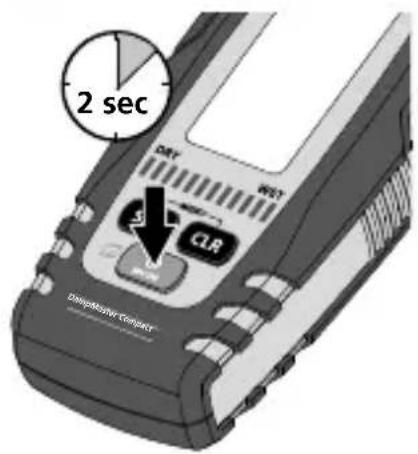
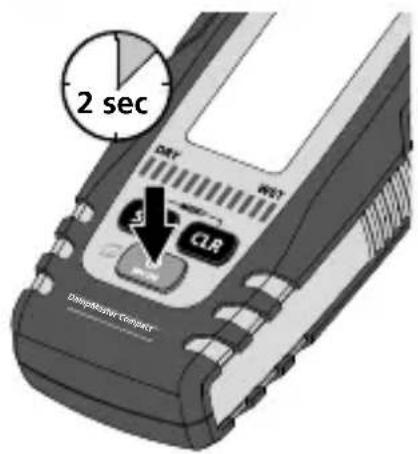
After switching on the device, the ambient temperature is displayed for 1 second.
m = 311
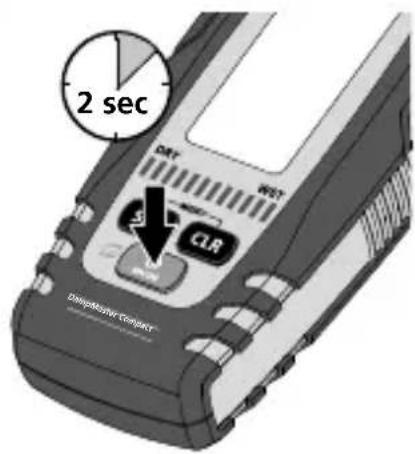
Auto switch-off after 3 minutes.
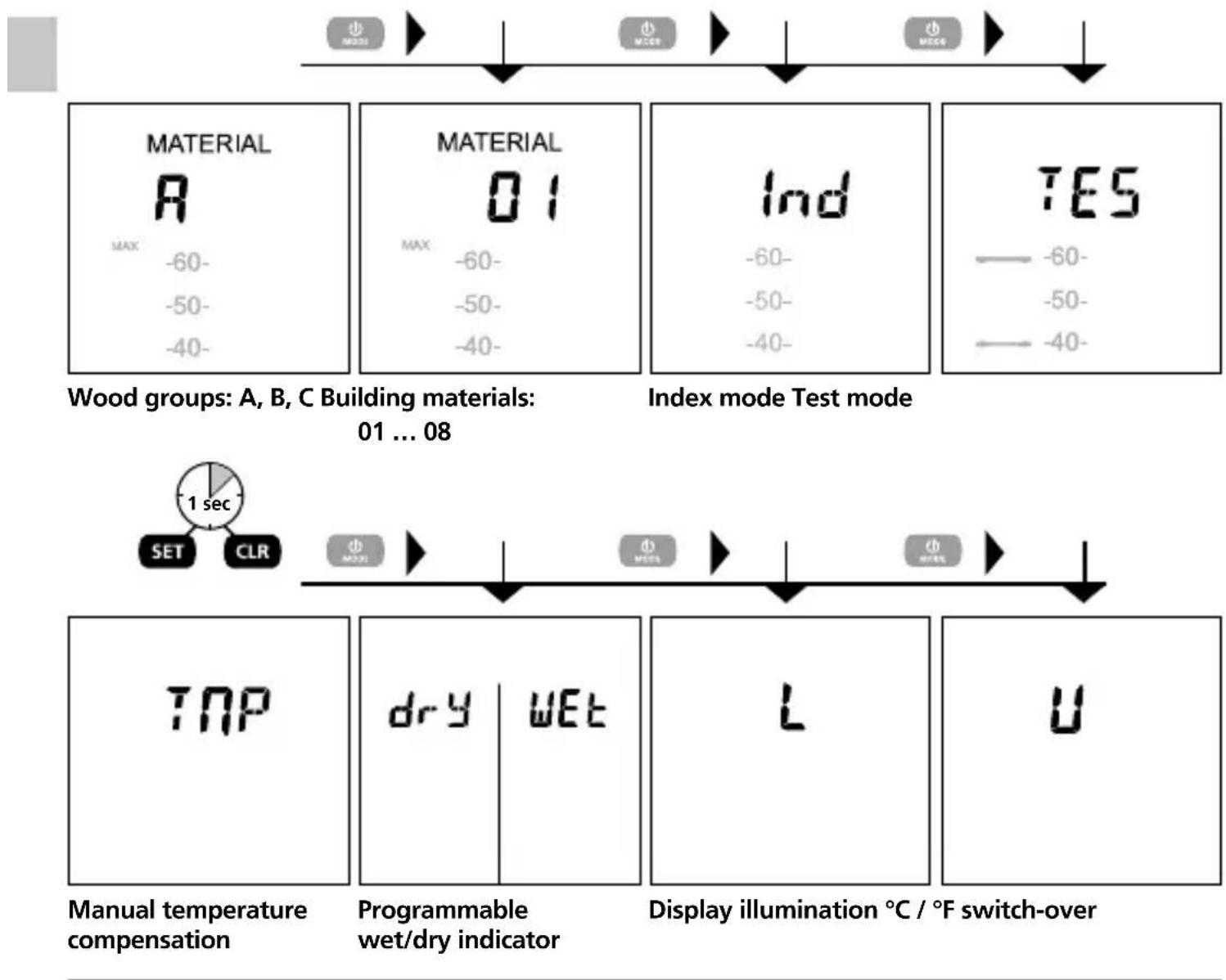
4 Modes
5 Select wood group (A, B, C)
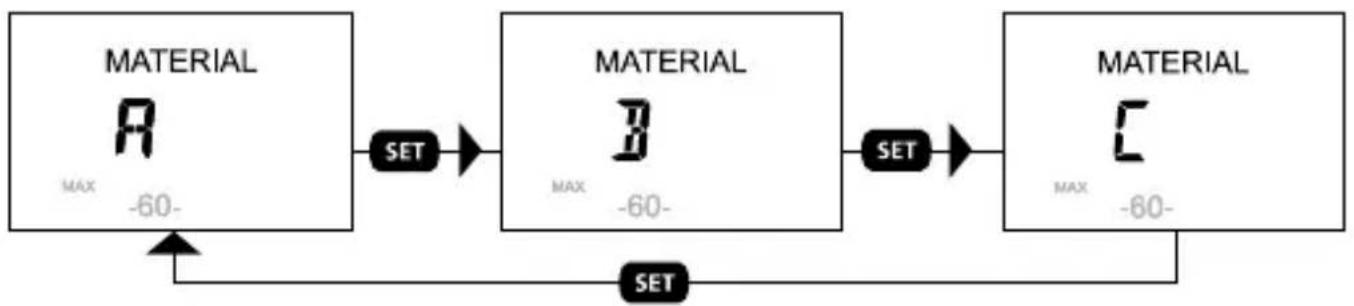
Just which wood types are grouped under A, B and C can be found in the table in Section 10.
Select building material (01, 02, 03, 04, 05, 06, 07, 08)
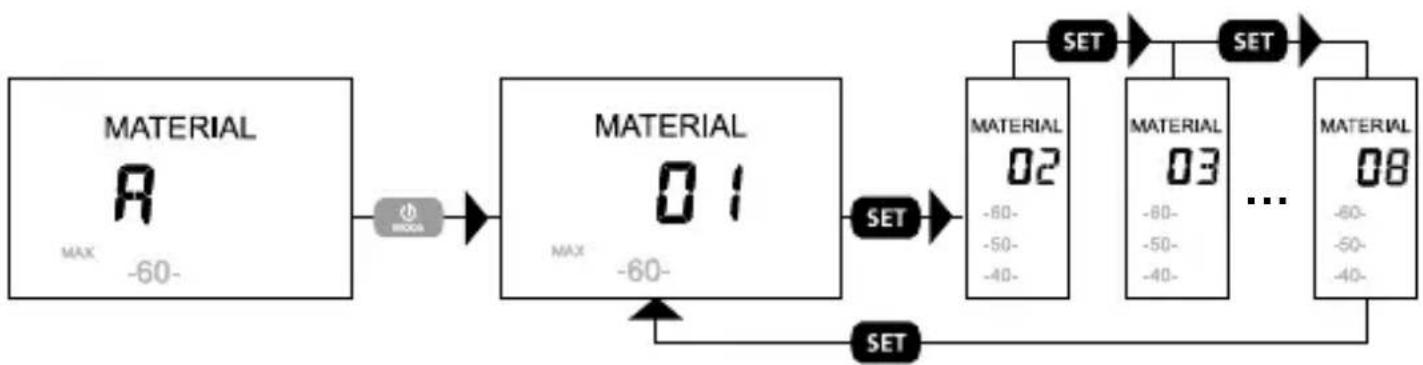
Just which building materials are grouped under 01 to 08 can be found in the table in Section 11.
7 Measuring material moisture
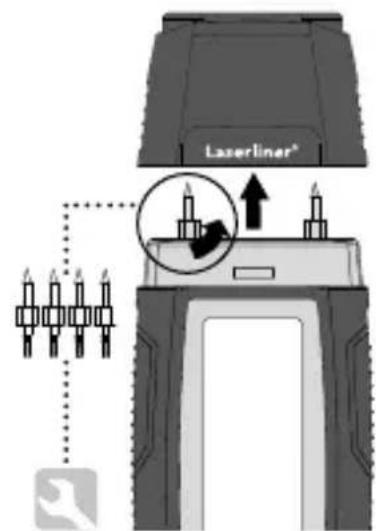
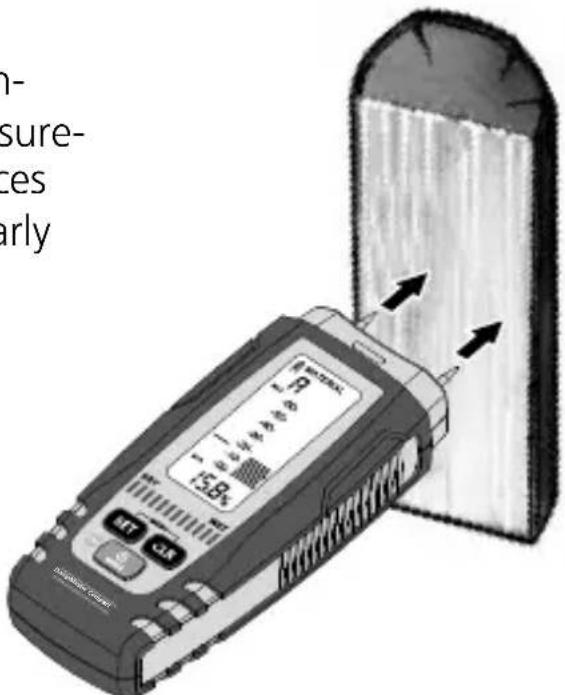
Be sure neither supply lines (electric lines, water pipes, etc) nor a metal subsurface is present at the location to be measured. Insert the electrodes as far into the material as possible but never use excessive or sudden impact force as this could damage the device. Always pull the device out of the material with left/right twisting motion. Perform several comparative measurements at different locations to minimise measurement error. The sharply pointed electrodes present an injury hazard. Always put the safety cap on the device when it is not in use or being transported.
8 Wood
The location to be measured should be untreated, free of knots, dirt and resin. Measurements should not be made on the end faces of wood because these areas dry particularly quickly such that they produce incorrect measurement results. Perform multiple comparative measurements. Wait until the % symbol stops blinking and remains constantly lighted. Only then are measurement values stable.
9 Mineral building materials
Be aware that walls (or surfaces) with differing material structures, or even variations in material composition, can cause measurement results to be falsified. Perform multiple comparative measurements. Wait until the % symbol stops blinking and remains constantly lighted. Only then are measurement values stable.
Material characteristics
The material characteristics available for selection in the measuring device are listed in the tables below. The different types of wood are divided into Groups A ... C. Please set the measuring device for the respective group in which the type of wood to be measured is found (see Step 5). A similar setting must also be made for measurements performed on building materials (see Step 6). Building materials are divided into groups 01 through 08.
10 Wood tables
Wood group A
| Abachi | Cypress Pine, Mexican | Niové |
| Abura | Ebony, African | Oak, Red |
| Afzelia | Gum, Manna | Oak, White American |
| Albizia falcata | Hickory, Mockernut | Okoumé |
| Ash, American | Hickory Pecan | Pau amarello |
| Ash, Japanese | Hickory, Pignut | Pear |
| Ash, White American | Idigbo | Pine, Brazilian |
| Beech, American | Ilomba | Rosewood, Brazilian |
| Beech, European | Ipe | Rosewood, Indian |
| Beech, Red (Sapwood) | Iroko | Teak |
| Canarium, Grey | Lime, American | Willow |
| Canarium, (PG) | Lime, European | Willow, Black |
| Cedar, common | Mockernut | |
| Cypress, Alaska | Niangon |
Wood group B
| Agba | Cembra Pine | Mahogany, Cherry |
| Alder, Black | Cherry, European | Maple Black |
| Alder, Common | Chestnut, Horse | Maple, Great |
| Alder, Red | Chestnut, Sweet | Maple Red |
| Alerce | Cypress, Italian | Oak, European |
| Andiroba | Douka | Pine, Common |
| Ash, Common | Elm | Pine, Maritime |
| Ash, Silver (Southern) | Emien | Pine, Ponderosa |
| Aspen | Fir, Douglas | Pine, Western Yellow |
| Balsa | Fréne | Plum, European |
| Basralocus / Angelique | Hornbeam, common | Poplar, all |
| Bean, Black | Izombé | Poplar, White |
| Birch | Jacareuba | Purpleheart |
| Birch, European White | Jarrah | Sandalwood, Red |
| Birch, Yellow | Kapok | Scots Pine |
| Bloodwood, Red | Karri | Spruce, European |
| Box, Black | Kosipo | Tola branca |
| Canarium (SB) | Larch, European | Tree heath |
| Cedar, Incense | Limba | Walnut, European |
| Cedar, Pencil | Logwood | |
| Cedar, Western red | Mahogany, African |
Wood group C
| Afrormosia | Kokrodua | Phenolic resin particle board |
| Cork | Melamine particle board | Rubber tree |
| Imbuia | Niové Bidinkala | Tola - real, red |
11 Table of building materials
Integrated building materials / measuring range
| 01 Anhydrite screed (AE, AFE) / 0 ... 29.5% |
| 02 Concrete C12/15 / 0.7 ... 3.3% |
| 03 Concrete C20/25 / 1.1 ... 3.9% |
| 04 Concrete C30/37 / 1.4 ... 3.7% |
| 05 Gypsum plaster / 0.1 ... 38.2% |
| 06 Limestone, bulk density 1.9 / 0.5 ... 18.7% |
| 07 Cellular concrete (Hebel) / 2.0 ... 171.2% |
| 08 Cement screed without additive / 1.0 ... 4.5% |
12 Wet/dry indicator
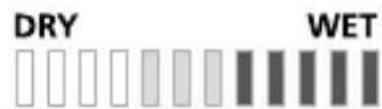
In addition to the measured value, the wet/dry indicator shows the moisture evaluation. This indicator is tuned by the material characteristics (A, B, C; 01, 02, 03, 04, 05,
06, 07, 08) stored in the measuring device. This evaluation is subdivided into 12 steps and it makes an evaluation of the measured material easier. The display is to be considered as a general indication and not a final evaluation.
13 Index mode
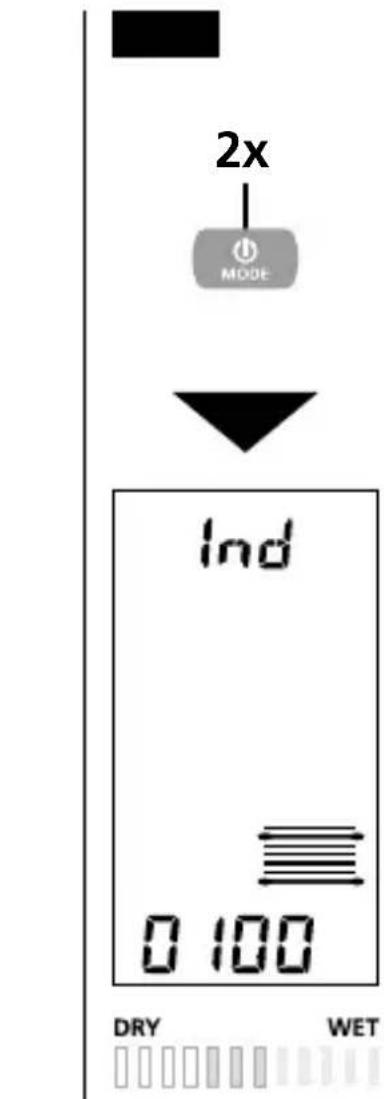
Index mode is used to rapidly locate moisture with comparative measurements, without a direct output of material moisture in %. The output value (0 through 1000) is an indexed value that increases as material moisture becomes greater. Measurements made in index mode are independent of material type and particularly useful with materials for which no characteristics are stored. When comparative measurements reveal strongly deviating values, the course of moisture in the material can be localized quickly. In addition to those materials with characteristics stored in the measuring device, index mode makes it possible to measure other building materials (09 ... 31), refer to the table at the right (See index mode conversion tables). The displayed value (0 through 1000) serves as the basis.
Activate index mode in your measuring device (Step 13b). In order to determine the degree of moisture in a type of building material, first find the material number for the building material to be measured. Following this, read the measured value from the scale displayed on the measuring device for index mode. Now determine the value for the corresponding material number in the table. If this value has a dark grey background, the material is to be classified as "wet", values without coloured background are considered to be "dry".
14 Programmable wet/dry indicator in index mode
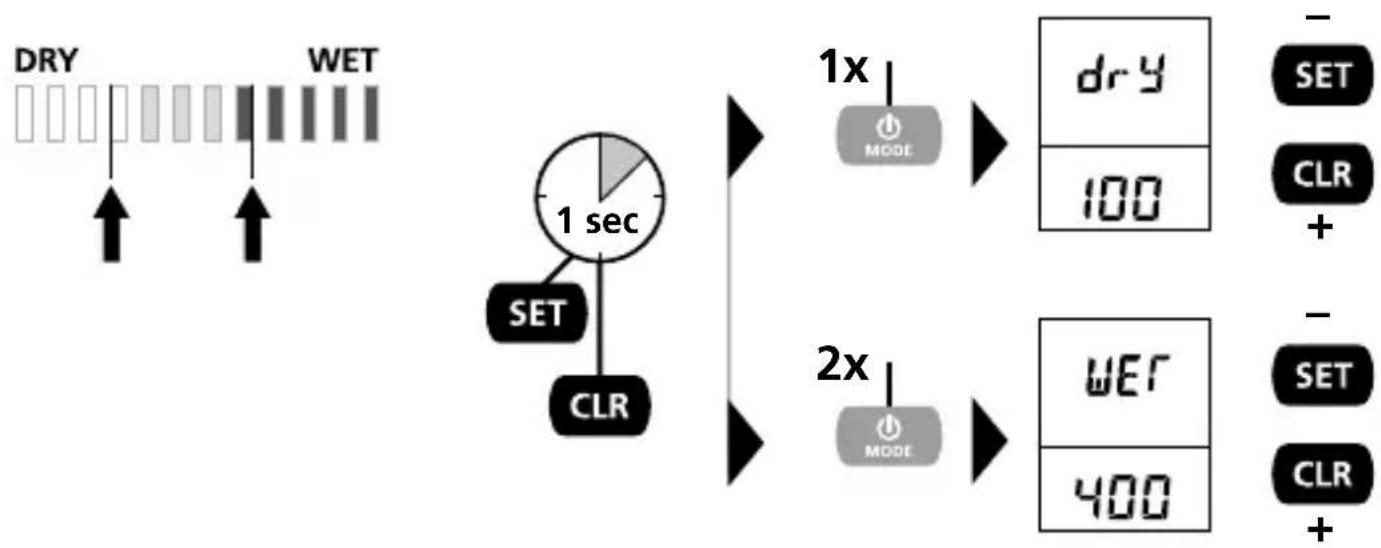
The wet/dry indicator can be programmed to the already predefined values especially for index mode. This produces a new setting for the „wet“ and „dry“ threshold value (see arrows).
15 Index mode conversion tables
| Index mode, building materials | ||
| 09 Cement screed with bitumen additive | 17 Stone-wood, xylolite | 25 Limestone |
| 18 Polystyrene, Styrofoam | 26 MDF | |
| 10 Cement screed with plastic additive | 19 Soft fibre board wood, bitumen | 27 Glued-laminated timber, spruce, Picea abies Karst. |
| 11ARDURAPID cement screed | 20 Cement-bonded particle board | 28 Wood chip, softwood with probe |
| 12 Elastizell screed | 21 Clay bricks, bricks | 29 Hay, flax |
| 13 Plaster screed | 22 Aerated concrete, Ytong PPW4, bulk density 0.55 | 30 Straw, grain |
| 14 Wood cement screed | 31 Permoxx board | |
| 15 Lime mortar | 23 Asbestos cement board | |
| 16 Cement mortar ZM 1:3 | 24 Gypsum | |
Continued on next page
Material moisture conversion table
OL = Outside measuring range
16 Wood moisture/ temperature compensation
The relative material moisture of wood is dependent on temperature. The device automatically compensates for different wood temperatures by measuring the ambient temperature and using it for the internal calculation.
To increase measuring accuracy, however, the measuring device also offers an option for setting the temperature manually (see Step 16b). This value is not stored and must be set again each time the device is switched on.
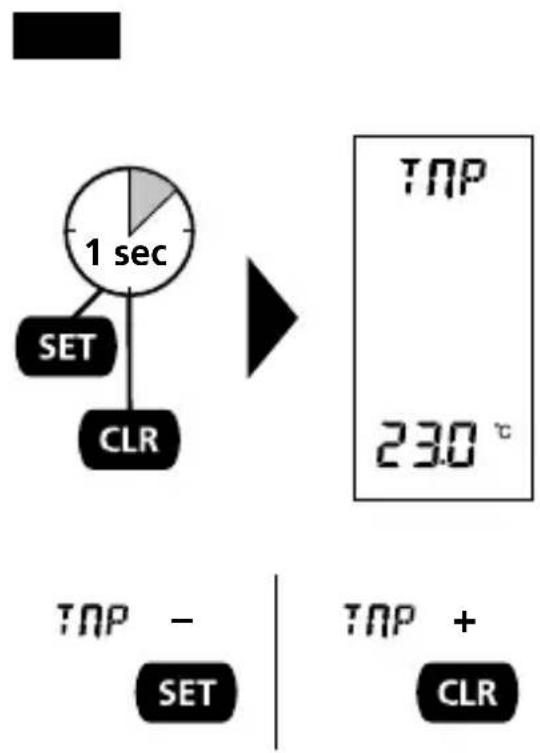
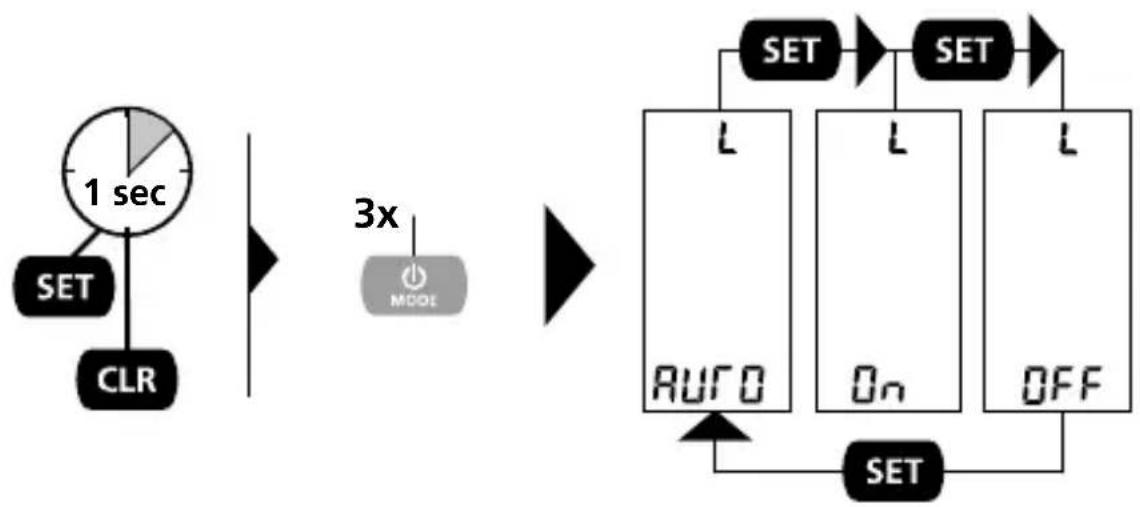
17 LCD backlight
LED display illumination can be varied with 3 different settings:
AUTO: Display illumination switches off during periods of inactivity and switches on again automatically for measurement procedures.
ON: Display illumination remains on permanently.
OFF: Display illumination remains off permanently.
The setting is stored and remains in effect until it is changed manually.
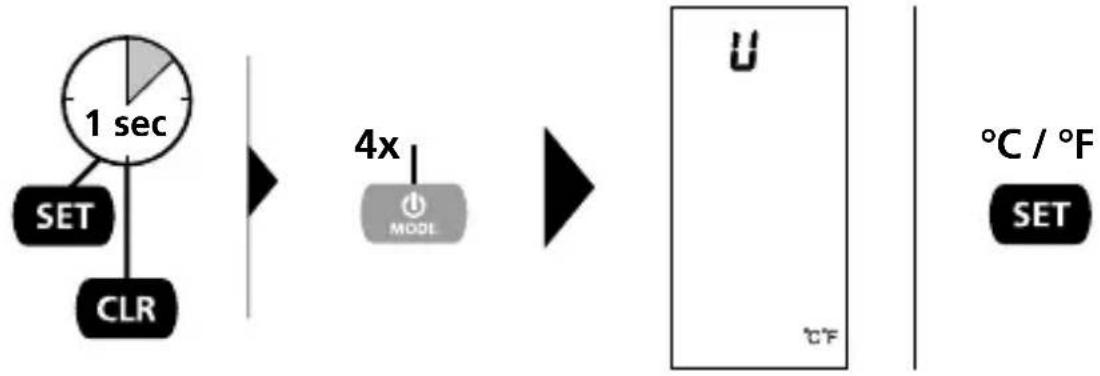
18 Temperature units of measure setting
The units of measure for ambient temperature and material compensation can be set to either ^ C or ^ F . The setting is stored and remains in effect until it is changed manually.
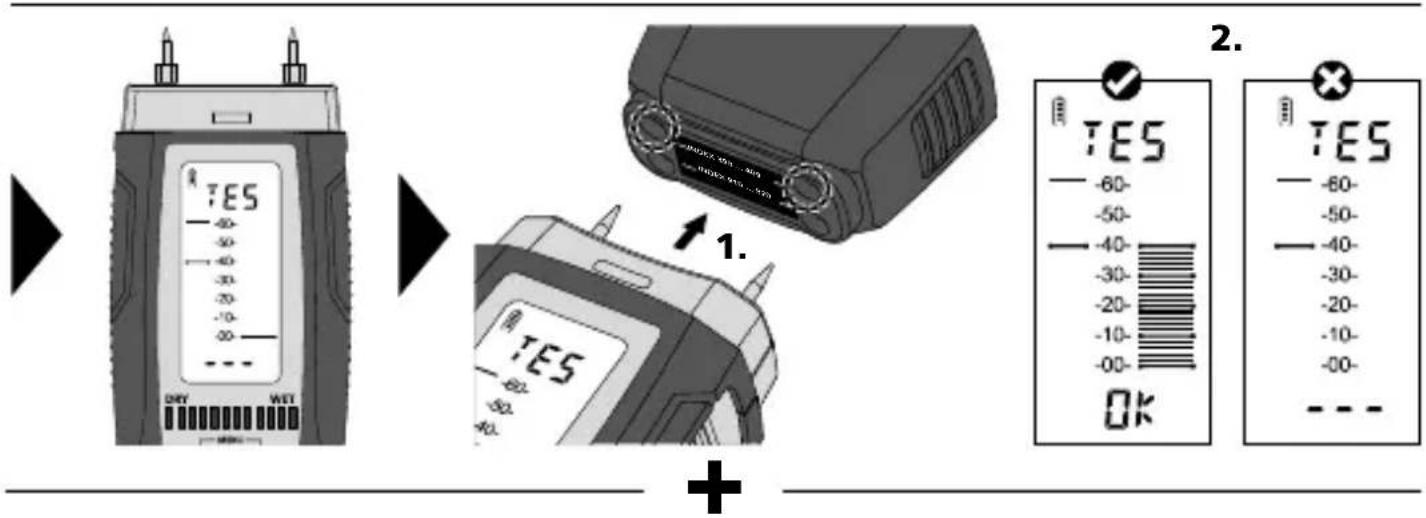
19 Self-test function

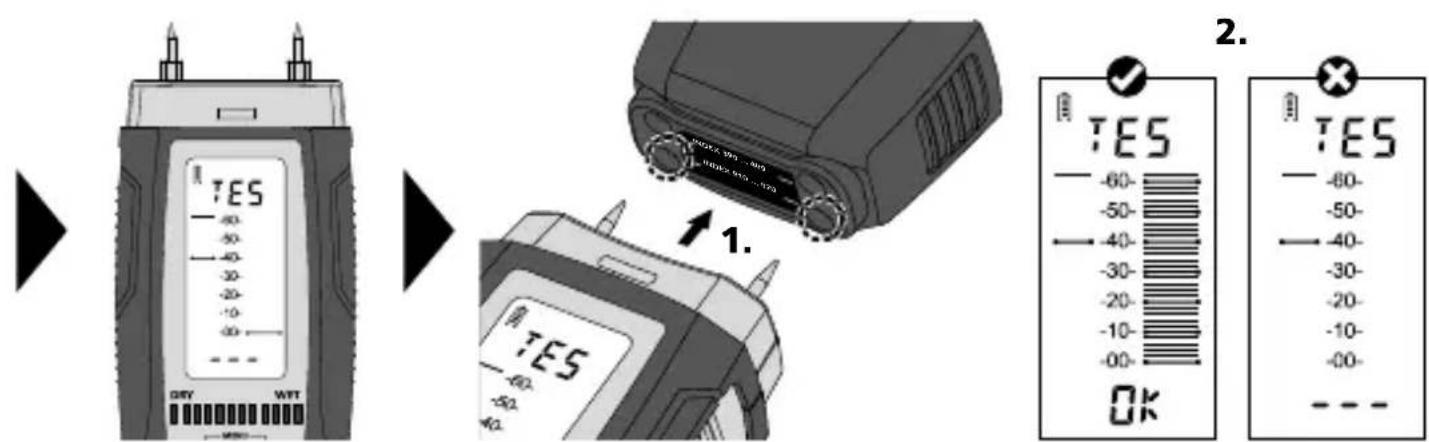
Data transfer
This device has digital connectivity which allows wireless data transfer to mobile devices such as smart phones or tablets with a wireless interface.
The system prerequisites for a digital connection are specified at
https://www.laserliner.com/info?an=damacopl
This device can generate a wireless connection to devices which are compatible with the wireless standard IEEE 802.15.4. The wireless standard IEEE 802.15.4 is a transfer protocol for Wireless Personal Area Networks (WPAN).
The range is set to a maximum distance of 10m from the terminal device and greatly depends on the ambient conditions such as the thickness and composition of walls, sources of interference as well as the transmit / receive properties of the terminal device.
The digital connection is activated as soon as the device is switched on as the wireless system is designed to use very little electricity.
A mobile device can link up to the active measuring device via an app.
Application (app)
An app is required to use the digital connection You can download the app from the corresponding stores for the specific type of terminal device:




Make sure that the wireless interface of the mobile device is activated.
After starting the app and activating the digital connection, a connection can be set up between a mobile device and the measuring device. If the app detects several active measuring devices, select the matching device.
This measuring device can be connected automatically the next time it is switched on.
!
Functional and operational safety is only warranted when the instrument is operated within the specified climatic conditions and is only used for those purposes for which it is designed. The assessment of measurement results and actions taken as a consequence lie in the user's scope of responsibility, depending on the given type of work.
| Technical data Technical revisions reserved. 23W17 | |
| Measured variable | Moisture content of material (resistive) Ambient temperature |
| Mode | 3 wood groups, 8 building materials, Index mode, Test mode |
| Accuracy (absolute) | Wood: ± 1% (5% ... 30%), ± 2% (<5% and >30%), Building materials: ± 0,15% |
| Auto power off after 3 minutes | 0°C ... 40°C, max. humidity 85% rH, no condensation, max. working altitude 2000 m above sea level |
| Storage conditions -10°C ... | 60°C, max. humidity 85% rH |
| Radio module operating data | IEEE 802.15.4. LE ≥ 4.x (Digital Connection) interface; Frequency band: ISM band 2400-2483.5 MHz, 40 channels; Transmit power: max. 10 mW; Bandwidth: 2 MHz; Bit rate: 1 Mbit/s; Modulation: GFSK / FHSS |
| Power supply 4 x 1,5V LR03 (AAA) | |
| Dimensions (W x H x D) 58 mm x 155 mm x 38 mm | |
| Weight 186 g (incl. batteries) | |
EU and UK directives and disposal
This device complies with all necessary standards for the free movement of goods within the EU and the UK.
This product, including accessories and packaging, is an electrical appliance that must be recycled in an environmentally appropriate manner in accordance with European and UK directives on waste electrical and electronic equipment, batteries and packaging, in order to recover valuable raw materials.
Further safety and supplementary notices at:
https://www.laserliner.com/info?an=damacopl
Laserliner
!
m = 311
m = 311
m = 311
- Intended use
- General safety instructions
- Safety instructions
- Information on maintenance and care
- Calibration
- Inserting the battery
- BaON OFF
- Select building material (01, 02, 03, 04, 05, 06, 07, 08)
- Measuring material moisture
- Wood
- Mineral building materials
- Material characteristics
- Wood tables
- Table of building materials
- Wet/dry indicator
- Index mode
- Programmable wet/dry indicator in index mode
- Index mode conversion tables
- Wood moisture/ temperature compensation
- LCD backlight
- Temperature units of measure setting
- Self-test function
- Data transfer
- https://www.laserliner.com/info?an=damacopl
- Application (app)
- EU and UK directives and disposal
- Laserliner
Brand : Laserliner
Model : DampMaster Compact Plus
Category : Measuring equipment