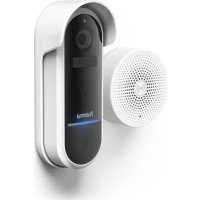
176617 - Doorbells HAMA - Free user manual and instructions
Find the device manual for free 176617 HAMA in PDF.



| Product Type | WiFi doorbell with camera and chime |
| Brand | Hama |
| Model | 176617 |
| Doorbell power supply | Rechargeable battery (USB 5V 1A) or mains 12-24V AC |
| Chime power supply | USB 5V 1A |
| Protection rating | IP65 (resistant to water jets) |
| Connectivity | WiFi 2.4 GHz and 433.92 MHz radio for the chime |
| Main functions | Doorbell, camera, intercom, motion detection (PIR sensor), SD card recording |
| App | Hama Smart Home (Solution) – iOS and Android |
| Package contents | 1 WiFi doorbell, 1 chime, 1 power adapter, 1 mounting kit (needle, screwdriver), 1 quick guide |
| Care and cleaning | Clean with a slightly damp cloth, without harsh detergents; disconnect before cleaning |
| Safety | Indoor/outdoor use IP65; avoid shocks and moisture; observe safety distances (20 cm for HF) |
| Warranty | Manufacturer's warranty (see terms) |
| Repairability | Do not open or repair yourself; contact a qualified technician |
Frequently Asked Questions - 176617 HAMA
User questions about 176617 HAMA
0 question about this device. Answer the ones you know or ask your own.
Ask a new question about this device
Download the instructions for your Doorbells in PDF format for free! Find your manual 176617 - HAMA and take your electronic device back in hand. On this page are published all the documents necessary for the use of your device. 176617 by HAMA.
USER MANUAL 176617 HAMA
OperatingInstructions
Bedienungsanleitung
Moded'emploi
Instruccionesdeuso
Gebruiksaanwijzing
Istruzioniperl'uso
Instrukcjaobsługi
Használatiútmutató
Manualdeutilizare
Návodkpoužití
Návodnapoužitie
Manualdeinstruções
Bruksanvisning
LinktoApp

natural_image
Technical line drawing of a mechanical device with internal components and directional arrows (no text or symbols)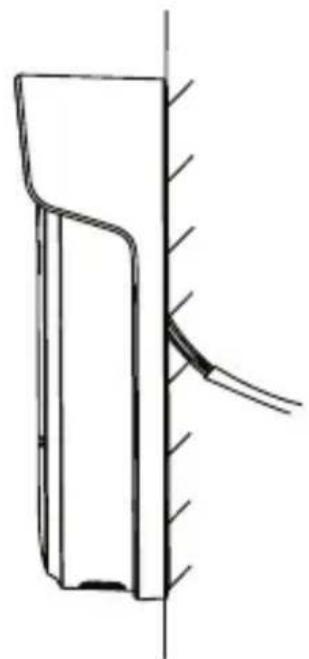
natural_image
Pure technical line drawing of a mechanical component or bracket without any text, numbers, or symbolsB
C
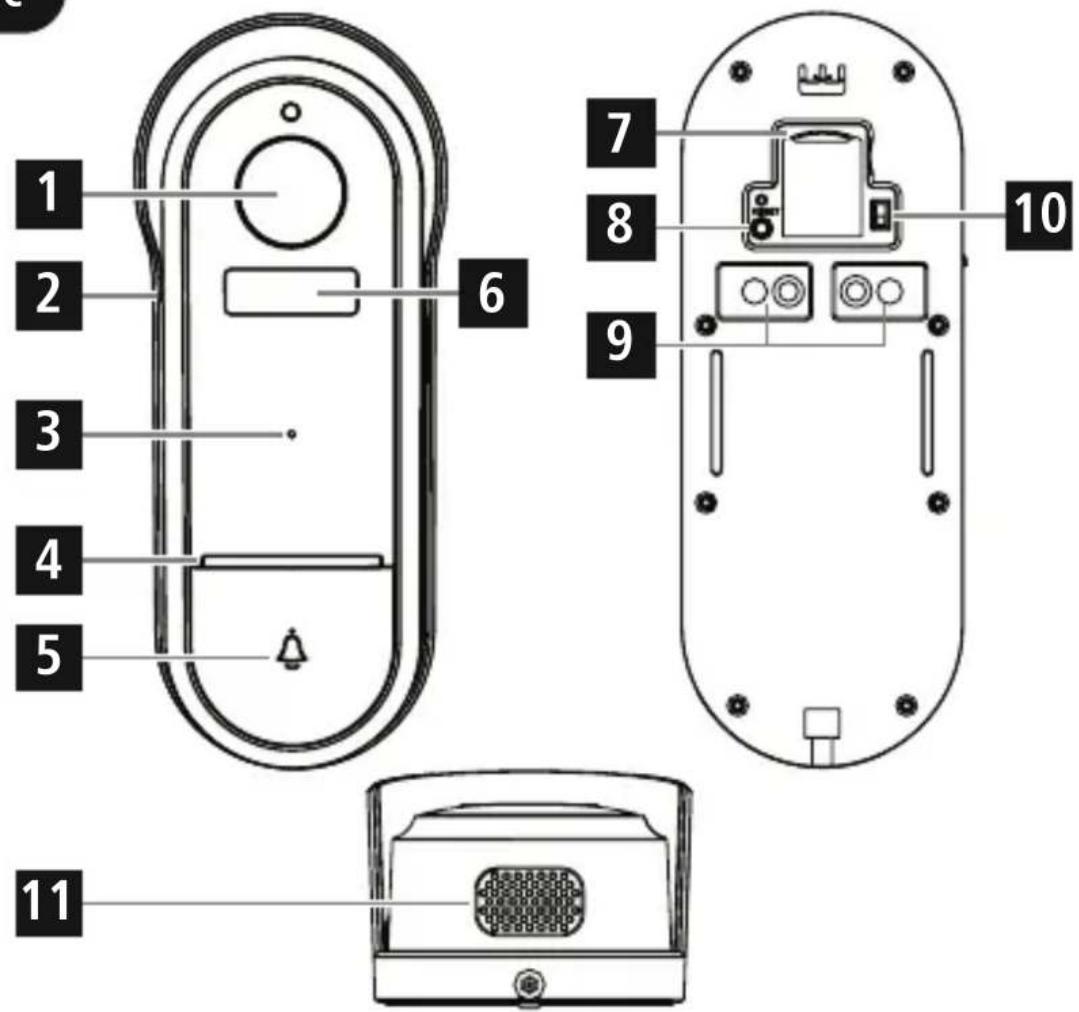
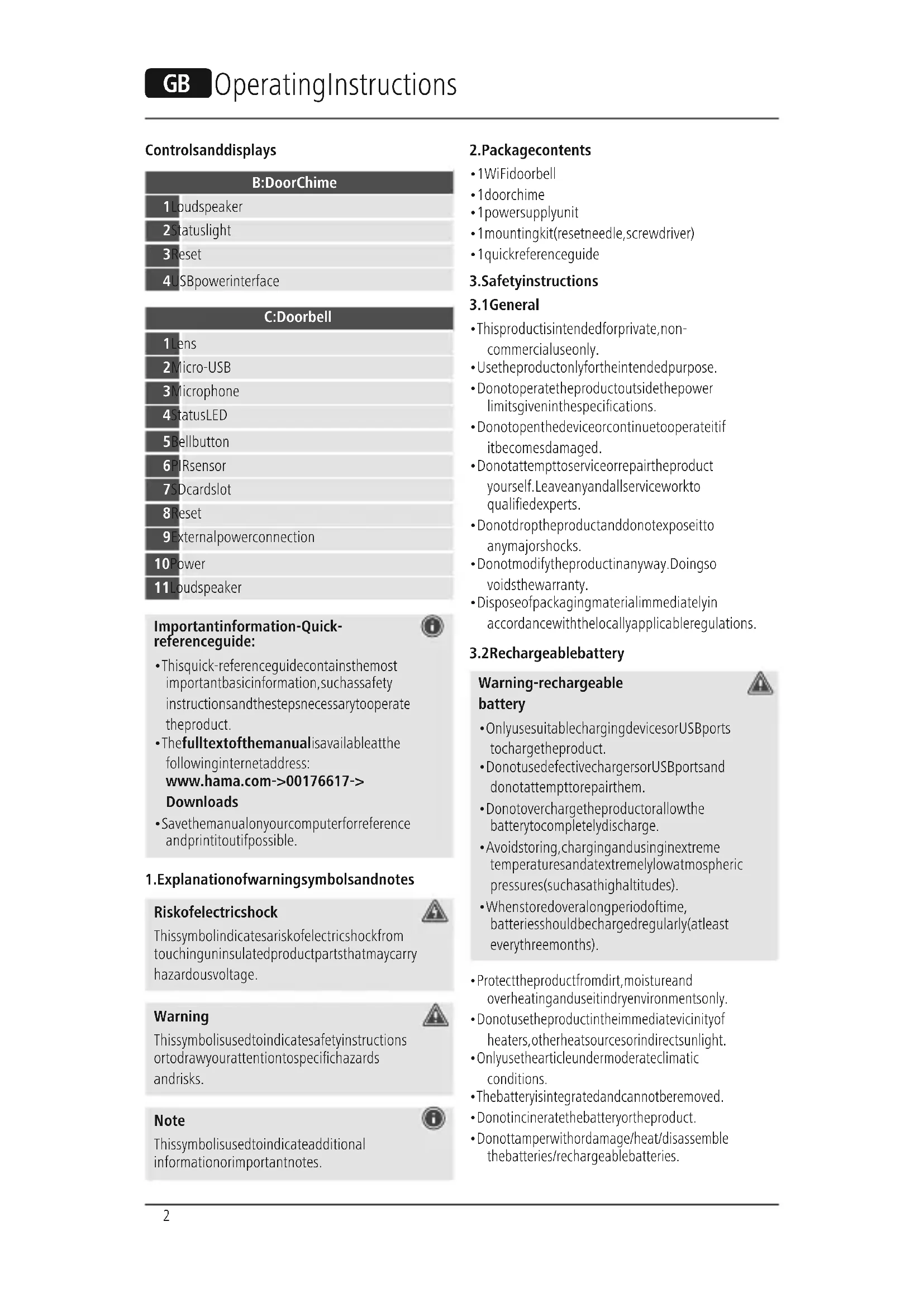
Controlsanddisplays
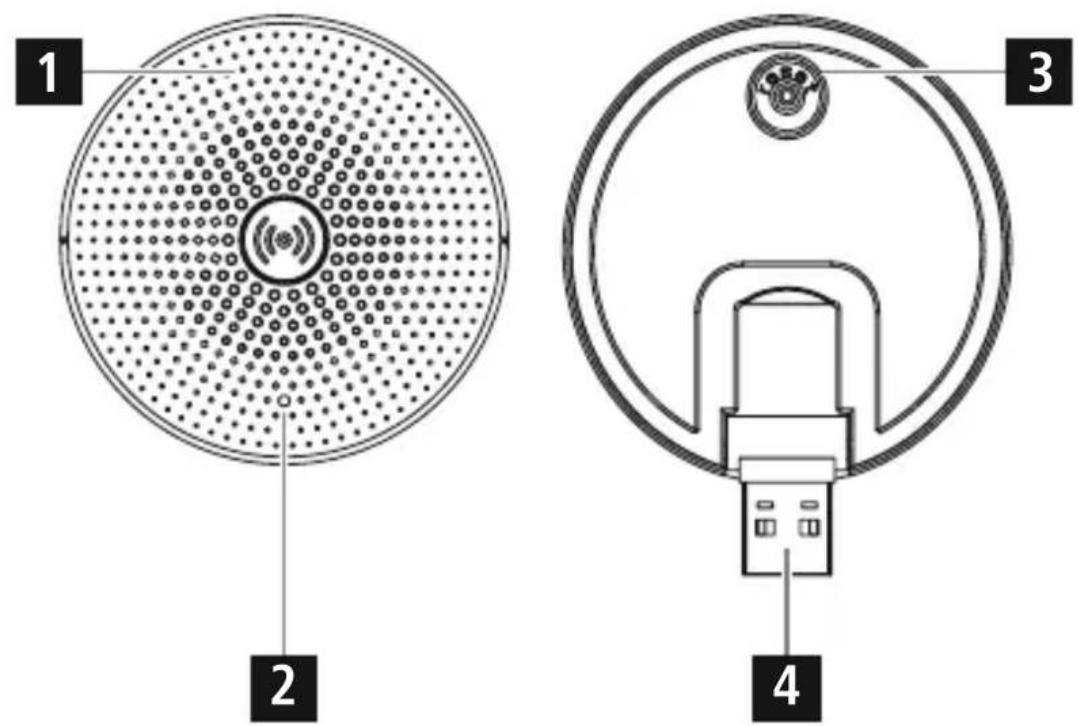
B:DoorChime
| 1 Loudspeaker |
| 2 Statuslight |
| 3 Reset |
| 4 USBpowerinterface |
C:Doorbell
| 1 Lens |
| 2 Micro-USB |
| 3 Microphone |
| 4 statusLED |
| 5 Bellbutton |
| 6 PIRsensor |
| 7 SDcardslot |
| 8 Reset |
| 9 Externalpowerconnection |
| 10 Power |
| 11 Loudspeaker |
Importantinformation-Quick-referenceguide:

- This quick-reference guide contains the most important basic information, such as safety instructions and the steps necessary to operate the product.
- Thefulltextofthemanualisavailableatthe followinginternetaddress: www.hama.com->00176617-> Downloads
- Savethemanualonyourcomputerforreference andprintitoutifpossible.
1. Explanationofwarningsymbolsandnotes
Riskofelectricshock

Thissymbolindicatesariskofelectricshockfrom touchinguninsulatedproductpartsthatmaycarry hazardousvoltage.
Warning

This symbol is used to indicate safety instructions ortodraw your attention to specific hazards and risks.
Note

This symbol is used to indicate additional information or important notes.
2.Packagecontents
• 1WiFidoorbell
• 1doorchime
- 1powersupplyunit
- 1mountingkit(resetneedle,screwdriver)
• 1 quickreferenceguide
3. Safetyinstructions
3.1 General
- Thisproductisintendedforprivate,non-commercialuseonly.
• Usetheproductonlyfortheintendedpurpose. - Donotoperatetheproductoutsidethepower limitsgiveninthespecifications.
- Donotopenthedeviceorcontinuetooperateitif itbecomesdamaged.
- Donotattempttoserviceorrepairtheproduct yourself.Leaveanyandallserviceworkto qualifiedexperts.
- Donotdroptheproductanddonotexposeitto anymajorshocks.
- Donotmodifytheproductinanyway.Doingso voidsthewarranty.
- Disposeofpackagingmaterialimmediatelyin accordancewiththelocallyapplicableregulations.
3.2 Rechargeable battery
Warning-rechargeable battery

- OnlyusesuitablechargingdevicesorUSBports tochargetheproduct.
- DonotusedefectivechargersorUSBportsand donotattempttorepairthem.
- Donotoverchargetheproductorallowthe batterytocompletelydischarge.
- Avoidstoring, charging and using in extreme temperatures and at extremely low atmospheric pressures (such as high altitudes).
-
Whenstoredoveralongperiodoftime, batteriesshouldbechargedregularly(atleast everythreemonths).
-
Protect the product from dirt, moisture and overheating and use it indry environments only.
- Donotusetheproductintheimmediatevicinityof heaters,otherheatsourcesorindirectsunlight.
- Onlyusethearticleundermoderateclimatic conditions.
• The battery is integrated and cannot be removed. - Donotincineratethebatteryortheproduct.
- Donottamperwithordamage/heat/disassemble thebatteries/rechargeablebatteries.
3.3 Powersupplyunit
Riskofelectricshock

- Donotopenthedeviceorcontinuetooperateit ifitbecomesdamaged.
- Donotusetheproductifthe ACadapter, theadaptercableorthemains cablearedamaged.
- Donotattempttoserviceorrepairtheproduct yourself.Leaveanyandallserviceworkto qualifiedexperts.
Warning
- Onlyoperatetheproductfromanapproved socketthatisconnectedtothepublicpower supply. Thesocketmustbeinstalledclosetothe productandmustbeeasilyaccessible.
- Disconnect the product from the powersupply using the On/Off switch—if this is not available, unplug the power cord from the socket.
- Ifusingamulti-socketpowerstrip, make surethatthetotalpowerconsumptionofall connecteddevicesdoesnotexceedthesocket strip'smaximumthroughputrating.
- If you will not be using the product for a prolonged period, disconnect from mains power.
- Protect the product from dirt, moisture and overheating and use it indry room only.
• The product is intended only for use inside buildings.
- Donotusetheproductinadampenvironment andavoidsplashingwater.
- Donotbendorcrushthecable.
3.4Specificinformationabouttheproduct
Note-Waterproofproperties

- With IP65, the door bell is sufficiently protected against water and can also be used in their air. IP65 offers protection against water jets from any angle. Be aware that, on contact with water, all ports must be sealed.
- CarefullysealtheUSBportafterthecharging processtoensurethattheproductiswaterproof.
- Donotmounttheproductabovelocationswhere personsmightsitorstand.
- Beforemounting, check that the wally you have chosen is suitable for the weight to be mounted. Als o makes sure that there are no electric, water, gas or other lines running through the wall at the mountingsite.
- Payattentiontotheapplicabledataprotection regulationsbeforeinstallingandusingthe product.
- Respectthepersonalandpropertyrightsofothers. Donotmakerecordingsofotherpeoplewith thecamera.
- Observetherighttoone'sownimageandspoken wordwhenrecording.
- If you are unsure about connecting the product to themainssupply, please contact a qualified electrician.
4.Technicaldata
4.1 Technicaldata-doorbell
| PowersupplyRechargeablebattery charging(USB) | 5V1A= |
| PowersupplyMainsoperation | AC12V-24V |
| Frequencyband2.4GHz | |
| Maximumradio-frequencypower transmitted | 100mW |
| Frequencyband433.92MHz | |
| Maximumradio-frequencypower transmitted | 10mW |
Specificationsaccordingto Regulation(EU)2019/1782

| Brandname, commercialregister number,address | Hama,HRA12159, DresdnerStr.9, 86653Monheim, Germany |
| ModelidentifierGTA92-0501000EU | |
| Inputvoltage100-240V | |
| InputAC frequency | 50/60Hz |
| Outputvoltage/output current/outputpower | 5.0VDC/1.0A /5.0W |
| Averageefficiency duringoperation | 73.6% |
| Efficiencyatlowload (10%) | 63.9% |
| Powerconsumptionat zeroload | 0.09W |
4.2 Technical data-doorchime
| Powersupply5V1A | == |
| Frequencyband433.92MHz | |
5. Installation
5.1 Batteryoperation
- Mountthebracketinasuitableplace.
- ConnecttheUSBchargingcableincludedtothe chargingportonthedoorbellandasuitablemains socket.Fullychargethedoorbell.
- Placethedoorbellinthebracketandsecureit withthescrew.
5.2 Mainsoperation(optional)
- FeedtheACpowersupplycables(AC12V-24V) throughtherectangularopeninginthebracket andmountitinasuitableplace.
- Connectthecablesasshown(seewiring diagramA).
- Placethedoorbellinthebracketandsecureit withthescrew.
6.Start-upandoperation
Here'showeasyitis: Downloadtheapp
- DownloadtheHamaSmartHome(Solution) APPfromtheAppleAppStoreorGooglePlay Store.
• OpentheHamaSmartHome(Solution)APP - The first time you set the app, you need to register and create an new account. If you already have an account, login with your access details.
• Followtheinstructionsintheapp.
Note

Adetaileddescriptionofthe
HamaSmartHome(Solution)App
anditsfullscopeoffunctionscanbefoundinour AppGuideat:
www.hama.com ArticleNumber Downloads AppOperatingInstructions
Doorchime
- PresstheResetbutton(3)toconnectthedoorchimetothedoorbell.
• TheLED(2)onthedoorchimestartstoflash. - Thenpressthebellbutton(5)onthedoorbell.
- Thedoorchimeisnowconnectedtothedoorbell andtheLED(2)lightsuppermanently.
Adjustingthevolumeorringtone
- NavigateintheAPPtothe"Ringsettings"tab.
- Setthedesiredvolumeanddesireddoorchime.
- PresstheResetbutton(3)onthedoorchime.
• TheLED(2)onthedoorchimestartstoflash. - Pressthebellbutton(5).
• Thesettingsaretransferred.
Note

Toensureringofthemobilephone, this must not besettosilent/vibrate.
Note: Pairingrestart

Firstremovetherubberprotectoronthebackof thedoorchime.NowpresstheResetbuttonwitha needleoranotherthinobjectuntilasignalsound isheard.AssoonastheLEDstartstoflashred, youcanstartafurtherpairingattempt.
7. Careandmaintenance
Note

Disconnect the product from themains before cleaning and during prolonged period so non-use.
- Onlycleanthisproductusingalint-free,slightly dampclothanddonotuseanyharshcleaners.
- Ensure that now waterisable to enter the product.
8.Warrantydisclaimer
HamaGmbH&CoKGassumesnoliability and providesnowarrantyfordamageresultingfrom improperinstallation/mounting,improperuseof theproductorfromfailuretoobservetheoperating instructionsand/orsafetynotes.
9.RFexposureinformation
This device complies with the EU requirements for limiting the exposure of the general public to electromagnetic fields by means of health protection. The device complies with RF specifications provided it is used 20 cm away from the body.
10. Declaration of conformity

HamaGmbH&CoKGherebydeclares thattheradioequipmenttype [00176617]isincompliancewith Directive2014/53/EU.Thefulltextof
theEUdeclarationofconformityisavailableatthe followingInternetaddress:
www.hama.com->00176617->Downloads.
AppHamaSmartHome(Solution)
Errorsandomissionsexcepted, and subjecttotechnical changes.
Ourgeneraltermsofdeliveryandpaymentareapplied.
- Controlsanddisplays
- Importantinformation-Quick-referenceguide:
- Explanationofwarningsymbolsandnotes
- Riskofelectricshock
- Warning
- Note
- 2.Packagecontents
- Safetyinstructions
- General
- Rechargeable battery
- Warning-rechargeable battery
- Powersupplyunit
- 3.4Specificinformationabouttheproduct
- Note-Waterproofproperties
- 4.Technicaldata
- Technicaldata-doorbell
- Installation
- Batteryoperation
- Mainsoperation(optional)
- 6.Start-upandoperation
- Here'showeasyitis: Downloadtheapp
- Doorchime
- Adjustingthevolumeorringtone
- Note: Pairingrestart
- Careandmaintenance
- 8.Warrantydisclaimer
- 9.RFexposureinformation
- Declaration of conformity
Brand : HAMA
Model : 176617
Category : Doorbells