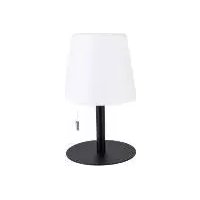
IAN 385908 - Lighting Livarno Lux - Free user manual and instructions
Find the device manual for free IAN 385908 Livarno Lux in PDF.



| Product type | Wireless outdoor table lamp |
| Brand | Livarno Lux |
| Model | IAN 385908 |
| Category | Luminaire |
| Power supply | Lithium-ion battery 1200 mAh (type 18650), 3.7 V |
| Charging | USB-C, 5 V, 1 A |
| Total LED power | Max. 2.8 W |
| Number of LEDs | 6 (3x RGB, 3x white) |
| Lighting modes | Fixed colors (red, green, blue, yellow, orange, pink, purple, white), auto change, candle effect |
| Brightness levels | 4 levels |
| Remote control | Infrared with CR2025 battery |
| Protection class | IP44 (except during charging) |
| Electrical protection class | III (very low safety voltage) |
| Usage | Indoor and outdoor (with precautions) |
| Warranty | 3 years |
| Maintenance | Clean with damp cloth and mild detergent |
| Safety | Do not cover, do not use if damaged, keep out of reach of children under 8 years |
| Spare parts | LEDs non-replaceable, integrated battery not user-replaceable |
| Remote battery | CR2025 (replaceable) |
Frequently Asked Questions - IAN 385908 Livarno Lux
User questions about IAN 385908 Livarno Lux
0 question about this device. Answer the ones you know or ask your own.
Ask a new question about this device
Download the instructions for your Lighting in PDF format for free! Find your manual IAN 385908 - Livarno Lux and take your electronic device back in hand. On this page are published all the documents necessary for the use of your device. IAN 385908 by Livarno Lux.
USER MANUAL IAN 385908 Livarno Lux
(free of charge, mobile networks
may vary / kowenhai, Mabihink
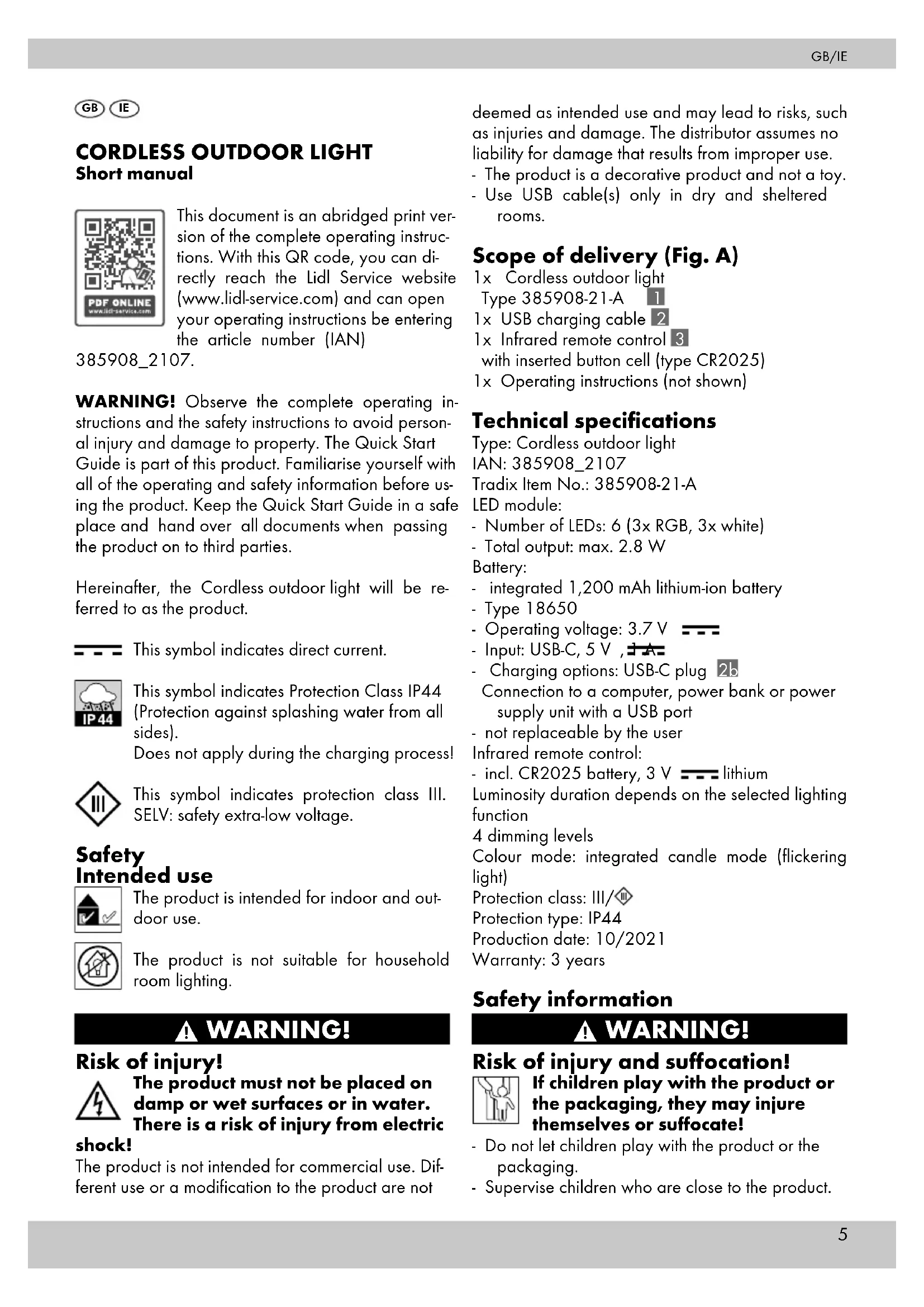
This document is an abridged print version of the complete operating instructions. With this QR code, you can directly reach the Lidl Service website (www.lidl-service.com) and can open your operating instructions be entering the article number (IAN)
385908_2107.
WARNING! Observe the complete operating instructions and the safety instructions to avoid personal injury and damage to property. The Quick Start Guide is part of this product. Familiarise yourself with all of the operating and safety information before using the product. Keep the Quick Start Guide in a safe place and hand over all documents when passing the product on to third parties.
Hereinafter, the Cordless outdoor light will be referred to as the product.

This symbol indicates direct current.

This symbol indicates Protection Class IP44 (Protection against splashing water from all sides).
Does not apply during the charging process!

This symbol indicates protection class III. SELV: safety extra-low voltage.
Safety Intended use

The product is intended for indoor and outdoor use.

The product is not suitable for household room lighting.
WARNING!
Risk of injury!

The product must not be placed on damp or wet surfaces or in water. There is a risk of injury from electric
shock!
The product is not intended for commercial use. Different use or a modification to the product are not
deemed as intended use and may lead to risks, such as injuries and damage. The distributor assumes no liability for damage that results from improper use.
- The product is a decorative product and not a toy.
- Use USB cable(s) only in dry and sheltered rooms.
Scope of delivery (Fig. A)
1x Cordless outdoor light Type 385908-21-A 1
1x USB charging cable 2
1x Infrared remote control 3
with inserted button cell (type CR2025)
1x Operating instructions (not shown)
Technical specifications
Type: Cordless outdoor light
IAN: 385908_2107
Tradix Item No.: 385908-21-A
LED module:
- Number of LEDs: 6 (3x RGB, 3x white)
- Total output: max. 2.8 W
Battery:
- integrated 1,200 mAh lithium-ion battery
- Type 18650
- Operating voltage: 3.7 V
- Input: USB-C, 5 V,
- Charging options: USB-C plug
Connection to a computer, power bank or power supply unit with a USB port
- not replaceable by the user Infrared remote control:
- incl. CR2025 battery, 3 V = lithium
Luminosity duration depends on the selected lighting function
4 dimming levels
Colour mode: integrated candle mode (flickering light)
Protection class: III/
Protection type: IP44
Production date: 10/2021
Warranty: 3 years
Safety information
WARNING!
Risk of injury and suffocation!

If children play with the product or the packaging, they may injure themselves or suffocate!
- Do not let children play with the product or the packaging.
- Supervise children who are close to the product.
- Keep the product and the packaging out of the reach of children.
WARNING!
Risk of injury!
Not suitable for children under the age of 8! There is a risk of injury! - Children from the age of 8, as well as people with impaired physical, sensory or mental capabilities or with a lack of experience and knowledge, must be supervised when using the product and/or be instructed regarding the safe use of the product and understand the resulting dangers. - Children are not allowed to play with the product. - Maintenance and/or cleaning of the product is not allowed to be performed by children.
Observe national regulations!
- Observe the applicable national requirements and regulations for the use and disposal of the product.
WARNING!
Risk of injury!
Do not use in an explosive environment! There is a risk of injury! - The product is not allowed to be used in an explosive (Ex) environment. The product is not approved for an environment, in which flammable liquids, gases or dust are present.
WARNING!
Risk of injury!
A defective product is not allowed to be used! There is a risk of injury!
- Do not use the product in the case of malfunctions, damage or defects.
- Significant danger can occur for the user in the case of improper repairs.
- If you find a defect in the product, have the product checked and repaired if necessary before putting it back into operation.
- The LEDs are not replaceable. If the LEDs are defective, the product must be disposed of.
WARNING!
Risk of injury!
The product is not allowed to be manipulated! There is a risk of injury from electric shock!
- The casing must not be opened and the product must not be manipulated/modified under any circumstances. Manipulations/modifications can cause danger to life from electric shock. Manipulations/modifications are prohibited for approval reasons (CE).
- The product must not be covered up during use.
WARNING!
Fatal danger!
Batteries must not be swallowed! There is a risk of fatal injuries! - Batteries may be fatal if swallowed, so this article and its batteries must be stored out of the reach of small children.
- Swallowing can lead to chemical burns, soft tissue perforations and death. Serious internal chemical burns can already occur within 2 hours of ingestion.
- If a battery has been swallowed, please consult a doctor without delay!
- Keep the batteries out of the reach of children.
WARNING!
Fire and explosion hazard!
- Never recharge non-rechargeable batteries, do not short-circuit and/or open them. This may result in overheating, risk of fire or bursting.
- Keep the product away from heat sources and direct sunlight, the batteries may explode if overheated. There is a risk of injury.
WARNING!
Risk of injury!
Do not touch leaked batteries with bare hands! There is a risk of injury! - Leaked or damaged batteries may cause chemical burns if they come into contact with skin. Do not touch leaked batteries with bare hands; therefore ensure that you wear appropriate protective gloves in this case!
- Insert the batteries into the designated battery compartment with the correct polarity.
- Do not use combinations of old and new batteries or rechargeable batteries.
- Store batteries in a dry and cool, not damp, place.
- Never throw batteries into fire.
- Do not short-circuit batteries.
- Disposable batteries also lose part of their energy during storage.
- Remove the batteries if the device is not in use.
- Discharged batteries must be immediately removed in order to avoid battery leakage and thus damage to the device.
- Empty batteries or used rechargeable batters must be disposed of properly.
- Store disposable batteries separately from discharged batteries, in order to avoid mix-ups.
Safety instructions regarding rechargeable batteries
WARNING!
Fire and explosion hazard!

- Keep the product away from heat sources and direct sunlight, the battery may explode if overheated. There is a risk of injury.
- Do not operate the product in its packaging! There is a risk of fire!
WARNING!
Risk of injury!

Do not touch leaked batteries with
bare hands! There is a risk of injury! - Leaked or damaged batteries may cause acid burns if they come into contact with skin. Do not touch leaked batteries with bare hands; therefore, ensure that you wear appropriate protective gloves in such a case!
NOTE!
- The product has a built-in rechargeable battery that cannot be replaced by the user. In order to avoid hazards, the battery may only be removed by the manufacturer or its service agent or by a similarly qualified individual.
CAUTION!
Danger of overheating!
Remove packaging prior to use.
Start-up
- Remove all packaging materials.
- Check whether all parts are available and undamaged.
If this is not the case, notify the specified service address.
Before start-up
Charging the battery (Fig. B)
CAUTION!
Risk of injury!
The product must not be charged in a damp environment. There is a risk of injury from electric shock!
- During charging, no IP44 protection exists with the connection between the product and USB charging cable 2. The product can only be charged in a dry environment.
The battery of the product must be charged fully with the supplied USB charging cable 2 before the first use.
Connect the product to a device with the appropriate technical data (e.g. power supply unit with USB port) using the USB charging cable 2.
The product can only be connected to a control device with a SELV output and a maximum working peak output voltage (Uout) of 5 V.
- Open the protective cap 4 on the underside of the product, see Fig. B.
- Insert the USB-C plug 2b of the USB charging cable 2 into the socket 5 of the product.
- Insert the USB plug 2c into the charging device.
NOTE!
During the charging process, the charging lamp lights up red. When the battery is 100 % charged, the charging lamp lights up green.
NOTE!
The battery is equipped with overcharging protection.
NOTE!
The charging lamp 6 is installed in the product. It only lights up red through the material.
- Disconnect the product from the charging device.
- Close the protective cap 4 on the underside of the product.
NOTE!
Make sure that the protective cap.4 is closed tightly. This is the only way to ensure protection from splashing water.
Operation on the product (Fig. C1)
Switching the product on/off
To switch on/off press and hold the COLOR ON/
OFF button 7 for approx. 2 seconds.
Colour Modes
When the product is switched on, you can use the COLOR ON/OFF button 7 to switch through the individual colour modes by pressing 1x at a time as follows:
- red, green, blue, yellow, orange, pink, purple, white
Operation with the infrared remote control
Activate infrared remote control (Fig. C2)
The infrared remote control battery 3 is protected against discharging with a film (c) when delivered. Pull it out as shown before using it for the first time. The infrared remote control 3 is now ready for use.
Switching options with the infrared remote control (Fig. C3)
ON = switch product on
OFF = switch product off
PLAY/PAUSE ⬤ = switch on/pause automatic colour change mode (pause stays in the current colour) COLOR ⬤ = colour selection (sequence (press 1x each): red, green, blue, yellow, orange, pink, purple, white)
BRIGHT± = brightness levels (4) of the individual colours
CANDLE Ⓞ - flickering effect (similar to a burning candle)
WHITE ⚙ – change the speed of the colour change in the automatic colour change mode
WHITE = white light
WARNING!
Due to the extremely fast speed of the light change, sight impairments could occur under certain circumstances with children or people who have a disorder (e.g. due to psychological disorders).
Setting up the product
- Stand the product up in an appropriate place.
Hanging up the product (Fig. E)
- Hong the product on an available hook or similar.
NOTE!
Make sure that the place is suitable.
- Make sure that the product is safeguarded from falling down.
- Make sure that there is sufficient free space around the product, in case the product starts to swing. It could hit another object and cause damage. There is a risk of material damage.
Replacing the infrared remote control battery (Fig. D)
If your infrared remote control 3 stops working, it may be that the battery is discharged and needs to be replaced.
To replace the infrared remote control 3 battery, proceed as follows:
-
Push the battery compartment lock inward as shown.
-
Pull out the battery compartment as shown, and remove the depleted battery.
-
Insert a new battery into the battery compartment as shown.
NOTE!
Only use type CR2025 batteries. Make sure that the polarity is correct when inserting a new battery. (For information on how to dispose of used batteries, see Chapter "Disposal".)
- Push the battery compartment back into the infrared remote control 3 until it clicks into place.
Your infrared remote control 3 is now ready for use again.
Storage
NOTE!
If you do not intend to use the product in the winter, we recommend storing it. This way, the service life of the installed rechargeable battery and battery will be extended.
-
Clean the product as described under "Cleaning and care instructions".
-
Remove the battery from the infrared remote control.
-
If available, wrap the product in bubble wrap or something similar.
-
Store the product in a dry, warm place that is protected from UV light.
-
Store the infrared remote control with the removed battery in a place that is not accessible for children.
Cleaning and care instructions
CAUTION!
Risk of injury!
Before cleaning, you must disconnect the USB charging cable 2 from the charging device (e.g. power
supply unit) and the product and switch off the product. There is a risk of electric shock!
- only clean with a damp cloth
- only use a mild detergent
- do not use any strong detergents and/or chemicals
- do not use sharp-edged tools such as spatulas or similar, they can damage the surface
Disposal
Disposal of the packaging
The packaging and operating instructions are made of 100 % environmentally friendly materials, which you may dispose of at local recycling centres.
Disposal of the product
The product may not be disposed of with normal household waste. Please find out about disposal options for the product from your local authority or town administration.
Disposal of the battery / rechargeable battery
- Defective or used rechargeable batteries have to be recycled in accordance with Directive 2006/66/EC and its amendments.
- Batteries and disposable batteries are not permitted to be disposed of with household waste. They contain harmful heavy metals. Marking: Pb (- lead), Hg (- mercury), Cd (- cadmium). You are legally obligated to return used batteries and rechargeable batteries. After use, you can either return batteries to our point of sale or in the direct vicinity (e.g. with a retailer or in municipal collection centres) free of charge. Batteries and rechargeable batteries are marked with a crossed-out waste bin.
- Rechargeable batteries must only be disposed of when discharged. Discharge the battery by leaving the product switched on until it no longer lights up.

- invoer: USB-C, 5 V = -1 A
Product ophangen (afb. E)


- SAFETY INTENDED USE
- WARNING
- RISK OF INJURY
- SHOCK
- SCOPE OF DELIVERY (FIG. A)
- TECHNICAL SPECIFICATIONS
- SAFETY INFORMATION
- RISK OF INJURY AND SUFFOCATION
- OBSERVE NATIONAL REGULATIONS
- FATAL DANGER
- FIRE AND EXPLOSION HAZARD
- SAFETY INSTRUCTIONS REGARDING RECHARGEABLE BATTERIES
- DO NOT TOUCH LEAKED BATTERIES WITH
- NOTE
- CAUTION
- DANGER OF OVERHEATING
- START-UP
- BEFORE START-UP
- CHARGING THE BATTERY (FIG. B)
- OPERATION ON THE PRODUCT (FIG. C1)
- SWITCHING THE PRODUCT ON/OFF
- COLOUR MODES
- OPERATION WITH THE INFRARED REMOTE CONTROL
- ACTIVATE INFRARED REMOTE CONTROL (FIG. C2)
- SWITCHING OPTIONS WITH THE INFRARED REMOTE CONTROL (FIG. C3)
- SETTING UP THE PRODUCT
- HANGING UP THE PRODUCT (FIG. E)
- REPLACING THE INFRARED REMOTE CONTROL BATTERY (FIG. D)
- STORAGE
- CLEANING AND CARE INSTRUCTIONS
- DISPOSAL
- DISPOSAL OF THE PACKAGING
- DISPOSAL OF THE PRODUCT
- DISPOSAL OF THE BATTERY / RECHARGEABLE BATTERY
- PRODUCT OPHANGEN (AFB. E)
Brand : Livarno Lux
Model : IAN 385908
Category : Lighting