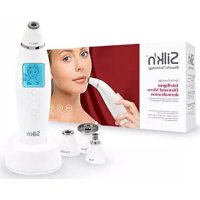
ReVit Essential H4201 - Skin care device SILKN - Free user manual and instructions
Find the device manual for free ReVit Essential H4201 SILKN in PDF.


| Product type | Skin care device (microdermabrasion peeling and vacuum stimulation) |
| Brand | SILKN |
| Model | ReVit Essential H4201 |
| Technology | Microdermabrasion by vacuum suction |
| Weight | 110 g |
| Power supply | 12 V DC, 0.2 A; power adapter 100-240 V~, 50/60 Hz, output 12 V, 0.5 A |
| Included tips | 2 (fine and coarse) |
| Included filters | 31 (1 pre-installed) |
| Rubber caps | 4 (1 pre-installed) |
| Suction modes | Low and high |
| Treatment areas | Face, neck, hands |
| Recommended usage frequency | Maximum 2 times per week |
| Cleaning | Tips washable with soapy water; filter can be brushed |
| Tip replacement | Every 6 months or if damaged |
| Warranty | 2 years |
| Protection class (main unit) | III (very low voltage) |
| Protection class (power adapter) | II (double insulation) |
| Protection type (main unit) | IPX0 (not protected against water) |
| Protection type (power adapter) | IP20 (protected against objects >12 mm) |
| Operating temperature | 10°C to 35°C |
| Operating humidity | 30% to 75% RH |
Frequently Asked Questions - ReVit Essential H4201 SILKN
User questions about ReVit Essential H4201 SILKN
0 question about this device. Answer the ones you know or ask your own.
Ask a new question about this device
Download the instructions for your Skin care device in PDF format for free! Find your manual ReVit Essential H4201 - SILKN and take your electronic device back in hand. On this page are published all the documents necessary for the use of your device. ReVit Essential H4201 by SILKN.
USER MANUAL ReVit Essential H4201 SILKN
Beautiful Technology
REVIT ESSENTIAL
H4201
natural_image
White hair dryer with a black label, no visible text or symbols on the device itself
text_image
hansc control User-friendly Manual ID: #05007EN USER MANUAL
text_image
Diagram of a hairdryer with numbered parts and labeled parts in ChineseCopyright 2021 © Homeskinovations Ltd. All rights reserved.
Legal notice
Home Skinovations Ltd. reserves the right to make changes to its products or specifications to improve performance, reliability, or manufacturability. Information furnished by Home Skinovations Ltd. is believed to be accurate and reliable at the time of publication. However, Home Skinovations Ltd. assumes no responsibility for its use. No license is granted by its implication or otherwise under any patent or patent rights of Home Skinovations Ltd.
No part of this document may be reproduced or transmitted in any form or by any means, electronic or mechanical, for any purpose, without the express written permission of Home Skinovations Ltd. Data is subject to change without notification.
Home Skinovations Ltd. has patents and pending patent applications, trademarks, copyrights, or other intellectual property rights covering subject matter in this document. The furnishing of this document does not give you any license to these patents, trademarks, copyrights, or other intellectual property rights except as expressly provided in any written agreement from Home Skinovations Ltd. Specifications are subject to change without notice.
Silk'n and the Silk'n logo are registered trademarks of Home Skinovations Ltd.
Invention Works B.V. Donk IB, 2991 LE Barendrecht, The Netherlands
www.silkn.eu – info@silkn.eu
Table of contents
EN
I Package contents/device parts ____ 5
2 General information 5
2.1 Reading and storing the user manual ____ 5
2.2 Explanation of symbols 5
3 Safety 7
3.1 Proper use ____ 7
3.2 Safety instructions ____ 7
4 Checking the product and package contents _ 12
5 Understanding the product ____ 12
6 Possible side effects 12
7 Preparing for your treatment ____ 13
7.1 Treatment areas 13
7.2 Attaching and replacing the treatment tips ____ 14
8 Operation 14
8.1 Recommended precautions 14
8.2 Treatment steps 15
9 Cleaning and maintenance 15
9.1 Cleaning the main unit and treatment tips ____ 15
9.2 Cleaning and replacing the filter ____ 16
10 Storage 16
II Troubleshooting ____ 16
12 Technical data 17
13 Disposal 18
13.1 Disposing of the packaging ____ 18
13.2 Disposing of the product ____ 18
14 Warranty 19
15 Customer service 19
EN
I Package contents/device parts
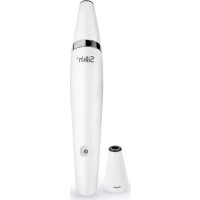
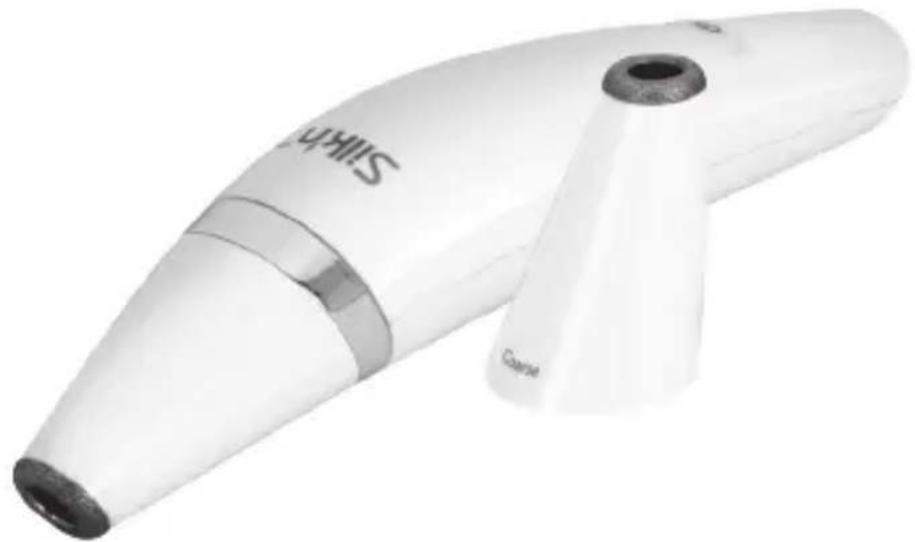
Treatment tip (Fine / Coarse), 2×*
5 Control button ()
6 Adapter socket
7 AC/DC adapter (with cable)
2 Rubber cap, 4×*
3 Filter, 31×*
4 Main unit
*One piece is already attached to the main unit.
2 General information
2.1 Reading and storing the user manual

natural_image
Icon of a person using a laptop (no text or symbols)This user manual accompanies this ReVit Essential (hereafter referred to as the “product”), and contains important information on setup and handling.
Before using the product, read the user manual
carefully. This particularly applies to the safety instructions. Failure to do so may result in personal injury or damage to the product. The user manual is based on the standards and rules in force in the European Union. When abroad, you must also observe country-specific guidelines and laws. Store the user manual for further use. Make sure to include this user manual when passing the product on to third parties.
2.2 Explanation of symbols
The following symbols and signal words are used in this user manual, on the product or packaging.
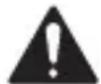
WARNING!
This signal symbol/word designates a hazard with moderate risk, which may result in death or severe injury if not avoided.
NOTICE!
This signal word warns of possible damage to property.

This signal symbol provides you with useful additional information on handling and use.

Declaration of Conformity: Products labelled with this symbol meet all applicable provisions of the European Economic Area.
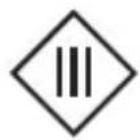
This symbol identifies electrical devices that belong to the protection class III (main unit).
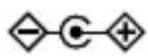
This symbol indicates the polarity of the current at the adapter socket.
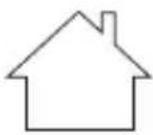
Devices marked with this symbol are only suitable for household use (dry indoor rooms).
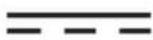
This symbol identifies voltage and the current rating for direct current.
IP20
The AC/DC adapter is protected against solid objects up to 12 mm.
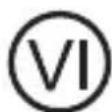
The international efficiency mark indicates that the power supply meets the level VI requirements (AC/DC adapter).
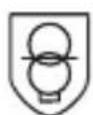
The AC/DC adapter is equipped with a short-circuit proof safety transformer.
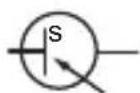
The AC/DC adapter has a switching power supply.

This symbol identifies electrical devices that belong to the protection class II (AC/DC adapter).
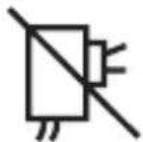
If the adapter is damaged or the pins are bent, you must discard and stop using the adapter.
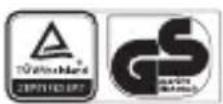
The word “GS” stands for tested safety. Products marked with this symbol meet the requirements of the German Product Safety Act (ProdSG) (AC/DC adapter).
3 Safety
3.1 Proper use
The product is exclusively designed as an over-the-counter device for the exfoliation of the upper layer of the skin for a fresher appearance. It is intended for treatment of the face, neck and hands. Dull and sun-damaged skin can also be treated.
The product is only intended for private use and not suitable for commercial purposes. Only use the product as described in this user manual. Any other use is considered improper and may result in damage to property or persons. The manufacturer cannot be held liable for damages or injury incurred through improper or incorrect use.
3.2 Safety instructions
WARNING! RISK OF ELECTRIC SHOCK!
- Only connect the product if the line voltage of the socket corresponds to the data on the rating plate of the AC/DC adapter.
- Only connect the AC/DC adapter to an easily accessible socket so that you can quickly disconnect it from the mains supply in the event of a problem.
- The product is only to be used with the AC/DC adapter provided. Do not use the AC/DC adapter for other purposes.
- If the supply cord of the AC/DC adapter is damaged, it must be replaced by the manufacturer, its service agent or similarly qualified persons in order to avoid a hazard.
- Never use the AC/DC adapter if it has a damaged cable or plug, it is not working properly, or has been submerged in water.
If that happens, unplug the AC/DC adapter immediately.
EN
- Do not open the housing; instead, have a qualified professional perform repairs. Contact the customer service team for this. Liability and warranty claims are waived in the event of repairs performed by the user, improper connection or incorrect operation. This product contains electrical and mechanical parts which are essential for providing protection against sources of danger.
- Keep the product and AC/DC adapter away from water or liquids. Do not use near bathtubs, showers, basins or other vessels containing water.
- Do not reach for the product or AC/DC adapter if they have fallen into water. Unplug immediately before retrieving either of them. Failure to unplug the product and/or the AC/DC adapter may result in an electric shock!
- Always switch the product off when you are not using it, when you intend to clean it, or in the event of a malfunction. Always unplug the AC/DC adapter when you are not using the product.
- Never touch the housing and AC/DC adapter with wet or damp hands.
EN
- Never insert any objects into the housing.
- Do not pull the AC/DC adapter out of the socket by the cable; instead, always pull it out by the adapter itself. Never move, pull, or carry the product by the cable.
- Keep the product and AC/DC adapter away from open flames and hot surfaces.
- Lay the cable so that it does not pose a tripping hazard.
- Do not kink the cable, wrap it around the product, or lay it over sharp edges.
- Only use the product indoors.

WARNING! DANGER FOR CHILDREN AND PERSONS WITH IMPAIRED PHYSICAL, SENSORY OR MENTAL CAPABILITIES, OR LACK OF EXPERIENCE AND KNOWLEDGE.
- The product cannot be used by children, persons under the age of 16 and persons with reduced physical, sensory or mental capabilities or lack of experience and knowledge in how to use the product.
Children must not play with the product.
Cleaning and user maintenance must not be performed by unsupervised children.
- Keep children under the age of 8 away from the product and AC/DC adapter.
• Make sure that children do not play with the
plastic wrapping. They may get caught in it when playing and suffocate.
- The product contains small parts. Keep them away from small children.
WARNING! RISK OF INJURY!
- Do not use the product if you have:
- Rosacea. - Poorly controlled endocrine disorders, such as diabetes and thyroid conditions.
- Abnormal skin conditions caused by diabetes, systemic or other metabolic diseases.
- Received radiation therapy or chemotherapy treatments within the past 3 months, or have areas of potential skin malignancies.
- Used physician-prescribed drugs on your skin within the past 6 months.
- Any other condition which, in the opinion of your physician or dermatologist, would make it unsafe for you to be treated.
- Do not treat areas that have:
- Active eczema, psoriasis, lesions, open wounds or infections (cold sores), moles or warts, abnormal skin conditions caused by systemic or metabolic diseases (diabetes for example).
- A history of herpes outbreaks.
- Traumatized or injured skin.
EN
- Had recent exposure to the sun without protection (wait 1 day) or if you have tanned or sunburnt skin (wait 3 days).
- Do not use the product on nipples or genitals.
- Use the low suction mode if you experience any discomfort.
- Stop using the product immediately if your skin turns very red.
- Remove all jewellery before treatments.
- Protect your skin with SPF 30 or higher if you expose your skin to the sun after using the product.
NOTICE! RISK OF DAMAGE!
- Do not use adapters, attachments or accessories not recommended by the manufacturer.
- Do not place the product on the edge of a surface to avoid dropping.
- Stop using the product if its plastic parts exhibit cracks or breaks or are deformed.
- Do not use any aggressive cleaners, brushes with metal or nylon bristles, or sharp or metallic cleaning utensils such as knives, hard scrapers and the like.
4 Checking the product and package contents
NOTICE! RISK OF DAMAGE!
- If you are not cautious when opening the packaging with a sharp knife or other pointed objects, you may quickly damage the product. Be very careful when opening it.
I. Take the product out of the packaging.
2. Check to make sure that all parts are included (see Fig. A).
3. Check whether the product or individual parts are damaged. If this is the case, do not use the product. Contact our customer service.
5 Understanding the product
The product is a dual-action therapy device designed for home use. It combines microdermabrasion exfoliation and vacuum stimulation.
Microdermabrasion exfoliation
- Promotes gentle, non-abrasive exfoliation to allow for smoother, fresher skin.
• Helps improve skin tone, texture and elasticity. - Helps reduce the appearance of fine lines around the eyes, age spots and shallow scars.
Vacuum stimulation
- Helps stimulate the blood circulation for smoother, more youthful looking skin.
- Brings some impurities to the surface.
• Collects dead skin cells for disposal.
6 Possible side effects
If you follow the instructions fully and pay attention to all warnings, complications and side effects are uncommon. All cosmetic procedures, including those designed for home use, involve some degree of risk. Therefore, it is important that you understand and
accept the risks and complications that may occur. Consult your physician if you experience any persistent symptoms.
| Adverse reaction Risk | |
| Bruising: You may experience slight bruising which should disappear after 2–3 days. | Minor |
| Skin redness: You may experience dilation of the superficial blood capillaries. This may result in some redness for a few days. Additionally, some capillaries may present red spots that will also subside with time. In such cases, immediately cool the area with cold water. | Minor |
7 Preparing for your treatment
7.1 Treatment areas
Familiarise yourself with these treatment areas and their treatment recommendations.
| Treatment area Recommendation | |
Forehead, cheeks and chin 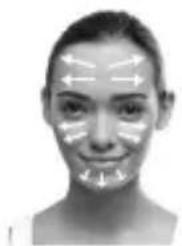 | Move the product over your skin from the centre outward. |
Eyes and nose 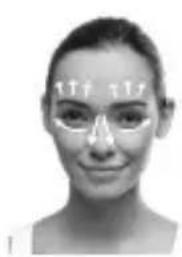 | Use short upward strokes for the area around your eyebrows. Avoid the eyelids. For the areas under the eyes, start next to the nose and and go outwards, towards the hairline. For the nose area, use straight downward strokes following the curve of the nose and the contour of the cheekbones. |
| Neck Use smooth-downward strokes for the whole neck area. | |
 | |
7.2 Attaching and replacing the treatment tips
The product has two treatment tips (Fine and Coarse, indicated on the treatment tip). We recommend that you start with the fine treatment tip.

Use the fine treatment tip for general treatment or delicate finishing, and the coarse treatment tip for heavy duty exfoliation.
To attach and replace the treatment tips:
- Make sure the main unit 4 is not connected to the AC/DC adapter 7.
- Remove the current treatment tip from the main unit by pulling it off gently.
- Attach the other treatment tip on the main unit. Make sure the treatment tip is firmly in place before use.
8 Operation
8.1 Recommended precautions
- Before you treat an area for the first time, do a spot test on a small area of skin. Continue the treatment if you have no adverse reaction.
- We recommend that you start with the low suction mode and move to the high mode after 2–3 treatments. If you experience any discomfort, work the treatment area in low suction mode.
- To start with, work each area 2–4 times. When your skin is used to the treatment, you may increase to 4–6 times.
- It is recommended not to use the product more than twice a week.
- Stop immediately if you feel any discomfort.
EN
8.2 Treatment steps
I. Make sure your skin is clean, dry and free from powder, cream or gel.
2. Make sure the rubber cap 2, filter 3 and treatment tip 1 are firmly in place on the main unit 4.
We recommend that you start with the fine treatment tip (see section “Attaching and replacing the treatment tips”).
3. Connect the cable of the AC/DC adapter 7 to the adapter socket 6.
4. Connect the AC/DC adapter to a mains socket.
5. Press the control button ( ) 5 to turn the product on. The product is ready for use in the low suction mode.
6. Apply the treatment tip firmly to your skin so that you feel the suction. Treat each area as recommended in the section "Treatment areas".
7. If necessary, press the control button () again to change from low to high suction mode.
8. When done, press the control button ( ) once or twice to turn the product off (depending on the current suction mode).
9. Disconnect the AC/DC adapter from the adapter socket and mains socket.

Avoid direct sunlight and apply SPF 30 or higher immediately after a treatment. You may also wish to apply a facial mask, or a day or night cream.
9 Cleaning and maintenance
9.1 Cleaning the main unit and treatment tips
I. Disconnect the product from the mains socket.
2. Wipe the main unit 4 with a damp cloth. Then wipe it completely dry with a dry cloth.
3. To clean the treatment tips 1, first remove them from the main unit. Wash the treatment tips with soap and water, then dry them thoroughly.
It is recommended to replace the treatment tips every 6 months, or earlier if the abrasive ends of the tips are damaged.
9.2 Cleaning and replacing the filter
The filter 3 needs cleaning or replacing due to the build-up of discarded skin. It is recommended that you do this every few treatments.
- Gently pull the treatment tip off from the main unit.
- Remove the rubber cap 2 and then remove the filter.
- To clean the filter, brush off any debris with a soft brush, then place it back on the main unit. To change a filter, remove the current filter and insert a new one.
- Place the rubber cap back into position, then put the treatment tip back on the main unit, making sure that they are firmly connected.

You can purchase new filters and treatment tips on our website at www.silkn.eu. For replacement rubber caps or AC/DC adapters, please contact Customer Service.
10 Storage
All parts must be completely dry before being stored. Store the product in a clean and dry place, avoiding heat and direct sunlight.
II Troubleshooting
Some problems may be caused by minor faults that you can fix yourself. To do so, follow the instructions in the following table. If it is still not possible to resolve the problem, contact customer service. Do not repair the product yourself.
| Fault Possible cause and solution | |
| The product does not operate. | Make sure the AC/DC adapter is properly connected to the product and a mains socket. |
| I don’t feel any suction when the product touches my skin. | Make sure the product is turned on, and check that the filter, rubber cap and treatment tip are placed on the main unit correctly. |
EN
12 Technical data
Model: H4201
Technology: Air vacuum filling tip
Input power: 12 V 0.2 A

Protection class: III
Weight: 110g
IP code: IPX0
Transport & storage between uses and storage condition
Temperature: -40 °C to +70 °C
Relative humidity: 10% to 90%
Atmospheric pressure: 500 to 1060 hPa
Operating conditions
Temperature: 10 °C to 35 °C
Relative humidity: 30 % to 75 %
Atmospheric pressure: 700 to 1060 hPa
AC/DC adapter
Model number:
EHI200-0500WG (EU)
EHI200-0500WE (GB)
Input:
100–240 V\~ 50/60 Hz 0.2 A
Output:
12 V=0.5 A 6.0 W
Output power:
6.0 W
Protection class: II
IP code:
IP20
| Published information | Value and precision | Unit |
| Name or trademark of the manufacturer, commercial register number and address: | Xiamen Eahunt Electronics Co., Ltd. Room 755, Venture Building, Venture Park, Torch High-tech Zone, Xiamen, Fujian, P.R. China | |
| Published information Value and precision Unit | ||
| Model identifier: EHI 200-0500WG (EU)EHI 200-0500WE (GB) | ||
| Input voltage: 100–240 V | ||
| Input alternating current frequency: | 50/60 | Hz |
| Output voltage: 12 V | ||
| Output current: 0.5 A | ||
| Output power: 6 | W | |
| Average efficiency during operation: | 81.89 | % |
| Efficiency at low load (10 %): | 79.97 | % |
| Power consumption at zero load: | 0.032 | W |
13 Disposal
13.1 Disposing of the packaging

Sort the packaging before you dispose of it. Dispose of paperboard and cardboard with the recycled paper service and wrappings with the appropriate collection service.
13.2 Disposing of the product
(Applicable in the European Union and other European countries with separate collection systems of recyclable materials)
natural_image
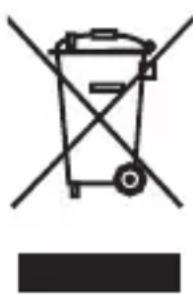
Symbol of a trash bin with crossed lines indicating no waste or restriction, accompanied by a solid black rectangle below (no text or labels)Old appliances may not be disposed of in household waste!
Should the product no longer be capable of being used at some point in time, dispose of it in accordance with the regulations in force in your city or county. This ensures that old appliances are recycled in a professional manner and also rules out negative
consequences for the environment. For this reason, electrical equipment is marked with the symbol shown here.
14 Warranty
This product is covered by a 2-year warranty according to European regulations and law. The extent of the warranty on this product is limited to technical defects caused by faulty production processes. In the event you want to claim warranty please be sure to contact our customer service for instructions. They may be able to solve your problem without needing to return the product to the store or our service center. Our customer service is always pleased to help you!
15 Customer service
For more information about the products of Silk'n visit your regional Silk'n website: www.silkn.eu. If the device is damaged, defective, in need of repair or you need our assistance, please contact your nearest Silk'n service center. This manual is also available as a PDF download from: www.silkn.eu.
Service number: 0906-2130009
Email: customercareuk@silkn.eu
Invention Works B.V.
natural_image
Symbol of a trash bin with crossed lines indicating no waste or restriction, accompanied by a solid black rectangle below (no text or symbols)natural_image
Icon of a person using a laptop inside a circular frame (no text or symbols)natural_image
Symbol of a trash bin crossed with no text or numbers, representing waste sorting or disposal (no text present)natural_image
Icon of a person using a laptop, no text or symbols presentWAARSCHUWING! GEVAAR VOOR ELEKTROCUTIE!
natural_image
Symbol of a trash bin crossed with no text or symbols, accompanied by a black rectangular block below (no text or labels)natural_image
Icon of a person using a laptop inside a circular frame (no text or symbols)natural_image
Simple line drawing of a trash bin with no text or symbolsInvention Works B.V.
Donk IB, 2991 LE Barendrecht, Os Países-Baixos
www.silkn.eu – info@silkn.eu
Conteúdo
natural_image
Icon of a person using a laptop (no text or symbols)natural_image
Simple line drawing of a trash bin with two crossed lines indicating no waste or prohibition (no text or symbols)Invention Works B.V.
natural_image
Icon of a person using a laptop (no text or symbols)natural_image
Symbol of a trash bin crossed with no text or symbols, representing waste sorting or disposal (no text present)Invention Works B.V.
Donk IB, 2991 LE Barendrecht, Hollanda
www.silkn.eu – info@silkn.eu
İçindekiler
natural_image
Symbol of a trash bin crossed with no text or numbers, representing waste sorting or disposal (no text present)Invention Works B.V.
Donk IB, 2991 LE Barendrecht, Paesi Bassi
www.silkn.eu - info@silkn.eu
Sommario
natural_image
Icon of a person using a laptop (no text or symbols)Potenza in uscita: 6,0 W
natural_image
Symbol of a trash bin with crossed lines indicating no waste or restriction (no text or numbers present)Invention Works B.V.
Donk IB, 2991 LE Barendrecht, Nederland
www.silkn.eu – info@silkn.eu
Innhold
I Leveringsomfang/apparatets deler \_\_\_\_ 171
2 Generelt 171
natural_image
Icon of a person using a laptop inside a circle (no text or symbols)Utgang: 12 V 0,5 A 6,0 W
Utgangsgseffekt: 6,0 W
natural_image
Simple line drawing of a trash bin with two crossed lines indicating no waste or prohibition (no text or symbols)natural_image
Simple line drawing of a trash bin with no text or symbolsnatural_image
Icon of a person using a laptop (no text or symbols)Udgang: 12 V = 0.5 A 6,0 W
natural_image
Symbol of a trash bin crossed with no text or numbers, representing waste sorting or restriction (no text present)Beautiful Technology
Invention Works B.V.
Donk IB, 2991 LE Barendrecht
The Netherlands