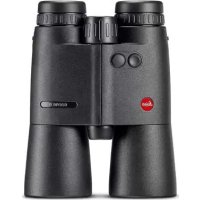
Geovid R 8x56 - Binoculars LEICA - Free user manual and instructions
Find the device manual for free Geovid R 8x56 LEICA in PDF.



| Product type | Binoculars with rangefinder |
| Brand | Leica |
| Model | Geovid R 8x56 |
| Magnification | 8x |
| Objective lens diameter | 56 mm |
| Exit pupil | 7 mm |
| Twilight factor | 21.17 |
| Geometric brightness | 49 |
| Field of view at 1000 m | 118 m |
| Minimum focusing distance | approx. 5.5 m |
| Dioptric compensation | approx. ± 3.5 diopters |
| Interpupillary distance | 58-74 mm |
| Prism type | Roof |
| Lens coating | Multi-layer anti-reflective, P40 phase correction |
| Power supply | 1 CR2 3V lithium battery |
| Battery life | ≥ 2000 measurements at 20°C |
| Measuring range | 10 m to approx. 1100 m |
| Measuring accuracy | ±1 m up to 350 m, ±2 m up to 700 m, ±0.5% beyond |
| Ballistic functions | Equivalent horizontal range (EHR) |
| Waterproofness | Up to 5 m depth (0.5 bar) |
| Operating temperature | -25 to +55 °C |
| Storage temperature | -40 to +85 °C |
| Housing material | Die-cast aluminum |
| Dimensions (W x H x D) | approx. 135 x 182 x 68 mm |
| Weight (with battery) | approx. 1100 g |
| Delivery contents | Binoculars, CR2 battery, carrying strap, case, eyepiece and objective covers, warranty card |
| Care and cleaning | Brush or blower for large particles, soft lint-free cloth for lenses, rinsing with clear water if necessary |
| Warranty | Manufacturer's warranty (see warranty card) |
Frequently Asked Questions - Geovid R 8x56 LEICA
User questions about Geovid R 8x56 LEICA
0 question about this device. Answer the ones you know or ask your own.
Ask a new question about this device
Download the instructions for your Binoculars in PDF format for free! Find your manual Geovid R 8x56 - LEICA and take your electronic device back in hand. On this page are published all the documents necessary for the use of your device. Geovid R 8x56 by LEICA.
USER MANUAL Geovid R 8x56 LEICA
LEICA GEOVID 8x42 R/10x42 R LEICA GEOVID 8x56 R/15x56 R
Anleitung | Instructions Notice d'utilisation | Gebruiksaanwijzing Istruzioni | Instrucciones | Bruksanvisning Инструкция по эксплуатации
natural_image
Close-up of a hand holding a black binoculars with a metallic clip (no visible text or symbols)EINSETZEN UND AUSWECHSELN DER BATTERIE
natural_image
Close-up of hands using a microscope to adjust a small component (no visible text or symbols)Hinweise:
natural_image
Black binoculars with no visible text or symbols on the device itself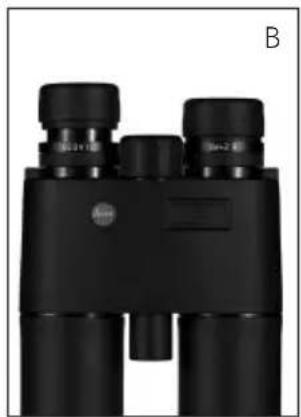
natural_image
Black binoculars with no visible text or symbols on the device itself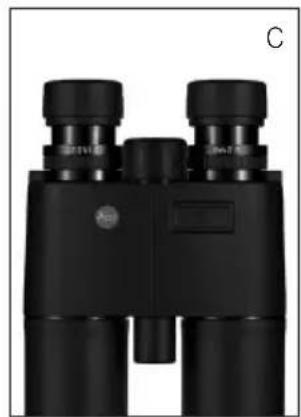
natural_image
Black binoculars with visible lens and control knobs (no text or symbols)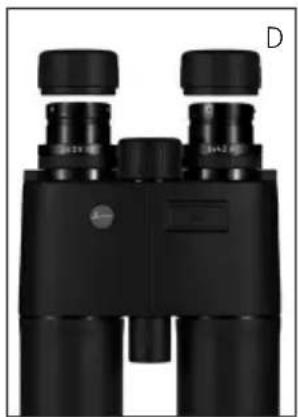
natural_image
Black binoculars with no visible text or symbols on the device itselfnatural_image
Black-and-white photo of a black buffalo lying in tall grass with red markings on its back (no text or symbols visible)ENTFERNUNGSMESSUNG
Product Support / Software Support
Am Leitz-Park 5
D-35578 Wetzlar
Tel.: +49(0)6441-2080-111 /-108
Fax: +49(0)6441-2080-490
info@leica-camera.com /
software-support@leica-camera.com
LEICA CUSTOMER CARE
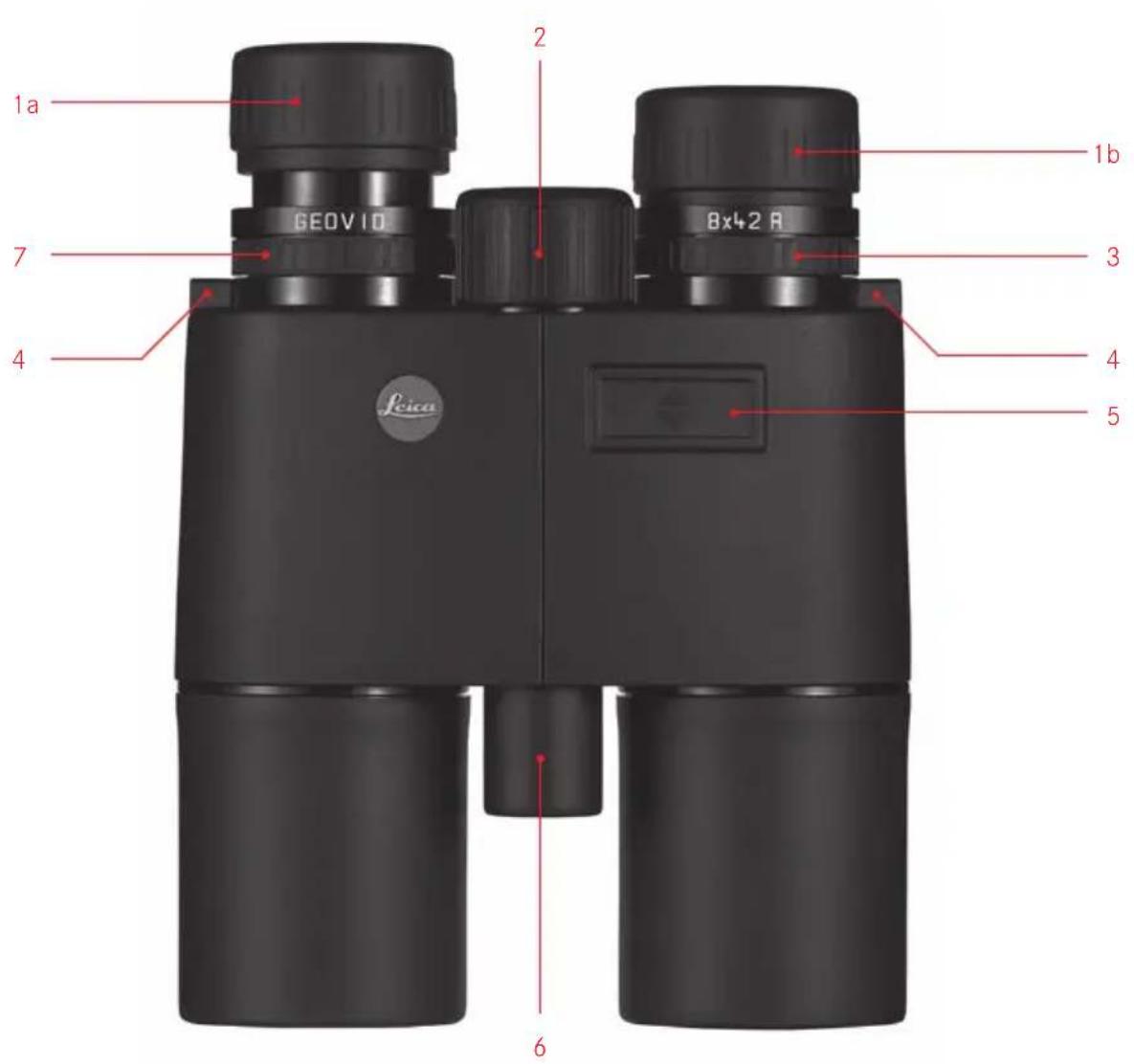
- Eyepiece cups
Position a: Extended for viewing without glasses
Position b: Retracted for viewing with glasses - Central focusing dial
- Diopter compensation dial with a. Scale
- Eyes for carrying strap
- Release button for distance metering
- Laser transmission optics
- Diopter compensation for reticule with a. Scale
- Hinged axis for adjusting the eye spacing
- Battery compartment
- Battery compartment cover
FOREWORD
Dear Customer,
All over the world, "Leica" stands for top quality, precision engineering with extreme reliability and a long life.
We wish you a great deal of enjoyment and success with your new Leica Geovid R binoculars. To ensure that you use them correctly, we recommend that you read these instructions first.
PACKAGE CONTENTS
- Binoculars
- 1 3V lithium round cell, type CR2
- Carrying strap
- Ever ready case
- Eyepiece cover
- 2 lens covers
- Warranty card
CONTENTS
Designation of parts....17
Foreword 17
Package contents 17
Disposal of electrical and electronic equipment .....19
Potential applications....19
Attaching the carrying strap and the eyepiece cover..19
Attaching the lens covers....19
Inserting and replacing the battery 20
Battery charge level 21
Adjusting the eyepiece cups /
Using with and without glasses....22
Adjusting the eye spacing 22
Setting the focus / Diopter compensation....23
Distance metering....24
Equivalent horizontal range (EHr)....25
Scan mode 26
Measurement range and accuracy ......26
Maintenance / cleaning....28
Accessories 28
Spare parts....28
Troubleshooting....29
Technical data 30
Leica Product Support.... 32
Leica Customer Care 32
Warning: As with any binoculars, avoid looking directly at bright sources of light when using the Leica Geovid R, to prevent eye injury.
DISPOSAL OF ELECTRICAL AND ELECTRONIC EQUIPMENT
(Applies within the EU, and for other European countries with segregated waste collection systems)
This device contains electrical and/or electronic components and should therefore not be disposed of in general household waste. Instead it should be disposed of at a recycling collection point provided by the local authority. This costs you nothing. If the device itself contains removable batteries or rechargeable batteries, these should first be removed and, if necessary, properly disposed of (refer to the specifications in the manual for your device). Further information on this issue is available from your local authority, your local waste disposal company, or in the store where you purchased this device.
POTENTIAL APPLICATIONS
Leica Geovid R binoculars have a robust aluminum housing, allowing them to be used even under adverse conditions. There's no need to worry about moisture-they are absolutely waterproof to a depth of 5m and the internal optics do not become fogged and a nitrogen filling means that the internal optics do not become fogged.
ATTACHING THE CARRYING STRAP AND THE EYEPIECE COVER
If you want to attach the eyepiece cover to the carrying strap, you must thread the strap through the eyelet on the eyepiece cover before you attach the carrying strap to the left-hand side of the binoculars.
ATTACHING THE LENS COVERS
To fit the two lens covers, the rubber rings on the covers are pushed over the binocular tubes from the lens side in such a way that the covers fold downwards.
natural_image
Close-up of a hand holding a black binoculars with a metallic clip (no visible text or symbols)INSERTING AND CHANGING THE BATTERY
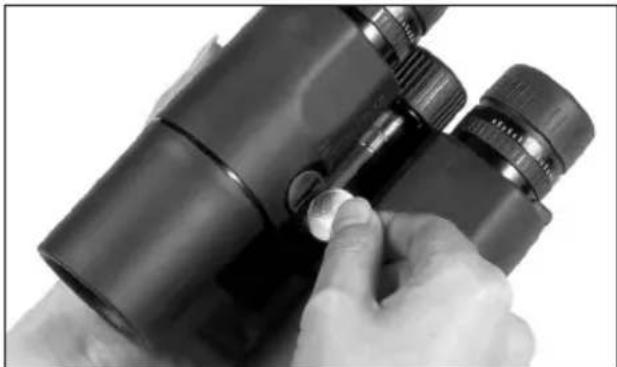
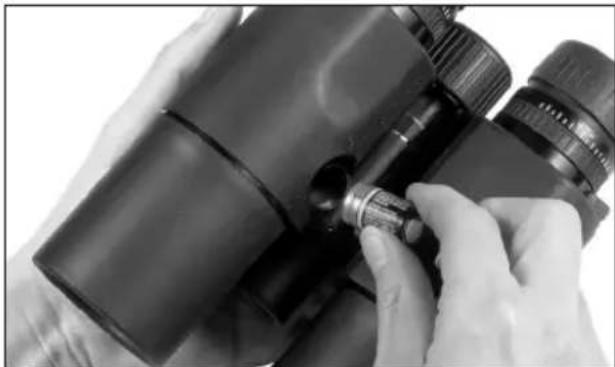
The Leica Geovid R binoculars are powered by a 3 Volt lithium round cell (e.g. Duracell DL CR2, Ucar CR2, Varta CR2 or other CR2 types).
-
Open the cover (10) over the battery compartment (9) by turning it anticlockwise, e.g. with a coin.
-
Insert the battery so that the positive contact goes in first (as shown by the markings in the battery compartment).
-
Close the cover again by turning it clockwise.
natural_image
Close-up of hands using a microscope to adjust a small component (no visible text or symbols)Notes:
- Batteries should be stored in a cool dry place.
- If the binoculars are not going to be used for a long time, the battery should be removed.
Caution:
- Batteries should never be put in a fire, heated, recharged, taken to pieces or broken apart.
- Used batteries may not be disposed of as normal, household waste as they contain toxic materials that are harmful to the environment. To ensure that they are properly recycled, they should be returned to the dealer or disposed of as special waste (at a collection point).
BATTERY CHARGE LEVEL
A new battery lasts for around 2000 measurements at 20^ C. Depending on the conditions of use, the battery life can be significantly shorter or longer than this. Low temperatures and frequent use of scan mode shorten the battery life.
A used battery is indicated by a flashing measured value and reticule display. When flashing starts, around another 50 measurements are possible, but with a continuously reduced range.
Caution:
Cold conditions impair the battery performance. Therefore, at low temperatures the LEICA Geovid R should be kept as close to the body as possible and a new battery should be used.
natural_image
Black binoculars with no visible text or symbols on the device itself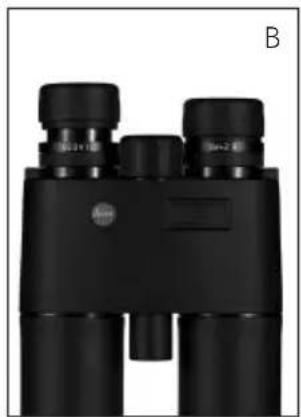
natural_image
Black binoculars with no visible text or symbols on the device itself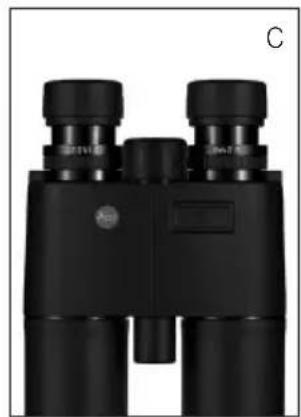
natural_image
Black binoculars with visible lens and control knobs (no text or symbols)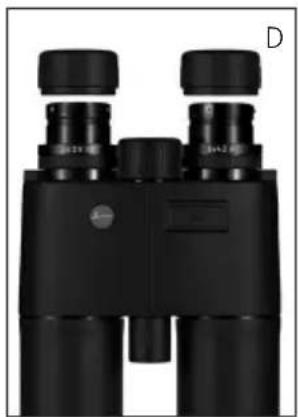
natural_image
Black binoculars with no visible text or symbols on the device itselfADJUSTING THE EYEPIECE CUPS / USING WITH AND WITHOUT GLASSES
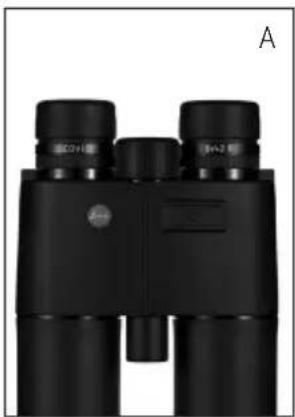
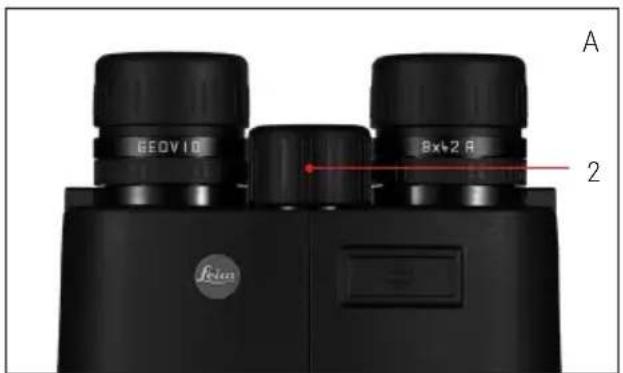
The eyepiece cups (1) can easily be adjusted by turning them and they lock securely in the selected positions. They can be removed completely for thorough cleaning.
For viewing with glasses (Figure A), they remain in the fully screwed in position. For viewing without glasses, they are extended by turning them anticlockwise.
Two positions are available for optimum adjustment (Figures B, C).
If the eyepieces are heavily soiled, we recommend removing the cups for cleaning (Figure D).
They are removed by gently pulling them in the fully extended position.
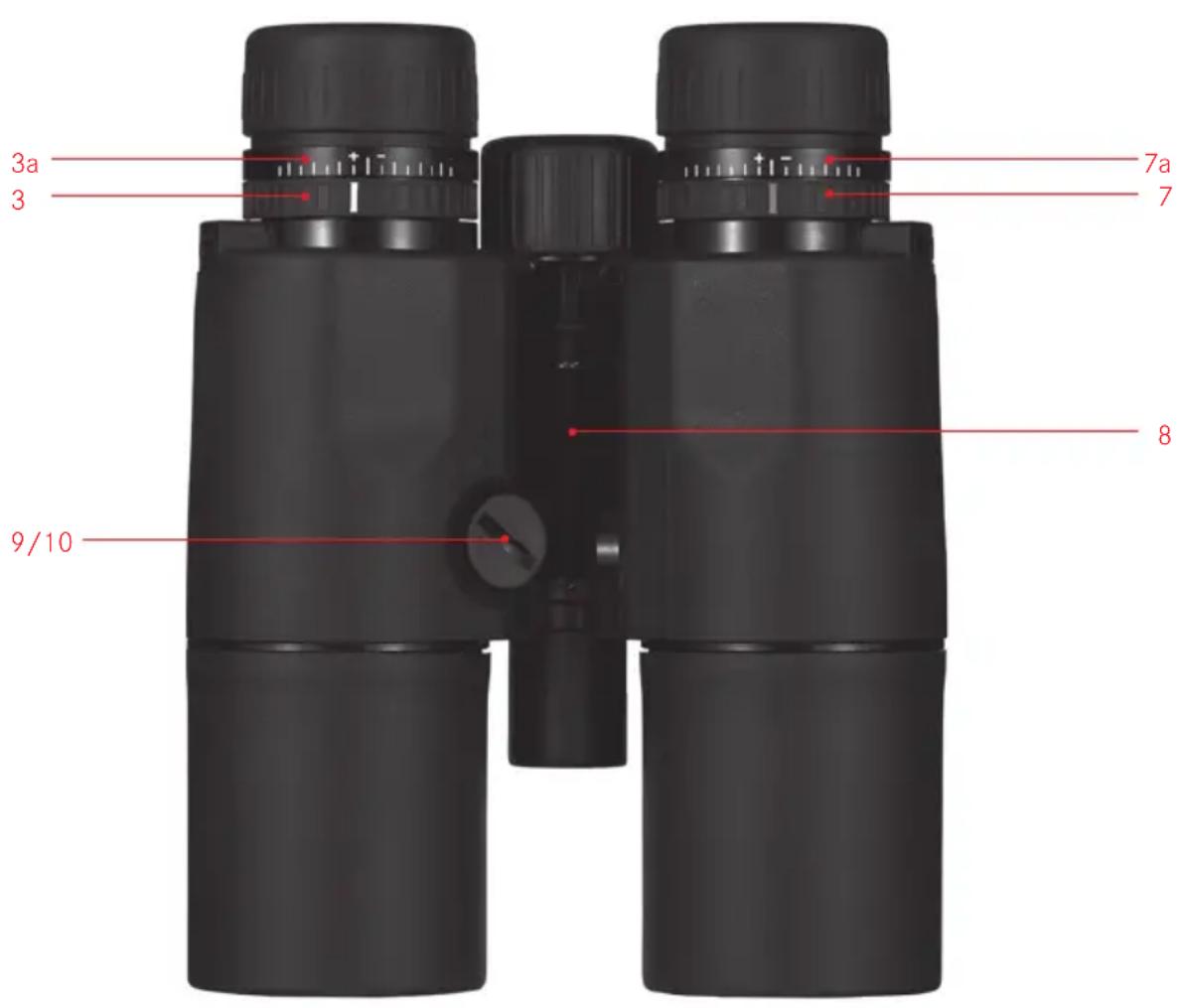
Bending the binoculars about the hinged axis (8) individually adjusts the eye spacing. The right and left field of vision should merge into a circular image.
SETTING THE FOCUS / DIOPTER COMPENSATION
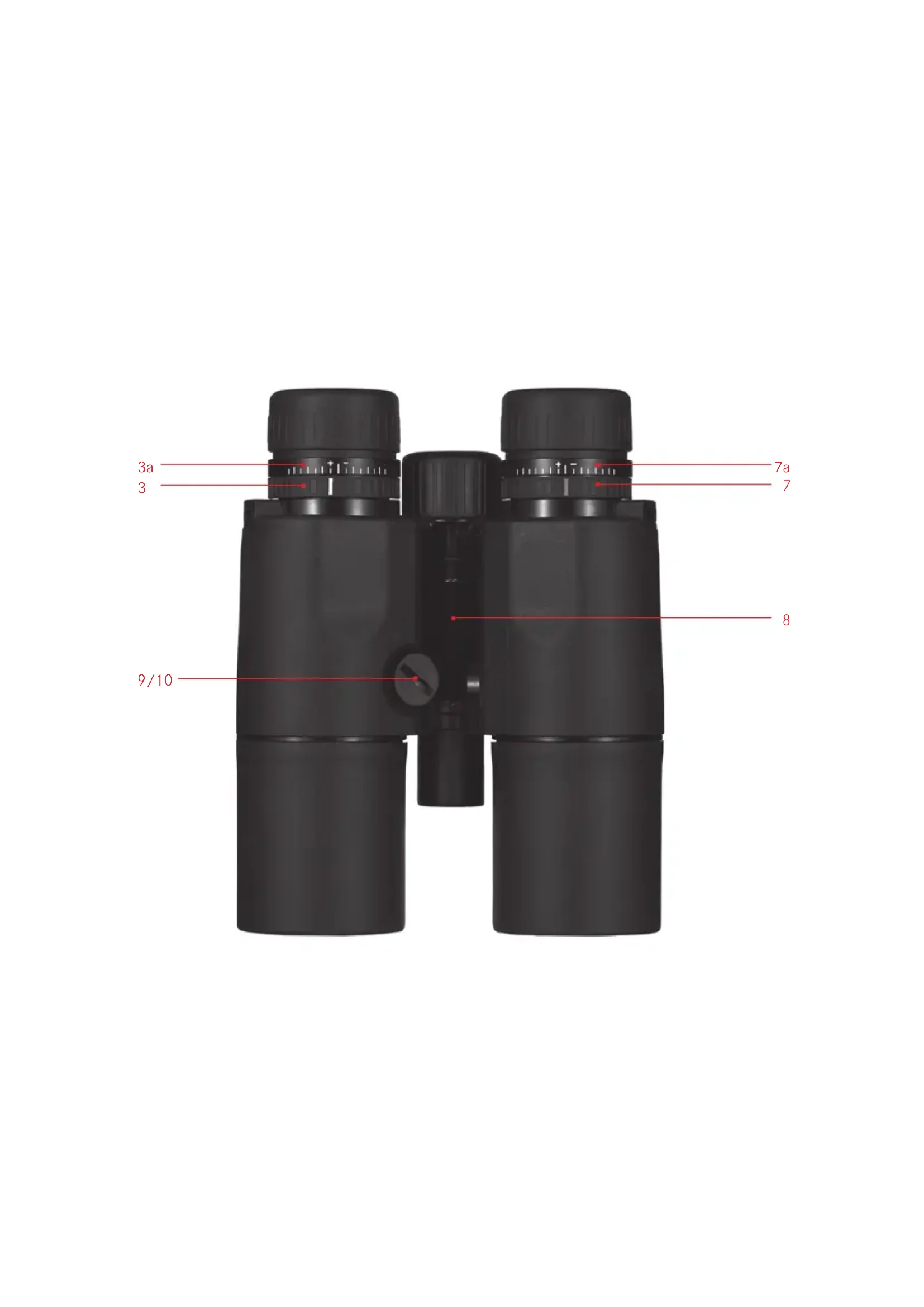
On the Leica Geovid R binoculars, the focus is set for objects different distances away using the central focusing dial (2). The two diopter compensation dials (3/7) are used to compensate for individual eyesight problems when viewing without glasses and to focus the reticule. Carefully run through the steps described below. Only then can you utilize the full capabilities of the optical system.
- Turn the two diopter compensation dials to their zero positions.
- When viewing with both eyes, adjust them to a distant object using the central focusing dial.
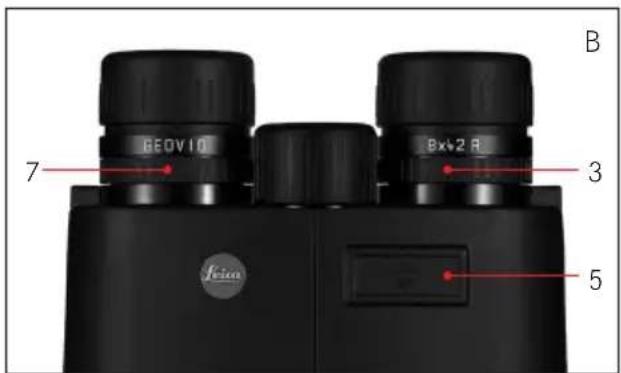
- Press the release button (5) to activate the reticule.
- When the reticule appears, while continuing to view with both eyes, adjust the right diopter compensation dial (red index) so that the reticule can be seen in focus in the right optical system.
- Then, with the reticule still activated but only viewing with the right eye, use the central focusing dial to adjust the image in the right barrel until it is exactly in focus.
- Finally, set the image in the left barrel to an optimum focus with the left diopter dial (3). The set values can be read using the "+" or "-" values on the diopter scales (3a/7a).
Note:
When looking through just the left or right side, the other eye should be squeezed shut or you can simply hold the corresponding half of the binoculars on the lens at the front.
natural_image
Black-and-white photo of a black buffalo lying in tall grass, no visible text or symbolsDISTANCE METERING
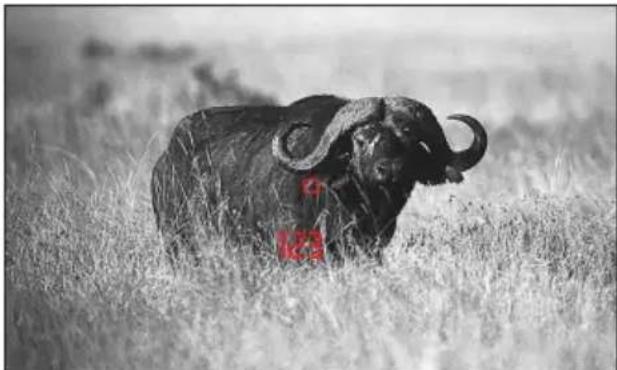
To measure the distance to an object, you must aim directly at it. To do this, activate the reticule by pressing the release button (5) once. When you release the button, the reticule remains lit for around another 4s. With the button held down, the reticule remains lit continuously. While it is lit, aim at the object and press the release button to repeat the distance measurement, and the measured value is then displayed. The reticule disappears briefly during the measurement.
Pressing the release button again allows a new measurement to be started at any time, provided the reticule is still lit.
If the distance to the object is less than 10 meters, the measuring range is exceeded or the object is not sufficiently reflective, "---" appears in the display.
When the display disappears, the distance meter is automatically deactivated.
Notes:
- Depending on the set eye spacing, the displays may be slightly skewed.
- The Leica Geovid R binoculars are available in different versions for displaying the distance in meters or yards. The different versions can be identified externally by the specifications on the cover of the central focusing dial.
EQUIVALENT HORIZONTAL RANGE (EHR)
Shots at targets at a higher or lower position are subject to changed ballistic conditions. Therefore, they require knowledge of the equivalent horizontal range, which is relevant for hunting.
For example, knowing the EH- is important when using ballistic reticles.
The Leica Geovid R calculates this EH from the linear range measured, a correction factor, and from the measured angle.
For individual measurements, the Leica Geovid R will always show you the direct linear distance to the target first. After around 2s, the display changes to the equivalent horizontal range.
Note:
- EH values are only specified between 10m and 1100m for safety reasons. The actual measured linear range is also specified.
- The EH function cannot be disabled.
Important:
- Please note that particularly at long ranges, the influence of all relevant ballistic influencing factors is greatly increased and considerable variations can occur. The ballistic values displayed should therefore only be viewed as a guideline.
- Regardless of whether this information is used, you are responsible for assessing the relevant hunting situation.
SCAN MODE
The Leica Geovid R binoculars can be used to measure continuously. Holding down the release button (5) the 2nd time it is pressed switches the device to scan mode after around 0.5s and it then performs continuous measurements. This can be seen by a change in the display: Around every 1.5s a new measured value is shown.
Scan mode is particularly practical for measuring small targets.
Notes:
- Because of the continuous measurements, power consumption is greater in scan mode than for single measurements.
• After 10s, scan mode is automatically deactivated to conserve the battery if the button has been pressed unintentionally. - In scan mode, theEH+ value is only displayed for the last measurement.
MEASUREMENT RANGE AND ACCURACY
The measuring accuracy of the Leica Geovid R binoculars is up to ± 1 meter/yard. The maximum range is achieved with well reflecting target objects and a visual range of 10km. The measuring range is influenced by the following factors:
| Range Longer Shorter | ||
| Color of object | White Black | |
| Angle to object | Perpendicular Acute | |
| Object size | Large Small | |
| General brightness | Low (cloudy) High (midday sun) | |
| Atmospheric conditions | Clear Hazy | |
| Object structure | Homogeneous (wall of building) | Inhomogeneous (bush, tree) |
In sunlight and with good vision, the following ranges and accuracies can be achieved:
| Range | 10m to approx. 1100m/1200yds |
| Accuracy | ±1m up to 350m±2m up to 700m±0.5% over 700m |
MAINTENANCE / CLEANING
Your Leica Geovid R binoculars do not require any special care. Coarse dirt particles, such as sand, should be removed with a fine hair brush or blown away. Fingerprints etc. on the lenses or eyepieces can be wiped off with a soft, clean leather or dust-free cloth. For excessive soiling, e.g. to the rotating eyepiece sleeves, the binoculars can be cleaned simply be rinsing them under running water. Saltwater can be rinsed off in the same way.
Caution:
Do not exert excessive pressure, even when wiping very dirty lens surfaces. Although the coating is highly abrasion resistant, it can be damaged by sand or salt crystals. All Leica Geovid R binoculars have their “personal” serial number in addition to the type designation. Note this number in your documentation for security.
ACCESSORIES
Order No.
Tripod adapter with 1/4" thread.... 42 220 Swimming carrying strap, orange .... 42 163
SPARE PARTS
If you should require any spare parts for your binoculars, e.g. eyepiece cups, covers or a carrying strap, please contact our Customer Service department or the Leica office in your country (see warranty card for addresses).
TROUBLESHOOTING
| Problem Cause Remedy | ||
| The image is not circular when viewing. | a) The binoculars are not properly adjusted to your personal eye spacing. | a) Correct the spacing of the two barrels of the binoculars simply by bending the binoculars about the hinged axis to a greater or lesser extent. |
| b) The viewer's pupil is not located in the binoculars' exit pupil. | b) Correct the position of the head, the eyes or the binoculars. | |
| c) The position of the rotating eyepiece sleeves does not match that for correct use with and without glasses. | c) Correct the adjustment: If wearing glasses, screw in the eyepiece sleeves; if viewing without glasses: Extend the eyepiece sleeves. | |
| Display not focused Diopter compensation not exact Repeat diopter compensation | ||
| When measuring the range, the display shows "-" | a) Above or below measuring range Refer to measuring range specifications | |
| b) The object is not sufficiently reflective | ||
| Display flashes or no measurement is possible | Battery dead Replace the battery | |
TECHNICAL DATA
LEICA GEOVID 8x42 R LEICA GEOVID 10x42 R
| Magnification | 8x | |
| Lens diameter | 42mm | |
| Exit pupil | 5.25mm | |
| Twilight number | 18.33 | |
| Geometric luminous intensity | 27.56 | 17.64 |
| Field of vision (at 1000m/yards) 125m | /7.1° 110m/6.3° (wide angle) | |
| Close up limit (at 0 diopter) Approx. 5.6m | Approx. 5.6m | |
| Exit pupil longitudinal distance | 18.5mm | 15.6mm |
| Pupil distance | 56-74mm | |
| Prism type | Ridge | |
| Coating on lenses on prisms Phase correction coating P40 | High Durable Coating (HDC ^TM ) and hydrophobic Aqua-Dura coating on external lenses | |
| Diopter compensation Approx. ± 3,5 diopter | ||
| Suitable for use when wearing glasses | Yes | |
| Operating temperature -25 °to +55 °C | ||
| Storage temperature | -40 °C to +85 °C | |
| Water tightness | 0.5 bar (approx. 5m water depth) | |
| Housing material | Die cast aluminum | |
| Maximum range | Approx. 1100m | |
| Minimum range | 10m | |
| Measuring accuracy | ±1m up to 350m±2m up to 700m±0.5% over 700m | |
| Ballistic function | Display of equivalent horizontal range (EH-) from 10m/y to 1100m/1200y | |
| Display | 4 digit LED | |
| Battery | 1 3V lithium round cell, type CR2 | |
| Battery life ^1 | ≥ 2000 measurements | |
| Laser | Safe for eyes, in compliance with EN and FDA Class 1 | |
| Laser beam divergence | 2.5 x 0.5mrad | |
| Maximum measurement duration | Approx. 1.4s | |
| Dimensions (W ^2 x H ^2 x D ^2 ) | Approx. 124 x174 x 65mm | |
| Weight (with battery) | Approx. 900g | |
^1 At 20 °C and with average usage profile ^2 At eye spacing 65mm ^3 With eyepiece cups screwed in
4.2mm
TECHNICAL DATA
LEICA GEOVID 8x56 R LEICA GEOVID 15x56 R
| Magnification | 8x | |
| Lens diameter | 56mm | |
| Exit pupil | 7mm | |
| Twilight number | 21.17 | |
| Geometric luminous intensity | 49 | 13.94 |
| Field of vision (at 1000m/yards) | 118m/6,8° | 72m/4.1° |
| Close up limit (at 0 diopter) Approx. 5.5m Approx. 5.5m | ||
| Exit pupil longitudinal distance | 18.5mm | 15.6mm |
| Pupil distance | 58-74mm | |
| Prism type | Ridge | |
| Coating on lenses on prisms Phase correction coating P40 | High Durable Coating (HDC ^TM ) and hydrophobic Aqua-Dura coating on external lenses | |
| Diopter compensation Approx. ± 3,5 diopter | ||
| Suitable for use when wearing glasses | Yes | |
| Operating temperature | -25 °C to +55 °C | |
| Storage temperature | -40 °C to +85 °C | |
| Water tightness | 0.5 bar (approx. 5m water depth) | |
| Housing material | Die cast aluminum | |
| Maximum range | Approx. 1100m | |
| Minimum range | 10m | |
| Measuring accuracy | ±1m up to 350m±2m up to 700m±0.5% over 700m | |
| Ballistic function | Display of equivalent horizontal range (H-) from 10m/y to 1100m/1200y | |
| Display | 4 digit LED | |
| Battery | 1 3V lithium round cell, type CR2 | |
| Battery life ^1 | ≥ 2000 measurements | |
| Laser | Safe for eyes, in compliance with EN and FDA Class 1 | |
| Laser beam divergence | 2.5 x 0.5mrad | |
| Maximum measurement duration | Approx. 1.4s | |
| Dimensions (W ^2 x H ^3 x D ^2 ) | Approx. 135 x174 x 68mm | Approx. 135 x 208 x 68mm |
| Weight (with battery) | Approx. 1100g | Approx. 1245g |
^1 At 20 °C and with average usage profile ^2 At eye spacing 65mm ^3 With eyepiece cups screwed in
LEICA PRODUCT SUPPORT
The Leica information service can provide you with an answer to any technical application questions relating to the Leica range either in writing, on the telephone or by e-mail.
Leica Camera AG
Product Support / Software Support
Am Leitz-Park 5
D-35578 Wetzlar
Tel.: +49(0)6441-2080-111 /-108
Fax: +49(0)6441-2080-490
info@leica-camera.com /
software-support@leica-camera.com
LEICA CUSTOMER CARE
For servicing your Leica equipment or in the event of damage, the Leica Camera AG Customer Care department or the repair service provided by authorized Leica agents in your country are available (see the warranty card for a list of addresses).
Leica Camera AG
Customer Care
Am Leitz-Park 5
D-35578 Wetzlar
Tel.: +49(0)6441-2080-189
Fax: +49(0)6441-2080-339
customer.care@leica-camera.com
DESCRIPTION DES PIÈCES
natural_image
Close-up of a hand holding a small metallic object next to a black binoculars (no visible text or symbols)INSERTION ET CHANGEMENT DE LA PILE
natural_image
Close-up of hands using a microscope to adjust a small component (no visible text or symbols)Remarques:
natural_image
Black binoculars with no visible text or symbols on the device itself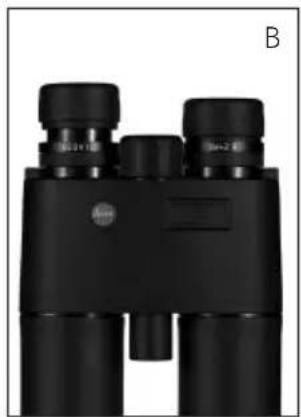
natural_image
Black binoculars with no visible text or symbols on the device itself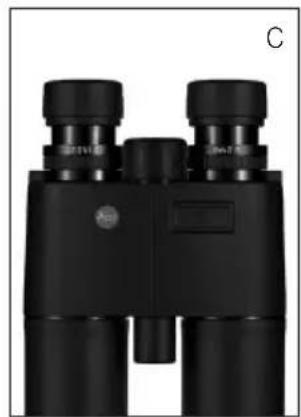
natural_image
Black binoculars with visible lens and control knobs (no text or symbols)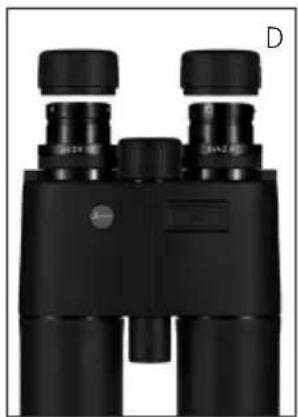
natural_image
Black binoculars with no visible text or symbols on the device itselfRÉGLAGE DES OÉILLETONS/ UTILISATION AVEC ET SANS LUNETTES
natural_image
Black-and-white photo of a black buffalo lying in tall grass with a red tag (no text or symbols visible)MESURE DES DISTANCES
Product Support / Software Support
Am Leitz-Park 5
D-35578 Wetzlar
Tél.: +49(0)6441-2080-111 /-108
Fax: +49(0)6441-2080-490
info@leica-camera.com /
software-support@leica-camera.com
LEICA CUSTOMER CARE
natural_image
Close-up of a hand holding a black binoculars with a metallic clip (no visible text or symbols)PLAATSEN EN VERVANGEN VAN DE BATTERIJ
natural_image
Close-up of hands using a microscope to adjust a small component (no visible text or symbols)Aanwijzingen:
natural_image
Black binoculars with no visible text or symbols on the device itself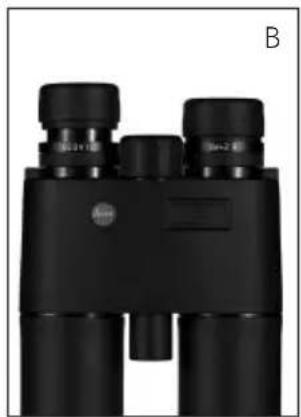
natural_image
Black binoculars with no visible text or symbols on the device itself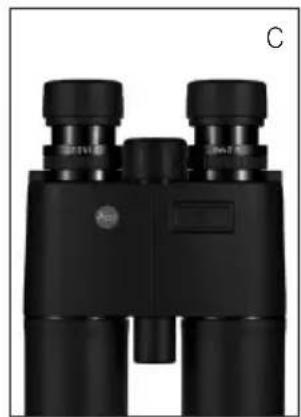
natural_image
Black binoculars with visible lens and control knobs (no text or symbols)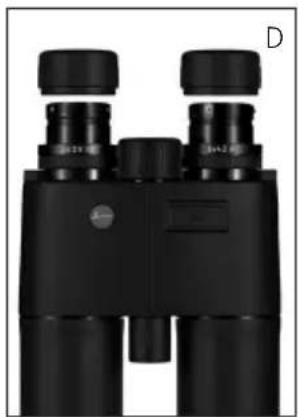
natural_image
Black binoculars with no visible text or symbols on the device itselfINSTELLEN VAN DE OOGSCHELPEN / GEBRUIK MET EN ZONDER BRIL
INSTELLEN VAN DE SCHERPTE / DIOPTRIE-COMPENSATIE
natural_image
Black-and-white photo of a black buffalo lying in tall grass with a red tag (no text or symbols visible)AFSTANDSMETING
Product Support / Software Support
Am Leitz-Park 5
D-35578 Wetzlar
Tel.: +49(0)6441-2080-111 /-108
Fax: +49(0)6441-2080-490
info@leica-camera.com /
software-support@leica-camera.com
LEICA CUSTOMER CARE
natural_image
Close-up of a hand holding a black binoculars with a metallic clip (no visible text or symbols)natural_image
Close-up of hands using a microscope to adjust a small component (no visible text or symbols)Avvertenze:
natural_image
Black binoculars with no visible text or symbols on the device itself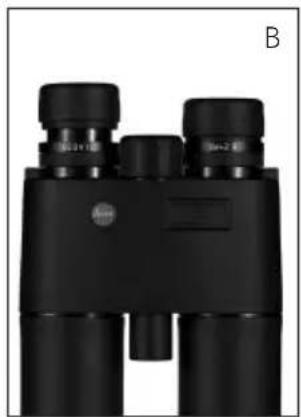
natural_image
Black binoculars with no visible text or symbols on the device itself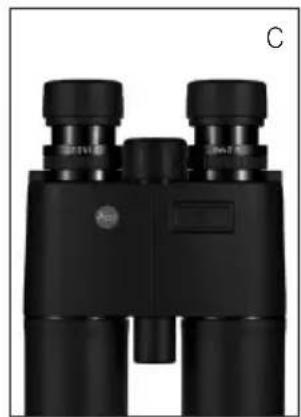
natural_image
Black binoculars with visible lens and control knobs (no text or symbols)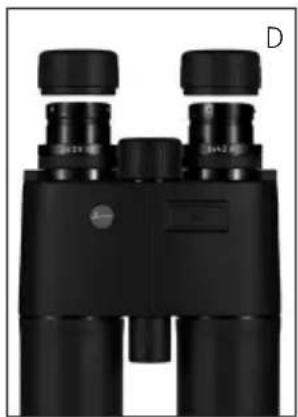
natural_image
Black binoculars with no visible text or symbols on the device itselfREGOLAZIONE DELLE CONCHIGLIE OCULARI/UTILIZZO CON E SENZA OCCHIALI
natural_image
Black-and-white photo of a black buffalo lying in tall grass, no visible text or symbolsProduct Support / Software Support
Am Leitz-Park 5
D-35578 Wetzlar
Tel.: +49(0)6441-2080-111 /-108
Fax: +49(0)6441-2080-490
info@leica-camera.com /
software-support@leica-camera.com
LEICA CUSTOMER CARE
natural_image
Close-up of a hand holding a black binoculars with a metallic clip (no visible text or symbols)natural_image
Close-up of hands using a microscope to adjust a small component (no visible text or symbols)Notas:
natural_image
Black binoculars with visible lens and control knobs, labeled 'A' in top right corner (no other text or symbols)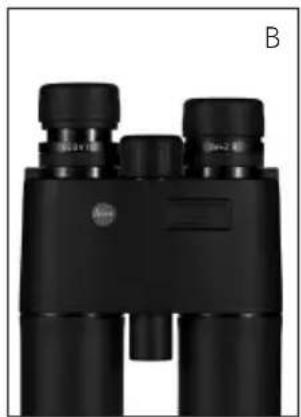
natural_image
Black binoculars with no visible text or symbols on the device itself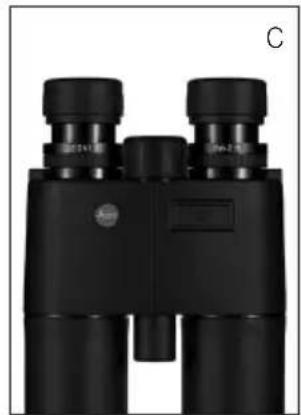
natural_image
Black binoculars with no visible text or symbols on the device itself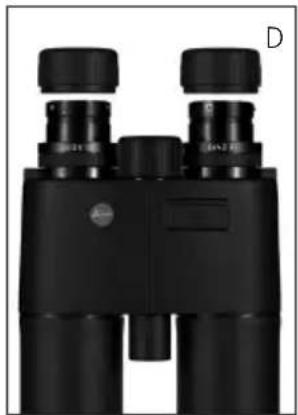
natural_image
Black binoculars with no visible text or symbols on the device itselfnatural_image
Black-and-white photo of a black buffalo standing in tall grass, no visible text or symbolsProduct Support / Software Support
Am Leitz-Park 5
D-35578 Wetzlar
Tel.: +49(0)6441-2080-111 /-108
Fax: +49(0)6441-2080-490
info@leica-camera.com /
software-support@leica-camera.com
LEICA CUSTOMER CARE
Leica Product Support....112
Leica Customer Care 112
natural_image
Close-up of a hand holding a black binoculars with a metallic clip (no visible text or symbols)INNLEGGING OG SKIFTE AV BATTERIET
natural_image
Close-up of hands using a microscope to adjust a small component (no visible text or symbols)Merk:
natural_image
Black binoculars with no visible text or symbols on the device itself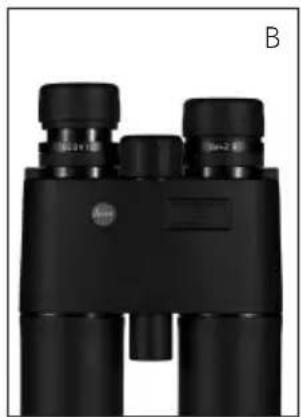
natural_image
Black binoculars with no visible text or symbols on the device itself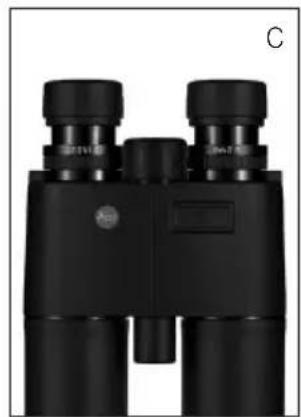
natural_image
Black binoculars with visible lens and control knobs (no text or symbols)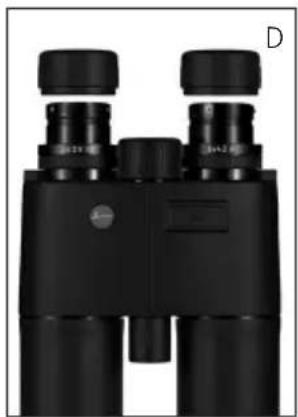
natural_image
Black binoculars with no visible text or symbols on the device itselfINNSTILLING AV ∅YEMUSLINGENE/ ANVENDELSE MED OG UTEN BRILLE
INNSTILLING AV SKARPHETEN / DIOPTRIKOMPENSASJON
natural_image
Black-and-white photo of a buffalo lying in tall grass, no visible text or symbolsAVSTANDSMÅLING
Product Support / Software Support
Am Leitz-Park 5
D-35578 Wetzlar
Tel.: +49(0)6441-2080-111 /-108
Fax: +49(0)6441-2080-490
info@leica-camera.com /
software-support@leica-camera.com
LEICA CUSTOMER CARE
Leica Product Support....128
Leica Customer Care ....128
natural_image
Close-up of a hand holding a small metallic object next to a black binoculars (no text or symbols visible)natural_image
Close-up of hands using a microscope to adjust a small component (no visible text or symbols)Указания:
natural_image
Black binoculars with no visible text or symbols on the device itself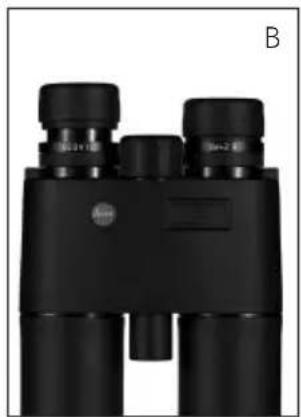
natural_image
Black binoculars with no visible text or symbols on the device itself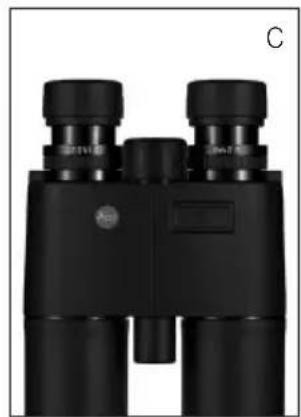
natural_image
Black binoculars with visible lens and control knobs (no text or symbols)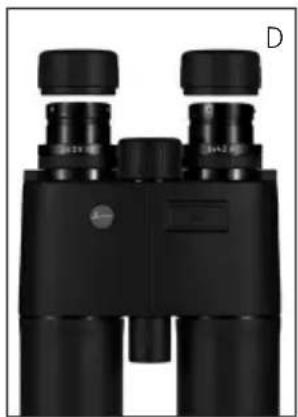
natural_image
Black binoculars with no visible text or symbols on the device itselfnatural_image
Black-and-white photo of a black buffalo lying in tall grass with red markings on its back (no text or symbols visible)Product Support / Software Support
Am Leitz-Park 5
D-35578 Wetzlar
Тел.: +49(0)6441-2080-111 /-108
This is a Class B product based on the standard of the Voluntary Control Council for Interference from Information Technology Equipment (VCCI). If this is used near a radio or television receiver in a domestic environment, it may cause radio interference. Install and use the equipment according to the instruction manual.
FCC NOTE: (U.S. ONLY)
This equipment has been tested and found to comply with the limits for a Class B digital device, pursuant to Part 15 of the FCC Rules. These limits are designed to provide reasonable protection against harmful interference in a residential installation. This equipment generates, uses, and can radiate radio frequency energy and, if not installed and used in accordance with the instructions, may cause harmful interference to radio communications. However, there is no guarantee that interference will not occur in a particular installation. If this equipment does cause harmful interference to radio or television reception, which can be determined by turning the equipment off and on, the user is encouraged to try to correct the interference by one or more of the following measures:
- Reorient or relocate the receiving antenna.
- Increase the separation between the equipment and receiver.
- Connect the equipment into an outlet on a circuit different from that to which the receiver is connected.
- Consult the dealer or an experienced radio/TV technician for help.
(CANADA ONLY)
CAN ICES-3(B)/NMB-3(B)
FCC CAUTION:
To assure continued compliance, follow the attached installation instructions and use only shielded interface cables with ferrite core when connecting to computer or peripheral devices. Any changes or modifications not expressly ap proved by the party responsible for compliance could void the user's authority to operate this equipment.
Trade Name: LEICA
Model: Geovid R
Responsible party/ Leica Camera Inc.
Support contact: Leica Camera Inc.
1 Pearl Count, Unit A
Allendale, New Jersey 07401
Tel.: +1 201 995 0051
Fax: +1 201 995 1684
technicalinfo@leicacamerausa.com
This device complies with Part 15 of the FCC Rules.
Operation is subject to the following two conditions:
(1) This device may not cause harmful interference, and
(2) this device must accept any interference received, including interference that may cause undesired operation.
Complies with 21 CRF 1040.1 and 1040.11
LEICA GEOVID R

Tested To Comply With FCC Standards
FOR HOME OR OFFICE USE

DAS WESENTLICHE
Leica Camera AG | Am Leitz-Park 5 | 35578 WETZLAR | DEUTSCHLAND
Telefon +49(0)6441-2080-0 | Telefax +49(0)6441-2080-333 | www.leica-camera.com
