3D ForceAnodized 850 iPump - Iron CECOTEC - Free user manual and instructions
Find the device manual for free 3D ForceAnodized 850 iPump CECOTEC in PDF.



| Product type | Clothes iron |
| Brand | Cecotec |
| Model | 3D ForceAnodized 850 iPump |
| Reference | 05104 |
| Power supply | 3100 W, 220-240 V, 50/60 Hz |
| Soleplate | Anodized (3D ForceAnodized) |
| Water tank capacity | Up to MAX mark |
| Steam burst function | Yes, intense burst |
| Spray function | Yes, usable at any temperature |
| Pressure generating pump (i-Pump) | Yes, for maximum steam |
| Touch sensor | Yes, handle safety |
| Self-cleaning | Yes, recommended every 2 weeks |
| Auto shut-off | Yes (25 s horizontal, 8 min vertical) |
| Anti-drip system | Yes |
| Anti-scale system | Yes |
| Vertical steaming | Yes |
| Dry and steam ironing | Yes |
| Swivel cord | Yes |
| LED indicator | Blue (heating), red (ready) |
| Warranty | 2 years |
| After-sales service | Cecotec, tel. +34 9 63 21 07 28 |
Frequently Asked Questions - 3D ForceAnodized 850 iPump CECOTEC
User questions about 3D ForceAnodized 850 iPump CECOTEC
0 question about this device. Answer the ones you know or ask your own.
Ask a new question about this device
Download the instructions for your Iron in PDF format for free! Find your manual 3D ForceAnodized 850 iPump - CECOTEC and take your electronic device back in hand. On this page are published all the documents necessary for the use of your device. 3D ForceAnodized 850 iPump by CECOTEC.
USER MANUAL 3D ForceAnodized 850 iPump CECOTEC
3D ForceAnodized 850 i-Pump
Centro de planchado compacto/Compact steam station
natural_image
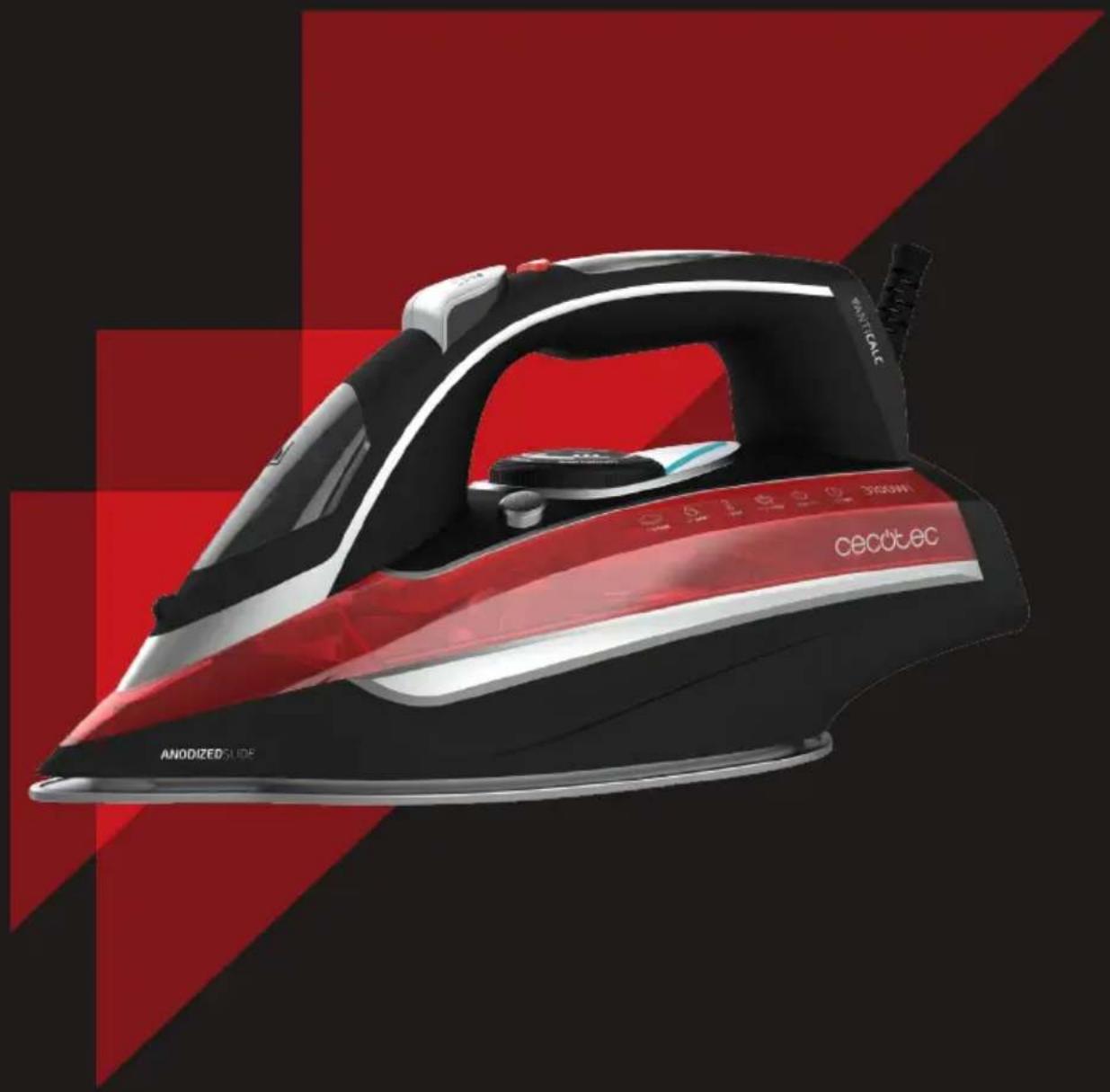
Red and black electric iron with 'CECOTEC' branding, displayed against a red and black geometric background (no text or symbols on the device itself)natural_image
Abstract geometric design with red triangular shapes forming a staircase pattern (no text or symbols)ÍNDICE
- Water-spray nozzle
- Water-filling opening cover
- Steam-burst button
- Water-spray button
- Pump button
- Touch-sensor button
- Cord protector
- LED light
- Water tank
- Temperature knob
- Self-cleaning button
- Soleplate
FR
2. SAFETY INSTRUCTIONS
Read these instructions thoroughly before using the appliance. Keep this instruction manual for future reference or new users.
- Make sure that the mains voltage matches the voltage stated on the rating label of the appliance and that the wall outlet is grounded.
- Do not leave the iron unattended while hot, connected or on an ironing board.
- Place and rest the appliance on a flat and stable surface.
- Do not operate the appliance if it has dropped, if it shows visible signs of damage or if it leaks.
- Do not pull from the power cord to unplug or move the appliance, use the plug instead.
- Do not twist, bend, strain, or damage the power cord in any way. Protect it from sharp edges and heat sources. Do not let it touch hot surfaces. Do not let the cord hang over the edge of the working surface or countertop.
- Do not immerse the cord, plug, or any non-removable part of the appliance in water or any other liquid, nor expose the electrical connections to water. Make sure your hands are dry before handling the plug or switching on the appliance.
- Check the power cord regularly for visible damage. If the cord is damaged, it must be replaced by the official Technical Support Service of Cecotec in order to avoid any type of danger.
- Avoid contact with the steam generated by the iron. The steam temperature is very high and could cause burns and damage.
- Do not use chemically descaled water. It is suggested to use distilled water.
• Always unplug the steam iron from the power supply when filling with water or emptying and when not in use.
• The appliance is not intended to be used by children under the age of 8. It can be used by children over the age of 8, as long as they are given continuous supervision.
- This appliance can be used by children aged 8 and above, and persons with reduced physical, sensory or mental capabilities or lack of experience and knowledge, as long as they have been given supervision or instruction concerning the use of the appliance in a safe way and understand the hazards involved.
- Supervise young children to make sure that they do not play with the appliance. Close supervision is necessary when the appliance is being used by or near children.
3. BEFORE USE
Note: some parts of the steam iron have been slightly greased and as a result, the iron may slightly smoke when switched on for the first time. After a short time, this will cease.
- Take the product out of the box.
- Remove any packaging materials, stickers or protective foil from the soleplate.
- Clean the soleplate with a soft cloth.
4. OPERATION
WATER TANK FILLING
- Unplug the iron before filling the water tank.
- Turn the temperature knob to the minimum position.
- Rest the iron on its heel rest, tilt it forward approximately 45^ and pour water into the water-filling opening up to the MAX mark.
VERTICAL STEAMING
- Make sure there is enough water in the water tank.
- Stand the steam iron on its heel and connect it to the power supply.
- Select the maximum-temperature mode.
- Hold the iron vertically and press the steam burst button, an intense steam will be ejected from the soleplate.
DRY IRONING
- Select the appropriate temperature according to the type of fabric.
STEAM IRONING
- Unplug the iron and fill it with water.
- Connect the iron to a power supply.
- Turn the temperature knob to select the type of fabric to be ironed.
- The light indicator will turn on blue when the soleplate is preheating and will switch to red when it is ready to use.
- When finished, select OFF and unplug the device from the power supply.
WARNING: if the iron is operated while the light is blue, the iron will not have reached the correct temperature to vaporize and the soleplate could leak.
WARNING: the iron will only produce constant steam when it is placed horizontally. Constant steam can be stopped by placing it in an upright position.
Steam function can only be activated when the iron is operated at medium or high temperature. If the selected temperature is low, the iron's soleplate could leak.

STEAM BURST
By pressing the steam-burst button, an intense burst of steam is emitted from the soleplate. This function can only be activated during high-temperature ironing.
Note: to prevent the soleplate from leaking, do not keep the steam-burst button pressed for more than 5 seconds.
Note: for optimal steam burst, do not press the steam-burst button more than three times in a row to prevent the iron from cooling.

SPRAYING
- As long as there is enough water in the water tank, you may use the spray button at any temperature setting.
SENSOR TOUCH
The iron includes a touch sensor in its handle. For safety reasons, it will only produce continuous steam when it is held horizontally by the handle.
PRESSURE-GENERATING PUMP
The iron includes a pressure pump to produce maximum steam and removes the most difficult wrinkles. To activate it, press once the i-PUMP button located on the product's top part. During operation, the LED will light and it will produce a slight sound. To turn it off, press the button and wait until the light turns off.
SELF CLEANING
• Make sure the appliance is unplugged.
- Set the steam knob to "0".
- Fill the water tank up to the maximum mark and close it.
- Set the temperature knob to maximum.
- Connect the appliance to the power supply.
- Unplug the appliance when it reaches the temperature.
- Holding the iron horizontally, press the self-cleaning button.
• Boiling water and steam will be ejected from the soleplate's holes, taking out all impurities.
- Repeat this process if considered necessary.
Tip: carry out the self-cleaning cycle once every 2 weeks. When excessive limescale is observed, carry it out more frequently.
AUTO-OFF FUNCTION
The iron will automatically turn off when it is placed and kept still horizontally 25 seconds,
or vertically 8 minutes. The device will produce 6 beeps and the LED light will light up in red, indicating that the appliance has been turned off.
To heat up the iron again, lift or gently move the iron.
ANTI-DRIP FUNCTION
- This function automatically prevents water from spilling when the appliance is not hot enough.
- During use, the anti-drip system may emit a loud clicking sound, especially during preheating or whilst cooling down. This is perfectly normal and indicates that the system is functioning correctly.
BUILT-IN ANTISCALE SYSTEM
- This system is designed to reduce the building up of limescale due to steam ironing. This will lengthen the iron's shelf life.
| CAUTION: On the label means that this article may not be ironed. | |||
| Label indications Type of fabric Temperature knob | |||
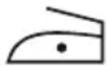 | Nylon/synthetics | 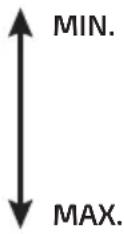 | |
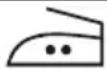 | Wool/silk | ||
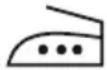 | Cotton | ||
| Linen | |||
5. CLEANING AND MAINTENANCE
- Turn off, unplug the appliance from the power supply, empty the water tank (do it after each use) and allow it to cool down completely.
- If there is any fabric adhered to the soleplate, use a damp cloth with vinegar to wipe off the soleplate.
- Do not use abrasive scouring pads, powders or cleaners to clean the product.
- If scale blocks the steam holes, use a toothpick to remove it.
- To protect the soleplate while it is stored, place the steam iron in an upright position on its heel rest.
6. TROUBLESHOOTING
| Problem Possible cause Solution | ||
| Not enough or too much heat. | The temperature knob is not set correctly or it is unplugged. | Set the temperature knob to the correct position. |
| No steam or leakage. | The temperature knob has been set to MIN. | |
| Steam burst or vertical steam do not work properly. | The steam-burst function has been used too often within a very short period. The iron is not hot enough. | Continue ironing in horizontal position and wait a few minutes before using the vertical steam-burst function again. |
| Water leaks from the soleplate. | The iron is not hot enough. | Wait until the red light indicator turns on. |
| Water is over the max mark. | Empty the left-over water. | |
| Little steam. | Steam holes are blocked. | Clean the hole with distilled water. |
| Too little water in the water tank. | Add water to the water tank. | |
| Spray does not work properly. | Not enough pressure or air inside. | Press the spray nozzle manually and press the spray button several times in a row. |
7. TECHNICAL SPECIFICATIONS
Model: 3D ForceAnodized 850 i-Pump
Reference No: 05103
3100 W, 220-240 V, 50/60 Hz
Made in China | Designed in Spain
8. DISPOSAL OF OLD ELECTRICAL APPLIANCES
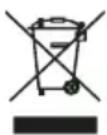
The European directive 2012/19/EU on Waste Electrical and Electronic Equipment (WEEE), specifies that old household electrical appliances must not be disposed of with the normal unsorted municipal waste. Old appliances must be collected separately, in
order to optimize the recovery and recycling of the materials they contain, and reduce the impact on human health and the environment.
The crossed out "wheeled bin" symbol on the product reminds you of your obligation to dispose of the appliance correctly. If the product has a built-in battery or uses batteries, they should be removed from the appliance and disposed of appropriately.
Consumers must contact their local authorities or retailer for information concerning the correct disposal of old appliances and/or their batteries.
9. TECHNICAL SUPPORT SERVICE AND WARRANTY
This product is under warranty for 2 years from the date of purchase, as long as the proof of purchase is submitted, the product is in perfect physical condition, and it has been given proper use, as explained in this instruction manual.
The warranty will not cover the following situations:
- The product has been used for purposes other than those intended for it, misused, beaten, exposed to moisture, immersed in liquid or corrosive substances, as well as any other fault attributable to the customer.
- The product has been disassembled, modified, or repaired by persons, not authorised by the official Technical Support Service of Cecotec.
- Faults deriving from the normal wear and tear of its parts, due to use.
The warranty service covers every manufacturing defects of your appliance for 2 years, based on current legislation, except consumable parts. In the event of misuse, the warranty will not apply.
If at any moment you detect any problem with your product or have any doubt, do not hesitate to contact Cecotec Technical Support Service at +34 963 210 728.
2. INSTRUCTIONS DE SÉCURITÉ
natural_image
Abstract geometric design with red triangular shapes on a dark background (no text or symbols)www.cecotec.es