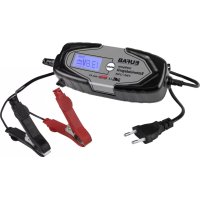
16616 - Battery charger Eufab - Free user manual and instructions
Find the device manual for free 16616 Eufab in PDF.



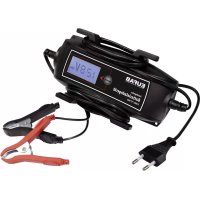
| Product type | Lead-acid battery charger |
| Brand | Eufab |
| Model | 16616 |
| Dimensions | 180 x 100 x 45 mm |
| Weight | 0.475 kg |
| Input power | 220-240 V AC, 50/60 Hz |
| Output | 6V/12V DC, 2A or 4A depending on mode |
| Compatible battery capacity | 6 V: 1.2 to 14 Ah; 12 V: 1.2 to 120 Ah |
| Protection class | IP65 (housing only) |
| Operating temperature | -5°C to +40°C |
| Charge cable length | 1.50 m |
| Charge programs | 6V, 6V winter, 12V motorcycle, 12V motorcycle winter, 12V car, 12V car winter, conservation mode |
| Maximum charging current | 2 A (6V and motorcycle modes); 4 A (car mode) |
| Main functions | Automatic charging, reverse polarity protection, defective battery detection, maintenance charging |
| Maintenance and cleaning | Clean clamps after use; do not immerse; use a dry cloth |
| Safety | Do not use as a jump starter; do not cover; use in a dry environment |
| Spare parts and repairability | Power cable not replaceable; device must be disposed of if damaged |
| General information | Manufacturer: EAL GmbH, Germany |
Frequently Asked Questions - 16616 Eufab
User questions about 16616 Eufab
0 question about this device. Answer the ones you know or ask your own.
Ask a new question about this device
Download the instructions for your Battery charger in PDF format for free! Find your manual 16616 - Eufab and take your electronic device back in hand. On this page are published all the documents necessary for the use of your device. 16616 by Eufab.
USER MANUAL 16616 Eufab
GB Intelligent battery charger 6/12V 4 A with cable roller
Article No. 16616
Content
- Intended use 6
- Scope of delivery 6
- Specifications 6
4.Explanation of symbols 7 - Safety notes 7
- Operating instructions 7
6.1 Preparation 8
6.2 Connecting the battery charger 8
6.3 Removing the charger 9 - Maintenance and care 9
7.1 Maintenance 9
7.2 Care 9 - Notes regarding environmental protection 9
- Contact information 9
WARNING

Read the operating instructions through carefully prior to initial use and observe all of the safety notes! Not observing such may lead to personal injury, damages to the device or your property! Store the original packaging, the receipt and these instructions so that they may be consulted at a later date! Prior to
initial use check the contents of the packaging to ensure that they are in perfect condition and complete!
1. Intended use
The charger is suitable for charging open and a variety of closed, maintenance-free lead-acid batteries, for example:
- Wet batteries (WET), lead-acid batteries (fluid electrolyte)
- Gel batteries (gel electrolyte)
- AGM batteries (electrolyte in fibreglass fleece)
- Maintenance-free lead-acid batteries (MF)
Other batteries may not be charged with this device.
The charger may not be used as a starter aid. First charge the battery of your vehicle fully and remove the charger before starting the vehicle.
The charger may not be used as a source of direct current or for other purposes.
The battery charger is designed for use in dry and protected environments at temperatures of -5^ to +40^ .
This device is not designed to be used by children and people with limited mental capacities or those without experience and/or knowledge. Keep children away from the device.
The device is not designated for commercial use.
Any other use or modification to the device is considered improper usage and may be dangerous. EAL GmbH accepts no liability for damages caused as a result of improper use.
2. Scope of delivery
-
Charger
-
Operating instructions
3. Specifications
Dimensions: 180 × 100 × 45 mm Weight: 0.475 kg
Long mains cable: 1.50m Long charger cable: 1.50m
Input: 220-240 V AC 50/60 Hz Output: 6 V mode: 6 V DC 2.0 A
Motorbike: 12 V DC 2.0 A Auto: 12 V DC 4.0 A
Battery capacity: 6 V min 1.2 Ah max. 14 Ah
12 V min 1.2 Ah max. 120 Ah
Protection class: IP65 (only device housing, not connection and charging cable)
Ambient temperature: -5°C to +40°C
4. Explanation of symbols

Corresponds to EC directives
Labelled electrical product may not be disposed of in the household waste

Devices with this symbol may only be operated in the house (dry environment)

Insulated housing (protection class II).

Fuse, here: Slow-burning, 1.6A

Recommended battery capacity

Read the operating instructions

Corresponds to the requirements of 21 of the German Product Safety Law (Produktssicherheitsgesetz)
IP65
Protection class Spray water protected
5. Safety notes

The warning triangle labels all instructions important to safety. Always follow these otherwise you could injure yourself or damage the device.
- Only connect the device to a correctly installed socket. The voltage must correspond to the specification on the type plate of the device.
- Do not trap the power cable and protect it from sharp edges, damp, heat or oil. The power cable of the unit cannot be replaced. In the event that the cable is damaged, the unit must be disposed of.
- Do not operate the device or immediately pull the plug if it is damaged or you suspect it may be defective. In this case, contact our technicians.
- Pull the plug when the device is not in use.
- Keep packaging materials, especially plastic and plastic bags, away from children. Risk of suffocation!
- Remove all plastic from the device before use.
- Lay the mains cable in such a way that you are not hindered by it, and no one is able to accidentally pull it.
- Disconnect the battery charger from the power supply after charging.
- Keep the charger in a place that cannot be accessed by children or unauthorised persons.
- Never operate the device in the vicinity of flammable materials or in an environment prone to explosion.
Always wear suitable working clothes, protective gloves and goggles. Battery acid is corrosive! Immediately and thoroughly wash off any splashed acid and consult a doctor if necessary. If battery acid gets into the eyes, immediately rinse under running water for at least 10 minutes and consult a doctor.
- Do not cover the charger, this may lead to overheating and result in damages. Never set the charger up for operation on a surface that is insulating (e.g. polystyrene). There is a risk of heat build up!
If you wish to charge a vehicle battery in the installed state, first park the vehicle safely, put on the parking brake and switch off the ignition. Cut the battery off from the on-board network of your vehicle. To do this, consult the manual for your vehicle, or ask your specialist workshop.
- When pulling the mains cable out of the socket, only hold the plug.
- Never expose the charger to the vicinity of fire, heat and extensive temperatures over +40^ C .
- Store these instructions carefully and, if necessary, pass them on to other users.
6. Operating instructions
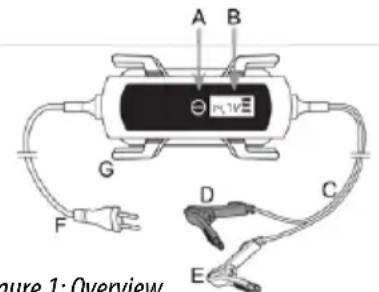
Figure 1: Overview
A MODE button
B Display
C Charging cable
D Pole callipers, red (+)
E Pole callipers, black (-)
F Mains cable
G Hook for rolling up the cable
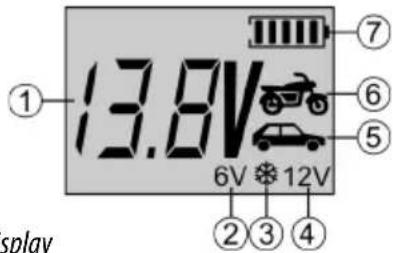
- Battery voltage display
2.6 V charging programme - Winter charging programme
4.12 V charging programme - Car charging programme
- Motorbike charging programme
- Battery charge status display Figure 2: Display
6.1 Preparation
Clean the battery pole of dust and corrosion residue. Only for open batteries: Top up with distilled water until the minimum filling level is reached. Leave the cells of the battery open until the end of the charging process. With maintenance-free batteries, follow the instructions of the battery manufacturer precisely.
6.2 Connecting the battery charger

Caution: Make sure that the charger is not connected to the power socket. Always first connect the red plus cable (+) of the charger to the plus pole of the battery. Then connect the black minus cable (-) to the minus pole of the battery. If you wish to charge the battery while it is installed, connect the black minus cable (-) to the chassis, far away from the battery, carburettor and fuel lines. Always stick to this sequence.

Caution: After plugging the mains cable inselect the desired charging pro- gramme by operating the MODE button multiple times. If the MODE button is not pressed, the charging process is not started. When charging has started it is no longer possible to switch to another charging program, If you wish to work with a program other than the set charging program, pull the plug out of the socket and wait until the display has gone dark. Then insert the plug again and proceed as described above.
Now, connect the power plug of the charger to the mains socket. The background illumination of the display is activated.
If the battery has been connected incorrectly (wrong poles) or the charger has no contact, the following error message appears on the display. If the error message is shown, a defective 6 V battery has been connected, this cannot be charged using the battery charger. If the battery has been correctly connected, the display shows the current battery voltage and the symbol for the set charging programme. By pressing (multiple times) the MODE button, you can select the appropriate charging programme for your needs.
The charging programmes appear in the following order and may be selected by pressing the MODE button:
Motorbike 6 V Motorbike 6 V winter
Motorbike 12 V Motorbike 12 V winter
Car 12 V Car 12 V winter
Depending on the charging state of the battery, the device adapts the charging current in order to best charge the connected battery. The specified maximum charging current is only used during the main charging phase. Shortly before the full charging capacity is achieved, the device switches to a lower charging current. This ensures that the battery is gently and optimally charged to full capacity.
The battery symbol (7) (Figure 2: Display) shown on the display indicates the current filling level of the battery.
Possible charging programmes
| 6 Volt mode Charging programme for 6 V batteries, 1.2 Ah to 14 Ah, temperatures above 0°C Charge current: 2 A maximum charge voltage: 7.2 V | 7.2V 6V |
| 6 Volt winter mode Charging programme for 6 V batteries, 1.2 Ah to 14 Ah, temperature below 0°C Charge current: 2 A maximum charge voltage: 7.4 V | 7.4V 6V |
| Motorbike mode Charging programme for 12 V batteries from 1.2 Ah to 14 Ah, temperatures above 0°C Charge current: 2 A maximum charge voltage: 14.3 V | 14.3V 12V |
| Motorbike winter mode Charging programme for 12 V batteries from 1.2 Ah to 14 Ah, temperatures below 0°C Charge current: 2 A maximum charge voltage: 14.8 V | 14.8V 12V |
| Car mode Charging programme for 12 V batteries from 14 Ah to 120 Ah, temperatures above 0°C Charge current: 4 A maximum charge voltage: 14.6 V | 14.6V 12V |
| Car winter mode Charging programme for 12V batteries from 14 Ah to 120 Ah, temperatures below 0°C Charge current: 4 A maximum charge voltage: 1 4.8 V | 14.8V 12V |
| Battery maintenance charge mode As soon as the battery is fully charged, the charger switches automatically over to battery maintenance charge mode. This is indicated appropriately on the display. | FULL 12V |
Error messages
| Display of error after faulty connection (wrong poles), short-circuit, selection of an incorrect charging programme or overheating. | EB.V.12V |
| Error message in 6 V - mode, if a battery is connected with less than 5.5 V ± 0.2 or the voltage is still lower than 6 V after 4 hours of charging time. | EB.BV6V |
6.3 Removing the charger

Caution: First pull the plug out of the socket and observe the sequence for disconnection. This prevents sparks from forming. Since charging generates a detonating gas, this is particularly important for the sake of your safety.
Disconnect the charger from the mains power supply.
Then disconnect the black callipers (minus). Then remove the battery callipers from the plus pole of the battery (red callipers). Allow the battery to cool and fill the cells with distilled water to the filling level named by the battery manufacturer. Close the battery cells using the caps.
7. Maintenance and care
7.1 Maintenance
If used correctly, the device is maintenance-free.
7.2 Care
Clean the pole callipers every time the charging procedure is completed. Remove all splashed battery acid from the pole callipers to prevent corrosion. Clean the device carefully with a dry cloth. Do not use liquids or chemical cleaning agents. Never submerge the device in liquids. Never allow liquid to flow over the device.
Before storing the device, roll up the cables properly using the designated hook in order to prevent damages to the cables and device. Store the device in a clean and dry place.
8. Notes regarding environmental protection
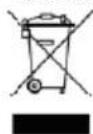
The packaging is made up of environmentally friendly materials which may be disposed of via your local recycling points. Do not put electrical devices into the household waste. Electronic and electrical devices must be collected separately and sent for environmentally friendly recycling. Contact your community or town administration for information regarding the disposal of electrics.
9. Contact information

EAL GmbH
42115 Wuppertal, Germany
Moto: 12 V DC 2,0 A Voiture: 12 V DC 4,0 A
Motorno kolo: 12 V DC 2,0 A Avto: 12 V DC 4,0 A
Kapaciteta akumulatorja: 6 V najm. 1,2 Ah najv. 14 Ah 12 V najm. 1,2 Ah najv. 120 Ah
We herewith confirm that the appliance as detailed below complies with the mentioned directives.
Articlebezeichnung:
Article description:
ArticleNumber:
16616
Article number:
Type:
SPB4DVL
Firmenanschrift:
governing EU-directives:

Low Voltage Directive (LVD)
2014/35/EU
Radio Equipment Directive
2014/53/EU

harmonised EN-Standards
Dieser Artikel entspricht folgenden, zur Erlangung des CE-Zeichens erforderlichen Normen: The article complies with the standards as mentioned below which are necessary to obtain the CE-symbol:
zu 1.
EN 55014-1
EN 55014-2
EN 61000-3-2
EN61000-3-3
EN 62233
zu 2.
EN 60335-1
EN 60335-2
zu 3.