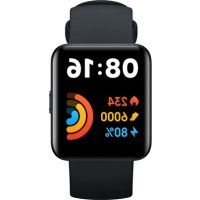
Redmi Watch 2 Lite - Wristwatch Xiaomi - Free user manual and instructions
Find the device manual for free Redmi Watch 2 Lite Xiaomi in PDF.


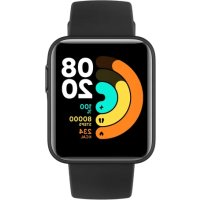
| Product type | Smart Watch |
| Brand | Xiaomi |
| Model | Redmi Watch 2 Lite (M2109W1) |
| Display | 1.55-inch TFT display, resolution 320 × 360 |
| Connectivity | Bluetooth 5.0 (Bluetooth Low Energy) |
| Sensors | Optical heart rate sensor, accelerometer, gyroscope, electronic compass |
| Positioning systems | GPS, GLONASS, Galileo, BeiDou (A-GPS) |
| Battery | 262 mAh, lithium-ion polymer, magnetic charging |
| Dimensions (without strap) | 41.2 × 35.3 × 10.7 mm |
| Weight (with strap) | 35 g |
| Water resistance | 5 ATM (swimming in pool or sea near shore, not for diving or hot water) |
| Strap | TPU, adjustable length 140-210 mm, buckle in PC + 30% GF |
| Compatibility | Android 6.0 / iOS 10.0 or later |
| App | Xiaomi Wear (Android) / Xiaomi Wear Lite (iOS) |
| Main features | Notifications, GPS tracking, heart rate, outdoor exercises, customizable widgets |
| Power supply | Input 5 V / 1 A (charger included) |
| Operating temperature | 0 °C to 45 °C |
| Care and cleaning | Wipe with a soft cloth after contact with water; clean the strap regularly with water |
| Safety | Non-medical, do not use as a diagnostic device; keep out of reach of children; do not expose to extreme air pressure |
| Spare parts and repairability | Battery replaceable only by an authorized service; do not disassemble yourself; removable strap |
| General information | CE certification; declaration of conformity available online |
Frequently Asked Questions - Redmi Watch 2 Lite Xiaomi
User questions about Redmi Watch 2 Lite Xiaomi
0 question about this device. Answer the ones you know or ask your own.
Ask a new question about this device
Download the instructions for your Wristwatch in PDF format for free! Find your manual Redmi Watch 2 Lite - Xiaomi and take your electronic device back in hand. On this page are published all the documents necessary for the use of your device. Redmi Watch 2 Lite by Xiaomi.
USER MANUAL Redmi Watch 2 Lite Xiaomi
Redmi Watch 2 Lite User Manual .01

Please read this manual carefully before use, and retain it for future reference.
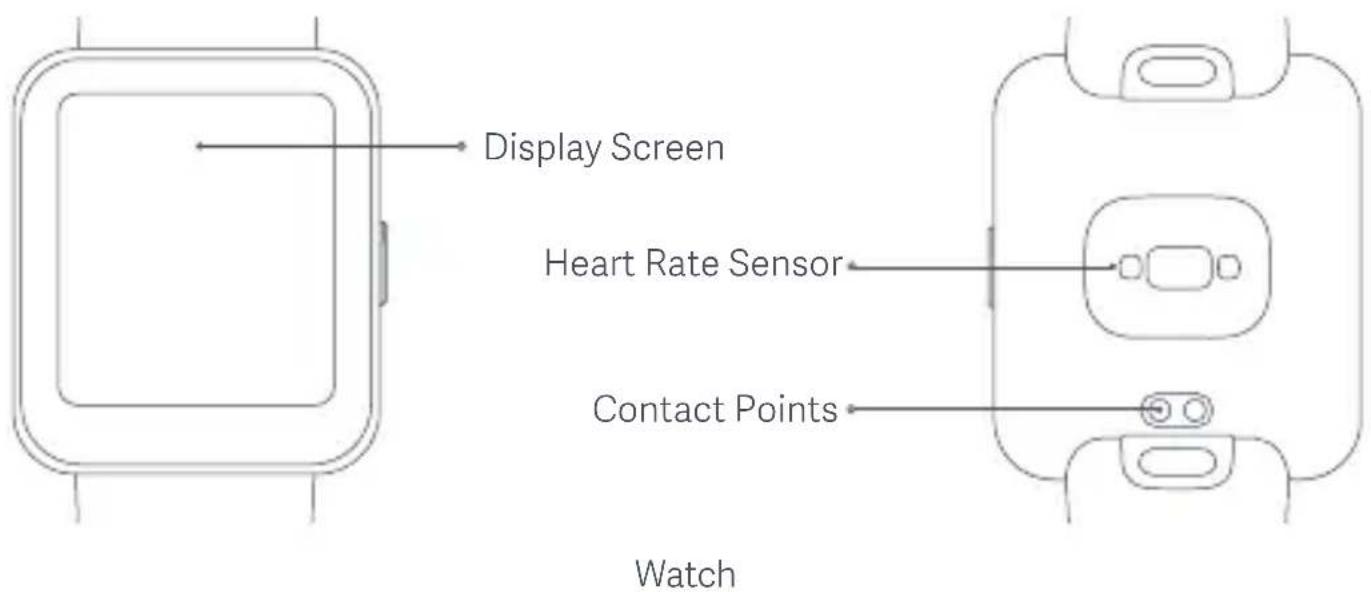
Illustrations of product, accessories, and user interface in the user manual are for reference purposes only. Actual product and functions may vary due to product enhancements.
natural_image
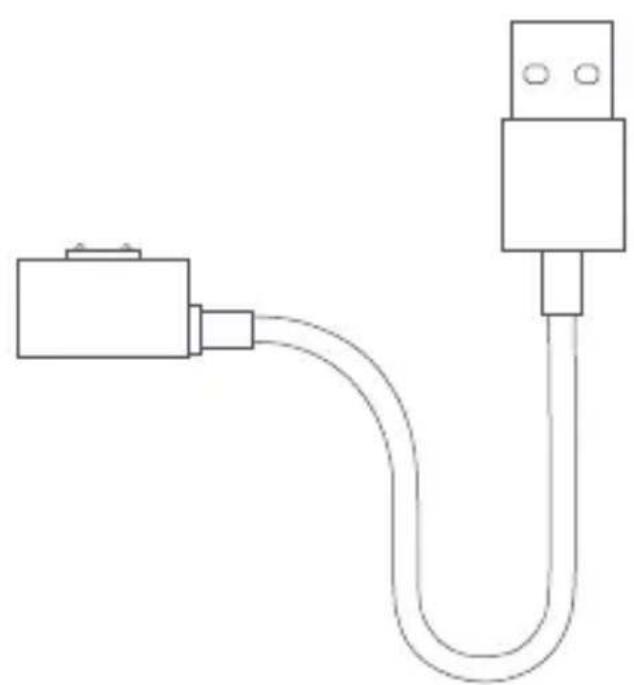
Simple line drawing of a USB cable with two connectors (no text or symbols)Charging Cable
How to Wear
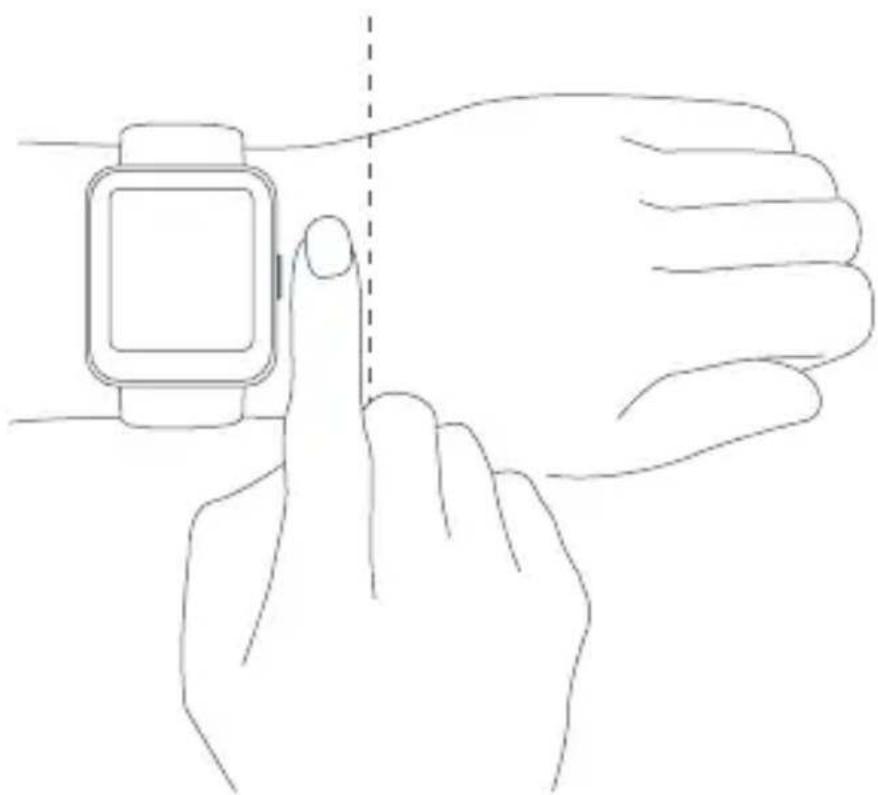
For daily use, comfortably tighten the watch around your wrist about one-finger width away from your wrist bone. Adjust the strap to ensure the heart rate sensor can collect data normally.
Note: Wearing the watch too loosely may impact the data collection by the heart rate sensor.
natural_image
Line drawing of a hand interacting with a smartwatch, showing finger positioning and a dashed line indicating alignment (no text or symbols)How to Connect
Download and install Xiaomi Wear/Xiaomi Wear Lite app to better manage your watch, and log in to your Xiaomi account for more services.
Note: The operations described here might slightly differ from the Xiaomi Wear/Xiaomi Wear Lite app due to its update, please follow the on-screen instructions.
-
Press and hold the function button to turn on the watch. Scan the QR code displayed on the watch with your phone, then download and install Xiaomi Wear/Xiaomi Wear Lite app. You can also download and install the app from app stores, or scan the QR code below.
-
Open Xiaomi Wear/Xiaomi Wear Lite app, then log in your Xiaomi account. Select Add device and follow the instructions to add your watch.
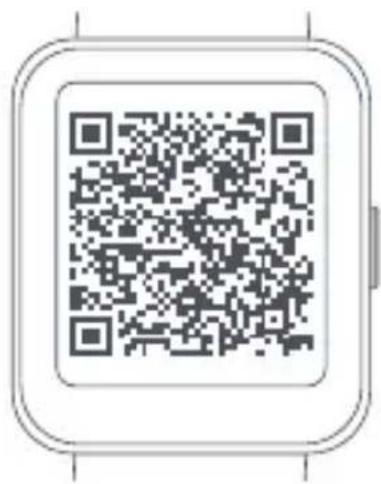
Scan the QR code to download the app
Android Device: Xiaomi Wear app / iOS Device: Xiaomi Wear Lite app
Pairing
When an identical pairing code is displayed on both the phone and the watch, tap Pair to complete the pairing.
Notes:
During pairing, make sure the Bluetooth is enabled on your phone and the watch is well connected with your phone.
If the pairing code appears on the watch but not on the phone, please check whether there is a pairing request in the notifications of the phone.
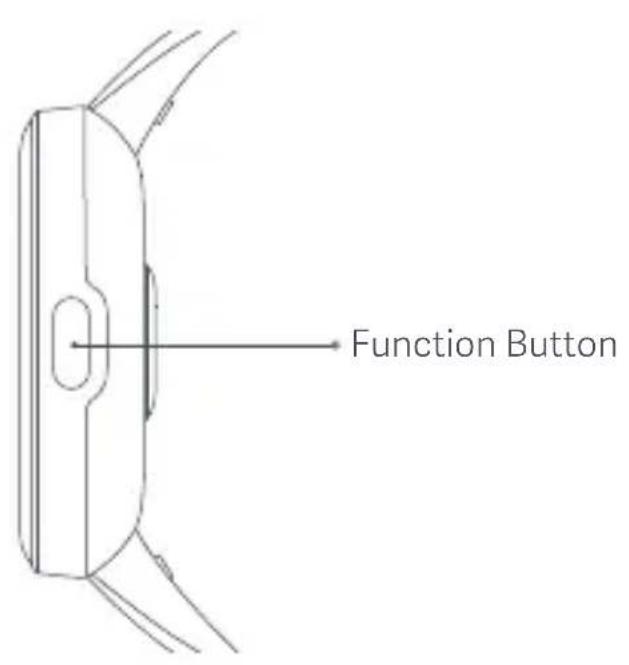
If the watch cannot be found while adding it to the app, or cannot connect with your phone during use, please press and hold the function button of the watch for 3 seconds and choose the reset option to restore factory settings, then try again.
How to Use
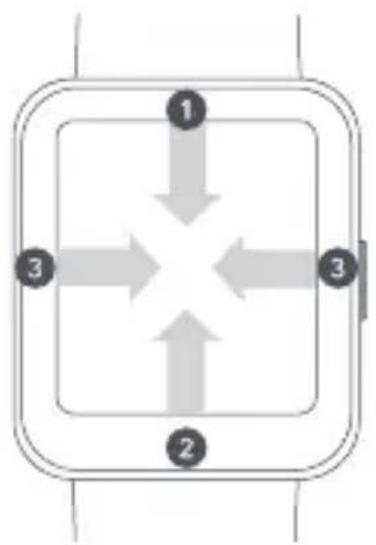
- View notifications: Swipe down from the top on the home screen
- Open control panel: Swipe up from the bottom on the home screen
- Switch widget: Swipe left or right when on the home screen page
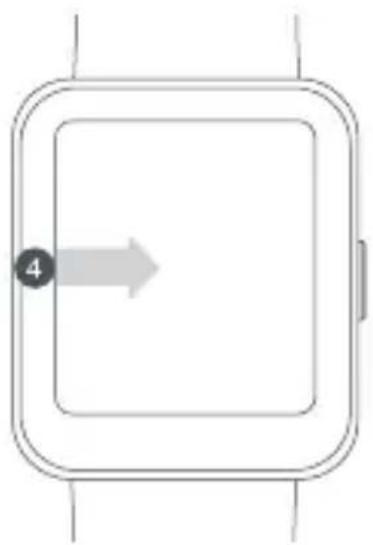
- Go back: Swipe from the left edge to the right when on other screen pages
flowchart
graph TD
    A["1"] --> B["3"]
    B --> C["2"]
    C --> D["3"]
    D --> A
natural_image
Simple line drawing of a square device with an arrow pointing to the center (no text or symbols)The watch supports the Global Position System (GPS) tracking. When you do outdoor exercises like running, the GPS will automatically start working and notify you when the positioning is successful, and quit tracking once you stop exercises. The open field outdoor is the best place for the GPS tracking; whereas when you are in a dense crowd, raising your arm up can better help GPS to the positioning. It is recommended to start your workout only when the GPS starts working.
The watch has an Assisted GPS (A-GPS) feature which can accelerate GPS positioning via the data directly from the GPS satellites. Make sure your watch is connected with the phone via the Bluetooth, the data can be automatically synchronized from Xiaomi Wear/Xiaomi Wear Lite app to your watch, and the A-GPS data automatically updated as well. In case the data has not been synchronized for seven consecutive days, the A-GPS data will expire. If so, the positioning information will need to be re-acquired. You can go to the page of outdoor exercises on your watch to update the positioning information.
Charging
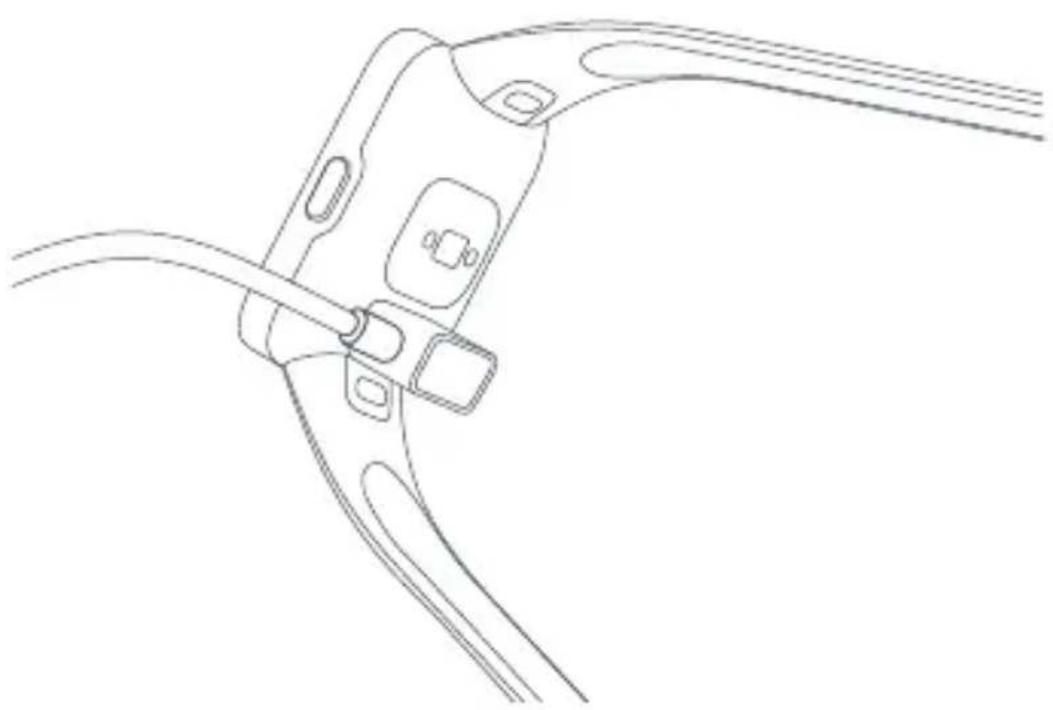
Recharge your watch immediately when the battery level is low. Attach the charging cable to charge the watch as shown in the illustration.
Note: When the magnetic charging cable is connected to the power, make sure the conductive substances are not absorbed on it. Otherwise, it may cause a short circuit.
natural_image
Line drawing of a mechanical clamp or bracket with attached fasteners (no text or symbols)Adjust & Install/Uninstall the Strap
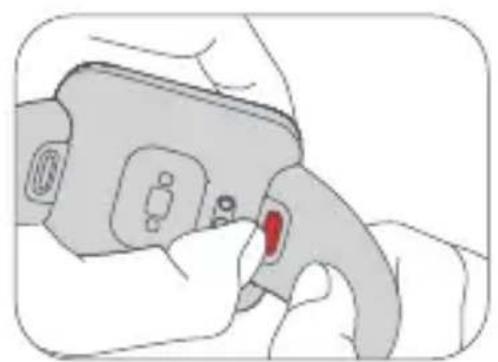
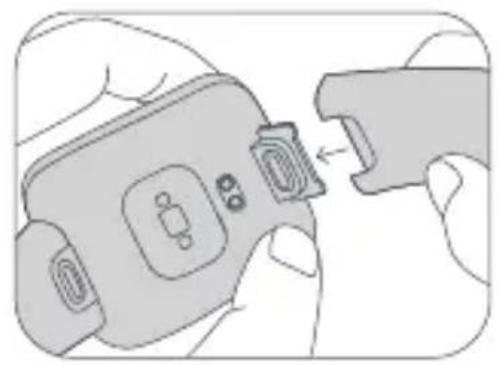
Adjust the position of the buckle according to the circumference of your wrist. To install or uninstall the strap, refer to the figures below. You can pull the strap to see if it is installed securely.
Uninstall the strap: Press down the release button with one hand, and simultaneously pull out the strap with the other hand.
natural_image
Illustration of a hand holding a small electronic device with a red button, no text or symbols visible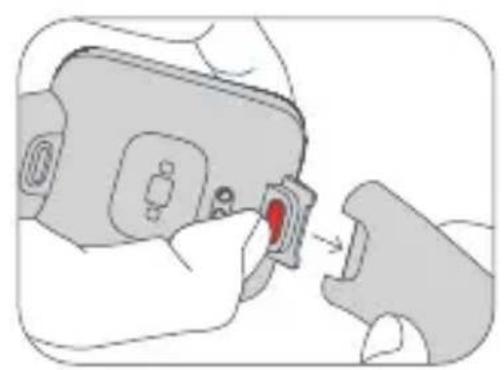
natural_image
Illustration of a hand inserting a red component into a device (no text or symbols visible)Install the strap: Align the slot of the strap with the watch and then insert it to the watch until you hear a click.
natural_image
Illustration of hands inserting a device into a clip (no text or symbols)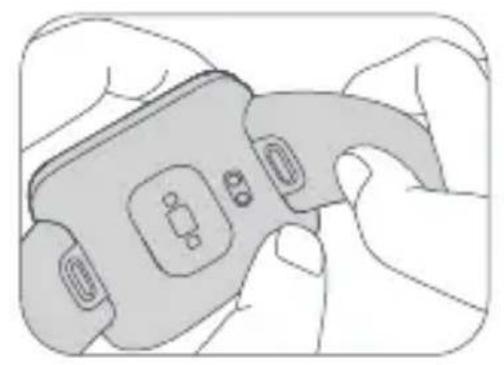
natural_image
Illustration of a hand holding a handheld device with buttons and display (no text or symbols)Safety Precautions
- When using the watch to measure your heart rate, please hold your wrist still.
- The band has a water resistance rating of 5 ATM. It can be worn in the swimming pool or while swimming near the shore. However, it can be used neither in places where the temperature and/or humidity is high, such as hot spring, sauna, or shower, nor in activities with deep or swift water, such as diving, scuba diving, or surfing. Furthermore, remember to take off the watch when washing clothes.
- The touchscreen of the watch does not support underwater operations. When the watch comes into contact with water, use a soft cloth to wipe away excess water from its surface before use.
- During daily use, avoid wearing the watch too tightly. Keep its contact area dry and regularly clean the strap with water. Immediately stop using the watch and seek medical assistance if the contact area on your skin shows signs of redness or swelling.
- The product information is listed at the slot of the strap, you can remove the strap to check it.
- Please use the included charger to charge the watch. Only use the power adapters that comply with the local safety standards or certified and supplied by qualified manufacturers.
- Make sure the power adapter, the charger, and the watch are in a dry environment while charging. Do not touch them with wet hands and do not expose them to rain or other liquids.
- The operating temperature of the watch is 0°C to 45°C. If the ambient temperature is too high or too low, the watch may malfunction.
- The watch has a built-in battery. To avoid damage to the battery or the watch, do not disassemble and replace the battery by yourself. Only the authorized service providers can replace the battery; otherwise, it will cause potential dangers even personal injuries if a wrong type of battery is used.
- Do not disassemble, strike, crush or throw the watch into a fire. Stop using the battery immediately if there is any swelling or fluid leakage.
- Never throw the watch or its battery into a fire so as to avoid an explosion.
- This watch is not a medical device, any data or information provided by the watch should not be used as a basis for diagnosis, treatment, and prevention of diseases.
- The watch and its accessories may contain small parts. To avoid choking or other hazards or damages caused by the children, keep the watch out of the reach of children.
• The watch is not a toy. Keep it out of reach of children. - If the watch will not be used for an extended period, turn it off after fully charging and then store it in a cool and dry place. Recharge the watch at least once every 3 months.
- Please stop using the product immediately and seek medical assistance if the contact area on your skin shows signs of redness or swelling.
- Do not put the battery in trash that is disposed of in landfills. When disposing of the battery, comply with local laws or regulations.
- Leaving a battery in an extremely high temperature surrounding environment that can result in an explosion or the leakage of flammable liquid or gas.
- A battery subjected to extremely low air pressure that may result in an explosion or the leakage of flammable liquid or gas.
- Keep the product's indicator away from the eyes of children and animals while the product is in use.
Specifications
Product: Smart Watch
Name: Redmi Watch 2 Lite
Model: M2109W1
Display Screen: 1.55-inch square & thin-film transistor (TFT) screen, 320 × 360 resolution
Wireless Connectivity: Bluetooth® 5.0 (Bluetooth Low Energy)
Sensor: Optical heart rate sensor, accelerometer, gyroscope, electronic compass
Battery Capacity: 262 mAh Water Resistance: 5 ATM
Item Dimensions: 41.2 × 35.3 × 10.7 mm (excluding strap and protrusions)
Positioning: GPS/GLONASS/Galileo/BeiDou
Transmitting Frequency of GPS/
GLONASS/Galileo/BeiDou: 1559–1610 MHz
Watch Net Weight: 35 g (Including strap)
Strap Material: TPU
Buckle Material: PC + 30% GF
Adjustable Length: 140–210 mm
Compatible with: Android 6.0 & iOS 10.0 or above
Battery Type: Lithium-ion polymer battery Input Voltage: 5 V=
Input Current: 1 A
Operating Temperature: 0°C to 45°C
Maximum Output Power: ≤ 13 dBm
Operating Frequency: 2400–2483.5 MHz
The Bluetooth® word mark and logos are registered trademarks owned by Bluetooth SIG, Inc. and any use of such marks by Xiaomi Inc. is under license. Other trademarks and trade names are those of their respective owners.
Disposal and Recycling Information
All products bearing this symbol are waste electrical and electronic equipment which should not be mixed with unsorted household waste. Instead, you should protect human health and the environment by handing over your waste equipment to a designated collection point for the recycling of waste electrical and electronic equipment, appointed by the government or local authorities. Correct disposal and recycling will help prevent potential negative consequences to the environment and human health. Please contact the installer or local authorities for more information about the location as well as terms and conditions of such collection points.
EU Declaration of Conformity
Hereby, Xiaomi Communications Co., Ltd. declares that the radio equipment type M2109W1 is in compliance with Directive 2014/53/EU. The full text of the EU declaration of conformity is available at the following internet address: http://www.mi.com/global/service/support/declaration.html
For regulatory information, product certification, and compliance logos related to the Redmi Watch 2 Lite, please go to Settings >About Watch> Regulatory.
WARRANTY NOTICE
As a Xiaomi consumer, you benefit under certain conditions from additional warranties. Xiaomi offers specific consumer warranty benefits which are in addition to, and not instead of, any legal warranties provided by your national consumer law. The duration and conditions related to the legal warranties are provided by respective local laws. For more information about the consumer warranty benefits, please refer to Xiaomi's official website https://www.mi.com/en/service/warranty/. Except as prohibited by laws or otherwise promised by Xiaomi, the after-sales services shall be limited to the country or region of the original purchase. Under the consumer warranty, to the fullest extent permitted by law, Xiaomi will, at its discretion, repair, replace or refund your product. Normal wear and tear, force majeure, abuse or damage caused by the user's negligence or fault are not warranted. The contact person for the after-sale service may be any person in Xiaomi's authorized service network, Xiaomi's authorized distributors or the final vendor who sold the products to you. If in doubt please contact the relevant person as Xiaomi may identify.
The present warranties do not apply in Hong Kong and Taiwan.
Products which were not duly imported and/or were not duly manufactured by Xiaomi and/or were not duly acquired from Xiaomi or a Xiaomi's official seller are not covered by the present warranties. As per applicable law you may benefit from warranties from the non-official retailer who sold the product. Therefore, Xiaomi invites you to contact the retailer from whom you purchased the product.
natural_image
Simple line drawing of a USB cable with two connectors (no text or symbols)Cable de carga
Cómo llevarlo
natural_image
Line drawing of a hand interacting with a smartwatch, showing finger positioning and a dashed line indicating alignment (no text or symbols)Cómo conectar
natural_image
Simple line drawing of a square device with an arrow pointing to the center (no text or symbols)natural_image
Line drawing of a mechanical clamp or bracket with attached clamps (no text or symbols)natural_image
Illustration of a hand holding a medical device with a red button (no text or symbols visible)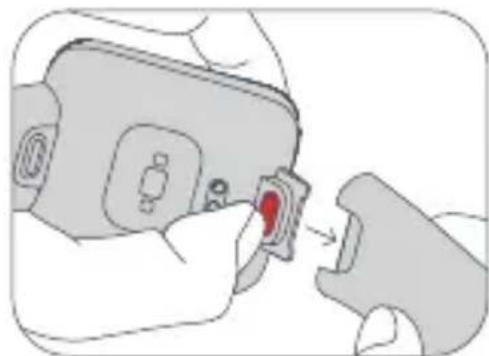
natural_image
Illustration of a hand inserting a red component into a device (no text or symbols visible)natural_image
Illustration of hands inserting a USB into a device (no text or symbols visible)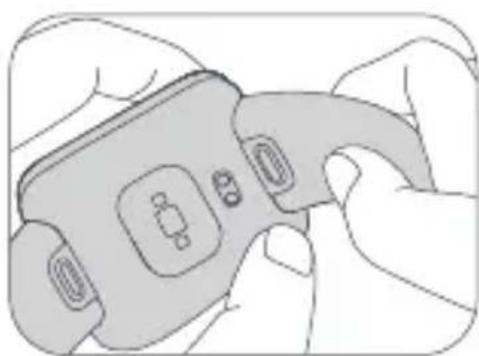
natural_image
Illustration of hands holding a handheld device with buttons and a connector (no text or symbols)http://www.mi.com/global/service/support/declaration.html
natural_image
Simple line drawing of a USB cable with two connectors (no text or symbols)Cavo di ricarica
Come si indossa
natural_image
Line drawing of a hand interacting with a smartwatch, showing finger positioning and a dashed line indicating a distance (no text or symbols)Connessione
natural_image
Simple line drawing of a square device with an arrow pointing to the center (no text or symbols)natural_image
Line drawing of a mechanical clamp or bracket with attached clamps (no text or symbols)natural_image
Illustration of a hand holding a car seatbelt with a red button, no text or symbols present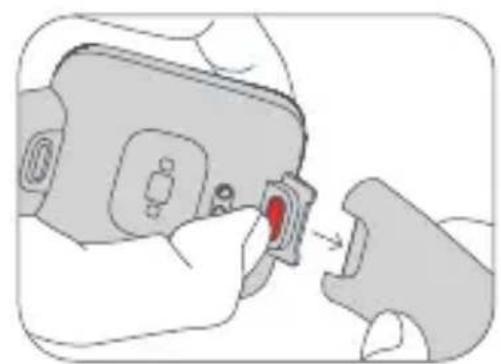
natural_image
Illustration of a hand inserting a red component into a device (no text or symbols visible)natural_image
Illustration of hands holding a device with a close-up of its connector (no text or symbols visible)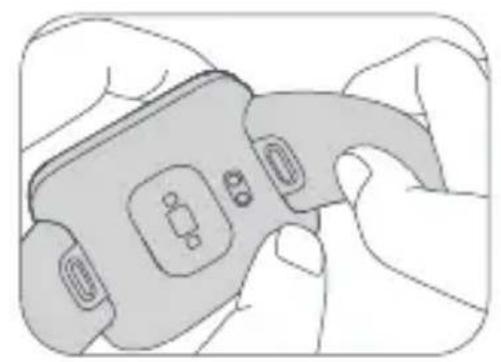
natural_image
Illustration of a hand holding a handheld device with buttons and a connector (no text or symbols visible)Safety Precautions
http://www.mi.com/global/service/support/declaration.html
natural_image
Line drawing of a hand interacting with a smartwatch, showing finger positioning and a dashed line indicating a measurement (no text or symbols present)natural_image
Simple line drawing of a square device with an arrow pointing to the bottom panel (no text or symbols)natural_image
Line drawing of a mechanical clamp or bracket with attached clamps (no text or symbols)natural_image
Illustration of a hand holding a car seatbelt with a red button, no text or symbols present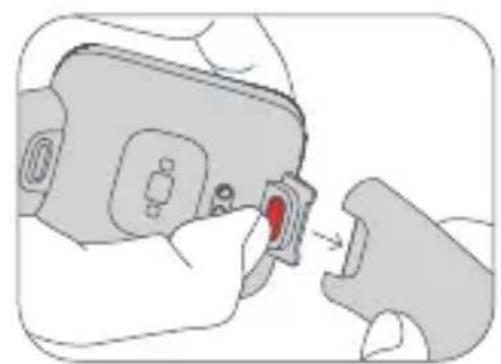
natural_image
Illustration of a hand inserting a red component into a device (no text or symbols visible)natural_image
Illustration of hands holding a device with a close-up of its connector (no text or symbols visible)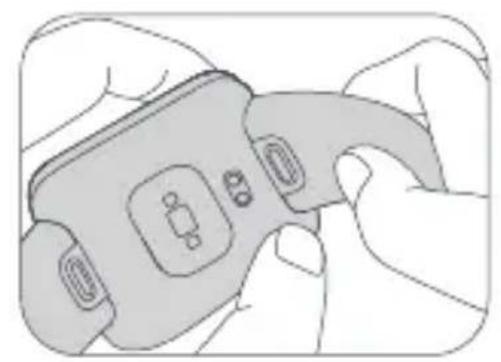
natural_image
Illustration of a hand holding a handheld device with buttons and display (no text or symbols visible)Sicherheitshinweise
http://www.mi.com/global/service/support/declaration.html
natural_image
Simple line drawing of a USB cable with two connectors (no text or symbols)Câble de charge
Positionnement
natural_image
Line drawing of a hand interacting with a smartwatch, showing finger positioning and a dashed line indicating alignment (no text or symbols)Connexion
natural_image
Simple line drawing of a square device with a gray arrow pointing to the bottom-left corner (no text or symbols)natural_image
Line drawing of a mechanical clamp or bracket with attached fasteners (no text or symbols)natural_image
Illustration of a hand holding a car seatbelt with a red button, no text or symbols present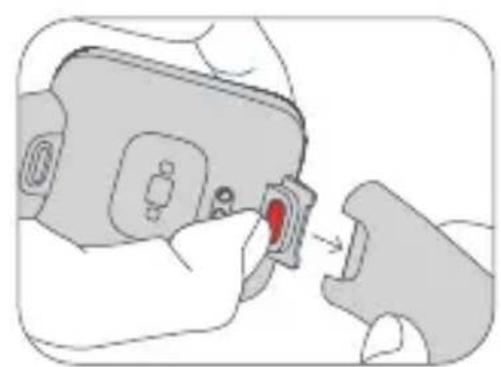
natural_image
Illustration of a hand inserting a red component into a device (no text or symbols visible)natural_image
Illustration of hands holding a device with a close-up of its connector (no text or symbols visible)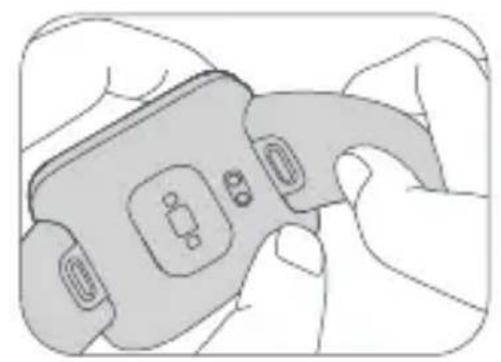
natural_image
Illustration of a hand holding a handheld device with buttons and display (no text or symbols visible)http://www.mi.com/global/service/support/declaration.html
natural_image
Simple line drawing of a USB cable with two connectors (no text or symbols)Кабель для зарядки
natural_image
Line drawing of a hand interacting with a smartwatch, showing finger positioning and a dashed line indicating alignment (no text or symbols)natural_image
Simple line drawing of a square device with an arrow pointing to the bottom panel (no text or symbols)natural_image
Line drawing of a mechanical clamp or bracket with attached fasteners (no text or symbols)natural_image
Illustration of a hand holding a car seatbelt with a red button, no text or symbols present
natural_image
Illustration of a hand inserting a red button into a device component (no text or symbols)natural_image
Illustration of hands inserting a device into a clip (no text or symbols)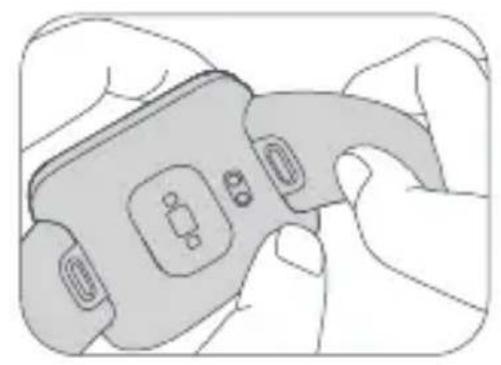
natural_image
Illustration of hands holding a handheld device with buttons and display (no text or symbols)http://www.mi.com/global/service/support/declaration.html

natural_image
Simple line drawing of a USB cable with two connectors (no text or symbols)Зарядний кабель
Як носити
natural_image
Line drawing of a hand interacting with a smartwatch, showing finger positioning and a dashed line indicating alignment (no text or symbols)Як підключити
natural_image
Simple line drawing of a smartwatch with an arrow pointing to the bottom panel (no text or symbols)natural_image
Line drawing of a mechanical clamp or bracket with attached fasteners (no text or symbols)natural_image
Illustration of a hand holding a car seatbelt with a red button, no text or symbols present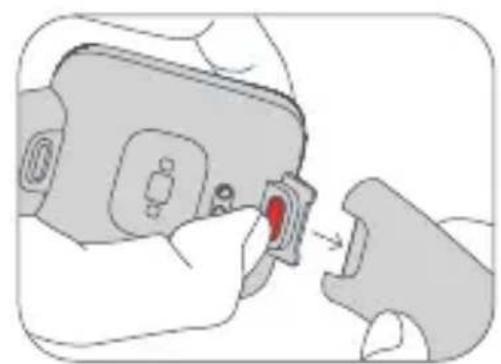
natural_image
Illustration of a hand inserting a red component into a device (no text or symbols visible)natural_image
Illustration of hands holding a device with a close-up of its connector (no text or symbols visible)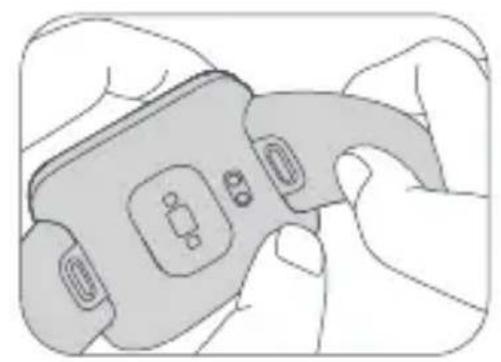
natural_image
Illustration of a hand holding a handheld device with buttons and display (no text or symbols visible)http://www.mi.com/global/service/support/declaration.html
natural_image
Simple line drawing of a USB cable with two connectors (no text or symbols)Kabel do ładowania
Noszenie
natural_image
Line drawing of a hand interacting with a smartwatch, showing finger positioning and a dashed line indicating a distance (no text or symbols)natural_image
Simple line drawing of a smartwatch with an arrow pointing to the bottom panel (no text or symbols)natural_image
Line drawing of a mechanical clamp or bracket with attached clamps and connectors (no text or symbols)natural_image
Illustration of a hand holding a car seatbelt with a red button, no text or symbols present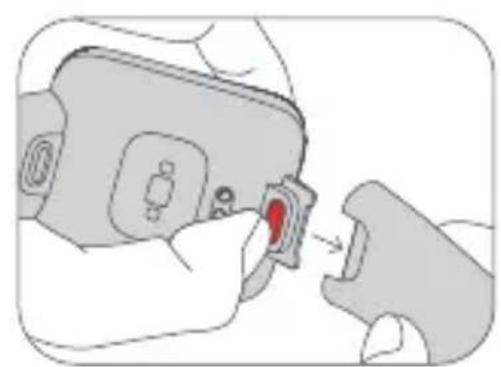
natural_image
Illustration of a hand inserting a red component into a device (no text or symbols)natural_image
Illustration of hands holding a device with a close-up of its connector (no text or symbols visible)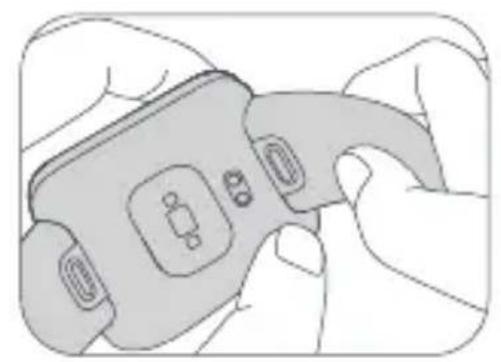
natural_image
Illustration of a hand holding a handheld device with buttons and display (no text or symbols visible)Środki ostrożności
natural_image
Line drawing of a hand interacting with a smartwatch, showing finger positioning and a dashed line indicating a distance (no text or symbols)Verbinding maken
Scan de QR-code om de app
Android-apparaat: Xiaomi Wear-appiOS-apparaat: Xiaomi Wear Lite-app te downloaden
Koppelen
natural_image
Simple line drawing of a square device with an arrow pointing to the bottom panel (no text or symbols)natural_image
Line drawing of a mechanical clamp or bracket with attached fasteners (no text or symbols)natural_image
Illustration of a hand holding a car seatbelt with a red button, no text or symbols present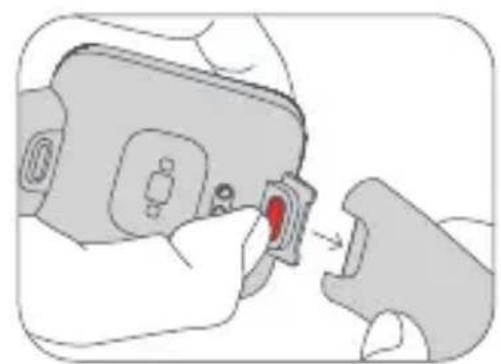
natural_image
Illustration of a hand inserting a red component into a device (no text or symbols visible)natural_image
Illustration of hands holding a device with a close-up of its connector (no text or symbols visible)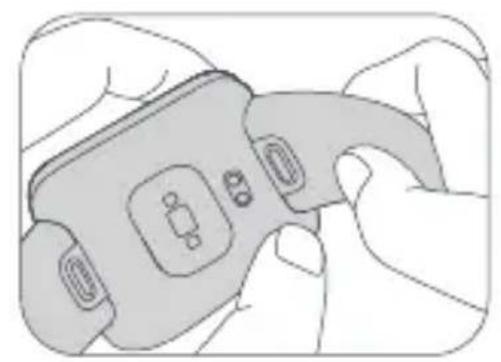
natural_image
Illustration of a hand holding a handheld device with buttons and a connector (no text or symbols visible)http://www.mi.com/global/service/support/declaration.html
natural_image
Simple line drawing of a USB cable with two connectors (no text or symbols)natural_image
Line drawing of a hand interacting with a smartwatch, showing finger positioning and a dashed line indicating a measurement (no text or symbols present)Como associar
natural_image
Simple line drawing of a square device with an arrow pointing to the bottom panel (no text or symbols)natural_image
Line drawing of a mechanical clamp or bracket assembly (no text or symbols)Ajustar e instalar/desinstalar a bracelet
natural_image
Illustration of a hand holding a car seatbelt with a red button, no text or symbols present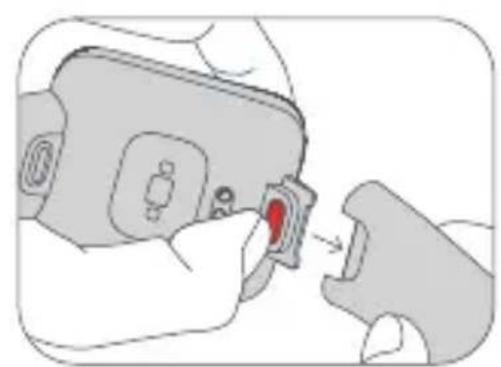
natural_image
Illustration of a hand inserting a red component into a device (no text or symbols visible)natural_image
Illustration of hands holding a device with a close-up of its connector (no text or symbols visible)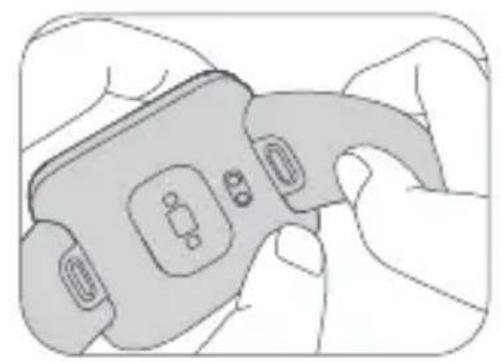
natural_image
Illustration of a hand holding a handheld device with buttons and display (no text or symbols)natural_image
Simple line drawing of a USB cable with two connectors (no text or symbols)Şarj Kablosu
Takma
natural_image
Line drawing of a hand interacting with a smartwatch, showing finger positioning and a dashed line indicating alignment (no text or symbols)natural_image
Simple line drawing of a square device with a gray arrow pointing to the bottom-left corner (no text or symbols)natural_image
Line drawing of a mechanical clamp or bracket with attached fasteners (no text or symbols)natural_image
Illustration of a hand holding a car seatbelt with a red button, no text or symbols present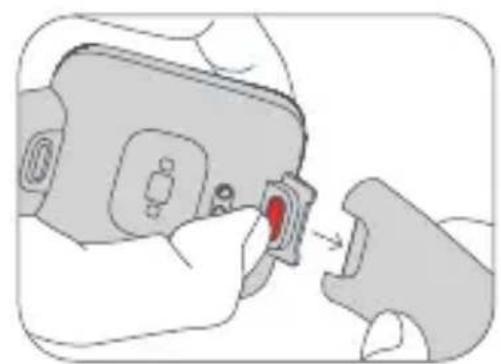
natural_image
Illustration of a hand inserting a red component into a device (no text or symbols visible)natural_image
Illustration of hands holding a device with a close-up of its connector (no text or symbols visible)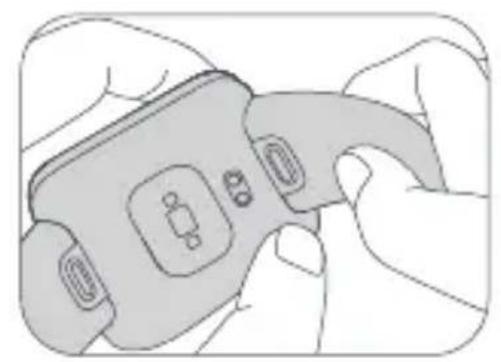
natural_image
Illustration of a hand holding a handheld device with buttons and display (no text or symbols visible)Güvenlik Önlemleri
natural_image
Line drawing of a hand interacting with a smartwatch, showing finger positioning and a dashed line indicating a distance (no text or symbols)Scan QR-koden for at downloade appen
Android-enhed: Xiaomi Wear app/iOS-enhed: Xiaomi Wear Lite app
Parring
natural_image
Simple line drawing of a square device with a gray arrow pointing to the bottom-left corner (no text or symbols)natural_image
Line drawing of a mechanical clamp or bracket with attached fasteners (no text or symbols)Juster & installer/afinstaller remmen
natural_image
Illustration of a hand holding a car seatbelt with a red button, no text or symbols present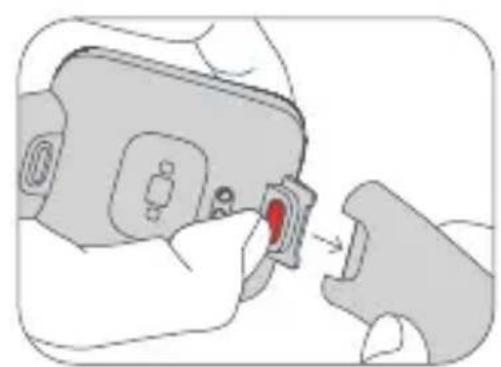
natural_image
Illustration of a hand inserting a red component into a device (no text or symbols visible)natural_image
Illustration of hands holding a device with a close-up of its connector (no text or symbols visible)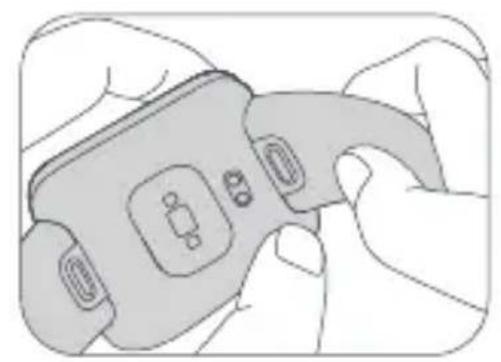
natural_image
Illustration of a hand holding a handheld device with buttons and display (no text or symbols visible)http://www.mi.com/global/service/support/declaration.html
Der findes juridiske oplysninger, produktcertificering og overensstemmelseslogoer i forbindelse med Redmi Watch 2 Lite under Settings >About Watch> Regulatory.
GARANTIMEDDELELSE
natural_image
Simple line drawing of a USB cable with two connectors (no text or symbols)Laddningskabel
Bära klockan
natural_image
Line drawing of a hand interacting with a smartwatch, showing finger positioning and a dashed line indicating alignment (no text or symbols)Ansluta klockan
natural_image
Simple line drawing of a square device with an arrow pointing to the center (no text or symbols)natural_image
Line drawing of a mechanical clamp or bracket with attached fasteners (no text or symbols)natural_image
Illustration of a hand holding a medical device with a red button (no text or symbols visible)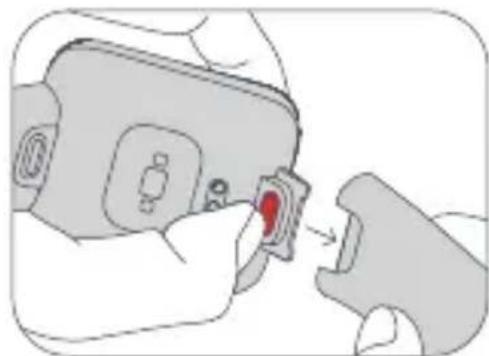
natural_image
Illustration of a hand inserting a red component into a device (no text or symbols visible)natural_image
Illustration of hands inserting a device into a clip (no text or symbols)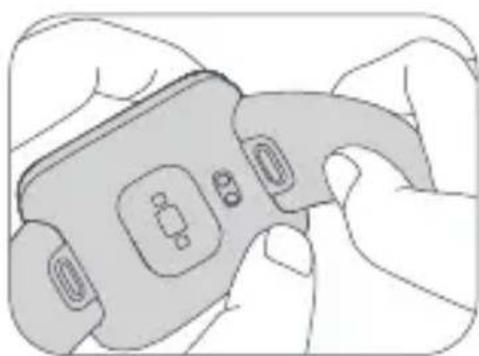
natural_image
Illustration of hands holding a handheld device with buttons and a connector (no text or symbols visible)Säkerhetsåtgärder
http://www.mi.com/global/service/support/declaration.html
natural_image
Line drawing of a hand interacting with a smartwatch, showing finger positioning and a dashed line indicating a distance (no text or symbols)Yhdistäminen
natural_image
Simple line drawing of a square device with an arrow pointing to the center (no text or symbols)natural_image
Line drawing of a mechanical clamp or bracket with attached fasteners (no text or symbols)natural_image
Illustration of a hand holding a medical device with a red button (no text or symbols visible)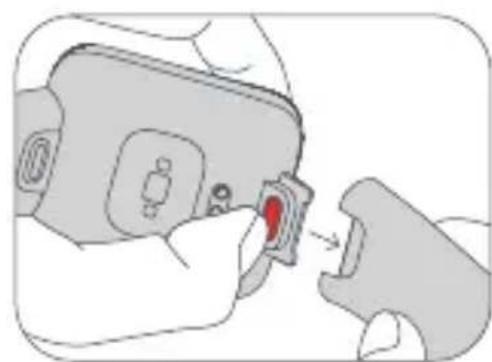
natural_image
Illustration of a hand inserting a red component into a device (no text or symbols visible)natural_image
Illustration of a hand holding a device with a close-up view of its connector (no text or symbols visible)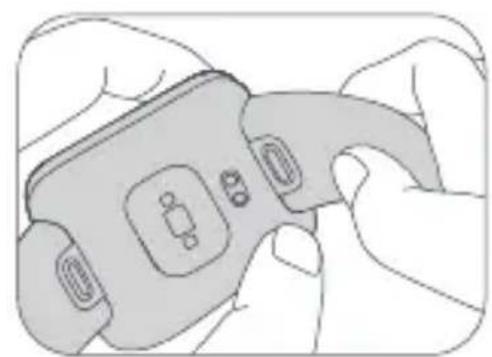
natural_image
Illustration of hands holding a handheld device with buttons and a connector (no text or symbols visible)Varotoimet
http://www.mi.com/global/service/support/declaration.html
natural_image
Line drawing of a hand interacting with a smartwatch, showing finger positioning and a dashed line indicating alignment (no text or symbols)Slik kobler du til
Skann QR-koden for å laste ned og installere appen Android-enhet: Xiaomi Wear app/iOS-enhet: Xiaomi Wear Lite app
Sammenkobling
natural_image
Simple line drawing of a square device with an arrow pointing to the bottom panel (no text or symbols)natural_image
Line drawing of a mechanical clamp or bracket with attached fasteners (no text or symbols)natural_image
Illustration of a hand holding a car seatbelt with a red button, no text or symbols present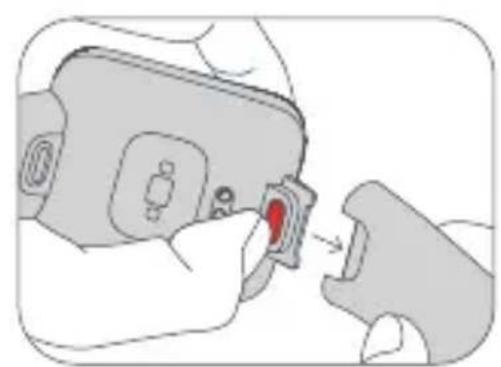
natural_image
Illustration of a hand inserting a red component into a device (no text or symbols visible)natural_image
Illustration of hands holding a device with a close-up of its connector (no text or symbols visible)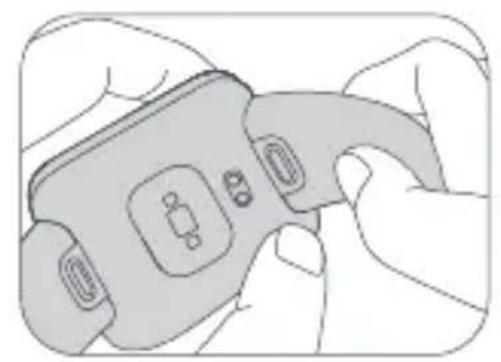
natural_image
Illustration of a hand holding a handheld device with buttons and display (no text or symbols visible)http://www.mi.com/global/service/support/declaration.html
natural_image
Simple line drawing of a USB cable with two connectors (no text or symbols)Cablu de încărcare
Modul de purtare
natural_image
Line drawing of a hand interacting with a smartwatch, showing finger positioning and a dashed line indicating a distance (no text or symbols)Modul de conectare
natural_image
Simple line drawing of a square device with an arrow pointing to the center (no text or symbols)natural_image
Line drawing of a mechanical clamp or bracket with attached clamps and connectors (no text or symbols)natural_image
Illustration of a hand holding a car seatbelt with a red button, no text or symbols present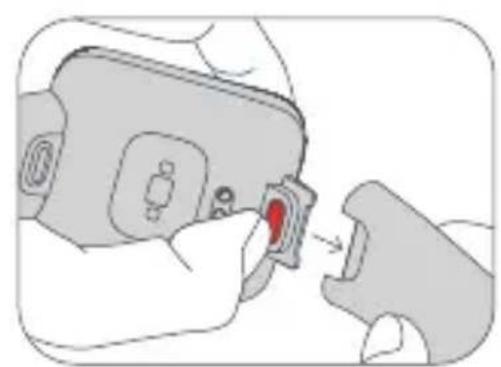
natural_image
Illustration of a hand inserting a red component into a device (no text or symbols visible)natural_image
Illustration of hands holding a device with a close-up of its connector (no text or symbols visible)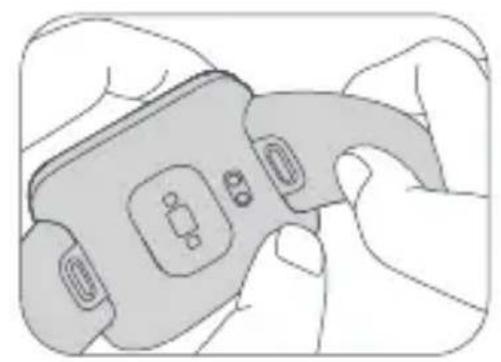
natural_image
Illustration of a hand holding a handheld device with buttons and display (no text or symbols visible)Măsuri de siguranță
Conectivitate wireless: Bluetooth® 5.0 (Bluetooth Low Energy)
http://www.mi.com/global/service/support/declaration.html
natural_image
Line drawing of a hand interacting with a smartwatch, showing finger positioning and a dashed line indicating alignment (no text or symbols)Τρόπος σύνδεσης
natural_image
Simple line drawing of a square device with an arrow pointing to the center (no text or symbols)natural_image
Line drawing of a mechanical clamp or bracket with attached fasteners (no text or symbols)natural_image
Illustration of a hand holding a car seatbelt with a red button, no text or symbols present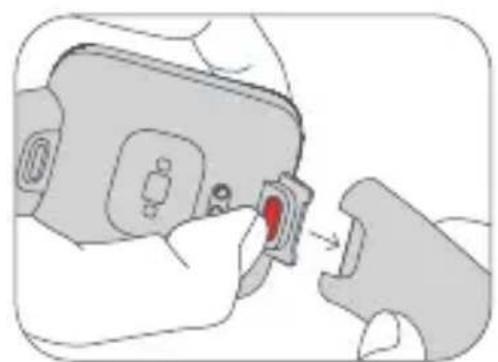
natural_image
Illustration of a hand inserting a red component into a device (no text or symbols visible)natural_image
Illustration of hands holding a device with a close-up of its connector (no text or symbols visible)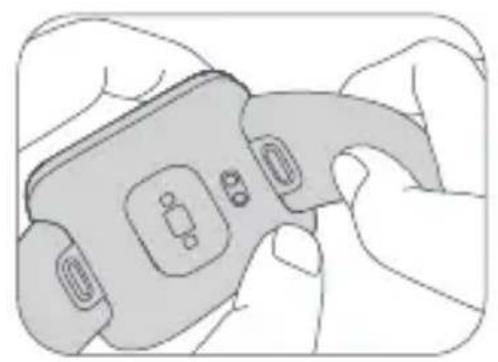
natural_image
Illustration of hands holding a handheld device with buttons and display (no text or symbols)(Bluetooth Low Energy)
http://www.mi.com/global/service/support/declaration.html
natural_image
Simple line drawing of a USB cable with two connectors (no text or symbols)Nabíjecí kabel
Způsob nošení
natural_image
Line drawing of a hand interacting with a smartwatch, showing finger positioning and a dashed line indicating alignment (no text or symbols)Způsob připojení
natural_image
Simple line drawing of a square device with an arrow pointing to the center (no text or symbols)natural_image
Line drawing of a mechanical clamp or bracket with attached fasteners (no text or symbols)natural_image
Illustration of a hand holding a car seatbelt with a red button, no text or symbols present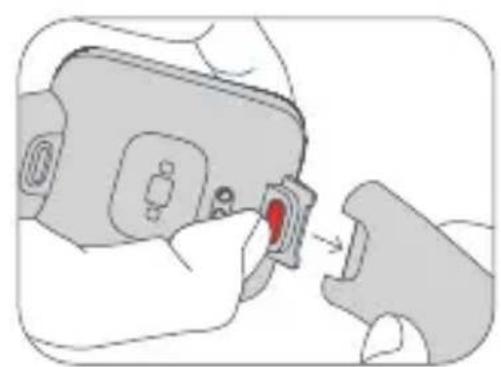
natural_image
Illustration of a hand inserting a red component into a device (no text or symbols visible)natural_image
Illustration of hands holding a device with a close-up of its connector (no text or symbols visible)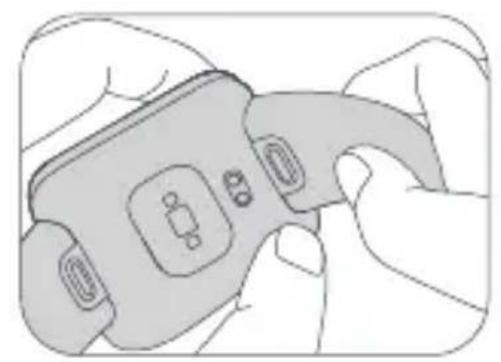
natural_image
Illustration of a hand holding a handheld device with buttons and display (no text or symbols visible)(Bluetooth Low Energy)
natural_image
Line drawing of a hand interacting with a smartwatch, showing finger positioning and a dashed line indicating a measurement (no text or symbols present)natural_image
Simple line drawing of a square device with an arrow pointing to the center (no text or symbols)natural_image
Line drawing of a mechanical clamp or bracket with attached clamps and connectors (no text or symbols)natural_image
Illustration of a device being inserted into a clip, showing the red clip on the clip's side (no text or symbols present)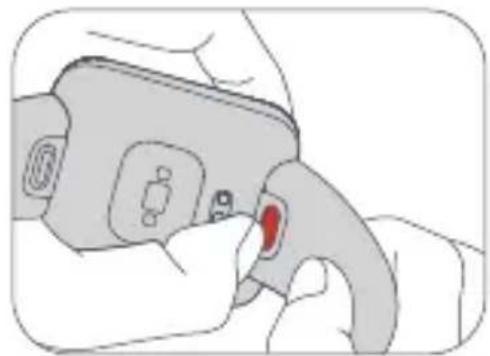
natural_image
Illustration of a hand holding a medical device with a red button (no text or symbols visible)natural_image
Illustration of hands holding a handheld device with buttons and a connector (no text or symbols)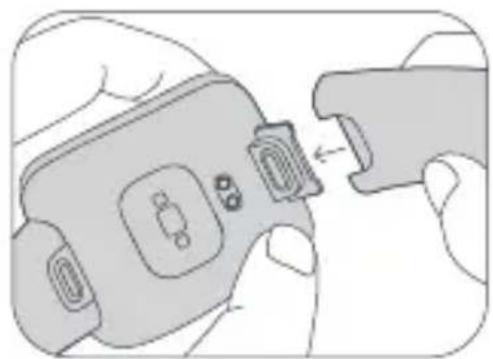
natural_image
Illustration of hands connecting a device to a clip, showing internal components (no text or symbols)http://www.mi.com/global/service/support/declaration.html
Manufactured by: Xiaomi Communications Co., Ltd.
Address: No.019, floor 9, building 6, yard 33, middle Xierqi Road, Haidian District, Beijing, P.R. China For further information, please go to www.mi.com
Fabricado por: Xiaomi Communications Co., Ltd.
Dirección: #019, 9th Floor, Building 6, 33 Xi'erqi Middle Road, Haidian District, Beijing, China, 100085 Para obtener más información, visite www.mi.com
Fabricant: Xiaomi Communications Co., Ltd.
Adresse : #019, 9th Floor, Building 6, 33 Xi'erqi Middle Road, Haidian District, Beijing, Chine, 100085 Pour plus d'informations, rendez-vous sur www.mi.com
Producent: Xiaomi Communications Co., Ltd.
Adres: #019, 9th Floor, Building 6, 33 Xi'erqi Middle Road, Haidian District, Pekin, Chiny, 100085 Wiecej informacji: www.mi.com
Morada: #019, 9th Floor, Building 6, 33 Xi'erqi Middle Road, Haidian District, Pequim, China, 100085 Para mais informações, consulte o site www.mi.com
Üretici: Xiaomi Communications Co., Ltd.
Adres: #019, 9th Floor, Building 6, 33 Xi'erqi Middle Road, Haidian District, Pekin, Çin, 100085
Adresse: #019, 9th Floor, Building 6, 33 Xi'erqi Middle Road, Haidian District, Beijing, Kina, 100085
Adress: #019, 9th Floor, Building 6, 33 Xi'erqi Middle Road, Haidian District, Peking, Kina, 100085
Osoite: #019, 9th Floor, Building 6, 33 Xi'erqi Middle Road, Haidian District, Peking, Kiina, 100085
Adresse: #019, 9th Floor, Building 6, 33 Xi'erqi Middle Road, Haidian District, Beijing, Kina, 100085
Adresă: #019, 9th Floor, Building 6, 33 Xi'erqi Middle Road, Haidian District, Beijing, China, 100085
Adresa: #019, 9th Floor, Building 6, 33 Xi'erqi Middle Road, Haidian District, Beijing, China, 100085
10085, 9th Floor, Building 6, 33 Xi'erqi Middle Road, Haidian District, 019# : العنوان
- Redmi Watch 2 Lite User Manual .01
- How to Wear
- How to Connect
- Pairing
- Notes:
- How to Use
- Charging
- Adjust & Install/Uninstall the Strap
- Safety Precautions
- Specifications
- Disposal and Recycling Information
- EU Declaration of Conformity
- WARRANTY NOTICE
- Cómo llevarlo
- Cómo conectar
- Come si indossa
- Connessione
- Sicherheitshinweise
- Positionnement
- Connexion
- Як носити
- Як підключити
- Noszenie
- Środki ostrożności
- Verbinding maken
- Koppelen
- Como associar
- Ajustar e instalar/desinstalar a bracelet
- Takma
- Güvenlik Önlemleri
- Parring
- Juster & installer/afinstaller remmen
- GARANTIMEDDELELSE
- Bära klockan
- Ansluta klockan
- Säkerhetsåtgärder
- Yhdistäminen
- Varotoimet
- Slik kobler du til
- Sammenkobling
- Modul de purtare
- Modul de conectare
- Măsuri de siguranță
- Τρόπος σύνδεσης
- Způsob nošení
- Způsob připojení
Brand : Xiaomi
Model : Redmi Watch 2 Lite
Category : Wristwatch