
Mi Watch Lite - Wristwatch Xiaomi - Free user manual and instructions
Find the device manual for free Mi Watch Lite Xiaomi in PDF.



| Product type | Smartwatch |
| Brand | Xiaomi |
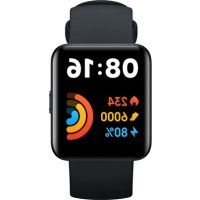
| Model | Mi Watch Lite (REDMIWT02) |
| Display | 1.4-inch square TFT screen, 320 × 320 pixel resolution, 323 ppi |
| Sensors | Heart rate, accelerometer, gyroscope, electronic compass, barometric pressure, ambient light |
| Satellite positioning | GPS and GLONASS |
| Wireless connectivity | Bluetooth 5.1 BLE |
| Water resistance | 5 ATM (up to 50 meters) |
| Battery | 230 mAh lithium polymer |
| Battery life | Up to 10 days in typical use (estimated) |
| Charging | Charging dock, input 5.0 V DC, 400 mA max |
| Net weight | 35 g (watch and strap included) |
| Strap material | TPU |
| Adjustable strap length | 140-210 mm |
| System compatibility | Android 5.0 and iOS 10 or later |
| Companion app | Xiaomi Wear (Android) / Xiaomi Wear Lite (iOS) |
| Main features | Notifications, activity tracking (steps, calories, sleep), heart rate, GPS, outdoor exercises, music control, weather, etc. |
| Care and cleaning | Wipe with a soft cloth after contact with water; clean the strap regularly with clean water |
| Safety | Non-removable built-in battery; do not expose to extreme temperatures; do not use for diving or in sauna |
| Operating temperature | 0 °C to 35 °C |
Frequently Asked Questions - Mi Watch Lite Xiaomi
User questions about Mi Watch Lite Xiaomi
0 question about this device. Answer the ones you know or ask your own.
Ask a new question about this device
Download the instructions for your Wristwatch in PDF format for free! Find your manual Mi Watch Lite - Xiaomi and take your electronic device back in hand. On this page are published all the documents necessary for the use of your device. Mi Watch Lite by Xiaomi.
USER MANUAL Mi Watch Lite Xiaomi
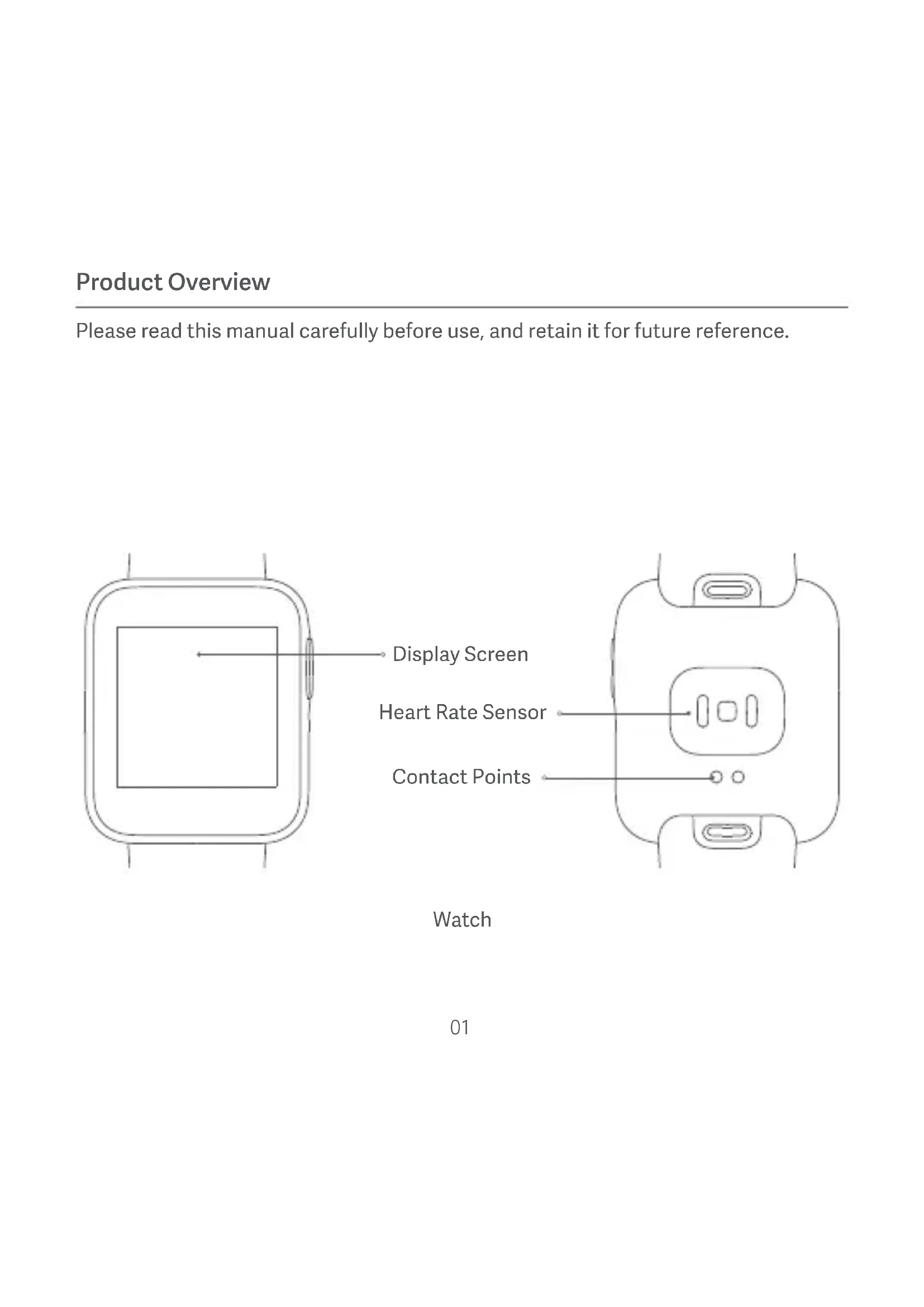
Please read this manual carefully before use, and retain it for future reference.
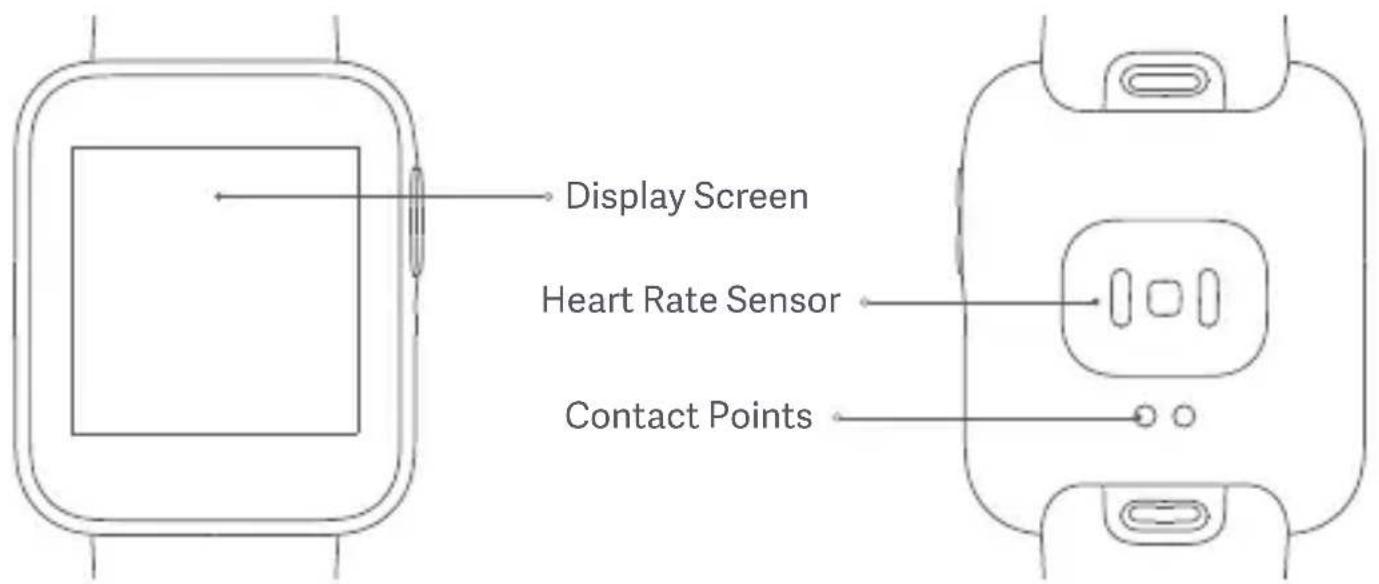
Watch
How to Wear
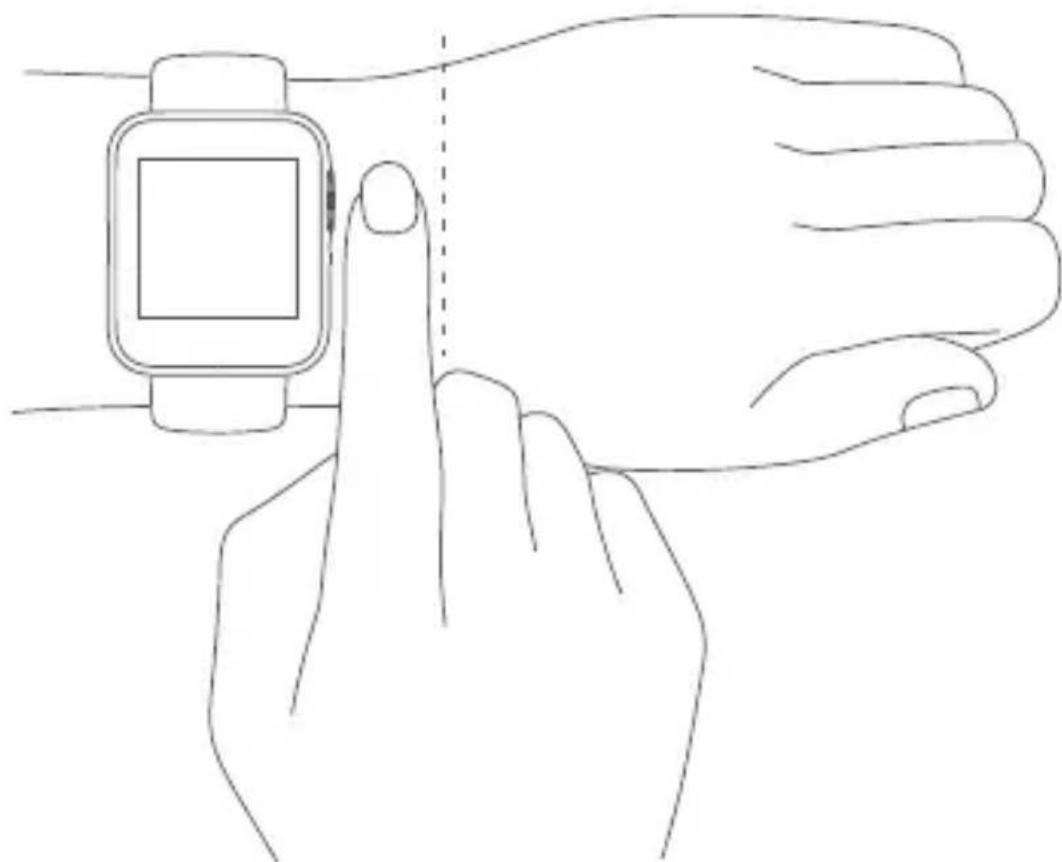
For daily use, comfortably tighten the watch around your wrist about one-finger width away from your wrist bone. Adjust the strap to ensure the heart rate sensor can collect data normally.
Note: Wearing the watch too loosely may impact the data collection by the heart rate sensor.
How to Connect
Download and install Xiaomi Wear/Xiaomi Wear Lite APP to better manage your watch, and log in to your Mi account for more services.
Note: The version of the APP might have been updated, please follow the instructions based on the current APP version.
-
Press and hold the function button to turn on the watch. Scan the QR code displayed on the watch with your phone, then download and install Xiaomi Wear/Xiaomi Wear Lite APP. You can also download and install the APP from APP stores, or scan the QR code below.
-
Open Xiaomi Wear/Xiaomi Wear Lite APP, then log in your Mi account. select add device and follow the instructions to add your watch.
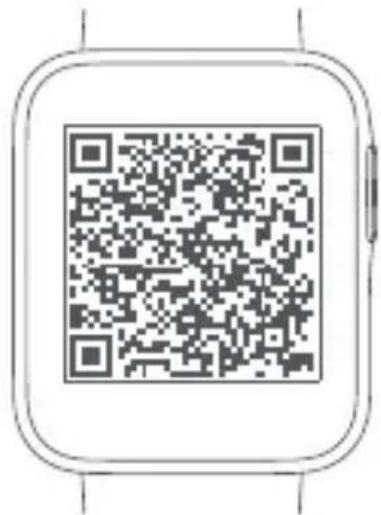
APP QR Code
Scan the QR code to download the APP
Android Device: Xiaomi Wear APP / iOS Device: Xiaomi Wear Lite APP
When an identical pairing code is displayed on both the phone and the watch, tap Pair to complete the pairing.
Notes:
During pairing, make sure the Bluetooth is enabled on your phone and the watch is well connected with your phone.
If the pairing code appears on the watch but not on the phone, please check whether there is a pairing request in the notifications of the phone.
If the watch cannot be found while adding it to the APP, or cannot connect with your phone during use, please press and hold the power button of the watch for 10 seconds to restore it to factory settings, then try again.
How to Use
- View notifications: Swipe down from the top on the home screen
- Open control panel: Swipe up from the bottom on the home screen
- Switch widget: Swipe left or right when on the home screen page
- Go back: Swipe from the left edge to the right when on other screen pages
![graph TD A["1"] --> B["2"] B --> C["3"] C --> D["4"] D --> A](/content/2026/03/518933/images/974eecd2c5edac7b8503cc5e8ed608c2af6f65adf9f9a12ccff642243133a165.jpg)
![graph TD A["4"] --> B["Next Step"] style A fill:#f9f,stroke:#333 style B fill:#ccf,stroke:#333](/content/2026/03/518933/images/a6a6ed4f01f2b1a585dc89ab36bf510b1e403fbf321672c0579bff47b26a2178.jpg)
GPS
GPS & A-GPS
The watch supports the Global Position System (GPS) tracking. When you do outdoor exercises such as running, the GPS will automatically start working and notify you when the positioning is successful, and quit tracking once you stop exercises. The open field outdoor is the best place for the GPS tracking; whereas when you are in a dense crowd, raising your arm up can better help GPS to the positioning. It is recommended to start your workout only when the GPS starts working.
The watch has an Assisted GPS (A-GPS) feature which can accelerate GPS positioning via the data directly from the GPS satellites. Make sure your watch is connected with the phone via the Bluetooth, the data can be automatically synchronized from Xiaomi Wear/Xiaomi Wear Lite APP to your watch, and the A-GPS data will be automatically updated as well.
In case the data has not been synchronized for seven consecutive days, the A-GPS data will expire. If so, the positioning information will need to be re-acquired. You can go to the page of outdoor exercises on your watch to update the positioning information.
Charging
Recharge your watch immediately when the battery level is low.
![graph LR A["Smartwatch Icon"] --> B["Device with USB cable"] style A fill:#f9f,stroke:#333 style B fill:#bbf,stroke:#333](/content/2026/03/518933/images/908a9bb045033a838e2920cb1815778a09505d65f04de4333c7decfae87a040c.jpg)
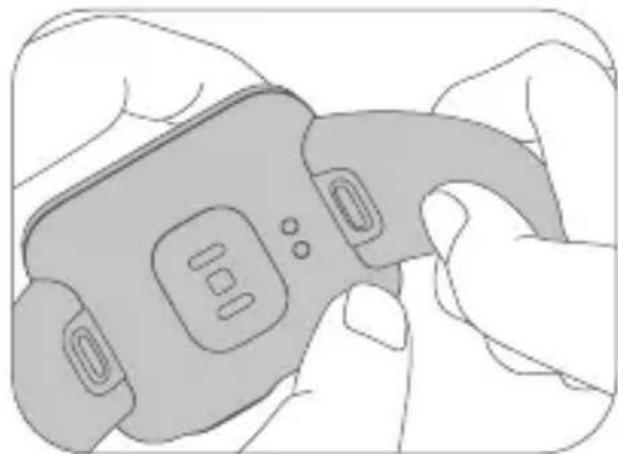
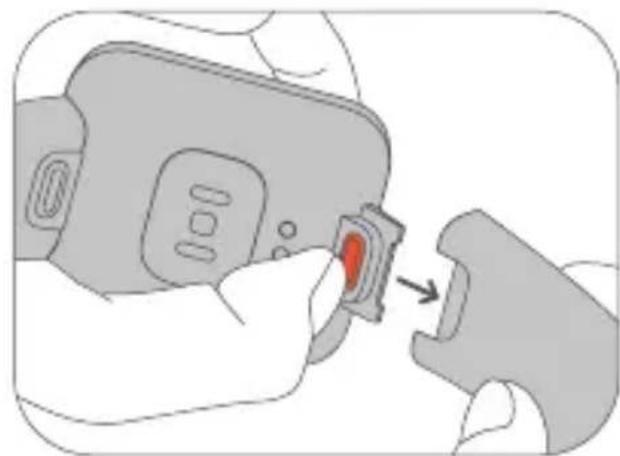
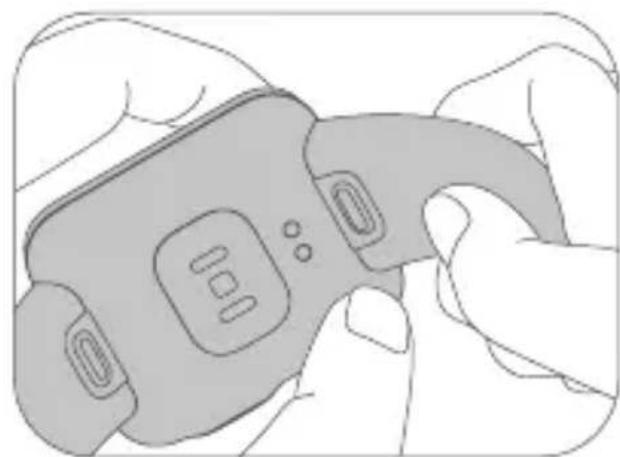
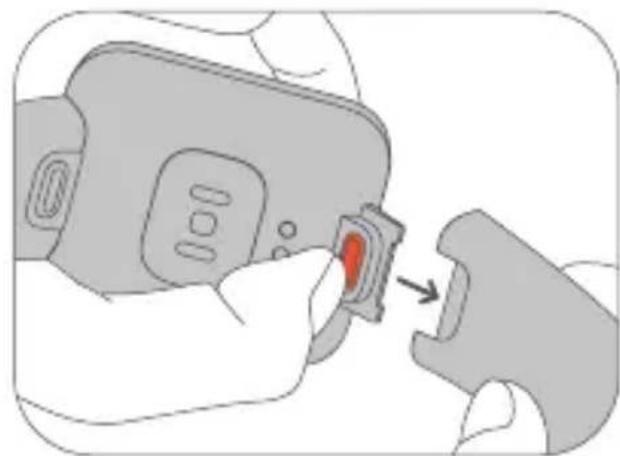
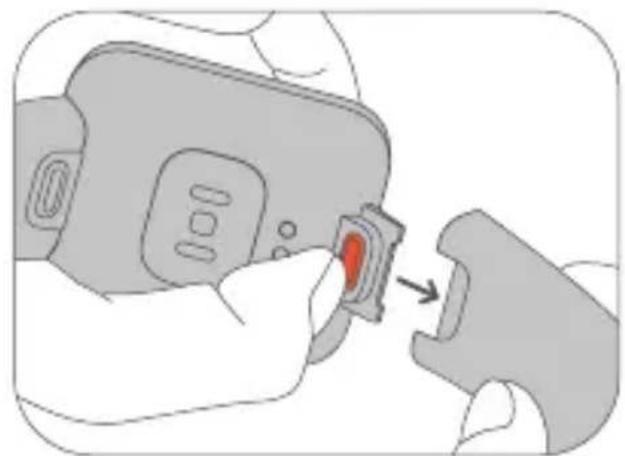
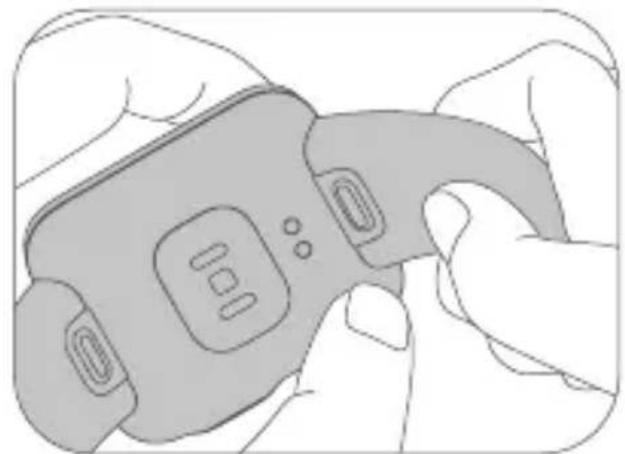
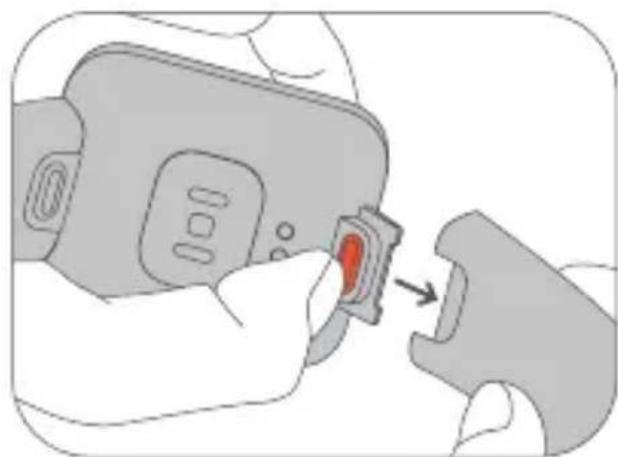
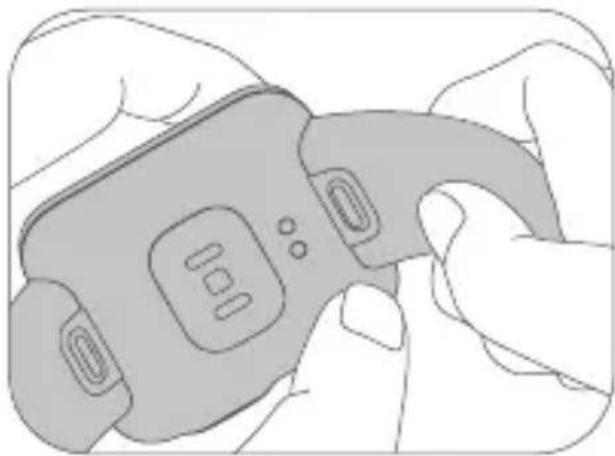
Adjust & Install/Uninstall the Strap
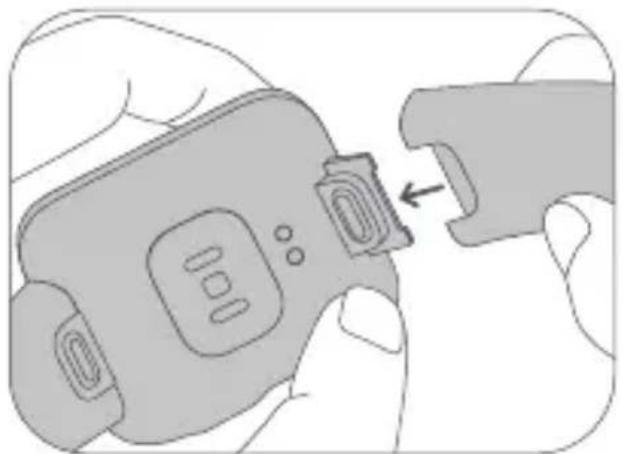
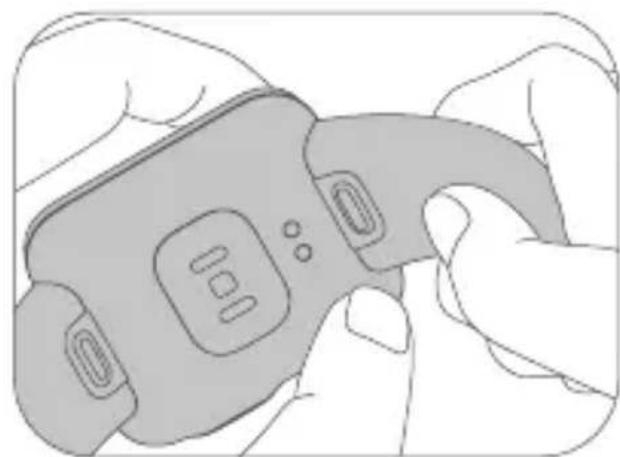
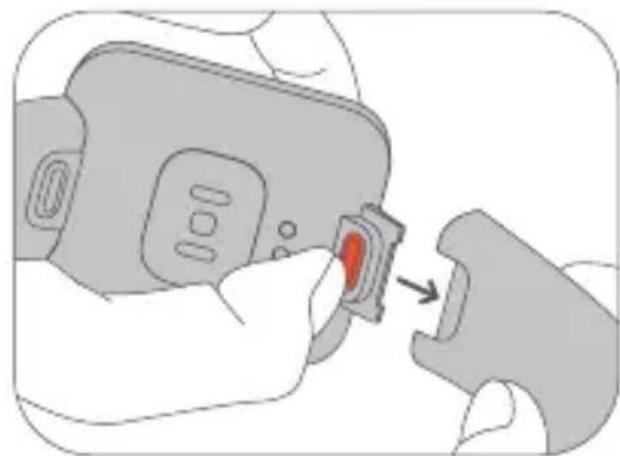
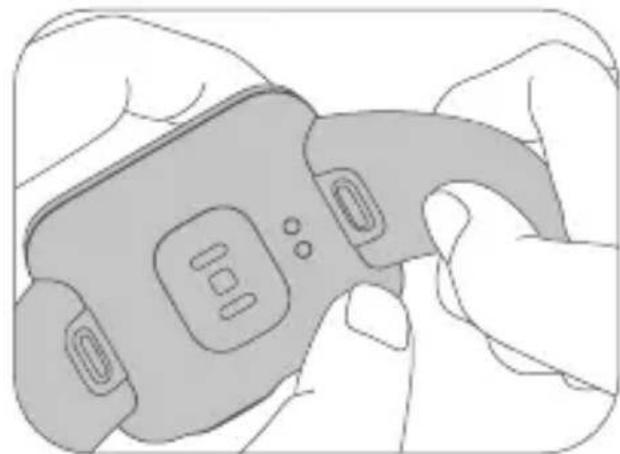
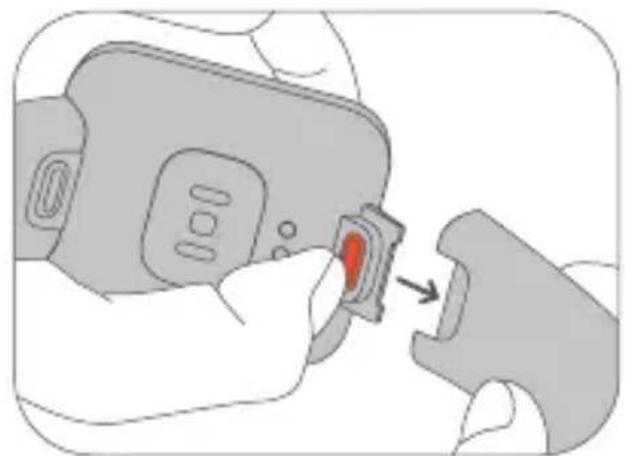
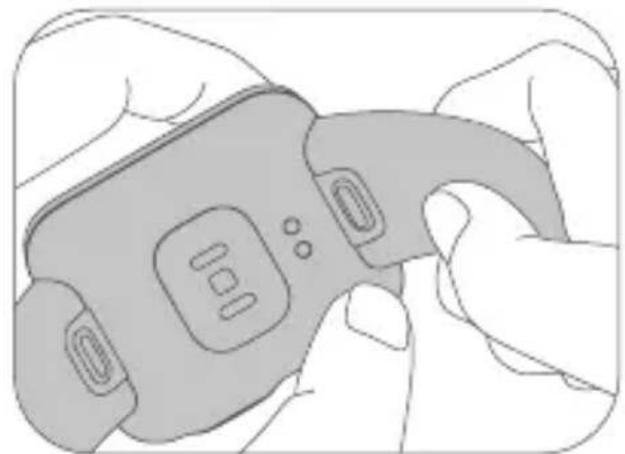
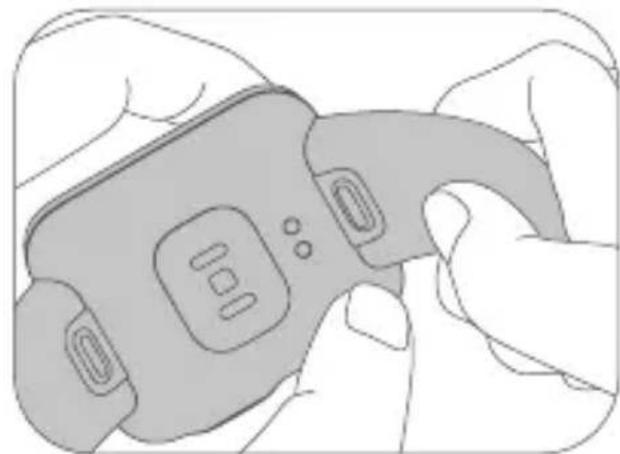
Adjust the position of the buckle according to the circumference of your wrist. To install or uninstall the strap, refer to the figures below. You can pull the strap to see if it is installed securely.
Uninstall the strap: Press down the release button with one hand, and simultaneously pull out the strap with the other hand.
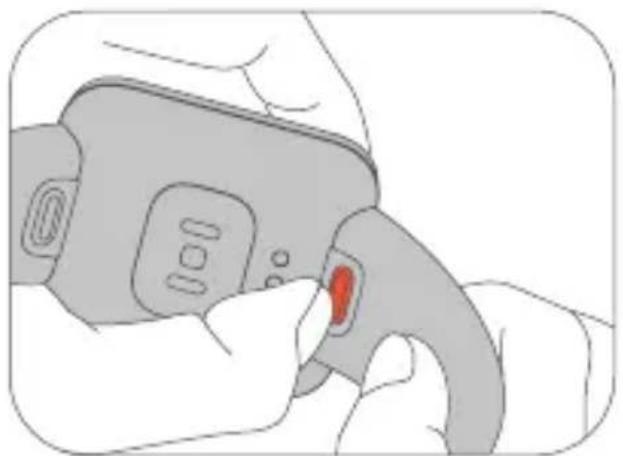
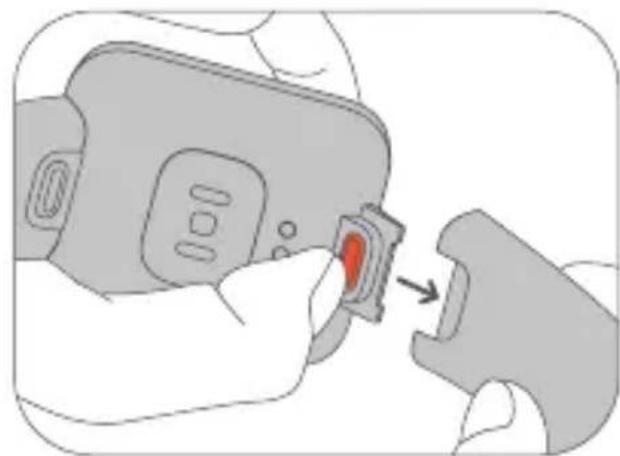
Install the strap: Align the slot of the strap with the watch and then insert it to the watch until you hear a click.
09
Safety Precautions
- When using the watch to measure your heart rate, please hold your wrist still.
- The watch has a water resistance rating of 5 ATM. It can be worn in the shower, swimming pool, or while swimming near the shore. However, it cannot be used in saunas or scuba diving.
- The touchscreen of the watch does not support underwater operations. When the watch comes into contact with water, use a soft cloth to wipe away excess water from its surface before use.
- During daily use, avoid wearing the watch too tightly. Keep its contact area dry and regularly clean the strap with water. Immediately stop using the watch and seek medical assistance if the contact area on your skin shows signs of redness or swelling.
- The product information is listed at the slot of the strap, you can remove the strap to check it.
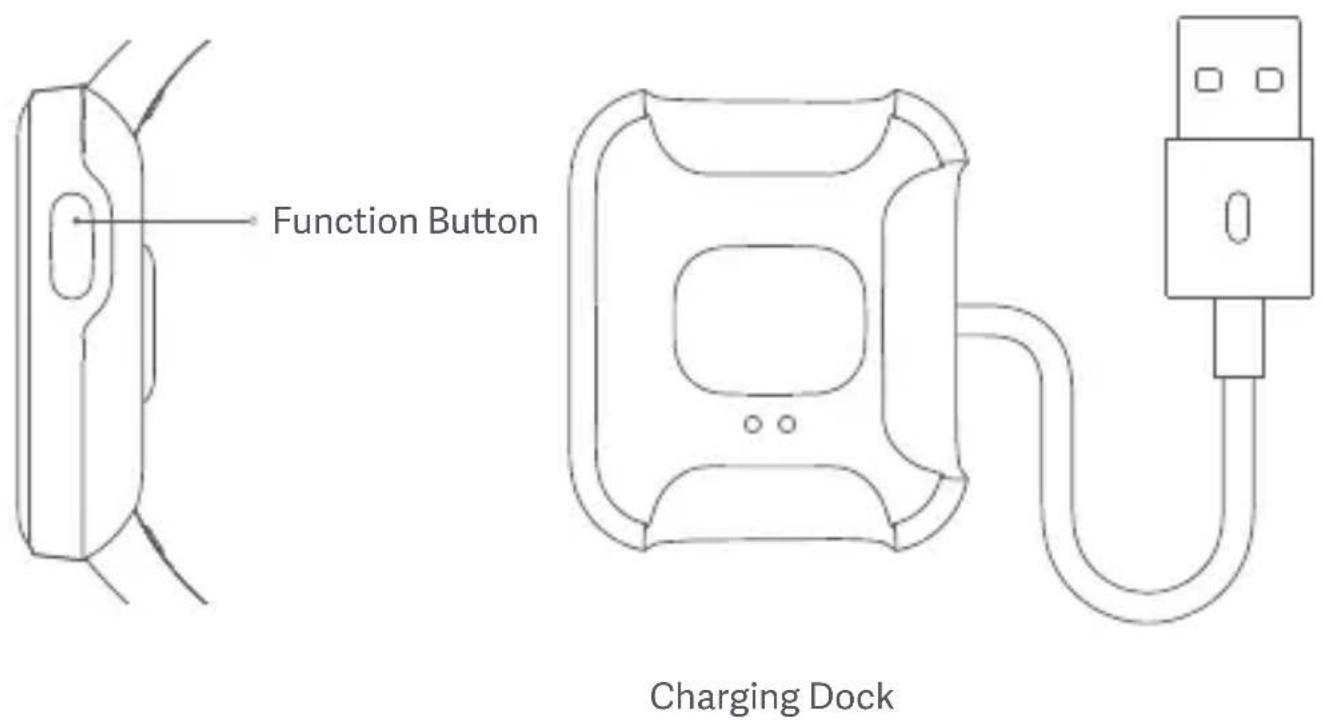
- Please use the included charging dock to charge the watch. Only use the power adapters that comply with the local safety standards or certified and supplied by qualified manufacturers.
- Always keep the power adapter and charging dock dry when charging the watch. Do not touch them with a wet hand. Never expose the power adapter and charging dock to rain or other liquids.
- The operating temperature of the watch is 0°C to 35°C . If the ambient temperature is too high or too low, the watch may malfunction.
- The watch has a built-in battery. To avoid damage to the battery or the watch, do not disassemble and replace the battery by yourself. Only the authorized service providers can replace the battery; otherwise, it will cause potential
dangers even personal injuries if a wrong type of battery is used.
- Do not disassemble, puncture, strike, crush or throw the battery into a fire. Stop using the battery immediately if there is any swelling or fluid leakage.
- Never throw the watch or its battery into a fire so as to avoid an explosion.
- This watch is not a medical device, any data or information provided by the watch should not be used as a basis for diagnosis, treatment, and prevention of diseases.
- The watch and its accessories may contain small parts. To avoid choking or other hazards or damages caused by the children, keep the watch out of the reach of children.
- This watch is not a toy and should only be used by children under adult supervision.
- Battery abuse or mishandling can cause overheat, liquid leakage, or an explosion. To avoid possible injury, do the following:
Do not crush or puncture the battery.
Do not short-circuit the battery, or expose it to water or other liquids.
Keep the battery away from children.
Keep the battery away from fire.
Do not leave the battery in an extremely high-temperature environment or an extremely low air pressure environment.
Stop using the battery if it is damaged, or if you notice any discharge or the buildup of foreign materials on the battery leads. We recommend that the batteries be charged about once every three months to prevent overcharge.
Do not put the battery in trash that is disposed of in landfills. When disposing of the battery, comply with local laws or regulations.
Specifications
Name: Mi Watch Lite
Model: REDMIWT02
Sensor: Heart rate sensor, accelerometer, gyroscope, electronic compass, barometric pressure sensor, ambient light sensor
Satellite Positioning: GPS & GLONASS
GPS/GLONASS Frequency:
1559-1610 MHz
Water Resistance: 5 ATM
Device Type: Bluetooth Device Wireless
Connectivity: Bluetooth 5.1 BLE
Battery Capacity: 230 mAh
Display Screen: 1.4-inch square &
thin-film transistor (TFT) screen,
320 × 320 resolution, PPI 323
Net Weight: 35 g (Incl. watch and strap)
Strap Material: TPU
Buckle Material: PC + 30% GF
Adjustable Length: 140-210 mm
Compatible with:
Android 5.0 & iOS 10 or above
Battery Type: Lithium polymer battery
Input Voltage: DC 5.0 V
Input Current: Max. 400 mA
Operating Temperature: 0°C to 35°C
Bluetooth Frequency: 2.4 GHz
Maximum Output Power: <6 dBm
Operation Frequency:
2402MHz-2480MHz
Disposal and Recycling Information
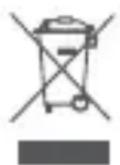
All products bearing this symbol are waste electrical and electronic equipment (WEEE as in directive 2012/19/EU) which should not be mixed with unsorted household waste. Instead, you should protect human health and the environment by handing over your waste equipment to a designated collection point for the recycling of waste electrical and electronic equipment, appointed by the government or local authorities. Correct disposal and recycling will help prevent potential negative consequences to the environment and human health. Please contact the installer or local authorities for more information about the location as well as terms and conditions of such collection points.
Certifications and Safety Approvals

Hereby, Xiaomi Communications Co., Ltd. declares that the radio equipment type REDMIWT02 is in compliance with Directive 2014/53/EU. The full text of the EU declaration of conformity is available at the following internet address: http://www.mi.com/global/service/support/ declaration.html
For regulatory information, product certification, FCC ID and compliance logos related to the Mi Watch Lite, please go to Settings >Regulatory.
Warranty Notice
As a Xiaomi consumer, you benefit under certain conditions from additional warranties. Xiaomi offers specific consumer warranty benefits which are in addition to, and not instead of, any legal warranties provided by your national consumer law. The duration and conditions related to the legal warranties are provided by respective local laws. For more information about the consumer warranty benefits, please refer to Xiaomi's official website https://www.mi.com/en/service/warranty/. Except as prohibited by laws or otherwise promised by Xiaomi, the after-sales services shall be limited to the country or region of the original purchase. Under the consumer warranty, to the fullest extent permied by law, Xiaomi will, at its discretion, repair, replace or refund your product. Normal wear and tear, force majeure, abuse or damage caused by the user's negligence or fault are not warranted. The contact person for the after-sales service may be any person in Xiaomi's authorized service network, Xiaomi's authorized distributors or the final vendor who sold the products to you. If in doubt please contact the relevant person as Xiaomi may identify. The present warranties do not apply in Hong Kong and Taiwan. Products which were not duly imported and/or were not duly manufactured by Xiaomi and/or were not duly acquired from or a Xiaomi's official seller are not covered by the present warranties. As per applicable law you may benefit from warranties from the non-official retailer who sold the product. Therefore, Xiaomi invites you to contact the retailer from whom you purchased the product.
Battery Safety
Disposal of a battery into fire or a hot oven, or mechanically crushing or cutting of a battery, that can result in an explosion.
Leaving a battery in an extremely high temperature surrounding environment that can result in an explosion or the leakage of flammable liquid or gas.
A battery subjected to extremely low air pressure that may result in an explosion or the leakage of flammable liquid or gas.
This device is equipped with a built-in battery that cannot be removed or replaced.
Do not disassemble or modify the battery by yourself.
Do not put the battery in trash that is disposed of in landfills. When disposing of the battery, comply with local laws or regulations.
FCC:
Any changes or modifications not expressly approved by the party responsible for compliance could void the user's authority to operate the equipment.
Note: This equipment has been tested and found to comply with the limits for a Class B digital device, pursuant to part 15 of the FCC Rules. These limits are designed to provide reasonable protection against harmful interference in a residential installation. This equipment generates, uses and can radiate radio frequency energy and, if not installed and used in accordance with the instructions, may cause harmful interference to radio communications. However, there is no guarantee that interference will not occur in a particular installation. If this equipment does cause harmful interference to radio or television reception, which can be determined by turning the equipment off and on, the user is encouraged to try to correct the interference by one or more of the following measures:
-Reorient or relocate the receiving antenna.
-Increase the separation between the equipment and receiver.
-Connect the equipment into an outlet on a circuit different from that to which the receiver is connected.
-Consult the dealer or an experienced radio/TV technician for help.
This device complies with part 15 of the FCC Rules. Operation is subject to the following two conditions: (1) This device may not cause harmful interference, and (2) this device must accept any interference received, including interference that may cause undesired operation. This equipment complies with RF radiation exposure limits set forth for an uncontrolled environment.
Produktübersich
App QR-Code
25
Sicherheitshinweise
Base di ricarica
Come si indossa
Connessione
Codice QR app
40
Tensione in ingresso: 5,0 V CC
hp://www.mi.com/global/service/support/ declaration.html
Connexion
55
http://www.mi.com/global/service/support/declaration.html
Base de carga
Cómo llevarlo
Cómo conectar
70
Oplaadstation
Draagwijze
Verbinding maken
App QR-code
Scan de QR-code om de app
Android-apparaat: Xiaomi Wear-App /OS-apparaat: Xiaomi Wear Lite-App te downloaden

85
https://www.mi.com/global/service/support/ declaration.html
Como associar
Ajustar e instalar/desinstalar a bracelet
100
Safety Precauções
قاعدة الشحن
115
Manufactured by: Xiaomi Communications Co., Ltd.
Address: No.019, floor 9, building 6, yard 33, middle Xierqi Road,
Haidian District, Beijing, P.R. China
For further information, please go to www.mi.com
Adresse: #019, 9th Floor, Building 6, 33 Xi'erqi Middle Road,
Haidian District, Beijing, China, 100085
Indirizzo: #019, 9th Floor, Building 6, 33 Xi'erqi Middle Road,
Haidian District, Pechino, Cina, 100085
Adresse : #019, 9th Floor, Building 6, 33 Xi'erqi Middle Road, Haidian
District, Beijing, Chine, 100085
Manufactured by: Xiaomi Communications Co., Ltd.
Address: No.019, floor 9, building 6, yard 33, middle Xierqi Road, Haidian
District, Beijing, P.R. China
For further information, please go to www.mi.com
Adres: No.019, floor 9, building 6, yard 33, middle
Xierqi Road, Haidian District, Beijing, P.R. China
Morada: No.019, floor 9, building 6, yard 33, middle Xierqi Road,
Haidian District, Beijing, P.R. China
10085, 9th Floor, Building 6, 33 Xi'erqi Middle Road, Haidian District, #019: العنوان
- HOW TO WEAR
- HOW TO CONNECT
- NOTES
- HOW TO USE
- GPS
- GPS & A-GPS
- CHARGING
- ADJUST & INSTALL/UNINSTALL THE STRAP
- SAFETY PRECAUTIONS
- SPECIFICATIONS
- DISPOSAL AND RECYCLING INFORMATION
- CERTIFICATIONS AND SAFETY APPROVALS
- WARRANTY NOTICE
- BATTERY SAFETY
- FCC
- PRODUKTÜBERSICH
- SICHERHEITSHINWEISE
- COME SI INDOSSA
- CONNESSIONE
- CONNEXION
- CÓMO LLEVARLO
- CÓMO CONECTAR
- DRAAGWIJZE
- VERBINDING MAKEN
- COMO ASSOCIAR
- AJUSTAR E INSTALAR/DESINSTALAR A BRACELET
- SAFETY PRECAUÇÕES
Brand : Xiaomi
Model : Mi Watch Lite
Category : Wristwatch