
MXS401S - Blender PANASONIC - Free user manual and instructions
Find the device manual for free MXS401S PANASONIC in PDF.
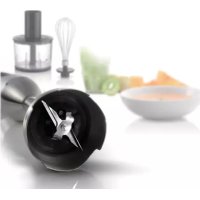


| Product type | Immersion blender with accessories |
| Brand | Panasonic |
| Model | MXS401S |
| Power supply | 230-240 V ~ 50 Hz |
| Power consumption (blending stick/chopper bowl) | 120-125 W |
| Power consumption (whisk) | 40-45 W |
| Continuous rated time (blending stick/chopper bowl) | 1 minute |
| Continuous rated time (whisk) | 2 minutes |
| Speeds | High, Low (soft start), Pulse |
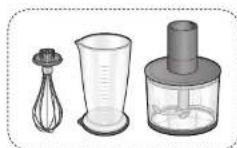
| Included accessories | Blending stick, chopper bowl with lid, whisk with adapter, cup (700 mL), protective holder, brush/spatula, anti-slip lid/mat |
| Cup capacity | Min. 100 mL, Max. 700 mL |
| Chopper bowl capacity | Min. 40-200 g depending on ingredient, max. liquid 50 mL |
| Dimensions (motor block + blending stick) | 6.5 × 7.4 × 42.3 cm |
| Dimensions (motor block + chopper bowl) | 13.9 × 13.9 × 41.9 cm |
| Dimensions (motor block + whisk) | 6.4 × 7.3 × 46.7 cm |
| Weight (blending stick) | 0.84 kg |
| Weight (chopper bowl) | 1.04 kg (with blade) |
| Weight (whisk) | 0.77 kg |
| Cable length | Approx. 1.3 m |
| Noise (blending stick) | 58.8 dB(A) |
| Noise (chopper bowl) | 56.5 dB(A) |
| Noise (whisk) | 54.2 dB(A) |
| Safety | Child lock, overload and motor overheat protection |
| Maintenance | Dishwasher safe for some parts (see manual) |
| Replacement parts available | Cup (AMD02E142), Chopper bowl (AMD00-142) |
| Use | Household use only |
Frequently Asked Questions - MXS401S PANASONIC
User questions about MXS401S PANASONIC
0 question about this device. Answer the ones you know or ask your own.
Ask a new question about this device
Download the instructions for your Blender in PDF format for free! Find your manual MXS401S - PANASONIC and take your electronic device back in hand. On this page are published all the documents necessary for the use of your device. MXS401S by PANASONIC.
USER MANUAL MXS401S PANASONIC
Representative in EU :
Panasonic Marketing Europe GmbH
Panasonic Testing Centre
Winsbergring 15, 22525 Hamburg, Germany
Panasonic Taiwan Co., Ltd.
http://www.panasonic.com
© Panasonic Taiwan Co., Ltd. 2017
MZ50G142
MX0617E0
Printed in China
Panasonic®
Operating Instructions
Bedienungsanleitung
Mode d'emploi
Thank you for purchasing the Panasonic product.
- Please read these instructions carefully to use the product correctly and safely.
- Before using this product, please give your special attention to "Safety Precautions" and "Important Information" (Page GB3-GB6). • This product is intended for household use only.
- Please keep these Operating Instructions for future use.
- Panasonic will not accept any liability if the appliance is subject to improper use, or in the event of failure to comply with these instructions.
Contents Page
Safety Precautions GB3
Important Information......GB6
Part Names and Instructions......GB7
Preparation......GB10
Handling Precautions......GB11
Prohibited Ingredients & Conditions......GB12
How to Use
- Blender attachment......GB13
- Chopper attachment ....GB15
- Whisk attachment ....GB17
Cleaning & Care......GB18
Troubleshooting GB20
Replacement Parts GB23
Specifications GB23

This symbol on the product indicates "Make sure you read the Operating Instructions carefully before using".
Disposal of old equipment
Only for European Union and countries with recycling systems

This symbol on the products, packaging, and/or accompanying documents means that used electrical and electronic products must not be mixed with general household waste. For proper treatment, recovery and recycling of old products, please take them to applicable collection points in accordance with your national legislation.
By disposing of them correctly, you will help to save valuable resources and prevent any potential negative effects on human health and the environment.
For more information about collection and recycling, please contact your local municipality.
Penalties may be applicable for incorrect disposal of this waste, in accordance with national legislation.
Safety Precautions
Please make sure to follow these instructions.
To reduce the risk of personal injury, electric shock or fire, please observe the following:
■ The following signals indicate the degree of harm and damage when the product is misused.

WARNING: Indicates potential hazard that could result in serious injury or death.

CAUTION: Indicates potential hazard that could result in minor injury or property damage.
■ The symbols are classified and explained as follows.

This symbol indicates prohibition.

This symbol indicates requirement that must be followed.

WARNING
To avoid risk of electric shock, fire due to short circuit, smoke, burn or injury.

- Do not allow infants and children to play with packaging. (It may cause suffocation.)
- Do not disassemble, repair or modify this appliance. → Consult the place of purchase or Panasonic service centre.
- Do not damage the mains lead or mains plug. Following actions are strictly prohibited: Mains lead—Modifying, touching on or placing near heating elements or hot surfaces, Mains plug Mains plug
bending, twisting, pulling, pulled over sharp edges, putting heavy objects on top, bundling the mains lead or carrying the appliance by the mains lead.
- Do not use the appliance if the mains lead or mains plug is damaged or the mains plug is loosely connected to the household mains socket.
If the mains lead is damaged, it must be replaced by the manufacturer, its service agent or similarly qualified person in order to avoid a hazard.

Safety Precautions
Please make sure to follow these instructions.
! WARNING WARNING

- Do not plug or unplug the mains plug with wet hands.
- Do not immerse the motor housing in water, or splash it with water and/or any liquid.
- Do not put your face close to the chopper bowl or beaker during use.

- This appliance shall not be used by children. Appliances can be used by persons with reduced physical, sensory or mental capabilities or lack of experience and knowledge if they have been given supervision or instruction concerning use of the appliance in a safe way and if they understand the hazards involved. Children shall not play with the appliance. Keep the appliance and its mains lead out of reach of children.
● Make sure the voltage indicated on the label of the appliance is the same as your local supply. Also avoid plugging other devices into the same household mains socket to prevent electrical overheating. However, if you are connecting a number of mains plugs, make sure the total wattage does not exceed the rated wattage of the household mains socket.
- Discontinue using the appliance immediately and unplug in the unlikely event that this appliance stops working properly.
e.g. for abnormal occurrences or breaking down • The mains plug and the mains lead become abnormally hot. • The mains lead is damaged or the appliance power fails. - The motor housing is deformed, has visible damage or is abnormally hot. • There is crack on the beaker, chopper bowl or other parts. • There is an unpleasant smell. • The blade units get stuck. • There is abnormal turning noise while in use. • There is another abnormality or failure. → Contact Panasonic service centre for inspection or repair.
GB4 GB5


- Insert the mains plug firmly. ● Dust off the mains plug regularly. → Unplug the mains plug, and wipe with a dry cloth.
- Be careful if hot liquid is poured into the beaker or chopper bowl as it can be ejected out of the appliance due to a sudden steaming.

CAUTION
To avoid risk of electric leakage, electric shock, fire due to short circuit, burn, injury or property damage.

- Do not use the appliance in the following places:
- On uneven surfaces, on carpets or tablecloths, etc.
- Places where it may be splashed with water or near a heat source.
- Near any open water such as bathtubs, sinks, or other containers. • Near a wall or furniture. → Place the appliance on a firm, dry, clean flat worktop.
- Do not insert any object into the gaps.
- Do not replace any parts of the appliance with spare parts other than genuine parts for this appliance. ● Do not open the chopper lid while in use. ● Never use the chopper blade without setting it on the appliance correctly.
- Do not put your fingers, spoon, or fork close to the blade while the appliance is operating.
- Do not blend or place ingredients over 60°C into the beaker and chopper bowl.
- Do not put your hand in the chopper bowl when taking mixture out before removing the chopper blade.
- Do not use the blender when the saucepan is on the heat source. Hot liquid may spurt out and touch your hand.
Safety Precautions
Please make sure to follow these instructions.

CAUTION

● Make sure to hold the mains plug when unplugging it. Never pull on the mains lead. - Beware not to be tripped over or get caught in the mains lead while in use. - Care shall be taken when handling the blender blade, chopper blade, emptying beaker, chopper bowl, and during cleaning. Do not clean the blades with bare hands. Use the spatula brush provided. ● Always disconnect the appliance from the supply if it is left unattended and before assembling, disassembling, moving, or cleaning. - Switch off the appliance and disconnect from supply before changing attachments or approaching parts that move in use.
Important Information
- Do not use the appliance outdoors.
- Do not use the appliance for commercial purposes.
- Do not place the beaker and chopper bowl on any heat sources or in a microwave.
- Do not drop the appliance to avoid damaging it.
- Do not wrap the mains lead around the motor housing. Make sure the attachments are set firmly.
- Do not use the appliance beyond the rated time.
- Do not move the chopper bowl by holding the chopper lid or motor housing.
- Do not operate the appliance without ingredients.
Part Names and Instructions
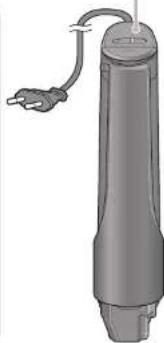
Motor housing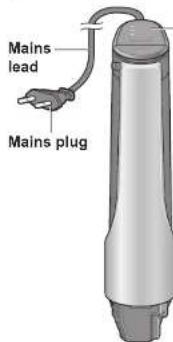
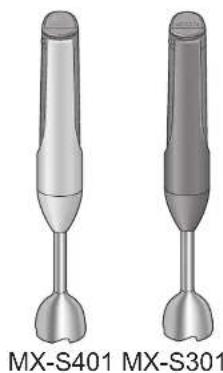
Control panel (MX-S301 is different from MX-S401)
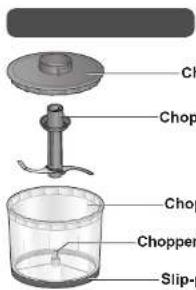
Chopper blade, Chopper bowl, Chopper blade pin, Slip-proof ring
Whisk attachment & Adapter, Blender attachment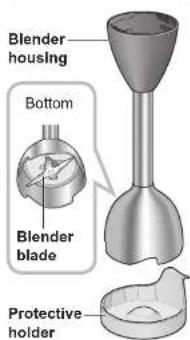
Use for placing or storing the blender temporarily. For safety, it is attached to the blender at the time of purchase
Accessories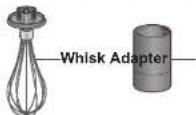
Beaker
Maximum volume: Approx. 700 mL, 16 oz/2 cups
Minimum volume: Approx. 100 mL, 4 oz/0.5 cup
Spatula brush
Brush: Clean the blades.
Lid/slip-proof mat
Can be used as a lid.
(Clean it before using.)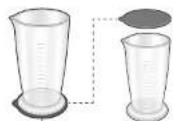
● Illustration color of product in these instructions are exemplified by MX-S401.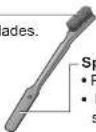
Part Names and Instructions (continued)
Control panel
(MX-S401)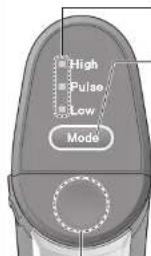
Mode indicator
Lights up to indicate the mode chosen with the mode selector.
Mode selector
Choose rotation speed [High/Pulse/Low (soft start)]. (P. GB9)
- Initial settings: standby mode (All mode indicators are flashing.) The machine will return to standby mode in the following instances:
- insert mains plug.
- not in use for more than 30 seconds. *motor overloading/overheating protection is activated.
Unlock button (section)
- Press the section.
- Lock is released while the button is pressed. (When the trigger switch is pressed and rotation begins, the lock will not engage even if your finger is removed.)
- Cannot be pressed when child lock is locked.
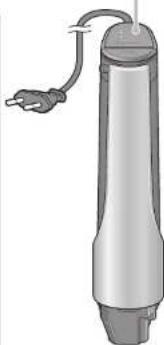
(MX-S301)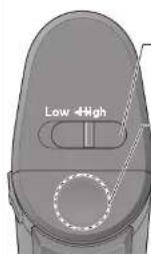
Mode switch
Choose rotation speed [Low/High]
Unlock button (section)
- Press the section
- Lock is released while the button is pressed. (When the trigger switch is pressed and rotation begins, the lock will not engage even if your finger is removed.)
- Cannot be pressed when child lock is locked.
Mode
High
Continuous operation with high speed rotation.
(Use for making juice, smoothie by blender blade, minced meat by chopper blade, etc.)
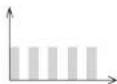
Pulse (for MX-S401 only)
Repeated operation between medium speed and stop. Uses the chopper blade and alternates between medium speed and stop for a grittier texture. (Use for chopping onion, fish, squid, prawn, etc.)
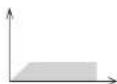
Low (soft start) (for MX-S401 only)
Starts slowly and then continues at low speed while whipping with the whisk attachment to prevent ingredients from flying out. (Use for whipping cream, making sauces, etc.)
Low (for MX-S301 only)
Continuous operation with low speed rotation. (Use for chopping onion, fish by using chopper blade, etc.)
Rotation Speed (sketch map)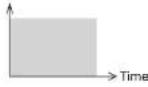
Motor housing back
Back
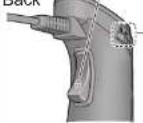
Trigger switch
- Press the trigger switch while holding down the unlock button to start the machine. (P, GB14) • The power will be "On" only while holding this switch.
Child lock
Be sure to lock in the following instances: taking a break from blending, carrying, not in use, attaching or removing attachments. The unlock button cannot be pressed while the child lock is locked.
Lock Unlock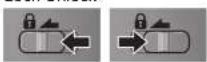
Preparation
Before using, wash parts except the motor housing and adapter. (P. GB19) Make sure to handle according to the following instructions. (Cleaning & Care see P. GB18-20)
Assembly and disassembly of attachments
Assembly of blender attachment

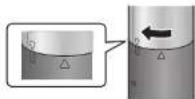
Align the ▼ on the motor housing with the ▲ on the blender housing.
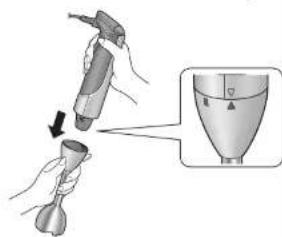
Twist the motor housing clockwise to align ▼ and ■ to lock until it cannot be rotated.
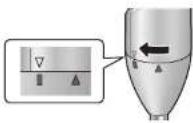
Reverse the steps to disassemble blender attachment.
Assembly of whisk attachment

Align the adapter and whisk attachment (below 3 ○) and insert until a "click" sound is heard.
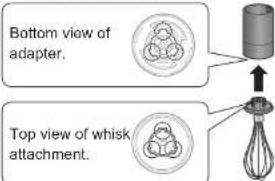
Align the ▼ on the motor housing with the ▲ on the adapter.
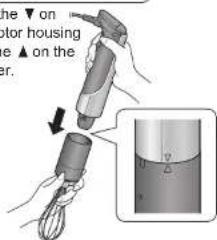
Twist the motor housing clockwise to align ▼ and ■ to lock until it cannot be rotated.
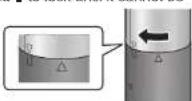
Reverse the steps to disassemble whisk attachment.
Assembly of chopper attachment


English
① Insert the chopper blade into the chopper blade pin. ② Close the chopper lid and face the ● on the lid to the front. ③ Align the ● on the adapter with the ● on the chopper lid. ④ Twist the adapter clockwise to align ● and ■ to lock until it cannot be rotated.
![graph TD A["Raw Material"] --> B["Step ②"] B --> C["Place ingredients"] C --> D["Step ①"] D --> E["Final Product"]](/content/2026/04/609185/images/068b4032c1f00a83bc65a198a05749c7adacdd020cdc939d292aab134aa71a56.jpg)
- The chopper blade is set with the chopper bowl at the time of purchase.
⑤ Align the ▼ on the motor housing with the ▲ on the adapter.
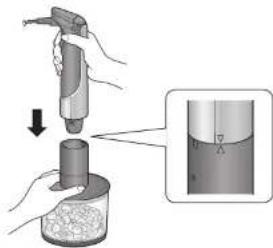
⑥ Twist the motor housing clockwise to align ▼ and ■ to lock until it cannot be rotated.
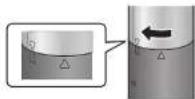
Reverse the steps to disassemble chopper attachment.
Handling Precautions
- Be sure to follow the rated time of each attachment. (P. GB23)
- For continued use, unplug and rest machine for at least 10 minutes until motor housing returns to a normal temperature. (Cause of smoke, odour or malfunction due to motor overheating.) If the motor becomes hot from high load, repeated long use, insufficient rest time, or other factors, even if it is used within the rated time, the motor overheating protection function may be activated and the motor stops. (P. GB20-21)
Prohibited Ingredients & Conditions
Blending prohibited ingredients can cause damage to each attachment, beaker, chopper bowl and motor housing malfunction.

Blender attachment
■ Strong sticky ingredients (Cause of malfunction)
- Boiled tubers*1 (Potatoes, pumpkins, etc.)
- Okra
- Chilled cream cheese 2 • Dough (bread, pasta, etc.)
■ Hard ingredients
(Cause of blade damages) • Coffee beans • Ice cubes - Dry bread - Dried soybeans - Frozen food - Turmeric

Chopper attachment
■ Strong sticky ingredients (Cause of malfunction)
- Boiled tubers *1 (Potatoes, pumpkins, etc.)
- Chilled cream cheese 2 • Dough (bread, pasta, etc.)

Whisk attachment
■ Whipping whole eggs or low fat cream (less than 30% milk fat) takes 2 minutes or longer. (Whole eggs cannot be whipped)
■ Ingredients with rich fibers or muscles (Cause of malfunction by trapping fibers or muscles around the blender blade.)
• Meats (includes chopped meat) • Fishes
■ Low moisture content ingredients (Cause of malfunction)
- Boiled tubers*
- Boiled beans*
(Kidney beans, butter beans, etc.)
■ Ingredients with rich fibers or muscles (Cause of malfunction by trapping fibers or muscles around the chopper blade.)
- Fibrous meats
■ Hard ingredients
(Cause of blade damages)
- Coffee beans - Ice cubes • Dry bread • Dried soybeans
- Frozen food
- Turmeric
■ Preparations for other than whipping cream, egg whites, or making sauces.
(Cannot be used for mixing chilled butter or cream cheese, or kneading dough.)
*1 Can be used by adding the same amount of water as ingredients. *2 Can be used when the ingredients are in room temperature (approx. 25°C).

How to Use -Blender attachment-
Preparations
■ Cut soft ingredients into 2-3 cm cubes.
Citrus
Peel and
separate.
Apple
(Remove core and
peel skin if desired.


- Remove pit from peaches, plums and other stone fruits.
Cut hard
ingredients into
1 cm cubes.
Carrots, etc.
(Peel)

If pieces are too
big, they cannot
be mixed well.
■ Wash leafy veg-
etables well and
cut into 2-3 cm
width pieces.

- Remove the stem
end/root, then wash
well before use
(Spinach, etc.)
- Remove large
stems from kale.
Notes
- Use a container or a pan that can be used with the blender. Hold the container firmly while in use.
| Can use | Cannot use |
| BeakerMetal or plastic containers or pan.Do not make contact with the rim or the bottom of container to avoid damaging it. | Glass containers (Including heat resistant and strengthened glass.)Ceramic and earthenware containers and pots that are easy to break.Chopper bowl |
- Do not use continuously for longer than 1 minute. (Cause of malfunction: P. GB11)
- Follow the quantities that can be made in 1 batch.
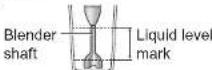
- Do not add ingredients that exceed the height
of the blender shaft.
- When adding liquid, follow the chart to the right.
- Depending on the type and quantity of ingredient, mixture may spill from the beaker or container. In such cases, reduce the quantity.
- Do not insert or remove the blender from the beaker, etc. while trigger switch is pressed. (It may cause injury and/or burn.)
- Attach blender attachments firmly. (P. GB10)

How to Use -Blender attachment- (continue)
Preparation:
① Attach blender attachments to motor housing. (P. GB10)
② Insert mains plug into mains socket.
③ Choose "High" mode. (P. GB8-9)
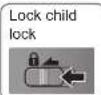
④ Unlock child lock.

Unlock child lock

1
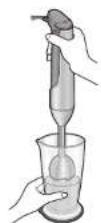
Insert blender into container.
2
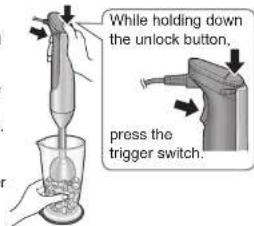
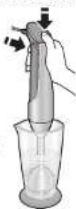
Press trigger switch while holding down unlock button to start.
- Mix while pushing blender blade into the ingredients. (Do not push hard.)
- Hold beaker firmly so it does not lift up.
- Insert blender directly downwards when using beaker.
- When ingredients stick to the container and are difficult to move, release trigger switch and reapply to ingredients. Then, restart again.
- Do not lift blender blade above the surface of liquid ingredients while in use. (Risk of splattering.)
- When handling in a pot or bowl, swirl the liquid at a slanted 5-10 mm without removing blender blade from the liquid. This will mix ingredients more smoothly.
- If device stops during use, see P. GB21.
3
When finished, release trigger switch and lock child lock. Confirm that rotation has stopped, then remove blender from container.
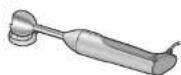
- The blender can be placed on the protective holder temporarily.
After Use
• Unplug the mains plug. - Remove blender attachments and clean them. (P. GB18-20)
GB14 GB15

How to Use -Chopper attachment-
Preparations
■ Cut into approx. 2-3 cm cubes.
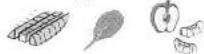
- Remove peels, stems, seeds, and cores from ingredients.
- Cut hard ingredients (carrots, etc.) into approx. 1-2 cm cubes.
- Cut hard cheese such as parmesan, etc into 1 cm cubes. (Remove hard outer rind.)
■ Remove parsley stalks.
- Wipe away excess water.
■ Peel, devein, and remove legs on squid and prawn.
■ Remove bones, gristle and tendons from meat.
Debone fish.

- Thinly slice pork belly and cut into 2-3 cm length.
■ Remove crust from bread. ● Tear 6-8 slices.
■ Remove nuts from shell.

Notes
- Do not use continuously for more than 1 minute. (Cause of malfunction: P. GB11)
- Scrape down ingredients that stick to the bowl during operation.

Incorrect

Correct
- Make sure that the chopper lid is not floating. (Cause of malfunction)
- Rotate lid and close again if it is not closed well.
- Be sure to attach slip-proof ring while in use.
The quantity and points of ingredient that can be used at a time.
- Choose appropriate mode according to the ingredients and finished condition.
- Be sure to follow the quantity that can be used at a time. (If quantity is too large, separate into batches.)
| Ingredient | Min. - Max.(1 time) | Mode | Approximate time for handling | Main points of usage |
| Onion 40-200 g | Pulse | 12-18 sec (MX-S401) | Cut to preferred size. | |
| Low | Power "On" and "Off" repeatedly (MX-S301) | |||
| Carrot 40-200 gHigh 10-18 sec | ||||
| Parsley 5-30 gHigh 10-30 sec | ||||
| Garlic 10-200 gHigh 5-13 sec | ||||
| Nuts (walnut, etc.) | 10-200 gHigh 8-30 sec | |||
| Slice of bread | 10-80 g | High 1b-30 sec | ||
| Parmesan cheese | 40-200 gHigh 15-50 sec | |||
| Meat (beef, pork,chicken, etc.) | 80-200 gHigh 5-20 sec | For rough finished condition, use "Pulse" mode for MX-S401,power "On" and "Off" repeatedly for MX-S301. | ||
| Fish | 80-200 g | Low | 5 sec-1 min | |
| Squid, prawn | 80-200 g | Low | 10 sec-1 min | |
- When using only liquids, it should not exceed 50 mL.

How to Use -Chopper attachment- (continue)
Preparation:
① Attach chopper blade, place ingredients, and then close chopper lid. (P. GB11) ② Insert mains plug into mains socket. ③ Choose appropriate mode. (P. GB8-9) ④ Unlock child lock.

Unlock child


1
Press trigger switch while holding down the unlock button to start.
- Hold the chopper bowl firmly.
- Do not open the chopper lid while in use.
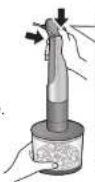
While holding down the unlock button,
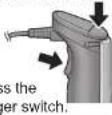
2
When finished, release trigger switch and lock child lock. Confirm that rotation has stopped, then remove blender from adapter.
Unplug the mains plug.
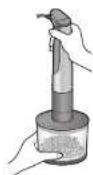
Lock child lock

3
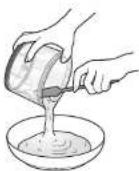
Remove the adapter and chopper lid. After removing the chopper blade, use a rubber spatula to take out the finished food.
After Use
Remove all parts and clean them. (P. GB18-20)

How to Use -Whisk attachment-
Preparations
Keep cream and egg white in the refrigerator.
Notes
- Do not use continuously for longer than 2 minutes. (Cause of malfunction: P. GB11)
- Use a large, deep bowl to minimize any splatter.
- Do not use more than 4 eggs when whipping egg whites.
- Attach whisk attachment firmly. (P. GB10) • Before using, wipe moisture from bowl and whisk. (Water residue prevents proper whipping.)
The quantity and points of ingredient that can be used at a time.
- Choose appropriate mode according to the ingredients and finished condition
| Ingredient | Max. (1 time) Mode | Approximate time for handling | Main points of usage | |
| Cream | Up to 200 mL(30% or more milk fat) | Low → High | Within 2 minutes | Cool bottom of bowl with iced water.Start "Low" mode and switch to "High" mode when it starts to thicken. |
| Egg whites Up to 4 eggs High Within 2 minutes | - | |||
- Cannot be used for mixing chilled butter or cream cheese, or kneading dough.
Preparation:
① Attach whisk attachment to motor housing. (P. GB10) ② Insert mains plug into mains socket. ③ Choose appropriate mode. (P. GB8-9) ④ Unlock child lock.

Unlock child lock

1
Place the whisk in a large and deep bowl.
Press trigger switch while holding down unlock button.
- When whisking, hold the motor housing perpendicular to the liquid surface and mix around the periphery of the bowl.
- Slightly tilt the bowl when using minimal ingredients.
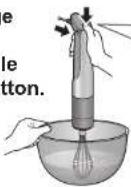
While holding down the unlock button,
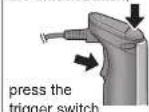

How to Use -Whisk attachment- (continued)

When finished, release the trigger switch and lock the child lock. Confirm that rotation has stopped, and then remove the whisk from the bowl.
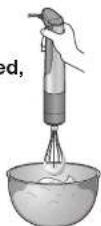
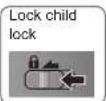
After Use
- Unplug the mains plug.
- Remove the whisk attachment and clean it. (P. GB18-20)
Cleaning & Care
• Unplug before cleaning. - Clean the machine after every use.
Notes for Cleaning
- Be careful not to directly touch blades with your hands.
- Do not use benzine thinner, bleach, nylon face of sponge, metal brush, polishing powder, etc. (Otherwise, the parts surface will be damaged.)
- Do not use chlorine type detergents. (Cause of rust and breakdown.)
- Be sure to dry well after washing. (Risk of rust) Dry blender blades with blades pointing downwards.
- Do not clean the machine and attachments with a metal pointed object.
Notes for Storage
- Keep the machine out of reach of children. (Avoid personal injury.)
- Attach protective holder to the blender.
About Resin Parts Discolouration
Resin parts* may become discoloured through contact by the staining compounds in carrots and other vegetables. This discolouration cannot be fully removed with a sponge, but it poses no problem to use. Early cleaning after use can reduce discolouration. * Blender housing, beaker, chopper bowl, chopper blade, protective holder.
GB18 GB19
Blender attachment
① Pour approx. 200-300 mL of water into the beaker. ② Choose "High" mode. ③ Run the blender for approx. 15 seconds. (P. GB14) - Do not move up and down, otherwise, water may spill. ④ Replace water and repeat several times. ⑤ After removing leavings, wash with the spatula brush.
Blender housing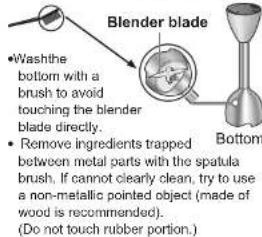
Motor housing & Adapter
Wipe with a well-wrung cloth.
Water entering the inside of the machine can cause malfunction.
Adapter
Other Parts
Wash with diluted dish detergent (neutral).
• Use a brush to clean chopper blade and chopper blade pin.
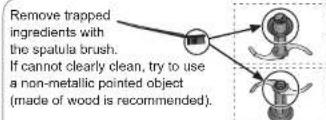
- Do not soak chopper blade in water or hot water. (Water entering the inside of the machine can cause malfunction.)
Chopper blade pin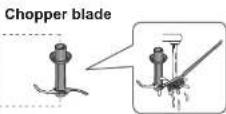
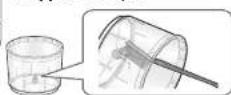
- Use a soft sponge to clean lid/slip-proof mat and slip-proof ring.
Lid/slip-proof mat: Wash it after removing from beaker.
Slip-proof ring: Wash it after removing from chopper bowl.
Cleaning & Care (continued)
Use of Dishwasher and Dish Dryer
| Motorhousing | Blonderattachment | AdapterBeakerper attachment | Whiskattachment | |||||
| × | √ | √ | √ | × | × | √ | × | √ |
- Use a detergent intended for use with a dishwasher machine. (Use after thoroughly referring to the user manual accompanying your dishwasher.)
- The beaker and chopper bowl may become fragile. Distance these items from the heating element, and set temperature to low if using a model with heat control.
Troubleshooting
Please check the following points before calling or arranging for repair.
Problem Ca
Button cannot be pressed.
Does not operate even when button is pressed.
Large vibrations
The blade gets stuck.
and Action
● Child lock does not unlock. (P. GB9) - Did not hold down the unlock button beforehand. (P. GB8)
• The mode is not chosen. (Only apply for MX-S401) → Choose a kind of speed mode - The mains plug is disconnected with the socket. → Securely insert it - Motor overheats, activating the motor overheating protection function. (All mode indicators of MX-S401 are flashing.) → Unplug and rest the machine for approx. 30 minutes or more (until motor housing returns to a normal temperature) to release overheating protection before using again. If the machine still does not operate, consult the store of purchase or Panasonic service centre. - Did not follow the indicated ingredient portion for 1 batch. (P. GB13, P. GB15, P. GB17) - Did not prepare the ingredients to the indicated sizes. (P. GB13, P. GB15) - Ingredients are hard. → Remove the hard ingredients. - Unplug and remove ingredients trapped between metal parts with the spatula brush. If cannot clearly clean, try to use a non-metallic pointed object (made of wood is recommended). (Do not touch rubber portion.)
Problem Ca
Motor housing becomes hot.
There is abnormal noise.
Operation stops abruptly.
Starting and stopping alternately.
and Action
• Use beyond rated time. → Use within rated time (P. GB23). For continued use, unplug and rest machine for at least 10 minutes until motor housing returns to a normal temperature. (Motor overheating causes malfunction.) - Ingredients are hard. → Remove the hard ingredients. - Chopper lid is not set properly → Reset the chopper lid properly. (P. GB15)
- Motor overloading protection is activated due to overload. (The mode indicator of MX-S401 goes off.)
If blender is pressed strongly against ingredients, release trigger switch and unlock button, unplug the machine. then reinsert to operate again. (P. GB14)
- Do not press blender forcefully into ingredients.
→ For circumstances other than the above, perform the following steps while the blender is stopped. Release
① Release trigger switch and unlock button, then remove motor housing from the container.
② Unplug the mains plug. ③ Remove half of the ingredients or add water.
• If prohibited ingredients were added, remove them. ④ Repeat preparation and operation. (P. GB14, P. GB16, P. GB17-18) - Do not press blender forcefully into ingredients.
If machine still does not operate after performing the above, motor overheating protection has been activated. See below.
- Motor overheating protection function activated from motor overheating during or after use. (All mode indicators of MX-S401 are flashing.) → Unplug and rest the machine for approx. 30 minutes or more (until motor housing returns to a normal temperature) to release overheating protection before using again. (If machine still does not operate, consult the store of purchase or Panasonic service centre.)
- Chosen "Pulse" mode. (Only apply for MX-S401) "Pulse" mode alternates between medium speed and stop. (P, GB9)
Troubleshooting (continue)
Please check following points before calling or arranging for repair.
Problem Ca
Ingredients do not mix well.
Poor finished product.
and Action
- Did not follow the indicated ingredient portion for 1 batch. (P. GB13, P. GB15, P. GB17)
- Did not prepare the ingredients to the indicated sizes. (P. GB13, P. GB15)
- Ingredients are hard. → Remove the hard ingredients.
- Operating time is short. → Lengthen operating time, but do not exceed the rated time of continuous operation. The chosen speed mode is not appropriate. → Choose an appropriate speed mode.
• The blade is damaged.
→ Stop using and contact the store of purchase or Panasonic service centre.
Replacement Parts
Replacement parts are available at your dealer or Panasonic service centre.
| Part Name Part Number | |
| Beaker (exclude lid/slip-proof mat) AMD02E142 | |
| Chopper bowl (exclude slip-proof ring) AMD00-142 |
English
Specifications
| Using blender attachment | Using chopper attachment | Using whisk attachment |
MX-S401 MX-S301 MX-S401 MX-S301 MX-S401 MX-S301
| Power Supply 230 - 240 V | ~50 Hz | |||||
| Power Consumption 120 - 1 | 25 W 40 - 45 W | |||||
| Rated Time(continuous operation) | 1 minute | 2 minutes | ||||
| Speed Control | Changeable type | |||||
| Safety Device | Motor overloading protectionMotor overheating protection | |||||
| Length of Mains Lead(approx.) | 1.3 m | |||||
| Dimensions (approx.)Motor housing + Attachments(W × D × H) | 6.5 × 7.4 ×42.3 cm | 13.9 × 13.9 ×41.9 cm | 6.4 × 7.3 ×46.7 cm | |||
| Mass. (approx.)Motor housing + Attachments | 0.84 kg | 0.80 kg | 1.04 kg(Attach withchopper blade) | 0.77 kg | 0.76 kg | |
| Airborne Acoustical Noise[dB(A) ref 1 pW] | 58.8 dB(A) | 58.3 dB(A) | 56.5 dB(A) | 55.9 dB(A) | 54.2 dB(A) | 58.3 dB(A) |
(MX-S301)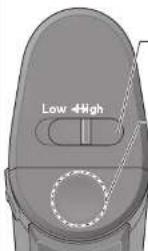
Mode switch
DE8 DE9
Mode
High
Technical data
(MX-S301)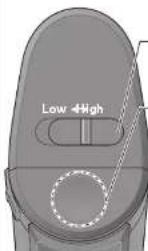
Mode switch
FR8 FR9
Mode
Rotation speed (Sketch card)
High
- Mixer accessory ....NL13
- Hook accessory ....NL15
- Guard accessory ....NL17
Specifications....NL23

⚠ WARNING WARNING


(MX-S301)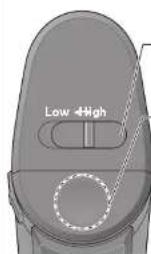
- Mode switch
Mode
High
③ Select mode "High". (See NL8-9)
Therefore, m = 3/11
Therefore, m = 3/11
Therefore, m = 3/11
Therefore, m = 3/11
Therefore, m = 3/11
Therefore, m = 3/11
Therefore, m = 3/11
The Ground Truth image displays a single, solid horizontal line. According to Rule 2 (UNDERSCORE & LINE RULES), this is a stylistic or background line, not a placeholder underscore. Therefore, the OCR result must ignore it and output nothing or only meaningful text. The provided OCR content is "____", which consists of four underscores. This is an incorrect interpretation of the line as a placeholder, violating the rule that stylistic lines must be ignored. The OCR has hallucinated underscores where none should exist based on the GT's visual context. Hence, the OCR result is inconsistent with the Ground Truth.
Therefore, m = 3/11
[Non-Text]
[Non-Text]
[Non-Text]
[Non-Text]
[Non-Text]
[Non-Text]
[Non-Text]
[Non-Text]
[Non-Text]
[Non-Text]
[Non-Text]
[Non-Text]
[Non-Text]
[Non-Text]
[Non-Text]
[Non-Text]
[Non-Text]
[Non-Text]
[Non-Text]
[Non-Text]
[Non-Text]
[Non-Text]
[Non-Text]
[Non-Text]
[Non-Text]
[Non-Text]
[Non-Text]
[Non-Text]
[Non-Text]
[Non-Text]
[Non-Text]
[Non-Text]
[Non-Text]
[Non-Text]
[Non-Text]
[Non-Text]
[Non-Text]
[Non-Text]
[Non-Text]
[Non-Text]
[Non-Text]
[Non-Text]
[Non-Text]
[Non-Text]
[Non-Text]
[Non-Text]
[Non-Text]
[Non-Text]
[Non-Text]
[Non-Text]
[Non-Text]
[Non-Text]
[Non-Text]
[Non-Text]
[Non-Text]
[Non-Text]
[Non-Text]
[Non-Text]
[Non-Text]
[Non-Text]
B
F
Therefore m = 3/11
Therefore m = 3/11
He
The
Therefore, m = 3/11
Therefore, m = 3/11
Therefore, m = 3/11
B
Word
WO
Therefore, m = 3/11
Therefore, m = 3/11
Therefore, m = 3/11
•
there is
Therefore, m = 3/11
Therefore, m = 3/11
Therefore, m = 3/11
∴ m = 3/11
∴ m = 3/11
∴ m = 3/11
∴ m = 3/11
∴ m = 3/11
∴ m = 3/11
∴ m = 3/11
∴ m = 3/11
∴ m = 3/11
∴ m = 3/11
∴ m = 3/11
∴ m = 3/11
∴ m = 3/11
∴ m = 3/11
∴ m = 3/11
Therefore, m = 3/11
Therefore, m = 3/11
Therefore, m = 3/11
Therefore, m = 3/11
Therefore, m = 3/11
Therefore, m = 3/11
Therefore, m = 3/11
Therefore, m = 3/11
Therefore, m = 3/11
Therefore, m = 3/11
Therefore, m = 3/11
Therefore, m = 3/11
Therefore, m = 3/11
Therefore, m = 3/11
Therefore, m = 3/11
Therefore, m = 3/11
Therefore, m = 3/11
Therefore, m = 3/11
Therefore, m = 3/11
Therefore, m = 3/11
Therefore, m = 3/11
Therefore, m = 3/11
[Non-Text]
[Non-Text]
[Non-Text]
[Non-Text]
[Non-Text]
[Non-Text]
[Non-Text]
[Non-Text]
[Non-Text]
[Non-Text]
[Non-Text]
[Non-Text]
[Non-Text]
[Non-Text]
[Non-Text]
[Non-Text]
[Non-Text]
[Non-Text]
[Non-Text]
[Non-Text]
[Non-Text]
[Non-Text]
[Non-Text]
[Non-Text]
[Non-Text]
[Non-Text]
[Non-Text]
[Non-Text]
[Non-Text]
[Non-Text]
[Non-Text]
[Non-Text]
[Non-Text]
[Non-Text]
[Non-Text]
[Non-Text]
[Non-Text]
[Non-Text]
[Non-Text]
[Non-Text]
[Non-Text]
[Non-Text]
[Non-Text]
[Non-Text]
[Non-Text]
(MX-S301)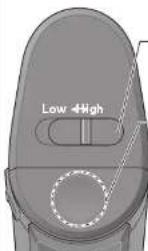
Mode
High
Mode indicator
(MX-S301)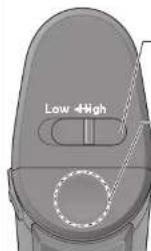
-Mode switch
SP8 SP9
Mode
High
(See SP14, SP16, SP17-18)
(MX-S301)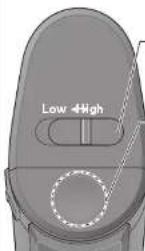
Mode switch
Mode
High
(MX-S301)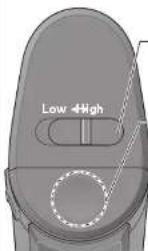
Mode switch
CZ8CZ9
Mode
High
(MX-S301)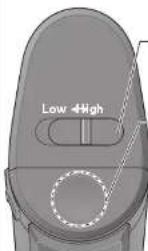
Mode switch
HU8 HU9
Mode
High
1
(MX-S301)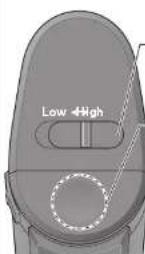
Speed switch
Select rotation speed [Low / High]
Tila
High (Korkea)
Therefore m = 3/11
etta.
ä.
1
Therefore m = 3/11
(四)股东类型
2.1 本公司及公司
(四)
(1)
-
Therefore m = 3/11
Reservedele ....DK23
Specifications....DK23

(MX-S301)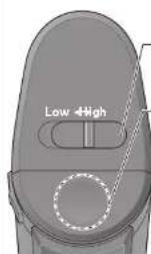
-Adjustment knob
DK8 DK9
Adjustment
High
⑥Turn the motor housing clockwise to adjust ▼ and ■ to lock it so that it cannot be turned.
(Kidney-beans, butter-beans, etc.)
Troubleshooting (continued)
Check the following points before calling or arranging for repair.
Problem Ar
(MX-S301)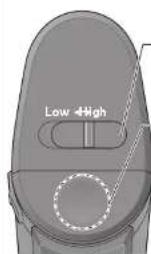
-Lid button
Select rotation speed [Low/High].
Unlock button
( : sections)
SE8 SE9
Position
High
Continuous operation at high rotational speed.



- PANASONIC®
- CONTENTS PAGE
- DISPOSAL OF OLD EQUIPMENT
- SAFETY PRECAUTIONS
- WARNING
- WARNING WARNING
- CAUTION
- IMPORTANT INFORMATION
- PART NAMES AND INSTRUCTIONS
- BEAKER
- SPATULA BRUSH
- PART NAMES AND INSTRUCTIONS (CONTINUED)
- CONTROL PANEL
- MODE INDICATOR
- MODE SELECTOR
- UNLOCK BUTTON (SECTION)
- MODE SWITCH
- MODE
- HIGH
- PULSE (FOR MX-S401 ONLY)
- LOW (SOFT START) (FOR MX-S401 ONLY)
- LOW (FOR MX-S301 ONLY)
- MOTOR HOUSING BACK
- BACK
- TRIGGER SWITCH
- CHILD LOCK
- PREPARATION
- ASSEMBLY AND DISASSEMBLY OF ATTACHMENTS
- ASSEMBLY OF CHOPPER ATTACHMENT
- HANDLING PRECAUTIONS
- PROHIBITED INGREDIENTS & CONDITIONS
- BLENDER ATTACHMENT
- CHOPPER ATTACHMENT
- WHISK ATTACHMENT
- HOW TO USE -BLENDER ATTACHMENT
- PREPARATIONS
- NOTES
- HOW TO USE -BLENDER ATTACHMENT- (CONTINUE)
- INSERT BLENDER INTO CONTAINER
- PRESS TRIGGER SWITCH WHILE HOLDING DOWN UNLOCK BUTTON TO START
- WHEN FINISHED, RELEASE TRIGGER SWITCH AND LOCK CHILD LOCK. CONFIRM THAT ROTATION HAS STOPPED, THEN REMOVE BLENDER FROM CONTAINER
- AFTER USE
- HOW TO USE -CHOPPER ATTACHMENT
- THE QUANTITY AND POINTS OF INGREDIENT THAT CAN BE USED AT A TIME
- HOW TO USE -CHOPPER ATTACHMENT- (CONTINUE)
- PRESS TRIGGER SWITCH WHILE HOLDING DOWN THE UNLOCK BUTTON TO START
- WHEN FINISHED, RELEASE TRIGGER SWITCH AND LOCK CHILD LOCK. CONFIRM THAT ROTATION HAS STOPPED, THEN REMOVE BLENDER FROM ADAPTER
- REMOVE THE ADAPTER AND CHOPPER LID. AFTER REMOVING THE CHOPPER BLADE, USE A RUBBER SPATULA TO TAKE OUT THE FINISHED FOOD
- HOW TO USE -WHISK ATTACHMENT
- KEEP CREAM AND EGG WHITE IN THE REFRIGERATOR
- PLACE THE WHISK IN A LARGE AND DEEP BOWL
- PRESS TRIGGER SWITCH WHILE HOLDING DOWN UNLOCK BUTTON
- HOW TO USE -WHISK ATTACHMENT- (CONTINUED)
- CLEANING & CARE
- NOTES FOR CLEANING
- NOTES FOR STORAGE
- ABOUT RESIN PARTS DISCOLOURATION
- MOTOR HOUSING & ADAPTER
- OTHER PARTS
- CLEANING & CARE (CONTINUED)
- TROUBLESHOOTING
- PROBLEM CA
- AND ACTION
- TROUBLESHOOTING (CONTINUE)
- REPLACEMENT PARTS
- TECHNICAL DATA
- ⚠ WARNING WARNING
- SPEED SWITCH
- TILA
- HIGH (KORKEA)
- THEREFORE M
- ADJUSTMENT KNOB
- ADJUSTMENT
- TROUBLESHOOTING (CONTINUED)
- PROBLEM AR
- LID BUTTON
- UNLOCK BUTTON
- POSITION
Brand : PANASONIC
Model : MXS401S
Category : Blender