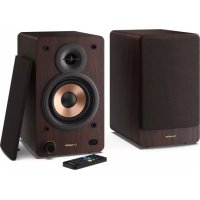
CPSS30 - Bluetooth speaker SHARP - Free user manual and instructions
Find the device manual for free CPSS30 SHARP in PDF.



| Product Type | Bluetooth Bookshelf Speaker |
| Brand | Sharp |
| Model | CP-SS30 |
| Power Supply | AC 100-240 V, 50/60 Hz |
| Connectivity | Bluetooth, AUX (3.5 mm), RCA, Optical, USB |
| Bluetooth Range | Approximately 8 meters |
| USB Audio Formats | MP3 |
| Max USB Capacity | 64 GB |
| Equalizer | Presets: Classic, Pop, Rock, Movie, Voice, Custom |
| Remote Control | Yes, with CR2025 battery included |
| LED Indicator | Red (standby), Blue (Bluetooth), Green (Aux), Cyan (RCA), Yellow (Optical), Purple (USB) |
| Double Insulation | Yes (Class II) |
| Auto Standby | After 15 minutes of inactivity (disablable) |
| Maintenance | Clean with a soft, dry cloth; unplug before cleaning |
| Safety | Do not expose to water, do not obstruct ventilation, keep batteries out of reach of children |
| Spare Parts | 3 A fuse (UK plug), remote battery CR2025 |
| Repairability | No user-serviceable parts, contact customer support |
| Box Contents | Speakers (active + passive), remote control, 3 m speaker cable, RCA cable, AUX cable, power cable, documentation |
Frequently Asked Questions - CPSS30 SHARP
User questions about CPSS30 SHARP
0 question about this device. Answer the ones you know or ask your own.
Ask a new question about this device
Download the instructions for your Bluetooth speaker in PDF format for free! Find your manual CPSS30 - SHARP and take your electronic device back in hand. On this page are published all the documents necessary for the use of your device. CPSS30 by SHARP.
USER MANUAL CPSS30 SHARP
Active bookshelf speakers
ENPLESDERUFRITNL
Trademarks:

Bluetooth
The Bluetooth® word mark and logos are registered trademarks owned by Bluetooth SIG, Inc.
All product and company names are trademarks™ or registered® trademarks of their respective holders. Use of them does not imply any affiliation with or endorsement by them.
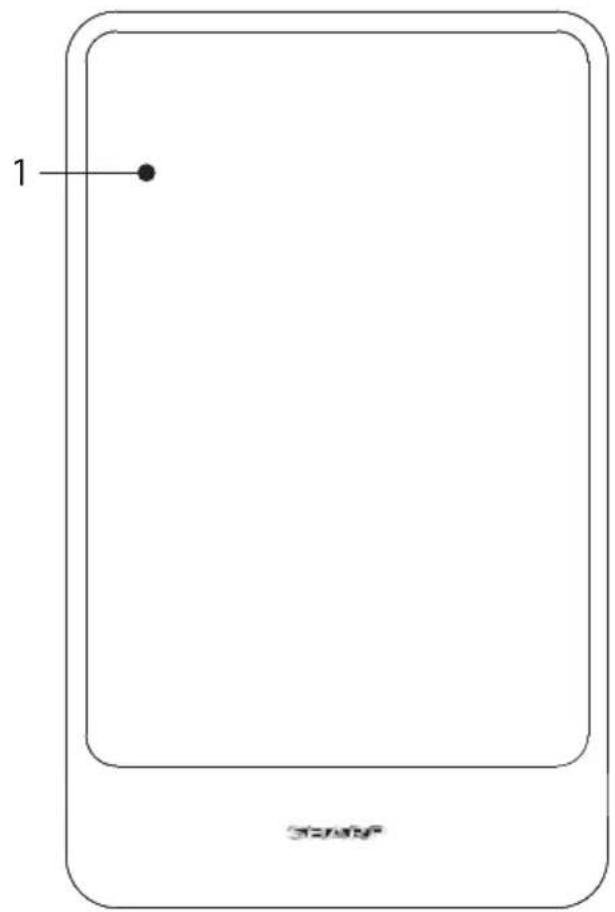
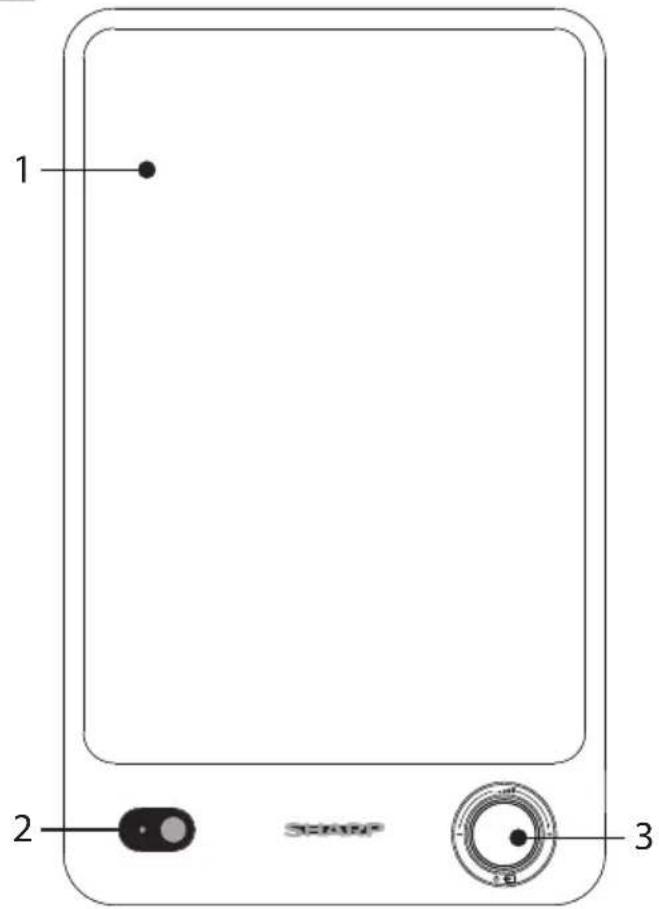
1
2
Important safety instructions
Please follow all safety instructions and heed all warnings. Keep this manual for future reference.

This symbol instructs the user to consult the user manual for further safety, operation, and maintenance related information.

This symbol indicates presence of uninsulated "dangerous voltage" within the product and may be of sufficient magnitude as to constitute a risk of electric shock to persons.

Refers to alternating current (AC) This symbol indicates that the rated voltage marked with the symbol is AC voltage.

Refers to class II equipment.
This symbol indicates that this product has a double insulation system and does not require a safety connection to electrical earth (ground).
Precautions
Damage
- Please inspect the unit for damage after unpacking. If it is damaged in any way do not operate the unit and consult your dealer.
To prevent the risk of electric shock, do not remove back cover. No user serviceable parts inside; please refer servicing to qualified service personnel.
Power connection and accessibility
- Do not handle the power cord with wet hands as it may cause an electric shock. If the power plug does not fit into your outlet, do not force the plug into an electrical socket. Switch off the unit completely before unplugging. Disconnect the power cord if it is not used for a long time. Ensure that the power plug is always easily accessible. Do not attach extension cables.
Power source
- Ensure that the unit is plugged into an AC 100-240V 50/60Hz power outlet. Using higher voltage may cause the unit to malfunction or even catch fire.
Fused moulded power plug (non rewireable) - UK, Malta, Cyprus and Ireland only.
- The power lead on this equipment is supplied with a moulded plug incorporating a 3 Amp fuse. The value of the fuse is indicated on the pin face of the plug and if it requires replacing, a fuse approved to BS1362 of the same rating must be used.
Power cord protection
- Do not damage the power cord, do not place any heavy objects on it, do not stretch it or bend it. Damage to the power cord can result in fire or electric shock. If the power cord is damaged, it must be replaced by the manufacturer, a service agent or similarly qualified persons.
Child safety
- Always follow basic safety precautions when using this product, especially when children are present. Children should be supervised to ensure that they do not play with the product.
Location
- When in use this product should be placed on a flat, stable surface with no part of the main unit overhanging an edge.
Ventilation
- Slots and openings in the cabinet are provided for ventilation and to ensure reliable operation of the product protecting it from overheating. These openings must not be blocked or covered. Ensure a minimum distance of 5cm around the product for sufficient ventilation. Never let anyone push anything into holes, slots or any other openings in the product's casing as this could result in an electric shock.
Heat and operating temperature
- Do not install near any heat sources such as radiators, heat registers, stoves, or other apparatus (including amplifiers) that produce heat. Avoid exposure to direct sunlight.
Naked flames
- To prevent the risk of fire, keep candles or open flames away from this product.
Water, moisture, and liquid entry
- To prevent the risk of fire or electric shock, do not expose this product to rain, water or moisture. Do not place objects filled with liquids on or near this product.
Storms and lightning
- Storms are dangerous for all electric products. If the power is struck by lightning, the product might get damaged, even if it is turned off. You should disconnect all the cables and connectors of the product before a storm.
Maintenance
- Unplug the power cable from the power source before cleaning the product. Use a soft and clean cloth to clean the outside of the unit. Never clean it with chemicals or detergent.
Service and repair
- This product does not contain any parts that are serviceable by the user. Exposing the internal parts inside the device may endanger your life. In case of a fault, contact the manufacturer or authorised service department. The manufacturers guarantee does not extend to faults caused by repairs carried out by unauthorised third parties.
Batteries
Installation
- Do not use any batteries other than those specified. Observe the correct polarity when inserting the batteries.
Use and maintenance
- Do not expose batteries to high temperatures, e.g. near fire or in direct sunshine. When the product is not to be used for a long time (more than a month), remove the batteries from the product to prevent them from leaking. If the batteries leak, wipe away the leakage inside the battery compartment and replace the batteries with new ones.
Child safety
Always ensure the battery compartment is closed and secured.
- Batteries are easily swallowed by young children and can cause severe internal burns and lead to death. Keep batteries away from children. Seek immediate medical advice if you believe a battery has been swallowed.
Environmental conditions
- Keep batteries away from low air pressure or high temperatures as this may result in an explosion or the leakage of a flammable liquid or gas.
Disposal
- Please dispose of batteries correctly by following the guidance in this manual (see section "Disposal of this equipment and batteries"). Do
not throw them into fire, do not disassemble them and do not try to recharge non-rechargeable batteries; they could leak or explode.
Disposal of this equipment and batteries
Information for users on collection and disposal of old equipment and used batteries.
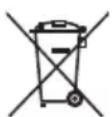
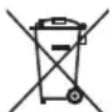
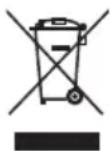
This symbol means that the product contains batteries covered by European Directive 2013/56/EU which cannot be disposed of with normal household waste. Cd, Hg and Pb underneath the wheelie bin symbol shows whether the battery contains, cadmium (Cd), mercury (Hg) or lead (Pb).
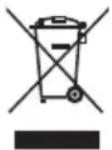
This symbol on a product means that the product is covered by European Directive 2012/19/EU and must not be disposed of or dumped with your other household waste.

This symbol means that the product is designed and manufactured so that it can be recycled and reused.
These symbols on the products, packaging, and/or accompanying documents mean that used electrical and electronic products and batteries should not be mixed with general household waste. Household users should contact either the retailer where they purchased this product, or their local government office, for details of where and how they can take these items for environmentally safe recycling.
CE and UKCA statement:
- Hereby, Sharp Consumer Electronics Poland sp. z o.o. declares that this audio device is in compliance with the essential requirements and other relevant provisions of RED Directive 2014/53/EU and UK Radio Equipment Regulations 2017.
- The full CE text and UKCA declaration of conformity are available at sharpconsumer.eu and then entering download section of your model and choosing "Declaration of Conformity".
What is included in the box:
- CP-SS30 bookshelf speakers
Remote control (incl. batteries) - Speaker connection cable (3m)
RCA audio cable
AUX audio cable
Power cable - User documentation
Controls
(Refer to page 1).
1. Removeable speaker grilles
2. LED indicator
- Standby - Red
- Bluetooth - Blue
Aux in -Green
RCA-Cyan
Optical Mode - Yellow - USB-Purple
3. /ome/ source/ power control
- Long press to turn on or enter standby mode.
- Short press to change the mode (Bluetooth, Aux-in, RCA, Optical, USB).
- Rotate to adjust the volume level.
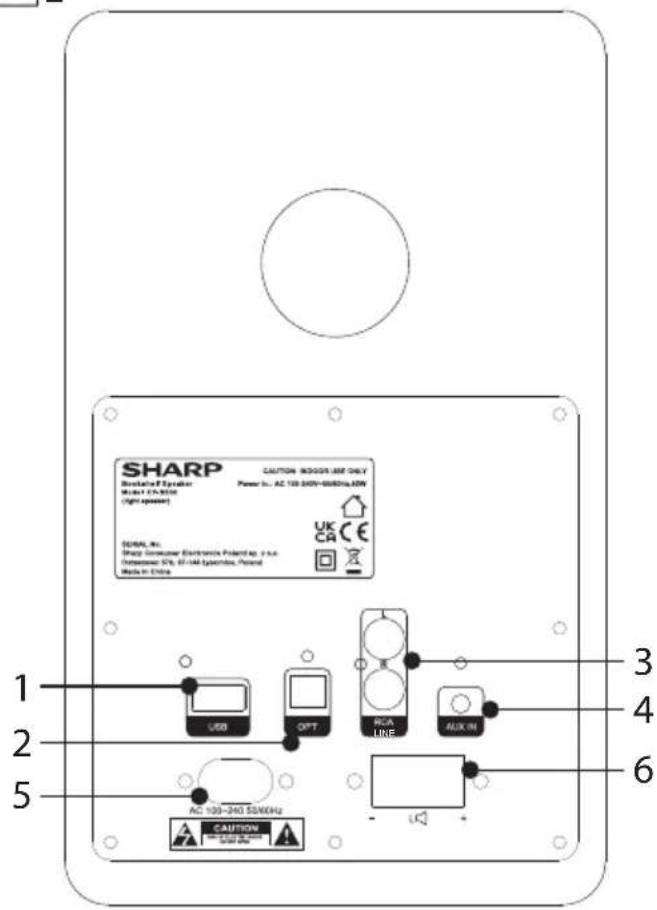
Inputs/outputs
(Refer to 20n page 1).
- USB input
- Optical input
- RCA line inputs
- Aux in
- AC power input
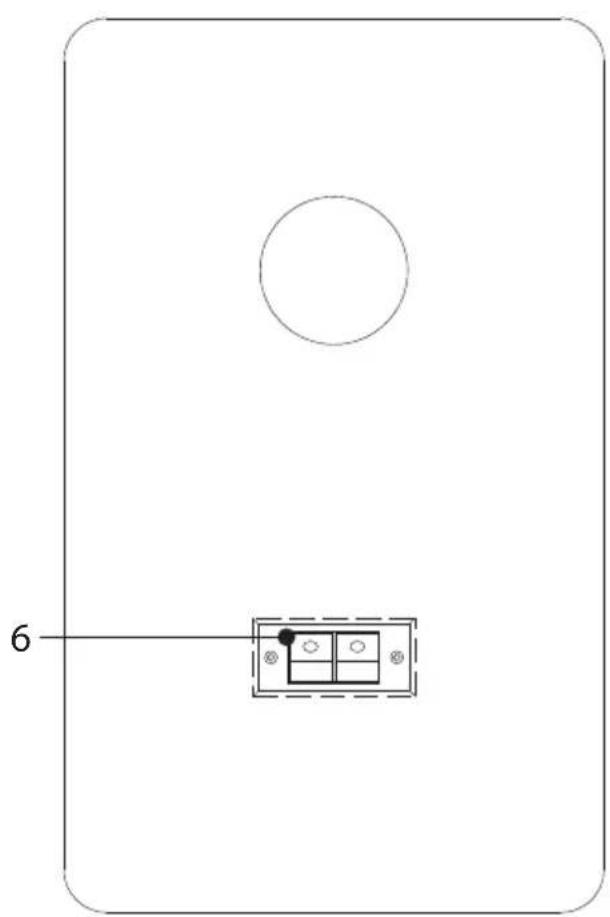
- Audio output for connecting passive left speaker
Remote control
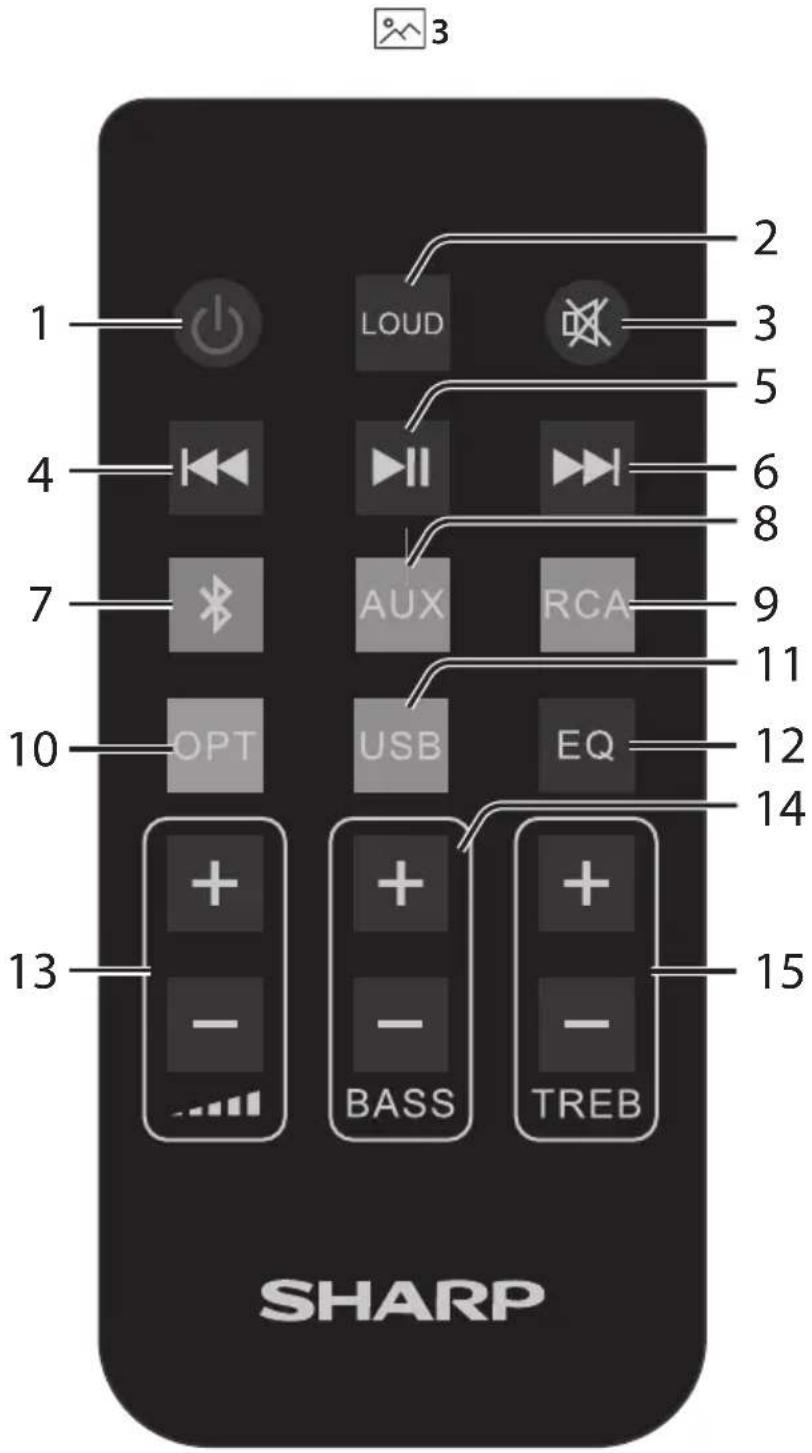
(Refer to 30 page 2).
- Press to power on or enter standby.
- LOUD Loudness compensation increases the low and high frequencies when listening at low volume.
- Press to mute the sound. Press again to resume sound, or press +/− to resume sound.
- In Bluetooth and USB mode, short press for previous track, long press to rewind.
- In Bluetooth and USB mode, short press to play/pause.
- In Bluetooth and USB mode, short press for next track, long press to fast forward.
- Short press to enter Bluetooth mode. Long press to disconnect from paired device.
- AUX Short press to change audio source to Aux.
- RCA Short press to change audio source to RCA.
- OPT Short press to change audio source to Optical.
- USB Short press to enter USB mode.
- EQ Short press to confirm current EQ mode. Continue pressing to cycle through the EQ presets.
- + / - Press to adjust the volume.
-
BASS + / - Press to adjust the custom EQ bass level.
-
TRE + / - Press to adjust the custom EQ treble level.
Remote control operation
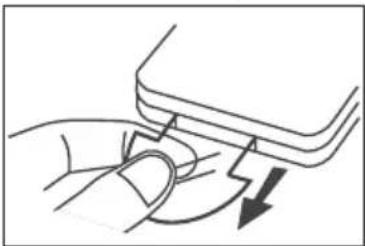
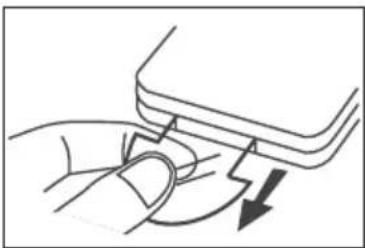
FIRST-TIME USE: The unit has a pre-installed lithium CR2025 battery. Remove the clear isolating tab to activate the remote control battery.
The supplied remote control allows the unit to be operated from a distance.
- Even if the remote control is operated within the effective range of 6m , remote control operation may be impossible if there are obstacles between the unit and the remote control.
- If the remote control is operated near other products which generate infrared rays, or if other remote control devices using infra-red rays are used near the unit, it may operate incorrectly. Conversely, the other products may operate incorrectly.
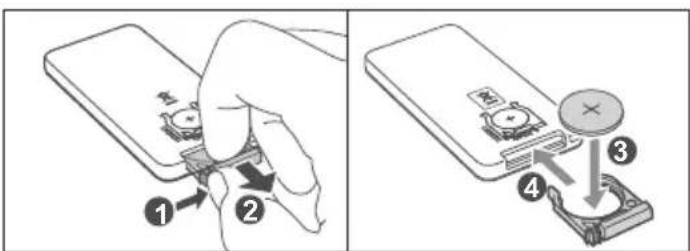
Remote control battery replacement
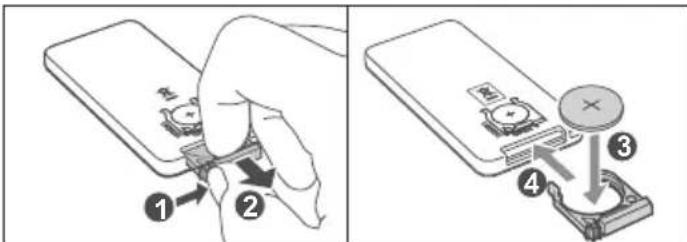
The remote control requires a CR2025, 3V Lithium battery.
- Push the tab on the side of the battery tray towards the centre.
- Slide the battery tray out of the remote control.
- Remove the old battery. Place a new CR2025 battery into the tray with the correct polarity (+/-) as indicated.
- Slide the tray back into the slot in the remote control until it clicks in to place.
Initial set-up
Placement of speakers
To enjoy stereo sound, place the "active" speaker unit (the unit with controls on the front and inputs on the back) on the right hand side. The other "passive" speaker should be on the left. We recommend the speakers should be positioned at least 50cm apart. Ensure the speakers are not obstructed.
Speaker connection
Before powering the unit, connect the left and right speakers using the speaker connection cable provided. Please observe the polarity when connecting the speakers: Connect the red cable to the red output, and the clear cable to the black output on both speakers.
Connect to power
Risk of product damage! Ensure that the power supply voltage corresponds to the voltage printed on the back or the underside of the unit.
Connect the power cable to the AC power input of the unit and then insert the plug in to a power socket.
Using your bookshelf speakers
Standby/ON
- When you first connect the unit to the power socket, the unit will be in STANDBY mode. The indicator will light up red.
- Press on the remote control to switch the speakers between ON and standby.
- Disconnect the plug from the power wall socket if you want to switch the unit off completely.
NOTE: The speakers will go into standby mode after 15 minutes of inactivity.
Select modes
Press the volume control on the unit to cycle through the source options, or use the remote control to select the desired mode.
Red: Standby
Blue:Bluetooth
Green: Aux
Cyan: RCA
Yellow: Optical
Purple: USB
Adjust the volume
- Use the volume knob on the unit or - on the remote control to adjust the volume.
-
To mute the sound, press on the remote control. To resume the sound, press or on the remote control, or rotate the volume control on the unit.
While adjusting the volume, the status indicator flashes quickly. -
When the volume level reaches its maximum level, if you press + again, the indicator flashes once. When the volume level reaches its minimum level, if you press - again, the LED indicator flashes once.
You can adjust the sound of the bookshelf speakers using the equaliser presets. Press EQ on the remote control once to confirm current EQ mode. Continue pressing to cycle through the EQ presets.
Classic - Green LED indicator flashes for 2 seconds
- POP -Yellow LED indicator flashes for 2 seconds
- Rock - Blue LED indicator flashes for 2 seconds
Movie-Purple LED indicator flashes for 2 seconds
Voice-Cyan LED indicator flashes for 2 seconds
- Custom - White LED indicator flashes for 2 seconds
Custom settings
- Press the EQ button to enter Custom settings or press either the BASS or TREB button +/- buttons once, a white light will flash for 2 seconds.
- Use the BASS/TREB buttons on the remote control to increase (+) or decrease (-) the EQ level. The selected EQ level is indicated by the speed at which the LED indicator on the speaker flashes. A flashing red LED indicates an increased level, a white LED (not flashing) indicates the level is flat/0, a flashing green LED indicates a decreased level.
| LED colour EQ level | Speed LED flashing |
| +3 Fast | |
| +2 Medium | |
| +1 Slow | |
| White 0 On | |
| -1 Slow | |
| -2 Medium | |
| -3 Fast |
NOTE: New EQ changes are saved as default. You have 3 seconds between each key press to make any changes before the EQ mode exits.
AUX/OPTICAL/RCA
- Ensure that the unit is connected to the TV or audio device.
- While the unit is powered on, ensure the correct source is selected either using the remote control or by pressing the volume control on the unit.
- Operate your audio device directly for playback features.
- Use the volume control on the unit or + / - on the remote control to adjust the volume level.
NOTE: Please ensure RCA and AUX input are set to minimum 50% volume on the source device. Volume can be adjusted via the speaker, the remote control or the source device.
Bluetooth mode
Pair Bluetooth-enabled devices
The first time you connect your Bluetooth device to these speakers, you need to pair your device to these speakers.
NOTE:
- The operational range between these speakers and a Bluetooth device is approximately 8 meters (without any object between the Bluetooth device and the unit).
- Before you connect a Bluetooth device to these speakers, ensure you know the device's capabilities.
- Compatibility with all Bluetooth devices is not guaranteed.
- Any obstacle between these speakers and a Bluetooth device can reduce the operational range.
-
If the signal strength is weak, your Bluetooth receiver may disconnect, but it will re-enter pairing mode automatically.
-
With the unit powered on, press on the remote control or press the volume control on the unit to select Bluetooth mode. The indicator light will flash blue.
- Activate your Bluetooth device and select the search mode.
"SHARPC-SS30" will appear on your Bluetooth device list.
-
If you cannot find the unit, press and hold on the remote control.
-
Select "SHARP CP-SS30" from the list of devices. An audio prompt will sound when it has been successfully connected, and the indicator will light a solid blue.
- Begin playing music from the connected Bluetooth device.
To disconnect the Bluetooth function, you can:
- Switch to another function on the unit.
- Disable the Bluetooth function on your device. An audio prompt will sound when it has been successfully disconnected.
- Press and hold on the remote control.
TIPS:
- Enter "0000" for the password if necessary.
- If no other Bluetooth device pairs with the speakers in 2 minutes, the speakers will reconnect to the previous connection.
- The speakers will also be disconnected when your device is moved beyond the operational range.
- If you want to reconnect your device to this speakers, place it within the operational range.
- If the device is moved beyond the operational range, when it is brought back, please check if the device is still connected to the speakers.
- If the connection is lost, follow the instructions above to pair your device to the speakers again.
Listen to music from Bluetooth device
-
If the connected Bluetooth device supports Advanced Audio Distribution Profile (A2DP), you can listen to the music stored on the device through the speakers.
-
If the device also supports Audio Video Remote Control Profile (AVRCP), you can use the speaker's remote control to manage playback of music stored on the device.
-
Pair your device with the speakers.
- Play music via your device (if it supports A2DP).
-
Use the supplied remote control to control play (if it supports AVRCP).
-
To pause/resume play, press on the remote control.
-To skip to a track, pres/ buttons on the remote control. - Long pres:///rewind/fast forward within the track.
USB mode
- Press the volume control on the speaker repeatedly or USB on the remote control to select USB mode. Connect the USB memory device containing MP3 files (flash drives up to 64GB supported).
- Press to start playback.
- Turn off the unit before removing the USB memory device.
NOTE
SHARP will not be held liable for any loss of data while the USB memory device is connected to this unit. Always back up your music before playing on this product.
USB functions (remote control)
to play or pause.
Skip to next song | Press and hold to fast forward.
Skip to beginning of song | Press and hold to quickly rewind.
NOTE:
- If the speakers were switched to standby whilst in USB mode, playback will resume from the same point when the unit is switched back on.
- USB playback will be done in order of how audio tracks are saved on the USB drive.
Auto-standby Function Control
- Power on the device.
- Switch to Optical mode.
- Press and hold the Play/Pause button on the remote control.
a. The device's LED will flash twice in red to indicate that Autostandby has been turned OFF.
b. The LED will flash once in red to indicate it is turned ON.
Troubleshooting
To keep the warranty valid, never try to repair the system yourself. If you encounter problems when using this unit, review the following before requesting service.
No power
Ensure that the AC cord is properly connected.
Ensure that there is power at the AC outlet.
Press on the remote control or speaker to turn the unit on.
No sound
Increase the volume. Press + on the remote control or turn the volume knob on the speaker clockwise.
Press on the remote control to ensure the speakers are not muted.
Short press to select a different input source.
When connected to a digital source (Optical), if there is no audio:
- Try setting the TV output to PCM or
- Connect directly to your Blu-ray/other source, some TVs do not pass through digital audio.
Your TV may be set to variable audio output. Confirm that the audio
output setting is set to FIXED or STANDARD, not VARIABLE. Consult your TV's user manual for more detailed information.
Ensure that the volume on your source device is turned up and that the device is not muted.
Remote control does not work
Ensure the battery isolation tab is removed from the back of the remote control.
Before you press any playback control button, first select the correct source.
Reduce the distance between the remote control and the unit. Insert the battery with its polarities (+/-) aligned as indicated.
Replace the battery.
Aim the remote control directly at the sensor on the front of the right speaker.
I hear buzzing or humming
Ensure all cables and wires are securely connected.
Connect a different source device (TV, record player, etc) to see if the buzzing persists. If it does not, the problem may be with the original device.
Connect your device to a different input.
If buzzing can be heard whilst using the Aux source, ensure the source device connected to the Aux input is properly grounded (this can normally be done by connecting the source device to an earthed mains power supply).
I can't find the Bluetooth name of this unit on my Bluetooth device
Ensure the Bluetooth function is activated on your Bluetooth device.
Re-pair the unit with your Bluetooth device.
Tryb AUX-IN/OPTICAL/RCA
- Pπn nCπoNtB3OBAHm DaHHe n3dEne DoJXHo 6bItb yCTaHOBnEHO Ha IIOCKyU, yCTOuYBuYO nobEPxHocTb TaK, YTObI HnKaKaYacTb OCHOBHOrO 6noka He BbICrTpanaHaNd NOLOM.
Bentnlaa
Длнаджнофункungонювани n3denн Heo6xodnma BeHTnlaц,在peoTbpaauoaaeraero neperpeB.Оha obecneunBaetc 电JIAMN OTBepCTnMn B Kopnyce n3denN.3TN OTBepCTnHelb38 6LOKupOBaT uIN nepekpbIaBt.ObTaBte BOKpyr n3denN3aOp ⅢnpHnoH He Mehee5cm nObeCneueHnHaJnxKaeB BeHTnlaucn. He no3BOJyTe HNKOMy,OC6eHHo DeTm,BCTabIaTb NoctopoHNHe npEdMeTb B nopTb,CIOtBu nPpOHe OTBepCTnB Kopnyce yCTpoiCTBa, NocKobKy 3TO MOKeT npUBeCTN K npApaJeHHIO 3NeKtpuyeCKIM TOKOM.
IctoHnKu Tenna npa6oay TempepaTpa
Hy yctaHaBnBaIte n3dennpe pAOM C nCTOuyHkAmn TeNla,HaNPmep padnaTopamn, o6orpeBaTeJMaMn, neaMn nn DpyrHMn ycTPOiCTBaMn (BkIouy aYcNInTeN), Bblpa6aTbIbAIOUzmmn Teno. He dOnyckaIte nonadaHn Ha n3dennne npAmbix cOnHeuHbIX nyuei.
OTKpbItbOROHb
Bo n36eKaHne pncKa BO3ropaHnHa, He CTabBe pAOM C n3dennem Cbeu nn Hbte NCTOCHNKN OTKpbITORo ORH.
Boda, Bnara n nonaHne KIOKcTn
Bo n36eXaHne pncKa Bo3ropAHn nn nopaxKeHHn 3NeKtpueckm TOKOM, He dOnyckaIte nonaHaHn Ha n3dEne Kaenb OcaKOB, BObl nn BlaHn. Ha cTaBbTe Ha n3dEne nn pAOM C Hm PpeMeTbI, HAnONHeHHbIe KNDKOCTMNI.
P03bl MOnHHN
- Pto3bl npedctabnIOT onachocb Iyra BceX 3neKtpnpnbopob. Ynap MOHNMOKET npNBecTNI K NOBpeJxDEHIO N3dEINIA, daKe cNIO OBO BbIKUoyHO. Npeep rpo3oH Heo6xOAnMO OTKnHouNTb BCE Ka6eIN IN npOBoDA n3dEINIA.
Texnueckoe 6cbnykubahme
- Pnpjde cem npctyNaTb K OunchTe n3dJIIna, oTKIOUHTe UHyp nHTAHn OT NCTOCHNA 3HEprn.ДЯ OUCHKn BHeuHne NOBepxHOCTN yCTPOINCTBa INoJb3yIte MRAKyo N uCtTyO caFETky. HNKOrDa He OOnsauTe eue C NOMOuBIO XUMNUeCKNX IIN MOUxN CpeDCTB.
06cnykubahne npemOH
JaHHe N3dJIeNHe He CoepKHT KOMNoHEHTOB, TexHnueckoe 06cIyKnBaHHe KOToPbIX NIOb3OBATeNb MoKeT OcyueeCTBnATb CAMoCToRteNbHO. KoHTaKT C HeKOTOpbIMu qACTmN BHyTpN yCTpOnCTBa MoKeT IpeDCTabNtB OAnCHOCTb DnJ KIn3Hn. B Cnyuae Bo3HnKHOBeHHn HeINCPaBnHOCTe CneJeYet CBa3aTbC nPon3BOJNTeM eNN npEcdTaBnTeMe ABTopn3OBaHHOrO cepBnCHOrO ueHtpaHTna
PpOIN3BOJNTeJI He pacnpocTpaHReTcHa HeNCpbaBHOcTn, Bo3HKUne BCNECTBVE PpOBeHeHpeMOHTa He yIOnHOMOeHHbIM TpeTbIM NInCaMn.
BaTapeiKn
YcTaHOBKa
IcnoB3yIeToIbKOyKa3aHbIe6aTapeKn.BCTabJIra6aTapeKn, 06paauTe BHMaHHe HaNoJIpHOCTb.
3KcnnyataaunnTexHnueckoe 06cnykBaHne
He noDBepraTe 6aTapeKn BO3deIcTBIO BBICOKNX TemnepaTyp, Hapnpimep B o6NaCTN BO3deIcTBNI pIpMbIX COHneHbIX Nyuei. Ecn n3dene He 6ydt NcNOJIb3OBAbCRA B TeYeHne IINTEbHOrO nepNoJa (CBblSe OndHO rMeCA), BO n36eKaHne IpoteKaHn 6aTaapeE K BInbTe INx IN3 dEnn. Ecn 6aTapeKn IpoteKIn, BblPnte BHYTpEHIOU qactb 6aTapeHoro OTceKa N 3aMeHNTe 6aTapeKn HOBbIMN.
Be30nachoctb DeTei
- BaTapeHbI OTeCk DoJIKeH 6bITb BcERda 3aKpbIT, a erO KpbIka DoJIKHa 6bITb 3aФИКсИрОваHa.
- 5aTapeKIMoKET NERKO pROrIOTnB pe6eHOK;3TO MoKET npINBeCTN K BO3HNKHOBEHNO TReKeBbX BHYTpEHHIX OXOROB IN CMErN. DepeKITe 6aTapeKIN B HeOcTyHOM DnA JTeEN MeCte. EcIn ImeIOTCs OCHOBHnnpEiNoIarTb, YTO pROrIoHeHa 6aTapeKa, HEmeJNeHNO ObpaTtEcB 3a MeINuHCKo NOMouBIO.
YcnoBnOkpyKaiouei cpebl
He donyckaIte InonadaHn6aTapeek B MeCTa C Hn3KIM DaBneHnEM BO3dyxa ININ BbICOKoI TeMnpepaTyPOI: 3TO MOKeT PnIBeCTN K B3pbIBy ININ yTeUke BOCnIaMeHReMoI XJIKOCTN ININ ra3a.
Ytunuaia
-Пиутллзациьбатаeeксдуетсobлладыуka3aHньИЗпхeнььН actoem pykoBODCTBE (cM. pa3dIe "yTunl3aциьОБOPyOBOHnIbtapeek").He 6pocaiTe B OOrh, He pa3bupaiTe n He nbITaHTecb nobTOpHO 3apJINb obblHbte 6aTaepKIn: OHN MOrY T NOTeYb ININ pa3OpBaTbcra.
Ytuln3aun o6opydoBaanu 6aTaapeek
Hhopmaun dnn noB3oBaTeJe, oTHocuaer K yTnIn3aun CTaporo 06OpyDobAHn nncnoB3oBaHHbIX 6aTaapeek.
DaHHbI CmBbON oO6HaueT,TO Ha BXoJaUe N B COcTaB
H3dennn 6aTapeKn pacnpoctpaHraTe cJeCTBne
DInpeKTnBBI EC 2013/56/EU, KOtopaar 3anpeuaetnx
yTNIm3aunIO BMecTe C o6bHbIMN 6bITOBbIMN OTXoJaMn.
ByKBbI Cd,Hg n Pb nOJ CmBbON MycopHOrO KOHTeHepa
yKa3bIAOT Ha coOpjKaHne B 6aTapeKkax KaDMn (Cd),
pTytn (Hg) n CBNuca (Pb).
DanHHBcMBOJ 06o3Haayet,HTO Ha n3dennepacnpoctpaHareTcJeIcTBne DnpeKTHBbEC2012/19/EU,KOtopa3aPpeaaeteroYtINIm3aCIOu BBIO3 Ha CBaIKyBMecTe C O6bHuIMN 6bITOBIM NTxOJaM.

DAnHHB CmBON 063Haayet, YTO npn PnpoektnpOBAHn INN3rOToBJeHn N3dEINPpeyCMToPeHa BO3MOxHOCTb ero NOBtOPHOrO nCNoJIb3OBAHn IN nepepa60Kn.
JaHHbIe CmBONbl,HaHeceHbIe Ha n3denny,ynaKOBky (nnn) COpOBoIeJIbHyIO DOKyMeHTaIIO,060HaayaiOT,TO NcNoJIb3oBaHbIe 3JeKTPuYeCKne I3JeKTPoHNbIe N3dEINN 6aTaepEn KHeJb38 BbIbPaCbIBaTb BMeCTe C O6bUHbIMn 6bITOBbIMn OTXdAMn. JIra NoJyHenn
noip06Hoi HhOpMaun O nopAke I BO3MOxHbIX MeCtax EKoIOnuYeCKN 6e3onacHOYtnn3aun 3TNX n3denn 6bITOBIM NOTpe6nTeJAM CneJeT 6bpaatcbraIOBTOPROky, B KOTOPoONH bIN npNo6peTeHbI, 1n6oB MeCThble opraHb Blactn.
3aBHeHne o COOTBeTCTBnN Tpe6ObaHnMДЯ ПОуЧЕня МаркИрOBКи CEи UKCA:
HactoIIM KompanaHna Sharp Consumer Electronics Poland sp. z o.o. 3aBJIeT, yTO daHHoe aydnooyctBO COOTBeTCTByeT o63aTeIbHbIM Tpe6ObaHnM INPOyHM BaxHbIM NIOJoxEHnM DInpeKtNBbE NC no paNooo6OpdyOBaHN 2014/53/EU nDInpeKtNBbI BeNko6pTuHn B OTHouHn paNooo6OpdyOBaHN 0T 2017 rOda.
Дя OзнakOMJIeHЯ C NOIbIM TeKCTOM DeKJIapaUNO COOTBcTBN Tpe6oBaHnM DЯ NOJyHnA MapKnOpOBKN CE N UKCA nepeiNte Ha caiT sharpconsumer.eu, OTKpoIe Pa3dEN 3aRpy3KN dJa BaWeu MoJen N Bby6epInTe DokumENT «Declaration of Conformity».
Copepkmoekopo6kn:
- CtaioHapnaayakcyteckcnaCtema CP-SS30
- NylbT DY (c 6aTaepKamu)
Ka6eBnIa coeINHeHnIuHaMnKOB (3M)
Aynoka6enb RCA
AynokabBb AUX
Ka6eBnNTaHn
-OKymeHTaUNI NOJIb3OBaTeJIa
3neMeHTbI ynpaBneHnA
(Cm. hca cmpaHuue 1).
1.CbemHbIpeWetKINHHaMKNOB
2.CBeToDnOHybHnHnKaTOp
-PeKIM OXnHaHn—KpaChbI
-Bluetooth-cnHm
Auxin-3eneHbI
RCA—ronyboi
-Ontnuecknpexm-JeKntbI
USB-ΦnoJTeOBbI
3. /pTJrTop rpoMkOCTn/ nepeKIOuATeNb nctouHnKa/ BbIKIOUaTeN bNTAHN
- PpOdoJxKTeBHoE HaxKaTne - nepexoB peXm OxNJaHn.
-KpaTkoBpeMeHHoe HaxaTne -n3MeHeHne pexkma (Bluetooth,Auxin, RCA, onTNueckn, USB).
-ПоворOT-perуларOBAHne rpomkoCTN.
BxOaBl/BblXoAbI
(Cm. 2a cmpahuue 1).
- USB BXO4
- Ontuueckn BXoA
- AynoBxOa RCA (nHH)
- Bxod Aux in
5.BxoI nntanr oT cetn - AynOBXoJ noKIOueHn neBOrnaccHBoro HAMKA
NylbT ductaHIOHO ynpabHeHHA
(Cm. 3Ha cmpahuue 2).
- CnykntIa BkHoueHnNn npexoA B pexm OxuaHa.
- LOUD KOMPHeHCAZINrPGOMKCTN yCUNIBaET 3Byk HA Hn3KNX N BbICOKNX qACTOTAX BO BPEMI pOcnyuBaHNHa MaONrPGOMKCTN.
- CnyxNIT DnB BbIKIOUeHIN 3ByKa. Yo6bl BOCCTAHOBNTb 3ByK, MOHO NOBOTOPHO HaxKaTb 3Ty KHONKY NIO HO HaxKaTb +/-
- B pexkme Bluetooth n USB kpaTkoBpeMeHHoe haxaTne no3BOJAE npeHTN K npdeIbIyuee 3aIncn, a npoDolKHTelbHoe nepeMOTaTb 3aIncb Ha3a.
- B pexnme Bluetooth n USB kpaKOBpeMeHoe HaxaTne cnjxnt DnBocnpOn3BeHeHn/ny3bl.
- B pexnme Bluetooth n USB kpaTkoBpeMeHHoe HaxaTne no3BOJnE t neeTn K cIeNyoUe 3anCn, a npOIOxHtJIbHOe HaxaTne -K 6bICTpo nepemOTke 3annCn BpePe.
- KpaKOBpeMeHoe HaxaTne Cnyknt nIe nepexoJa B peKIM Bluetooth. IpoDOnJXnTeNbHoe HaxaTne Cnyknt nIe OTKJIoucHnO T noKn HORO yCTpOCTBa.
8.AUX KpaTkoBpeMeHHoe HaxKaTne CnyKNT DnA CMeHb NCTOCHKA ayDnOCnHaHa Aux.
9.RCA KpaTkoBpeMeHHoe HaxaTne CnyKNT DnI CMeHb I NCTOCHKa ayDnOcNHaHa Ha RCA.
10. OPT KpaTkoBpeMeHHoe HaKaTne CnyKNT Dna CMeHbI NCTOuHNka ayDnOCrHaJa Ha ONTNueCKn BXoJ.
11. USB KpaTkoBpeMeHHoe HaxaTne Cnyxnt nIe npexoDa B pexm USB.
12.EQ KpaTkoBpeMeHHoe HaxaTne CnyKNT IJn noTBePxDeHnre TekyIero peKIMa 3KBaIaN3epa.
IOBTOphoe HaxaTne 3ToN KHONN nO3BOJAre Tbl6paTb pa3NIuHbIe
7a6NoHbI 3KBaIaN3epa.
13. +/P PerynpoBaHne rpoMkOCTn.
14. BASS +/− Hactpojka ypOBHn Hn3Knx qACTOT B nOJIb3OBaTeNbckOM Ⅲa6nohe 3KBana3epa.
15. TRE +/− Hactpoika ypoBnBa BbICOKnx qactOT B NOIb3OBaTeNbCKOM Ⅲa6nohe kBbana3epa.
IcnoJb3ObaHne npJIbTa dNCTaHcNoHHoro ynpabJIeHnA
IEPBOE NcNoB3OBAHNE:Bycmpoucm80ykeyma-HoeneHa numueea6amaeuka CR2025.4mo6bakmu-po8am6amaeuky, bblme3auumHbJ3b4OK.
BxOaHn B KOMNKeT NylbT Ny nO3BOJrE TynpaBnTa yCTpoiCTBOM Ha pacctoHm.
JaKe npn nCnoB3OBAHN nyIbTa YHa 3ofoekTUBOM paCCTOHIN B 6MOH MoKeT He pa60TaB,ecm MExky Hm N yCTPOHCTBOM IMeOTcK KaKe-Im6o npenTCTBn.
IynbT Dmy MoKet pa6oTaB HenpabInbHo, eCIN OH npImeHReTcra pAOM CpyrMM IN3dEINAMM, KOToPbIe rHepepyOT INHpaKpaChbIe IyuN, INI ECIM PRAOM CYCTPOICTBOM pa6oTaO T pyrNe yCTpoiCTBa C nybTOM INCTaHUNHO YnpaBJeHIN, INONb3yIOUM INHpaKpaC-HbIe LyuN. B CBOU OuepeB, dpyrNe yCTpoiCTBa TAKKe MOryt pa6oTaB HnppaBInbHo.
3aMeHa 6atapeKn nylbTa D
Ja pa60tbIyIbTa DY tpe6yETcIITneBa8 6aTapeKa CR2025 Ha 3 B.
- PnKMTe 3bOc HkpaIO DePkaTeIaTapeuKn no HappaBHeHIO K cepenHe npbTa.
- BbTaunTe n3 nyIb Ta depKaTeB 6aTapeKn.
- BbHbTe cTapyu 6aTapeKy. YcTaHOBtE B dEpXaTeIb HObyo 6aTapeKy CR2025, co6nOra nOJrPHOCTb (+/-).
4.BCTaBtE depxateB rHe3o npbTa Dy do xapaKtepHoro ueuKa.
He pa6oTaet npIbT dIcTaHcHOnHOrO ynpabJIeHn
IpoBepbTe, ydaneH nn 3aunTHbI a3bUOK 6aTapeKu n3 depKaTeR B 3aHeuactn npbTa DY.
Ipejde yem Haikmatb IIO6y KHOKNky UnpaBHeHnB OBCpOu3BeDeHnEm, Bb6epnte Hndnxauu nCTouHnK.
CokpatntepacctoHHeMeKdyIyIbTOM dyu yCTpoCTBOM.
BCTaBtBe 6aTapeuKy,co6nIouyka3aHHyIO nolpHocTb (+/-).
3aMeHHTe 6aTapeiKy.
HanpaBnaIte npbT Dn npma Ho daTnK, paonnoXeHHb Ha nepeHne naHe nnpaBOrO dHaAMnKa.
A cybIy kxykKaHne nn nydeHne
y6eNTcB TOM, yTO6bI BCE Ka6eN IN npOBoDA HaDExKHO NOcOeINHeHb. IIOKNIOHTe ppyoNtOCHNK (TeneBn3Op, pONrPbBaTeJIb N.T.D.) ,yTO6 b npOBepTb, coxpaHReTcN JxJxJxHne. Ecn HET, BO3MOXHO, npuHHO npo6nEMbl ABnEeTcN CXOdHOe YCTpOCTBO.
IopknIouHTe yctpoCTBO Kdpyromy BXOy.
Ecn npn nCnoB3OBAHn nCToHnka Aux cblweh yw, y6eintecb, yTO nCToHnK, noKnIOUeHHb K BXody Aux, IMeet npaBnIbHOe 3a3emHeHne (3To o6bIHO MOxHO CdeNaTb, noKnIOuN B nCToHnK K 3a3emHeHoi ceTn nepemehoro ToKa).
Bluetooth-Ha3BaHne daHHoro yCTpOuCTBa OTCyTCTByET B cnNcKe Ha Moem yCTpOuCTBe Bluetooth
Y6eIITecb TOM, yTo Ha yCTpoiCTBe Bluetooth aktBnPoBaHa fynKcna Bluetooth.
BbIOnHnTe cOpJKeHne npOurpBaTeTc yCtpoNCTBOM Bluetooth epe pa3.
Technical specification | Technische Angaben | Especialación技术水平 | Specification technique | Specifiche tecniche | Technische specificaties | Dane techniczne | Technuecksne cneuФкauи
| EN | DE | ES | FR | IT |
| Model | Modell | Modelo | Modèle | Modello |
| Power supply | Stromversorgung | Fuente de eliminación | Alimentation | Alimentazione: |
| Power consumption | Stromverbrauch | Consumo de energia | Consummation energetique | Consumo energetico |
| Standby consumption Stand-by-Verbrauch | by-Verbrauch | Consumo en modo deespera | Consummation en modeveille | Consumo in standby |
| Output power | Ausgangsleistung | Potencia de salute | Puisance de sortie | Potenza in uscita |
| Bluetooth | Bluetooth | Bluetooth | Bluetooth | Bluetooth |
| Version | Version | Version | Version | Versione |
| Maximum powertransmitted | Maximaler übertragenerStrom | Potencia maximal transmitida | Puisance maximaletransmise | Potenza massima trasmessa |
| Frequency bands | Frequenzbänder | Bandas de Frequencia | Bande de fréquences | Bande di frequenza |
| Remote control | Fernbedienung | Mando a distancia | Télécommande | Telecomando |
| Battery type | Batterietyp | Tipo de pilas | Type de pile | Tipo di batteria |

4,3 kg
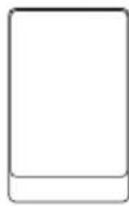
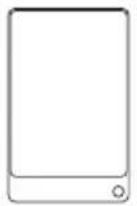
248 mm

158 mm 190 mm
| Stroomvoorziening | Zasilanie | Источник пitaшия | AC 100-240 V ~ 50/60 Hz |
| Energieverbruik | Pobór mocy | Энегаловпеблие | 65 W |
| Verbruik in stand-bymodus | Pobór mocy w trybie czuwania: | Мошност b ржиме ождань | <0.5 W |
| Uitgangsvermögen | Moc wyjsciowa | Выхоная мошость | 60 W (2 x 30W) RMS |
| Bluetooth | Bluetooth | Bluetooth | |
| Versie | Wersja | Версан | V 5.0 |
| Maximaal overgedragen vermogen | Maksymalny poziom przy kazywanej mocy | Мakсимальnamошость пeredачи | <13 dbm |
| Frequentiebanden | Pasma czestotliwość | Частные дурацоны | 2402 MHz ~ 2480 MHz |
| Afstandsbediening | Pilot zdalnego sterowania | Пелъдостанцонною ураз车联网ения | |
| Batterijtype | Typ baterii | Тулбатарейки | CR2025-3V |
CC
Sharp Consumer Electronics Poland sp. z o.o.
Ostaszewo 57B,87-148 Lysomice, Poland
Made in China
SAU/MAN/0177
www.sharpcounter.eu
SHARP
- Trademarks:
- Bluetooth
- Important safety instructions
- Please follow all safety instructions and heed all warnings. Keep this manual for future reference.
- Precautions
- Damage
- Power connection and accessibility
- Power source
- Fused moulded power plug (non rewireable) - UK, Malta, Cyprus and Ireland only.
- Power cord protection
- Child safety
- Location
- Ventilation
- Heat and operating temperature
- Naked flames
- Water, moisture, and liquid entry
- Storms and lightning
- Maintenance
- Service and repair
- Batteries
- Installation
- Use and maintenance
- Environmental conditions
- Disposal
- Disposal of this equipment and batteries
- CE and UKCA statement:
- What is included in the box:
- Controls
- Removeable speaker grilles
- LED indicator
- /ome/ source/ power control
- Inputs/outputs
- Remote control
- Remote control operation
- Remote control battery replacement
- Initial set-up
- Placement of speakers
- Speaker connection
- Connect to power
- Using your bookshelf speakers
- Standby/ON
- Select modes
- Adjust the volume
- Custom settings
- AUX/OPTICAL/RCA
- Bluetooth mode
- Pair Bluetooth-enabled devices
- NOTE:
- To disconnect the Bluetooth function, you can:
- TIPS:
- Listen to music from Bluetooth device
- USB mode
- NOTE
- USB functions (remote control)
- Auto-standby Function Control
- Troubleshooting
- No power
- No sound
- Remote control does not work
- I hear buzzing or humming
- I can't find the Bluetooth name of this unit on my Bluetooth device
- Tryb AUX-IN/OPTICAL/RCA
- Bentnlaa
- IctoHnKu Tenna npa6oay TempepaTpa
- OTKpbItbOROHb
- Boda, Bnara n nonaHne KIOKcTn
- P03bl MOnHHN
- Texnueckoe 6cbnykubahme
- 06cnykubahne npemOH
- BaTapeiKn
- YcTaHOBKa
- 3KcnnyataaunnTexHnueckoe 06cnykBaHne
- Be30nachoctb DeTei
- YcnoBnOkpyKaiouei cpebl
- Ytunuaia
- Ytuln3aun o6opydoBaanu 6aTaapeek
- 3aBHeHne o COOTBeTCTBnN Tpe6ObaHnMДЯ ПОуЧЕня МаркИрOBКи CEи UKCA:
- Copepkmoekopo6kn:
- 3neMeHTbI ynpaBneHnA
- 1.CbemHbIpeWetKINHHaMKNOB
- 2.CBeToDnOHybHnHnKaTOp
- /pTJrTop rpoMkOCTn/ nepeKIOuATeNb nctouHnKa/ BbIKIOUaTeN bNTAHN
- BxOaBl/BblXoAbI
- NylbT ductaHIOHO ynpabHeHHA
- IcnoJb3ObaHne npJIbTa dNCTaHcNoHHoro ynpabJIeHnA
- 3aMeHa 6atapeKn nylbTa D
- He pa6oTaet npIbT dIcTaHcHOnHOrO ynpabJIeHn
- A cybIy kxykKaHne nn nydeHne
- Bluetooth-Ha3BaHne daHHoro yCTpOuCTBa OTCyTCTByET B cnNcKe Ha Moem yCTpOuCTBe Bluetooth
- Technical specification | Technische Angaben | Especialación技术水平 | Specification technique | Specifiche tecniche | Technische specificaties | Dane techniczne | Technuecksne cneuФкauи
Brand : SHARP
Model : CPSS30
Category : Bluetooth speaker