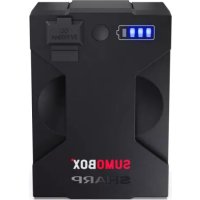
SumoBox CPLSBP1 - Bluetooth speaker SHARP - Free user manual and instructions
Find the device manual for free SumoBox CPLSBP1 SHARP in PDF.



| Product Type | Portable Bluetooth Speaker |
| Brand | Sharp |
| Model | SumoBox CP-LS100 (with battery pack CP-LSBP1) |
| Power Supply | Mains 220-240 V ~50/60 Hz or rechargeable lithium-ion battery |
| Battery Life | Up to 10 hours at 50% volume |
| Battery Charging Time | At least 4 hours |
| Audio Inputs | 2 combo XLR/TRS channels (CH1, CH2), 1 auxiliary input 3.5 mm (CH3), Bluetooth |
| Outputs | 1 USB port 5V 1000 mA (charging), 1 speaker link |
| Bluetooth Connectivity | Yes, with Duo Mode True Wireless Stereo (TWS) |
| Audio Functions | Volume, treble, bass, reverb settings (CH1, CH2), Ducking, Indoor/Outdoor Mode, SAM® Devialet |
| Control Panel | Buttons and LED indicators for power, Bluetooth, Ducking, input type selector |
| Dedicated App | Sharp Life (remote control) |
| Included Accessories | Power cord, battery pack, 8 corner protectors, hex screwdriver, documentation |
| Spare Parts Available | Battery pack CP-LSBP1, grilles, handles, corner protectors |
| Repairability | No user-repairable parts – contact Sharp authorized service |
| Maintenance and Cleaning | Use a soft, dry cloth; do not use chemical products |
| Safety | Double insulation (class II), 3 A fuse (UK), do not expose to water or heat, keep away from children |
| Positioning | Flat and stable surface; compatible with 35 mm stand |
Frequently Asked Questions - SumoBox CPLSBP1 SHARP
User questions about SumoBox CPLSBP1 SHARP
0 question about this device. Answer the ones you know or ask your own.
Ask a new question about this device
Download the instructions for your Bluetooth speaker in PDF format for free! Find your manual SumoBox CPLSBP1 - SHARP and take your electronic device back in hand. On this page are published all the documents necessary for the use of your device. SumoBox CPLSBP1 by SHARP.
USER MANUAL SumoBox CPLSBP1 SHARP
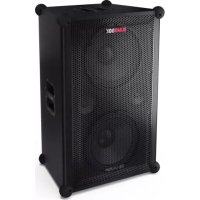
High Performance Portable Speaker
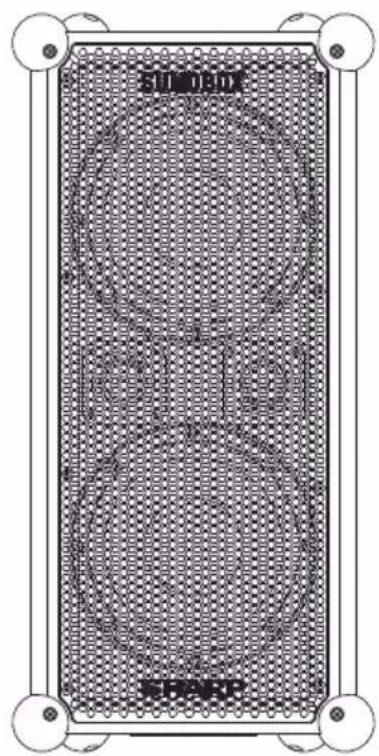
natural_image
Technical diagram of a rectangular device with circular patterns and mounting points (no readable text or symbols)User manual
CP-LS100
ENITES PLDE NLFR RU
SHARP

A
natural_image
Pure electrical circuit lines without any symbols
C



natural_image
Simple line drawing of a U-shaped object with two vertical connectors at top and bottom (no text or symbols)
K
L

natural_image
Diagram showing two vehicle positions with a shaded ground area, no text or symbols presentM

natural_image
Illustration of a studio lighting setup with a stand-mounted device and a beam of light (no text or symbols)Trademarks
SUMOBOX
The term "SumoBox" and the SumoBox logo device are registered trademarks of Sharp Consumer Electronics Poland sp. z o.o.

"SAM" by Devialet" is a registered trademark of DEVIALET SA. All IP rights reserved.

Bluetooth®
The Bluetooth ^® word mark and logos are registered trademarks owned by Bluetooth SIG, Inc.
Important safety instructions
Please follow all safety instructions and heed all warnings. Keep this manual for future reference.

This symbol instructs the user to consult the user manual for further safety, operation, and maintenance related information.

This symbol indicates presence of uninsulated "dangerous voltage" within the product and may be of sufficient magnitude as to constitute a risk of electric shock to persons.

Refers to alternating current (AC)
This symbol indicates that the rated voltage marked with the symbol is AC voltage.

Refers to class II equipment.
This symbol indicates that this product has a double insulation system and does not require a safety connection to electrical earth (ground).
Precautions
Damage
- Please inspect the unit for damage after unpacking. If it is damaged in any way do not operate the unit and consult your dealer.
Power connection and accessibility
- Do not handle the power cord with wet hands as it may cause an electric shock. If the power plug does not fit into your outlet, do not force the plug into an electrical socket. Switch off the unit completely before unplugging. Disconnect the power cord if it is not used for a long time. Ensure that the power plug is always easily accessible. Do not attach extension cables.
Power source
- Ensure that the unit is plugged into an AC 220-240V 50/60Hz power outlet. Using higher voltage may cause the unit to malfunction or even catch fire.
Fused moulded power plug (non rewireable) - UK, Malta, Cyprus and Ireland only.
- The power lead on this equipment is supplied with a moulded plug incorporating a 3 Amp fuse. The value of the fuse is indicated on the pin face of the plug and if it requires replacing, a fuse approved to BS1362 of the same rating must be used.
Power cord protection
- Do not damage the power cord, do not place any heavy objects on it, do not stretch it or bend it. Damage to the power cord can result in fire or electric shock. If the power cord is damaged, it must be replaced. The power cord is not fixed and so can simply be replaced when damaged.
Child safety
- Always follow basic safety precautions when using this product, especially when children are present. Children should be supervised to ensure that they do not play with the product.
Location
- When in use this product should be placed on a flat, stable surface with no part of the main unit overhanging an edge.
Insertion hazards
- Never let anyone push anything into holes, slots or any other openings in the product's casing as this could result in an electric shock.
Heat and operating temperature
- Do not place near any heat sources such as radiators, heat registers, stoves, or other apparatus (including amplifiers) that produce heat. Avoid prolonged exposure to direct sunlight.
Naked flames
- To prevent the risk of fire, keep candles or open flames away from this product.
Storms and lightning
- Storms are dangerous for all electric products. If the power is struck by lightning, the product might get damaged, even if it is turned off. You should disconnect all the cables and connectors of the product before a storm.
Maintenance
- Unplug the power cable from the power source before cleaning the product. Use a soft and clean cloth to clean the outside of the unit. Never clean it with chemicals or detergent.
Service and repair

- This product does not contain any parts that are serviceable by the user. Exposing the internal parts inside the device may endanger your life. In case of a fault, contact the manufacturer or authorised service department. The manufacturers guarantee does not extend to faults caused by repairs carried out by unauthorised third parties.
Caution:
Prevention of hearing loss and damage
- SumoBox CP-LS100 is capable of generating excessive sound pressure levels (SPL) sufficient to cause permanent hearing loss or damage. Caution should be taken to avoid prolonged exposure to excessive (>85dB) SPL.
Warning: Special instructions for handling the Lithium-ion battery pack
Follow instructions carefully. This will reduce the risk of explosion, electric shock and possibly serious injury or death.
- Only use approved Sharp power adapter to charge battery pack. Use a power source with the voltage specified on the nameplate of the charger. The charger and battery pack are specifically designed to work together.
- Do not operate the charger with a damaged cord or plug.
- Do not place the battery pack near fire or heat. Exposure to fire or temperature above 60°C may cause the battery pack to explode.
- Do not charge the battery pack in a damp or wet location.
- Do not charge in the presence of flammable liquids or gases.
- Ensure the battery pack is never immersed into water.
- Do not charge in an area of extreme heat (above 40^ ) or cold (below 10^ ).
It will work best at normal room temperature.
- Do not crush, drop or damage the battery pack.
- Do not use a battery pack or charger that has been dropped or received a sharp blow.
Damage to the battery pack may cause the battery pack to explode. Properly dispose of the battery pack immediately by following instructions on how to dispose of battery pack or contact service centre for advice.
- Do not open, modify or attempt to repair a battery pack.
- The battery may give off fumes if it becomes damaged or is used incorrectly.
Ensure the area is well ventilated and seek medical attention should you experience any adverse effects. - The battery may leak liquid if it becomes damaged or is used incorrectly.
If you come into contact with any liquid from the battery accidentally, rinse off immediately with mild soap and water. If the liquid comes into contact with your eyes, rinse with water and seek medical attention. - Keep battery pack away from small metal objects to avoid shortening battery terminals.
Disposal of equipment and batteries
Information for users on collection and disposal of old equipment and used batteries:
This product does not contain any parts that are serviceable by the user. The batteries should be removed by an authorized Sharp service centre. Not doing so will invalidate any guarantees and warranties on your device. Dispose of batteries according to local regulations. Do not dispose as household waste or in a fire as they may explode.
This symbol means that the product contains batteries covered by European Directive 2013/56/EU which cannot be disposed of with normal household waste. Cd, Hg and Pb underneath the wheelie bin symbol shows whether the battery contains, cadmium (Cd), mercury (Hg) or lead (Pb).

This symbol on a product means that the product is covered by European Directive 2012/19/EU and must not be disposed of or dumped with your other household waste.

These symbols on the products, packaging, and/or accompanying documents mean that used electrical and electronic products and batteries should not be mixed with general household waste. Household users should contact either the retailer where they purchased this product, or their local government office, for details of where and how they can take these items for environmentally safe recycling.
CE and UKCA statement
- Hereby, Sharp Consumer Electronics Poland sp. z o.o. declares that this audio device is in compliance with the essential requirements and other relevant provisions of RED Directive 2014/53/EU and UK Radio Equipment Regulations 2017.
- The full CE text and UKCA declaration of conformity are available at sharpconsumer.eu, enter the download section of your model and choose "Declaration of Conformity".
Introduction
Thank you for purchasing the Sharp SumoBox CP-LS100.
This instruction manual provides details on how to safely setup and operate your SumoBox and explains how to connect to a variety of audio sources.
Please take the time to familiarise yourself with the features.
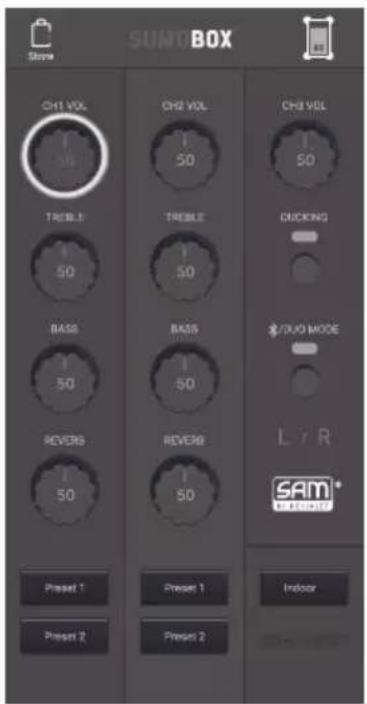
You can also download the dedicated Sharp Life App and take control of your SumoBox remotely.
SHARP Life
app support

Connections and controls
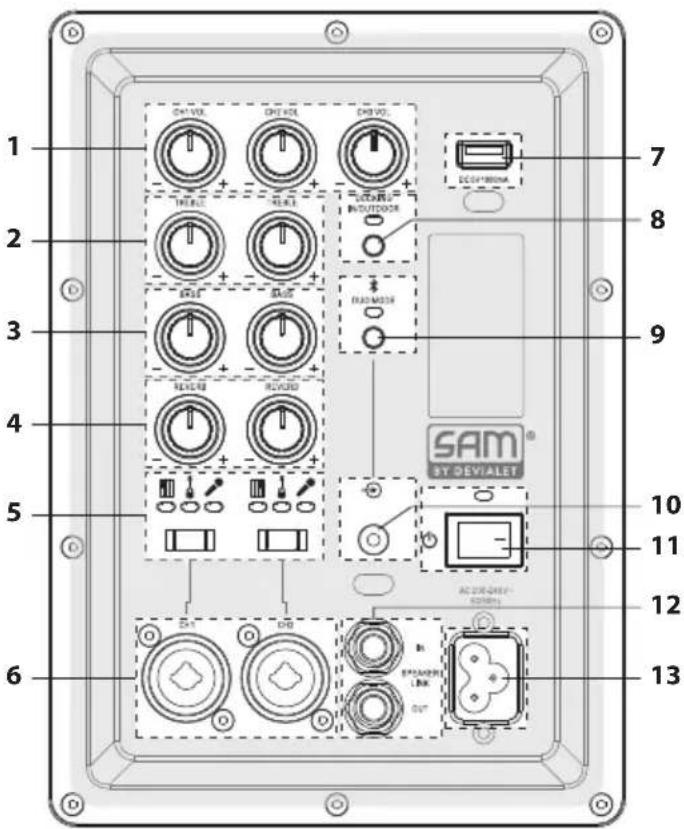
(Refer to A on page 2).
- Volume Control: Adjust the volume of the connected input.
-
Treble Control: Adjust the high tones of the connected instrument or microphone (CH1 and CH2 only).
-
Bass Control: Adjust the low tones of the connected instrument or microphone (CH1 and CH2 only).
-
Reverb Control: Adjust how much reverb is applied to the connected instrument or microphone (CH1 and CH2 only).
-
Input Type: Use the switch to select the input type for CH1 and CH2. The LED indicates the selected device type.
-
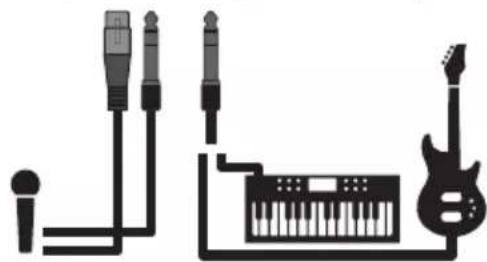
XLR/TRS Combi: Connect instruments, guitars (TRS) and Microphones (XLR) Note: The XLR input does not output Phantom power.
-
USB Out (DC 5V 1000mA): Allows mobile devices to be charged. Note: This is not intended for USB flash disks to play audio files.
-
Ducking Control: Turns ducking feature ON/OFF. When ON, CH3 audio will be suppressed by CH1 and CH2 audio. Also controls Indoor/Outdoor mode.
| Blue (solid) Ducking on | |
| Blue (fast flashes x4) Indoor mode | |
| Blue (slow flashes x2) Outdoor mode | |
- Bluetooth / Duo Mode: Turns ON/OFF Bluetooth and Duo Mode functions. See section "Bluetooth and Duo Mode" for more information".
| Blue (flashing) | SumoBox is ready to pair to a Bluetooth device. |
| Blue (solid) SumoBox | s connected to a Bluetooth device. |
| Yellow (flashing) | SumoBox is looking for another SumoBox to pair with. |
| Yellow (solid) | SumoBox is paired to another SumoBox and is the secondary unit. |
| When connected, the Bluetooth LED on the primary unit will flash until a Bluetooth device is connected. |
-
3.5 mm AUX In: Connect an audio device via a 3.5mm cable. When an AUX device is first connected it will autoswitch from any active Bluetooth connection.
-
Power Switch: Turns the SumoBox ON / OFF.
| Blue (solid) Power on | |
| Red (solid) Standby | |
| Red (blinking) Low battery (battery powered only) | |
-
Speaker Link IN / OUT: Connect additional SumoBoxes.
-
Power In: Connect to the mains power via the supplied power lead. AC 200-240V \~50/60Hz Note: Ensure you use the correct power cable for your region.
-
USB Charging Port (5V 1000mA): Allows mobile devices to be charged.
-
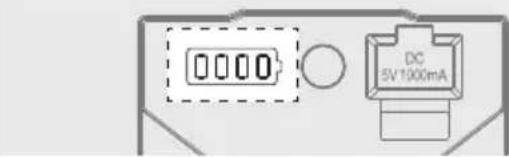
Battery Status LED: Press the button to see the battery Status.
-
Battery clip: Secures the battery pack in place. Push the clip to the right to allow the battery pack to be removed.
-
DC 18V Input: Allows charging of the battery when not installed in the SumoBox. Note: External charger sold separately with CP-LSBP1.
-
Connection to SumoBox
Box contents
- CP-LS100 SumoBox
- Power cable
- Battery pack
• Corner protectors (x8) - Hex driver tool
- User documentation
Optional Accessories:
• Battery Pack & Charger (CP-LSPB1)
Sold separately.
Initial set up
Before first use, it is recommended to charge the battery pack for a minimum of four hours (or until fully charged). Anytime the battery is installed and the SumoBox is connected to mains power, the battery will charge.
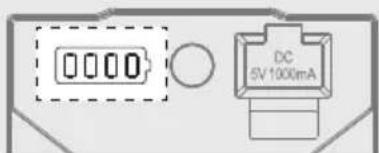
| 10% - 25% | |
| 26% - 50% | |
| 51% - 75% | |
| 76% - 100% |
Turning on the SumoBox
If using SumoBox with instruments:
- Connect any instruments/microphones to the desired channels.
- Switch any powered instruments on and ensure they are not sending any signals.
- Turn on the SumoBox via the power switch. The power LED will turn solid blue to indicate the speaker is on.

natural_image
Pure electrical circuit lines without any symbolsIf using SumoBox only with Bluetooth
If only using Bluetooth connections, turn the SumoBox on to start connecting.
NOTE:
When turning off the SumoBox, perform these steps in the reverse order.
Connection types
With three channels and a variety of input types, you can connect a wide range of instruments, microphones and other devices.
Above the CH1 and CH2 inputs is an input type selector. This adjusts the balance of the connection. Here are some examples.
(Refer to 📁 B on page 2).
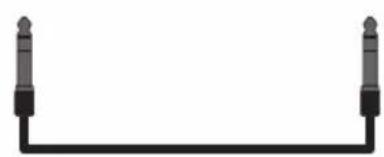
B: Connect keyboards, guitars or microphones to CH1 and CH2. Select the correct device type on the switch. Use instrument cables for keyboards and guitars, and XLR cables for microphones.
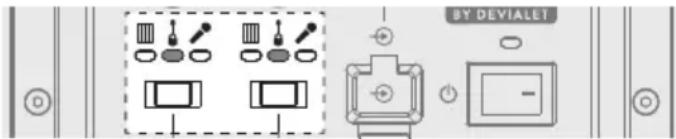
(Refer to ☐ on page 2).
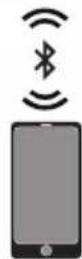
C: Bluetooth on CH3. Refer to the section "Bluetooth and Duo Mode" for details on how to connect your Bluetooth enabled device.
(Refer to 📋 D on page 3).
D: Aux input (3.5mm) on CH3. Connect analog source devices using the 3.5mm input. Please note that in presence of a device connected via AUX on CH3, Bluetooth is suppressed.
(Refer to 📁 on page 3).
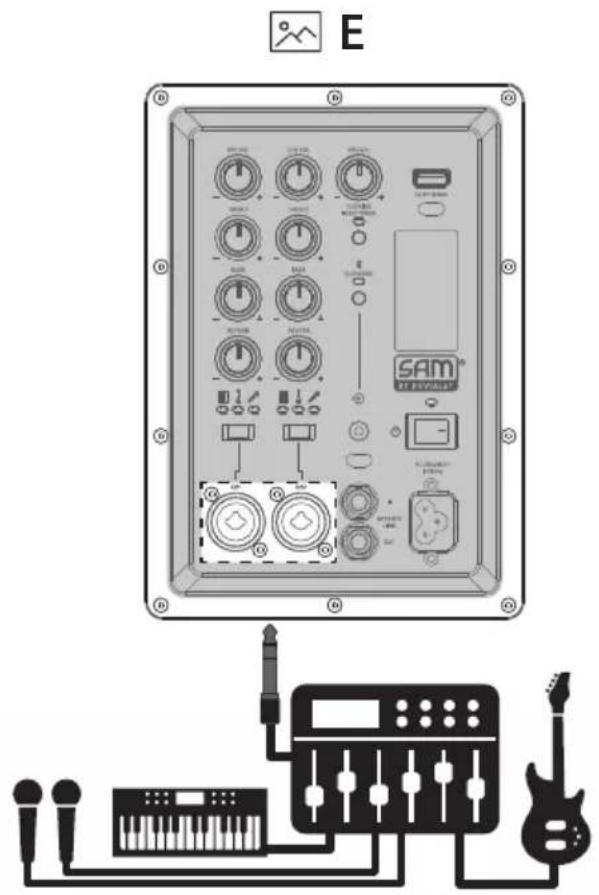
E: You can connect a mixer to CH1 or CH2 to increase the devices connected to SumoBox. Use the "keyboard" setting on the input type selector if you connect a mixer.

Volume, bass, treble & reverb
Volume (CH1, CH2 & CH3)
Adjusts the volume of the channel.
0-Max scale.
Treble (CH1 & CH2 only)
Adjusts the high tone of the connected instrument or microphone. -/+ scale from 12 o'clock position (Min - 0 - Max).
Bass (CH1 & CH2 only)
Adjusts the low tone of the connected instrument or microphone. -/+ scale from 12 o'clock position (Min - 0 - Max).
Reverb (CH1 & CH2 only)
Adjusts how much reverb is applied to the connected instrument or microphone. 0-Max scale.
Ducking mode
The Ducking feature will reduce (duck) CH3's output when input from CH1 or CH2 is detected.
To turn on, press the Ducking Control button once. The LED will be solid blue. Press again to turn off.
Example: You may have a backing track playing on CH3 whilst using a microphone on CH1. The ducking feature means audio playing on CH3 will reduce in volume slightly when you speak into the microphone - giving your voice more space in the mix.
Indoor / Outdoor mode
There are two sound modes; Indoor and Outdoor. To switch between modes, double tap the Ducking Control button (2x within 1 sec).
You can identify which mode SumoBox is in by observing the LED indicator when the mode is changed:
| Sound Mode Ducking LED | indicator |
| Indoor (default) Blue - fast flash x4 | |
| Outdoor Blue - slow flash x2 | |
Indoor mode is suitable for when SumoBox is used indoors and is optimised for sound quality.
Outdoor mode is suitable for when SumoBox is used outdoors. When in Outdoor mode, the high and mid range frequencies are boosted. This allows those frequencies to be better heard when in an outdoor environment.
Bluetooth and Duo Mode
You can connect a Bluetooth enabled device to your SumoBox. SumoBox can also connect to another SumoBox via Duo Mode - True Wireless Stereo (TWS).
Duo Mode is a powerful feature which allows the Bluetooth audio source to be sent to 2 SumoBoxes, one operating as the left stereo channel, the other operating as the right stereo channel. The effect offers a more powerful and immersive stereo sound stage.
Connect via Bluetooth
- With the SumoBox on activate your Bluetooth device and select the search mode. "SUMOBOX CP-LS100" will appear on your Bluetooth device list.
- Select "SUMOBOX CP-LS100". An audio prompt will sound from SumoBox when it has successfully connected.
- To disconnect, press the Bluetooth / Duo Mode button once. Alternatively, disconnect from the SumoBox on your Bluetooth enabled device.
- To reconnect the same device, press the Bluetooth / Duo Mode button once on the SumoBox or connect via your Bluetooth enabled device.
NOTE:
The speaker will attempt to automatically connect itself to the last audio output device connected via Bluetooth. If this is not possible, the speaker will enter pairing mode and the Bluetooth LED will flash.
Duo Mode: True Wireless Stereo (TWS)
- Turn on both SumoBox speakers.
- On the first SumoBox, double press the Bluetooth / Duo Mode button.
- The LED will flash yellow and SumoBox will notify it is in pairing mode.
-
Wait for the connection between the two SumoBox to be made.
-
Once connected, both SumoBox will give an audio confirmation. The RIGHT (secondary) SumoBox will have a steady yellow LED and The LEFT (primary) SumoBox will have a flashing blue LED.
-
Adjust the CH3 volume on the first SumoBox to change CH3 volume on both speakers.
-
To disconnect Duo Mode, double press the Bluetooth / Duo Mode button on either SumoBox.
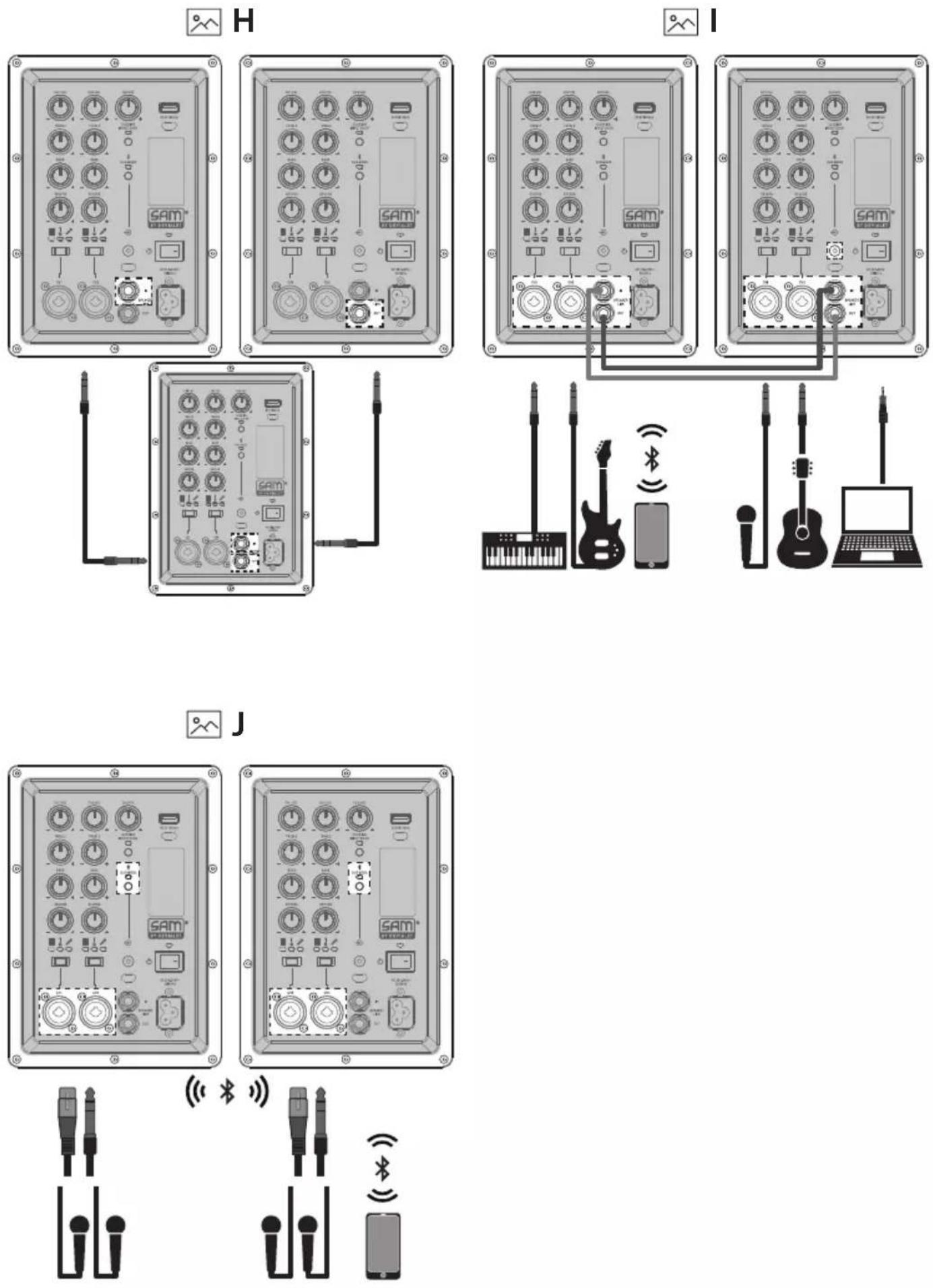
8. Usage example
(Refer to 📂 on page 4).
When in Duo Mode you can connect 4x microphones and a Bluetooth device. This is ideal for a conference or presentation.
NOTES:
When in Duo Mode, only the Bluetooth source CH3 from the LEFT (primary) SumoBox will be shared. Input from Mic 1 and Mic 2 on both speakers will remain local to that speaker.
It is not possible to connect to the RIGHT (secondary) SumoBox via Bluetooth when Duo Mode is active.
If two speakers have already been paired, Duo Mode / TWS will reconnect automatically when both speakers are powered on.
Speaker link
SumoBox can be linked to other SumoBoxes via speaker linking. This is the optimal way to share audio incoming via CH1 and CH2 with another SumoBox.
You can do this in various ways:
- One way link:
(Refer to □ F on page 3).
Connect one speakers OUT socket to another speakers IN socket.
When in this configuration, the OUT unit will not play any audio connections from the IN unit.
- Two way link:
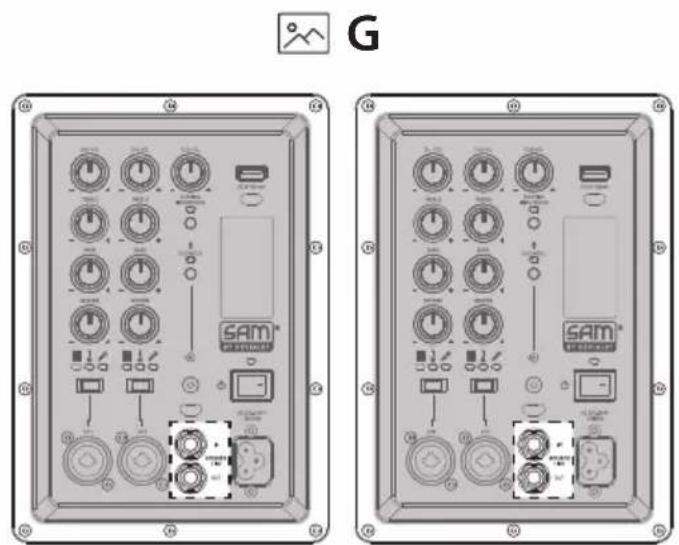
(Refer to 📂 G on page 3).
Connect one speakers OUT socket to another speakers IN socket, and vice-versa.
When in this configuration, the audio on both units is sent to each other.
- Daisy chain link:
(Refer to 📂 H on page 4).
Connect one speakers OUT socket to another speakers IN socket, then that speakers OUT socket to another speakers IN socket.
When in this configuration, the audio on the first speaker is sent down the chain. You can add as many SumoBox as you want.
- Two way link (small band):
(Refer to 📋 on page 4).
Using the two way link, you have 6x inputs where the audio on both units is sent to each other. This is ideal for a small band, for example.
NOTES:
You can daisy chain multiple SumoBox as the speaker link function on SumoBox is an amplified output. Daisy chaining might not work correctly using similar products from other manufacturers as these links may not be amplified.
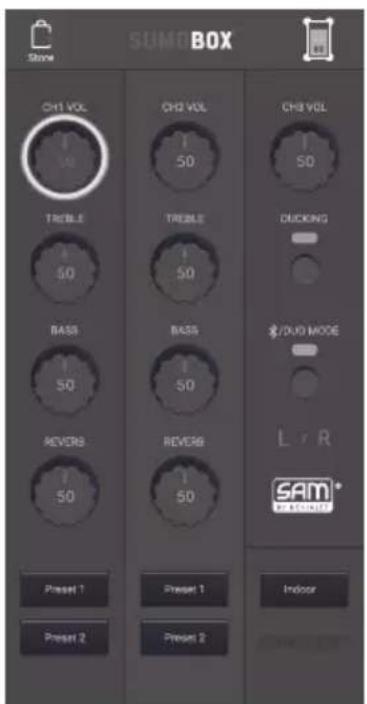
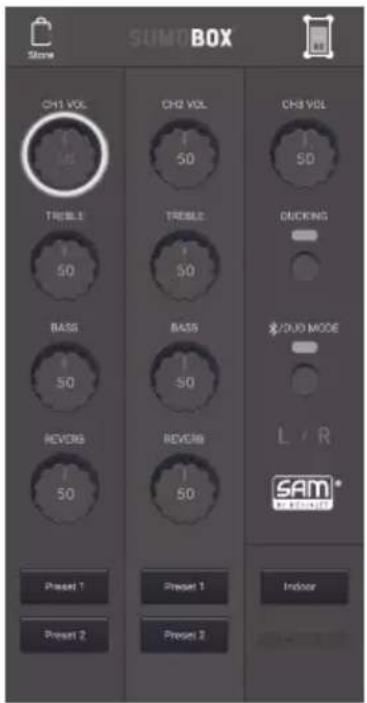
Sharp Life App
You can download the Sharp Life App onto your smart device.
The app allows full control of the SumoBox and also offers some additional features.
To pair the app to the SumoBox, do the following:
1. Initial set up
If you're connecting to the app for the first time, but have previously connected a device to play audio via Bluetooth, you will need to disconnect your Bluetooth device.
To disconnect the Bluetooth connection, press the Bluetooth / Duo Mode button once.
-
On your smart device, open the Sharp Life app. Click on "Add Device". Your device will scan automatically for the SumoBox..
-
Once the SumoBox is found, tap the + symbol to begin the pairing process.
When pairing is complete, tap the device icon and the SumoBox user interface will load.
To download the app, use this QR code to go automatically to the download page or visit: https://www.sharpconsumer.com/sharp-life-app

NOTE:
Only one SumoBox can be connected to the Sharp Life Account at any one time.
A factory reset will clear the memory and allow a new Sharp Life account to be connected.
Factory reset
Long press (>10 seconds) the Ducking button to reset the unit to factory settings. An audio tone will confirm the reset and the panels back lights will flash once.
Standby mode
You can put SumoBox into standby by long pressing (>3 seconds) the Bluetooth/Duo Mode button.
To quickly power back on, press the Bluetooth/Duo Mode button once.
NOTE:
SumoBox will automatically go into standby mode when no input signal has been detected for more than 15 minutes.
Whilst in App mode, standby is disabled.
Corner protectors and grille
SumoBox comes with 8x Corner Protectors and 16x screws. Use the included hex driver tool to affix them to each corner.
There are 4 types of corner, each with lettering on the inside surfaces:
| Corner Type SumoBox Location | |
| FTL/FBR Front Top | Left or Front Bottom Right |
| FTR/FBL Front Top | Right or Front Bottom Left |
| RBL/RTR Rear Bottom | Left or Rear Top Right |
| RTL/RBR Rear Top | Left or Rear Bottom Right |
You will need to remove the pre-installed feet from the SumoBox to attach the Corner Protectors.
Each Corner Protector uses 2x screws to attach to the SumoBox as demonstrated:
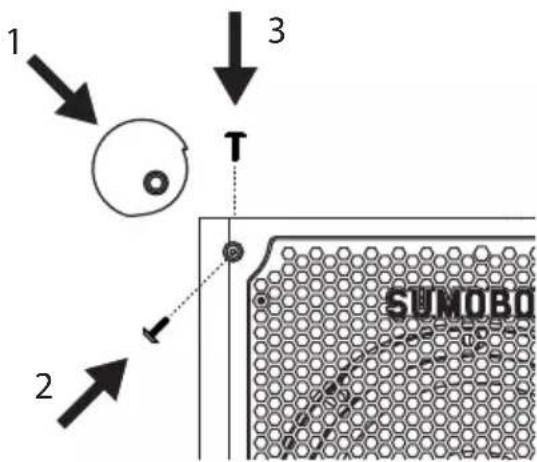
Step 1 - Remove the screws.
Step 2 - Place the corner protector on the corner of the SumoBox and check for correct fitment.
Step 3 - Using the supplied hex driver tool, screw the corner protector to the SumoBox via the two screw holes. Ensure the holes of the corner protector align with the holes in the SumoBox.
NOTE:
Holes for the corner protectors are only on the front, rear, top and bottom of the SumoBox. No holes exist on the left or right sides.
It is also possible to remove the grille using the included hex driver tool. Replacement and special edition customised grilles will be available to purchase separately. Do not use the SumoBox without the grille attached.
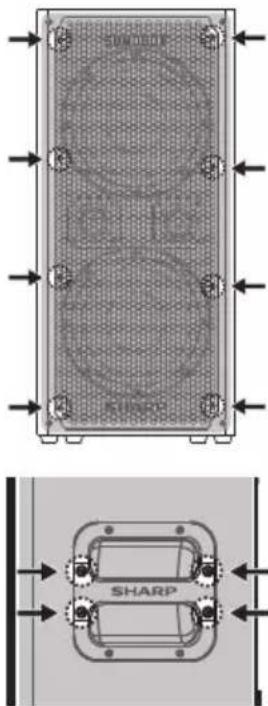
Replacement and special edition customised handles will be available to purchase separately.
Positioning the SumoBox
(Refer to K,L, M on page 5).
Your SumoBox has protective corners and an angled design. This allows a variety of positions when placed on a solid surface.
You can also mount SumoBox on a Standard 1-3/8 inch (35 mm) speaker mount.
NOTE:
Do NOT use the SumoBox speaker with a tripod/stand that is unstable. SumoBox speakers are only designed for use on a standard 1-3/8 inch (35 mm post, and the tripod/stand must be capable of supporting a speaker with a minimum weight of 25 kg.
Using a tripod/stand that is not designed to support the weight of the SumoBox speaker can be hazardous and may lead to injury.
SAM by Devialet®

SumoBox utilises Devialet's proprietary SAM® (Speaker Active Matching) algorithm which delivers improved linearity and enhanced low frequency performance. What this means for the end user is a richer, more detailed, and more powerful bass performance with limited audio distortion – the high-quality speaker drivers are optimised to be at their very best. With SHARP's audio heritage and Devialet managing the tuning of the bass (via SAM®), prepare yourself for a best-in-class sound experience!
FAQ's
Q. Can I get additional battery packs?
A. Yes, you can! Additional battery packs are available to purchase separately (model CP-LSBP1). Speak to the retailer from where you purchased your SumoBox.
Q. What do the LEDs on the rear panel mean?
A. Look at this table to understand the information being indicated by the LEDs:
| LED Colour Status | ||
| Power | Blue (solid) Power On | |
| Red (solid) Standby | ||
| Off Power Off | ||
| Input Type Blue (solid) | Refers to the position of the inut type selector. There are three positions: Instrument, Guitar and Microphone | |
| Bluetooth / Duo Mode | Blue (flashing) | SumoBox is ready to pair to a Bluetooth Device |
| Blue (solid) | SumoBox is connected to a Bluetooth Device | |
| Yellow (flashing) | SumoBox is looking for another SumoBox to pair with in Duo Mode | |
| Yellow (solid) | SumoBox is paired to another SumoBox in Duo Mode and is the secondary unit (right channel) | |
| Ducking IN/ OUTDOOR | Blue (solid) Ducking on | |
| Blue (fast flashes x4) In | door mode was selected | |
| Blue (slow flashes x2) | Outdoor mode was selected | |
Q. How do I disconnect the App?
A. Long press (>10 seconds) the Ducking button to reset the unit to factory settings.
An audio tone will confirm the reset and the panels back lights will flash once.
Q. How many devices can I connect?
A. You have 3 channels which can connect up to 3 devices
1 x CH1 Input
1 x CH2 Input
1 x CH3 Input: Bluetooth and/or AUX
Please note that in presence of a device connected via AUX on CH3, Bluetooth is suppressed.
You can increase the number of inputs by adding a mixer to your signal flow. Connect all of your devices to the mixer, and connect the mixer to CH1 or CH2 of the SumoBox, and switch the input type to Instrument.
Q. Can I customise SumoBox?
A. Yes, you can. SumoBox has been designed so the front grille can be removed. Feel free to express yourself by painting the grille into your unique style.
We suggest using spray paints specially made for applying to metal, observing the correct safety instructions when using such paints.
For the best results, use a primer before applying your design and a sealer for after.
Look out for special edition customised accessories (grilles, corner protection and handles) coming soon.
Q. Does SumoBox have a standby mode?
A. Yes, SumoBox can be placed into standby mode by long pressing the Bluetooth / Duo Mode button for 3 seconds.
SumoBox will automatically go into Standby mode when no input signal has been detected for more than 15 minutes. Whilst in App mode, standby is disabled.
Q. How long does the battery last?
A. You can expect up to 10 hours playback at 50% volume from a fully charged battery pack.
Once depleted, recharge the battery for a minimum of four hours.
Q. Can I use SumoBox outdoors?
A. With the protective corners attached, SumoBox is suitable for outdoor use. SumoBox is not IPX rated so if there is rain, or excessive dirt/dust/sand we advise to bring the speaker indoors. SumoBox Pro (CP-LS200) is IPX4 (splashproof) rated and is better suited for outdoor use.
SHARP Life
app support
 | 10% - 25% |
 | 26% - 50% |
 | 51% - 75% |
 | 76% - 100% |
natural_image
Pure electrical circuit lines without any symbolsHINWEIS:
natural_image
Technical diagram of a rectangular device with internal circular components and directional arrows indicating flow or movement (no text or symbols)
SHARP Life
app support

natural_image
Pure electrical circuit lines without any symbolsNOTA:
natural_image
Technical diagram of a rectangular device with internal circular components and directional arrows (no text or symbols)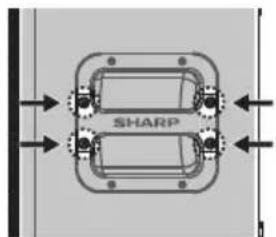
SHARP Life
app support

natural_image
Pure electrical circuit lines without any symbolsMode Duo - True Wireless Stereo (TWS).
REMARQUE :
natural_image
Technical diagram of a rectangular device with internal circular components and directional arrows indicating flow or movement (no text or symbols)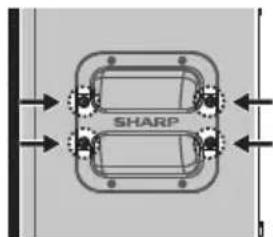
natural_image
Pure diagram of a mechanical component with two springs and directional arrows, no text or symbols present.SHARP Life
app support
natural_image
Pure electrical circuit lines without any symbolsNOTA:
natural_image
Technical diagram of a rectangular device with circular components and directional arrows indicating flow or movement (no text or symbols)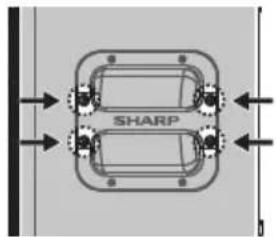
SHARP Life
app support
 | |
| 10% - 25% | |
| 26% - 50% | |
| 51% - 75% | |
| 76% - 100% | |
| 10% - 25% | |
| 26% - 50% | |
| 51% - 75% | |
| 76% - 100% |
De SumoBox inschakelen
natural_image
Pure electrical circuit lines without any symbolsVolume, bass, treble & reverb
Volume (CH1, CH2 & CH3)
Reverb (alleen CH1 & CH2)
OPMERKING:
natural_image
Technical diagram of a rectangular device with internal circular components and mounting holes (no text or symbols)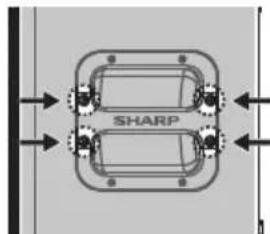
SHARP Life
app support

| 10% - 25% | |
| 26% - 50% | |
| 51% - 75% | |
| 76% - 100% |
natural_image
Pure electrical circuit lines without any symbolsUWAGA:
natural_image
Technical diagram of a rectangular device with circular cutouts and directional arrows indicating flow or movement (no text or symbols)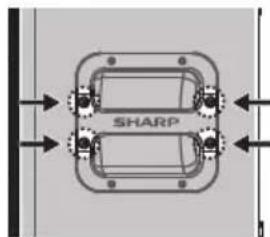
SHARP Life
app support

| 10% - 25% | |
| 26% - 50% | |
| 51% - 75% | |
| 76% - 100% |
Включение SumoBox
natural_image
Pure electrical circuit lines without any symbolsПРИМЕЧАНИЕ.
natural_image
Technical diagram of a rectangular device with circular cutouts and directional arrows indicating flow or placement (no text or symbols)
High Performance Portable Speaker

natural_image
Technical line drawing of an electrical enclosure with two side panels, no text or symbols presentCE
UKCA
Sharp Consumer Electronics Poland sp. z o.o.
Ostaszewo 57B, 87-148 Lysomice, Poland
Made in China
SAU/MAN/0180
- User manual
- Trademarks
- SUMOBOX
- Bluetooth®
- Important safety instructions
- Please follow all safety instructions and heed all warnings. Keep this manual for future reference.
- Precautions
- Damage
- Power connection and accessibility
- Power source
- Fused moulded power plug (non rewireable) - UK, Malta, Cyprus and Ireland only.
- Power cord protection
- Child safety
- Location
- Insertion hazards
- Heat and operating temperature
- Naked flames
- Storms and lightning
- Maintenance
- Service and repair
- Caution:
- Prevention of hearing loss and damage
- Warning: Special instructions for handling the Lithium-ion battery pack
- It will work best at normal room temperature.
- Disposal of equipment and batteries
- CE and UKCA statement
- Introduction
- Connections and controls
- Box contents
- Optional Accessories:
- Initial set up
- Turning on the SumoBox
- If using SumoBox with instruments:
- If using SumoBox only with Bluetooth
- NOTE:
- Connection types
- Volume, bass, treble & reverb
- Volume (CH1, CH2 & CH3)
- Treble (CH1 & CH2 only)
- Bass (CH1 & CH2 only)
- Reverb (CH1 & CH2 only)
- Ducking mode
- Indoor / Outdoor mode
- Bluetooth and Duo Mode
- Connect via Bluetooth
- Duo Mode: True Wireless Stereo (TWS)
- Usage example
- NOTES:
- Speaker link
- You can do this in various ways:
- Sharp Life App
- To pair the app to the SumoBox, do the following:
- Initial set up
- Factory reset
- Standby mode
- Corner protectors and grille
- Positioning the SumoBox
- SAM by Devialet®
- FAQ's
- Can I get additional battery packs?
- What do the LEDs on the rear panel mean?
- How do I disconnect the App?
- How many devices can I connect?
- Can I customise SumoBox?
- Does SumoBox have a standby mode?
- How long does the battery last?
- Can I use SumoBox outdoors?
- HINWEIS:
- NOTA:
- REMARQUE :
- De SumoBox inschakelen
- Reverb (alleen CH1 & CH2)
- OPMERKING:
- UWAGA:
- Включение SumoBox
- ПРИМЕЧАНИЕ.
Brand : SHARP
Model : SumoBox CPLSBP1
Category : Bluetooth speaker