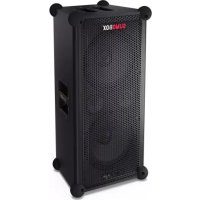
SumoBox CPLS100 - Bluetooth speaker SHARP - Free user manual and instructions
Find the device manual for free SumoBox CPLS100 SHARP in PDF.



| Product type | Portable Bluetooth speaker |
| Brand | Sharp |
| Model | SumoBox CPLS100 |
| Power supply | 200-240 V AC, 50/60 Hz (mains cable); rechargeable lithium-ion battery |
| Battery life | Up to 10 hours at 50% volume |
| Wireless connectivity | Bluetooth (pairing, Duo TWS mode) |
| Audio inputs | 2 x XLR/TRS combo (CH1, CH2); 1 x 3.5 mm auxiliary input (CH3); Bluetooth (CH3) |
| Outputs | 1 x USB output (5 V DC, 1000 mA); 1 x speaker link (input/output) |
| Controls | Volume, treble, bass, reverb per channel; input type selector; ducking; indoor/outdoor mode; Bluetooth/Duo mode |
| Special features | Duo mode (True Wireless Stereo); Devialet SAM® for optimized bass; ducking; indoor/outdoor sound modes |
| LED indicators | Power, input type, Bluetooth, ducking, sound mode, battery status |
| Corner bumpers | 8 corner bumpers included (with screws and hex key) |
| Removable grille | Yes (customizable) |
| Pole mount | Standard 1-3/8 inch (35 mm) pole compatibility |
| Mobile app | Sharp Life (iOS/Android) |
| Package contents | Speaker, mains cable, battery pack, corner bumpers (x8), hex key, documentation |
| Optional accessories | Battery pack and adapter (model CP-LSPB1) |
| Maintenance | Clean with a soft dry cloth; do not use chemical products |
| Safety | Safety instructions included; warning against high sound levels (>85 dB) |
| Repairability | No user-serviceable parts; contact an authorized Sharp service center |
| Warranty | Manufacturer's warranty (conditions online) |
Frequently Asked Questions - SumoBox CPLS100 SHARP
User questions about SumoBox CPLS100 SHARP
0 question about this device. Answer the ones you know or ask your own.
Ask a new question about this device
Download the instructions for your Bluetooth speaker in PDF format for free! Find your manual SumoBox CPLS100 - SHARP and take your electronic device back in hand. On this page are published all the documents necessary for the use of your device. SumoBox CPLS100 by SHARP.
USER MANUAL SumoBox CPLS100 SHARP
High Performance Portable Speaker
User manual
CP-LS100

SHARP

A

EN: Battery Pack only
DE: Nur Akkusatz
ES:Bateria solo
The term "SumoBox" and the SumoBox logo device are registered trademarks of Sharp Consumer Electronics Poland sp. z o.o.

"SAM" by Devialet" is a registered trademark of DEVIALET SA. All IP rights reserved.

The Bluetooth® word mark and logos are registered trademarks owned by Bluetooth SIG., Inc.
Important safety instructions
Please follow all safety instructions and heed all warnings. Keep this manual for future reference.

This symbol instructs the user to consult the user manual for further safety, operation, and maintenance related information.

This symbol indicates presence of uninsulated "dangerous voltage" within the product and may be of sufficient magnitude as to constitute a risk of electric shock to persons.

Refers to alternating current (AC) This symbol indicates that the rated voltage marked with the symbol is AC voltage.

Refers to class II equipment.
This symbol indicates that this product has a double insulation system and does not require a safety connection to electrical earth (ground).
Precautions
Damage
- Please inspect the unit for damage after unpacking. If it is damaged in any way do not operate the unit and consult your dealer.
Power connection and accessibility
- Do not handle the power cord with wet hands as it may cause an electric shock. If the power plug does not fit into your outlet, do not force the plug into an electrical socket. Switch off the unit completely before unplugging. Disconnect the power cord if it is not used for a long time. Ensure that the power plug is always easily accessible. Do not attach extension cables.
Power source
- Ensure that the unit is plugged into an AC 220-240V 50/60Hz power outlet. Using higher voltage may cause the unit to malfunction or even catch fire.
Fused moulded power plug (non rewireable) - UK, Malta, Cyprus and Ireland only.
- The power lead on this equipment is supplied with a moulded plug incorporating a 3 Amp fuse. The value of the fuse is indicated on the pin face of the plug and if it requires replacing, a fuse approved to BS1362 of the same rating must be used.
Power cord protection
- Do not damage the power cord, do not place any heavy objects on it, do not stretch it or bend it. Damage to the power cord can result in fire or electric shock. If the power cord is damaged, it must be replaced. The power cord is not fixed and so can simply be replaced when damaged.
Child safety
- Always follow basic safety precautions when using this product, especially when children are present. Children should be supervised to ensure that they do not play with the product.
Location
- When in use this product should be placed on a flat, stable surface with no part of the main unit overhanging an edge.
Insertion hazards
- Never let anyone push anything into holes, slots or any other openings in the product's casing as this could result in an electric shock.
Heat and operating temperature
- Do not place near any heat sources such as radiators, heat registers, stoves, or other apparatus (including amplifiers) that produce heat. Avoid prolonged exposure to direct sunlight.
Naked flames
- To prevent the risk of fire, keep candles or open flames away from this product.
Storms and lightning
- Storms are dangerous for all electric products. If the power is struck by lightning, the product might get damaged, even if it is turned off. You should disconnect all the cables and connectors of the product before a storm.
Maintenance
- Unplug the power cable from the power source before cleaning the product. Use a soft and clean cloth to clean the outside of the unit. Never clean it with chemicals or detergent.
Service and repair

- This product does not contain any parts that are serviceable by the user. Exposing the internal parts inside the device may endanger your life. In case of a fault, contact the manufacturer or authorised service department. The manufacturers guarantee does not extend to faults caused by repairs carried out by unauthorised third parties.
Caution: Prevention of hearing loss and damage
- SumoBox CP-LS100 is capable of generating excessive sound pressure levels (SPL) sufficient to cause permanent hearing loss or damage. Caution should be taken to avoid prolonged exposure to excessive (>85dB) SPL.
Warning: Special instructions for handling the Lithium-ion battery pack
Follow instructions carefully. This will reduce the risk of explosion, electric shock and possibly serious injury or death.
- Only use approved Sharp power adapter to charge battery pack. Use a power source with the voltage specified on the nameplate of the charger. The charger and battery pack are specifically designed to work together.
- Do not operate the charger with a damaged cord or plug.
- Do not place the battery pack near fire or heat. Exposure to fire or temperature above 60^ may cause the battery pack to explode.
- Do not charge the battery pack in a damp or wet location.
- Do not charge in the presence of flammable liquids or gases.
- Ensure the battery pack is never immersed into water.
- Do not charge in an area of extreme heat (above 40^ ) or cold (below 10^ ).
It will work best at normal room temperature.
- Do not crush, drop or damage the battery pack.
-
Do not use a battery pack or charger that has been dropped or received a sharp blow. Damage to the battery pack may cause the battery pack to explode. Properly dispose of the battery pack immediately by following instructions on how to dispose of battery pack or contact service centre for advice.
-
Do not open, modify or attempt to repair a battery pack.
- The battery may give off fumes if it becomes damaged or is used incorrectly.
Ensure the area is well ventilated and seek medical attention should you experience any adverse effects.
- The battery may leak liquid if it becomes damaged or is used incorrectly.
If you come into contact with any liquid from the battery accidentally, rinse off immediately with mild soap and water. If the liquid comes into contact with your eyes, rinse with water and seek medical attention.
- Keep battery pack away from small metal objects to avoid shortening battery terminals.
Disposal of equipment and batteries
Information for users on collection and disposal of old equipment and used batteries:
This product does not contain any parts that are serviceable by the user. The batteries should be removed by an authorized Sharp service centre. Not doing so will invalidate any guarantees and warranties on your device. Dispose of batteries according to local regulations. Do not dispose as household waste or in a fire as they may explode.

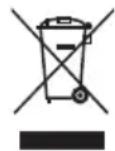
This symbol means that the product contains batteries covered by European Directive 2013/56/EU which cannot be disposed of with normal household waste. Cd, Hg and Pb underneath the wheelie bin symbol shows whether the battery contains, cadmium (Cd), mercury (Hg) or lead (Pb).

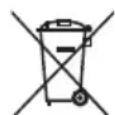
This symbol on a product means that the product is covered by European Directive 2012/19/EU and must not be disposed of or dumped with your other household waste.

These symbols on the products, packaging, and/or accompanying documents mean that used electrical and electronic products and batteries should not be mixed with general household waste. Household users should contact either the retailer where they purchased this product, or their local government office, for details of where and how they can take these items for environmentally safe recycling.
CE and UKCA statement
- Hereby, Sharp Consumer Electronics Poland sp. z o.o. declares that this audio device is in compliance with the essential requirements and other relevant provisions of RED Directive 2014/53/EU and UK Radio Equipment Regulations 2017.
- The full CE text and UKCA declaration of conformity are available at sharpconsumer.eu, enter the download section of your model and choose "Declaration of Conformity".
Introduction
Thank you for purchasing the Sharp SumoBox CP-LS100.
This instruction manual provides details on how to safely setup and operate your SumoBox and explains how to connect to a variety of audio sources.
Please take the time to familiarise yourself with the features.
You can also download the dedicated Sharp Life App and take control of your SumoBox remotely.
SHARP Life

app support
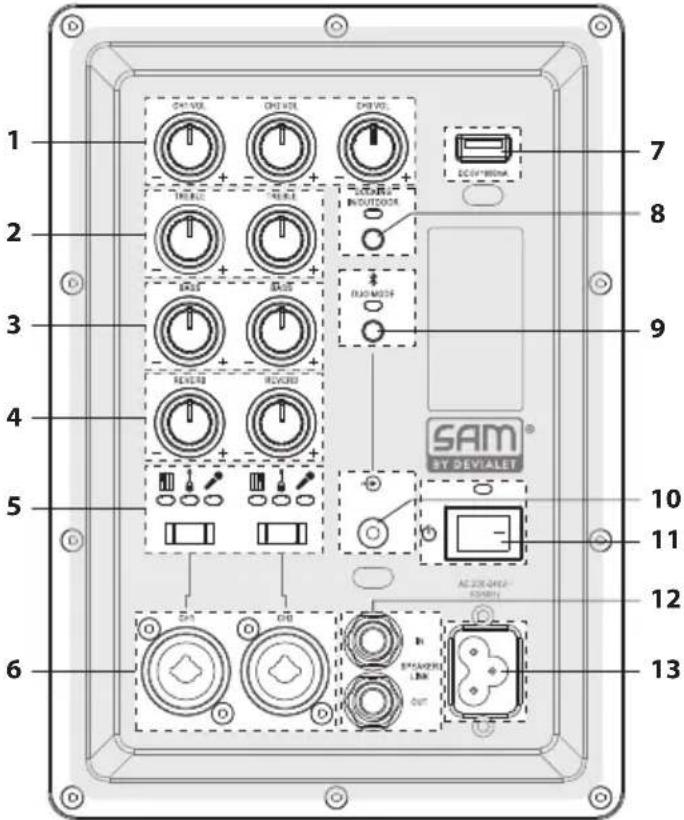
Connections and controls
(Refer to Aon page 2).
- Volume Control: Adjust the volume of the connected input.
- Treble Control: Adjust the high tones of the connected instrument or microphone (CH1 and CH2 only).
- Bass Control: Adjust the low tones of the connected instrument or microphone (CH1 and CH2 only).
- Reverb Control: Adjust how much reverb is applied to the connected instrument or microphone (CH1 and CH2 only).
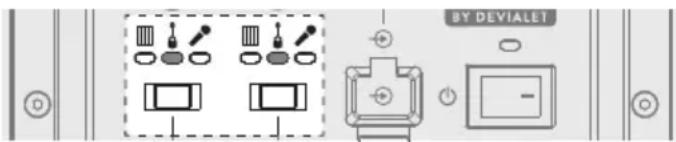
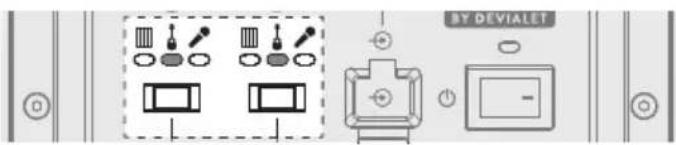
- Input Type: Use the switch to select the input type for CH1 and CH2. The LED indicates the selected device type.
- XLR/TRS Combl: Connect instruments, guitars (TRS) and Microphones (XLR) Note:The XLR input does not output Phantom power.
- USB Out (DC 5V 1000mA): Allows mobile devices to be charged. Note: This is not intended for USB flash disks to play audio files.
- Ducking Control: Turns ducking feature ON/OFF. When ON, CH3 audio will be suppressed by CH1 and CH2 audio. Also controls Indoor/Outdoor mode.
| Blue (solid) Ducking on | |
| Blue (fast flashes x4) Indoor mode | |
| Blue (slow flashes x2) Outdoor mode |
- Bluetooth / Duo Mode: Turns ON/OFF Bluetooth and Duo Mode functions. See section "Bluetooth and Duo Mode" for more information".
| Blue (flashing) | SumoBox is ready to pair to a Bluetooth device. |
| Blue (solid) SumoBox | is connected to a Bluetooth device. |
| Yellow (flashing) | SumoBox is looking for another SumoBox to pair with. |
| Yellow (solid) | SumoBox is paired to another SumoBox and is the secondary unit. |
| When connected, the Bluetooth LED on the primary unit will flash until a Bluetooth device is connected. |
- 3.5 mm AUX In: Connect an audio device via a 3.5mm cable. When an AUX device is first connected it will autoswitch from any active Bluetooth connection.
- Power Switch: Turns the SumoBox ON / OFF.
| Blue (solid) Power on | |
| Red (solid) Standby | |
| Red (blinking) Low battery | battery powered only) |
- Speaker Link IN / OUT: Connect additional SumoBoxes.
- Power In: Connect to the mains power via the supplied power lead. AC 200-240V 50 / 60Hz Note: Ensure you use the correct power cable for your region.
- USB Charging Port (5V 1000mA): Allows mobile devices to be charged.
-
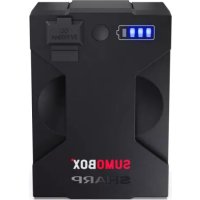
Battery Status LED: Press the button to see the battery Status.
-
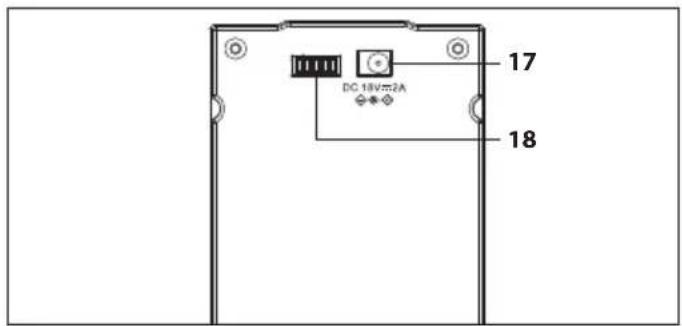
Battery clip: Secures the battery pack in place. Push the clip to the right to allow the battery pack to be removed.
- DC 18V Input: Allows charging of the battery when not installed in the SumoBox. Note: External charger sold separately with CP-LSBP1.
- Connection to SumoBox
Box contents
- CP-LS100 SumoBox
Power cable
Battery pack - Corner protectors (x8)
- Hex driver tool
- User documentation
Optional Accessories:
- Battery Pack & Charger (CP-LSPB1) Sold separately.
Initial set up
Before first use, it is recommended to charge the battery pack for a minimum of four hours (or until fully charged). Anytime the battery is installed and the SumoBox is connected to mains power, the battery will charge.
| 10% - 25% | |
| 26% - 50% | |
| 51% - 75% | |
| 76% - 100% |
Turning on the SumoBox
If using SumoBox with instruments:
- Connect any instruments/microphones to the desired channels.
- Switch any powered instruments on and ensure they are not sending any signals.
- Turn on the SumoBox via the power switch. The power LED will turn solid blue to indicate the speaker is on.

If using SumoBox only with Bluetooth
If only using Bluetooth connections, turn the SumoBox on to start connecting.
NOTE:
When turning off the SumoBox, perform these steps in the reverse order.
Connection types
With three channels and a variety of input types, you can connect a wide range of instruments, microphones and other devices. Above the CH1 and CH2 inputs is an input type selector. This adjusts the balance of the connection. Here are some examples.
(Refer to B on page 2).
B: Connect keyboards, guitars or microphones to CH1 and CH2. Select the correct device type on the switch. Use instrument cables for keyboards and guitars, and XLR cables for microphones.
(Refer to on page 2).
C: Bluetooth on CH3. Refer to the section "Bluetooth and Duo Mode" for details on how to connect your Bluetooth enabled device.
(Refer to D on page 3).
D: Aux input (3.5mm) on CH3. Connect analog source devices using the 3.5mm input. Please note that in presence of a device connected via AUX on CH3, Bluetooth is suppressed.
(Refer to E on page 3).
E: You can connect a mixer to CH1 or CH2 to increase the devices connected to SumoBox. Use the "keyboard" setting on the input type selector if you connect a mixer.

Volume, bass, treble & reverb
Volume (CH1, CH2 & CH3)
Adjusts the volume of the channel.
0-Max scale.
Treble (CH1 & CH2 only)
Adjusts the high tone of the connected instrument or microphone. - / + scale from 12 o'clock position (Min - 0 - Max).
Bass (CH1 & CH2 only)
Adjusts the low tone of the connected instrument or microphone. - / + scale from 12 o'clock position (Min - 0 - Max).
Reverb (CH1 & CH2 only)
Adjusts how much reverb is applied to the connected instrument or microphone.
0-Max scale.
Ducking mode
The Ducking feature will reduce (duck) CH3's output when input from CH1 or CH2 is detected.
To turn on, press the Ducking Control button once. The LED will be solid blue. Press again to turn off.
Example: You may have a backing track playing on CH3 whilst using a microphone on CH1. The ducking feature means audio playing on CH3 will reduce in volume slightly when you speak into the microphone - giving your voice more space in the mix.
Indoor / Outdoor mode
There are two sound modes; Indoor and Outdoor. To switch between modes, double tap the Ducking Control button (2x within 1 sec).
You can identify which mode SumoBox is in by observing the LED indicator when the mode is changed:
| Sound Mode Ducking LED | indicator |
| Indoor (default) Blue - fast flash x4 | |
| Outdoor Blue - slow flash x2 |
Indoor mode is suitable for when SumoBox is used indoors and is optimised for sound quality.
Outdoor mode is suitable for when SumoBox is used outdoors. When in Outdoor mode, the high and mid range frequencies are boosted. This allows those frequencies to be better heard when in an outdoor environment.
Bluetooth and Duo Mode
You can connect a Bluetooth enabled device to your SumoBox. SumoBox can also connect to another SumoBox via Duo Mode - True Wireless Stereo (TWS).
Duo Mode is a powerful feature which allows the Bluetooth audio source to be sent to 2 SumoBoxes, one operating as the left stereo channel, the other operating as the right stereo channel. The effect offers a more powerful and immersive stereo sound stage.
Connect via Bluetooth
- With the SumoBox on activate your Bluetooth device and select the search mode. "SUMOBOX CP-LS100" will appear on your Bluetooth device list.
- Select "SUMOBOX CP-LS100". An audio prompt will sound from SumoBox when it has successfully connected.
- To disconnect, press the Bluetooth / Duo Mode button once. Alternatively, disconnect from the SumoBox on your Bluetooth enabled device.
- To reconnect the same device, press the Bluetooth / Duo Mode button once on the SumoBox or connect via your Bluetooth enabled device.
NOTE:
The speaker will attempt to automatically connect itself to the last audio output device connected via Bluetooth. If this is not possible, the speaker will enter pairing mode and the Bluetooth LED will flash.
Duo Mode: True Wireless Stereo (TWS)
- Turn on both SumoBox speakers.
- On the first SumoBox, double press the Bluetooth / Duo Mode button.
- The LED will flash yellow and SumoBox will notify it is in pairing mode.
- Wait for the connection between the two SumoBox to be made.
- Once connected, both SumoBox will give an audio confirmation. The RIGHT (secondary) SumoBox will have a steady yellow LED and The LEFT (primary) SumoBox will have a flashing blue LED.
- Adjust the CH3 volume on the first SumoBox to change CH3 volume on both speakers.
- To disconnect Duo Mode, double press the Bluetooth / Duo Mode button on either SumoBox.
- Usage example (Refer to on page 4). When in Duo Mode you can connect 4x microphones and a Bluetooth device. This is ideal for a conference or presentation.
NOTES:
When in Duo Mode, only the Bluetooth source CH3 from the LEFT (primary) SumoBox will be shared. Input from Mic 1 and Mic 2 on both speakers will remain local to that speaker.
It is not possible to connect to the RIGHT (secondary) SumoBox via Bluetooth when Duo Mode is active.
If two speakers have already been paired, Duo Mode / TWS will reconnect automatically when both speakers are powered on.
Speaker link
SumoBox can be linked to other SumoBoxes via speaker linking. This is the optimal way to share audio incoming via CH1 and CH2 with another SumoBox.
You can do this in various ways:
- One way link:
(Refer to F on page 3).
Connect one speakers OUT socket to another speakers IN socket.
When in this configuration, the OUT unit will not play any audio connections from the IN unit.
- Two way link:
(Refer to on page 3).
Connect one speakers OUT socket to another speakers IN socket, and vice-versa.
When in this configuration, the audio on both units is sent to each other.
- Daisy chain link:
(Refer to H on page 4).
Connect one speakers OUT socket to another speakers IN socket, then that speakers OUT socket to another speakers IN socket.
When in this configuration, the audio on the first speaker is sent down the chain. You can add as many SumoBox as you want.
- Two way link (small band):
(Refer to on page 4).
Using the two way link, you have 6x inputs where the audio on both units is sent to each other. This is ideal for a small band, for example.
NOTES:
You can daisy chain multiple SumoBox as the speaker link function on SumoBox is an amplified output. Daisy chaining might not work correctly using similar products from other manufacturers as these links may not be amplified.
Sharp Life App
You can download the Sharp Life App onto your smart device. The app allows full control of the SumoBox and also offers some additional features.
To pair the app to the SumoBox, do the following:
1. Initial set up
If you're connecting to the app for the first time, but have previously connected a device to play audio via Bluetooth, you will need to disconnect your Bluetooth device.
To disconnect the Bluetooth connection, press the Bluetooth / Duo Mode button once.
-
On your smart device, open the Sharp Life app. Click on "Add Device". Your device will scan automatically for the SumoBox..
-
Once the SumoBox is found, tap the + symbol to begin the pairing process.
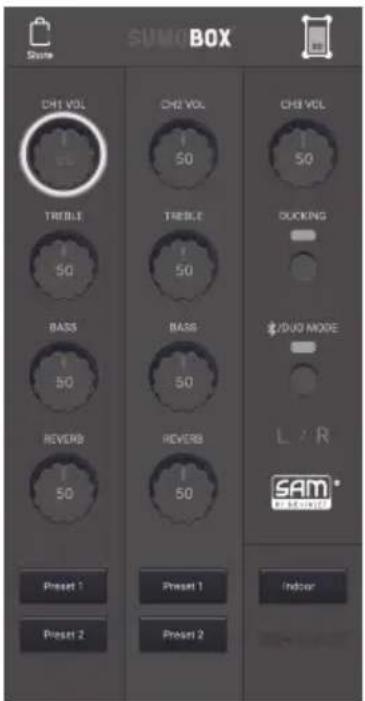
When pairing is complete, tap the device icon and the SumoBox user interface will load.
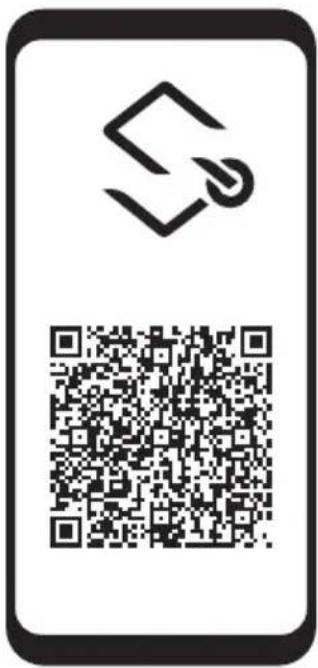
To download the app, use this QR code to go automatically to the download page or visit: https://www.sharpconsumer.com/sharp-life-app

NOTE:
Only one SumoBox can be connected to the Sharp Life Account at any onetime.
A factory reset will clear the memory and allow a new Sharp Life account to be connected.
Factory reset
Long press (>10 seconds) the Ducking button to reset the unit to factory settings. An audio tone will confirm the reset and the panels back lights will flash once.
Standby mode
You can put SumoBox into standby by long pressing (>3 seconds) the Bluetooth/Duo Mode button.
To quickly power back on, press the Bluetooth/Duo Mode button once.
NOTE:
SumoBox will automatically go into standby mode when no input signal has been detected for more than 15 minutes.
Whilst in App mode, standby is disabled.
Corner protectors and grille
SumoBox comes with 8x Corner Protectors and 16x screws. Use the included hex driver tool to affix them to each corner.
There are 4 types of corner, each with lettering on the inside surfaces:
| Corner Type SumoBox Location | |
| FTL/FBR Front Top | Left or Front Bottom Right |
| FTR/FBL Front Top | Right or Front Bottom Left |
| RBL/RTR Rear Bottom | Left or Rear Top Right |
| RTL/RBR Rear Top Left or Rear Bottom Right | |
You will need to remove the pre-installed feet from the SumoBox to attach the Corner Protectors.
Each Corner Protector uses 2x screws to attach to the SumoBox as demonstrated:

Step 1 - Remove the screws.
Step 2 - Place the corner protector on the corner of the SumoBox and check for correct fitment.
Step 3 - Using the supplied hex driver tool, screw the corner protector to the SumoBox via the two screw holes. Ensure the holes of the corner protector align with the holes in the SumoBox.
NOTE:
Holes for the corner protectors are only on the front, rear, top and bottom of the SumoBox. No holes exist on the left or right sides.
It is also possible to remove the grille using the included hex driver tool. Replacement and special edition customised grilles will be available to purchase separately. Do not use the SumoBox without the grille attached.
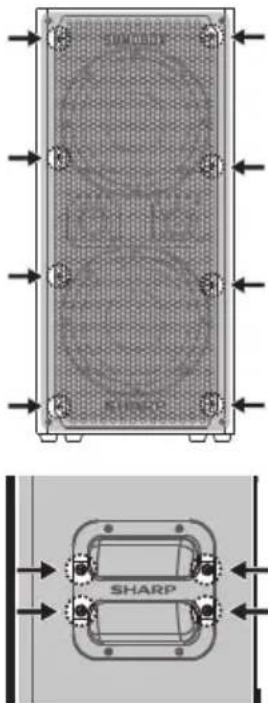
Replacement and special edition customised handles will be available to purchase separately.
Positioning the SumoBox
(Refer to X_m^m , M on page 5).
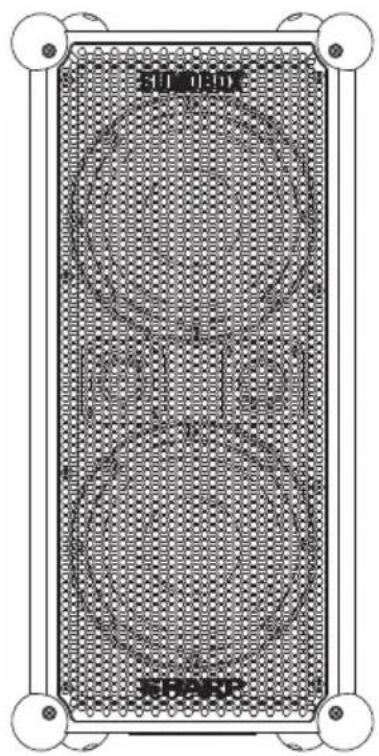
Your SumoBox has protective corners and an angled design. This allows a variety of positions when placed on a solid surface.
You can also mount SumoBox on a Standard 1-3/8 inch (35 mm) speaker mount.
NOTE:
Do NOT use the SumoBox speaker with a tripod/stand that is unstable. SumoBox speakers are only designed for use on a standard 1-3/8 inch (35 mm post, and the tripod/stand must be capable of supporting a speaker with a minimum weight of 25kg .
Using a tripod/stand that is not designed to support the weight of the SumoBox speaker can be hazardous and may lead to injury.
SAM by Devialet

SumoBox utilises Devialet's proprietary SAM (Speaker Active Matching) algorithm which delivers improved linearity and enhanced low frequency performance. What this means for the end user is a richer, more detailed, and more powerful bass performance with limited audio distortion – the high-quality speaker drivers are optimised to be at their very best. With SHARP's audio heritage and Devialet managing the tuning of the bass (via SAM), prepare yourself for a best-in-class sound experience!
FAQ's
Q. Can I get additional battery packs?
A. Yes, you can! Additional battery packs are available to purchase separately (model CP-LSBP1). Speak to the retailer from where you purchased your SumoBox.
Q. What do the LEDs on the rear panel mean?
A. Look at this table to understand the information being indicated by the LEDs:
| LED Colour Status | ||
| Power | Blue (solid) Power On | |
| Red (solid) Standby | ||
| Off Power Off | ||
| Input Type Blue (solid) | Refers to the position of the inut type selector. There are three positions: Instrument, Guitar and Microphone | |
| Bluetooth / Duo Mode | Blue (flashing) | SumoBox is ready to pair to a Bluetooth Device |
| Blue (solid) | SumoBox is connected to a Bluetooth Device | |
| Yellow (flashing) | SumoBox is looking for another SumoBox to pair with in Duo Mode | |
| Yellow (solid) | SumoBox is paired to another SumoBox in Duo Mode and is the secondary unit (right channel) | |
| Ducking IN/OUTDOOR | Blue (solid) Ducking on | |
| Blue (fast flashes x4) In | door mode was selected | |
| Blue (slow flashes x2) | Outdoor mode was selected | |
Q. How do I disconnect the App?
A. Long press (>10 seconds) the Ducking button to reset the unit to factory settings.
An audio tone will confirm the reset and the panels back lights will flash once.
Q. How many devices can I connect?
A. You have 3 channels which can connect up to 3 devices
1xCH1Input
1xCH2Input
1 x CH3 Input: Bluetooth and/or AUX
Please note that in presence of a device connected via AUX on CH3, Bluetooth is suppressed.
You can increase the number of inputs by adding a mixer to your signal flow. Connect all of your devices to the mixer, and connect the mixer to CH1 or CH2 of the SumoBox, and switch the input type to Instrument.
Q.CanI customise SumoBox?
A. Yes, you can. SumoBox has been designed so the front grille can be removed. Feel free to express yourself by painting the grille into your unique style.
We suggest using spray paints specially made for applying to metal, observing the correct safety instructions when using such paints.
For the best results, use a primer before applying your design and a sealer for after.
Look out for special edition customised accessories (grilles, corner protection and handles) coming soon.
Q.Does SumoBox have a standby mode?
A. Yes, SumoBox can be placed into standby mode by long pressing the Bluetooth / Duo Mode button for 3 seconds.
SumoBox will automatically go into Standby mode when no input signal has been detected for more than 15 minutes. Whilst in App mode, standby is disabled.
Q. How long does the battery last?
A. You can expect up to 10 hours playback at 50% volume from a fully charged battery pack.
Once depleted, recharge the battery for a minimum of four hours.
Q.Can I use SumoBox outdoors?
A. With the protective corners attached, SumoBox is suitable for outdoor use. SumoBox is not IPX rated so if there is rain, or excessive dirt/dust/ sand we advise to bring the speaker indoors. SumoBox Pro (CP-LS200) is IPX4 (splashproof) rated and is better suited for outdoor use.
- No dañe el cable de alimentación, no colocoque objetos pesados encima, no lo estire ni lo doble. Los daños en el cable de alimentaciónSEO,SEO,SEO,SEO,SEO,SEO,SEO,SEO,SEO,SEO,SEO,SEO,SEO,SEO,SEO,SEO,SEO,SEO,SEO,SEO,SEO,SEO,SEO,SEO,SEO,SEO,SEO,SEO,SEO,SEO,SEO,SEO,SEO,SEO,SEO,SEO,SEO,SEO,SEO,SEO,SEO,SEO,SEO,SEO,SEO,SEO,SEO,SEO,SEO,SEO,SEO
Seguridad infantil
Mode Duo - True Wireless Stereo (TWS).
| 10% - 25% | |
| 26% - 50% | |
| 51% - 75% | |
| 76% - 100% |
De SumoBox inschakelen
Volume, bass, treble & reverb
Volume (CH1, CH2 & CH3)
Reverb (alleen CH1 & CH2)
| 10% - 25% |
| 26% - 50% |
| 51% - 75% |
| 76% - 100% |
IopKluoyehme nTuHnN u doctyn
Bo n36eJHne npaKeHHn 3JIeKtpueckm TOKOM He npuKaacItecb K uHpy nHTAHN MOKpbIMn pykAMn. EcIn BUNka yCTpoNCTBa He NODxOHT K po3Etke, He nPImHeYrTe CnUy, YTObBi BCTaBNTb ee. NpeD OTKIOUChEHNEM NOHOCTBIO BbIKIOHTe yCTPOINCTBO. OTKIOHTe SHyp NITAHN, ecIn yCTPOINCTBO He NCIONb3yETCB TEeHne DnITeNBHO BPemHn. Bbl BcERda DOJXHbI IMETb CBO6OHNbIOCTUY K cTeBOB BNlKe. He nOcOeDNHnTE K HEmy yDNIHnENTbHbI Ke Ka6Eni.
MCTOUYHKNTAHTN
- UcpoiCTBO Hnykno NpoknIOHTb Kpo3eTke 220-240 B nepeM. ToKa, 50/60 T. IcNoIb3OBaHne 6Oonee BbcOKoro HanpJxKeHna MoKeT npIBecTI K hapyueHIO fHyKUHOHPOBaHna yCtpoiCTBa nII IN BO3rOpaHIO.
ΦopMoBaHnHa Bnka nTuHa n C nlaBkM npeOxApuHnteEm (He pa36OpHa) — TOnbko BenuKo6pTuHa, MaIbTa, Knp u NpHaHn.
Ka6eBnPiTaHnIaHHoroObOpyDoBaHnOcHaueHΦopMOBaHHoBNIKoN PnAaBkIM npEdoxpaHntEm 3 A.HOMHaI npEdoxpaHTenyaKazAH NaIeBoi CTopoHE IITNaBUNKIN, IN CInyaeHeoXoDmOCtN 3aMeHbI CneJeT NcIOJIb3OBaTb npEdoxpaHTenbTOr Je HOMHaI, OOnBeHHbI corLaCHO BS1362.
3aunTa whypa nTuHn
He donyckaTe NoBpeKdEHNsHypa nHTAHnHe CTaBBTe H Hero TaeJeIpeDMeTb, He pactraNbaTe N He cKpyuNBaTe erO. NoBpeKdEHNsHypa nHTAHnMoKeT npBeCTN K Bo3ropaHIO nn nopaxeHIO 3neKtpnueckm TokOM. Ecnu hyp nHTAHnNoBpeXDeH,
ero Hxho 3aMeHnTb. lHyp nItaHnHe 3aΦnKcnpoBaH, nOToMBy Cnyae NOpeXeHnEero JERKO 3aMeHnTb.
Be3onachoctb DeTei
B npocce IcnoIb3oBaHnna n3dennra Bcerda co6bIouaTe OCHOBhie npabunia Texnkn 6e3onacHOCTn,OC6eHHo B pncyTCTBn dTei. DeTu DOnJXHb HaxOuTbCra NOD HaN3OpOM, YTObI OH He MoRJI INrpaTb Cn3dennem.
PacnoJoxeHne
- Pn INCNoB3OBAHm DaHHe N3DeJIne DOnKHO 6bITb yCTaHOBJIeHO Ha NIOCKyH, YCTOuNByIO NOBepxHOCTb TaK, UTO6bl HnKaKaar YaCTb OCHOBHOrO 6Ioka He Bblctynana HAD NOLOM.
OnachocTN B CBA3N C NOnaDaHnEM BHyTpB NoCTopoHHNX PpeMeTOB
He no3BolnIte HNkOMy,OCo6eHHO DeTAM, BCTaBJIbTb NocToPOHHne npedMeTb IB nopTb,CIOtBi IN pOpyNE OTBepCTNA B KOpnyce yctpoiCTBa, NOCKoJIbKBy 3TO MOxET pINBeCTNK NopaxKeHHIO 3NeKTPnueCkIM TOKOM.
IcToHnKu Tena pa6oay TempepaTy
He yctaHaBnBaIte n3dennpeyamc nCTOCHNkAMmTe nnA,HaNPmep padnaTopamn, o6orpeBaTeIaMn, neaMn nnDpyrnnuYcTPOiCTBaMn (BknIOUaay ycINlTeN), Bblpa6aTbBAIOUIMn TEnNo. He donyckaIte dInITeBHOBO3dEChTBNA Ha n3dennpe npMaix coJIHeuHbIX Lyuei.
OTKpbItbI OROHb
Bo n36eJahne pucKa Bo3ropaHn, He CTabbTe prdOM C n3deJIeNEM CBeynn Hblte NcToCHNI OTKpbIToro ORH.
P03bl MOnHm
「p03blnpdctabnIOT onacchoBt IyBce 3eKtpnpb6opob.Yap MOHNMOKeT npVBecTN K NOBpeKJeHIO n3JeNIA,JaKe ecNI OHO BbIKJUcHNo. NpeIg p03oH Heo6XoDmO OTKJIooHTb BCE Ka6eN IN npOBoDA n3JeNIA.
Texnueckoe 06cnyxubahne
Ipejde yem npctyana K oucntke n3diena,OTKIOUHTe hHyp NtAHNOr OT nCTOuHnKa 3Heprn.ДЯ OUCNTKn BHeuHne NOBepxHOCTN UcTPOINCTBa NCIONb3yTe MRAKkyu INCCTYIO CaΦeTKy. HInKoRda He OCHsauite eue C NOMOuBHO XIMNUeCKNX IIN MOIOxN CpeCTB.
06cJyXnBaHne npeMOHT

BHIMAHNE
PCKYDAPA 3JNEKTPMUECKIM TOKOM. HEOTKpIBATb

-Данhoeиздение He coapedxit KOMnoHeHToB,TexHueeckoe 6cIyKINBaHnne KOTOpbIX PONb3OBATeNb MoKeT OcyuIeCTBnA TcMoCToRrTeNbHO.KoHTaKT C HeKOTOpbIMu YactmN BHyTpN yCtpoiCTBa MoKeT IpeDCTABnATb OnacHocTB dny JxN3HN.B Cnyuae Bo3HKnHOBeHn HEnCnpaBnOteN cIeNyET C8Ba3aTbCn C npOn3BOJNTeMe NnnpedctabInTeMe ABTopn3OBaHHOrO cepBnCHOrO ceHtpa.TapaHTn npOn3BOJNTeJI He paCnpocTpaHraETcHa HeNCnpaBHoCTN, BO3HKnUWe BCNeDCTBVe IpPoBeHnpeMOHTa He yPONHOMOeHHbIMN TpeTbIMN liuamn.
BHMaHne: IpeoTbpaueHne nToepn uxydseHna cnyxa
SumoBox CP-LS100 MoXeT reHepnpoBaTb 36bItoOHoe 3BykoBoe DaBJIeHne (3D),IOCTaTOUHOE JIA TORO, YTO6bl B3BaTb NOCTOHHyIO Tepno IIN yxuJHHe HcnyxA. Bo N36ExaHne 3TORO cNdeyET N36ErA Tb npdoJHKTeBHorO BO3DeIcTBn IOBbIeHHOrO 3D (>85日)
IpeynpexkdeHne:CneuaNbHbIe HNCTpyKcnn NO NcNoB3OBAHnIO IHTm-NOHHoro aKKymyJrTOphoro 6loka
Ctporo co6IIOdaIte INCTpyKUIN.3To NOMOKeT CHN3NTb PNCK B3pbIBa, nopaXeHnE 3JekTpueeCKM TOKOM, BO3MOXHbIX Cepbe3HbIX TpaBM IIN CMEpTN.
- Ucnojbl3yIte dny 3apJnk aKKMyIaTOpHoro 6Ioka Tolbko oOobpenhbl Sharp aanTep nHTAHn. Ucnojbl3yIme ucmouHuk numaHun, HanpJxHeue Komopo2o coombeemcmyem yka3aHHomy Ha 3abodckou ma6luuKe 3apJHO2o ycmpoucma. 3apJHOc ycmpoucmeo u akKymIamop cneuaIbHo pa3pa6omaHb dny uCNOJb30aHUN Bmecme.
He nCnOJb3yIe 3apAHOe yCTpoIcTBO C NOBpeXeHHbIM UHypOM INN BUNKOI.
He pa3MeaaiTe aKKymyIaTOPbHb 6nK B6n3n orHa nIn nCTouHKnOB Tenna. Bo3eUcmbue o2Hr uNmu memnpampyb bblue 60^ moXem npueecmu K 83pbby aKKymyIaMopHOzo 6noka.
He 3apKaTe aKKymyTOpHbI 6IOK BO BnAHHOM INMOKpOM MecTe.
He3apKaIteakKymyIaTOpHbI6IokBcpeE,codepkaueJERKOBOCnPaMeHaIOUeCeaXnKoCTNIIra3bl. - HN B KOEM Cnyuae He NOrpykaTte AkkymyIaTOpHbI 6JOK B OvOy.
- He 3apjkaTe aKKymyIaTOPbHb 6Jok B yCIOBmX KpaHe BbICOKo (BbIe 40^) nnn Hn3Ko TEMpepatypb (HnKe 10^ ). Lyuwe Bcero ycpoiCTBO pa6Otaet npu HopMaIbHOk KOHaTHOH TEMepaType.
He cIaBnBaIe n He poHnTe aKkymyIaTOpHbI 6IOK, 6peRrTe erO OT NOBpeKdEHH.
He nIcnoIb3yIte akKymIaTOpHbI 6nok nIu 3apAIDoe yCTPOIcTB0 nOcne naDeHnI uN cINbHO rApa. IopexdeHue akKymIaMOpHzo 6noka moXem npueecmu K e2o 83pby. HeMeDneHNO ymUnu3UpyUme akKymIaMOpHbI 6nok Hadlexaum o6pa3OM, cLeyr unCmpykuuM no ymUnu3auuu aKKymIaMOpHzo 6noka, uU o6pamumecb 3a KOHCyIbmaueeB cepBuChbI ueHmp.
He OTKpbIaBaiTe Hne bIaTaeCb YHHNTb aKKyMJIaTOpHbI 6NOK NIN BHOCITb B Hero KaKne-IM6o IM3MeHeHn.
B cnyuae noBpeKdEHNn HnnpaBnHbHO nCnOJb3OBaHNn AKKymyIaTOpHbI 6bnk MoKeT BblJeNrT onaChbI napbl. ObecneYme HaDnEkauYIO BeHmuauio nomueHn u oBpaumecb 3a MeDuuncko nomoubIO cnyae Bo3HuKHObeHn Kaux-1u6o HeblaZonpuMhIx cumnmomob.
B cnyuae noBpeKdEHNn HnnpaBnBHO nCnOb3OBaHn aKKymyIaTOpHbN 6nok MoKeT npoteKaTb. B cnyuae cnYauHo2o KOhMaKma c KaKou-1u6o KudKocMbU O3 aKKymyIaMopHo2o 6noka HemeDneHNO CMOUme ee MraKum MbIOM U bdou. B cnyuae nonadAHn JUdKocMu B 2na3a npomoume ux Edou u 6bpamumecb 3a MeduHcKou nomoubio.
-Держп Te aKKymЛЯТОнь 6nok BdAnOT MeKnx MTeaJIuYeCKnx IpeDMeTOB BO n36eXaHne yKopaYbHaNn KIeMM aKKymЛЯТОpa.
yTnH3aun o6OpyObaHn n aKKymIaTOPoB
HhopmaunIy IIOJIb3OBATeJe, OTHOCAaC KytIN3auN CTaporo 606pyoBaHHn HNCIOJIb3OBAHHbIX AKKymJrTOPOB:
JaHHoe n3dJIe He CoepKNT KOMHOENTOB, TexHueckoe 06CnyKBaHHe KOToBbIX NOnb3OBeTb MoKeT OcyuEcTBnTb caMOCToTeBHo. AkkymIaTObpI DOnJKeH N3BNeKaTb PpeCTabNTeB abTopu3OBAHHorO cepBnCHOrO ueHTpa Sharp. B npotNBHom cnYae
rapaHTnHa yCTpOINCTBO TepReT CBOIO CNLY. YTNIN3NpyTe 6aTaapeo B COOTBeTCTBUN C MeCTHbIM 3aKOHODaTeNbHbIM HOpMaMn. He BBiPaCbIbAitE 6aTaapeo C 6bITOBbIM MYCOPOM IIN B OROh, NCKOJIbKy OHA MOKeT B3OPBaTbcra.
DAnHHb CmB0J O6O3Haayet, YTo Ha BXoJaIe B COCTAB N3dJIINy AKKMyJrTOpbl paCnpocTaPaHReTc
DeiCTBne DnpeKtNBbE EC 2013/56/EU, KOTopar
3aNpeaaETnx yTNIIN3aUNIO BMeTe C o6bUYHM
6bITOBMbIM OTXODAM. ByKBbCd, Hg n Pb NOc CmB0JOM MycOPHO r KOHTeHepa yKa3bIAoiT ha CoedePjAHe B
aKKMyJrTOpax KaMn (Cd), pTuH (Hg) n CBnua (Pb).
JaHHb CmB0J 6O3Haayet, YTO Ha 13dennepacnpoctpaHareTc DeIeCTBne DnpeKTHBb EC 2012/19/EU, KOTopaa 3anpeaet ero yTuIN3aCIOu N BbIBO3 HaCBANKy BMeCTe CobHybIMN 6bITOBbIMN OTXoAMN.

DAnHbIe CmMBoIbI,HaHeceHbIe Ha N3dEINy,ynaKOBky n (nnn) COpOBoIuTeBHyIOkUMeHTaUIO,063NaHauOT,TO NCNoIb3OBaHHbIe 3NeKTpuYeCKne I N3eKTPoHbIe N3dEINy I AkKMyJITopbl HeJIb3r BB6paCbIBaTb BMeCTe C O6bUHbIMN 6bITOBbIMN OTxOaAMN.ДЯ NOlyeHnI NOpObHOH INHΦOpMaUIN O nopRKe I BO3MOXbIX MeCTAX 3KoONOrueckn 6e3OnaChOH yTInn3aUNN 3TNX N3dEINN 6bITOBbIM NOTpeBtEnam CLeNyET O6paTaBCA IN6o B TropBOYTO TOKY, B KOTopoI OH bIIIN pnpO6peTeHbI, IN6o B MeCTHbIe OprAhbl Blactn.
Декларачnia O COOTBeTCTBn Tpe6OBaHnA M ДЯ NOlyeHnA mapKnpobKn CE n UKCA:
HactoIIM KomnHaSharp Consumer Electronics Poland sp. z o.o. 3aBnEETO daHHoe ayDIOyCTPOICTBO COOTBeTCTBYeT O6raTeIbHbIM Tpe6OBAHm I npOuHM BaXhMb IIOJKeHm IInpeKtNBbI EC no paAnoo6OpyDoBaHnIO 2014/53/EU n DInpeKtNBbI BeNko6pTuHn B OTHoWeHN paAnoo6OpyDoBaHnO t 2017 rOda.
Длгоэзakommeнс спольим TeKCTOMДeКларuaио COOTBeTCTBn Tpe6obahmдлгонынмаркИрOBKe CEи UKCA nepeiDte Ha caHT sharpconsumer.eu, otКpoIte pa3dEл zarpy3OK ДЯ BAшew MOneJи N Bb6epTe DOKyMENT «Declaration of Conformity».
BVeJeHne
Cnacn6o 3a nokynky Sharp SumoBox CP-LS100.
3To pykoBOCTBO NO kCnnyatauIN COePKN TNOpOHyIOHOFMaIIO NO 6e3oNacHO HAcTpoKe INcNoB3OBaHN SuMoBox, a TaKke pa3brcHeHNA NO NpKnIOHeHIO K pa3NNUHbIM NCTOCHKaM ayDIOCNIRHa.
O3HaKoMbTeCb C xapaKtepnCTnKaAMy cTpoiCTBa.
Bb TaKke MoKeTe 3aRpy3ntb CneuaNbHoe npnIoXeHne Sharp Life dIy nCTaHcNoHHoro ynpabJeHn SuoBox.
SHARP Life
app support
CoeHHennn n 3JeMeHtbl ynpaBneHnn
(Cm. AHa cmpaHuue 2).
- Perynupobka rpoMkoctn: Perynpobka rpoMkoctn NOdkJIIOUeHHOrO BXOJa.
- PerynnpobKa ypOBH BA BbICOKNx YactOT: PerynnpobKa BbICOKNx TOHOB NOKIOUeHHORO INCTpyMeHTa NIN MIKPOoHa (TOnbKO CH1 n CH2).
- PerynupobKa ypOBHa Hn3Knx YacToT: PerynpobKa Hn3Knx ToHOB NOkIoueHHOr NcHcTpMeHa Tnn MmKpoOHa (TolbKO CH1 nCH2).
- Perynnpobka peBep6epaun: HacpoKa peBep6epaunn NOKluueHHOru HCTpyMeHa Tnn MmKpOoHa (TolbKO CH1 nCH2).
- TnBxOa:BocnoB3yntecb nepeKIOuATEeNmIy Bb6opa TnA BxoJa nCH1 n CH2.CBeToNDHbI INHdNkATOp NOKa3bIbAet Bb6paHHbTnTynycTroNCTBa.
- XLR/TRS Combi:Подклочени Инсчypм entob,гИтap (TRS) mKpofohoB (XLR) PpmeaHne.BxOД XLR He bblOdnt faHTOMHoe pHTaHne.
- BixoJ USB (5B DC 1000 mA): IozBoJAE3apJkaTb Mo6HbHbIe yCTpoiCTBa.
PImeHaHe. He npEHa3HaueH dJa BocnpOu3BeDeHnay ayDIOphiAIOB c USB-HaONITeJ. - YnpabnHeHne nprrnyeHHem: BkIOueHHe/BbIKIOueHHe yHKcHn nprrnyeHHa. EcnI yHKcHn BkIOueHa ayINocirHan kAHanOB CH1 nCH2 noJabJIeT ayINOCIRHan kAHana CH3. TaKke noZBOJIeT ynpabnTa peKIMAMN IJRA KcNpyaTaunu CNTEmbl B NOMEeHN Ha yLIune.
| 10% - 25% |
| 26% - 50% |
| 51% - 75% |
| 76% - 100% |
BkJIoueHne SumoBox
Ppi nCnoJIb3ObaHm SumoBox mHcTpymeHTaMn:
1.ПОДКЛIOЧИТЕИНСТРУМТБIМКРОФОHBIKHYKHIMKaHANAM.
2.BKIOHTe NOKIIOHeHHbIe KIOCTOHNY NITAHINHCTPymEtbl y6eNTecB TOM,HTO OHN He NpepaOT CnHaBl.
3.BKIOUHTe SumoBox npn NOMOUI BbKIOUaTeI NITAHN. KOrdaHAMIK BKNIOUey, CBeToIDNOHbI INHINKaTOp NITAHN rOpNT NOCTOHHbIM CINHM CBETOM

Ptp nCnoB3OBAHm SumoBox tonbko c Bluetooth
PnncnoB0AHn TOnbKO coeHHeHH Bluetooth BKnIOHTe SumoBox, YTo6bHaayTaB coeHHeHne.
PIMMEYAHNE.
Ppu BbIKNoUeHuu SumoBox BbINOHume 3mu deucmbua 8 o6pamHom npaKe.
Tunbi coeHHHeHn
BlaorapnHaunuTpxKaHauOB INBXoDB pa3nHOrO TnnaMOxHO NOKJUOaTB MHOXeCTBO INHCTpyMeHTOB, MKNPOΦOHOB INdpynx yCTPOCTB.
Had Bxodamn CH1 n CH2 haxoDnTc nepekIouateIb dny Bbl6pa Tnna Bxoda. OH npedHa3NaeHd nny peyInpOboKb 6aHaHca coeHHeHn. Hnke npBedeHb HeKOToPbE npIMepbl.
(Cm. BHa cmpaHuue 2).
B:Подклioуенke Клавишьix ИнстpvмeHTOB,гИТAPИN MKNpOfoHOB KCHI n CH2.Bb6epnte HxHbI TnT yCtpoCTBa npn NOMOu nepeKlIOUaTeYЯСпОь3yIte Ka6eIN INHcTpMeHTOB dIЯ KlaBniShbIX INHcTpMeHTOB n rITap n Ka6eIN XLR dIЯ MKNpOfoHOB.
(Cm. CHa cmpaHuue 2).
C:Bluetooth Ha CH3. Bonee noDpO6Haa HhOpMaunno No noKnIoueHmU yctpoCTBa c noDpeKko Bluetooth npBedeHa B pa3dJe «PekmM Bluetooth n Duo»
(Cm. D Ha cmpaHue 3).
D:BxOJ Aux (3,5 MM) Ha CH3.ПОДКЛЮЧЕпЕ anHAnorOBbIX yCtpoiCTB uepe3 BxOJ 3,5 MM.ОБразиTe BHNMaHne,чTo npu HANuHnnoKJIUChEHHOr Opee3 AUXHa CH3,coeINHeHne Bluetooth nOdaBnIETcR.
(Cm. E Ha cmpaHuue 3).
E: Bb moKeTe noKIOuHTb K CH1 nIN CH2 MKNWep dJa ycUNeHnryCTPOIcTB, NOKIOUeHHbIX K SumoBox. Ppi NOKIOUeHN MKNWepaBOCNOJIb3yITEcb HAcTpoKOJ DnA KJIaBNUHbIX INHCTpyMeHTOB Ha
npeeknoate ne Bb6opa Tna BXoJa.

IpOMKoCTb, Hn3Kne yacTOTbl n peBep6epaunia
TpomKocTb (CH1, CH2 n CH3)
PerynpOBKa rpoMkoTn KaHana.
Kana oT 0 do Max.
BbOCKe yactotbl (TolbKO CH1 n CH2)
PerynupOBKa BbICOKnx TOHOB NOKIOUeHHORO INHCTpyMeHa NIMIKkofoHa.
Kana-/+n3 nonoJxHn8 12acOB(Min-0-Max).
Hn3Kne yactotbl (Tolbko CH1 n CH2)
PerynipobKa Hn3Knx ToHOB NODKnIOeHHOro NHCTpyMeHa nnMknpofoHa.
Kana-/+n3 nnonkeneHg 12acob(Min-0-Max).
Pebep6epaun(TolbKOCH1nCH2)
Hactpoika peBep6epaunn noKIOueHHoro INCTpyMeHa nnMnKpOfoHa.
Ukana oT 0 do Max.
Pexim npurnyuhenia
Функцп npнгушени снkaet (npнгушael) bblxodhoи снгhal CH3 npn obapykehen Bxodhoro cnHana CH1 nHCH2.
ДяВКIOUeHЯнMITE KHOIky npnpaBHeHn npnrnyuHem (Ducking)ODIN pa3.CBeToIONoI rOpIT NOCTOHHbIM CINHM CBETOM. HxMMTe eue pa3ДЯ BvIKIOUeHry.
Pnpme: Bb moKeTe BocnpOn3BODnTb 6K-dOpOxy Ha KaHaJe CH3 npn nCnoJb3oBaHH MNKpOfoHa Ha KaHaJe CH1. OyHKun npnIpyuWeHn o603Haay, TTo rpoMkoCTb npn BOCnpOn3BeDeHN ayDnOcNHaHa Ha KaHaJe CH3 cnerKa ChnKaetc, KOrJa Bbl ROBOPte B Mnkpooh, YTO ycINnBaET BaW rOLOC B KOMnO3nUHN.
Pexm 3KcnpyaTaunB nomeeHn / Ha ynuce
IMeetcBpa pexnMa Bocpon3BeHEn 3ByKa:B nOmeuHn Ha yInue. Ia nepeKIOueHm MeXy peKnMaMn DbaXkbI HaxMNTe KHOky npapBHeHH npurnyuHem (Ducking) (2 pa3a B teueHne 1 cekyHbl).
O nepeknioeHn pexnMa CBnTeBCTByET CBeToIOHOHb HnDnKaTOp SumoBox:
Pexmm Duo: True Wireless Stereo (TWS)
-
BkIIOUHTe 6a dHnHAMnKa SumoBox.
-
Ha nepBOM dInHaMnke SumoBox dBaJdbi HaxMnte KhoNky peXmua Bluetooth / Duo.
3.CBeToDIOHbI INHdKaTOP HaHTeMgTaB JKeTbIM CBeTom,a SumoBox coo6uNT o nepeKlnOHeHH B pexm cOprrKeHn.
4.Дождntecb yctahOBKn coeHHeHn Mekdny DBym yCTpoiCTBaMn SumoBox.
5.Поссе coeINHeHЯоба ДИнAMnka SumoBox BbIOJAT 3ByKOBoI CnHAnДЯ NOITBepXJIeHЯ.KeNTbI INHnKaTOp IPABOTO (ВТОпчHorO) SumoBox ropNT NOCTOAHbIM KeNTbIM CBETOM,a INHnKaTOp JIEBOTO (OCHOBHorO) SumoBox MnraET CnHIM CBETOM.
-
OTPerynpyte rpoMKocTB kaHana CH3 ha nepBOM SumoBox, YTO6bl n3MeHHTb rpoMKocTB kaHana CH3 Ha o6OuX dINHAMKax.
-
TTo6bI BbIKIOUHTb peKIM Duo, DBAKDbI HAKMITE KHOKNy peKUMa Bluetooth / Duo Ha IIO6OM SumoBox.
B. MoXHo IIN npNo6peCTn DoOnOHHTeHbHe aKKymyIaTOpHbIe 6Jokn?
O.Да,Кон electoIdoonHHTeBhIe aKKyMnyTOpHbIe 6nOKm MoxHo npno6pctn OTdJIbHO (MoTeB CP-LSBP1).O6paTntecb K po3HnHOMy npoabUy,y KOtopoRo Bbl npno6peN SumoBox.
B. 甲To 06O3HaayoT CBTeOAnOHNbIe INHdNKaTopbI Ha 3aDHe NnAHeN?
O.O3HaKoMbTecbCTaBnueHnHexe,HTo6bI NOnHrTb,KaKnE CBeDeHnA OTo6paKaJOTCBETOAnIOHbIe HNIMKaTOpbl:
B. KaK DoIro yCToPcIbTO pa6oTaeT OT aKKyMynIaTopa?
O.OxuaemnipoJOnKnteHboctbpaobtI npnNoHocTb0 3apKaehHom aKKymytope Ha rpoMkoCTn 50% coctabJeT 10 yacob.
Iocne noJHnO pa3pAaK 3apAaTe aKKyMnyTop B TeueHne No MehBwe Mepe Yetbipex Yacob.
B. MoXHo Hn nCnONb3ObaTb SumoBox Ha yIuue?
O. UctaHOBINB 3aunTy yrgnOB, MoxHO nCNoIb3oBaTb SumoBox Ha ynuie. SumoBox He nmeet KnaCCa 3aunTb IPX, noTOMy B cnyae ecnn NaHeTcdoJXdb NnB YCNOBnX CNbHOrO 3aRpa3HeHnN, BO3eJeCTBnN nbIn/NeCa, peKomeHdyem nepeHecTN DnHaMnK B nOmeJeHne. SumoBox Pro (CP-LS200) nMeET KnaCC 3aunTb IPX4 (3aunTa ot 6pb3r) n 6bIbe npDxoDIT nnpImeHnHa ynuie.

Technical specification | Technische Daten | Especificationtica | Caracteristiques techniques | Specifiche tecniche | Technische specificaties | Dane technicznce | Texnueckne cpeuФkaun
| EN | DE | ES | FR | IT |
| Model | Modell | Modelo | Modèle | Modello |
| Power supply | Stromversorgung | Fuente de eliminación | Alimentation | Alimentazione: |
| Rated Power Consumption | Nennleistungsaufnahme | Consumo de potencia nominal | Consummation électrique nominale | Consumo energetico nominale |
| Standby Power Consumption | Stand-by-Stromverbrauch | Consumo promedio en modo de espera | Consummation électrique en mode veille | Consumo energetico in stand-by |
| Output Power | Ausgangsstrom | Potencia de salute | Puisance de sortie | Corrente in uscita |
| Speaker output power level | Lautsprecher-Ausgangsleistung | Nivel de salute del altovoz | Niveau de puissance de sortie des haut-parleurs | Potenza di uscita dell'altoparlante |
| Frequency response | Frequenzabhängigkeit | Respuesta de Frequencia | Réponse en fréquence | Risposta di frequenza |
| Battery | Akku | Bateria | Batterie | Bateria |
| Bluetooth | Bluetooth | Bluetooth | Bluetooth | Bluetooth |
| Version | Version | Version | Version | Versione |
| Maximum power transmitted | Maximaler übertragener Strom | Potencia maximala transmitida | Puisance maximale transmise | Potenza massima trasmessa |
| Frequency bands | Frequenzbänder | Bandas de Frequencia | Bande de fréquences | Bande di frequenza |
| Pairing name | Pairing-Name | Nombre de emparejamento | Nom d'appariement | Nome accoppiamento |
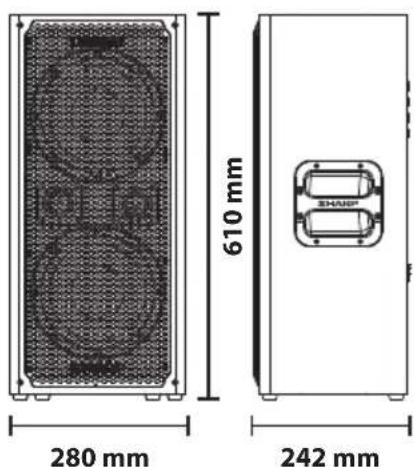
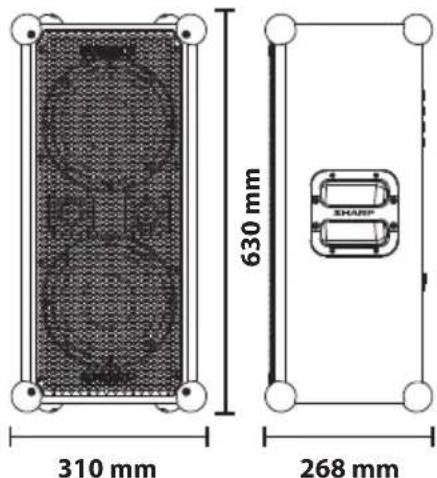
| Stroomvoorziening | Zasilanie | Источник пitaшия | AC 200-240 V ~ 50/60 Hz |
| Nominal energieverbruik | Znamionowe zužycie energia | НомINALьhoe энероградеюгпées | 120W |
| Energieverbruik stand-by | Zužycie energia w trybie czuwania | Зниот正能量 В ресиме ожIDsаня | <0.5W |
| Uitgangsvermögen | Moc wyjsciowa | Вуховая мошость | 120W RMS |
| Uitgangsvermögen luidspreker | Moc wyjsciowa gośników | Вуховая мошость гromgorobilеця | 105 dB (Sound Pressure Level) |
| Frequentierespons | Reakcja na噤stilwość | Поса вострацентаденя | 40Hz-20KHz |
| Batterij | Bateria | Актулайт | 14.8V 5000mAh Lithium-ion battery pack with power bank function and battery level indicator |
| Bluetooth | Bluetooth | Bluetooth | |
| Versie | Wersja | Версия | V5.0 |
| Maximaal overgedragen vermögen | Maksymalny poziom przekazywaney mocy | Масимальна мошость пeredачи | <20 dbm |
| Frequentiebanden | Pasma噤stilwość | ЧастOTные дINA附子 | 2402 MHz ~ 2480 MHz |
| Koppelnaam | Nazwa urzystzenia stosowsa w trybie parowania | Название ри установке coедиени | SUMOBOX CP-LS100 |

CC
Sharp Consumer Electronics Poland sp. z o.o. Ostaszewo 57B, 87-148 Lysomice, Poland
Made in China
SAU/MAN/0180
- User manual
- A
- Important safety instructions
- Please follow all safety instructions and heed all warnings. Keep this manual for future reference.
- Precautions
- Damage
- Power connection and accessibility
- Power source
- Fused moulded power plug (non rewireable) - UK, Malta, Cyprus and Ireland only.
- Power cord protection
- Child safety
- Location
- Insertion hazards
- Heat and operating temperature
- Naked flames
- Storms and lightning
- Maintenance
- Service and repair
- Caution: Prevention of hearing loss and damage
- Warning: Special instructions for handling the Lithium-ion battery pack
- It will work best at normal room temperature.
- Disposal of equipment and batteries
- CE and UKCA statement
- Introduction
- Connections and controls
- Box contents
- Optional Accessories:
- Initial set up
- Turning on the SumoBox
- If using SumoBox with instruments:
- If using SumoBox only with Bluetooth
- NOTE:
- Connection types
- Volume, bass, treble & reverb
- Volume (CH1, CH2 & CH3)
- Treble (CH1 & CH2 only)
- Bass (CH1 & CH2 only)
- Reverb (CH1 & CH2 only)
- Ducking mode
- Indoor / Outdoor mode
- Bluetooth and Duo Mode
- Connect via Bluetooth
- Duo Mode: True Wireless Stereo (TWS)
- NOTES:
- Speaker link
- You can do this in various ways:
- Sharp Life App
- To pair the app to the SumoBox, do the following:
- Initial set up
- Factory reset
- Standby mode
- Corner protectors and grille
- Positioning the SumoBox
- SAM by Devialet
- FAQ's
- Can I get additional battery packs?
- What do the LEDs on the rear panel mean?
- How do I disconnect the App?
- How many devices can I connect?
- Q.CanI customise SumoBox?
- Q.Does SumoBox have a standby mode?
- How long does the battery last?
- Q.Can I use SumoBox outdoors?
- Seguridad infantil
- De SumoBox inschakelen
- Reverb (alleen CH1 & CH2)
- IopKluoyehme nTuHnN u doctyn
- MCTOUYHKNTAHTN
- ΦopMoBaHnHa Bnka nTuHa n C nlaBkM npeOxApuHnteEm (He pa36OpHa) — TOnbko BenuKo6pTuHa, MaIbTa, Knp u NpHaHn.
- 3aunTa whypa nTuHn
- Be3onachoctb DeTei
- PacnoJoxeHne
- OnachocTN B CBA3N C NOnaDaHnEM BHyTpB NoCTopoHHNX PpeMeTOB
- IcToHnKu Tena pa6oay TempepaTy
- OTKpbItbI OROHb
- P03bl MOnHm
- Texnueckoe 06cnyxubahne
- 06cJyXnBaHne npeMOHT
- BHIMAHNE
- PCKYDAPA 3JNEKTPMUECKIM TOKOM. HEOTKpIBATb
- BHMaHne: IpeoTbpaueHne nToepn uxydseHna cnyxa
- IpeynpexkdeHne:CneuaNbHbIe HNCTpyKcnn NO NcNoB3OBAHnIO IHTm-NOHHoro aKKymyJrTOphoro 6loka
- yTnH3aun o6OpyObaHn n aKKymIaTOPoB
- Декларачnia O COOTBeTCTBn Tpe6OBaHnA M ДЯ NOlyeHnA mapKnpobKn CE n UKCA:
- BVeJeHne
- CoeHHennn n 3JeMeHtbl ynpaBneHnn
- BkJIoueHne SumoBox
- Ppi nCnoJIb3ObaHm SumoBox mHcTpymeHTaMn:
- Ptp nCnoB3OBAHm SumoBox tonbko c Bluetooth
- PIMMEYAHNE.
- Tunbi coeHHHeHn
- IpOMKoCTb, Hn3Kne yacTOTbl n peBep6epaunia
- TpomKocTb (CH1, CH2 n CH3)
- BbOCKe yactotbl (TolbKO CH1 n CH2)
- Hn3Kne yactotbl (Tolbko CH1 n CH2)
- Pebep6epaun(TolbKOCH1nCH2)
- Pexim npurnyuhenia
- Pexm 3KcnpyaTaunB nomeeHn / Ha ynuce
- Pexmm Duo: True Wireless Stereo (TWS)
- KaK DoIro yCToPcIbTO pa6oTaeT OT aKKyMynIaTopa?
- MoXHo Hn nCnONb3ObaTb SumoBox Ha yIuue?
- Technical specification | Technische Daten | Especificationtica | Caracteristiques techniques | Specifiche tecniche | Technische specificaties | Dane technicznce | Texnueckne cpeuФkaun
Brand : SHARP
Model : SumoBox CPLS100
Category : Bluetooth speaker