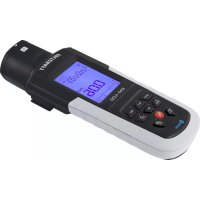
RM400 - Detector VOLTCRAFT - Free user manual and instructions
Find the device manual for free RM400 VOLTCRAFT in PDF.
Download the instructions for your Detector in PDF format for free! Find your manual RM400 - VOLTCRAFT and take your electronic device back in hand. On this page are published all the documents necessary for the use of your device. RM400 by VOLTCRAFT.
USER MANUAL RM400 VOLTCRAFT
Item No. 2564434 Page 18 - 33
F Mode d'emploi
RM-400 Balayeur à
rayonnement
N^ de commande 2564434 Page 34 - 49
2 Introduction 20
3 Intended use 20
4 Delivery content 20
5 Up-to-date operating instructions 21
6 Description of symbols. 21
7 Safety instructions 21
7.1 General information 21
7.2 Handling 22
7.3 Operating environment 22
7.4 Operation 22
7.5 User requirements 22
7.6 Batteries 23
8 Operating elements 23
8.1 Display 23
8.2 Product 24
9 Battery 25
9.1 Insert batteries 25
9.2 Battery voltage check 25
10 System settings 25
10.1 Settings 26
10.2 Factory default settings 26
11 Operation 26
11.1 Select radiation type: , , , X -ray 26
11.2 Power and backlight button 27
11.3 Select radiation dose rate unit ( Sv / h,mR / h) 27
11.4 Save data 27
11.5 Accumulated radiation dose rate 28
11.6 Pulse counting 28
12 Data transfer to computer 29
12.1 Install software on computer 29
12.2 Bluetooth data transmission 29
13 Cleaning and care. 29
14 Disposal 30
14.1 Product 30
14.2 (Rechargeable) batteries 31
15 Declaration of Conformity (DOC) 31
16 Technical data 32
16.1 Power supply 32
16.2 Product 32
16.3 Bluetooth module 32
16.4 Environment 33
16.5 Other 33
16.6 Software 33
2 Introduction
Dear customer,
Thank you for purchasing this product.
If there are any technical questions, please contact: www.conrad.com/contact
3 Intended use
The product is a radiation meter. Use the product to detect and measure -ray, -ray, -ray, and X-ray radiation levels.
The product is intended for indoor use only. Do not use it outdoors. Contact with moisture must be avoided under all circumstances.
If you use the product for purposes other than those described, the product may be damaged. Improper use can result in other hazards.
The product complies with the statutory national and European requirements. For safety and approval purposes, you must not rebuild and/or modify the product.
Read the operating instructions carefully and store them in a safe place. Make this product available to third parties only together with the operating instructions.
All company names and product names are trademarks of their respective owners. All rights reserved.
4 Delivery content
Radiation scanner
4x AA batteries
Carrying case
CD Software
Operating instructions
5 Up-to-date operating instructions
Download the latest operating instructions at www.conrad.com/downloads or scan the QR code shown. Follow the instructions on the website.
6 Description of symbols

The following symbols are on the product/appliance or are used in the text:

The symbol warns of hazards that can lead to personal injury.

Radiation warning. Precautions must be taken when performing measurements near a source of harmful radiation.
7 Safety instructions

Read the operating instructions carefully and especially observe the safety information. If you do not follow the safety instructions and information on proper handling in this manual, we assume no liability for any resulting personal injury or damage to property. Such cases will invalidate the warranty/guarantee.
7.1 General information
The device is not a toy. Keep it out of the reach of children and pets.
Do not leave packaging material lying around carelessly. This may become dangerous playing material for children.
If you have questions which remain unanswered by these operating instructions, contact our technical support service or other technical personnel.
Maintenance, modifications and repairs must only be completed by a technician or an authorised repair centre.
7.2 Handling
Please handle the product carefully. Jolts, impacts or a fall even from a low height can damage the product.
7.3 Operating environment
Do not place the product under any mechanical stress.
Protect the appliance from extreme temperatures, strong jolts, flammable gases, steam and solvents.
Protect the product from high humidity and moisture.
Protect the product from direct sunlight.
7.4 Operation
Consult an expert when in doubt about the operation, safety or connection of the appliance.
If it is no longer possible to operate the product safely, take it out of operation and protect it from any accidental use. DO NOT attempt to repair the product yourself. Safe operation can no longer be guaranteed if the product:
- is visibly damaged,
- is no longer working properly,
- has been stored for extended periods in poor ambient conditions or
- has been subjected to any serious transport-related stresses.
7.5 User requirements
Radiation can be hazardous to health. Persons that perform measurements in the presence of radioactivity must understand the hazards involved, be familiar with applicable guidelines, and take necessary precautions to protect themselves and others.
7.6 Batteries
Correct polarity must be observed while inserting batteries.
The batteries should be removed from the device if it is not used for a long period of time to avoid damage through leaking. Leaking or damaged batteries might cause acid burns when in contact with skin, therefore use suitable protective gloves to handle corrupted batteries.
Batteries must be kept out of reach of children. Do not leave batteries lying around, as there is risk, that children or pets swallow them.
All batteries should be replaced at the same time. Mixing old and new batteries in the device can lead to battery leakage and device damage.
Batteries must not be dismantled, short-circuited or thrown into fire. Never recharge non-rechargeable batteries. There is a risk of explosion!
8 Operating elements
8.1 Display

A Radiation measurement
B Date / time indicator
C Measuring function
D Readings / units of measure
E Radiation dose rate
F Measured ray(s) type
8.2 Product

1 Sensor window (G.M. Geiger counter tube).
2 Two-way ray selector switch: 2-y, + + +
3 Display with backlight
4:Date, time, alarm, beep volume, mean value measurement time, Bluetooth (ON/OFF)
5: Value down / save data
6 : Power (ON/OFF) / backlight
7: Toggle between: Sv/h and Rem/h dose rates
8 : Enter / confirm
9:Exit setup menu
10 Value up / battery level
11Accumulated count / measuring time
12 Toggle between: CPS (counts per second) CPM (counts per minute)
13 Battery compartment
9 Battery
9.1 Insert batteries
- Remove the battery compartment cover by releasing the locking screw. Be careful not to lose the screw.
- Insert 4x AA batteries matching the polarities shown.
- Replace the compartment cover.
9.2 Battery voltage check
Important:
- Replace the batteries before they are completely spent.
-
Power shut off due to low batteries will result in data loss.
-
Press the button to display the battery voltage.
-
Normal range is: 4.8 to 6.0V
-
The replace battery symbol will show if the voltage is: < 4.8 ~V .
-
Press to exit battery voltage check.
10 System settings
Configure various settings through the setup menu before using the device.
- Press and then / to select a setting.
-
Press to confirm the selection or press to exit the setup menu.
-
Press / to adjust values.
-
Press to toggle through settings.
-
Press save the setting and return to the main menu.
10.1 Settings
| Setting Description | |
| DATE Year, month, day | |
| TIME Hours, minutes | |
| ALM When the measured value is greater than the set value, a continuous beep will sound. Settings range: 1 - 999 μSv/h (default: 205 μSv/h). | |
| If set to ON, there will be a “tick” sound when radiation is detected. | |
| T Settings range: 8 - 120 seconds (default: 30 seconds). | |
10.2 Factory default settings
Remove then replace the batteries to reset all settings to factory defaults.
11 Operation
11.1 Select radiation type: , , , X-ray
Important:
Gently rotate the ray selector switch to prevent damage to the sensor.
In normal conditions, the sensor can detect the selected radiation value when the sensor is pointed towards the source of radiation.
| Switch position Detected ray type | |
| Middle Alpha (α) | |
| Left Beta (β) | |
| Right Gamma (y) | |
| Left, middle, right X-ray | |
11.2 Power and backlight button
Press and hold the button to switch power ON/OFF.
If the product is ON, press the button to switch the backlight ON/OFF.
Note:
- The backlight has a 1-minute auto shutoff time.
- Data will be saved when the power is switched off.
11.3 Select radiation dose rate unit (μSv/h, mR/h)
Press the button to switch between Sv / h and Rem/h.
If the reading is too low, the bar graph will be flat.
The Sv/h and Rem/h unit conversion is based on the following formula: 10 Sv / h = 1mRem / h
11.4 Save data
You can save up to 4000 measurements. Saved data includes date, time, value and unit.
Press to start / stop saving data.

will show when data is being recorded.
11.5 Accumulated radiation dose rate
You can measure the accumulated radiation dose over time.
The initial unit is Sv . If the measured dose rate increases, the unit will automatically change to mSv or Sv.
Press the button to cycle through modes:
Infinite dose rate accumulation calculation mode, "μSv" will show.
Timing measurement mode (default 60 "060" mins), "TIME" will flash.
Stop timing measurement, "TIME" will stop flashing.
To set the measuring time:
-
In timing measurement mode, press and hold to set the measuring time (001 - 999 minutes).
-
Press / to adjust values.
-
Press to toggle through settings.
-
After all the values have been set, pressing will save and exit settings.
11.6 Pulse counting
| Mode Description | |
| cps Pulse per second | |
| cpm | Pulse per minute. Counter will automatically switch to Sv (1 Sv = 100 Rem). |
| Pulse counting | Radiation is constantly measured by the Geiger tube and then converted into a pulse rate. “TIME” flashes when counting pulses, and stops flashing when stopped counting pulses. |
Press the button to cycle through modes: "cps" "cpm" "n" (counting) "stop counting).
Press to exit pulse counting.
12 Data transfer to computer
Use the bundled software to process and review the data.
12.1 Install software on computer
- Insert the CD-ROM into your computer and double-click the software file to install it.
- Follow the onscreen instructions to complete the installation process.
12.2 Bluetooth data transmission
Enable Bluetooth to transfer measured data to a computer in real-time using the bundled software.
- Press and then / to select "". Press to confirm.
- Press / to select Bluetooth ON/OFF. Press ESC to exit settings. "B" will blink to indicate Bluetooth is transmitting data.
- Open the software on the computer.
- Select "BLE", select the radiation meter from the dropdown menu and then click "CONNECT".

13 Cleaning and care
Important:
- Do not use aggressive cleaning agents, rubbing alcohol or other chemical solutions. They damage the housing and can cause the product to malfunction.
- Do not immerse the product in water.
Clean the product with a dry, fibre-free cloth.
14 Disposal
14.1 Product

This symbol must appear on any electrical and electronic equipment placed on the EU market. This symbol indicates that this device should not be disposed of as unsorted municipal waste at the end of its service life.
Owners of WEEE (Waste from Electrical and Electronic Equipment) shall dispose of it separately from unsorted municipal waste. Spent batteries and accumulators, which are not enclosed by the WEEE, as well as lamps that can be removed from the WEEE in a non-destructive manner, must be removed by end users from the WEEE in a non-destructive manner before it is handed over to a collection point.
Distributors of electrical and electronic equipment are legally obliged to provide free take-back of waste. Conrad provides the following return options free of charge (more details on our website):
in our Conrad offices
at the Conrad collection points
at the collection points of public waste management authorities or the collection points set up by manufacturers or distributors within the meaning of the ElektroG
End users are responsible for deleting personal data from the WEEE to be disposed of.
It should be noted that different obligations about the return or recycling of WEEE may apply in countries outside of Germany.
14.2 (Rechargeable) batteries
Remove batteries/rechargeable batteries, if any, and dispose of them separately from the product. According to the Battery Directive, end users are legally obliged to return all spent batteries/rechargeable batteries; they must not be disposed of in the normal household waste.

Batteries/rechargeable batteries containing hazardous substances are labelled with this symbol to indicate that disposal in household waste is forbidden. The abbreviations for heavy metals in batteries are: Cd = Cadmium, Hg = Mercury, Pb = Lead (name on (rechargeable) batteries, e.g. below the trash icon on the left).
Used (rechargeable) batteries can be returned to collection points in your municipality, our stores or wherever (rechargeable) batteries are sold. You thus fulfil your statutory obligations and contribute to environmental protection.
Batteries/rechargeable batteries that are disposed of should be protected against short circuit and their exposed terminals should be covered completely with insulating tape before disposal. Even empty batteries/rechargeable batteries can contain residual energy that may cause them to swell, burst, catch fire or explode in the event of a short circuit.
15 Declaration of Conformity (DOC)
Conrad Electronic SE, Klaus-Conrad-Straße 1, D-92240 Hirschau hereby declares that this product conforms to the 2014/53/EU directive.
Click on the following link to read the full text of the EU declaration of conformity: www.conrad.com/downloads
Enter the product item number in the search box. You can then download the EU declaration of conformity in the available languages.
16 Technical data
16.1 Power supply
Batteries 4x AA 1.5 V batteries
16.2 Product
Ray Types. Alpha (α), Beta (β), Gamma (γ), X-ray
Measuring ranges. Radiation dose rate: 0.01 Sv / h - 1000 Sv / h Impulse dose rate: 0-4,000 cpm, 0-4,000 cps Radiation dose accumulation: 0.001 Sv -9999 Sv Impulse dose accumulation: 0-9999
Sensitivity Cobalt-60 ray environment at 1 Sv / h 108x pulse or 1000 cpm/mR/hr Alpha ray: from 4 MeV Beta ray: from 0.2 MeV Gamma ray: from 0.02 MeV X-ray: from 0.02 MeV
Detector type. Halogencompensating (G.M Geiger counter tube)
Accuracy. < 10% (< 500 Sv/h) < 20% (>500 Sv/h)
Internal memory. 4000 data sets (auto save)
16.3 Bluetooth module
Version. 4.0
Frequency. 2.402 - 2.480 GHz
Transmission power. -6.99 dBm
Transmission distance.......max. 3 m
16.4 Environment
Operating altitude. max. 2000 m
Operating temperature .0 to +50^
Storage temperature. -10 to +50^
Operating/Storage humidity. < 75% RH (non-condensing) (-10 to +30 °C)
<50 % RH (non-condensing) (+30 to +50 °C)
16.5 Other
Dimensions (H x W x D) 205 x 71 x 49 mm
Weight approx. 226 g (without batteries)
16.6 Software
Supported OS.......Windows 10 (32/64 bit), 11 (and above)
Chere cliente, cher client,
France (email): technique@conrad-france.fr
stockage <75% HR (sans condensation)
(-10a +30^)
<50 % HR (sans condensation)
(+30a +50^)
16.5 Autre
Copyright 2023 by Conrad Electronic SE.

This is a publication by Conrad Electronic SE, Klaus-Conrad-Str. 1, D-92240 Hirschau (www.conrad.com).
All rights including translation reserved. Reproduction by any method, e.g. photocopy, microfilming, or the capture in electronic data processing systems require the prior written approval by the editor. Reprinting, also in part, is prohibited. This publication represents the technical status at the time of printing.
Copyright 2023 by Conrad Electronic SE.

Copyright 2023 by Conrad Electronic SE.

Copyright 2023 by Conrad Electronic SE.
EasyManual