
Panoramico 90 PlUS - Cooker FALMEC - Free user manual and instructions
Find the device manual for free Panoramico 90 PlUS FALMEC in PDF.
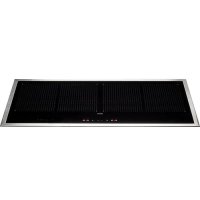



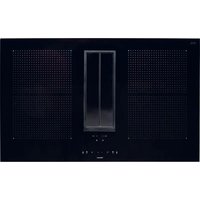
| Product type | Built-in induction hob |
| Brand | Falmec |
| Model | Panoramico 90 Plus |
| Width | 90 cm |
| Number of cooking zones | 4 induction zones |
| Total power | 7400 W |
| Power supply | 220-240 V ~ 50/60 Hz (1P+N) or 380-415 V ~ 50/60 Hz (2P+N or 3P+N) |
| Cooking functions | Booster, Bridge, Keep warm (3 levels), Stop & Go, Chef, Timer with auto-off |
| Booster function | Maximum power for up to 10 minutes |
| Bridge function | Combines two cooking zones for a large surface (minimum pan diameter: 230 mm) |
| Minimum pan diameter | 120 mm |
| Safety | Control lock, residual heat indicator (H), automatic safety shut-off, overheat protection, pan detection |
| Cleaning | Use a specific ceramic glass cleaner; do not use a steam cleaner |
| Hood compatibility | Can be connected to a Falmec hood with touch control (light, speed, timer) |
| Required cookware type | Magnetic base (induction) |
Frequently Asked Questions - Panoramico 90 PlUS FALMEC
User questions about Panoramico 90 PlUS FALMEC
0 question about this device. Answer the ones you know or ask your own.
Ask a new question about this device
Download the instructions for your Cooker in PDF format for free! Find your manual Panoramico 90 PlUS - FALMEC and take your electronic device back in hand. On this page are published all the documents necessary for the use of your device. Panoramico 90 PlUS by FALMEC.
USER MANUAL Panoramico 90 PlUS FALMEC
Panoramico 90
Panoramico 90 Plus
IT LIBRETTO ISTRUZIONI
EN INSTRUCTIONS BOOKLET
PANORAMICO
90 Plus
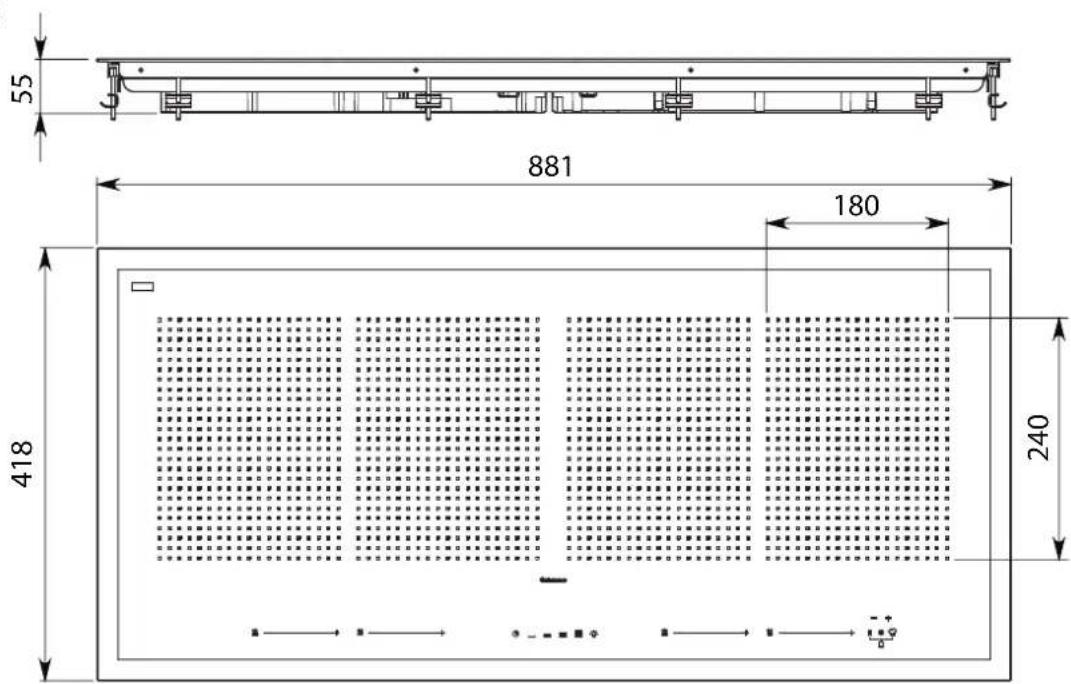
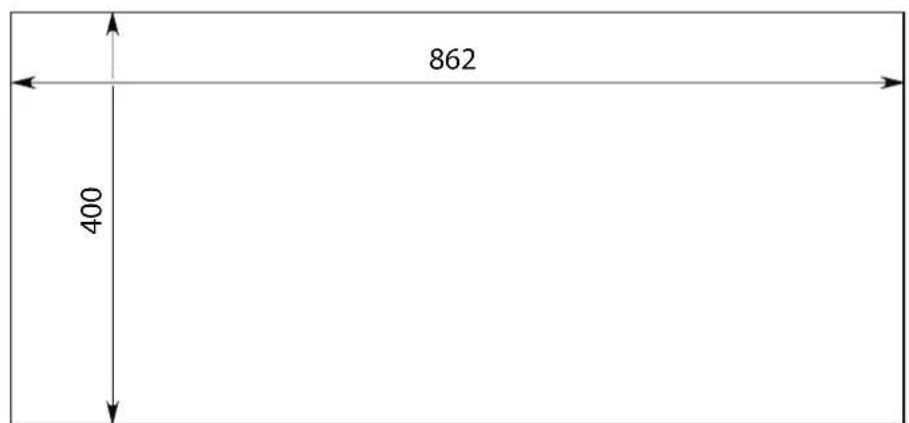
IT - Dimensione foro top EN - Top hole size DE - Abmessungen der Öffnung oben FR - Dimension du trou du top ES - Dimensiones orificio top RU - Размеры выреза под варочную панель PL - Wymiar otworu górnego DK - Mål hul top
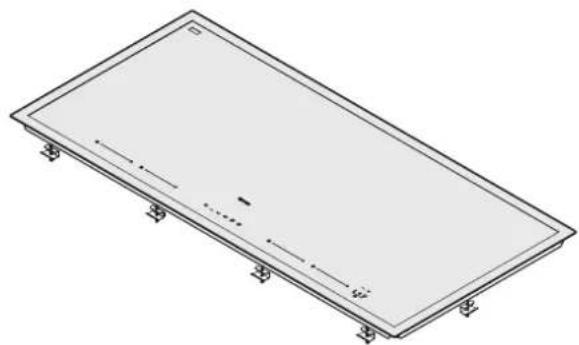
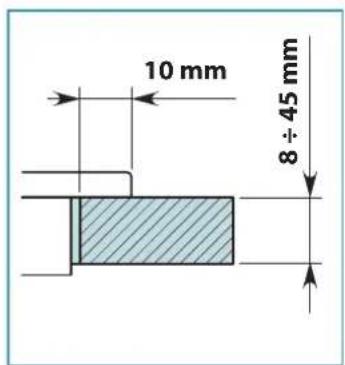
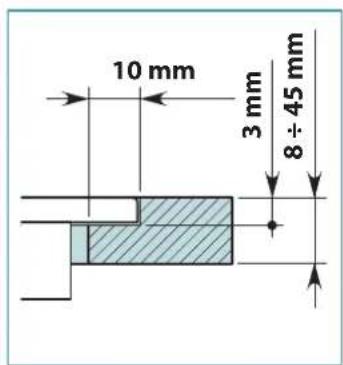

EN - Safety distance between the top and: oven (2), general counter (3).
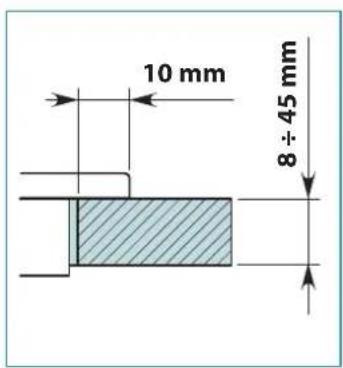
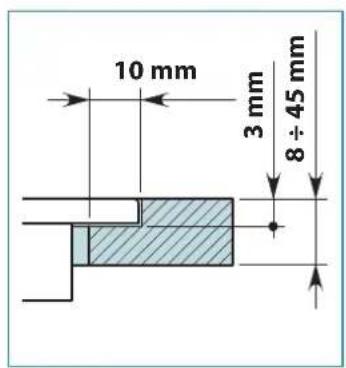
EN - Embedding for cookers.
EN - (*) with compensator.
EN - Electrical connection.
SAFETY INSTRUCTIONS AND WARNINGS

These warnings have been drawn up for your personal safety and those of others. You are therefore kindly asked to read the booklet carefully in its entirety before using or cleaning the equipment.
The Manufacturer declines all responsibility for any damage caused directly, or indirectly, to persons, things and pets as a consequence of failing to comply with the safety warnings indicated in this booklet.
It is imperative that this instructions booklet is kept together with the equipment for any future consultation.

Intended use
- This cooker is intended to be used in domestic environments to prepare and keep dishes warm.
- Do not install the cooker outdoors and do not expose it to outdoor environment (rain, wind, etc.).
- Any other use is not admitted.
- Build in this cooker on ovens or electric kitchens only, if fitted with a fume cooling system.
- The equipment can be used by children over the age of 8 and by persons with reduced physical, sensory and mental abilities, or with no experience or knowledge, as long as they do so under supervision or after having received relative instructions regarding safe use of the equipment and understanding of the dangers connected to it. Children are not to play with the equipment. Cleaning and maintenance by the user must not be carried out by children without supervision.
- Do not leave the cook top unmanned while it is working.

Danger of burns
- Use the control lock to avoid that unauthorised people can switch on the appliance by themselves.
- Place handles of frying pans and saucepans in a way that children cannot touch them.
- Switch off the cooking areas after use.
- Do not place any metal object on cooking areas that are on.

Technical safety
• Installation operations are to be carried out by
skilled and qualified installers in accordance with the instructions in this booklet and in compliance with the regulations in force.
If the power cable or other components are damaged, the cook top shall NOT be used: disconnect the cooker from the power supply and contact the Dealer or an authorized Servicing Department for repairs.
Do not modify the electrical, mechanical, or functional structure of the equipment.
Do not personally try to carry out repairs or replacements. Interventions carried out by incompetent and unauthorized persons can cause serious damage to the unit or physical and personal harm, not covered by the Manufacturer's warranty.
Before installing the cooker, check the integrity and function of each part. Should anomalies be noted, do not proceed with installation and contact the Dealer.

The electrical system to which the cooker is to be connected must be in accordance with local standards and supplied with earthed connection in compliance with safety regulations in the country of use. It must also comply with European standards regarding radio anti-interference properties.
- The connection data (voltage and frequency) shown on the data plate of the cooker must match those of the electric network. Compare these data before connection. In case of doubts, refer to an electrician.
- Do not use the cooker before installing it.
- It is forbidden to use the cooktop on moving equipment.
- Never open the case of the appliance.
- Falmec assures compliance with safety standards only with original spare parts.
- The appliance is not intended for use with an external timer or remote control.
USE WARNINGS

- Before powering the appliance for the first time, remove any protective films and adhesives.
- While using, saucepans and kitchenware can cause noise that can depend on:
- a high power level.
- different materials of the bottom of saucepans.
- Never use water to put fire out. Deactivate the cooking area. Choke flames with a cover, a fireproofing blanket or something similar to it.
- Do not keep inflammable objects in the drawers below the cooker. The cutlery tray shall be made up of fire-resistant material.
- Do not heat empty saucepans or frying pans and always check that saucepans have a minimum quantity of liquids inside.
- Switch off the cooker after use.
- Continuously check the cooking in case of greases and oils used, as they can easily catch fire.
- Heat greases and oils at maximum for one minute and never use the Booster function.
- Pay attention not to burn yourself during and after using the device.
- Make sure that no fixed or mobile power cable of the device is in contact with the glass or a hot frying pan.
- Do not use the cooker to heat pots.
- Do not apply any type of cover on the cooktop.
- Electrical cables are not to be in contact with the cooker.
- It is recommended to protect hands from heat using pot holders. Only use dry gloves or pot holders.
- Only use cookware with a smooth and magnetic bottom suitable for induction hobs.
- Avoid that sugar, synthetic materials, aluminium, or films come into contact with the hot areas. During cooling, these substances can cause cracks or other alterations on the pyroceram surface: switch off the device and immediately remove them from the cooking area that is still hot.
- When moving saucepans, make sure to lift them rather than slide them over the surface.
- Saucepans and the cooker must be perfectly clean before being in contact.
- Do not drop objects on the hob!

Only use saucepans with a magnetic bottom. Other materials are not allowed.
- Use saucepans of appropriate size for the desired cooking area. Always use a saucepan or frying pan on each cooking area, even with the BRIDGE function.
- Do not place hot saucepans on the sensor keys or the LEDs, as this could cause damage to the electronic components underneath. Keep controls and lamps always clean.
- Do not keep metal objects directly below the cooker.
- Always use covers to avoid heat dispersion. Cook with little water. After starting grilling or cooking dishes, bring the power level to a lower one.
Safety and warning indications
Warning for people wearing pacemakers:
Keep in mind that when the appliance is being used, an electromagnetic field forms in the immediate proximity. There is therefore a remote possibility that the operation of the pacemaker might be affected. If in doubt, contact the pacemaker manufacturer or your GP.
The electromagnetic field of the hob during operation can affect the operation of magnetisable objects. Credit cards, life-saving devices, pocket calculators, etc. should not be in the proximity of a hob when in operation.
Metal objects stored in the drawer underneath the appliance may become hot in case of prolonged use. Do not store metal objects in a drawer immediately underneath the hob.
The appliance is equipped with cooling fans. If there is a drawer under a built-in appliance, a separation must be ensured between the drawer and the bottom of the appliance, for appropriate hob ventilation and to make sure the fans are not obstructed.
Never use two saucepans or pans on the same cooking zone, or a rectangular cooking zone, or a Power-Flex cooking area.
SAFETY DEVICES ON THE COOKER
Safety shutdown
If a cooking area exceeds the maximum time for operation at the same power, it is automatically switched off and the indication of the residual heat is shown. To reset the cooking area, touch the necessary keys.
| Power level | low 1 | 2 3 4 | 5 6 7 | 8 9 P | |||||||
| Maximum duration of operation in hours | 8.7 2 | 0 8.7 | 6.7 5.3 | 4.3 3 | 5 2.8 | 2.3 1.9 | 1.5 |
The cooker switches off automatically if one or more controls stay covered for more than 10 seconds.
To restore the proper operation:
- Remove all objects from the control panel.
- Clean the control panel.
- Restart the cooker and the concerned area.
OVERHEATING DEVICE
Before items of the cooker can overheat, the control reduces the used power by following this procedure for protection measures:
- Deactivation of booster and power booster if turned on.
- Reduction of the power level set.
- Shutdown of the cooking area concerned. On the display of the cooking area the message "E2" is displayed.
It is possible to restore the cooking area when the default message is off.
SAFETY INSTRUCTIONS FOR ASSEMBLY
Install the cooker after installing kitchen cabinets and basis.
Make sure that worktops have been veneered with thermoresistant glue in order not to suffer deflections or detachments.

It is forbidden to install the appliance on fridges or freezers, washing machines, dishwashers, or tumble driers.
ELECTRICAL SAFETY
The electrical system to which the cooker is to be connected must be in accordance with local standards and supplied with earthed connection in compliance with safety regulations in the country of use. It must also comply with European standards regarding radio antistatic properties.
Make sure that it can't be possible to touch the power cable of the cooker after it has been built-in and that it is not subject to mechanical stress.
The socket used to connect the installed equipment to the electrical power supply must be within reach: otherwise, install a mains switch to disconnect the machine when required.
Any changes to the electrical system must be carried out by a qualified electrician.
Do not try to solve the problem yourself in the event of equipment malfunction, but contact the Dealer or an authorised Servicing Department for repairs.

When installing the cooker, disconnect the equipment by removing the plug or switching off the main switch.
ELECTRICAL CONNECTION (only intended for qualified personnel)

Disconnect the equipment from mains power network before carrying out any operation on the cooker.
Make sure that electric wires inside the cooker are not disconnected.
ted or cut:
In the event of damage, contact your nearest Servicing Department.
Refer to qualified personnel for electrical connections.
Connection must be carried out in compliance with the provisions of law in force.
Before connecting the cooker to the mains power network, check that:
- The mains voltage corresponds with the voltage indicated on the data plate located inside the cooker;
- The electrical system is compliant and can withstand the load (see the technical specifications located inside the cooker);
- The power supply plug and cable do not come into contact with temperatures exceeding 70 °C;
- The power supply system is effectively and properly connected to earth in compliance with regulations in force.
- The socket used to connect the cooker is within reach.
In case of:
- Devices fitted with cables without a plug: the type of plug to use is a "standardised" one. The wires must be connected as follows: yellow-green for earthing, blue for neutral and brown for the phase. The plug must be connected to an adequate safety socket.
- Fixed equipment not provided with a power supply cable and plug, or any other device that ensures disconnection from the electrical mains, with an opening gap of the contacts that enables total disconnection in overvoltage category III conditions.
Said disconnection devices must be provided in the mains power supply in compliance with installation regulations.
The yellow/green earth cable must not be cut off by the switch.
The Manufacturer declines all responsibility for failure to comply with the safety regulations.
Connection of the cooker (Panoramico 90):
| network Connection Cable sec- | tion | Power ca-ble | Switch gauge |
| 220V - 240V~50/60Hz | 1P+N / 2P 3 x 2.5 mm 2 | H 05 W - FH 05 RR - F | 25 A * |
| 380V - 415V~50/60Hz | 2P+N 4 x 1.5 mm 2 | H 05 W - FH 05 RR - F | 16 A * |
| 380V - 415V~50/60Hz | 3P+N 5 x 1.5 mm 2 | H 05 W - FH 05 RR - F | 16 A * |
* calculated with the contemporary factor in compliance with EN 60 335-2-6.
POWER:
| Feature 90 90 Plus | ||
| Total power | 2800-7400W | 7400W |
| Position 1 | ||
| Rated power | 1600W | 2100W |
| Booster power | 1850W | 3700W |
| Position 2 | ||
| Rated power | 2100W | 2100W |
| Booster power (1/2) | 3000W | 3700W |
| Position 3 | ||
| Rated power | 2100W | 2100W |
| Booster power (1/2) | 3000W | 3700W |
| Position 4 | ||
| Rated power | 1600W | 2100W |
| Booster power | 1850W | 3700W |
PANORAMICO
90

| Control description | |
| 1 | Cooker top ON/OFF. In case no other control is enabled, the cooker switches off automatically after a few seconds |
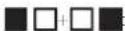
| ■□ | Selection of the front cooking area. If pressed together with □■it enables the BRIDGE function. |
| □■ | Selection of the back cooking area. If pressed together with ■□it enables the BRIDGE function. |
| ˆ | Control block: pressed for more than 2 seconds it inhibits all controls. To release controls, repeat the operation. |
| + | Increase of the power level for cooking and booster selection, or increase of cooking time of the TIMER function. |
| - | Decrease of the power level for cooking and booster selection, or decrease of cooking time of the TIMER function. |
| Display display | description |
| Cooking area in stand-by | |
| Levels of power from the lowest to the highest one, which can be selected pressing the keys + and - | |
| Power boost : maximum cooking power. | |
| Indication of the residual heat | |
| level of power between 0 and 1, suitable to keep dishes warm | |
| bridge function enabled.(minimum saucepan diameter: 230 mm) | |
| Saucepan not on the cooker or not suitable for material and size.(minimum saucepan diameter: 120 mm) | |
| Control block function enabled. |
PANORAMICO
90 Plus


| Control description | |
| 1 | Cooker ON / OFF In case no other control is enabled, the cooker switches off automatically after a few seconds. |
| Cooking area activation, selection of the cooking power level from 1 to 9 and Booster activation. If pressed together with it enables the BRIDGE function. | |
| Control block: pressed for more than 2 seconds it inhibits all controls. To release controls, repeat the operation. | |
| + | increase of the cooking time of the TIMER function. |
| - | decrease of the cooking time of the TIMER function. |
| II | Stop and Go function. |
| It sets a customised level of power for each area to: start cooking, continue cooking, finish cooking, keeping warm. | |
| Keep warm function: it allows to select 3 levels of power to keep dishes warm. |
| Display display | description |
| Cooking area in stand-by. | |
| Levels of power from the lowest to the highest one, which can be selected pressing the keys + and -. | |
| Power boost : maximum cooking power. | |
| Indication of Stop and Go function enabled | |
| Indication of the residual heat. | |
| Function for the automatic start of cooking. | |
| bridge function enabled.(minimum saucepan diameter: 230 mm) | |
| Saucepan not on the cooker or not suitable for material and size.(minimum saucepan diameter: 120 mm) | |
| Control block function enabled. |
OPERATION AND USE OF THE COOKTOP
ONLY USE COOKWARE SUITABLE FOR INDUCTION HOBS.
When a cooking area is turned on, the bottom of the saucepan heats. The cooking area only heats thanks to the heat given by the saucepan. The cooktop automatically detects the size of the saucepan. The heating power is to be chosen based on what shall be cooked. Please find below a short table:
SETTING AREAS
| 1 - 2 | MeltHeat | Sauces, butter, chocolate, gelatinePrecooked dishes |
| 2 - 3 | WhiskDefrost | Rice, pudding and cooked dishesVegetables, fish, frozen food |
| 3 - 4 | Steam | Vegetables, fish, meat |
| 4 - 5 | Boil | Boiled potatoes, soups, pastaFresh vegetables |
| 6 - 7 | Cook over a low heat Meat, liver, eggs, sausagesGoulash, rolate, tripe | |
| 7 - 8 | CookFry | Potatoes, donuts, cakes |
| 9 | Fry, bring to the boil | Steaks, omelettesBoil |
| P | Fry, bring to the boil | Bring to the boil big quantities of water |
Remark: heating time of cooktops is shorter than the gas cookers.
BASIC FUNCTIONS
See table of the corresponding model in the previous page.
BRIDGE FUNCTION
This function allows having cooking areas 1-2 and/or 3-4 working at the same time.
To enable:
- Enable the cooktop;
For "90":
press simultaneously the symbols
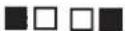
- the symbol 7 will be displayed on the screen of the front cooking area;
- Push the keys + and - to set power.
Note: this function can only be activated between the 2 right or the 2 left plates (not the two centre plates).
For "90 Plus":
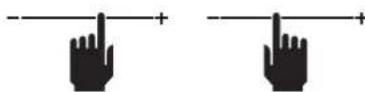
press simultaneously the symbols:
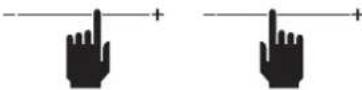
- The symbols will appear on the display of the two BRIDGE cooking areas; - Set the power with the slider of the front cooking area.
DEACTIVATION of the BRIDGE function:
For "90":
press simultaneously the symbols
For "90 Plus":
press simultaneously the symbols:

The Booster strengthens power, so that big quantities can be heated (e.g. water to cook pasta).
This power increase is enabled for max. 10 minutes.
For "90":
- Turn on the cooker;
- select the cooking area;
- touch (+) until on the screen P is displayed on the back cooking area.
Note: it is not possible to only set to P one right or one left plate at the time (and no more than 2 in total).
If the outermost plate is set to 1 , the one near cannot be set to exceed the level.
If the innermost plate is set to P, the outer one switches off.
For "90 Plus":
- Turn on the cooker;
- touch the slider to bring power to and then the key (+).
At the end of the Booster mode, power is automatically reduced to 9
If a zone is set to P, the nearby zone cannot exceed level 5.
KEEP WARM FUNCTION
Version "90"
42°C - Keeping temperature of cooked dishes:
Turn on the cooker;
Select the cooking area;
Touch (+) and then (-): the symbol will appear.
Version "90 Plus"
Turn on the cooker;
Touch the key regarding the concerned cooking area and select one of the 3 levels of temperature:
42°C - Keeping temperature of cooked dishes;
70°C - Keep on cooking
94°C - Bring to the boil
Shutdown of the cooker
To shutdown the cooking area:
Touch the key (-) until 0 is displayed on the screen of the cooking area.
If the cooking area is still too hot, the residual heat is indicated by H.
Turn off the cooker.
Touch the key Ⓐ to deactivate all cooking areas.
On the display of the cooking areas that are still too hot, the symbol is displayed.
Do not touch the cooking areas until the H indicator is off.
TIMER FUNCTION
AND AUTOMATIC SHUTDOWN
The timer has two functions:
1 - TIMER;
2 - AUTOMATIC SHUTDOWN of one or more cooking areas.
It is possible to set a duration up to 99 minutes for the "90" version and 119 minutes for the "90 Plus" version.
Once the set time has elapsed, the display shows 00 and a sound warning is activated, which can be deactivated by pressing the (+) or (-) keys.
TIMER
To set:
- If off, turn the hob on using the ② key and touch (+) and (-) at the same time. (on the Plus version the lamp is on ③)
- Set the desired time touching keys (+) and (-).
Timer starts passing.
To modify time repeat the procedure from point 1.
To cancel timer:
- If off, turn the hob on and touch (+) and (-) at the same time. (on the Plus version the lamp is on ⚙️)
- Touch the key (-) to bring time to 00.
AUTOMATIC SHUTDOWN
For the automatic shutdown function:
1 - turn on the cooker; 2 - select the cooking area; 3 - select the level; 4 - set the timer as described above.
To set the automatic shutdown for another cooking area, repeat the procedure from point 2.
TIMER and AUTOMATIC SHUTDOWN can be used simultaneously.
ADDITIONAL FUNCTIONS "90 PLUS" MODEL
STOP AND GO
This function allows to temporarily stop cooking and restore it with the same settings.
To enable, touch the key ||
If the function is not deactivated within 10 minutes, the cooker switches off.
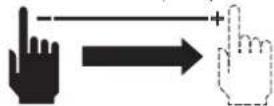
For deactivation:
Touch the key I and within 5 seconds completely slide the slider to the right.
AUTOMATIC PROGRAMMING OF THE COOKING
This function allows to speed up the start of cooking.
The procedure is the following:
1 - Turn on the cooker.
2 - Touch for more than 2 seconds the desired level of cooking:
On the display will be displayed and the desired level of cooking.

For a certain period the cooking area will work at the maximum power to then reach the set level.
To deactivate the function:
touch again the control and change the power level.
RESET FUNCTION FOR ACCIDENTAL SWITCH OFF
After turning off the cooker, it is possible to restore the last selected settings:
- Status of cooking of all cooking areas (power).
- Minutes and seconds of the timer by programmed cooking areas.
· Automatic programming of cooking.
The restore procedure is the following:
- turn on the cooker.
- touch within 6 seconds the key II
Previous settings are restored.
CHEF FUNCTION

It allows setting for each cooking area pre-defined power for each cooking phase.
AREA 4: power level 9. Cooking start.
AREA 3: power level 6. Cooking continuation.
AREA 2: power level 3. Cooking end.
AREA 1: power level 1. Keep warm.
TOUCH PUSHBUTTON PANEL (For use with remote hoods)

| — | ON/OFFMotor on/off and Speed 1 |
| = | Speed 2 activation |
| ≡ | Speed 3 activation |
| Speed 4 is only active for a few minutes, then speed 3 activates. | |
| Light on/offShort pulse: light on/offLong pulse: change of light tone from 2700K-5600K (hoods with dynamic light ( [IMAGE] ) | |
| TIMER(red LLD flashing)Auto switch off after 15 min. |
CODE CHANGE ON HOOD CONTROLS
In case of only one hood control, go to item 2.
In case of several control positions in the same room, a new code can be created by following the procedure below.

Disconnect the power to the hood before starting the procedure.
1) - CREATE A NEW CODE
The procedure is to be carried out using the pushbutton panel found on the hob.
- Press LIGHT and TIMER simultaneously until the display starts flashing.
- Press the 2nd speed key for a few seconds.

Reconnect the hood to the electrical power supply, making sure that the lights and motor are off.
2) - ASSOCIATION BETWEEN THE HOB CONTROLS AND THE HOOD
Press LIGHT or TIMER (see the instruction manual for the hood) on the hood pushbutton panel for 2 seconds:
The key turns on.
Press the LIGHT key on the hob within 5 seconds.
RESTORING DEFAULT CODE
The procedure is to be carried out if the hob is disposed of, sold or transferred.

Disconnect the power to the hood before starting the procedure.
Press LIGHT and TIMER at the same time until the keys start flashing.
Press the and speed keys for a few seconds.
Perform the procedure described in point 2.
WHAT TO DO IN CASE OF PROBLEMS
The cooker or cooking areas do not turn on:
- The cooker is not connected to the electric network.
- The protection fuse is released.
- Check if the block is not active.
- Keys are covered with water or grease.
- An object is placed on the keys.

The symbol is displayed
- There is no saucepan on the cooking area.
- The container used is not compatible with cooktops.
- The diameter of the saucepan bottom is too small compared to the cooking area.
The symbol [E] is displayed:
- Disconnect and connect the cooker.
- Contact the after-sales centre.
One of the areas or the entire cooker turns off:
- The safety overheating system is active; · The cooker or one cooking area remains on for too long;
- one or more keys are covered;
- one of the saucepans is empty and the bottom overheated.
The fan keeps on working after the cooker shutdown:
- This is not a malfunction: the fan keeps on protecting the electronic power unit of the device.
- The fan stops automatically.
10 ERROR CODES
For supporting a service technician in case of error, the UI displays error codes. In combination with the provided document "error codes Basic 2" which includes detailed information, a complete error matrix description is available.
E.G.O's standard error codes are listed below; customized UI can be different. In the standard general UI, errors (Er xx) and cooking zone errors (E/x) differ. In case of cooking zone errors, the display of the incorrect cooking zone blinks alternately "E" and a hexcode "X".
| Error code | Description possible causes | Remedy |
| The cooking zone can be configured if a static "C" is shown | No error, the user is in the service menu. | |
| The cooking will be configured if a flashing "C" is shown. After a successful configuration the relevant display shows "-". If "-" is not displayed check the possible causes of the E/5 | User is in the service menu, no error | |
| A flashing "E" on each cooking zone indicates that all configs will be deleted | User is in service menu, no error | |
| Temperature limits are exceeded | Pt or glass temperature is too high NTC -> electronic temperature too high |
| E3 | Unsuitable pot, e.g. loss of the magnetic characteristics because of temperature in the bottom | On the module a pot creates an improper operating point which can destroy devices, e.g IGBTs. | 1. The error is automatically cancelled after 8 s and the cooking zone can be used again. In case of further upcoming errors the pot has to be replaced.2. The module has to be changed if the error comes without a pot on the cooking zone. |
| E4 | Unconfigured induction module (all induction module answer to UI, but any element is related to the effected cooking zone.) | induction module is not configured | Delete the hob configuration and activate the manual configuration.Start the UI service menu to configure the induction module if the listed points are not successful replace the module. |
| E5 | No communication between UI and induction module | No power supply of induction module.Bad cabling or defect | Check power and LIN connections. If connection is OK, replace the module |
| E6 | Main power disturbance | 1. Failure in main power frequency detection2. Overvoltage | Check main power voltage and frequency, if ok replace the module |
| E7 | Non assignable failure | Replace module or User interface | |
| E8 | Fan failure Fan or control electronic is defect | Replace the module | |
| E9 | Defect ivetemperature probe on inductor | Sensor signal out of valid range; sensor or electronic is defect | Replace the module |
| EA | Hardware defect of induction module | Defect hardware device detected by the self-check of the module | Replace the module |
| EC | Configuration failure | 2 cooking zones are dedicated to the same element of the UI | Delete the actual configuration manual configuration with service menu |
| EH | Fixed sensor value (test function for T probe on inductor) | Not enough temperature change (10 K) within 5 min after switch on the hob | System must cool down |
| No functionality and no displaying | Overvoltage on the switch mode power supply (no functionality) | 400 V connection | Disconnect and correct the power line connection |
Note:
Not each failure can be detected automatically by the system, e.g., in case of defect of the User interface power supply.
CLEANING AND MAINTENANCE INSTRUCTIONS

ATTENTION!
For cleaning, never use a steam equipment.
Before cleaning the cooker, make sure that it is at room temperature.
Always clean the cooker after each use with a specific cleanser for pyroceram.
Do not use products containing:
- corrosive agents (soda, acids, ammoniac).
- abrasive agents (dusts or paste).
Do not use pointed or abrasive objects.
After cleaning, dry the appliance with a soft cloth.
If the appliance is built-in over an oven or an electric kitchen fitted with pyrolytic system, do not operate it while the pyrolytic procedure is under way, as the overheating protection of the cooker can be released (see relevant chapter).
DISPOSAL AFTER END OF USEFUL LIFE

The crossed-out wheeled bin symbol on the appliance means that the product is WEEE, i.e. "Waste electrical and electronic equipment", accordingly it must not be disposed of with unsorted waste (i.e. with
"mixed household waste"), but it must be disposed of separately so that it can undergo specific operations for its re-use, or a specific treatment, to remove and safely dispose of any substances that may be harmful to the environment and remove the raw materials that can be recycled. Proper disposal of these products contributes to saving valuable resources and avoid potential negative effects on personal health and the environment, which may be caused by inappropriate disposal of waste.
You are kindly asked to contact your local authorities for further information regarding the designated waste collection points nearest to you. Penalties for improper disposal of such waste can be applied in compliance with national regulations.
INFORMATION ON DISPOSAL IN EUROPEAN UNION COUNTRIES
The EU WEEE Directive was implemented differently in each country, accordingly, if you wish to dispose of this appliance we suggest contacting your local authorities or dealer to find out what the correct method of disposal is.
INFORMATION ON DISPOSAL IN NON-EUROPEAN UNION COUNTRIES
The crossed-out trash or refuse bin symbol is only valid in the European Union: if you wish to dispose of this appliance in other countries, we suggest contacting your local authorities or dealer to find out what the correct method of disposal is.

WARNING!
The Manufacturer reserves the right to make changes to the equipment at any time and without prior notice. Printing, translation and reproduction, even partial, of this manual are bound by the Manufacturer's authorisation.
Technical information, graphic representations and specifications in this manual are for information purposes and cannot be divulged.
This manual is written in Italian. The Manufacturer is not responsible for any transcription or translation errors.
- PANORAMICO
- PANORAMICO 90 PLUS
- PLUS
- SAFETY INSTRUCTIONS AND WARNINGS
- INTENDED USE
- DANGER OF BURNS
- TECHNICAL SAFETY
- USE WARNINGS
- SAFETY AND WARNING INDICATIONS
- WARNING FOR PEOPLE WEARING PACEMAKERS
- SAFETY DEVICES ON THE COOKER
- SAFETY SHUTDOWN
- OVERHEATING DEVICE
- SAFETY INSTRUCTIONS FOR ASSEMBLY
- ELECTRICAL SAFETY
- ELECTRICAL CONNECTION (ONLY INTENDED FOR QUALIFIED PERSONNEL)
- OPERATION AND USE OF THE COOKTOP
- ONLY USE COOKWARE SUITABLE FOR INDUCTION HOBS
- BASIC FUNCTIONS
- BRIDGE FUNCTION
- FOR
- FOR "90 PLUS
- DEACTIVATION OF THE BRIDGE FUNCTION
- KEEP WARM FUNCTION
- VERSION
- VERSION "90 PLUS
- SHUTDOWN OF THE COOKER
- TO SHUTDOWN THE COOKING AREA
- TURN OFF THE COOKER
- TIMER FUNCTION
- AND AUTOMATIC SHUTDOWN
- TIMER
- TO SET
- AUTOMATIC SHUTDOWN
- ADDITIONAL FUNCTIONS "90 PLUS" MODEL
- STOP AND GO
- FOR DEACTIVATION
- AUTOMATIC PROGRAMMING OF THE COOKING
- RESET FUNCTION FOR ACCIDENTAL SWITCH OFF
- CHEF FUNCTION
- TOUCH PUSHBUTTON PANEL (FOR USE WITH REMOTE HOODS)
- CODE CHANGE ON HOOD CONTROLS
- CREATE A NEW CODE
- ASSOCIATION BETWEEN THE HOB CONTROLS AND THE HOOD
- RESTORING DEFAULT CODE
- WHAT TO DO IN CASE OF PROBLEMS
- THE COOKER OR COOKING AREAS DO NOT TURN ON
- THE SYMBOL IS DISPLAYED
- THE SYMBOL [E] IS DISPLAYED
- ONE OF THE AREAS OR THE ENTIRE COOKER TURNS OFF
- THE FAN KEEPS ON WORKING AFTER THE COOKER SHUTDOWN
- ERROR CODES
- NOTE
- CLEANING AND MAINTENANCE INSTRUCTIONS
- ATTENTION
- DISPOSAL AFTER END OF USEFUL LIFE
- INFORMATION ON DISPOSAL IN EUROPEAN UNION COUNTRIES
- INFORMATION ON DISPOSAL IN NON-EUROPEAN UNION COUNTRIES
- WARNING
Brand : FALMEC
Model : Panoramico 90 PlUS
Category : Cooker