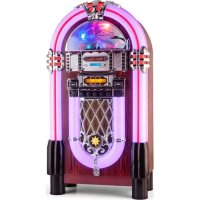
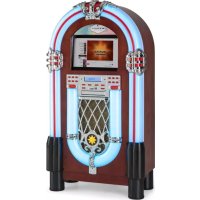
Graceland XXL BT - Juke box Auna - Free user manual and instructions
Find the device manual for free Graceland XXL BT Auna in PDF.


| Brand | Auna |
| Model | Graceland XXL BT |
| Product type | Jukebox |
| Article number | 10028536 |
| Power supply | 100-240 V ~ 50/60 Hz |
| Dimensions (W x H x D) | 54 x 104.5 x 29 cm |
| Weight | Approx. 23 kg |
| FM frequency | 88 – 108 MHz |
| Bluetooth frequency | 2402-2480 MHz |
| Bluetooth transmission power (max) | 4 dBm |
| Playable formats | CD, CD-MP3, USB, SD, Bluetooth, AUX, Radio FM |
| Audio functions | Treble and bass adjustment, random play, repeat |
| Lighting | RGB with color change (Color Flash) |
| Remote control | Yes, with CR2025 button cell battery (included) |
| Outputs | Line Out (RCA), headphone jack (via adapter), built-in speakers |
| Inputs | AUX (3.5 mm jack), USB, SD |
| Antenna | FM wire antenna |
| Maintenance and cleaning | Clean with a dry, soft cloth. Avoid liquids and abrasive products. |
| Safety | Do not expose to water or moisture. Unplug during storms. Keep out of reach of children under 8 years without supervision. |
| Spare parts and repairability | Use only parts provided by the manufacturer. Repair by a qualified professional. |
| General information | Control via buttons on the device and remote control. Playlist programming possible. |
Frequently Asked Questions - Graceland XXL BT Auna
User questions about Graceland XXL BT Auna
0 question about this device. Answer the ones you know or ask your own.
Ask a new question about this device
Download the instructions for your Juke box in PDF format for free! Find your manual Graceland XXL BT - Auna and take your electronic device back in hand. On this page are published all the documents necessary for the use of your device. Graceland XXL BT by Auna.
USER MANUAL Graceland XXL BT Auna
Member of Berlin Brands Group
Handwerkerstr. 11
15366 Dahlwitz-Hoppegarten
Deutschland
Berlin Brands Group UK Ltd
PO Box 1145
Oxford, OX1 9UW
United Kingdom
Congratulations on the purchase of your appliance. Please read the following instructions carefully and follow them to prevent potential damage. We accept no liability for damage caused by disregarding the instructions and improper use. Please scan the QR code to access the latest operating instructions and further information about the product.
CONTENTS
Safety instructions 16
Controls and functions 17
Programming playlists 22
BT functions 22
Troubleshooting 23
Disposal Considerations 24
Declaration of Conformity 24
TECHNICAL DATATECHNICAL DATA
| Item number 10028536 | |
| Power supply 100-240 V ~ 50/60 Hz | |
| FM frequency 88-108 MHz | |
| BT frequency 2402-2480 MHz | |
| BT transmission power (max.) 4 dBm | |
| Dimensions 54 x 104.5 x 29 cm (WxHxD) | |
| Weight approx. 23kg |
SAFETY INSTRUCTIONS
General instructions
- Lightning strike - If you are not using the unit for a longer period of time or if there is a thunderstorm, pull the plug out of the mains socket or disconnect the unit from the antenna connection. This prevents damage to the product due to lightning and overvoltage.
- Overloading - Do not overload electrical outlets, extension cords or integral sockets as this may result in a fire or electric shock.
- Foreign objects and liquid entry - Never push objects of any kind into the unit through openings as they may touch dangerous voltage points or short out parts that could cause a fire or electric shock. Never spill liquids of any kind on the unit.
- Repair and maintenance - Do not attempt to service this product yourself as opening or removing covers may expose you to dangerous voltages or other hazards. Leave all maintenance work to qualified service personnel.
- Damage requiring servicing - Unplug the appliance from the wall outlet and refer servicing to qualified service personnel when any of the following situations occur:
a) If the mains cable or plug is damaged.
b) If liquid has been spilled or objects have fallen onto the product.
c) If the product has been exposed to rain or water.
d) If the product has been dropped or damaged.
e) If the product has a significantly reduced performance.
- Spare parts - If spare parts are needed, make sure that the specialist company replacing the parts only uses spare parts that are approved by the manufacturer or have the same characteristics as the original part. Unauthorised substitutions may result in fire, electric shock or other hazards.
- Heat - Do not install near any heat sources such as radiators, heat registers, stoves, or other products (including amplifiers).
Special notes
- Children over 8 years as well as mentally, sensory and physically impaired persons may only use the device if they have been informed in detail about the functions and safety precautions by a supervisor responsible for them beforehand and understand the associated risks.
- Children should be supervised to ensure that they do not play with the device. Make sure that children and babies do not play with plastic bags or other packaging materials.
- Make sure that the mains plug/mains adapter always remains easily accessible so that the unit can be quickly disconnected from the mains in an emergency.
- When you are no longer using the device, switch it off and pull the plug out of the socket.
CONTROLS AND FUNCTIONS
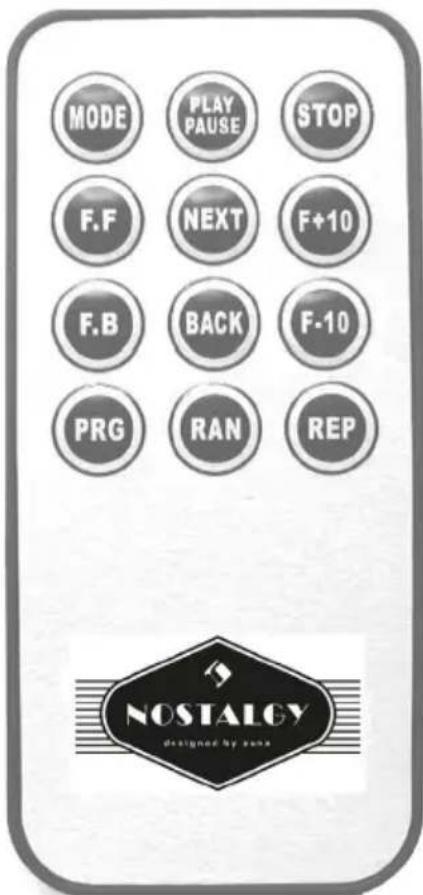
Remote control
Mode - Selection of the operating mode
- Play/Pause - Playing / pausing MP3 tracks
- Stop - Stop playback
NEXT / BACK - Title jump forward / backward
NEXT / BACK - Title jump forward / backward
- PRG - Title programming
RAN-Shuffle
- REP - Repeat Title / Album
F.F. / F.B. - Fast Forward / Rewind
The remote control requires a button cell (CR2025). This is supplied and is already in the battery compartment on the back of the remote control. Please remove the foil that is attached for transport by simply pulling it out.
Front side
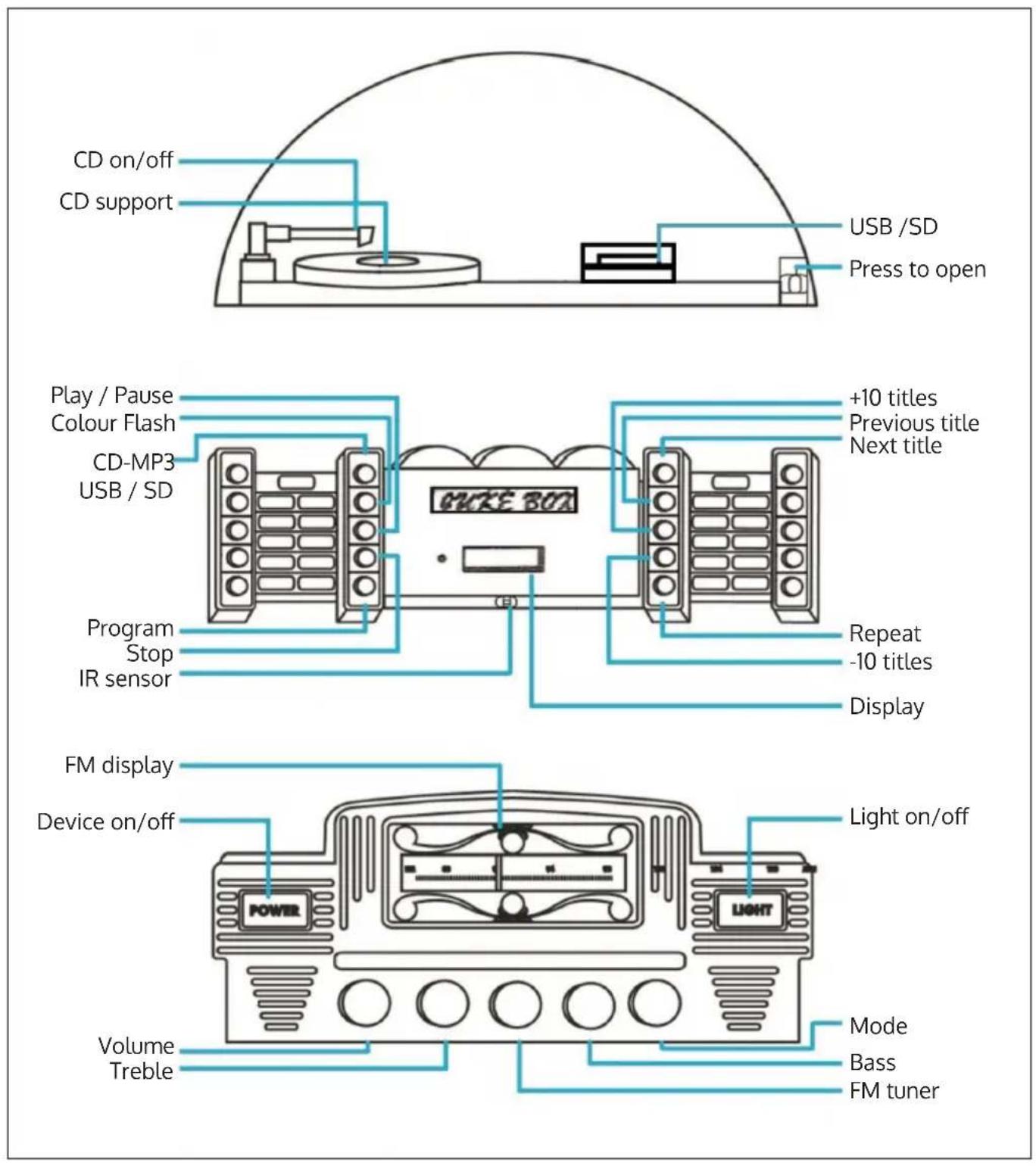
Functions
| Play CDs • Open and close | the CD and USB/SD compartments by pressing the bottom right corner of the acrylic glass door. • Select the playback function with the mode switch on the bottom right. Then use CD- MP3/USB/SD to select the corresponding playback instance (in this case: CD). • The switch, which is modelled on the tone arm of a record player, • causes the CD placed on the CD support to be rotated. • Put on a CD and close the acrylic door. Control the playback of the CD with the PLAY/PAUSE, +/- 10 Tracks (skip 10 tracks), Back, Next, Repeat and Random buttons. |
| Play USB and SD storage devices. | • Open and close the CD and USB/SD compartments by pressing the bottom right corner of the acrylic glass door. • Select the playback function with the mode switch on the bottom right. Then use CD- MP3/USB/SD to select the corresponding playback instance (in this case: USB/SD). • Insert a USB or SD medium. • Control the media playback in the same way as described above for CD playback on the unit or by remote control. |
| Program • For programming | playlists. |
| BT and AUX playback • | Connect an external player (typically an MP3 player, CD player, smartphone or tablet) via the AUX cable on the rear or connect your BT- capable smartphone/tablet to 'GRACELAND' and then play your media library via the jukebox. • Control playback on your external device or via the BT panel on the jukebox side. |
| MODE • Select the mode (FM / CD-USB-SD / BT-AUX). | |
| Radio • Select the radio mode using the MODE switch. • Select the desired station with TUNING. | |
| Display • Displays the current function. | |
| Treble / Bass • Use these two controls to mix the treble and bass components of the playback | |
| Volume • Control volume | |
| Power button • Switching the unit on/off | |
| Colour Flash / Light on/off | • Switch the lighting on and off with LIGHT. • Stop the colour change with COLOR FLASH. |
| Remote control • With | the exception of light control and switching the unit on/off, the functions can also be controlled by remote control. |
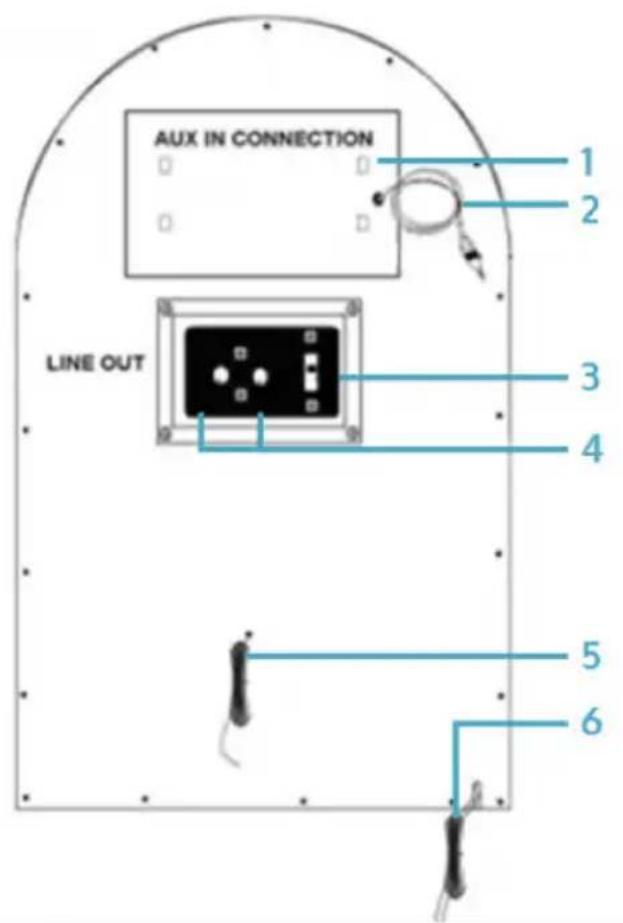
| 1 | Screen |
| 2 | Aux cable for connecting external media sources |
| 3 | Line-out switch |
| 4 | Line-Out (RCA, Right/Left) |
| 5 | FM wire antenna |
| 6 | Power cable and power adaptor |
| Line-Out | Connect an external amplifier here. Switch off the internal speakers with the line-out switch on the back. |
| Aux cable | Connect an external media playback device here. |
PROGRAMMING PLAYLISTS
- While playing music from CD, USB or SD, first press STOP, then PROGRAM to select programming mode. The lettering PROG shows this in the display. At the same time, a position number appears that shows the current playlist position, i.e. initially P01.
- Use the BACK and NEXT buttons to select the track you want to place at this position in the playlist and save by pressing PROGRAM.
- Repeat this step to add more tracks to the playlist.
- Press PLAY to play the list.
- Press STOP to stop playback of the playlist and delete it.
- At the maximum number of tracks that can be included in the playlist, the display shows 'FUL'.
BT FUNCTIONS
- Select the BT/AUX mode with MODE.
- Make sure that your BT device (typically smartphone or tablet) has BT enabled and the device is switched on.
- The BT LED on the jukebox front flashes to indicate that pairing mode is activated.
- Now connect your BT device to 'Graceland' in the list of available BT devices. Enter '0000' if you are prompted for a password.
- As soon as the BT LED flashes more slowly, the connection is established. You can now play audio files via BT with the jukebox.
- You can control playback on your BT device or use the BT panel on the side of the jukebox.
Note: The AUX switch on the back of the unit must be in the OFF position.
TROUBLESHOOTING
| Problem Potential cause | Possible solution | |
| The unit does not switch on when the ON/OFF switch is pressed. | The unit is not connected. | Connect the unit to the supplied mains adapter. |
| There is no sound coming from the speakers. | The volume has been set to low. | Adjust the volume. |
| The input control does not match the playback source. | Select the desired input source again. | |
| There is interference in the sound. | The jukebox is too close to a TV set or other such device. | Switch off the TV or other device or move the jukebox to another location. |
| You cannot hear any station or the signal sounds weak. | The transmitter is not set correctly. | Set the desired station correctly. |
| A TV is in use nearby and is interfering with radio reception. | Turn off the interfering television set. | |
| The sound is distorted. The antenna is not aligned correctly. | Reorient the antenna until reception improves. | |
| No sound The CD player has been paused. | Press the play/pause button to resume playback of the track. | |
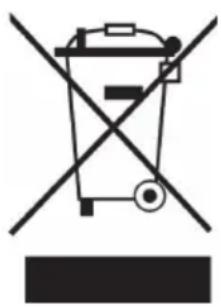
If there is a legal regulation for the disposal of electrical and electronic devices in your country, this symbol on the product or on the packaging indicates that this product must not be disposed of with household waste. Instead, it must be taken to a collection point for the recycling of electrical and electronic equipment. By disposing of it in accordance with the rules, you are protecting the environment and the health of your fellow human beings from negative consequences. For information about the recycling and disposal of this product, please contact your local authority or your household waste disposal service.
DECLARATION OF CONFORMITY
CE UK CA
Manufacturer:
Chal-Tec GmbH, Wallstrasse 16, 10179 Berlin, Germany.
Importer for Great Britain:
Berlin Brands Group UK Ltd
PO Box 1145
Oxford, OX1 9UW
United Kingdom
Hereby, Chal-Tec GmbH declares that the radio equipment type Graceland XXL BT is in compliance with Directive 2014/53/EU. The full text of the EU declaration of conformity is available at the following internet address: use.berlin/10028536
For Great Britain: Hereby, Chal-Tec GmbH declares that the radio equipment type Graceland XXL BT is in compliance with the relevant statutory requirements. The full text of the declaration of conformity is available at the following internet address: use.berlin/10028536
Estimado cliente:
Berlin Brands Group UK Ltd
PO Box 1145
Oxford, OX1 9UW
United Kingdom
Cher client, chere clientele,
Berlin Brands Group UK Ltd
PO Box 1145
Oxford, OX1 9UW
United Kingdom
Berlin Brands Group UK Ltd
PO Box 1145
Oxford, OX1 9UW
United Kingdom
- MEMBER OF BERLIN BRANDS GROUP
- HANDWERKERSTR. 11
- 15366 DAHLWITZ-HOPPEGARTEN
- DEUTSCHLAND
- CONTENTS
- TECHNICAL DATATECHNICAL DATA
- SAFETY INSTRUCTIONS
- GENERAL INSTRUCTIONS
- SPECIAL NOTES
- CONTROLS AND FUNCTIONS
- REMOTE CONTROL
- FRONT SIDE
- FUNCTIONS
- PROGRAMMING PLAYLISTS
- BT FUNCTIONS
- TROUBLESHOOTING
- DECLARATION OF CONFORMITY
- CE UK CA
- MANUFACTURER
- IMPORTER FOR GREAT BRITAIN
- ESTIMADO CLIENTE
- CHER CLIENT, CHERE CLIENTELE
Brand : Auna
Model : Graceland XXL BT
Category : Juke box