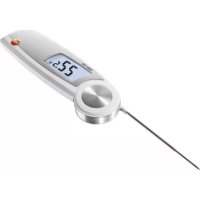
104 - Thermometer Testo - Free user manual and instructions
Find the device manual for free 104 Testo in PDF.



User questions about 104 Testo
0 question about this device. Answer the ones you know or ask your own.
Ask a new question about this device
Download the instructions for your Thermometer in PDF format for free! Find your manual 104 - Testo and take your electronic device back in hand. On this page are published all the documents necessary for the use of your device. 104 by Testo.
USER MANUAL 104 Testo
natural_image
Digital thermometer with digital display showing temperature reading of 27.5°C, no visible text or symbols on the device itself.natural_image
Close-up of a white electronic device with two batteries (no visible text or symbols)natural_image
Close-up of a white electronic device with a blue internal component and a green rectangular base (no visible text or symbols)natural_image
Close-up of a white electronic device showing two blue battery modules with model numbers (no readable text or symbols beyond branding)Please read this document through carefully and familiarise yourself with the operation of the product before using it. Keep this documentation to hand so that you can refer to it when necessary.
en
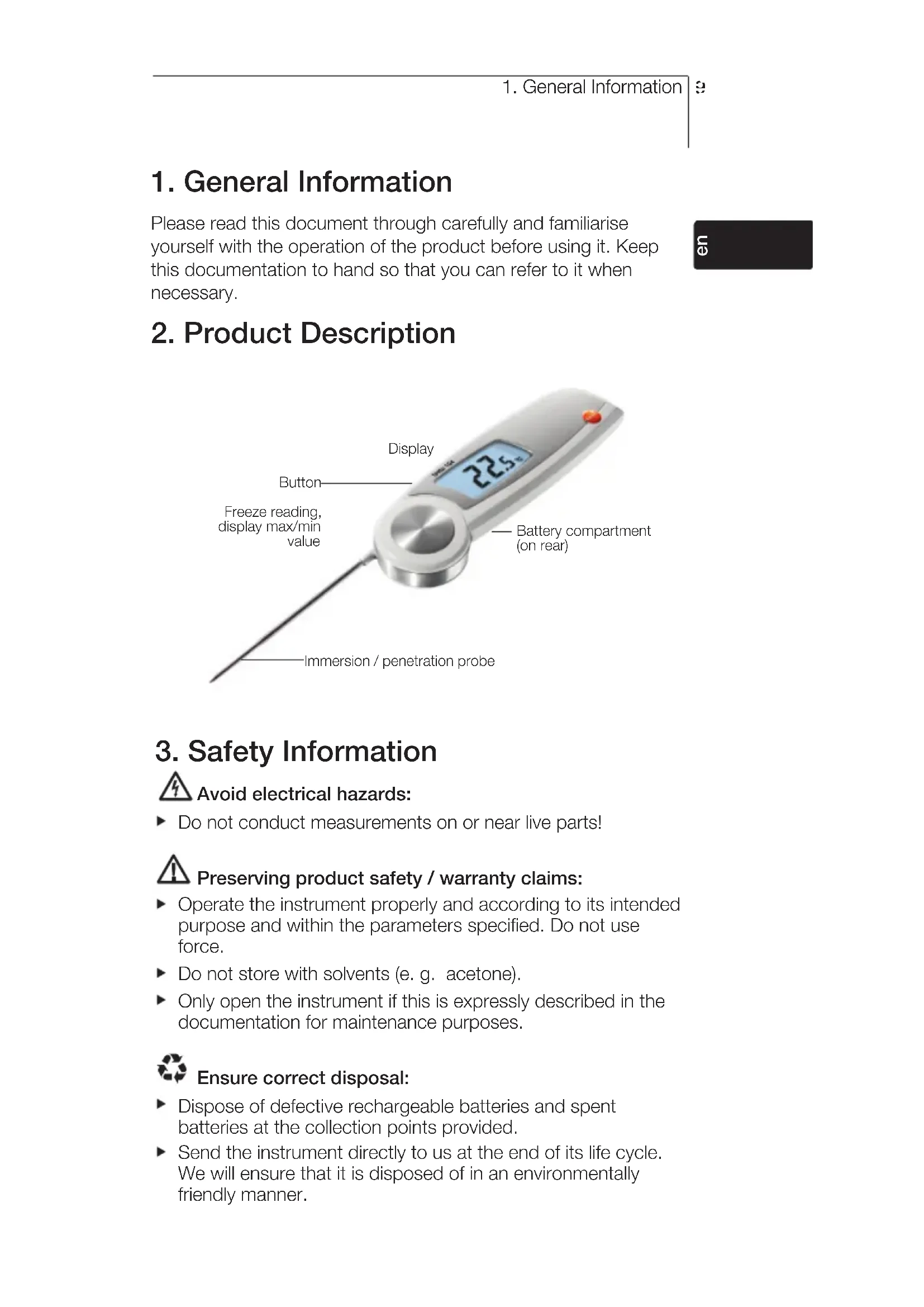
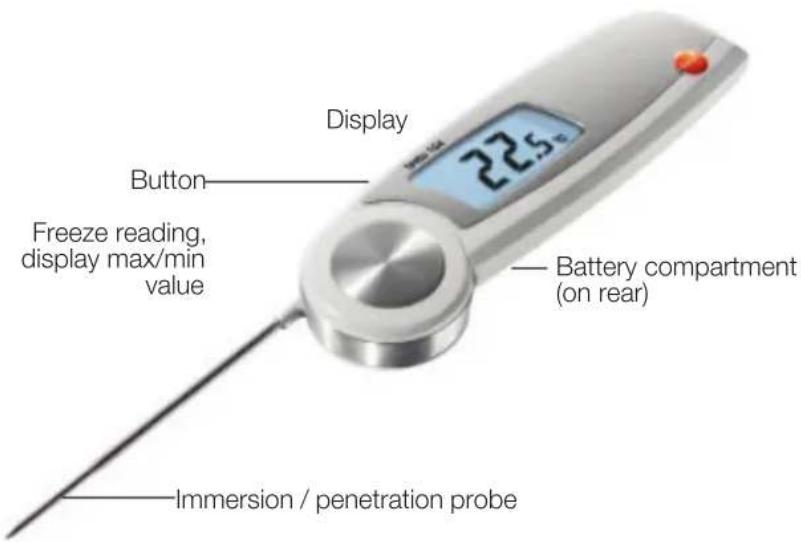
2. Product Description
text_image
Display Button Freeze reading, display max/min value Battery compartment (on rear) Immersion / penetration probe3. Safety Information

Avoid electrical hazards:
▶ Do not conduct measurements on or near live parts!

Preserving product safety / warranty claims:
▶ Operate the instrument properly and according to its intended purpose and within the parameters specified. Do not use force.
▶ Do not store with solvents (e. g. acetone).
▶ Only open the instrument if this is expressly described in the documentation for maintenance purposes.

Ensure correct disposal:
▶ Dispose of defective rechargeable batteries and spent batteries at the collection points provided.
▶ Send the instrument directly to us at the end of its life cycle. We will ensure that it is disposed of in an environmentally friendly manner.
4. Intended Use
The testo 104 is a robust food thermometer.
The product is designed for the following tasks/areas:
- Food sector: production, food service, spot check measurement
• Measuring liquids, pastes and semi-solid materials

The following product components are designed for continuous contact with foodstuffs in accordance with Regulation (EC) 1935/2004:
From the tip of the immersion/penetration probe up to 2 cm before the probe handle or the plastic housing. If provided, the information about penetration depths under point 7.2 in the instruction manual or the mark(s) on the immersion/penetration probes should be noted.
The product may not be used in the following areas:
• Potentially explosive areas
- For diagnostic measurements in the medical sector
5. Technical Data
| Feature Values | |
| Sensor type NTC | |
| Measurement range -50...+250°C | |
| Parameter Temperature in °C/°F/°R | |
| Resolution 0.1°C/°F/°R | |
| Accuracy ±1.0 °C (-50.0...-30.1°C)±0.5 °C (-30.0...+99.9°C)±1 % of the measurement range (+100.0...+250.0°C) | |
| Response time t99 10 s (measured in moving liquid) | |
| Measuring rate 2 measurements per second | |
| Operating temperature -20...+60°C | |
| Transport / storage temperature -30...+70°C | |
| Power supply 2 x AAA batteries | |
| Battery life 100 h (typically at 25°C without display illumination) | |
| Housing ABS/TPE/PC and die-cast zinc/stainless steel | |
| Protection class IP65 | |
| Dimensions 265 x 48 x 19 mm (immersion/penetration probe open) | |
| Weight 165 g (incl. batteries) | |
| Display | LCD, single line, with status line (Hold/Auto Hold) illuminated |
| Standards | EN 13485Certificates: see www.testo-international.com,Service&Support | Download Center (registration required) |
| EC Directive | 2004/108/EEC |
| Warranty | 2 years, warranty conditions: see www.testo.com/warranty |

text_image
testo 104 EN 13485 ACCORDING TOInformation on standards
This product complies with the EN 13485 standard
Suitability: S, T (storage, transport)
Environment: E (transportable thermometer)
Accuracy class: 0.5
Measurement range: -50...+250 °C
According to EN 13485, the measuring instrument should be checked and calibrated regularly under the terms of EN 13486 (recommended frequency: yearly).
Contact us for more information.
6. Initial Operation
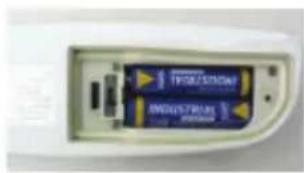
6.1 Inserting batteries
natural_image
Close-up of a white electronic device with two batteries and indicator lights (no visible text or symbols)1 Loosen the screw on the battery compartment.
2 Open the battery compartment.
3 Insert batteries (2 x AAA). Observe the polarity!
4 Close the battery compartment.
5 Tighten the screw.
enfr
6.2 Configuring the unit
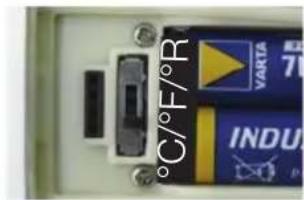
text_image
°C/°F/R VARTA INDU1 Loosen the screw on the battery compartment.
2 Open the battery compartment.
3 Set the switch (e.g. using a sharp instrument) to the desired temperature unit (°C/°F/°R).
4 Close the battery compartment.
5 Tighten the screw.
6.3 Labelling the instrument
The testo 104 can be labelled using coloured foils. The coloured label can be used, for example, to allocate the instrument to a particular processing stage or employee.
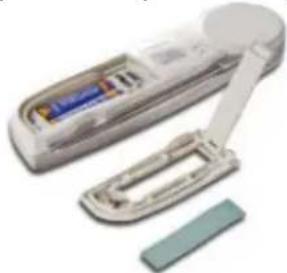
natural_image
Close-up of a white electronic device with a slide and a rectangular component, no visible text or symbols.1 Open the battery compartment.
2 Open the flap on the inside of the battery compartment.
3 Stick the coloured foil onto the flap.
4 Close the flap.
5 Close the battery compartment.
7. Operation
The instrument switches off automatically 60 minutes after it has been switched on even if the immersion/ penetration probe is open.
7.1 Switching On / Off
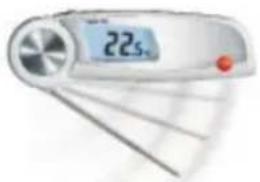
natural_image
Digital flip-flop device displaying temperature reading of 22.5°C (no other text or symbols visible)▶ Switch on the instrument: open the immersion/penetration probe.
▶ Switch off the instrument: close the immersion/penetration probe.
7.2 Measuring
! Observe the required immersion / penetration depth for correct readings: at least 23 mm.
The housing must only be subjected to operating temperature between -20 and +60°C.
√ Instrument is switched on.
▶ Immerse / penetrate the probe into the object being measured.
- The current reading is shown.
Holding the reading manually (Hold)
√ The instrument is in Hold mode (mode when supplied).
▶ Hold reading: press Hold Max Min.
- Signal emitted, reading is frozen and Hold lights up.
▶ Restart measurement: press Hold Max Min
Holding the reading automatically (Auto Hold)
√ The instrument is in Auto Hold mode (See description under "Changing the measurement mode").
- Auto Hold flashes. If the reading remains stable within 10 seconds, it is frozen. A signal is emitted and Auto Hold lights up.
▶ Restart measurement: press Max Min.
8. Configuring the instrument
Changing the measurement mode
√ Instrument is switched off.
1 Open the configuration mode: open the immersion/penetration probe while holding down Hold Max Min.
Depending on the preconfigured settings, either Hold or Auto Hold is shown.
2 Select Hold or Auto Hold: press Hold Max Min.
- Configuration is complete. The instrument changes to the measurement mode.
Displaying min/max values
Only Hold and Auto Hold values are stored in the min/max memory.
√ Instrument is switched on.
1 Immerse / penetrate the probe into the object being measured.
2 In the Hold measurement mode: press Hold Max Min.
In the Auto Hold measurement mode: wait until a signal is emitted and Auto Hold lights up.
3 Hold down Hold Max Min for at least 2 seconds.
- Max lights up and the maximum measurement value is shown.
4 Press Hold Max Min. - Min lights up and the minimum measurement value is shown.
5 Press Hold Max Min. - The instrument changes to the measurement mode.
Deleting min/max values
√ Steps 1-4 of “Displaying min/max values” have been followed.
5 Hold down Hold Max Min for at least 2 seconds.
- Max Min CLr. appears on the display.
- The instrument changes to the measurement mode.
9. Service and Maintenance
9.1 Changing the batteries
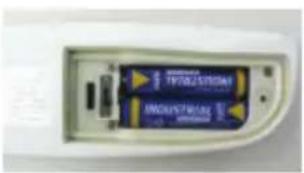
natural_image
Close-up of a white electronic device showing two blue battery modules with gold contacts (no visible text or symbols)1 Loosen the screw on the battery compartment.
2 Open the battery compartment.
3 Insert batteries (2 x AAA). Observe the polarity!
4 Close the battery compartment.
5 Tighten the screw.
9.2 Cleaning the instrument
Only use weak, commercially available neutral/household cleaning agents (e.g. washing-up liquid) to clean the instrument. Do not use any aggressive cleaning agents or solvents!
The housing and probe can be disinfected using an alcohol-based spray. In doing so, always follow the manufacturer's instructions.
- Clean the housing and probe under running water and rub dry with a towel.
10. Questions and Answers
| Question Possible causes Possible solution | ||
| lights up. | Batteries dead. c Change batteries. | |
| --- lights up. Measurement range exceeded. | Measurementscanonly be carried out in the range specified. | |
| Instrument cannot be switched on. | Batteries dead. | Change batteries. |
| Instrument switches itself off. | The instrument switches off automatically 60 minutes after it is switched on. | Close and reopen the immersion/penetration probe. |
If we have not answered your question, please contact your local dealer or Testo's Customer Service.
For contact details, please visit www.testo.com/service-contact.
Convenance : S, T (stockage, transport)
natural_image
Close-up of a white electronic device showing two batteries with labels (no readable text beyond branding)natural_image
Illustration of a white remote control device with battery and handle, plus a separate green strip (no text or symbols visible)natural_image
Close-up of a white electronic device showing two batteries with visible internal components (no readable text or symbols)natural_image
Close-up of a white electronic device with two blue battery modules (no visible text or symbols)natural_image
Illustration of a handheld electronic device with a blue internal component and a green rectangular base (no text or symbols visible)natural_image
Close-up of a USB drive showing two blue buttons labeled 'TPT025301M' and 'INDUSTRIAL', with no visible text beyond labels.natural_image
Close-up of a white electronic device with two batteries and two external components (no visible text or symbols)1 Allentare la vite del vano batterie.
natural_image
Close-up of a white handheld electronic device with a blue internal component and a green rectangular base (no visible text or symbols)natural_image
Close-up of a USB drive showing two blue buttons labeled 'TPT025301M' and 'INDUSTRIAL', with no visible text beyond labels.▶ Niet samen met oplosmiddelen (b. v. aceton) bewaren.
Omgeving: E (transporteerbare thermometer)
Nauwkeurigheidsklasse: 0,5
Meetbereik: -50...+250 °C
natural_image
Close-up of a white electronic device with two batteries and a label (no readable text or symbols beyond branding)natural_image
Close-up of a white handheld device with a blue internal component and a green strip attached (no visible text or symbols)√ Instrument is ingeschakeld.
1 Sonde in meetobject dompelen / steken.
2 In meetmodus Hold: Hold Max Min indrukken.
natural_image
Close-up of a USB drive showing two blue buttons labeled 'TPT025301M' and 'INDUSTRIAL', with no visible text beyond labels.www.testo.com/service-contact.