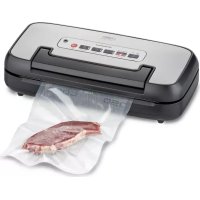
VRH 590 advanced - Vacuum packaging machines CASO - Free user manual and instructions
Find the device manual for free VRH 590 advanced CASO in PDF.



| Product Type | Vacuum Sealer |
| Brand | CASO |
| Model | VRH 590 advanced |
| Power supply | 220-240 V, 50/60 Hz |
| Included accessories | 1 roll 28x300 cm, 10 bags 20x30 cm, hose, removable vacuum chamber |
| Main functions | Automatic vacuum sealing, manual sealing, Pulse mode, container vacuum sealing, marinating, dry/wet/extra long settings |
| Compatible use | Bags, rolls, containers, ZIP bags (with adapter) |
| Sealing strip | Teflon coating, do not remove |
| Sealing gasket | Rubber, removable and washable with soapy water |
| Drip tray | Removable, washable with warm water |
| Max number of consecutive cycles | 125 cycles vacuum+seal or 125 seal only |
| Safety | Overheating protection, hot sealing strip, do not touch after sealing |
| Maintenance | Exterior: damp cloth; interior: paper towel; tray and gasket washable |
| Warranty | 24 months |
| Usage | Household and semi-professional |
| Sous vide compatibility | Yes, with appropriate CASO bags |
| Cable storage | Cable winder at the back |
Frequently Asked Questions - VRH 590 advanced CASO
User questions about VRH 590 advanced CASO
0 question about this device. Answer the ones you know or ask your own.
Ask a new question about this device
Download the instructions for your Vacuum packaging machines in PDF format for free! Find your manual VRH 590 advanced - CASO and take your electronic device back in hand. On this page are published all the documents necessary for the use of your device. VRH 590 advanced by CASO.
USER MANUAL VRH 590 advanced CASO
natural_image
Black and silver CO2O air purifier device with control panel and warning labels (no readable text beyond branding)Technische Daten / Technical Data / Caractéristiques techniques / Dati tecnici / Datos técnicos / Technische gegevens / Dados técnicos / Технические характеристики / Tekniske data
| Gerät / Device / Appareil /Apparecchio /Aparato / Aparaat / Aparelho / Прибор /enhed | Vakuumiersystem / Vacuum SealerSystem / Appareil d'emballage sousvide / Sistema di sigillatura sottovuoto / Envasadora al vacío / Stofzuigsysteem / Sistema de aspiração /Вакуумный упаковщик / Vakuumpakker |
| Name / Name / Nom / Nome / Denominación /Name / Nome / Наименование / navn | CASO VRH 590 advanced |
| Artikel-Nr. / Item No. / N°. d'article /N. Articolo / N° de art / Artikelnr. /Artigo número / N° артикула / artikel-Nr. | 01526 |
| Anschlussdaten / Mains data / Données deraccordement / Dati connessione / Conexión /Aansluitgegevens / Conexão / Параметрыподключения / tilslutningsdata | 220 V – 240 V ; 50 Hz /220 B - 240 B, 50 Гц |
| Leistungsaufnahme / Power consumption /Puissance consommée / Potenza assorbita /Consumo de potencia / Vermogens / Consumoenergético / Мощность / strømforbrug | 110 W, 110 Вт |
| Außenabmessungen (B/H/T) /External measurements (W x H x D) /Dimensions externes (l/h/p) /Misure esterne (L/H/P) /Dimensiones exteriores (An/H/P) /Afmetingen (BxHxD), Medidas (C x A x P) /Габаритные размеры (Ш/В/Г) /ydermål (b/h/d) | 40 cm x 10,5 cm x 18 cm /40 cm x 10.5 cm x 18 cm |
| Nettogewicht / Net weight / Poids net / Pesonetto / Peso net / Nettogewicht / Peso / Bec /vægt | 2,34 kg /2,34 кг |
natural_image
Three technical line drawings of printer designs, showing front, top, and side views (no text or symbols)natural_image
Two line drawings of a printer with paper and a circular print, no text or symbols present.natural_image
Line drawing of a device with a container and a piping bag (no text or symbols)natural_image
Technical line drawing of a mechanical device with internal components (no text or symbols)1.1 Information on this manual 22
1.2 Warning notices 22
1.3 Limitation of liability 23
1.4 Copyright protection....23
2 Safety....23
2.1 Intended use....23
2.2 General Safety information....24
2.3 Sources of danger 25
2.3.1 Danger of burns 25
2.3.1 Danger of fire 25
2.3.2 Dangers due to electrical power....25
3 Food storage safety information....26
4 Getting Started 26
4.1 Packaging safety information 26
4.2 Delivery scope and transport inspection 26
4.3 Functions....27
4.4 Unpacking....27
4.5 Setup location requirements....27
4.6 Electrical connection....27
5 Complete Overview 28
5.1 Appliance diagram 28
5.2 Control Panel 29
5.3 Rating plate....29
6 Operation 29
6.1 Basics of sealing 29
6.2 Bags and rolls....30
6.3 To make a bag from the roll 30
6.4 Vacuum packaging with a bag 30
6.5 Use of the function „pulse“ vacuum....31
6.6 Vacuum package in a Canister 32
6.7 Marinieren....32
6.8 Storage....33
7 Cleaning and Maintenance 33
7.1 Safety information....33
7.2 Cleaning....33
8 Troubleshooting 34
8.1 Safety notices 34
8.2 Troubleshooting table 34
9 Disposal of the Old Device 35
9.1 Disposal of the packaging....36
10 Guarantee....36
1General
Please read the information contained herein so that you can become familiar with your device quickly and take advantage of the full scope of its functions.
Your vacuum sealer system will serve you for many years if you handle it and care for it properly. We wish you a lot of pleasure in using it!
1.1 Information on this manual
These Operating Instructions are a component of the vacuum sealer system (referred to hereafter as the Device) and provide you with important information for the initial commissioning, safety, intended use and care of the device.
The Operating Instructions must be available at all times at the device. This Operating Manual must be read and applied by every person who is instructed to work with the device:
- Commissioning, - Operation,
- Troubleshooting and/or
- Cleaning
Keep the Operating Manual in a safe place and pass it on to the subsequent owner along with the device.
1.2 Warningnotices
The following warning notices are used in the Operating Manual concerned here.

DANGER
A warning notice of this level of danger indicates a potentially dangerous situation.
If the dangerous situation is not avoided, this can lead to death or serious injuries.
Observe the instructions in this warning notice in order to avoid the danger of death or serious personal injuries.

WARNING
A warning notice of this level of danger indicates a possible dangerous situation. If the dangerous situation is not avoided, this can lead to serious injuries.
▶ Observe the instructions in this warning notice in order to avoid the personal injuries.

ATTENTION
A warning notice of this level of danger indicates a possible dangerous situation. If the dangerous situation is not avoided, this can lead to slight or moderate injuries.
▶ Observe the instructions in this warning notice in order to avoid the personal injuries.
PLEASE NOTE
A notice of this kind indicates additional information, which will simplify the handling of the machine.
1.3 Limitation of liability
All the technical information, data and notices with regard to the installation, operation and care are completely up-to-date at the time of printing and are compiled to the best of our knowledge and belief, taking our past experience and findings into consideration. No claims can be derived from the information provided, the illustrations or descriptions in this manual.
The manufacturer does not assume any liability for damages arising as a result of the following:
• Non-observance of the manual
• Uses for non-intended purposes
- Improper repairs
- Technical alterations, modifications of the device
- Use of unauthorized spare parts
Modifi cations of the device are not recommended and are not covered by the guaran- tee. All translations are carried out to the best of our knowledge. We do not assume any liability for translation errors, not even if the translation was carried out by us or on our instructions. The original German text remains solely binding.
1.4 Copyright protection
This document is copyright protected.
Braukmann GmbH reserves all the rights, including those for photomechanical reproduction, duplication and distribution using special processes (e.g. data processing, data carriers, data networks), even partially.
Subject to content and technical changes.
2Safety
This chapter provides you with important safety notices when handling the device. The device corresponds with the required safety regulations. Improper use can result in personal or property damages.
2.1 Intendeduse
This device is only intended for use in households in enclosed spaces for vacuuming bags and canister, as well as sealing vacuum foils. In addition, this device can be used in the semi-professional sector (hunters, anglers, hobby cooks, etc.).
Uses for a different purpose or for a purpose which exceeds this description are considered incompatible with the intended or designated use.

WARNING
Danger due to unintended use!
Dangers can emanate from the device if it is used for an unintended use and/or a different kind of use.
▶ Use the device exclusively for its intended use.
▶ Observe the procedural methods described in this Operating Manual.
Claims of all kinds due to damages resulting from unintended uses are excluded. The User bears the sole risk.
2.2 General Safety information
PLEASE NOTE
Please observe the following general safety notices with regard to the safe handling of the device.
Examine the device for any visible external damages prior to using it. Never put a damaged device into operation.
If the power cable or plug are damaged, then they must be replaced by the manufacturer or its service agent in order to avoid a hazard.
This device can be used by children aged 8 and above, and by persons with reduced physical, sensory or mental capabilities or a lack of experience and / or knowledge if they have been given supervision or instruction concerning use of the device in a safe way and understand the hazards involved.
▶ Children are not allowed to play with the device.
The device and its connecting cable must be kept away from children who are less than 8 years old.
Only customer service departments authorized by the manufacturer may carry out repairs on the device, as otherwise the guarantee entitlements will be null and void in the event of any subsequent damages. Improperly performed repairs can cause considerable dangers for the user.
▶ Defective components must always be replaced with original replacement parts. Only such parts will guarantee that the safety requirements are fulfilled.
▶ Do not leave the device unsupervised when it is in operation.
When disconnect, please unplug by grasp the plug and not the cord, to avoid any injury.
▶ Never immerse the device in water or other liquids and do not place it in the dishwasher.
For the correct storage, please slightly close the cover, do not lock, it will deform the gaskets and affect the machine function.
2.3 Sources of danger
2.3.1 Danger of burns

WARNING
The sealing bar gets very hot. Please observe the following safety notice in order not to burn yourself or others.
▶ To avoid getting burned, never touch the sealing bar directly after sealing process.
2.3.1 Danger of fire

WARNING
There is a danger of fi re due to the event the device is not used properly. Observe the following safety notices to avoid dangers of fi re:
▶ Do not set up the device near fl ammable material.
- Keep this appliance away from sources of heat (gas, electric, burner, heated oven).
2.3.2 Dangers due to electrical power

DANGER
Mortal danger due to electrical power!
Mortal danger exists when coming into contact with live wires or subassemblies! Observe the following safety notices to avoid dangers due to electrical power:
Do not operate this device if it has a damaged cable or plug, if it is not working properly or if it has been damaged or dropped. If the power cable or plug are damaged, then they must be replaced by the manufacturer or its service agent in order to avoid a hazard.
Do not open the housing on the device under any circumstances. There is a danger of an electrical shock if live connections are touched and the electrical or mechanical structure is altered. In addition, functional faults on the device can also occur.
Before plugging the appliance in or when you operate it, make sure your hands are dry.
▶ Do not insert objects into the openings of the device.
3 Food storage safety information
Please follow specific procedures for vacuum sealing; so you can guarantee the quality and safety of your vacuumed / sealed food.
PLEASE NOTE
If perishable foods have been heated, defrosted or un-refrigerated, consume them immediately.
Before vacuum sealing, it's necessary to clean your hands, and all utensils and surfaces to be used for cutting and vacuum sealing foods.
▶ Refrigerate or freeze the perishable foods immediately, if you have vacuum-sealed them, and do not leave them sitting at room temperature.
The shelf life of dry foods such as nuts, coconut or cereals will be extended in vacuum-sealed package, while storing them in dark place. Oxygen and warm temperature will cause high-fat content foods fat to rancidity.
Before vacuum sealing some fruit and vegetables, such as apples, bananas, potatoes and root vegetables, peel them, this will extend their shelf lives.
When vacuum seal some vegetables such as broccoli, cauliflower and cabbage fresh for refrigeration, they will emit gases, so it's need to blanch and freeze these foods before vacuum sealing.
4GettingStarted
This chapter will guide you through safely unpacking and setting up your new unit.
4.1 Packaging safety information

WARNING
Do not allow children to play with packaging materials due to risk of suffocation.
4.2 Delivery scope and transport inspection
The vacuum sealer system VRH 690 advanced includes the following components:
- VRH 590 advanced
• 10 top-quality bags(20 x 30 cm) • 1 profi bag roll 28 x 300 cm - vacuum hose
- Instruction manual
- Removable vacuum chamber
PLEASE NOTE
Examine the shipment to ensure the unit and manual are included and inspect the unit for any visible damage.
Immediately notify the carrier and/or the supplier about an incomplete shipment or any damage as a result of inadequate packaging or mishandling.
4.3 Functions
Vacuum-packaged foods stay fresh for up to eight times longer: maintain taste and freshness, and reduce costs with less spoiled food.
- Package foods, such as meat, fish, poultry, seafood and vegetables for refrigerated storage.
- Maintain the freshness of dry foods, such as beans, nuts, and cereals.
- Besides storing food, there are many other uses for vacuum sealing: Protect moisture-sensitive items such as camping supplies, matches, fi rst aid kits, roadside fl ares and clothing. Protect prized collectibles from dust and moisture.
4.4 Unpacking
Carefully remove the packaging material and unit from the carton.
PLEASE NOTE
If possible, keep the original packaging for the duration of the guarantee period in the event a return is necessary.
4.5 Setup location requirements
- The device must be set up on a solid, even, horizontal surface capable of supporting the vacuum sealer and any items to be vacuum-sealed.
- Select a setup location where children cannot reach the hot sealing strip of the device.
- Do not set up the unit in a hot or damp environment or near fl ammable material.
- To operate correctly, the unit requires sufficient airflow. Leave at least 10 centimeters (4 inches) of space on all sides when setting up the unit.
- Do not move the vacuum sealer when it is in operation.
- The electrical outlet must be easily accessible so that the plug can be quickly disconnected in the case of an emergency.
- The setup of this unit in non-stationary locations (e.g., boats, airplanes, motor homes) must be carried out by a qualified electrician, provided they guarantee the prerequisites for the safe use of the unit.
4.6 Electrical connection
In order to ensure the safe and trouble-free operation of the device, the following instructions must be observed for the electrical connection:
- Before plugging in the unit, compare the voltage and frequency data on the vacuum sealer's rating plate (found on the bottom of the unit) with that of your electrical network. This data must be compatible. If in doubt consult a qualified electrician.
- Inspect the power cord for damage and ensure it doesn't run under the unit or over hot or sharp surfaces.
- The electrical safety of the unit is only guaranteed if it is connected to a properly installed protective conductor system. If in doubt, consult a qualified electrician. The manufacturer cannot be made responsible for damages due to a missing or damaged protective conductor.
5 Complete Overview
This chapter provides you with an overview of your vacuum sealer and explains some of its key features.
5.1Appliance diagram
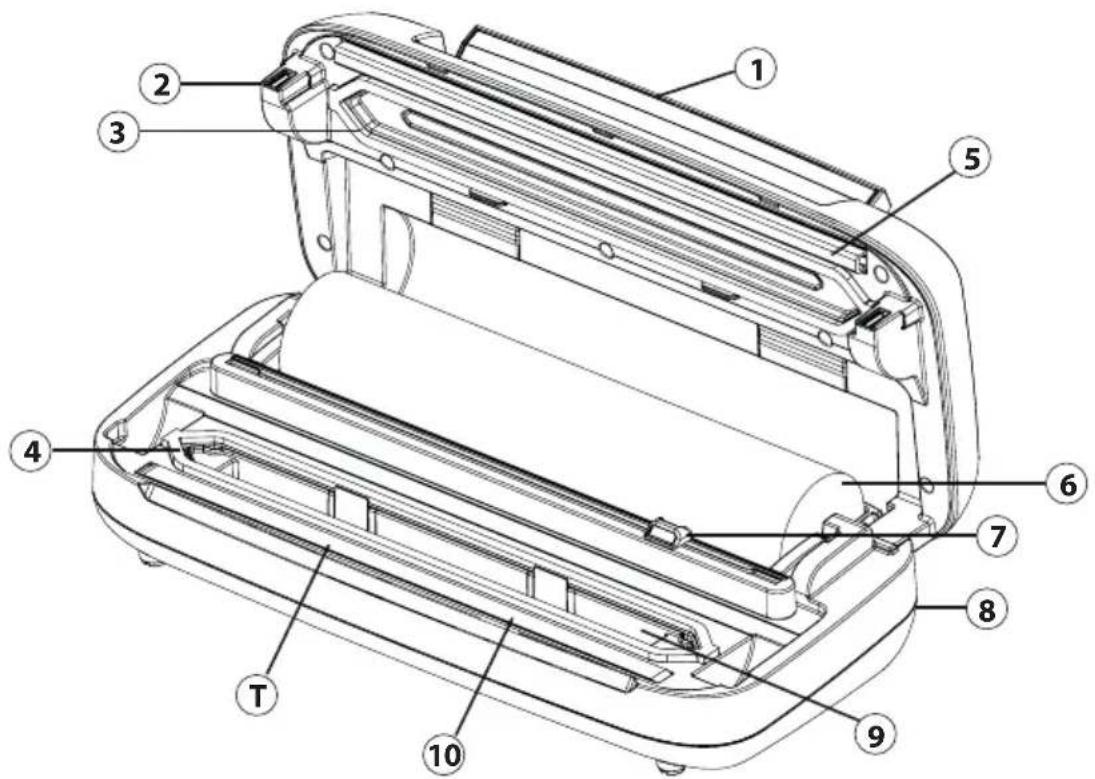
① handle
② hook for latching of cover
③ upper gasket
④ lower gasket
⑤ sealing profi le (Presses the bag against the heat-sealing bar)
⑥ Roller compartment
⑦ cutter
⑧ Cable rewind (back)
⑨ Removable vacuum chamber
⑩ sealing bar
(Contains a heating wire covered with tefl on which allows the bag to seal but not to stick to the wire. Place the bag over this sealing bar.)

WARNING
The sealing bar gets very hot.
Please observe the following safety notice in order not to burn yourself or others.
To avoid getting burned, never touch the sealing bar directly after sealing process.
PLEASE NOTE
▶ Do not remove the Tefl on tape (T).
5.2 Control Panel
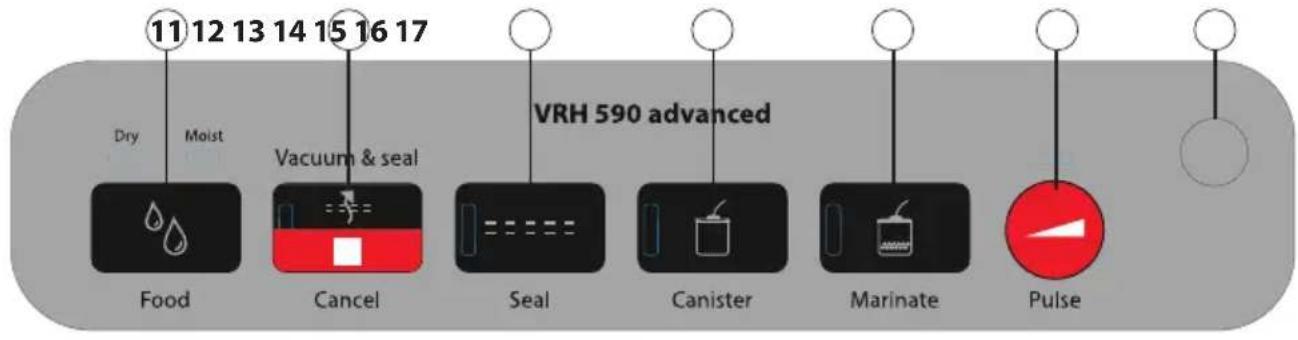
Buttons - indicator light shows selected function
⑪ Button Food (Dry & Moist)
Before the vacuum sealing process, please select „Dry“ for dry vacuumed goods or „Moist“ for moist vacuumed goods with some liquid present.
⑫ Button Vacuum & seal / Cancel
For automatic vacuuming and sealing of bags or containers
Press the button again to cancel the operation. You can also cancel the other processes with this button.
⑬ Button Seal
For sealing of a bag without additional vacuum operation.
14 Button Canister
For vacuum sealing containers
15 Button Marinate
For marinating in a container or in a vacuum bag
(no automatic heat sealing after the marinating process)
16 Button Pulse
As long as you press the button air is with drawn from the bag. If you release the button this operation will stop. Afterwards seal the bag with Seal button.
Also usable for canisters.
17 connector for vacuum hose for vacuuming of canisters
5.3 Ratingplate
The rating plate with the connection and performance data can be founded on the bottom of the unit.
6Operation
This chapter provides instructions on the proper operation of your vacuum sealer.
6.1 Basics of sealing
After each sealing session and before starting up, check to make sure the unit and all accessories are clean and free of leftover food. Follow the cleaning instructions on in Chapter Cleaning and Maintenance.
6.2 Bags and rolls
Please only use specified bags and rolls designed for vacuum sealing. Do not use other materials such as plastic wrap. All vacuum rolls and bags delivered by CASO are appropriate for cooking under vacuum (sous vide).
Please make sure when vacuum rolls and bags of other producers are used, whether they are also microwaveable and suitable for cooking under vacuum. Please note that a bar vacuumsealer as this device can only be used with structured bags. You can buy a wide range of different bags and rolls from CASO.
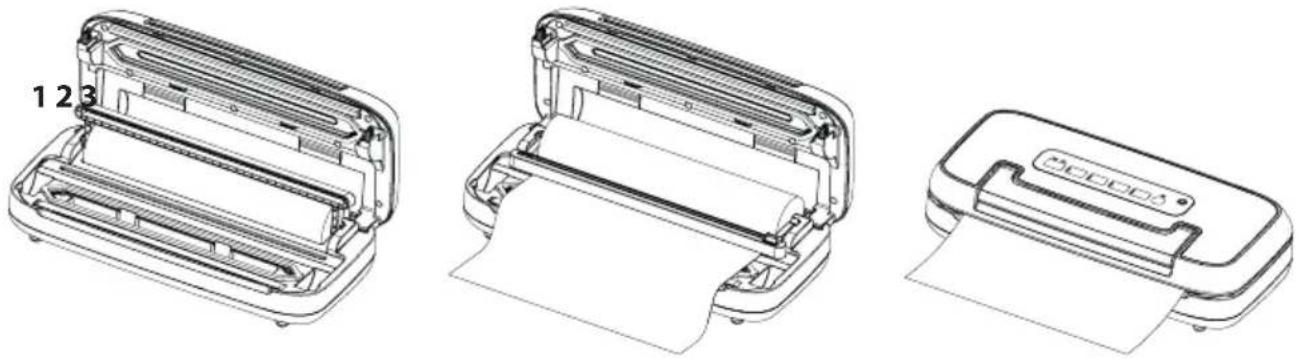
6.3 To make a bag from the roll
natural_image
Three technical line drawings of printer designs, showing front, top, and side views (no text or symbols)- Place the device on a dry place.
- Open the device using the handle.
- Fold up the cutter rail to roll out the film to the desired length under the cutter. (fig. 1)
- Secure the fi lm by folding down the cutter rail. (fi g. 2)
- Move the cutter completely over the rail to cut the film.
- Place one end of the film over the heat-sealing bar.
- Close the lid and push down the handle. (fi g. 3)
- Press seal button.
- The corresponding LED lights up and goes out when the heat-sealing process is completed.
- Lift the handle to open the device and remove the bag.
- The bag can now be used for vacuum sealing.
PLEASE NOTE
Make sure that the bag you want to use is at least 8cm/3.1in. longer than the food. Add another 2 cm/0.8in. for each time the bag is re-used.
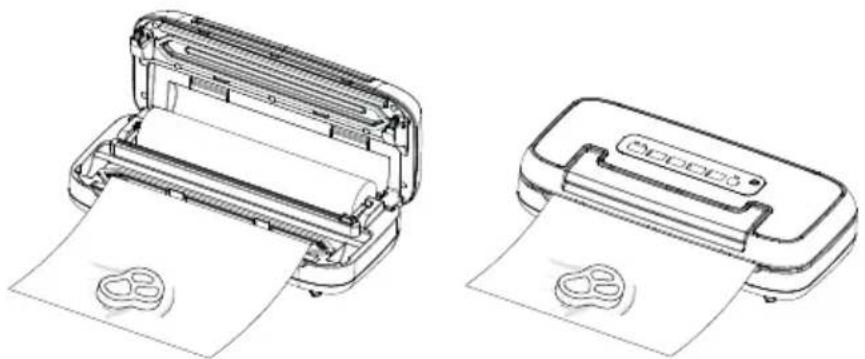
6.4 Vacuum packaging with a bag
natural_image
Two line drawings of a printer with paper and a circular print, no text or symbols present.- Place the device on a dry place.
- Open the device using the handle.
- Place the food to be preserved inside the bag.
- Place the open end of the bag into the vacuum chamber.
- Close the lid and push down the handle.
- Press Vacuum & Seal / Cancel and the bag will be vacuumed and sealed automatically.
- The corresponding LED lights up and turns off when the process is complete.
- You can cancel the operation at any time by pressing Vacuum & Seal / Cancel again.
- Lift the handle to open the device and remove the bag.
PLEASE NOTE
▶ You can use the device up to 125 times in a row with the „Vacuum & seal“ operation and up to 125 times with the „Seal“ operation without it overheating.
Do not overstuff the bag; leave enough empty length in the open end of the bag (at least a few inches) so that the bag can be properly placed in the vacuum chamber.
Clean and straighten the open end of the bag before sealing. Foreign matter or creases on the bag may result in a faulty seal. Do not wet the open end of the bag. Wet bags may not seal properly.
▶ Press the bag to expel excess air before vacuuming it. Too much air inside the bag may result in a poor vacuum.
If the food you're sealing has sharp edges (such as bones or shells) pack the edges with kitchen paper to avoid tearing the bag
▶ First freeze liquid food in a suitable container and then put it in a bag to vacuum seal it.
As food can expand slightly during freezing, choose a bag about 8 cm longer.
Place unfrozen meat or fi sh on a paper towel and vacuum seal with the paper towel in the bag to absorb any extra moisture.
Separate soft foods that stick together easily with baking or parchment paper and then vacuum seal them. This will make it easier to remove:
6.5 Use of the function „pulse“ vacuum
Since the pressure of vacuum sealing is too great for some foods and they could be crushed in the bag, you can use the „Pulse“ function to regulate the duration and thus the strength of the vacuum sealing process. So you can adjust the vacuum strength to the consistency of your vacuum food and also seal soft foods (for example berry fruit) without crushing them. The time and pressure regulation prevents delicate food from being crushed. When packing some juicy foods, you can also use this function to prevent liquid from being sucked in and drawn out.
- Place the device on a dry place.
- Open the device using the handle.
- Place the food to be preserved inside the bag.
- Make sure that the open end of the bag is inside the vacuum chamber.
- Close the lid and push down the handle.
- Press the „Pulse“ button. As long as you keep the button pressed, air is extracted. Only when you release the button, the process stops. Thus you can exactly control the vacuum and prevent the liquid from being sucked.
- Please hold the button pressed until the required vacuum has been reached.
- The LED of the „Seal“ key fl ashes.
- Then press the button „Seal“ and seal the bag.
PLEASE NOTE
If too much air has been extracted, you can wait a moment and the device will let air into the bag again. You can repeat the process.
6.6 Vacuum package in a Canister
- Place the device on a dry place.
- Open the device using the handle.
- Wipe the vacuum container and its lid to make sure they are clean and dry.
-
Fill the vacuum goods into the canister. Be careful not to fill in too much vacuum goods.
-
Close the container with its lid.
-
Close the lid of the appliance and press down the handle.
-
Attach one end of the vacuum hose to the connection of the device (17) and the other end to the connection of the container lid or on the container lid with the adapter.
-
Press button for canisters.
-
To ensure there is no air leaking between the cover and the canister, use your hand to push down the cover at the beginning of the vacuum operation.
-
The vacuum sealing process ends automatically as soon as enough vacuum has been created.
-
You can cancel the operation by pressing „Vacuum & seal / Cancel“.
-
Alternatively you can press button pulse vacuum to adjust the vacuum strength by yourself and stop at desired point of time.
-
Remove the vacuum hose from the cover of container first then from the connector at device.
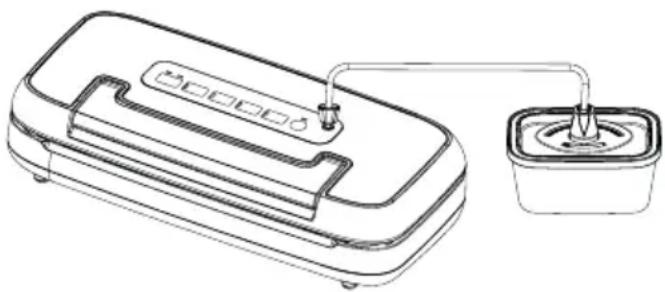
natural_image
Line drawing of a portable water dispenser with a small container connected to a piping bag (no text or symbols)PLEASE NOTE
You can also use vacuum ZIP bags for vacuum sealing. Please note that a suitable adapter is required for the ZIP bags.
6.7 Marinieren
- Follow steps 1-5 as described in 6.4.
- Press „Marinate“ Button.
- Air is removed and automatically reinserted after the vacuuming process. The device will work for 5 cycles.
- The „Marinate“ process ends automatically.
- You can cancel the operation by pressing „Vacuum & seal / Cancel“.
- After the „Marinate“ process, sealing is not automatic. You can start this manually with the „Seal“ button if necessary.
PLEASE NOTE
You can also use vacuum marinating containers for marinating. To do this, follow steps 1–6 as described in 6.6 and press the „Marinate“ key. The valve in the container lid must be open. Remove the vacuum hose from the cover of container first then from the connector at device.
6.8Storage
Store the device in its upright position, out of the reach of children.
HINWEIS
If you are not going to use the appliance for a long time, we recommend that you disconnect the mains plug from the socket.
For storage, please only close the lid loosely and fold down the handle, do not lock it so that the seals do not deform.
Put the power cord into the storage box which is in the back of the machine. Do not wrap the cord around the device.
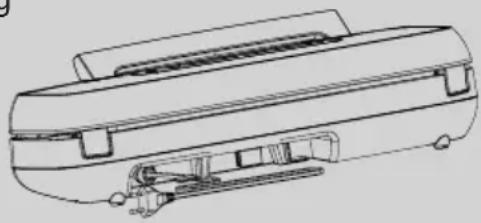
natural_image
Technical line drawing of a mechanical device with internal components (no text or symbols)7 Cleaning and Maintenance
This chapter provides important information on properly cleaning and maintaining your vacuum sealer.
7.1 Safetyinformation

ATTENTION
Please observe the following safety notices, before cleaning the unit to avoid damage to the unit or personal injury:
▶ Unplug the device prior to cleaning it.
To ensure optimum performance, the unit must be cleaned regularly. Failure to clean the unit regularly can lead to potential malfunctions, as well as safety and health risks.
The sealing bar remains hot after use. Wait a few minutes until the strip has cooled before cleaning.
Clean the unit after every use as soon as it has cooled. Leaving the unit uncleaned for long periods can make it very difficult to remove leftover food and grime and may even damage the unit.
If moisture penetrates the unit's housing, it can damage the electronic components. Please ensure that no moisture enters the device.
Do not use any harsh or abrasive cleaning agents.
Do not attempt to scrape off stubborn grime with hard or abrasive tools.
Dry all parts thoroughly before using after cleaning.
▶ Never immerse the device in water or other liquids and do not place in the dishwasher.
7.2Cleaning

Outside of the unit
Wipe with a damp cloth or sponge and mild dish soap.
◆ Inside of the unit
Wipe away any food or liquids with a paper towel.
Remove the drip tray and wash with warm water and a mild dishwashing soap. Dry it carefully and replace it.
◆ Cleaning bags for reuse
SWash the bags in warm water with a mild dishwashing soap, then rinse them well and allow them to dry completely before reusing.
ATTENTION
Bags used to store raw meats, fish or greasy foods should never be reused due to risk of contamination.
Sealing profi le (5)
Remove the sealing profi le and clean it in warm soapy water.
PLEASE NOTE
The sealing profi le should be cleaned thoroughly before installing it again.
Make sure the seal is placed correctly so that the device can function properly.
8Troubleshooting
The following table may help you narrow down and address minor malfunctions.
8.1 Safetynotices
ATTENTION
Only qualified electricians, who have been trained by the manufacturer may carry out any repairs on electrical equipment.
▶ Improperly performed repairs may result in personal injury or damage to the device.
8.2 Troubleshootingtable
| Vacuum unit is not functioning | Power plug is not plugged in Plug in mains plug! | |
| Defective power cable or plug C | Contact Customer Service | |
| Defective electrical socket Select another electrical socket | ||
| The first weld on the cut off piece of the roll is not being carried out. | Roll is not positioned correctly | Follow the steps in the chapter “making a bag using the bag roll” |
| A complete vacuum is not being created in the bag. | The open end of the bag is not completely inside the vacuum chamber | Position the bag correctly |
| The bag is defective Select another bag | ||
| There is dirt on the welding and the normal seals | Clean the seals and retry correctly once they are dry | |
| The bag is not being welded correctly | The welding bar is overheating so that the bag melts | Open the cover on the unit and let it cool down for a few minutes |
| The bag does not hold the vacuum after it has been welded shut | The bag is defective Select another bag; wrap paper serviettes around any sharp edges on the content | |
| There are leaks along the welding seam as a result of creases, crumbs, grease or liquids. | Open the bag again and clean the upper internal part of the bag and remove any foreign matter that might be on the welding bar before you weld the bag shut again. | |
| The weld seam is not sealed all the way through. | Cut off the seal and start the vacuum and sealing process again. | |
| The food inside the bag has formed gases. | Blanch vegetables such as cabbage and broccoli before vacuum sealing them. | |
| The sealing bar seals even before the end of the vacuum sealing process. | The sealing bar has become too hot due to too many passes in quick succession and is sealing the bags even though not all the air has been extracted. | Open the cover on the unit and let it cool down for a few minutes |
PLEASE NOTE
If you are unable to solve the problem with the steps shown above, please contact Customer Service.
9 Disposal of the Old Device
To protect the environment, it's important to dispose of old electronic devices properly. Do not place your old unit in the non-recyclable waste under any circumstances.

PLEASE NOTE
Please take your old unit to the nearest recycling center for safe disposal.
Until it can be disposed of properly, store your old unit away from children.
9.1 Disposal of the packaging
Caso believes in the importance of recycling and has selected packaging materials that not only protect your unit from damage during transit, but can be recycled to minimize any ecological impact. Recycling the packaging materials preserves raw materials and reduces waste. Take any packaging materials that are no longer required to a recycling collection point for proper disposal.

10Guarantee
We provide a 24-month guarantee for defects caused by production or material faults, beginning on the date of purchase. Our guarantee is valid for Germany, Austria and the Netherlands. For all other countries, please contact us.
Your legal guarantee claims as per Art. 437 ff . German Civil Code (BGB) will remain unaff ected by this. You may exercise your statutory guarantee rights free of charge. The guarantee does not cover damage caused by improper handling or use of the product or defects which have only a minor impact on the product's functionality or value. In addition to this, the guarantee also excludes parts which are subject to wear and tear; transport damages insofar as we are not responsible for them and damages caused by repairs which were not carried out by us.
This product has been constructed for non-commercial use (domestic use) and its performance is designed to meet the corresponding needs. The guarantee only covers commercial use insofar as it is comparable to domestic use. The product is not intended for any other type of commercial use.
In the case of legitimate complaints we may either repair the defective product or replace it with a defect-free product at our discretion. Obvious defects must be notified to us within 14 days of the product's delivery. Any further claims are excluded.
When making a guarantee claim please contact us before you return the product (always with the purchase receipt!). Our contact details ("Guarantor") are provided at the beginning of this instruction manual.
Table des matières
5.3Plaquesignalétique
natural_image
Three line drawings of a printer with open and closed sections, showing internal structure and paper roll (no text or symbols)natural_image
Two line drawings of a printer with paper and a circular print, no text or symbols present.natural_image
Line drawing of a portable water heater with a side-mounted drain unit (no text or symbols)natural_image
Line drawing of a printer or printer outline showing internal components and base (no text or symbols)natural_image
Three technical line drawings of printer designs, showing front, side, and top views (no text or symbols)natural_image
Technical line drawings of two printer designs, one open and one closed, both showing paper printing (no text or symbols present)natural_image
Line drawing of a portable water dispenser with a small container connected to a sink (no text or symbols)INDICAZIONE
natural_image
Technical line drawing of a mechanical device with internal components (no text or symbols)7 Pulizia e cura
① Mango
② gancio di bloccaggio
③ junta superior
④ junta inferior
⑤ junta de goma
(Presiona la bolsa contra la barra selladora)
⑥ Compartimento para rollo
natural_image
Three technical line drawings of a printer with open and closed sections, showing internal structure and paper sheet (no text or symbols)natural_image
Technical line drawings of two printer machines, one open and one closed, both showing paper printing (no text or symbols present)natural_image
Line drawing of a portable water heater with a side-mounted cup and outlet tube (no text or symbols)NOTA
natural_image
Technical line drawing of a mechanical component with no visible text or symbolsnatural_image
Three technical line drawings of printer designs, showing front, top, and side views (no text or symbols)natural_image
Two line drawings of a printer with paper and a circular print, no text or symbols present.natural_image
Line drawing of a device with a container and a plug, no text or symbols presentnatural_image
Technical line drawing of a mechanical component or housing (no text or symbols visible)natural_image
Three technical line drawings of a printer with open and closed sections, showing internal structure and paper sheet (no text or symbols)natural_image
Two line drawings of a printer with paper and a circular print, shown from different angles (no text or symbols present)natural_image
Line drawing of a portable water heater with a small container and connecting tubing (no text or symbols)natural_image
Technical line drawing of a mechanical device with no visible text or symbolsnatural_image
Three line drawings of a printer with open lid, showing front, side, and top views (no text or symbols)natural_image
Two line drawings of a printer with paper and a circular print, no text or symbols present.natural_image
Line drawing of a portable device with a water dispenser and a small container (no text or symbols)natural_image
Line drawing of a printer or printer with internal components (no text or symbols)7 Очистка и уход
6.7 Marinering....154
6.8 Opbevaring af Vakuumpakker 155
natural_image
Three line drawings of a printer with open and closed views, showing internal structure and paper sheet (no text or symbols)natural_image
Technical line drawings of two printer machines, one open and one closed, both showing paper printing (no text or symbols visible)natural_image
Line drawing of a portable device with a water dispenser and a small container (no text or symbols)natural_image
Technical line drawing of a mechanical component with no visible text or symbols


- 1General
- Information on this manual
- Warningnotices
- DANGER
- WARNING
- ATTENTION
- PLEASE NOTE
- Limitation of liability
- Copyright protection
- 2Safety
- Intendeduse
- Danger due to unintended use!
- General Safety information
- Sources of danger
- Danger of burns
- The sealing bar gets very hot. Please observe the following safety notice in order not to burn yourself or others.
- Danger of fire
- There is a danger of fi re due to the event the device is not used properly. Observe the following safety notices to avoid dangers of fi re:
- Dangers due to electrical power
- Mortal danger due to electrical power!
- Mortal danger exists when coming into contact with live wires or subassemblies! Observe the following safety notices to avoid dangers due to electrical power:
- Food storage safety information
- 4GettingStarted
- Packaging safety information
- Delivery scope and transport inspection
- Functions
- Unpacking
- Setup location requirements
- Electrical connection
- Complete Overview
- 5.1Appliance diagram
- The sealing bar gets very hot.
- Control Panel
- Ratingplate
- 6Operation
- Basics of sealing
- Bags and rolls
- To make a bag from the roll
- Vacuum packaging with a bag
- Use of the function „pulse“ vacuum
- Vacuum package in a Canister
- Marinieren
- 6.8Storage
- HINWEIS
- Cleaning and Maintenance
- Safetyinformation
- Please observe the following safety notices, before cleaning the unit to avoid damage to the unit or personal injury:
- 7.2Cleaning
- Outside of the unit
- ◆ Inside of the unit
- ◆ Cleaning bags for reuse
- Sealing profi le (5)
- 8Troubleshooting
- Safetynotices
- Troubleshootingtable
- Disposal of the Old Device
- Disposal of the packaging
- 10Guarantee
- Table des matières
- 5.3Plaquesignalétique
- INDICAZIONE
- Pulizia e cura
- NOTA
- Очистка и уход
Brand : CASO
Model : VRH 590 advanced
Category : Vacuum packaging machines