
VC 200 - Vacuum packaging machines CASO - Free user manual and instructions
Find the device manual for free VC 200 CASO in PDF.


| Product Type | Vacuum Sealer |
| Brand | CASO |
| Model | VC 200 |
| Dimensions (L x W x H) | 40 x 20 x 10 cm |
| Weight | 2.5 kg |
| Power Supply | 220-240 V, 50-60 Hz |
| Power | 120 W |
| Sealing Capacity | 30 cm |
| Main Functions | Vacuum, automatic and manual sealing, automatic stop |
| Housing Material | Stainless steel and ABS plastic |
| Noise Level | Less than 75 dB |
| Included Accessories | Roll of bags, ready-to-use bags, jar adapter |
| Care and Cleaning | Clean with a damp cloth; do not immerse in water |
| Safety | Automatic shut-off in case of overheating, thermal protection |
| Spare Parts Available | Yes, on the official CASO website |
| Repairability Index | 8/10 |
| Warranty | 2 years |
Frequently Asked Questions - VC 200 CASO
User questions about VC 200 CASO
0 question about this device. Answer the ones you know or ask your own.
Ask a new question about this device
Download the instructions for your Vacuum packaging machines in PDF format for free! Find your manual VC 200 - CASO and take your electronic device back in hand. On this page are published all the documents necessary for the use of your device. VC 200 by CASO.
USER MANUAL VC 200 CASO
natural_image
Exterior view of a COSO washing machine (no visible text or symbols on body)Braukmann GmbH
Raiffeisenstraße 9
D-59757 Arnsberg
Service-Hotline International:
Tel.: +49 (0) 29 32 / 80 55 4 - 99
Fax: +49 (0) 29 32 / 80 55 4 - 77
eMail: kundenservice@caso-design.de
natural_image
Technical line drawing of a mechanical component with labeled point T (no text or symbols beyond label)5.2 Bedienelemente

natural_image
Three-step diagram showing a device being opened into a paper holder, with arrows indicating the process (no text or symbols present)Schritt 1:
natural_image
Close-up of a white electronic device with black and red components, showing a red arrow indicating rotation (no visible text or symbols)HINWEIS
Original Operating Manual
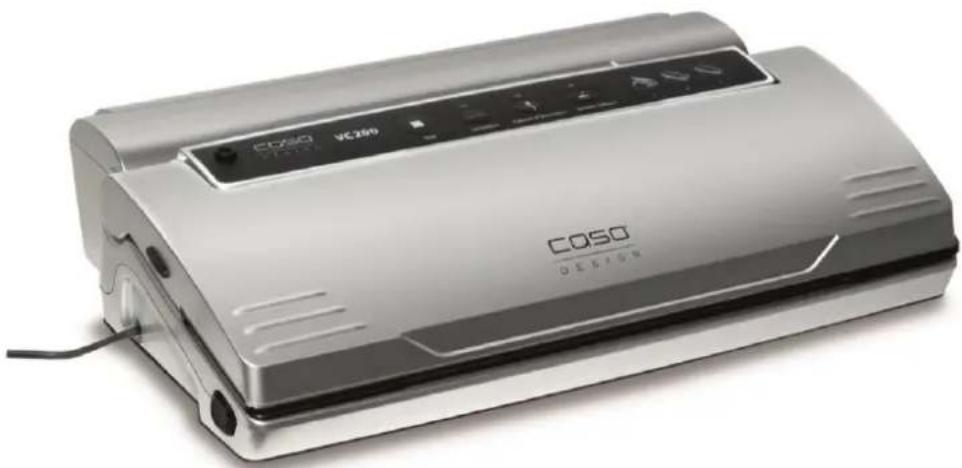
Vacuum Sealer System VC200
natural_image
Exterior view of a COSO design washing machine (no visible text or symbols on the device body)Item No. 1390
CE



12 Operating Manual - General
Please read the information contained herein so that you can become familiar with your device quickly and take advantage of the full scope of its functions.
Your vacuum sealer system will serve you for many years if you handle it and care for it properly. We wish you a lot of pleasure in using it!
12.1 Information on this manual
These Operating Instructions are a component of the vacuum sealer system (referred to hereafter as the Device) and provide you with important information for the initial commissioning, safety, intended use and care of the device. The Operating Instructions must be available at all times at the device. This Operating Manual must be read and applied by every person who is instructed to work with the device:
- Commissioning
- Operation
- Troubleshooting and/or
- Cleaning
Keep the Operating Manual in a safe place and pass it on to the subsequent owner along with the device.
12.2 Warning notices
The following warning notices are used in the Operating Manual concerned here.
⚠GEFAHR
DANGER
A warning notice of this level of danger indicates a potentially dangerous situation.
If the dangerous situation is not avoided, this can lead to death or serious injuries.
▶ Observe the instructions in this warning notice in order to avoid the danger of death or serious personal injuries.
⚠️WARNUNG
WARNING
A warning notice of this level of danger indicates a possible dangerous situation.
If the dangerous situation is not avoided, this can lead to serious injuries.
▶ Observe the instructions in this warning notice in order to avoid the personal injuries.
▲VORSICHT
ATTENTION
A warning notice of this level of danger indicates a possible dangerous situation.
If the dangerous situation is not avoided, this can lead to slight or moderate injuries.
▶ Observe the instructions in this warning notice in order to avoid the personal injuries.
HINWEIS
PLEASE NOTE
A notice of this kind indicates additional information, which will simplify the handling of the machine.
12.3 Limitation of liability
All the technical information, data and notices with regard to the installation, operation and care are completely up-to-date at the time of printing and are compiled to the best of our knowledge and belief, taking our past experience and findings into consideration.
No claims can be derived from the information provided, the illustrations or descriptions in this manual. The manufacturer does not assume any liability for damages arising as a result of the following:
• Non-observance of the manual
- Uses for non-intended purposes
• Technical alterations, modifications of the device
- Improper repairs
- Use of unauthorized spare parts
Modifications of the device are not recommended and are not covered by the guarantee.
All translations are carried out to the best of our knowledge. We do not assume any liability for translation errors, not even if the translation was carried out by us or on our instructions. The original German text remains solely binding.
12.4 Copyright protection
This document is copyright protected. Braukmann GmbH reserves all the rights, including those for photomechanical reproduction, duplication and distribution using special processes (e.g. data processing, data carriers, data networks), even partially.
Subject to content and technical changes.
13 Safety
This chapter provides you with important safety notices when handling the device.
The device corresponds with the required safety regulations. Improper use can result in personal or property damages.
13.1 Intended use
This device is only intended for use in households in enclosed spaces for vacuuming bags and canister, as well as sealing vacuum foils. In addition, this device can be used in the semi-professional sector (hunters, anglers, hobby cooks, etc.).
Uses for a different purpose or for a purpose which exceeds this description are considered incompatible with the intended or designated use.
▲WARNUNG Warning
Danger due to unintended use! Dangers can emanate from the device if it is used for an unintended use and/or a different kind of use.
▶ Use the device exclusively for its intended use.
▶ Observe the procedural methods described in this Operating Manual.
Claims of all kinds due to damages resulting from unintended uses are excluded.
The User bears the sole risk.
13.2 General Safety information
HINWEIS Please note
Please observe the following general safety notices with regard to the safe handling of the device.
▶ Examine the device for any visible external damages prior to using it. Never put a damaged device into operation.
▶ If the power cable or plug are damaged, then they must be replaced by the manufacturer or its service agent in order to avoid a hazard.
This device may be used by children aged 8 and above, if they are supervised or have been instructed at to the safe use of the device and have understood the resulting hazards.
▶ Cleaning and maintenance by the user must not be performed by children unless they are at least 8 years old and are supervised. Children are not allowed to play with the device. The device and its connecting cable must be kept away from children who are less than 8 years old.
The device may be used by individuals with reduced physical, sensory or mental capabilities or a lack of experience and / or knowledge of their use if they are supervised or have been instructed at to the safe use of the device and have understood the resulting hazards.
▶ Only customer service departments authorized by the manufacturer may carry out repairs on the device, as otherwise the guarantee entitlements will be null and void in the event of any subsequent damages. Improperly performed repairs can cause considerable dangers for the user.
▶ Defective components must always be replaced with original replacement parts. Only such parts will guarantee that the safety requirements are fulfilled.
▶ Do not leave the device unsupervised when it is in operation.
▶ When disconnect, please unplug by grasp the plug and not the cord, to avoid any injury.
HINWEIS Please note
▶ Never immerse the device in water or other liquids and do not place it in the dishwasher.
For the correct storage, please slightly close the cover, do not lock, it will deform the gaskets and affect the machine function.
13.3 Sources of danger
13.3.1 Danger of burns
▲WARNUNG Warning
The sealing bar gets very hot. Please observe the following safety notice in order not to burn yourself or others.
▶ To avoid getting burned, never touch the sealing bar directly after sealing process.
13.3.2 Danger of fire
▲WARNUNG Warning
There is a danger of fire due to the event the device is not used properly.
Observe the following safety notices to avoid dangers of fire:
▶ Do not set up the device near flammable material.
▶ Keep this appliance away from sources of heat (gas, electric, burner, heated oven).
13.3.3 Dangers due to electrical power
▲GEFAHR Mortal danger due to electrical power!
Mortal danger exists when coming into contact with live wires or subassemblies! Observe the following safety notices to avoid dangers due to electrical power:
▶ Do not operate this device if it has a damaged cable or plug, if it is not working properly or if it has been damaged or dropped. If the power cable or plug are damaged, then they
must be replaced by the manufacturer or its service agent in order to avoid a hazard.
AGEFAHR Danger
▶ Do not open the housing on the device under any circumstances. There is a danger of an electrical shock if live connections are touched and the electrical or mechanical structure is altered. In addition, functional faults on the device can also occur.
▶ Before plugging the appliance in or when you operate it, make sure your hands are dry.
▶ Do not insert objects into the openings of the device.
13.4 Food storage safety information
This vacuum preservation system will change the way you purchase and store foods. Once you are accustomed to vacuum packing, it will become an indispensable part of your food preparation. Please follow certain procedures when using this appliance to ensure food quality and safety.
HINWEIS Please note
▶ If perishable foods have been heated, defrosted or un-refrigerated, consume them immediately.
Before vacuum sealing, it's necessary to clean your hands, and all utensils and surfaces to be used for cutting and vacuum sealing foods.
▶ Refrigerate or freeze the perishable foods immediately, if you have vacuum-sealed them, and do not leave them sitting at room temperature.
The shelf life of dry foods such as nuts, coconut or cereals will be extended in vacuum-sealed package, while storing them in dark place. Oxygen and warm temperature will cause high-fat content foods fat to rancidity.
▶ Before vacuum sealing some fruit and vegetables, such as apples, bananas, potatoes and root vegetables, peel them, this will extend their shelf lives.
- When vacuum seal some vegetables such as broccoli, cauliflower and cabbage fresh for refrigeration, they will emit gases, so it's need to blanch and freeze these foods before vacuum sealing.
14 Commissioning
This chapter provides you with important safety notices during the initial commissioning of the device. Observe the following notices to avoid dangers and damages:
14.1 Safety information
⚠️WARNUNG Warning
▶ Packaging materials may not be used for playing. There is a danger of suffocation.
14.2 Delivery scope and transport inspection
As a rule, the vakuum sealer system is delivered with the following components:
• Vacuum sealer system VC200 • 2 vacuum film rolls

- Operating Instructions
• Vacuum hose (A) in film box (B)
HINWEIS Please note
▶ Examine the shipment for its completeness and for any visible damages.
▶ Immediately notify the carrier, the insurance and the supplier about any incomplete shipment or damages as a result of inadequate packaging or due to transportation.
14.3 Functions
The main function of this appliance is to store a wide kind of foods for freshness, longer shelf life, flavor and convenience. In general, vacuum packaging keeps food fresh up to eight times as long as other traditional food storage methods. Once this appliance will be an indispensable part of your life, you will have less food spoilage and it will save your money.
- Cook in advance to vacuum seal and store individual portions or entire meals.
- Prepare foods in advance for picnics and camping trips or barbecues.
- Eliminate freezer burn.
- Package foods, such as meat, fish, poultry, seafood and vegetables to freeze or refrigerate.
- Package dry foods, such as beans, nuts, and cereals to store longer.
- There are many non-food uses for vacuum packing. Keep camping supplies such as matches, first aid kits and clothing clean and dry. Keep flares for auto emergencies ready. Keep and collectibles untarnished.
14.4 Unpacking
To unpack the device, proceed as follows:
- Remove the device out of the carton and remove the packaging material.
14.5 Disposal of the packaging
The packaging protects the device against damages during transit. The packaging materials are selected in accordance with environmentally compatible and recycling-related points of view and can therefore be recycled.
Returning the packaging back to the material loop saves raw materials and reduces the quantities of accumulated waste. Take any packaging materials that are no longer required to “Green Dot” recycling collection points for disposal.
HINWEIS
Please note

▶ If possible, keep the original packaging for the device for the duration of the guarantee period of the device, in order that the device can be re-packaged properly in the event of a guarantee claim.
14.6 Setup
14.6.1 Setup location requirements:
In order to ensure the safe and trouble-free operation of the device, the setup location must fulfil the following prerequisites:
- The device must be set up on a firm, flat and horizontal surface with sufficient load-bearing capacity for the vacuum sealer system and the maximum weight of the food that should be vacuum-sealed.
- Choose the setup location in such a way that children cannot reach the hot sealing strip of the device.
- Do not set up the device in a hot, wet or extremely damp environment or near flammable material.
- The device requires an adequate flow of air in order to operate correctly. Leave a clearance of 10 cm around the device.
- Do not move the vacuum sealer system when it is in operation.
- The electrical socket must be easily accessible so that the power lead can be disconnected easily, in the case of an emergency.
- The installation and assembly of this device in non-stationary setup locations (e.g. on ships) must be carried out by specialist companies / electricians, provided they guarantee the prerequisites for the safe use of this device.
14.7 Electrical connection
In order to ensure the safe and trouble-free operation of the device, the following instructions must be observed for the electrical connection:
- Before plugging in the unit, compare the voltage and frequency data on the vacuum sealer's rating plate (found on the bottom of the unit) with that of your electrical network. This data must be compatible. If in doubt consult a qualified electrician.
- Inspect the power cord for damage and ensure it doesn't run under the unit or over hot or sharp surfaces.
- The electrical safety of the unit is only guaranteed if it is connected to a properly installed protective conductor system. If in doubt, consult a qualified electrician. The
manufacturer cannot be made responsible for damages due to a missing or damaged protective conductor.
15 Design and Function
This chapter provides you with important safety notices on the design and function of the device.
15.1 Complete overview
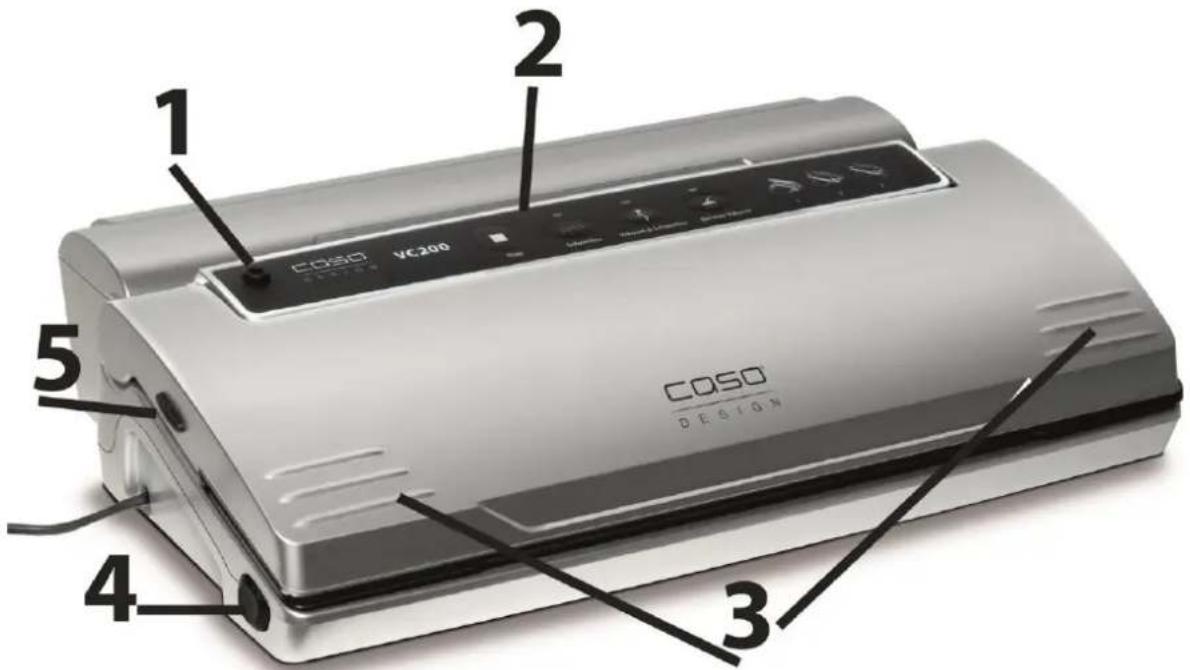
1 Connector for vacuum hose 2 Panel
3 Cover-lock - To lock the cover, press on the right and left side
4 Cover-unlock - Press buttons on right and left side
5 Cutter unlock - Press buttons on right and left side
If you open the cover, you see:
- the Sealing bar, it contains a heating wire covered with Teflon which allows the bag to seal but not to stick to the wire.
- Removable vacuum chamber. The open end of the bag must be placed inside the chamber. This feature makes sure that air cannot escape from the bag and that excess liquid is removed. Easy to remove and clean.
⚠️WARNUNG
Warning
The sealing bar gets very hot.
Please observe the following safety notice in order not to burn yourself or others.
▶ To avoid getting burned, never touch the sealing bar directly after sealing process.
HINWEIS Please note
▶ Do not remove the Teflon tape (T).

natural_image
Technical line drawing of a mechanical component with labeled point T (no text or symbols beyond label)15.2 Panel
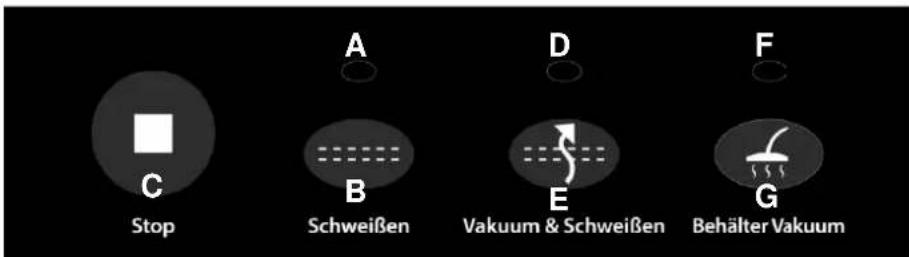
A Indicator lamp for sealing
indicates the seal process
B Button Seal only
For sealing the bag without vacuum
C Stop
switches off the vacuuming and sealing action whenever the operator wants to stop the operation
D Indicator lamp for vacuum
indicates the vacuum process
E Vacuum & Seal
draws air out of the bag and automatically changes operation to seal the bag after vacuum is completed
F Indicator lamp for vacuum in canister
indicates the vacuum process
G Vacuum canister
draws air out of the canister
With the included vacuuming hose you can vacuum the Caso vacuum canister set.
15.3 Rating plate
The rating plate with the connection and performance data can be founded on the back of the device.
16 Operation and Handing
This chapter provides you with important notices with regard to operating the device. Observe the following notices to avoid dangers and damages:
16.1 Operating Instructions
After each sealing session and before starting up, check to make sure the unit and all accessories that come in contact with the foodstuff are thoroughly clean. Follow the cleaning instructions at chapter “cleaning”.

natural_image
Three-step diagram showing a white industrial paper printer with a black cover, labeled 'COSO' and pointing to its side panel (no text or symbols on the device itself)Step 1: Open the lid and place an open side of the bag in the vacuum chamber.
Step 2: Press the cover down
Step 3: Press for release (after sealing process)
16.2 Removing the vacuum chamber
- Shift the vacuum chamber and take it out completely.
- Place the chamber back in the recess.
16.3 Bags and rolls
Please only use specified bags and rolls for vacuuming.
The material of these special foils is different from wrapping film.
All vacuum rolls and bags delivered by CASO are appropriate for cooking under vacuum (sous vide). Furthermore the vacuum rolls and bags can be used for defrosting and heating in the microwave at up to 70°C. Please make sure when vacuum rolls and bags of other producers are used, whether they are also microwaveable and suitable for cooking under vacuum. Please make sure when vacuum rolls and bags of other producers are used, whether they are also microwaveable and suitable for cooking under vacuum.
Please note that a bar vacuumsealer as this device can only be used with structured bags. You can buy a wide range of different bags and rolls from CASO.
16.4 Preserve food with vacuum:
Place the unit on a dry place. Make sure the working area in front of the unit is free of obstacles and wide enough to accommodate the food bags.
- Put the food that you want to preserve inside the bag.
- Clean and straighten the open end of the bag, make sure that there are no wrinkles or ripples on the panels of the open ends.
- Make sure that both panels of the bag are located within the vacuum chamber. (see Step1)
- Close the cover and then press down heavily on both sides by using two hands until two click sounds heard (see Step 2).
- Press the "Vakuum & Schweißen"-Button (E) and the corresponding LED control light starts flashing, then the bag will be automatically vacuumed and sealed.
- After that press the two "Cover Lock"-buttons and the process is completed (see Step3).
- Check the appearance of the sealed bag; it should have a stripe across the seal and no wrinkles otherwise the seal may not be complete.
- If you need to interrupt the vacuum operation (e.g. the bag is incorrectly positioned) first press the "Stop" button (C) and then the "Cover-Unlock"-buttons.
HINWEIS Please note
▶ Do not put too much food inside the bag; leave enough empty length in the open end of the bag so that the bag can be placed in the vacuuming plate more positively.
▶ Do not wet the open end of the bag. Wet bags may be difficult to seal tightly.
▶ Clean and straighten the open end of the bag before sealing the bag. Make sure nothing is leaving on the open area of the bag. Foreign objects or creased bags may cause difficulty to seal tightly.
▶ Do not leave too much air inside the bag. Press the bag to allow extra air to escape from the bag before vacuuming it. Too much air inside the bag increases the vacuum pump loading and may cause that the motor works insufficient to draw away all the air out of the bag.
If the foods you're sealing have sharp edges, such as bones, spaghetti or shellfish, pack the edges with kitchen paper to avoid tearing the bag
▶ Suggest to vacuum seal one bag within 1 minute to let the appliance cool down enough.
In order to vacuum seal liquid-based foods, such as soups, casseroles or stew, freeze them first in a baking pan or tempered dish, vacuum seal them, label and stack them in your freezer as soon as they are in frozen solid.
▶ Blanch the vegetables by cooking briefly in boiling water or microwave oven, cool them down, then vacuum seal them in convenient portions.
▶ To vacuum seal the foods not frozen, two extra inches are required for bag length to allow for expansion while freezing. Place the meat or fish on a paper towel and vacuum seal with the paper towel in the bag, this way will help to absorb moisture from the foods.
HINWEIS Please note
▶ Before storing the foods such as tortillas, crepes or hamburger, use wax or parchment paper between them to stack the pieces, this will be easier to remove some of the food, reseal the rest and immediately replace in the freezer.
The vacuum preservation system can't be directly used for the vacuum sealing of canisters or canning jars.
16.5 Making a bag using the bag roll
- Unroll the bag to the desired length and cut the bag to the appropriate length with precise and clear cut.
- Open the lid and put one end of the bag on top of the black rubber strip, then close the cover (see Step 1).
- Press the cover down heavily on both sides by using two hands until two click sounds heard (see Step 2).
- Press the "Schweißen"-Button (B) and the corresponding LED control light starts flashing.
- When the LED light turns off, the bag is sealed.
- Now you have a custom-sized bag.
HINWEIS Please note
▶ Make sure that the bag you want to use is at least 8cm/3.1in. longer than the food. Add another 2 cm/0.8in. each time the bag is re-used.
16.6 Open a sealed bag
Cut the bag straight across with scissors or the cutter, just inside the seal.
16.7 Using the film box
Place the film roll into the film box.
When you are vacuum sealing, attach the film box to the rear of the vacuum sealer. Lift up the vacuum sealer cover and pull the film through.
16.8 Using the Cutter
To cut off the film at the desired position, unlock the cutter buttons on both sides. Fold down the cutter so that the film is held in place and then pull the cutter knife across the film once.

natural_image
Close-up of a white and black industrial machine with a red arrow indicating rotation, showing internal components (no visible text or symbols)16.9 Storing your vacuum sealing system
Keep the unit in a flat and safe place, out of the reach of children.
HINWEIS Please note
For the correct storage, please slightly close the cover, do not lock, it will deform the gaskets and affect the machine function.
▶ To disconnect remove the plug from the outlet.
▶ Always unplug this appliance from the electrical outlet immediately after using and before cleaning.
17 Cleaning and Maintenance
This chapter provides you with important notices with regard to cleaning and maintaining the device. Please observe the notices to prevent damages due to cleaning the device incorrectly and to ensure trouble-free operation.
17.1 Safety information
▲VORSICHT Attention
Please observe the following safety notices, before you commence with cleaning the device:
The device must be cleaned and food residues must be removed at regular intervals. If the device is not maintained in a clean condition, this will have a detrimental effect on the service life of the device and can also result in a dangerous condition in the device as well as in the growth of fungus and bacteria.
▶ Unplug the device prior to cleaning it.
The sealing bar is hot after it is used. There is a danger of burns! Wait until the device has cooled down.
▶ Clean the device after use as soon as it has cooled down. Extended waiting unnecessarily complicates cleaning and can make it impossible in extreme cases. Excessive accumulations of dirt can even damage the device under certain circumstances.
▶ Never immerse the device in water or other liquids and do not place in the dishwasher.
▶ If dampness penetrates into the device, this can damage the electronic components. Please ensure that no liquid can enter the interior of the device.
▶ Do not use any aggressive or abrasive cleaning agents or solvents.
▶ Do not scrape off stubborn dirt with hard items.
▶ Dry thoroughly before using again.
17.2 Cleaning
◆ Outside of the unit
Wipe the outside of the unit with a damp cloth or sponge and mild dish soap.
◆ Inside of the device
To clean the inside of the unit wipe away any food or liquids with a paper towel.
◆ Inside of the device
The extractable vacuum chamber can be washed under running water or in the dishwasher – see for this the paragraph “Removing the vacuum chamber”.
◆ Preservation bags
Washing the bagging material in warm water with a mild dishwashing soap, then rinse the bags well and allow drying thoroughly before reusing.
▲VORSICHT Attention
- Bags used to store raw meats, fish or greasy foods can't be reused.
◆ Sealing profile (which presses the bag against the sealing bar)
Remove the sealing profile and clean it in warm soapy water.
HINWEIS Please note
The sealing profile should be cleaned thoroughly before installing it again.
▶ Be careful during re-installation, so that nothing will be damaged and sealing profile is placed well so that the device can work properly.
18 Troubleshooting
This chapter provides you with important notices with regard to operating the device. Observe the following notices to avoid dangers and damages:
18.1 Safety notices
▲VORSICHT Attention
▶ Only qualified electricians, who have been trained by the manufacturer, may carry out any repairs on electrical equipment.
▶ Improperly performed repairs can cause considerable dangers for the user and damages to the device.
18.2 Cause and Action
The table below helps to locate and resolve minor faults.
| Error | Possible cause | Rectification |
| Vacuum unit is not functioning | Power plug is not plugged in | Plug in mains plug! |
| Defective power cable or plug | Send device to Customer Service | |
| Defective electrical socket | Select another electrical socket | |
| The first weld on the cut off piece of the roll is not being carried out. | Roll is not positioned correctly | Follow the steps in the chapter “Vacuum packaging in a bag originating on the roll” |
| A complete vacuum is not being created in the bag. | The open end of the bag is not completely inside the vacuum chamber | Position the bag correctly |
| The bag is defective | Select another bag | |
| There is dirt on the welding and the normal seals | Clean the seals and retry correctly once they are dry | |
| The bag is not being welded correctly | The welding bar is overheating so that the bag melts | Open the cover on the unit and let it cool down for a few minutes |
| The bag does not hold the vacuum after it has been welded shut | The bag is defective | Select another bag; wrap paper serviettes around any sharp edges on the content |
| There are leaks along the welding seam as a result of creases, crumbs, grease or liquids. | Open the bag again and clean the upper internal part of the bag and remove any foreign matter that might be on the welding bar before you weld the bag shut again. |
HINWEIS
Please note
▶ If you are unable to solve the problem with the steps shown above, please contact Customer Service.
19 Disposal of the Old Device
Old electric and electronic devices frequently still contain valuable materials. However, they also contain damaging substances, which were necessary for their functionality and safety.
If these were put in the non-recyclable waste or were handled incorrectly, they could be detrimental to human health and the environment. Therefore, do not put your old device into the non-recyclable waste under any circumstances.

HINWEIS
Please note
- Utilise the collection point, established in your town, to return and recycle old electric and electronic devices. If necessary, contact your town hall, local refuse collection service or your dealer for information.
▶ Ensure that your old device is stored safely away from children until it is taken away.
20 Guarantee
We provide a 24 month guarantee for this product, commencing from the date of sale, for faults which are attributable to production or material faults.
Your legal guarantee entitlements in accordance with § 439 ff. BGB-E remain unaffected by this.
The guarantee does not include damages, which were incurred as a result of improper handling or use, as well as malfunctions which only have a minor effect on the function or the value of the device. Consumables, transit damages, inasmuch as we are not responsible for these, as well as damages, which were incurred as a result of any repairs that were not performed by us, are also excluded from the guarantee entitlements.
This device is designed for use in domestic situations and has the appropriate performance levels. Any use in commercial situations is only covered under the guarantee to the extent that it would be comparable with the stresses of being used in a domestic situation. It is not intended for any additional, commercial use.
In the event of justified complaints, we will repair the faulty device at our discretion or replace it with a trouble-free device. Any pending faults must be reported within 14 days of delivery. All further claims are excluded.
To enforce a guarantee claim, please contact us prior to returning the device (always provide us with proof of purchase).
21 Technical Data
| Device | Vacuum sealer system |
| Name | VC 200 |
| Item No.: | 1390 |
| Mains data | 220 - 240 V; 50 Hz |
| Power consumption | 120 W |
| External measurements (W x H x D): | 390 x 88 x 248 mm |
| Net weight | 1,9 kg |
natural_image
Exterior view of a COSO washing machine (no visible text or symbols on the device body)
N°. d'art. 1390
22 Mode d'emploi
22.1 Généralités
natural_image
Technical line drawing of a mechanical component with labeled point T (no text or symbols beyond label)A Voyant lumineux scellage
natural_image
Three-step diagram showing a device being opened into a paper, with arrows indicating the process (no text or symbols present)natural_image
Close-up of a white and black device with a red arrow indicating rotation, showing no visible text or symbols.natural_image
Exterior view of a Coso design washing machine (no visible text or symbols on body)CE



Articolo-N. 1390
32 Istruzione d'uso
32.1 In generale
natural_image
Technical line drawing of a mechanical component with labeled point T (no text or symbols beyond label)35.2 Pannello comandi

natural_image
Close-up of a mechanical device with a black handle and silver base, showing a white sheet and a yellow tab (no text or symbols visible)
natural_image
Two identical white electronic devices with black connectors, shown from top and side views (no text or symbols visible)natural_image
Close-up of a white electronic device with black and red components, showing a red arrow indicating rotation or adjustment (no visible text or symbols)natural_image
Exterior view of a COSO design air purifier (no visible text or symbols on the device body)natural_image
Technical line drawing of a mechanical component with labeled point T (no text or symbols beyond label)46.2 Elementos de control
natural_image
Three-step diagram showing a device being opened into a paper holder, with arrows indicating the process (no text or symbols present)Paso 1:
natural_image
Close-up of a white and black industrial machine with a red arrow indicating rotation or assembly (no visible text or symbols)HINWEIS Nota
natural_image
Exterior view of a COSO printer with visible branding and control buttons (no readable text beyond branding)▲WARNUNG WAARSCHUWING
▲WARNUNG WAARSCHUWING
▲WARNUNG WAARSCHUWING
▲WARNUNG WAARSCHUWING
▲WARNUNG WAARSCHUWING
natural_image
Technical line drawing of a mechanical component with labeled point T (no text or symbols beyond label)57.2 Bedieningspaneel

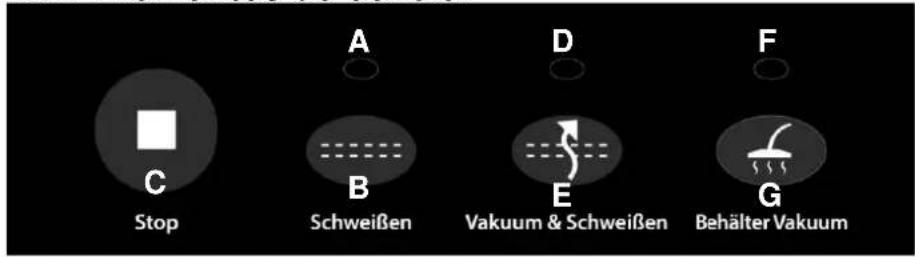
F Indicator lichte vacuum tank
natural_image
Three-step diagram showing a printer or scanner device with open lid, showing internal structure and alignment (no text or symbols)Stap 1:
natural_image
Close-up of a white electronic device with black components and red LED stripe, showing a red arrow indicating rotation (no visible text or symbols)58.9 Opbergen van de Vakuumierer VC200:
natural_image
Exterior view of a COSO air purifier device (no visible text or symbols on body)
Артикул 1390
natural_image
Technical line drawing of a mechanical component with labeled point T (no text or symbols beyond label)natural_image
Three-step diagram showing a printer with a lid, labeled 'Cobio' and arrows indicating process steps (no text or symbols on the devices themselves)natural_image
Close-up of a white and black appliance with a red arrow indicating rotation, no visible text or symbols.

- Braukmann GmbH
- Bedienelemente
- Schritt 1:
- HINWEIS
- Original Operating Manual
- Operating Manual - General
- Information on this manual
- Warning notices
- ⚠GEFAHR
- DANGER
- ⚠️WARNUNG
- WARNING
- ▲VORSICHT
- ATTENTION
- PLEASE NOTE
- Limitation of liability
- Copyright protection
- Safety
- Intended use
- ▲WARNUNG Warning
- General Safety information
- HINWEIS Please note
- Please observe the following general safety notices with regard to the safe handling of the device.
- Sources of danger
- Danger of burns
- Danger of fire
- Dangers due to electrical power
- ▲GEFAHR Mortal danger due to electrical power!
- AGEFAHR Danger
- Food storage safety information
- Commissioning
- Safety information
- ⚠️WARNUNG Warning
- Delivery scope and transport inspection
- Functions
- Unpacking
- Disposal of the packaging
- Setup
- Setup location requirements:
- Electrical connection
- Design and Function
- Complete overview
- Panel
- Rating plate
- Operation and Handing
- Operating Instructions
- Removing the vacuum chamber
- Bags and rolls
- Preserve food with vacuum:
- Making a bag using the bag roll
- Open a sealed bag
- Using the film box
- Using the Cutter
- Storing your vacuum sealing system
- Cleaning and Maintenance
- Safety information
- ▲VORSICHT Attention
- Cleaning
- ◆ Inside of the device
- ◆ Preservation bags
- ◆ Sealing profile (which presses the bag against the sealing bar)
- Troubleshooting
- Safety notices
- Cause and Action
- Disposal of the Old Device
- Guarantee
- Technical Data
- Mode d'emploi
- Généralités
- Istruzione d'uso
- In generale
- Pannello comandi
- Elementos de control
- Paso 1:
- HINWEIS Nota
- ▲WARNUNG WAARSCHUWING
- Bedieningspaneel
- Stap 1:
- Opbergen van de Vakuumierer VC200:
Brand : CASO
Model : VC 200
Category : Vacuum packaging machines