Vacu OneTouch Pro 1333 - Vacuum packaging machines CASO - Free user manual and instructions
Find the device manual for free Vacu OneTouch Pro 1333 CASO in PDF.


| Product type | Manual vacuum sealer |
| Brand | CASO |
| Model | Vacu OneTouch Pro 1333 |
| Power supply | Integrated rechargeable battery, charging via USB-C (power adapter not included), charging time approx. 3.5 hours |
| Vacuum sealing | ZIP bags, VacuBoxx containers, WineLock stoppers (bottles) |
| Automatic shut-off | Yes, when vacuum is reached |
| LED indicator | Steady white: sealing in progress or battery full; flashing red: low battery or charging |
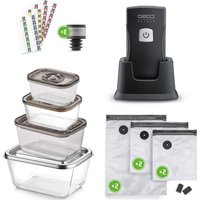
| Package contents | Device with charging station, USB-C cable, 15 ZIP bags (5x20x23 cm, 5x26x23 cm, 5x26x35 cm), 2 ZIP-Locker, 3 VacuBoxx Eco containers (500 ml, 800 ml, 1500 ml), 1 VacuBoxx Inox XL (2600 ml), 3 WineLock, 4 Food Manager stickers, instruction manual |
| Bag compatibility | ZIP bags with compatible valve; freezer and microwave safe up to 12 min at 650 W; boil resistant 8 h at 100 °C |
| Container compatibility | VacuBoxx: microwave and oven safe up to 350 °C (without lid), freezer safe down to -18 °C |
| WineLock | Stopper for bottles (inner diameter 16-19 mm), compatible with wine, oil, vinegar, juice (non-carbonated) |
| Cleaning the device | Soft, slightly damp cloth; removable drip tray, washable with hot water |
| Cleaning accessories | ZIP bags and VacuBoxx containers: dishwasher safe; WineLock: hot water or dishwasher |
| Electrical safety | Do not immerse in water; battery non-replaceable; battery leak: rinse thoroughly with water |
| Warranty | 12 months (Germany, Austria, Netherlands); for wear parts and damage due to improper handling |
| Usage | Domestic and professional |
Frequently Asked Questions - Vacu OneTouch Pro 1333 CASO
User questions about Vacu OneTouch Pro 1333 CASO
0 question about this device. Answer the ones you know or ask your own.
Ask a new question about this device
Download the instructions for your Vacuum packaging machines in PDF format for free! Find your manual Vacu OneTouch Pro 1333 - CASO and take your electronic device back in hand. On this page are published all the documents necessary for the use of your device. Vacu OneTouch Pro 1333 by CASO.
USER MANUAL Vacu OneTouch Pro 1333 CASO
Original-Bedienungsanleitung | Instruction Manual | Istruzione d'uso Manual del usuario | Gebruiksaanwijzing | Руководство по эксплуатации Mode d'emploi | Instruções de funcionamento | Bruksanvisning Kullanım Kılavuzu
Handvakuumierer Vacu OneTouch Pro Set Hand-Held Vacuum Sealer Vacu OneTouch Pro Set Apparecchio per sottovuoto manuale Vacu OneTouch Pro Set Envasadora al Vacío Manual Vacu OneTouch Pro Set Handstofzuiger Hand Vacuum Vacu OneTouch Pro Set Ручной вакууматор Vacu OneTouch Pro Set Machine à vide manuelle Vacu OneTouch Pro Set Máquina de embalar a vácuo portátil Vacu OneTouch Pro Set Handhållen vakuumförseglare Vacu OneTouch Pro Set El Vakumu Vacu OneTouch Pro Set
natural_image
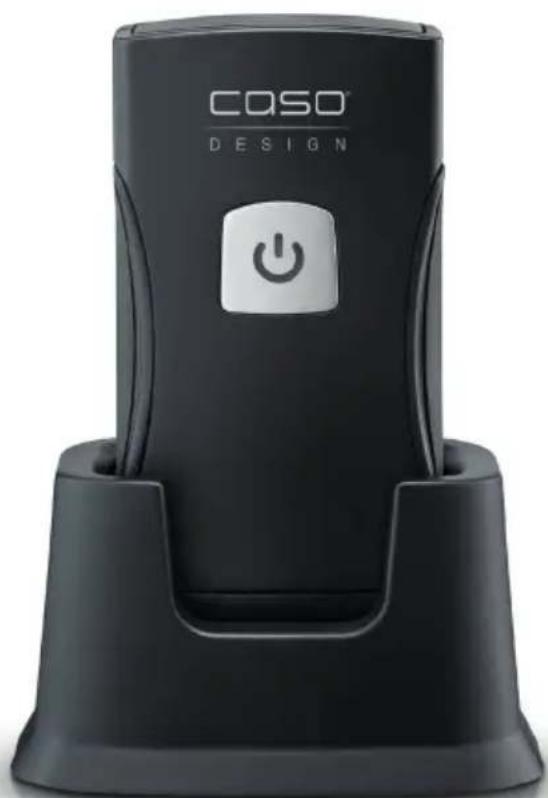
Black CO2O DESIGN device with power button icon (no text or symbols on body)
| DE | Weitere Sprachen dieser Bedienungsanleitung fi nden Sie unter www.caso-design.de oder wenn Sie den QR-Code scannen. |
| EN | To see these operating instructions in more languages, visit www.caso-design.de or scan the QR code. |
| IT | Ulteriori lingue di queste istruzioni per l’uso sono disponibili al seguente link www.caso-design.de o scansionando il codice QR. |
| ES | Este manual de instrucciones está disponible en otros idiomas en www.caso-design.de o escaneando el código QR. |
| NL | Je vindt deze gebruiksaanwijzing met vertaling in verschillende talen op de volgende link op de website www.caso-design.de. U kunt ook de QR-code scannen om toegang te krijgen tot de vertalingen. |
| RU | Это руководство по эксплуатации на других языках вы найдете, перейдя по ссылке www.caso-design.de или отсканировав QR-код. |
| FR | Vous trouverez ce mode d’emploi en plusieurs langues sur www.caso-design.de ou en scannant le code QR. |
| PT | Pode encontrar este manual de instruções noutras línguas em www.caso-design.de ou através da leitura do código QR. |
| SV | Det fi nns tillgång till fl era språk i denna bruksanvisning på www.caso-design.de eller om du scannar QR-koden. |
| TR | Bu kılavuzun diğer dillere çevirileri için şu bağlantıya bakınız: www.caso-design.de. Bu amaçla, geçerli QR kodunu da tarayabilirsiniz. |
Technische Daten / Technical Data / Dati tecnici / Datos técnicos / Technische gegevens / Технические характеристики / Caractéristiques techniques / Especifi cações técnicas / Tekniska data / Teknik bilgiler
| Gerät / Device / Apparecchio / Aparato /Aparaat / Прибор / Appareil / Aparelho /Apparat / Cihaz | Handvakuumierer / Hand-Held VacuumSealer / Apparecchio per sottovuotomanuale / Envasadora al Vacío Manual /Handstofzuiger Hand Vacuum / Ручнойвакууматор / Machine à vide manuelle /Máquina de embalar a vácuo portátil /Handhållen vakuumförseglare / El Vakumu |
| Name / Name / Nome / Denominación /Name / Наименование / Nom / Nome /Benämning / Adı | CASO Vacu OneTouch Pro Set |
| Artikel-Nr. / Item No. / N. Articolo / N° de art /Artikelnr. / N° артикула / N°. d’article /N.° de artigo / Artikel-nr. / Ürün no. | 01336 |
| Anschlussdaten / Mains data / Dati connessione /Conexión / Aansluitgegevens / Параметрыподключения / Données de raccordement /Dados de ligação / Anslutningsdata / BağlantıBilgileri | 5 V; 3200 mAh |
| Außenabmessungen (B/H/T) /External measurements (W x H x D) /Misure esterne (L/H/P) /Dimensiones exteriores (An/H/P) /Afmetingen (BxHxD) /Габаритные размеры (Ш/B/Г) /Dimensions externes (I/h/p) /Medidas (C x A x P) /Yttermått (B/H/D) /Diş Gövdenin Boyutu (Y/G/D) | 80 mm x 180 mm x 65 mm |
| Nettogewicht / Net weight / Peso netto /Peso net / Nettogewicht / Bec / Poids net /Peso / Nettovikt / Net ağırlık | 638 g |
The following warning notices are used in the Operating Manual concerned here.

DANGER
A warning notice of this level of danger indicates a potentially dangerous situation. If the dangerous situation is not avoided, this can lead to death or serious injuries.
Observe the instructions in this warning notice in order to avoid the danger of death or serious personal injuries.

WARNING
A warning notice of this level of danger indicates a possible dangerous situation. If the dangerous situation is not avoided, this can lead to serious injuries.

WARNING
Observe the instructions in this warning notice in order to avoid the personal injuries.

ATTENTION
A warning notice of this level of danger indicates a possible dangerous situation. If the dangerous situation is not avoided, this can lead to slight or moderate injuries.
Observe the instructions in this warning notice in order to avoid the personal injuries.
PLEASE NOTE
A notice of this kind indicates additional information, which will simplify the handling of the machine.
Intended use
The hand vacuum sealer is intended for vacuuming zip bags, vacuum canisters or Wine-Locks (with a connection suitable for the hand vacuum sealer). The device is intended for use in commercial applications and for domestic use.
The ZIP-bags and vacuum canisters are designed for vacuuming and storing, heating and freezing food. The aroma seal is designed for vacuum-sealing bottles.

WARNING
Danger due to unintended use! Dangers can emanate from the device if it is used for an unintended use and/or a different kind of use.
▶ Use the device exclusively for its intended use.
▶ Observe the procedural methods described in this Operating Manual.
Claims of all kinds due to damages resulting from unintended uses are excluded. The User bears the sole risk.
Transport inspection

WARNING
Do not allow children to play with packaging materials due to risk of suffocation.
PLEASE NOTE
Examine the shipment to ensure the unit and manual are included and inspect the unit for any visible damage.
Immediately notify the carrier and/or the supplier about an incomplete shipment or any damage as a result of inadequate packaging or mishandling.
PLEASE NOTE
Please observe the following general safety notices with regard to the safe handling of the device.
Examine the device for any visible external damages prior to using it. Never put a damaged device into operation.
This device can be used by children aged 8 and above, and by persons with reduced physical, sensory or mental capabilities or a lack of experience and / or knowledge if they have been given supervision or instruction concerning use of the device in a safe way and understand the hazards involved.
▶ Cleaning and user maintenance shall not be made by children.
▶ Children are not allowed to play with the device.
The device and its connecting cable must be kept away from children who are less than 8 years old.
▶ Only customer service departments authorized by the manufacturer may carry out repairs on the device, as otherwise the guarantee entitlements will be null and void in the event of any subsequent damages. Improperly performed repairs can cause considerable dangers for the user.
▶ Defective components must always be replaced with original replacement parts. Only such parts will guarantee that the safety requirements are fulfilled.
Dangers due to electrical power

DANGER
Mortal danger due to electrical power!
Mortal danger exists when coming into contact with live wires or subassemblies! Observe the following safety notices to avoid dangers due to electrical power:
▶ Do not charge the appliance with a damaged USB-C charging cable or power supply.
The device contains rechargeable batteries that cannot be replaced; therefore, never replace the battery with other batteries.
▶ Never take the cordless device apart, expose it to high temperatures or place it in a fire.

DANGER
Do not immerse the device, cord or plug in water or other liquids and do not place in the dishwasher.
If the battery has leaked, ensure the skin, eyes and mucous membranes do not come into contact with the battery acid. In the event of contact with battery acid, immediately rinse the affected areas with plenty of clean water and seek medical help immediately.
Electrical connection
In order to ensure the safe and trouble-free operation of the device, the following instructions must be observed for the electrical connection:
- Before connecting the device, compare the connection data (voltage and frequency) on the rating plate with those of your electrical network. This data must agree in order that no damages occur in the device.
IT
Sicurezza
natural_image
Line drawings of three different CosO® LED driver devices with power button indicators (no text or symbols on the devices themselves)CASO Vacu ZIP-Bags CASO VacuBoxxen CASO WineLock
HINWEIS
natural_image
Diagram showing two mechanical or fluidic states with a downward arrow and bidirectional arrow between them (no text or symbols)3.8 Food Manager Sticker
Table of contents - Operation
1 General 39
1.1 Copyright protection....39
1.2 Delivery scope 40
2 Design and Function....40
2.1 Overview....40
2.2 Rating plate....40
3 Operation and Handling 41
3.1 LED and battery symbol 41
3.2 Charging the battery....41
3.3 Vacuum sealing zip bags, containers and bottles using the WineLock......42
3.4 Opening bags / containers / WineLocks 42
3.5 Use / suitability of the Vacu ZIP bags 42
3.5.1 Heating and freezing the bags 42
3.6 Use / suitability of the VacuBoxxes....43
3.6.1 Heating and freezing canisters....43
3.7 Use / suitability of the WineLock - vacuum aroma seal 43
3.8 Food Manager Stickers 43
4 Cleaning and Maintenance ....43
4.1 Safety information....44
4.2 Cleaning....44
4.2.1 Vacu OneTouch Pro....44
4.2.2 Vacu ZIP-Bags 44
4.2.3 VacuBoxxen 44
4.2.4 WineLock – Vacuum aroma seal 44
5 Troubleshooting 44
5.1 Troubleshooting table 45
6 Disposal of the Old Device 45
6.1 Disposal of the packaging....46
7 Guarantee....46
1General
Please read the information contained herein so that you can become familiar with your device quickly and take advantage of the full scope of its functions. Your appliance will serve you for many years if you handle it and care for it properly. We wish you a lot of pleasure in using it!
1.1 Copyright protection
This document is copyright protected. CASO GmbH reserves all the rights, including those for photomechanical reproduction, duplication and distribution using special processes (e.g. data processing, data carriers, data networks), even partially. Subject to content and technical changes.
1.2 Deliveryscope
The device includes the following components:
• Vacu OneTouch Pro with charging station and USB-C charger (without plug)
- 5x Vacu ZIP-Bags 20 x 23 cm
- 5x Vacu ZIP-Bags 26 x 23 cm
- 5x Vacu ZIP-Bags 26 x 35 cm • 2x ZIP-Locker
• 1x VacuBoxx Eco S (500 ml) • 1x VacuBoxx Eco M (800 ml)
• 1x VacuBoxx Eco L (1500 ml) • 1x VacuBoxx Inox XL (2600 ml)
- 3x WineLock – vacuum aroma seal
- 4 sheets food manager sticker
- Instruction manual
2 Design and Function
This chapter provides you with important information of the design and function of the device.
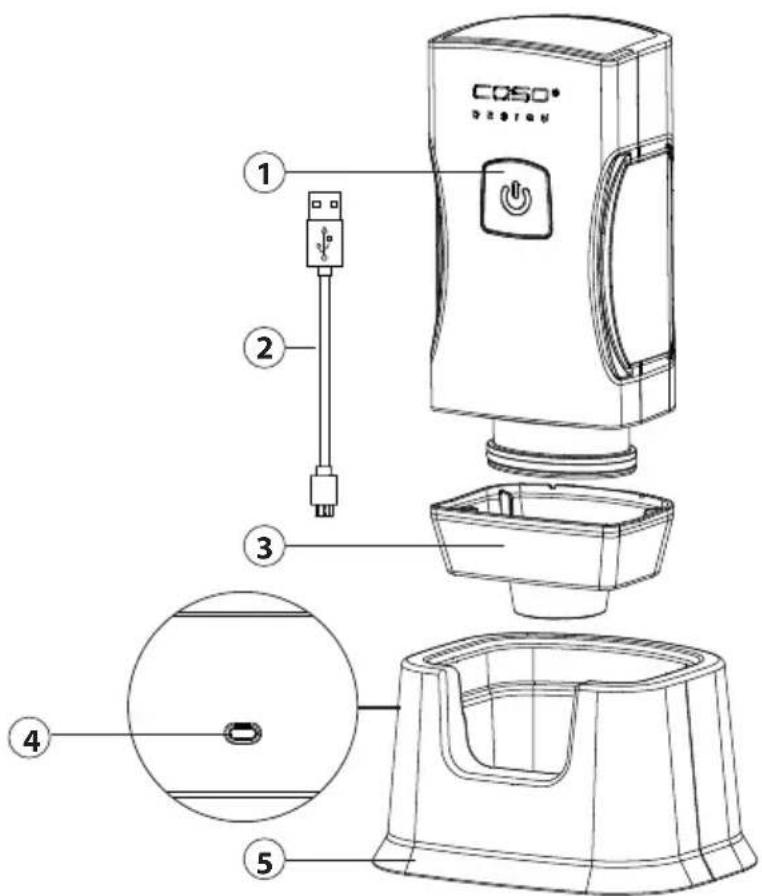
2.1Overview
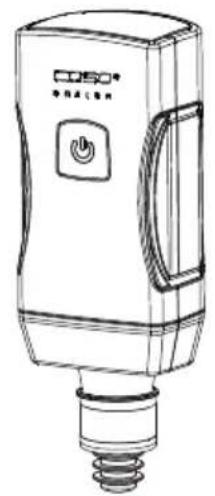
① "On / Off" button with LED
② USB-C charger
③ Collection container
④ USB TYPE C connection
⑤ Charging station
2.2 Ratingplate
The rating plate with connection and performance data can be found on the back of the device.
3 Operation and Handling
This chapter provides you with important information and notes on the operation and basic settings of the appliance.
Use the hand-held vacuum sealer to vacuum seal zip bags, containers or bottles (using the WineLock) which have a suitable valve.

WARNING
The device should not directly absorb liquids or powders (e.g. water, oil, fl our).
- If you notice that the device is sucking in liquid or powder, then stop the vacuum sealing process immediately by pressing the "On / Off" button.
- Remove and clean the drip container.
- Following this, clean the device. Do not place the device on the charging station until it has been cleaned.
3.1 LED and battery symbol
- The LED lights up constantly white during the vacuum operation
- The device stops the vacuum operation automatically and the white LED switches off.
- The LED fl ashes red when the battery is weak and during charging.
- The LED lights up constantly white as soon as the battery is charged.
3.2 Charging the battery
Charge the device at least every 6 months to ensure optimal battery function. Charge the device fully before using it for the first time.
Use a USB plug (not included in the scope of delivery) to connect the USB cable. To do this, insert the larger USB connector into the plug and the smaller USB-C connector into the charging station. Place the device on the charging station to re-charge it. Charging can take up to approx. 3.5 hours.
PLEASE NOTE
If the device is started unintentionally, when you are not performing a vacuum operation, then the device switches itself off after approx. 3 minutes to protect its battery.
3.3 Vacuum sealing zip bags, containers and bottles using the WineLock
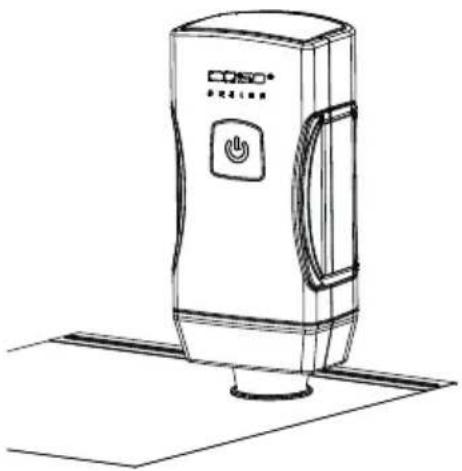
- Place the appliance on the bag / container / or WineLock valve.
- Press the appliance's "On / Off" button. Air will be sucked out.
- The vacuum sealing process stops automatically when a vacuum has been achieved.
- You can stop the process at any time by pressing the "On / Off" button.
- Carefully move the appliance to the side to release it from the valve.
natural_image
Line drawing of a portable air purifier device with control panel and power button (no text or symbols)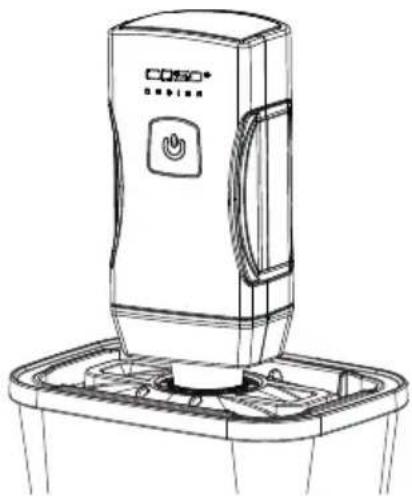
natural_image
Line drawing of a portable electronic device with control panel and base tray (no text or symbols)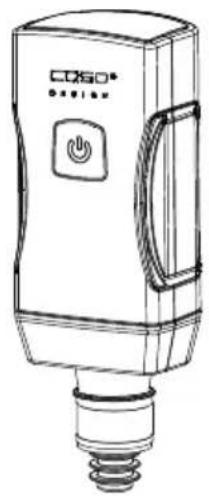
natural_image
Line drawing of a Coso device with a button and screw base (no text or symbols)CASO Vacu ZIP-Bags CASO VacuBoxxen CASO WineLock
PLEASE NOTE
The valve must be dry and free from food residues.
Do not overfi ll bags / containers. Make sure that the food inside bags / containers does not come into contact with the valve on the inside.
The device should not directly absorb liquids or powders (e.g. water, oil, flour). If you notice that the device has sucked in any liquid, then stop the vacuum sealing process immediately by pressing the "On / Off" button.
3.4 Opening bags / containers / WineLocks
Push the silicone valve to the side to allow air to re-enter.
3.5 Use / suitability of the Vacu ZIP bags
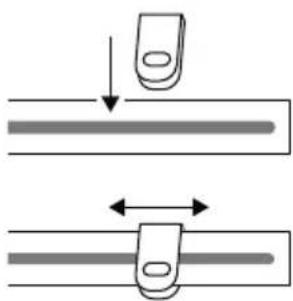
Make sure that the valve on the inside of the bag does not come into contact with the contents. Close the zip bag tightly with the help of a ZIP Locker and check that the zip lock is closed properly.
natural_image
Diagram showing two mechanical components with arrows indicating motion or movement (no text or symbols)3.5.1 Heating and freezing the bags
The bags are suitable for the freezer.
You can heat the bags with their contents in the microwave for a maximum of 12 minutes at 650 W. To do this, open the closure of the ZIP-bag.
The bags are boil-proof for up to 8 hours at 100°C (suitable for sous vide). Be careful that the valve and the zipper do not come into contact with the water, as otherwise liquid could enter the bag.

WARNING
Risk of burns
Handle the bags and the food carefully, there is a risk of burns. Use pot holders or something similar if necessary.
3.6 Use / suitability of the VacuBoxxes
When filling the food, leave approx. 0.5 cm free up to the top edge of the container. Fruits and vegetables that gas up, such as onions or cabbage, should be blanched before vacuuming, as they release gases and thus the vacuum is lost within a few hours.
3.6.1 Heating and freezing canisters
The containers (but not the lids) are suitable for warming up food in the microwave or oven (up to 350 °C). Let food cool down before you vacuum seal it.

WARNING
Risk of burns / injury
▶ Please be careful when handling heated canisters and food, as there is a risk of scalding. Use potholders or similar items as necessary.
▶ Do not heat the canister directly on fire.
You can also use these canisters to freeze food (down to -18^ ). When filling, please remember that frozen food can expand.

WARNING
Risk of injury
Do not put containers in the oven straight from the freezer.
3.7 Use / suitability of the WineLock - vacuum aroma seal
Suitable for bottle necks with an internal diameter of 16-19 mm. You can vacuum seal e.g. wine bottles, oil bottles, vinegar bottles and juice bottles with the fl avour seal. The liquids must not contain any carbon dioxide.
3.8 Food Manager Stickers
The stickers supplied are for food organisation. With the Caso Food Manager app, you can see which food is available or needs to be used up. Find out more at www.myfoodmanager.de.
4 Cleaning and Maintenance
This chapter provides you with important notices with regard to cleaning and maintaining the device. Please observe the notices to prevent damages due to cleaning the device incorrectly and to ensure trouble-free operation.
4.1 Safetyinformation

ATTENTION
Please observe the following safety notices, before you commence with cleaning the device:
The item must be cleaned after each vacuuming process.. If the device is not maintained in a clean condition, can also result in a dangerous condition in the device as well as in the growth of fungus and bacteria.
Do not use aggressive or abrasive cleaners to clean the device and its parts; the containers or the WineLocks. Do not use solvents.
Do not scrape off stubborn dirt with hard items.
4.2Cleaning
4.2.1 Vacu OneTouch Pro
Only clean the device and the charging station with a soft, slightly damp cloth. The device and its parts are not dishwasher-proof.
To clean the drip container, remove it from the housing by carefully pulling it downwards. Use warm water to clean the drip container and then dry it thoroughly. Following this, reassemble the device correctly.
4.2.2 Vacu ZIP-Bags
You can clean the ZIP bags in warm soapy water or in the dishwasher and then reuse them again. To clean the valve of the zip bag separately, remove the outer valve cover and the inner silicon part and clean them with warm water. Then carefully dry and assemble them again.

ATTENTION
ZIP bags that were used to store raw meat, fish or fatty foods, or for warming or Sous-Vide cooking, should not be reused.
4.2.3VacuBoxxen
Prior to first use and after each use, you should clean your VacuBoxx canisters and lids. You can do so using warm dishwater or your dishwasher. Rinse vacuum packing hose under running water. You can remove the seal in the lid for cleaning should dirt get under it during use. Clean adapter with a damp cloth. Make sure to dry all parts well after washing them.
4.2.4 WineLock – Vacuum aroma seal
You can clean the aroma seals in warm dishwater or in the dishwasher. Dry the aroma seals thoroughly.
5 Troubleshooting
This chapter provides you with important notices with regard to operating the device. Observe the following notices to avoid dangers and damages:
5.1 Troubleshootingtable
The table below will help you to locate and solve small problems.
| Error Possible cause Action | ||
| The device stops during the vacuum operation and does not switch on again. | The device sucked in liquid or powder. | Stop the vacuum sealing process by pressing the “On / Off” button.Remove and clean the drip container as described in the “Cleaning” section. |
| The battery is flat. | Place the device on the charging station and connect it to mains power using the USB charger. | |
| The device does not create vacuum when placed on a canister or the vacuum does not last. | The lid of the canister, the silicon gasket or the valve are positioned incorrectly. | Check that the positioning is correct and that the lid is properly closed. |
| The silicon gasket or the valve or the canister are dirty or wet | Clean and dry the silicon gasket and the valve of the canister. | |
| The device is placed too loosely on the valve. | During vacuum operation press the device slightly on the valve so that no air can escape. | |
| The device does not respond to the ON/OFF button. | The battery of the device is low or not charged. | Charge the battery |
PLEASE NOTE
If you cannot solve the problem by carrying out the steps described above, our Customer Service will help you free of charge.
Clean the device before you send it to customer service.
6DisposaloftheOld Device
Old electric and electronic devices frequently still contain valuable materials. However, they also contain damaging substances, which were necessary for their functionality and safety. If these were put in the non-recyclable waste or were handled incorrectly, they could be detrimental to human health and the environment. Therefore, do not put your old device into the non-recyclable waste under any circumstances.

PLEASE NOTE
Utilise the collection point, established in your town, to return and recycle old electric and electronic devices. If necessary, contact your town hall, local refuse collection service or your dealer for information.
▶ Ensure that your old device is stored safely away from children until it is taken away.
6.1 Disposal of the packaging
The packaging protects the device against damages during transit. The packaging materials are selected in accordance with environmentally compatible and recycling-related points of view and can therefore be recycled. Returning the packaging back to the material loop saves raw materials and reduces the quantities of accumulated waste. Take any packaging materials that are no longer required to "Green Dot" recycling collection points for disposal.

7Guarantee
We provide a 12-month guarantee for defects caused by production or material faults, beginning on the date of purchase. Our guarantee is valid for Germany, Austria and the Netherlands. For all other countries, please contact us.
Your legal guarantee claims as per Art. 437 ff . German Civil Code (BGB) will remain unaff ected by this. You may exercise your statutory guarantee rights free of charge. The guarantee does not cover damage caused by improper handling or use of the product or defects which have only a minor impact on the product's functionality or value. In addition to this, the guarantee also excludes parts which are subject to wear and tear; transport damages insofar as we are not responsible for them and damages caused by repairs which were not carried out by us.
This product is designed for commercial use.
In the case of legitimate complaints we may either repair the defective product or replace it with a defect-free product at our discretion. Obvious defects must be notified to us within 14 days of the product's delivery. Any further claims are excluded.
When making a guarantee claim please contact us before you return the product (always with the purchase receipt!). Our contact details ("Guarantor") are provided at the beginning of this instruction manual.
natural_image
Line drawings of three different CosO® device models with power button indicators, shown from different angles (no text or symbols present)CASO Vacu ZIP-Bags CASO VacuBoxxen CASO WineLock
INDICAZIONE
natural_image
Diagram showing two mechanical components with downward and upward arrows indicating motion (no text or symbols)3.8 Food Manager Sticker
natural_image
Line drawings of three different Coso brand air purifiers with power button indicators (no text or symbols)CASO Vacu ZIP-Bags CASO VacuBoxxen CASO WineLock
NOTA
natural_image
Diagram showing two mechanical or fluidic states with a downward arrow and bidirectional arrow between them (no text or symbols)3.8 Food Manager Sticker
natural_image
Line drawings of three different Coso brand lighting devices with power button indicators (no text or symbols present)CASO Vacu ZIP-Bags CASO VacuBoxxen CASO WineLock
TIP
natural_image
Diagram showing two mechanical or fluidic states with a downward arrow and bidirectional arrow between them (no text or symbols)WAARSCHUWING: Verbrandingsgevaar
WAARSCHUWING: Verwondingsgevaar
3.8 Food Manager Sticker
2.2Паспортнаятабличка
natural_image
Line drawings of three different Cosso brand air purifiers with power button indicators, shown from different angles (no text or symbols on the devices themselves)CASO Vacu ZIP-Bags CASO VacuBoxxen CASO WineLock
ПРИМЕЧАНИЕ
natural_image
Diagram showing two mechanical or fluidic states with a downward arrow and bidirectional arrow between them (no text or symbols)3.8 Food Manager Sticker
3.8 Food Manager Sticker 84
2.2Plaquesignalétique
natural_image
Line drawing of a Cospo Wireless device with a power button and base mount (no text or symbols)CASO Vacu ZIP-Bags

natural_image
Line drawing of a CO50 air conditioner unit with control panel and base tray (no text or symbols)CASO VacuBoxxen
natural_image
Line drawing of a light bulb device with a power button and screw base (no text or symbols)CASO WineLock
REMARQUE
natural_image
Simple line drawing of a hand holding a small object above a horizontal bar (no text or symbols)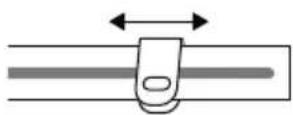
3.8 Food Manager Sticker
3.8 Food Manager Sticker 92
natural_image
Line drawings of three different CO2SO brand lighting devices with no visible text or symbolsCASO Vacu ZIP-Bags CASO VacuBoxxen CASO WineLock
NOTA
natural_image
Diagram showing two mechanical or electrical setups with a device and a clip, no text or symbols present.3.8 Food Manager Sticker
natural_image
Line drawing of a Coso brand air purifier device with control panel and base plate (no text or symbols)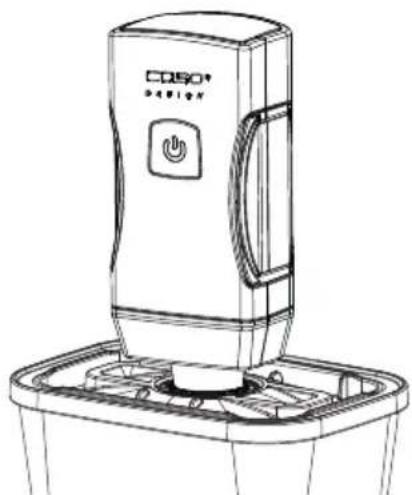
natural_image
Line drawing of a CD50® digital water heater with control panel and base tray (no text or symbols)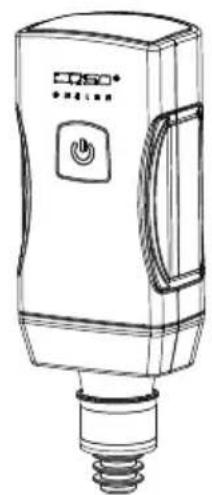
natural_image
Line drawing of a light bulb device with a power button and screw base (no text or symbols)CASO Vacu ZIP-Bags CASO VacuBoxxen CASO WineLock
OBS
natural_image
Diagram showing two mechanical components with downward and upward arrows indicating motion (no text or symbols)3.8 Food Manager Sticker
natural_image
Line drawings of three different CO50® LED lighting devices with no visible text or symbols on the devices themselves.CASO Vacu ZIP-Bags CASO VacuBoxxen CASO WineLock
NOT
natural_image
Diagram showing two mechanical components with arrows indicating motion or assembly (no text or symbols)3.8 Food Manager Sticker
| DE | Weitere Sprachen dieser Bedienungsanleitung fi nden Sie unter www.caso-design.de oder wenn Sie den QR-Code scannen. |
| EN | To see these operating instructions in more languages, visit www.caso-design.de or scan the QR code. |
| IT | Ulteriori lingue di queste istruzioni per l’uso sono disponibili al seguente link www.caso-design.de o scansionando il codice QR. |
| ES | Este manual de instrucciones está disponible en otros idiomas en www.caso-design.de o escaneando el código QR. |
| NL | Je vindt deze gebruiksaanwijzing met vertaling in verschillende talen op de volgende link op de website www.caso-design.de. U kunt ook de QR-code scannen om toegang te krijgen tot de vertalingen. |
| RU | Это руководство по эксплуатации на других языках вы найдете, перейдя по ссылке www.caso-design.de или отсканировав QR-код. |
| FR | Vous trouverez ce mode d’emploi en plusieurs langues sur www.caso-design.de ou en scannant le code QR. |
| PT | Pode encontrar este manual de instruções noutras línguas em www.caso-design.de ou através da leitura do código QR. |
| SV | Det fi nns tillgång till fl era språk i denna bruksanvisning på www.caso-design.de eller om du scannar QR-koden. |
| TR | Bu kılavuzun diğer dillere çevirileri için şu bağlantıya bakınız: www.caso-design.de. Bu amaçla, geçerli QR kodunu da tarayabilirsiniz. |