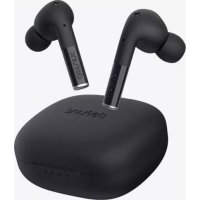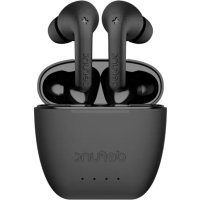
True Mute - Speaker Defunc - Free user manual and instructions
Find the device manual for free True Mute Defunc in PDF.


| Product Type | Wireless In-Ear Headphones (Bluetooth Headset) |
| Brand | Defunc |
| Model | True Mute |
| Bluetooth Version | 5.0 |
| Supported Audio Codecs | AAC, SBC |
| Speaker Dimensions | 13 mm, impedance 32 Ω ± 15% |
| Sensitivity | 101 ± 3 dB at 1 kHz (126 mV) |
| Frequency Response | 20 Hz - 20 kHz |
| Battery Life (Listening without ANC) | Approximately 7 to 8 hours |
| Battery Life (Listening with ANC) | Approximately 5 hours |
| Standby Time | Approximately 80 hours |
| Battery Capacity (Earbuds) | 50 mAh each |
| Battery Capacity (Case) | 500 mAh |
| Case Battery Life (Charges) | 4 to 5 full charges of the earbuds |
| Charging Time (Earbuds) | Approximately 1.5 hours |
| Charging Type | USB-C (cable included) |
| Water Resistance | IPX4 (splash resistant) |
| Active Noise Cancellation | Yes, with transparency mode |
| Touch Controls | Play/pause, volume, tracks, calls, voice assistant |
| Net Weight (Total) | Approximately 49 g |
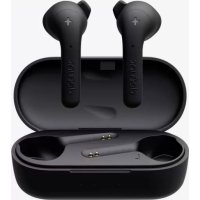
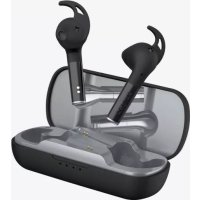
| Box Contents | Earbuds, charging case, USB-C cable, ear tips S/M/L |
| Warranty | 1 year against manufacturing defects |
| Operating Temperature | 0 °C to 45 °C |
| Cleaning | Do not use oily or volatile products; avoid moisture |
| Safety Instructions | Do not repair yourself; do not use during thunderstorms; avoid eye exposure |
Frequently Asked Questions - True Mute Defunc
User questions about True Mute Defunc
0 question about this device. Answer the ones you know or ask your own.
Ask a new question about this device
Download the instructions for your Speaker in PDF format for free! Find your manual True Mute - Defunc and take your electronic device back in hand. On this page are published all the documents necessary for the use of your device. True Mute by Defunc.
USER MANUAL True Mute Defunc

ACTIVE NOISE CANCELLATION
Hey you! Thanks for choosing Defunc TRUE MUTE. It's equipped with active noise cancellation and soft silicone plugs so you can enjoy the only sound you want to hear. We hope this truly improves your wireless life.
English 05
Français 13
Español 21
Deutsch 28
Svenska 36
Türkçe 43
Ελληνικά 50
日本語 58
中文 65
Copyright © The Art of Utility AB
Defunc, c/o The Art of Utility AB, Upplandsgatan 7, 111 23 Stockholm, Sweden
The Bluetooth® word mark and logos are registered trademarks owned by the Bluetooth SIG, Inc. and any use of such marks by The Art of Utility AB is under license. Other trademarks and trade names are those of their respective owners.
DEFUNC TRUE MUTE
Thanks for choosing Defunc TRUE MUTE. Read this manual to optimize your experience. Enjoy your new earbuds!
WHAT'S INCLUDED
- Defunc TRUE MUTE earbuds
- Extra earplugs (size S/M/L in A3 and Q31 series)
• USB-C charging case and cable
TECHNICAL SPECIFICATIONS
Bluetooth version: 5.0
Playtime: ≈ 7-8 h
Playtime with active noise cancellation (ANC): ≈ 5 h
Standby time: ≈ 80 h
Earbud recharges in charging case: 4-5 times
Charging time: ≈ 1.5 h
Charging means: USB-C
Water resistance: IPX4
Codec: AAC/SBC
Bluetooth transmission band: 2.4 GHz
Speaker dimension: 13 mm 32 Ω ± 15%
Speaker sensitivity: 101 ± 3 dB at 1 KHz 126 mV
Power supply bin voltage: 5 V
Driver transmission frequency: 20 Hz-20 kHz
Earbud battery: 50 mAh
Charging case battery: 500 mAh
Rated earbud power: 22.2 mW
Rated charging case power: 0.38 W
Product operation freq. band: 2402\~2480 MHz
Max radio freq. power transmitted within above freq. band: 4 dBm
Net weight: ≈ 49 g
TURN ON ACTIVE NOISE CANCELLATION AND TRANSPARENCY MODE
The earbuds have 3 sound modes:
- Active noise cancellation (ANC) mode actively cancels surrounding noise.
- Transparency mode lets surrounding sounds into the earbuds.
- Normal mode gives basic sound. It is the default when the earbuds are turned on.
Press the right earbud for 3 seconds to switch from one sound mode to another.
GENERAL TIPS FOR TRUE WIRELESS EARBUDS
- Because of interference with other Bluetooth devices, the earbuds can get disconnected from each other. If you experience this problem, put the earbuds in the charging case and close the cap. After a few seconds, open the cap and start using the earbuds again.
- Hold the earbud stem when putting or adjusting the earbuds in your ears. This way you avoid touching the sensitive touch area which controls different functions.
- The volume affects the capacity of the battery. If you play your music with lower volume, the battery life will last longer.
- Pause between each touch control command, e.g. wait 1 second between each volume control tap to further increase/decrease volume.
GET STARTED
- Make sure the earbuds are fully charged. Do this by charging the earbuds in the charging case until all 4 blue lights on the charging case are lit for 5 seconds and then turn off.
- Open the charging case. The earbuds will automatically power on and pair with each other.
- When blue/red lights flash alternately, the earbuds are ready to pair with your device.
- Turn on the Bluetooth function on your device. Select Defunc TRUE MUTE in the Bluetooth list to pair the earbuds with the device. Take out the earbuds.
- The earbud lights turn off when the earbuds are paired.
- The earbuds will automatically pair with a previously connected device when taken out of the charging case again.
POWER ON
There are two ways to turn the earbuds on:
- Open the charging case for auto-power on after about 1 second.
- Press each earbud for 3 seconds until you hear the on-sound or blue lights flash 3 times.
POWER OFF
There are two ways to turn the earbuds off and one way they auto-power off:
- Put the earbuds back in the charging case and close the cap.
- Press either earbud for 5 seconds until you hear the off-sound or see red lights flash 3 times.
- Auto-power off will be activated after 5-6 minutes without a connected device.
TOUCH CONTROL FUNCTIONS
Tap or press the earbud touch area to control different functions.
Switch sound modes: Press the right earbud for 3 seconds to switch from normal to active noise cancellation (ANC) mode, 3 seconds again to switch from ANC to transparency mode, and 3 seconds again to go back to normal mode. If the earbuds are turned off, normal mode will be the default when turned back on.
Power on: Open the charging case for auto-power on or press each earbud for 3 seconds.
Power off: Put the earbuds back in the charging case and close the cap. Or press either earbud for 5 seconds. Auto-power off will be activated after 5-6 minutes without a connected device.
Play/pause: Double-tap either earbud.
Next track: Triple-tap the right earbud.
Previous track: Triple-tap the left earbud.
Volume increase: Tap the right earbud once.
Volume decrease: Tap the left earbud once.
Answer/end phone call: Double-tap either earbud.
Reject call: Press either earbud for 2 seconds.
Voice assistant: Press the left earbud for 3 seconds to activate/deactivate. Note that most Android phones automatically deactivate the voice assistant.
CHARGE THE EARBUDS
Make sure that the charging case has battery life. Put the earbuds in the charging case. Close the cap.
CHARGE THE CASE
Plug the USB-C charging cable with the USB-C port on the charging case. Plug the other end of the cable into a power source.
LIGHTS ON THE CHARGING CASE
Charging: Blue lights flash.
Battery status: Each light equals 25% battery life. When each 25% is reached, the corresponding light becomes stable, and the next starts flashing. When charged to 100%, all lights turn off.
Two earbuds charging: The first and fourth charging case lights flash for about 5 seconds.
Only left earbud charging: The first charging case light flashes for about 5 seconds.
Only right earbud charging: The fourth charging case light flashes for about 5 seconds.
Case and earbuds can be charged simultaneously.
WARNING!
- Do not attempt to repair the earbud. A faulty repair may lead to fire, electronic breakdown or a damaged product.
-
Do not use the earbud in an environment where the temperature is below 0 °C or above 45 °C.
-
Avoid using a device indicator light near the eyes of children and animals.
- Do not use the earbud in thunderstorm weather to avoid abnormal earbud behavior and the risk of shock.
- Do not wipe the earbud with oil or other volatile liquids.
- Do not wet the earbud.
ONE YEAR WARRANTY
All Defunc products are designed and manufactured with your high expectations and best customer experience in mind. We are devoted in providing the best quality and modern technology. However, as most people realise, electronic products sometimes do have technical difficulties, and sometimes it is due to a manufacturing defect. This is why we offer a one (1) full year replacement warranty, from purchase date, against manufacturer defects on each pair of earbuds we sell.
Defunc (The Art of Utility AB) hereby warrants that, under normal use, this product will be free from defects in materials and workmanship for a period of one (1) year from the date of original retail purchase. The replacement warranty is valid only if the original proof of purchase issued to the purchaser, specifying the date of purchase, is presented with the product to be replaced.
How does it work? If you believe this product is defective within the warranty period, carefully repack the unit and return the product to your authorised dealer, with the original proof of purchase. Your authorised dealer will replace the product in case a defect in manufacture or workmanship is identified. In case your authorised dealer does not have the corresponding product or colour in stock, Defunc will promptly provide you with a new product.
This limited replacement warranty does not apply in cases of abuse or misuse of the product, use contrary to Defunc instructions, ordinary wear and tear, incorrect connection, force majeure or unauthorised repair. Any lawsuit for breach of this limited warranty shall be commenced, if at all, within one (1) year of the date that the claim accrues.
Defunc shall not be liable for special, indirect, incidental or consequential damages resulting from the use or inability to use this product, regardless of the legal theory on which the claim is based. This warranty gives you specific legal rights, and you may have other rights, which vary from country to country. This warranty does not restrict the rights of the consumer mandated under applicable laws.
This product shall not be treated as household waste. Instead it shall be handed over to the applicable collection point for the recycling of electrical and electronic equipment.
The limited premium replacement warranty is valid only if the original proof of purchase issued to the purchaser, specifying the date of purchase, is presented with the product to be replaced.
COMPLIANCE WITH FCC REGULATIONS
Caution! The user is cautioned that changes or modifications not expressly approved by the party responsible for compliance could void the user's authority to operate the equipment. This equipment has been tested and found to comply with the limits for a Class B digital device, pursuant to Part 15 of the FCC Rules. These limits are designed to provide reasonable protection against harmful interference in a residential installation.
This equipment generates, uses and can radiate radio frequency energy and, if not installed and used in accordance with the instructions,
may cause harmful interference to radio communications. However, there is no guarantee that interference will not occur in a particular installation. If this equipment does cause harmful interference to radio or television reception, which can be determined by turning the equipment on and off, the user is encouraged to try to correct the interference by one or more of the following measures:
- Reorient or relocate the receiving antenna.
- Increase the separation between the equipment and receiver.
- Connect the equipment into an outlet on a circuit different from that to which the receiver is connected.
- Consult the dealer or an experienced radio/TV technician for help.
This device complies with Part 15 of the FCC Rules. Operation is subject to the following two conditions: (1) this device may not cause harmful interference, and (2) this device must accept any interference received, including interference that may cause undesired operation.
THE SPECIFICATION AND EXTERNAL APPEARANCE OF THE EARBUDS MAY BE SUBJECT TO CHANGE WITHOUT PRIOR NOTICE.
If at any time in future you should need to dispose of this product, please note that waste electrical products should not be disposed of household waste. Please recycle where facility exist. Check with your local authority or retailer for recycling advice.
EU DECLARATION OF CONFORMITY
The Art of Utility AB hereby declares that Defunc TRUE MUTE complies with Directive 2014/53/EU. The full text of the EU Declaration of Conformity is available on defunc.com/documents.
DEFUNC TRUE MUTE
GARANTIE D'UN AN DEFUNC
DÉCLARATION DE CONFORMITÉ UE
LADDNINGSFODRALETS LAMPOR
Hörlurar/fodral laddas: Lampor blinkar/lyser blått.