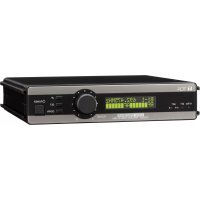
WD5800 - Microphone TOA - Free user manual and instructions
Find the device manual for free WD5800 TOA in PDF.


| Product Type | Wireless Antenna Distributor |
| Brand | TOA |
| Model | WD5800 |
| Dimensions (W x H x D) | 420 x 44 x 214 mm |
| Weight | 2 kg |
| Power Supply | 12–15 V DC, 1.6 A max (AC adapter included) |
| Power Consumption | 25 W or less |
| Operating Frequency | VHF/UHF |
| Antenna Inputs | 2 per channel (front x1, rear x1), 75 Ω, BNC (phantom power 9 V DC/35 mA) |
| Antenna Outputs | 4 per distribution channel, 75 Ω, BNC |
| DC Outputs | 4 outputs, 12 V DC/250 mA each |
| Number of Connectable Receivers | Up to 4 compatible receivers |
| Compatible Receivers | WT-D5800, WT-4820, WT-5800, WT-5805 |
| Operating Temperature | -10 to +50 °C |
| Operating Humidity | 30 to 85 % RH (without condensation) |
| Housing Material | Front panel: painted aluminum, black; Housing: painted steel, black |
| Supplied Accessories | AC adapter, power cable (2 m), 4 DC cables, 4 rubber feet |
| Option | Rack mount bracket MB-15B |
| Cleaning | Dry cloth; do not use gasoline, solvent, or volatile liquid |
| Safety | Indoor use only; do not expose to rain or liquids; use specified voltage |
Frequently Asked Questions - WD5800 TOA
User questions about WD5800 TOA
0 question about this device. Answer the ones you know or ask your own.
Ask a new question about this device
Download the instructions for your Microphone in PDF format for free! Find your manual WD5800 - TOA and take your electronic device back in hand. On this page are published all the documents necessary for the use of your device. WD5800 by TOA.
USER MANUAL WD5800 TOA
Thank you for purchasing TOA's Antenna Distributor.
Please carefully follow the instructions in this manual to ensure long, trouble-free use of your equipment.
TABLE OF CONTENTS
- SAFETY PRECAUTIONS .... 1
- GENERAL DESCRIPTION ...... 4
- HANDLING PRECAUTIONS .... 4
- NOMENCLATURE AND FUNCTIONS .... 5
- CONNECTION 6
- OPERATION 6
- INSTALLATION ...... 7
- SPECIFICATION 8
1. SAFETY PRECAUTIONS
- Be sure to read the instructions in this section carefully before use.
- Make sure to observe the instructions in this manual as the conventions of safety symbols and messages regarded as very important precautions are included.
- We also recommend you keep this instruction manual handy for future reference.

WARNING
Indicates a potentially hazardous situation which, if mishandled, could result in death or serious personal injury.
- Do not expose the unit to rain or an environment where it may be splashed by water or other liquids, as doing so may result in fire or electric shock.
- Use the unit only with the voltage specified on the unit. Using a voltage higher than that which is specified may result in fire or electric shock.
- Do not cut, kink, otherwise damage nor modify the power supply cord of the supplied AC adapter. In addition, avoid using the power cord in close proximity to heaters, and never place heavy objects -- including the unit itself -- on the power cord, as doing so may result in fire or electric shock.
- Avoid installing or mounting the unit in unstable locations, such as on a rickety table or a slanted surface. Doing so may result in the unit falling down and causing personal injury and/or property damage.

WARNING
Indicates a potentially hazardous situation which, if mishandled, could result in death or serious personal injury.
- Since the unit is designed for indoor use, do not install it outdoors. If installed outdoors, the aging of parts causes the unit to fall off, resulting in personal injury. Also, when it gets wet with rain, there is a danger of electric shock.
-
Should the following irregularity be found during use, immediately switch off the power, disconnect the power supply plug of the supplied AC adapter from the AC outlet and contact your nearest TOA dealer. Make no further attempt to operate the unit in this condition as this may cause fire or electric shock.
-
If you detect smoke or a strange smell coming from the unit
- If water or any metallic object gets into the unit
- If the unit falls, or the unit case breaks
-
If the power supply cord is damaged (exposure of the core, disconnection, etc.)
-
To prevent a fire or electric shock, never open nor remove the unit case to modify the unit. Refer all servicing to your nearest TOA dealer.
- Do not place cups, bowls, or other containers of liquid or metallic objects on top of the unit. If they accidentally spill into the unit, this may cause a fire or electric shock.
- Do not touch a plug of the supplied AC adapter or antenna during thunder and lightning, as this may result in electric shock.

CAUTION
Indicates a potentially hazardous situation which, if mishandled, could result in moderate or minor personal injury, and/or property damage.
- Never plug in nor remove the power supply plug of the supplied AC adapter with wet hands, as doing so may cause electric shock.
- When unplugging the power supply cord of the supplied AC adapter, be sure to grasp the power supply plug; never pull on the cord itself. Operating the unit with a damaged power supply cord may cause a fire or electric shock.
- The socket outlet shall be installed near the equipment and shall be easily accessible.
- When moving the unit, be sure to remove its power supply cord of the supplied AC adapter from the wall outlet. Moving the unit with the power cord connected to the outlet may cause damage to the power cord, resulting in fire or electric shock. When removing the power cord, be sure to hold its plug to pull.
- Avoid installing the unit in humid or dusty locations, in locations exposed to the direct sunlight, near the heaters, or in locations generating sooty smoke or steam as doing otherwise may result in fi re or electric shock.
- Be sure to follow the instructions below when rack-mounting the unit. Failure to do so may cause a fire or personal injury.
- Install the equipment rack on a stable, hard floor. Fix it with anchor bolts or take other arrangements to prevent it from falling down.
- When connecting the unit's power cord to an AC outlet, use the AC outlet with current capacity allowable to the unit.
- Rack-mounting screws are not supplied with the unit. Prepare them that are appropriate for the equipment rack.

CAUTION
Indicates a potentially hazardous situation which, if mishandled, could result in moderate or minor personal injury, and/or property damage.
- Do not place heavy objects on the unit as this may cause it to fall or break which may result in personal injury and/or property damage. In addition, the object itself may fall off and cause injury and/or damage.
- Use the supplied AC adapter for the unit. Note that the use of other adapter may cause a fire.
- If dust accumulates on the power supply plug of the supplied AC adapter or in the wall AC outlet, a fire may result. Clean it periodically. In addition, insert the plug in the wall outlet securely.
- Switch off the power, and unplug the power supply plug of the supplied AC adapter from the AC outlet for safety purposes when cleaning or leaving the unit unused for 10 days or more. A fire or electric shock may result.
Caution to the user
Notice:
The changes or modifications not expressly approved by the party responsible for compliance could void the user's authority to operate the equipment.
IMPORTANT NOTE
This device complies with Industry Canada's licence-exempt RSSs. Operation is subject to the following two conditions:
(1) This device may not cause interference; and
(2) This device must accept any interference, including interference that may cause undesired operation of the device.
The TOA Wireless Antenna Distributor WD-5800 is designed to be used in conjunction with a VHF/UHF band system for sound reinforcement applications. It comes with two channels, in which two input signals are mixed and distributed to four outputs. The WD-5800 also has four DC power distribution outputs.
3. HANDLING PRECAUTIONS
- When installing, keep the unit, receiving antennas, and antenna cables as far away as possible from fluorescent lamps, digital equipment, personal computers, and other equipment which generate high frequency noise.
- Avoid installing the receiving antennas in close proximity to metal objects, such as iron frames and lockers. Keep the antennas at least 30 cm away from the wall surface.
- Keep two antennas at least 3 m away from each other to obtain the optimum diversity effect, although this distance differs depending on the construction and size of the room where they are installed.
- When cleaning the case, use a dry cloth. Never use benzine, thinner or other volatile liquids.
- Do not connect any DC input terminals other than those from the specified wireless receivers to the DC power distribution output terminals. Doing so could render the distributor inoperable.
- Do not connect the AC adapter to the DC power distribution output terminals. The AC adapter could be damaged.
4. NOMENCLATURE AND FUNCTIONS
[Front]
![TOA WD5800 - [Front] - 1](/content/2026/04/591058/images/451cf5bdf6b72ed5eaa63302b7f9b05f542622b056cbf7a01da92214279eeae4.jpg)
text_image
TOA ANT A IN ANT B IN POWER ON OFF ANTENNA DISTRIBUTOR WD-5800 ① ② ③ ④1. Power switch
Press this switch to switch on the power. Press this switch again to switch off the power.
2. Power lamp
Lights when the power is switched on.
3. Front antenna input A
75 Ω, BNC. Delivers 9 V DC/35 mA for supplying power to an external antenna.
4. Front antenna input B
75 Ω, BNC. Delivers 9 V DC/35 mA for supplying power to an external antenna.
[Rear]
![TOA WD5800 - [Rear] - 1](/content/2026/04/591058/images/4d7606de587b75c190e7b0c215025a6e5075f4e01352a76ec5f9cf4d18926fe7.jpg)
text_image
DC IN DC OUT for RECEIVERS Do not connect AC adapters ANT IN B ANT OUT B ANT OUT A ANT IN A 12-15V= 1.6A(max) ⑤ 6 7 8 9 ⑩ 11![TOA WD5800 - [Rear] - 2](/content/2026/04/591058/images/eb009b2afb6fc568df3c6e0bcfe3f7feeee71c19b9eacd42bc092b73982ad5a2.jpg)
The exclamation mark within a circle used on the unit alerts the user to important operating and servicing instructions.
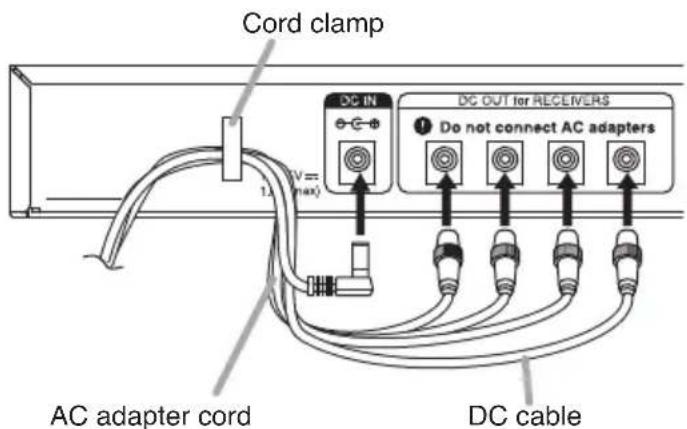
5. Cord clamp
Pinches and securely holds the AC adapter cord and DC cables to prevent plugs from detaching as shown below.
text_image
Cord clamp DC IN DC OUT for RECEIVERS Do not connect AC adapters AC adapter cord DC cable6. DC power input terminal
12 - 15 V DC, 1.6 A
Connect the supplied AC adapter.
7. DC power distribution output
Distributes the DC power to receivers.
8. Rear antenna input B
75 Ω, BNC. Delivers 9 V DC/35 mA for supplying power to an external antenna.
9. Antenna distribution output B
75 Ω, BNC.
10. Antenna distribution output A
75 Ω, BNC.
11. Rear antenna input A
75 Ω, BNC. Delivers 9 V DC/35 mA for supplying power to an external antenna.
5. CONNECTION
- Up to four receivers* in total can be connected to the WD-5800 using one or two receiving antennas.
* WT-D5800 Digital wireless receiver
WT-4820 Wireless tuner
WT-5800 Wireless tuner
WT-5805 Wireless tuner
Note
Do not connect any devices other than those listed above to the DC power distribution output terminals. Doing so could damage the unit.
- The length of the antenna cables between the WD-5800 and connected receivers must not exceed 1 m or 3.28 ft.

text_image
YW-4500 YW-4500 YW-4500 Connect to the front antenna inputs DC IN 12-15V mm 1.6A(max) DC OUT for RECEIVERS Do not connect AC adapters ANT IN B ANT OUT B ANT OUT A ANT IN A ANT B OUTIN CONTACT OUTPUT 12-15V mm ACT/AC OUTPUT (600Ω) UNBALANCED I UNBALANCED I 20kV LEVEL 1kF MC 20kV~60kV OUTIN ANT A OUTIN UW-D5800 ANT B OUTIN CONTACT OUTPUT 12-15V mm ACT/AC OUTPUT (600Ω) UNBALANCED I UNBALANCED I 20kV LEVEL 1kF MC 20kV~60kV OUTIN ANT A OUTIN YW-D58006. OPERATION
Step 1. Turn on the power of both the WD-5800 and connected receivers (the power lamp lights).
Step 2. Set the wireless microphone switch to the ON position.
7. INSTALLATION
7.1. Rack Mounting
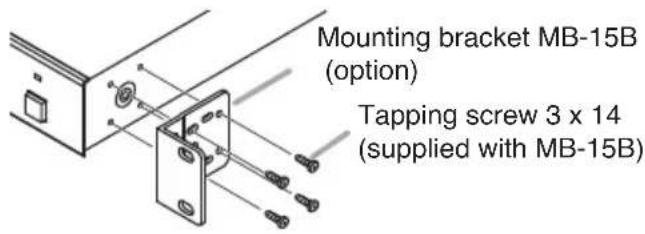
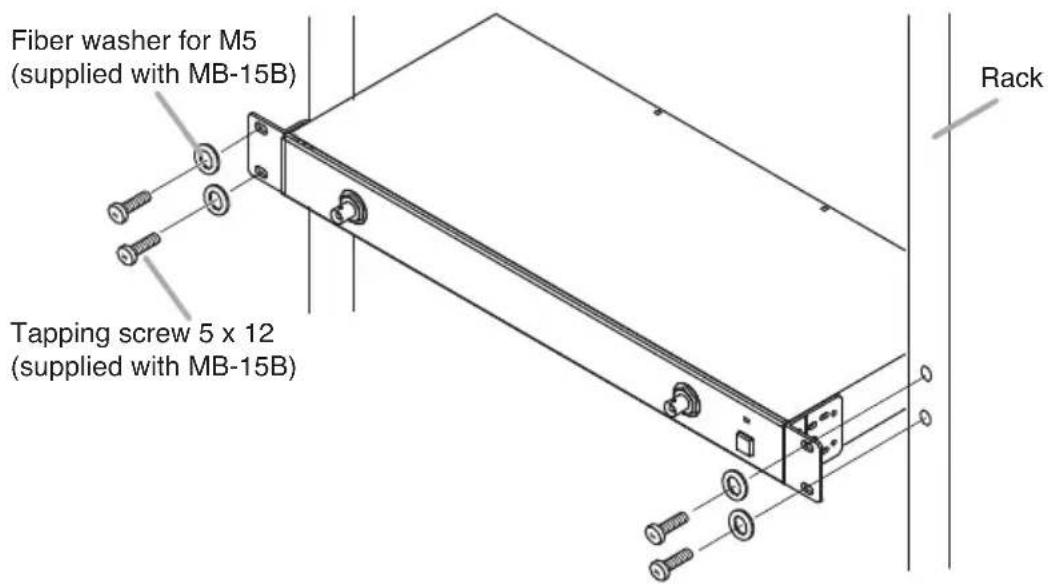
Use an optional MB-15B bracket when mounting the unit in an equipment rack.
Step 1. Using the screws supplied with the MB-15B, mount the MB-15B to the unit's sides.
text_image
Mounting bracket MB-15B (option) Tapping screw 3 x 14 (supplied with MB-15B)Step 2. Using other screws also supplied with the MB-15B, mount the unit in the rack.
text_image
Fiber washer for M5 (supplied with MB-15B) Tapping screw 5 x 12 (supplied with MB-15B) Rack7.2. Installing the Unit on the Desk
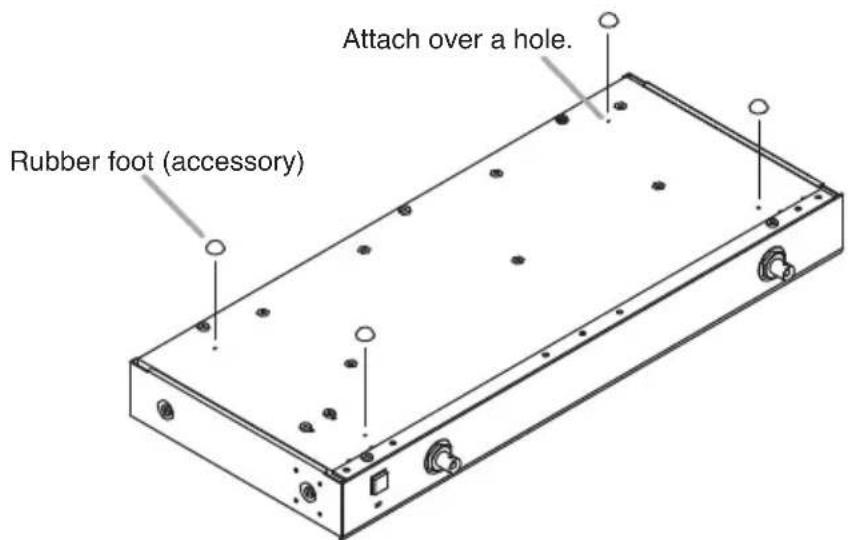
When installing the unit on the desk, attach the supplied rubber feet to the unit's bottom surface.
text_image
Attach over a hole. Rubber foot (accessory)- SPECIFICATION
| Power Source AC mains | (supplied AC adapter must be used) |
| Power Consumption 25 W or less | |
| Current Consumption 1.6 | A (12–15 V DC) |
| Frequency Range VHF/UHF | |
| Antenna Input 2 inputs per distribution channel (front x 1, rear x 1),75 Ω, BNC (phantom power for antenna) | |
| Antenna Output 4 outputs per distribution channel, 75 Ω, BNC | |
| DC Power Supply 4 outputs (each output: 12 V DC/250 mA)(Output voltage of this unit depends on that of AC adapters.) | |
| Indicator Power lamp | |
| Operating Temperature –10 to +50 °C (14 to 122 °F) | |
| Operating Humidity 30 to 85%RH (no condensation) | |
| Finish Panel: Aluminum, black, paintCase: Steel, black, paint | |
| Dimensions 420 (w) x 44 (h) x 214 (d) mm (16.54" x 1.73" x 8.43") | |
| Weight | 2 kg (4.41 lb) |
Note: The design and specifications are subject to change without notice for improvement.
- Accessories
AC adapter 1
Power cord (2 m or 6.56 ft) 1
DC cable 4
Rubber foot 4
- Optional product
Rack mounting bracket: MB-15B
text_image
DC IN DC OUT for RECEIERS Do not connect AC adapters ANT IN B ANT OUT B ANT OUT A ANT IN A 12-15V = 1.6A max ⑤ 6 7 8 9 ⑩ 11
3. PRECAUTIONS DE MANUTENTION
text_image
DC IN DC OUT for RECEIVERS Do not connect AC adapters ANT IN B ANT OUT B ANT OUT A ANT IN A ⑤ 6 7 8 9 ⑩ 11
text_image
DC IN DC OUT for RECEMERS Do not connect AC adapters ANT INB ANT OUT B ANT OUT A ANT INA 12-15Vrms 1.6A max ⑤ 6 7 8 ⑨ 10 ⑪
text_image
DC IN DC OUT for RECEIVERS Do not connect AC adapters AC适配器电缆 DC电缆6. 直流电源输入端子
12–15V DC, 1.6A
连接与设备一同提供的AC适配器。
7. DC电源分配输出口
分配DC电源到接收器。
8. 后部天线输入口B
Traceability Information for USA
Manufacturer:
TOA Corporation
7-2-1, Minatojima-Nakamachi, Chuo-ku, Kobe, Hyogo, Japan
Authorized representative:
TOA Electronics, Inc.
400 Oyster Point Boulevard, Suite 301, South San Francisco, California 94080, USA
Traceability Information for Europe
Manufacturer:
TOA Corporation
7-2-1, Minatojima-Nakamachi, Chuo-ku, Kobe, Hyogo, Japan
Authorized representative:
TOA Electronics Europe GmbH
Suederstrasse 282, 20537 Hamburg, Germany