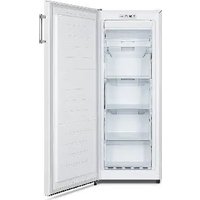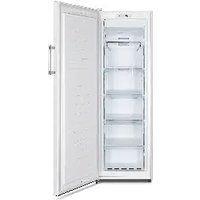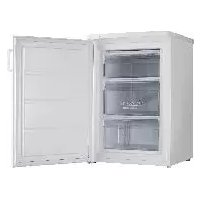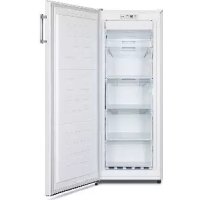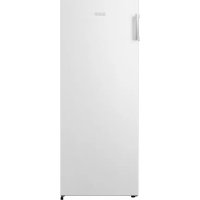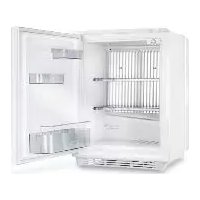
DS 400 WH - Freezer SIBIR - Free user manual and instructions
Find the device manual for free DS 400 WH SIBIR in PDF.


User questions about DS 400 WH SIBIR
0 question about this device. Answer the ones you know or ask your own.
Ask a new question about this device
Download the instructions for your Freezer in PDF format for free! Find your manual DS 400 WH - SIBIR and take your electronic device back in hand. On this page are published all the documents necessary for the use of your device. DS 400 WH by SIBIR.
USER MANUAL DS 400 WH SIBIR
natural_image
Line drawing of a portable appliance with a label 'Domestic' and CE mark, no text or symbols on the device itself.Operating Instructions
Bedienungsanleitung
Mode d'emploi
natural_image
Exterior view of a modern office building (no signage)
natural_image
Exterior view of a white industrial container with metal grating and internal compartments (no visible text or symbols)
natural_image
3D rendering of a rectangular electronic device with a lid and front panel (no visible text or symbols)1
text_image
Labeled diagram of an open refrigerator interior with numbered parts for identificationDS 200 DS 300

text_image
Labeled diagram of a refrigerator interior showing numbered components for identification
text_image
Labeled diagram of an open refrigerator interior showing numbered compartments and doorsDS 400 DS 600

text_image
Labeled diagram of a refrigerator interior showing numbered compartments and storage areas2

natural_image
Technical line drawing of a refrigerator interior showing internal compartments and door opening (no text or labels)3
natural_image
Technical line drawing of a mechanical component with gear and shaft (no text or symbols)6

natural_image
Close-up of a metal cage with a white arrow pointing to a small object inside (no visible text or symbols)7
flowchart
graph TD
    subgraph A
        A1[" "] --> A2["miniCool"]
        A2 --> A3[" "]
        A3 --> A4[" "]
        A4 --> A5[" "]
        A5 --> A6[" "]
        A6 --> A7[" "]
    end
    subgraph B
        B1[" "] --> B2["miniCool"]
        B2 --> B3[" "]
        B3 --> B4[" "]
        B4 --> B5[" "]
        B5 --> B6[" "]
        B6 --> B7[" "]
        B7 --> B8[" "]
        B8 --> B9[" "]
        B9 --> B10[" "]
        B10 --> B11[" "]
        B11 --> B12[" "]
        B12 --> B13[" "]
        B13 --> B14[" "]
        B14 --> B15[" "]
        B15 --> B16[" "]
        B16 --> B17[" "]
        B17 --> B18[" "]
        B18 --> B19[" "]
        B19 --> B20[" "]
        B20 --> B21[" "]
        B21 --> B22[" "]
        B22 --> B23[" "]
        B23 --> B24[" "]
        B24 --> B25[" "]
        B25 --> B26[" "]
        B26 --> B27[" "]
        B27 --> B28[" "]
        B28 --> B29[" "]
        B29 --> B30[" "]
        B30 --> B31[" "]
        B31 --> B32[" "]
        B32 --> B33[" "]
        B33 --> B34[" "]
        B34 --> B35[" "]
        B35 --> B36[" "]
        B36 --> B37[" "]
        B37 --> B38[" "]
        B38 --> B39[" "]
        B39 --> B40[" "]
        B40 --> B41[" "]
        B41 --> B42[" "]
        B42 --> B43[" "]
        B43 --> B44[" "]
        B44 --> B45[" "]
        B45 --> B46[" "]
        B46 --> B47[" "]
        B47 --> B48[" "]
        B48 --> B49[" "]
        B49 --> B50[" "]
        B50 --> B51[" "]
        B51 --> B52[" "]
        B52 --> B53[" "]
        B53 --> B54[" "]
        B54 --> B55[" "]
        B55 --> B56[" "]
        B56 --> B57[" "]
        B57 --> B58[" "]
        B58 --> B59[" "]
        B59 --> B60[" "]
        B60 --> B61[" "]
        B61 --> B62[" "]
        B62 --> B63[" "]
        B63 --> B64[" "]
        B64 --> B65[" "]
        B65 --> B66[" "]
        B66 --> B67[" "]
        B67 --> B68[" "]
        B68 --> B69[" "]
        B69 --> B70[" "]
4

text_image
B A8

text_image
C D ② miniBar ③ min. 60 mm ① miniBar5
text_image
Technical diagram of an open refrigerator with numbered parts and directional arrows indicating internal structure.9
natural_image
Technical line drawing of a mechanical assembly with no visible text or symbols10

text_image
Technical diagram of a mechanical component with numbered parts and directional arrows indicating assembly or motion.13

text_image
Technical diagram of a refrigerator with numbered components and labeled parts11

text_image
1 2 4 1 314

text_image
Domestic12
natural_image
Interior view of a cabinet or storage unit with a black arrow pointing to the tray (no visible text or symbols)Fig. 32

text_image
2 φ φ φ φ φ φ φ φ φ φ φ φ φ φ φ φ φ φ φ φ φ φ φ φ φ φ φ φ φ φ φ φ φ φ φ φ φ φ φ φ φ φ φ φ φ φ φ φ φ φ α α α α α α α α α α α α α α α α α α α α α α α α α α α α α α α α α α α α α α α α α α α αFig. 33
natural_image
Simple line drawing of a door with a handle and a black arrow pointing to the interior (no text or symbols)
natural_image
Diagram of a refrigerator with a door, showing internal seating arrangement and an arrow pointing to the door (no text or symbols present)15

Please read these operating instructions carefully before putting the refrigeration unit into operation. If you later sell or dispose of it, please ensure that the new owner receives these operating instructions.
Please follow the installation details below carefully Guarantee is valid for products installed as described only. (See chapter 4.1)
Thank you for choosing our appliance. We are sure it will provide you with trouble-free use.
In the following, we would like to familiarise you with some symbols, which we bring to your attention to ensure the safe and efficient operation of the appliance:

source of danger, in event of improper operation

suggested useful tips to read

information concerning environmental protection
This refrigerator is intended for the storage of food and drinks.

Attention!
- This product is designed to be operated by adults. Children should not be allowed to tamper with the controls or play with the product.
- Any electrical work required to install this appliance should be carried out by a qualified electrician.
- This product should be serviced by an authorised Service Engineer, and only genuine spare parts should be used.
- It is dangerous to alter the specifications or modify this product in any way.
- Care must be taken to ensure that the appliance does not stand on the electrical supply cable.
- There are working parts in this product which heat up. Always ensure that there is adequate ventilation as a failure to do this will result in component failure and possible content loss. See installation instructions.
- Parts which heat up should not be exposed. The back of the product should be close to a wall but leaving the required distance for ventilation as stated in the installation instructions.
- Before defrosting, cleaning or maintenance work is carried out, be sure to switch off the appliance and unplug it.
- DO NOT USE SHARP INSTRUMENTS to scrape off frost or ice. Under no circumstances should solid ice be forced off the cooling fins. Solid ice should be allowed to thaw when defrosting the appliance. See defrost instructions.
- This appliance is heavy. Care should be taken when moving it.
- Under no circumstances should you attempt to repair the appliance yourself. Repairs carried out by inexperienced persons may cause injury or more serious malfunctioning. Refer to your local Service Centre and always insist on genuine spare parts.
- In this appliance the storage of any toxic or explosive substance is forbidden!
CONTENTS
- Unpacking
- View of the appliance
- Cleaning
- Positioning the appliance
4.1. Installation instruction
4.1.1. Built-in versions
4.1.2. Freestanding versions
- Using the appliance
5.1. Initial operation
5.2. Temperature regulation
5.3. Cooling unit control (CUC)
-
Useful suggestions
-
Defrosting, cleaning and maintenance
7.1. Automatic defrost function
-
Interior light
-
Reversing the door hang
-
Replacing the decorative door panel
-
Fitting up and removing the handle
11.1. Fitting up the handle
11.2. Removing the handle
-
Positioning of the storage rack and shelf
-
Customer service
-
Putting into operation, technical data
14.1. Connecting to electrical mains
-
Environmental protection information
-
Recycling

Attention!
Warranty arrangements are in accordance with EC Directive 44/1999/CE and the normal conditions applicable in the country concerned.
For warranty or other servicing, such as spare-parts, please contact our Dometic Service Network.
The warranty does not cover any damage due to improper use.
The warranty does not cover any modifications to the appliance or the use of non-original Dometic spare-parts.
The warranty does not apply if the installing and operating instructions are not adhered to.
When contacting Dometic Service Network, please state the model, product number and serial number. You will find this information on the data plate inside of the refrigerator.
1. Unpacking
After removal from the cardboard packaging, make sure the appliance is not damaged. If you find damage to the appliance resulting from transport, report it immediately to the transportation firm.
All model are available in freestanding and built-in version. BI in the modelname refers for the built-in version and FS for the freestanding version. Please check your product version (figure 1.) and follow the relevant instructions about the installation and operation.
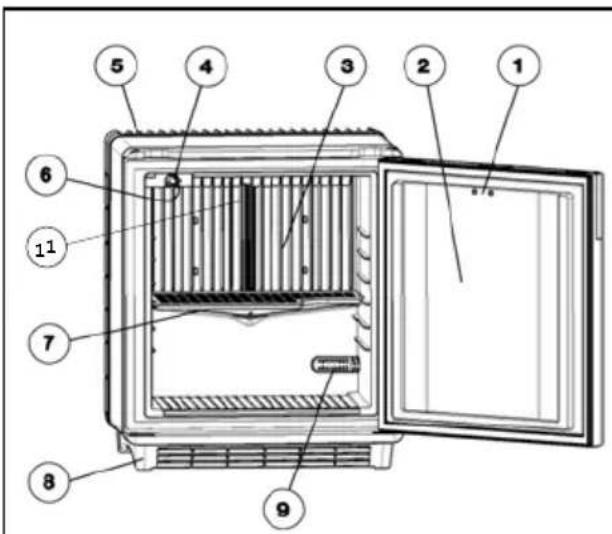
2. View of the appliance (fig. 2.)
- Door lock (if available)
- Door
- Evaporator
- Thermostat knob
- Cooling unit cover
-
Interior light
-
Shelves
- Footframe
- Air-sensor
- Door racks
- Evaporator-sensor
IN CASE IF YOUR REFRIGERATOR IS EQUIPPED WITH LOCK, DOMETIC ZRT DO NOT ACCEPT LIABILITY FOR LOSS OR DAMAGE OF KEYS. HOWEVER A COMPLETE LOCK CAN BE SUPPLIED.
3. Cleaning
Clean the refrigerator thoroughly at intervals, as necessary. Remove the shelves; these parts, as well as the cabinet interior and the door should be washed with a warm solution of sodium bi-carbonate. Finally wipe over with a cloth rinsed in warm water only, and dry with a clean cloth. Do not wash any plastic parts in water that is more than hand warm, and do not expose them to dry heat. The outside of the cabinet should be wiped down regularly with a clean, damp cloth.
NEVER USE STRONG CHEMICALS OR ABRASIVE CLEANING MATERIALS ON ANY PART OF THE CABINET.
4. Positioning the appliance
When first using this refrigerator please consider the following points:
• ENSURE REFRIGERATOR IS LEVEL
• THE PIPEWORK AT THE BACK GETS HOT IN USE
- THE REFRIGERATOR HAS NO 'MOTOR' AND IS THEREFORE VIRTUALLY SILENT
- ALLOW AT LEAST 3 HRS. FOR SIGNS OF COOLING
During the refrigeration process, the appliance gives off heat from the condenser (under the upper part of the rear cover) into the surrounding air. The more ventilated the condenser is, the more effective the refrigeration will be.
- The other condition for satisfactory operation is that the appliance is levelled. This could be checked by placing a glass of water on top of the appliance.
- It is important that the appliance is not directly exposed to radiated heat (sunlight, radiator, near an oven, etc.).
- Please do not place the refrigerator onto thick carpet!
4.1. Installation instructions
All four sizes of the miniCool family are available in built-in and freestanding version.
4.1.1. Built-in versions (fig. 3.)
This version is intended for built in purposes. Built in models do not have foot frames, cooling unit covers compared to the freestanding versions (figure 1).
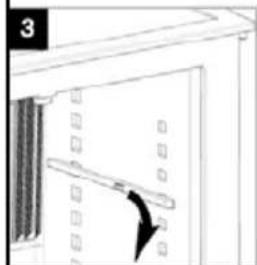
The miniCool can be screwed to the furniture using the fittings at the bottom. Drive in the screws (figure 3).
4.1.2. Freestanding versions (fig. 4-5.)
These versions are intended for freestanding use. Cooling unit covers protect the hot parts of the cooling units. Foot frames with grilles ensure sufficient ventilation.
These models can be also build in into the furnitures with sliding hinges or simply be pushed into a given space. In this case please take into the consideration items listed below.

IMPORTANT
Please follow the installation details below carefully. Guarantee is valid for products installed as described only.
- The refrigerator must be level both directions
- There should be 20 mm clearance to the wall
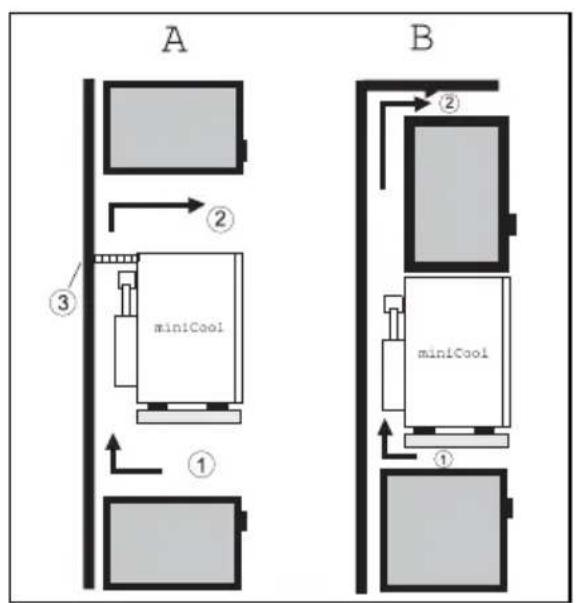
- Ventilation must be provided as shown in alternatives A, B, C or D (fig 4-5)
- Air in
- Air out
-
Ventilation grille
-
Only the entire cooling unit must project into the duct as shown
-
Air passing though the duct must not be preheated by any source of heat
GB
6. Ventilation grills, if used, must have an free openings of at least 200 cm ^4 each
During installation, please ensure the mains plug is accessible at all times.
5. Using the appliance
To start the refrigerator connect the plug to the socket outlet and switch on the socket. The cooling fins should show signs of cooling after about 1-2 hours depending on ambient temperature.
5.1. Initial operation
- The device must be plugged into a properly earthed socket.
- The miniCool starts automatically with a self-test. The LED flashes several times and after a while continuous light will follow if the door is open.
- The miniCool achieves its operating temperature after several hours.
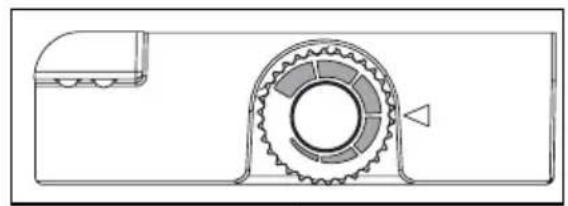
5.2. Temperature regulation (fig. 6.)
The usual setting required is in the region of the middle of the thermostat knob (Fig. 6), but this can vary with conditions of load and installation. If it is found necessary to change the setting, the knob can be turned to a higher symbol to give a lower temperature, or a lower symbol to give a higher temperature. The effect of any adjustment can be checked by means of a thermometer when the refrigerator has reached the new temperature after some hours.
5.3. Cooling unit control (CUC)
The electronic checks the function after every defrosting period (every 24 hours) by measuring the evaporator temperature drop. If it registers a problem the refrigerator will shut down and the LEDs of the interior light will begin to flash continuously. If this happens you should check whether the refrigerator has been overloaded, that the door was properly closed, that the cooling unit ventilation is correct and that the refrigerator is levelled. After checking, unplug the refrigerator at least for 10 seconds and plug in again. This resets the unit and it will function again. If the countinous flashing comes back there is a problem and you should then contact Dometic service.

6. Useful suggestion
Do not overfill the appliance. Put warm foods and drinks in the appliance only when they have cooled down to room temperature. It is advisable to leave some space between the products in the cabinet to ensure efficient and even cooling. If the shelves are packed too tightly there may be unacceptable temperature variations.

7. Defrosting, cleaning and maintenance (fig. 2.)
Frost will gradually form on the cooling fins and it must not be allowed to become too thick since it restricts the cooling.
The miniCool is fitted with a fully automatic, electronic temperature regulator.
The frost will melt and the defrost water will run through the drain tube from the drip channel into an evaporating vessel located at the bottom rear of the refrigerator. (Fig 7) The defrost water will evaporate automatically into the circulating air and the vessel will not need emptying.
To switch off the unit, disconnect the refrigerator from the electricity supply and leave the cabinet door open. After defrosting the cabinet interior should be wiped out with a clean, damp cloth.
7.1. Automatic defrost function
The first defrosting phase commences 39 hours after the start and lasts for two hours.
After this, the device operates for 22 hours at a time, followed by a defrosting period of 2 hours.
8. Interior light (fig. 8.)
Two light-emitting diodes (A) on an electronic PCB illuminate the cooling compartment when the door is opened.
Two sensors (B) control whether the door is open or not and the LEDs will work accordingly.
9. Reversing the door hang (fig. 9-10.)
- Disconnect the mains.
- Lay the appliance on its side.
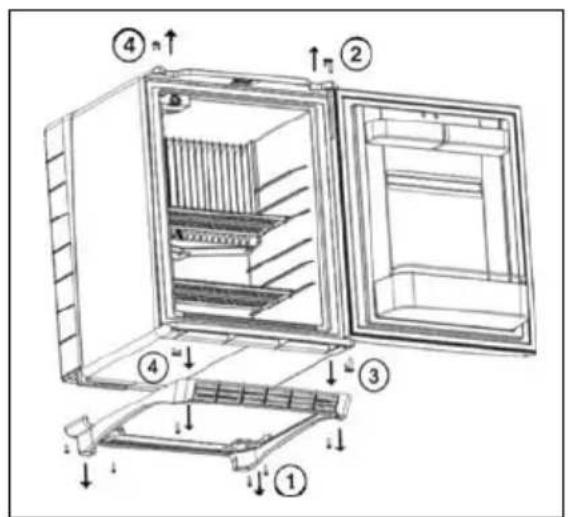
- Remove the 6 screws (1) from the foot frame and also the screw in the mid of the air grill and take the frame down.
- Put the fridge on a desk to ease the work.
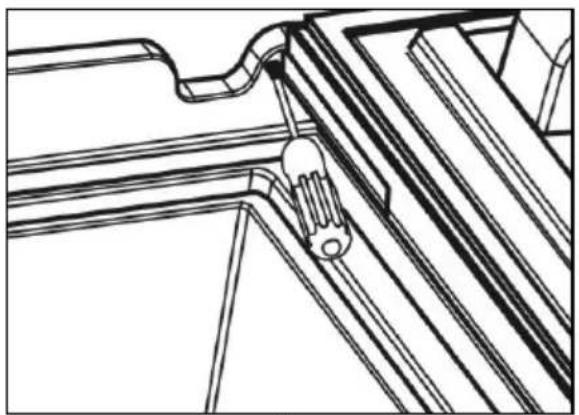
- Open the door and snap out the fixing tab (2) of the upper hinge pin by the help of screwdriver and push out the pin. (fig. 10.)
- Remove the door and the hinge washer.
- Remove the bottom hinge pin (3) and the upper and lower hinge plug (4) in the same way as in case of the upper hinge pin.
- Snap in the lower hinge pin (3) to the desired side.
- Put back the door and the hinge washer and snap in the upper hinge pin (2).
- Snap in the 2 hinge plugs (4) too.
- Put the foot frame back and fit it with the 7 screws
10. Replacing the decorative door panel (fig. 11.)
If the refrigerator is furnished with handle, it is the handle that should be first removed at the change of the door panel.
Remove the mounter screws (1) of the forehead panel (3).
Remove rosette (2) (in case of with lock version fridge).
Lift and remove the forehead panel.(3)
Slide the decorative panel (4) out of the door frame and insert the new panel (thickness max. 2 mm).
Place back the forehead panel, rosette and screw in reverse sequence.
11. Fitting up and removing the handle (If available)
The handle which can be found among the accessories of the appliance should be fitted and removed as follows:
11.1. Fitting up the handle (fig. 12., 13.)
11.2. Removing the handle (fig. 14.)
12. Positioning of the shelf (fig. 15.)
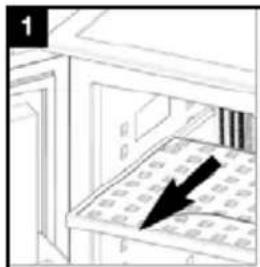
- Pull out the storage rack until it is blocked.
- Press in the lock of both running rails.
- Remove storage rack and running rails and place it at the desired position.
- After clicking in the storage rack it is secured against pulling out completely again
13. Customer service
Before you call a service engineer, carry out the following simple tests:
| Problem | Possible cause | Solution |
| The appliance does not cool sufficiently | Thermostat control is set too low. | Set to a higher position. |
| Too much food to be cooled was put in. | Put in less food to be be cooled. | |
| Door is not shut properly. | Check if the door is shut. | |
| Internal air circulation is restricted. | Provide inside cool air circulation. | |
| The appliance does not cool at all and the LEDs are flashing | CUC system stopped the operation. | See operating instruction 5.3. |
| The appliance does not cool at all and there is no lighting at all | Plug is not connected to the mains socket properly | Check if the connection is proper. |
| There is no voltage in the mains socket. | Check if there is voltage. |
When checking all the above points and the refrigerator is still not working satisfactorily, contact your nearest service engineer. State the problem, model, product- and serial-number.
(Details of the model, product- and serialnumber are to be found on the data label in the top left of the inside compartment.)
In the event of a fault developing, contact your nearest Service Centre-see local telephone directory.
www.dometic.com
14. Putting into operation
Technical data:
| Model DS 200 DS 300 | DS 400 DS 600 | |||
| Type DS20-60 DS20-60 | DS20-60 DS20-60 | |||
| Gross volume 23 litre | 28 litre 34 litre 45 litre | |||
| Mains operation 220 - | 240V (AC) 220 - 240V | (AC) 220 - 240V (AC) | 220 - 240V (AC) | |
| Input 65W 65W 65W | 65W | |||
| Energy consumption | 0.740 kWh/24h | 0,755 kWh/24h | 0.760 kWh/24h | 0.765 kWh/24h |
| Climate class | SN | SN | SN | SN |
| Absorber Solution | 147g H_2O + 98 g NH_3 | 151g H_2O + 101 g NH_3 | 151g H_2O + 101 g NH_3 | 157g H_2O + 105 g NH_3 |
GB
14.1. Connecting to electrical mains
The appliance may only be operated from nominal voltage mains as shown on the data plate. The appliance mains plug may be connected to a mains socket earthed in accordance with regulations.
text_image
GREEN & YELLOW 3 AMP FUSE 3 AMP BLUE BROWN CORD CLAMPAny electrical work required to install this appliance should be carried out by a qualified electrician or competent person.
The manufacturer declines any liability should these safety measures not be observed.
Electrical Requirements
Before switching on, make sure the electricity supply voltage is the same as that indicated on the appliance rating plate.
Only for UK:
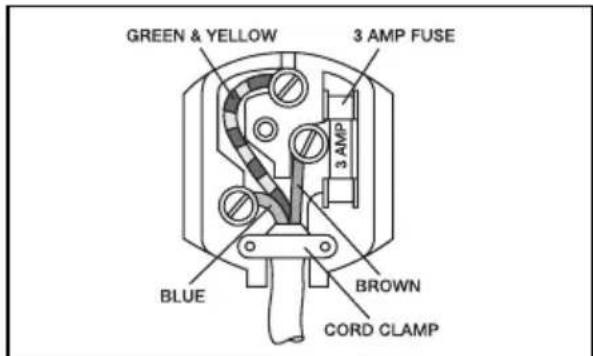
The appliance is supplied with a 3 amp plug fitted. In the event of having to change the fuse in the plug supplied, a 3 amp ASTA approved (BS 1362) fuse must be used. Should the plug need to be replaced for any reason, the wires in the mains lead are coloured in accordance with the following code:
Green and Yellow: Earth
Blue: Neutral
Brown: Live
The wire coloured green and yellow must be connected to the terminal marked with the letter „E“ or by the earth symbol or coloured green and yellow.
The wire coloured blue must be connected to the terminal „N“ or coloured black.
The wire coloured brown must be connected to the terminal marked „L“ or coloured red.
Upon completion there must be no cut, or stray strands of wire present and the cord clamp must be secure over the outer sheath.

15. Environmental protection information
Ammonia (natural hydrogen and nitrogen compound) is used as a refrigerating agent in the refrigeration unit.
The ozone-friendly cyclopentane is activated as a blowing agent for the PU foam insulation.
Sodium chromate is used for corrosion protection (less than 2 % weight of the coolant).

16. Recycling
After unpacking the appliance, the packing materials should be delivered to a local collection site. At the end of its useful lifetime, the appliance should be delivered to a specialized collection and reprocessing firm, which reclaims the usable materials. The rest is properly destroyed.
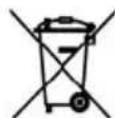
Appliances bearing this symbol must be deposited at the designated local reception point for the disposal of electrical and electronic equipment.
It is not permitted that this product be disposed of by way of the normal household refuse collection system.
Dometic refrigerators bear this symbol on the specifications plate (data plate) to be found in the interior of the unit.
This appliance complies with the following EEC directives:
LVD-Directive 73/23/EEC with amendment 90/683/EEC
EMC-Directive 89/336/EEC
RoHS-Directive 2002/95/EC

Directive EMC 89/336/CEE
Directive RoHS 2002/95/CE
|

Suba e remova o painel principal (3).