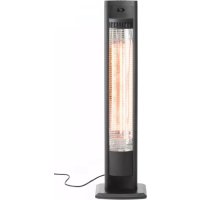
272435 - Heating Hendi - Free user manual and instructions
Find the device manual for free 272435 Hendi in PDF.


| Product Type | Carbon Infrared Heater |
| Brand | Hendi |
| Model | 272435 |
| Category | Heating |
| Usage | Professional (indoor and outdoor) |
| Power Supply Voltage | 220-240 V~ 50/60 Hz |
| Power | 2000 W |
| Protection Rating | IP44 |
| Dimensions (L x P x H) | 174 x 69 x 1058 mm |
| Net Weight | 6 kg |
| Technology | Carbon Infrared |
| Heat Levels | 2 (L1, L2) |
| Timer | 0 to 24 hours |
| Remote Control | Yes (with AAA batteries) |
| Installation | On stand (supplied) or wall-mounted |
| Electrical Protection Class | I (earthing mandatory) |
| Main Material | Steel and reflector |
| Safety | Overheat detection (code E1), automatic shut-off |
| Maintenance | External cleaning with damp cloth and mild detergent |
| Warranty | 12 months |
| Included Accessories | Stand, screws, remote control, batteries |
| Spare Parts | Contact the manufacturer or dealer |
Frequently Asked Questions - 272435 Hendi
User questions about 272435 Hendi
0 question about this device. Answer the ones you know or ask your own.
Ask a new question about this device
Download the instructions for your Heating in PDF format for free! Find your manual 272435 - Hendi and take your electronic device back in hand. On this page are published all the documents necessary for the use of your device. 272435 by Hendi.
USER MANUAL 272435 Hendi
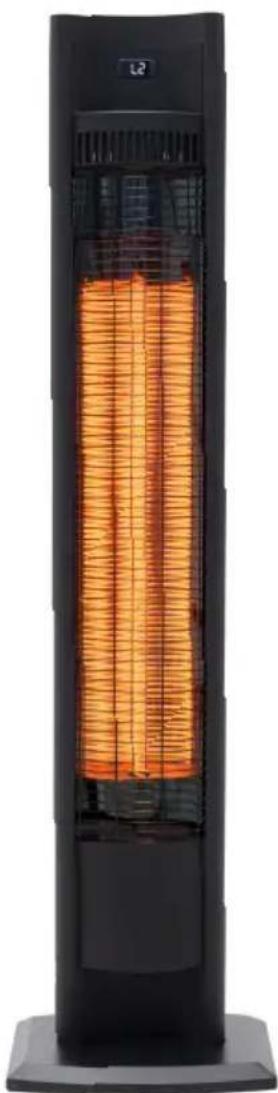
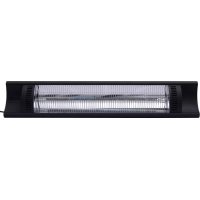
INFRARED PATIO HEATER TORNADO
272435
natural_image
Exterior view of a tall outdoor heat exchanger with visible internal grid pattern (no text or symbols)You should read this user manual carefully before using the appliance.
Keep these instructions with the appliance.
Only use this appliance outdoors or in a well ventilated area.

CE
Thank you for purchasing this Hendi appliance. Read this manual carefully, paying particular attention to the safety regulations outlined below, before installing and using this appliance for the first time.
Safety regulations
- This appliance is intended for commercial use only.
- Only use the appliance for the intended purpose it was designed for as described in this manual.
- The manufacturer is not liable for any damage caused by incorrect operation and improper use.
- Keep the appliance and electrical plug away from water and other liquids. In the event the appliance falls into water, immediately remove the power plug from the socket. Do not use the appliance until it has been checked by a certified technician. Failure to follow these instructions will cause life threatening risks.
- Never attempt to open the housing of the appliance by yourself.
- Do not insert objects into the housing of the appliance.
- Do not touch the plug with wet or damp hands.
- DANGER OF ELECTRIC SHOCK! Do not attempt to repair the appliance by yourself, repairs are only to be conducted by qualified personnel.
- Never use a damaged appliance! When it's damaged, disconnect the appliance from the socket and contact the retailer.
- WARNING! Do not immerse the electrical parts of the appliance in water or other liquids.
- Never hold the appliance under running water.
- Regularly check the power plug and cord for any damage. When damaged it must be replaced by a service agent or similarly qualified person in order to avoid danger or injury.
- Make sure the cord does not come in contact with sharp or hot objects and keep it away from open fire. Never pull the power cord to unplug it from the socket, always pull the plug instead.
- Make sure that the power cord and/or extension cord do not cause a trip hazard.
- Never leave the appliance unattended during use.
- WARNING! As long as the plug is in the socket the appliance is connected to the power source.
- Turn off the appliance before unplugging it from the socket.
- Connect the power plug to an easily accessible electrical socket so that in case of emergency the appliance can be unplugged immediately.
- Never carry the appliance by the cord.
- Do not use any extra devices that are not supplied together with the appliance.
- Only connect the appliance to an electrical outlet with the voltage and frequency mentioned on the appliance label.
-
Never use accessories other than those recommended by the manufacturer. Failure to do so could pose a safety risk to the user and could damage the appliance. Only use original parts and accessories.
-
This appliance should not be operated by persons with reduced physical, sensory or mental capabilities, or persons that have a lack of experience and knowledge.
- This appliance should, under any circumstances, not be used by children.
- Keep the appliance and its power cord out of reach of children.
- WARNING: ALWAYS switch off the appliance and unplug from power socket before cleaning, maintenance or storage.
Special Safety Regulations
- READ CAREFULLY-The infrared heater is designed for safe operation. Nevertheless, installation, maintenance and operation of the heater can be dangerous. Observing the following procedures will reduce the risk of fire, electric shock, injury to persons and keep installation time to a minimum. Save these instructions for future use.
- Remove the unit from its packaging and check to make sure it is in good condition before using.
- Do not let children play with parts of package (such as plastic bags).
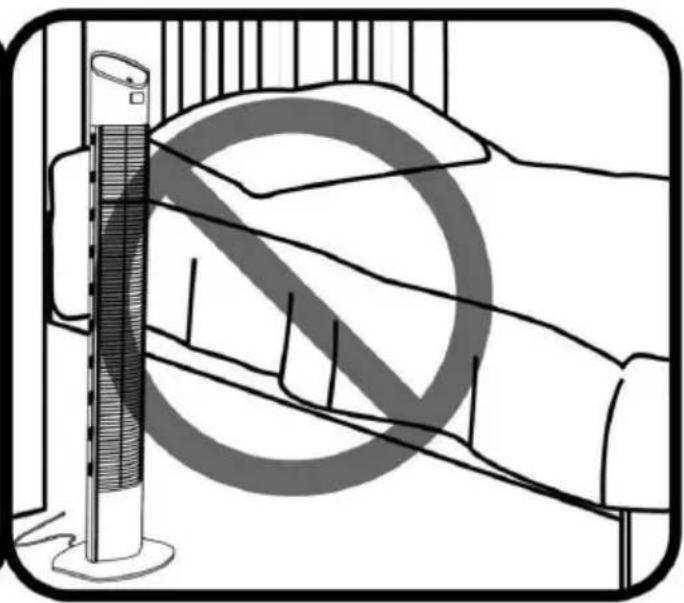
- This heater is hot when in use. To avoid burns, do not let bare skin touch hot surfaces. If provided, use handles when moving this heater. Keep combustible materials, such as furniture, pillows, bedding, papers, clothes, and curtains at least 3 feet (0.9 m) from the front of the heater and keep them away from the sides and rear.
- Extreme caution is necessary when the heater is used near children or invalids.
- Do not use near or in the immediate vicinity of a bath or swimming pool or any source of liquid.
- Do not insert or allow foreign objects to enter any ventilation or exhaust opening, as this may cause an electric shock, fire or damage to the heater.
• Always unplug the heater when not in use. - Connect to properly grounded outlets only.
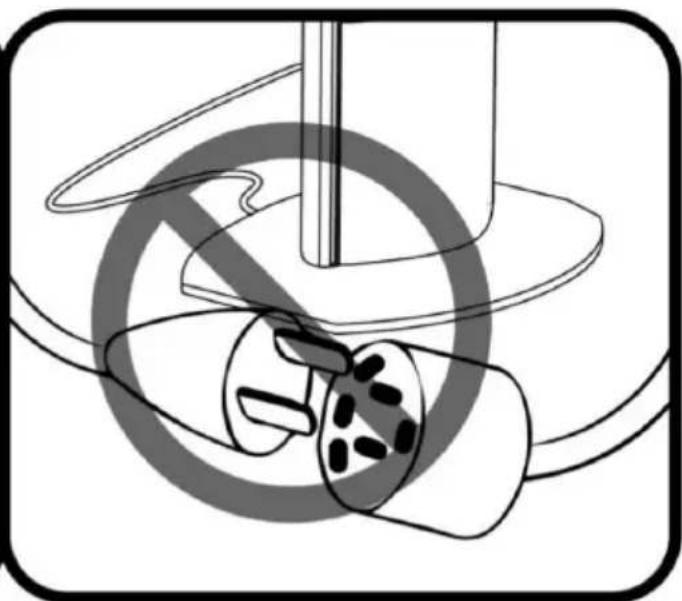
- Always plug heaters directly into a wall outlet/receptacle. For outdoor use, never use with an extension cord or relocatable power tap (outlet/power strip).
- Do not allow cord to overhang the counter top where it can be easily pulled by children.
- Do not put fingers or foreign objects into the grill while in operation.
- Do not leave the appliance unattended when in use.
- This heater is not intended for use in bathrooms, laundry and similar indoor locations, never put heater where it may fall into a bathtub or other water container.
- Do not operate any heater with a damaged cord or plug or after the heater malfunctions, has been dropped or damaged in any manner. Disconnect power at service panel and have heater inspected by a reputable electrician before reusing. If the supply cord is damaged in any way, it must be replaced by the manufacturer or its service agent or a similarly qualified person in order to avoid a hazard.
-
Do not run cord under carpeting. Do not cover cord with throw rugs, runners, or similar coverings. Do not route cord under furniture or appliances. Arrange cord away from traffic area and where it will not be tripped over.
-
To prevent overheating of this appliance, keep the air inlets and outlets clean and free of anything that may cause blockage. Check all inlets and outlets from time to time to ensure it is clear of any dirt or dust accumulation. DO NOT COVER.
- A heater has hot and arcing or sparking parts inside. Do not use it in areas where gas line, paint, or flammable liquids are used or stored.
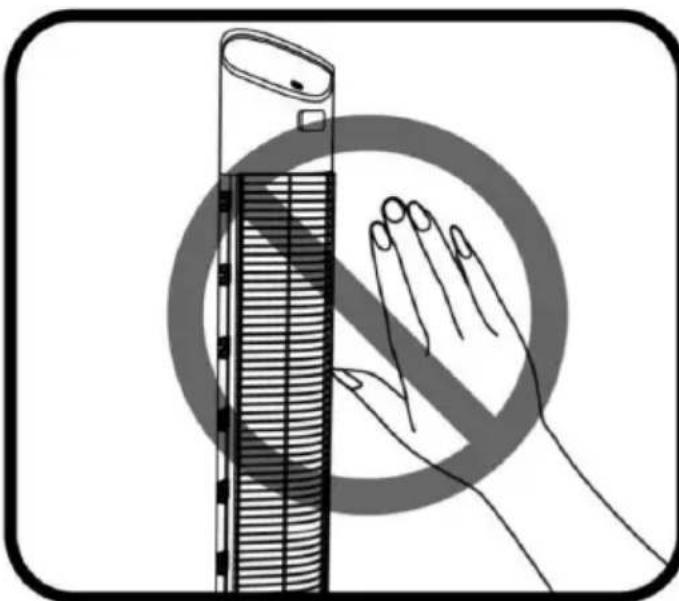
- Parts of the heater may exceed 200^ C, contact with the heating tube, reflector, or metal parts near the heating tube, may cause severe BURNS. To avoid burns, do not let bare skin touch hot surface.
- NEVER place hands under the heating elements. ALWAYS allow heating element to cool at least 10 minutes before touching the heating tube or adjacent parts.
- This product contains recyclable materials. Do not dispose this product as unsorted municipal waste. Please contact your local municipality for the nearest collection point.
Intended use
- The appliance is intended for professional use.
- The appliance is designed for heating outside and under strict regulations inside. Any other use may lead to damage of the appliance or personal injury.
- Operating the appliance for any other purpose shall be deemed a misuse of the device. The user shall be solely liable for improper use of the device.
Grounding installation
This appliance is classified as protection class I and must be connected to a protective ground. Grounding reduces the risk of electric shock by providing an escape wire for the electric current.
This appliance is fitted with a power cord that has a grounding wire and grounded plug. The plug must be plugged into an outlet that is properly installed and grounded.
Introduction
The HENDI TORNADO carbon infrared heaters produce instant and comfortable heat like the sun. These robust and weatherproof heaters are de-
signed for domestic and commercial heating applications within indoor and outdoor areas.
Installation
- This heater should be installed by a competent person, i.e. a qualified electrician.
- Always disconnected the heater from the electricity supply and allow it to cool before installation.
- Keep the supply cord away from the body of the heater which will get hot during use.
- If the heater is to be used outside, a weather-proof outlet is recommended.
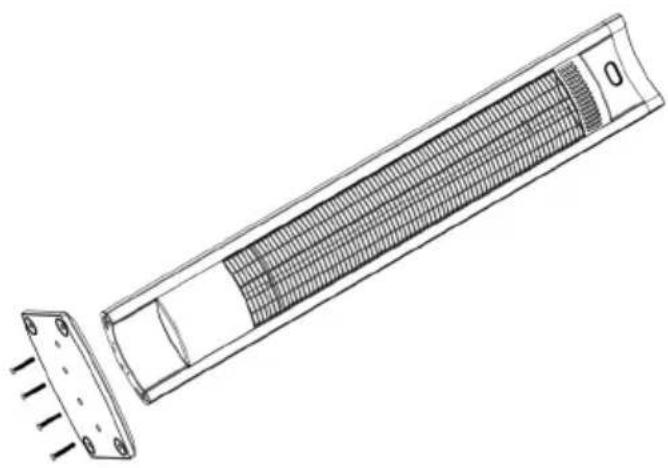
- Fasten the heater securely on the base plate using the screws supplied.
natural_image
Technical line drawing of a rectangular device with internal grid structure and mounting feet (no text or symbols)Warning
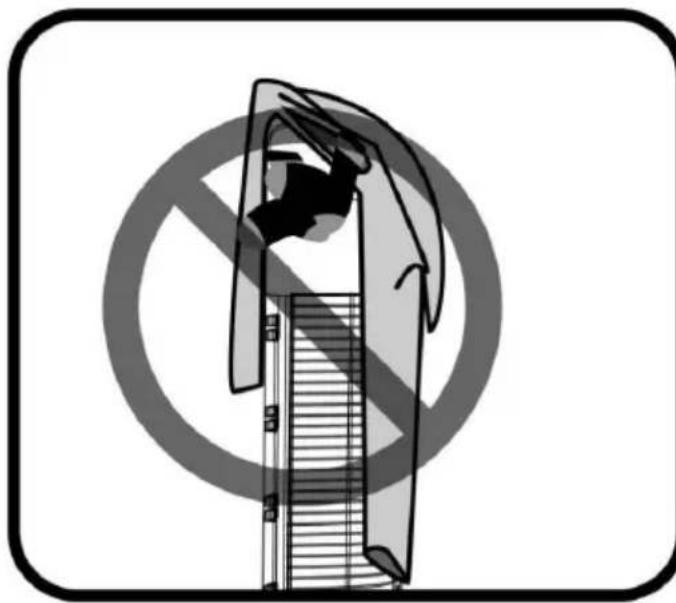
To reduce the risk of fire - 01
natural_image
Illustration of a hand holding a device against a circular background with a diagonal line and no text or symbolsCAUTION: Do not cover any objects such as clothes on the heater.
natural_image
Diagram of a room with a vertical fan and circular background, no text or symbols presentCAUTION: Do not place the heater near the bed.

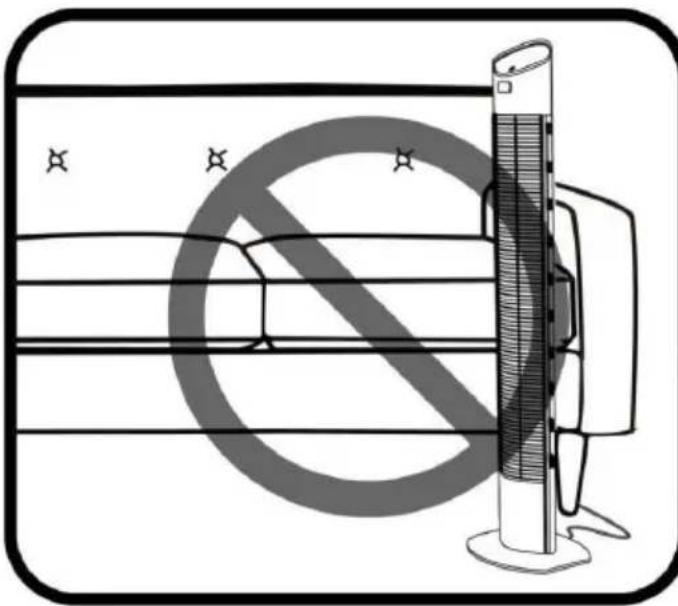
CAUTION: Keep furniture, papers, clothes, etc away from the sides and rear.

natural_image
Illustration of a window with curtains and a circular overlay, no text or symbols presentCAUTION: Keep combustible materials, such as furniture, pil lows, curtains at least 3 feet (0.9m) from the front of the heater and keep them away from the sides and rear.
To reduce the risk of fire - 02
natural_image
Illustration of a hand blocking a smartphone with a prohibition symbol (no text or labels)CAUTION: Hot surface, do NOT touch.
natural_image
Diagram of a mechanical device with no visible text or symbols, featuring a circular component and intersecting lines (no readable labels or text)CAUTION: DO NOT use with an extension cord or relocatable power tap (outlet/power strip).
Operating
Product Key Function:
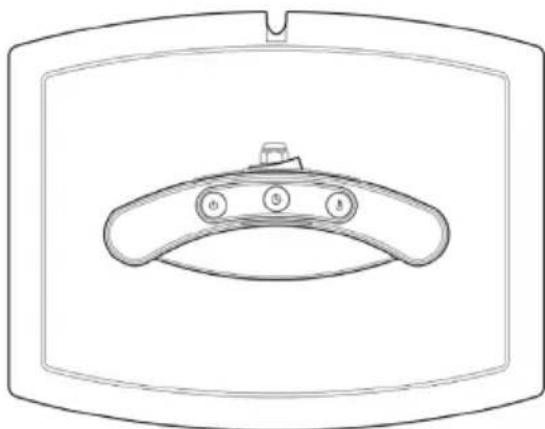
- Turn on the power button, the product is in standby mode display (- -);
- Press heating level button: select the heating level (L1-L2 standby - off)
- Press timer button: To set the timer from 0H-24H, which is the number of hours it will run. 0H will display and then adjust to the number of hours you would like to set.
natural_image
Line drawing of a device with three labeled buttons (0, 5, 8) on a curved surface inside a rectangular frame (no text or symbols beyond labels)Preparations before first use
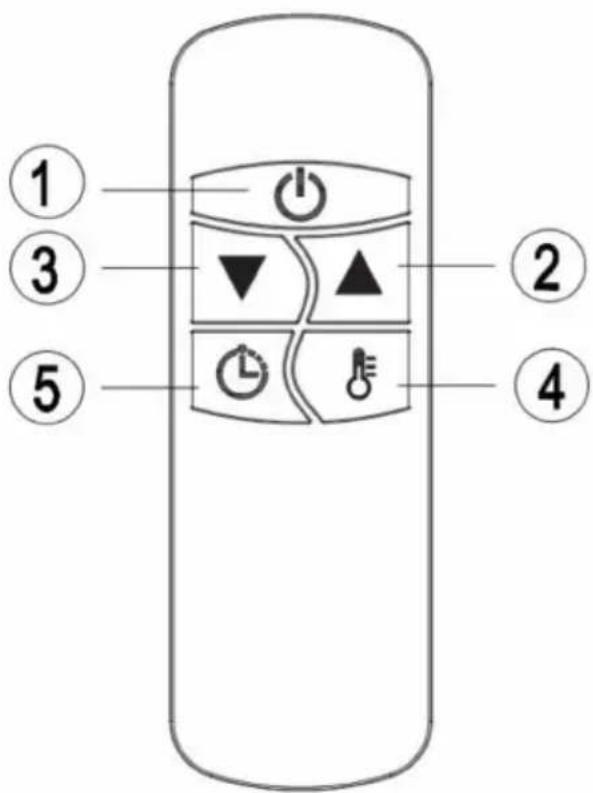
- POWER BUTTON: Turn the heater off.
- UP BUTTON: Increase timer or power level.
- DOWN BUTTON: Decrease timer or power level.
-
LEVEL BUTTON: Use to adjust the heat levels(L1-L2). Press the Level button then use the up and down buttons(buttons 2 and 3) to increase or decrease the heating level.
-
TIMER BUTTON: To set the timer from 0H-24H, which is the number of hours it will run. 0H will display and then adjust to the number of hours you would like to set, using the up and down buttons(2 and 3).
Noted: All heaters and their remote controls have the same frequency, so it is possible to control several heaters with just one remote.
Inserting Batteries (not included)
- Insert 2 AAA/ Alkaline type batteries into your remote control.
- Flip the backside of your remote control and pull out battery cover. Insert the batteries in accordance with the instructions and polarity the batteries.
- Change the batteries in the same way depicted above.
NOTICE:
- Replace the old batteries with the same type batteries. Otherwise, your heater may not function well.
- Pull out the batteries in case of long terms of disuse to prevent leakage which may impair your remote control.
- Do not allow water or liquid to get into the remote control.
CAUTION
When the appliance is not operated for a long period of time, cleaning or maintenance is conducted or when the location of the heater is changed, the heater should be turned to OFF and unplugged from the electrical connection.
Periodic inspection and removal of dirt and contaminants will ensure that equipment can be operated safely.
Troubleshooting
If the appliance does not function properly, please check the below table for the solution. If you are still unable to solve the problem, please contact the supplier/service provider.
-
Check if the power cord is plugged into an electrical outlet, if not, plug in.
-
Check if electricity to the main fuse is working
-
Error code shows on display
| Problem Possible cause Solution | ||
| E1 Error on display Control unit overheat. Check installation clearances. |
In case of any doubt, always contact your supplier!
Cleaning and maintenance
Maintenance
ATTENTION! Careful and regular maintenance of your heater considering our instructions assume great importance so as to attain a long efficient operation of your appliance.
- Check the filthiness of the Reflector and IR-Filament at least once a month. If necessary, apply cleaning and maintenance instructions.
-
The number of checks may be increased considering the amount of the dust in the environment.
-
Check the deformation of the Reflector, Wire and Frame visually while cleaning the appliance. In case of deformation, consult to your technical service.
- Check the Power Cord and Plug visually while cleaning the appliance. In case of deformation, consult to your technical service.
Cleaning
- Regular and careful cleaning helps your infrared heater operate efficiently for many trouble free years. To clean your heater follow steps below:
- Unplug the power cord for your safety before cleaning your appliance.
- Make sure the heater is cool before continuing.
-
To keep the heater clean, the outer shell maybe cleaned with a soft, damp cloth. You may use a mild detergent if necessary. After cleaning, dry the unit with a soft cloth. (CAUTION: DO NOT let liquids enter the heater).
-
DO NOT use alcohol, gasoline, abrasive powders, furniture polish or rough brushes to clean the heater. This may cause damage or deterioration to the surface of the heater.
- DO NOT immerse the heater in water
- Wait until the heater is completely dry before use.
Storage: Store the heater in a cool, dry location when not in use to prevent dust and dirt build up. Use packaging carton to store.
ATTENTION
- Always disconnect the heater from the electricity supply and allow it to cool before attempting to work on it.
- If the heater has collected dust or dirt inside the unit or around the heating element, have to unit cleaned by a qualified service agent. Do not operate the heater in this condition.
- The only maintenance required is cleaning of the external surfaces of the heater.
- Do not touch the heating element with bare fingers, as residue from your hand could affect the life of the lamp. If it is accidentally touched,
remove the finger marks with a soft cloth moistened with mentholated spirit or alcohol.
5. Do not attempt to repair or adjust any electrical or mechanical functions on this heater.
6. The heater contains no user serviceable parts. Should the product suffer damage or breakdown, it must be returned to the manufacturer or its service agent.
7. Damaged supply cords to be replaced by the manufacturer, service agent or similarly qualified person in order to avoid hazard.
Technical specification
Item no.: 272435
Operating voltage & frequency: 220-240V\~50/60Hz
Rated power: 2000 W
Protection class: Class I
Waterproof protection class: IP44
Dimension: 174x69x(H)1058 mm
Net weight: approx. 6 kg
REMARK: Technical specification is subjected to change without prior notification.
Warranty
Any defect affecting the functionality of the appliance which becomes apparent within one year after purchase will be repaired by free repair or replacement provided the appliance has been used and maintained in accordance with the instructions and has not been abused or misused in any way. Your statutory rights are not affected. If the appliance is claimed under warranty, state where and when it was purchased and include proof of purchase (e.g. receipt).
In line with our policy of continuous product development we reserve the right to change the product, packaging and documentation specifications without notice.
Discarding & Environment
When decommissioning the appliance, the product must not be disposed of with other household waste. Instead, it is your responsibility to dispose to your waste equipment by handing it over to a designated collection point. Failure to follow this rule may be penalized in accordance with applicable regulations on waste disposal. The separate collection and recycling of your waste equipment at the time of disposal will help conserve natural resources and ensure that it is recycled in a manner that protects human health and the environment.
For more information about where you can drop off your waste for recycling, please contact your local waste collection company. The manufacturers and importers do not take responsibility for recycling, treatment and ecological disposal, either directly or through a public system.
natural_image
Technical line drawing of a cylindrical device with internal grid structure and mounting holes (no text or symbols)Warnung
natural_image
Illustration of a hand holding a device with a diagonal bar and a circular background symbol (no text or symbols)natural_image
Diagram of a vertical barrier with a diagonal line and circular overlay, no text or symbols presentnatural_image
Illustration of a window with curtains and a circular overlay, no text or symbols presentnatural_image
Illustration of a smartphone with a hand blocking against a circular background (no text or symbols)natural_image
Diagram of a mechanical device with rotating components and a central shaft (no text or symbols)natural_image
Line drawing of a device with three circular buttons labeled ①, ②, and ③ on a curved surface (no text or symbols beyond labels)natural_image
Technical line drawing of a rectangular electronic component with internal grid structure and mounting holes (no text or symbols)Waarschuwing
natural_image
Illustration of a hand holding a device against a circular background with a diagonal line and horizontal bar (no text or symbols)natural_image
Diagram of a room with a vertical fan and circular background, no text or symbols presentnatural_image
Illustration of a hand blocking a device with no visible text or symbolsnatural_image
Diagram of a mechanical device with no visible text or symbols, featuring a circular component and intersecting lines (no readable labels or text)natural_image
Line drawing of a door handle with three buttons labeled 0, 1, and 2 (no text or symbols beyond labels)natural_image
Technical line drawing of a rectangular device with internal grid structure and mounting holes (no text or symbols)Ostrzeżenie
natural_image
Illustration of a hand holding a device with a diagonal line and grid lines, enclosed in a circular frame (no text or symbols)natural_image
Diagram of a room with a vertical tube and a circular object, no text or symbols presentnatural_image
Illustration of a window with curtains and a circular overlay, no text or symbols presentnatural_image
Illustration of a smartphone with a hand holding a prohibition sign, no text or symbols presentnatural_image
Diagram of a mechanical device with no visible text, numbers, or symbolsnatural_image
Line drawing of a device with three circular buttons labeled ①, ②, and ③ on a curved surface (no text or symbols beyond labels)natural_image
Technical line drawing of a rectangular device with internal grid structure and mounting holes (no text or symbols)Avertissement
natural_image
Illustration of a hand holding a device with a diagonal bar and a circular background symbol (no text or symbols)natural_image
Diagram of a vertical barrier with a diagonal line and circular overlay, no text or symbols presentnatural_image
Illustration of a window with curtains and a circular overlay, no text or symbols presentnatural_image
Illustration of a hand blocking a smartphone with a prohibition symbol (no text or labels)ATTENTION: Surface chaude, ne pas toucher.

natural_image
Diagram of a mechanical device with no visible text, numbers, or symbolsnatural_image
Line drawing of a device with three labeled buttons (a, b, c) on a curved surface inside a rectangular frame (no text or symbols)Insertion des piles (non incluses)
Protection: Classe I
natural_image
Technical line drawing of a rectangular device with internal grid structure and mounting holes (no text or symbols)Avvertenza
natural_image
Illustration of a hand holding a device against a circular background with a diagonal line and no text or symbolsnatural_image
Diagram of a room with a vertical fan and diagonal line overlay, no text or symbols presentnatural_image
Illustration of a window with curtains and a circular overlay, no text or symbols presentnatural_image
Illustration of a hand blocking a smartphone with a prohibition symbol (no text or labels)natural_image
Diagram of a mechanical device with rotating components and a central shaft (no text or symbols)natural_image
Line drawing of a device with three buttons labeled A, B, and C on a curved base (no text or symbols beyond labels)natural_image
Technical line drawing of a cylindrical device with internal grid structure and mounting holes (no text or symbols)Avertisement
natural_image
Illustration of a hand holding a device with a diagonal line and grid lines, enclosed in a circular frame (no text or symbols)natural_image
Diagram of a vertical barrier with a diagonal line and circular overlay, no text or symbols presentnatural_image
Illustration of a window with curtains and a circular overlay, no text or symbols presentnatural_image
Technical line drawing of a rectangular device with internal grid structure and mounting holes (no text or symbols)Предупреждение
natural_image
Illustration of a hand holding a device against a circular background with diagonal lines (no text or symbols)natural_image
Diagram of a room with a vertical stand and a circular object, no text or symbols presentnatural_image
Illustration of a window with curtains and a large circular overlay, no text or symbols presentnatural_image
Illustration of a hand blocking a smartphone with a no-smoking symbol (no text or labels)natural_image
Diagram of a mechanical device with no visible text, numbers, or symbolsnatural_image
Line drawing of a device with three labeled buttons (①, ②, ③) on a curved surface inside a rectangular frame (no text or symbols)natural_image
Technical line drawing of a rectangular device with internal grid structure and mounting holes (no text or symbols)Προειδοποίηση
natural_image
Illustration of a hand holding a device with a diagonal bar, set against a circular background marked with a diagonal line and no text or symbols.natural_image
Diagram of a vertical electric fan with a diagonal line indicating no protection, enclosed in a rounded square frame (no text or symbols)natural_image
Illustration of a window with curtains and a circular overlay, no text or symbols presentnatural_image
Illustration of a smartphone with a hand blocking against a circular background (no text or symbols)natural_image
Diagram of a mechanical device with rotating components and a central shaft (no text or symbols)natural_image
Line drawing of a device with three circular buttons labeled ①, ②, and ③ on a curved surface (no text or symbols beyond labels)PKS Hendi South East Europe SA
5 Metsovou Str.
18346 Moschato, Athens, Greece
Tel: +30 210 4839700
Email: info@pks-hendi.com
Hendi Polska Sp. z o.o.
ul. Firmowa 12
62-023 Robakowo, Poland
Tel: +48 61 658 7000
Email: info@hendi.pl
Hendi Italia S.R.L.
Via Leonardo da Vinci 4
39100 Bolzano (BZ), Italy
Tel: +39 800 727 438
Email: office.italy@hendi.eu
Hendi Food Service Equipment GmbH
Ehring 15
1208, 12/F Exchange Tower
33 Wang Chiu Road, Kowloon Bay, Hong Kong
Tel: +852 2154 2618
Email: info-hk@hendi.eu
Hendi Food Service Equipment Romania S.R.L.
www.youtube.com/HendiEquipment
- Changes, printing and typesetting errors reserved.

- INFRARED PATIO HEATER TORNADO
- Safety regulations
- Special Safety Regulations
- Intended use
- Grounding installation
- Introduction
- Installation
- Warning
- To reduce the risk of fire - 01
- To reduce the risk of fire - 02
- Operating
- Product Key Function:
- Preparations before first use
- Inserting Batteries (not included)
- NOTICE:
- CAUTION
- Troubleshooting
- Cleaning and maintenance
- Maintenance
- Cleaning
- ATTENTION
- Technical specification
- REMARK: Technical specification is subjected to change without prior notification.
- Warranty
- Discarding & Environment
- Warnung
- Waarschuwing
- Ostrzeżenie
- Avertissement
- Insertion des piles (non incluses)
- Avvertenza
- Avertisement
- Предупреждение
- Προειδοποίηση
- PKS Hendi South East Europe SA
- Hendi Polska Sp. z o.o.
- Hendi Italia S.R.L.
- Hendi Food Service Equipment GmbH
- Hendi Food Service Equipment Romania S.R.L.
Brand : Hendi
Model : 272435
Category : Heating