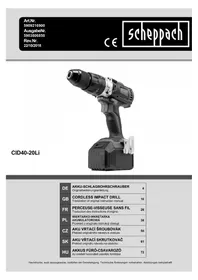
CID4020Li - Drill SCHEPPACH - Free user manual and instructions
Find the device manual for free CID4020Li SCHEPPACH in PDF.



| Product type | Cordless drill/driver |
| Brand | Scheppach |
| Model | CID4020Li |
| Nominal voltage | 20 V |
| No-load speed (1st speed) | 450 rpm |
| No-load speed (2nd speed) | 1600 rpm |
| Maximum torque | 40 Nm |
| Chuck clamping range | Max. 13 mm |
| Battery type | Lithium-Ion |
| Battery capacity | 2.0 Ah |
| Energy capacity | 40 Wh |
| Charger - Input voltage | 220-240 V, 50-60 Hz |
| Charger - Output voltage | 20 V |
| Charger - Charging current | 4 A |
| Power supply | Rechargeable 20 V Li-Ion battery |
| Main functions | 2 speeds, torque preselection, LED lamp, rotation direction switch, spindle lock, motor brake |
| Maintenance and cleaning | Clean with a damp cloth, no harsh products, no internal maintenance required |
| Safety | Hearing protection, safety glasses and dust mask recommended; do not expose to rain; disconnect the battery before adjustment |
| Spare parts and repairability | Original parts available from specialized dealer; repairs by a qualified electrician |
| General information | Cordless drill/driver for domestic use; supplied with 2 batteries 2 Ah, quick charger 4 A, bit and holder |
Frequently Asked Questions - CID4020Li SCHEPPACH
User questions about CID4020Li SCHEPPACH
0 question about this device. Answer the ones you know or ask your own.
Ask a new question about this device
Download the instructions for your Drill in PDF format for free! Find your manual CID4020Li - SCHEPPACH and take your electronic device back in hand. On this page are published all the documents necessary for the use of your device. CID4020Li by SCHEPPACH.
USER MANUAL CID4020Li SCHEPPACH
natural_image
Black and white photo of a black handheld power tool with a cylindrical head and base (no visible text or symbols)| DE | AKKU-SCHLAGBOHRSCHRAUBEROriginalbedienungsanleitung | 4 |
| GB | CORDLESS IMPACT DRILLTranslation of original instruction manual | 16 |
| FR | PERCEUSE-VISSEUSE SANS FILTraduction des instructions d'origine | 26 |
| PL | WIERTARKO-WKRĘTARKAAKUMULATOROWAPrzekład z oryginału instrukcji obsługi | 38 |
| CZ | AKU VRTACÍ ŠROUBOVÁKPřekład originálního návodu k obsluze | 50 |
| SK | AKU VŘTACÍ SKRUTKOVAČPreklad originálu návodu na obsluhu | 61 |
| HU | AKKUS FÚRÓ-CSAVAROZÓAz eredeti használati utasítás fordítása | 72 |
natural_image
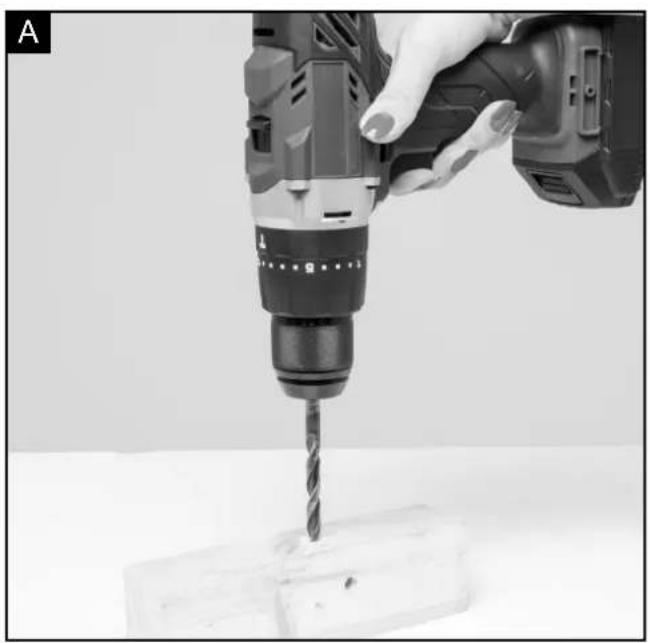
Close-up of a hand using a drill bit to drill on a surface (no visible text or symbols)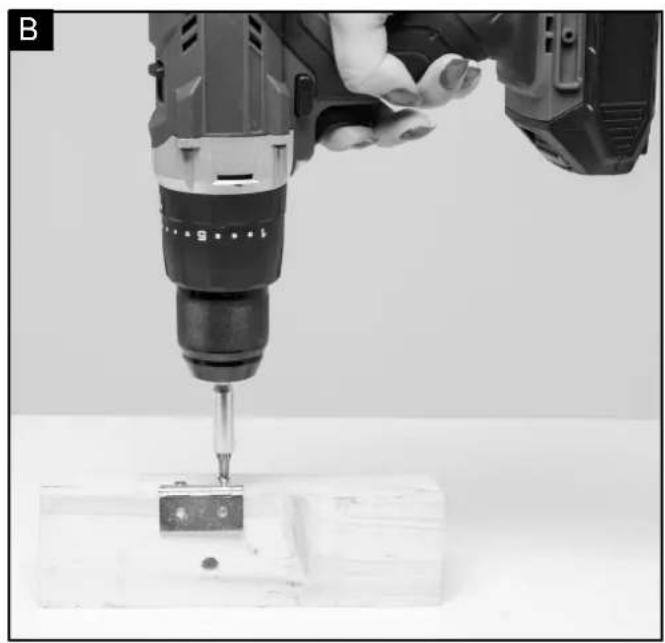
natural_image
Close-up of a hand using a drill bit on a wooden block, no visible text or symbols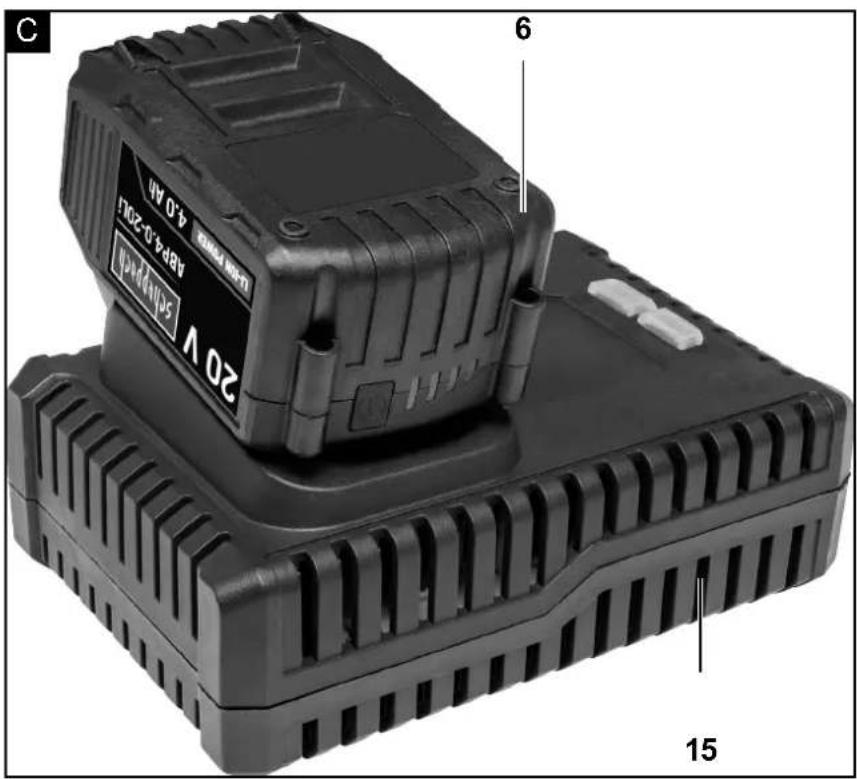
Günzburger Straße 69
D-89335 Ichenhausen
Verehrter Kunde
Explanation of the symbols on the equipment
The use of symbols in this manual is intended to draw your attention to possible risks. The safety symbols and the explanations that accompany them must be perfectly understood. The warnings in themselves do not remove the risks and cannot replace correct actions for preventing accidents.
 | Caution - Read the operating instructions to reduce the risk of inquiry |
 | Wear ear-muffs! The impact of noise can cause damage to hearing. |
 | Wear a breathing mask! Dust which is injurious to health can be generated when working on wood and other materials. Never use the device to work on any materials containing asbestos! |
 | Wear safety goggles! Sparks generated during working or splinters, chips and dust emitted by the device can cause loss of sight. |
 MAX 40°C MAX 40°C | Protect rechargeable batteries from temperatures over 40°C |
 Li-Ion Li-Ion | Do not throw rechargeable batteries away with household waste |
Table of contents: Page:
- Introduction...... 18
- Device description.... 18
- Technical data 18
- Scope of delivery.... 18
- Unpacking 18
- Construction....19
- Safety information 19
- Additional Safety Warnings 21
- Intended use....23
- Installation 23
- Cleaning 24
- Storage....24
- Maintenance....24
- Troubleshooting....25
- Disposal and recycling 25
1. Introduction
Manufacturer:
scheppach
Günzburger Straße 69
D-89335 Ichenhausen
Dear customer,
we wish you a pleasant and successful working experience with your new scheppach machine.
Note:
According to the applicable product liability law the manufacturer of this device is not liable for damages which arise on or in connection with this device in case of:
- improper handling,
• non-compliance with the instructions for use, - repairs by third party, non authorized skilled workers,
- installation and replacement of non-original spare parts,
- improper use,
- failures of the electrical system due to the non-compliance with the electrical specifications and the VDE 0100, DIN 57113 / VDE 0113 regulations
Recommendations:
Read the entire text of the operating instructions prior to the assembly and operation of the device.
These operating instructions are intended to make it easier for you to get familiar with your device and utilize its intended possibilities of use.
The operating instructions contain important notes on how to work safely, properly and economically with your machine and how to avoid dangers, save repair costs, reduce downtime, and increase the reliability and working life of the machine.
In addition to the safety regulations contained herein, you must in any case comply with the applicable regulations of your country with respect to the operation of the machine.
Put the operating instructions in a clear plastic folder to protect them from dirt and humidity, and store them near the machine. The instructions must be read and carefully observed by each operator prior to starting the work. Only persons who have been trained in the use of the machine and have been informed on the related dangers and risks are allowed to use the machine. The required minimum age must be met.
In addition to the safety notes contained in the present operating instructions and the special regulations of your country, the generally recognized technical rules for the operation of wood working machines must be observed.
We accept no liability for accidents or damage that occur due to a failure to observe this manual and the safety instructions.
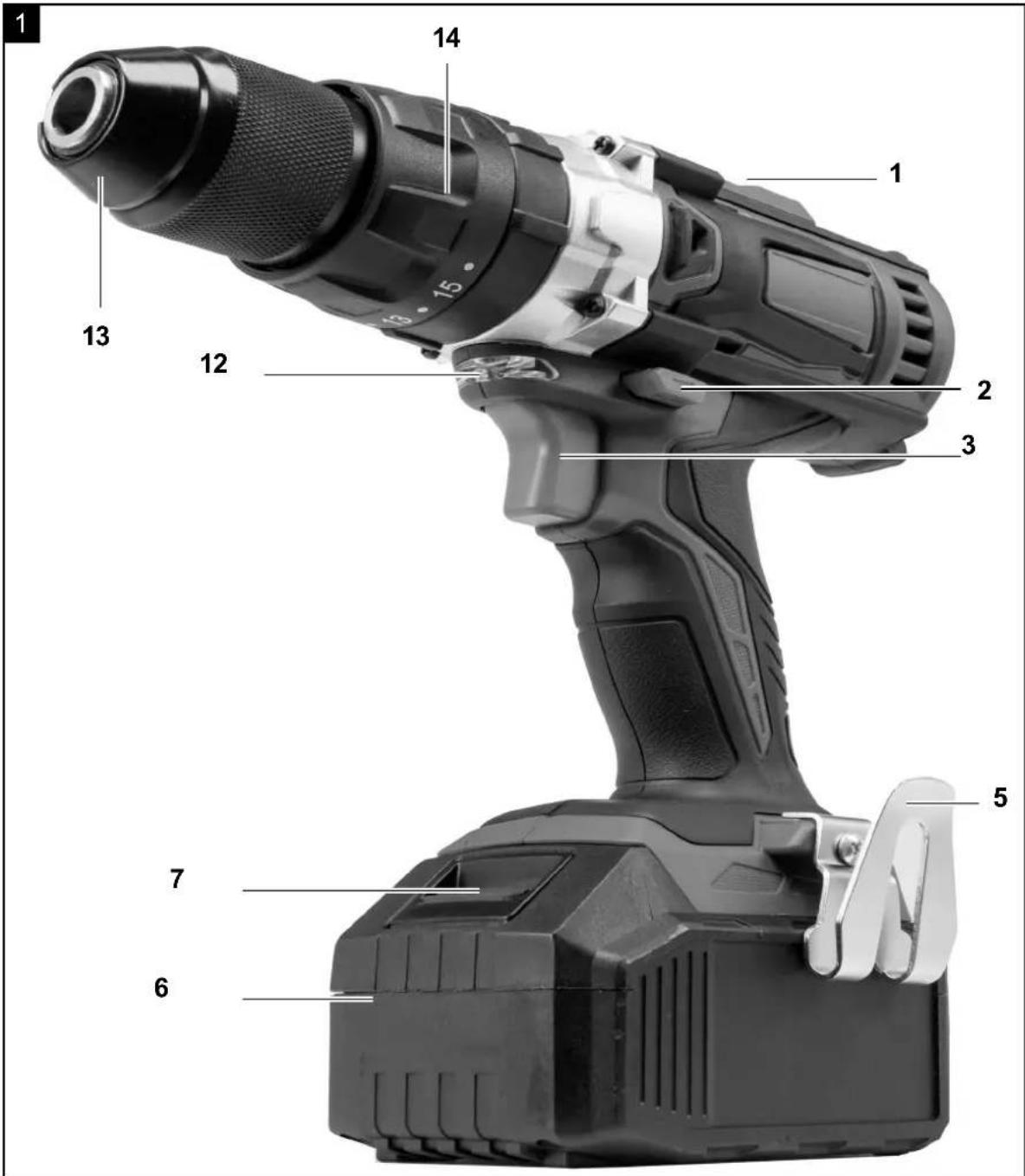
2. Device description (Fig. 1, 2)
1 Gear selector switch
2 Direction of rotation switch / lock
4 -
5 Belt clip
6 Rechargeable battery pack
7 Battery pack release button
8 -
9 -
10 -
11 -
12 LED-light
13 Drill chuck
14 Torque pre-selector
15 F ast charger
3 ON / OFF Switch / R.P.M. regulator
3. Technical data
Cordless drill:
Nominal voltage: 20 V
Idle-running speed: 1st gear: max. 450 min-1
Idle-running speed: 2nd gear: max. 1600 min-1
Drill chuck
clamping range: max. 13 mm
Max. torque: 40 Nm
Battery Pack:
Type: LITHIUM-ION
Nominal voltage: 20 V
Capacity: 2,0 Ah
Energy content: 40 Wh
Fast Charger:
INPUT
Nominal voltage: 220 - 240 V□, 50 - 60 Hz
OUTPUT
Nominal voltage: 20 V
Charging current 4 A
Subject to technical changes!
Noise and vibration
⚠ Warning: Noise at the workplace can exceed 85 dB (A). In this case, noise protection measures are necessary for the user (wear hearing protection!).
Noise output in dB
sound power level L_WA 72,18 dB(A) (EN ISO 3744)
sound pressure level L_pA 83,14dB(A) (EN ISO 11201)
uncertainty K_wa/pA 3 dB(A)
Vibration value
Vibration a_h 2,06 m/s ^2
Uncertainty K_h 1,5 m/s ^2
4. Scope of delivery
- drill bits
- 1pc holder
- 1pc flexible,
- 2*2AH battery
• 1pc Charger (4A charger)
• Translation of original instruction manual
5. Unpacking
- Open the packaging and remove the device carefully.
- Remove the packaging material as well as the packaging and transport bracing (if available).
- Check that the delivery is complete.
- Check the device and accessory parts for transport damage. Inform the transport agent immediately of any faults. Later complaints cannot be considered.
- If possible, store the packaging until the warranty period has expired.
- Familiarize yourself with the machine with the help of the operating instructions manual before using it.
- Use only original parts for accessories as well as consumables and spare parts. Spare parts can be obtained from your scheppach retailer.
- Please quote our article numbers as well as type and production year in all your orders.
ATTENTION
The device and packaging materials are not toys! Children must not be allowed to play with plastic bags, film and small parts! There is a risk of swallowing and suffocation!
6. Construction
Warning!
Always remove the battery pack before making adjustments to the equipment.
Be sure to read the following information before you put the cordless equipment into operation:
- Charge the battery pack with the charger. An empty battery pack requires a charging period of approximately 0.5 to 1 hour.
7. Safety information
⚠ WARNING Read all safety warnings and all instructions.
Failure to follow the warnings and instructions may result in electric shock, fire and/or serious injury.
Workplace safety
a) Keep your working area clean and well lit. Untidy or poorly lit working areas can lead to accidents.
b) Do not work with the device in potentially explosive environments in which there are inflammable liquids, gases or dusts. Electrical power tools create sparks, which can ignite dusts or fumes.
c) Keep children and other people away while you are operating the electrical tool. Distractions can cause you to lose control of the device.
2. Electrical safety
a) The mains plug on the device must match the mains socket. The plug must not be modified in any way. Do not use
plugs and matching sockets reduce the risk of electric shock.
b) Avoid touching earthed surfaces such as pipes, radiators, ovens and refrigerators with any part of your body.
There is an increased risk of electric shock if your body is earthed.
c) Keep the device away from rain or moisture. Water entering an electrical device increases the risk of electric shock.
d) Do not use the mains lead for any purpose for which it was not intended, e.g. to carry the device, to hang up the device or to pull the mains plug out of the mains socket. Keep the mains lead away from heat, oil, sharp edges or moving parts of the device.
Damaged or tangled mains leads increase the risk of electric shock.
e) When working outdoors with an electrical power tool always use extension cables that are also approved
for use outdoors. The use of an extension cable suitable for outdoor use reduces the risk of electric shock.
f) Use a residual current device (RCD) for protection if operating the electrical power tool in a moist environment
is unavoidable. The use of an RCD reduces the risk of electric shock.
3. Personal safety
a) Remain alert at all times, watch what you are doing and always proceed with caution. Do not use the device if
you are tired or under the influence of drugs, alcohol or medication. One moment of carelessness when using the device can lead to serious injury.
b) Wear personal protective equipment and always
wear safety glasses. The wearing of personal protective equipment such as dust masks, non-slip safety shoes, safety helmets or ear protectors, appropriate to the type of electrical power tool used and work undertaken, reduces the risk of injury.
c) Avoid unintentional operation of the device. Check that the electrical power tool is switched off before you connect it to the mains, pick it up or carry it. Accidents can happen if you carry the device with your finger on the ON / OFF switch or with the device switched on.
d) Remove any setting tools or spanners before you switch the device on. A tool or spanner left attached to a rotating part of a device can lead to injury.
e) Avoid placing your body in an unnatural position. Keep proper footing and balance at all times. By doing this
you will be in a better position to control the device in unforeseen circumstances.
f) Wear suitable clothing. Do not wear loose clothing or jewellery. Keep your hair, clothing and gloves clear of moving parts. Loose clothing, jewellery or long hair can become trapped in moving parts.
g) If vacuum dust extraction and collection devices are fitted do not forget to check that they are properly connected and correctly used. The use of these devices reduces the hazard presented by dust.
- Careful handling and use of electrical power tools a) Do not overload the device. Always use an electrical power tool that is intended for the task you are undertaking.
By using the right electrical power tool for the job you will work more safely and achieve a better result.
b) Do not use an electrical power tool if its switch is defective. An electrical power tool that can no longer be switched on and off is dangerous and must be repaired.
c) Pull the mains plug from the socket before you make any adjustments to the device, change accessories or when
the device is put away. This precaution is intended to prevent you from unintentionall starting the device.
d) When not in use always ensure that electrical power tools are kept out of reach of children. Do not let anyone use
the device if he or she is not familiar with it or has not read the instructions and advice. Electrical power tools are dangerous when they are used by inexperienced people.
e) Look after the device carefully. Check that moving parts are working properly and move freely. Check for any
parts that are broken or damaged enough to detrimentally affect the functioning of the device. Have damaged
parts repaired before you use the device. Many accidents have their origins in poorly maintained electrical power tools.
f) Keep cutting tools clean and sharp. Carefully maintained cutting tools with sharp cutting edges are less likely to jam and are easier to control.
g) Use the electrical power tool, accessories, inserted tools etc. in accordance with these instructions and advice, and
the stipulations drawn up for this particular type of device. In doing this, take into account the working conditions
and the task in hand. The use of electrical power tools for purposes other than those intended can lead to dangerous situations.
Safety advice relating to cordless drill drivers
Hold the device by the insulated handle surfaces when you are undertaking work where there is the danger of the screw striking hidden electricity cables or the device's mains lead. Contact of the screw with a live wire could cause metal parts of the device to become live and lead to electric shock.
Children or persons who lack the knowledge or experience to use the device or whose physical, sensory or intellectual capacities are limited must never be allowed to use the device without supervision or instruction by a person responsible for their safety. Children must never be allowed to play with the device.
Securely support the workpiece. A workpiece held in a clamp or vice is kept more securely in place than one held by your hand.
POISONOUS DUSTS!
Harmful / noxious dusts generated from your work represent a risk to the health of the person operating the device and to anyone near the work area. Wear safety glasses and a dust mask!
Do not drill any material containing asbestos. Asbestos is a known carcinogen.
Hold the electrical power tool firmly. High reaction torques may occur momentarily during tightening or loosening of screws.
If the inserted tool jams, switch off the electrical power tool immediately. Be prepared for high reaction torques as they may cause kickback. The inserted tool may jam if the electrical power tool is overloaded or is held at an angle to the workpiece.
Before you carry out any tasks on the device, transport or store it, make sure that the direction of rotation switch is in the middle position (lock). To prevent the device from starting up unintentionally.
Attention - Service lines!
Danger! Take steps to ensure that you do not hit upon any service lines (electricity, gas, water) when working with electrical appliances. Check, if need be with a service line detector, before you start to cut or bore into a surface.
8. Additional Safety Warnings
Information on the rechargeable battery
- The battery pack of the rechargeable device is not charged when delivered. It is therefore necessary to charge the battery before first commissioning.
- For optimum battery capacity avoid deep discharge cycles! Charge your battery frequently.
- Store your battery in a cool place, ideally at 15^ C and with at least 40% charge.
- Lithium-ion batteries are subject to natural ageing. The rechargeable battery must be replaced no later than when its capacity is just 80% of the capacity in new condition! Weakened cells in an aged battery pack are no longer able to cope with the high capacity requirements and therefore constitute a safety risk.
- Do not throw old rechargeable batteries into an open fire. Risk of explosion!
- Do not ignite or burn rechargeable batteries.
- Do not deep discharge rechargeable batteries! Deep discharge damages the battery cells. The most frequent cause of deep discharge in battery packs is lengthy storage or a lack of use of partially discharged rechargeable batteries. End the working process as soon as the capacity is notably reduced or the protection electronics trigger. Only store the rechargeable battery after fully charging.
- Protect rechargeable batteries or device from overloading! Overloading quickly leads to overheating and cell damage inside the rechargeable battery housing, without overheating being externally visible.
- Avoid damage and impacts! Replace rechargeable batteries immediately if these fall more than one metre or if they have been exposed to hefty impacts, even if the battery pack housing appears undamaged. The battery cells inside may be seriously damaged. Also observe the disposal instructions here.
- With overloading or overheating, the protective shut-down integrated in the device switches off for safety reasons. Attention! Do not actuate the on/off switch again if the protective shut-down has switched the device off. This can lead to damage to the rechargeable battery.
- Only use original rechargeable batteries. The use of other batteries can lead to injuries, explosion and a risk of fire.
Warning! This electric tool generates an electromagnetic field during operation. This field can impair active or passive medical implants under certain conditions. In order to prevent the risk of serious or deadly injuries, we recommend that persons with medical implants consult with their physician and the manufacturer of the medical implant prior to operating the electric tool
Information on the charging unit and charging process
- Observe the data provided on the type plate of the charging unit. Only connect the charging unit to the mains voltage provided on the type plate.
- Protect the charging unit and cable from damage and sharp edges. Have damaged cables replaced by an electrician immediately.
- Keep the charging unit, rechargeable batteries and rechargeable device out of reach of children.
- Do not use damaged charging units.
- Do not use the charging unit supplied to charge other rechargeable devices.
- The rechargeable battery pack will heat up with heavy loads. Leave the rechargeable battery pack to cool down before starting the charging process.
- Do not over-charge rechargeable batteries! Observe the maximum charging times. These charging times only apply to discharged batteries. Inserting a charged or partially charged rechargeable battery multiple times leads to overloading and cell damage. Do not leave rechargeable batteries in the charging unit for multiple days.
- Never use or charge rechargeable batteries if you suspect that they were last charged more than 12 months ago. The probability is high that the rechargeable battery is already dangerously damaged (deep discharge).
- Charging at a temperature of less than 10^ C leads to chemical damage to the cell and can result in a fire.
- Do not use rechargeable batteries that have heated up during charging, because the battery cells could be dangerously damaged.
- Do not use rechargeable batteries that are bulging or deformed, or that exhibit unusual symptoms (out-gassing, hissing, crackling, etc.)
- Do not discharge the rechargeable battery fully (recommended final discharge level max. 80%). Fully discharging leads to premature ageing of the battery cells.
- Never leave batteries to charge unsupervised!
Residual risks
The machine has been built according to the state of the art and the recognised technical safety requirements. However, individual residual risks can arise during operation.
- Health hazard due to electrical power, with the use of improper electrical connection cables.
• Furthermore, despite all precautions having been
met, some non-obvious residual risks may still remain.
- Residual risks can be minimised if the „safety instructions“ and the „Proper use“ are observed along with the whole of the operating instructions.
- Avoid accidental starting of the machine: the operating button may not be pressed when inserting the plug in an outlet. Use the tool that is recommended in this manual.. This ensures that your machine performs optimally.
- Hands may never enter the processing zone when the machine is in operation.
9. Intended use
The equipment is to be used only for its prescribed purpose. Any other use is deemed to be a case of misuse. The user / operator and not the manufacturer will be liable for any damage or injuries of any kind caused as a result of this.
To use the equipment properly you must also observe the safety information, the assembly instructions and the operating instructions to be found in this manual. All persons who use and service the equipment have to be acquainted with this manual and must be informed about the equipment's potential hazards.
It is also imperative to observe the accident prevention regulations in force in your area.
The same applies for the general rules of health and safety at work.
The manufacturer will not be liable for any changes made to the equipment nor for any damage resulting from such changes.
The machine may be used only with original accessories and original tools of the manufacturer.
The safety-, workplace- and maintenance specifications of the manufacturer as well as the dimensions specified in the technical data must be observed.
Please note that our equipment has not been designed for use in commercial, trade or industrial applications. Our warranty will be voided if the equipment is used in commercial, trade or industrial businesses or for equivalent purposes.
10. Installation
IMPORTANT!
You must fully assemble the appliance before using it for the first time!
Charging the battery pack
DANGER OF ELECTRIC SHOCK! Before cleaning or servicing the charging station or the battery pack always ensure that the plug is not in the mains socket.
Note! A new battery pack, or one that has not been in use for an extended period, must be charged up before the first / renewed usage. The battery pack attains its full capacity after ca. 3–5 charging cycles.
CAUTION! Always ensure the plug is removed from the mains socket before inserting a battery pack into, or removing one from, the charging station. Never charge the battery pack if the ambient temperature is less than 10 °C or greater than 40 °C.
- Insert the battery pack 6 into the quickcharger 15 (see Fig. C).
- Insert the power plug into the socket. The flashing red charge indicator LED 16 shows that charging is in progress. The red charging control LED 16 extinguishes as soon as the battery pack is fully charged. The green charging control LED 17 signals to you that the charging process is complete and the battery pack 6 is ready for service. Never charge the battery pack for a second time immediately after a fast charging process has been completed. This can give rise to the battery pack becoming over-charged and to a reduced service life of the battery and charging station.
Switch the charger off for at least 15 minutes between two successive charging procedures.
Remove the power plug from the wall socket.
Insertion / removal of a batterypack into the appliance
Ensure that the appliance is switched off before inserting the battery. The insertion of a battery into an electrical appliance that is switched on can lead to accidents.
Inserting the rechargeable battery pack:
Move the rotation switch 2 into the middle position (lock) and push the rechargeable battery pack 6 into the handle until it engages.
Removing the rechargeable battery pack:
Press the release button 7 and remove the rechargeable battery pack
Changing tools
Your cordless electric drill / screwdriver has a fully automatic spindle lock and is fitted with an enclosed keyless chuck incorporating the latest technology.
Once the motor has come to a halt, the drive shaft is automatically locked, so that the chuck 13 can be opened simply by turning it. After you have inserted the required bit and fixed it in place by turning the chuck, you can immediately continue working.
The spindle lock releases itself automatically when the motor is started (by operation of the ON/OFF switch 3).
Torque pre-selection
You can adjust the torque by using 14 torque preselection. The torque levels regulate a range of up to ca. 40 N m.
Select a low setting for small screws, soft workmaterial.
Select a high setting for large screws, hard work materials and for the extraction of screws.
For drilling, push the selector to the setting for drilling, in that you adjust the torque pre-selector to the position.
For drilling tasks, also push the gear selector switch 1 to the front (Position: 2).
2 Gear Drive
CAUTION! Move the gear selector switch 1 only after the device has come to a standstill.
Failure to observe this advice may result in damage to the device.
In the first gear (Gear selector switch 1 in Position: 1)
This setting is intended for use with all screwing tasks and for accessories (see example Fig. B).
In the second gear (Gear selector switch 1 in Position: 2)
for the carrying out of drilling tasks (see example Fig. A).
Preparing the tool for use
Switching On/Off
Switching on:
To start the appliance squeeze on the ON/OFF switch 3 and then keep it pressed down. The LED working light 12 comes on with a slightly or fully pressed ON/OFF switch 3 and illuminates the working area in poor lighting conditions.
Switching off:
To stop the appliance, release the ON
Adjusting the speed
The ON / OFF switch 3 has a variable speed control device. Slight pressure on the ON / OFF
switch 3 will cause the rotation speed to slow down.
With increased pressure, the rotational speed will increase.
Note: The integrated engine brake means that the device will come to a fast standstill.
Switching direction of rotation
To switch the direction of rotation, push the direction of rotation switch 2 to either the right or to the left.
Tips and Tricks
Before you use the appliance, check to see that the screw or drill bit is properly fitted, i.e.
located centrally in the chuck.
Screw bits are designated with their dimensions and their shape. If you are unsure, always try
the particular screw bit out to see whether it sits in the screw head without any free play.
Torque:
Smaller screws and bits in particular can be easily damaged if you adjust the appliance with too high a torque and/or rotation speed.
Hard screwdriving conditions (into metal):
Particularly high torques can occur, for example with metal screws tightened by socket tool bits.
Select a lower rotation speed.
Soft screwdriving conditions (e.g. into soft wood):
You should also select a low speed in order not to damage the wood workpiece surface through contact with the metal screw head.
Use a countersinker.
When drilling into wood, metal and other materials, take note of the following advice:
With small diameter drill bits use a high drill speed.
For large diameter drill bits, use a low drill speed.
For hard materials, select a low drill speed.
For soft materials, select a high drill speed.
Secure or fix down the workpiece (if possible) in a clamp or vice.
Mark the intended position of the hole with a centre punch or a nail and select a low drill speed for drilling.
Take the rotating drill bit out of the hole frequently so that swarf or drill dust can be re-moved and the hole and tool is ventilated.
Drilling in metal:
Use a metal drill bit (HSS). For the best results, you should cool the bit with oil. Metal drill bits can also be used to drill into plastic.
Drilling in stone:
Use a circular shafted masonry drill bit with a hardened metal tip.
Drilling in wood:
Normally you should use a wood drill with a centring point. For deep holes, use an auger type
bit. For large diameter holes, use a forstner bit. You
can screw small screws into soft wood without the need for pre-drilling.
To ensure that the Li battery pack provides long service you should take care to recharge it promptly. You must recharge the battery pack when you notice that the power of the cordless equipment drops.
Electrical connection
The electrical motor installed is connected and ready for operation. The connection complies with the applicable VDE and DIN provisions.
The customer's mains connection as well as the extension cable used must also comply with these regulations.
Damaged electrical connection cable
The insulation on electrical connection cables is often damaged.
This may have the following causes:
- Passage points, where connection cables are passed through windows or doors.
- Kinks where the connection cable has been improperly fastened or routed.
- Places where the connection cables have been cut due to being driven over.
- Insulation damage due to being ripped out of the wall outlet.
- Cracks due to the insulation ageing.
Such damaged electrical connection cables must not be used and are life-threatening due to the insulation damage.
Check the electrical connection cables for damage regularly. Make sure that the connection cable does not hang on the power network during the inspection.
Electrical connection cables must comply with the applicable VDE and DIN provisions. Only use connection cables with the marking „
The printing of the type designation on the connection cable is mandatory.
11. Cleaning
Danger!
Always pull out the battery pack before starting any cleaning work.
Cleaning
- Keep all safety devices, air vents and the motor housing free of dirt and dust as far as possible. Wipe the equipment with a clean cloth or blow it with compressed air at low pressure.
- We recommend that you clean the device immediately each time you have finished using it.
- Clean the equipment regularly with a moist cloth and some soft soap. Do not use cleaning agents or solvents; these could attack the plastic parts of the equipment. Ensure that no water can seep into the device. The ingress of water into an electric tool increases the risk of an electric shock.
12. Storage
Store the device and its accessories in a dark, dry and frost-proof place that is inaccessible to children. The optimum storage temperature is between 5 and 30°C. Store the electrical tool in its original packaging. Cover the electrical tool in order to protect it from dust and moisture. Store the operating manual with the electrical tool.
13. Maintenance
There are no parts inside the equipment which require additional maintenance.
Connections and repairs
Connections and repairs of electrical equipment may only be carried out by an electrician.
Please provide the following information in the event of any enquiries:
- Type of current for the motor
• Machine data - type plate
• Machine data - type plate
Service information
Please note that the following parts of this product are subject to normal or natural wear and that the following parts are therefore also required for use as consumables.
Wear parts*: Grinding discs, carbon brushes
* Not necessarily included in the scope of delivery!
14. Troubleshooting
The table below contains a list of fault symptoms and explains what you can do to remedy the problem if your equipment fails to work properly. If the problem still persists after working through the list, please contact your nearest service workshop.
| Fault Possible cause Remedy | ||
| Device does not start | Battery empty Check the battery, | have it repaired by a certified elec-trician if necessary |
| On/off switch defective Repair by | an authorised service centre | |
| Motor defective Repair by an authorised service centre | ||
| Motor stops during operation | Battery empty Charge battery | |
| Battery not inserted correctly Re-insert battery | ||
| Battery defective Clean contacts, | replace original battery | |
| Reduced power | Battery depleted Replace battery | |
| Battery not fully charged Charge | battery | |
15. Disposal and recycling
The equipment is supplied in packaging to prevent it from being damaged in transit. The raw materials in this packaging can be reused or recycled. The equipment and its accessories are made of various types of material, such as metal and plastic. Defective components must be disposed of as special waste. Ask your dealer or your local council.
Old devices must not be disposed of with household waste!
This symbol indicates that this product must not be disposed of together with domestic waste in compliance with the Directive (2012/19/EU) pertaining to waste electrical and electronic equipment (WEEE). This product must be disposed of at a designated collection point. This can occur, for example, by handing it in at an authorised collecting point for the recycling of waste electrical and electronic equipment. Improper handling of waste equipment may have negative consequences for the environment and human health due to potentially hazardous substances that are often contained in electrical and electronic equipment. By properly disposing of this product, you are also contributing to the effective use of natural resources. You can obtain information on collection points for waste equipment from your municipal administration, public waste disposal authority, an authorised body for the disposal of waste electrical and electronic equipment or your waste disposal company.
stances* or not, to a collection point run by the local authority or to a retailer, so that they can be disposed of in an environmentally friendly manner.
*labelled with: Cd = cadmium, Hg = mercury, Pb = lead
- Remove the batteries from the laser before disposing of the machine and the batteries.
Batteries and rechargeable batteries do not belong in the household waste!

As the consumer you are required by law to bring all batteries and rechargeable batteries, regardless whether they contain harmful sub-
Günzburger Straße 69
D-89335 Ichenhausen
Cher client,
Günzburger Straße 69
D-89335 Ichenhausen
Szanowny kliencie,
Günzburger Straße 69
D-89335 Ichenhausen
Vážení zákazníci,
Günzburger Straße 69
D-89335 Ichenhausen
Vážený zákazník,
Günzburger Straße 69
D-89335 Ichenhausen
Tisztelt vásárló!
CE - Declaration of Conformity
AKKU-SCLAGBOHRSCHRAUBER- CID40-20LI
CORDLESS IMPACT DRILL - CID40-20LI
MEULEUSE VISSEUSE SANS FIL - CID40-20LI
| 2014/29/EU | 2004/22/EC | 89/686/EC_96/58/EC | 2000/14/EC_2005/88/EC | ||||
| X | 2014/35/EU | 2014/68/EU | 90/396/EC | Annex V | |||
| X | 2014/30/EU | X | 2011/65/EU* | Annex VINoise: measured L_WA = xx dB(A); guaranteed L_WA = xx dB(A)P = xx KW; L/∅ = cmNotified Body: Notified Body No.: | |||
| X 2006/42/EC | |||||||
| Annex IVNotified Body:Notified Body No.:Certificate No.: | 2010/26/EC | ||||||
| Emission. No: | |||||||
| 2014/29/EU | 2004/22/EC | 89/686/EC_96/58/EC | |||
| X | 2014/35/EU | 2014/68/EU | 90/396/EC | ||
| X | 2014/30/EU | X | 2011/65/EU* |
x 2006/42/EC
2000/14/EC\_2005/88/EC
Annex V
2010/26/EC
Standard references:
EN 60745-1; EN 60745-2-3; EN 60335-1; EN 60335-2-29; EN 62233;
EN 55014-1; EN 55014-2; EN 61000-3-2; EN 61000-3-3
This declaration of conformity is issued under the sole responsibility of the manufacturer.
The object of the declaration described above fulfils the regulations of the directive 2011/65/EU of the European Parliament and Council from 8th June 2011, on the restriction of the use of certain hazardous substances in electrical and electronic equipment.
Subject to change without notice
Documents registar: Fabian Bücheler
Günzburger Str. 69, D-89335 Ichenhausen
Garantie DE
Apparent defects must be notified within 8 days from the receipt of the goods. Otherwise, the buyer's rights of claim due to such defects are invalidated. We guarantee for our machines in case of proper treatment for the time of the statutory warranty period from delivery in such a way that we replace any machine part free of charge which provably becomes unusable due to faulty material
or defects of fabrication within such period of time. With respect to parts not manufactured by us we only warrant insofar as we are entitled to warranty claims against the upstream suppliers. The costs for the installation of the new parts shall be borne by the buyer. The cancellation of sale or the reduction of purchase price as well as any other claims for damages shall be excluded.