
T7E - Milling machine Trend - Free user manual and instructions
Find the device manual for free T7E Trend in PDF.


| Product type | Router / Plunge Router |
| Brand | Trend |
| Model | T7E |
| Rated voltage | 220-240 V ~ 50 Hz |
| Rated power | 2100 W |
| No-load speed (variable) | 11,500 – 28,000 rpm |
| Collet diameter | 12 mm |
| Maximum plunge depth | 50 mm |
| Double insulation | Yes (Class II) |
| Weight | 4.3 kg |
| Dimensions (L x W x H) approx. | 320 x 220 x 280 mm |
| Sound pressure level (LpA) | 90 dB(A) |
| Sound power level (LwA) | 101 dB(A) |
| Vibration emission value | 4.90 m/s² (uncertainty K = 1.5 m/s²) |
| Cutting depth adjustment | Coarse and fine adjustment (1 graduation = 0.1 mm, 1 revolution = 2.0 mm) |
| Speed pre-selection | 6 positions (dial from 1 to 6) |
| Special functions | Constant electronic control, soft start, turret stop for multi-step cuts |
| Included accessories | Parallel guide, guide bush (30 mm and 16 mm), wrench, center pin, dust extraction adapter |
| Maintenance and cleaning | Clean with a dry cloth, keep ventilation slots clean, no special lubrication required |
| Spare parts and repairability | Use only original Trend parts. Contact Trend customer service for repairs |
| Safety | Double insulation, wear hearing protection, eye protection, and dust mask, emergency stop by releasing the switch |
| Warranty | Manufacturer's warranty according to the provided warranty card |
Frequently Asked Questions - T7E Trend
User questions about T7E Trend
0 question about this device. Answer the ones you know or ask your own.
Ask a new question about this device
Download the instructions for your Milling machine in PDF format for free! Find your manual T7E - Trend and take your electronic device back in hand. On this page are published all the documents necessary for the use of your device. T7E by Trend.
USER MANUAL T7E Trend
*Not all the accessories illustrated or described are included in standard delivery.
A
B
C
D
E
F
G
H
1
J
K
L
M
N
0
Dear Customer
Thank you for purchasing this Trend product, we hope you enjoy many years of creative and productive use. Please remember to return your guarantee card within 28 days of purchase.
EC DECLARATION OF CONFORMITY
MACHINERY DIRECTIVE
C
Trend declares that these products described under Technical Data are in compliance with the below directives
DESCRIPTION: ROUTER TYPE: T7E
Function Cutting slots into or shaping the edge of various materials
Complies with the following directives,
2006/42/EC
2011/65/EU&(EU)2015/863
2014/30/EU
Standards conform to
EN 60745-1
EN 60745-2-17
EN 55014-1
EN 55014-2
EN 61000-3-2
EN 61000-3-3
For more information please contact Trend at the following address or refer to back of manual.
The undersigned make this declaration on behalf of Trend Machinery & Cutting Tools Ltd.
Technical Director Neil McMillan
Trend Machinery & Cutting Tools Ltd
Unit 6 Odhams Trading Estate
St Albans Road, Watford
Herts,WD24 7TR
United Kingdom
01.04.2019
SYMBOL

To reduce the risk of injury, user must read instruction manual

Warning!

Wear ear protection

Wear eye protection

Wear dust mask

Double insulation
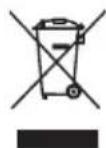
Waste electrical products must not be disposed of with household waste.
Please recycle where facilities exist.
Check with your local authorities or retailer for recycling advice.

If you require further safety advice, technical information or spare parts, please call Trend Technical Support or visit www.trend-uk.com
GENERAL POWER TOOL SAFETY WARNINGS

WARNING Read all safety warnings and all instructions.
Failure to follow the warnings and instructions may result in electric shock, fire and/or serious injury.
Save all warnings and instructions for future reference.
The term "power tool" in the warnings refers to your mains-operated (corded) power tool or battery-operated (cordless) power tool.
Work area safety
a) Keep work area clean and well lit. Cluttered or dark areas invite accidents.
b) Do not operate power tools in explosive atmospheres, such as in the presence of flammable liquids, gases or dust. Power tools create sparks which may ignite the dust or fumes.
c) Keep children and bystanders away while operating a power tool. Distractions can cause you to lose control.
Electrical safety
a) Power tool plugs must match the outlet. Never modify the plug in any way. Do not use any adapter plugs with earthed (grounded) power tools. Unmodified plugs and matching outlets will reduce risk of electric shock.
b) Avoid body contact with earthed or grounded surfaces, such as pipes, radiators, ranges and refrigerators. There is an increased risk of electric shock if your body is earthed or grounded.
c) Do not expose power tools to rain or wet conditions. Water entering a power tool will increase the risk of electric shock.
d) Do not abuse the cord. Never use the cord for carrying, pulling or unplugging the power tool. Keep cord away from heat, oil, sharp edges or moving parts. Damaged or entangled cords increase the risk of electric shock.
e) When operating a power tool outdoors, use an extension cord suitable for outdoor use. Use of a cord suitable for outdoor use reduces the risk of electric shock.
f) If operating a power tool in a damp location is unavoidable, use a residual current device (RCD) protected supply. Use of an RCD reduces the risk of electric shock.
Personal safety
a) Stay alert, watch what you are doing and use common sense when operating a power tool. Do not use a power tool while you are tired or under the influence of drugs, alcohol or medication. A moment of inattention while operating power tools may result in serious personal injury.
b) Use personal protective equipment. Always wear eye protection. Protective equipment such as dust mask, non-skid safety shoes, hard hat, or hearing protection used for appropriate conditions will reduce personal injuries.
c) Prevent unintentional starting. Ensure the switch is in the off-position before connecting to power source and/or battery pack, picking up or carrying the tool. Carrying power tools with your finger on the switch or energising power tools that have the switch on invites accidents.
d) Remove any adjusting key or wrench before turning the power tool on. A wrench or a key left attached to a rotating part of the power tool may result in personal injury.
e) Do not overreach. Keep proper footing and balance at all times. This enables better control of the power tool in unexpected situations.
f) Dress properly. Do not wear loose clothing or jewellery. Keep your hair, clothing and gloves
away from moving parts. Loose clothes, jewellery or long hair can be caught in moving parts.
g) If devices are provided for the connection of dust extraction and collection facilities, ensure these are connected and properly used. Use of dust collection can reduce dust-related hazards.
Power tool use and care
a) Do not force the power tool. Use the correct power tool for your application. The correct power tool will do the job better and safer at the rate for which it was designed.
b) Do not use the power tool if the switch does not turn it on and off. Any power tool that cannot be controlled with the switch is dangerous and must be repaired.
c) Disconnect the plug from the power source and/or the battery pack from the power tool before making any adjustments, changing accessories, or storing power tools. Such preventive safety measures reduce the risk of starting the power tool accidentally.
d) Store idle power tools out of the reach of children and do not allow persons unfamiliar with the power tool or these instructions to operate the power tool. Power tools are dangerous in the hands of untrained users.
e) Maintain power tools. Check for misalignment or binding of moving parts, breakage of parts and any other condition that may affect the power tool's operation. If damaged, have the power tool repaired before use. Many accidents are caused by poorly maintained power tools.
f) Keep cutting tools sharp and clean. Properly maintained cutting tools with sharp cutting edges are less likely to bind and are easier to control.
g) Use the power tool, accessories and tool bits etc. in accordance with these instructions, taking into account the working conditions and the work to be performed. Use of the power tool for operations different from those intended could result in a hazardous situation.
Service
a) Have your power tool serviced by a qualified repair person using only identical replacement parts. This will ensure that the safety of the power tool is maintained.
ROUTER SAFETY WARNINGS
a) Hold power tool by insulated gripping surfaces, because the cutter may contact its own cord. Cutting a "live" wire may make exposed metal parts of the power tool "live" and shock the operator.
b) Use clamps or another practical way to secure and support the workpiece to a stable platform. Holding the work by your hand or against the body leaves it unstable and may lead to loss of control.
ADDITIONAL SAFETY INSTRUCTIONS FOR ROUTER
- Hold tool by insulated gripping surfaces when performing an operation where the cutting tool may contact hidden wiring. Contact with a "live" wire will make exposed metal parts of the tool "live" and shock the operator.
- Use clamps or another practical way to secure and the workpiece to a stable platform. Holding the work by hand or against your body leaves it unstable and may lead to loss of control.
-
Always wear a dust mask.
-
Wear protective glasses and hearing protection.
- For long hair, wear hair protection. Work only with closely fitting clothes.
- If the mains cable is damaged or cut through while working, do not touch the cable. Never use the machine with a damaged cable.
- Do not operate the machine in rain or high moisture conditions.
- Always direct the cable to the rear away from the machine. Take care with the trailing cable from the router and we recommend that an RCD is user at all times with this machine.
- Contact with electric lines can lead to fire and electric shock. Damaging a gas line can lead to explosion. Penetrating a water line causes property damage or may cause an electric shock.
- When working with machine, always hold it firmly with both hands.
- Secure the workpiece. A workpiece clamped with clamping devices or in a vice is held more secure than by hand.
- Before putting into operation, check the routing tool for firm seating.
- Never route over metal objects such as nails or screws.
- Keep hands away from rotating router bits.
- After finishing work, guide the machine back into the upper starting position by actuating the clamping lever and switch the machine off.
- Always switch the machine off and wait off and wait until it has come to a standstill before placing it down.
- Protect tools from impact and shock.
- Never allow children to use the machine.
- Do not use blunt or damaged router bits. Blunt or damaged router bits cause increased friction, can become jammed and lead to imbalance.
- The allowable speed of the router bit must be at least as high as the maximum speed listed on the power tool. Accessories that rotate faster than permitted can be destroyed.
- Never touch the bit during or immediately after the use. After use the bit is too hot to be touched by bare hands.
Warning: some dust particles created by power sanding, sawing, grinding, drill and other construction jobs contain chemicals known to cause cancer, birth defects or other reproductive harm.
Some examples of these chemicals are:
Lead from lead-based paints.
Crystalline silica from bricks and cement and other masonry products.
Arsenic and chromium from chemically treated timber
Your risk from these exposures varies, depending upon how often you do this type of work. To reduce your exposure to these chemicals;
Work in a well-ventilated area
Work with approved safety equipment, such as those dust masks that are specially designed to filler microscopic particles.
TECHNICAL DATA
| Rated Voltage 220-240V~50Hz | |
| Rated Power 2100W | |
| Rated No-load Speed | 11500~28000/min |
| Collet size 1/2 & 1/4 inch | |
| Max plunge depth 50mm | |
| Double insulation | ☐/II |
| Machine weight 4.3Kg | |
NOISE INFORMATION
| A weighted sound pressure | LpA =90 dB(A) |
| A weighted sound power | LwA =101dB(A) |
| LpA&KwA 3.0dB(A) | |
| Wear Ear Protection when sound pressure is over 80dB(A) | |
Vibration Information
Vibration total values (triax vector sum) determined according to EN 60745:
Vibration emission value: a = 4.90 m/s² Uncertainty K = 1.5 m/s²
The declared vibration total value may be used for comparing one tool with another, and may also be used in a preliminary assessment of exposure.
WARNING: The vibration emission value during actual use of the power tool can differ from the declared value depending on the ways in which the tool is used dependant on the following examples and other variations on how the tool is used:
How the tool is used and the materials being cut or drilled.
The tool being in good condition and well maintained
Using the correct accessory for the tool and ensuring it is sharp and in good condition.
The tightness of the grip on the handles and if any anti vibration accessories are used.
And the tool is being used as intended by its design and these instructions.
This tool may cause hand-arm vibration syndrome if its use is not adequately managed
WARNING: To be accurate, an estimation of exposure level in the actual conditions of use should also take account of all parts of the operating cycle such as the times when the tool is switched off and when it is running idle but not actually doing the job. This may significantly reduce the exposure level over the total working period.
Helping to minimise your vibration exposure risk.
ALWAYS use sharp chisels, drills and blades. Maintain this tool in accordance with these instructions and keep well lubricated (where appropriate)
If the tool is to be used regularly then invest in anti vibration accessories.
Plan your work schedule to spread any high vibration tool use across a number of days.
ACCESSIONS
| Centre pin | 1 | |
| Parallel guide | 1 | |
| Template Guide(30mm&16mm) | 1 | |
| Spanner | 1 | |
| Collet 1/4 inch | 1 | |
| 1/2 inch | 1 | |
| Dust extraction tube | 1 | |
We recommend that you purchase your accessories from the same store that sold you the tool. Refer to the accessory packaging for further details. Store personnel can assist you and offer advice.
OPERATING INSTRUCTIONS

NOTE: Before using the tool, read the instruction book carefully.
Intended Use
The machine is intended for routing grooves, edges, profiles and elongated holes as well as for copy routing in wood, plastic and light building materials, while resting firmly on the workpiece.
1.INSERT THE ROUTER CUTTER Router Cutter Selection
Depending on processing and application, router Cutter are available in many different designs and qualities:
Router cutter made of high-speed steel (HSS) is suitable for the machining of soft materials, e. g. softwood and plastic.
Carbide tipped router Cutter (HM) is particularly suitable for hard and abrasive
materials, e. g. hard wood and aluminum.
WARNING: Use only routing tools with an allowable speed matching at least the highest no load speed of the machine.
The shank diameter of the router cutter must correspond with the rated diameter of the collet.
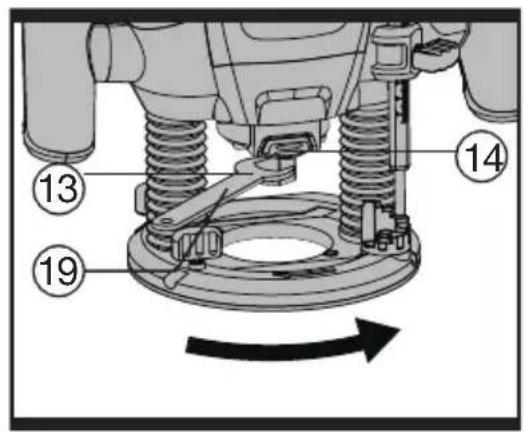
Inserting RouterCutter (SeeA) Before any work on the machine itself, disconnect the mains plug. It is recommended to wear protective gloves when inserting or replacing router cutter.
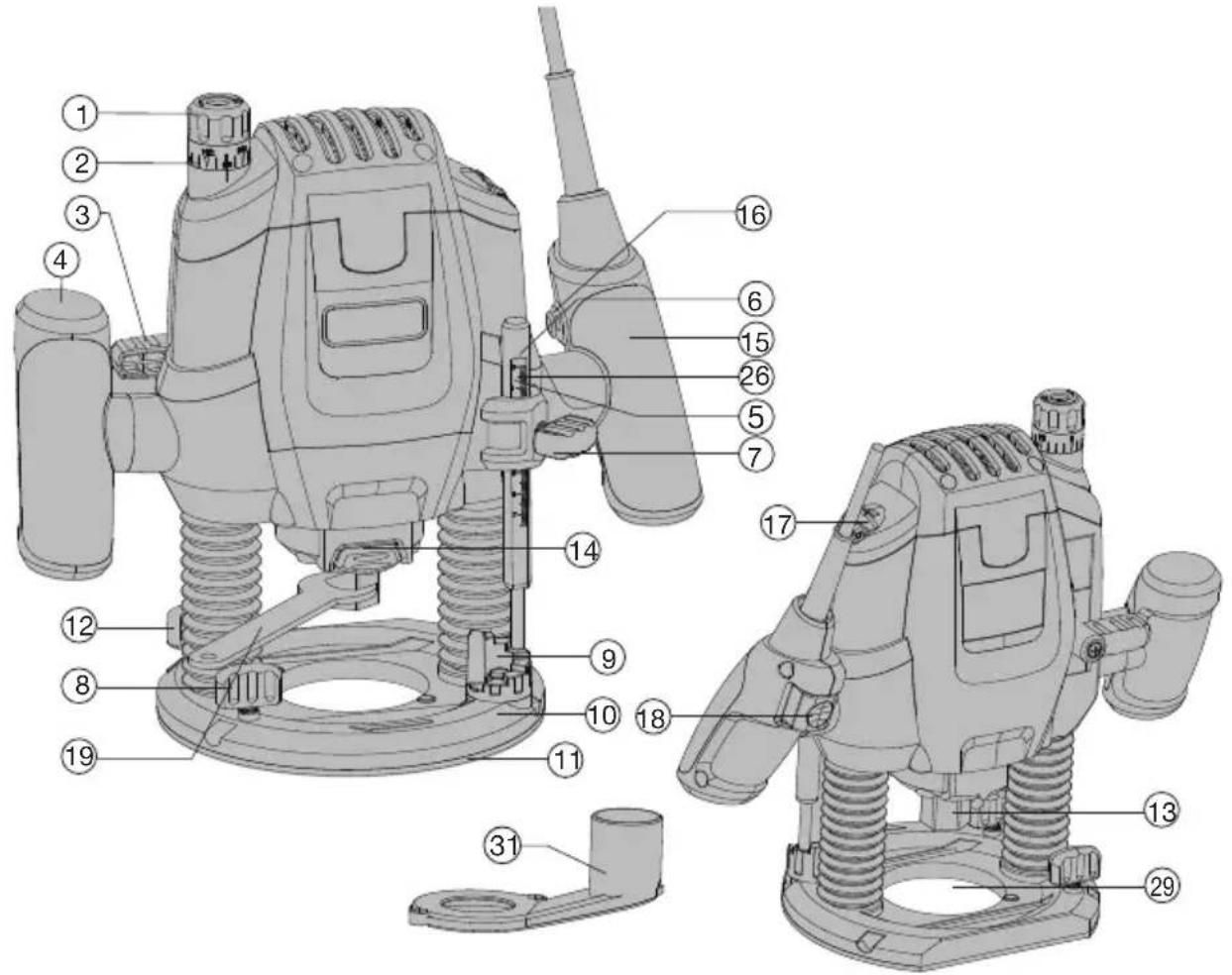
Press spindle lock button (14) and keep depressed. If required, turn the spindle by hand until the lock engages.
Press the spindle lock button only when at a standstill.
Insert router Cutter. The shank of the router Cutter must be inserted at least 20mm (shank length).
Tighten the tightening nut (13) with the spanner (19) (size 22 mm). Release the spindle lock button.
WARNING: Do not tighten the tightening nut of the collet without a router bit inserted.
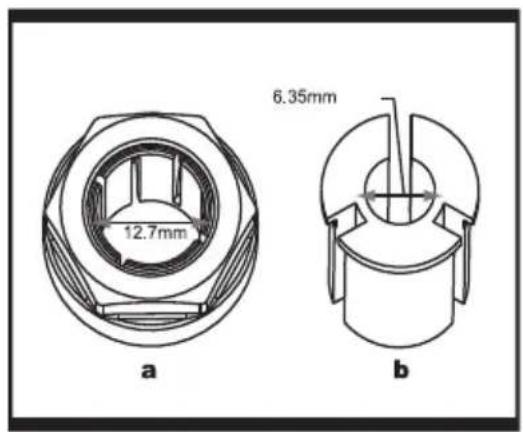
HOW TO FIT THE 6.35 MM COLLET (SEE B)
This router is supplied with a 6.35mm collet as an accessory.
To fit the 6.35mm collet (b) simply slide it into the 12.7mm collet (a) fitted to the collet nut.
The 6.35mm collet has a flange coller to ensure insertion to correct depth.
NOTE: 1. Do not attempt to remove the 12.7mm collet from the collet nut.
- Always wear safety gloves when changing the router cutter.
2. MOUNTING THE EXTRACTION ADAPTER (See C)
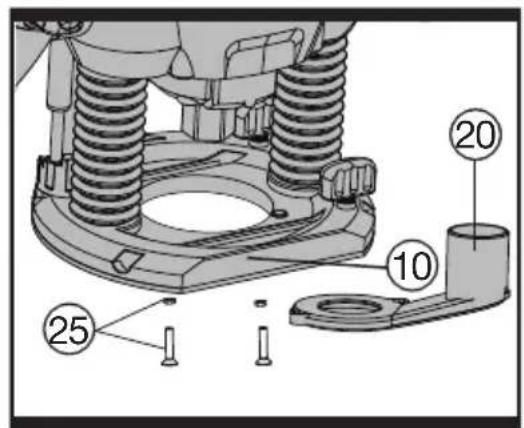
To connect the vacuum cleaner via a suction hose, you must fasten dust adapter (20) to base plate (10) with both screws and nuts (25).

WARNING: When mounting the extraction adapter, ensure correct
mounting position!
- For dust extraction, the vacuum hose can be connected directly to the extraction adapter.
- Clean the dust adapter (20) regularly to ensure optimum dust extraction at all times.
The vacuum cleaner must be suitable for the material to be worked. - When vacuuming dry dust that is especially detrimental to health or carcinogenic, use a special vacuum cleaner.
3. ON AND OFF SWITCH a) LOCK-OFF SWITCH
For starting operation of the machine, actuate the lock-off button (16) first, then press and hold the On/Off switch (18) afterwards. To switch off the machine, release the On/Off switch (18).
For safety reasons the On/Off switch of the machine cannot be locked; it must remain pressed during the entire operation.
Speed Pre-selection
The required speed can be pre-selected with the thumb-wheel (17) (also whilst running).
1-2=low speed
3-4=medium speed
5 - 6 = high speed
The required speed is dependent on the material and can be determined by practical testing.
After longer periods of working at low speed, allow the machine to cool down by running it for approx. 3 minutes at maximum speed with no load.
Speed Table
| Material | Router bit-0 | Speedstages |
| Hardwood (Beech) | 4 - 10 mm | 5-6 |
| 12 - 20 mm | 3-4 | |
| 22 - 40 mm | 1-2 | |
| Softwood (Pine) | 4 - 10 mm | 5-6 |
| 12 - 20 mm | 3-6 | |
| 22 - 40 mm | 1-3 | |
| Particle board | 4 - 10 mm | 3-6 |
| 12 - 20 mm | 2-4 | |
| 22 - 40 mm | 1-3 | |
| Plastic | 4 - 15 mm | 2-3 |
| 16 - 40 mm | 1-2 | |
| Aluminium | 4 - 15 mm | 1-2 |
| 16 - 40 mm | 1 |
The values shown in the chart are standard values. The necessary speed depends on the material and the operating conditions, and can be determined by practical testing.
Constant Electronic Control and Soft Start
Constant electronic control maintains the speed constant at no-load and under most working conditions. Soft start delays the increase in motor speed to reduce the motor "kick" or torque effect to improve operator comfort and safety.
4. SETTING THE DEPTH-OF-CUT
Depending on the cutting operation, the depth of cut can be preset in several steps.
WARNING: The adjustment of the depth-of-cut may only be carried out when the router is switched off.
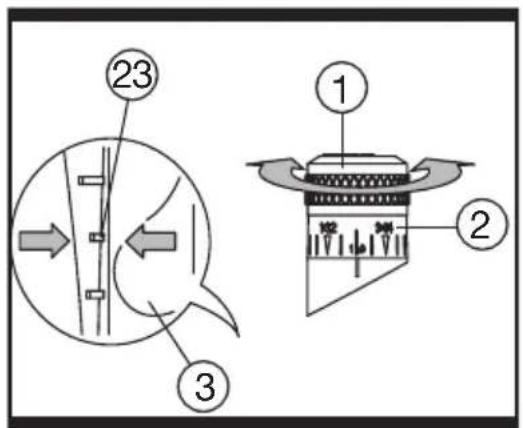
Coarse Adjustment of the Depth-of-cut (See D)
Place the router on the work-piece to be machined.
Set the fine adjustment for depth-of-cut in the centre position with fine-adjustment knob (1); to do this, turn the fine-adjustment knob until the markings (23) on the backside of the router are in alignment, as shown. Afterwards turn scale (2) to "0" (See D). Set Turret Stop (9) to the lowest position; the Turret Stop snaps-in noticeably.
Loosen locking screw (7), so that depth stop (6) can be moved freely.
Release the clamping lever (3) by turning in clockwise direction and slowly lower the router until the router bit touches the surface of the workpiece. Lock the router in position by turning the clamping lever in anti-clockwise direction.
Press depth stop downwards until it touches the Turret Stop (9). Adjust the depth stop (6) to the required routing depth and tighten the wing screw (7). Release the clamping lever and guide the router back up again.
The coarse adjustment of the depth-of-cut should be checked by a trial cut and corrected, if necessary.
Fine Adjustment of the Depth-of-cut
After a trial cut, fine adjustment can be carried out by turning the fine adjustment knob (1 scale mark = 0.1 mm/1 rotation = 2.0 mm).
The maximum adjustment is approx. + / - 8mm Example: Slide router upwards again and measure the depth-of-cut (set value = 10.0 mm actual value = 9.8mm
Lift up router and underlay guide plate (11) in such a manner that the router can plunge freely without the router bit touching the work-piece. Lower the router again until the depth stop touches the step buffer (9).
Afterwards set scale (2) to "0".
Loosen wing screw.
With the fine adjustment (1), advance the depth-of-cut in clockwise direction by 0.2mm
2 scale marks (= difference between required value and actual value).
Retighten wing screw again.
Slide router upward again and check depth-of-cut by carrying out another trial cut.
After setting the depth-of-cut, the position of the index mark (26), on the depth stop should not be changed anymore so that the currently adjusted setting can always be read off the scale
5. USAGE OF THE TURRET STOP
a) Dividing the cutting procedure in several steps
For deep cuts, it is recommended to carry out several cuts, each with less material removal. By using the Turret Stop, the cutting process can be divided into several steps.
Set the required depth-of-cut with the lowest step of the Turret Stop. Afterwards, the higher steps can be used for the last two cuts.
b) Pre-adjustment of varying depth-of-cuts If several different depth-of-cuts are required for the machining of a work-piece, these can also be preset by using the Turret Stop.
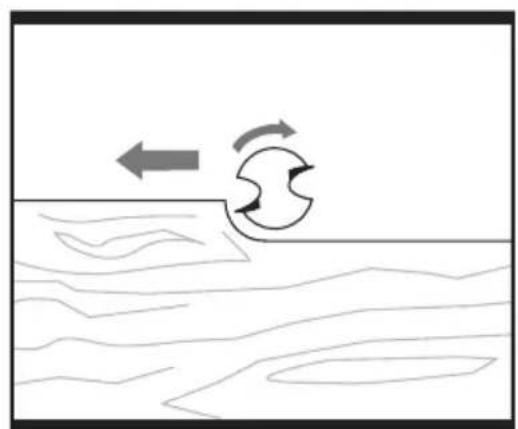
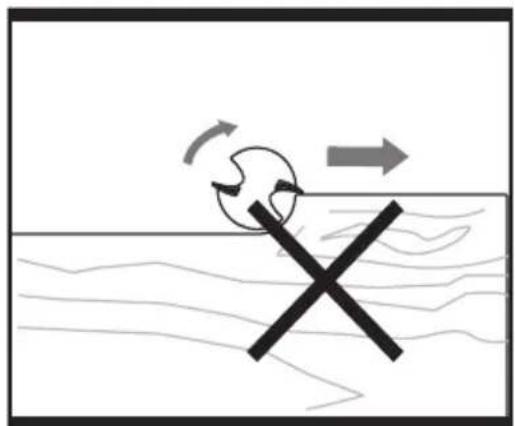
6. DIRECTION OF FEED (See E, F)
The feed motion of the router must always be carried out against the rotation direction of the router Cutter (up-grinding).
When milling in the direction with the rotation of the router cutter (down cutting), the router can break loose, preventing control by the user.
7. ROUTING PROCESS
Adjust the depth-of-cut as previously described.
Place the router on the work-piece.
Release the clamping lever by tuming in clockwise direction and slowly lower the router until the depth stop runs against the Turret Stop. Lock the router in position by turning the clamping lever in anti-clockwise direction, then switch on. Carry out the cutting procedure with uniform feed. After finishing the cutting process, slide the router upwards again and switch off.
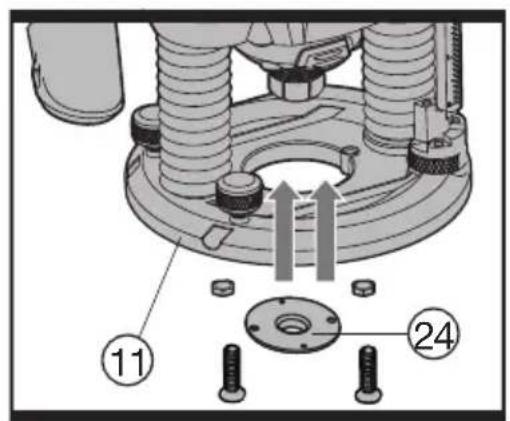
8. ROUTING WITH GUIDE BUSHING (See G).
The guide bushing (24) enables template and pattern routing on work-pieces.
Place the guide bushing over the hole in the centre of the base plate, and align the two through holes in the bottom of the base plate with the countersunk holes in the guide bushing. Fasten the guide bushing with the nuts and screws provided.(See G).
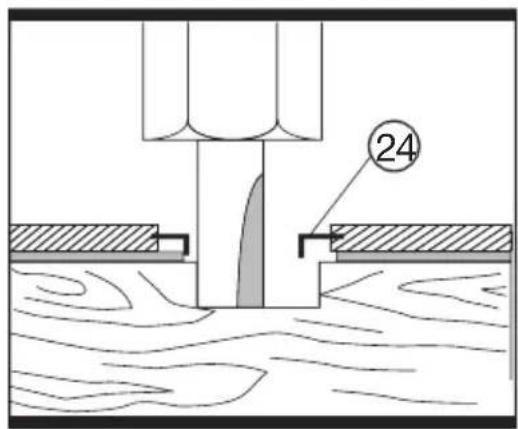
9. ROUTING PROCESS (See H)
WARNING: Choose a router Cutter with a smaller diameter than the inner diameter of the guide bushing.
Set the router with guide bushing against the template. Release the clamping lever by turning in clockwise direction and slowly lower the router toward the work-piece until the adjusted depth-of-cut is reached.
Guide router with projecting guide bushing along the template, applying light sideward pressure.
Note: The template must have a minimum thickness of 8mm due to the projecting height of the guide bushing.
10. SHAPING OR MOULDING APPLICATIONS
For shaping or molding applications without the use of a parallel guide, the router must be equipped with a pilot or a ball bearing. Lead the router sideward to the workpiece and allow router bit to engage until the pilot or the ball bearing of the router reach the corner of the workpiece being machined. Guide the router alongside the workpiece corner using both hands, ensuring proper seating of the base plate. Too much pressure can damage the edge of the workpiece.
11. ROUTING WITH PARALLEL GUIDE (Accessory - See I, J)
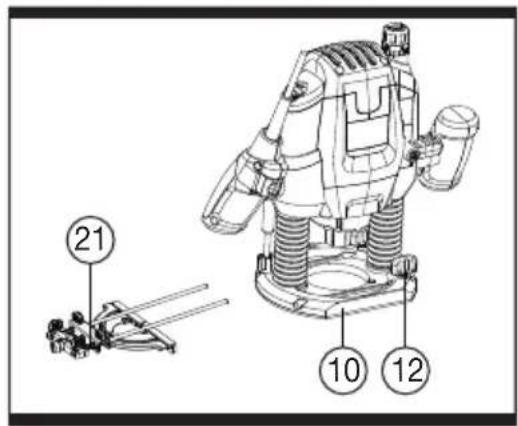
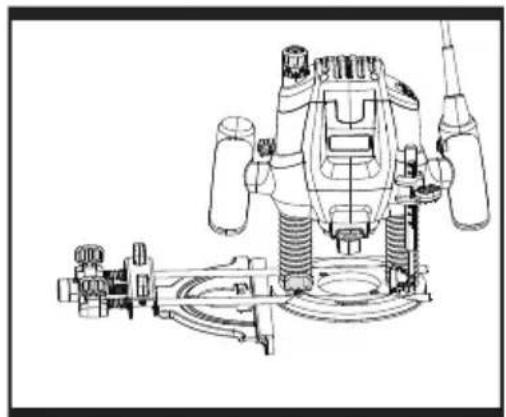
Slide the parallel guide (21) with the guide rods (27) into the base plate (10) and tighten at the required measure with the wing bolts (12). Guide the machine with uniform feed and sideward pressure on the parallel guide (21) along the edge of the workpiece.
12. USING EXTRACTION ADAPTER FOR PARALLEL GUIDE (See K, L)
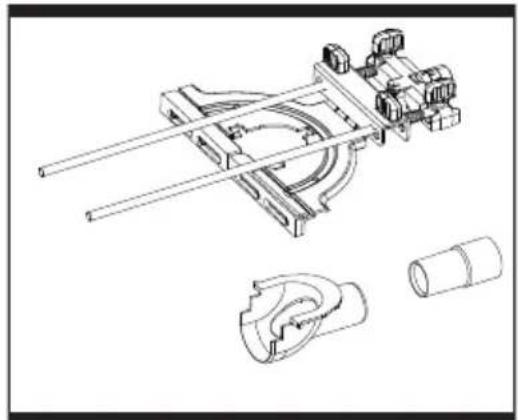
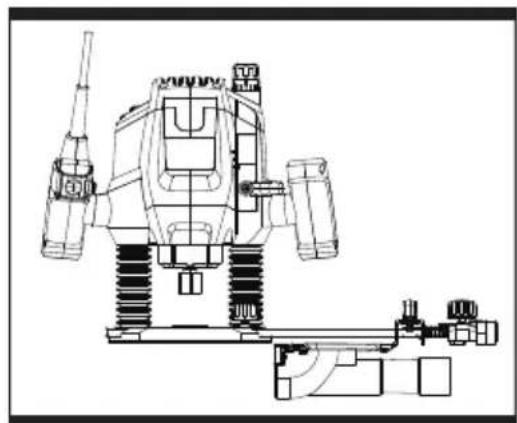
When the machine routing on an vertical surface, the dust/chip extraction should take place via the special extraction adapter for the parallel guide (30).
To mount the extraction adapter for the parallel guide, first insert the tab (a) into place, then engage the front two tabs into place. And then mount the parallel guide with the extraction adapter onto the router.
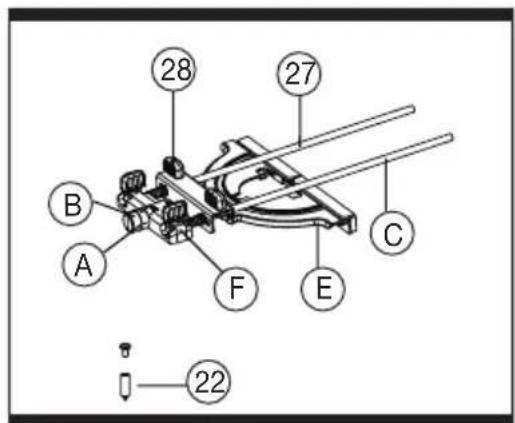
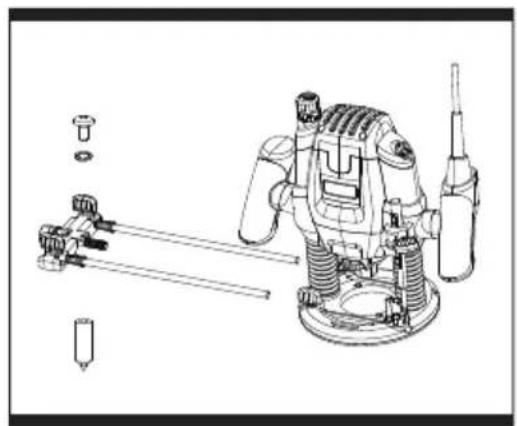
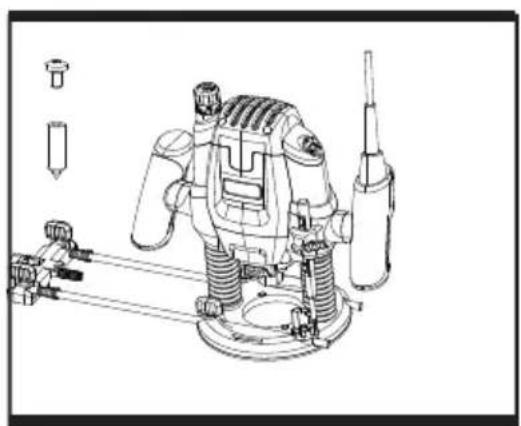
13. ROUTING CIRCULAR ARC PROFILES (See M, N, O)
To reassemble the router guide for use as a circle guide (arc guide), follow below steps:
- Loosen rear wing knobs (28) and fine adjustment knob (A), spacer, and indicator (B), remove these parts from guide rods (C).
- Loosen front knobs and guide base (E), remove from the guide rods.
- Remove springs (D) from guide rods.
- Reinstall fine adjustment guide (F) onto guide rods rotate 180 degrees from normal position so that circle guide hole faces away from the router.
- Insert the guide rods (C) into router base. For maximum stability, make sure each rod goes through both holes and protrudes out the other side of the router base. At a maximum, the rods must be inserted far enough into the router base that they are supported from below base.
- Securely fasten the router to the rods by tightening the locking screws (12). The largest circles and arcs can be made when the guide rods enter the side of the router where the locking screws (12) are located.
- Mark the workpiece at the centre of the desired circle.
- Loosen the screw of centre pin (22), and fit into the centre hole of the adjustment guide (F), then fasten the screw to use.
- Place the centre pin against the mark of desired circle on the workpiece.
- Adjust the position of the rods and router as necessary to achieve the desired radius of the circle or arc, then securely tighten wing knobs.
14. ROUTER CUTTER
Before proceeding, carry out test cut on waste timber. Only use cutters with a shank that matches the collet used.
HSS (High Speed Steel) - for softwood use.
TCT (Tungsten Carbide Tipped) - for use on hardwood, chipboard, plastics or aluminium.
The most commonly used bits are listed below.
MAINTENANCE
Please use only Trend original spare parts and accessories
Remove the plug from the socket before carrying out any adjustment, servicing or maintenance.
Your power tool requires no additional lubrication or maintenance.
There are no user serviceable parts in your power tool. Never use water or chemical cleaners to clean your power tool. Wipe clean with a dry cloth. Always store your power tool in a dry place. Keep the motor ventilation slots clean. Keep all working controls free of dust. Occasionally you may see sparks through the ventilation slots. This is normal and will not damage your power tool.
If the supply cord is damaged, it must be replaced by the manufacturer, its service agent or similarly qualified persons in order to avoid a hazard.
ENVIRONMENTAL PROTECTION

Recycle raw materials instead of disposing as waste.
Accessories and packaging should be sorted for environmental-friendly recycling.
Separate collection. This product must not be dispose of with normal household waste.
Household user
Local regulations may provide for separate collection of electric products from the household, at municipal waste sites or by retailer when you purchase a new product.
Please call Trend Customer Services for advice as to how to dispose of unwanted Trend electrical products in an environmentally safe way or visit www.trend-uk.com
Business Users
Please call Trend Customer Services for dispose of unwanted Trend electrical products.
GUARANTEE
The unit carries a manufacturer guarantee in accordance with the conditions on the enclosed guarantee card.
For the location of your nearest Trend Service Agent, please call Trend Customer Services or see our stockiest locator at www.trend-uk.com.
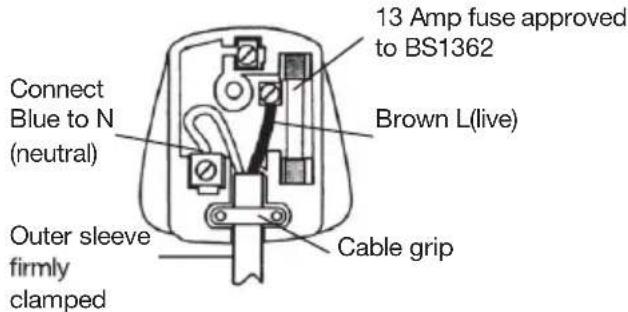
PLUG REPLACEMENT (ONLY FOR REWIRABLE PLUG OF UK & IRELAND)
If you need to replace the fitted plug then follow the instructions below.
IMPORTANT
The wires in the mains lead are colored in accordance with the following code:
BLUE = NEUTRAL
Brown = Live
As the colors of the wires in the mains lead of this appliance may not correspond with the colored markings identifying the terminals in your plug, proceed as follows. The wire which is colored blue must be connected to the terminal which is marked with N. The wire which is colored brown must be connected to the terminal which is marked with L.
WARNING:Never connect live or neutral wires to the earth terminal of the plug. Only fit an approved 13ABS1363/A plug and the correct rated fuse.
NOTE: If a moulded plug is fitted and has to be removed take great care in disposing of the plug and severed cable, it must be destroyed to prevent engaging into a socket.
KOMPONENTENLISTE
Trend Machinery & Cutting Tools Ltd Unit 6 Odhams Trading Estate
St Albans Road, Watford
Herts,WD24 7TR
Trend Machinery & Cutting Tools Ltd
Unit 6 Odhams Trading Estate
St Albans Road, Watford
Herts,WD24 7TR
Royaume-Uni
01.04.2019

SYMBOLS

INFORMATIONS RELATIVES AUX VIBRATIONS
TREND Machinery & Cutting Tools Ltd Unit 6 Odhams Trading Estate
St Albans Weg, Watford Herts,WD24 7TR
TREND Machinery & Cutting Tools Ltd
Enhet 6 Odhams Trading Estate
St Albans Vag, Watford
Herts,WD24 7TR
Storbritannien
01.04.2019

TREND Machinery & Cutting Tools Ltd
Unit 6 Odhams Trading Estate
St Albans Vei, Watford
Herts,WD24 7TR
Storbritannia
01.04.2019
SYMBOLER

Unit 6 Odhams Trading Estate
St Albans Tie, Watford
Herts,WD24 7TR
Trend Machinery & Cutting Tools Ltd, Unit 6 Odhams Trading Estate, St. Albans Road, Watford, Herts, WD24 7TR United Kingdom