Planar 8 - Turntable REGA - Free user manual and instructions
Find the device manual for free Planar 8 REGA in PDF.


User questions about Planar 8 REGA
0 question about this device. Answer the ones you know or ask your own.
Ask a new question about this device
Download the instructions for your Turntable in PDF format for free! Find your manual Planar 8 - REGA and take your electronic device back in hand. On this page are published all the documents necessary for the use of your device. Planar 8 by REGA.
USER MANUAL Planar 8 REGA
English: For user instructions in your language, please visit www.rega.co.uk and go to the download section of your chosen product page.
Thank you for purchasing this Rega product.
Please follow this quick set up guide to ensure optimum performance and perfect operation. Failure to do so may invalidate your warranty. For more information on this product, please visit www.rega.co.uk.
Unpacking and positioning the Planar 8 turntable
• Always keep the turntable flat.
• Follow the unpacking guide included in the box.
- Save the packaging in case you need to transport your turntable in the future.
- Place the turntable on a rigid, level surface. For the ultimate isolation solution, use the custom Rega wall bracket (sold separately).
- Ensure the drive belts are in place and remove the transport hub card from beneath the sub platter.
- Carefully place the glass platter on the hub and fit the turntable mat.
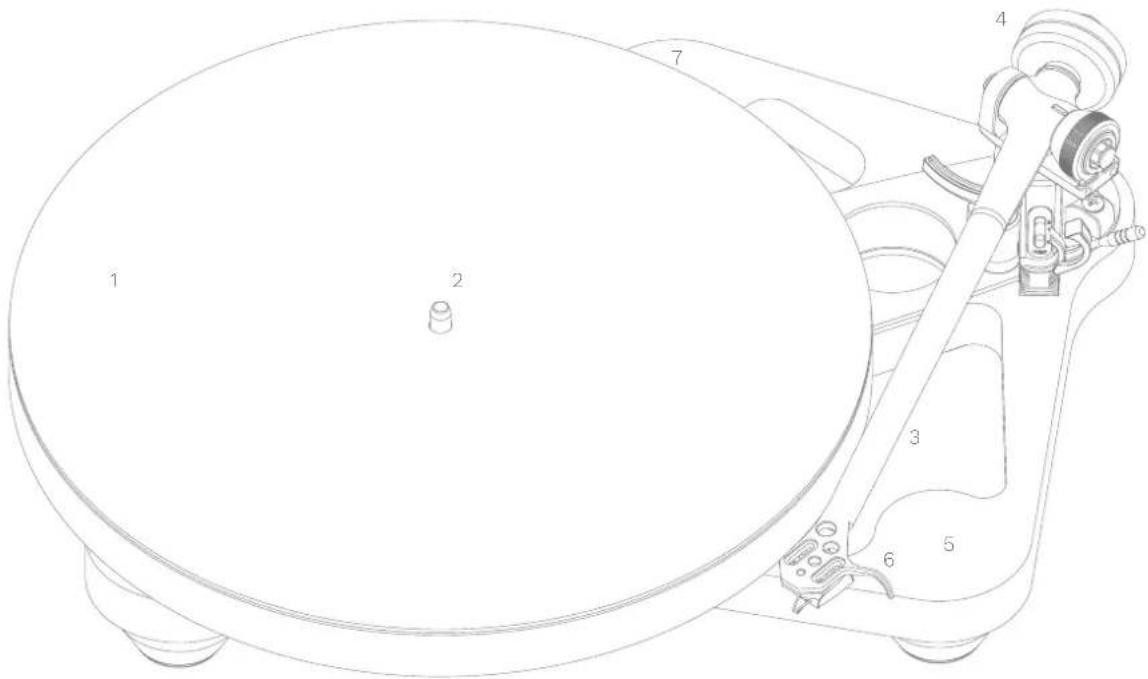
- When not in use, carefully position the lid over the centre spindle, and locate the dust cover anti rotation pin. Place into location at the rear of the plinth (7)
text_image
Technical diagram of a rotary dial with numbered parts for identification- Platter
- Drive belt & sub platter (underneath the glass platter)
- Tonearm
- Balance weight
- Skeletal plinth
- Finger lift
- Pin locator
Setting up and connecting your Planar 8 and Neo power supply
- Only use the Rega supplied PS1 AC adaptor.
- Connect the power DIN lead from the rear of the Planar 8 to the 24 V AC Input socket on the rear panel of the Neo.
- Plug in the Rega PS1 and switch the mains power on.
- To turn the Neo on, push the button marked 'power', located on the front panel, and the turntable platter will rotate at the selected speed.
- When the power supply is switched on, if the Rega logo illuminates red, 33% RPM is selected.
- If the Rega logo is illuminated green, 45 RPM is selected.
- To change between speeds, press the button marked '33/45' on the front panel, as required.
Note: To minimise the risk of hum picked up by the cartridge, the Neo should be situated to the left as far from the cartridge pickup as the interconnect cable will allow. Also ensure that the PS1 power supply is as far from the turntable and the phono stage being used as possible.
Connecting to the amplifier
The tonearm external phono leads must be connected to a suitable phono stage. Connect as follows: Red = right channel, Black = left channel.
Depending on the type of cartridge you have chosen, you will require the appropriate moving magnet (MM) or moving coil (MC) stage. If your amplifier does not have an integrated phone stage, you will require an external phone stage (sold separately - see www.rega.co.uk/phone-stages).
Cartridge mounting and setting up the RB880 tonearm
Firstly, ensure the cartridge fixings are orientated correctly according to the cartridge makers specification. Use the cartridge alignment protractor (supplied) to accurately set the position of the cartridge (note: overhang is automatically set when using all 3 point fixing Rega cartridges). Ensure that the tracking force dial (A) and bias adjustment slider (B) are both set to zero. Place the balance weight (C) on to the balance weight shaft. With the stylus guard removed, position the cartridge above the lead-in groove of an LP. Whilst supporting the headshell, carefully push the weight further up the shaft until the stylus is floating, just 1 mm clear of the record.
The recommended tracking force can now be applied using the tracking force dial. Always use a force which corresponds to the upper limit of the cartridge makers recommended range. Finally, push the bias adjustment slider to the same number as the tracking force control (i.e. 1.75 tracking pressure = set bias slider to 1.75). If in any doubt, please contact your Rega dealer.
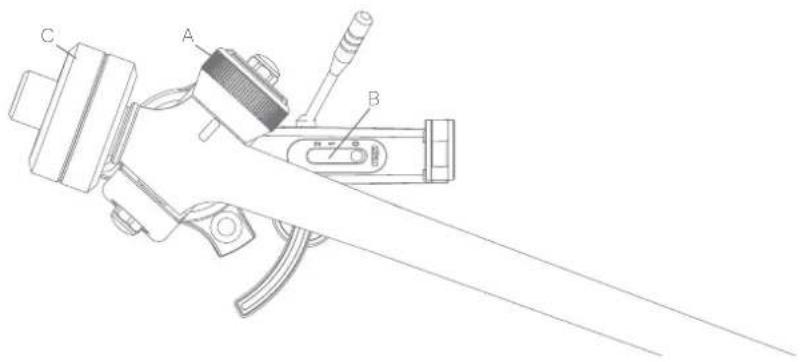
text_image
Technical diagram of a mechanical device with labeled parts A, B, and CNeo PSU speed adjustment (factory set - only adjust if necessary)
• The speed control functions are sited on the back panel of the Neo.
- Speed programme switch – This enables the set speed mode.
- Programme mode LED – This indicates the two modes of operation: Factory default mode and speed adjustment mode.
• Speed adjustment – This encoder is used to adjust the speed. The step size of the speed control is 0.01 RPM.
Neo PSU speed adjustment
Note: We recommend the Rega strobe kit to accurately measure the speed during adjustment (sold separately).
Note: The speed is adjusted whilst running at 33½ RPM and any adjustments made at 33½ RPM will be automatically be applied to 45 RPM.
- Select 33½ RPM.
- Press the 'speed programme' switch on the rear panel once to put the unit into setup mode - The 'programme mode' LED will now be permanently illuminated red.
- Adjust the speed via the 'speed adjustment' control using a 1.7 mm allen key. Turning clockwise will increase the speed and turning counter clockwise will decrease the speed. The step size is 0.01 RPM. Only make small adjustments of up to five 'steps' at a time to ensure accurate adjustment. Check the speed after each adjustment to achieve the best accuracy.
- When the speed has been correctly set, press the 'speed programme switch' once to put the unit back into 'run mode'. The 'programme mode' LED will now go out and flash approximately every ten seconds indicating the speed has been changed from the factory setting. Your turntable is now set and ready to use.
Returning the Neo to factory settings
This process is recommended when fitting a new drive belt to your turntable or after a service to help optimise the range of adjustment available to you.
- Select 33½ RPM.
- Press and hold down the 'speed programme' switch until the 'programme mode' LED flashes every few seconds. Keep the button pressed until a solid LED is illuminated.
- Whilst illuminated, press the 'speed programme' switch button once again to fully factory reset and return to 'run mode'.
Note: We recommend changing Rega drive belts every five years to guarantee optimum performance. Using the Neo with old, worn belts may result in lower performance and variation in speed stability.
Use of mobile phone apps to check and adjust the speed
Rega, along with a London mastering studio, have used the iPhone 'RPM' app (available on the App Store) developed by Philip Broder to check and adjust the speed of a turntable using the Neo, with positive results. We have verified the basic accuracy of the 'RPM' app using Rega's in-house speed measuring equipment, but as this is a third-party app, we cannot guarantee the readings because of uncertainties, which could be caused by the age, condition, and operating system of the phone the app is installed on. If you are in any doubt, you should check the calibration of the 'RPM' app using a suitable reference.
Rega Strobe and stroboscopic disc (sold separately)
The best way to adjust the speed of your Planar 8 is to use the Rega Stobe kit. A stroboscopic disc is an optical instrument used to measure the speed of the turntable by freezing the bars on the disc. The bars are illuminated by an accurate, quartz locked LED pulsing at 100 Hz.
Using the Strobe kit
Simply place the strobe disc on the turntable platter. Switch on the 100 Hz LED and hold it approximately 2 cm above the rotating strobe. If the bars do not appear to move and are stationary, the speed is 33½ RPM. If they move clockwise, the turntable is running fast, and conversely, if they move anti-clockwise, the turntable is running slow.
If over one minute the bars appear to move by one bar to the left or one bar to the right, the speed is 0.016% fast or slow respectively. Using the speed control on the Neo, it is possible to achieve +/- 0.05% or +/- 1.3 RPM.
Note: If over one minute the bars appear to move by two bars to the left or by two bars to the right, the speed is 0.01 RPM fast or slow respectively. Using the speed control on the Neo, it is possible to achieve +/- 0.01 RPM, which is one step of the speed adjustment.
Warning: Because of the nature of the stroboscopic effect of the disc and the LED light, we strongly recommend anyone with photo-induced epilepsy not to use this device. Although this condition is very rare, we must make the user aware of this condition. Ask your dealer for assistance if required.
Safety and warranty
- Do not use this unit near liquids, or expose to moisture.
- Do not use near sources of heat such as radiators, vents, stoves, or candles.
- Ensure adequate ventilation around the product, at least 10 cm in all directions, and avoid placing the unit on soft surfaces such as long carpet and fabric.
- Do not open the product enclosure or force objects into openings in the unit.
- Place the unit on a fixed level surface where it will not fall or tip.
• The unit should only be used in moderate climates between 5 °C (41 °F) and 35 °C (95 °F). - Keep packaging material and small pieces out of reach of children.
- Unplug the power supply if the unit is unused for extended periods of time.
With the unit disconnected from the mains, only clean with a microfibre cloth (lightly damp if necessary). If the unit performs erratically or emits smoke or odour, disconnect from the power supply and take it to a qualified service technician.
- All Rega products are covered by a lifetime warranty against manufacture defects.
• This warranty does not cover wear and tear.
• Any unauthorised modifications or failure to follow the Rega recommended guidelines may invalidate the warranty.
• If returning goods for inspection to your retailer, the original packaging must be used to preserve warranty. - Replacement packaging is available from any Rega retailer.
- Your statutory rights are not affected.
Neo specifications
Output to motor bi-phase = 24 V AC protected by resettable fuse.
Power consumption = 7.2 W
Voltage = 24 V AC. Rega PSU1 only.
Speed control step size = 0.01 RPM
Stroboscopic disc = 100 Hz, 180 marks 33½ RPM
The basic one bar per minute drift resolution = 0.016%
| PS1 (UK) | PS1 (Australian) |
| Input 230 V ~ 50 Hz 0.07 A | Input 230 V ~ 50 Hz 0.07 A |
| Output 24 V ~ 350 mA AC | Output 24 V ~ 350 mA AC |
| PS1 (EU - Euro 2 pin) | PS1 (Japan) |
Input 230 V \~ 50 Hz 0.07 A Input 100 V \~ 50/60 Hz
Output 24 V \~ 350 mA AC Output 24 V \~ 350 mA AC
| PS1 (UL - American) | PS1 (Korea) |
Input 115-120 V \~ 60 Hz Input 220 V \~ 60 Hz 0.07 A
Output 24 V \~ 350 mA AC Output 24 V \~ 350 mA AC
Warnings
• Do not unplug the power supply from the turntable whilst the unit is on - turn off the power supply before unplugging.
- Do not operate the power supply without the turntable connected.
• A 24 V AC plus a 20 V DC signal present on the pins of the plug - If these are shorted it will cause damage to the power unit.
- Use only with the Rega PS1 power supply or Neo.
- Do not open the case covers. There are no user serviceable parts inside.
The Neo incorporates resettable fuses in the driver amplifier to protect it from overcurrent faults, which will cause the turntable to run erratically or not at all. If in the rare circumstance these are activated, they are reset by turning off the Neo via the front panel for approximately 10 seconds. If the fault should persist, consult your dealer.
1 English
5 Français*
9 Deutsch*
13 Italiano*
17 Español*
21 Português*
25 Nederlands
29 Dansk*
33 Svenska*
37 Polski*
p8
text_image
Technical diagram of a rotary dial with numbered parts for identificationtext_image
Technical diagram of a mechanical device with labeled parts A, B, and CPS1 (UE - 2 broches)
Entrée 230 V \~ 50 Hz 0,07A
Sortie 24 V - 350 mA AC
1 English
5 Français*
9 Deutsch*
13 Italiano*
17 Español*
21 Português*
25 Nederlands
29 Dansk*
33 Svenska*
37 Polski*