EasyManual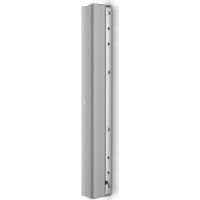
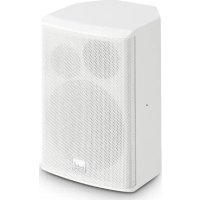
MAUI i1 W - Speaker LD Systems - Free user manual and instructions
Find the device manual for free MAUI i1 W LD Systems in PDF.



User questions about MAUI i1 W LD Systems
0 question about this device. Answer the ones you know or ask your own.
Ask a new question about this device
Download the instructions for your Speaker in PDF format for free! Find your manual MAUI i1 W - LD Systems and take your electronic device back in hand. On this page are published all the documents necessary for the use of your device. MAUI i1 W by LD Systems.
USER MANUAL MAUI i1 W LD Systems
INSTALLATION COLUMN SPEAKER
MANUFACTURER´S DECLARATIONS 9
DEUTSCHFRANCAIS ESPAÑOL ENGLISH ITALIANO POLSKI ENGLISH YOU‘VE MADE THE RIGHT CHOICE! We have designed this product to operate reliably over many years. LD Systems stands for this with its name and many years of experience as a manufacturer of high-quality audio products. Please read this User‘s Manual carefully, so that you can begin making optimum use of your LD Systems product quickly. You can nd more information about LD-SYSTEMS at our Internet site WWW.LD-SYSTEMS.COM SAFETY INFORMATION
1. Please read these instructions carefully.
2. Keep all information and instructions in a safe place.
3. Follow the instructions.
4. Observe all safety warnings. Never remove safety warnings or other information from the equipment.
5. Use the equipment only in the intended manner and for the intended purpose.
6. Use only sufciently stable and compatible stands and/or mounts (for xed installations). Make certain that wall mounts are properly installed and secured. Make certain that the equipment is installed securely and cannot fall down.
7. During installation, observ e the applicable safety regulations for your country.
8. Never install and operate the equipment near radiators, heat registers, ovens or other sources of heat. Make certain that the equipment is always installed so that is cooled sufciently and cannot overheat.
9. Never place sources of ignition, e.g., burning candles, on the equipment.
10. Ventilation slits must not be blocked.
11. Keep a minimum distance of 20 cm around and above the device.
12. Do not use this equipment in the immediate vicinity of water (does not apply to special outdoor equipment - in this case, observe the special instructions noted below. Do not expose this equipment to ammable materials, uids or gases. Avoid direct sunlight! 13. Make certain that dripping or splashed water cannot enter the equipment. Do not place containers lled with liquids, such as vases or drinking vessels, on the equipment.
14. Make certain that objects cannot fall into the device.
15. Use this equipment only with the accessories recommended and intended by the manufacturer.
16. Do not open or modify this equipment.
17. After connecting the equipment, check all cables in order to prevent damage or accidents, e.g., due to tripping hazards. 18. During transport, make certain that the equipment cannot fall down and possibly cause property damage and personal injuries. 19. If your equipment is no longer functioning properly, if uids or objects have gotten inside the equipment or if it has been damaged in anot her way, switch it off immediately and unplug it from the mains outlet (if it is a powered device). This equipment may only be repaired by authorized, qualied personnel.
20. Clean the equipment using a dry cloth.
21. Comply with all applicable disposal laws in your country. During disposal of packaging, please separate plastic and paper/cardboard.
22. Plastic bags must be kept out of reach of children.
23. Please note that changes or modications not expressly approved by the party responsible for compliance could void the user´s authority to operate the equipment. FOR EQUIPMENT THAT CONNECTS TO THE POWER MAINS 24. CAUTION: If the power cord of the device is equipped with an earthing contact, then it must be connected to an outlet with a protective ground. Never deactivate the protective ground of a power cord. 25. If the equipment has been exposed to strong uctuations in temperature (for example, after transport), do not switch it on immediately. Moisture and condensation could damage the equipment. Do not switch on the equipment until it has reached room temperature. 26. Before connecting the equipment to the power outlet, rst verify that the mains voltage and frequency match the values specied on the equipment. If the equipment has a voltage selection switch, connect the equipment to the power outlet only if the equipment values and the mains power values match. If the included power cord or power adapter does not t in your wall outlet, contact your electrician. 27. Do not step on the power cord. Make certain that the power cable does not become kinked, especially at the mains outlet and/or power adapter and the equipment connector. 28. When connecting the equipment, make certain that the power cord or power adapter is always freely accessible. Always disconnect the equipment from the power supply if the equipment is not in use or if you want to clean the equipment. Always unplug the power cord and power adapter from the power outlet at the plug or adapter and not by pulling on the cord. Never touch the power cord and power adapter with wet hands. 29. Whenever possible, avoid switching the equipment on and off in quick succession because otherwise this can shorten the useful life of the equipment. 30. IMPORTANT INFORMATION: Replace fuses only with fuses of the same type and rating. If a fuse blows repeatedly, please contact an authorised service centre. 31. To disconnect the equipment from the power mains completely, unplug the power cord or power adapter from the power outlet. 32. If your device is equipped with a Volex power connector, the mating Volex equipment connector must be unlocked before it can be removed. However, this also means that the equipment can slide and fall down if the power cable is pulled, which can lead to personal injuries and/or other damage. For this reason, always be careful when laying cables. 33. Unplug the power cord and power adapter from the power outlet if there is a risk of a lightning strike or before extended periods of disuse.4 ITALIANO POLSKI ESPAÑOL FRANCAIS DEUTSCH ENGLISH 34. The appliance is not to be used by persons (including children) with reduced physical, sensory or mental capabilities, or lack of experience and knowledge.
35. Children must be instructed not to play with the device.
36. If the power cord of the device is damaged, do not use the device. The power cord must be replaced by an adequate cable or assembly from an authorized service center. CAUTION: To reduce the risk of electric shock, do not remove cover (or back). There are no user serviceable parts inside. Maintenance and repairs should be exclusively carried out by qualied service personnel. The warning triangle with lightning symbol indicates dangerous uninsulated voltage inside the unit, which may cause an electrical shock. The warning triangle with exclamation mark indicates important operating and maintenance instructions. Warning! This device is designed for use below 2000 metres in altitude. Warning! This product is not intended for use in tropical climates. CAUTION! HIGH VOLUMES IN AUDIO PRODUCTS! This device is meant for professional use. Therefore, commercial use of this equipment is subject to the respectively applicable national ac- cident prevention rules and regulations. As a manufacturer, Adam Hall is obligated to notify you formally about the existence of potential health risks. Hearing damage due to high volume and prolonged exposure: When in use, this product is capable of producing high sound-pressure levels (SPL) that can lead to irreversible hearing damage in performers, employees, and audience members. For this reason, avoid prolonged exposure to volumes in excess of 90 dB. NOTE: This equipment has been tested and found to comply with the limits for a Class B digital device, pursuant to Part 15 of the FCC Rules. These limits are designed to provide reasonable protection against harmful interference in a residential installation. This equip- ment generates, uses and can radiate radio frequency energy and, if not installed and used in accordance with the instructions, may cause harmful interference to radio communications. However, there is no guarantee that interference will not occur in a particular installation. If this equipment does cause harmful interference to radio or television reception, which can be determined by turning the equipment off and on, the user is encouraged to try to correct the interference by one or more of the following measures: – Reorient or relocate the receiving antenna. – Increase the separation between the equipment and receiver. – Connect the equipment into an outlet on a circuit different from that to which the receiver is connected. – Consult the dealer or an experienced radio/TV technician for help.5 DEUTSCHFRANCAIS ESPAÑOL ENGLISH ITALIANO POLSKI FEATURES
- Passive column speaker for wall and ceiling installation with 9 x 3“ mid-frequency drivers and 2 x 1“ neodymium HF drivers
- Sophisticated passive crossover network for balanced frequency response
- Auto-reset overload protection for tweeters
- 120 W RMS capacity at 8 ohms
- Input selector: 8 ohms (transformer bypass) / 100 V / 70 V
- Four 100 V / 70 V transformer taps: 60 W / 30 W / 15 W / 7.5 W
- Transformer with extremely low saturation
- Consistent sound dispersion thanks to BEM-optimised waveguide; wide horizontal and controlled vertical sound dispersion
- U-bracket included in scope of supply, adjustable tilting bracket optionally available
- Four-pole terminal block connector for simple parallel connection of loudspeakers
- IP65 protected, aluminium speaker grille and weatherproof membrane for outdoor installation
- Available in 2 colours: white (RAL9010) and black (RAL9005)
INPUT SELECT 4-way selector to match installation loudspeaker to a 70 V or 100 V installation amplifier or an amplifier with low impedance output (8 Ω/120 W RMS). Select the appropriate position before connecting. Both middle positions are intended for use with 100 V installation amplifiers.
POWER SELECT 4-way switch for selection of the required transformer tap (60 W/30 W/15 W/7.5 W). If 8 Ω/120 W RMS is selected on the INPUT SELECT switch, the internal transformer is bypassed.
Terminal block for connection of an installation amplifier and for sending the amplifier signal to the additional loudspeakers in parallel (terminal block supplied). When wiring, please ensure correct polarity (see illustration above terminal block).
COVER PLATE For outdoor installations, use the supplied cover plate to protect the connectors and switches from wetness and humidity. The cable glands in the cover plate
are suitable for round cables with an ex- ternal diameter of up to 7 mm. Ensure that the rubber gasket is correctly positioned before securing the cover plate to the speaker housing. Then tighten the locking nuts on the cable glands. Use the supplied blanking plugs to seal any open cable glands if only one cable is used to control the speaker.6 ITALIANO POLSKI ESPAÑOL FRANCAIS DEUTSCH ENGLISH MOUNTING Thanks to the supplied U-bracket, the speaker can be installed in a suitable location on a level surface. Important safety notice: Overhead mounting requires extensive experience, including the calculation of the load limit values of the installation material and regular safety inspection of all installation materials and speakers. If you do not have these qualifications, do not attempt to perform an installation yourself. Refer instead to a qualified professional.
The U-bracket is supplied installed to the column speaker. Loosen and remove the M8 screws on the top and bottom of the speaker and remove the bracket and the washers from the speaker. Screw the U-bracket (in a suitable position) to a load-bearing wall or ceiling
. Use suitable screws and plugs etc. and ensure secure installation. (9 mm hole diameter, screws, plugs etc. not supplied.) Lift the speaker into the bracket so that the thread locations in the speaker and the holes in the bracket are aligned. Use the previously removed M8 screws and washers as shown in the illustrations (place washers between the bracket and the speaker), adjust the dispersion angle as desired and tighten the screws with a suitable tool
. The U-bracket is also equipped with feed holes for signal cables
Tip: Install the U-bracket on a wall with the slanted recess in the slot facing upwards. Place a washer on the mounting hole on the top end of the speaker and partially screw a suitable screw into the thread. Lift the speaker into the U-bracket and insert the installation screw into the slanted recess in the slot, then pull the speaker forwards as far as possible. Now a washer and installation screw can be easily positioned and secured at the bottom of the speaker.
DEUTSCHFRANCAIS ESPAÑOL ENGLISH ITALIANO POLSKI SECURING POINTS Four M5 threads serve as securing points which can be used to secure the speaker
. To do so, loosen a housing screw at the required position and replace it with a suitable M5 ring bolt. M5 threads for the attachment of an M5 ringbolt are located on the top and bottom of the U-bracket
Use a suitable safety cable to secure the speaker.
OPTIONAL ACCESSORIES An adjustable tilt-and-turn wall bracket is available as an optional accessory. Product number: LDMAUII1WMBT8 ITALIANO POLSKI ESPAÑOL FRANCAIS DEUTSCH ENGLISH TECHNICAL DATA Item number LDMAUIi1 / LDMAUIi1W Product type PA loudspeaker Type Passive Low/mid driver dimensions 9 x 3" Woofer size 76.2 mm Woofer magnet Ferrit Woofer brand Custom-made Horn BEM optimized CD Horn HF driver dimensions 2 x 1" HF driver Size 25.4 mm HF driver magnet Neodymium HF driver brand Custom-made HF driver voice coil 1 HF driver Voice Coil 25.4 mm Dispersion (H x V) 120 ° x 30 ° (-6 dB) Low impedance RMS power 120 W Low impedance Peak power 480 W (>200 Hz) Nominal impedance 8 Ohms Input selector switch 70 V - 100 V - 8 0hms (transformer bypass) 100V Transformer power taps 60 - 30 - 15 - 7.5 W 70V Transformer power taps 60 - 30 - 15 - 7.5 W Frequency response 130 - 19000 Hz (-10dB) Crossover frequency 2500 Hz SPL (1W/1m) 94 dB Max. SPL 116 dB Speaker input connections 4-pole Terminal Block. Pitch 5.08 mm Cabinet material Aluminum IP rating 65 Width 85 mm Height 985 mm Depth 105 mm Net weight 8.6 kg Included accessories U-Bracket for surface mount Optional accessories Bracket for tilt installation applications Color White (RAL9010) / Black (9005)9 DEUTSCHFRANCAIS ESPAÑOL ENGLISH ITALIANO POLSKI
MANUFACTURER´S DECLARATIONS
CORRECT DISPOSAL OF THIS PRODUCT
(valid in the European Union and other European countries with a differentiated waste collection system) This symbol on the product, or on its documents indicates that the device may not be treated as household waste. This is to avoid environ- mental damage or personal injury due to uncontrolled waste disposal. Please dispose of this product separately from other waste and have it recycled to promote sustainable economic activity. Household users should contact either the retailer where they purchased this product, or their local government ofce, for details on where and how they can recycle this item in an environmentally friendly manner. Business users should contact their supplier and check the terms and conditions of the purchase contract. This product should not be mixed with other commercial waste for disposal. FCC STATEMENT This device complies with Part 15 of the FCC Rules. Operation is subject to the following two conditions: (1) This device may not cause harmful interference, and (2) This device must accept any interference received, including interference that may cause undesired operation