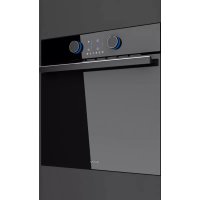
PHT963 - Oven Pando - Free user manual and instructions
Find the device manual for free PHT963 Pando in PDF.



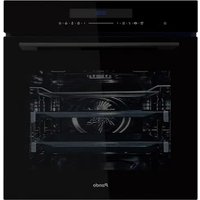
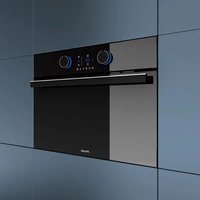
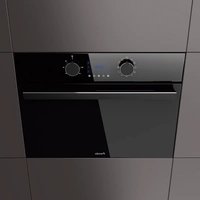
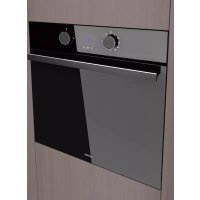
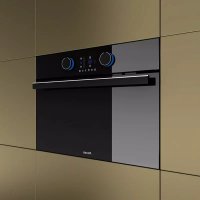
| Product type | Built-in electric oven |
| Brand | Pando |
| Model | PHT963 |
| Recessed dimensions (H x W x D) | 590-600 x 560-568 x 580 mm |
| Product dimensions without front panel (H x W x D) | 570 x 545 x 537 mm |
| Net weight | 32 kg |
| Gross weight (oven + packaging) | 34 kg |
| Power supply | 220-240 V ~ 50/60 Hz |
| Maximum power | 3215 W |
| Usable volume | 70 L |
| Energy efficiency class | A+ |
| Main functions | Traditional, Turbo, Grill, Bottom heat, Pizza, ECO, Defrost, Low-temperature cooking, PANDO CHEF (automatic recipes), SCS (steam cleaning) |
| Cleaning type | Steam cleaning SCS (Steam Cleaning System) |
| Interior lighting | Halogen bulb 25 W |
| Number of cooking levels | 4 (with side support) |
| Supplied accessories | 1 flat tray, 1 deep tray, 1 reinforced grid |
| Child safety | Control panel lock |
| Display | Touch LCD screen |
| Warranty | 2 years (excluding wear parts and installation defects) |
Frequently Asked Questions - PHT963 Pando
User questions about PHT963 Pando
0 question about this device. Answer the ones you know or ask your own.
Ask a new question about this device
Download the instructions for your Oven in PDF format for free! Find your manual PHT963 - Pando and take your electronic device back in hand. On this page are published all the documents necessary for the use of your device. PHT963 by Pando.
USER MANUAL PHT963 Pando
SCS (Steam Cleaning System by PANDO)

Funciones que incorpocran precalentamento rápido automatico
5.2. PARA COCINAR CON LAS FUNCIONES TRADICIONALES
9. FUNCION SCS (Steam Clean System by PANDO)
https://www.pando.es/en/after-sales-services/
FR
9. FUNCÉO SCS (Stem Clean System by PANDO)
PROGRAMAR A FUNCAO SCS
ATENÇAN
Guarantee certificate
Benutzerhandbuchand
7.PROGRAMMATION AVEC MINUTERIE DU FOUR 15
9. FUNCTION SCS (Stem Clean System by PANDO) 18
SCS (Steam Cleaning System by PANDO)

7.PROGRAMMATION AVEC MINUTERIE DU FOUR
7.1 OPTIONS DE MINUTERIE
9. FUNCTION SCS (Stem Clean System by PANDO)
First of all we wish to thank you for the trust shown on our Company by purchasing one of our products. We are sure you have made the right choice.
In Pando, not only we offer first quality products, but also we make available a large professional team to serve and assist you on any query you may have regarding installation and/or performance.
We also suggest you to pay a visit to our web site (www.pando.es/en) to get to know us better and where you will find all product range containing all necessary commercial and technical information.
A wide selection of extractor hoods can be found there; Wall Hoods, Ceiling, Island or Canopy Hoods. Four types of installation making possible to adapt ourselves to any type of kitchen based on different needs.
At the same time, we take the opportunity to introduce you our collection of in house essential appliances, such our new high performance Ovens and Microwaves, Induction and Gas Hobs to make real your best recipes. Wine Coolers and Aging Wine Coolers to maintain and keep your wines in best of conditions and built-in Dishwashers with latest technology.
All that under a brand with over 40 year history in the market, making products like a real craftsman, and gathering in them the best of our experience to please all your needs.
We sincerely look forward you to have fun, experience and enjoy with the comfort and capacity of what already became your new kitchen ally.
Many Thanks
The PANDO Team
1.DESCRIPTION OF THE OVE. 5
2.CONTROL PANEL 5
3. SWITCHING ON AND SETTING THE TIME 6
4.DESCRIPTION OF THE CONTROL PANE 7
4.1.Start screen / standby.. 7
4.2. Selection screen 8
4.3.Cooking information scree 9
- TRADITIONAL COOKING FUNCTION 10
5.1.Oven functions 10
5.2.Cooking with traditional functions 11
5.3. Automatic fast preheating 11
- COOKING WITH THE PERSONAL COOKING ASSISTANT (PANDO CHEF) 12
6.1. Automatic oven recipes 12
6.2.Cooking with the personal cooking assistant 13
6.3. Preheating while empty 14
6.4.Turning food 14
- OVEN TIMER SETTINGS 15
7.1. Timer options 15
7.2. Programming the timer option 16
8.SAFETYINSTRUCTIONS 17
8.1.Child safety lock (control panel lock) 17
9. FUNCTION SCS (STEM CLEAN SYSTEM BY PANDO) 18
10. DEMO MODE (SPECIAL FUNCTION FOR SHOP FLOORS) 20
11. TECHNICAL SPECIFICATIONS 21
12. INSTALLATION DIAGRAMS AND DIMENSIONS 22
13. AFTER-SALES SERVICE AND GUARANTEE: 24
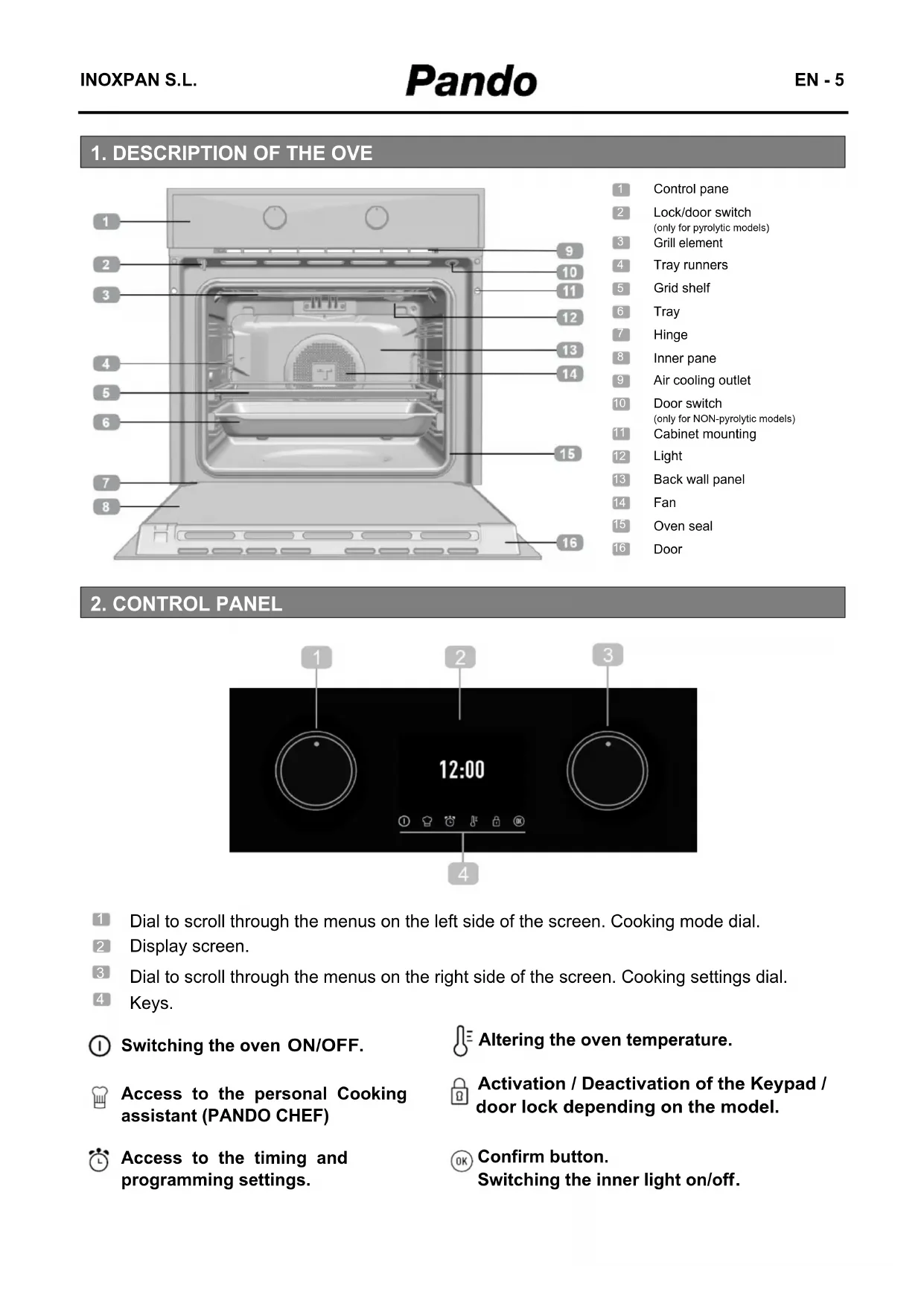
1.DESCRIPTION OF THE OVE

1 Control pane
2 Lock/door switch
only for pyrolytic models)
3 Grill element
4 Tray runners
5 Grid shelf
6 Tray
Hinge
8 Inner pane
Air cooling outlet
10 Door switch
only for NON-pyrolytic models)
11 Cabinet mounting
12 Light
13 Back wall panel
14 Fan
15 Oven seal
16 Door
2.CONTROL PANEL
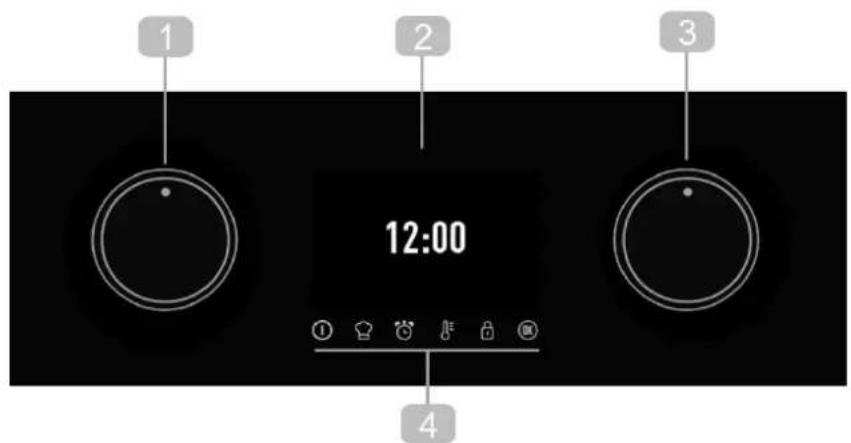
1 Dial to scroll through the menus on the left side of the screen. Cooking mode dial.
2 Display screen.
3 Dial to scroll through the menus on the right side of the screen. Cooking settings dial.
4 Keys.
① Switching the oven ON/OFF.
Altering the oven temperature.
Access to the personal Cooking assistant (PANDO CHEF)
Activation / Deactivation of the Keypad / door lock depending on the model.
Access to the timing and programming settings.
OK Confirm button. Switching the inner light on/off.
3. SWITCHING ON AND SETTING THE TIME
When plugging the oven in for the first time, the logo will appear followed by 12:00 flashing on the screen.
You must set the time in order to use the oven.
SETTING THE TIME:
- Select hours with the left knob and minutes with the right knob.
Validate the selection with the key OK or wait a few seconds. - Select with the right control the type of graphic for the hour display.
- Validate the selection with the key OK or wait a few seconds.

An audible signal will be heard confirming that the time has been set on the screen.
To change the time:
With the oven in standby (start screen), hold the button until the time begins to flash. Follow these steps to change the time.

WARNING
The sensitivity of the touch controls continuously adapt to the ambient conditions. Make sure the glass surface of the control panel is clean and free of any obstacles when plugging in the oven.
If the clock does not respond correctly when you touch the glass, unplug the oven for a few seconds and then plug it in again. Doing this causes the sensors to adjust automatically and they will react again to finger touch.

WARNING
In the event of a power failure, your electronic clock/timer settings will be erased.
The time12:00 will appear.
You can set the time as described above.
If the oven door was locked before the power cut, the locked symbol will appear until it is unlocked.
This may take several minutes, depending on the temperature inside the oven, and during this period you cannot reset the time.
Once the door is unlocked, you can set the time as described above.
4. DESCRIPTION OF THE CONTROL PANEL
Information that you will find on the display screen of your oven and how this will be displayed is outlined below.
4.1. START SCREEN / STANDBY
This screen will appear when the oven is not working, but is still plugged in.
12:00
If the keypad lock are activated, the symbol will appear on the top of the screen.
12:00
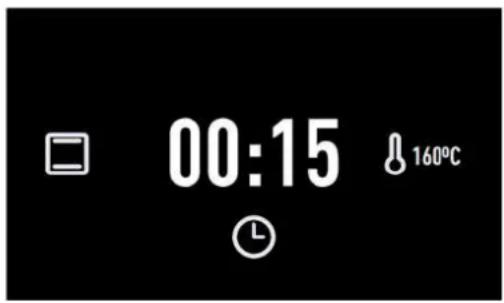
If a timer has been programmed, the screen will stop showing the time and show a countdown, as can be seen in the image.
00:15

4.2. SELECTION SCREEN
FUNCTION SELECTION:
- Start the unit using the power button ①
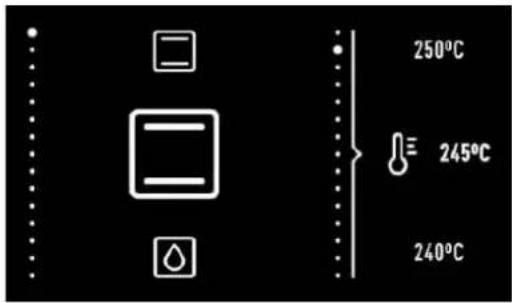
When selecting a cooking function, automatic recipe or timer programme the screen will be split into two sections:
LEFT SECTION.
This part of the screen shows available cooking settings, automatic recipes and timer programmes. To select any one of these, turn the left dial until the desired function appears and confirm the selection with the button (if you do not press any buttons, the oven will confirm this automatically after a few seconds).
RIGHT SECTION.
This part of the screen shows the values that can be set according to the selected mode: temperature, weight, duration, finish time...
To select a value, turn the right dial until the desired value appears and confirm the selection with the button (if you do not press any buttons, the oven will confirm this automatically after a few seconds).
4.3. COOKING INFORMATION SCREE
During cooking, the information on the oven's status will appear on the screen around two central circles:
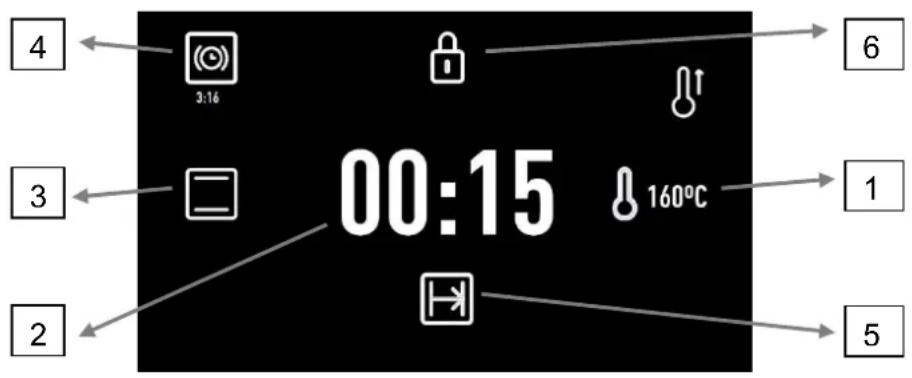
1. Selected temperature.
The symbol will flash red until the selected temperature is reached and whenever the oven is transmitting heat to the food. When the selected temperature is reached, this symbol will turn off, leaving only the blue indicator.
2. Cooking time.
If the timer has not been programmed, the elapsed cooking time will be shown.
If the timer has been set, the time left until cooking ends (countdown) will be shown.
If the oven has been programmed, but is set to delay (cooking has not yet started), the total programmed cooking time will be shown.
3. Cooking settings or automatic recipe selection.
If time settings have been programmed, information relevant to these is shown on the right side of the screen.
- Timer. Countdown with audible signal to indicate the cooking time has finished.
5. Finish time.
If you have activated security functions, the information regarding this function is displayed on the screen.
- Keypad lock. The child-safety lock will light up when activated.
5. TRADITIONAL COOKING FUNCTION
5.1. OVEN FUNCTIONS

INFORMATION
For a description of the use of each of these functions, please consult the cooking guide included with your oven.

ON/OFF BUTTON

CONVENTIONAL

CONVENTIONAL WITH FAN

GRILL AND BOTTOM HEAT

MAXIGRILL

GRILL

BOTTOM HEAT

PIZZA

TURBO

SLOW COOKING

RISING DOUGH

DEFROSTING

ECO

SCS (STEAM CLEANING SYSTEM BY PANDO)

Settings with fast preheating
5.2. COOKING WITH TRADITIONAL FUNCTIONS

Selecting functions.
Turn the oven on by pressing the button
Turn the left dial until the desired function has been reached.
The recommended temperature for the function chosen will then appear on the right.
If desired, the temperature can be changed by turning the right dial.
Confirm your choice with the button. The oven will begin cooking.
At any time during the cooking process you can:
- Change the cooking function by turning the left dial.
- Change the cooking temperature by turning the right dial.
Programme the cooking timer or a duration/finish time by pressing the button. - Modify programmed timers or duration/finish times by pressing the ④ button

INFORMATION
To set or modify a programme, consult the "Timed cooking programmes" section which can be found further on in this user manual.
5.3.AUTOMATIC FAST PREHEATING
The functions indicated incorporate fast preheating.
During fast preheating the ^ symbol lights up.
We recommend waiting until this symbol goes away before putting in the food.
6. COOKING WITH THE PERSONAL COOKING ASSISTANT (PANDO CHEF)
6.1.AUTOMATIC OVEN RECIPES
| POULTRY | CHIKEN DUCK GOOSE TURKEY |
| MEAT | SUCKLING PIG BEEF LAMB CHOPS |
| FISH | HAKE SALMON |
| BREAD | WHITE BREAD BROWN BREAD WHOLEMEAL BREAD |
| PIZZA | THICK CRUST THIN CRUST |
| DESSERTS | CAKES IN A MOULD LARGE FRUITCAKE SMALL PIE CAKES ON TRAYS |

Recipes that require preheating the oven while empty

Recipes that require turning the food.
6.2. COOKING WITH THE PERSONAL COOKING ASSISTANT
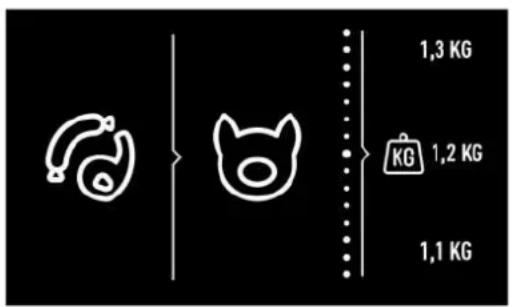
Recipe selection.
Turn the left dial until the type of food that you want to cook is shown.
Available recipes for the selected food type will appear on the left side of the screen. With the right dial select the desired recipe and confirm it with the button.
Then, on the right section of the screen, the information that the oven needs to programme the cooking will appear.
Depending on the recipe selected, the oven will ask you to key in:
THE WEIGHT OF THE FOOD: Select with the right dial and confirm with the OK button.
THE TEMPERATURE: Confirm the suggested temperature for the recipe or select another with the right dial and confirm with the button.
LEVEL OF BROWNNESS: For some recipes, you can select the finish:
- HIGH: Well browned
MEDIUM: Medium browned - LOW: Lightly browned
When all settings have been chosen, confirm with the button.
The oven will start cooking and the cooking screen will appear in place of the selection screen, showing the following information:
- Selected cooking temperature
- Remaining cooking time
- Recipe selected
When the cooking time has finished an audible signal will sound for approximately 90 seconds and the cooking symbol will flash on the screen. Press any button to turn off the audible signal.
The oven will turn off automatically.

INFORMATION
In the first 10 minutes of cooking, you will be able to change the weight and level of brownness, or set a finish time.
After this time, these settings will be set and cannot be changed.
To change these cooking settings, tap the button l and the oven will revert to the selection screen. Follow the instructions above.
At any time during the cooking process you can:
Change the cooking temperature by touching the button. Confirm with the OK button.
set the timer by pressing the ① button.
Change the existing timer by pressing the ① button.
To set or modify a programme, consult the "Timed cooking programmes" section which can be found further on in this user manual.
6.3. PREHEATING WHILE EMPTY

For recipes indicated in the table by the symbol ^ , the oven must be preheated before any food is put in.
When you select one of these recipes, the symbol will appear on the screen as cooking begins. When the oven reaches the cooking temperature, the symbol will flash and an audible signal will sound to notify you that the food can now be put into the oven.
When the door is opened to put in the food the audible signal will switch off automatically, and the remaining time will show on the cooking screen.
6.4. TURNING FOOD
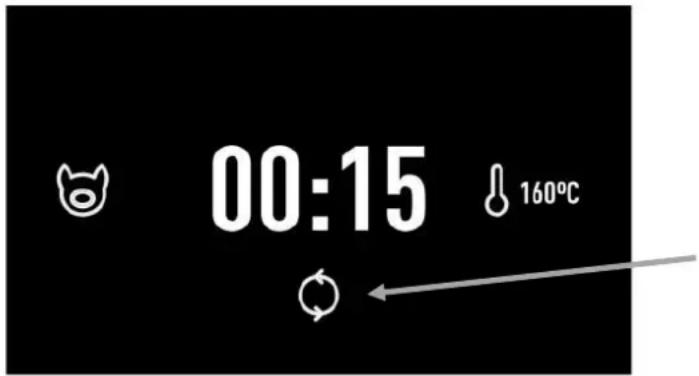
For recipes indicated in the table by the symbol, food must be turned during cooking.
The oven will notify you when to do this with an audible signal and the symbol will appear onthe cooking screen.
Opening the oven door to turn the food will cause the audible signal to turn off automatically.
7. OVEN TIMER SETTINGS
7.1. TIMER OPTIONS
You can use the following timer options to programme cooking:

timer: An audible signal will sound when the programmed time finishes. Cooking will NOT stop when the timer sounds. The timer can also be set when the oven is not cooking.

INFORMATION
You can set a timer at any time regardless of whether or not the oven is cooking.
The rest of the timer options are available only when the oven is cooking.

Cooking time: Allows you to select for how long the oven will cook.
An audible signal will sound at the end of the programmed time, the symbol will flash and the oven will stop heating automatically.
Tap any button to stop the audible signal and turn the oven off.

Cooking Finish time: Allows you to set the time for when the oven will stop cooking.
An audible signal will sound when the set time is reached, the symbol will flash and the oven will stop heating automatically.
Tap any button to stop the audible signal and turn the oven off.
- Starting delayed cooking ( Cooking Duration + Finish time):
Allows you to programme the oven to start cooking automatically and switch off automatically once the programmed time has ended.

INFORMACION
To programme this option, set the Cooking Duration and Finish Time consecutively.
You can access the programming options at any time during cooking.
Similarly, you can change an existing programme.
10 seconds before the programmed timing begins, an audible beep will sound, which you can cancel by pressing any button.
At the end of programming, the audible beep is heard again, which you can cancel by pressing any button.
If you do not press a button, the audible beep stops being heard after 2 minutes.

INFORMATION
If you have chosen an automatic recipe, the oven will automatically determine the cook- ing time so this option will not be available.
However, you can:
Programme the Finish Time during the first ten minutes of cooking.
Set the timer at any time.
7.2.PROGRAMMING THE TIMER OPTION
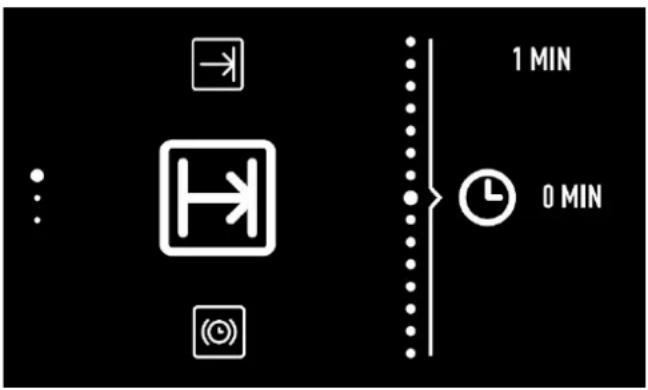
Programming during cooking.
- Press the ① button to access the timer options menu.
2 Turn the left dial to select the desired programme option. - Turn the right dial to choose the duration or finish time depending on the chosen option.

INFORMATION
The oven will not allow you to select a finish time before the time it is now.
When programming a finish time, the centre section will show the current time to help you choose.
- Confirm your choice with the button.
- The cooking screen will then be shown again. You will be able to see programmed timers to the right of the central circle.
8. SAFETY INSTRUCTIONS
8.1. CHILD SAFETY LOCK (CONTROL PANEL LOCK)
This feature can be activated at any time:
- With the oven switched off. The child lock will not allow the oven to be switched on when the button is touched ①
- With the oven in use. If the feature is activated while the oven is cooking or set to delay, the keypad will not respond and it will not be possible to use the dials or change the cooking settings.
To activate this feature, press and hold the button until you hear a beep and the symbol appears on the screen. The control panel is now locked.
To deactivate this feature, touch and hold the button again until you hear a beep and the symbol disappears.
9. FUNCTION SCS (STEM CLEAN SYSTEM BY PANDO)
This feature helps to clean any grease and other deposits from the sides of the oven. Avoid letting deposits build up to make cleaning easier. Clean the oven often.
PROGRAMMING THE SCS FUNCTION

WARNING
Do not pour water into the hot oven as this can damage the enamel.
Always run the cycle when the oven is cold. Results may be affected if you do so while the oven is too hot and in addition can damage the enamel.
First remove the trays and all accessories from inside the oven, including the tray runners and telescopic guide rails to clean these, follow the instructions in the installation and Maintenance booklet that comes with your oven.
To do this, follow the instructions below:
- With the oven cold, spread a cloth on the bottom of the oven.
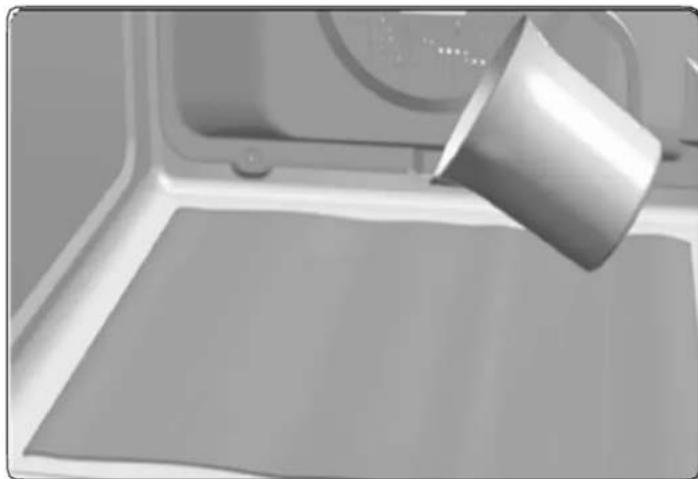
- Slowly pour 200ml of water onto the bottom of the oven.

INFORMATION
For best results, add a teaspoon of mild washing-up detergent to a glass of water before pouring it onto a cloth.
- Switch the oven on, turning the left dial to select the function and confirm with the OK button
- An audible signal will be heard confirming that the SCS feature has been activated.
On the screen the symbol will appear as will the remaining time the cycle needs to finish. The duration time is pre-set to 24 minutes.
23:59


IMPORTANT
The duration of this cycle cannot be changed. To stop before the completion of the cycle, turn the oven off by pressing the button ①
- When the cycle ends, the oven will turn itself off, an audible signal will sound and the symbol will flash quickly.

IMPORTANT
Do not open the oven door until the SCS cycle has ended completely.
The cooling cycle is necessary for this feature to work properly.
- Press any button with your fingertip to stop the audible signal and to turn off the symbol.
- The oven will turn off automatically.
- The oven is ready for dirt deposits and excess water to be removed with the cloth.
The SCS feature works at low temperatures. However, cooling times can vary according to room temperature.

WARNING
Before touching the inner surface of the oven directly, make sure that the temperature is not too hot.
If a deeper clean is required after running the SCS feature, use neutral detergents and non-abrasive sponges.
10. DEMO MODE (SPECIAL FUNCTION FOR SHOP FLOORS)
With the DEMO mode activated, you can control the oven without heating.
Activating this mode is recommended if the oven is to be plugged in at a showroom.
Activating DEMO mode
Before setting the clock, press the buttons simultaneously until "DEMO Mode ON"appears on the screen.
Then, set the time on the oven.
The word "DEMO" will be shown permanently on the panel and the oven will work as normal, but without heating up.
12:00
DEMO MODE ON
To deactivate DEMO mode, unplug the oven from the socket.
- TECHNICAL SPECIFICATIONS
| INSTALLATION | PHT-941 | PHT-963 |
| Voltage (V) | 220-240 | 220-240 |
| Frequency (Hz) | 50/60 | 50/60 |
| Connecting Wire (m) | 1,1 m WITHOUT PLUG | 1,1 m WITHOUT PLUG |
| Built-in Dimensions (High x Wide x Bottom) (mm) | 450-460 x 560-568 x 580 | 590-600 x 560-568 x 580 |
| Product Dimensions without front panel(High x Wide x Bottom) (mm) | 430x545x537 | 570x545x537 |
| LOGISTIC / PACKING INFORMATION | ||
| Net Weight (Kg) | 25 | 32 |
| Gross Weight (Oven+Pack.) (Kg) | 27 | 34 |
| Packaging Size (High x Wide x Bottom) (mm) | 510x635x655 | 650x635x655 |
| ACCESSORIES | ||
| Instruction Book - Languages (5) | ES/PT/UK/FR/GE | ES/PT/UK/FR/GE |
| Flat Tray 30 | 1 | 1 |
| Deep Tray 50 | 1 | 1 |
| Reinforced Grid | 1 | 1 |
| FEATURES | ||
| Net Cavity Volume (1) (L) | 44 | 70 |
| Overall Cavity Volume (1) (L) | 45 | 71 |
| Usable Cooking Surface (1) (cm2) | 1280 | 1280 |
| Thermostat Temperature Range | 30-270 °C | 30-270 °C |
| ELECTRICAL POWER DATA | ||
| HEATING ELEMENTS | ||
| Grill + Top | 1.400 W +1.100 W | 1.400 W +1.100 W |
| Bottom | 1.150 W | 1.150 W |
| Rear | 1800 | 2000 |
| Turbo Fan Motor | 22 | 22 |
| Cooling Fan Motor | 18 W | 18 W |
| Light Power Lamp | 25 W | 25 W |
| LIGHT | ||
| INSIDE LIGHT | HALOGEN | HALOGEN |
| MAXIMUN POWER FUNCTION | Bottom + TURBO (Pizza) | Bottom + TURBO (Pizza) |
| Maximun Oven power (230 V) | 3015 W | 3215 W |
| ENERGY EFFICIENCY (1) (3) - PRODUCT FICHE | ||
| Best Performing Mode | ECO | ECO |
| Energy Efficiency Index (EEI) | 80,8 | 81 |
| Energy Efficiency Class | A+ | A+ |
| MARKS AND CERTIFICATES | CE / N / CCA / CB / EAC / G - Mark | CE / N / CCA / CB / G - Mark |
12. INSTALLATION DIAGRAMS AND DIMENSIONS
PHT 941
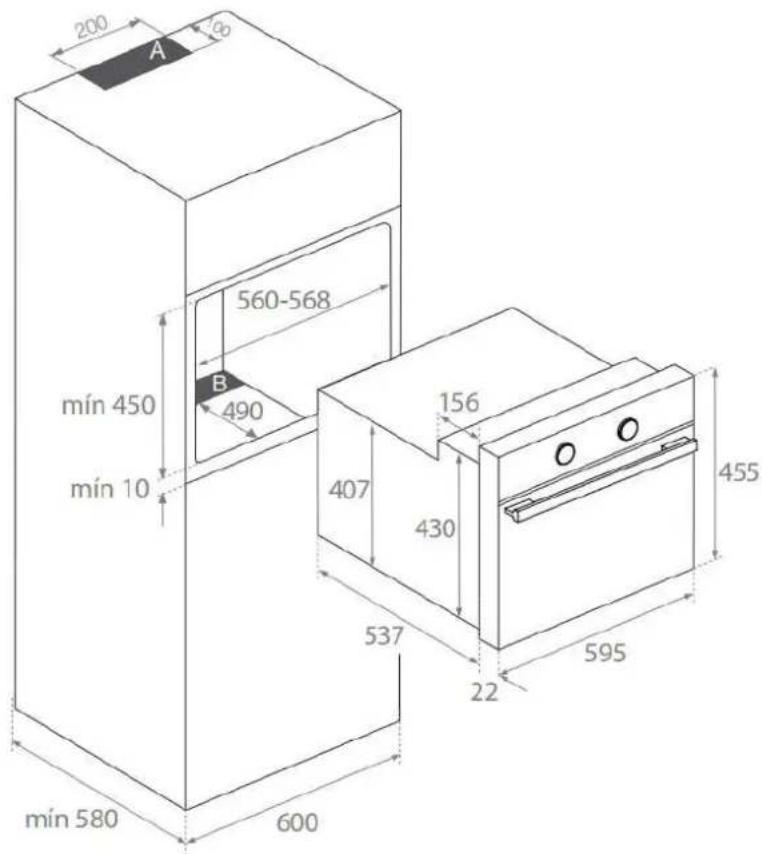
BUILT IN DIAGRAM
BUILT UNDER DIAGRAM

NOTE
Respect the ventilation holes in the cabinet, see installation drawings (200X100mm in zone A and 560x90mm in zone B). If these vents are not available, the productnot work properly and may suffer damage that would NOT be covered by the warranty.

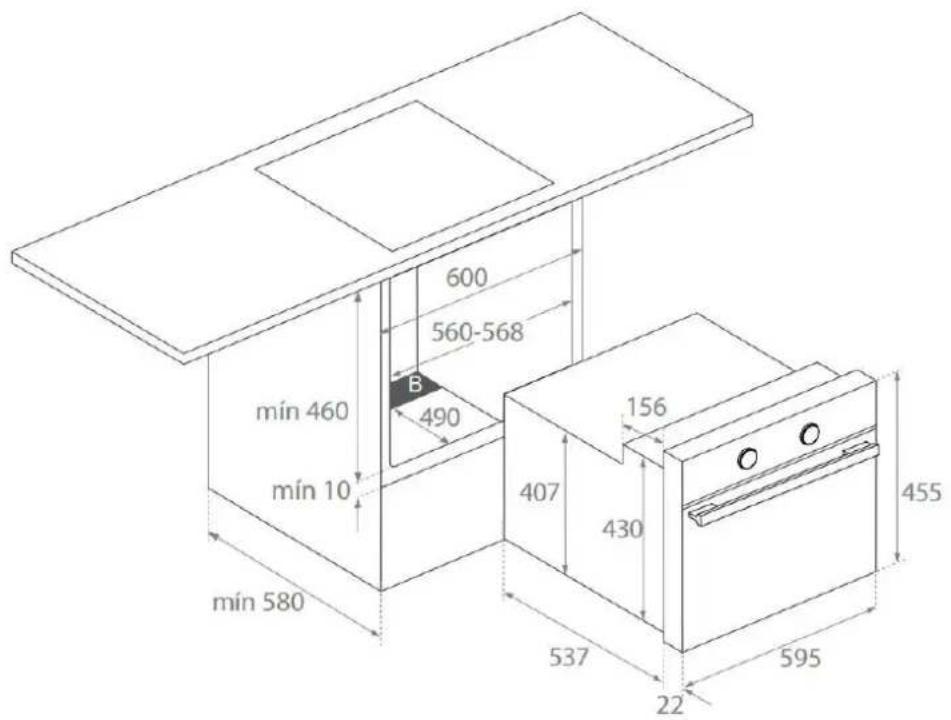
12. INSTALLATION DIAGRAMS AND DIMENSIONS

PHT 963
INSTALLACION EN COLUMNA
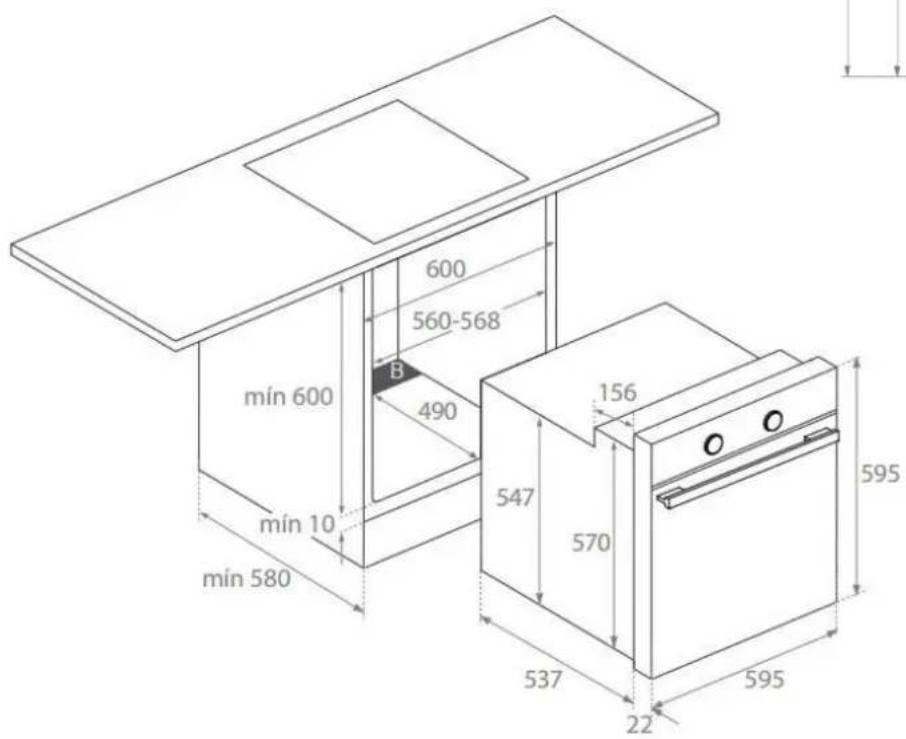
BUILT UNDER DIAGRAM
NOTE
Respect the ventilation holes in the cabinet, see installation drawings (200X100mm in zone A and 560x90mm in zone B). If these vents are not available, the productnot work properly and may suffer damage that would NOT be covered by the warranty.
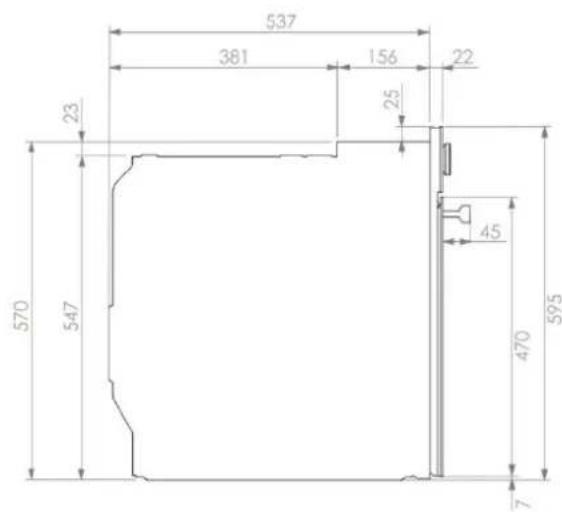
13. AFTER-SALES SERVICE AND GUARANTEE:
INOXPAN S.L., thank you for choosing our brand and for trusting a Pando product, standard of Quality, Design & Innovation, a brand honouring his origins and commitments.
TERMS OF THIS WARRANTY:
This product comes with a warranty of 2 year as from the date of purchase covering all product defect affecting its performance. To validate the same is mandatory to apply the purchasing invoice or buying ticket before the official Customer Service engineer.
During the above mentioned period, the Company pledge to repair or replace at no cost any defective part whose cause is due to vice or manufacturing product flaw to make it work fine again, as well as the necessary labour cost and expenses involved in said repairing or replacement.
PANDO WARRANTY EXEMPTIONS:
It shall not be covered by the warranty or may be cause of cancelation of such, any of the following case scenarios, thus being the user the one taking charge of any material cost, labour and customer service travel expenses:
- Installation or performing reviews, cleaning or maintenance.
- If the installation of the device has not been carried out by Authorized Specialist Professional personnel or Pando Official Technical Service personnel, who meet the requirements of the safety standards and electrical power regulations.
- Whenever the product is orientated to commercial or non-residential use, to which it is not made for.
- Product malfunction caused by not following the instructions, recommendations and/or norms shown in the appliance manuals.
- Malfunctions or problems caused by an inadequate installation, or by not having the necessary free spaces in the furniture and indicated in the installation manual, for adequate ventilation of the product.
- Issues and faults produced by carriage or moves, and/or product handling by non-authorised personnel to this company or the brand Pando.
- Bumps, dents, scratches, or broken glasses
- Other alien bodies present in the interior or exterior of the product
- That the technician does not have easy access to the product, because there are elements that prevent its easy and safe access. All necessary means to access by the Pando authorised engineer shall be on account and responsibility of the user.
- Wiring inadequate handling of external electric cable.
- Wear and tear aesthetical parts, such as light screens, lamps, trays, grills, guides.
- Rust, burns, stains or colour changes in the body, door, accessories or interior cavity caused by improper maintenance or use, or by improper application or unprotected exposure to corrosive elements such as cleaning products not recommended by the manufacturer and inappropriate.
- Issues or malfunction produced by variations of main supply, or natural and random causes from weather or geological origin, as storms, lightning, earthquakes, floods, etc.
- Products whose origin is resale, used appliance, or displays with more than two years since their date of manufacturing.
INOXPAN, S.L., Remains expressly excluded from any liability over any eventual damage any direct or indirect to persons or materials produced by inadequate product handling and use.
Official Pando Customer Service Contact Details:
ESPANAPORTUGAL Y ANDORRA: OTROS PAISES:
ES
www.pando.es/asistencia-technica/

EN
https://www.pando.es/en/after-sales-se
FR
SCS (Steam Cleaning System by PANDO)

- HIGH: Well done
MEDIUM:Medium
LOW:Rare
Description of the oven functions. 3
Environmentally-friendly use of the oven 4
Conventional Functions 4
Microwave Functions 5
The advantages of microwaves 5
Cooking with a microwave oven 6
Cooking with microwaves.. 6
Defrosting with microwaves 7
Steam functions 8
Steam Flow 8
Residual water in the oven 8
Usage and tips 8
Type of ovenware 9
Microwave function 9
Test the ovenware 9
Conventional functions 9
Combined functions 9
Metallic containers and aluminium foil ... 9
Lids. 9
Tables of Temperatures and Times... 64
Birds 64
Meat 65
Fish 68
Pizza 69
Bread 70
Entrees and pastas. 71
Cake shop 72
Defrosting by time. 75
Fish 76
Steam 76
Meat. 77
Eggs 77
Side dishes 77
Reheat 77
Dumplings 77
Vegetables. 77
Desserts 77
Fruit (Sterilising/Boiling down) 77
Blanch. 77
Defrost 77
Ovenware 77
Description of the oven functions

WARNING
Please remember that the available functions will vary according to each model.
To check which functions are available on your oven, see the User Manual provided with this Cooking Guide.

CONVENTIONAL
This function is for use when baking cakes where the heat should be even to give a spongy texture.

CONVENTIONAL WITH FAN
Suitable for roasts and baking. The fan distributes the heat evenly around the inside of the oven to reduce cooking time and temperature.

GRILL AND LOWER ELEMENT
Ideal for roasts. This setting can be used for any cuts of meat, regardless of size.

MAXIGRILL
For toasting larger surfaces than possible with the Grill setting, with greater toasting power for faster food browning.

GRILL
Toasting and browning. This setting allows the surface to be browned without affecting the inside of the food. Suitable for flat foods such as steaks, ribs, fish and toast.

GRILL / MAXIGRILL WITH FAN
For even roasting and simultaneous surface browning. Ideal for mixed grills. Perfect for bulky pieces such as poultry and game.
to heat food using a hot air system on two levels. HI is suitable for meat in general and LO is used for fish, pastry and bread.
The meat should be placed on the grid shelf with the tray below to collect meat juices.

LOWER HEAT (FLOOR)
Heat only comes from the lower part. Suitable for warming dishes or letting dough or similar products rise.

TURBO + LOWER HEAT (PIZZA)
Ideal for cooking pizzas and baking pies, fruit tarts and sponge cakes.

TURBO
The fan distributes the heat coming from an element located at the back of the oven. As a result of the evenly-distributed temperature, food can be cooked on two shelves at the same time.

SLOW COOKER
Specially designed for cooking traditional casseroles, stews, etc... and for any dishes specifying particularly long cooking times and low heat.
ECO ECO
For cooking in the oven with the minimum energy consumption possible. Using forced convention heating, the oven switches off a few minutes before the end of cooking, using the residual heat inside the oven and completing the dish perfectly. Recommended for fish and all types of meat roasts.

DEFROSTING
This function is suitable for slowly defrosting food, particularly food consumed unheated, such as soups, pastries, tarts, cakes, etc. In some models, the defrost function can be used

MICROWAVE
This function is ideal to cook and heat vegetables, potatoes, rice, fish and meat.

MICROWAVE AND COMBINED CNTIONS
This function is ideal to cook lasagne, poultry, roast potatoes and toasted foods.

STEAM
This function is ideal to cook vegetables, potatoes, rice, fish and meat.

RISING DOUGH
Specially designed for allowing dough for bread and pastry to rise.

FAST PREHEATING
This function allows the oven to be quickly pre-heated to the selected temperature.
Use this function when your recipe requires the oven to be at a specific temperature before use.
Environmentally-friendly use of the oven
Energy-saving tips:
- Remove any accessories not in use from the oven.
- Use oven-proof dishes, preferably dark coloured.
- Open the oven door as little as possible during cooking.
- Avoid preheating the oven while empty. When ever the recipe allows, place the food in the cold oven.
If your oven has an ECO function, use this function whenever the recipe allows.
- For recipes with long cooking times, switch off the oven 5 to 10 minutes before the end of the total cooking time to make use of the residual heat.
If your oven has fan features, cook multiple dishes at once.

Conventional Functions
Cooking functions vary between models. The tables provided show the key cooking times.
The times and temperatures shown in the chart are given as a guide. It is advisable to start with the lowest figures and increase as necessary.
Always use the lower end of the range given in the tables.
In general, the times shown on the Tables are calculated for placing food in a cold oven.
Recipes requiring the oven to be pre-heated will expressly mention this.
Some models come with a Rapid Pre-heating function. This function reduces the cooking time in relation to figures given in the Tables.
When using this function, wait until the selected temperature has been reached before placing the food in the oven.
The shelf levels for cooking are as follows (from the bottom):
1: Low.
2/3:Medium.
4: High
Level 4 is suitable for grilling and toasting.
Place the food in the centre of the shelf or rack for the most even result possible.
In conventional ovens, heat radiated by electrical elements or gas burners slowly penetrates the food from outside to inside. On account of this there is a major amount of energy is wasted heating the air, the oven components and the food containers.
In a microwave oven, heat is generated by the food itself and the heat travels from inside to outside. No heat is lost to the air, the walls of the oven cavity or the dishes and containers (if these are suitable for use in microwave oven), in other words, only the food is heated.
Microwave ovens have the following advantages:
- Shorter cooking times; in general these are up to 3/4 less than the time required for conventional cooking.
- Ultra-fast food defrosting, thus reducing the danger of bacterial development.
- Energy savings.
- Conservation of the nutritional value of foods due to the shorter cooking times.
- Easy to clean.
How a microwave oven works
In a microwave oven there is a high tension valve called a magnetron which converts electrical energy into microwave energy.
These electromagnetic waves are channelled to the interior of the oven through a wave guide and distributed by a metallic spreader or through a turntable.
Inside the oven the microwaves propagate in all directions and are reflected by the metal walls, uniformly penetrating the food.
Why food heats up
Most foods contain water and water molecules vibrate when subjected to microwaves.
The friction between molecules produces heat which raises the temperature of the
food, de-freezing it, cooking it or keeping it hot.
Since the heat arises inside the food:
- This can be cooked with little or no liquid or fats/oils;
- De-freezing, heating or cooking in a microwave oven is quicker than in a conventional oven;
- The vitamins, minerals and nutritional substances in the food are conserved;
The natural colour and aroma of the food are unchanged.
Microwaves pass through china, glass, cardboard or plastic but do not go through metal. For this reason, metal containers or ones with metal parts must not be used in a microwave oven.
Microwaves are reflected by metal...

... but go through glass and china...

... and are absorbed by foods.


WARNING
Read the Installation and Maintenance booklet before cooking with your microwave.
Follow these recommendations when cooking with your microwave:
- Before heating or cooking foods with peel or skin (e.g. apples, tomatoes, potatoes, sausages) prick them so that they do not burst. Cut the food up before starting to prepare it.
- Before using a container or dish make sure that it is suitable for microwave use (see the section on types of ovenware).
- When cooking food with very little moisture (e.g. defrosting bread, making popcorn, etc.) evaporation is very quick. The oven then works as if it was empty and the food may burn. The oven and the container may be damaged in such a situation. You should therefore set just the cooking time necessary and you must keep a close eye on the cooking process.
- It is not possible to heat large quantities of oil (frying) in the microwave.
- Remove pre-cooked food from the containers they come in since these are not always heat resistant. Follow the food manufacturer's instructions.
- If you have several containers, such as cups, for example, set them out uniformly on the base.
- Do not close plastic bags with metal clips. Use plastic clips instead. Prick the bags several times so that the steam can escape easily.
- When heating or cooking foods, check that they reach at least a temperature of 70^ .
- During cooking, steam may form on the oven door window and may start to drip. This situation is normal and may be more noticeable if the room temperature is low. The oven's safe working is not affected by this. After you have finished cooking,
clean up the water coming from the condensation
- When heating liquids, use containers with a wide opening, so that the steam can evaporate easily.
Prepare the foods as per the instructions and keep in mind the cooking times and power levels indicated in the tables.
Keep in mind that the figures given are only indicative and can vary depending on the initial state, temperature, moisture and type of food. It is advisable to adjust the times and power levels to each situation. Depending on the exact characteristics of the food you may need to increase or shorten the cooking times or increase or decrease the power levels.
COOKING WITH MICROWAVES...
-
The greater the amount of food, the longer the cooking time. Keep in mind that:
-
Double the quantity double the time
-
Half the quantity half the time
-
The lower the temperature, the longer the cooking time.
- Foods containing a lot of liquid heat up more quickly.
- Cooking will be more uniform if the food is evenly distributed on the base. If you put dense foods on the outside part of the plate and less dense ones on the centre of the plate, you can heat up different types of food simultaneously.
- You can open the oven door at any time. When you do this the oven switches off automatically. The microwave will only start working again when you close the door and press the start key.
- Foods that are covered require less cooking time and retain their characteristics better. The lids used must let microwaves pass through and have small holes that allow steam to escape.
-
To achieve the best results when warming up small loads (such as a glass of water, a milk mug or a popcorn bag) it is suggested that they are placed on the glass tray and position it at the 1st or higher levels.
-
Turn or stir the food at regular intervals to improve heating uniformity.
- To achieve the best cooking results with microwaves the rack must be removed, place the food on the glass tray and position it at the bottom or higher levels.
- Do not place any food or recipient with food/liquid directly on the bottom of the cavity. For better heating results always place the food or recipient with food/liquid over the glass tray.
- Do not cover the bottom of the oven cavity with aluminum or tin foil sheets as there is the risk of damaging the oven.
DEFROSTING WITH MICROWAVES
- When defrosting, use only dishes that are appropriate for microwaves (china, glass, suitable plastic).
- The defrost function by weight and the tables refer to the defrosting of raw food.
- The defrosting time depends on the quantity and thickness of the food. When freezing food keep the defrosting process in mind. Distribute the food evenly in the container.
- Distribute the food as best as possible inside the oven. The thickest parts of fish or chicken drumsticks should be turned towards the outside. You can protect the most delicate parts of food with pieces of aluminium foil. Important: The aluminium foil must not come into contact with the oven cavity interior as this can cause electrical arcing.
-
Thick portions of food should be turned several times.
-
Distribute the frozen food as evenly as possible since narrow and thin portions defrost more quickly than the thicker and broader parts.
- Fat-rich foods such as butter, cream cheese and cream should not be completely defrosted. If they are kept at room temperature they will be ready to be served in a few minutes. With ultra-frozen cream, if you find small pieces of ice in it, you should mix these in before serving.
- Place poultry on an upturned plate so that the meat juices can run off more easily.
- Bread should be wrapped in a napkin so that it does not become too dry.
- Turn the food at regular intervals or whenever the oven lets out a beep and the display flashes the word: TURN.
- Remove frozen food from its wrapping and do not forget to take off any metal twist-tags. For containers that are used to keep frozen food in the freezer and which can also be used for heating and cooking, all you need to do is take off the lid. For all other cases you should put the food into containers that are suitable for microwave use.
- The liquid resulting from defrosting, principally that from poultry, should be discarded. In no event should such liquids be allowed to come into contact with other foods.
- Do not forget that by using the defrosting function you need to allow for standing time until the food is completely defrosted.
Steam functions
Steam Flow
It is normal to have an intermittent steam flow, coming out from the oven front.
This is especially noticeable in winter time or in high moisture environments.

Residual water in the oven
To reduce the residual water in the oven, it is recommended to insert a tray in the bottom rack level. The condensation released from the food begins to drip on the tray. The remaining residual water can be easily dried with a cloth. Take care the drip tray under the door is dried after every use. A build-up of liquid in this tray can quickly overflow and damage the surrounding cupboards. It is accessed through the opened door.
Usage and tips
The perforated container is suitable for cooking fresh or deep frozen vegetables, meat and poultry. In this case it is important that the non-perforated container is placed into the lowest level. This way, dripping liquids are collected and the appliance does not get dirty. The perforated container with the food should be inserted into the second level.
The non-perforated container is used to steam sensitive foods, e.g. compotes, pau and dumplings.
The rack is used when cooking with small containers, as for example, dessert bowls and to regenerate plate dishes.
For more precise information refer to the tables.
The suggested times and temperatures are guideline values. The actual cooking time can vary according to the type and quality of the foods.

To remove the rack, lift it upwards slightly at the front when the safety notches connect with the sides of the oven (see illustration).

We recommend using the rack together with the baking tray when cooking items on the rack which might drip.
Type of ovenware
MICROWAVE FUNCTION
For the microwave function, keep in mind that microwaves are reflected by metal surfaces. Glass, china, clay, plastic, and paper let microwaves pass.
For this reason, metal pans and dishes or containers with metal parts or decorations cannot be used in the microwave. Glass ware and clay with metallic decoration or content (e.g. lead crystal) cannot be used in microwave ovens.
The ideal materials for use in microwave ovens are glass, refractory china or clay, or heat resistant plastic. Very thin, fragile glass or china should only be used for short period of times (e.g. heating).
Hot food transmits heat to the dishes which can become very hot. You should, therefore, always use an oven glove!
TEST THE OVENWARE
Put the item you want to use in the oven for 20 seconds at maximum microwave power. After that time, if it is cold and just slightly warm, it is suitable to use. However, if it heats up a lot or causes electric arcing it is not suitable for microwave use.

WARNING
If microwave is used, please make sure there are no inappropriate objects inside of the oven, including wire racks or griddles that are the part of appliance and shall be used solely with grill or oven functions.
CONVENTIONAL FUNCTIONS
In the Grill and Hot Air functions, the ovenware must be resistant to temperature of at least 300^ .
Plastic dishes are not suitable for use in the grill.
COMBINED FUNCTIONS
In the combined functions, the ovenware used must be suitable for use in both the microwave and the grill.
METALLIC CONTAINERS AND ALUMINIUM FOIL
Pre-cooked food in aluminium containers or in aluminium foil can be put in the microwave if the following aspects are respected:
Keep in mind the manufacturer's recommendations written on the packaging.
- The metallic containers cannot be more than 3cm high or come in contact with the cavity walls (minimum distance 3 cm). Any aluminium lid or top must be removed.
- Put the metallic container directly on top of the base. If you use the grid iron, put the container on a china plate. Never put the container directly on the grid iron!
- The cooking time is longer because the microwaves only enter the food from the top. If you have any doubts, it is best to use only dishes suitable for microwave use.
Aluminium foil can be used to reflect microwaves during the defrosting process. Delicate food, such as poultry or minced meat, can be protected from excessive heat by covering the respective extremities/edges. - Important: aluminium foil cannot come into contact with the cavity walls since this may cause electrical arcing.
LIDS
We recommend you use glass or plastic lids or cling film since:
- This will stop excessive evaporation (mainly during very long cooking times);
-
The cooking times are shorter;
-
The food does not become dry;
- The aroma is preserved.
The lid should have holes or openings so that no pressure develops. Plastic bags must also be opened. Baby feeding bottles or jars with baby food and similar containers can only be heated without their tops / lids otherwise they can burst.

NOTE
For a general idea of what type of ovenware is suitable for each situation, check the table at the end of this manual in the "Ovenware" chapter.
Água residual noorno
FONCTIONS CONVENTIONNELLES
Overtollig water in de oven
a aaa aaaa aaa aaa aaa aaa aaa aaa
Jglal gall glll jgiy gillgaii Jglal gail gall gall gllgai i pI 1
J 1111111111111111111111111111111111111
Jggl 1 jll aagll oia piai iie Jgall g .n all glal bll g 1a oall a yjol jll :(Jawl) LsLg ball
jia:1
LwJ2/3
4
4 4
a jie Jgall Jolal g jll bgs pabil g
aillg ggs
4g
y 1 y
jaiy jaiy jaiy jaiy jaiy jaiy jaiy jaiy jaiy jaiy jaiy jaiy jaiy jaiy jaiy jaiy jaiy jaiy jaiy jaiy jaiy jaiy jaiy jaiy jaiy jaiy jaiy jaiy jaiy jaiy jaiy jaiy jaiy jaiy jali y jali y jali y jali y jali y jali y jali y jali y
JwJyJyJyJyJyJyJyJyJyJyJyJyJyJyJyJyJyJyJyJyJyJyJyJyJyJyJyJyJyJyJyJyJyJyJyJyJy
11
a
aalall aably jolal ayogai yll gylg lpll i p 1y 1y jll g as gall al gll Jll 1s 1s 1s 1s 1s 1s 1s 1s 1s 1s 1s 1s 1s 1s 1s 1s 1s
Jgdlglj. 10000000000000000000000000000000000000000000000000000

gall j l jiei g 1000 yjy jll a jil jll jll jll jll jll jll jll jll jll jll jll jll jll jll jll jll jll jll jll jll jll jll jll jll jll jll jll jll jll jll jll jll jll jll jll jll jll jll jll jll jll jll jll jll jll jll jll jll
yglal gglbgyllal y 1g 1g jzj g j 1j 1g j 1
Jll jll g jll lgl 1234567890123456789012345678901234567890123456789012345678901234567890123456789012345678901234567890123456789
g j 1 g a y g sall j g p dssu uauu uauu uauu uauu uauu uauu uauu uauu uauu uauu uauu uauu uauu uauu uauu uauu uauu uauu uauu uauu uauu uauu uauu uauu uauu uauu uauu uauu uauu uauu uauu uauu uauu uauuu
yI jllg lallll gJlJI 1jlll piai Ie J
(1) 11111111111111111111111111111111111111
1
| Type of dish | Operating mode | Microwave | Conventional functions | Combined functions | |
| Defrost / heat | Cook | ||||
| Glass and porcelain 1) | |||||
| Domestic, non fire-resistant, may be washed in dishwasher | yes | yes | no | no | |
| Glazed ceramic | |||||
| Fire-resistant glass and porcelain | yes | yes | yes | yes | |
| Ceramic, earthenware dishes | |||||
| unglazed | yes | yes | no | no | |
| glazed without metallic decorations | |||||
| Earthenware dishes | |||||
| glazed | yes | yes | no | no | |
| unglazed | no | no | no | no | |
| Plastic dishes 2) | |||||
| heat-resistant up to 100°C | yes | no | no | no | |
| heat-resistant up to 250°C | yes | yes | no | no | |
| Plastic films 3) | |||||
| Cling film | no | no | no | no | |
| Cellophane | yes | yes | no | no | |
| Paper, cardboard, parchment 4) | yes | No | no | no | |
| Metal | |||||
| Aluminium foil | yes | no | yes | no | |
| Aluminium containers 5) | no | yes | yes | yes | |
| Accessories (rack) | yes | yes | yes | no | |
- No golden or silver edges and no lead glass.
- Remember the manufacturer's tips!
- Do not use metal clips to close the bags. Perforate the bags. Use films only to cover foods.
- Do not use paper plates.
- Only shallow aluminium containers without lids. The aluminium must not come into contact with the walls of the cavity
Installation & Maintenance
ES Instalación y Mantenimiento
PT Instalação e Manutenção
EN Installation & Maintenance
FR Installation et Entretien
DE Installation und Wartung
NL Installatie en onderhoud
IT Installazione e manunternzione
Installation and maintenance instructions index
SAFETYINSTRUCTIONS 29
Electrical safety 29
Child safety 30
Oven use safety 30
Safety in cleaning and maintenance 31
Safety when using the pyrolytic cleaning cycle 31
INSTALLATION 33
Before installation 33
Column installation 33
Undercounter installation 33
Electrical connection 33
Oven installation 33
ENVIRONmENTAL INFOreration 34
Disposal of the ecological packaging .. 34
Product disposal 34
Energy information 34
BEFORE FIRST USE 34
OTHER Important
INSTRUCTIONS 34
ACCESSIONS 35
Assembling the telescopic runners 35 Telescopic runners with folding clip . 35 Telescopic runners with direct clip .. 35
CLEANING AND MAINTENANCE 36
Cleaning the oven exterior and accessories 36
Cleaning the oven interior 36
Assembling the side supports 36
Assembling the supports 36
Dismantling the bottom panel 36
Ovens with a folding grill 37
Cleaning the oven door 37
Dismantling/assembling the door with hinge on body 37
Dismantling/assembling the door with hinge on door 37
Dismantling/assembling the interior glass panes of the door .... 38
Changing the oven light bulb 38
Changing the upper bulb 38
Changing the side bulb 38
Changing the LED lamp 38
Trouble shooting 39
Technical Specifications 40
FIGURES 93
SAFETY INSTRUCTIONS
Read these instructions carefully to obtain the best performance from your oven, safely and correctly. Keep this manual so that it can be read by a new owner.
Electrical safety
If the power cable is not supplied with the oven, the following cables may be used in non-pyrolytic ovens: H05RR-F / H05VV-F / H05V2V2-F / H07RN-F / H05SS-F. In pyrolytic ovens, only the H05SS-F-type cable may be used. The connection diagram is shown in Figure 1.
The oven must always be plugged into a sound earth connection and its installation must comply with current regulations.
This appliance is intended for use at a maximum altitude of 2,000m .
When installing the oven, total disconnection means must be incorporated into the fixed installation in accordance with the installation regulations (adapted to the current to be supported and with a minimum space between the contacts of 3mm ) based on surge protection category III conditions, for disconnection in the event of an emergency and when cleaning or changing the bulb. Under no circumstances must the earth wire pass through this switch.
This switch may be replaced by a plug, provided it is accessible for normal use.
Any handling or repair to the appliance, including replacement of the power cable, should be carried out by authorised Technical Service Personnel using original spare parts. Repairs or handling by others may damage the appliance or cause malfunctioning that could be hazardous to your safety.
Unplug your oven if it malfunctions.
In combined ovens with countertops and to avoid potential risks, only those recommended by the manufacturer may be assembled.
Child safety
Do not allow children to come near the oven while in use or during the pyrolytic cleaning cycle as it can reach very high temperatures.
Children under 8 years of age should be kept away from the appliance unless they are under constant supervision. Children should not be allowed to play with the appliance.
The appliance may be used by children over the age of 8 and people with reduced physical, sensory or mental capacities or a lack of experience or know-how, provided they have been given appropriate instructions or supervision on how to use the appliance safely and they understand the dangers involved.
Oven use safety
The oven must always be operated with the door closed.
Only use the oven after it has been installed inside the kitchen unit (See Installing the oven).
Do not install the oven behind decorative doors. This can cause it to overheat.
The manufacturer is not responsible for any use of the oven other than for the home preparation of food.
Do not cover the bottom of the oven with aluminium foil, or any other material, as this may affect cooking performance and damage the enamel inside the oven and the interior of your kitchen unit.
Do not store oil, fats or inflammable materials inside the oven. This may be dangerous if the oven is turned on.
Do not lean or sit on the open oven door. It could be damaged and you could be injured.
The tray and rack have a system for easy partial removal and handling of food. Always place these accessories inside the oven, as indicated in the Accessories section.
The oven heats up when in use, so always use oven gloves when performing operations inside the oven and avoid touching the heating elements.
Only use the supplied temperature probe inside the oven (in models that come with this feature).
Safety for cleaning and maintenance
Disconnect the appliance from the mains power supply before any operation.
Do not use steam cleaners or pressurised water to clean the oven.
Do not use metal scouring pads, wire brushes or commercially available or abrasive powder cleansers to clean the oven door as they can scratch the surface and cause the glass to break.
Cleaning and maintenance tasks to be carried out by the user should not be done by children without supervision.
Before replacing a bulb, first make sure that the oven has been disconnected from the mains to avoid the possibility of receiving an electric shock.
Remove all accessories and dishes from the oven, including the shelf supports and/or telescopic runners.
Clean any spillages or excess dirt, as during the pyrolytic cleaning cycle these could ignite and become a fire hazard.
For your safety, never operate the oven without the back panel (that protects the fan) in place.
Safety when using the pyrolytic cleaning cycle
Before starting the cleaning cycle:
CAUTION: Remove all accessories and dishes from the oven, including the shelf supports and/or telescopic runners.
Clean any spillages or excess dirt, as during the pyrolytic cleaning cycle these could ignite and become a fire hazard.
Remove any dirt from the oven gasket.
Carefully follow the instructions for programming the pyrolytic cleaning cycle.
During the pyrolytic cleaning process:
Do not leave any cloths or fabric hanging from the oven handle or in close contact with it.
For safety reasons, if the oven has been installed below the counter, the hob must not be in use while the oven is in pyrolytic mode.
The oven's inside light will remain off and cannot be turned on.
The oven is equipped with a safety lock mechanism that prevents the door from being opened during the cleaning cycle.
Do not try to open the door while the lock is activated.

FORMATION
This manual describes general oven characteristics, and so they may not correspond in full to those of your oven. Consult the User's guide accompanying this manual to learn about the specific features and equipment of your oven.
The manufacturer reserves the right to change the product characteristics in order to improve its operation.
Installation
This information is exclusively for the installer who is responsible for assembly and electrical connection. The manufacturer will not accept liability for possible damage caused if you install the oven yourself.
BEFORE INSTALLATION
To handle the oven, use the grips at the sides. Do not use the door handle to lift the oven.
When installing the oven under a counter, follow the instructions for installing it.
In general, protruding elements (furniture reinforcements, pipes, socket bases, etc.) at the back of the unit must be avoided.
When the base of the main power socket is inside the unit in which the oven is installed, this must be done in the shaded area. Figure 2.
The unit in which the oven is installed and adjacent units must withstand temperatures higher than 85^ .
The installation instructions must be adhered to strictly. If not, the oven's ventilation circuit may become blocked, causing high temperatures that could damage the kitchen unit and the appliance itself.
For this purpose, check the unit measurements and those of the holes to be drilled in the units, as shown in the following figures:
Column installation.
60 cm oven: Figure 7^ .
45 cm oven: Figure 8^ .

- When installing pyrolytic ovens, DO NOT drill any holes in the unit inside the shaded areas.
Undercounter installation.
60 cm oven: Figure 9*.
45 cm oven: Figure 10^ .

- When installing pyrolytic ovens, DO NOT drill any holes in the unit inside the shaded areas.
ELECTRICAL CONNECTION
The fitter must ensure that:
The mains power voltage and frequency correspond to what is marked on the identification plate.
The domestic wiring system can withstand the maximum power marked on the identification plate.
After connecting the power supply, check that all electrical parts of the oven are working correctly.
OVEN INSTALLATION
For all ovens. After the electrical connection has been done:
-
Position the oven inside the unit and ensure that the feed cable is not trapped or in contact with parts of the oven that heat up.
-
Make sure that the body of the oven is not in contact with the walls of the unit and that there is a minimum space of 2mm between adjacent units.
-
Centre the oven in the unit so that there is a minimum space of 5mm between the oven and the doors of the furniture that surrounds it. Figure 3.
-
Open the door and insert the plastic plugs supplied with the oven into their respective housings. Figure 11.
-
Fasten the oven to the unit with the screws supplied, screwing them into the unit through the stops.
Do not lean on the open door of the oven while executing steps 4 and 5, as the oven
is not secured to the unit and it could move forwards and fall to the floor.
Environmental information
DISPOSAL OF THE ECOLOGICAL PACKAGING
The packaging is made from totally recyclable materials which can be put to other uses. Consult your local council regarding the necessary procedures for disposing of these materials.
PRODUCT DISPOSAL
WABNING
The symbol on the product or packaging indicates that this appliance cannot be disposed of as normal household waste. It should be taken to an electrical and electronic equipment collection point for recycling. In this way, any negative consequences for the environment and public health from incorrect handling can be avoided.
Contact your local council, household waste
disposal service or the establishment where you bought the product from for more information on recycling the appliance.
ENERGY INFORMATION
Tested to comply with the requirements of the 66/2014 (Eco-Design) and 65/2014 (Energy Labelling) regulations in accordance with Regulation EN 60350-1.
Energy consumption measurements taken under different conditions may give different values from those indicated for your oven.
Consult the User's guide accompanying this manual to learn about the energy consumption of your oven.
before first use
There may be traces of fat and other substances in the oven as a result of the manufacturing process. These should be removed using the following procedure:
- Remove all the packaging from your oven, including the protective plastic, if any.
-
Turn your oven to / or if this setting is not available to at 200^ for 1 hour. Consult the User's guide accompanying this manual on how to do this.
-
Cool the oven with the door open so that it ventilates and no odours remain inside it.
- Once cold, clean the oven and the accessories.
During this first operation, smoke and smells will be produced. The kitchen should therefore be well ventilated.
Other important instructions
Do not pour water on the bottom surface when in use; this may damage the enamel.
It is normal for condensation to occur on the oven door when cooking food with a high liquid content.
When closing the oven door during cooking, the sound of the air inside it can be heard. This effect is normal due to the pressure exerted by
the door when it is closed, guaranteeing the sealing of the cavity.
Accessories
Do not leave any containers or food on the oven floor. Always use the trays and racks supplied with the oven.
To prepare yoghurt, place the jars on the oven floor.
To cook any other food, insert the tray or rack into the runners inside the oven.
- Between the two rails of the side supports or on any of the extractable runners, if the oven has them.
- The rack and some of the trays have retention grooves to prevent them from accidentally being removed. Place these grooves towards the back of the oven, facing downwards. Figure 4.
- The surface of the rack on which the container will rest must be below the side rails. This prevents the container from accidentally sliding. Figure 5.
- The trays have a tab at the front to facilitate their removal. Place the tray with the tab facing towards the outside of the oven. Figure 6.
ASSEMBLING THE TELESCOPIC RUNNERS.
Some oven models have a telescopic runner kit accessory.
To assemble the telescopic runners on the chrome-plated supports, proceed as follows:
Telescopic runners with folding clip

The runners must be placed at height 2, starting from below. Figure 12.
- Remove the protective film.
- Hook the large clips on the upper rail and extend the runner until it hooks on the small clips on the lower rail. Figure 12.
- You will hear a "click" when the runner is correctly secured. Figure 13.
- The notch to fix the tray/support must remain at the front part of the oven. Figure 13.
Telescopic runners with direct clip

The single extraction runners must be placed at heights 1, 2, 3 and 5 starting from below. Figure 14.
The double extraction runners must be placed at heights 1, 2 and 3 starting from below. Figure 15.
In 45 cm ovens, the telescopic runners are positioned at height 1. Figure 16.
- Hook the clip on the top rail at the desired level. Figure 17.
- You will hear a "click" when the runner is correctly secured. Figure 18.
- The notch to fix the tray/rack support must remain at the front part of the oven. Figure 18.
Cleaning and maintenance

WARNING
Disconnect the appliance from the mains power supply before any operation.
CLEANING THE OVEN EXTERIOR AND OVEN ACCESSORIES
Clean the outside of the oven and accessories with warm soapy water or with a mild detergent.
Take great care when cleaning stainless steel or painted surfaces. Use only sponges or cloths that do not scratch.

CAUTION
The telescopic runners must not be placed in the dishwasher. This will remove the fat that enables them to slide and the runners will become blocked, making them useless.
CLEANING THE OVEN INTERIOR
Clean the oven interior regularly to remove traces of fat or food, which can later give off smoke and odours and cause stains to appear.
Use nylon brushes or sponges with warm soapy water to clean enamelled surfaces such as the bottom of the oven. Clean when the oven is cold. Use oven-cleaning products only on enamelled surfaces and always follow the manufacturer's instructions.

WARNING
Do not clean the oven interior with steam or pressurised-water cleaning equipment.
Do not use metal scouring pads, wire brushes or any utensil that can scratch the enamel.
Over time, certain types of food such as toma-
toes, vinegar and salt-baked dishes may cause the enamel to change colour. This is normal and does not affect the functioning of the oven. Do not try to remove these stains using aggressive methods such as those described, as this could cause permanent damage to the surface.
Clean the oven seal regularly to eliminate all traces of fat or food. This will prevent the seal from becoming damaged and breaking during subsequent cooking operations.
It is advisable to clean this seal without removing it.
Dismantling the side supports
- Remove all accessories from inside the oven.
- Completely loosen the nut at the front of the fastening element (A), pull the supports forward (B) and remove them. Figure 19.
Assembling the supports
- Insert the rear notch into the rear fastening nut.
- Fix the front fastening nut (C) in the front notch of the support. Figure 20.
- Secure the support with the nut (D) and turn until it is fully adjusted (E). Figure 20.
Dismantling the bottom panel

INFORMATION
To dismantle the bottom panel first dismantle the side supports, following the instructions set out in the previous section.
Then:
- Remove the bottom screws (A) and then the top screw (B). Figure 21.
- To assemble the bottom panel, proceed in the reverse order.

WARNING
For your safety, never operate the oven without the back panel (that protects the fan) in place.
Ovens with a folding grill
To clean the top part of the oven:
- Wait until the oven is cold.
- Push the rail of the grill element (A) with both hands towards the back of the oven, to release it from the upper fastening nut (B). Figure 22.
- Let the element fall and clean the top part of the oven. Figure 23.
- Then put the grill element back in place in its original position and proceed in the reverse order.
Ovens with the Pyrolytic Self-Cleaning Function
Please consult the oven User's guide.
CLEANING THE OVEN DOOR
For easy cleaning, the door can be dismantled. To do this, follow the instructions for the type of door your oven has.
Dismantling/assembling the door with hinge on body
- Open the oven door fully.
- Block the hinge by turning the latches. Figure 24.
-
Close the door to the locked position. Figure 25.
-
Hold the door with both hands holding on to both sides, lift up and pull out the oven door until the hinges are fully detached Figure 25.
Assembling the door
- Hold the door with both hands at the lower part of the sides, insert the hinge arms into their housings and let the door fall as far as it will go. Figure 26.
- Open the oven door fully. Figure 26.
- Turn the latches back to their original position.

WARNING
Make sure the door is inserted completely by turning the latches. If not, it can become blocked when trying to close it.

INFORMATION
If the latches are hard to turn, use a flat tool to turn them.
Dismantling/assembling the door with hinge on door
- Open the oven door fully.
- Block the hinge by turning both latches. Figure 27.
- Close the door to the locked position. Figure 28.
- Hold the door with both hands holding on to both sides, lift up and pull out the oven door until the hinges are fully detached. Figure 28.
To assemble the door, carry out the steps in the reverse order.
Dismantling/assembling the interior glass of the door

WARNING
If dismantling the glass panes with the door fitted in the oven, always do it with the hinge in the locked position. If not, the door will close and the unmounted glass panes could break and cause injury.

INFORMATION
To prevent this, dismantle the glass panes with the door removed, following the instructions in the previous section.
Depending on the model, your oven may have 2, 3 or 4 panes of glass. Follow the instructions for the type of door your oven has.
- Using your fingers, press the buttons located at the top of both sides of the oven door. Figure 29.
- Keep them pressed and pull on the plastic seal above the door. Figure 30.
- Remove the glass panes from the door. Clean them with a glass cleaner or soap and water and a soft cloth.

WARNING
Pay attention to the order and position of the glass panes when removing them as they must be reassembled in the same order and position when you have finished cleaning them.
- Once clean, insert pane no. 3 into the same position so that the TERMOGLASS indication printed on it is visible as shown in Figure 31.
-
In pyrolytic ovens, the TERMOGLASS indication on panes numbers 3 and 4 must be visible as shown in Figure 32.
-
Insert pane no. 2 with the printed part facing toward the iner side of the door.
- Re-attach the top seal of the door, making sure that the side tabs fit into their housings.

WARNING
Never switch the oven on if any of the glass panes on the door are missing.
CHANGING THE OVEN LIGHT BULB

WARNING
Make sure the oven has been disconnected from the mains before changing the bulb.
The replacement bulb must withstand temperatures up to 300^ . You can order them from the Technical Assistance Service Department.
Changing the upper bulb
- Unscrew the glass cover of the bulb-holder. Figure 33.
- Replace the bulb and reassemble the glass cover.
Changing the side bulb
- Lift off the bulb-holder glass cover with a flat-ended tool. Figure 34.
- Change the bulb and reassemble the glass cover, ensuring that everything fits in the correct position.
Changing the LED lamp
Call the Technical Assistance Service Department.
Trouble shooting
This section describes some of the most frequent problems that can affect your oven,
along with the most common causes and possible solutions.
The oven stops working
Check the power connection.
Check the fuses and the circuit breaker of your installation.
Make sure the timer is either in the manual or programmed setting.
Check the position of the control and temperature dial.
The inside light does not go on
Change the bulb.
Check it has been properly installed as set out in the Installation Instructions.
The heating pilot light does not turn on
Select a temperature.
Select a setting.
It should only come on while the oven is heating up to the selected temperature.
Oven smoking during use
Normal during first use.
Clean the oven regularly.
Reduce the amount of fat or oil in the tray.
Do not cook at temperatures higher than those indicated in the cooking chart.
The expected cooking results are not achieved
Check the cooking charts for guidance on how your oven operates.
My accessories and shelf supports are damaged
You did not removed the accessories and supports during the pyrolytic cleaning cycle.
You must replace them and remove them during subsequent cleaning cycles.
The enamel colour has changed or stains have appeared
The chemical composition of some foodstuffs may cause changes in the enamel.
This is normal and does not damage the properties of the enamel.
The oven is off, the symbol lights up and the door will not open
The door lock is activated.
Deactivate the door lock following the instructions in the User's guide supplied with this manual.
The oven is on, the symbol lights up but the door will not open
The door lock is activated.
Turn the control dial to position o.
Deactivate the door lock following the instructions in the User's guide supplied with this manual.
To continue cooking, re-select the desired cooking function.
I have turned the control dial to position and selected a pyrolysis programme (P1, P2 or P3) but the symbol flashes quickly and a buzzer sounds
The oven door is not closed properly, so the door cannot be locked and the pyrolytic process has been blocked.
Check the door and make sure it is properly closed. Then set the control dial to the position and repeat the sequence to activate the pyrolysis.
I have turned the control dial to position and selected a pyrolysis programme (P1, P2 or P3) but the symbol does not light up and the oven does not heat up
The door switch is not working even though the door is properly closed.
Call the Technical Assistance Service Department as there is a fault in the door switch.
The pyrolysis programme has ended and the oven is cold, but the door is locked and symbol l and 0:00 are flashing
You did not turn the control dial to position when the pyrolysis programme ended. Set the control dial to position .
The control dial is in position 0 and the door is still locked
The oven has not cooled down to the safe temperature limit.
Wait until the oven cools and the symbol goes off.
Technical specifications

WARNING
If these problems persist despite these tips, contact the Technical Service Department.
Inform the Technical Service Department of the kind of problem you are experiencing and give the:
- Serial Number (S-No)
- Model of Appliance (Mod.)
This information is on the oven identification plate which is on one side of the opened door.
INSTALLATION DU FOUR
REEMPLACEMENT DE L'AMPOULE DU FOUR

MISE EN GARDE

FIG./AFB.17
FIG./AFB.18

FIG./AFB.19
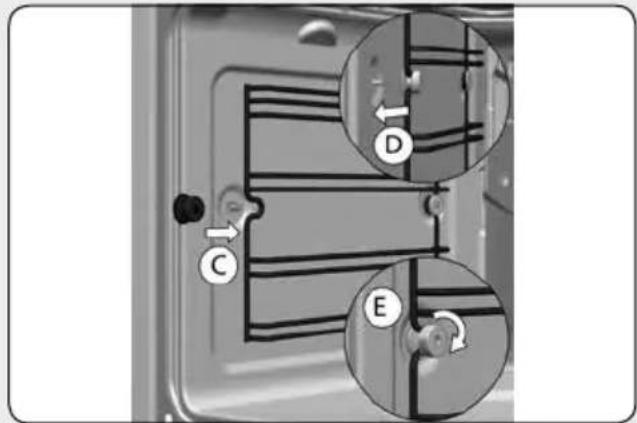
FIG./AFB.20
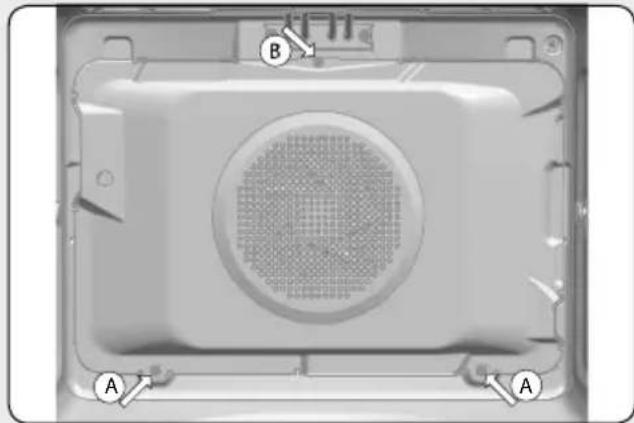
FIG./AFB.21
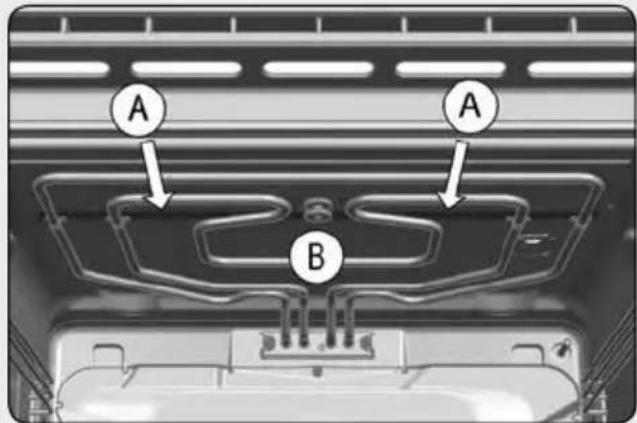
FIG./AFB.22
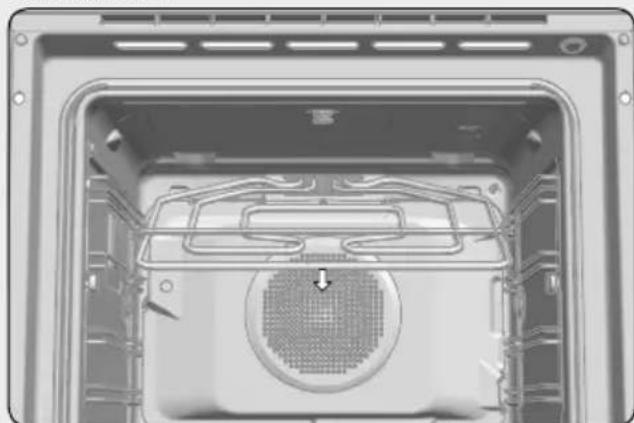
FIG./AFB.23
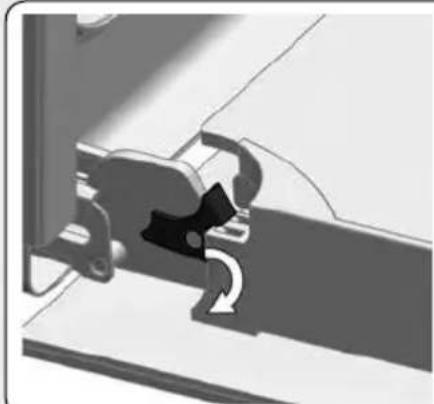
FIG./AFB.24
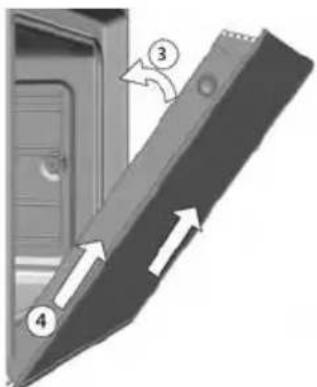
FIG./AFB.25

FIG./AFB.26
Fig./AFb.27
Fig./AFb.28
Fig./AFb.29
Fig./AFb.30
Fig./AFb.31
Fig./AFb.32
Fig./AFb.33
Fig./AFb.34
- The enamel is especially designed to be cleaned with water.
- CAUTION: Do not pour water inside the oven when hot because it may damage the enamel inside.
- Never use anti-limescale products or specific oven cleaning products, or in general, products with a pH above 12.
- Enamel trays should not be placed in the dishwasher. Detergents and salt commonly used in these machines can permanently damage the properties of the enamel.
- The cleaning function is sufficient in most cases provided you follow the instruction manual.
- Make cleaning easier by preventing dirt from building up. Clean the oven frequently.
- If you require a more thorough cleaning process, use neutral detergents and soft non-abrasive sponges.
- Failure to follow these instructions can damage the enamel, causing it to lose its permanent cleaning properties.
CLEANING FREQUENCY:
- Clean after each oven use, following the methods recommended in the product manual. Once cleaned, make sure there are no traces of dirt, if there are, repeat the cleaning process until it is completely clean.
- Not cleaning after every oven use may result in reheated remains of dirt damaging the enamel of the trays and the interior of the cavity, making it lose its non-stick properties and then becoming very difficult to clean, even resulting in stains and permanent damage. This damage, stains and cleaning are not covered by the manufacturer's guarantee.
FR À LIRE ATTENTIVEMENT
- PARA COCINAR CON LAS FUNCIONES TRADICIONALES
- FUNCION SCS (Steam Clean System by PANDO)
- FUNCÉO SCS (Stem Clean System by PANDO)
- PROGRAMAR A FUNCAO SCS
- ATENÇAN
- 7.PROGRAMMATION AVEC MINUTERIE DU FOUR 15
- FUNCTION SCS (Stem Clean System by PANDO) 18
- 7.PROGRAMMATION AVEC MINUTERIE DU FOUR
- OPTIONS DE MINUTERIE
- FUNCTION SCS (Stem Clean System by PANDO)
- 1.DESCRIPTION OF THE OVE
- 2.CONTROL PANEL
- SWITCHING ON AND SETTING THE TIME
- SETTING THE TIME:
- To change the time:
- WARNING
- DESCRIPTION OF THE CONTROL PANEL
- START SCREEN / STANDBY
- SELECTION SCREEN
- FUNCTION SELECTION:
- LEFT SECTION.
- RIGHT SECTION.
- COOKING INFORMATION SCREE
- Selected temperature.
- Cooking time.
- Cooking settings or automatic recipe selection.
- → Finish time.
- TRADITIONAL COOKING FUNCTION
- OVEN FUNCTIONS
- INFORMATION
- COOKING WITH TRADITIONAL FUNCTIONS
- 5.3.AUTOMATIC FAST PREHEATING
- COOKING WITH THE PERSONAL COOKING ASSISTANT (PANDO CHEF)
- COOKING WITH THE PERSONAL COOKING ASSISTANT
- PREHEATING WHILE EMPTY
- TURNING FOOD
- OVEN TIMER SETTINGS
- TIMER OPTIONS
- INFORMACION
- 7.2.PROGRAMMING THE TIMER OPTION
- SAFETY INSTRUCTIONS
- CHILD SAFETY LOCK (CONTROL PANEL LOCK)
- PROGRAMMING THE SCS FUNCTION
- To do this, follow the instructions below:
- 23:59
- IMPORTANT
- DEMO MODE (SPECIAL FUNCTION FOR SHOP FLOORS)
- Activating DEMO mode
- INSTALLATION DIAGRAMS AND DIMENSIONS
- PHT 941
- NOTE
- AFTER-SALES SERVICE AND GUARANTEE:
- TERMS OF THIS WARRANTY:
- PANDO WARRANTY EXEMPTIONS:
- Official Pando Customer Service Contact Details:
- ESPANAPORTUGAL Y ANDORRA: OTROS PAISES:
- Description of the oven functions
- CONVENTIONAL
- CONVENTIONAL WITH FAN
- GRILL AND LOWER ELEMENT
- MAXIGRILL
- GRILL
- GRILL / MAXIGRILL WITH FAN
- LOWER HEAT (FLOOR)
- TURBO + LOWER HEAT (PIZZA)
- TURBO
- SLOW COOKER
- ECO ECO
- DEFROSTING
- MICROWAVE
- MICROWAVE AND COMBINED CNTIONS
- STEAM
- RISING DOUGH
- FAST PREHEATING
- Environmentally-friendly use of the oven
- Conventional Functions
- How a microwave oven works
- Why food heats up
- COOKING WITH MICROWAVES...
- DEFROSTING WITH MICROWAVES
- Steam functions
- Steam Flow
- Residual water in the oven
- Usage and tips
- Type of ovenware
- MICROWAVE FUNCTION
- TEST THE OVENWARE
- COMBINED FUNCTIONS
- METALLIC CONTAINERS AND ALUMINIUM FOIL
- LIDS
- Água residual noorno
- FONCTIONS CONVENTIONNELLES
- Overtollig water in de oven
- aillg ggs
- 4g
- a
- Installation & Maintenance
- Installation and maintenance instructions index
- SAFETYINSTRUCTIONS 29
- INSTALLATION 33
- ENVIRONmENTAL INFOreration 34
- BEFORE FIRST USE 34
- ACCESSIONS 35
- CLEANING AND MAINTENANCE 36
- SAFETY INSTRUCTIONS
- Electrical safety
- Child safety
- Oven use safety
- Safety for cleaning and maintenance
- Safety when using the pyrolytic cleaning cycle
- Before starting the cleaning cycle:
- During the pyrolytic cleaning process:
- FORMATION
- Installation
- BEFORE INSTALLATION
- Column installation.
- Undercounter installation.
- ELECTRICAL CONNECTION
- OVEN INSTALLATION
- Environmental information
- DISPOSAL OF THE ECOLOGICAL PACKAGING
- PRODUCT DISPOSAL
- WABNING
- ENERGY INFORMATION
- before first use
- Other important instructions
- Accessories
- ASSEMBLING THE TELESCOPIC RUNNERS.
- Telescopic runners with folding clip
- Telescopic runners with direct clip
- Cleaning and maintenance
- CLEANING THE OVEN EXTERIOR AND OVEN ACCESSORIES
- CAUTION
- CLEANING THE OVEN INTERIOR
- Dismantling the side supports
- Assembling the supports
- Dismantling the bottom panel
- Then:
- Ovens with a folding grill
- Ovens with the Pyrolytic Self-Cleaning Function
- CLEANING THE OVEN DOOR
- Dismantling/assembling the door with hinge on body
- Dismantling/assembling the door with hinge on door
- Dismantling/assembling the interior glass of the door
- CHANGING THE OVEN LIGHT BULB
- Changing the upper bulb
- Changing the side bulb
- Changing the LED lamp
- Trouble shooting
- The oven stops working
- The inside light does not go on
- The heating pilot light does not turn on
- Oven smoking during use
- The expected cooking results are not achieved
- My accessories and shelf supports are damaged
- The enamel colour has changed or stains have appeared
- The oven is off, the symbol lights up and the door will not open
- The oven is on, the symbol lights up but the door will not open
- I have turned the control dial to position and selected a pyrolysis programme (P1, P2 or P3) but the symbol flashes quickly and a buzzer sounds
- I have turned the control dial to position and selected a pyrolysis programme (P1, P2 or P3) but the symbol does not light up and the oven does not heat up
- The pyrolysis programme has ended and the oven is cold, but the door is locked and symbol l array and 0:00 are flashing
- The control dial is in position 0 and the door is still locked
- Technical specifications
- INSTALLATION DU FOUR
- REEMPLACEMENT DE L'AMPOULE DU FOUR
- MISE EN GARDE
- CLEANING FREQUENCY:
- FR À LIRE ATTENTIVEMENT
Brand : Pando
Model : PHT963
Category : Oven