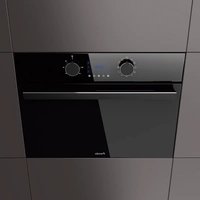
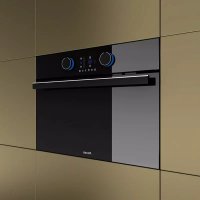
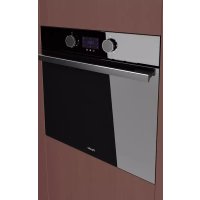
PHC-943 - Oven Pando - Free user manual and instructions
Find the device manual for free PHC-943 Pando in PDF.


| Product type | Combination microwave oven |
| Brand | Pando |
| Model | PHC-943 |
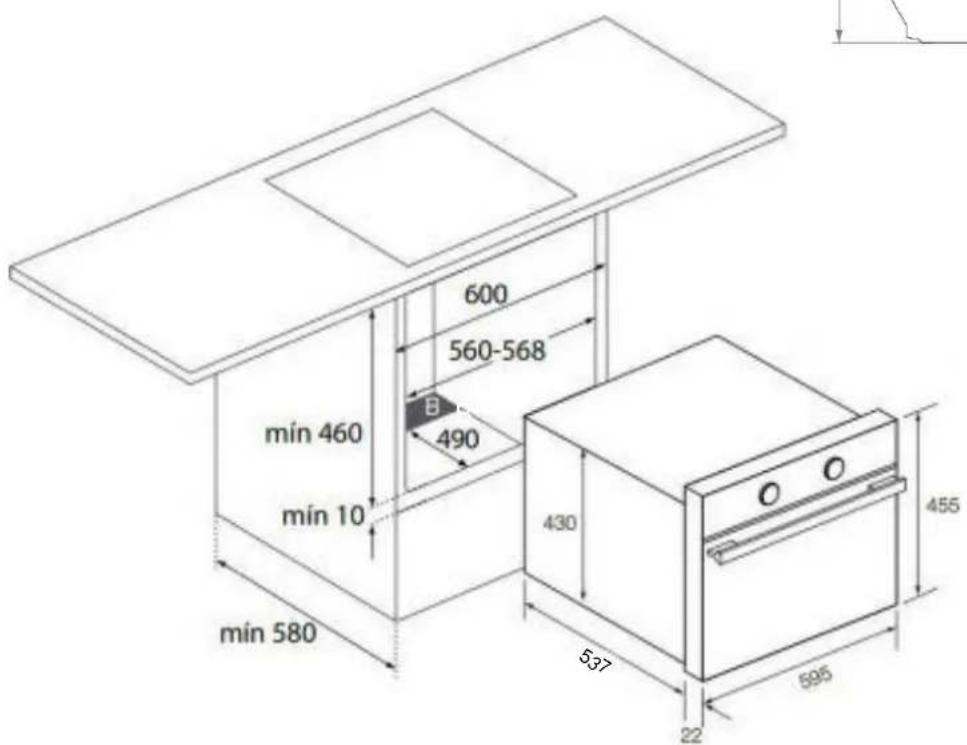
| Built-in dimensions (H x W x D) | 450-460 x 560-568 x 580 mm |
| Product dimensions without front panel (H x W x D) | 430 x 545 x 537 mm |
| Net weight | 33 kg |
| Gross weight (with packaging) | 36 kg |
| Usable volume | 44 L |
| Total interior volume | 45 L |
| Voltage | 220-240 V, 50 Hz |
| Maximum total power | 3200 W (at 230 V) |
| Microwave power | 1000 W |
| Grill + top heat power | 1400 W |
| Lighting power | 25 W (halogen G9) |
| Cooking functions | Traditional cooking, Turbo, Sole, Maxi Grill, Microwave, Microwave + Hot air, Microwave + Grill, Defrost (time/weight), SCS (steam cleaning) |
| Child safety lock | Yes (lockable touch keys) |
| Timer | With programmable automatic stop (duration, end, duration+end) |
| Audible alarm | Yes (independent of cooking) |
| Cleaning function | Steam Clean System (SCS) at 90°C |
| Included accessories | Grid, glass plate, flat tray, tray supports |
| Warranty | 3 years (according to conditions) |
| Provided manuals | FR, EN, ES, PT, DE |
Frequently Asked Questions - PHC-943 Pando
User questions about PHC-943 Pando
0 question about this device. Answer the ones you know or ask your own.
Ask a new question about this device
Download the instructions for your Oven in PDF format for free! Find your manual PHC-943 - Pando and take your electronic device back in hand. On this page are published all the documents necessary for the use of your device. PHC-943 by Pando.
USER MANUAL PHC-943 Pando
natural_image
Interior view of a modern kitchen appliance with digital gauges and a 'Pando' label (no readable text beyond branding)Pando integralcooking
PHC-943
ES - PT - FR - EN - DE
EAC

User manual Guarantee certificate
natural_image
Close-up of a metallic bucket pouring liquid into a white container (no text or symbols visible)
INFORMACIÓN
. FUNÇÃO SCS (Steam Clean System by PANDO)4
natural_image
Close-up of a metallic bucket pouring liquid into a white container (no text or symbols visible)
INFORMAÇÃO
. FUNCTION SCS (Steam Clean System by PANDO)4
natural_image
Close-up of a metallic bucket pouring liquid into a white container (no text or symbols visible)
INFORMATION
First of all we wish to thank you for the trust shown on our Company by purchasing one of our products. We are sure you have made the right choice.
In Pando, not only we offer first quality products, but also we make available a large professional team to serve and assist you on any query you may have regarding installation and/or performance.
We also suggest you to pay a visit to our web site (www.pando.es/en) to get to know us better and where you will find all product range containing all necessary commercial and technical information.
A wide selection of extractor hoods can be found there; Wall Hoods, Ceiling, Island or Canopy Hoods. Four types of installation making possible to adapt ourselves to any type of kitchen based on different needs.
At the same time, we take the opportunity to introduce you our collection of in house essential appliances, such our new high performance Ovens and Microwaves, Induction and Gas Hobs to make real your best recipes. Wine Coolers and Aging Wine Coolers to maintain and keep your wines in best of conditions and built-in Dishwashers with latest technology.
All that under a brand with over 40 year history in the market, making products like a real craftsman, and gathering in them the best of our experience to please all your needs.
We sincerely look forward you to have fun, experience and enjoy with the comfort and capacity of what already became your new kitchen ally.
Many Thanks
The PANDO Team
1. DESCRIPTION OF THE APPLIANCE....5
1.1. Control panel .... 5
1.2. Function selector symbols....6
1.3. Oven functions....6
1.4. Microwaves power levels....6
1.5. Display description....7
1.6. Setting the time....8
1.7. Hiding and un-hiding the clock....8
2. OVEN USE 9
2.1. Oven functions....9
2.2. Oven timer operation ....10
2.3. Microwave 12
3. SAFETY INSTRUCTIONS .... 14
3.1. Safety block for children 14
-
FUNCTION SCS (Steam Clean System by PANDO) 15
-
SHOWROOM MODE 18
-
TECHNICAL SPECIFICATIONS ...... 19
-
INSTALLATION DIAGRAMS AND DIMENSIONS.... 20
-
AFTER-SALES SERVICE AND GUARANTEE.... 21
-
DESCRIPTION OF THE APPLIANCE
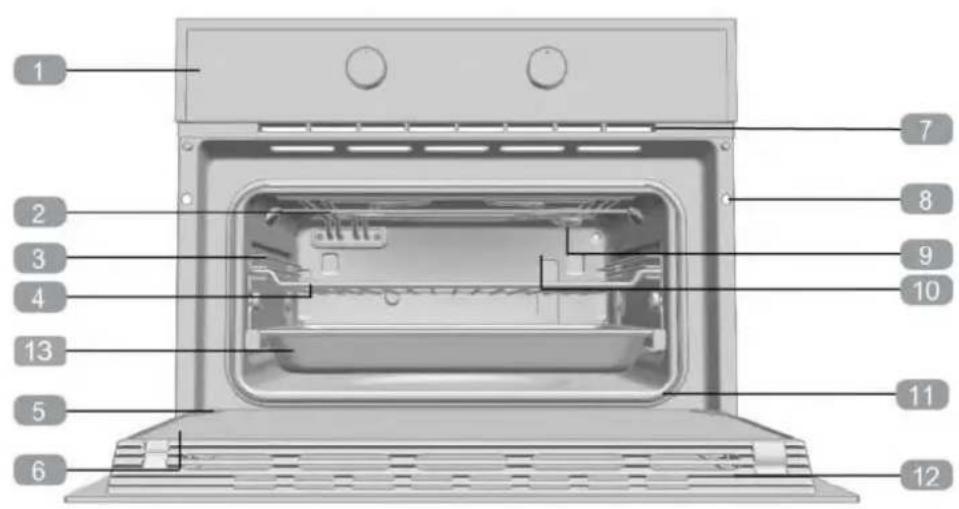
1 Control panel
2 Grill element
3 Tray supports
4 Grid shelf
5 Hinge
6 Inner Glass
7 Air cooling outlet
8 Unit mounting
9 Lamp
10 Back wall panel
11 Oven seal
12 Door
13 Glass tray
1.1. CONTROL PANEL
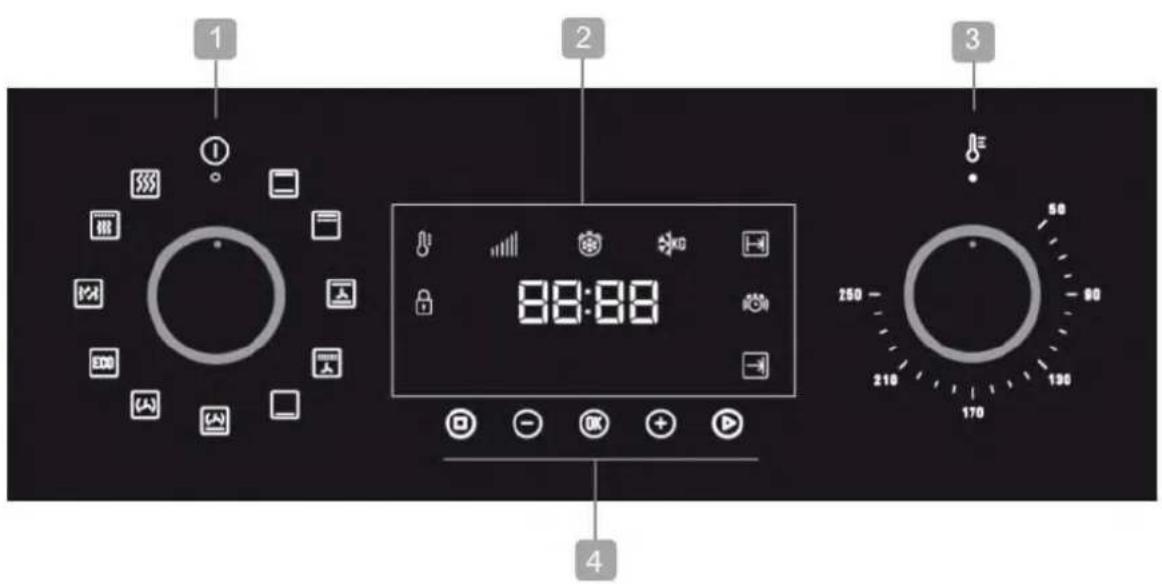
1 Function control dial
2 Display
3 Temperature control dial
4 Touch keys
1.2. FUNCTION SELECTOR SYMBOLS

1.3. OVEN FUNCTIONS
For a description of how to use each of the features, see the cooking guide that comes with your oven.

LOWER ELEMENT

TURBO + LOWER ELEMENT

CONVENTIONAL WITH FAN

MICROWAVE + GRILL

MAXIGRILL WITH FAN

MICROWAVE
| Microwave power output Foods | |
| 200 Slow defrosting for delicate foods; keeping food hot | |
| 400 | Cooking with little heat.Boiling riceRapid defrosting.Heating baby food |
| 600 Heating and cooking food | |
| 800 | Cooking vegetables and food.Cooking and heating carefully.Heating and cooking small portions of food. |
| 1000 Rapidly heating liquids | |
1.5. DISPLAY DESCRIPTION
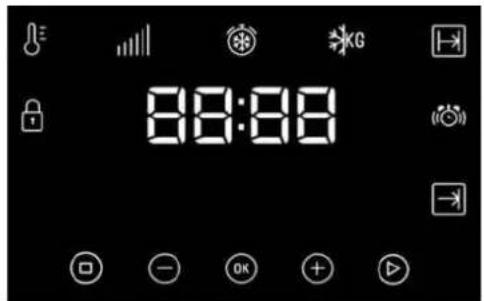
KEYS
OK, - and + : Enable you to program the functions.
☑: Enable you to program the functions.
☐: Enable you to stop the cooking functions.
SYMBOLS

POWER LEVEL
WARNING TIMER: Lights up when the clock/timer is selected. Generates an acoustic signal when the time is up. The oven does not turn off at the end of the timer period. This function can also be used while the oven is cooking.
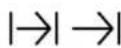
PROGRAMING: Lights up to indicate that the oven is programmed (cooking time, stop time or total).
- |→| Cooking Time: This program allows you to program the cooking time, after which the oven will turn off automatically.
- →| Cooking Stop Time: This setting allows you to program the time for cooking to stop, after which the oven will turn off automatically.
- |→| →|Cooking Time and Cooking Stop Time: This setting allows you to program the cooking time and cooking stop time. The oven switches on automatically at the set time and operates for the selected cooking time (Cooking Time). It then switches off automatically at the indicated time (Cooking Stop Time).

SAFETY BLOCK: Indicates that the touch keys are blocked, preventing modifications by small children.
OTHER FUNCTIONS
HEATING: Indicates that the oven is transmitting heat to the food.

DEFROSTING BY TIME: Lights up while the defrosting by time function is on.

DEFROSTING BY WEIGHT: Lights up while the defrosting by weight function is on.

WARNING
The sensitivity of the touch keys adapts continually to environmental conditions.
Make sure the surface of the control panel is clean and free of obstacles when plugging in the oven.
If the display does not respond correctly when you touch the keys, unplug the oven for a few seconds and then plug it in again. Doing this causes the sensors to adjust automatically so that they will react once more to fingertip control.
1.6. SETTING THE TIME
- When you plug the oven, you will see the clock flashing 12:00.
- Press or to adjust the hours.
- Press to confirm the hours.
- Press or to adjust the minutes.
- Press to confirm the minutes.
- If you wish to modify the time, press ⏻ or Ⓕ until the time starts flashing. Press Ⓞ and follow the instructions in the previous points.

WARNING
In the event of power failure, the clock settings will be erased and 12:00 will flash on the clock display. Reset it and program again.
- If you wish to hide the clock press for 5 seconds.
- If you wish to see the clock on the display again, press for 5 seconds.
PROGRAMING THE BUZZER
- Touch ⏻ or Ⓐ until the ⏻ symbol on the display starts flashing, then press Ⓞ The indication "0_00" will appear on the display.
- Select the time after which you want the alarm to sound by pressing or . You will hear 2 beeps to confirm that the time has been set and the clock will start counting down from the selected time. The symbol will flash slowly.
Warning: This action must be done in no more than 5 seconds.
- Once the time has expired, an acoustic signal will sound 3 beeps spaced at 30-second intervals will sound 90 seconds and the symbol will flash quickly.

NOTE
With the Buzzer function, the oven will not turn off when the time expires.
- Touch any key to stop the alarm. The symbol will then disappear.
If you wish to modify the time on the buzzer, press or until the flash and the hours are not flashing; then press and repeat the steps shown. Upon entering the timer control, the time currently remaining will appear which you will be able to adjust

NOTE
With the Buzzer function, the remaining time will show permanently on the display. With this programmed function, it is not possible to view the time or the total programmed cooking time.

NOTE
When the oven is turned off, the internal fan can continue to run for a few minutes. This is normal.
2. OVEN USE
2.1. OVEN FUNCTIONS
- After setting the clock, the oven is ready for use. Select a cooking function with the function selector dial and temperature with the temperature control dial.

INFORMATION
In models with an electronic temperature control, when the selector switch is turned, the display will show the temperature.
After selecting the temperature, the clock will automatically reappear.
- You will notice that the symbol lights up during cooking to indicate that heat is being transmitted to the food. This symbol disappears when the selected temperature has been reached.
- Set the controls to ① to turn off the oven

INFORMACIÓN
When a cooking cycle begins, the oven will automatically display the total the time for the cycle progress, if the cooking time or cooking stop time have not been set.
PROGRAMING COOKING TIME
- Select a function and a cooking temperature using the oven commands.
- Press ⊖ or ⊕ until the |→|symbol on the display starts flashing, then press Ⓞ. The indication "0_00" will appear on the display.
- Select the time after which you want the alarm to sound by pressing ⏻ o and press to select the option. You will hear 2 beeps to confirm that the time has been set and the clock will start counting down from the selected time. The symbol will flash slowly.
- Once the cooking time is up, the oven will turn off, an alarm will sound and the word END will appear and the symbol will flash. It will thus remain disconnected showing the word END, until the symbol is pressed, turning the oven on again.
- Press ☑ to stop the alarm and turn off the symbol. The oven will switch on again
- Set the controls to ① position to turn off the oven.
You can change the remaining cooking time at any time by touching or until the symbol starts to flash quickly. Press OK to change the time. Then continue with the process indicated in point 3.
PROGRAMING THE COOKING STOP TIME
- Select a cooking function and a temperature.
- Press or until the symbol on the display starts flashing, then press . The current time will appear on the display.
- Select the time after which you want the alarm to sound by pressing ⏻ or Ⓕ and press ⓄK to confirm. You will hear 2 beeps to confirm that the time has been set and the selected cooking stop time appears on the display. The → symbol will flash slowly.
- When the cycle is finished, the oven will turn itself off, an alarm will sound and the symbol will flash quickly.
6 Press ▶ to stop the alarm and turn off the →|symbol. The oven will switch on again. - Set the controls to ⏻ position to turn off the oven.
You can change the remaining cooking time at any time by touching or until the I symbol starts to flash quickly. Press OK to change the time.
PROGRAMING THE COOKING TIME AND COOKING STOP TIME
- Select a cooking function and a temperature.
- Press ⊖ or ⊕ until the |→| symbol on the display starts flashing, then press Ⓞ. The indication "0_00" will appear on the display.
- Select the cooking time by touching ⊙ or ⊕ and press ⏻. You will hear 2 beeps, the remaining time will appear on the display and the |→ symbol will flash.
- Press to select the option
- Press ⊖ or ⊕ until the →|symbol on the display starts flashing, then press Ⓞ The indication "0_00" will appear on the display..
- Select the cooking end time by pressing or . and press to select the option.
- The oven will remain disconnected with the and symbols lit up. The oven is now programmed.
- When it is time to start cooking, the oven will turn on and will operate for the programmed time.
- While cooking, the remaining cooking time will be displayed and the symbol will flash.
- When the cooking time is up, the oven will turn off, a buzzer will sound, and the || symbol will flash.
- Press any key to stop the buzzer and turn off the symbol. The oven will switch on again.
- Set the controls to position Ⓐ to turn off the oven.
You can change the remaining cooking time at any time by touching or until the symbol starts to flash quickly. Press to change the time.
2.3. MICROWAVE
- Select the microwave function.
- The display shows 00:30 (Quick start function) by default. Press ⊖ or ⊕ until the display shows 1:00.
- Press ☑ to confirm.
- The display shows the default cooking time. Select the desired cooking time by pressing ⊖ or ⊕.
- Press to confirm.
- The display shows the default Power setting. Select the desired power setting by pressing ⊖ or ⊕.
- Press to confirm.
- Press ☑ to start the microwave function with the desired parameters.
QUICK START
- Select the microwave function.
- Press ▶ and the microwave starts immediately to operate in the Microwave function at maximum power for 30 seconds.
- If you want to increase the operating time press ▶ again. Each time you press this key the operating time will be increased by 30 seconds.
DEFROST BY TIME
- Select the microwave function.
- Press or until the symbol appears on the display.
- Press ☐ to select the option.
- The display shows the default defrost time. Select the desired cooking time by pressing ☑ or ⊕.
- Press ☑ to start the defrost by time function with the desired parameters.

NOTE
See Cooking Guide for advice on defrosting times.

INFORMATION
When the display shows the word "Turn", open the door, turn the food and press to continue.
DEFROST BY WEIGHT
- Select the microwave function.
- Press or until the symbol appears on the display
- Press ☐ to select the option.
- The display shows "F01" blinking as default. Select the desired defrost option by pressing ⊖ or ⊕.
- Press ☐ to confirm.
- The display shows default weight blinking. Select the desired weight by pressing ⏻ or Ⓕ. Press Ⓞ to confirm
- Press to start the defrost by weight function with the desired parameters.
The following table shows the defrosting by weight function programs, indicating weight intervals, and defrosting and standing times (in order to ensure the food is of a uniform temperature):
| Prog. | Food Weight (kg) | Time (min) | Standing time (min) | |
| F01 | MEAT | 0.10 – 2.00 2:10 – 43 20 – 30 | ||
| F02 | POULTRY | 0.10 – 2.50 2:20 – 58 20 – 30 | ||
| F03 | FISH | 0.10 – 2.00 2 – 40 20 – 30 | ||
| F04 | FRUIT | 0.10 – 0.50 2:36 – 13 10 – 20 | ||
| F05 | BREAD | 0.10 – 0.80 2:25 – 19 10 – 20 | ||

INFORMATION
When the display shows the word "Turn", open the door, turn the food and press ▶ to continue.
COMBINED FUNCTIONS
- Select a microwave + conventional oven function with the function selector.
- The display shows the default cooking time.
- Press to confirm.
- Select the desired cooking time by pressing ☐ or . +
- Press OK to confirm.
- The display shows the default Power setting. Select the desired power setting by pressing ⊖ or ⊕.
- Press to confirm.
- Press ☑ to start the function with the desired parameters.

NOTE
The temperature can be changed anytime rotating the temperature control dial.
3. SAFETY INSTRUCTIONS
3.1. SAFETY BLOCK FOR CHILDREN
This function can be selected at any time while using the oven.
To activate the function, press OK for a few seconds until you hear a beep and the symbol appears on the display. The oven is locked.
If the oven is off and you activate the safety block function, the oven will not work even if a cooking function is selected.
If this function is activated while you are cooking, it will only lock the display and keys
To deactivate the safety block function, press OK for a few seconds until you hear a beep
4. FUNCTION SCS (Steam Clean System by PANDO)
This function makes it easy to remove grease and other food debris that may have stuck to the sides of the oven.
For easier cleaning, do not allow dirt to accumulate. Clean the oven frequently.
PROGRAMMING THE SCS FUNCTION

WARNING
Do not pour water into a hot oven as this can damage the enamel of the oven.
Always run the cycle on a cold oven. The result could be affected and the varnish damaged if it is run when the oven is too hot.
First remove the trays and all accessories from the oven interior, including the tray supports and telescopic guide rails.
To do this, follow the instructions in the installation and maintenance guide accompanying the oven.
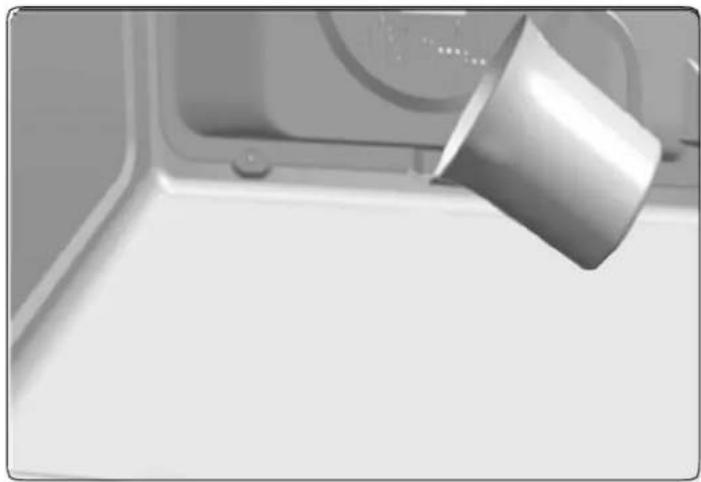
- Gently pour 200 ml of water into the bottom of the oven cavity.
natural_image
Close-up of a metallic cylindrical object hanging from a window, no visible text or symbols
INFORMATION
For best results, add a teaspoon of mild washing up detergent to the glass of water.
- Turn Turn the control dial to position ☐
- Set the temperature to 90^ C.
- Program a duration of 4 minutes on the timer.
- After 4 minutes, an alarm will sound and the oven will stop heating.
① - Turn the control dial to position。
- Wait for about 20 minutes for the interior of the oven to cool.

IMPORTANT
Do not open the oven door until the SCS function is complete. The cooling cycle is necessary for the function to work properly.
- Any traces of dirt and excess water can now be removed from the oven with the damp cloth.
The SCS function takes place at a low temperature. However, cooling times can vary depending on the room temperature.

WARNING
Before touching the inside surface of the oven, make sure that it has cooled properly.
If a deeper clean is required after using the SCS function, use neutral detergents and non-abrasive sponges.

READ CAREFULLY
- The enamel is especially designed to be cleaned with water.
- CAUTION: Do not pour water inside the oven when hot because it may damage the enamel inside.
- Never use anti-limescale products or specific oven cleaning products, or in general, products with a pH above 12.
- Enamel trays should not be placed in the dishwasher. Detergents and salt commonly used in these machines can permanently damage the properties of the enamel.
• The cleaning function is sufficient in most cases provided you follow the instruction manual.
- Make cleaning easier by preventing dirt from building up. Clean the oven frequently.
- If you require a more thorough cleaning process, use neutral detergents and soft non-abrasive sponges.
- Failure to follow these instructions can damage the enamel, causing it to lose its permanent cleaning properties.
CLEANING FREQUENCY:
- Clean after each oven use, following the methods recommended in the product manual. Once cleaned, make sure there are no traces of dirt, if there are, repeat the cleaning process until it is completely clean.
- Not cleaning after every oven use may result in reheated remains of dirt damaging the enamel of the trays and the interior of the cavity, making it lose its non-stick properties and then becoming very difficult to clean, even resulting in stains and permanent damage. This damage, stains and cleaning are not covered by the manufacturer's guarantee.
5. SHOWROOM MODE
The showroom mode is used in showrooms, to show the clients how the oven works as described in every function, but there's no activation of the heating loads.
To activate / deactivate the showroom mode, it is necessary to configure the clock.
To activate the showroom mode press and . OK The word "Sho" appears on the display with two confirmation beeps.
To deactivate the function press and again. Two beeps are heard and the word "Sho" disappears from the display. The oven is operational again.

NOTE
In Showroom mode, the word "Sho" will appear on the display every minute for 3 seconds.
- TECHNICAL SPECIFICATIONS
| INSTALLATION | PHC-943 |
| Voltage (V) | 220-240 |
| Frequency (Hz) | 50 |
| Connecting Wire (m) | 1,1 m |
| Built-in Dimensions(High x Wide x Bottom) (mm) | 450-460 x 560-568 x 580 |
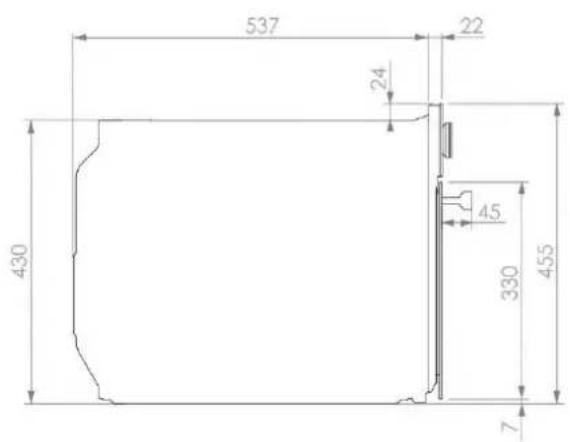
| Product Dimensions without front panel(High x Wide x Bottom) (mm) | 430x545x537 |
| LOGISTIC / PACKING INFORMATION | |
| Net Weight (Kg) | 33 |
| Gross Weight (Oven+Pack.) (Kg) | 36 |
| Packaging Size (High x Wide x Bottom) (mm) | 510x635x655 |
| ACCESSORIES | |
| Instruction Book - Languages (5) | ES/PT/UK/FR/GE |
| Reinforced Grid | 1 |
| FEATURES | |
| Net Cavity Volume (1) (L) | 44 |
| Overall Cavity Volume (1) (L) | 45 |
| ELECTRICAL POWER DATA | |
| Grill + Maxigrill | 1400 W |
| MWO POWER | 1000 W |
| Light Power Lamp | 25 W |
| LIGHT | |
| INSIDE LIGHT | HALOGEN G9 |
| MAXIMUN POWER FUNCTION | |
| Maximun Nominal Power (230 V) | 3200 W |
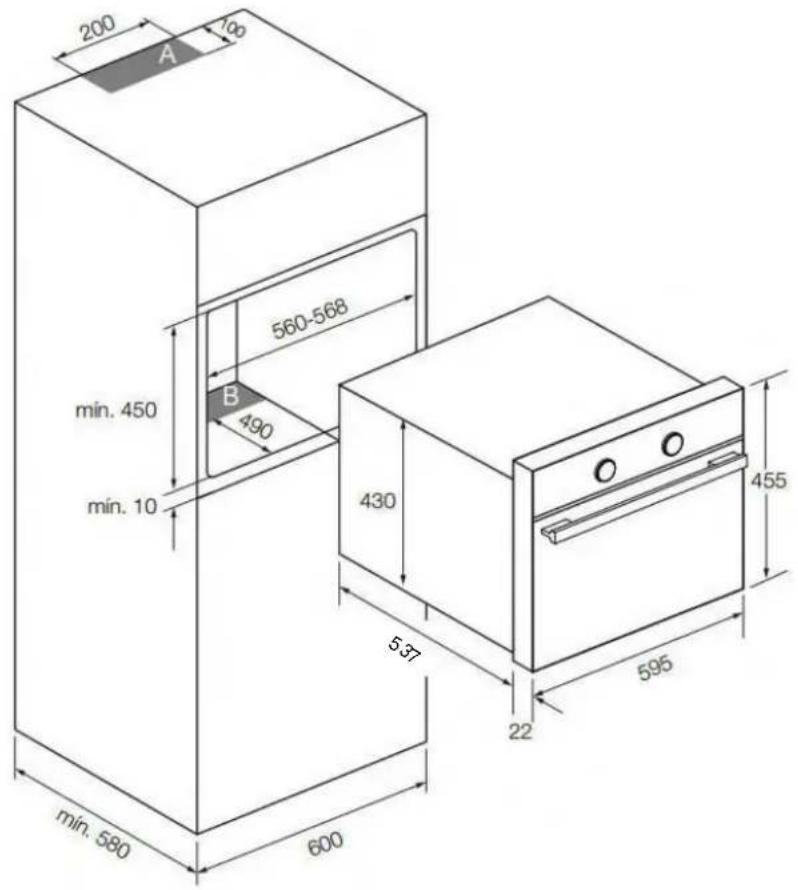
7. INSTALLATION DIAGRAMS AND DIMENSIONS
PHC 943
BUILT IN DIAGRAM
BUILT UNDER DIAGRAM
NOTE
Respect the ventilation holes in the cabinet, see installation drawings (200X100mm in zone A and 560x90mm in zone B). If these vents are not available, the productnot work properly and may suffer damage that would NOT be covered by the warranty.
8. AFTER-SALES SERVICE AND GUARANTEE
INOXPAN S.L., thank you for choosing our brand and for trusting a Pando product, standard of Quality, Design & Innovation, a brand honouring his origins and commitments.
TERMS OF THIS WARRANTY:
This product comes with a warranty of 3 year as from the date of purchase covering all product defect affecting its performance. To validate the same is mandatory to apply the purchasing invoice or buying ticket before the official Customer Service engineer.
During the above mentioned period, the Company pledge to repair or replace at no cost any defective part whose cause is due to vice or manufacturing product flaw to make it work fine again, as well as the necessary labour cost and expenses involved in said repairing or replacement.
PANDO WARRANTY EXEMPTIONS:
It shall not be covered by the warranty or may be cause of cancelation of such, any of the following case scenarios, thus being the user the one taking charge of any material cost, labour and customer service travel expenses:
- Installation or performing reviews, cleaning or maintenance.
- If the installation of the device has not been carried out by Authorized Specialist Professional personnel or Pando Official Technical Service personnel, who meet the requirements of the safety standards and electrical power regulations.
- Whenever the product is orientated to commercial or non-residential use, to which it is not made for.
- Product malfunction caused by not following the instructions, recommendations and/or norms shown in the appliance manuals.
- Malfunctions or problems caused by an inadequate installation, or by not having the necessary free spaces in the furniture and indicated in the installation manual, for adequate ventilation of the product.
- Issues and faults produced by carriage or moves, and/or product handling by non-authorised personnel to this company or the brand Pando.
- Bumps, dents, scratches, or broken glasses
- Other alien bodies present in the interior or exterior of the product
- That the technician does not have easy access to the product, because there are elements that prevent its easy and safe access. All necessary means to access by the Pando authorised engineer shall be on account and responsibility of the user.
- Wiring inadequate handling of external electric cable.
- Wear and tear aesthetical parts, such as light screens, lamps, trays, grills, guides.
- Rust, burns, stains or colour changes in the body, door, accessories or interior cavity caused by improper maintenance or use, or by improper application or unprotected exposure to corrosive elements such as cleaning products not recommended by the manufacturer and inappropriate.
- Issues or malfunction produced by variations of main supply, or natural and random causes from weather or geological origin, as storms, lightning, earthquakes, floods, etc.
- Products whose origin is resale, used appliance, or displays with more than two years since their date of manufacturing.
INOXPAN, S.L., Remains expressly excluded from any liability over any eventual damage any direct or indirect to persons or materials produced by inadequate product handling and use.
Official Pando Customer Service Contact Details:
ESPAÑA, PORTUGAL Y ANDORRA:
ES
https://www.pando.es/en/after-sales-services/
FR
1.3. BACKOFENFUNKTIONEN
. SCS FUNKTION (Steam Clean System by PANDO)4
natural_image
Close-up of a metallic bucket pouring liquid into a white container (no text or symbols visible)
HINWEIS
SERVICIO POST VENTA España, Portugal y Andorra
EAC
Environmental Management System Certification
UNE-EN ISO 14001:2015
ES20/208675


- Pando integralcooking
- PHC-943
- INFORMACIÓN
- FUNÇÃO SCS (Steam Clean System by PANDO)4
- INFORMAÇÃO
- FUNCTION SCS (Steam Clean System by PANDO)4
- INFORMATION
- DESCRIPTION OF THE APPLIANCE....5
- OVEN USE 9
- SAFETY INSTRUCTIONS .... 14
- FUNCTION SELECTOR SYMBOLS
- OVEN FUNCTIONS
- DISPLAY DESCRIPTION
- KEYS
- SYMBOLS
- POWER LEVEL
- OTHER FUNCTIONS
- WARNING
- SETTING THE TIME
- PROGRAMING THE BUZZER
- NOTE
- OVEN USE
- OVEN FUNCTIONS
- PROGRAMING COOKING TIME
- PROGRAMING THE COOKING STOP TIME
- PROGRAMING THE COOKING TIME AND COOKING STOP TIME
- MICROWAVE
- QUICK START
- DEFROST BY TIME
- DEFROST BY WEIGHT
- COMBINED FUNCTIONS
- SAFETY INSTRUCTIONS
- SAFETY BLOCK FOR CHILDREN
- FUNCTION SCS (Steam Clean System by PANDO)
- PROGRAMMING THE SCS FUNCTION
- IMPORTANT
- READ CAREFULLY
- CLEANING FREQUENCY:
- SHOWROOM MODE
- INSTALLATION DIAGRAMS AND DIMENSIONS
- AFTER-SALES SERVICE AND GUARANTEE
- TERMS OF THIS WARRANTY:
- PANDO WARRANTY EXEMPTIONS:
- Official Pando Customer Service Contact Details:
- BACKOFENFUNKTIONEN
- SCS FUNKTION (Steam Clean System by PANDO)4
- HINWEIS
Brand : Pando
Model : PHC-943
Category : Oven