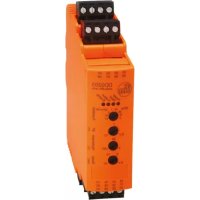
DD0203 - Detector IFM - Free user manual and instructions
Find the device manual for free DD0203 IFM in PDF.


| Product type | Speed controller (pulse evaluator) |
| Brand | IFM |
| Model | DD0203 |
| Dimensions (L x H x D) | 35.5 x 116 x 93 mm (approx.) |
| Weight | Approx. 150 g (estimate) |
| AC supply | 110...240 V AC, 50...60 Hz, max. 6 W |
| Alternative DC supply | 24 V DC (typ.), tolerance -20/+10 %, max. 4 W |
| Sensor supply | 18.5...30 V DC SELV, ≤ 100 mA |
| Pulse input type | PNP (type 2 according to IEC 61131-2), max. frequency 5000 Hz |
| Relay output | Switching capacity 4 A (resistive load 240 V AC or 24 V DC), reinforced insulation |
| Transistor output | Voltage 10...30 V DC SELV, current ≤ 100 mA |
| SP threshold setting range | 0.1...10 Hz or 10...1000 Hz (depending on model) |
| Hysteresis | 1...100 %, adjustable |
| Start-up delay | 0.1...15 s, adjustable |
| Switching functions | I (min. speed), II (under-speed), III (speed reached), IV (over-speed) |
| Protection | IP 20 (housing and terminals) |
| Ambient temperature | -25...+60 °C |
| Storage temperature | -25...+70 °C |
| Max. relative humidity | 80 % (31 °C), linear decrease to 50 % (40 °C), non-condensing |
| Max. operating altitude | 2000 m above sea level |
| Connection | 4-pole terminal blocks pitch 5.0 mm, screw connector supplied (Phoenix Contact) |
| Mounting | DIN rail 35 mm |
| Maintenance | Maintenance-free; clean housing with a soft, dry cloth after switching off |
| Repairability | Repair only by manufacturer; unauthorized interventions void warranty |
| Safety | SELV, installation in enclosure IP 54 min.; not approved for personnel protection |
Frequently Asked Questions - DD0203 IFM
User questions about DD0203 IFM
0 question about this device. Answer the ones you know or ask your own.
Ask a new question about this device
Download the instructions for your Detector in PDF format for free! Find your manual DD0203 - IFM and take your electronic device back in hand. On this page are published all the documents necessary for the use of your device. DD0203 by IFM.
USER MANUAL DD0203 IFM
Operating instructions
Speed monitors
DD0203
DD0296
Contents
1 Preliminary note.... 3
1.1 Symbols used.... 3
1.2 Warnings.... 3
1.3 Safety symbol on the device 3
2 Safety instructions 4
2.1 Cybersecurity.... 4
3 Transport, handling and storage 5
4 Intended use 6
5 Installation.... 7
5.1 Removing the unit 8
5.2 Installation of the sensors 8
6 Electrical connection 9
6.1 Overview 9
6.2 General wiring information.... 9
6.3 Notes on wiring 10
6.4 Pluggable cage clamps 10
6.5 Voltage supply (power).... 11
6.5.1 AC voltage supply 11
6.5.2 DC voltage supply 11
6.5.3 External DC power supply for inputs and transistor output.... 11
6.6 Inputs.... 12
6.6.1 Connection of the sensor 12
6.6.2 Enable input.... 12
6.7 Outputs.... 12
6.7.1 Relay output.... 12
6.7.2 Transistor output 13
7 Operating and display elements.... 14
7.1 Potentiometer.... 14
7.2 LEDs 14
8 Settings.... 16
8.1 Frequency range and switching function.... 16
8.1.1 Frequency range (SPx1/SPx100) 16
8.1.2 Switching function I... IV 16
8.2 Switch point (SP).... 17
8.3 Hysteresis 17
8.4 Start-up delay.... 17
8.5 Switching diagram.... 18
8.5.1 With start-up delay and coupled voltage supplies 18
8.5.2 With start-up delay and Enable signal coupled to the motor 19
9 Troubleshooting.... 20
10 Maintenance, repair and disposal 21
10.1 Maintenance 21
10.2 Cleaning the housing surface 21
10.3 Repair 21
10.4 Disposal 21
1 Preliminary note
You will find instructions, technical data, approvals and further information using the QR code on the unit / packaging or at documentation.ifm.com.
1.1 Symbols used
Requirement
Instruction
Reaction, result
bold Designation of keys, buttons or indications
→ Cross-reference without link
→ Cross-reference with link


Important note
Non-compliance may result in malfunction or interference
Information
Supplementary note
1.2 Warnings
Warnings indicate the possibility of personal injury and damage to property. This enables safe product handling. Warnings are graded as follows:

WARNING
Warning of serious personal injury
▷ If the warning is not observed, fatal and serious injuries are possible.

CAUTION
Warning of minor to moderate personal injury
▷ If the warning is not observed, minor to moderate injuries are possible.

ATTENTION
Warning of damage to property
▷ If the warning is not observed, damage to property is possible.
1.3 Safety symbol on the device

Safety symbol on the device:
▶ Adhere to the operating instructions for the safe operation of the unit.
2 Safety instructions
- The unit described is a subcomponent for integration into a system.
- The system architect is responsible for the safety of the system.
-
The system architect undertakes to perform a risk assessment and to create documentation in accordance with legal and normative requirements to be provided to the operator and user of the system. This documentation must contain all necessary information and safety instructions for the operator, the user and, if applicable, for any service personnel authorised by the architect of the system.
-
Read this document before setting up the product and keep it during the entire service life.
- The product must be suitable for the corresponding applications and environmental conditions without any restrictions.
- Only use the product for its intended purpose (→ Intended use).
- If the operating instructions or the technical data are not adhered to, personal injury and/or damage to property may occur.
- The manufacturer assumes no liability or warranty for any consequences caused by tampering with the product or incorrect use by the operator.
- Installation, electrical connection, set-up, programming, configuration, operation and maintenance of the product must be carried out by personnel qualified and authorised for the respective activity.
- Protect units and cables against damage.
- Replace damaged units, otherwise the technical data and safety will be impaired.
- Observe applicable documents.
2.1 Cybersecurity
Installation
The device is suitable for operation in a secure environment according to IEC 62443-1-1.
▶ Carry out a risk assessment of the system according to IEC 62443-1-1.
▶ Take measures to ensure physical security. The device has no built-in protection against unauthorised access.
3 Transport, handling and storage
▶ Store the device in its original packaging.
▶ When the device is to be stored again, use the original packaging or pack the device in suitable packaging.
▶ Observe the permissible ambient conditions for the device during storage (→ Technical data).

WARNING
Storage without sufficient protection for pollution degree 2
▷ Risk of electric shock when connecting the device
▶ Store the device in its original packaging.
▶ Otherwise, ensure pollution degree 2 for the device during storage.
4 Intended use
This document applies to the devices DD0203 and DD0296. The devices differ in the setting range of the switch point SP [Hz] (see Switch point (SP) 17).
• DD0203: 0.1...1000 Hz
• DD0296: 0.2...2000 Hz
The device is a pulse evaluation system for monitoring rotating, linear, vibrating or oscillating movements.
Can be used in the control cabinet in an industrial environment (indoors) as a permanently installed device with supply from SELV or AC voltage according to the technical data.
The device receives the pulses from external sensors, measures the pulse interval and calculates the input frequency. This value is compared with the set switch points. The outputs are switched in accordance with the set parameters.
The output (relay) is used for direct control of contactors, smaller drives, valves, etc.
Operation by trained, authorised specialist personnel due to protection rating IP20.

The device is not suited for environments with particular requirements on mechanical stability (e.g. shock/vibration).
▶ Observe the operating conditions (→ Technical data at www.ifm.com).

Fig. 1: Example: speed monitoring of a drive shaft on a conveyor belt
1: Conveyor belt
3: DD0203 / DD0296
5: Transistor output
2: Pulse pick-up on the drive shaft
4: Relay output
6: Signals depending on the selected switching function
5 Installation
▶ Disconnect power.
To ensure correct operation, install the device in a housing that can only be opened using a tool or in a locked control cabinet (both protection rating IP 54 or higher) as an enclosure in accordance with EN61010-1.

Always comply with pollution degree 2 for the device.
▶ Install the device vertically on a 35 mm DIN rail.


Leave enough space ( ≥ 50 mm) between the device and the top and bottom of the control cabinet to enable air circulation and to avoid excessive heating.

ATTENTION
If units are mounted side by side, inadmissible heating may occur between the units.
▷ Malfunction / damage is possible.
▶ Take into account the internal heating of all devices when mounting different devices side by side and observe the environmental conditions for each device.
5.1 Removing the unit

5.2 Installation of the sensors
▶ Follow the manufacturer's installation instructions.
6 Electrical connection
6.1 Overview

Fig. 2: Wiring

Fig. 3: Terminal overview

All GND connections are internally connected with each other.

The terminals 1 and 2 are internally interconnected. The terminals 3 and 4 are internally interconnected. The terminals 21 and 22 are internally interconnected. The terminals 23 and 24 are internally interconnected.
6.2 General wiring information

The unit must be connected by a qualified electrician.
▶ Observe the national and international regulations for the installation of electrical equipment.

WARNING
Use of unconnected terminals
▷ Electric shock possible.
▶ Do not use unconnected terminals (n.c.) which are not shown in the drawing as support point terminals.
▷ Protection guaranteed.
Accessible surfaces of the device are insulated from the circuits with basic insulation according to IEC 61010-1 (mains circuit of overvoltage category II up to 300 V nominal mains voltage).
This does not apply to connection areas and cooling openings (IP20).
The AC voltage supply and relay circuit are insulated from the DC voltage supply and from each other with reinforced insulation according to IEC 61010-1 (mains circuit of overvoltage category II up to 300 V nominal mains voltage).
The external wiring has to be carried out in a way that ensures the required separation from other circuits.
6.3 Notes on wiring
Maximum length of the connection cables:
• 30 m at each terminal

It is recommended to lay all cables in the control cabinet in cable ducts.
Alternatively:
Provide all outgoing cables with suitable strain relief after a maximum of 400 mm. Observe the minimum bending radius of the cables (information from the cable manufacturer).
6.4 Pluggable cage clamps

ATTENTION
No IP 20 protection without connector.
▶ Cover unused connectors with terminals.
▷ Observe IP 20.

Stripping length for the supplied cage clamps: 9-10 mm
Connections that may carry mains voltage are colour-coded red on the pluggable cage clamps. This prevents them from being accidentally plugged on the SELV terminals.
Network terminals:
- AC supply (21...24)
- Out relay (17...20)
SELV terminals:
- DC supply (1...4)
- In/Enable (5...8)
• Out transistor (13...16)

WARNING
Use of non-coded cage clamps for AC supply (21...24) and out relay (17...20)
▷ Cage clamps carrying mains voltage may be accidentally plugged onto SELV-terminals of the device.
▷ Electric shock possible.
▶ Only use the supplied coded cage clamps for network terminals.
▷ Protection guaranteed.
6.5 Voltage supply (power)
▶ Voltage supply see type label.
▶ Connect the device only to one of the possible voltage connections, either to terminals 21-22 and 23-24 (AC) or to terminals 1-2 and 3-4 (24 V DC).
▶ Lay all supply and signal cables separately. Use a screened cable if required in the application.
6.5.1 AC voltage supply
The device features an internal power supply that powers both the device and the connected sensors. There are two terminals each for L and N. The 2. terminal can be used to supply other devices with AC voltage. These terminals are bridged in the device, so unplugging will interrupt the supply to other devices.

The maximum current rating of the bridged terminals 21-22, 23-24 is 8 A.

WARNING
No internal protection of the bridged terminals 21-22, 23-24
▷ Risk of fire / electric shock due to overload / short circuit
▶ The system architect must provide external protection/limitation to 8 A in accordance with the applicable regulations
▷ Protection guaranteed
If the device is operated on an AC supply, the extra-low voltage provided for the sensor supply meets the SELV criteria according to IEC 61010-2-201.
6.5.2 DC voltage supply
▶ Comply with the SELV criteria for a DC power supply.
▶ The DC supply cable + (terminals 1/2) must be protected externally with a 315 mA time-lag fuse (5 x 20 mm or similar).
▶ The supply of the subsequent devices is not intended.
The DC supply terminals are directly connected to the sensor supply terminals.
6.5.3 External DC power supply for inputs and transistor output
The inputs and the transistor output can optionally be operated via an external +24 V DC power supply.

WARNING
No internal protection of inputs and transistor output
▷ Potential fire hazard
▶ The system architect must provide external protection/limitation to 315 mA in accordance with the applicable regulations
A common fuse for inputs and outputs is permitted.
▷ Protection guaranteed
▶ Connect the reference point (GND) of the external power supply with terminal 15 or 3/4 of the device. Otherwise no switching operation is possible.
▶ The SELV criteria must be observed for external voltage supply.
6.6 Inputs
6.6.1 Connection of the sensor
3-wire DC PNP

2-wire DC quadronorm

2-wire AC/DC

2-wire AC/DC

BN: brown
BU: blue
BK: black
WH: white

The connection of mechanical switch contacts is not recommended since they tend to bounce and produce faulty pulses.
The terminals 5 and 7 can be used for the sensor supply or for the enable input.
6.6.2 Enable input
Using the enable input (terminal 8) the start-up delay can be started.
▶ The internal +24 V DC voltage (terminal 5) or an external +24 V DC voltage is connected to terminal 8 via a closing contact.

When the contact is open (+24 V DC no longer applied) and the set start-up delay has elapsed monitoring starts.

A +24 V DC continuous signal results in a permanent deactivation of the monitoring.
6.7 Outputs
The relay and transistor output have the same switching status.
6.7.1 Relay output
Relay for general use according to IEC 61010-2-201.

WARNING
No internal protection of the relay output
▷ Risk of fire / electric shock due to overload / short circuit
▶ The system architect must provide external protection/limitation to 6 A in accordance with the applicable regulations
▷ Protection guaranteed
▶ To prevent excessive wear and to comply with the EMC standards, interference suppression of the contacts is required for switching inductive loads.

WARNING
Connection of different AC phase conductors to the AC power supply and relays
▷ Electric shock possible
▶ Connect the same phase conductor to the AC voltage supply and the relay.
▷ Protection guaranteed

If the relay output is used to switch very small currents (e.g. PLC inputs), considerable contact resistance can arise. In this case use the transistor outputs for DC.
6.7.2 Transistor output
The transistor output needs an external +24 V DC supply on terminal 13 (see External DC power supply for inputs and transistor output ➞ 11).

The transistor output is only intended for resistive loads. Do not connect any inductive loads.
7 Operating and display elements

Fig. 4: Example: DD0203 with switch point range 0.1...10 Hz and 10...1000 Hz
1: LEDs
2: Potentiometer
3: Panel for labelling
7.1 Potentiometer
| Potentiometer | Setting |
| Function | Frequency range [SPx1/SPx100](Frequency range (SPx1/SPx100) ➕ 16) |
| Switching function [I... IV](Switching function I... IV ➕ 16) | |
| SP | Switch point [Hz] The adjustable frequency value depends on the potentiometer position Function.(Switch point (SP) ➕ 17) |
| Hysteresis | Hysteresis [%](Hysteresis ➕ 17) |
| Delay | Start-up delay [s](Start-up delay ➕ 17) |
7.2 LEDs
| LED | Colour | State | Description |
| Power | green | On | Voltage supply OK |
| Flashing | Potentiometer Function in invalid setting range (see Frequency range and switching function 16) or short circuit/overload on sensor supply | ||
| Input | yellow | Flashing | Input pulses |
| Output | green | On | Relay energised Transistor switched |
| Enable | yellow | On | Enable input switched (+24 V DC is applied to the Enable input)Start-up delay is active |
Error signals and diagnostics under Troubleshooting ➞ 20
8 Settings
▶ Set the continuously adjustable potentiometers using a suitable screwdriver.
8.1 Frequency range and switching function

Fig. 5: Potentiometer "Function"
□ Valid setting zone
- Invalid setting zone
▶ Make sure that the setting of the potentiometer is within a valid zone.
▷ If the setting is outside a valid zone, [POWER] flashes.
8.1.1 Frequency range (SPx1/SPx100)
SPx1: corresponds to the device label
SPx100: corresponds to the device label x 100
8.1.2 Switching function I IV
| I | Signalled state: minimum rotational speed reached / standstill |
| Relay energises (transistor output switched) when the current value is below the switch point. | |
| If the input frequency increases again, the relay switches back when the current value is above the switch point + hysteresis (SP+HY). The relay is de-energised during the start-up delay and as long as the input frequency is greater than the set switch point. | |
| II | Error signal: underspeed / blocked |
| Relay de-energises (transistor output blocked) when the current value is below the switch point. | |
| If the input frequency increases again, the relay switches back when the current value is above the switch point + hysteresis (SP+HY). The relay is energised during the start-up delay and as long as the input frequency is greater than the set switch point. | |
| III | Signalled state: rotational speed reached |
| Relay energises (transistor output conductive) when the current value is above the switch point. | |
| If the input frequency decreases again, the relay switches back when the current value is below the switch point - hysteresis (SP-HY). The relay is de-energised during the start-up delay and as long as the input frequency is smaller than the set switch point. | |
| V | Error signal: overspeed |
| Relay de-energises (transistor output blocked) when the current value is above the switch point. | |
| If the input frequency decreases again, the relay switches back when the current value is below the switch point - hysteresis (SP-HY). The relay is energised during the start-up delay and as long as the input frequency is smaller than the set switch point. |
Switching function in combination with switch point, hysteresis and start-up delay: Switching diagram 18
8.2 Switch point (SP)
Value at which the output changes its switching status according to the switching function.
Value DD0203: 0.1...10 Hz or 10...1000 Hz (depending on potentiometer position SPx1/SPx100)
Value DD0296: 0.2...20 Hz or 20...2000 Hz (depending on potentiometer position SPx1/SPx100)
8.3 Hysteresis
The hysteresis value determines the difference between the switch-off point and the switch point. If the distance between cams is not the same, different pulse sequence times are measured. They may be alternately above or below the switch point so that the output changes its switching status continuously and rapidly. This behaviour can be prevented by increasing the hysteresis factor.
Value: 1...100 %
8.4 Start-up delay
Enables the suppression of error signals when a plant is started. After power on the start-up delay is active only once.
If the drive is frequently switched on and off, it is advisable to couple the voltage supplies of the drive and the speed monitor. By doing so, the start-up delay is active every time the motor is turned on.
If a coupled connection of the voltage supplies is not possible, use the Enable input: Enable input ➞ 12.
Value: 0.1...15 s
8.5 Switching diagram
8.5.1 With start-up delay and coupled voltage supplies

1: Speed monitor supply voltage (coupled to the motor)
2: Start-up delay
3: Switching functions (see Switching function I... IV 16)
A: Input frequency as an indication of (rotational) speed
B: Time

Relay energised, i.e. switched (transistor output switched)
8.5.2 With start-up delay and Enable signal coupled to the motor

1: Voltage supply speed monitor
2: +24 V DC signal at the Enable input (coupled to the motor)
3: Start-up delay
4: Switching functions (see Switching function I... IV 16)
A: Input frequency as an indication of (rotational) speed
B: Time

Relay energised, i.e. switched (transistor output switched)
9 Troubleshooting
| LED | Error | Troubleshooting | |||
| Power | Input | Output | Enable | ||
| -- | ○ | -- | Rotary switch Function in invalid setting zone | Correct the rotary switch position.(Frequency range and switching function 16) | |
| Short circuit at sensor supply | Remove the short circuit. | ||||
| Overspeed | Check whether the input frequency is outside the permissible frequency range. | ||||
| -- | ● | -- | Short circuit at transistor output | Remove the short circuit. | |
| ○ | -- | ○ | ● | Internal device error | Contact service |
Legend:
○ Off
- On
Flashing
-- any
10 Maintenance, repair and disposal
10.1 Maintenance
The unit is maintenance-free.
10.2 Cleaning the housing surface
▶ Disconnect the device from the voltage supply.
▶ Clean the device from dirt using a soft, chemically untreated and dry micro-fibre cloth.
10.3 Repair
▶ The device must only be repaired by the manufacturer. Observe the safety instructions ( → 2 Safety instructions).
10.4 Disposal
▶ After use, dispose of the unit in an environmentally friendly way in accordance with the applicable national regulations.
- 1 PRELIMINARY NOTE
- 1.1 SYMBOLS USED
- 1.2 WARNINGS
- 1.3 SAFETY SYMBOL ON THE DEVICE
- 2 SAFETY INSTRUCTIONS
- 2.1 CYBERSECURITY
- 3 TRANSPORT, HANDLING AND STORAGE
- 4 INTENDED USE
- 5 INSTALLATION
- 5.1 REMOVING THE UNIT
- 5.2 INSTALLATION OF THE SENSORS
- 6 ELECTRICAL CONNECTION
- 6.1 OVERVIEW
- 6.2 GENERAL WIRING INFORMATION
- 6.3 NOTES ON WIRING
- 6.4 PLUGGABLE CAGE CLAMPS
- 6.5 VOLTAGE SUPPLY (POWER)
- 6.5.1 AC VOLTAGE SUPPLY
- 6.5.2 DC VOLTAGE SUPPLY
- 6.5.3 EXTERNAL DC POWER SUPPLY FOR INPUTS AND TRANSISTOR OUTPUT
- 6.6 INPUTS
- 6.6.1 CONNECTION OF THE SENSOR
- 6.6.2 ENABLE INPUT
- 6.7 OUTPUTS
- 6.7.1 RELAY OUTPUT
- 6.7.2 TRANSISTOR OUTPUT
- 7 OPERATING AND DISPLAY ELEMENTS
- 7.1 POTENTIOMETER
- 7.2 LEDS
- 8 SETTINGS
- 8.1 FREQUENCY RANGE AND SWITCHING FUNCTION
- 8.1.1 FREQUENCY RANGE (SPX1/SPX100)
- 8.1.2 SWITCHING FUNCTION I IV
- 8.2 SWITCH POINT (SP)
- 8.3 HYSTERESIS
- 8.4 START-UP DELAY
- 8.5 SWITCHING DIAGRAM
- 8.5.1 WITH START-UP DELAY AND COUPLED VOLTAGE SUPPLIES
- 8.5.2 WITH START-UP DELAY AND ENABLE SIGNAL COUPLED TO THE MOTOR
- 9 TROUBLESHOOTING
- 10 MAINTENANCE, REPAIR AND DISPOSAL
- 10.1 MAINTENANCE
- 10.2 CLEANING THE HOUSING SURFACE
- 10.3 REPAIR
- 10.4 DISPOSAL
Brand : IFM
Model : DD0203
Category : Detector