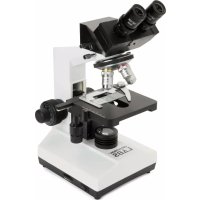
Labs CB2000C - Microscope CELESTRON - Free user manual and instructions
Find the device manual for free Labs CB2000C CELESTRON in PDF.



User questions about Labs CB2000C CELESTRON
0 question about this device. Answer the ones you know or ask your own.
Ask a new question about this device
Download the instructions for your Microscope in PDF format for free! Find your manual Labs CB2000C - CELESTRON and take your electronic device back in hand. On this page are published all the documents necessary for the use of your device. Labs CB2000C by CELESTRON.
USER MANUAL Labs CB2000C CELESTRON
Congratulations on your Celestron Labs microscope purchase. Your new Celestron Labs microscope is a precision optical instrument, made of the highest quality materials to ensure durability and long life. It is designed to give you a lifetime of enjoyment with minimal maintenance.
This CB2000C microscope provides powers from 40x up to 2000x. It is ideally suited for examining specimen slides of yeasts and molds, cultures, plant and animal parts, fibers, bacteria, and more.
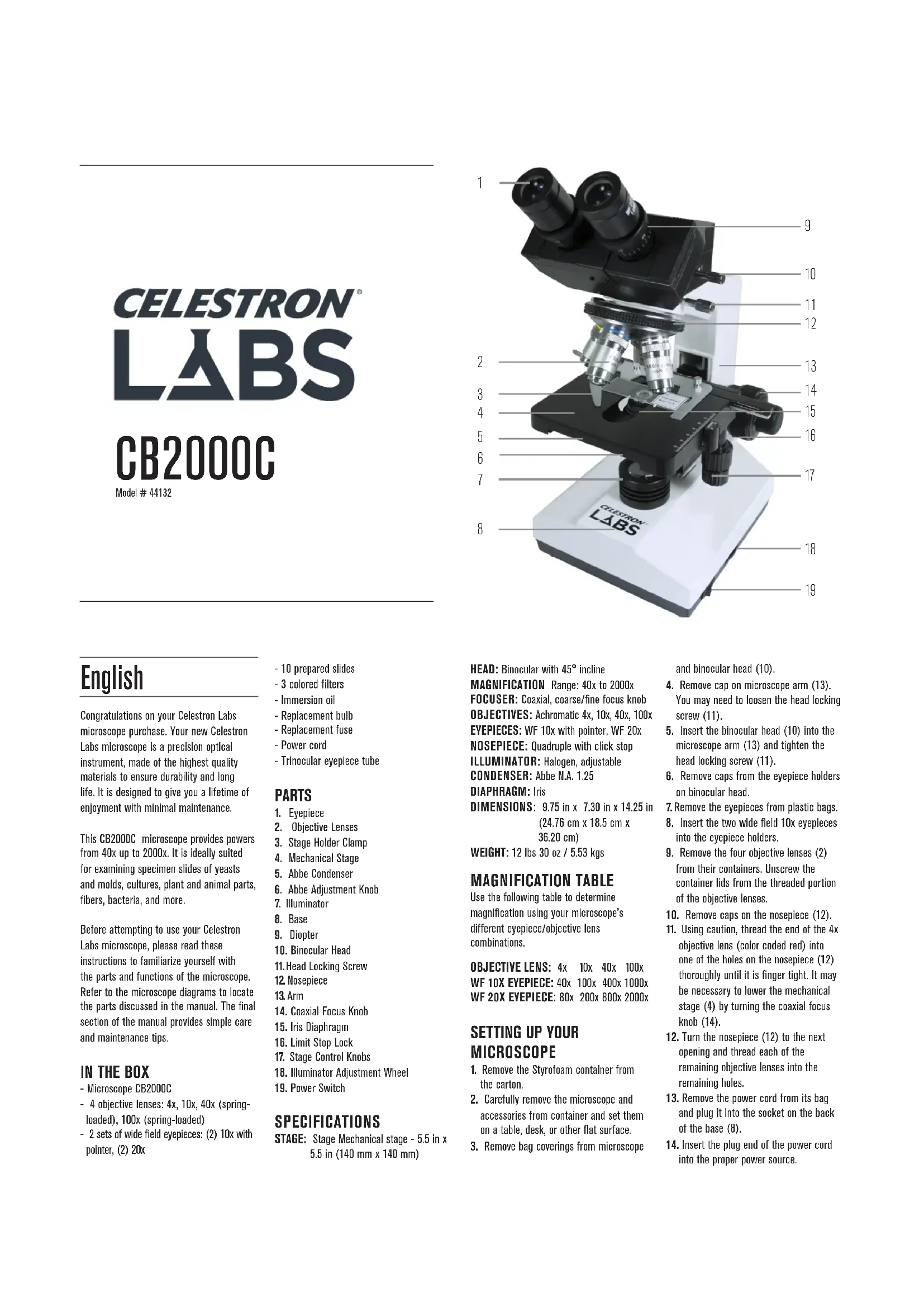
Before attempting to use your Celestron Labs microscope, please read these instructions to familiarize yourself with the parts and functions of the microscope. Refer to the microscope diagrams to locate the parts discussed in the manual. The final section of the manual provides simple care and maintenance tips.
IN THE BOX
- Microscope CB2000C
- 4 objective lenses: 4x, 10x, 40x (spring-loaded), 100x (spring-loaded)
-
2 sets of wide field eyepieces: (2) 10x with pointer, (2) 20x
-
10 prepared slides
- 3 colored filters
- Immersion oil
- Replacement bulb
- Replacement fuse
- Power cord
- Trinocular eyepiece tube
PARTS
- Eyepiece
- Objective Lenses
- Stage Holder Clamp
- Mechanical Stage
- Abbe Condenser
- Abbe Adjustment Knob
- Illuminator
- Base
- Diopter
- Binocular Head
- Head Locking Screw
12 Nosepiece - Arm
- Coaxial Focus Knob
- Iris Diaphragm
- Limit Stop Lock
- Stage Control Knobs
- Illuminator Adjustment Wheel
- Power Switch
SPECIFICATIONS
STAGE: Stage Mechanical stage - 5.5 in x 5.5 in (140 mm x 140 mm)
HEAD: Binocular with 45^ incline
MAGNIFICATION Range: 40x to 2000x
FOCUSor: Coaxial, coarse/finefocus knob
OBJECTIVES: Achromatic 4x, 10x, 40x, 100x
EYEPIECES: WF 10x with pointer, WF 20x
NOSEPIECE: Quadruple with click stop
ILLUMINATOR: Halogen, adjustable
CONDenser:Abbe N.A.1.25
DIAPHRAGM: Iris
DIMENSIONS: 9.75 in x 7.30 in x 14.25 in
(24.76 cm x 18.5 cm x
36.20 cm)
WEIGHT: 12 lbs 30 oz / 5.53 kgs
MAGNIFICATION TABLE
Use the following table to determine magnification using your microscope's different eyepiece/objective lens combinations.
OBJECTIVE LENS: 4x 10x 40x 100x
WF 10X EYEPIECE: 40x 100x 400x 1000x
WF 20X EVEPIECE:80x 200x 800x 2000x
SETTING UP YOUR MICROSCOPE
- Remove the Styrofoam container from the carton.
- Carefully remove the microscope and accessories from container and set them on a table, desk, or other flat surface.
- Remove bag coverings from microscope
and binocular head (10).
- Remove cap on microscope arm (13). You may need to loosen the head locking screw (11).
- Insert the binocular head (10) into the microscope arm (13) and tighten the head locking screw (11).
- Remove caps from the eyepiece holders on binocular head.
- Remove the eyepieces from plastic bags.
- Insert the two wide field 10x eyepieces into the eyepiece holders.
- Remove the four objective lenses (2) from their containers. Unscrew the container lids from the threaded portion of the objective lenses.
- Remove caps on the nosepiece (12).
- Using caution, thread the end of the 4x objective lens (color coded red) into one of the holes on the nosepiece (12) thoroughly until it is finger tight. It may be necessary to lower the mechanical stage (4) by turning the coaxial focus knob (14).
- Turn the nosepiece (12) to the next opening and thread each of the remaining objective lenses into the remaining holes.
- Remove the power cord from its bag and plug it into the socket on the back of the base (8).
- Insert the plug end of the power cord into the proper power source.
MICROSCOPE OPERATION
Before viewing specimens, please read these sections thoroughly regarding focusing, changing power (magnification), using the stage and adjusting illumination.
VIEWING A SPECIMEN
The images you see in your microscope will be upside down and reversed right to left. Your microscope includes prepared slides to help you get started.
- This microscope uses a mechanical stage (4) with a stage holder clamp (3) and directional knobs (17). Use the clamp lever to open the clamping arm of the stage holder clamp (3).
- Carefully place a prepared specimen slide (3 in x 1 in/76.2 mm x 25.4 mm size) inside the holder and close the clamping arm against the slide.
- Use the stage movement knobs (17) to position the specimen over the opening in the stage (4). The large stage movement knob moves the X-axis (forward and backward), while the small stage movement knob moves the Y-axis (side to side).
NOTE: To position the specimen directly under the objective lens, close the opening on the iris diaphragm until it is almost completely closed by moving the small lever. You should see a small beam of light projected on to the specimen slide. Now use the stage movement knobs to move the specimen directly inside the beam of light.
You are now ready to focus and view the specimen. Use caution to avoid damaging the slide or object. When using higher powers while focusing, make sure the objective lens (2) does not hit the slide or specimen.
- Start with the lowest power (4x objective lens and WF 10x eyepieces). Rotate the nosepiece (12) to change the objective lens (2) until the 4x objective lens is directly over the specimen.
- Rotate each eyepiece diopter (9) clockwise so that they are all the way down.
- Adjust the distance between the eyepieces by sliding the eyepiece in or out horizontally. Grasp the knurled portion of each side of the plate to adjust the plate.
- While looking through the eyepieces (1), gradually turn the coaxial focus knob (14) until the specimen comes into view. You may need to adjust the stage movement knobs (17) slightly to center the specimen in the field of view.
- Adjust the eyepiece side plate until the whole field of view can be observed through both eyes at the same time
without moving your head side to side. Depending on your individual eyes, you may need to make slight adjustments to the right and left eyepieces for the most comfortable viewing. Move the diopter (9) up or down until you have the specimen slide in sharp, comfortable focus.
6. For higher powers, rotate the nosepiece (12) to change the objective lens (2) to 10x , 40x or 100x . This will yield a greater magnification. Gradually turn the coaxial focus knob (14) to refocus on the specimen.
NOTE: To be safe, you should first turn the coaxial focus knob to lower the stage, before turning the objective carriage.
- You can replace the WF 10x eyepieces with the WF 20x eyepieces to obtain four additional high power magnifications, including (2000x), the highest power possible.
To change the range of working distance of the stage, you need to adjust the limit stop lock. Unlock the limit stop lock by pushing it down. Move stage upward or downward to desired position and then lock the limit stop lock by pushing up. The stage is now locked and will not raise any further from the locked position. Locking the stage also prevents an objective lens from hitting a specimen when viewing.
ADJUSTING THE LIGHTING
Specimens of different sizes, thicknesses, and colors require different levels of illumination. There are three ways to change the amount of illumination when viewing a specimen: adjusting the illumination using the illumination adjustment wheel (18), adjusting the Abbe condenser (5) and adjusting the iris diaphragm (15).
When viewing a specimen that is not transparent or dark in color you may need to increase the amount of light to resolve certain features or details. To do this, increase the brightness of the illuminator by turning the illuminator adjustment wheel (18) all the way to its highest setting.
ADJUSTING THE CONDenser
When viewing with lower power (4x and 10x) objective lenses, you will need to lower the condenser lens in order to spread the light over the larger field of view. To change the position of the condenser (5), rotate the Abbe adjustment knob (6) until the beam of light spreads wide enough to illuminate the entire field of view.
ADJUSTING THE IRIS DIAPHRAGM
As you lower the condenser (5) to spread out the light or change to a higher power objective lens, your image will appear dimmer. Instead of increasing the light intensity of the illuminator (which may "wash out" fine detail of the specimen you are viewing), open the aperture of the iris diaphragm (15) by moving the lever to let in more light. Opening and closing the diaphragm (15) will give a relief view of the specimen and allow you to change the depth of field of the specimen being viewed.
USING FILTERS
To bring out different levels of detail, experiment with changing the lighting color. To change colors, open the filter holder on the bottom of the diaphragm (15) by pushing it counterclockwise. Place the color filter in the filter holder and close it. You may need to refocus by adjusting the focus knobs.
TRINOCULAR FEATURE
Your microscope comes equipped with a trinocular feature. To use the trinocular, follow these simple steps.
- Unscrew the metal cap on top of the binocular head (10).
- Thread the trinocular eyepiece tube onto the binocular head.
- Pull the trinocular lever on the binocular head to until fully extended.
- Insert an eyepiece into trinocular eyepiece tube. You can now view through the trinocular tube.
CARE, MAINTENANCE, AND WARRANTY
Your Celestron Labs microscope is a precision optical instrument and should be treated with care at all times. Follow these care and maintenance suggestions and your microscope will need very little maintenance throughout its lifetime.
- When you are done using your microscope, remove any specimens left on the stage.
- Turn off the illuminator switches.
- Turn off the LCD monitor - push the on/off button until you see "Shutting Power Off."
- Unplug the power cord.
Always place the plastic bag or dust cover over the microscope when not in use to help keep it clean. - Store the microscope in a dry and clean place.
- Be very careful if using your microscope in direct sunlight to prevent damage to the microscope or your eyes.
- When moving your microscope, carry it by the "arm" with one hand and not by the focuser knob, LCD monitor, etc. Then,
put your other hand under the base for support.
- Clean the outside surfaces (metal and plastic) with a moist cloth.
Always unplug any cords before cleaning. - Never clean optical surfaces with cloth or paper towels as they can scratch optical surfaces easily.
- To clean optical surfaces, use an air blower or camel hair brush.
- To clean fingerprints off of optical surfaces, use a lens cleaning agent and lens tissue available at most photo outlets and when cleaning do not rub in circles as this may cause sleeks or scratches to occur.
- Never disassemble or clean internal optical surfaces. This should be done by qualified technicians at the factory or other authorized repair facilities.
- When handling glass specimen slides, use care as the edges can be sharp.
YOUR MICROSCOPE HAS A TWO YEAR LIMITED WARRANTY.
for more detailed information, please visit www.CelestronLabs.com



Torrance, CA 90503
TEL (800) 421-9649
www.CelestronLabs.com
Copyright 2014 Celestron | All rights reserved.
(Products or instructions may change without notice or obligation.)
Designed and intended for those 14 years of age and older.
Français
OCULAIRE WF 10X: 40x 100x 400x 1000x
OCULAIRE WF 20X:
80x200x 800x2000x
INSTALLATION DE VOTRE MICROSCOPE
Copyright 2014 Celestron | All rights reserved.
(Products or instructions may change without notice or obligation.)
Designed and intended for those 14 years of age and older.
Deutsch
OBJEKTIVE: 4x 10x 40x 100x
10x-WF-Okular:40x 100x 400x 1000x
20x-WF-0kular:80x 200x 800x 2000x
MIKROSKOPAUFBAU
DIMENSIONES: 9,75 in x 7,30 in x 14,25
in (24,76 cm x 18,5 cm x
36,20 cm)
PESO: 12 lbs 30 oz / 5,53 kgs