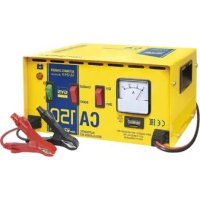
CA 150 - Battery charger GYS - Free user manual and instructions
Find the device manual for free CA 150 GYS in PDF.



| Product type | Battery charger |
| Brand | GYS |
| Model | CA 150 |
| Power supply | 230 V ~ 50/60 Hz |
| Output voltage | 12 V / 24 V |
| Standard charging current | 8 A (12 V) / 7 A (24 V) |
| Boost charging current | 10 A (12 V) / 9 A (24 V) |
| Recommended battery capacity | 35 to 150 Ah |
| Battery type | Liquid electrolyte lead (12 V / 24 V) |
| Charging modes | Standard and Boost (automatic) |
| Protection | Fuse, thermostat, reverse polarity |
| Charge indicator | Ammeter |
| Operation | Automatic unsupervised charging |
| Safety | Do not charge non-rechargeable batteries, indoor use, disconnect before connecting |
| Primary fuse | 5×20 mm T3.15A |
| Secondary fuse | ATO blade 25A (ref. GYS 054516) |
| Maintenance | Dust regularly, check connections by qualified personnel |
| Warranty | 2 years (parts and labor) |
Frequently Asked Questions - CA 150 GYS
User questions about CA 150 GYS
0 question about this device. Answer the ones you know or ask your own.
Ask a new question about this device
Download the instructions for your Battery charger in PDF format for free! Find your manual CA 150 - GYS and take your electronic device back in hand. On this page are published all the documents necessary for the use of your device. CA 150 by GYS.
USER MANUAL CA 150 GYS
FR 2-6 / 37-40
EN 7-11 / 37-40
DE 12-16 / 37-40
ES 17-21 / 37-40
RU 22-26 / 37-40
NL 27-31 / 37-40
IT 32-36 / 37-40
CA 150
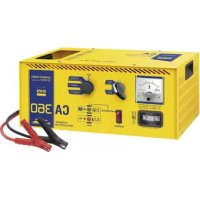
CA 360
INSTRUCTIONS DE SÉCURITÉ

ANALYSES, CAUSES, REMÈDES
This manual includes guidelines on the operation of your device and the precautions to follow for your own safety. Ensure it is read carefully before first use and keep it handy for future reference. These instructions should be read and understood before anyone operates the product. Any modifications or maintenance that are not specified in the manual should not be undertaken. The manufacturer is not liable for any injury or damage due to non-compliance with the instruction manual. In case of problems or uncertainties, please consult a qualified person that is able to handle the device correctly. This device should only be used for charging within the limits indicated on the device and in the manual. The safety instructions must be followed. In case of improper or unsafe use, the manufacturer cannot be held responsible.

Device suitable for indoor use only. Do not expose to rain or excessive moisture.
This device may be used by children from age 8 and by persons with reduced physical, sensory or mental capabilities or lack of experience and knowledge, provided that they are under supervision or have been told how to use the device safely and are aware of the potential risks. Children must not use the device as a plaything. Cleaning and servicing tasks may not be carried out by children unless they are supervised.
Do not use for charging non-rechargeable batteries.
Do not operate the device with a damaged power supply cord or a damaged mains plug.
Never charge a frozen or damaged battery.
Do not cover the device
Do not place the device near a fire or subject it to heat or to longterm temperatures exceeding 60°C
Do not obstruct the cooling vents. Refer to the installation section before operating the machine.
The automatic mode of operation and usage restrictions are explained below in these operating instructions.

Risk of explosion and fire!
A battery being charged can emit explosive gas.
- During the charge, the battery must be placed in a well ventilated area.

- Avoid flames and sparks. Do not smoke.
- Protect the electrical contacts of the battery against short-circuiting.
Do not leave a charging battery unattended for a long time.
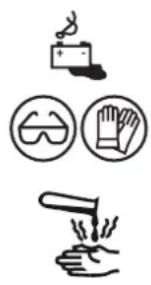



Acid projection hazard!
- Wear safety goggles and protective gloves
- If your eyes or skin come into contact with battery acid, rinse the affected part of the body with plenty of water and seek immediate medical assistance.
Connection / disconnection:
- Disconnect the power supply before connecting/disconnecting the device to/from the battery
- The terminal of the battery that is not connected to the car frame must be connected first. The other connection must be made on the car frame, far from the battery and the fuel line. The battery charger must be connected to the power supply network.
- After the charging process, disconnect the battery charger from the power supply network and remove the connector from the car frame and then the connector from the battery, in this order.
Connection:
- This device must be connected to an earthed power supply
• This machine is fuse-protected
This hardware is compliant with the IEC 61000-3-12.
This equipment complies with the IEC 61000-3-11.
Maintenance:
- If the power supply cable is damaged, it must be replaced by the manufacturer, its service agent or an equally qualified person.
• Service should be performed by a qualified person - Warning! Always remove the power plug from the wall socket before carrying out any work on the device.
- If the internal fuse is blown, it must be replaced by the manufacturer, its after-sales service or an equally qualified person.
- Regularly take off the cover and remove dust with an air gun. Take the opportunity to have a qualified person check the electrical connections with an insulated tool.
- Under no circumstances should solvents or other aggressive cleaning agents be used.
- Clean the device's surfaces with a soft, dry cloth.

Regulations :
- The device complies with European Directive.
- The certificate of compliance is available on our website.
• EAC conformity mark (Eurasian Economic Commission) - Equipment in compliance with British requirements. The British Declaration of Conformity is available on our website (see home page).
• Equipment in conformity with Moroccan standards. - The declaration C° (CMIM) of conformity is available on our website (see cover page).
Disposal:
- This product should be disposed of at an appropriate recycling facility. Do not dispose of in domestic waste.
GENERAL DESCRIPTION
The CA 150 and CA 360 chargers are designed for charging 12V and 24V lead acid battery with liquid electrolyte 3 from 5 to 150Ah (CA 150) or from 40 to 350Ah (CA 360).
OPERATING
The CA 150 and CA 360 are traditional chargers.
The CA 150 is an automatic charger which can be left connected unsupervised.
The CA 360 is both automatic and manual. Charging a battery on the manual position requires monitoring and for the charge to be stopped manually. It is able to charge without any voltage limitation to recover a discharged battery or to perform fast charge (high current for a short period).
| CA 150 | ||
| 12 V 24 | V | |
| Standard charge 8 A 7 A | ||
| Boost 10 A 9 A | ||
| - | - | |
| CA 360 | ||
| 12 V 24 | V | |
| Standard charge 8 A 7 A | ||
| Boost 1 | 17 A 14 | A |
| Boost 2 | 25 A 22 | A |
The CA 150 has two charging modes: standard charge and boost.
Le CA 360 has three charging modes: standard charge, slow boost and fast boost.
CHARGE :
- Make sure to disconnect the charger from the battery, set the on/off switch on the « off » position.
- Connect the charger's red clamp to the battery's positive terminal.
- Connect the charger's black clamp to the battery's negative terminal.
- Select the voltage output (CA360 only) et the charging speed (CA150 and CA360) on the charger.
- Set the charger's on/off switch on the "on" position
ADVICE
◇ Connection and disconnection
Disconnect from the battery all electronic system during the charge (do not charge the battery when it is connected on the car) (CA 360 in manual mode only).
◇ Starting
Do not start the vehicle with the charger connected to the battery. This will blow the fuse.
Problems
A quick charge can cause problems:
- The fuse blows and stops the charge.
- The OK light indicator is on but without the battery being charged, it starts and stops regularly.
In this case restart the charger after selecting the slowest charging mode available.
◇ Thermal protection
The charger is fitted with a thermostat. If it gets too hot, the charger will stop working. Place the unit in a ventilated room, wait until it cools down to turn the charger on (wait 10-20 minutes)
◇ Fuse
The fuse will protect the unit in the following instances:
- Polarity reversal or clamps in short-circuit.
- Starting the vehicle whilst the battery is connected to the charger.
- Charging current is in boost mode for too long or too high and above the nominal current in standard charge mode.
In case of a fuse break, disconnect the clamps from the battery, switch the unit off, change the fuse, set the charger to the minimum charge output available and reconnect everything as instructed above.
| CA 150 CA 360 | ||
| Primary fuse | (No Gys reference for sells)Cylindrical 5×20mm - T3.15ALittelfuse reference : 02153.15MXP | (No Gys reference for sells)Cylindrical 5× 20mm - T5ALittelfusereference: 0215005.MXP |
| Secondary fuse | Gys reference : 054516Type : ATOF blade - 25ALittelfuse reference : 287025.PXPV | Gys reference : 054622Type: BF1 – M5 - 32V 50ALittelfuse reference : 153.5631.5502 |
Sulfated battery
Batteries which have been deeply discharged may be charged/recovered. Such batteries may be identified if the ammeter needle does not (stays at 0) or if the charger stops quickly when in automatic mode.
In this event, set the charger to "Manual" (CA 360), set the charger on the fastest charging speed and monitor it every hour. If the needle still hasn't moved after 5 hours, the battery cannot be recovered.
TROUBLESHOOTING
| Symptoms Causes Remedies | ||
| The ON/OFF button does not switch on when set to ON. | No mains voltage Check that the power cord is plugged to a 230V50/60Hz socket. Check the power supply network. | |
| The machine's anmeter does not fluctuate . | Power supply problem. Check your mains power supply. | |
| Clamps in short circuit or polarity reversal. | Check that the fuses have not melted and that the circuit breaker is not tripped | |
| The battery that you are trying to charge is faulty. | Check the terminals' voltage with a voltmeter. If this voltage jumps instantaneously to 2.5V per element, the battery may be sulfated or damaged. | |
| Voltage error (12 -24V) Chck that the switch is on the right setting (12 or 24V) | ||
| Following intensive use, your device has entered thermal protection mode. | Wait 1/4h so the device can cool down. | |
| The charger is properly connected but it does not charge the battery | Blown fuse Replace the fuse by a new one. | |
| Bad clamp connections. Clean the terminals and the clamps. Check the state of the cables and clamps. | ||
| Wrong charge settings Check that the selected voltage matches the battery voltage. | ||
| Following intensive use, your device has entered thermal protection mode. | Wait 1/4h so the device can cool down. | |
| The anmeter's pin goes above the maximum marking while the device is set to minimum intensity. | The battery is deeply discharged. Keep charging using the minimum setting . | |
| Voltage error (12 -24V) Chck that the switch is on the right setting (12 or 24V) | ||
| Your battery has elements in short circuit. | Damaged battery Replace the battery. | |
| The fuse blows every time it is replaced | Polarity reversal Connect the + clamp to the battery's (+) and the + clamp to the battery's (-). | |
| Starting the vehicle Do not perform any starts when the charger is connected. | ||
| Wrong charge settings Check that the selected voltage matches the battery voltage. | ||
| Current overconsumption on the battery | Do not draw any of the battery's current during the charge | |
| The machine is charging a 12V battery in 24V mode | Set the switch to 12V. | |
| After charging for a whole day, the end of charge indicator does not switch on. | The charger is still in manual mode Switch to automatic mode | |
| The battery is damaged Change the battery. | ||
| The machine is charging a 24V battery in 12V mode | Set the switch to 24V. | |
WARRANTY
The warranty covers faulty workmanship for 2 years from the date of purchase (parts and labour).
The warranty does not cover:
- Transit damage.
- Normal wear of parts (eg. : cables, clamps, etc..).
- Damages due to misuse (power supply error, dropping of equipment, disassembling).
- Environment related failures (pollution, rust, dust).
In case of failure, return the unit to your distributor together with:
- The proof of purchase (receipt etc ...)
- A description of the fault reported
Нормы и правила:


- CA 150
- CA 360
- INSTRUCTIONS DE SÉCURITÉ
- RISK OF EXPLOSION AND FIRE
- ACID PROJECTION HAZARD
- CONNECTION / DISCONNECTION
- CONNECTION
- MAINTENANCE
- REGULATIONS
- DISPOSAL
- GENERAL DESCRIPTION
- OPERATING
- CHARGE
- ADVICE
- ◇ CONNECTION AND DISCONNECTION
- ◇ STARTING
- PROBLEMS
- ◇ THERMAL PROTECTION
- ◇ FUSE
- SULFATED BATTERY
- WARRANTY
- НОРМЫ И ПРАВИЛА
Brand : GYS
Model : CA 150
Category : Battery charger