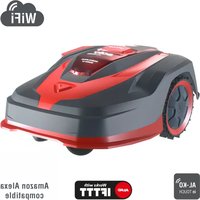
Robolinho 2000 W - Robot mower SOLO - Free user manual and instructions
Find the device manual for free Robolinho 2000 W SOLO in PDF.



| Product type | Robotic lawnmower |
| Brand | Solo |
| Model | Robolinho 2000 W |
| Maximum mowing area | 2000 m² |
| Maximum slope | 45% (24°) |
| Cutting height | 25 to 55 mm (manually adjustable) |
| Battery | Lithium-ion, automatic recharging |
| Power supply | Base station with power unit (100-240 V) |
| Safety sensors | Lift, tilt, rain sensors, obstacle detection |
| Programming | Weekly schedule, starting points, edge cutting |
| Connectivity | WLAN 2.4 GHz, AL-KO inTOUCH app |
| Special features | Eco mode, adjustable rain sensor, secondary area |
| Package contents | Lawnmowing robot, base station, power unit, boundary wire (not included for this model?), pegs, manual |
| Maintenance | Weekly cleaning, blade replacement, contact lubrication |
| Spare parts | Cutting blades, boundary wire, battery, base station |
| Warranty | Statutory warranty against manufacturing defects |
| Services | AL-KO after-sales service, software update via Internet |
| Weight | Approx. 12 kg (estimate) |
| Dimensions (L × W × H) | Approx. 60 × 50 × 30 cm (estimate) |
Frequently Asked Questions - Robolinho 2000 W SOLO
User questions about Robolinho 2000 W SOLO
0 question about this device. Answer the ones you know or ask your own.
Ask a new question about this device
Download the instructions for your Robot mower in PDF format for free! Find your manual Robolinho 2000 W - SOLO and take your electronic device back in hand. On this page are published all the documents necessary for the use of your device. Robolinho 2000 W by SOLO.
USER MANUAL Robolinho 2000 W SOLO
AL-KO KOBER GROUP Kottz, Germany
This documentation or excerpts therefrom may not be reproduced or disclosed to third parties without the express permission of the AL-KO KOBER GROUP.

11

| Robolinho 500 Robolinho 1150 Robolinho 700 Robolinho 1200 Robolinho 2000 | |||||
| 600 x 400 x 290 mm | 600 x 400 x 290 mm | 600 x 400 x 290 mm | 625 x 440 x 290 mm | 625 x 440 x 290 mm | |
| max. 500 m² | max. 1200 m² | max. 700 m² | max. 1200 m² | max. 2000 m² | |
| 45 % (24°) | |||||
| 200 mm 220 mm | 220 mm 230 mm | 230 mm | |||
| 25 - 55 mm | |||||
| IPX1 | |||||
| 6,4 kHz | |||||
| 10 m: < 70 dBμA/m | |||||
| max. 3400 min-1 | max. 3400 min-1 | Standard: 3400 min-1 Eco-Mode: 3200 min-1 | Standard: 3400 min-1 Eco-Mode: 3200 min-11 | Standard: 3400 min-1 Eco-Mode: 3200 min-1 | |
| max. 60 dB(A) | |||||
| 8,75 kg 10,1 kg 9,1 kg 10,1 kg 10,1 kg | |||||
| Robolinho 500 Robolinho 1150 Robolinho 700 Robolinho 1200 Robolinho 2000 | |||||
| Li-Ion 18 V/2,25 Ah/45 Wh | Li-Ion 25,2 V/5 Ah/125 Wh | Li-Ion 18 V/2,5 Ah/45 Wh | Li-Ion 25,2 V/5,0 Ah/125 Wh | Li-Ion 25,2 V/5,0 Ah/125 Wh | |
| 230 V AC/36 V DC 16 A/1,67 A 50 Hz/60 W | |||||

www.al-ko.com/service-contacts
14 KUNDENDIENST/SERVICE
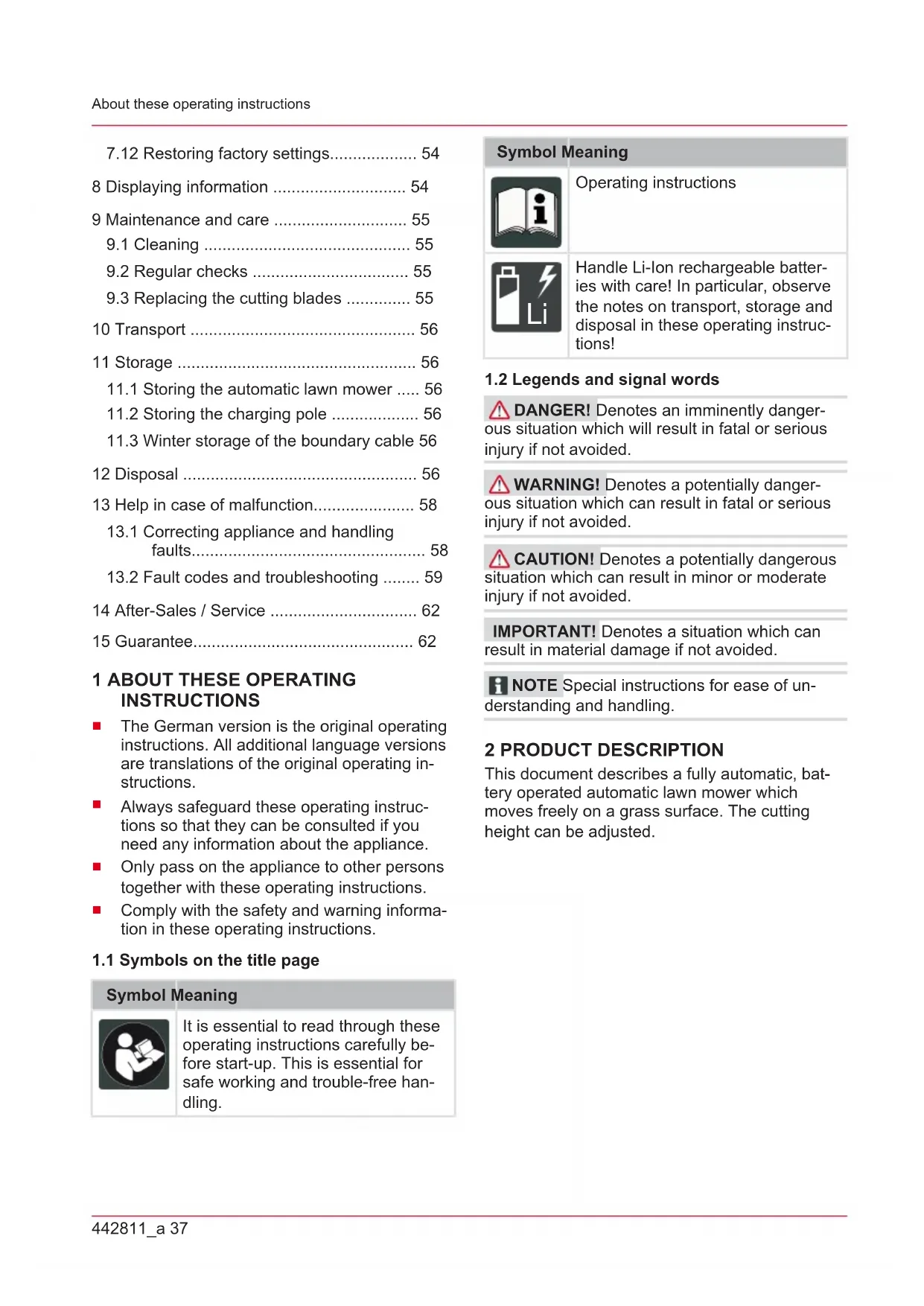
1 About these operating instructions 37
1.1 Symbols on the title page 37
1.2 Legends and signal words 37
2 Product description 37
2.1 Scope of supply 38
2.2 Automatic lawn mower 38
2.3 Symbols on the appliance 39
2.4 Control panel 39
2.5 Display 40
2.6 Menu structure 41
2.7 Base station 42
2.8 Rechargeable battery 42
2.9 Functional description 42
2.10 WLAN radio module and AL-KO in-TOUCH app 43
3 Safety. 43
3.1 Intended use 43
3.2 Possible misuse 44
3.3 Safety and protective devices 44
3.3.1 PIN and PUK input 44
3.3.2 Sensors 44
3.4 Safety instructions.. 45
3.4.1Operator 45
3.4.2 Personal protective equipment .... 46
3.4.3 Safety of persons and animals .... 46
3.4.4 Appliance safety 46
3.4.5 Electrical safety 46
4Assembly 47
4.1 Unpacking the machine 47
4.2 Planning the mowing areas (01) 47
4.3 Preparing the mowing areas 47
4.4 Setting up the base station (03/a) 47
4.5 Installing the boundary cable 48
4.5.1 Connecting the boundary cable to the base station (03/b) 48
4.5.2 Routing the boundary cable (01). 48
4.5.3 Excluding obstacles. 48
4.5.4 Enclosing corridors (01/h) 49
4.5.5 Excluding downward slopes (11). 49
4.5.6 Creating loops of cable (07) 49
4.5.7 Typical faults in cable routing (02) 49
4.6 Connecting the base station to the power source (04) 49
4.7 Checking the connections on the base station (04). 49
5 Start-up. 50
5.1 Charging the rechargeable battery (08) 50
5.2 Making the basic settings 50
5.3 Setting the cutting height 50
5.4 Carrying out an automatic calibration movement 50
6 Operation. 51
6.1 Starting the appliance manually 51
6.2 Cancelling mowing 51
6.3 Mowing the secondary area (01/NF) .. 51
7 Settings 51
7.1 Calling up the setting - General 51
7.2 Activating/deactivating the button tones 52
7.3 Activating/deactivating Eco mode (Robolinho 700/1200/2000) 52
7.4 Setting the rain sensor (Robolinho 700/1200/2000) 52
7.5 Setting the mowing program 52
7.5.1 Setting the mowing program - General 52
7.5.2 Setting the start points 52
7.5.3 Setting the mowing times.. 53
7.6 inTOUCH 53
7.7 Edge mowing with a manual start.... 54
7.8 Setting the secondary area mowing ... 54
7.9 Setting the display contrast 54
7.10 Setting lock 54
7.11 Recalibrating. 54
7.12 Restoring factory settings.. 54
8 Displaying information 54
9 Maintenance and care 55
9.1 Cleaning 55
9.2 Regular checks 55
9.3 Replacing the cutting blades 55
10 Transport 56
11 Storage 56
11.1 Storing the automatic lawn mower .... 56
11.2 Storing the charging pole 56
11.3 Winter storage of the boundary cable 56
12 Disposal 56
13Help in case of malfunction. 58
13.1 Correcting appliance and handling faults 58
13.2 Fault codes and troubleshooting 59
14 After-Sales / Service 62
15 Guarantee 62
1 ABOUT THESE OPERATING INSTRUCTIONS
The German version is the original operating instructions. All additional language versions are translations of the original operating instructions.
Always safeguard these operating instructions so that they can be consulted if you need any information about the appliance.
Only pass on the appliance to other persons together with these operating instructions.
Comply with the safety and warning information in these operating instructions.
1.1 Symbols on the title page
Symbol Meaning

It is essential to read through these operating instructions carefully before start-up. This is essential for safe working and trouble-free handling.
Symbol Meaning

Operating instructions
Handle Li-Ion rechargeable batteries with care! In particular, observe the notes on transport, storage and disposal in these operating instructions!
1.2 Legends and signal words
DANGER! Denotes an imminently dangerous situation which will result in fatal or serious injury if not avoided.
WARNING! Denotes a potentially dangerous situation which can result in fatal or serious injury if not avoided.
CAUTION! Denotes a potentially dangerous situation which can result in minor or moderate injury if not avoided.
IMPORTANT! Denotes a situation which can result in material damage if not avoided.
NOTE Special instructions for ease of understanding and handling.
2 PRODUCT DESCRIPTION
This document describes a fully automatic, battery operated automatic lawn mower which moves freely on a grass surface. The cutting height can be adjusted.
2.1 Scope of supply
The items listed here are part of the scope of supply. Check that all items are included:
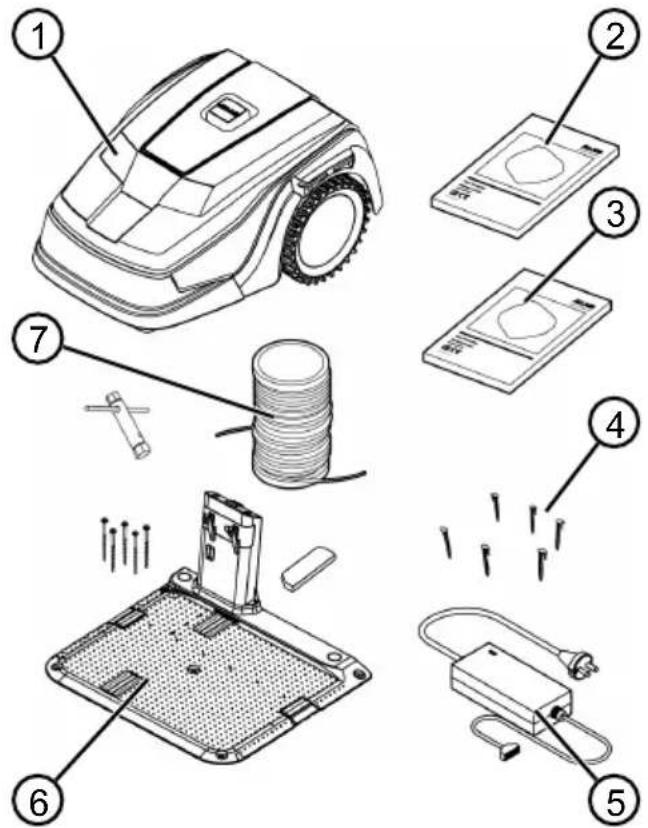
No. Component
| 1 Automatic lawn mower |
| 2 Quick-start guide |
| 3 Operating instructions |
| 4 Lawn pegs * |
| 5 Power supply |
| 6 Base station incl. screw nails (5 pcs.), wrench and winter cover |
| 7 Boundary cable ** |
- Robolinho 500: 90 pcs., Robolinho 1150: 180 pcs., Robolinho 700/1200/2000: Not included in the scope of delivery
** Robolinho 500: 100 m, Robolinho 1150: 150 m, Robolinho 700/1200/2000: Not included in the scope of delivery
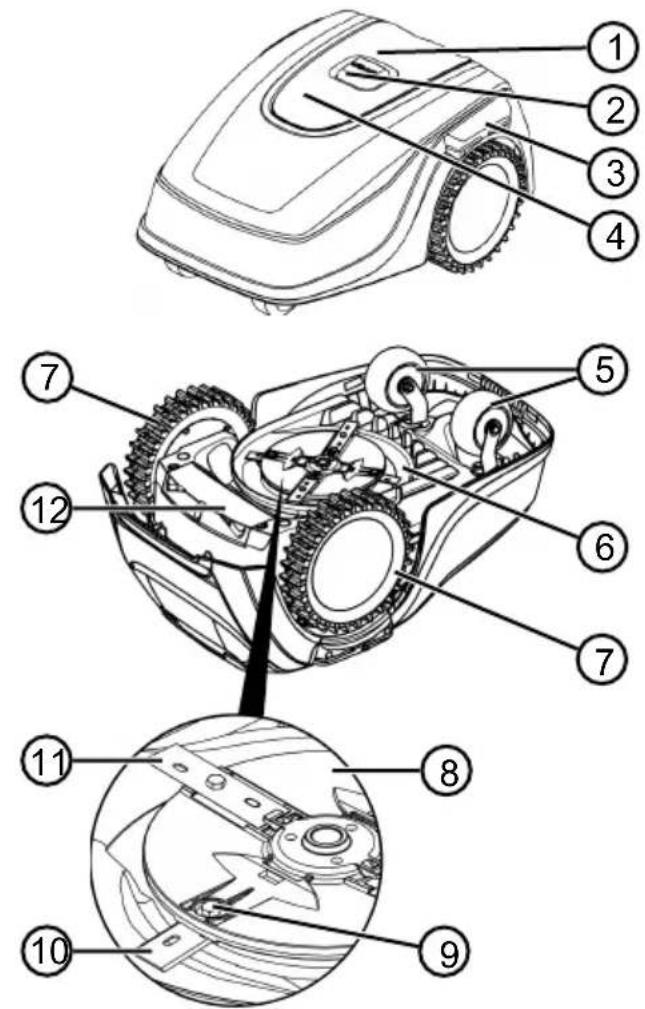
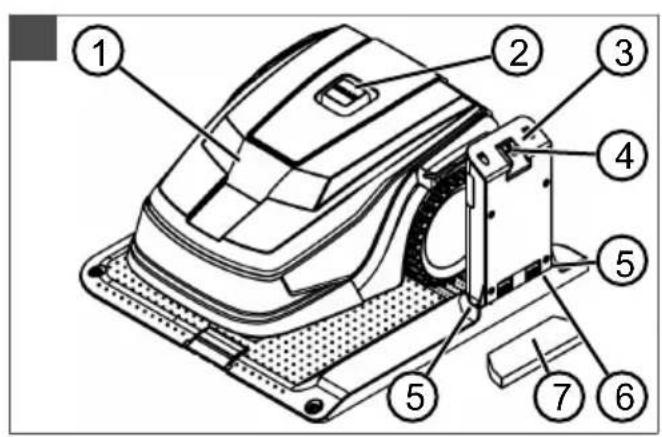
2.2 Automatic lawn mower
No. Component
| 1 Control panel with display (interior) |
| 2 STOP key (stops the appliance immediately and the cutting blade within 2 s) |
| 3 Charging contacts |
| 4 Height adjustment (interior) |
| 5 Front rollers (steering) |
| 6 Mower deck |
| 7 Drive wheel |
| 8 Blade plate |
| 9 Fastening screw |
| 10 Clearer blade |
| 11 Cutting blade |
| 12 Rechargeable battery compartment |
2.3 Symbols on the appliance
Symbol Meaning

Keep other people out of the danger area!

Pay special attention when handling this product!

Keep your hands and feet away from the blade system!

Maintain a safety distance!
Read the operating instructions before starting operation!
Enter the PIN in order to start the appliance!

Do not ride on the appliance!
2.4 Control panel
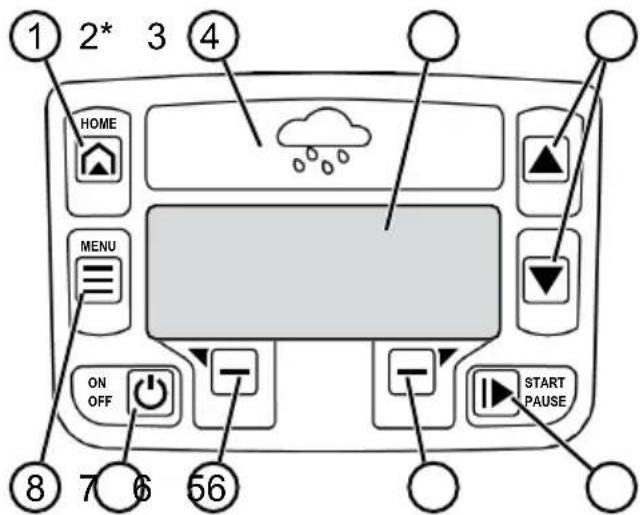
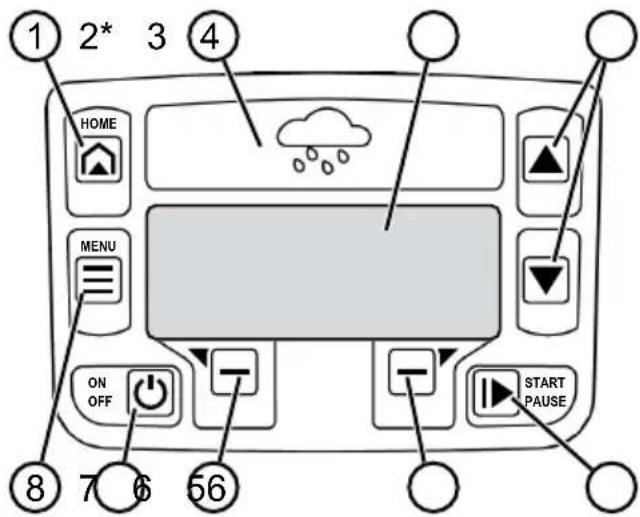
* Robolinho 700/1200/2000 only
No. Component
1
(home button): Cancel mowing, the appliance returns to its base station. It starts on the next day automatically again at the set mowing time.
2 Rain sensor (Robolinho 700/1200/2000): Registers if it rains (see chapter 7.4 "Setting the rain sensor (Robolinho 700/1200/2000)", page 52).
3 Display: Shows the current operating status of the appliance, the name of the selected menu, its menu items and the functions to be selected. (see chapter 2.5 "Display", page 40).
4
arrow keys): Select the menu items, increase and decrease numerical values, select between settings.
5
( start/pause button): Start mowing manually and stop mowing or immediately resume it again after pressing
6
- (function keys): Call up the function that is displayed directly above the button on the display.
7
On/Off button):Switch the appliance on and off.
8
(menu button): Call up the main menu.
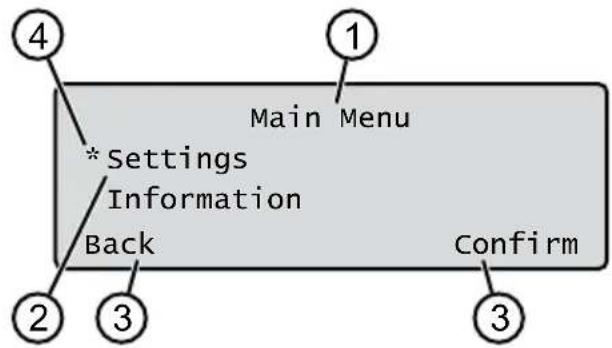
2.5 Display
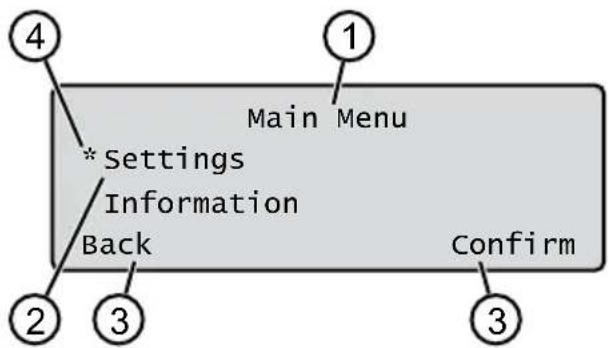
No. Display
1 Name of the selected menu (here: Main Menu)
2 Menu items in the menu: Only two menu items are ever displayed (here: Settings and Information). Further menu items can be displayed with and
3 Functions for the selected menu item (here: Settings). Further functions can be called up with and
4 Asterisk for marking the displayed menu item (here: Settings)
2.6 Menu structure
| Main Menu | Programs | Weekly Program see chapter 7.5 "Setting the mowing program", page 52 |
| Entry Point see chapter 7.5.2 "Setting the start points", page 52 | ||
| Program Info see chapter 8 "Displaying information", page 54 | ||
| Settings | Time see chapter 5.2 "Making the basic settings", page 50 | |
| Date see chapter 5.2 "Making the basic settings", page 50 | ||
| Language see chapter 5.2 "Making the basic settings", page 50 | ||
| PIN-Code see chapter 5.2 "Making the basic settings", page 50 | ||
| Key clicks see chapter 7.2 "Activating/deactivating the button tones", page 52 | ||
| EcoMode see chapter 7.3 "Activating/deactivating Eco mode (Robolinho 700/1200/2000)", page 52* | ||
| Rain sensorsee chapter 7.4 "Setting the rain sensor (Robolinho 700/1200/2000)", page 52* | ||
| After rain delay see chapter 7.4 "Setting the rain sensor (Robolinho 700/1200/2000)", page 52* | ||
| Rain sensitive see chapter 7.4 "Setting the rain sensor (Robolinho 700/1200/2000)", page 52* | ||
| inTOUCH see chapter 7.6 "inTOUCH", page 53 | ||
| Margin mowing see chapter 7.7 "Edge mowing with a manual start", page 54 | ||
| Sub zone active/disabled see chapter 7.8 "Setting the secondary area mowing", page 54 | ||
| Display contrast see chapter 7.9 "Setting the display contrast", page 54 | ||
| Safety settings see chapter 7.10 "Setting lock", page 54 | ||
| Reset calibration see chapter 7.11 "Recalibrating", page 54 | ||
| Factory reset see chapter 7.12 "Restoring factory settings", page 54 | ||
| Information | Blades service see chapter 8 "Displaying information", page 54 | |
| Hardware see chapter 8 "Displaying information", page 54 | ||
| Software see chapter 8 "Displaying information", page 54 | ||
| Program Info see chapter 8 "Displaying information", page 54 | ||
| Failures see chapter 8 "Displaying information", page 54 |
- Robolinho 700/1200/2000
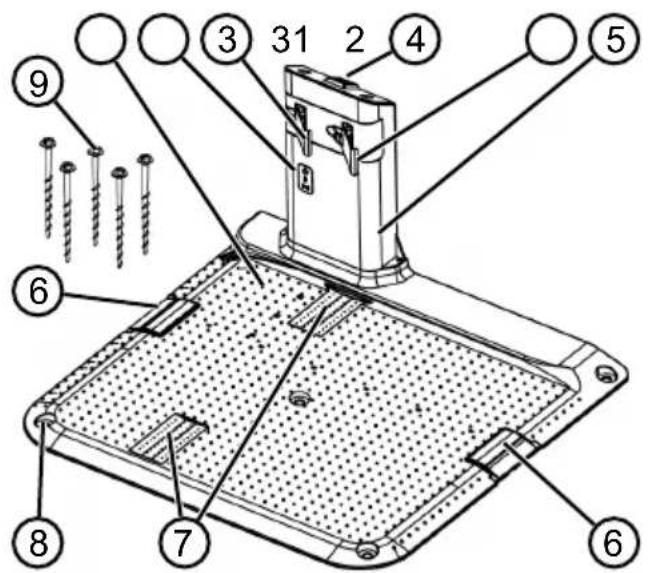
2.7 Base station
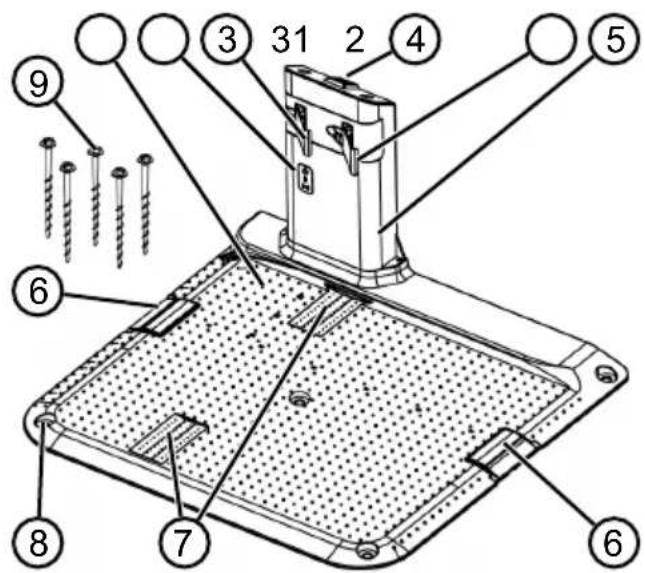
No. Component
1 Base plate
2 LEDs for status display
3 Charging contact
4
Home button

5 Charging station
6 Cable shaft
7 Wheel recess
8 Hole for screw nails (9)
9 Screw nails
- Robolinho 700/1200/2000
2.8 Rechargeable battery
The rechargeable battery can be changed by the user.
NOTE Fully charge the rechargeable battery before using it for the first time. The rechargeable battery can be charged in any charge status. Interrupting charging does not damage the rechargeable battery. The rechargeable battery can only be charged after the appliance has been switched on.
The rechargeable battery is partially charged on delivery. The rechargeable battery is regularly recharged during normal operation. The appliance returns to its base station for this.
The integrated electronic control unit with a monitoring function terminates the charging
procedure when a 100% charge status is reached.
The charging process only functions with perfect contact of the charging contacts on the base station with the contact surfaces of the appliance.
The built-in protection circuit prevents the rechargeable battery from being charged at temperatures above 45^ . This prevents irreparable damage to the rechargeable battery.
If the operating time of the battery is reduced in spite of it being fully charged, have the battery replaced by a new genuine battery. This task should be carried out by an AL-KO dealer, technician or service partner.
If the battery charge level has dropped below the threshold set by the manufacturer as a result of ageing or excessively long storage, this means it can no longer be recharged. Have the battery and the monitoring electronic control unit checked by an AL-KO dealer, technician or service partner, and replace them if necessary.
The rechargeable battery status is shown on the display. Check the rechargeable battery status after about 3 months in storage. To do so, switch on the appliance and read off the rechargeable battery status. If the rechargeable battery is now only charged to approx. 30% or less, place the appliance in the base station and switch it on so the rechargeable battery is charged. If the charging station was removed to store the base station (see chapter 11.2 "Storing the charging pole", page 56), first mount it again in reverse order and connect the base station to the mains supply again.
If electrolyte has escaped into the appliance: Have the appliance repaired by an AL-KO service centre.
If the rechargeable battery has been removed from the appliance: If the eyes or hands have come into contact with escaped electrolyte, flush them immediately with water. Immediately consult a doctor.
2.9 Functional description
Moving on the grass surface
The appliance moves freely in a mowing area delimited by a boundary cable. The appliance is oriented by sensors that detect the magnetic field of the boundary cable.
If the appliance encounters an obstacle, it stops and then continues in another direction. If the appliance gets into a situation where it cannot operate, this is indicated by a message on the display.
Robolinho 700/1200/200: If the appliance detects moisture when the rain sensor is switched on, it automatically returns to the base station.
Mowing and charging
The mowing phases alternate constantly with the charging phases. If the charge of the rechargeable battery drops to a specific value (display: 0% ) during mowing, the appliance returns to the base station along the boundary cable.
Mowing programs are preset and can be customised on the appliance or in the app.
Each time the mowing motor is started, its direction of rotation is changed which doubles the service life of the cutting blades.
2.10 WLAN radio module and AL-KO inTOUCH app
The robot lawn mower is equipped with a WiFi radio module. This allows convenient control, setting and monitoring via app from a mobile device (smartphone, tablet, etc.).
NOTE The mobile device being used requires an Internet connection in order to use the inTOUCH app.
NOTE In order to ensure that the latest software version is always installed on the robot lawn mower, it must be connected to the Internet via a WiFi network. The AL-KO inTOUCH app provides notification when there are new software updates for the robot lawnmower. They are downloaded automatically.
AL-KO inTOUCH app
The AL-KO inTOUCH app can be downloaded for Android-based devices from the Google Play Store and for iOS-based devices from the Apple App Store:


Available on the App Store

GET IT ON Google Play
After installing the app, the user must first log in. The Quick Installation Guide is automatically called up the first time the app is started. Follow the instructions to install the robot lawn mower in the garden, and then to connect it to the AL-KO inTOUCH app.
NOTE The robot lawnmower connects to a
2.4 GHz WLAN only.
5 GHz WLAN networks are not supported.
To connect to the AL-KO inTOUCH app, the robot lawnmower and smartphone must be within range of a router with sufficient signal strength (recommendation: min. 50% ).
- Start the AL-KO inTOUCH app.
- Create a user account with "REGISTER". Enter the user name and password.
- Log in with the previously created user account.
- Start the connection wizard via "APPLIANCES" and "NEW APPLIANCE".
- Follow the further instructions.
NOTE If the robot lawnmower moves into an area of the garden with a poor or no WLAN connection, the settings of the AL-KO inTOUCH app will only be carried out when the robot lawnmower returns to an area with a good signal. If the local WLAN strength of the router does not cover the entire garden, its range can be extended with a standard repeater.
In the event of malfunctions, a dealer with the AL-KO inTOUCH app installed can help you. The robot lawnmower must be enabled for the dealer via the AL-KO inTOUCH app.
Besides remote access to connected robot lawn mowers, the AL-KO inTOUCH app offers other functions such as product registration, gardening tips, gardening manual or push notifications in the event of a fault.
3 SAFETY
3.1 Intended use
This appliance is intended solely for use in non-commercial applications. Any other use (as well as unauthorised conversions or add-ons) are regarded as con
trary to the intended use and will result in exclusion of the warranty as well as loss of conformity (CE mark); the manufacturer will thus decline any responsibility for damage and/or injury suffered by the user or third parties. The application limits of the appliance are:
Max. area:
Robolinho 500: 500m^2
Robolinho 700: 700m^2
Robolinho 1150: 1200m^2
Robolinho 1200: 1200m^2
Robolinho 2000: 2000m^2
Max. upward/downward slope: 45% (24°)
Max. lateral inclined angle: 45% (24°)
Temperature:
Charging: 0 - 45^
Mowing: 0 - 55^ C
3.2 Possible misuse
This machine is not suitable for use in public gardens, parks, sports stadiums, and in agriculture and forestry.
3.3 Safety and protective devices
WARNING! Risk of injury.
Defective and disabled safety and protective devices can result in serious injury.
Have any defective safety and protective devices repaired.
- Never disable safety and protective devices.
3.3.1 PIN and PUK input
The appliance can only be started by entering a PIN (Personal Identification Number). This prevents the appliance from being switched on by unauthorised persons. The factory setting of the PIN is 0000. The PIN can be changed, see chapter 5.2 "Making the basic settings", page 50.
If the PIN is entered incorrectly 3 times, the PUK (Personal Unlocking Key) must be entered. If this is also entered incorrectly, the user must wait 24 hours until entering it again.
- Keep the PIN and PUK so that they are inaccessible to unauthorised persons.
3.3.2 Sensors
The appliance is provided with several safety sensors. It does not restart automatically after be
ing switched off by a safety sensor. The error message is shown on the display and must be acknowledged. The reason for the triggering of the sensor must be resolved.
Lifting sensor
If the appliance is raised by the housing during operation, the travel drive switches off and the cutting blades are stopped.
Bump sensors for obstacle detection
The appliance is equipped with sensors that ensure it changes its direction of travel if it encounters obstacles. When it encounters an obstacle, the top part of the deck is shifted slightly and the shock sensor triggered.
Tilt sensor in direction of travel/sideways
If an upward or downward slope or a laterally inclined angle of 24^ (45%) is reached in the direction of travel, the appliance is turned or the appliance changes its direction of travel.
Rain sensor (Robolinho 700/1200/2000)
The appliance is equipped with a rain sensor that (when activated) interrupts the mowing procedure in case of rain, and ensures that
the appliance returns to the base station.
NOTE The appliance can be operated reliably in the immediate vicinity of other automatic lawn mowers. The signal used in the boundary cable corresponds to the standard defined by the European Garden Machinery Industry Federation (EGMF) with regard to electromagnetic emissions.

3.4 Safety instructions
3.4.1 Operator
- Young people under 16 years of age, persons with limited physical, sensory or mental abilities or with a lack of experience and knowledge and persons who do not know the operating instructions must not use the device. Heed any country-specific safety regulations concerning the minimum age of the user.
- Do not operate the appliance if you are under the influence of alcohol, drugs or medication.
3.4.2 Personal protective equipment
Wear clothing and protective equipment in accordance with the regulations in order to avoid injury.
The personal protective equipment comprises:
Long trousers and sturdy shoes.
During maintenance and care: Protective gloves.
3.4.3 Safety of persons and animals
In areas accessible to the public, affix warning information with the following content around the mowing area:
IMPORTANT! Automatic lawn mower in operation! Do not approach the appliance! Supervise children.
Make sure that children and other persons are not present in the vicinity of the appliance when it is operating or climb onto the appliance and do not play with the appliance.
- Sitting on the appliance and reaching into the cutting blade is forbidden.
- Keep body and clothes away from the cutting unit.
3.4.4 Appliance safety
Before working, make sure that there are no objects (e.g. branches, glass or metal pieces, and items of clothing, stones, garden furniture, garden utensils or toys) in the work area of the appliance. They can damage the cutting blade of the appliance or can be damaged by the appliance.
Only use the appliance under the following conditions:
The appliance is not soiled.
The appliance shows no damage or wear.
All controls function properly.
The base station and power supply as well as their electrical supply cables are undamaged and function properly.
Always replace defective parts with original spare parts from the manufacturer.
Have the appliance repaired if it has been damaged.
The user of the appliance is responsible for accidents of the appliance involving other persons or their property.
3.4.5 Electrical safety
- Never operate the appliance when a lawn sprinkler is oper
ating on the mowing area at the same time.
- Do not spray the appliance with water.
- Do not open the appliance.
4 ASSEMBLY
4.1 Unpacking the machine
- Open the packaging carefully.
- Carefully remove all components from the packaging and check for transport damage. Note: Notify your AL-KO dealer or service partner immediately if any transport damage is discovered.
- Check the scope of supply, see chapter 2.1 "Scope of supply", page 38.
If the appliance is going to be sent on, retain the original packaging and accompanying documents. They will also be required for return shipment.
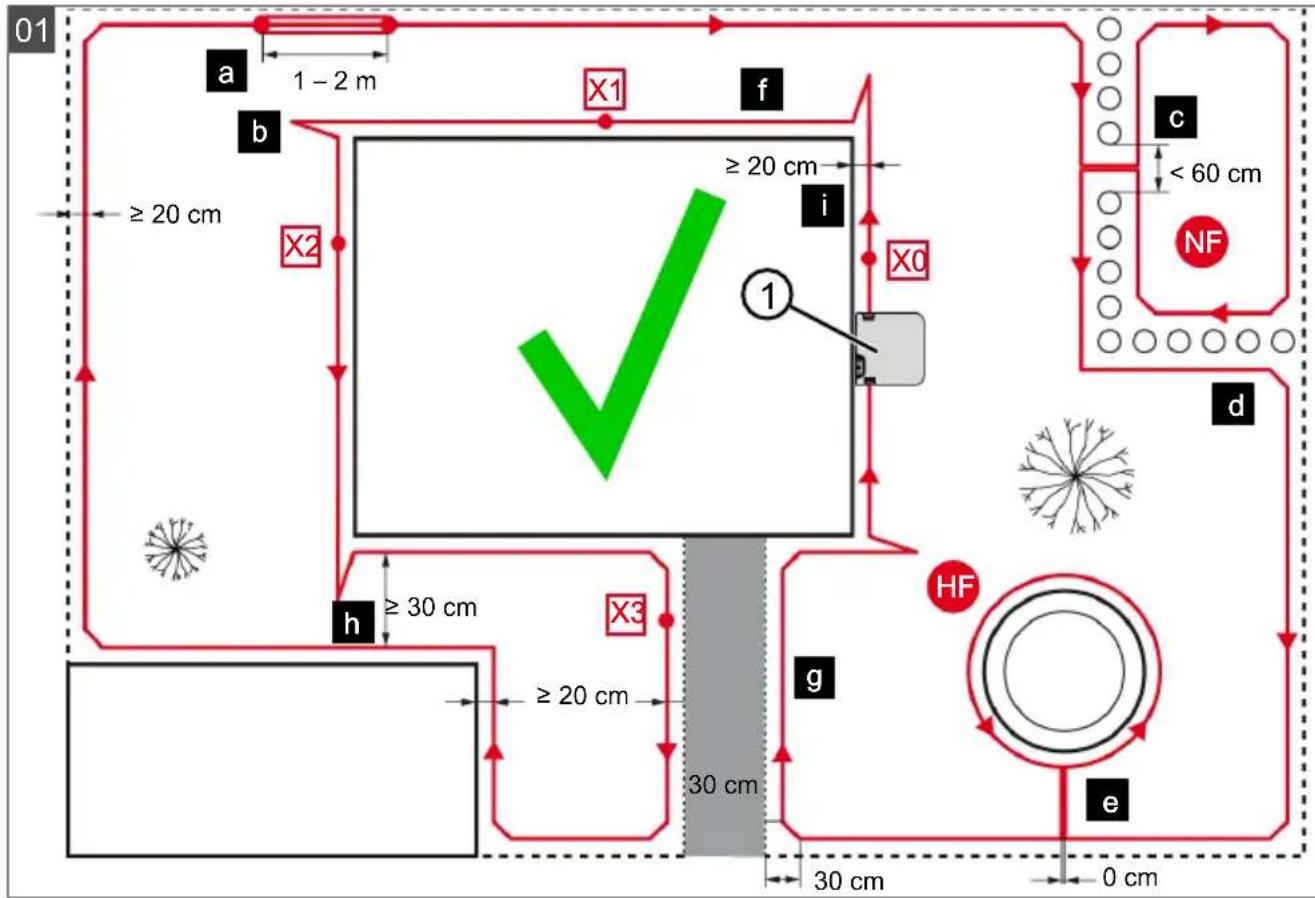
4.2 Planning the mowing areas (01)
Location of the base station (01/1)
Shortest possible distance to the largest mowing area
Level surface
Protected against direct sunlight and harsh weather conditions
- Connection option for power source
Free accessibility to the robot lawn mower
Routing the boundary cable (01)
The boundary cable must be laid in a continuous loop in a clockwise direction.
Corridors between mowing areas (01/h)
A corridor is a narrow section in the grass surface and can be used to connect two mowing areas.
Main area and secondary area(s) (01)
Main area (01/HF): This is the grass surface on which the base station is located and whose entire surface can be mowed automatically by the appliance.
Secondary area (01/NF): If a grass surface cannot be reached by the appliance from the main area, carry the appliance to the secondary area by hand if necessary. Secondary areas can be processed using manual operation.
The main area and secondary areas are bounded by the same continuous boundary cable, however.
Location of start points (01/X0 - 01/X3)
At the specified mowing time, the appliance moves along the boundary cable to the specified start point and begins to mow there.
The start points can be used to specify which areas of the mowing area are to be mowed several times.
4.3 Preparing the mowing areas
- Check that the grass surface is larger than the area covered by the appliance. If the grass surface is too large, an irregularly mown lawn will result. Reduce the size of the grass surface to be mowed if necessary.
- Before installation of the base station and boundary cable or start-up of the appliance: Use a lawn mower to mow the grass surface to a low cutting height.
-
Remove any obstacles on the grass surface or exclude them with the boundary cable (see chapter 4.5.3 "Excluding obstacles", page 48):
-
Flat obstacles that will be run over and could damage the cutting blade (e.g. flat stones, transitions from the grass surface to the terrace or paths, plates, kerbs, stones, etc.)
Holes and protrusions in the grass surface (e.g. molehills, burrowing holes, pine cones, fallen fruit, etc.)
Steep ascents and descents of more than 45% (24^) - Bodies of water (e.g. ponds, streams, swimming pools, etc.) and their demarcation to the grass surface
Shrubs and hedges that can become broader
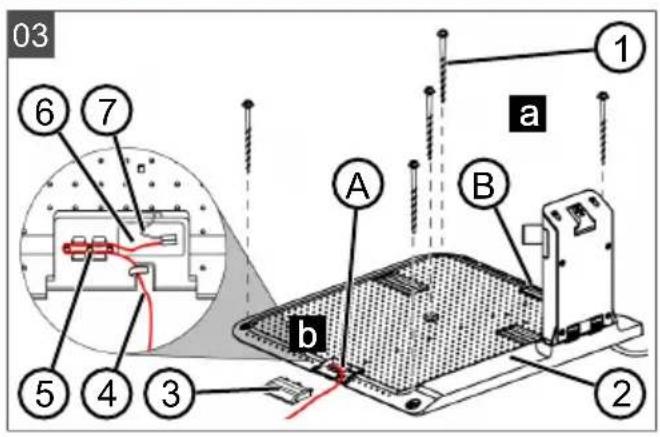
4.4 Setting up the base station (03/a)
- Place the base station (01/1) at right angles to the planned location of the boundary cable as described below:
Level (check with spirit level)
Straight and level entrance and exit
Not arched (the charging station must not bend or tilt during subsequent tightening of the screw nails)
- Fix the base station (03/2) to the floor with four screw nails (03/1).
4.5 Installing the boundary cable
NOTE Robolinho 500/1150: If the supplied boundary cable is too short, an extension cable can be obtained from your AL-KO dealer or service partner.
4.5.1 Connecting the boundary cable to the base station (03/b)
- Pull the boundary cable (03/4) out of the packaging.
- Remove the cover of the cable shaft (03/3) on the connection (03/A).
- Insulate the end of the boundary cable (03/6) and insert into the terminal (03/7).
- Close the terminal.
- Lead the boundary cable through the strain relief (03/5) out of the cable shaft with cable reserve.
NOTE The cable reserve allows smaller corrections to be carried out on the cable guide later.
- Place the cover on the cable shaft.
4.5.2 Routing the boundary cable (01)
The boundary cable can be laid on the lawn and as much as 10cm under the turf. The laying under the turf can be carried out by the dealer.
Both variants can be combined with one another.
IMPORTANT! Danger of damaging the
boundary cable. If the boundary cable is damaged or cut, the transmission of the control signals to the appliance is no longer possible. In this case, the boundary cable must be repaired or replaced. The boundary cables are available from AL-KO.
Always route the boundary cable directly on the ground. If necessary, secure with an additional lawn peg.
- When laying the boundary cable and during operation, protect the boundary cable from damage.
Do not dig or scarify in the vicinity of the boundary cable.
- Attach the boundary cable at regular intervals with lawn pegs or route it underground (at a max. depth of 10cm ).
-
Route the boundary cable around obstacles: see chapter 4.5.3 "Excluding obstacles", page 48.
-
Create corridors between individual mowing areas: see chapter 4.5.4 "Enclosing corridors (01/h)", page 49.
- Exclude excessive upward or downward slopes: see chapter 4.5.5 "Excluding downward slopes (11)", page 49.
- Create loops of cable: see chapter 4.5.6 "Creating loops of cable (07)", page 49.
- After completing the routing of the boundary cable, connect to the connector (03/B) of the base station: see chapter 4.5.1 "Connecting the boundary cable to the base station (03/b)", page 48.
4.5.3 Excluding obstacles
Depending on the surroundings of the working area, the boundary cable must be routed at different distances to obstacles. Use the ruler that can be removed from the packaging to determine the correct distance.
NOTE Exclusions are only necessary if they cannot be detected by the bump sensors of the appliance. Avoid too many or unnecessary exclusions. Recesses that are smaller than 6cm must be excluded, otherwise the appliance may cause damage.
Distance from walls, fences, beds: min. 20 cm (01)
The appliance moves along the boundary cable with an offset of 20~cm to the outside. Therefore, route the boundary cable at a distance of at least 20~cm from walls, fences, beds, etc.
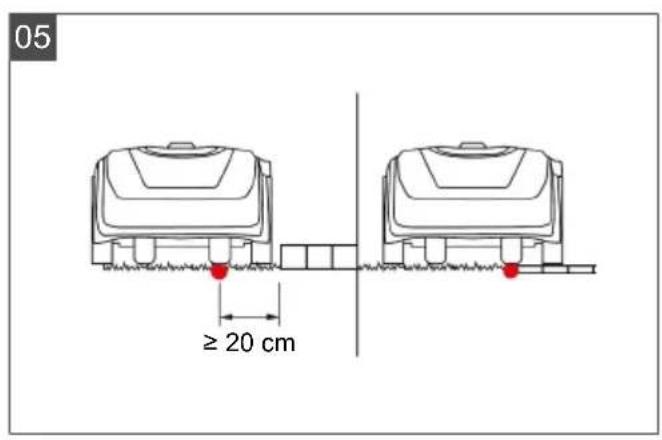
Distance from terrace edges and paved paths (05)
If the terrace or path edge is higher than the grass surface, a distance of at least 20cm must be complied with. If the edge of the terrace or path is at the same height as the grass surface, the cable can be routed exactly along the edge.
Distance of obstacles from the boundary cable (01)
If the boundary cables are precisely folded up away from the obstacle or towards the obstacle, i.e. distance 0cm the appliance moves beyond the boundary cable. Do not cross the boundary cables (02/c), but lay them parallel (01/e).
Routing the boundary cable around corners (06)
For inwards going corners (06/a): Route the boundary cable diagonally to avoid the appliance becoming caught in the corner.
For outside corners with obstacles (06/b): Route the boundary cable in a point in order to avoid a collision of the appliance with the corner.
For outside corners without obstacles: Route the boundary cable at an angle of 90^
4.5.4 Enclosing corridors (01/h)
In the corridor the following distances must be complied with:
Total width: min. 60 cm
Distance of the boundary cable to the edge: 20 cm
Distance between the boundary cables: min. 20 cm
4.5.5 Excluding downward slopes (11)
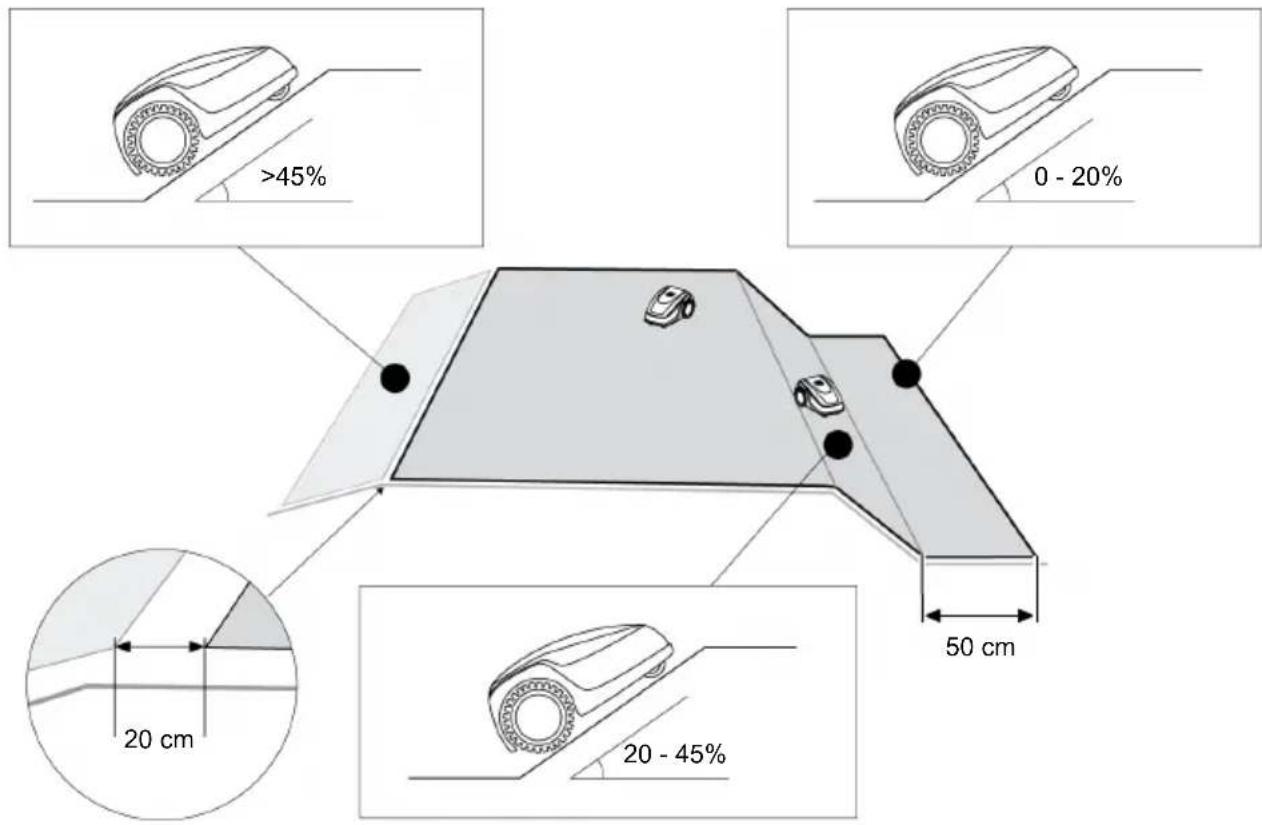
Downward slopes that are greater than 45% must be excluded with the boundary cable (45% = 45cm downward slopes per 1m horizontally).
The boundary cable must not be laid over a gradient of more than 20% . In order to avoid problems when turning, maintain a distance of 50 cm to the 20% gradient. If the gradient at the outer edge of the working area is more than 20% at any point, lay the boundary cable on the flat ground at a distance of 20 cm from the start of the gradient.
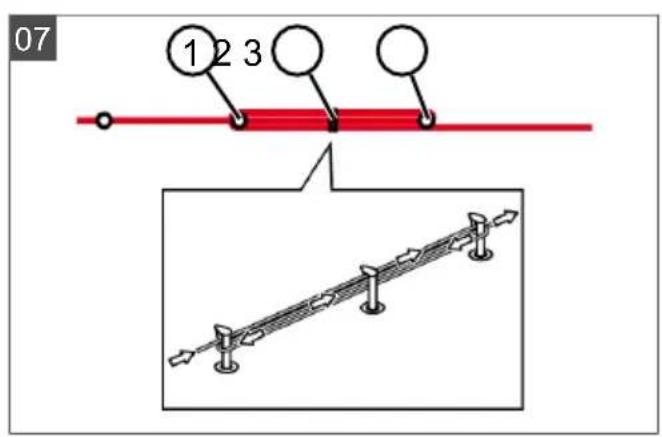
4.5.6 Creating loops of cable (07)
Spare loops of cable should be incorporated at regular intervals in order to reposition the base station or to extend the mowing area even after the mowing area has been laid out.
Select the number of spare cable loops according to your own judgement.
NOTE In the case of spare cable loops, do not form open loops.
- Lead the boundary cable around the current lawn peg (07/1) and then back to the previous lawn peg (07/3).
- Then lead the boundary cable to the current lawn peg again. This creates a loop. The cables must be close together.
- If necessary, attach the loop to the ground in the middle with an additional lawn peg (07/2).
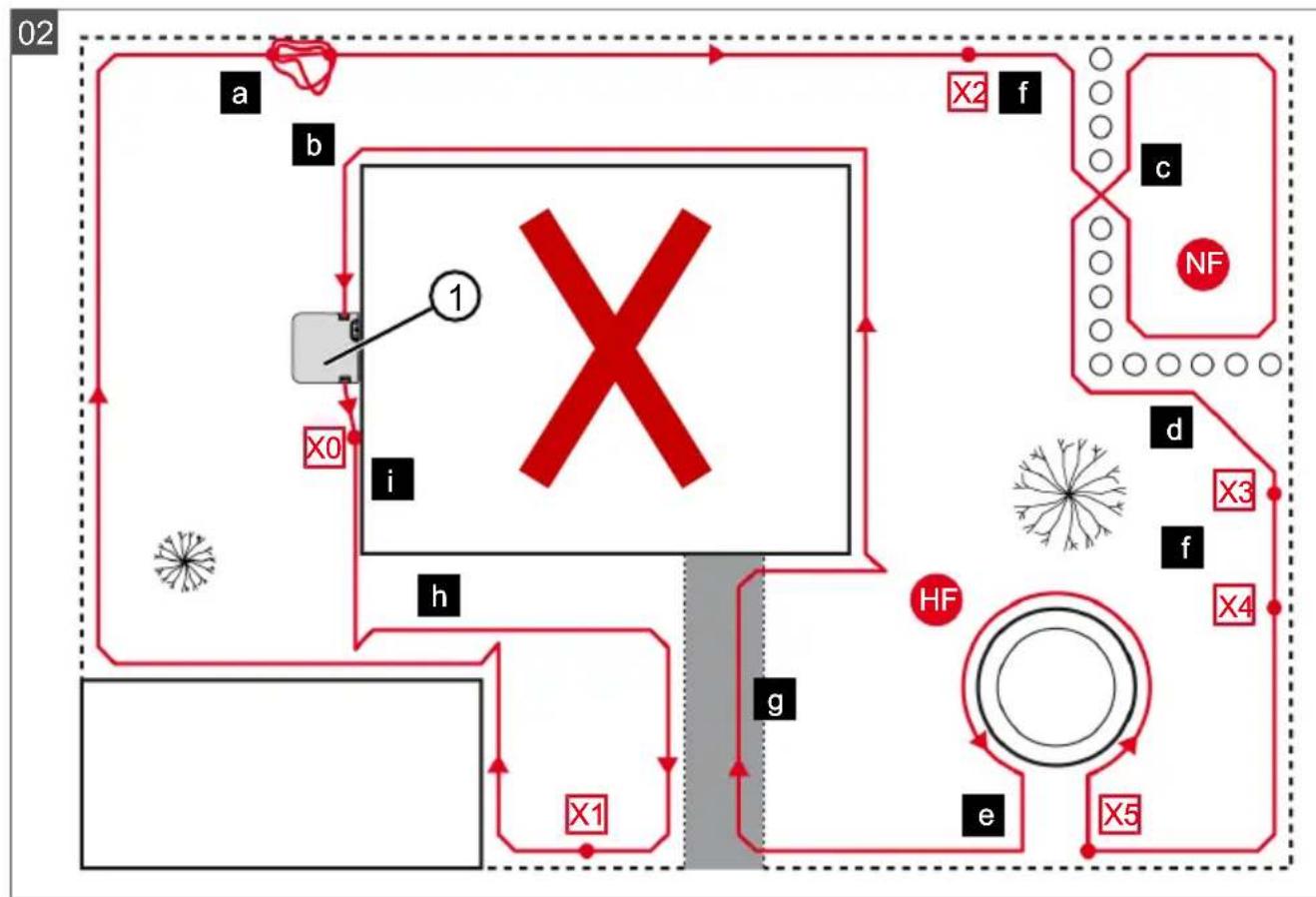
4.5.7 Typical faults in cable routing (02)
- Spare cable loops of the boundary cable are not laid in an even, elongated loop (02/a).
The boundary cable is not routed properly around corners (02/b).
The boundary cable is crossed over or not routed clockwise (02/c).
The boundary cable is routed too imprecisely so that edge areas of the grass surface cannot be mowed (02/d).
The boundary cable is not routed lying directly next to itself when guided towards and back from the edge to an obstacle inside the lawn (02/e).
The start points are set too far away from the base station (02/f).
The boundary cable is routed beyond the edge of the grass surface (02 / g)
- When routing the boundary cable, the minimum distance for corridors of 20cm is undercut (02/h).
The boundary cable is routed too close (i.e. at a distance of less than 20~cm ) to obstacles that cannot be driven over (02/i).
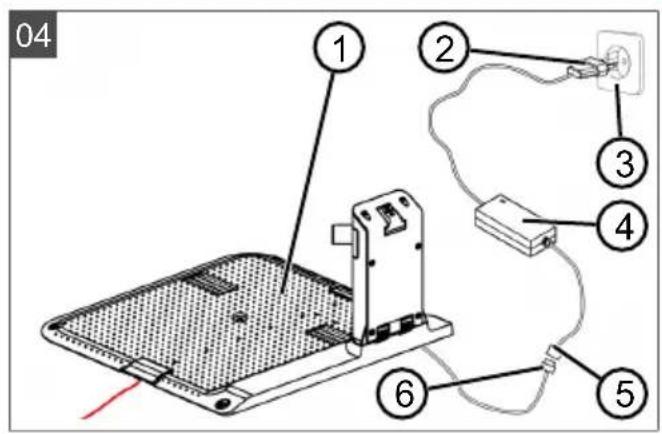
4.6 Connecting the base station to the power source (04)
- Place the power supply (04/4) in a dry location that is protected against direct sunlight and sufficiently close to the base station (04/1).
- Connect the low voltage cable of the power supply (04/5) and the cable of the base station (04/6) with each other.
- Plug the power plug of the power supply (04/2) into a power socket (04/3).
NOTE We recommend connecting the power supply to the mains supply via an earth leakage circuit breaker (ELCB) with a rated leakage current < 30mA .
4.7 Checking the connections on the base station (04)
- Check that both LEDs on the front side of the charging station (09/1) light. If not:
Disconnect the mains plug.
- Check that all plug connectors of the power source and the boundary cable are positioned correctly and check for damage.
Status indications of the LEDs
LEDs Operating states
Green
Lights up when the boundary cable is laid correctly and the loop is intact.
LEDs Operating states
Yellow
Lights up if the power source is intact.
5 START-UP
This chapter describes the activities and settings that are necessary to put the appliance into operation for the first time. For all further settings, refer to see chapter 7 "Settings", page 51.
5.1 Charging the rechargeable battery (08)
During normal operation, the battery of the appliance is regularly charged automatically.
NOTE Fully charge the rechargeable battery before using it for the first time. The rechargeable battery can be charged in any charge status. Interrupting charging does not damage the rechargeable battery. The rechargeable battery can only be charged after the appliance has been switched on.
- Place the appliance (08/1) in the base station (08/3) so the contact surfaces of the appliance touch the charging contacts of the base station.
- Switch on the appliance with
- The display on the appliance shows Battery is being recharged. If not: see chapter 13 "Help in case of malfunction", page 58.
5.2 Making the basic settings
- Open the cover flap.
- Switch on the appliance with .mware, code and type are displayed.
- In the menu for language selection, select the
language with and accept with

- In the Login > Enter PIN menu, enter the preset PIN 0000. To do so, select the digit 0
with in sequence and always accept with After entering the PIN, access is enabled.
- In the Change PIN menu:
Under Enter new PIN, enter a self-selected new four-digit PIN. To do so, se
lect one digit in sequence with and respectively confirm with
Under Reenter new PIN, enter the new PIN again. If both entries are identical, PIN changed is displayed.
- In the Enter date menu, set the current date (format: DD.MM.20YY). To do so, select
one digit in sequence with a re-spectively confirm with
- In the Enter time > HH:MM menu, set the current time (format: HH:MM). To do so, se
lect one digit in sequence with and respectively confirm with
The basic settings have been completed. The Not calibrated Press Start key status is displayed.
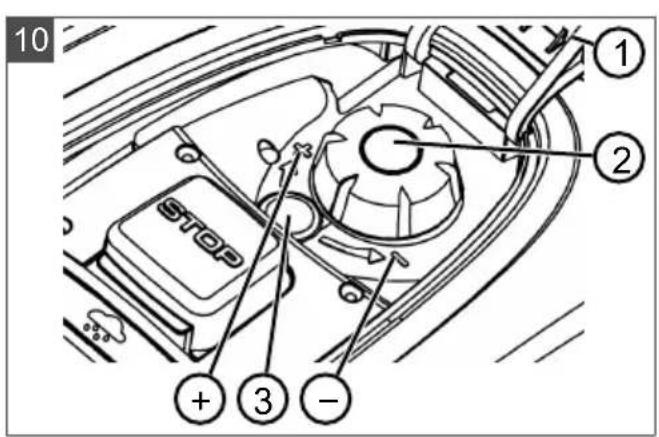
5.3 Setting the cutting height
The cutting height can be manually adjusted continuously between 25 - 55mm
NOTE A cutting height of 55mm is recommended for the calibration movement (see chapter 5.4 "Carrying out an automatic calibration movement", page 50) and for teaching-in the starting points (see chapter 7.5.2 "Setting the start points", page 52).
-
Open the cover (10/1).
-
Set the cutting height (the current cutting height is displayed in the window (10/3) in millimetres):
-
Increase the cutting height (i.e. lawn height): Turn the rotary knob (10/2) clockwise (10 / +) .
Decrease the cutting height (i.e. lawn height): Turn the rotary knob (10/2) anticlockwise (10 / - ) -
Close the cover.
5.4 Carrying out an automatic calibration movement
NOTE Before commissioning, carry out the calibration movement (see chapter 5.4 "Carrying out an automatic calibration movement", page 50) or teaching-in of the starting points (see chapter 7.5.2 "Setting the start points", page 52).
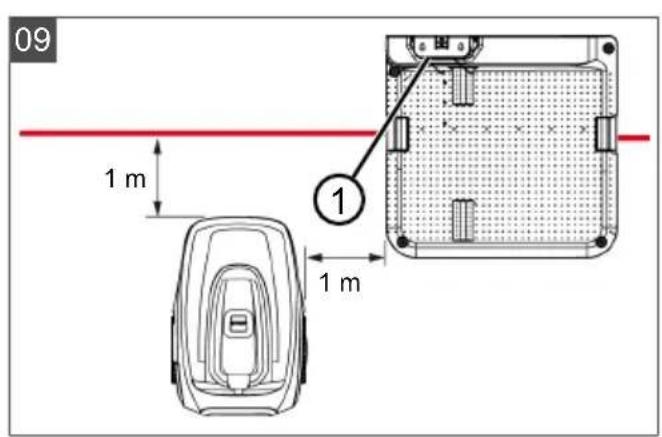
Place the appliance at the starting position (09)
- Place the appliance at the starting position inside the mowing area:
At least 1 m left and 1 m in front of the base station
- Aligned with the front side to the boundary cable
Starting the calibration movement
-
Check that there are no obstacles in the expected movement area of the appliance. The appliance must be able to move over the boundary cable with both front wheels. If necessary, remove obstacles or lay the cable temporarily inwards (min. 35 cm required).
-
Start the appliance with e following is shown on the display:
!Caution ! Starting Motors
■ Calibration, Phase [1]
During the calibration movement
To determine the signal strength inside the boundary cable, the appliance first moves twice straight beyond the boundary cable and then into the base station and comes to a stop there.
The Calibration completed message is shown on the display.
The rechargeable battery is being charged.
NOTE The appliance must come to a stop when it moves into the base station. If the appliance does not touch the contacts when it moves into the base station, it moves further along the boundary cable. If the appliance moves through the base station, the calibration procedure has failed. In this case, the base station must be better aligned and the calibration procedure repeated.
After the calibration movement
The preset current mowing duration is displayed. For all further settings, refer to see chapter 7 "Settings", page 51.
Robolinho 700/1200/2000
NOTE To ensure proper operation and reduce error messages, the loop length must be measured.
See also
Setting the start points [52]
6 OPERATION
6.1 Starting the appliance manually
- Switch on the appliance with .For unscheduled edge mowing: see chapter 7.7 "Edge mowing with a manual start", page 54.
- Start the appliance manually with
6.2 Cancelling mowing
Robolinho 500/1150: Press the appliance.
Robolinho 700/1200/2000: Press the base station (08/4) or on the appliance.
The appliance moves automatically into the base station. It deletes the mowing plan of the current day and starts again the next day for the set time.
Press the appliance. The mowing is interrupted for half an hour.
Press the appliance. The appliance is switched off.
NOTE In dangerous situations, the appliance can be stopped with the STOP button (08/2).
6.3 Mowing the secondary area (01/NF)
- Lift the appliance and place in the secondary area by hand.
- Switch on the appliance with
- Call up the main menu with
- o* settings
- o* zone mowing
-
Select the mowing time with
-
Start the appliance manually with .Depending on the setting: The appliance mows for the set time period and then switches off or mows until the rechargeable battery is flat.
After mowing the secondary area, place the appliance in the base station again by hand.
7 SETTINGS
7.1 Calling up the setting - General
-
Call up the main menu with 三 Note: The asterisk * in front of the menu item indicates that it has just been selected.
-
o* settings
- Select the required menu item with and accept with
- Make the settings. Note: The menu items are described in the following sections.
- Return to the main menu with
NOTE Further menu items: see chapter 5.2 "Making the basic settings", page 50.
7.2 Activating/deactivating the button tones
- 0* kV clicks
-
Activating/deactivating the button tones:
-
or Activate : - Activate the button tones.
Or Deactivate: Deactivate the button tones.
7.3 Activating/deactivating Eco mode (Robolinho 700/1200/2000)
In Eco mode, the appliance switches to energy-saving mode. This reduces the energy consumption and noise emissions.
NOTE With high and thick grass and for thick rolled turf, this is not recommended or may not be possible.
- o* EcoMode
- Activating/deactivating Eco mode:
Activate Activate Eco mode.
Deactivate Deactivate Eco mode.
7.4 Setting the rain sensor (Robolinho 700/1200/2000)
NOTE Mowing when the grass is dry reduces soiling. By activating the rain sensor and setting a delay time, it is possible to prevent the appliance mowing when the grass is wet.
If the rain sensor is activated, the appliance moves back into the base station when the rain begins. It remains there until the rain sensor has dried. Then it waits for the time period that is set as the delay before it continues mowing. The sensitivity of the rain sensor is adjustable.
- o* Rn sensor
- Activating/deactivating the rain sensor:
or Activate: Activate the rain sensor.
or Deactivate: Deactivate the rain sensor.
- Setting the delay of the rain sensor:
or After rain delay
xx hours xx minutes Select the required value for the delay with a accept with .
- Setting the sensitivity of the rain sensor:
or Rain sensitive
Select the required value for the sensitivity with and accept with
7.5 Setting the mowing program
7.5.1 Setting the mowing program - General
- Call up the main menu with
- O# P#grams
- Select the menu item with and accept with
- Carry out the settings. Note: The menu items are described in the following sections.
7.5.2 Setting the start points
Teaching-in start points
- Place the appliance in the base station.
- Switch on the appliance with
-
Call up the main menu with
-
▲* Programs
- o* Entry Point
- o* interactive teach
- 串 start interactive entry point teaching
or start . The appliance moves along the boundary cable.
or set when the appliance has reached the required start point. The start point is stored.
- Set entry point 1 if no start point has been specified during the teaching-in movement. If no start point has been specified here, the start points are automatically specified.
- Entiy point x: XXm if the last start point has been reached.
Manually specifying start points (01)
The first start point (01/X0) is pre-set and is 1 m to right of the base station. Other start points can be defined after this point:
Robolinho 500/700/1150: Up to three start points (X1 - X3)
Robolinho 1200: up to six start points (X1 - X6)
Robolinho 2000: up to nine start points (X1 - X9)
When specifying the start points, heed the following:
Do not set start points too far from the base station or too close to one another (02/f).
Only use as many start points as necessary.
- o* Emy Point
- o* Point X1 at [020m]
Select one digit in sequence with and always accept with
- o* Point x2 at [075m]
Select one digit in sequence with and always accept with
- If necessary, specify further start points.
- Return to the main menu with
7.5.3 Setting the mowing times
NOTE There must be at least 30 min. between programming the mowing times and the mowing start. If not, the appliance starts 30 min after the last press of the button at the earliest.
In the Weekly Program menu item, the days of the week and time periods when the appliance should mow are set. Adapt these settings to the size of your garden if necessary. If unmown areas are still visible after approx. one week, increase the mowing periods.
- o* Weekly Program
or All Days [X]: The appliance mows every day at the set times. If All Days [ ] is shown, the appliance only mows on the set days of the week.
or Monday [X]...* Sunday [X]: The appliance mows for the set time periods on the set day of the week. If Monday [ ] is shown, for example, the appliance does not mow on the respective day.
or change:Activate the respective day [X] or deactivate it [, and set the time periods, type of mowing and the start points.
- Make the settings for every day or the respective day:
e.g. [M] 07:00-10:00 [?]: Normal mowing [M] from 07:00 - 10:00 am with automatically changing start point 0 - 9 [?]
e.g. [R] 16:00-18:00 [1]: The appliance starts with edge mowing [R] at 4 pm and moves along the entire boundary cable. The area mowing then begins at start point 1 [1]. At 6 pm or as soon as the rechargeable battery is discharged, the appliance moves back to the base station.
or change : Change the selec ted setting.
or continue: confirm the changes setting and continue to the next setting.
- Save: Save at changed settings of the menu item.
7.6 inTOUCH
An existing connection to a gateway can be disconnected. This means the appliance is ready to establish a new connection for 30 minutes.
NOTE To establish a connection later, the connection must first be disconnected again, even if the appliance was not previously connected with a gateway.
- Reset connection Appliance reports: Done.
- Confirm with and return to the menu.
7.7 Edge mowing with a manual start
For a manual start, the setting can be made here that the appliance begins with edge mowing.
Carrying out the edge mowing at the programmed mowing time periods: see chapter 7.5.3 "Setting the mowing times", page 53.


7.8 Setting the secondary area mowing


- Setting the mowing time periods:
or nactive:
Secondary area mowing is switched off.
or active:
The appliance mows until the rechargeable battery is flat.
or Nowing time in min:
The appliance mows the secondary area for the set time period. The following mowing time periods can be set: 30/60/90/120/until rechargeable battery flat.
7.9 Setting the display contrast
If the display is difficult to read, e.g. in sunlight, the display can be improved by changing the display contrast.

- Increase/decrease the display contrast with

7.10 Setting lock
If the setting lock is deactivated, the PIN must only be entered when acknowledging safety-relevant faults.

- Activating/deactivating the setting lock:
orActivate:
Activate the setting lock.

Deactivate the setting lock.
7.11 Recalibrating
If the position or length of the boundary cable has been changed or the appliance no longer finds the boundary cable, recalibration is necessary.
- oReset calibration
- Reset loop calibration data?
- Carrying out a calibration movement: see chapter 5.4 "Carrying out an automatic calibration movement", page 50.
7.12 Restoring factory settings
The factory settings of the appliance can be restored, e.g. before selling the appliance.
- o* Factory reset
Appliance reports: Factory reset completed
8 DISPLAYING INFORMATION
The Information menu is used for displaying machine data. No settings can be made in this menu.
- Call up the main menu with
- o* information
- Select the menu item with and accept with
Note: The menu items are described in the following sections.
- Return to the main menu with

Blades service
Shows in how many operating hours a blade service is required. The counter can be reset manually. Have the blade service carried out by an ALKO dealer, technician or service partner.
Reset the counter for blade service:
- conVirm
Hardware
Shows information on the appliance, such as type, year of manufacture, operating hours, serial number, number of mowing operations, total mowing time, number of charging cycles, total charging time, length of the loop of the boundary cable.
Software
Shows the software version.
NOTE Keep the software of the Robolinho automatic lawn mower up to date at all times. Check the firmware version at regular intervals and update it as necessary. The Robolinho updater software can be found on the Internet at: www.al-ko.com/shop/de/robolinho-autoupdater
Program Info
Shows current settings such as the total weekly mowing time.
Failures
Shows the fault messages that last occurred with date, time and fault code.
9 MAINTENANCE AND CARE
CAUTION! Risk of injury. Sharp-edged and moving appliance parts can lead to injury.
Always wear protective gloves during maintenance, care and cleaning work.
9.1 Cleaning
IMPORTANT! Danger from water. Water in the automatic lawn mower and in the base station leads to damage on electrical components.
- Do not spray the automatic lawn mower and base station with water.
Clean the automatic lawn mower
CAUTION! Danger of injury due to the cutting blade. The cutting blades are very sharp and can cause cutting injuries.
Wear protective gloves.
Make sure that parts of the body do not get into the cutting blade.
Once a week, carry out the following:
- Switch off the appliance with
- Wipe off the surface of the housing with a broom, a brush, a damp cloth or a fine sponge.
- Brush off the underside, mower deck and cutting blade with a brush.
- Check the cutting blade for damage. If necessary, replace the following: see chapter 9.3 "Replacing the cutting blades", page 55.
Cleaning the base station
- Regularly remove grass residues and leaves or other objects out of the base station.
- Wipe off the surface of the base station with a damp cloth or a fine sponge.
9.2 Regular checks
General checks
- Once a week, check the whole Installation for damage:
Machine
Base station
Boundary cable
Power supply
- Replace defective parts by original spare parts from AL-KO or have them replaced by an AL-KO service centre.
Check the rollers can move freely
Once a week, carry out the following:
- Carefully remove grass residues and soiling from the areas around the rollers. Use a broom and cloth for this.
- Check that the rollers run freely and that they can be steered.
Note: If the rollers do not move freely or cannot be steered, have them replaced by an AL-KO service centre.
Check the contact surfaces on the automatic lawn mower
- Use a cloth to remove soiling and then lightly grease with contact grease.
Check the charging contacts of the base station
- Disconnect the mains plug.
- Press the charging contacts in the direction of the base station and release them. The charging contacts must spring back into the initial position.
Note: If the charging contacts do not spring back, have them replaced by the AL-KO service centre.
9.3 Replacing the cutting blades
CAUTION! Danger of injury due to the cutting blade. The cutting blades are very sharp and can cause cutting injuries.
Wear protective gloves.
Make sure that parts of the body do not get into the cutting blade.
IMPORTANT! Damage to the appliance due to incorrect repair. The blade plate can be damaged by the alignment of a bent, built-in cutting blade.
Do not align bent cutting blades.
Replace bent cutting blades by original spare parts from AL-KO.
Worn or bent cutting blades must be replaced.
-
Switch off the appliance with
-
Put down the appliance with the cutting blades pointing upwards.
- Unscrew the fastening screws.
- Take the cutting blade out of the blade seat.
- Clean the blade seat with a soft brush.
NOTE The cutting blades are sharpened along the entire length and can therefore also be mounted rotated by 180^ , which doubles their runtime.
- Replacing the cutting blades:
If cutting blades have not been rotated since the initial mounting: Rotate the cutting blades by 180^ and insert into the blade seat again with the sharpened side pointing towards the appliance, and tighten the fastening screws again by hand.
If the cutting blades have already been rotated once since the initial mounting: Insert new cutting blades into the blade seat again with the sharpened side pointing towards the appliance, and tighten the new fastening screws by hand. Note: It is only allowed to use original spare parts from AL-KO.
In case of stubborn dirt that cannot be removed with a brush, the blade plate must be replaced because an imbalance can lead to increased noise levels, greater wear and malfunctions.
As a rule, the clearer blades do not need to be replaced.
10 TRANSPORT
To transport the appliance, proceed as follows:
- Stop the appliance with ton.
the stop but
- Switch off the appliance with

- Lift the appliance with both hands on the housing:
Do not touch the cutting blades.
The cutting blades must always point away from the body.
11 STORAGE
11.1 Storing the automatic lawn mower
The appliance must be stored over winter or when it is to be taken out of service for an expected duration of longer than 30 days.
- Fully charge the rechargeable battery (see chapter 5.1 "Charging the rechargeable battery (08)", page 50)
-
Thoroughly clean the appliance (see chapter 9.1 "Cleaning", page 55).
-
Store the appliance:
upright on all wheels
at a dry, lockable location protected from frost
out of the reach of children
11.2 Storing the charging pole
The charging pole must be stored over winter or when it is expected to be out of service for an expected duration of longer than 30 days.
- Disconnect the power supply from the mains supply and unplug from the base station.
- Removing the charging pole:
Unscrew both screws of the charging station (08/5).
- Remove the charging station from the base station by tilting.
- Undo the plug connection of the cables from the base station and charging station.
- Close the opening of the base (08/6) with the included winter cover (08/7).
- Storing the charging pole:
at a dry, lockable location protected from frost
out of the reach of children
11.3 Winter storage of the boundary cable
The boundary cable can remain in the ground and does not need to be removed.
12 DISPOSAL
Information on the German Electrical and Electronic Equipment Act (ElectroG)

- Electrical and electronic appliances do not belong in household waste, but should be collected and disposed of separately.
Used batteries or rechargeable batteries that are not installed permanently in the old appliance must be removed before disposal. Their disposal is regulated by the battery law.
- Owners or users of electrical and electronic appliances are obliged by law to return them after use.
The end user bears personal responsibility for deleting his personal data from the old appliance to be disposed of.
The symbol of the crossed-through rubbish bin means that electrical and electronic appliances may not be disposed of in the household rubbish. Electrical and electronic appliances can be handed in at the following places at no charge:
Public service disposal or collection points (e.g. municipal building yards)
Points of sale of electrical appliances (stationary and online) provided traders are obliged to take them back or offer this voluntarily.
These statements only apply to appliances that are installed and sold in the countries of the European Union and are subject to European Directive 2012/19/EU. Different provisions may apply to the disposal of electrical and electronic appliances in countries outside the European Union.
Information on the German Battery Act (BattG)

Used batteries and rechargeable batteries do not belong in household waste, but should be collected and disposed of separately.
- For safe removal of batteries or rechargeable batteries from the electrical appliance and for information on their type or chemical system, follow the further information within the operating or installation instructions.
- Owners or users of batteries and rechargeable batteries are obliged by law to return them after use. Return is limited to the handover of customary household quantities.
Used batteries can contain harmful substances or heavy metals that can cause damage to the environment and human health. Reuse of the used batteries and use of the resources contained therein contributes to the protection of these two essential commodities.
The symbol of the crossed-through rubbish bin means that batteries and rechargeable batteries may not be disposed of in household rubbish. In addition, if the symbol Hg, Cd or Pb appears under the rubbish bin, this stands for the following:
Hg: Battery contains more than 0.0005% mercury
Cd: Battery contains more than 0.002% cadmium
Pb: Battery contains more than 0.004% lead Rechargeable batteries and batteries can be handed in at the following places at no charge:
Public service disposal or collection points (e.g. municipal building yards)
Points of sale of batteries and rechargeable batteries
Disposal points of the common take-back system for the used batteries of appliances
Disposal point of the manufacturer (if not a member of the common take-back system)
These statements apply only to rechargeable batteries and batteries that are sold in the countries of the European Union and that are subject to European Directive 2006/66/EU. Different provisions can apply to the disposal of rechargeable batteries and batteries in countries outside the European Union.
Information on packaging

The packaging materials are recyclable. Please dispose of packaging in an environmentally friendly manner.
Remove the rechargeable battery before disposing of the appliance
The integrated rechargeable battery must be removed before disposal of the device and disposed of separately in an environmentally friendly manner.
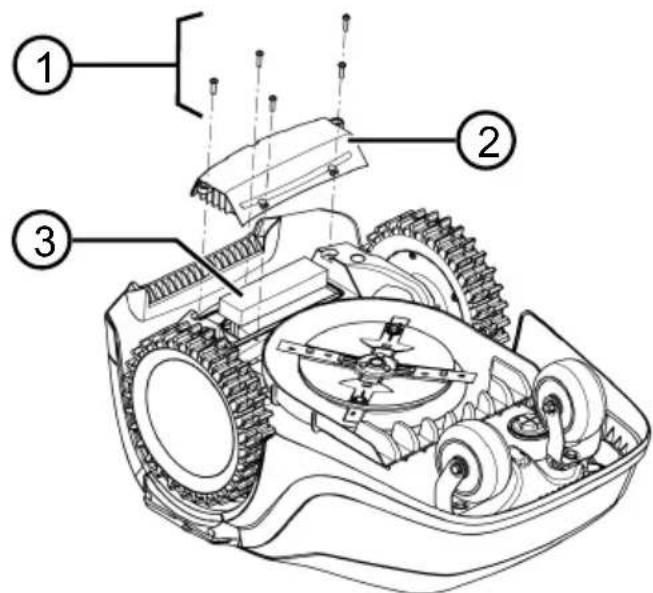
- Undo the screws (1).
- Take off the cover of the rechargeable battery compartment (2).
-
Unplug the rechargeable battery (3) and take it out.
-
Put the cover back on and fasten the screws.
13 HELP IN CASE OF MALFUNCTION
13.1 Correcting appliance and handling faults
CAUTION! Risk of injury. Sharp-edged and moving appliance parts can lead to injury.
Always wear protective gloves during maintenance, care and cleaning work.
NOTE For malfunctions that are not listed in this table or that you cannot resolve yourself, please contact our customer service.
| Malfunction Cause Remedy | ||
| The appliance does not start. | Rechargeable battery is flat. Charge the appliance in the base sta- tion. | |
| The appliance gets stuck and has dug itself in. The wheels continue to turn. | Bump sensors do not trigger. Contact an AL-KO service centre. | |
| The grass is too high. | ■ Increase the cutting height, then lower in stages to the required height.■ Mow the grass short with a lawn mower. | |
| The appliance sits on an un-evenness of the grass sur-face. | Eliminate the unevenness. | |
| The appliance mows at the wrong time. | The appliance has the incor-rect time. | Set the time. |
| The mowing duration is in-correctly set. | Set the mowing times. | |
| The appliance loses the time settings. | The rechargeable battery is defective. Contact an AL-KO service centre. | |
| Motor stops during mow-ing. | Motor is overloaded. Switch off the appliance, set on level ground or shorter grass and restart. | |
| Rechargeable battery is flat. Charge the rechargeable battery. | ||
| The cutting blades are blunt. Turn over or replace cutting blades if necessary. | ||
| Mowing result is uneven. Mowing time is too short. Program | longer mowing times. | |
| Mowing area is too large. Reduce the mowing area. | ||
| Cutting height level is too low. | Increase the cutting height, then lower in stages to the required height. | |
| The cutting blades are blunt. Turn over or replace cutting blades if necessary. | ||
| Rechargeable battery oper-ating time is significantly shorter. | Cutting height level is too low. | Increase the cutting height, then lower in stages to the required height. |
| Grass is too long or too wet. | ■ Let the grass dry. ■ Set the cutting height to a higher level. | |
| Appliance vibrates or the volume is too high. | Imbalance on the cutting blade or in the cutting blade drive | ■ Clean the mower deck. ■ Contact an AL-KO service centre. |
| Rechargeable battery cannot be charged or low battery voltage | ■ The charging contacts of the base station are dirty. ■ The contact surfaces on the appliance are soiled. | Clean the charging contacts and contact surfaces. |
| Base station has no power. Connect the base station to the power source. | ||
| The appliance does not touch the charging contacts. | ■ Place the appliance in the base station and check that the charging contacts make contact. ■ Contact an AL-KO service centre. | |
| The service life of the re-chargeable battery has expired. | Contact an AL-KO service centre. | |
| The charging electronics are faulty. | Contact an AL-KO service centre. | |
13.2 Fault codes and troubleshooting
NOTE For malfunctions that are not listed in this table or that you cannot resolve yourself, please contact our customer service.
| Fault code Cause Remedy | ||
| CN001: Tilt sensor The inclination sensor has been triggered: ■ Max. tilt exceeded ■ The appliance has been carried ■ Slope too steep | Place the appliance on a flat surface and acknowledge fault. | |
| CN002: Lift sensor The lift sensor has triggered: ■ The appliance cover has been deflected upwards by lifting or by an obstacle. | Remove the obstacle. | |
| CN005: Bumper deflected The appliance has driven in-to an obstacle and cannot free itself (e.g. collision close to the base station). | ■ Place the appliance on the free, designated grass surface. ■ Correct the location of the boundary cable. | |
| CN007: No loop signal | ■ No loop signal ■ The boundary cable is faulty. ■ Loop signal is too weak. | ■ Check the LEDs on the base station. ■ Check the power source of the base station. Disconnect and reconnect the power supply. ■ Check the boundary cable for damage. Repair the defective cable. |
| CN008: Loop signal weak | ■ Loop signal too weak ■ Boundary cable buried too deep | ■ Check the LEDs on the base station. ■ Check the power source of the base station. Disconnect and reconnect the power supply. ■ Raise the boundary cable to the prescribed height; attach directly on the grass if necessary. |
| CN010: Bad position | ■ The appliance is outside the designated grass surface. ■ The boundary cable has been routed in a criss-cross pattern. | ■ Place the appliance on the free, designated grass surface. ■ Correct the location of the boundary cable around curves and obstacles. Eliminate the criss-crossing of the cable. |
| CN011: Escaped robot | The appliance is outside the designated grass surface. | Correct the location of the boundary cable around curves and obstacles. |
| CN012: Cal: no loop | Fault during the calibration: ■ The appliance cannot find the boundary cable. | ■ Check the LEDs on the base station. ■ Check the power source of the base station. Disconnect and reconnect the power supply. ■ Place the appliance at the prescribed calibrating position; align precisely at right angles. Appliance must be able to drive over the boundary cable. |
| CN015: Cal: outside | ||
| CN017: Cal: signal weak | Fault during the calibration: ■ Loop signal too weak ■ No loop signal ■ The boundary cable is faulty. | ■ Place the appliance at the prescribed calibrating position; align precisely at right angles. ■ Check the power source of the base station. Disconnect and reconnect the power supply. ■ Check the boundary cable for damage. |
| CN018: Cal: Collision | Fault during the calibration: ■ The appliance has bumped into an obstacle. | Remove the obstacle. |
| Fault code Cause Remedy | ||
| CN038: Battery The rechargeable battery is flat: | ||
| Loop of the boundary cable is too long, too many islands. | Correct the location of the boundary cable. | |
| When charging, no contact to the charging contacts | Clean the charging contacts. Place the appliance in the base station and check that the charging contacts make contact. Have the charging contacts checked and replaced by a service centre of the manufacturer. | |
| Obstacles close to the base station | Remove the obstacles. | |
| The appliance has got stuck. Place the appliance on the free, designated grass surface. | ||
| The appliance does not find the base station. | Check the boundary cable for damage. Have the boundary cable repaired by a service centre of the manufacturer. | |
| The rechargeable battery is depleted. | Have the rechargeable battery replaced by a service centre of the manufacturer. | |
| The charging electronics are faulty. | Have the charging electronics checked by a service centre of the manufacturer. | |
| CN099: Recov escape | Automatic fault rectification not possible | Manually acknowledge the malfunction message. If the fault reoccurs: Have the appliance checked by a service centre of the manufacturer. |
| CN104: Battery overheating | Rechargeable battery has overheated (more than 60 °C). No discharging is possible. Emergency switch-off by monitoring electronic control unit | Switch off the appliance and let the rechargeable battery cool down. Do not place the appliance on the base station. |
| CN110: Blade motor over heating | Mowing motor has overheated (more than 80 °C). | Switch off the appliance and let it cool down. If the fault reoccurs: Have the appliance checked by a service centre of the manufacturer. |
| CN119: R-Bumper deflected | The appliance has moved onto an obstacle and cannot free itself. | Remove the obstacle. |
| CN120: L-Bumper deflected | ||
| Fault code Cause Remedy | ||
| CN128: Recov Impos-sible | The appliance has moved onto an obstacle and cannot free itself. | Remove the obstacle. |
| The appliance is outside the designated grass surface. | ■ Place the appliance on the free, designated grass surface. ■ Correct the location of the boundary cable. | |
| CN129: Locked WL Left wheel motor is blocked. Remove blockage. | ||
| CN130: Locked WR Right wheel motor is blocked. | Remove blockage. | |
The description of other error codes can be found on the AL-KO homepage.
KO Service Centre. These can be found on the Internet at:
www.al-ko.com/service-contacts
14 AFTER-SALES / SERVICE
In the event of questions of warranty, repair or spare parts, please contact your nearest AL-
15 GUARANTEE
We will resolve any material or manufacturing faults on the appliance during the legal warranty period for claims relating to faults, in accordance with our choice either to repair or replace. The legal warranty period is determined by the legislation of the country in which the appliance was purchased.
Our warranty promise applies only if:
These operating instructions are heeded
The appliance is handled correctly
Original spare parts have been used
The warranty becomes void in the case of:
Unauthorised repair attempts
Unauthorised technical modifications
Non-intended use
The guarantee excludes:
Paint damage that can be attributed to normal wear and tear
Wear parts that are marked with a frame xxxxx (x) on the spare parts card
The guarantee period commences with purchase by the first end user. The date on the proof of purchase is decisive. In the event of a guarantee claim, please take this guarantee declaration and the original proof of purchase, and contact your dealer or the nearest authorised customer service centre. This statement does not affect the purchaser's statutory claims for defects against the vendor.
VERTALING VAN DE ORIGINELE GEBRUIKERSHANDLEIDING
Inhoudsopgave
2 PRODUCTOMSCHRIJVING
7.3 Eco-Mode activeren/deactiveren (Robolinho 700/1200/2000)
8 INFORMATIE WEERGEVEN
Robot-grasmaier reinigen
CN005: Bumper deflected
www.al-ko.com/service-contacts
14 KLANTENSERVICE/SERVICE CENTRE
www.al-ko.com/service-contacts
15 GARANTIE
Available on the AppStore

GET IT ON Google Play
www.al-ko.com/service-contacts
14 SERVIZIO CLIENTI/ASSISTENZA
! Caution ! Starting Motors
■ Calibration, Phase [1]
Med kalibracijski voznjo
ali After rain delay
xx hours xx minutes
S tipko tipko izberite zeleno
vrednost zakasinite in s tipko potr-dite nastavitev.
www.al-ko.com/service-contacts
14 SERVISNA SLUZBA/SERVIS
!Caution ! Starting Motors
Calibration, Phase [1]
-
iTry Point
-
iint x1 at [020m]
Koristeci uzustopce odaberite brojku i preuzmite koristeci
- iint x2 at [075m]
Koristeci uzustopce odaberite brojku i preuzmite koristeci
-
Po potrebi odredite dodatne poctene tocke.
-
Vratite se na glavni izbornik koristeci
7.5.3 Namještanje vremena košnje
NAPOMENA Izmedu programiranja vremena kosnje i početka kosnje mora biti min 30 minuta. Ako ne, uredaj sePokreće najranije 30 min. nakon pritiska posljednje tipke.
He Bo3nte ce Ha ypehajy!
2.4 KomaHdNo noJIbe
* camo Robolinho 700/1200/2000
Bp. CactaBn deo
1
(TacTeP Home):пекинту реким Кош�ьа,уpeйсce враhaубаstry CTAHИС.СлdeHERдANA ce onet NOKpehe ayTomatcNу пошево Врeme KОш�ьa.
2 Cen3op 3a Knuy (Robolinho 700/1200/2000): Perinctpyje da li na da Knua (Budn Po2nae7e 7.4 "Podecumu ceH3op 3a Knuy (Robolinho 700/1200/2000), cmpaHa 218).
3Диспгел:Пика3уjeТрeHyTHo padHo cTaHbe ypejaja,Ha3nB n3a6paHOr MeHnja,HeRoBe CTaBKe MeHnja,Kao n n3bOpФyHKuJa(BuDn IToaIaEJIbe 2.5 "DucnpeJ",cmpaHa 206).
4
Tactepn ca ctpenuama):
BpaBe CTaBKn MeHna, NOBeHaBaHe n CMaHbNAbe 6pojuAHx BpeDHOCTN,
BpaBe N3MeHy noDeWabaHa.
5
(TacTeP cTApT/nay3a):PyuHo NOKpeTaHBe HnpEKnD peXIma KoWeHbA ODN. TpeHyTHn HAcTaBak paDa IocNe npNTUcKa Ha
6
(ФункиjsТ tacTepn): ⅠоЗВаТи Функииу, koja ce ynpabo npka3yje n3HaД tacTepa Ha ДиспNejy.
7
(TacTeP On/Off): YKbUyBaHbe nCKbUyBaHbe ypehaja.
Бр.СаТВнДeo
8
(TracTeP 3a MeHn): NokpeTaBe rnaBHOr MeHnja.
2.5 Ducnnej
Бр. Ппраз
1 Ha3nB n3a6paHOr MeHnJa (OBKe: Main Menu)
2 CtabKe MeHnja y MeHnju: YBeK ce npka3yjycamO DBe cTabKe MeHnja (OBJe: Settings n Information). Ca Mryhe je npka3aTn DoaTHe cTabKe MeHnja.
3Функиje 3a n3a6paHn cTaNky MeHnja (OBNe: Settings).Ca moryhe je no3BaTN cyHKnJe.
4 3Be3nue 3a 03NaUaBaHe npKa3aHe CTaBKe MeHnja (OBne: Settings)
2.6 CtrpykTypa MeHnja
| Main Menu | Programs | Weekly Programидп Празлел be 7.5 "Празшаваье празама кошени", smран 219 |
| Entry Point видп Празлел be 7.5.2 "Празшаваье поемнux мача", smран 219 | ||
| Program Info видп Празлael be 8 "Прека з unfорmaцу", smран 221 | ||
| Settings | Time видп Празлael be 5.2 "Пр dedуз汞аье осноehux празшаваь", smран 216 | |
| Date видп Празлael be 5.2 "Пр dedуз汞аье осноehux празшаваь", smран 216 | ||
| Language видп Празлael be 5.2 "Пр dedуз汞аье осноehux празшаваь", smран 216 | ||
| PIN-Code видп Празлael be 5.2 "Пр dedуз汞аье осноehux празшаваь", smран 216 | ||
| Key clicks видп Празлael be 7.2 "Актураяbe/degakmuaupaьe зукова масера", smран 218 | ||
| EcoMode видп Празлael be 7.3 "АктураяMu/degakmuaupaMu Eco-Mode (Robolinho 700/1200/2000)", smран 218 * | ||
| Rain sensorвидп Празлael be 7.4 "Празсumu сензор за кшу (Robolinho 700/1200/2000)", smран 218 * | ||
| After rain delay видп Празлael be 7.4 "Празсumu сензор за кшу (Robolinho 700/1200/2000)", smран 218 * | ||
| Rain sensitive видп Празлael be 7.4 "Празсumu сензор за кшу (Robolinho 700/1200/2000)", smран 218 * | ||
| inTOUCH видп Празлael be 7.6 "inTOUCH", smран 220 | ||
| Margin mowing видп Празлael be 7.7 "Кошенье уеба ручимnotremаь", smран 220 | ||
| Sub zone active/disabled видп Празлael be 7.8 "Празшаваьe кшева с鞘дунх пошина", smран 220 | ||
| Display contrast видп Празлael be 7.9 "Празшаваьe konmpacma duclneja", smран 220 | ||
| Safety settings видп Празлael be 7.10 "Зашума пошаваь", smран 221 | ||
| Reset calibration видп Празлael be 7.11 "Понова калбрацija", smран 221 | ||
| Factory reset видп Празлael be 7.12 "Ресмоваье на phабочka пошаваь", smран 221 | ||
| Information | Blades service видп Празлael be 8 "Прека з unforpmaцу", smран 221 | |
| Hardware видп Празлael be 8 "Прека з unforpmaцу", smран 221 | ||
| Software видп Празлael be 8 "Прека з unforpmaцу", smран 221 | ||
| Program Info видп Празлael be 8 "Прека з unforpmaцу", smран 221 | ||
| Failures видп Празлael be 8 "Прека з unforpmaцу", smран 221 |
- Robolinho 700/1200/2000
2.7 Ba3Ha cTaHnua
Bp.CacTabHn deo
1Doba nloya
2JIED3a npka3 cTaTyca
3 KoHTaKT 3a nyBeHe
4 TacTep Home
5 Cty6 3a nyhebe
6 Ka6noBCKO OKHO
7ydy6beHeBe 3a ToaKa
8 O'tBOp 3a HABoJHe KInHObe (9)
9 HaBojHn KInHOBn
- Robolinho 700/1200/2000
2.8 BaTepejna
KopncnK moKe da npomeHn 6aTepujy.
HANOMEHA Do Kpaja HanyHnTe
akymnatop npe npBe ynotpe6e. Akymnatop ce MoKe nyHnTu Ha 6nNo Kojem HnBOy
HanyBeHocTn. PpeKnDaHe NyBeHa He StTeTn
akymnatopy. Akymnatop MoKe Da ce nyHn
cMo KaJa je ypehaj yKbUyeH.
AkymyaTop je DeiIMnHo HanybeH npnnkOM nCnpyke. Y HopMaHHom pexmMy paada ce akymyatop peDOBHO nyHN. Y Ty cbpxy ce ypehaj nomepa y 6a3Hy cTahuCy.
IHTerpicaHa eNeKtpoHka 3a Ha3Op ayTomatcKn 3ayctaBb a NyHebe KaDa ce DoceHre cTaTyc NyBeBa od 100%
Ipoec nyheba yHKIOHnue caMO aKO cy KOHTaKTn 3a nyhebe 6a3He cTaHnue y 6ecnpekopHom KOHaTKTy ca DoOpHnM NOBpUnHama ypejaja.
Ha TemnepaTypaMa n3HaD 45 ^ C yrpaheHa 3aHTTa cKnONka cnpeyaba nybeHe akymylaTopa. Ha taj hauH ce n36eraba pa3apaHe akymylaTopa.
Ako je BpeMe paDa akymylaTopa 3HaayajHo CMaHbeHO ynpKoc NyHom NByeBy, akymylaTop Mopa 6nTu 3aMeHbEN HOBMOpuHHaHmakymylaTopo npeKO DnCTpN6yTepa,TexHnUapa nn cepBnCHor napTHepa komnaHne AL-KO.
Ako ce akymylaTop 360r cTapeBa nI npdeyror cKnaIuTeHa Icnpa3Hn IcnoI npara Koju je OndepNo npou3BoHa, Bnue ce He MoKe nyHIn. PpOBepnte akymylaTop n eJeKtpoHnky 3a HaD3Op KOD IncTpNbTyepa, TexHnUAPA nII cepBnCHor napThepa kompanije AL-KO n 3ameHnTe nx no Notpe6n.
Ctatac akymylaTopa je npka3an Ha dincnpejy. IpoBepntu ctaTyc akymylaTopa nocne oko 3 meceua cknaIusTeHa. Y Ty CBpxy yKbYHTN ypehaj N OHTaTN ctaTyc akymylaTopa. Ako je akymylaTop Hanyhe ha camo oko 30% , CTABNTe ypehaj y 6a3Hy CTAHUy N yKbYHTe ra da 6nCTe nyHInn akymylaTop. Ako je cTy6 3a NyHebe paDn ycknaIusTeHa cKNHY ca 6a3He cTAHnce (BNDI NoaBBe 11.2 "CknaduwmHe cmy6a 3a NyHebe",cmpaHa 223),npBO ra NOHOBO MOHTnpajTe 6bpyTM peOocneDom N NOHOBO npNKbYHTe 6a3Hy cTAHcy Ha eJekTpHu MpekY.
Ako je doшно do uypeha eNeKTpoJNTa yypehajy:JaTre ypehaj Ha nonpaBky y cepBnc cnPme AL-KO!
Ako je akymylatop demoHTnpaH n3 ypehaja: Ako cy ouH nn pyke doUne y KOHTaKT ca NcUypeJIIM eJekTPOJNTOM, OdMax UcNepuTe BOJOM. OdMax notpaxKeIe Jekapa!
2.9 Onnc yHKnJe
KpeTaBe no TpaBHaToj NOBpUnHn
Ypehajce cnoobnO kpehe y noDpyjy KoWeHa koje je odpehJeHO rpaHnHm Ka6nom. OpiJeHTaunja ypehaja ce BpHn npeko ceH3opa KoJN DeTeKTyjy MarHeTHo NOBe rpaHnHOr Ka6na
Ako ypehaj yapn o npenpeky, 3ayctabba ce n HacTabba y npyrom cmepy. Ako ypehaj dohe y
CnTuaunjy y Kojoj paHne Moryh, Ha Dncnpejy ce npka3yje nopyka.
Robolinho 700/1200/200: Ako ypehaj npn yKbyeHOM ceH3opy 3a Knu npeno3haje Bnary, ayTomatcN Ce BpaHa y 6a3Hy cTahNu.
Pekm KoeseBa n pekm nybeBa
Φa3e KoWeBa ce CtaIHO CMeHbIy ca φa3ama NyBeHa. Ako ce HanybeHoCT aKymyIaTopa cMaHnIo Ha odpehEny BpeHocT npNIkOM KoWeBa (pNka3: 0%), ypehaj ce BpaHa y 6a3Hy cTaHnCy dYK rpaHnUHe XnCe.
Iporpam 3a KoWeBe cy yHanpei noDeWeHn mory ce doaTHo nOeWabatn Ha ypehajy nn y annkaunj.
CbaKn npT kaJa ce MoTOp KocnIuCe nOKpeHe, MeBa ce HBeRoB Cmep poTaunje, wTo yDBOCTpyUye BEK TpaJaHa HOKeBa.
2.10 Moŋyɪn Koju n ce noBé3yje nyTem WiFi-ja n anlɪnkaɪnzja AL-KO inTOUCH
Pobot 3a KoWeHe TpaBe OnpemJbeH je paAno MoDyIOM KOJn Ce NObe3yje NyTem WiFi-ja. Obaj MoeJ omOryhye Jako ynpabBaHbe, NOdeuBaHbe Hnad3npaHbe PpeKO anJnKaunJe Ha HeKOM MObHOM ypehajy (nAmETn TelefoH, TabNet).
HANIOMEHA 3a KopuusheneMoBnHorypehaja nytem anikaJe AL-KO inTOUCH HeoNXoHa je Be3a ca nHTepHeTOM.
HANOMEHA Da 6n coΦTBeP 3a po6oT 3a KOWeHe TpaB e yBek 6nO axKypuPaH Ha HajHOBjy Bep3nju, Mopa Da 6ynde NOBe3aH ca INHTepHEtOM npeko WiFi mpexe. Annkaunja AL-KO inTOUCH o6abeWTaba KaDa ce noJaBe HObe Bep3nje coΦTBeP a 3a po6oTcK y KocnInu. OHe ce ayTomatcKn npey3majy ca INHTepHeTa.
Anlkaunja AL-KO inTOUCH
Anika ja AL-KO inTOUCH je DocTynHa 3a anDpond ypehaje y GooglePlay npoDaBnCi, a 3a iOS ypehaje npeko cepBnca Apple App Store:


Available on the App Store

GET IT ON Google Play
HaKoH nHCTanaJne annnkaJne Mopate ce npBO npNJabNTn.
PpNIKOM npBOr nOKpeTaHa aAnnkaunje ayTomatcN ce AKTNbnpa ynyTCTBO 3a 6p3y nHCTanaJy.CneDnte ynyTCTBa 3a INCTanaJy po60Ta 3a KoSeHe TpaBe y cBooJ 6aHTn I noTOM ra NOBe3aHn ca annkaunjom AL-KO inTOUCH.
HANOMEHA Po6oTcKa KocnIuca ce NCKbUyHBO NOBe3yje ca WiFi mpeXOM od 2,4 GHz.
He noopjkaBajy ceWiFi mpeke od 5 GHz.
Да 6и ce noBE3ana anNnkaunja AL-KO inTOUCH,po6OTcKa Kocnna u nametHn TeNefoh Mopajy da ce Hana3e y domety pyTepa ca doBObHOM jaUnHom cnHaHa (npenopyka: MnH. 50%
1.Покенуни anлкauиу AL-KO inTOUCH.
2. HanpaBHTN KOpNCHnKn HAnor y3 nomoh KomaHne ,PEINCTPOBATn". Ynncatn KOpNCHnKo IMe N IIO3NHky.
3. Пиравьнвае nomу noctojecteh Kopuchnukor Hanora.
4.ПokpenHyTN acnCTeHTa 3a noBe3nBaHbe npeko komaHnde ,YPEbAJN" n ,HOBN YPeTbAJ".
5.Cneintn daIba ynyTCTBa.
HANOMEHA YKoNko ce po6oTcKa Kocnna Kpehye DeNy 6aTe ca loom WiFi Be30 mnn 6e3 He, noDeuBaHa aanikaJe AL-KO inTOUCH ce Bpwe TK nowTo ce po6oTcKa Kocnna Bpatu y Deo 6aTe ca Do6pIM WiFi cnHAnOM. YKoNko IokaHn WiFi cnHAn Ha pyTepy Hne DOBObHO ja Da nokpnje ceny 6aHTy, HerOB domet Ce MoKe noJaatn NomoHy penetntopa KoJn ce MoKe hahny npodajn.
Y cnyajy fynKuHOHaHnX CMeTbN, MoKe Bam nomoh npodBauc Koju IMa IHcTaInpaHy anikaJy AL-KO inTOUCH. PpOabuy ce npeko ankaunej AL-KO inTOUCH mopa omoryhnti daBnHcKn npncTyP pOboTckoj Kocnilnci.
OcHMa daBnHcKOr npncTyna CBHM NOBe3aHIM
po6OTnMa 3a KoWebe TpaBe, anNkaunja AL-KO
inTOUCH Hynn nDpyre fynkunje, nonyt
perncTpaunje npOn3BOda, cabeta o
6aWToBaHCTBy, cabeTHNK O 6nIbKaMa nIy NpU
HotnFokaunje y cnuyajrpeuke.
3БE3БЕДHOCT
3.1 CbpcncxoHa ynoTpe6a
Obaj ypehaj je npedBnHEn NCKbUyNBO 3a npIBaTHy ynoTpe6y. Cbakn dpyraunjn HauHH KopuShHeBa, Kao n Heo3BOJbeHe npeppaBKe nIi DOrpaIbe ce cMaTpa HeHameHcKOM yNoTpe6om n DOBoNDIO ppeCTaHka BaxKeHa rapaHcNJe Te do ry6ntKa ycklaheHocTN (CE o3HaKa) n do OndjaHa CBake ODROBOPHOCTN npOn3BOHa y ODHOCy Ha ShTeTy KOpncHka nIi TpeHnx INuca.
5.2 PpeyuMahe OCHOBnX noewaBaHa
- OTbOpHTn NOKpNBHy 3aKlonKy.
- Ca yuHTe ypehaj. Pnka3yj cy cnPMBep, uoppa n TnI.
3.Y MeHjy 3a n36op je3nka ca 1n3a6epnte je3nk n ppey3mnte ca -
Y MeHjy Login > Enter PIN yHeCnTe noDeWeH nINH 0000. Y ty cbpxy y3actOnHo ca nn n36peRte 6pojky O n yBek npey3mnte ca Tocne yHoca INH-a ce De6Joknpa npncTyn.
-
Y MeHnjuy Change PIN:
Ioi Enter new PIN yheCnTe HOB cheTbopoOnppeH INH no conCTBeHoj XeJbN. Y Ty CBpxy y3aCTOnHO caA nn 13a6epnte 6pojky n yBEK ppey3MnTe ca
Ioi Reenter new PIN jow jeHOM yheCnTe HOBn PnH. Ako cy oBe yHeTe BpeHocTn IeHTnUHe, npKa3ahe ce PIN changed.
6.у MeHjy Enter date noDecHTn aKTyeJHn DaTym (fOpMaT:ДI.MM.20r).Y Ty cBpxy y3actOnHO caA Hn 36epnte 6pojky n yBeK ppey3MITE ca
7.уMeHnjuy Enter time>HH:MM yHeTu aKTyeJnHO BpeMe (ΦopMaT:YU:MM).Y Ty CBpXy y3aCToJnHO caAnn N3aBepuTe 6pojky n yBeK npey3Mnte ca
OCHOBHa NODeIaBaIbCa cy 3aBpIeHa. Pnka3yje ce cTaYc Not calibrated Press Start key.
5.3 POneWaaBHe BnCnHe pe3a
BucnHa KoWeBa ce MoKe KOHTnHyaNHO pyHNOpeWabTn 3Mehy 25-55 MM.
HANOMEHA 3a npoana kani6paunje (Bnu NpOaBBe 5.4 "N3epuaBaHe aymomamcko npoana kaIu6paucJe", cmpaHa 217) kao n 3a nporpaMnpaHe noeTHnx Taayaka (Bnu NpOaBBe 7.5.2 "POneWaaBe noemnHex mauka", cmpaHa 219) npenopyyje ce BvCnHa KoWeHa oD 55 MM.
- OToBOpTu n oKnIona (10/1).
2.ПодшаВаье Висине КОш�ьа (Трени ВИСИНА КОш�ьа щ ппказаHA y KOHTРОПHOM пpoЗорчHy (10/3)у млиметримa):
■Повehаье Висуну pe3aha(Tj.ВиснаТравьaka):Окрени TeобтноДугme(10/2)yсмepyka3aJIbkeHacaTy (10 / + )
CmaHbBaHe BucnHe KoWeHa (Tj. BucnHe TpaBbaka): OkpeHnte o6pTHo Dyrrme (10/2) y cmepy cynpothom od Ka3aJbKe Ha caty (10/-).
- 3aTBOpHTN NOKJlonaL.
5.4 N3BpShaBaHbe ayTomatckor npona3a kaH6paunje
HANOMEHA Ipe nyuTaBa y paI n3BpWnte npOa3 kaNbpaUne (BnDn Po2naBe 5.4 "N3BpuwaaBe aymomamcko npOa3a KaNu6paUne", cmpaHa 217) uNn npOrpAmpaHe noyETnHex TaYaKa (BnDn Po2naBe 7.5.2 "NoDeewaaBe noyemHuX mauka", cmpaHa 219).
NocTaBnTuypehajy noeTHn nooXaj (09)
- NocTabnTe ypehaj yHytap nobpwnHe 3a KOWeHBe y noeTHN NOOxaj:
MHN.1 M neBO u 1 M nCnped 6a3He cTaHnue
Ca npedHbom cTpaHOM okpeHyToM npema rpaHnUHOM ka6ny
Pokpetahe npola3a kaII6paunje
- Поверпесда Нма пенира унтапочекиог оncera кетаьа урehaja.Урehaj Mopa 6ntn cnocoban 3a Boxby npeko rpanuhor ka6na ca oba npedha TOTka. YkoliNKo je notpe6Ho, yknOHHTn ppenpeke
n nn Ka6nn npNvBpeMeHo nppeMeCTNTn npema yHyTpa (noTpe6Ho je mH. 35 um).
- Ca HpeHnte ypehaj. Ppika3yje ce Ha dncnnejy:
!Caution ! Starting Motors
■ Calibration, Phase [1]
Y Toky npoana3a kain6paunje
Да 6и ce odpeiHa jaUnHa cnHana y rpaHnUhoj XuNi,ypehaj npBO Bo3N Db NaTApaBO npeko rpaHnUHe Xnue, a 3aTm y 6a3Hy cTaHnUy n Ty ce 3ayCTaBba.
Ha dincnjejce npka3yje npyka calibration completed.
AkyMylaTop ce nyHn.
HANOMEHA Ypehaj ce Mopa 3ayctabNTn npnnkOM yIacka y 6a3Hy cTahNu. Ako ypehaj He noroDn KOHTaKTe npnnkOM yIacka y 6a3Hy cTahNu, OH hAcTaBbA pyTOBaHe y3 rpaHnHy Xnu. Ako ce ypehaj Kpeh e KpO3 6a3Hy cTahNu, NocTynap KaIbpaunje Hnje ycneo. Y TOM cnuyajy, 6a3Ha cTaNu ca Mopa 6bTu 6oJbe npabHaTa I npouec kaIbpaunje Mopa da ce IHOBOv.
Pocne npoIa3a kaIb6paunje
Pnka3yje ce noeHno akTyenHO TpajaHe KOseHa.
3a cba npya noewaaba BnDn Poaanbe 7 "Poeaaea", cmpaHa 218.
Robolinho 700/1200/2000
HANOMEHA Da 6n ce o6e36eNo npabnilan pad ypehaja n cmaHno 6poj npNJabJIbEHnx rpeJka, Mopa ce N3MePNTn dJxHa neTbe.
y ty cbpxy nornejaTe n
Noeewaabahe noeTHnx TaayaKa [219]
6 ONCJYKUBAHe
6.1 Puyho nokpeTahe ypehaja
- Ca yuHTe ypehaj. 3a HennaHpaHo KoWeHe NBua: BnI NooJaBc7.7 "KowHe uEua npu pyHOM nokpemaHy", cmpaHa 220.
- Ca HO NOKpeHnTe ypehaj.
6.2Ппекид ржима кош�ьа
Robolinho 500/1150:Причесниуpeишajy.
Robolinho 700/1200/2000:ПуNTиСHTИ
На урehajу пи на 6a3нов станци (08/4).
Ypehaj ce ayTomatckn nomepa y 6a3Hy ctaHnUy. Oha ce 6pniue pnaH koeHa 3a Tekyn dan H noHOBO ce nokpehe cneDeher daHa y noDeSeHo BpeMe.
PnTnchTu ypehajy. Pekm KoWeHa ce npeKnDa Ha noJa cata.
IpnTnCHyTu ypehajy. Ypehaj ce nckbvyje.
HANIOMEHA Y onacnM cnTyaujama,ypehaj ce moke 3ayctabuTn TacTepom CTOPI (08/2).
6.3Koewe cnopeDne noBpuHHe (01/HΦ)
1.Поинуypeиaj npkOM ra noctaHTnHa cnopeHny NOBpUnHy.
2. Ca byuhte ypehaj.
3.Ca BAtn TnaBn MeHn.
4. settings
5. zone mowing
6.Ca 3a np TaN BpeMe KOweHa.
7. Ca HNO NOKpeHnTe ypehaj.
3aBncho OJ NOeWabHa: Ypehaj Kocn NOeIeHcO BPeMe, a 3aTm Ce NCKbUyJe IIN KOCN DOK ce aKymuTaOp He Ncnpa3HN.
Hakon KoWeHa cNopeIHe NOBpUHHe, BpaTInTe ypehaj pyuHo y 6a3Hy cTaHnCy.
7 NOIDEUBAHbA
7.1 No3nBaHBe noDeShaBaHa - OnwTe
- Ca 3BaTu Tn TaBn MeHn. HanomeHa: 3e3dua * uCnped cmaKe MeHuja o3Haayaba da je ma cmaKa mpeHymHo u3a6paHa.
- 水 settings
3.Ca n3a paTu XeJbEHy CTaBky MeHnja N npey3Et ca
4.ИЗВРШТЕ NOДЕSWABAHA. HanomeHa: CmaeKe MeHuJa cy onucaHe y cneDeHm OdeIbUma.
-
v * Programs
-
w * Eery Point
-
v * Interactive teach
-
start interactive entry point teaching
Start.ypejB03n DyK rpaHnHor ka6na.
Anu Set, ayepehaj DOCTnrao JKeJbeHy noeTHy TaUky. NoeTha taUka ce MemOpuwe.
- Set entry point 1,
ako npn BOXkBn nporpaMpaHb aHije odpeheta HneJHa noeTHa TaYka.Ako ce OBHe He odpei HneJHa noeTHa TaYka, noeThe Taue he 6HTn ayTomatckn odpehhe. - Ent point x: XXm, Ka da ce doCTnIghe nocneHb na noeTHa TaUka.
PyuHo OndpeHnBaHbe NoueTHnx TaYaKa (01)
I npBa noyeha TaUka (01/X0) je npeTxoJHO nOdeuHa n Hala3n ce 1 M decho nopei 6a3He cTaHnue. N3a OBe TaUke ce Mory DeOpHnHcTn IdoaTHe noyTe HaKe:
Robolinho 500/700/1150:do Tprn noyeh Taueke (X1-X3)
Robolinho 1200: do sect noyetnx tauka (X1-X6)
Robolinho 2000:doNeBETNoeTHnx Taoka (X1-X9)
PpNIJKOM OdpeHnBaHa NoeTHnx TaYaKa Tpe6a HmATn y BnDy CneDehe:
He noctabbaTn noyEThe Taue npedaleko od 6a3He cTaHnce oH. npe6n3y jeHa npyroj (02/φ).
Kopuctn camo OHJIKO NOeTHnx Taaya, KOJIKO je Notpe6Ho.
- v* Entry Point
- v* Point X1 at [020m] Ca y3aTOnHn n3a6paTu jeiHy 6pojky ncbaky npey3eTu ca
- * Point X2 at [075m] Ca yBcToHn n3a6paTn jeHy 6pojky cBAky npey3eTu ca
4.Ako je noTpe6Ho, OndepuNTn DoaTHe NOUHTHe Taue.
5.Ca BpaNTe y rnaBHn MeHn.
7.5.3 NoideShaBaHbe BpeMeHa KoWeHbA
HANOMEHA N3meHy nporpaMnpaBa BpeMeHa KOseHa N NOyEtKa KoSeHa Mopa Da npoTeKHe MN. 30 MN. Y cynpoTHOM, ypehaj NoHHe ca paDom Hajpanije 30 MN. HakoN oocJeBcR aKTNBnpaHa Tactepa.
Y ctabkn MeHnja Weekly Program ce
NoeWabajy daHn u BpeMe KaJa ypehaj Tpe6a da
Kocn. Ako je Notpe6Ho, npnilarOuTe OBe
NoctabKe BeJnUHH 6aUte. Ako ce n HakoH
HeJeBy DaHa BnDE HeKOWeHa NoDpyJa,
NoBehajTe BpeMeHa KoWeHa.
- * Weekly Program
AIIIN A11 Days [X]:Ypehaj CBAKN daH KOCn y noDeeHbpeMe.Ako ce npKa3yje A11 Days [ ],ypehaj he KocHTN caMo noDeeHm DaHIMa y HeJeBn.
Monday [X]...* Sunday
[X]: Ypehaj kocn nopeheHm daHmMa y HeJeBn y nopeeHo Bpeme. Ako ce npika3yje Hnp. Monday [ ], ypehaj HeHe kocntu odpehjenor daHa.
Anhange:AkBupaTN [X]nIeakTbupaTN[]OpeHEn HaH,poecNTBpeMeHa,HaHH KOHeBaNPOeThe Taue.
2.ИЗВРШЕ NOCTABKE 3a CBE ДАн e ИПи 3a OДрЕн дан:
Hnp. *[M] 07:00-10:00 [?] HopmaJIHo KoIeHe [M] oJ 07:00- 10:00 yacOba ca ayTomatcKn npOMeHbN BOM NOyETHOM TaYKOM O-9 [?]
Hnp. [R] 16:00-18:00 [1]: Ypehaj y 16:00 yacoba nounhe ca kochebem nBua [R] u kpehce ce duk zenor rpaunuhr ka6na. Nocne tora nounhe noBpwnHcKO KoWeHe y noeTHOJ TaKn 1 [1].Y 18:00 yacoba oH. Ym ce akymyIaTOP nCnpa3Hn, ypehaj ce Bpaha y 6a3Hy cTaHnUy.
Anu change:13MeHHTn 13a6paHy noCTaBky.
Innontinue:ntBpnte n3MeHbEny noCTaBky npeHnTe Ha cneDeHy noCTaBky.
- Save: CaCyBaJte CBe 13MeHbeHe NOCTaBKe CTaBKe MeHnja.
7.6 inTOUCH
IocjoheBa3a caMpexHnM npola3OM MoKe da ce npeKHe. Ha taj hauH he ypehaj 30 MnHyTa 6NTN OTBOpE H3a ycnoCTaBbAbe HOBe Be3e.
HANOMEHA Da 6ncte Kacnije ycnoCTaBnJI NBe3y, Be3a Ce npBO Mopa nHOBO npeknHyTu, yak n aKO ypehaj paHnje Hnje 6nO NOBe3aH ca MPekHM npoJa3OM.
- u*inouch
2.пекид Вез e -урнaj jabla:ToTOBO. - IOTBpNTn ca VbpaNTn ce y MeHn.
7.7 Koewebe IVBua npn pyHOM NOKpeTaHy 3a puHNO NOKpeTaBe MOKeTe OBDe NODECHTN Da ypehaj noUHe ca KOWeHbem IVBua.
I3BoHeBe KooeHa nBnua y nporpaMnpaHO BpeMe KoWeHa:BnuN Po2na8be 7.5.3 "PodeuaeAbe BpeMeHa KooeHa",cmpaHa 220.
- * margin mowing
- * manual start
7.8 NoidewaBaBe KoWeHa cNopeHnX NOBpUHa - 区 zone mowing
2.ПошаBaHeВрemeHa KoWeHa:
ninn nactive: KOWeHBe CnpoeDnX NOBpUnHa je NCKJbUyeHo.
Upehaj Kocn CBe DoK aKymyIaTOP He 6ynde npa3aH.
IINBpeMe KoueuHa y MHN 1ypehaj TOKOM NOdeSeHOr BpeMeHa Kocn cnopeHy nobpunHy. Moryhe je noideaBaBe cneDeHer BpeMeHa KOseHa: 30/60/90/120/do npa3He 6aTeprije.
7.9 NopdewaBaBe KOHTpacta DnCnneja
Ako je dincnnej, Hnp. 36or cyHca, cna6o uHTbN, npika3 ce moKe no6obJbWATn IpomehOM KOHTpacta dincnpeja.
- v* play contrast
2.Ca noBraBajTe/CMaHyjTe KOHTpAcT DnCnIeJa, a ca Ta npey3MnTe.
7.10 3aunTa noDewaBaHa
Ako je 3aWTnTa NOpEwaBaHa DeaKTbNpaHa, INH ce Mopa yHeTn cAmo KaJa ce nOTBpe rpeWke peIeBaHThe 3a 6e36eHocT.
- 巧 ^ 巧 * safety settings
- AkTnBupaHbe/daekTnBupaHbe 3aHTnte nOndeShaBaHa:
AnnnActivate: aKTNBnpaTn 3aUHTTy noDeuBaHa.
Aneeactivate:一 DeakTNBnpaTn3aHTNtTyNoDeuBaHa.
7.11 Поновна калпбрацида
Ako je lokaunja nnn dyykna rpaunuhor ka6na npomeheha nn ako ypehaj Bnwe He hana3n rpaunuHn Ka6n, noTp6Ha je noHObHa kaN6paunja.
- Reset calibration
- Reset loop calibration data?
- CnpoBohJeIe npoa3a kaIb6paunje: BnI IpoIaJIe 5.4 "I3epwaaIbe aymomamckO2 npoa3a KaIb6paunje", cmpaHa 217.
7.12 PecetobaHe Ha pa6pnuKa nOdeShaBaHa
Фабричка подашаваьу урегая могу да ce obHOBE,нр.пpe пpoDAje.
1. 工 _ 工 ^ 工 Factory reset Ypehaj jabba:Factory reset completed
8 ПИКАЗ ИНФОМАЦИJA
MeHn Information cnJxN 3a npKna3 noJaTaKa ypehaja. YOBOM MeHnju ce He Mory BpHNT NHKaKBa NOdeJaaHa.
1.Ca BaTN rnaBn MeHn.
2. * Information
3.Ca 13aopatn CTaBky MeHuja npey3etn je ca HAnomeHa: CmaKe MeHuja cy onucaHe y cneDeHum nacycuma.
4.Ca BpaNTe y rnaBn MeHn.
Blades service
Ioka3yje 3a KOJnKo caTn pada je he 6ntu noTpe6an cepBnc HOKeBa. Bpojaue ce moKe pyuH opecToBAtn. CepBnc HOka Tpe6a da n3BpUn AL-KO dncTpnbTyep, TexnUap nn cepBnCH npTHeP.
PeceToBaHbe 6pojaa 3a cepBnC Hoxa:
- conrm
Hardware
Pnka3yje nHΦopMaunje o ypehajy, Hnp. Tn, roiHa npoN3BOnde, catn paDa, cepnjckn 6poj, 6poj KoWeHb, yKynHO Bpeme KoWeHb, 6poj UNKnyca NyIbeHb, yKynHO Bpeme NyeBeHb, dJxHnHa neTbe rpaHnUHor ka6na.
software
Pnka3yje Bep3nju coTbepa.
HANOMEHA YBek OndpkaBajTe aKypnHm coΦTBeP po6OTcke KocnInce Robolinho. PeIOBHo npOBepaBJte Bep3nju n aKypnpajTe je, ako je notpe6Ho. CoΦTBeP 3a aKypnpaHe Robolinho Updater moKeTe npOHaHn Ha INHTepHety Ha: www.al-ko.com/shop/de/robolinho-autoupdater
Program Info
Pnka3yje TpeHyTha NdoeShaBaHa, KAO Hnp. UeNoKynHO HeJeBHo BpeMe KoWeHa.
Failures
Pnka3yje HajnoBije npuyke o rpeuCi ca DaTymOM, Bpemehom u n ndpom rpeuke.
9 ODPKABAHNA HEGA
ONPE3! OnachocT od nobpeTe. Owtpn n POKpeTHn DeNoBn ypehaja Mory da doBeNy do noBpeDa.
Ipnikom paOba oPkaBaHa, Here n uHHeBa yBek HocHTe 3aHTnThe pykabuie!
9.1 Ynshene
PAXHbA! OnachocT od Boe. Boda y po6oTckoj kocnilu n 6a3HoJ cTaHnU y3pOkyje oWTeheBa eJeKtpuHnx KOMNoHeHTN.
Hemojte npckatn po6otcky kocnniu y 6a3Hy cTahnu BOdom.
Ushenepepo6oTckeKocnne
ONPE3!OnachocT od nobpeDe 36or
HOKeBa.HoKeBn cy Beoma OwTpNi Mory npoy3pOKoBAtu NOceKOTnHe.
Hocnte 3aHTnThe pykabnce!
YBepnte ce da deNoBn TeNa He Docnejy y HOKeBE.
I3BpHNTJeHOM HeJeBHo:
- Ca lyuTe ypehaj.
2.ObpwnTe NOBpunHy KyhniTuMa MeTnucom, YeKOM,BJaxHOM KpNOM INIΦINM cyHepom. - YeTkom OuNCTnTe DoBv CtpaHy ypehaja, NIOuy 3a KoUeHBe KocUNIue HOK.
- Поверпн HOжеву ngледу owTeheBa.
ПоNotpe6и 3amehHTN: BnДn ПoanabBe 9.3
"3ameha HOжews", cmpaHa 222.
Ushhe6a3He cTaHnue
- PEOBHO yKnaHajTe TpaBy n IINsHe nn Dpyre npedMeTe n3 6a3He cTaHnue.
2.ObpwnTe nobpunHy 6a3He cTaHnCe BnaXHom Kpnom nINn FInHM cyHepom.
9.2 PeIOBHO nCnTnBaHbE
OnuTe nCnNTBaHe
1.ПоверпгецелуИнсталацию ќEDHOM HeDeIbHoHaIITeTу:
Ypehaj
Ba3Ha cTaHua
「paHnHaJnUa
MpeKHeDc
- 3aMeHnTe HeuCnpaBHe DeJIOBe opnHaJIHm pe3epBHM DeJIOBIMa @npMe AL-KO oH. 3aMeHnTe nX y cepBnCy @npMe AL-KO.
PpOBepa cNo6oDHor OkpeTaHa ToUkOBA
I3BpHNTJeHOM HeJeBHo:
- TemeIbHTO ONUCTnTe NOdpyuJa OKo TOnKOBa OJ TpaBe I npJBabWtHe. PpTOM KOpNCTnTe MeTnUy N Kpny.
2.ПоверпдддссToKOBn cNo6Oнo okpehy nДa JI cy ynpaBbNbH. HanomeHa: Ako ce moKobu meWko okpehy u Hucy npaebu, AL-KO cepuec mopa da ux 3aMeHu.
IpoBepNTIdoInpHeIOBpHInHeHa po6oTckoj KocnJnCn
- PpIbawTInHy OUnCTnTe KpNOM, a 3aTmMaNo NODMaJXnTE KOHTaKTHOM MaUhy.
IpoBepa KOHTakata 3a nyHebe Ha 6a3Hoj cTaHnCn
1.ИЗВУЦИТЕ Мржнутkaч.
2.ПиNTNCHyTN KOHTaKTe 3a nybeHe y cMepy
6a3He cTaHnue n NyCTnTu.KoHTaKTu 3a
nyBeBe Oet Mopaj Da ce onpyxHo BpaTe
y noeTHn nOIOXaj.
HanomeHa: Ako ce KoHmakmu 3a nyBeHe
He ePame nod dejcmeom onpyze, AL-KO
cepBuc Mopa da ux 3aMeHu.
9.3 3aMeHa HOKeBa
ONPE3! Onachoct od nobpeDe 36or HoxeBa. HoxeBn cy Beoma Owtpn n Mory npoy3pOKOBaTN NOCEKOTnHe.
Hocnte 3aunthe pykabnue!
YBepnte ce da deNoBn TeNa He Docnejy y HOKeBE.
PAXHbA! OwTeHebe ypehaja ycnei HectpyuHne nonpaBKe. NopabHaBaHbe cABNJeHnx, yrpaJehnx HOxEBA MOxe OwTeTNTaHnp ca HOxEBe.
HemojTe nopaBHaBaTu cabJeHe HOKeBe.
3aMeHnte cabujeHe HOKeBe opurHaJIHm pe3epBnM deNoBnMa qnpme AL-KO.
IcTpoWeHn nn cabJeHn HOKeBn ce Mopajy 3aMeHHTn.
- Ca lyuhte ypehaj.
- Ondnoxntuypehaj ca HOKeBnMa OKpeHyTm npema rope.
- OdbrHytn 3aBpTHe 3a npuHbpuhnahe.
4.ИЗВадин HOK ИЗ ЛжштА HOKA. - OuHCTHTN JEXKINTE HOXA MEKOM YeTKOM.
HANOMEHA HoXeBn cy n36pyuWeHn no IeNoj DuxHNi n CTora ce Mory MOHTnpaTu n 3akpeHyTu 3a 180^ ,Ume ce yDBOCTpyuye bHXOB BEK TpaJaHa.
6.3aMeHa HOKeBa:
Ako HOkeBn OJ npBe MOHTaKe HnCy OKpeTaHn: OkpeHnte HOx 3a 180^ n yMeTHnTe rHa3aD y JeknIte HOXca 6pyuHEHom CTpaHOM OkpeHyTOM npemaypehajy N NOHO BO pNITErHnTe 3aBPThBe 3a PnUvBpshHbAHe pykOM.
Ako cy HOXeBN OJ npBE MOHTaxe Beh jeHOM OKpeTAn: YMETHnte HOBe HOXeBE ca 6pyuWeHOM cTpaHOM OKpeHyToM npema ypehajy JIeKnUTe HOXA N 3aTeHNTe HOBe 3aBpTbe 3a npNvBpshnBaHe.
Hanomeha: Cmej y da ce kopucme camo opuzuHaHpu pe3epHu deNoBu fupme AL-KO.
Ycnyajy jake npbawtHe Koja ce He MoKe yKIOHHTN YeTkom, TaBnP ca HOKeBIMa ce Mopa 3aMeHHTn, jep HepaBHOTeka MOKe IOBeCTn Do NOBeHahe 6yKe, NOBeHaHor TpoWeHa n FyHKUHOHaJIHNX CMeTHn.
O6nHNO Hnje nOpTe6Ha 3aMeHa HOKeBa 3a yKnaHaBe.
10 TPAHCNOPT
3a TpaHcnpT ypehaja noctynite Ha cneheHn HauHH:
- Ca Tactepom 3a 3ayCTaBbahe 3ayCTaBNTe ypehaj.
- Ca lyuTe ypehaj.
3.Подигнiteуpeиaj ca obe pykeДржehnyшte:
HoxkeBn ce He cMejy DoOpHyTu.
HoxeBnyBek Mopajy da 6ydy OkpeHyTN oTena.
11CKJIADNIWTEHbE
11.1 CknaIuIteHe po6oTcke KocnJIne
YcknaIuHTTe ypehaj TOKOM 3nme, nIe KaJa je BepoBaTHO da he 6ntu BaH ynoTpe6e Bnue Od 30 dana.
1.До Краja HanuyHHTn akymyIaTOp (BvIg NooJaEbe 5.1 "PyHeBe aKymyIamopa (08),cmpaHa 216)
2.Добpo ounctntu ypehaj (Bnu N Po2na8JIbe 9.1 "UuwHeBe",cmpaHa 221).
- UyBaHbe ypehaja:
CtojehHa CBHm TOyKOBMa
Ha cybom mecy koje ce moxe 3akbyaTNn 3aunheNo je od mpa3a
BanhDomawaja deue
11.2 CknaIaIIuTHe bceTy6a 3a nyHbHebe
YcknaIuNTTe Cty6 3a nyHeBe TOKOM 3nMe, Ond. KaJa je BepoBaTHO da he 6HTN BaH yNoTpe6 dyKe od 30 daHa.
- OndBojntuMpexHn aanTep oI MPeKe nCKJbuyHTu n3 6a3He cTaHnCe.
2.ДемонтаякStуба3aNYиБe:
OdBpyTu 6ba 3aBpTb a Cty6a 3a nyHebe (08/5).
HarrhaheM OBOJNTn CTy6 3a NybeHe o6a3He cTaHnCe.
PactaBtynyTuHne cnojeBe Ka6IbOba Ha 6a3HOJ cTAHnU n Cty6y 3a nyHebe.
OTBOP NOДHoxJa (08/6) 3aTbOpNTn npINoXeHIM NOKJIoNcE M 3a 3mMy (08/7).
- CmeCTnT nCtYb 3a nyHbeHe:
Ha cybom Mecy Koje ce moke 3aKbByatn n 3aWtInHeNo je od mpa3a
Banh Domawaja dece
11.3 PpezIMJbBaBaHe rpaHnUHe XnCe
IpaHnHa Jnca MoKe Da ocTaHe y 3eMbn Hmopa da ce yKnaHa.
12 OJIAHbE
Hanomehe y Be3n ca 3aKoHOM o eJekTpnuHn m enektpoHckn ypehajnma (ElektroG)

CTapn eJektpuHn n eJektpoHcKn ypehajn He Tpe6a da ce 6auajy ca kyHn mCmeHem, Beh Tpe6a da ce noDBprHy OJBAjBy n copTnpaHy oDN. peunKInpaHy!
CTape 6aTepejne nnakymyataOpn Koju HnCy fKCHO yrgaehny CTapn ypehaj, npe npedaje Mopajya ca ce n3BaJe! Huxobo oJnarahe Ha OTnaJ pe peryncaHo 3aKOHOM o 6aTeepjama.
BlaChNK Ond.KopncHK eJeKtpuHnx n eJIeKTPoHcKx ypeJaja cy no nCTeKy HbNXOBr BeKa yIOTpe6e 3aKOHcN oBaBe3Hn da nx BpaTe.
KpajbKn KopncnK cHcN OndroBOpHoc 3a 6pncabe cBojnx Iuynx NODaTaka n3 CTapor ypehaja Koju Tpeba da ce oNDoXn Ha OTnad! Cmbo npceptane He KaHTe 3a OTnatake 3NaH da CTapn eNeKtpuHn EneKtpoHcN ypehajn He Cmeju Da ce Ondaxy 3ajeDHO ca KyHNM CMehem. CTapn eNeKtpuHn EneKtpoHcN ypehajn BeCnnaTHO Mory Da ce npedajy Ha CneDeHIM MeCTHa:
JaBHa MeCTa 3a OJNarAbe OTnada OHN. HBeROBO npKuPbAbe (Hnp. KOMyHaJIHa CTOBAPuTAt)
IpojHa MeCTa 3a eNeKTPnue ypehaje (cTaUHOHapHa n Ha nHTepHeTy),yKoNko cy TpOBUu O6aBe3Hn Da npNXBaTe BpaHeHn IPOUN3BOJ INn AKO Do6pOBOJbHo HHyDe TaKBy ycnyry.
Obe n3jaBe Baxe cAmo 3a ypehaje koju ce yrpahyjy npodajy y 3embama EBponcke yHnje Hn Ka je ce npimehbyje EBponcka dIupeKTHBa 2012/19/EY. Y 3embama n3BaH EBponcke yHnje Mory ce npimehBnBAtN Heke dpyre OndpeDbe 3a OndaraBe CTapNX eJektpuHnx N eJekTPOHcKHX ypehaja.
Hanomehe y Be3n ca 3aKoHOM o 6aTepujama (BattG)

CTape 6aTepeju n akymylaTopn He Tpe6a da ce 6auajy ca Kyhnm Cmehem, Beh Tpe6a da ce nodBprHy OdBajaHy n copTnpaHy oH. peuKnnpaHy!
Y CBpxy 6e36eHOR BaHeHa 6aTepeNja n akymyIaTopa n3 eIekTpUHOr ypeHa npaI INΦOpMaunJa O HbXOBOM TnPy Ond. Xemjckom CnCTEmy, BODITE paCyHa O OCTaIM NODaUMa y ynyTCTBy 3a ynotpe6y Ond.MoHTaKy.
Blaacnok Ond. Kopncn6batepnja n akymyntopa cy no nCTeky HnxOBor Beka ynoTpe6 3aKoHcN o6aBe3n Da nx BpaTe. Bpahbe je orpaHneHo Ha npedajy kOJIuHa yO6uJaehnx 3a DOMaHnHCTBO.
CTape 6aTepeJe Mory Da caDpxe WTeTHe MaTepeJe Nn TeUke MeTaIe, KOJn 6n MoRn Da HaWKoDe JKNBOTHOJ CpeDNH Nn 3dpaBbY. Ipepa Da CTapnx 6aTepeJa n KopuShene y HbMa caDpxKaHNx pecypca DonpHOCN 3aWTtN OBa DBA dparOeHa pecypca.
Cm60n npeuPTaHe KaHTe 3a OTnATke 3HaUN da 6aTepeJne n akymyIaNtOpn He Cmej y Da ce Ondaxy 3ajeHNO ca KyHnM CMehem.
Ako ce ocim Tora nCnoi KaHTe 3a CMeHe Hana3e O3HaKe Hg, Cd nn Pb, OHJa To O3Haayaba cneDehe:
Hg: BaTepuja caPkn Bnue od 0,0005 %
Cd: BaTeepiJa caPkn Bnse od 0,002 % KaMnjyma
Pb: BaTepeNiJa caIpxN BnIe oD 0,004 % OJIOBa
AkymyaTopu n 6atepejie 6ecnnaTHo Mory da ce npedajy Ha cneDehnm MeCTnma:
JaBHa MecTa 3a OJnaraHbe OTnaDa OJH. HberOBo npKynBaHbe (Hnp. KOMyHaJIHa CTOBapuTuTa)
IpoajHa Mecta 3a 6aTepe n i akymylaTope
Mecta 3a Bpahahe 6atepuja n akymylaTopa
MecToBpaHaBaKoI npOn3BohJa(aKO HneJ UaH 3ajeHNuKOr CnCTema BpaHaHa)
Obe n3jaBe Baxe cAmo 3a akymylaTope n
6aTepeNiJe KoJn Ce npOajy y 3eMlbama EbpOncKe
ynije nHa koje ce npImeHByje ebPoncKa
DnpeKtNbBa 2006/66/E3.Y 3emlbama n3BaH
EbpONcKe yHnje Mory ce npImeHbNAu HeKe
dpyre odpeIb6 3a oDnaraHe aKymlaTopa n
6aTepeJa.
HaNoMeHe o am6aJaxn

MaTePnJaJIa 3a am6aJaxy ce Mory peuKnIpaTn. MoIIMO Bac da am6aJaxy yKIOHnTE Ha ekOJIoWKn npxBaTJBnB NaHH.
Ipe Hero wTo 6aunTe ypehaj, n3BaAnTe 6aTepyj
IHTerpicaHa 6atepnja ce npe 6aacaBa ypehaja Mopa n3BaAnTu n 3ace6Ho yKIOHnTu Ha eKOJOWKn npxBaTbNb HauH.
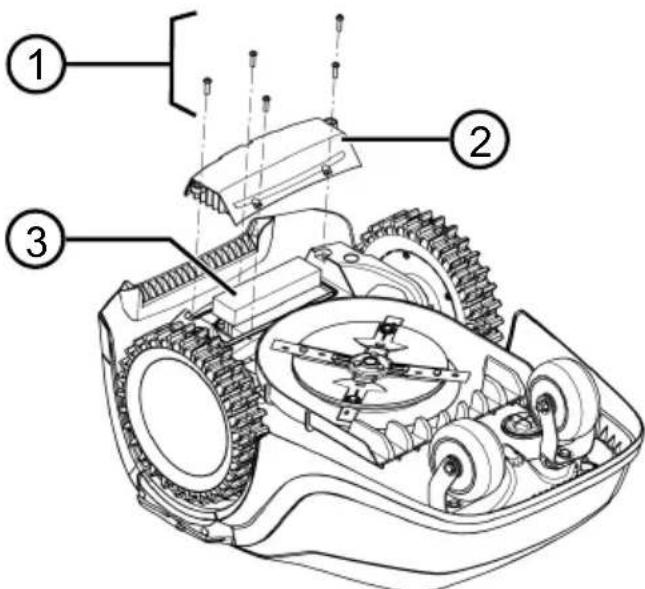
- OdByTu 3aBpTbe (1).
- CkHHTn noknona nperpaJe 3a 6aTepejy (2).
- OtkaHTn 6aTepnjy (3) n i3BaHTn je.
- BpataNTn noknonaun noHOBO npnterHyTN 3aBpTHe.
13 NOMOT Y CJNYAJY CMETHBn
13.1 Kopekunja rpewaka ha ypehajy n rpewaka npn pykoBaHy
ONPE3! OnachocT od nobpeTe. Owtpn IN oKpETHn DeJIOBn ypehaja Mory Da IOBeDu do noBpeDa.
Прилелkom радoba odржаваь, Here n Chшненьая увек Ноче зашитпhe рукавицe!
HANOMEHA KoI cMeTbI KOJE HNCY HaBeJeHe y OBOJ Ta6eNn NJI KOJE He MoKeTe Da OTKNoHnte cam, ce o6paTInTe hAwoj Cnyx6n 3a KopUCHNIke.
www.al-ko.com/service-contacts
15 TAPAHUNJA
EBeHTyaIHe rpeIke y MaTePnJaNy IINI PpOu3BOIDbN Ha ypehajy nonpaBnHem 3a BpeMe 3aKoHcKor poka 3actape npaba Ha rapaHunjy 3a HeIOCTaTKe IpeMa cONCTBeHOM n36Opy nonpaBbAbeM IINI 3aMeHOM. Pok 3actape odpehye ce npema npaby dpXkabe y kojoj ye ypehaj kynbEn.
Haça rapaHTha n3jaba BaXn cMo y cnlyajy:
TapaHunja He o6yXbata:
OwTeHeHaJaKa Koja ce CBoe Ha HopMaHHO TpoWeHe
I IOTPOUHe DeIOBe KOJn cy Ha KapTnCi pe3epBnX DeIOBa O3HaueHn paMOM XXXXX (x)
IapaHTHn pOK noUHe da Teue od DaTyma KynOBnHe od cTpaHe npBor KpajHer KopuCHnka.
MepoDaBaH je daTym Ha paUHy. Ca OBom n3jabOM o rapaHcJIn OpRTHaJIHM paYHom obpaTnte ce npOabuy nHn Haj6bNkoj OBnaWheHOj cepBnCHOj padnoHnCi. OBom n3jabOM ce He Mehajy 3aKOHsKa npaba Koja Kyaau mA npema npOabuy y cnUayj HeIOCTaTaKa.
TŁUMACZENIE ORYGINALNEJ INSTRUKCJI OBSŁUGI
Spis tresci
(whyczanie urzadzenia.
8
CN005: Bumper deflected
Available on the AppStore

GET IT ON Google Play
CN005: Bumper deflected
www.al-ko.com/service-contacts
14 ZÁKAZNICKY SERVIS/SERVIS
!Caution ! Starting Motors
■ Calibration, Phase [1]
- albo * Weekly Program
alebo A11 Days [X]: Pristroj kosi kaźdy den v nastavenych casoch. Ak sa zobrazi A11 Days [ ], potom pristroj kosi len v nastavenych dnoch tź-dna.
alebo Monday [X]...* Sun-day [X]: Pristroj kosí v nastavenom dni v týždni v nastavenych casoch. Ak je napr. zobrazené Monday [ ], potom pristroj prislušné den nekosi.
alebo change:Aktivujte prisluyn den [X] alebo deaktivujte [,nastavte casy,sposob kosenia apociatocné body.
www.al-ko.com/service-contacts
14 ZAKAZNICKY SERVIS
V pripe de otazok k zaruke, oprave alebo nahradnym dielom sa obratte, prosim, na najblizsi ser
15 ZÁRUKA
www.al-ko.com/service-contacts
14 KUNDESERVICE/SERVICE
- Aktivera/inaktivera Eco-Mode:
Aktivera Aktivera Eco-Mode.
Deaktivera Inaktivera Eco-Mode.
7.4 Stalla in regnsensor (Robolinho 700/1200/2000)
14 Kundeservice/service. 415
15 Garanti 415
1 OM DENNE BRUKSANVISNINGEN
- Still inn folsomhet pa regnsensor:
Eller Regnkansl.
Still inn onsket verdi for folsomhet med ell erog ta i bruk med.
7.5 Stille inn klippeprogram
7.5.1 Stille inn klippeprogram - generelt
9 VEDLIKEHOLD OG PLEIE
www.al-ko.com/service-contacts
14 KUNDESERVICE/SERVICE
Ved sporsmal om garanti, reparasjon aller resveredeler henvend deg til det narmesto AL-KO
15 GARANTI
YdaJIte NoCTOpOHnX JnC n3 O-nachOy 3OnbI!

Co6IIOdaIte oc6bIooctOpok-HocTb npi pa6ote!

BepertepyknHornOTpeKyuero mexaHa3Ma!
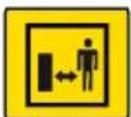
Co6nJaTe 6e3onacHoe paccToaHne!

IpeB BBOOM B 3KcNpyaTuIO npOHTe pyKOBoCTBO NO 3KcNpyaTaun!
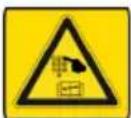
BVeIte PIN-KoI dIJI 3aIycka y-CTpOiCTBa!
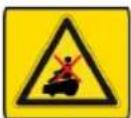
He e3nTe Ha yctpoNCTBO!
2.4 Panaelb ynpaBneHna
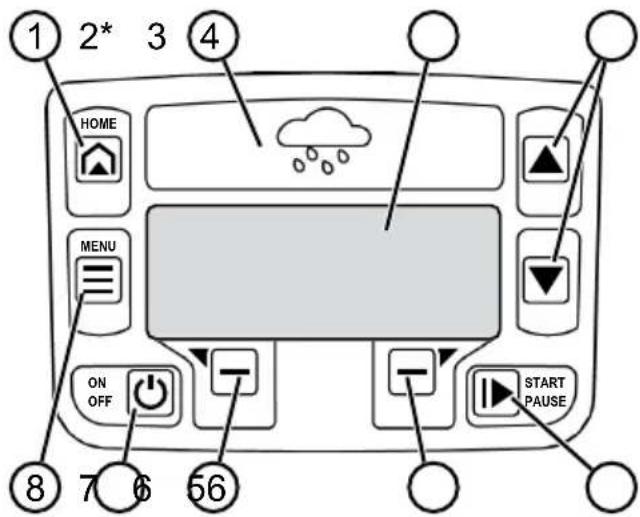
* TOnIbko Robolinho 700/1200/2000
| Ho- MEP | KOMNOHENTA |
| 1 | (Khonka Home): OTMeHa pa60TbI B peXime cKaunBaHnY, yCTpoiCTBO BO3- BpaUaTcTcK 6a30BoW CTaHcNt. DeHb B 3aIporpaMMnpoBaHHbI pIpOexKyTOK BpeMeHn. |
| 2 DaTChk DoxJa (Robolinho 700/1200/2000): perncTpnpuyet, ndet li doxMb (cm. 2naea 7.4 "Hacmpouka dAmuKa doxJd (Robolinho 700/1200/2000)", Cmp. 459). | |
| 3 DnCnPei: oTo6paJxAETcTЯ KeUxuee pa- 6oOee COCTOAnHe yCTpoiCTBa, Na3BaHn- e Bbl6paHnO To MeHIO, PnyKtBi MeHIO N ФунКцИ, KOTOpbI HeO6xOДmO Bbl- 6paTb (cm. 2naea 2.5 "Ducnpei", Cmp. 446). | |
| 4 | (KnabNiSi CO STpeJIkAmI): Bbl- 6op pyHKTOB MeHIO, yBeJIyHeHne i y- MeHbUeHne YIcSpENHbIX 3NaUeHNI, Bbl- 6op HacTpoEk. |
| 5 | (Khonka Start/Pause): 3anYck i O- CTaHOBKa cKaUnBaHnY BpyHyU oIIN BO3O6HOBJIeHne cKaUnBaHnY cpa3y Jxe IocJIe HaxaTnI KONKN |
| 6 | (KhUNHOHaJIbHbIe KONKN): Bbl3OB ΦyHKZIM, KOtOpa I OTo6paJxAET- cI HaI KNHKOJI Ha DiSCPJIee. |
| Ho- mep | kompohteTa |
| 7 | (Кноркa On/Off): Влючения и Вbl- Клоченье уст保險Та. |
| 8 | (Кнорka MeHó): Вbl3OB Гльвого Me- Ню. |
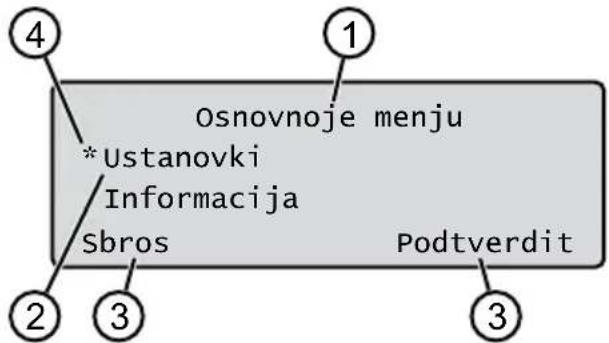
2.5 Dusnien
Robolinho 700/1200/200: Ecnn yctpoiCTBO npn BKNIOeHHOM DaTnKe DoXJa ObHApYKnBaet Bnary, OHO aBTOMaTHueCKN BO3BpaUaTeTc K 6a-3OBOI CTAHUN.
Pa60Ta BpeXmme cKaaunBaHnI N 3apJKn
3TaNbICKaUHbAHnIOCTOHHoMeHHTcCOrIaCHO 3TaIam 3apJKn.Ecnn 3apJd 6aTapenDOCTNOrOpEeJIeHHoro 3HaueHnB O BpeM cKaUHbAHn(CBeToND:0%),yCTpOJCTBO BO3Bpa-7aEcTcK 6a3OBn CTAHnBdoIgPaHnITeNbHOrO Ka6eJn.
PporpaMMbl ckaunBaHnna - npedyctaHOBHeHbIe, INMOxHO KoppeKTnpoBaTb Ha yCTpoiCtBe IINu Chepe3 npINOKeHne.
Pn KaXdOM 3aNyCKe DBNrAteJIy KOCINbHOro MeXaHN3Ma N3MeHReTcE rO HAnpABNeHne BpaUeHnra, YTO yDbaInBaet cPoK Cnyx6bl HOKei.
2.10 BeçnpoBODHо paДиOMOуЛьnpiJIoXeHne AL-KO inTOUCH
Po60tN3HpOBaHHa ra3OHOKOCNJka OCHAeHa 6ecnpoBOHbIM paINOMOyJem. 3TO N03BOJnEYdo6Ho ynpabTb rAOHOKOCNJKO, BblONJIHTbe ee peryI npOBky n KOHTpoJIb c NOMOJbIO npNIJOxHeHnaMOBbHom ycTPOJCTBe (cMapTfoHe, PnAnHwTe).
I INPIMEYAHNE IJIa IIpIMeHnMa MO- 6bIbHOrO yCTPOcTBA Tpe6yETc 6ecnpoBOdHoe COeINHeHne C NcNoJIb3OBaHNem npINOxKeHn inTOUCH.
I NPMMEAHNE IJIa noIDepKHaHn aKtY- aIbHOCTN BercnI nporpaMMHOrO oEcneueHn po6OTn3npoBaHHo ra3OHokocnKn OHa DOJXHa 6bITb NOkJIIOHeHa K INHTepHeTy uepe3 cetb WiFi. PpInOKeHne AL-KO inTOUCH nHΦopMpyeT O HAIChn OBHeHn nporpaMMHOrO oEcneueHn IJIPO6OTn3npoBaHHo ra3OHokocnKn. IVx cKauNbAHne npoNCxoDNT ABTOMaTNeCKn.
Haayabhble TOOK N03BOJrOT yka3aTb, KaKne y- yactkn 6ObnCTN cKaUNBaHn CKOWeHbl.
4.3ПодгтOBkaоблacrKaшиBaHHa
- Y6eIITecb TOM, yTO nIOuaDb ra3OHa 60JIbIe yem MOUHOCt b Ha eINuCy NOBepxHOCTn yCTpOcTBa. EcIIra3OH cInuKOM 60JIbWo, To TpaBa 6yDet Cpe3aTbCRA HepaBHomePHO. Pn HEO6XoDmOcTN yMeHbUnTe IIOUaDb rA3OHa, KOTOPaN IOJNeKNT cKaunBaHIO.
2.Перед установков базов санции и орар нчтелов Кабеля в Вбдом усторь В заимлуатик: Сокоче ra30н ra30ноко- силков на НИЗКОВ ВICOTE. - YdaInte npenTCTBna Ha ra3OHe nIN NCKJIIOyTe INC NOMOu bIO ORpaHnHTeNbHO rKa6bEa (cm. 2naea 4.5.3 "N3oJau npenm-cmeu", Cmp. 455):
Плоскne npelenTCTBnA, KOToPbIe npn pepee3de MOryT NOBpeDHTb HOX (HaPnMep, ПLOCKne KaMHN, NepexOdbI c ra30Ha Ha Teppacy NnDopOxKu, PnNTbl, 6OpDIOpbI n T. D.),
OTBepCTnI BO3BbIeHnHa ra3OHe (Ha npImep, Hopbl Kpota, pa3pbItble OTBepCTnI, COCHOBbIe IINsKn, NaJaJIuca n T. d.)
Kpytoi noBem nnn nepenadbi 6oJee 45% (24°)
Boda (Hanpimep, npydbl, pyb, 6accenHbI n. d.) INX demapkaun Ha ra3OHe
Kcytbl nnBbIe n3rOpoN, KOToPbIe MOryT cTaB 6Oone WnPoKIMN
4.4 MoHTaX 6a3OBoCtAHuN (03/a)
- Pa3MeCTIte 6a3OByIO cTaHcNIO (01/1) coTnacHO 3aIIaHnpOBaHHOMy NOLOKeHNIO OrpaHnHTeNbHOro KaBeJIa CNeDyUOuM o6pa-3OM:
Ha ypoBHe 3emn (npOBepbTe c nOMO- uTO ypoBH)
PpMoN npOBhIn cnyck n noDbem
He ycnneHbI (npn npnkpyuBaHn BNTOBbIX rBO3de 3apdHa cTaHcHn He DOJXHa n3r6aTbcn nncr6aTbc)
2.3aKpeNte 6a3OByIO cTaHcUIO (03/2) YeTbIpB-MRA BnHTOBbIMn TBO3dAmN (03/1) K 3emJIe.
4.5 YctaHOBka orpaHnHTeJbHoro ka6eJra
H PIPMMEUAHNE Robolinho 500/1150: EcJN OrpaHnHTeJIbHbI Ka6eJIb N3 KOMJIneKTa NOCTaBKN CINuWKOM KOpOTKn, Bbl MoKeTe npNoObpeCTN yDInHHteJIbHbI Ka6eJIb y DInnepa HnN cepBnCHoro napTHepa AL-KO.
4.5.1Поdkлючene orpaHnHTeIbHoro Ka6eЯK 6a3OBOCTaHcNn (03/b)
- YdaIte oRaHnUTeNbHbI Ka6eIb (03/4) n3 ynaKOBKn.
- YdaHte yMOnorNoTneIb Ka6eNbHOJ XaX-TbI (03/3) c pa3bema (03/A).
- YdaJIte n3OJIaCIO C KOHca ORpaHnHTeJIb-Horo Ka6eJIa (03/6) n BCTaBBTe B KJIeMMy (03/7).
4.3akpoTe KneMMy. - ПобendeTe orpaHnHTeNbHbI Ka6eIbYepe3 Ka6eIbHbI BBOd (03/5) c 3anacom Ka6eIaN3 Ka6eIbHOJ WaxTbl.
R PIPMUEAHNE 3anac ka6eIaKke MOxHO NcNoJIb3OBAtB dIyNocJeDyUoTeBOHe- ceHnHa He6oJIbuxNcnpaBNeHn B npoknaKe Ka6eIa.
- YctaHOBtTe 5yMONOrnOTnTeJb Ka6eJIbHoJ WaxTbl.
4.5.5 NcKJIIOUeHne yKJIOHOB (11)
Nepenada, npeBbIaOuIe 45%,doJXHbI 6bITb H30InpoBaHbI orpaHnHTeNbHbIM Ka6eJIem (45% = nepenad 45 cm uepe3 kaxdbI 1 M no ropn3OH-tann).
OrpaHnHTeBbI KAbEbn He DoJXeH 6bITb npoJIOxH No CKnOHy C yKNoHOM 6OJee 20%. YTo6bI H36ExaTb npo6Ie MnPi NOBopoTe, HyXHO CO6JIHOaTb DnCTaHcNIO OT 50 cm Do 20% yKNoHa. EcIn yKNoH Ha BHeUHem Kpae pa6Oey 3OHbI npeBbIaet 20% B OdHoi ToUKe, OrpaHnHTeBbHbI Ka6eB JOnXeH 6bITb npoJoxH Ha pacCTOaHHN 20 cm OT pOBHOINOBepXHOCTN Do NaHauJa yKNoHa.
4.5.6 Ppoknaika 3anacob ka6eJra (07)
YTO6bIMeTb BO3MOXHOCTb NepMeaTaB 6a30Byu CTAHcNIO INI paCUnpArybObnactb cKaunBaHn DaJxne NocHe HAcTPOkN Oblactn cKaunBaHn, peryIpaHNo yCTaHaBnBaIte 3anacBi Ka6eBnB ORpaHnHTeNbHom Ka6eNe.
KoIueCTBO 3anacOB Ka6eJIa MoKeT yCTaHAbNnBaTbCn NO CO6CTBeHHOMy YCMOTpeHIO.
IINPIMEYAHNE N36eaiTe OTKpbItbIX neTEnb B cIyue 3anacob ka6eJ.
1.ПркладыВаiteOrpaHnHTeNBbI Ka6eB BOKpyr TeKyuIeroФИKcaTopaДЯКрeПЕнЯ OrpaHnHTeNBHO Ra6eN (07/1),a 3aTeM BepHNTecb KnpEdIyUeMyФИKcaTOpyДЯ KpEПЕнЯOrpaHnHTeNBHO Ra6eN (07/3).
2. 3aTe m npoJoxnTe orpaHnHTeIbHbI Ka6eIb o6paTHO B HnPaBHeHm TeKyuIero fNkcatop a dIy KpeIneHn OrpaHnHTeIbHO rKa6eIra. Co3daetc KoHTyp. Ka6eI NdoJXHbI PnOTHO npnneratb.
3. При НEOбхODIMOCTN ИСРаБТЕ KOHTypВ сеpeДИнe C NOMOUsbIO ДОПЛHNTeNBHOФNKcaTopaДЯ КрENJIeHЯ ORpaHNUHTeNBHOrOKa6eЯ (07/2)Ha 3eMJIe.
4.5.7 TnHbIe Oun6Kn npn npoknaKe Ka6eNei (02)
3anacbi orpaHnHTeNbHOro Ka6eJr He yCTaHOBHeBbBaBHOMepHom yDInHeHHOM KOHType (02/a).
OrpaHnUHTeNbHbI Ka6JIb He yCTaHOBJeHnAdnEkaUIM 6Opa3OM BOKpyr YrIIOB (02/b).
OrpaHnUHTeIbHbI Ka6eIb nepeceKaeTcI IIN He npOIOKeB HAnpaBHeHn No YacOBoCtpeJIke (02/c).
OrpaHnUHTeNbHbI Ka6eIb yCTaHOBneH cnIshKOM HepOBHo IJa cKaUNBaHna Ra3OHa doJXhblm 06pa3oM (02/d).
Pn npexode ot kpa K npenTCTBnHO ha ra30He orpaHnHTeNbI Ka6JIb He npokna-DbIBaETc HENOCpeDCTBeHHO pAnOM C npenTCTBnEM (02/e).
IcxOHNbIE TOcKyCTaHOBHeHcCNIUkOM daJIeKOOT6a3OBoCTAHuN (02/f).
OrpaHnHTeJIbHbI Ka6eNb npoloxeH 3a Kpaem ra3oHa (02/g).
Pn npoklaKe orpaHnHTeIbHoro Ka6eJnpeBbIeHO MNHmAlbHoe paCtOaHne dI npoxoob 20 cm (02/h).
OrpaHnHTeJIbHbI Ka6eJIb HaxOJNTcA CInuKOM 6JIIN3KO, T. e. Ha pacCToHn MeHee 20 cm,do npenTCTBn, KOtOpbIe MoXHo nepeexaTb (02/i).
4.6 NpokJIOUeHne 6a3OBoB cTaHcnn K 6JOKy nHTaHn (04)
- Pa3mecTnTe 6JOK nHTaHn (04/4) B cyxom MeCTe BdaIIN OT pRMArO COJIHeuHO r CBeTa B DOCTaTOUHO 6JIn3OCTn OT 6a3OBoN CTaH- cun (04/1).
2.Подкночite ka6eNB Hn3KOrO HanpЯжен 6JIOKa IITaHnR (04/5) n Ka6eNB 6a3OBoN CTaHcUN (04/6). - BCTaBbTe cTeBoi wTeCenb 6Ioka nITaHn (04/2)Вpo3eTky (04/3).
H PnmeAHne PeKomeHnyem noKnIO- yatb 6Iok nHTaHn K 3JIeKTPocetnYepe3 ycTpoiCTBO 3aunTHoro OTKnIOUeHn, cpa6aTbBAIOuOee npHOMHaHbHOM Toke yTeuKn < 30 mA.
4.7 PpOBepka coeHHeHn Ha 6a3oBoi CTaHcnn (04)
5.4 BbINOJIHeHne aBTOMaTHueCKo KaJn6pOBKn
I INPIMEYAHNE Ipeed BBODOM B 3Kcnpny-atauio npoBeiTe KaHbPOBky (cm. 2naBa 5.4 "BbInOpHeHue aemomamueckou KaHbPOBku", Cmp. 458), nII n3yUHTe NCxOHDhIE TOOK (cm. 2naBa 7.5.2 "YcmaHOeKa UcxOdHbIX moeK", Cmp. 460).
YCTAHOBKa NcXoHOrO NOJoxKeHnA yCTpoiCTBa (09)
- Nomecntte yctpoiCTBO B o6laactb ckaunBaHnB B nCXoHoe NOJOKeHne:
MHN.1MCsIeBaN1MnepeD6a3oBoi CTaHcnei
BbIPOBHeHHbI C nepeHne YacTbHO orpaHnHuTeNbHorO Ka6eJra
3anyckKaJIn6poBKn
- PpOBepbTe, HeT JI npenrTCTBn B OxuaeMOM dnaana3OHe nepemueHn yctpoiCTBa.YcPoIcTBo DOJHXO 6bITb CnOCo6HO npBODHTB B DnIXeHne 06a nepeDHnx KOleca noOrpaHnHTeJIbHOMy Ka6JIIO. Ppi Heo6XoIMoCTN YcTaHtB IpenrTCTBn IIN BpemeHHO nepeHectn Ka6JIb BHyTpB ObNaCTn cKa-UNBaHn (pacCToHnDe IO npenrTCTBnI DoJHXo CoCTaBnTb MIn. 35 cm).
2.3anyctntye yctpoicTBOC NOMOIO duCnIeepoKa3aHO:
!Vnimanie! Start privoda
Kalibrovka, Faza
BoBpemKaJIb6poBkn
YTo6bI ONpeJEnTb yPoBeHcRHaNb B OrpaHIn-HTenbHom Ka6eNe, yCTPOINCTBO ChaJaN npoxoDNT DBaXDbI nPRAMO NO OPaHnHTenbHOMy Ka6eIIO, a 3aTEM No 6a3OBoN CTaHcN N OCTaHaBnBAETCra TaM.
Ha dincnnee noaBntc Kaibrovka zakonchena.
AkkymyIaTOp 3apJxKeH.
RINPIMEYAHNE PnB BxOe B 6a3OByUcTaHcNIO yCTPOIcTBo DOJXHO OCTaHObHTbcA.EcNl yCTPOIcTBo He NOnaJaET B KOHTaKbI npINBXOe B 6a3OBYIO CTaHcNIO, OHO 6yDet npOdoJIKaTb DnIXeHne NO ORpaHnUHTeJIbHOMy Ka6eJIIO.EcNl yCTPOIcTBo Nepemeuzaetcno 6a3OBoi cTaHcNIO, pOucek KaInbPoBKn 3aBepuINcra HeyDaUHO. B 3tOM Cnyae 6a3OBaJ cTaHcNIA DoJXHaHeo6XoDmIO BblpOBHrTb DOJXHbIM 6pa3OM INOBTOPTb IpOcecc KaInbPoBKn.
PocJIe KaIIb6pOBKn
OTo6pKaeta 3aHaHHa TeKyuza npoDoJnTeNbHOCTb CkaUNBaHna.
Дя BCex OCTaJIbHbIX HAcTpOeK CM. 2naea 7 "Ha-cmpouku", Cmp. 459.
Robolinho 700/1200/2000
R PnmuMeUAHNE UTo6bI rapaHTnpoBaTb NC- npaBHOe yHKUHOHPOBaHne ycTpoiCTBa n yMeHbWntb KOJIueCTBO COO6uEHn O6 OUn6kax, Heo6xoDmO u3MePnTB dINHy neTIn.
CM. TaKke 3decb
UcTaHOBka IcXoIDbIX TOueK [460]
6 YIINPABJIENHE
6.1 3anyck yctpoiCTBa BpyHyIO
- Bключite yctpoiCTBO C nOMOuьo .Дя He3aJIaHnPoBaHHOrO cKaUHbAHnKpa-EB:cm.2JIaBa 7.7"CkaWueaHue Kpaee npu pyHOM 3anycKe", Cmp.461.
- 3anyctnte yctpoiCTBO BpyHyO C NOMOuBIO
6.2 Otmeha pa6oTbI B peXmE cKaunBaHnA
Robolinho 500/1150: HaxMMTe a y-CTpOJCTBe.
Robolinho 700/1200/2000: Haxmnte a6a3OBoN cTaHcun (08/4) nIIN Ha ycTpoNCTBe.
YCTPOIcTBO ABTOMATUeCKN NOMUaETCn Ha 6a3OByIO CTAHUIO. OHO ydaJIaTe PnAn CkaUNBaHnTeKyuIero DnH NpeEzanyckaETCn Ha CNeDyUo-Usn DeHb BVcTaHOBJIeHHOE Bpemr.
Haxmnte yctpoicBe.
OnepaunckaunBaHn npepbIbaeTcHa noLyuaca.
Haxmnte yctpoicBe.
YcTpoiCTBO BbIKJIIOUHTbcra.
R INPIMEYAHNE B onaChbIX cHTyaunx y-CTPOINCTBO MOKeT 6bITb OCTaHOBJeHO C NOMOuKhoNkN STOP (08/2).
6.3 CkaunBaHne dONoJHnTeJbHOI nloaAn (01/NF)
1.ПОДHIMNTE yCtpoIcTBOи NOMeCTNe erO BpyHyIO Ha DOnOJIHnTeJbHyIO NIOuCaIb.
2.BkIIOUHTe yCTPOINCTBO C NOMOUIIO
- BbI3OBnTe rnaBHOe MeHIO C NOMOuIbIO
- * Ustanovki
- w* sAschiwanije
dopolnitjel'noj ploschtschadi
- BbIbepnTe Bpem CkaunBaHnC nOMOuBIO
A INN
- 3anyCTnTe yCTpoINCTBO BpyHyIO C NOMOIO
B 3aBnCmOCTN O T HAcTPOKn: YcTPOIcTBO Bbl-ONHReT cKaUINBaHne B 3aDaHHoe BpeM, a 3aTEM BbIKJIooYaeTcN IIN NpOdoJXaET cKaUINBaHne, noka akKymyIaTOp He pa3PraNTc.
Iocne ckaunBaHnJaOnoHnTeJbHoN PlouaDi nCHOBA yCTaHOBnTe yCTpOInCTBO o6paTHo B 6a30Byo CTaHnIO.
7 HACTPOINK
7.1 BbI3OB HacTpoKn - o6uhe
-
BbI3OBNTe ITaBHOe MeHIO C NOMOUIo .PpumeHaue: 38e3doUka * neped nyHKmOM MeHIO yKa3bIeaem, qmo e daHHbI MOMEHM OHU ebipahbl.
-
tanovki
3.BbI6epnte HxKbI NyHKT MeHIO C NOMOuBIO IINN NOITBepNTe C NOMOuBIO -
YctaHOBNTe HactpOKn. PumueHue: NyHKmbl MeHIO ONUcaHbI cJeDyUuux pa3dEJax.
- BepHntecb B rnaBHOe MeHIO C nOMOuIbIO
I IPNMEUHNE npytne nyHKtb MeHIO:cm. 2na5a 5.2 "YcmaHObKa OCHOBhIX HacmpoeK", Cmp.457.
7.2 BkIIOueHHe/OTKJIIOueHHe cRHaJIOB HAXKATNA KHONOK
- v* zuk klavishej
- BkIIOUeHHe/OTKJIIOUeHHe CnIHaNoB HaxKaTna KHOJOK:
Annapustit': BKNJIOUeHHe CNHaIOB HaxaTnKHOPOK.
AnneVeakt.:OTKJIIOUeHHe CNrHaIOB HaxKaTnKHOPOK.
7.3 BkIIOueHne/OTKIOueHne pexMa ECO (Robolinho 700/1200/2000)
B pexime Eco yctpoiCTBO nepekniouaetc B 3-heproc6eperaou npexim. 3TO cHxkaet 3hep-roIop6JIeHne i ypoBeHb Uyma.
R INPIMEYAHNE He peKOMeHdyeTc Nn HEB03MOXHO B Cnyae BbICOKO IN NIOTHOH TpaBbl, a TaKKe PNOTHORo pyNoHHOro ra3OHa.
- 一 EMode
- BkIIOUeHHe/OTKIIIOUeHHe pekima ECO:
Zapustit' BKNIOUeHne peKIMa ECO.
Deakt. OTKIIOUeHne peKIMa Eco.
7.4 Hactpoika daTnuka doxra (Robolinho 700/1200/2000)
I INPIMEYAHNE CkaunBaHne cyxOu TpaBbl CHnKaeT 3arpy3HeHne. PyTeM aKTnBaUIN DaTnKa DoJy N yCTaHOBKn BpeMeHN 3aepKKn MOxHo IpeDfTbPaTntb CkaunBaHne MOKpO TpaBbl UcTpoiCTBOM.
Korda daTnKdoJyaKTbBnpoBaH,yCTpoIcTBO BO3BpaaaetcHa 6a3OByU CTaHcNIO, KOrda nTeDoxDb.OHO ocTaetc TaM,noka daTnK doXJa He BbICOXHe.3aTEM OHO Oxndaet B TeueHne yCTaHOBJIeHHoro BpeMeHN 3aepxKn,IpeJde Yem npoDoJKNtB OPeauu H cKaunBaHn.YyBCTBnTeNbHOCTb DaTnKA doJDA perynpyeTc.
- v_A = s sensor dozhdya
2.BkIIOUeHHe/OTKIIIOUeHHe DaTnka DoxJa:
Annapustit':BKNIOUeHnE DaTUnKa DOxJa.
AnnBeakt.:OTKJIouHHeIaTUnKaIOxJa
3.YctaHOBKa 3aIepKKn DaTUnKa DoXJa:
Zaderzhka dozh. sen
xx chasov xx minut BbI6epHTe JKeJaemoe 3HaueHne 3aepK Kn C NOMOuIO HN NoTBePdN- Te C NOMOuIO
4.YCTAHOBKa CyBCTBNTeJIbHOCTn DaTUnKa DoJXJ:
Chuvstv. datchika
YCTaHOBHTe XeJaEMoe 3HaueHne YyB-CTBHTeJIbHOCTn C NOMOuBuI N IOdTBepDITe C NOMOuBuI
7.5 YcTaHOBka nporpaMMbl cKaunBaHn
7.5.1 YcTaHOBka nporpaMMbI cKaunBaHnA — o6uee
- BbI3OBNTe rnaBHOe MeHIO C NOMOuIbIO
- * Pgrammy
3.BbI6epnte nyHKT MeHIO C NOMOuBIO 1N NOITBePNTe C NOMOuBIO
4.YCTAHOBNTe HAcTPOKNI. PpumeyaHue:PyHKmbi MeHIO ONUcaHbI 6 cneodyuux pa3deJax.
7.5.2 YctaHOBka nCXoHbIX ToueK
H3yueHne nCXoHNbIX ToueK
- NomeCTNe yCTPOINCTBO B 6a3OByIO CTAHUHO.
2.BKIOUHTe yCTPOINCTBO C NOMOUsbO - BbI3OBNTe TnabHoe MeHIO C NOMOuBIO
- * Programmy
-
- Punkt nachal rabot
- 串 串 *redelenie puti
-
- Start oznakomitelnoj ezdy po punktam start
Anu start. UcpoiCTBO
Iepemeuaetcno orpanuHTelbHOMy
Ka6eHIO.
Anu des' , cyn yctpoi- CTBO DOCTnIIO JeenaEMOn IcxOHDHO Tc
KN. IcxOHaH ToUka CoXpaHReTcA.
-
Vveite punkt starta 1, ecnncxohna Tocka He 3aHaHa BO BpeMn obyuHoue noe3dkn. Ecn n HauJIb-Ha TaOka He 3aHaHa, NcXoHbIe Tockn yCTaHabJIbNAIOrTa aBToMaTnueCKn.
-
Punkt starta x: XXm, Korda bila docturihyta nocneHna NCXoHa Haa Toka.
YcTaHOBka IcxOaHbIX ToueK BpyHyIO (01)
IepBaHaayaHbHaToUka(01/X0)3aHaHa HaXoDntcB 1 M cnpabaOT6a3OBoCtAHcUN.3a3TOI TOyKO MoxHO ONpeJeNTb DOONHTeNbHbIE NCXoDhble ToUKN.
Robolinho 500/700/1150:do Tpex nCxOndbIX Touek (X1-X3)
Robolinho 1200:do ueCTn nCxOaHbIX ToueK (X1-X6)
Robolinho 2000:do DeBRTINCXOДHbIX ToyeK (X1-X9)
Pn yctaHOBKe IcXoIbIX ToeK o6paTnte BHNMaHne Ha CNeDyUoUee:
He yctaHaBnBaIte nCXoHbIe TOUKN CInuKOM DaJIeKO OT 6a3OBoN CTaHcUN NIN CInuKOM 6JIn3KO dpyr K dpyr (02/f).
IcnoJb3yIe ToJIbKO CTOnJIbKO IcXoHbIX To-ueK, cKoJIbKO Heo6xOdmo.
BbIbepeTe uHpy c nOMOuHIO Hn V NOITBepeNTe C NOMOuHIO
4.Пи HeobxOДmOCn 3aJaTe DaJIbHNeIWe NCXODHbIE TOUKN.
5.BepHntecbB rnaBHOe MeHc NOMOuIbIO
7.5.3 YcTaHOBKa BpeMeHn cKaunBaHn
H NPMEYAHNE Mejky nporpaMMnpoBaHNEM BpeMeHn cKaunBaHnHaayaIOM cKaUNBaHn DOJXHO 6bITb MNH.30 MNH.B npOTNBOMcIyae yCTpOiCTBO 3anyckaetc H paHbWe YEmYepe3 30 MInyt nocne nocJeHero HaxatnaKHONKN.
IyHKT MeHIO Programma nedeli nCNoIb3yETcra IyCTaHOBKn DHeN BpeMeHN cKaUNBaHHYCTPOIcTBOM. Pn Heo6XoIMOCTH yCTaHOBNTe 3TN HAcTPOIKN B COOTBeTCTBUN C pa3Mepom ca
da. Ecnn Bbl No-mpexHemy BnDnte Heo6pa60TaHHbIe yuactkn npimepno yepe3 HeJeIO, yBeJIyCbTe BpemcKaaUNBaHnI.
1. w\* Pgramma nedeli
A nnn Vse dni [X]:YctpoI-CTBO BbINOJIHReT CkaUINBaHne KaJdbIe DeHbB 3aDaHHOe BpeM.EcN OTO6paKjaETcY Vse dni [ ],To ycTpOuCTBO 6yDeT BblIOJIHrTB CkaUINBaHne TOJbKO ByCTaHOBNeHHbIe DnH HeJeN.
Ponedel'nik [X]...*Voskresenje [X]:YcTpoi-CTBO BbIOJHЯET CkaUWBaHne B 3aDaHnIe DnH HeJeI. HanpImep, ecn OTO6paKaetCpaedel'nik [ ],y-CTPOIcTBo He 6yDeT BbIOJHЯTb CkaUWBaHne KaxDbI DeHb.
nIzmenit':BIOUHTe [X] INN OTKINOHTe [] COOTBeTCTByO- Ⅲn DeHb, yCTaHOBNTe BpeM, TnCkA- 1uBaHn N IcXoHNbIe TOUKN.
2.YctaHObKa HAcTpoEKNBcEx DHeNIOHOrO Hr:
Hanpimep,*[M]07:00-10:00[?]:O6bIuHoe cKaUINBaHne [M]c 07:00do10:00 c aBTOMaTHueCKnIM n3MeHeHEmNCxOJHO TOKn 0-9[?].
Hanpimep,*[R]16:00-18:00[1]: YcTpoiCTBO 3aIyckaeTcB 16:00 BpeKIMe cKaUINBaHnK pAeB [R] n nepeMeuaeTcB bOJIb BCero OgrpanuHTeJIb-Horo Ka6eJ. Nocne 3TOrO NaunHaETcCKaUINBaHnE PLOUaDiC hCXoDHO TOnkN 1[1].B 18:00 nn KAK ToJIbKO aKKMyJLTop pa3PAnITcB, ycTpoiCTBO BepHeTcK K 6a3OBON CTaHcUN.
A nnn Zmenit':HmeHnTe BbI6paHHyIO HacTpoiKy.
Ipyered:TDBepnte N3MeHeHHyHnHaCTpoNky INpeeyDHTe K CneDyUoien.
3. SoHanite:CoXpaHnTe BCE N3MeHeHHbIe HAcTpoKn NyHKTa MeHIO.
7.6 inTOUCH
CyueCTByUoUee coeDInHeHne CO UJIO3OM MOKeT 6bITb OTKIOUeHO. 3TO npINBeTeK TOMy, yTO y- cTPOIcTB ObydET OTKpBtO dIa HOBO IOKIOU- ueHnB TeueHne 30 MNHT.
8 NPMMEAHNE UTo6bl yCTaHOBnTb coe- dInHeHne n03Ke, CoeINHeHne Heo6xOdIMO cHa- qana oTKIOuHTb, daxe ecnn yCTpOiCTBO paHee He 6blno NOdkIIOUeHo K WlIO3y.
1. v *inUCH
2.0tključenie soedinenija CoobüeHne yctpoiCTBa: Gotovo.
3.ПОДТВЕРДИТЕС NOMOUIBIO VBEPHNTECB B MeHIO.
7.7 CkaunBaHne KpaEB npn pyuHOM 3anycke
Дя рунor0 3anycka Bbl moKeTe 3decb yctaHOBnTb hauJIO pa6Otbl yCTpoNCTBa co cKaunBaHnI KpaEB.
CkaunbaHne kpaeb corlacho 3anporpammpoBahHomy BpeMeHH cKaunBaHn:cm.2nae7.5.3"YcmaHO6Ka BpeMeHu cKaUuaHn", Cmp.460.
- w* kvschenie po kraju
- 串 * manual'nom starte
7.8 YctaHOBka cKaUHbHnA NOJHHTeJIbHOI NIOuaDN
-
- $naschiwanije
dopolnitjel'noj ploschtschadi
2.YCTaHOBka BpeMeHN cKaIINBaHnA:
- $naschiwanije
dopolnitjel'noj ploschtschadi
naktiv:CKaUNBaHne IOnONHHTeNbHbIX NIOUa-Dei OTKIIOUcHo.
Annkiv: UcTPOICTBO BbINHReT CkaUNBaHHe, NOKa aKKyMylrTop He pa3PraNTcR IONHOCTbIO.
NIIINBpEMKcAUNBaHnB MHyTAX yCTPOICTBO cKaUINBaET DOnONHITeJIbHy- IOIIOuaDb TB TeueHne 3aDaHHoro BpeMeHN. MoXHO yCTaHOBnTB TaKoe BpeMg CkaUNBaHn: 30/60/90/120/do pa3PraKn aKKymJrTo- pa.
7.9 HacpoKa KOHTpactHOCTn DnCnJIeA
Ecnn dnncnne, Hanpimep, B cnyuae nHcOJauu, NINOxo YHTaETcra, To INHdNkauqmao MOKeT 6bItb y-
IyUWeHa NytEm N3MeHeHn KOHTpAcTHOCTN DnCnnner.
- * Kharst displeja
- YBENHbTe/YMeHbUHTe KOHTpactHOCTb DnCnnpe C NOMOuBo Hn nNTBepnte C NOMOuBo
7.10 3aunTa HacTpoek
Ecnn 3aunTa HacTpoek OTKIOUeHa, PIN-KoJ He-06XoDIMO BBOIDnB TOJIbKO B Cnyae OUn6Kn, CBraHHoC 6e3ONaChOCTbIO.
- 水 水 * Zawita ustanovok
2.BKIOUeHHe/OTKJIIOUeHHe 3aIHTbHaCTpoeK:
APustit': BKNIOUeHne 3aUNtbl HAcTpoek
AnnVeakt.:OTKJIIOUeHHe 3aunTbI HAcTpoEK.
7.11 NOBTOPAKAN6POBka
Ecn MeCTOnOToXKeHne nn dInHa orpaHnHTeNbHO Ra6eJa 6bIa N3MeHeHa nn eCn y-CTPOINCTBO 60JIbWe He MoKet O6HApYxNtB orpaHnHTeNbHbI Ka6eJb, Tpe6yEtcN NOBTOpHaN KaJIb6PoBa.
- Nova kalibrovka
- Vernut'sya v prezhnee sostojanie?
- BbInonHeHne KaIb6pOBKn: cm. 2naea 5.4 "BbInonHeHue aemomamueckou KaIb6poeKu", Cmp. 458.
7.12 BocCTaHOBJIeHHe 3aBOdCKnX HacTpoEK
3aBOJCKHe HAcTPOIKn yCtPoiCTBa MOrY 6bITb BOCCTaHOBJIeHbI, HApIMep, nepeI npOdaKei.
- vodskie ustanovki
CoobueHne yctpoicBa: Ustanovki uspeshno vosstanovleny
8 IPOCMOTP INHΦOPMAUIN
MeHIO Informacija nCnoNb3yETc dIra OTO-6paKeHnI DaHHbIX 06 yCTPOINCTBe. B 3TOM MeHIO HeNb3ry YcTaHaBnBaTb HAcTPOINKn.
- BbI3OBnTe rnaBHOe MeHIO C NOMOuIbIO
- 工 _ 工 * formacija
3.BbIbepeTe nyHKT MeHc NOMOuBIO 1N NOITBePdNTe C NOMOuBIO
PpumeyaHue: NyHKmbi MeHIO ONUcaHbI 6 cnedyouux a63auax.
4.BepHnTeCbB rIaBHOe MeHIO C NOMOuIbIO
Servis nozha
OTo6paXaet yacb pa60tbl, KOToPbIe Tpe6yIoTc IAn o6CnyKuBaHnHa HOxa. CteTnK MoKeT 6bITb c6poWeH BpyHyIO. NopyHTe o6CnyKuBaHne HOxa CneUaJIncTy, TexNkU nn cepBnCHOMy napTHepy AL-KO.
C6poc cyeTnka o6cnyxuBaHna Hoxa:
- Podverdit
Hardware
OTo6paXaET INHΦopMaUHO 6bYCTPOcTBe, TaKyI KAK: TIN, rOD BbInycka, Yacbl paBOTbl, cepnHbI HOMep, KOJIueCTBE KOCINOK B KOMNKeTbe, OoJee Bpemr cKaUWBaHn, KOJIueCTBO ZIKNIOB 3apJKn, OoJee Bpemr 3apJKn, DIIHa OgranHHTeIbHOrO Ka6eJIa.
Software
OTo6paKaet BepCIO nporpaMMHOro oBeCneueHNIA.
RnPIMMEUHNE Bcerda obNoBnIe npo- rpaMMHoe oecneueHne Robolinho Ira pOboTn3npoBaHHbIX ra3OHokCnIOK. PeryJnPHo npoBe- pyTe BepcNIO npoWNBKN I npn Heo6XODMocTN 6HOBnIte. NporpaMMHoe oecneueHne Robolinho Updater moxHo haHTN B INHTepHeTe no aDpecy:
www.al-ko.com/shop/de/robolinho-autoupdater
Program Info
OTo6paKaTeKyuIe HAcTpOuKn, TaKe KaK oB- 1ue BpeMcAunBaHn3a HeJeIO.
Nepoladki
OTo6paKaet nocneHnne coo6uEHHa 6 ouN6- kax C KOOM DaTbI, BpeMeHN N KOOM OOn6Kn.
9 TEXOBCLJYKINBAHNE UYXOD
OCTOPOXHO! OnacHocTb TpaBMnpoBaHn.ДвnxuuecA DeTaI N DeTaI N C OCTpbIMKpaMm MOry T npVBecTu K TpaBMam.
Bcerda Hocnte 3aunTHbIe nepuATkn BO BpeMraTexHnueckoro o6cnyKbAHn, yXoDa n OchCTKn!
9.1 OuInCTka
BHIMAHHE! OnachocTb BCJeDcTBne no-naDaHn BODbl. NonaDaHne BObl B po6To3n-roBaHHyro ra3oHOKOcnIky n Ha 6a3OByU cTaHcNIO Bbl3bIbAeT NOBpeJdeHne 3JIeKTPnuYeCKNX KOM-NOHETOB.
He onpbicknBaIte po6oTu3npOBaHHyU ra3O-HOKOCnIKy I 6a3OByU CTaHcNIO BOIo.
OuNCTka po6oTn3npOBaHHo ra3oHOKocNJIK
OCTOPOXHO! Pnck noJyehn TpaBM, HaHeceHHbIX HOxOM. HoK oueHb OCTpbI N MoKet HaHeCTN TpaBMbl.
Hocnte 3aunthbIe nepuataK!
YbEaNTeB TOM, YTO TaCTN TeJa He KOHTaK-TnpyIOT C HoxKom.
BbInonHnTb OIN pa3 B HeJeIIO:
- BbIKIIOHTe yCTPOINCTBO C NOMOJIbIO
2.ПрOTpnte NOBepxHocTb KOpnyca KnCTbIO, 电TKO,BnaXHO TkaHbIO INI IN TOHKoI r6-KoI. - OuHCTIte IHO, KocNJIky H HOx IeTKoN.
- Поверьтей Нж на пеДмет NOВрждени. 3amehite npn Heo6xoJIMocTN: cm. 2na8a 9.3 "3ameHa HoJa", Cmp. 463.
OuNTka 6a3OByIO CTaHcNIO
- Perylarypo ydaIyTe TpaBy nIcTbIy IIN dpyrne npedMeTbI c 6a3OBoI CtaHcN.
- OuInTe IOBepxHocTb 6a3OBoC tAnCm BJIaxHO TKAHbIO NIN TOHKO r6KOJ.
9.2 PerynlaHbIe nCnbTaHnA
06üne ncbitaHna
- PpOBepaTe BcO yCTaHOBky pa3 B HeJeHnHa npEaMeT IOBpeKdEHN:
UcTpoNCTBO
Ba3OBa CTAHcY
OrpaHnUHTenbHbI Ka6eIb
BLOK NITaHnA
- 3aMeHnTe HeNCnPabHbIe DeTaNOpunHaJIb- HbIMN 3aNaChbIMN YacTMy AL-KO nI npyUHTe INx 3aMeHy cepBnCHOMy ceHTpy AL-KO.
PpOBepka cBo6oHoro XoJa pOJIKNOB
BbInonHnTb OIN H pa3 B HeJeIIO:
-
TuaTeNbHO OuNCTnTe yUacTKn BOKpyr poNIOKOB OT TpaBbI n rpa3n. NcNoJIb3yInTe KInCTb nTKaHb.
-
Y6eIntecb B TOM, yTO pONIKC CBO6oHNo nepeMeuaOTcN ynpabnAOTcN. PpumeaHue: Ecnu polukc mpydom nepeMeuaomca uNu He npaaonmc, doepbme ux 3aMeHy cepucHomy uehmpy AL-KO.
PpOBepKa KOHTaKTHbIX NOBepXHocTei Ha po60tN3HPOBaHHoKocNJke
- OuNCTIe TpR3b TKaHbIO N CJIeRka CMAKbTe KOHCNCTeHTHOI CMA3KOJ.
ПюВерка зapядньх KOHTaKTOB Ha 6a3OBoN CTaHcN
- BbIHbTe UTeKepe.
- Haxmte n OTnycTe 3apHbIe KOHTaKtBv HappaBHeHn 6a3OBoCtAHcN. 3apAHyBe KOHTaKtBdOJIHHbI BepHyTbcR B INCXoHoe NOJoxHeHne.
IpumeuHue: Ecnu 3apdHbIe KOhmaKmbi He 8o3epaauomc, doeepbme ux 3amEny cepuechomy uehmpy AL-KO.
9.3 3aMeHa Hoxa
OCTOPOXHO! Puck nonyueynra TpaBM, HaHeceHHbIX HOxOM. Hox OueHb OCTpbI N MoKet HaHeCTN TpaBMbl.
Hocnte 3aunthbte nepuatkn!
YbEInTeB TOM, YTO YaCTn TeJa He KOHTaK-TnpyIOT C HoxKom.
BHIMAHHE! NOBpeXdEHNe yCTpOcTBA n3-3a HnpaBnIbHOro peMOHTa. BbIpaBnBaHne I30rHyTORO BCTpoEHHO HOxa MOxET NOBpeDnTb Je3BHe HOxa.
He BbipaBnBaIte n3OrHyToe Je3Bne HOxa.
3aMeHnte n3OrHyToe Je3Bne HOka opnHaJIbHbIMn 3aNaChbIMn YacTAmN AL-KO.
H3HOUeHHbI HIN N3OrHyTbI Je3BnH OXa DOnXHbI 6bItb 3AmHeHbI.
- BbIKIOUHTe yCTPOINCTBO C NOMOUsBIO
- NIOJXnTe yCTpoNCTBO HOKAMN BBepx.
- OTKpyTnTe KpeNexHbIe BNHTbl.
- CHIMITE JIe3BHe HOJa c IOnuCnpeKyuJero INHCTpyMeHTa.
- OuHCTnTe POnuIPOpeKyuIero INHCTpyMeHTa MraTKoI UeTkoI.
HINPMEYAHNE HOK OTUINFOBAn HOBENIINHE NIO3TOMy MOXET 6bITb yCTaHOBJEHNOyrnom180°,YTO yDBAuBaET Bpempa6oTbl.
6.3aMeHa Hoxa:
EcnHox He OtpaOToI nocne nepBoi c6opKn: nobepHnTe Hox noy rJom 180 N BCTaBbTe ero o6paTHo B no3uNIO peKxyIero IHcTpymeHTa OTUINFOBaHHo CTOpOH,OBpaueHHo K yCTpOInCTBy,N CHOBA 3aTAHnTe KpeNExHbIe BnHTbl BpyHyIO.
EcnHoxyke Otpa6oTaN nocne nepBoi c6opKn:BCTaBbTe HOBbHoxuNFOBaHHoCtOPOHO,ObpaueHHoKYCTpOcTBy,BnO3nUPOpeKyuIero NHCTpyMeHTa HOka N 3akpyTnte HOBbie KpeEneKhbIe BNHTbl.
Pumeyaue: Pa3pewaemca ucnonb3o-8amb monbko opuunhaBhble 3anaChble yacmu AL-KO.
B clyae cnilbHoro 3arpa3HeHn, KOtOpoe HeIb-3y ydaNTb C NOMOsbIO UeTKN, Ne3Bue HOka Heo6xOIMO 3aMeHnTb, NCKoJIbKy Dnc6baJAHc MOXET npNBecTN K yBeJInuEHHIO UyMa, NOBbIuEHHO My n3HOCy I HEnCnpabHocTn.
Je3Bne paacunpuTeJn ObIyHo He HxKHO MeHrTb.
10 TPAHCIOPTNPOBKA
B cyxom, 3a npaemom n 3aunueHHOM OT Mop03a MecTe
B HeNoCTyHOM IJIaIeTeMecTe
11.3 XpaHeHne orpaHnUteJIbHorO ka6eJraB 3mMnI nepnoD
OrpaHnHTeJIbHbI Ka6eJIb MoXeT OCTaBaTbCBy 3emJe I erO He HuxHO ydaIaTb.
12 YTNJIIN3AUIGN
Yka3aHnno 3aKoHy o6 3JeKtpnueckom n 3JeKtpoHHOM 6OpydoBaHn

3neKtpnuecko n 3neKtpoHoe o6opydoBaHHe He OTHOCNTcK 6bITOBMy Mycopy.Ero Heo6xOIMO co6npaTb uYtIN3npoBaTb OTdEInbHO!
IcnoB3OBAHHbIe 6aTapeKn nnn aKKymyIaTOpbl cneDyeT BbHMaTb n3 CTaporo yctpoIcTba nepeCdaue! Nx yTuN3aunpeynnyPyeTcra 3akOHOM O 6aTapeX.
BnaJeIbCuI nn noIb3OBaTeIe 3JKeKtpue-ckoro n 3JKeKtpoHnro o6OpyDoBaHnra 083yIOTcBepHyTb yCTpOiCTBO nocne nCNoIb3OBAHnra corIacHO 3aKOHy.
KoHeuHbI NOJIb3OBaTeJIb Hecet OTBETCTBeHHocTb 3a ydaJIeHne CBOUX IINHbIX DaHHbIX CnCNoJIb3OBaHHoro O6OpyDoBaHnR, KOTOpoe NoIeXtUTynI3aun!
Cnmbon nepeepKHyToro MycOpHOro KOHTeHepa 03Haayet, yTO 3JIeKTPnueckoe n 3JIeKTPoHHOe O- 6bpyOboAHne HeIb3y yTNIN3npoBaTb BmecTe C 6bITOBbIMN OTXODAMN.
3JIeKtpnueecko n 3JIeKtpoHHO o6OpyObaHne MOxHo 6ecnlaTHo CdaTb B cJeNyUOuX MeCTax:
TocydapcTBeHHa cIy6a no yTuIN3aunn IIn nyHKT c6opa (HaNPmep, MyHnUpaNbHbIe CKNaDbI)
MaRa3nHbI 3neKtpo06OpyOboHna (cTaCuHOhApHbIe INHTepHeT-MaRa3nHbI), npu ycNoBHN, YTO pOpaBcI O63aHbI npHIMaTb O6OpyOBOAHne NII npeJaRaTb BO3BpaT Ha Do6pOBOJbHOJ OCHOBE.
3TN 3aBHeHn DeHCTBnTeHbHbTOJbKO dnyyCTPOINCTB, yCTaHOBHeHHbIX n npOdaHHbIX B CTpaHax Ebponeckoro Co03a, B COOTBeTCTBN C INpeKTHBOE EC 2012/19/EC. B cTpaHax 3a npedeJaMn Ebponeckoro Co03a MOy T deiCTBOBaTbDpyrIe npabnla, kacaUounec yTuInn3aunn 3JeKTPnuecknx n 3JeKTPoHHbIX yCTPOINCTB.
Yka3aHnA corIaCHO 3aKOHy O 6aTapeiKaX

IcnoJIb3OBAHHBIE 6aTapeKn n aKKyMyJATOpBI He OTHOCYTCa K 6blTOBOMy Mycopy.Ero Heo6xOdmo c6npaTb n yTuIN3NPOBaTb OTdeIbHO!
YTo6bI 6e3oNaCHO BbHyTb 6aTapeKn NnN aKKyMnyTOpB I3 3JIeKTpUeCKOrO yCTpoi-CTBa,a TaKKe nOlyuHTb INΦopMaunO Onx Tnne NnXmNueCKoN CnCTeme,CM.DONONHtTeNbHyU INΦopMaunIO B pyKOBoDCTBe NO 3KcNlpyataun NnYCTaHOBKe.
BnaJeIbCuI ININ NOJIb3OBaTeJI6BaTapeek INIaKKyMnyTopoB 063yIOTCB BepHyTb y-CTpoIcTB Oncne IcNOJIb3OBaHnC corlacho 3akOHy.Bo3Bpat ORpaHnUBAeTcDOnyCTnMbIM KONuYeCTBOM npNo6peTeHHbIX INIyUTNIN3nPOBaHHbIX TOBapOB dIg DomaUHero XO3raCTBa.
IcnoJb3OBaHHbIe 6aTapeu MoYr CoepKaTb BpeHbIe BeueCTBa Nn TjKeJIbIe MeTaIIbI, KO-TopbIe MOryT HaHeCTN BpeO kpykaIOSe I cpeE n yUepe 3dOpobBIO. Nobtopna nepepa6oTKa IcNoJb3OBaHHbIX 6aTapeKn INcNoJb3OBaHne pecypcoB, CoepKaUINxCBA HNX, CNOCObCTByeT 3aUnTe 3TNX DByX BaXhBX aKTNBOB.
CnmboI nepeepKHyToro MycOpHOro KOHTeHepa O3Haayet, yTo 6atapeNn N aKKyMyJrTOpbI HeNb-3ra yTuIN3InPOBaTb BMeCTe C 6bITOBbIMN OTXOdaMNI.
Kpome TOrO, NOI CNMBONOM MYCOPHORO KOHTeHepa HaneceHbI CNMBOnbI Hg, Cd nIi Pb. 3To BblrAINT CneDyUoUIM o6pa30M:
Hg: 6atapea coepknt 6oonee 0,0005 % pty
Cd: 6atapea coepxnt 6oJee 0,002 % kaMnA
Pb: 6atapea coepxnt 6oJee 0,004 % cBnH-ua
AkkymyIaTOpbI 6aTapeiKm MoXHo 6ecnPaTHO CdaTb B CneDyIOxMecTx:
FocyapCTBeHHa cIy6a no yTnIIN3aUNn IIN nyHKT cbopa (HaNPmep, MyHnIINaJIbHbIe CKNaDbI)
Mara3nHbI 6aTaapeek n aKKyMnyTOpOB
IpyHKtbl npHema o6uee cnCTembl BO3BpaTa IcNoJIb3OBAHHbIX 6aTapeek yctpoiCTB
IpyHKtI npnema n3rTOBNTeJIa (ecJIN OH He ABJETcYJIeHOM OBeDInHeHHOu CnCTeMbI BO3Bpata)
3TN 3aBHeHn DeIcTBnTeHbI TOJbKO dJa AkKymyIaTOPOB n 6aTapeN, KOToPbIE npOdaOTcB CCTpaHax Ebponeckoro Co03a n COOTBeTCTByOT DInpeKTube 2006/66/EC. B cTpaHax 3a npPeJeMaMn Ebponeckoro Co03a MOyt DeIcTBoBaTb DpyrIe npabnla, kacaUncEcyTINn3aunn 6aTapeN n aKKymyIaTOPOB.
HΦopMaunO6ynakOBKe

YnakoOuHbI MaTePnaJIbI npiroDhbl IJy BTOpUHoi nepepa6OTKn. Ipoc6a yTnIN3npoBaTb ynakoBky 3KOJIOrHuYeCKn 6e3oNacHBIM CnOCo6OM.
I3BnKeKInTe aKKymyJrTop nepeD yTnJn3auneyctpoiCTBa
Ipepeytnn3aueyctpoicTba,Heo6xOIMO ydaNTb n3 Hero aKKymyIaTOp n ytnn3InpOBaTb
ero OTdienbHO, 3KONOrnueckm CnocO6OM, ONNCAHHbIM paHee.
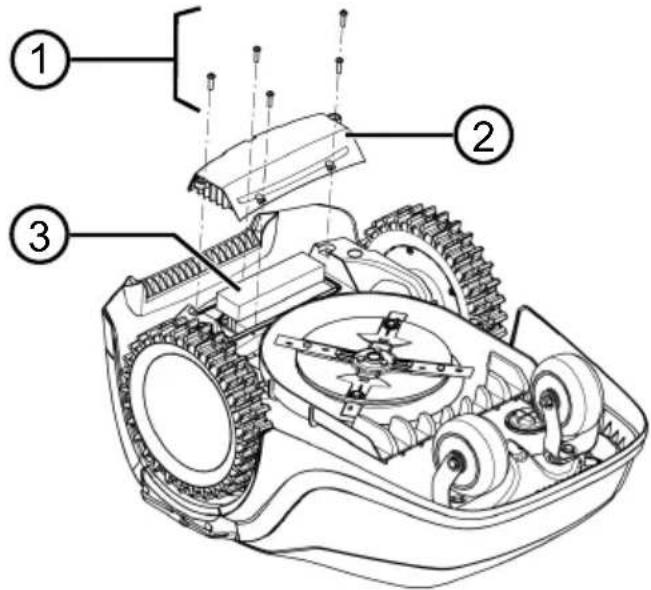
- BbIKpyTnTe BnHTbl (1).
-
CHIMITE KpbuKy aKKymyTOpHOro OTCeKa (2).
-
OTKIIOUHTe aKKymyIaTOp (3) u ydaJInte ero.
- CHOBA yCTaHOBnTe KpbIuKy I 3aKpyTnTe BnHTbl.
13 YCTPAHEHNE HENCPABHOCTEIN
13.1 NcnpaBneHne oun6ok yctpoNCTBa n 06pa6oTkn
OCTOPOXHO! Onacnoctb TpaBMnpoBaHna.ДвnxkyuinecA DeTaN N DeTaN C OCTpbIMKpaAMMOryT npNBecTN K TpaBMam.
Bcerda Hocnte 3aunthbIe nepuATkn BO BpeMraTexHnueckoro o6cnyxnbHna, yxo#a n OyncTk!
HINPMEYAHNE B cnyuae BO3HNKHOBEHNA HeNCnpaBHOCTe, KOtOpbIe He yka3aHbI B daHHoT a6JIue nJIn C KOTOpbIMn Bbl He MoXeTe cnpaBNTbcraMoCTOaTeNbHO, ObaaauTecb HNaUy cepBnCHyO cnyx6y.
| Henschpapbnoctb PrunuHa | Cnocobly uctpanenry | |
| UcTpoiCTBO He 3aynsKaet- cT. | Akkymylatop pa3prjxhen. 3aRpy3nte yCtpoiCTBO B 6a3OByIO CTaH- cTIO. | |
| UcTpoiCTBO nepeMeIaet- cT C TpydOM I 3aknnHbva- et. Koneca npodJXaOT Bpaasatbcra. | ДaTchIKy udapa He cpa6aTbI- BaIOT. | ОБразИТeСьВ СервиCSыцHTР AL- KO. |
| Tpaba CnIshKOM BbICOKaY. | ■ YBeJIuCyIe BbICOTy cpe3a, a 3aTeM NOCTePENHO UMeHbSаIte Do Tpe6by- emOy BbICOTbI. | |
| ■ CkaUmbaIte ra3OH ra3OHOKoNkoB V TeUeHne KOpOTKO BpeMeHn. | ||
| UcTpoiCTBO 3aKIIINHbAeT Na HecOBHOCrX Ra3OHa. | UcTpaHITe HecOBHOCrN. | |
| UcTpoiCTBO BvIOnHЯET cKaUmbaHne B HeprabInb- HOe BpeMra. | HeprabInbHoe BpeM y- cTpoiCTBa. | UcTaHOBITe BpeM. |
| BpeM r cKaUmbaHry UcTa- HOBJeHO HeprabInbHO. | UcTaHOBITe BpeM r cKaUmbaHry. | |
| HacTpoiKn BpeMEni yCtpoi- cTbA He coXpaHЯOTcY. | AkkymyIaTup HeNCIpaBEn. O6paTlNTeB CseBVCbY I ceHTp AL-KO. | |
| ДВиагел b octaHabnBa- eTcra BO BpeM KoSeHnY. | ДВиагел NepeRpyKeH. OTKIIouHTe yCtpoiCTBO, nOmeCTHte erO Ha ПLOSCkyI IOBepxHocTb ИПуНи HN3Ky- ITO TpaBy, I ChOBa 3aPycTHe. | |
| AkkymyIaTup pa3prjxhen. 3aRpyIte AkkymyIaTup. | ||
| Hox 3aTuynIcra. ПоврнITE Нox ИПуПр HeO6xOdImo- cTn 3aMeHnTe. | ||
| Heinspaprabnoctb PrunuHa | Cnocobly uystpanenry | |
| Рezульстам садшевая Неравноерны. | Врем садшевая садш-kom короткоe. | ЗапPORРаммі ріte 6оліе діntelьhoe Врем садшевая. |
| Врем садшевая садш-kom бolyшоe. | Уменып'te облачь садшевая. | |
| Бысota сpe3a haxodintcna наниkom урове. | Увелочь в buICOTу cpe3a, a 3atem постенно у当我ьшайт do т'reбуем ВыICOTbl. | |
| Hoxk 3aTuynncя. Поверн'te hoxk пи pri Neob6xodnmo-ctn 3amehite. | ||
| Сразк ectуацій akku-mул'tора знay'te Льно chinizilся. | Высota сpe3a haxodintcna наниkom урове. | Увелочь в buICOTу cpe3a, a 3atem постенно у当我ьшайт do т'reбуем ВыICOTbl. |
| Травс садшков Высокая и-ni садшков Влajног. | Отоожи'tь садшевая, пoka не поcodхnet Трав. Ностroyе ВысOTу cpe3a на 6oJee ВыICOKи уровь. | |
| Вибрацій піи гpromkoostby устрийства садшков Вы-cokne. | Дисбаланс hoxka пи менизma DBVIXeHNY Hoxka | Очир'te kocnilky. Оspratntecb B cepBvchb i KeHTP AL-KO. |
| Актулгатоне зар? ется піи пімeel.Tнзкoe habрженье | ■ 3apядные koNTak'tbi Na Базовий садши 3a-rpязнebl. ■ Контackные поверхно-stn Na устрийстve 3a-rpязнebl. | Очир'te зар\'дные koNTak'tbi и кOND- Тak'thble поверхноCTN. |
| Ha 6azOBuY co STAnciu He no- daetcny pntahne. | Покліочte 6azOBuY co TAnciu K 6boko питаня. | |
| УстрийстBro He coBmectimo c 3apяДнblIM N KOHTaTAMl. | ■ Помech'te устрийстBro V 6azOBuY cStanciu и поверьte HaIIyne 3a- ряДнblx KoNTakTOB. ■ Ospratntecb B cepBvchb i ZeHTP AL-KO. | |
| Сразк ectуацій Н� постек. | Оspratntecb B cepBvchb i ZeHTP AL- KO. | |
| Зapor'dнay 3лeКТрОнika He- истравha. | Оspratntecb B cepBvchb i ZeHTP AL- KO. | |
13.2 KoDbI Own6ok N yCtpaHHe N Own6ok
I PIMMEYAHNE B Cnyaee BO3HnKHOBeHHN HeNCnpaBnOcTei, KOToPbIe He yka3aHbI B DaHHoT a6JIuCe nIN C KOTOpbIMN Bbl He MOKeTe cnpaBnTbcra CamocToTeJbHo, O6paauTeCb B HaUy cepBnCHyIO Cnyk6y.
www.al-ko.com/service-contacts
15 TAPAHTIN
Mby yctpaHnem BO3MOXHbIe DepeKtbl MaTePnaIOB nJIN npOn3BOIDCTBa B TeueHne cPoka daBHOCTN, yCTaHOBJEHORO 3aKOHOM B OTHOseHn peKJaMauN IO KaueCTBy, nyTeM pEmoHTa nJIN 3aMeHb I3deJIy. CpOK DaBHOCTH ONpeDeJIeTcra 3aKHOdaTeJBCTBOM CTpaHbI, B KOTopoN 6blIO npNo6peTeHo y-CTpoiCTBO.
Hahe rapaHTnHoe 683aTeNbCTBO DeiCTBnTeNbHo TOnbKO npN:
CobIoudaIte daHHoe pyKOBOcTBO no 3Kcnnyatau
Haadnejkaeem Obaaehn;
IcNoJIb3OBAHnOpuHaJIbHbIX 3aNaChbIX Ya-CTeI.
TapaANTn aHnynnpyetc npn:
cAmOCToTeJIbHbIX NOnbITkax pEmoHTa;
CAMOCTOATEIbHbIXTexHnueCKNXn3MeHeHHX;
ICNPOJIb3OBAHIN He NO Ha3HaueHIO.
TapaHTnHa He paCnpocTpahReTcra Ha:
NOBpeKdEHHaNaOKpaCooHOro NOKpbITnB, Bbl3BaHHbIe HopMaJIbHbIM n3HOCOM;
n3HaINBaIOUeC8 qactn, o6o3NaueHHbE B BeDOMOCTN 3aNaChbIX qactePamKoXXXXX (x).
FapantnHbI cPOK hauHaeTcN oCNe NOKyKNi nepBbIM KOHeuHbIM NOIb3ObaTeJIeM. OnpeJeJIOUIm
fakTopom cnjxnt data Ha DOkymeHTe, NOdTBeRjkDaIOUeM NOKynK. ObpaaatcB c HactoJUM
cepNKaTOM n DOKyMeTOM, NOdTBeRjkDaIOUeM NOKynK, K CBOeMy DNlEpy IIN B 6bnXaIaN aB-
TOPn3OBaHHbI cepBnCHbI ceHTp. HacToaui NcEHTp. HacToaui NcEHTcN rapaHTnpyeMbIX 3aKOHOM
npab Ha npTeH3nn NOKyNaTeJI K npodabuy.
IPEKJIAD OPUNIHANY NOCIBHNA 3 EKCINYATAUII
3mict
1 Inopmaia npo noci6nik i3 ekcnnyata- 473
1.1 CmboJn Ha TtTybHi cToPiHci 473
1.2 YMOBHI No3HaueHHa Ta CnHahbHi cNoBa 473
2Onnc npnctroo 474
2.1 KomnJIeK T noCTaBKn 474
2.2 Po6oTn3ObaHa ra3oHokocapka... 474
2.3 YMOBHnNo3HaueHHHa npncIpoi 475
2.4 PanaHb ynpablinnna 475
2.5 DnCnnnei 476
2.6 CtpyKTypa MeHIO 477
2.7 Ba3Oba cTanhui 478
2.8 AkymyIaTOp. 478
2.9 Onnc cyHKcioHyBaHHra 478
2.10 PaioMoJb WLAN Ta IoJaToK AL-KO inTOUCH 479
3 Be3neka 480
3.1 BnKOpncTaHHa npn3HaueHHaM .... 480
3.2 MoxJIInBe HEnpaBnIbHe BnKOpncTaH
3.3 3anobixhi Ta 3axnchi eIemEnTn 480
3.3.1 BBeIeHnI PIN-koIy i PUK-koIy.. 480
3.3.2Датунки 481
3.4ПравILAТхики6e3nekn.. 481
3.4.1 Onepatopn 481
3.4.2 3ac06n iHdNbIyanaIbHoro 3axncty482
3.4.3 Be3neka IIOe Ta TBapnH 482
3.4.4 Be3neka npncTropo.. 482
3.4.5 EneKtpnHa 6e3neKa. 483
4 CknaaHnra 483
He i3iditb Ha npncTpo!
2.4 NaheB ynpaBliHHa
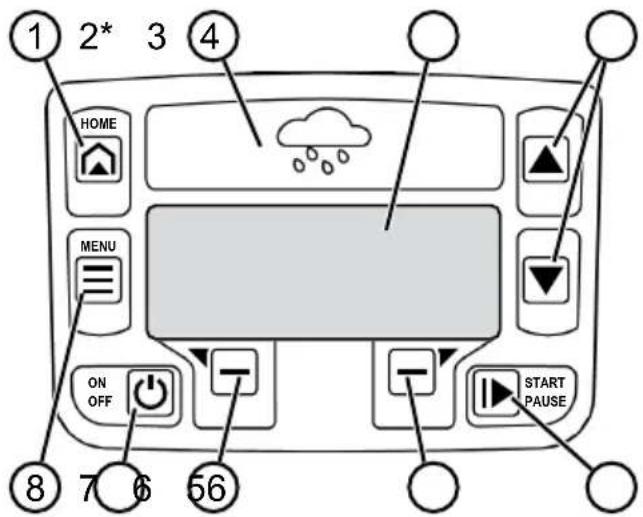
* ŋише Robolinho 700/1200/2000
3.2 MoxJIVe He npaBnIbHe BnKOpNCTaHHa
Ley npicptiH He iDxOHTb Iy BnKOpncTaHHB Napkax, CKBepax, Ha cNoPTNBHX MaIdaHnKax, a TAKoK B ciJbcbKOMy Ta IICOBMy rocnoapCTBi.
3.3 3anobixhi Ta 3axnchi eJeMeHTN
I NOPEDEXEHH! He6e3- neka TpaBmyBaHnHa. HecnpabHicTb a6o BiCyTHiCtB 3anO6ixHnx Ta 3axnCHnx eJeMeHTiB MoKxTyb Pn3BeCTn Do cepNo3Hnx TpaBM.
Hecnpabhi 3anobixhni ta 3a-xnchie enemeHTN cIiB iDpeMOHTyBaTn.
YkoHomy pa3i He BnBObTe 3 naHy 3anobixkHi Ta 3axnChi eIemEnTn.
3.3.1 BBeDeHnPa PIN-koDy i PUK-koDy
Ipnctpi MoxHa 3anyctnTn Ii-
Ie IJXOM BBeDeHn PAIN-KoDy
(inePcoHaJIbHOro iJeHTnOpaCiin
HOro Homepa).Le 3anobirae no
RO BBIMKHeHHa HeynoBHOBaKeH
HmN OcO6aMn. 3aBOdcbKe HaJaWtYBaHHa PIN-KoDy -0000.
PIN-KoD MoxHa 3miHnTu, DnB.
po3di5.2 "BcmaHOBpeHHa OCHOBHX napamempie",cmopihka487.
Ko PIN-KoB BBeDeHn He npabNbHO 3 pa3n, nOtpi6Ho BBecTu PUK-KoD (nepcohJIbHn KInou po36IokyBaHHa). KaIO noTo KaKb BBeDeHO He npabNbHO, He-06xIDHO 3aueKaTn 24 roDnHn pepeHaCTUHN M BBeDeHHaM.
TpmaTe PIN-koD i PUK-koD yMiCTi,HeoctynHomy dIЯ cToPOHHix oci6.
3.3.2Датунки
Pnncptpi OcnaeHOn DekeIbKOMa DaTnKamn CnCTemn 6e3neKn. BIn He nepe3anyskaetbcra ABToMaTHUHO nICJIa BnMKHeHHa 3a DOnOMoHO DaTnKa CnCTemn 6e3neKn. NObiOJomJIeHHa npo NoMnIKy BiO6paJaETbcra Ha dinCnIIe i Ioro cIid niTBePdNTn. PnunHy cnpaucOBaHHa DaTnKa cIid ycHyTN.
Датунkiпійому
Ko npicpti 6yde nHrto 3 Kopnyc npd yac po60tn, npBid XoIOBOrO mexaHi3My BnMKHeTbCra, a HOxI 3ynnHraTbcra.
4.1 Po3naKoByBaHH npncTpoI
1.ObepexKHO 3HimiTb ynaKyBaHHa
2.ObepexHo 3HimItb yci KOMnoHeHTn 3 ynaKyBaHHi nepeBipTe HaaBHicTb NIOKoJKeHb NiD qac TpaHCnopTyBaHHa
Ppumimka: Y pa3i HaReHocmi NowkoDkeHb niO yac mpaHcnpmyBaHHa HeaAUHO nobidoMme qaxibra abo cepbcio napmhepa ALKO.
P03mieHn8 6a3oBoi cTaHcii (01/1)
Haikopotmni MappyT do 6iNbwo'i obnactickouByBaHHa
Pibha nobepxna
3axnCT BiD npraMOrO coHryHOrO cBiTna Ta cnIbHnx nOroDHNx yMOB
MoxnBictb niknueHHa do 6IOky XnBneHn
BilbHn doctyn dny po6oTu3ObaHOi ra3OHokocapkn
PpoknaaHnO6mexyBaIbHoro Ka6eJIO (01) O6mexyBaIbHn Ka6eJIb CnIe nepemiuataN 3a ro DHHNKOBOIO CTPIIKOIO B 6e3nepepbHOMy KOHTpyi.
PpoxoMix o6JaCTaMn cKoUyBaHn (01/h)
Iproxid-ueBy3bkeMicheHaRa30Hi,KeMOKe CnyxHTnDnA3'EdHaHHaDBOXIOBepxOHbCKOswyBaHHa.
OchOBHa i doaTKoBa nloua (n) (01)
OchOBHa ploua (01/HF): Lc Ra3OH, Ha kOmy po3TaioBaHa 6a3OBA cTahzj, kKIM MOKe ABTOMATnUHO CkOuYBaTnC8 3a DOnOMoHO npIcTPOH NO Bci nIOoi.
ДодаTKOBа плоба (01/NF): Le ra3OH,doякого ппст piн He може діctаTNCS 3 ochOBHOI плош. Ппст piн HeobxIDNo bpyHy pepeHecTn Ha DoDAТКOBy pIoUy.ДодаTKOBI плошi можна обрбЯТиВ ржIMi pyHoi po6OTn.
Ondak ochobhi Ta doatakovi nloosi obmexeni odHIM i TMM JKe NocnilOBHM oMExyBaIbHIM ka6enem.
Po3TaWyBaHHBnXiDnHex ToOcK (01/X0 - 01/ X3)
Pnctpi nepemiuacbcr B3IOBx OmbexyBaHb-Horo Ka6eIIO 3 fIKCOBAHUM Yacom cKOuYBaHHaDo fIKCOBAHOI BHXIDHOI TOKNI NOUHaEc TaMCKOswyBaHHa.
NoataKOBi TOnkN Do3BOJIOb Bka3aTN, kI dInnKN o6nacti cKOswyBaHH 6yNo cKOweHo.
4.3Плд rotyBaHHа 6Oblaacti ckowyaBHHa
- IpekeohntecB TOMy, 00 nloua ra3oHy 6inbwa HIX notyXHicTb Ha OINHIO NOBepxHi npnctroIO. RaKIO rA3O OH 3aHaITo BEInkN, TO TpaBy 6yde 3pi3aHO HepiBHomipHO. 3a no-
Tpe6n 3MeHuiTb PNOUy RaOHy, Ka NiDnaRaCCKoUyBaHHIO.
- IpepeBCTaHOBHeHHa6a3OBoi CTAHcii i 06MekyBaIbHOro Ka6eHIO I BBeDeHHaM npICtpoHO B EKcNpyatauio: CKoUyIte Ra3OHra3OHOKocapKOHO Hn3bKi BNCOTi.
- BuaJIbIb nepeuKoHn Ha ra30Hi abo o6MeX-Te ix 3a donomoroIO o6MeKyBaJbHorO Ka6eIIO (INB. po3di4.5.3 "I3onraiJe nepeuKoD", cmopiHka 485):
nacki nepeikOJn, kni nIac nepe3ny MoKyTb NOnKoNDTu HIX (HapnKnaD, nacki kameHi, nepexoN 3 ra3OHy Ha Tepacy a6o dopixkN, pInTu, bOpDOpN To-
OTBOPn Ta NiDHeCENHHa ra3oHi (HanpNKlaI, Hopn KpoTa, po3pNTi OTBOpN, COCHOBI uuKn, naaJIuca ToIo)
KpytniPiinom a6o nepenadn noHa4 45% (24°)
Boa (Ha npKna, CTaBKn, Ctpymkn, 6aceHn Ttoo) Ta ixHra demapkaia Ha ra30Hi
KyuTi Ta XINBOONOTN, IO MOKyTb PO3uHpOBaTnC
4.4 MoTax 6a3OBoI cTaHcii (03/a)
1.ДоаиTe 6a3OBy cTanuIO (01/1) 3riIHO 3 3a-ПlaHOBaHIM NIOJOKeHHM O6MeKyBaJIbHOrO Ka6eJIO TAKIM YINOM:
Ha pibhi 3emni (pepebipte 3a donomoroipin
PpMn i pBnCnyck i niDnOM
He nocuIeHn (niD yac npKpyuBaHHraBnHTOBnx CByXIB 3apJHa cTaHciI HeNoBnHHa 3rHaTncs)
- 3akpinitb 6a0bY cTaHcIIO (03/2) yOtnpma rBnHTOBMm nCbXamn (03/1) do 3emni.
4.5 BCTaHOBJIeHHa 06MExyBaJIbHorO Ka6eIIO
8 NPMITKA Robolinho 500/1150:Якso obMexyBaJIbHn Ka6eIb 3 KOMNJIeKTy nocTaaH- HЯ 3aHaJTo KOpOTKn, Bn MoKeTe npuδaTu no- doBxBya y dInepa abo cepBicHoro napThepa AL-KO.
4.5.1ПiДКЛЮЧЕнЯOBмexуBaJIbHOrO ka6eIIOdo6a3OBOi cTahci (03/b)
-
BnmiTb 6mexyBaIbHn Ka6eIb (03/4) 3 ynaKyBaHHra.
-
3HIMITb KpNlKy Ka6eJIbHOI JaxTn (03/3) 3 po3'Emy (03/A).
- Būdānǐt b ióJǒuqiú 3 kīnq yǒměj yǔbǎn hòr kábejiu (03/6) i BCtābTe B kNémy (03/7).
- 3akpnTe KJIeMy.
- IpoknaTb obMeKyBaIbHn Ka6eIb Ype3 Ka6eIbHn BViD (03/5) 3 3anacom Ka6eIIO 3 Ka6eIbHOJ WaxTN.
H PnMItKA 3anac Ka6eIIO TaKoX MoXHa BnKOpNCTOByBaTn DnI NaJbWOrO BHeceHHa HeBeJIKNKx BnPpABNeHb NpOKNaDaHHa Ka6eJIIO.
6. BcTaHObiTb KpiuKy Ka6eNbHoJ WaxTN.
4.5.2 PpoknaaHnO o6MeKyBaIbHorO Ka6eJIO (01)
O6mexyBaIbHn Ka6eJIb MOxHa BCTaHOBHTn Ha ra30Hi, a TaKoJHa BiIcTaHI 10 cm NiD DePHOBIM NOKPOBOM. YCTaHOBJIeHHr NiD DePHOBIM NOKPOBOM NOBHeH 3diCHIOBAtn faxiBeUb.
MoxHa noeIHyBaTn o6nIbA BapiaHTn.
YBAI! He6e3neka noxokxeHnna 6mexyBaIbHoro ka6eIIO. RaKIO o6MeJyBaIbHn Ka-6eJIb noxokxeHn a6o po3ipBaHn, npncTpiB6JIbSe He 3MOKe OTpIMyBatn cInHaJIu ynpaBInHH. B CbOmy pa3i 6mexyBaIbHn Ka6eJIb He-06XiHO BiDpeMOHTyBatn a6o 3amIHNTu. O6MeJyBaIbHn Ka6eJIb E B HnABHocTi y Komnai AL-KO.
3abxnn npoknaadaiTe oMexyBaIbHn Ka6eIb npaMo Ha rpynti. 3a noTpe6n no6aIte npo 6e3neky 3a donomoroIO doaTKOBnx fikcaTopiB dIra KpInIeHHra O6mexyBaJIbHOKabeIIO.
3axuaiTe 6mexyBaIbHn Ka6enb BiD no- uKOJKeHb NiD Yac BCTaHOBNeHHra EKcNpyataui.
He konaTe i BnKohyTe BepTKyciIO npuy i3 06mexyBaIbHnM ka6eIem.
- 3akpiitb obmexkybaibn ka6enb yepe3 pe- rnyraphi npomixkns 3a donomoro oikcatopib dna kpinneHHra obmexyBaHoro ka6eio a- 6o nid 3emne (he rnnbe hix 10 cm).
- Покади obMeKyBaIbHn Ka6eIb Habko- no nepeKoD: nVB. po3di 4.5.3 "I3OJaI nepeWkoD", cmopinka 485.
- BctaHOBiTb npoxoJn MIX OKpeMmN NOBepxHMy NCKOswyBaHHa: nVB. po3di 4.5.4 "3eyKeHH npoxoie (01 / h) ,cmopihka 485.
-
Дя Викlioунов Великий ухлівabo nepenaiB:ДИВ. po3diN 4.5.5 "YHukHeHЯ nepena- die (11),"cmopiHa 485.
-
Прokнадитб зааси кабелю: ДИВ. рo3dIN 4.5.6 "Прokнадання зааси кабелю (07)", cmopiHka 485.
6.ПicЯЗаВерш�ньВстановпняпдкючы obmexувальни Ka6eЛьdoКлемn(03/B)6a3oBoi ctaHii:ДИВ.pO3diN4.5.1"Пid-KIQUeHnObMEXyBaJbHo2O Ka6eJIIO do 6a-3oBoi cmaHii (03/b),"cmopinka 484.
4.5.3 Izonua i nepeuko
3aJIeKHO BiD HaBKOJINHbOre cepEOBnua B po-6oHi 30HI o6MeJyBaIbHn KabeN Heo6xIDHO npoknaadTuHa p3Hnx BiCTaHx BiD nepeWKoJ. Uo6 BN3NaHTn npaBnIbHy BiCTaHb, BIKOPnCTOByTe NiHiKy, Ra Ka BiD'EDHyETbcra BiD ynaKOBKn.
8 NPNMITKA BnHrTk Hno6xDi Hi TINbKn BV TOMy BNnAky, kUO BOH He MoKyb 6ytu BnBJIeHi DaTnKamN 3iTKHeHb npNCpoIO. YnkaIte 3aHaTO BeNIKOi KInbKOcTi BnHrTkIB a6o He-OB'3KOBnx BnHrTkIB. ByptNKn po3Mipom MeHwe 6 CM MaOtB 6ytu i0JbObaHI, iHaKwe npCTpi MoKe CnpuHHTN NOsKOJXeHHra.
BicTaHb Do CTiH, orOpox, KJyM6: mH. 20 cm (01)
Pnncpi nepemiuacb3i 3miueHnHa3OBhi Ha 20 cm B3IOBx ObmexyBaIbHO Ka6eJIIO. TaKIMuHOM, npOKJaadte ObmexyBaIbHn Ka6eJIb Ha BiIcTaHI He MeHwe 20 cm BiI cTIn, oropok, KnyM6 Toio.
BicTaHb Do KpaIB Tepacn Ta MoueHx Dopir (05)
Ktepaca a6o BiDcTaNb BiI KpaIO Do ra3OHy Bnue, To Heo6xIDHO 3a6e3neHTN BiDCTAHb He MeHwe 20 cm. KaTO Tepaca a6o KpaI 3hao- DITBCr Ha Taki Cami BNCOTI, Ra3OH, TO Ka6eJIb MoXHa IpOKNaDatn PIBHO KaPio.
BicntaHb mixk o6mexkyBaIbHnM ka6eIem i nepekoqamn (01)
KuO o6MeKyBaIbHi Ka6eni npoknaeHo 6e3nocepEiHbO no6n3y BiN nepeWkoDi a6o Ha Hi, To6To Hb BiCTaHI O cm, npucpii nepeixdkae Upe3 o6MeKyBaIbHi Ka6enb. He nepeixdkaTe o6MeKyBaIbHi Ka6enb (02/c), a npoknaaTe Ioro napaneIbHO (01/e).
PpoknaaHnO6mexyBaIbHoro Ka6eIIO B KyTax (06)
ДяВнутpiшик KyTIB(06/a): npoknaadte o6mexkyBaJIbHn Ka6eJIb no diaroHaI, 6o6 yHnKHyTn pyxu npNCtpoB KytKy.
ДяЗOBHIHIXkyTIB3nepeWkoJAMn(06/b): npoknaIaIteObMexyBaIbHnKa6eIb 3aroCTpeHIM KIncE,Io6 yHnKHyTN 3ITKHeHHn npicCTpoi 3 KyTom.
ДяЗOBHIHIX KyTIB 3 nepeшkoJaMn: npoknaJaTe obmexkyBaJIbHni KaBeIb NiD Kytom 90^
4.5.4 3Byxhen npoxoib (01/h)
IotpmyTecb HabeJeHOi HxKYe BiCtahi B npoxoJax:
3araJIbHa ⅢnpHa:MiH.60cm
BicTaHbI O6mExyBaIbHoro Ka6eIIO do KpaI0:20cm
BicTaHb mix o6mexyBaJIbHIMn Ka6eJAMM: mH. 20 cm
4.5.5 YHHKHeHHn nepenaiB (11)
Iepenadni, 10 nepeBnuyotb 45%, nobHHi 6y-tn i3oJboBaHI o6mexyBaJIbHm Ka6eJem (45% = nepenad 45 cm uepe3 kOKeH 1 M no rOpN3OHTa-ni).
O6mexybaHn Ka6eH He cIi npoknaaTn Ha cxni 3 Haxnlom noHa2 20% .Uo6 yHnKHyTu np6Jem npn NobopoTi, cIi 3aIIuWATn BiDCTaHb BID 50 cm Do 20% HaxNy. RaIO haxN 3OBHIHbOrO KpaO po6OoO 3OHn B ODiH ToCu i NoHa2 20% , o6mexybaHn Ka6eHb cIi npoknaTn Ha BiDCTaH 20 cm Ha IIOcki IILOU i Do noOatKy cxNly.
4.5.6 IpoKlaaHn 3anacib Ka6eIIO (07)
Uo6 matn moxjNbicTb nepemiuatn 6a3OBy CTanu a6o po3wnpOBaTu oBnaCTb CKouyBaHn HABiTb nCnHaNaSTyBaHHn Obnacti CKouyBaHH, peryIpaHBOCTaHOBIOHTe 3anacn Ka6JIIO B O6mexKeHOMy Ka6JI.
KilbkiCTb 3anacib ka6eIIO MOXHa BCTaHOBNIHOBaTn Ha Bnachn po3cyd.
R INMITKA YHkaTe BiKpnTnx neTeIb y pa3i 3anacib ka6eIIO.
1.ПрokнадаTe obMeKByaBbHn Ka6eNb HABKONo nOToUHoro oikCaTopa dЯ KpinNeHn OobMeKByaBbHoro Ka6eIIO (07/1), a notIM nobepHiTbcrdo nonepdHboro oikCaTopa dЯ KpinNeHHra ObMeKByaBbHoro Ka6eIIO (07/3).
2. Notim npoklaidiob omexybaHn Kaebnb Hazad B HapryMky nOtouHoro fikcaTopa dny KpinHeHHaOmeKyBaHbHoro KaBEnHO CTBOpntbckOHtyp.KaBeni NobuHHi uInbHo npinJraTu.
- 3a Notpe6n BUnpaBte KOHTyp BCEpenHi 3a DOnOMoTOO DoaTkoBOrO fikcaTopa InKpiI pIeHHra O6mexyBaIbHOrO Ka6eIIO (07/2) Ha 3emni.
4.5.7 TnnoBi nomnkn niid yac npoknaaHna Ka6eNIB (02)
3anacn 6mexybaHoro Ka6eIIO He BCTaHOBJIeHI B pIBHomipHOMy NOOBKeHOMy KOHTyi (02/a).
O6mexyBaIbHn Ka6eIb He npaBnIbHO BCTaHOBNeHo HABKOJN KyTIB (02/b).
O6mexyBaIbHn Ka6eIb NepeTHHaEcTbcra a- 6o He npoklaedeHn B HaprMky 3a roHHNKOBIO cTpiIKOIO (02/c).
O6mexyBaIbHn Ka6eIb BCTaHOBNeHO 3aHaTTo HepiBnO InpaBnIbHOro CkOuYBaHnra30Hy (02/d).
Пд уас nepexody BiД Краю Doпешкови На ra3oHi obmexkyBaIbHn Ka6eIb He npoklaedeNo 6e3nocepeDHBO npuy 3 nepeushko- do (02/e).
I OuaTkoBi TOnKn BCTaHOBJeH0 3aHaTo daJIeKO BiD 6a3OBoi CtaHci (02/f).
O6mexybaHn Ka6eIb npoklaedeHo 3a Kpaem ra3oHy (02/g).
Пд уас npoklaадня obmexkyBaIbHoro ka-6eIIO nepeBnueHo mInImaIbHy BiIcTaHbДпЯ npoxoIb 20 cm (02/h).
O6mexyBaJIbHn Ka6eIb 3NaXoIbTcRdUxKe 6JIn3bKO,TO6To Ha BiIcTaHi MeHSe 20 cm,do nepeuKoD,aki MoXHa nepeixaTu (02/i).
4.6ПiДКЛIOUeHЯ6a3OBoI cTaHciIdo 6JOKy XNVBJIeHHra (04)
- Po3mictiB 6Iok kINBneHnra (04/4) B cyxomy Miczi daJIeKO BiI npRIMX COHryHnx npOMEHIB B DOCTaTHIb 6IIN3bKOCti BiI 6a3OBOi cTaHci (04/1).
2.Пдкючыkaьнзькои Hanpyn6loky xapuyBaHHa (04/5) i kaebb 6a3OBoi cTaHci (04/6). - BCTaBTe MepeKeBn 1Tencelb 6JOKy JINB-NeHHa (04/2) B po3eTKy (04/3).
8 INPIMITKA PeKOMeHnyEMo NiIKNIOUaTNI 6Iok JINBJIeHHa Do eJekTpOmepeXi Ype3 npICrpi 3axnCHoro BiKnIOueHHa, 0o CnpaCbOByc npHOMHaNbHOMy cTpyMi BVtOKy <30 mA.
4.7 IpeBipka 3'εdHaHb Ha 6a3oBi cTaHci (04)
- nepeBipTe, cn cBiTbCra iHnKaTOp Ha nepeDHi yactnHi 3apAHOi CTAuCi (09/1). JaKuo Hi:
BnIMtB uTekep.
IpeBipTe npabnblHictb po3miueHHra HaaBHictb NOWKoJxHeb BCix WTeKePHnx 3'EdHaHb 6NOKy XNBHeHHa i O6MeKyBaJIbHnx Ka6eNilB.
IHHkauii cTaHy IHHkaTopiB
5.2 BcTaHOBHeHHOCHOBHn npaMeTpib
- BiДКрИТe КрИшКу.
- YbIMKHiTb npnctpii 3a donomoro o .6paXaetbcBepcI Mkponporpamn, Homep Kody Ta TnI.
3.B MeHIO Bn6Opy MOBn 3a DonomoroIO Bn6epiTb MOBy i nIeTBepdiTb 3a Donomoro
4.B MeHIO Registraracija > Vvedite PIN BBeiTB PIN-koI 3a 3amOByBaHHm 0000. Bn6epiB uΦpy 0 3a Donomoroio Go iPiTBePdIb 3a Donomoroio -1icnB BBeHeHHa PIN-koDy DocTy npO3bokyEcBcA
- Y MeHIO Izmenite PIN:
BVeDiTb niD Vvedite novyj PIN HOBn yOtnpN3Haun Pin-koD. Bn6epiTb cnPn Onda 3a OndHO 3a DonomoroIO a6o nTBePdiTb 3a DonomoroIO
Ie pa3 BBeiItb niD Povtorite novyj PIN HOBNI PIN-KoI. RaKIO o6nIBa BBe-DeHnra 36iraTbCRA, TO 3'ABNTbCnOBiDomJIeHHa PIN uspeshno izmenen.
- B MeHIO Vvedite datum 3aДaIte noToUHy DaTy (ΦopMaT:ДI.MM.20PP).Bn6epiTB UO np OJHa 3a OJHO 3a DOJOMoTO 6o NITBepDiTb 3a DoJOMoro .
- B MeHIO Ustanovite vremya > 24h- Format 3aJaTe NoToUHn Yac (Φop-MaT: ΓΓ:XX). Bn6epiB uOoPn Onda 3a OJHO 3a DOnOMOrO IO Afo i TBePdIb 3a DOnOMOrOIO
Ochobhi hanaityBaHHB BCTaHOBneHo. BiO6paJxAeTbCra CTan Ne kalibrovan Nazhmite knopku START.
5.3 HanaTsyBaHHBNCOTn 3pi3aHH
Bucota 3pi3aHHn noCTiHNo peryIIOeTbcra 25-55 MM BpyHy.
NPNMITKAДяkanibpyBaHHa (nB.p03- din 5.4 "BuKoHaHHaemomamuHozo kani6pyBaHHa"cmopinka 487)i nI nporpaMyBaHHa BxixHnx ToOK (nB.p03din 7.5.2"HanaumyBaHHa buxidhux mook",cmopihka 489)pekomehnyctb-cra Bucota 3pi3y 55 MM.
-
BiДкриТe Кршky (10/1).
-
BiDperynHte BucOTy 3pi3aHHa (B ornIIOBOMy BIKHI B MINIMETpax BiO6paKaεTbcra NOToUHa Bucota 3pi3aHHa (10/3)):
36iNbWeHHBnCOTn 3pi3aHHN (TO6TO BnCOTn cKOuYBaHH): NOBepHiTb NOBOPOTHy pyKy (10/2) 3a roDHHNKOBOO CTrpIKKOIO (10 / + )
3MeHWeHHBnCOTn 3pi3aHHn (To6TO BnCOTn cKOuYBaHH): NOBepHiTb NOBOPOTHy pyKy (10/2) npOTn rOINHHNKoBOi CTrpIKN (10/-).
- 3aKpNiTe KpNlKy.
5.4 Bukohannn aBTOMaTHUHoro kaJI6pyBaHH
I NPMITKA Bukohai Te cikn kaipbyaHn (INB. po3d15.4 "BuKoHaHH aemomamuHo20 KaibpyaHH, cmopiHKa 487) abo BKaxItb NOaTkoBI TOcN (INB. po3d17.5.2 "HaAumyBaHH buxihux mook", cmopiHKa 489) nepei NOaTkom BIKOpNCtAHn.
BcTaHOBHeHH BnIXiDHoro nOIOXeHH npIcTpoI (09)
- BctaHOBiTb npucptpiB o6nacti cKoUyBaHHB NOYATKOBE NOJoxHeHH:
MIn.1 MJIbOpyu i 1 M npeed 6a3oBOO cTaHcieIO
BupiBHNH3 nepeDnHbOu qactNHOo 6-MexyBaIbHOrO Ka6JIHO
3anyck kaJI6pyBaHHa
-
NpebipTe, uH HeMaC nepeWkoD B ouikyBa-HomU diana30Hi nepemiuueHH npucTroIO. PnucTpii NOBHeH 6Tu 3daTHM pNBOuNTu B pyx oNBba nepeDi Koneca no oMeKyBaIbHomy Ka6eJIu. Y pa3i NotpeBu ycHbTe nepeWkoDi a6o npoknaTiB Ka6eJIb BCEpe-DnHi (MinIMym 35 cm 3aBrnn6uKn).
-
3anyctitb npncptpi 3a donomoroio .HnCnneBIO6paKaecTbcra:
!Vnimanie! Start privoda
Kalibrovka, Faza
Пид уас kaniбувань.
Uo6 Bu3HaHTn pIBeHb CnHaNy B O6MeKyBaIb-Homy Ka6eni, npncTpii cNoaTy npoxOuNTb DbiHi npraMo no 6mExkyBaIbHomy Ka6enIO, a NotIM NO 6a3OBi cTaHci i 3ynHAcTbCt Tam.
Ha dincnnei 3'YBntbca Kalibrovka zakonchena.
AkymylantOp 3apdkaeTbcra.
HINMITKA Ha Bxodi B 6a3OBy cTahciOpnpicpii noBHe H 3ynHHTbcra. Kaio npicpii He notpanIe B KOHTaKTI Ha Bxodi B 6a3OBy cTahciIO, BiN pOIOBkNTb pyX NO 6mExyBaIbHOmy Ka6eHIO. Kaio npicpii nepemiaCTbcra No 6a3OBI CTAHcII, ue O3Naue, oio npoec kani-6pyBaHHre 6byno 3abepeHo. Bcbomy pa3i 6a3OBy cTahciIO cniD BnPiBHTn HaneKHM YInHom i NOBTOPITn npocek Kani6pyBaHHra.
Picna kaJI6pyBaHHa
BidobpaKaTa 3aHa nToUHa TpBaJIcTbCKoUyBaHH.
Дя BCIX iHux HanaWtYBaHb nVB. po3di7 "HaJauMvyAHHa", cmopiHa 488.
Robolinho 700/1200/2000
H NPMITKA 3a6e3neuHTn npabnIbHy po60Tu Ta 3MeHunTn KInbKicTB NOBIDOMJIeHb nPo NOMIKN, CIId BmiprTn DOBXINHy cIKny.
ДиВ.Тakож
HaJauaHTyBaHHBnXiDnHx ToOK [489]
6 EKCNJYATAUIA
6.1 3anyck npncstpoBpyHy
-
YbIMKHiB npncptpi 3a donomoroIO .IJIH HepeRyIpaHOrO cKOwYBaHHra KpaIB:INB. po3di7.7 "CkowyeaHHra Kpaie nio yac 3a-nycky bpyHy",cmopinka 491.
-
3anyctiTb npncptpiBpyHy 3a donomoroIO
6.2 CkacyBaHHa po6OuBpeXUMiCKoUyBaHHa
Robolinho 500/1150:HaTnCHiTb KHONKy Ha npncTpoi.
Robolinho 700/1200/2000:HaTnCHiTb 6a3oBi n cTaHcii (08/4) a6o Ha npncTpoi.
Pnucpii ABtOMaTHUHO NOBepTaEcTbCra Do 6a30BOI cTAnu. BIn BuaJrE PnA H CKoUyBaHn NoTOUHO DnI I nepe3anyckaEcTbCra Ha HAcTyHnI DeHb y BCTaHOBJIeHn Yac.
HaTnchHb KhoNky npncTpoi. Po6ota B peXmI cKoUyBaHHa nepepNBaEcTb- cHa nIBroDHH.
HaTnCHiB KHONky a npncTpoI. PnpCTpi BmMKHeTBcR.
H NpIMITKA Y He6e3neuHnx CnTuaicjx npncptiM MoKHa 3yUnHHTN 3a DOJOMOHO KhoNKn STOPP (08/2).
6.3 CkowyBaHHaOdaTkoBoi nlooi (01/NF)
1.Пдимитьnpиctpii i BCtaHOBIb Ioro BpyHy Ha DoDAtKOBy nlouY.
2. Ybimkhitb npncptpi 3a donomoroio
3. Binknutyte roJOBHe MeHIO 3a DOnOMOToHO
4.a * Uvtanovki
5. a * saschiwanije dopolnitjel'noj ploschtschadi
6. BnBepiTb yac cKOuSyBaHHa 3a DonomorOo a6o
7. 3anyctitb npncptpiBpyHy 3a donomoroto
3aIexHo BiD HanaWtYBaHHr: PnucTpiBnKOHyeCKoUyBaHHB 3aHaHn Yac, a NotIM BmMkaCTbCra a6o npOobJxE cKOuYBaHHr, DOKn aKymyJIaTOP He po3pIITbcR.
Nicra cKoUyBaHHaDoaTkoBoi nlooi 3HOby BCTaHOiB npncptpi Ha3a y 6a3OBy cTaHciio.
7 HAJIaHTyBAHHJ
7.1 BnKnK HaNaTuBaHb - 3araJbHi
- BnKnUte roJIOBHe MeHIO 3a DonOMOrHO .Ipumimka: 3ipoOka * neped nyHKmOM MeHIO eKa3yE, uO e ue yac BOHu b6paHI.
- _0 * Ustanovki
- Bn6epiB noTpi6Hn nyHKT MeHIO 3a donomoro- roo 60 i TbePdiTb 3a donomoroio
- BctaHObitb hanaHTyBaHHra. Ppumimka: IyHKmu MeHIO OUNCAHO e Ha-cmynHux po3diinax.
5.Повернівсяdo roNoBHoro MeHIO 3a DoNoMOrOHO
H NPNMITKA IHHI NyHKTN MeHIO: INB. po3- din 5.2 "BcmaHOBNeHnO ochOBHX napaempiE", cmopiHa 487.
7.2YbIMKHeHHBUMKHeHHCnHAniB HATNCKAHKHONOK
- a* zuk klavishej

2.YBIMKHeHHBUMKHeHHCnHaHb HAHTNCKaHH KHOHOK:
a6oapustit': yBIMKHeHHcHHaJIb HaTnCKaHHa KHO- nOK.
a6oBeakt.:BIMKHeHHCnHaJIbHaTnCKaHHKHOHOK.
7.3 YbIMKHeHHBbIMKHeHHpeKmMy Eco (Robolinho 700/1200/2000)
B pexmi Eco npucpii nepemkaetbca B ehep-ro36epiraoun pekm. Lc 3nkye eheprocnoxnBaHHaPiBeHb Wymy.
I PnMITKA LcH peKm HpeKOMeHOBaHn a6o HeocTyHb B pa3i Bucokoi i 1nbHO TpaBn, a TaKoX 1nbHOpyNoHHoro ra3OHy.
- aMode
- YbIMKHeHHBbIMKHeHHpeXMy Eco:
Zapustit' yBIMKHeHHpeXmMy Eco.
Deakt. BIMKHeHHpeXmMy Eco.
7.4 HanaTyuBaHHa DaTUnKa DoUy (Robolinho 700/1200/2000)
NPNMITKA CkouyBaHH cyxoI TpaBn 3MeHuye KjIbKicTb 3a6pydHeHH. JIaxOM aKTNBaui DaTuNka DoUy i BCTaHOBJIeHH yacy 3a-TPMKN MoJHa 3anObiTn CkouyBaHHIO npCtpoE MOKpOI TpaBn.
KoII DaTnK DoUy AKTINBOBaHO, npicpii NOBepTaEcHa 6a3OBy cTaNcHIO, KOII nDe DoU. BIn 3aIIuHaEcTbCtAM, DOKI DaTnK DoUy He BUCOXHe. Notim Bin OuyKe IpOTrOM BCTaHOBneHoro Yacy 3atpIMKn, nepH HIX npODOBkTN OepauciIO CKoUyBaHHa. UytJIINBICTb DaTnKa DoUy perynIOEtbcra.
- a * sensor dozhdya
2.YbIMKHeHHBnMkHeHHaTUnKa DOUy:
a6oapustit': yBIMKHeHHaTUnKaDoUy.
a6oBeakt.:BIMKHeHHaTUnKaDoUy.
- BcTaHOBJIeHHaTpIMKn DaTUnKa DoUy:
a6o Zaderzhka dozh.sen
xx chasov xx minut Bn6epiB 6aKaHe 3HaueHHe 3aTpumKn 3a DOnOMOrOo 50 , TBePdiTb 3a DOnOMOrOo
- BctaHOBenneHHyTnIBOcTi DaTnKa DoUy:
a6o Chutl. datchyka
Bn6epiB 6aKaHe 3HaueHnYyTnIOBOCTI 3a Donomoro1o a5o , TBePdITb 3a Donomoro1o
7.5 HanaTyBaHH nporpaMn cKoUyBaHH
7.5.1 HanaTyBaHH nporpaMn cKoUyBaHH - 3araIbHi
- BnKJIInTe roJIOBHe MeHIO 3a DonomoroIoo .
- a * grammy
3.Bu6epitb nyHKT MeHIO 3a DonomoroHO i nITBepDiTB 3a DonomoroHO - BctaHObitb hanaHTyBaHHa. Ppumimka: IyHKmu MeHIO OUNCAHO Ha-cmynHex po3diJax.
7.5.2 HanaHTyBaHHBnXiDnHx ToOK
BvBueHHaNoaTkoBux ToyOK
- BcTaHOBiB npncptpi B 6a3OBy cTaHciIO.
-
YbIMKHiTb npncptpi 3a donomoroIO .
-
BnKInyTe roJOBHe MeHIO 3a DonomoroIoo
-
a * pVogrammy
- a * Punkt nachal rabot
6.a * predelenie puti - a* start oznakomitelnoj ezdy po punktam start
a6o start .Pncpi nepeMiuaactbCnB3IOBxOBMeKyBaJIbHOrKa6enI.
afo des' npncptiinocarhyb 6axaHOI BxIHHOI TOKIN. BxHaTOyka 36epiraetbcra.
-
a vveite punkt starta 1 , kio Bxidna Toka He 3aHa n iac HabaybHOi No3dkn. KIO noaTKOBy TOnky He 3aHaHO, TO noaTKOBI ToKn 6yde BCTaHOBJIeHO ABTOMATNUHO.
-
a Punt starta x: XXm, -KoIb yIIO DoCraHyTO OCTaHHboBvIXiHOITOuKN.
BcTaHOBHeHHaTkoBnx ToOk BpyHy (01)
Iepwa noataKoBa TocKa (01/X0) 3aDaHa i 3hAxoDntbcra B 1 M npabOpuy BiD 6a3OBoi cTaHcii. 3a ciEIO TOUKOIO MOXHa 3anpOrpaMyBaTn DOaTKOBi BNXIDHI TOCKN:
Robolinho 500/700/1150:do Tpbox BnxiDnX Toyok (X1-X3)
Robolinho 1200:do ueCTn BuxiHnx Toock (X1-X6)
Robolinho 2000:do deB'ATN BuxiHnX ToOK (X1-X9)
Пд ус BCtaHOBJIeHHЯ BNXiДнHX TOOK 3BepHiTb yBary Ha Take:
He BCTaHOBJIouTe NOUaTKOBI TOUKN 3aHaITo daJeKO BiD 6a3oBOi CTAHcii a60 duXke 6Jn3bko OdHa Do OdHoI (02/f).
BukopncToByTe TiIbKn CTInbKn NoaTKOBNX ToOK,CKInbKn Heo6xIDHO.
- a * Punkt nachal rabot
- a * Punkt X1 pri [020m] Bn6epitb cnopn Onda 3a OndHO 3a Donomoro roo 60 i nTBePdIb 3a Donomoro
- a * Punkt x2 pri [075m] -Bиберіт bцчрп одна 3a одно 3a доною 60 i nTВердіт b 3a доною
- 3a notpe6n 3aJaTe noJaBbSi BuxiDi Hi TocKu.
- NobepehiTbcra do roNoBHoro MeHIO 3a donoMoroIO
7.5.3 HanaHTyBaHHa Yacy CkOswyBaHHa
8 NPMITKA Mix nporpaMyBaHHm yacy CKoUyBaHH i noaTkom CkOuYBaHH Mae npoHTn He MeHwe 30 XB. B iHaKUOMy BnAaKy npucpti 3anyctntbcr He paHie, Hix 3a 30 xbunH nicJra OCTaHHbOrHaTNCHeHH KnaBii.
IyHKT MeHIO Programma nedeli BnKOpNCOTbCy DnB BCTaHOBJeHHn HIB iYacy CkOuYBaHH npNCTpoem. 3a NotpeBu BCTaHOBITcHaJauSTyBaHH BiNoBIDHO Do po3Mipy caHy. Jkuo BV
nominhe Heo6po6nehi dianHK np6n3Ho yepe3 TxKdHb, 36ilbuiTb yac cKOswyBaHH.
- a * Pgramma nedeli
a6o Vse dni [X]:Pnucptpi BnKOHycCKOuYBaHHra 0oHbB3aHaHn Yac. Kaio BiOobpaKaεTbc8vse dni [ ],TO npucptpi 6yde BnKOHyBaTH CkOuYBaHHr TINbKn B 3aHaHdHtNkHna
a6o Ponedel'nik [X]... Voskresenje [X]:Ппстpiвконус с кувань в зали Dihi Тижн. Hanpknad,якso BiOбрахаctbcs Ponedel'nik [ ] ,прстpiн He 3diCnHIOE cKOWyBaHHЯ OODHЯ.
a6o zmenit':yBIMKHiTb [X] a6o BIMKHiTb [] y BiNIOiDNHn DeHb, BCTaHOBiTb Yac, TIN CKOuYBaHHa I BNXiDiHToUKN.
2.BctaHOBJIeHHHaIaHTyBaHbДЯ BCIX HIB a6o neBHoro dHr:
Hanpuknaid,*[M]07:00-10:00[?]: 3BnuaHne cKOuSyBaHHa[M]307:00do 10:003ABTOMaTHUHOO3MiHOOBHXiHOToUKn0-9[?]
Hanpukna, [R] 16:00-18:00 [1]: Pnucpii 3anyckaetbcr o 16:00 B pexmi cKOuyBaHHK paiB [R] i nepemiuca-ETBCa B3IOBX BCBOO O6MeJyBaJIbHOKabEnHO. Picra zbo rnooynHaetbcra CKoUyBaHHnPiOni 3 BuxiDHOI TOKN 1 [1]. O 18:00 a6o uonHo akyMylTopp po3prntbcr, nucpii noBepHeTbcr do 6a3OBoI cTAnci.
a6o zmenit':3mHITb BN- 6pahi HanaHTyBaHHra.
a6opered:PiBepiTb 3MiHeHi HanaTuBaHHia npeeNdItbdo NaCTyNHIX.
- a SoHanite:36epexitb Bci 3MiHeHi HanaHTyBaHHn NyHKTy MeHIO.
7.6 inTOUCH
HaBHe 3'edHaHHa 3i 7JIO3OM MoKe 6yTu BmKHeHO. Lepn3BeDe Do TORO, 1o npncptpi 6yDe BiKpTO dna HOBOrO 3'edHaHHa npOTaROM 30 XBNH.
8 NPMITKA 106 BCTaHOBnTn 3'EDHaHHn i3HHe, 3'EDHaHH Heo6xIDHO CNoaTKy BUMKHyTN, HABiTB JaKIO npucpii paHlwe He 6yNo nI-KIIOyeHo Do WIO3y.
- a *in UCH
2.vimknennja z'ednannja IobidomJIeHH npicTroo:Gotovo.
3.ПИТВЕРДITb 3a ДОПOMOROIO BBePHiTb-Ca B MEHIO.
7.7 CkouyBaHHKpaIB niD vac 3anycky BpyHy
ДяЗanycky BpyHy Bn MOKeTe BCTaHOBHT N Tyt NoaTOK pO6OTn npNcTPOo 3i CkOswyBaHHKpaIB. СКошУВаHH KpaIb 3rIdH0 3aNporpamOBaHHM YacOM CkOswyBaHH: DnB. po3di7.5.3 "Hana- wmyeAHH YAcy CkOswyAHH", cmopIHka 490.
- a* kcschenie po kraju
- a * manual'nom starte
7.8 HanaWtYBaHHcKoUyBaHHaDoatKOBoI NLOi
- a* sKaschiwanije dopolnitjel'noj ploschtschadi
- HanaHTyBaHHa cacy ckOuByBaHHa:
a6o naktiv:CKOswyBaHHaODaTKOBoi nlooi BmMka-etbcra.
a6o ktiiv: npncptpi BnKOHycCKOuYBaHHa,doKna KymyIaTOp He po3pndtbcra NOBHCIO.
a6o aCCKOswyBaHHyXB.
Tpncpii cKOWye DoDAkOBv NIOuTy np Tgrom 3aHaHO racy.MoxHa BCTAHOBn Tn TaKn Yac cKOWyBaHHr: 30/60/90/120 /do po3prJxHHeHnAkyMnyIyTopa.
7.9 HanaTyBaHHKoHTpactHOcti DnCnJIe
KuO dncnne, Hanpukna y pa3i iHcona, no- rao HHTaTbCra, To INdkauio MOxHa NOKpaunrU 7JXOM 3MiHN KOHTpactHOCTI dncnner.
- a * Kontrast displeja
2.36inbuiTb/3MeHuiTb KOHTpactHicTB dncnne 3a donomoro ofo i TbepeiTb 3a donomoro o
7.10 3axnCT HanaTByBaHb
KuO 3axnCT HanaWtYBaHb BmKHeHO, PIN-KoHne6xIDHO BBOHTN TiIbKn B pa3i NOMnKn, NOB'raHOI 3 6e3neKOIO.
1.a * zawita ustanovok
2. YbIMKHeHHa/BUMKHeHHa 3axnCTy HanaWtYBaHb:
a6oapustit': -YbIMKHeHHaXnCTyHaNaHTyBaHb.
a6oVeakt.:BIMKHeHH3axnCTyHaIaHTyBaHb.
7.11 NOBTOPHe kaJI6pyBaHHa
KuO Micue po3aUyBaHnA 60 doBxHy 6MeKyBaJIbHO Ka6eIIO 6yNo 3MHeHO a6o RaKIO npCTpi He MoKe BnABTu O6MeXyBaJbHn Ka6eJIb, Notpi6He NoBtOpHe kaIbpyBaHH.
- a Nova kalibrovka
- Vernut'sya v prezhnee sostojanie?
- Bukohann KaibpyBaHn: nB. po3di 5.4 "BuKoHaHHaemomamuHoo KaibpyeaHn",cmopihka 487.
7.12 BiINOBHeHHaBOccknX HanaHTyBaHb
3aOcBiHaIaHTyBaHnI npCTpoMOxHa BiHOBHT, HApNKlaI, nepe IpoDaxem.
- a* oodskie ustanovki Iobidomnenny npnctropo: Ustanovki uspeshno vosstanovleny
8 INPERI IHHOPMAU
MeHIO Informacija BnKOpNCToBcTa DnB BiDobpaXeHHa HΦopMaciI npo npicTpI. Y cboMy MeHIO MoXHa BCTaHOBJIOBaTn HaJaSTyBaHHa.
- BnKnHrTe rOIOBHe MeHIO 3a DonOMoroIO .
2.a * formacija
3.Bu6epiB nyHKT MeHIO 3a donomoroTO Ta nITBePdIb 3a donomoroTO Ipumimka: NyHKmu MeHIO ONUcaHO Ha-cmynHex ab3auax.
OuHHeHH po60Tu3oBaHoI ra3OHokCapKn
OBEPEXKHO! He6e3neka OTrpMaHHa
TpaBM,HaHeceHux HOxem.Hix dyxke roctpni MOKe 3aBdaTN TpaBMn.
BnKOpncToByTe 3axnChi pykabu!
IpekeHaiTeCByTOMy,0u cactnH TiHa He KOHTaKTyOTh 3 HOxEM.
BnKohyBaTn OINH pa3 B TnXkDeHb:
- BumkhItb npncptpi 3a donomoroio
2.ПpoTpItb NOBepxHIO KOpNcy NeH3JIeM,UIITKOIO,BOJOrHO TkaHnHOa6o ToHKOI r6KOHO. - OuHCTITbIHO, Kocapky i HIX uTkoHO.
- IpepeBipTe HIX Ha npEiMeT NOUKOJKeHb. 3aMiHITb 3a Notpe6n: INB. po3diN 9.3 "3aMHaHOxA", cmopinka 493.
OuHHeHH 6a3oBoi CTaHcii
- PeryjnapHO BuaJnTe TpaB i Jnctra a6o iH- u npEmdtn 3 6a3OBoi cTahui.
- OuHCTIb NOBepxHIO 6a3OBoI CTaHcii BONOTKahHHo a60 ToHKOI r6KOIO.
9.2 Perynaphi Bnnpo6yBaHHa
3araJIbHI Bnnpo6yBaHHa
- IpepeBiprIte BcIO yCTaHOBky pa3 Ha TnKdEHB Ha npEiMeT NOUKOJKeHb:
Pnuctri
Ba3OBA cTAnci
O6mexyBaHnKa6eJb
BnOKKINBHeHHA
- 3amihitb HecnpabHi Detani opurihahbHm3apanachnmu qactnham AL-KO a6o dopyitb ixHIO 3amHy cepBichoro ueHTpy AL-KO.
IpeBipka BilbHoro xOdy poNkIB
BnKohyBaTn OINH pa3 B TnKdEhB:
- PeTeNbHO OunchiTb DiJHKn HABKONo pOJIHKIB BiD TpaBn Ta 6pydy. Ppi CbOMy BnKOpNCToByIe NeH3eNb i TkaHnHy.
- IpekeHaiTecB TOMy, 10 poNk BInbHO npemiuOToBc i npabnIOTbc. Ipumimka: kpoPOnu3 npaueo npemi
yomcb a6o He ynpa8nromb, dopyimb ix 3amiHy cepichomy uehmpy AL-KO.
IpeBipka KOHTaKTTHNX NOBepxOHb Ha po60Tu3OBaHi ra3oHokocapci
- Ouncitb 6pyd TkaHHIOU i 3nerka 3MaCTiTB KOHCNCTeHTHM MaCTNJOM.
IpeBipka 3apdHnx KOHTaKTiB Ha 6a3OBi CtaHci
- BnIMiTb WTeKepe.
- Hatncitb i BiDnyctiB 3apAHi KOHTaKTH B HAprrMky 6a3OBoI cTaNii. 3apAHi KOHTaKTH IOBHHI NOBepHyTnC8 B NOaTKOBe INoJoxeHn.
Ipumimka: JaKuo 3apraDi KOHmakmu He noBepmaombc, dopyimb ix 3amHy cepeichOmy uehmpy AL-KO.
9.3 3aMiHa HOXa
OBEPEXHO! He6e3neka OTPMaHHa TpaBM,HaHeceHnx HOxem.Hix dyxke roctpn i MOxE 3aBdaTn TpaBM.
BukopncToByTe 3axnChi pykabuci!
IpekeohaTeecB TOMy, 0u cactnH TiHa He KOHTaKTyOTh 3 HOxEM.
YBAG! NpOskoJxHnN npncTpoU chepe3 HnnpaBnIbHn peMOHT. BnpiBnOBaHHN BnHy-TOrO B6yDObaHO HOXa MOXe NpOShKOdNTn Je3O HOXa.
He BnPIBHIOIte 3irHyTe ne3o HOxa.
3amHItb 3irHyTe Je3o HOxa opurHaJIbHnMn 3apanachmnu qactnHAMn AL-KO.
3Houeni a6o BVnHyTI JIe3a HOKa CIId 3amHHTN.
- Bumkhitb npictpi3a donomoroio .
2.ПokладiTb npncTpHoxaMn Bropy. - BiDkpyTiB kpiINJbHi rBNHTN.
- 3HIMITb Ie3o HOxA 3 nO3nCi pIXyUoro IHCTpyMeHTy.
- OuHCTIb nO3nIIO pIKyUoro iHCTpyMeHTy M'AKOIO uTkoHO.
HINIMITKA HIX BiDshniOBoHn no Bciin DOBXnHi, i TOMy Ioro MOxHa BCTaHOBHTn NiD Kytom 180°, 1o NDoBOHe Yac po6OTn.
- 3amHa HOxa:
I KxH He BIDnpaIOBab NICJnepooi 36ipKn: NOBepHiTb HIX Nk KyTom 180°i BCTABTe Ioro Ha3ad y No3uio pixyoro IHCTpyMeHTy BiUNIΦOBaHIM bOKOM,
3BepHeHIM Do npncToIO, i 3HOBy 3aTgHiTb KpINnblHi TBnHTn BpyHy.
I KaHIO HIX BxE BiDnpaUOBAB nicra nep- 100i 36ipKn: BCTaBTE HOHN HIX BiDwli- FOBAHUM 6OKOM, 3BepHeHm Do npn- cTPOIO, B No3NciIO pIKyUoro IHCTpyMeHTy HOKa i 3akpyTiB HOBI KpinnbHi TBnHTN.
Ipumimka: Oo3eOJEno buKOpucmoByaMu minbku opuziHaJIbHi 3anachi yacmuHu AL-KO.
Y pa3i CnIbHOrO 3a6pydHeHHra,Ke He MoXHa BnDaJIHTN 3a DOnOMOrIO UtiKn,Ne3o HOka Heo6XiHO 3amIHNTu, OckIbKn DnC6baNaHC MOKe np3BecTn DO 36InbWeHHra Wymy,PiDBrUeHOrO 3HOcy Ta HecnpaBHoCTi.
Ie3o po3uropobaua 3a3Bnuay He nOtp6ye 3amHn.
10 TPAHCNOPTYBAHH
ДлЯТраHCNOpTуВaHHЯпиСТpoI O BnKoHaITe Taki Ii:
- 3ynnHItb npnctpii 3a donomoroKHOKN 3ynnHKn.

- BumkhItb npucpti3a donomoroo

13 YCYHEHHA HECNPABHOCTEY
13.1 BnnpaBneHn nOMnIOK npncTroTO Ta 06po6kn
OBEPEXKHO! He6e3neka TpaBmyBaHHa.
Pyxomi Detani Ta Detani 3 roctpumn KpaMn MoKyTb npu3BecTN Do TpaBM.
3abxdi Hocitb 3axnchi pykabuizi nd yac TexHicHoro i cepBichoro obcnyrobyBaHHra Ta OunueHHa!
I IPNIMITKA y pa3i BHNKHeHHn NOwko
JxHb, kI He 3a3HaueHb Cii Ta6nCi, a6o no- KODXeHb, 3 KIMN KOpNCyBauch He MoKe BnopaTNCa Cam, cIiD 3BepHyTncd O HaooCnyK6nPiIDTPMKN.
AkymyjTOp He 3apJka-ctbcra60 Maec Hn3bKy Ha npry
3apAHi KOHTaKTH Ha 6a-30Bi cTaNcii 3a6pydHe-Hi.
KoHTaKTHi nobepxHi Ha npicTpoi 3a6pydHeHi.
Ha 6a3OBy cTaHcIIO He noJa-ctbCRA KINBJIeHHJ.
Pnncpti He cymicn 3 3apdHmKoHTaKTamn.
Tepmin cnjx6n akymyIto-opa 3aBepuINBCJ.
3apnHa eIeKtpoHika HeCnpaBHa.
OuHCTb 3apAHi KOHTaKTn i KOHTaKTHi nobepxhi.
Пдкночь 6a30by cTaHciIO do 6noky KINBneHH.
BCTaBTe npictpiB 6a3OBy cTaHciu i nepebipte HareBHicThb 3apArdnIX KOHTaKTIB.
3BepHItbcra do cepbicoro ceHTpy komnahii AL-KO.
3BepHtbcra do cepBicHO rEHTpy KOMnahii AL-KO.
3BepHITbcra do cepBicHO rEHTpy KOMnahii AL-KO.
13.2 KOnn NOMJIOki ycyHeHHN NOMJIOK
8 NPMITKA Y pa3i BnHnKHeHHI NOxKO- DKeHb, kI He 3a3NaYeHi B cIi Ta6nCi, a6o No- WKOJKeHb, 3 KIMN KOpNCyBaU He MOxE BnopaTnCra Cam, cIiD 3BepHyTnCra Do HaIoI CnyX6n NiIDTPmKn.
KoI nOmJIkN PpUHa YcyHeHHa
CN001: Tilt sensor
CnpaIOBab DaTnK HaxnJy:
nepeBnueHO MaKcN-MaNbHn yxu
Pnncptpi 3HOWeHNI
3aHaNTO KpyTyn yxIN
CN002: Lift sensor
CnpaIOBb DaTnK nIiNOMy:
Kopnyc npnctpoIO biDxnnIyETbcB BROPuy IJnxOMPiNMy a6o obctpykuii.
CN005: Bumper deflected
Pnncpi 3iKHyBc 3 nepeuKOIOI He MoKe 3BilbHNTscn (Ha npKJa, 3iKHeHHn6n3y 6a30BOOCTAHii).
BctaHOBIb npicptpi Ha nIOCKy nobepxHIO i niTBePdITb NOMIky.
YcyHbTe nepeUkoIy.
BcTaHOBIb npucptiHa BInbHn, 06mexhen ra3OH.
BunpaBte noIOxKeHHyOBMeKByBaJIb-Horo Ka6eJIIO.
| КodnomинуПрочи на усуненя | ||
| CN007: No loop signal | ■ Hemaec сигналу koHTуру ■ ObmexybaIbIи кабелы несправи. | ■ Пеерір've indикатори на 6a3obiin станцii. ■ Пеерір've 6лok жИВлeнгь 6a3oBOi станцii. ВIMKHITb i BBIMKHITb 6lOK жИВлeнгь. ■ Пеерір've obмexувалын kабелы на наразс'tь пошкODжeь. Вдр- �мту've随意павикн kабел. |
| CN008: Loop signal weak | ■ Сигнал koHTуру 3анадто слбам. | ■ Пеерір've indикатори на 6a3obiin станцii. ■ Пеерір've 6лok жИВлeнгь 6a3oBOi станцii. ВIMKHITb i BBIMKHITb 6lOK жИВлeнгь. ■ Пidиміть obмexувалын kабелы на за干嘛у висOTу, jakто можлibo, приkpіпіть яloro 6e3nosepeДьо на ra3oHi. |
| CN010: Bad position | ■ Рис triй 3нaxоиться за мөжами obмexveho ог разону. ■ ObmexybaIbIи кабелы Встановл eн на пети- нi. | ■ Bстановіп рис triй на вильни, обмexeни ra3oH. ■ Вир\'а? ■ Вир\'а? ■ Вир\'а? ■ Вир\'а? ■ Вир\'а? ■ Вир\'а? ■ Вир\'а? ■ Вир\'а? ■ Вир\'а? ■ Вир\'а? ■ Вир\'а? ■ Вир\'а? ■ Вир\'а? ■ Вир\'а? ■ Вир\'а? ■ Wistri. ■ Wistri. ■ Wistri. ■ Wistri. ■ Wistri. ■ Wistri. ■ Wistri. ■ Wistri. ■ Wistri. ■ Wistri. ■ Wistri. ■ Wistri. ■ Wistri. ■ Wistri. ■ Wistri. ■ Wistri. ■ Wistri. ■ Wistri. ■ Wistri. ■ Wistri. ■ Wistri ■ Wistri. ■ Wistri. ■ Wistri. ■ Wistri. ■ Wistri. ■ Wistri. ■ Wistri. ■ Wistri. ■ Wistri. ■ Wistri. ■ Wistri. ■ Wistri. ■ Wistri. ■ Wistri. ■ Wistri. ■ Wistri. ■ Wistri. ■ Wistri. ■ Wistri. ■ Wistri; ■ Wistri. ■ Wistri. ■ Wistri. ■ Wistri. ■ Wistri. ■ Wistri. ■ Wistri. ■ Wistri. ■ Wistri. ■ Wistri. ■ Wistri. ■ Wistri. ■ Wistri. ■ Wistri. ■ Wistri. ■ Wistri. ■ Wistri. ■ Wistri. ■ Wistri. ■ Wistri: ■ Wistri. ■ Wistri. ■ Wistri. ■ Wistri. ■ Wistri. ■ Wistri. ■ Wistri. ■ Wistri. ■ Wistri. ■ Wistri. ■ Wistri. ■ Wistri. ■ Wistri. ■ Wistri. ■ Wistri. ■ Wistri. ■ Wistri. ■ Wistri. ■ Wistri. ■ Wistri。 ■ Wistri. ■ Wistri. ■ Wistri. ■ Wistri. ■ Wistri. ■ Wistri. ■ Wistri. ■ Wistri. ■ Wistri. ■ Wistri. ■ Wistri. ■ Wistri. ■ Wistri. ■ Wistri. ■ Wistri. ■ Wistri. ■ Wistri. ■ Wistri. ■ Wistri. ■ Wistri? ■ Wistri. ■ Wistri. ■ Wistri. ■ Wistri. ■ Wistri. ■ Wistri. ■ Wistri. ■ Wistri. ■ Wistri. ■ Wistri. ■ Wistri. ■ Wistri. ■ Wistri. ■ Wistri. ■ Wistri. ■ Wistri. ■ Wistri. ■ Wistri. ■ Wistri. ■ Wistrix. ■ Wistri. ■ Wistri. ■ Wistri. ■ Wistri. ■ Wistri. ■ Wistri. ■ Wistri. ■ Wistri. ■ Wistri. ■ Wistri. ■ Wistri. ■ Wistri. ■ Wistri. ■ Wistri. ■ Wistri. ■ Wistri. ■ Wistri. ■ Wistri. ■ Wistri. ■ Wistrix ■ Wistri. ■ Wistrix. ■ Wistrix. ■ Wistrix. ■ Wistrix. ■ Wistrix. ■ Wistrix. ■ Wistrix. ■ Wistrix. ■ Wistrix. ■ Wistrix. ■ Wistrix. ■ Wistrix. ■ Wistrix. ■ Wistrix. ■ Wistrix. ■ Wistrix. ■ Wistrix. ■ Wistrix. ■ Wistrix. ■ Wistrix. ■ Wistix. ■ Wistrix. ■ Wistrix. ■ Wistrix. ■ Wistrix. ■ Wistrix. ■ Wistrix. ■ Wistrix. ■ Wistrix. ■ Wistrix. ■ Wistrix. ■ Wistrix. ■ Wistrix. ■ Wistrix. ■ Wistrix. ■ Wistrix. ■ Wistrix. ■ Wistrix. ■ Wistrix. ■ Wistrix. ■ Wistrox. ■ Wistrix. ■ Wistrix. ■ Wistrix. ■ Wistrix. ■ Wistrix. ■ Wistrix. ■ Wistrix. ■ Wistrix. ■ Wistrix. ■ Wistrix. ■ Wistrix. ■ Wistrix. ■ Wistrix. ■ Wistrix. ■ Wistrix. ■ Wistrix. ■ Wistrix. ■ Wistrix. ■ Wistrix. ■ Wistrx. ■ Wistrix. ■ Wistrix. ■ Wistrix. ■ Wistrix. ■ Wistrix. ■ Wistrix. ■ Wistrix. ■ Wistrix. ■ Wistrix. ■ Wistrix. ■ Wistrix. ■ Wistrix. ■ Wistrix. ■ Wistrix. ■ Wistrix. ■ Wistrix. ■ Wistrix. ■ Wistrix. ■ Wistrix. ■ WistRIX. ■ Wistrix. ■ Wistrix. ■ Wistrix. ■ Wistrix. ■ Wistrix. ■ Wistrix. ■ Wistrix. ■ Wistrix. ■ Wistrix. ■ Wistrix. ■ Wistrix. ■ Wistrix. ■ Wistrix. ■ Wistrix. ■ Wistrix. ■ Wistrix. ■ Wistrix. ■ Wistrix. ■ Wistrix. ■ WistRx. ■ Wistrix. ■ Wistrix. ■ Wistrix. ■ Wistrix. ■ Wistrix. ■ Wistrix. ■ Wistrix. ■ Wistrix. ■ Wistrix. ■ Wistrix. ■ Wistrix. ■ Wistrix. ■ Wistrix. ■ Wistrix. ■ Wistrix. ■ Wistrix. ■ Wistrix. ■ Wistrix. ■ Wistrix. ■ Wistrax. ■ Wistrix. ■ Wistrix. ■ Wistrix. ■ Wistrix. ■ Wistrix. ■ Wistrix. ■ Wistrix. ■ Wistrix. ■ Wistrix. ■ Wistrix. ■ Wistrix. ■ Wistrix. ■ Wistrix. ■ Wistrix. ■ Wistrix. ■ Wistrix. ■ Wistrix. ■ Wistrix. ■ Wistrix. ■ Wistx. ■ Wistrix. ■ Wistrix. ■ Wistrix. ■ Wistrix. ■ Wistrix. ■ Wistrix. ■ Wistrix. ■ Wistrix. ■ Wistrix. ■ Wistrix. ■ Wistrix. ■ Wistrix. ■ Wistrix. ■ Wistrix. ■ Wistrix. ■ Wistrix. ■ Wistrix. ■ Wistrix. ■ Wistrix. ■ WistIX. ■ Wistrix. ■ Wistrix. ■ Wistrix. ■ Wistrix. ■ Wistrix. ■ Wistrix. ■ Wistrix. ■ Wistrix. ■ Wistrix. ■ Wistrix. ■ Wistrix. ■ Wistrix. ■ Wistrix. ■ Wistrix. ■ Wistrix. ■ Wistrix. ■ Wistrix. ■ Wistrix. ■ Wistrix. ■ Wist IX. ■ Wistrix. ■ Wistrix. ■ Wistrix. ■ Wistrix. ■ Wistrix. ■ Wistrix. ■ Wistrix. ■ Wistrix. ■ Wistrix. ■ Wistrix. ■ Wistrix. ■ Wistrix. ■ Wistrix. ■ Wistrix. ■ Wistrix. ■ Wistrix. ■ Wistrix. ■ Wistrix. ■ Wistrix. ■ WistIx. ■ Wistrix. ■ Wistrix. ■ Wistrix. ■ Wistrix. ■ Wistrix ■ Wistrix ■ Wistrix ■ Wistrix ■ Wistrix ■ Wistrix ■ Wistrix ■ Wistrix ■ Wistrix ■ Wistrix ■ Wistrix ■ Wistrix ■ Wistrix ■ Wistrix ■ Wistrix ■ Wistrix ■ Wistrix ■ Wistrix ■ Wistrix ■ Wistrix ■ Wistrix. ■ Wistrix ■ Wistrix ■ Wistrix ■ Wistrix ■ Wistrix ■ Wistrix ■ Wistrix ■ Wistrix ■ Wistrix ■ Wistrix ■ Wistrix ■ Wistrix ■ Wistrix ■ Wistrix ■ Wistrix ■ Wistrix ■ Wistrix ■ Wistrix ■ Wistrix. ■ Wistrix. ■ Wistrix ■ Wistrix ■ Wistrix ■ Wistrix ■ Wistrix ■ Wistrix ■ Wistrix ■ Wistrix ■ Wistrix ■ Wistrix ■ Wistrix ■ Wistrix ■ Wistrix ■ Wistrix ■ Wistrix ■ Wistrix ■ Wistrix ■ Wistrix. ■ Wistrix ■ Wistrix. ■ Wistrix ■ Wistrix ■ Wistrix ■ Wistrix ■ Wistrix ■ Wistrix ■ Wistrix ■ Wistrix ■ Wistrix ■ Wistrix ■ Wistrix ■ Wistrix ■ Wistrix ■ Wistrix ■ Wistrix ■ Wistrix ■ Wistrix ■ Wistrix. ■ Wistrix. ■ Wistrix. ■ Wistrix ■ Wistrix ■ Wistrix ■ Wistrix ■ Wistrix ■ Wistrix ■ Wistrix ■ Wistrix ■ Wistrix ■ Wistrix ■ Wistrix ■ Wistrix ■ Wistrix ■ Wistrix ■ Wistrix ■ Wistrix ■ Wistrix. ■ Wistrix ■ Wistrix ■ Wistrix. ■ Wistrix ■ Wistrix ■ Wistrix ■ Wistrix ■ Wistrix ■ Wistrix ■ Wistrix ■ Wistrix ■ Wistrix ■ Wistrix ■ Wistrix ■ Wistrix ■ Wistrix ■ Wistrix ■ Wistrix ■ Wistrix ■ Wistrix. ■ Wistrix ■ Wistrix. ■ Wistrix. ■ Wistrix ■ Wistrix ■ Wistrix ■ Wistrix ■ Wistrix ■ Wistrix ■ Wistrix ■ Wistrix ■ Wistrix ■ Wistrix ■ Wistrix ■ Wistrix ■ Wistrix ■ Wistrix ■ Wistrix ■ Wistrix ■ Wistrix. ■ Wistrix. ■ Wistrix ■ Wistrix. ■ Wistrix ■ Wistrix ■ Wistrix ■ Wistrix ■ Wistrix ■ Wistrix ■ Wistrix ■ Wistrix ■ Wistrix ■ Wistrix ■ Wistrix ■ Wistrix ■ Wistrix ■ Wistrix ■ Wistrix ■ Wistrix ■ Wistrix. ■ Wistrix. ■ Wistrix. ■ Wistrix. ■ Wistrix ■ Wistrix ■ Wistrix ■ Wistrix ■ Wistrix ■ Wistrix ■ Wistrix ■ Wistrix ■ Wistrix ■ Wistrix ■ Wistrix ■ Wistrix ■ Wistrix ■ Wistrix ■ Wistrix ■ Wistrix. ■ Wistrix ■ Wistrix ■ Wistrix ■ Wistrix. ■ Wistrix ■ Wistrix ■ Wistrix ■ Wistrix ■ Wistrix ■ Wistrix ■ Wistrix ■ Wistrix ■ Wistrix ■ Wistrix ■ Wistrix ■ Wistrix ■ Wistrix ■ Wistrix ■ Wistrix ■ Wistrix\N ■ Wistrix ■ Wistrix ■ Wistrix ■ Wistrix ■ Wistrix ■ Wistrix ■ Wistrix ■ Wistrix ■ Wistrix ■ Wistrix ■ Wistrix ■ Wistrix ■ Wistrix ■ Wistrix ■ Wistrix ■ Wistrix ■ Wistrix ■ Wistrix ■ Wistrix ■ Wistix ■ Wistix ■ Wistix ■ Wistix ■ Wistix ■ Wistix ■ Wistix ■ Wistix ■ Wistix ■ Wistix ■ Wistix ■ Wistix ■ Wistix ■ Wistix ■ Wistix ■ Wistix ■ Wistix ■ Wistix ■ Wistix ■ Wistix ■ WistIX ■ WistIX ■ WistIX ■ WistIX ■ WistIX ■ WistIX ■ WistIX ■ WistIX ■ WistIX ■ WistIX ■ WistIX ■ WistIX ■ WistIX ■ WistIX ■ WistIX ■ WistIX ■ WistIX ■ WistIX ■ WistIX ■ WistIX ■ WistX ■ WistIX ■ WistIX ■ WistIX ■ WistIX ■ WistIX ■ WistIX ■ WistIX ■ WistIX ■ WistIX ■ WistIX ■ WistIX ■ WistIX ■ WistIX ■ WistIX ■ WistIX ■ WistIX ■ WistIX ■ WistIX ■ WistIX ■ Wistix ■ WistIX ■ WistIX ■ WistIX ■ WistIX ■ WistIX ■ WistIX ■ WistIX ■ WistIX ■ WistIX ■ WistIX ■ WistIX ■ WistIX ■ WistIX ■ WistIX ■ WistIX ■ WistIX ■ WistIX ■ WistIX ■ WistX ■ WistX ■ WistX ■ WistX ■ WistX ■ WistX ■ WistX ■ WistX ■ WistX ■ WistX ■ WistX ■ WistX ■ WistX ■ WistX ■ WistX ■ WistX ■ WistX ■ WistX ■ WistX ■ WistX ■ Wistx ■ WistX ■ WistX ■ WistX ■ WistX ■ WistX ■ WistX ■ WistX ■ WistX ■ WistX ■ WistX ■ WistX ■ WistX ■ WistX ■ WistX ■ WistX ■ WistX ■ WistX ■ WistX ■ WistX ■ Wist X ■ WistX ■ WistX ■ WistX ■ WistX ■ WistX ■ WistX ■ WistX ■ WistX ■ WistX ■ WistX ■ WistX ■ WistX ■ WistX ■ WistX ■ WistX ■ WistX ■ WistX ■ WistX ■ WistX ■ WistIX ■ WistIX ■ WistIX ■ WistIX ■ WistIX ■ WistIX ■ WistIX ■ WistIX ■ WistIX ■ WistIX ■ WistIX ■ WistIX ■ WistIX ■ WistIX ■ WistIX ■ WistIX ■ WistIX ■ WistIX ■ WistX ■ Wistx ■ WistX ■ WistX ■ WistX ■ WistX ■ WistX ■ WistX ■ WistX ■ WistX ■ WistX ■ WistX ■ WistX ■ WistX ■ WistX ■ WistX ■ WistX ■ WistX ■ WistX ■ Wistx ■ WistX ■WistX ■WistX ■WistX ■WistX ■WistX ■WistX ■WistX ■WistX ■WistX ■WistX ■WistX ■WistX ■WistX ■WistX ■WistX ■WistX ■WistX ■WistX ■WistX ■WistX ■ WistX ■WistX ■WistX ■WistX ■WistX ■WistX ■WistX ■WistX ■WistX ■WistX ■WistX ■WistX ■WistX ■WistX ■WistX ■WistX ■WistX ■WistX ■WistX ■Wistx ■WistX ■WistX ■WistX ■WistX ■WistX ■WistX ■WistX ■WistX ■WistX ■WistX ■WistX ■WistX ■WistX ■WistX ■WistX ■WistX ■WistX ■WistX ■WistX ■Wistx ■ WistX ■WistX ■WistX ■WistX ■WistX ■WistX ■WistX ■WistX ■WistX ■WistX ■WistX ■WistX ■WistX ■WistX ■WistX ■WistX ■WistX ■WistX ■WistX ■ WistX ■ WistX ■WistX ■WistX ■WistX ■WistX ■WistX ■WistX ■WistX ■WistX ■WistX ■WistX ■WistX ■WistX ■WistX ■WistX ■WistX ■WistX ■WistX ■WistX ■ Wistx ■WistX ■WistX ■WistX ■WistX ■WistX ■WistX ■WistX ■WistX ■WistX ■WistX ■WistX ■WistX ■WistX ■WistX ■WistX ■WistX ■WistX ■WistX ■WistX ■ Wistx ■ Wistx ■Wistx ■Wistx ■Wistx ■Wistx ■Wistx ■Wistx ■Wistx ■Wistx ■Wistx ■Wistx ■Wistx ■Wistx ■Wistx ■Wistx ■Wistx ■Wistx ■Wistx ■Wistx ■Wistx ■Wistx ■ Wistx ■Wistx ■Wistx ■Wistx ■Wistx ■Wistx ■Wistx ■Wistx ■Wistx ■Wistx ■Wistx ■Wistx ■Wistx ■Wistx ■Wistx ■Wistx ■Wistx ■Wistx ■Wistx ■ Wistx ■ Wistx ■Wistx ■Wistx ■Wistx ■Wistx ■Wistx ■Wistx ■Wistx ■Wistx ■Wistx ■Wistx ■Wistx ■Wistx ■Wistx ■Wistx ■Wistx ■Wistx ■Wistx ■WistX ■Wistx ■Wistx ■Wistx ■Wistx ■Wistx ■Wistx ■Wistx ■Wistx ■Wistx ■Wistx ■Wistx ■Wistx ■Wistx ■Wistx ■Wistx ■Wistx ■Wistx ■Wistx ■Wistx ■WistX ■Wistx ■ Wistx ■Wistx ■Wistx ■Wistx ■Wistx ■Wistx ■Wistx ■Wistx ■Wistx ■Wistx ■Wistx ■Wistx ■Wistx ■Wistx ■Wistx ■Wistx ■Wistx ■Wistx ■WistX ■ Wistx ■Wistx ■Wistx ■Wistx ■Wistx ■Wistx ■Wistx ■Wistx ■Wistx ■Wistx ■Wistx ■Wistx ■Wistx ■Wistx ■Wistx ■Wistx ■Wistx ■Wistx ■Wistx ■WistX ■ Wistx ■ Wistx ■Wistx ■Wistx ■Wistx ■Wistx ■Wistx ■Wistx ■Wistx ■Wistx ■Wistx ■Wistx ■Wistx ■Wistx ■Wistx ■Wistx ■Wistx ■Wistx ■WistX ■Wistx ■Wistx ■ Wistx ■Wistx ■Wistx ■Wistx ■Wistx ■Wistx ■Wistx ■Wistx ■Wistx ■Wistx ■Wistx ■Wistx ■Wistx ■Wistx ■Wistx ■Wistx ■Wistx ■WistX ■Wistx ■ Wistx ■ Wistx ■Wistx ■Wistx ■Wistx ■Wistx ■Wistx ■Wistx ■Wistx ■Wistx ■Wistx ■Wistx ■Wistx ■Wistx ■Wistx ■Wistx ■Wistx ■Wistx ■WistX ■WistX ■WistX ■WistX ■WistX ■WistX ■WistX ■WistX ■WistX ■WistX ■WistX ■WistX ■WistX ■WistX ■WistX ■WistX ■WistX ■WistX ■Wistx ■Wistx ■Wistx ■Wistx ■Wistx ■Wistx ■Wistx ■Wistx ■Wistx ■Wistx ■Wistx ■Wistx ■Wistx ■Wistx ■Wistx ■Wistx ■Wistx ■Wistx ■WistX ■WistX ■WistX ■ WistX ■WistX ■WistX ■WistX ■WistX ■WistX ■WistX ■WistX ■WistX ■WistX ■WistX ■WistX ■WistX ■WistX ■WistX ■WistX ■Wistx ■Wistx ■Wistx ■Wistx ■ Wistx ■Wistx ■Wistx ■Wistx ■Wistx ■Wistx ■Wistx ■Wistx ■Wistx ■Wistx ■Wistx ■Wistx ■Wistx ■Wistx ■Wistx ■WistX ■WistX ■WistX ■WistX ■WistX ■ WistX ■WistX ■WistX ■WistX ■WistX ■WistX ■WistX ■WistX ■WistX ■WistX ■WistX ■WistX ■WistX ■WistX ■Wistx ■Wistx ■Wistx ■Wistx ■Wistx ■Wistx ■ Wistx ■Wistx ■Wistx ■Wistx ■Wistx ■Wistx ■Wistx ■Wistx ■Wistx ■Wistx ■Wistx ■Wistx ■Wistx ■WistX ■WistX ■WistX ■WistX ■WistX ■WistX ■WistX ■ WistX ■WistX ■WistX ■WistX ■WistX ■WistX ■WistX ■WistX ■WistX ■WistX ■WistX ■WistX ■Wistx ■Wistx ■Wistx ■Wistx ■Wistx ■Wistx ■Wistx ■Wistx ■ Wistx ■Wistx ■Wistx ■Wistx ■Wistx ■Wistx ■Wistx ■Wistx ■Wistx ■Wistx ■Wistx ■WistX ■WistX ■WistX ■WistX ■WistX ■WistX ■WistX ■WistX ■WistX ■ WistX ■WistX ■WistX ■WistX ■WistX ■WistX ■WistX ■WistX ■WistX ■WistX ■Wistx ■WistX ■WistX ■WistX ■WistX ■WistX ■WistX ■WistX ■WistX ■WistX ■ WristKcHt# ■WristKcHt# - WristKcHt# - WristKcHt# - WristKcHt# - WristKcHt# - WristKcHt# - WristKcHt# - WristKcHt# - WristKcHt# - WristKcHt# - WristKcHt# - WristKcHt# - WristKcHt# - WristKc Ht# - WristKc Ht# - WristKc Ht# - WristKc Ht# - WristKc Ht# - WristKc Ht# - WristKc Ht# - WristKc Ht# - WristKc Ht# - WristKc Ht# - WristKc Ht# - WristKc Ht# - WristKc Ht# - - - - - - - - - - - - - - - - - - - - - - - - - - - - - - - - - - - - - - - - - - - - - - - - - - - - - - - - - - - - - - - - - - - - - - - - - - - - - - - - - - - - - - - - - - - - - - - - - - - - - - - + - - - - - - - - - - - - - - - - - - - - - - - - - - - - - - - - - - - - - - - - - - - - - - - - - - - - - - - - - - - - - - - - - - - - - - - - - - - - - - - - - - - - - - - - - - - - - - - - - - - # - - - - - - - - - - - - - - - - - - - - - - - - - - - - - - - - - - - - - - - - - - - - - - - - - - - - - - - - - - - - - - - - - - - - - - - - - - - - - - - - - - - - - - - - - - - - - - - - - - - & - - - - - - - - - - - - - - - - - - - - - - - - - - - - - - - - - - - - - - - - - - - - - - - - - - - - - - - - - - - - - - - - - - - - - - - - - - - - - - - - - - - - - - - - - - - - - - - - - - - / - - - - - - - - - - - - - - - - - - - - - - - - - - - - - - - - - - - - - - - - - - - - - - - - - - - - - - - - - - - - - - - - - - - - - - - - - - - - - - - - - - - - - - - - - - - - - - - - - - - = - - - - - - - - - - - - - - - - - - - - - - - - - - - - - - - - - - - - - - - - - - - - - - - - - - - - - - - - - - - - - - - - - - - - - - - - - - - - - - - - - - - - - - - - - - - - - - - - - - - \ - - - - - - - - - - - - - - - - - - - - - - - - - - - - - - - - - - - - - - - - - - - - - - - - - - - - - - - - - - - - - - - - - - - - - - - - - - - - - - - - - - - - - - - - - - - - - - - - - - - - - - - - - - - - - - - - - - - - - - - - - - - - - - - - - - - - - - - - - - - - - - - - - - - - - - - - - - - - - - - - - - - - - - - - - - - - - - - - - - - - - - - - - - - - - - - - - - - - - - - - - - - - - - - - - - - - - - - - - - - - - - - - - - - - - - - - - - - - - - - - - - - - - - - - - - - - - - - - - - - - - - - - - - - - - - - - - - - - - - - - - - - - - - - - - - - - - - - - - - - - - - - - - - - - - - - - - - - - - - - - - - - - - - - - - - - - - - - - - - - - - - - - - - - - - - - - - - - - - - - - - - - - - - - - - - - - - - - - - - - - - - - - - - - - - - - - - - - -- - - - - - - - - - - - - - - - - - - - - - - - - - - - - - - - - - - - - - - - - - - - - - - - - - - - - - - - - - - - - - - - - - - - - - - - - - - - - - - - - - - - - - - - - - - - - - - - - - - - - - - - - - - - - - - - - - - - - - - - - - - - - - - - - - - - - - - - - - - - - - - - - - - - - - - - - - - - - - - - - - - - - - - - - - - - - - - - - - - - - - - - - - - - - - - - - - - - - - - . - - - - - - - - - - - - - - - - - - - - - - - - - - - - - - - - - - - - - - - - - - - - - - - - - - - - - - - - - - - - - - - - - - - - - - - - - - - - - - - - - - - - - - - - - - - - - - - - - - - + - - - - - - - - - - - - - - - - - - - - - - - - - - - - - - - - - - - - - - - - - - - - - - - - - - - - - - - - - - - - - - - - - - - - - - - - - - - - - - - - - - - - - - - - - - - - - - - - - - - # - - - - - - - - - - - - - - - - - - - - - - - - - - - - - - - - - - - - - - - - - - - - - - - - - - - - - - - - - - - - - - - - - - - - - - - - - - - - - - - - - - - - - - - - - - - - - - - - - - - - - - - - - - - - - - - - - - - - - - - - - - - - - - - - - - - - - - - - - - - - - - - - - - - - - - - - - - - - - - - - - - - - - - - - - - - - - - - - - - - - - - - - - - - - - - - - - - - -- - - - - - - - - - - - - - - - - - - - - - - - - - - - - - - - - - - - - - - - - - - - - - - - - - - - - - - - - - - - - - - - - - - - - - - - - - - - - - - - - - - - - - - - - - - - - - - - - - -- - -- - - - - - - - - - - - - - - - - - - - - - - - - - - - - - - - - - - - - - - - - - - - - - - - - - - - - - - - - - - - - - - - - - - - - - - - - - - - - - - - - - - - - - - - - - - - - - - - - - - - - - - - - - - - - - - - - - - - - - - - - - - - - - - - - - - - - - - - - - - - - - - - - - - - - - - - - - - - - - - - - - - - - - - - - - - - - - - - - - - - - - - - - - - - - - - - - - - - - - - - - + - - - - - - - - - - - - - - - - - - - - - - - - - - - - - - - - - - - - - - - - - - - - - - - - - - - - - - - - - - - - - - - - - - - - - - - - - - - - - - - - - - - - - - - - - - - - - - - - - - - . - - - - - - - - - - - - - - - - - - - - - - - - - - - - - - - - - - - - - - - - - - - - - - - - - - - - - - - - - - - - - - - - - - - - - - - - - - - - - - - - - - - - - - - - - - - - - - - - - - - > - - - - - - - - - - - - - - - - - - - - - - - - - - - - - - - - - - - - - - - - - - - - - - - - - - - - - - - - - - - - - - - - - - - - - - - - - - - - - - - - - - - - - - - - - - - - - - - - - - - = - - - - - - - - - - - - - - - - - - - - - - - - - - - - - - - - - - - - - - - - - - - - - - - - - - - - - - - - - - - - - - - - - - - - - - - - - - - - - - - - - - - - - - - - - - - - - - - - - - - / - - - - - - - - - - - - - - - - - - - - - - - - - - - - - - - - - - - - - - - - - - - - - - - - - - - - - - - - - - - - - - - - - - - - - - - - - - - - - - - - - - - - - - - - - - - - - - - - - - - ? - - - - - - - - - - - - - - - - - - - - - - - - - - - - - - - - - - - - - - - - - - - - - - - - - - - - - - - - - - - - - - - - - - - - - - - - - - - - - - - - - - - - - - - - - - - - - - - - - - - # . # . # . # . # . # . # . # . # . # . # . # . # . # . # . # . # . # . # . # . # . # . # . # . # . # . . # . . . . . . . . . . . . . . . . . . . . . . . . . . . . . . . . . . . . . . . . . . . . . . . . . . . . . . . . . . . . . . . . . . . . . . . . . . . . . . . . . . . . . . . . . . . . . . . . . . . . 、 、 、 、 、 、 、 、 、 、 、 、 、 、 、 、 、 、 、 、 、 、 、 、 、 、 、 、 、 、 、 、 、 、 、 、 、 、 、 、 、 、 、 、 、 、 、 、 、 、 、 、 、 、 、 、 、 、 、 、 、 、 、 、 、 、 、 、 、 、 、 、 、 、 、 、 、 、 、 、 、 、 、 、 、 、 、 、 、 、 、 、 、 、 、 、 、 、 、 、 、 |
| Кодnomили Крочи на Усуненя | ||
| CN018:Cal:Collision | Помилka пд час калібру-Вання:Пристри зіткунiocя 3перашиково. | Усунытpe_REпескоу. |
| CN038: Battery Акymеларотор розаяжени: | ||
| Конту обм_EXьвальноа Ка-бени 3анадто довгий,за-hадто багато острови. | Вирав'tе поожени обм_EXьвальноа Кабени. | |
| Пд час заразджань Немаэ Контакту 3 зараздими КОТами | ■ Oчиріь зараздій Контаки.■ Всав'te постри в базову сизцію i пера bip're Naявність зараздіnx Контакі.■ Дорочь пера bipукі у заину заразд- нх Контаків сөрвісінomy ceHTpy biroбніks. | |
| Першкои поблізу базо- воі сизціi | Усунытpe_REпескоу. | |
| П prisстри зас相对较.ВсдановітБ | пис相对较 на вільни,обм- жени raizon. | |
| П prisстри не віявліе 6азову станцію. | ■ Пера bip're обм_EXьвальноа Кабель на наявність пошко'dжени. ■ Дорочь віміріювань обмexу- вальноу кабелю сөрвісінomy ceH- trpy biroбніks. | |
| Ресурс akumлайора вчер- пano. | Замініть akumлайорВ сөрвісінomy цeti врòбніks. | |
| Заяда на有很大е lektroніка не- справна. | Пера bip're зараздій левірініку в сөр- вісінomy ceHTpri biroбніks. | |
| CN099: Recov escape | Авtomатчne усуненя Нec- справностеи hemokлівe | ■ Підтberdіпь поідомлени по no- меніу brychny. ■ U рaziі посторенья: 3berhілься за пера bipікію в сөрвісініцeti в- рòбніks. |
| CN104: Battery over heating | ■ Akumлайор пераівся (погад 60℃). 3араз- жань Неміklіve. ■ Аразіне вімкненя за д一步一步ю有很大ірінікii. | ■ Вімknіть пераіві有很大іріні л\'у рomerу oxolonyHTn. ■ He розmicьіte пераіві有很大іріні цeti вл- рòбніks. |
| CN110: Blade motor over heating | Двигун кocapки пераівся (більше 80℃). | ■ Вімknіть пераів有很大іріні �олonyHTn. ■ U рaziі посторенья: 3berhілься за пера bipікію в сөрвісініцeti в- рòбніks. |
| Кodnomлки Рочина Усунья | ||
| CN119: R-Bumper deflected CN120: L-Bumper deflected | Прис转移到 3iTkHyBc7 3 nepe- шкою i He може 3Вiльни- туся. | Усуныт пошкоу. |
| CN128: Recov Impossible | Прис移到 3iTkHyBc7 3 nepe- шкою i He може 3Вiльни- туся. | Усуныт пошкоу. |
| Прис移到 3нaxо捲б7 3a мени領域 6bexeHOro 7a30- ну. | ■ Встановitably поис移到 на Вiльни, ob及相关人士。 ■ Вирав'tе пооженness等领域 ob及相关人士。 ■ Вирав'te пооженness等领域 ob及相关人士。 | |
| CN129: Locked WL П范围内 MOTOP-koLecO 3a6lOKo- ВаHe. | Видан'tь等相关人士 | |
| CN130: Locked WR П范围内 MOTOP-koLecO 3a6lOKo- ВаHe. | Видан'tь等相关人士 | |
Onnc IHwix KOiB NOMJOK MOXHa 3HaHTN Ha DoMaHi cToPiHci AL-KO.
cepBicn ueHtp AL-KO.ADpecy MoXHa 3HaHTN B lHTepHeti 3a noCnnaHHM:
www.al-ko.com/service-contacts
14 CEPBICHE OBCJYROBYAHH
KyO y Bac e nHTaHHI Odo rapaHTi, peMOHTy a6o 3anachnx qactnH, 3BepHiTbcr Hn6JnxKny
15「APAHTI
До 3akihueHЯ CTPOky DabHocTi peKnaMaui, yCTaHOBneHoro 3a 3akoHOM, Bnpo6nK yCyBaE MOxNBI DeΦeKTn MATEpiaIy uN Bnpo6HnHm 6paK 7Jnxom pEmoHTy a6O 3amHn (Ha cBiY Bu6ip). CtpOK daBHOCTi Bu3HaayetbCra 3aKOHOdaBCTBOM KpaIHn, y kki npinad 6byNo KyJIpeHo.
Tapaantia 36epiraetbca liue 3a TaKnx yMOB:
TapaHTia anHyIOeTbC3a TaKnx yMOB:
IOTpMmYTeCzBoro noci6Hnka 3 ekcnnyatauii
CamaobinbHn peMOHT
BukopncTaHH npUaTy 3a npn3NaeHHaM
CamaBihha 3MiHa TexHiuHx XapaKTepunctIK
BnKOpncTaHHOpurHaJIbHnx3aNpuactNH
BnKOpuctaHHe 3a npu3HaueHHaM
IapaTia He nouipoeTbcra Ha:
I NowkoJxehnnaKoap6oBOrO nokpTTra, cnpuHHe 3BuayHM 3HOuyBaHHM
YactHnH, 3HOyTOBcra, 03HaueHi y BiDOMocTi 3anachnx YactHn paMkoIO; xxxxx (x)
Bidnik rapaHTiHoro TepmiHy po3noUHaetbcra 3 daTn npud6aHHBnpo6y nepuHM KInueBm CNOKNaBcem. Data npud6aHHBa3aHa ByeKy. Y pa3i BuHnKHeHHra paaHTiHoro BnnaDky 3BepHiTbcra 3ieHO 3aBOTo Ta opurHanoKbntaHci, 0oPiTBePdkyE NOKynk, Do CBORO dJIepa a6o B Hau6Jnxky ABTOpN3OBaHy cepbichy cnjx6y. Lc rapaHTiHre 3o6ob'3aHHr He 3MiHOC BCTAHOBneHi 3aKOHOM npeTeH3iI NOKpucdo npodabca.