EasyManual
38213 - Audio/video extension Lindy - Free user manual and instructions
Find the device manual for free 38213 Lindy in PDF.



User questions about 38213 Lindy
0 question about this device. Answer the ones you know or ask your own.
Ask a new question about this device
Download the instructions for your Audio/video extension in PDF format for free! Find your manual 38213 - Lindy and take your electronic device back in hand. On this page are published all the documents necessary for the use of your device. 38213 by Lindy.
USER MANUAL 38213 Lindy
Tested to comply with FCC Standards For Home and Office Use!!!! IMPORTANT !!! Only use a direct Cat.5e/6/7 cable connection between the HDBaseT ports. Do not connect these ports to Network or Ethernet equipment or any active components
!!! IMPORTANTE !!! UTILIZZATE UN CAVO DEDICATO PER LA CONNESSIONE TRA LE DUE UNITA', NON COLLEGATELO AD UNA RETE ETHERNET O AD ALTRI COMPONENTI ATTIVIUser Manual English Safety Instructions ! WARNING ! Please read the following safety information carefully and always keep this document with the product. Failure to follow these precautions can result in serious injuries or death from electric shock, fire or damage to the product. Touching the internal components or a damaged cable may cause electric shock, which may result in death. To reduce risk of fire, electric shocks or damage:
- Do not open the product. There are no user serviceable parts inside.
- Qualified servicing personnel must only carry out any repairs or maintenance.
- Never use damaged cables.
- Do not expose the product to water or places of moisture.
- This product is intended for indoor use only.
- Do not place the product near direct heat sources. Always place it in a well-ventilated place.
- Do not place heavy items on the product or the cables.
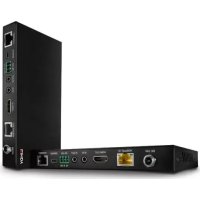
- Please ensure any adapters are firmly secured and locked in place before inserting into a wall socket Introduction Thank you for purchasing from the 70m C6 HDBaseT HDMI 18G & IR Extender kit. This product has been designed to provide trouble free, reliable operation. It benefits from both a LINDY 2-year warranty and free lifetime technical support. To ensure correct use, please read this manual carefully and retain it for future reference. The Lindy C6 HDBaseT HDMI 18G & IR Extender is a two-part high performance, reliable solution for extending HDMI signals over long distances via Cat.6 network cable. This kit can be used with each other or with a compatible Lindy HDBaseT splitter. For further information on this, please see your local Lindy website. HDBaseT is a globally recognised standard for high quality distribution of AV content and other technologies, including power, control and ethernet, over longer distances via low cost Cat.6 or above cable. Supporting resolutions up to 4K Ultra HD, video can be viewed in stunning clarity, while additional support for HDR (High Dynamic Range) allows content to be displayed with enhanced brightness, greater contrasts of blacks and whites and a much wider colour gamut. This provides a reliable solution for creating eye- catching digital signage in retail, immersive displays at events or engaging setups in larger conference rooms or lectures halls. PoC (Power over Cable) functionality provides additional flexibility. This allows power to be supplied alongside data through Cat.6 network cable in a point to point connection between the transmitter and receiver, meaning only a single power supply is required at the transmitter unit. Ideal when power outlets are limited at the receiver end of the installation. Featuring bi-directional IR ports at both sides of the setup, the source equipment can be easily controlled from the display side, and the display can also be controlled from the HDMI source side. Combined with CEC control, which allows commands from one main remote, this extension system allows for complete and simple control for the user. HDBaseT™ and the HDBaseT Alliance logo are trademarks of the HDBaseT Alliance. Please Note: The quoted lengths and resolutions are possible with a direct connection between Transmitter and Receiver using good quality Cat.6 solid core cable. Using a different cable type, or introducing wall plates, couplers or patch panels may result in a reduction of possible distances.User Manual English Package Contents
- 24VDC 1A Multi-country Power Supply (UK, EU, US & AUS), Screw Type DC Jack: 5.5/2.1mm
- Supports resolutions up to 3840x2160@60Hz 4:4:4 8bit, with additional support for HDR up to 4:2:2 10/12bit and Dolby Vision
- Audio Pass-through of all HDMI audio formats including Dolby Atmos & DTS:X
- PoC (Power over Cable) support, requiring a power supply connection from only one side of the installation
- Bi-directional IR Control (30-60kHz) of equipment via the extender
- RS-232 & CEC Pass-through
- Screw Type DC Jack for a secure power connection Specification
- HDMI 2.0b, 18Gbps Compliant
- HDCP 2.2/1.4 Pass-through The following distance and resolution combinations are possible when using high quality Cat.6 U/UTP or F/UTP cable: 70m:
- Relative Humidity: 20 - 90% RH (Non-condensing)
- Power Consumption: 24WUser Manual English Installation and Operation Transmitter Front and Rear
2. DC 24V: Connect the 24VDC 1A PSU to an AC wall outlet and securely connector to the transmitter
or receiver. This is only required at one side of the installation.
3. HDBaseT Out: HDBaseT Output port. Connect a compatible HDBaseT receiver using a single
Cat.6 or above cable for all data signals. Please do not connect to a network port.
used is within the direct line-of-sight of the IR Extender.
6. IR Out: Connect the supplied IR Transmitter Cable for IR signal transmission. Place the IR
Transmitter in direct line-of-sight of the equipment to be controlled.
7. RS-232: Connect to a PC, Serial Controller or Serial device via a phoenix block 3-way connection
for the pass-through transmission of RS-232 commands.
8. Service: Reserved for future use.
9. Link Indicator LED:
Illuminated Green: Link is Okay Not Illuminated: No Link
10. Data Signal Indicator LED:
Illuminated Orange: Signal is Okay Not Illuminated: No HDMI SignalUser Manual English Receiver Front and Rear
2. DC 24V: Connect the 24VDC 1A PSU to an AC wall outlet and securely connector to the transmitter
or receiver. This is only required at one side of the installation.
3. HDBaseT In: HDBaseT Input Port. Connect a compatible HDBaseT transmitter using a single Cat.6
or above cable for all data signals. Please do not connect to a network port.
used is within the direct line-of-sight of the IR Extender.
6. IR Out: Connect the supplied IR Transmitter Cable for IR signal transmission. Place the IR
Transmitter in direct line-of-sight of the equipment to be controlled.
7. RS-232: Connect to a PC, Serial Controller or Serial device via phoenix block 3 way connection for
the pass-through transmission of RS-232 commands.
8. Service: Reserved for future use.
9. Link Indicator LED:
Illuminated Green: Link is Okay Not Illuminated: No Link
10. Data Signal Indicator LED:
Illuminated Orange: Signal is Okay Not Illuminated: No HDMI SignalUser Manual English Important! Before starting the installation, please ensure that all devices are powered off.
1. Connect an HDMI source device to the Transmitter unit using HDMI cable.
2. Connect one end of the Cat.6/7 cable to the HDBaseT Out port on the Transmitter and the other end
to the HDBaseT In port of the Receiver. U/UTP or F/UTP solid core installation cables are recommended. For cable lengths please see the Specifications of this manual.
3. Use another HDMI cable to connect an HDMI display device to the HDMI output port on the Receiver
4. Plug the DC power supply into the Transmitter or Receiver and switch on.
5. Power on the source device and display to complete the installation.
In addition to the installation steps outlined above this HDMI 18G Extender can also provide the following additional/optional functionality: RS-232 Serial The Transmitter and Receiver both feature a phoenix block serial connection for the extension of control signals. Infrared Control The Transmitter and Receiver units both feature an IR In and Out port, with two pairs of IR extension cables provided. The extension cables allow an IR remote control to be used from the Transmitter to the Receiver or vice versa. IR Receiver IR EmitterUser Manual English Troubleshooting There is no display on the screen. It has been found that there are significant differences in the cable lengths/types and even input ports which can be used on different brands of display using HDMI 18G 4K@60Hz resolutions. If problems are experienced, please apply the following steps:
- Try a different input port on the display.
- Reduce the cable length on the Input and Output to 1m.
- Try a different type of 1m HDMI Cable.
- Check that the DC plug and jack used by the external power supply is firmly connected and that the power LED is illuminated on both the Transmitter and Receiver.
- Check that the Cat.6/7 cable is plugged in correctly and that the Connection LED on the left side of both the HDBaseT In and Out ports are illuminated.
- Check that the HDMI Indicator LED on the right side of the HDBaseT In and Out ports are illuminated, if not please power cycle the source and display.
- For several HDMI devices it may be helpful to unplug and re-connect their HDMI connection to re- initiate the HDMI handshake and recognition.
- Power off all the devices, then power on in this order: first, the extender, then the display and finally the source.
- RS-232 & CEC Pass-Through
- RS232 & CEC Pass-through
- RS-232 & CEC Pass-through
CE Certification This equipment complies with the requirements relating to Electromagnetic Compatibility Standards. It has been manufactured under the scope of RoHS compliance.
FCC Certification This equipment has been tested and found to comply with the limits for a Class B digital device, pursuant to part 15 of the FCC Rules. These limits are designed to provide reasonable protection against harmful interference in a residential installation. You are cautioned that changes or modification not expressly approved by the party responsible for compliance could void your authority to operate the equipment. This device complies with part 15 of the FCC Rules. Operation is subject to the following two conditions:
1. This device may not cause harmful interference, and
2. This device must accept any interference received, including interference that may cause undesired
WEEE (Waste of Electrical and Electronic Equipment), Recycling of Electronic Products
Europe, United Kingdom In 2006 the European Union introduced regulations (WEEE) for the collection and recycling of all waste electrical and electronic equipment. It is no longer allowable to simply throw away electrical and electronic equipment. Instead, these products must enter the recycling process. Each individual EU member state has implemented the WEEE regulations into national law in slightly different ways. Please follow your national law when you want to dispose of any electrical or electronic products. More details can be obtained from your national WEEE recycling agency.
Edition, November 2019 lindy.com Tested to comply with FCC Standards For Home and Office Use!