Mi Smart Blender - Blender Xiaomi - Free user manual and instructions
Find the device manual for free Mi Smart Blender Xiaomi in PDF.



| Product Type | Smart Blender |
| Brand | Xiaomi |
| Model | MPBJ001ACM-1A (Mi Smart Blender) |
| Dimensions (L × W × H) | 188 × 222 × 436 mm |
| Weight | Not specified |
| Power Supply | 220–240 V~, 50–60 Hz |
| Blending Power | 1000 W |
| Heating Power | 800–950 W |
| Maximum Capacity (Cold Drink) | 1600 ml |
| Maximum Capacity (Hot Drink) | 1200 ml |
| Wireless Connectivity | Wi-Fi 802.11 b/g/n (2,4 GHz), BLE |
| Main Functions | Smoothie, fruit & vegetable juice, smooth/thick sauce, jam, milkshake, manual mode, delayed programming |
| Care and Cleaning | Clean with soft cloth; do not immerse base; use "Press and hold to clean" mode |
| Safety | Overload protection (code E01), temperature sensor (E05), empty jug detection (E02), automatic shutdown on error |
| Spare Parts and Repairability | Contact Xiaomi after-sales service for any replacement; power cord not user-replaceable |
| General Information | Household use only; max altitude 2000 m; ambient temperature; do not use empty |
Frequently Asked Questions - Mi Smart Blender Xiaomi
User questions about Mi Smart Blender Xiaomi
0 question about this device. Answer the ones you know or ask your own.
Ask a new question about this device
Download the instructions for your Blender in PDF format for free! Find your manual Mi Smart Blender - Xiaomi and take your electronic device back in hand. On this page are published all the documents necessary for the use of your device. Mi Smart Blender by Xiaomi.
USER MANUAL Mi Smart Blender Xiaomi
xiaomi Smart Blender User Manual · 01
Read this manual carefully before use, and retain it for future reference.
Precautions
Usage restrictions
• The blender is for household use only.
- This appliance can be used by persons with reduced physical sensory or mental capabilities or lack of experience and knowledge if they have been given supervision or instruction concerning use of the appliance in a safe way and if they understand the hazards involved.
- The blender's normal operating altitude range is 0–2000 meters.
- Do not place the blender on unstable or wet surfaces. Keep it preferably at least 30 cm away from fire or heat sources (such as stoves).
- Do not place the blender near devices that are susceptible to electromagnetic interference.
- Do not let people who lack the physical, sensory, or intellectual ability or lack the experience or common sense to use the blender without supervision or guidance.
- If the blender is not used in accordance with the instructions in the user manual, there may be a risk of injury.
- Do not allow children to play with the blender. The blender should be placed out of the reach of children. Children should not use it without supervision.
- Do not hang the power cord on sharp objects.
- Do not use the blender to heat viscous liquids, including milk, soy milk, cold rice porridge, etc. Otherwise it will lead to build-up on the bottom, which could cause burning and strange smells.
- Do not use any non-genuine accessories with this blender to avoid potential injuries.
Cleaning & maintenance
- Do not immerse the blender in water or splash it with water.
- Do not use steel wool or other hard objects to clean the heating plate.
- Use only soft cloths for cleaning.
- If the blender will not be used for an extended period of time, unplug the power cord and take appropriate measures to protect the blender from moisture, dust, and household pests.
- Ensure that the power cord is disconnected and wait for the jar to cool down before cleaning.
- The table surface the blender is placed on must be regularly cleaned of grease.
- Please rinse the jar's interior and accessories with clean water before wiping them dry. The blades are sharp, so please be careful when cleaning or emptying the jar to avoid injury.
Precautions for using power supply
- Do not use any power supply other than 220–240 V AC to avoid fire and electrical shocks.
• Always unplug the blender by holding the power plug to avoid fire or electrical shocks. - Do not plug or unplug the power cord when your hands are wet to avoid injury and electrical shocks.
- Use only power sockets with a rated current of 10 A at minimum.
- If the power cord is damaged or broken, it must be replaced by the manufacturer or the after-sale service team to avoid safety hazards.
- Do not use other power cord extenders or parts not approved by Xiaomi when repairing.
• To avoid the risk of fire, do not use the low-quality power strip with this product. - Only use the blender on the base provided.
• Always unplug the blender before cleaning, assembling or disassembling, or after using. - Make sure that the blender is powered off before moving the base.
While in use
- Do not add water past the maximum level, or else the water will overflow or spray out and cause burns or other accidents.
- Idling or overloading is strictly prohibited.
- Do not move the blender or touch any running parts when in use to avoid accidents.
-
Do not heat without any food or water inside.
-
Do not move the lid and lid plug when in use.
- Do not allow any liquid to get on the pin connector.
- There will be residual heat after heating element works.
- The surface of the jar and lid will be hot while heating up, so please do not touch them while in use.
About the environment
- Steam and heat may damage, discolor or deform your walls and furniture, so keep the product preferably at least 30 cm away from any walls and furniture.
- When using the blender in a kitchen cabinet, etc., please ensure that the place is well ventilated.
Product Overview
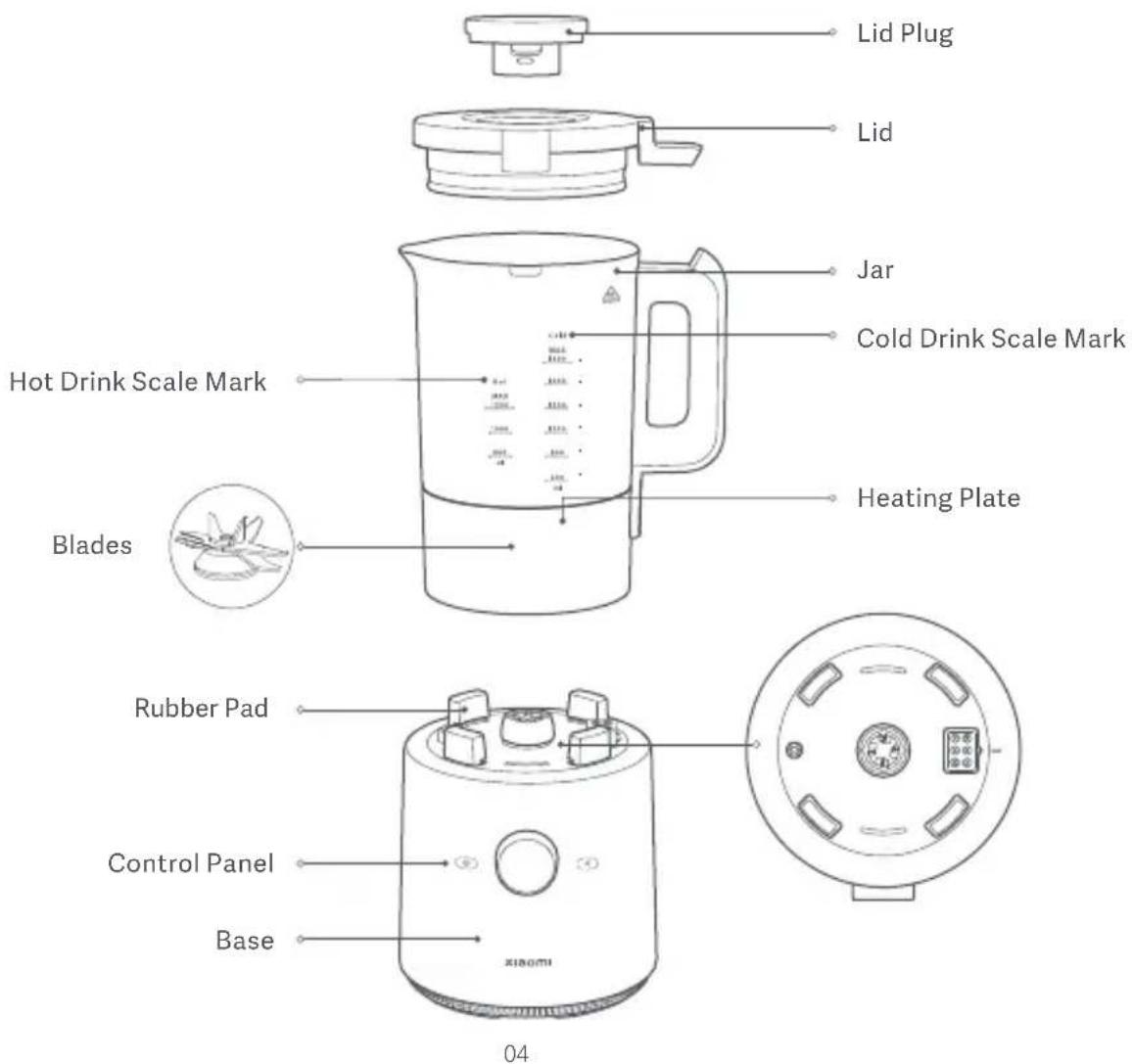
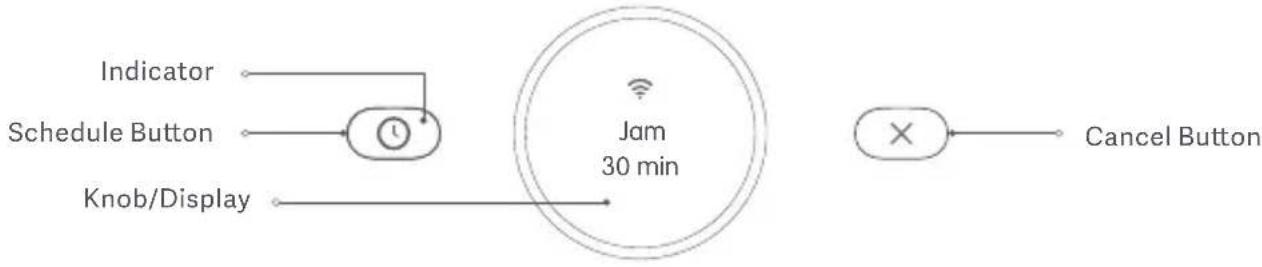
flowchart
graph LR
    A["Indicator"] --> B["Schedule Button"]
    B --> C["Knob/Display"]
    D["Jam 30 min"] --> E["×"]
    F["Cancel Button"] --> G["×"]
Accessories

Note: Illustrations of product, accessories, and user interface in the user manual are for reference purposes only. Actual product and functions may vary due to product enhancements.
How to Use
First use
- When the startup animation ends after the blender is powered on for the first time, the blender will enter the language selection screen. Press the knob for the screen to display languages, turn the knob to select a language, and press it to confirm the selection.
- After the language is set, turn the knob to enter the Wi-Fi settings screen. Press the knob to enable/disable Wi-Fi. If no action is performed within 30 seconds, the system will automatically select "No" as default (disable Wi-Fi connection).
Note: The blender will only enter the language selection and Wi-Fi settings screen the first time it's powered on. If you need to reset later, please go to the settings menu.
Turning On/off
1. Turning on
Every time the blender is plugged in, it will enter pre-start state after the startup animation ends, and the screen will display "Press and hold to turn on", so press and hold the knob to turn on the blender. The first recipe will appear on the screen when the blender is turned on the first time.
2. Turning off
In any other mode than Press & hold to clean mode, press and hold the knob to turn the blender off.
Connecting with Mi Home/Xiaomi Home App
This product works with the Mi Home/Xiaomi Home app*. Use the Mi Home/Xiaomi Home app to control your device, and to interact with other smart home devices.
Scan the QR code to download and install the app. You will be directed to the connection setup page if the app is installed already. Or search "Mi Home/Xiaomi Home" in the app store to download and install it. Open Mi Home/Xiaomi Home app, tap "+" on the upper right, and then follow prompts to add your device.

* The app is referred to as Xiaomi Home app in Europe (except for Russia). The name of the app displayed on your device should be taken as the default.
Note: The version of the app might have been updated, please follow the instructions based on the current app version.
Wi-Fi Status
| Operating Modes Status Display | |
| Awaiting connection | Wi-Fi icon blinks slowly |
| Connecting | Wi-Fi icon blinks quickly |
| Connected | Wi-Fi icon remains lit |
Note: When Wi-Fi is not connected, the Wi-Fi icon will blink. If the blender is not connected to any Wi-Fi network for 30 minutes, the Wi-Fi icon will go out.
Operating Instructions
- Take out the blender and clean the lid plug, lid, and tamper.
- Wash the ingredients, cut them into 3 cm cubes, and place them in the jar.
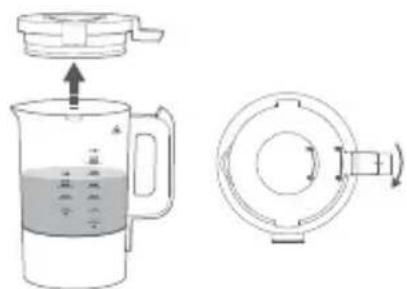
- Install the lid plug onto the lid, and turn the lid clockwise to lock it with the jar. (Figure 1)
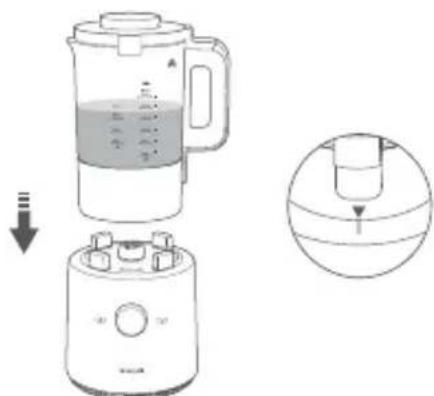
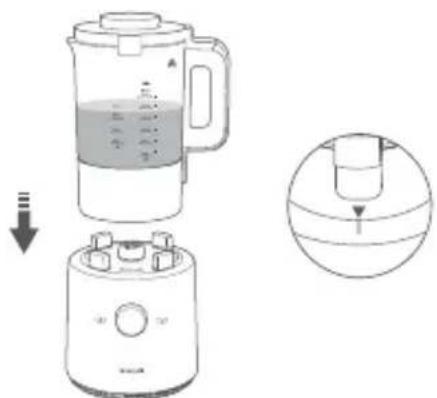
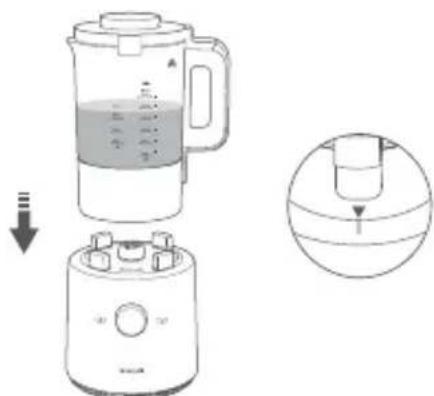
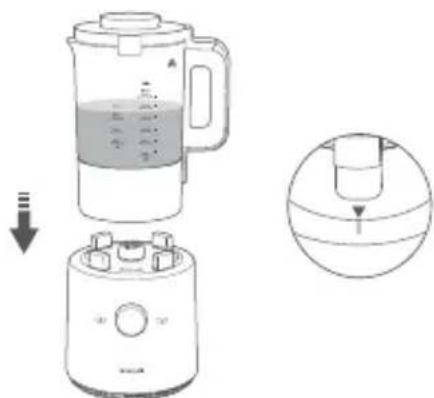
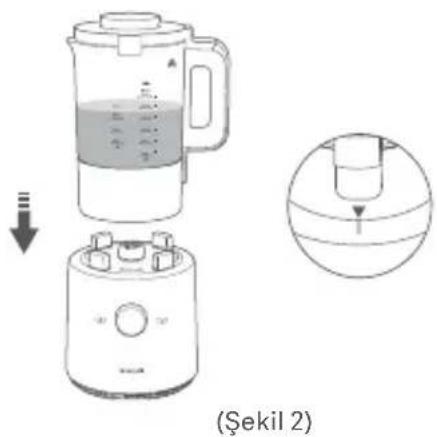
- Place the jar onto the base properly by aligning the small triangle under the handle with the marking on the base. Ensure the base is placed on a stable surface. (Figure 2)
- Once the blender is powered on, turn the knob to cycle through functions. When the desired function appears on the screen, press the knob to enable it.
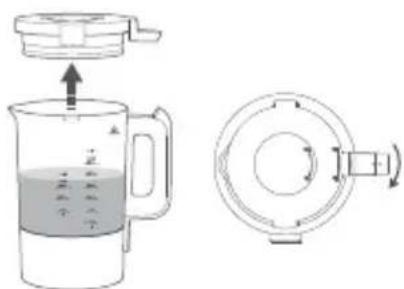
(Figure 1)
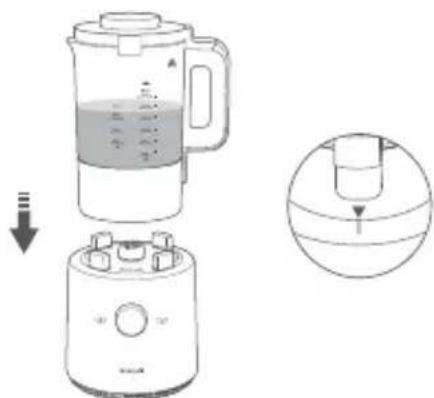
(Figure 2)
Care & Maintenance
Cleaning
- Watch out for burns from residual heat. Please wait for the jar to cool down before cleaning.
- Once the jar has cooled down and is empty, please add clean water and run the Press & hold to clean mode several times to properly clean the jar.
- The exterior of the base can be wiped down with a damp cloth once the power is disconnected. Do not soak the base, jar, power cord, and other parts with electronics. Do not directly rinse the base or other parts that contain electronics, such as the bottom of the jar.
- Please rinse the jar's interior and accessories with clean water before wiping them dry. The blades are sharp, so please be careful when cleaning to avoid injury.
- Do not use abrasive cleaners or corrosive liquids (gasoline, acetone, etc.) to clean the blender.
- When parts are stained with fruit or vegetable juice, wiping these parts with several drops of cooking oil before cleaning can help remove stains more easily. Thoroughly dry the parts after rinsing them with clean water.
- If the residue in the jar forms a hard spot that is difficult to remove, please add an appropriate amount of water to soak it before cleaning and wiping the blender dry.
- If the inner bottom of the jar is not cleaned up even after multiple cleanings, and a residual layer has adhered to it, soak it in clean water for a period of time before gently wiping it clean with a cloth dipped in white vinegar. Please mind the blade while wiping to avoid any accidents. (Do not power on the blender when cleaning.)
• The blender should be used frequently to keep the motor dry. - If the blender will not be used for an extended period of time, please store it in a well-ventilated and dry place to prevent the motor from getting wet and affecting its future use.
Functions
| Modes | Operations |
| Jam Smooth soup Chunky soup | Once the blender is powered on, the knob will display "Jam". Press the knob to make jam, or turn the knob to choose between smooth soup or chunky soup and then press the knob to begin making the chosen one.Note 1: Task scheduling is available, and the keep warm mode will be enabled by default once cooking ends. The cooking task will be automatically canceled if you do not resume it after pausing it for two minutes while in the middle of its operation.Note 2: After a task starts, press the knob to pause it and press the knob again to resume it. When it is paused, press the cancel button to exit the task. |
| Smoothie Fruit & vegetable juice Milkshake | Turn the knob to select Smoothie, Fruit & vegetable juice, or Milkshake, then press the knob to start making the chosen drink.Note 1: Task scheduling is not available. The cooking task will be automatically canceled if you do not resume it after pausing it for one minute while in the middle of its operation.Note 2: After a task starts, press the knob to pause it and press the knob again to resume it. When it is paused, press the cancel button to exit the task. |
| Press & hold to clean | Turn the knob to the Press & hold to clean mode. Once the ingredients or water is added, press and hold the knob to start the task.Note 1: If the food is not fully blended, enable the Press & hold to clean mode to blend thoroughly in a short time.Note 2: Select the Press & hold to clean mode for cleaning purposes. |
| Manual | Turn the knob to Manual mode, press and turn it to select the speed.Note: After a task starts, press the knob to pause it and press the knob again to resume it. When it is paused, press the cancel button to exit the task. |
| Settings | Language selection: After the blender is powered on, turn the knob to the settings screen, and press it for language setting. Then press the knob to enter the language selection screen, turn the knob to select a language, and press it to confirm the selection. The system will automatically return to the settings screen after the setup or if no language is confirmed within 30 seconds.When the blender is connected to a network, turn the knob to select Wi-Fi on the settings screen. Press the knob to confirm, then you can reset or disconnect the Wi-Fi network.When the blender is not connected to a network, turn the knob to select Wi-Fi on the settings screen. Press the knob to confirm, then you can connect to Wi-Fi network.Note: When connecting/disconnecting Wi-Fi network, if there is no operation for 30 seconds, the system will default to the last selected option and return to the settings screen. |
Recipes
| Drink Name Time Ingredients | ||
| Jam 30 min | Strawberry 300 g, white sugar 120 g, lemon juice 6 g | |
| Smoothie | 45 s | Ice 300 g (2 cm cubes) |
| Fruit & vegetable juice | 2 min | Carrot 640 g, drinking water 960 ml |
| Smooth soup | 38 min | 1 potato (approx. 220 g), cashew 10 g, white mushroom 50 g, salt 2 g, a pinch of pepper, drinking water 720 ml |
| Chunky soup | 35 min | 1 potato (approx. 220 g), cashew 10 g, white mushroom 50 g, salt 2 g, a pinch of pepper, drinking water 720 ml |
| Milkshake | 1 min | 1 red dragon fruit (400 g), yogurt 300 ml, 5 ice cubes (2 cm ^3 in size), a small amount of honey |
| Manual | 1 min | Take Juice as an example: carrot 890 g, drinking water 710 ml |
Cautions:
- When using the smoothie mode, please use ice cubes that have been frozen below -18°C for more than 24 hours, and use the ice cubes immediately after taking them out. (Please make sure the jar is dry before adding the ice cubes).
- The blender should not blend for more than two minutes continuously in fruit & vegetable juice mode and in manual mode, and should not exceed six minutes in total.
· If the base overheats while operating, turn off the blender for about 20 minutes and wait for it to cool down before resumption.
· Only jam, smooth soup, and chunky soup are available for scheduling in advance. Other recipes do not support this function.
| Code | Message Explanation Solution | ||
| Motor overloadedE01 | Motor overloaded | Clean out the food in the jar after the power is off, and wait for the blender to cool down before powering it on again. | |
| E02 | Place the jar | No jar placed on the base | After placing the jar on the base, return to the menu screen, and press the cancel button to enter standby mode. |
| E05 | Overheated | High temperature alert from bottom temperature sensor | The blender will return to normal when the temperature drops. Press the cancel button to enter standby mode. |
| E10 | Temperature sensor error | Bottom temperature sensor has a short or broken circuit. | Contact the after-sale service team. |
| Communication error | Power board and display panel communication error | Contact the after-sale service team.E11 | |
Troubleshooting
| Issues | Solutions |
| Food overflowsIngredients cannot be blended. | Add a proper amount of ingredients.Add water to the proper water level.Select the desired function according to the user manual.Contact the after-sale service team. |
| Burnt food on the jar's bottom | Add a proper amount of ingredients.Do not add ingredients that are easily burnt on the jar's bottom, like flour.Add water to the proper water level.Clean before use.Select the desired function according to the user manual.Contact the after-sale service team. |
| Ingredients not hot after cooking | Select the desired function according to the user manual.Contact the after-sale service team. |
| Display does not light up. | Check the power cord and make sure it is plugged in and connected to the power supply.Contact the after-sale service team. |
| The display is on but the blender is not working. | Re-select the function and press the knob to enable it.Add water to the proper water level and restart the blender after it cools down.Unplug first, then power on and follow the normal operation steps.Contact the after-sale service team. |
| Operating noise | The blender will make some sounds while it is working, which is normal. Contact the after-sale service team. |
Notes:
- Please check whether the power cord is properly connected and the jar and the lid are properly placed. Immediately unplug and stop using it if the blender emits strange noises, smells, smoke, etc.
- When the blender still does not work as expected after the inspection mentioned above, please contact the after-sale service team.
Specifications
Name: Smart Blender Model: MPBJ001ACM-1A
Rated Voltage: 220–240 V\~ Rated Frequency: 50–60 Hz
Blending Power: 1000 W Heating Power: 800–950 W
Cold Drink Max. Capacity: 1600 ml
Hot Drink Max. Capacity: 1200 ml
Transmit Frequency: 2.4–2.4835 GHz Transmit Power: ≤20 dBm
Item Dimensions: 188 × 222 × 436 mm
Wireless Connectivity: Wi-Fi IEEE 802.11b/g/n 2.4 GHz BLE GFSK 1Mbps
- When performing the RE test of EN 301 489-1, the product should be tested in the standby state.
- When performing tests in the 30 MHz-1 GHz band in EN 55014-1, the disturbance power should be used.

Hereby, Guangdong Chunmi Electronic Technology Co., Ltd. declares that the radio equipment type Smart blender MPBJ001ACM-1A is in compliance with Directive 2014/53/EU. The full text of the EU declaration of conformity is available at the following internet address: http://www.mi.com/global/service/support/declaration.html.
For detailed e-manual, please go to www.mi.com/global/service/userguide.
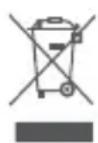
All products bearing this symbol are waste electrical and electronic equipment (WEEE as in directive 2012/19/EU) which should not be mixed with unsorted household waste. Instead, you should protect human health and the environment by handing over your waste equipment to a designated collection point for the recycling of waste electrical and electronic equipment, appointed by the government or local authorities. Correct disposal and recycling will help prevent potential negative consequences to the environment and human health. Please contact the installer or local authorities for more information about the location as well as terms and conditions of such collection points.
(Figura 1)
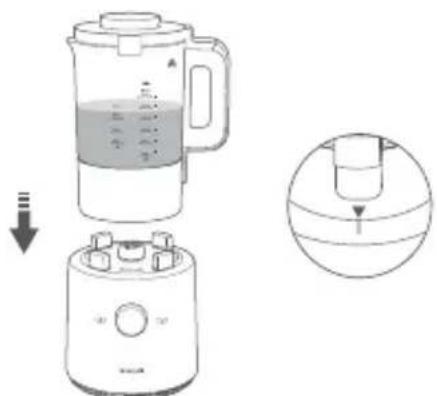
(Figura 2)
(Figura 1)
(Figura 2)
Cura e manutenzione
Pulizia
Indirizzo: 2/F, Building C, South No.1 Huanzheng East Road, Beijiao Community, Beijiao Town,
Shunde District, 528311 Foshan City, Guangdong Province, PEOPLE'S REPUBLIC OF CHINA
(Figure 1)
(Figure 2)
©
http://www.mi.com/global/service/support/declaration.
EAB61214
(Рисунок 1)
(Рисунок 2)
http://www.mi.com/global/service/support/declaration.
Адрес: 2/F, Building C, South No.1 Huanzheng East Road, Beijiao Community, Beijiao Town,
Shunde District, 528311 Foshan City, Guangdong Province, PEOPLE'S REPUBLIC OF CHINA
(Figura 1)
(Figura 2)
Bakım
Temizlik
http://www.mi.com/global/service/support/declaration.
http://www.mi.com/global/service/support/declaration.
www.mi.com/global/service/userguide
(รูปที่ 1)
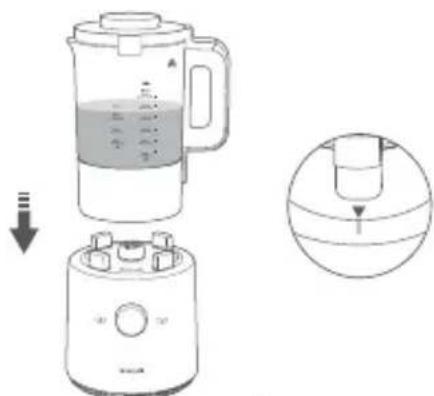
(รูปที่ 2)
flowchart
graph TD
    A[" male"] --> B[" male 马罩"]
    C[" male 马罩"] --> D[" male 马罩"]
    E[" male 马罩"] --> F[" male 马罩"]
    G[" male 马罩"] --> H[" male 马罩"]
    I[" male 马罩"] --> J[" male 马罩"]
    K[" male 马罩"] --> L[" male 马罩"]
    M[" male 马罩"] --> N[" male 马罩"]
    O[" male 马罩"] --> P[" male 马罩"]
    Q[" male 马罩"] --> R[" male 马罩"]
    S[" male 马罩"] --> T[" male 马罩"]
    U[" male 马罩"] --> V[" male 马罩"]
    W[" male 马罩"] --> X[" male 马罩"]
    Y[" male 马罩"] --> Z[" male 马罩"]
    AA[" male 马罩"] --> AB[" male 马罩"]
    AC[" male 马罩"] --> AD[" male 马罩"]
    AE[" male 马罩"] --> AF[" male 马罩"]
    AG[" male 马罩"] --> AH[" male 马罩"]
    AI[" male 马罩"] --> AJ[" male 马罩"]
    AK[" male 马罩"] --> AL[" male 马罩"]
    AM[" male 马罩"] --> AN[" male 马罩"]
    AO[" male 马罩"] --> AP[" male 马罩"]
    AQ[" male 马罩"] --> AR[" male 马罩"]
    AS[" male 马罩"] --> AT[" male 马罩"]
    AU[" male 马罩"] --> AV[" male 马罩"]
    AW[" male 马罩"] --> AX[" male 马罩"]
    AY[" male 马罩"] --> AZ[" male 马罩"]
    BA[" male 马罩"] --> BB[" male 马罩"]
    BC[" male 马罩"] --> BD[" male 马罩"]
    BE[" male 马罩"] --> BF[" male 马罩"]
    BG[" male 马罩"] --> BH[" male 马罩"]
    BI[" male 马罩"] --> BJ[" male 马罩"]
    BK[" male 马罩"] --> BL[" male 马罩"]
    BM[" male 马罩"] --> BN[" male 马罩"]
    BO[" male 马罩"] --> BP[" male 马罩"]
    BQ[" male 马罩"] --> BR[" male 马罩"]
    BS[" male 马罩"] --> BT[" male 马罩"]
    BU[" male 马罩"] --> BV[" male 马罩"]
    BW[" male 马罩"] --> BX[" male 马罩"]
    BY[" male 马罩"] --> BZ[" male 马罩"]
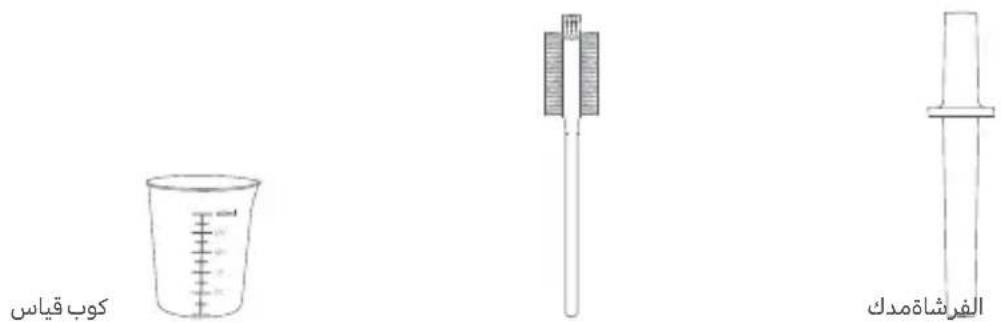
الملحقات
EAB61214
(2 الشكل)
(1 الشكل)
http://www.mi.com/global/service/support/declaration.
,F/2, Building C, South No.1 Huanzheng East Road, Beijiao Community, Beijiao Town : العنوان
Shunde District, 528311 Foshan City, Guangdong Province, PEOPLE'S REPUBLIC OF CHINA
- Precautions
- Usage restrictions
- Cleaning & maintenance
- Precautions for using power supply
- While in use
- About the environment
- Accessories
- How to Use
- First use
- Turning On/off
- Turning on
- Turning off
- Connecting with Mi Home/Xiaomi Home App
- Wi-Fi Status
- Operating Instructions
- Care & Maintenance
- Cleaning
- Notes:
- Specifications
- Cura e manutenzione
- Pulizia
- Bakım
- Temizlik
Brand : Xiaomi
Model : Mi Smart Blender
Category : Blender