Vilna 1500 P - Heating TAURUS - Free user manual and instructions
Find the device manual for free Vilna 1500 P TAURUS in PDF.



User questions about Vilna 1500 P TAURUS
0 question about this device. Answer the ones you know or ask your own.
Ask a new question about this device
Download the instructions for your Heating in PDF format for free! Find your manual Vilna 1500 P - TAURUS and take your electronic device back in hand. On this page are published all the documents necessary for the use of your device. Vilna 1500 P by TAURUS.
USER MANUAL Vilna 1500 P TAURUS
natural_image
Line drawing of a solar heating unit with vertical panel and base legs (no text or symbols)EN: This product is only suitable for well insulated spaces or occasional use.
natural_image
Simple line drawing of a mechanical bracket with a vertical line and label 'Fig.3' (no text or symbols on the diagram itself)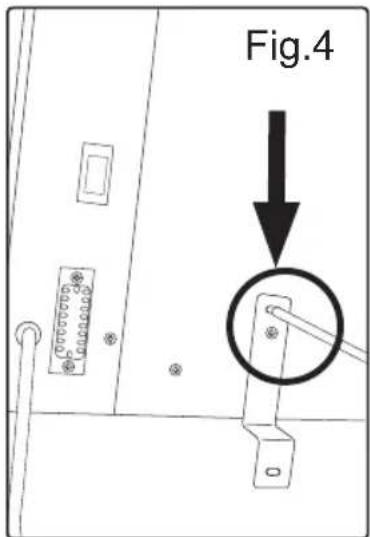
text_image
Fig.4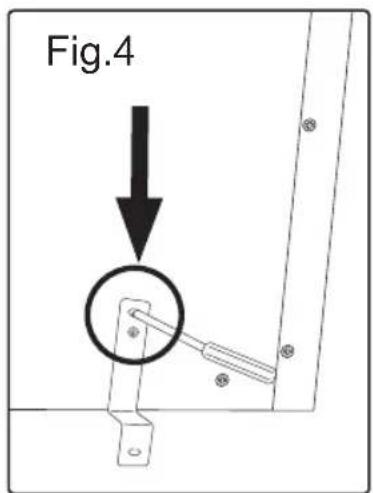
text_image
Fig.4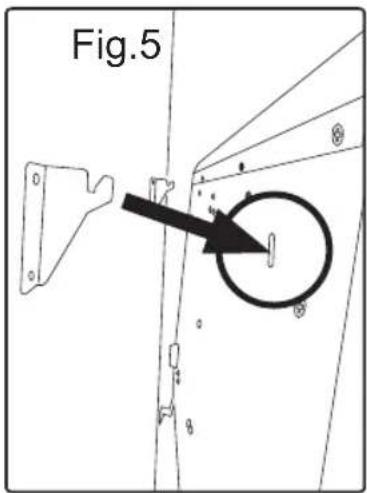
text_image
Fig.5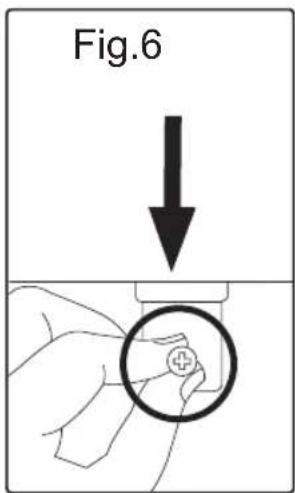
text_image
Fig.6
text_image
Fig.7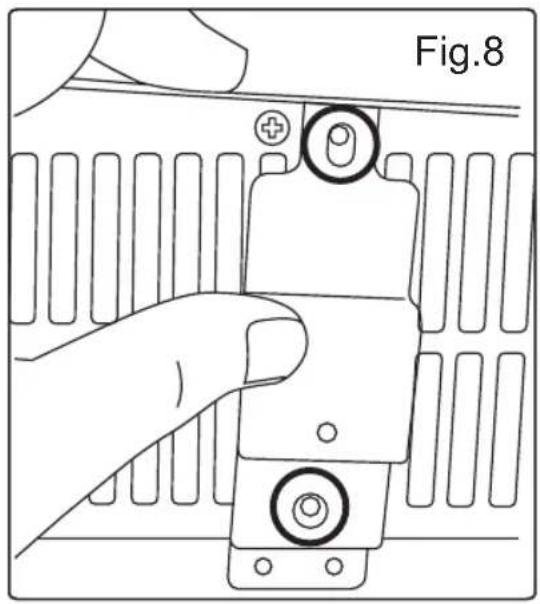
text_image
Fig.8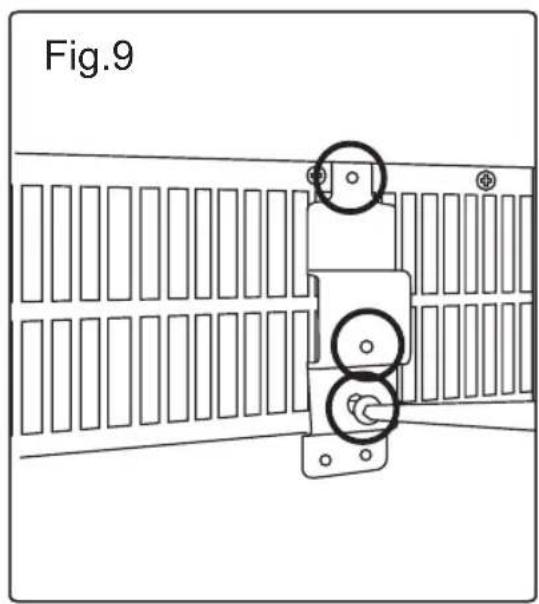
text_image
Fig.9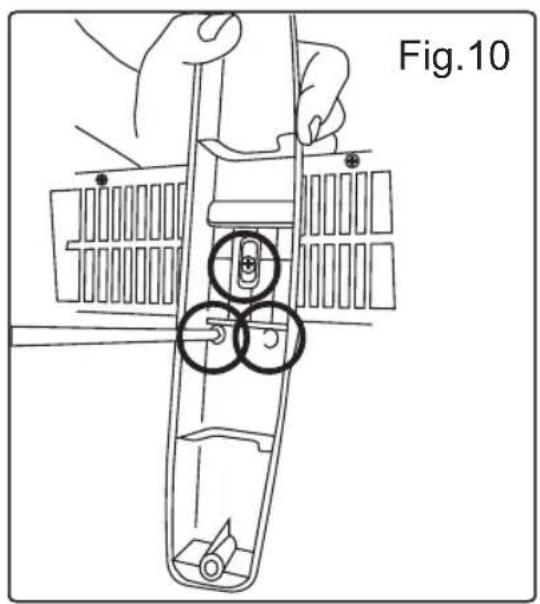
text_image
Fig.10Español
Emisor Térmico
Vilna 600 P
Vilna 900 P
Vilna 1200 P
Vilna 1500 P
Vilna 2000 P
Many thanks for choosing to purchase a TAURUS ALPATEC brand product.
Thanks to its technology, design and operation and the fact that it exceeds the strictest quality standards, a fully satisfactory use and long product life can be assured.
Read these instructions carefully before switching on the appliance and keep them for future reference. Failure to follow and observe these instructions could lead to an accident.
SAFETY ADVICE AND WARNINGS
- CAUTION: Some parts of this product can become very hot and cause burns. Particular attention has to be given where children and vulnerable people are present.
- The appliance must not be placed below a power socket.
- Children of less than 3 years should be kept away unless continuously supervised.
- Children aged from 3 years and less than 8 years shall only switch on/off the appliance provided that it has been placed or installed in its intended normal operating position and they have been given supervision
or instruction concerning use of the appliance in a safe way and understand the hazards involved.
- This appliance can be used by children aged from 8 years and above and persons with reduced physical, sensory or mental capabilities or lack of experience and knowledge if they have been given supervision or instruction concerning use of the appliance in a safe way and understand the hazards involved.
- Cleaning and user maintenance shall not be made by children unless they are supervised.
- Children aged from 3 years and less than 8 years shall not plug in, regulate and clean the appliance or perform user maintenance.
- This appliance is not a toy. Children should be supervised to ensure that they do not play with the appliance.
- Do not use the appliance near bathtubs, showers or swimming pools.
- CAUTION: In order to avoid a hazard due to inadvertent resetting of the thermal protector, this appliance must not be supplied through an external switching device, such as a timer, or connected to a circuit that
is regularly switched on and off by the utility.
- If the connection to the mains has been damaged, it must be replaced, take the appliance to an authorised technical support service. Do not attempt to disassemble or repair the appliance by yourself in order to avoid a hazard.
- This appliance is for household use only, not professional, industrial use.

s symbol means that product can't be covered.
- CAUTION: In order to prevent overheating do not cover the appliance.
- Ensure that the voltage indicated on the rating label matches the mains voltage before plugging in the appliance.
- Connect the appliance to a base with an earth socket withstanding a minimum of 16 amperes.
- The appliance's plug must fit into the mains socket properly. Do not alter the plug. Do not use plug adaptors.
- Use the appliance in a well-ventilated area.
- If other gas or fuel appliances can be used at the same time in the room where the appliance is to be used, that room must be well ventilated.
- The appliance must only be used with the stand provided.
- Place the appliance on a horizontal, flat, stable surface, suitable for withstanding high temperatures and away from other heat sources and contact with water.
- Keep the appliance away from flammable material such as textiles, cardboard or paper, etc.
- Place the appliance a minimum distance of 50cm away from combustible materials, such as curtains, furniture ...
- Do not place inflammable material near the appliance.
- Ensure that neither the air access nor exit become either totally or partially covered by
drapery, clothing, etc., as this increases the risk of fire.
- Do not use the appliance in association with a programmer, timer or other device that automatically switches it on.
- Do not use the appliance if the cable or plug is damaged.
- If any of the appliance casings breaks, immediately disconnect the appliance from the mains to prevent the possibility of an electric shock.
- CAUTION: Maintain the appliance dry.
- CAUTION: Do not use the appliance near water.
- Do not use the appliance with damp hands or feet, or when barefooted.
- Do not force the power cord. Never use the power cord to lift up, carry or unplug the appliance.
- Do not wrap the power cord around the appliance.
- Do not clip or crease the power cord.
- Do not allow the power cord to come into contact with the appliance's hot surfaces.
- Check the state of the power cord. Damaged or tangled cables increase the risk of electric shock.
- The appliance is not suitable for outdoor use.
- Supply cord should be regularly examined for signs of damage, and if the cord is damaged, the appliance must not be used.
- As an additional protection to the electrical supply for the appliance, it is advisable to have a differential current device with a maximum sensitivity of 30 mA. Ask for advice from a competent installer.
- Do not use or store the appliance outdoors.
- Do not leave the appliance out in the rain or exposed to moisture. If water gets into the appliance, this will increase the risk of electric shock.
- Do not touch the plug with wet hands.
- Do not use the appliance in the case of persons insensitive to heat (the appliance has heated surfaces).
- Do not touch the heated parts of the appliance, as it may cause serious burns.
- The temperature of the accessible surfaces may be high when the appliance is in use.
USE AND CARE:
- Fully unroll the appliance's power cable before each use.
-
Do not use the appliance if the on/off switch does not work.
-
Do not use the appliance if it is tipped up and do not turn it over.
- Do not turn the appliance over while it is in use or connected to the mains.
- If you use the appliance in a bathroom or similar place, unplug the appliance from the mains when it is not in use, even if it is only for a short while, as proximity to water involves a risk, even if the appliance is disconnected.
- Disconnect the appliance from the mains when not in use and before undertaking any cleaning task.
- Store this appliance out of reach of children and/or persons with physical, sensory or reduced mental or lack of experience and knowledge.
- Do not store the appliance in a vertical position.
- Do not store the appliance if it is still hot.
- Keep the appliance in a dry, dust-free place, out of direct sunlight.
- Never leave the appliance unattended while in use.
- Never leave the appliance connected and unattended if is not in use. This saves energy and prolongs the life of the appliance.
- Do not use the appliance to dry textiles of any kind.
SERVICE:
- Make sure that the appliance is serviced only by specialist personnel, and that only original spare parts or accessories are used to replace existing parts/accessories.
- CAUTION: There is a risk of fire if the appliance's cleaning is not done according to these instructions.
- Any misuse or failure to follow the instructions for use renders the guarantee and the manufacturer's liability null and void.
DESCRIPTION
A On / Off main switch
B Control panel
C LCD screen
D Heat Outlet
E Base feet
F Wall bracket
G Screws
H Stand fixing bracket
ICONS ON CONTROL PANEL
- /button
- Programming button
- Mode button
- Window detector button
- Standby button
FUNCTIONAL ICONS ON LCD SCREEN
I. Stand by mode
II. Anti-freeze mode
III. Comfort mode
IV. Economic mode
V. Programme mode
VI. Keyboard lock
VII. Window detector
UNDER CUSTOMIZED PROGRAMME SETTING
a. Working under comfort mode
b. Working under economic mode
c. Stand by

If the model of your appliance does not have the accessories described above, they can also be bought separately from the Technical Assistance Service.
INSTALLATION
- Ensure that the appliance is level with respect to the floor.
- Install the appliance away from flammable material such as textiles, cardboard or paper, etc.
- Install the appliance a minimum distance of 50cm away from combustible materials, such as curtains, furniture ...
- Ensure that neither the air access nor exit become either totally or partially covered by drapery, clothing, etc., as this increases the risk of fire.
- The appliance requires suitable ventilation in order to work properly. Leave a space of 30 cm between walls or other obstacles and 30 cm from the floor.
- Do not cover or obstruct any of the openings of the appliance.
- Do not cover or obstruct the sides of the appliance, leave a minimum space of 2 cm around the appliance.
- The plug must be easily accessible so it can be disconnected in an emergency.
- To achieve the highest efficiency from the
appliance it should be situated in a place where the atmospheric temperature is between 12 and 32°C.
- To achieve the highest efficiency from the appliance and so as to be able to install the appliance on a cold wall (an exterior wall) and below a window. But never obstructing or covering a ventilation area.
- The appliance should work well with its wall support attached or with its base/feet attached.
ASSEMBLING THE WALL BRACKET:
- The appliance has a wall bracket (F) on which it can be supported.
- Taking into account the separation distances mentioned above, place the wall support in the required position and mark the drilling points on the wall. (Fig.1).
- Drill into the wall where marked and insert the rawlplugs. (Fig.2).
- Place the support by matching the holes with the rawlplugs and screw in firmly. (Fig.3).
- Make sure that the bracket is firmly fixed; it should be able to support twice the weight of the appliance.
- Fit the appliance into the wall support.
- Take 1 long bracket on the back housing, align the hole, insert the short screws to fix it (2 short screws for 1 long bracket) (Fig.4).
- Before Insert the expansion bolts to the wall, please make sure the distance between bolts as below table:
| Model Distance | |
| Vilna 600 P 139mm | |
| Vilna 900 P 226mm | |
| Vilna 1200 P 313mm | |
| Vilna 1500 P 400mm | |
| Vilna 2000 P 574mm |
- Put 2 long screws to fix the short bracket.
- Fix the short bracket in right position.
- Hang the heater to the bracket (Fig.5).
- Fix the last hole on long bracket after hanging on the wall (Fig.6).
FITTING THE BASE FEET:
- To assemble the base feet, place the appliance face down.
-
Loosen the screws provided with the appliance (Fig.4).
-
Take 1 stand fixing bracket to align the holes in the bottom (Fig.8).
- Fix the feet using the brackets provided. (Fig.9).
- Fix the feet with 3 screws (Fig.10).
- Position the base feet on the body of the
- Stand the appliance up again so as to check that the base feet work properly.
INSTRUCTIONS FOR USE BEFORE USE:
- Make sure that all products' packaging has been removed.
- Prepare the appliance according to the function you wish to use:
USE:
- Unroll the cable completely before plugging it in.
- Connect the appliance to the mains.
- Turn the appliance on, by using the on/off switch (A).
- Once connected to electricity, the clock will pop out on the display for setting. Press ▲ to toggle among hours / minutes / day. Press the ▼ to set the hours / minutes / day.
- After 10 seconds it will automatically finish and the appliance will enter to standby mode as defaulted.
- Press standby button (5) to enter to the comfort mode.
- In case of power failure, after reconnecting the power supply, set the time again and the unit will be in standby mode. You can press the standby button (5) to enter to the mode and temperature before power failure.
WORKING MODE SETTING
- Press the mode button (3) to toggle among the modes: Economic mode *, Anti-freeze mode
Comfort mode, P1/P2/P3. - Under the mode of comfort mode or economic mode (excluding anti-freezing mode), press or to choose the desired temperature. After 5 seconds it will automatically finish.
- When the room temperature is higher than the selected temperature, the heater will stop heating.
Comfort mode (setting the desired temperature from 5°C to 29°C). - Economic mode (setting the desired temperature from 1,5°C to 25,5°C).
- Anti-freeze mode (the device maintains the
room temperature at approximately 7^ C).
- P1/P2/P3 are preinstalled programs. After confirming the program, the programme icon and the temperature desired will appear on the screen alternately.
PERSONALIZED PROGRAMMES
- Press programming button (2).
- Press programming button (2) to select between days, mode and hours.
- Select the desired day (1-7) by pressing or √.
- Select the desired hour by pressing button and select the desired mode (comfort, economic and standby.) by pressing button.
- After 30 seconds, it will automatically finish.
CLOCK SETTING:
- When the device is already in operation and you want to set the date and time again, you need to press the buttons ▲ and ▲ at the same time.
- Once connected to electricity, the clock will pop out on the display for setting. Press △ to toggle among hours / minutes / day. Press the √ to set the hours / minutes / day.
- After 10 seconds it will automatically finish.
| Selection Icon displayed | |
| Monday 1 | |
| Tuesday 2 | |
| Wednesday 3 | |
| Thursday 4 | |
| Friday 5 | |
| Saturday 6 | |
| Sunday 7 | |
| Hours 00-23 | |
| Minutes 01-59 | |
SAFETY LOCK
- Press the mode button (3) during 3 seconds to lock the screen. To unlock press again mode button (3) during 3 seconds.
- Lock function will automatically be deactivated if the appliance suffers power disconnection.
WINDOW DETECTOR FUNCTION
- Press the window detector button (4) to activate this function.
- The appliance will enter comfort mode as default.
- If temperature decrease detected, the appliance will automatically enter to anti-freeze mode.
- If temperature rises up detected, the appliance will go back to comfort mode.
- You can press mode button (3) or programming button (2) to choose other modes.
ONCE YOU HAVE FINISHED USING THE APPLIANCE:
- Turn the appliance off, using the on/off switch.
- Unplug the appliance from the mains.
- Clean the appliance.
SAFETY THERMAL PROTECTOR:
- The appliance has a safety device, which protects the appliance from overheating.
- When the appliance switches itself on and off repeatedly, for reasons other than the thermostat control, check to ensure that there are no obstacles that impede correct air entry or expulsion.
- If the appliance turns itself off and does not switch itself on again, disconnect it from the mains supply, and wait for approximately 15 minutes before reconnecting. If the machine does not start again seek authorised technical assistance.
CLEANING
- Disconnect the appliance from the mains and allow it to cool before undertaking any cleaning task.
- Clean the equipment with a damp cloth with a few drops of washing-up liquid and then dry.
- Do not use solvents, or products with an acid or base pH such as bleach, or abrasive products, for cleaning the appliance.
- Never submerge the appliance in water or any other liquid or place it under running water.
- If the appliance is not in good condition of cleanliness, its surface may degrade and inexorably affect the duration of the appliance's useful life and could become unsafe to use.
- Remark: When the appliance is used as a heater after long periods in storage or after having been used solely as a fan a small amount of smoke may be produced. This is not important and is due to the heater burning dust deposits which have accumulated on the heating element. This phenomenon may be avoided by cleaning the inside of the appliance before-
hand through the grill with a vacuum cleaner or pressurised air.
ANOMALIES AND REPAIR
- Take the appliance to an authorised technical support service if product is damaged or other problems arise. Do not attempt to disassemble or repair the appliance yourself as this may be dangerous.
FOR EU PRODUCT VERSIONS AND/OR IN CASE THAT IT IS REQUESTED IN YOUR COUNTRY:
ECOLOGY AND RECYCLABILITY OF THE PRODUCT
- The materials of which the packaging of this appliance consists are included in a collection, classification and recycling system. Should you wish to dispose of them, use the appropriate public recycling bins for each type of material. - The product does not contain concentrations of substances that could be considered harmful to the environment.
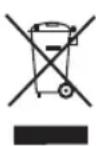
This symbol means that in case you wish to dispose of the product once its working life has ended; take it to an authorised waste agent for the selective collection of Waste from Electric and Electronic Equipment (WEEE).
This appliance complies with Directive 2014/35/EU on Low Voltage, Directive 2014/30/EU on Electromagnetic Compatibility, Directive 2011/65/EU on the restrictions of the use of certain hazardous substances in electrical and electronic equipment and Directive 2009/125/EC on the ecodesign requirements for energy-related products.
The following information details the features related to ecodesign.
| VILNA 600 P / VILNA 900 P / VILNA 1200 P / VILNA 1500 P / VILNA 2000 P | |
| Heat Output | |
| Nominal heat output P_nom | 0,6 kW / 0,9 kW / 1,2 kW / 1,5 kW / 2,0 kW |
| Minimum heat output (indicative) P_min | N/A |
| Maximum continuous heat output P_max,c | 0,6 kW / 0,9 kW / 1,2 kW / 1,5 kW / 2,0 kW |
| Auxiliary electricity consumption | |
| At nominal heat output el_max | N/A |
| At minimum heat output el_min | N/A |
| In standby mode el_SB | 0,239 kW |
| Type of heat input, for electric storage local space heaters only | |
| Manual heat charge control, with integrated thermostat | N/A |
| Manual heat charge control with room and/or outdoor temperature feedback | N/A |
| Electronic heat charge control with room and/or outdoor temperature feedback | N/A |
| Fan assisted heat output N/A | |
| Type of heat output/room temperature control | |
| Single stage heat output and no room temperature control | No |
| Two or more manual stages, no room temperature control | No |
| With mechanical thermostat room temperature control | No |
| With electronic room temperature control No | |
| Electronic room temperature control plus day timer | No |
| Electronic room temperature control plus week timer | Sí |
| Other control options | |
| Room temperature control, with presence detection | No |
| Room temperature control, with open window detection | Sí |
| With distance control option No | |
| With adaptive start control No | |
| With working time limitation No | |
| With black bulb sensor No | |
| Electrodomésticos Taurus, S.L. Avda. Barcelona, S/N, 25790 Oliana, Ileida, Spain | |
Français
Radiateur à inertie
Vilna 600 P
Vilna 900 P
Vilna 1200 P
Vilna 1500 P
Vilna 2000 P
Cher Client,
-Views about the world's history of the United States.
This product enjoys the recognition and protection of the legal guarantee in accordance with current legislation. To enforce your rights or interests you must go to any of our official technical assistance services.
You can find the closest one by accessing the following web link: http://taurus-home.com/
You can also request related information by contacting us.
You can download this instruction manual and its updates at http://taurus-home.com/
Français
GARANTIE ET ASSISTANCE TECHNIQUE
COUNTRY ADDRESS PHONE
| Algeria Zone d'Activite, N° 62, Constantine 213770777756 | ||
| Argentina Av. del Libertador 1298,(B1638BEY), Vicente López (Pcia. Buenos Aires) | 541153685223 | |
| Belgium Mariëndonkstraat 5, 5154 EG, Elshout 31620401500 | ||
| Benin 359 Av. Steinmetz, 1930, Cotonou 0299-21313798 | ||
| Bulgaria | 265,Okolovrasten Pat, Mladost 4, 1766, Sofia | 35929211120 / 35929211193 |
| Burkina Faso Avenue Bassawarga, 01 BP915, Ouagadougou 226 25301038 | ||
| Congo (Republic of) 98 Blvd General Charles de Gaulle, Pointe Noire 242066776656 | ||
| Cyprus | 20, Bethlehem Str. / P.O.Box 20430, 2033, Strovolos | 35722711300 |
| Czech Republic | Milady Horakove 357/4, 568 02, Svitavy | 420 461 540 130 |
| Democratic Republic of the Congo | AV. Pont Canale N° 3440, Kinshasa | 00243-991223232 |
| Equatorial Guinea | SN Av Patricio Lumumba y C/ Jesus B, Bata | 00240 333 082958 / 00240 333 082453 |
| Equatorial Guinea | Calle de las Naciones Unidas, PO box 762, Malabo | 240333082958 / 240333082453 |
| España Avda Barcelona, S/N, 25790 Oliana (Lleida) atencioncliente@taurus.es | 902 118 050 | |
| Ethiopia Lideta Sub City Kebele 10 H.NO 124, Addis Ababa | +251 11 5518300 | |
| France | Za les bas musats 18, 89100, Malay-le-Grand | 03 86 83 90 90 |
| Gabon | BP 574, Port-Gentil Centre-ville | 24101552689 / 24101560698 |
| Ghana | Ederick Place, Accra-Ghana | 302682448 / 302682404 |
| Gibraltar 11 Horse Barrack Lane, 54000, Gibraltar 00350 200 75397 / 00350 200 | ||
| 41023 | ||
| Greece Sapfous 7-9, 10553, Athens +30 21 0373 7000 | ||
| Guinea BP 206, GN, Conakry (224) 622204545 | ||
| Hong Kong Unit H,13/F., World Tech Centre, Hong kong (852) 2448 0116 / 9197 3519 | ||
| Hungary Késmárk utca 11-13, 1158, Budapest +36 1 370 4519 | ||
| India C-175, Sector-63, Noida, Gautam Budh Nagar - 201301, Delhi | (+91) 120 4016200 | |
| Ivory Coast 01 Rue Des Carrossiers-Zone 3, B.P 3747, Abidjan 01 (RCI) | 22521251820 / 225 21 353494 | |
| Jordan 28 Basman St Down town, Amman +962 6 46 222 68 | ||
| Kuwait | P.O. BOX 3379 hawally, 32034, Hawally | +965 2200 1010 |
| Lebanon Damascus Highway; Sciale Building, Jamhour | 9615922963 | |
| Luxembourg | Mariëndonkstraat 5, 5154 EG, Elshout 31620401500 | |
| Mali | BP E2900, Dravela Bolibana | 223227216 / 223227259 |
| Marruecos | Avenue 2 Mars, Résidence Nassrallah, Appt n° 2 1er, Casablanca | (+212) 522 86 30 95 |
| Mauritania | 134 Avenue Gamal Abdener Ilot D, Nouakchott | 2225254469 / 2225251258 |
| Mexico Rosas Moreno N° 4-203 Colonia de San Rafael C.P. 06470 – Delegación Cuauhtémoc, Ciudad de México | (+52) 55 55468162 | |
| Montenegro | Rastovac bb, 81400, Niksic | +382 40 217 055 |
| Netherlands | Mariëndonkstraat 5, 5154 EG, Elshout 31620401500 | |
| Nigeria 8, Isaac; John Str,G.R.A Ikeja Lagos | 23408023360099 | |
| Paraguay | Denis Roa 155 c/ Guido Spano, Asunción | 21665100 |
| Peru | Calle los Negocios 428, Surquillo, Lima | (511) 421 6047 |
| Portugal Avenida Rainha D. Amélia, n°12-B, 1600-677, Lisboa | +351 210966324 | |
| Romania | Dudesti Pantelimon 23, 410554, Bucharest | 031.805.49.58 |
| Serbia | Rastovac bb, 81400, Niksic | +382 40 217 055 |
| Slovakia Milady Horakove 357/4, 568 02, Svitavy | 420 461 540 130 | |
| Southafrica | Unit 25 & 26, San Croy Office Park, Die Agora Road, Croydon, Kempton Park, 1619, Johannesburg | (+27) 011 392 5652 |
| Tunisia | 2, Rue de Turquie, Tunis | 21671333066 |
| Ukraine | Block 6, Ap Housing Estate Topol-2, B, 49000, Dnepropetrovsk | 380563704161 / 380563704161 |
| United Arab Emirates | P.O.BOX 8543, Dubai | 14506246200 |
| Uruguay | Luis Alberto de Herrera 3468, 11600, Montevideo | 598 2209 28 00 |
| Vietnam Lot 7 Ind. Zone for, Ha Noi | 84437658111 / 84437658110 | |