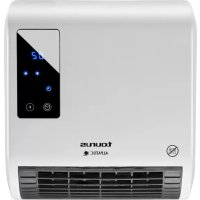
RCMB231 - Heating TAURUS - Free user manual and instructions
Find the device manual for free RCMB231 TAURUS in PDF.



| Product type | Wall-mounted ceramic heater |
| Installation | Wall mounting |
| Minimum distance to floor | 2 meters |
| Minimum distance above | 20 cm |
| Minimum distance on sides | 25 cm |
| Minimum distance from combustible materials | 50 cm |
| Power supply | Mains 220-240 V ~ 50 Hz |
| Display type | LCD screen |
| Remote control | Yes, included |
| Heating modes | Automatic, low heat, high heat |
| Temperature range | 10 °C to 49 °C |
| Hourly timer | 0 to 12 hours |
| Weekly programming | 6 programs per day (P1 to P6) |
| Open window detection | Yes, switches to standby if temperature drops 5°C in 10 min |
| Indicators | Low heat (*), high heat (**), open window, timer |
| Control buttons | On/Off, Function, Timer, +/-, OK, Hour/minute setting, Open window detection, Day selection, Edit |
| Safety | Thermal safety device against overheating |
| Maintenance | Unplug, let cool, damp cloth, do not immerse |
| Recommended use | Well-insulated rooms or occasional use |
| Warranty | According to applicable legislation |
| After-sales service | http://taurus-home.com/ |
Frequently Asked Questions - RCMB231 TAURUS
User questions about RCMB231 TAURUS
0 question about this device. Answer the ones you know or ask your own.
Ask a new question about this device
Download the instructions for your Heating in PDF format for free! Find your manual RCMB231 - TAURUS and take your electronic device back in hand. On this page are published all the documents necessary for the use of your device. RCMB231 by TAURUS.
USER MANUAL RCMB231 TAURUS
HacTeHHbI oBorpeBaTeJIb
Convector de perete
CTeHnHaIpeBaTeJ
4u1uol1ofo

EN: This product is only suitable for well insulated spaces or occasional use.
AR: grrall piaiwl g J kai jai lalwll bai wlll lio
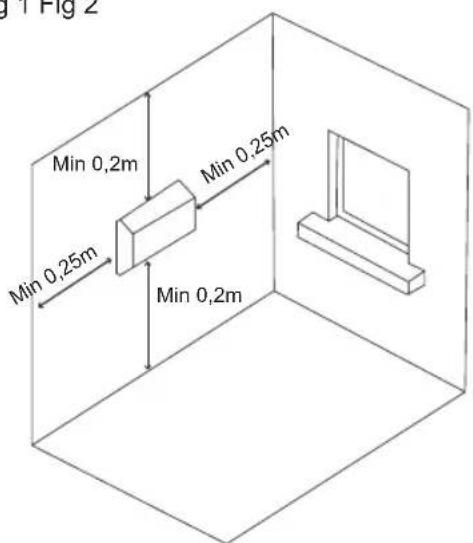
Fig 1 Fig 2


Espanol
CALEFACTOR DE PARED RCMB 231
DESCRIPTION
- If the model of your appliance does not have the accessories described above, they can also be bought separately from the Technical Assistance Service.
USE AND CARE:
- Fully extend the appliance's power cable before each use.
- Do not use the appliance if the on/off switch does not work.
- If you use the appliance in a bathroom or similar place, unplug the appliance from the mains when it is not in use, even if it is only for a short while, as proximity to water involves a risk, even if the appliance is disconnected.
- Disconnect the appliance from the mains when not in use and before undertaking any cleaning task.
-
Store this appliance out of reach of children and/or persons with physical, sensory or reduced mental or lack of experience and knowledge.
-
Make sure that dust, dirt or other foreign objects do not block the fan grill on the appliance.
- Never leave the appliance unattended while in use.
- Never leave the appliance connected and unattended if is not in use. This saves energy and prolongs the life of the appliance.
- Do not use the appliance to dry textiles of any kind.
INSTALLATION
- Be sure to remove all packaging material from inside the appliance.
- Install the appliance away from flammable material such as textiles, cardboard or paper, etc.
- Install the appliance a minimum distance of 50cm away from combustible materials, such as curtains, furniture ...
- Ensure that neither the air access nor exit become either totally or partially covered by drapery, clothing, etc., as this increases the risk of fire.
- Appliance must be installed at least 2m above the floor.
- In the event that the appliance is mounted on a bathroom wall, position it in such a way that the socket, power supply cable, switches or other controls are not within the reach a person in the bath, shower or at the wash-hand basin.
- This appliance must be fixed into a wall. The minimum distance between the floor and the lower part of the appliance is 1,8m
- The appliance requires suitable ventilation in order to work properly. Leave a space of 30~cm above the appliance and 25~cm on each side. (Fig.1)
- Do not cover or obstruct any of the openings of the appliance.
- The plug must be easily accessible so it can be disconnected in an emergency.
- To achieve the highest efficiency from the appliance and so as to be able to install the appliance on a cold wall (an exterior wall) and below a window. But never obstructing or covering a ventilation area.
WALL ASSEMBLING:
-
Securing to the wall (Fig.2): Use a pencil to mark the right position to drill the wholes for the wall plugs.
-
Make sure the diameter of the wholes corresponds to the diameter of the wall plugs.
- Drill two wholes on the areas previously marked (Fig.2).
- Insert the wall plugs into the wholes.
- Once the wall plugs have been fitted into the wall, screw the two screws leaving a distance of approximately 10mm between the screw head and the wall.
- Make sure the screws are well fixed before hanging the appliance.
- Use the wholes behind the appliance to hang it from the two screwheads.
- Ensure that the appliance is properly and safely fixed in its working position with the screws.
INSTRUCTIONS FOR USE
BEFORE USE:
- Make sure that all the product's packaging have been removed.
- Some parts of the appliance have been lightly greased. Consequently, the first time the appliance is used a light smoke may be detected. After a short time, this smoke will disappear.
- To eliminate the smell given off by the appliance when used for the first time, it is recommended to have it on at full power for 2 hours in a well-ventilated room.
- Prepare the appliance according to the function you wish to use:
TURNING THE APPLIANCE ON AND OFF:
- Extend the cable completely before plugging it in.
- Connect the appliance to the mains.
- To turn your appliance on, flick the On/ Off switch (4) on the side of the unit to the On position, represented by the symbol 'I'. The LCD screen will come on to indicate the unit is powered up, and the heater will automatically go into Standby mode (S letter in the screen) until a button is pressed or a selection is made.
- To turn the appliance off, flick the On/Off switch on the side of the unit to the Off position, represented by the symbol 'O'. The LCD screen and any indicators will go out, and the unit will stop working.
GENERAL USE:
STANDBY MODE / AUTO MODE:
- Once the unit has been turned on, it will automatically go into Standby mode.
- Press the Power/Standby button on the remote control or the 'F' button on the unit's control panel while the unit is on Standby mode to start it in Auto mode. In this mode, the unit will operate continuously on the latest selected settings until a button is pressed or a different selection is made. The LCD screen will display the symbol - - - to indicate Auto mode has been selected.
- Press the Power/Standby button again while the unit is operating on Auto mode to return it to Standby mode.
- Press the 'F' button on the unit's control panel once while it is operating on Auto mode to switch to a low heat setting; press it again once the low heat setting has been selected to switch to a high heat setting; or press it once more after the high heat setting has been selected to return it to Standby mode.
SELECTING HEAT SETTINGS:
- This unit offers a choice of cold, high or low heat settings. Press the 'F' button on the body of the unit or the Temperature Selection button on the remote control "12" to cycle between the available heat settings. The corresponding indicators (* for low heat or ** for high) will light up on the unit's LCD panel to indicate each selection has been made
TEMPERATURE SELECTION:
- This unit features manual as well as automatic temperature selection. To manually select a specific temperature, press the +^ or - buttons "13/15" on the unit's remote control. The corresponding indicator will come on to indicate manual temperature selection has been activated
- Once manual temperature control is enabled, continuously press the +^ or - buttons "13/15" to adjust it as required. The temperature will increase or decrease by increments of 1 degree, up to a minimum of 10 or maximum of 49 degrees
- Press button "12" on the unit's remote control at any time while manually setting the temperature to cancel all selections and return the unit to Standby mode
SETTING THE DAY AND TIME:
-
The unit's internal time and day of the week can be set and adjusted manually.
-
To manually set the unit time, press the 'Set' button "11" on the unit's remote control. Press this button once to bring up the hour selection, and again to bring up the minute selection.
- Once the hour or minute selection has been brought up, press the +^ or - buttons (13/15) on the remote control to increase or decrease the time by increments of 1 hour or 1 minute.
- Press the 'Set' button (11) again while on the minute selection screen to bring up the day selection screen. Once in this screen, press the +^ or -13/15) buttons to select the day of the week, from d1' (Monday) to d7'(Sunday),
- Once the correct hour, minute and day have been selected, press the 'OK' "14" button on the unit's remote control to confirm your selections.
- Press the 'Set' "11" button again at any time to review the hour, minute and day settings, and repeat the process above to adjust them as necessary.
TIMERS:
- This unit is equipped with hourly, daily and weekly timers.
- To set the hourly timer, press the 'Timer' button "10" on the remote control or the unit's control panel. The corresponding indicator will light up and the numbers '00' will be displayed in the unit's LCD screen to indicate the hourly timer function has been selected.
- Once the hourly timer has been activated, continuously press the 'Timer' button "10" on the remote control or the unit's control panel "8" to increase timer length, from 0 to a maximum of 12 hours.
- Once the correct timer length has been selected, the LCD display will continue to flash and display the chosen time for a few seconds, after which it will default to '---'. The corresponding indicator will stay lit to indicate the unit is operating on a timer.
- NOTE: Ensure the correct time, date and day of the week are set before attempting to program any timers.
SETTING THE DAILY AND WEEKLY TIMERS:
- To set the weekly timer, begin by pressing the 'P' button "18" on the unit's remote control to activate the function. The corresponding indicator will light up on the unit's control panel to indicate this option has been chosen.
- Once the weekly timer option is active, press the 'Day' button "17" to bring up the day selection screen. The LCD screen will flash 'd1'
to indicate the day selection screen has been selected.
- In the day selection screen, repeatedly press the 'Day' button "17" to cycle through the days of the week, from 'd1' (Monday) to 'd7' (Sunday).
- NOTE: Multiple days of the week may be programmed simultaneously
- Once the relevant day of the week has been selected, press the Edit button on the unit's remote control to bring up the timer selection screen. Continuously press the button to cycle through the 6 timers (or periods) available per day. The LCD screen will display the text 'P1' to 'P6' to indicate each timer has been selected.
- Once the relevant timer has been selected, press the 'Time On' and 'Time Off' buttons to set the duration for the pre-programmed cycle, from 1 to 24 hours. The 'Time On' button controls the start time for the cycle, while the 'Time Off' button controls the end time.
- NOTE: The start and end times for a pre-programmed cycle are adjustable in increments of 1 hour. Timers cannot be adjusted in minutes. The minimum duration of a pre-programmed cycle is 1 hour.
- NOTE: The cycle starting time must not be lower than the end time. When the start and end times for a pre-programmed cycle are the same, the appliance will go into stand-by mode.
- When the start and end times have been selected, press the 'OK' button on the unit's remote control to confirm your selection and save the timer to memory.
- Repeat the above steps as many times as necessary to set the required daily and weekly timers.
- NOTE: All timers and programmed settings will be erased when the unit is turned off using the On/Off switch.
- Press the 'P' button again while the Program function is enabled to turn the function off. The unit will default to Auto mode and operate as normal until a button is pressed or a selection is made.
OPEN WINDOW MODE:
- The unit is equipped with an open window detection mode, which adjusts the temperature accordingly whenever a window is open.
- To activate open window mode, press the Open Window Detection button on the unit's remote control "16". The open window, heat
setting and temperature indicators will light up on the unit's LCD screen to show this function has been activated.
- Once open window mode has been selected, press the +^ or -1 "13/15" buttons to set the temperature, as instructed in the Setting the Temperature' section above.
- Press the Open Window button "16" again while this function is selected to turn it off.
- NOTE: While open window mode is active, the unit will automatically go into standby mode if the room temperature drops by more than 5 degrees over the course of 10 minutes.
- NOTE: Open window mode will overlap with any pre-programmed timers. In such instances, the function will only be active for the duration of the timed period; otherwise, the unit will be on Standby mode.
ONCE YOU HAVE FINISHED USING THE APPLIANCE:
- To turn the appliance off, flick the On/Off switch on the side "4" of the unit to the Off position, represented by the symbol 'O'. The LCD screen and any indicators will go out, and the unit will stop working
- Unplug the appliance from the mains.
- Clean the appliance.
SAFETY THERMAL PROTECTOR:
- The appliance has a safety device, which protects the appliance from overheating.
- When the appliance switches itself on and off repeatedly, for reasons other than the thermostat control, check to ensure that there are no obstacles that impede correct air entry or expulsion.
- If the appliance turns itself off and does not switch itself on again, disconnect it from the mains supply, and wait for approximately 15 minutes before reconnecting. If the machine does not start again seek authorised technical assistance.
CLEANING
- Disconnect the appliance from the mains and allow it to cool before undertaking any cleaning task.
- Clean the equipment with a damp cloth with a few drops of washing-up liquid and then dry.
-
Do not use solvents, or products with an acid or base pH such as bleach, or abrasive products, for cleaning the appliance.
-
Do not let water or any other liquid get into the air vents to avoid damage to the inner parts of the appliance.
- Never submerge the appliance in water or any other liquid or place it under running water.
- If the appliance is not in good condition of cleanliness, its surface may degrade and inexorably affect the duration of the appliance's useful life and could become unsafe to use.
- Remark: When the appliance is used as a heater after long periods in storage or after having been used solely as a fan a small amount of smoke may be produced. This is not important and is due to the heater burning dust deposits which have accumulated on the heating element. This phenomenon may be avoided by cleaning the inside of the appliance beforehand through the grill with a vacuum cleaner or pressurised air.
François
CHAUFFAGE CÉRAMIQUE MURAL RCMB 231
DESCRIPTION
FUNCTIE "RAAM OPEN":
FUNKCJA "OTWARTE OKNO":
ENIAOH H IXYOZ I A TH ZEETH:
-Autn n movadapooqpei eTIOynpuOmuoeWvia Kpuo kai uynan h xamn thepokpia. PatnoTe to Koupi FTO Owma Tns movadac n to koupti EITIOyNCS thepokpiaic oTo tnXeipiotio 12Via va deite diaoxikacis diapopcs puOmeic ZcOTNSou evai diaheoiuec. OI avtioxec Evdeieics * yia xamn h epokpaoia n ** yia uynan thepokpia) 0a avawov otnv obovn
LCD Tns movadac, yia va deigouv oTI exi TPaymuotoinoEi KAOE EITIAoyn
ENIAOHT OEPMOKPAIAA:
-Autn n movadexeTNDuvatotntaETIIOyng
0epoKpaiaacxipokivnta n autouata.1a
va eTIIAEETe mia ouyekpiiev n 0epoKpaia,
TATnOte Ta KOUMTIA 一 + 一 n 一 - 一 一 13 / 15 ATO TnAeipiotnpio TnC movadac.H
avtioxN evdeiN th avayei yia va deiEi
OTn XEPOKIVTN EITIOAOYN 0epoKpaoiac
EvpyoTOINkE.
-ApoouexeiEvepyoToinTeo xepokivntos
eEyxoc 0epuokpaoia, patauovexoeva
ta koupti 工 + 出 n 一 yia va putheta et Tn
0epuokpaia, avaloya e Tc avaykec. H
0epuokpaia aauenthe i th a uiothci kata
1 bao, exyoi, kat' eAixto, 10 n, kata
peyioTo, 49 baOwv.
- PatnoTe To KoumuTc 12> OTo TnAExEpiotnpio Tns movadac, ava naoa stiyun, evw puOmuizTe Xeipokivnta Tn eepoKpaia, yia va akupwoTe oAec Tt EtniOyEc kai va eTiotpepsiTe Tn mova aekataaon avamovns
PYOMIH HMEPA KAI QPA:
-H eowtepiik wpa kai n npepa tns 8bodopa aac TnS movadac mtopouv va puthetaotouv Xeipokivnta.
- Tia va puθióte TNV ωpa TNS Movábaç, Tπañote TO KOUPTI «Kaθopiμoç» «11» OTO TnλexeiPIOTnIO. TnTne auto TO KOUPTI μia φopá yia va εμφaviotéi n ETTIAOYN ωpα, KAI Tπañote KAI Tnλi YIA VA εμφaviotéi n ETTIAOYN λεπιwv.
-Apou Emuaviotei n 11ioyn wpaç n AETTov, TATnOTe Ta KOUPTIa 一 + 一 n 一 - 一 (13/15) OTO tNExeiPiotnpio yia va auENoTe n va eWoTe TOV XpOVA KA 1 Wpa n KATA 1 ETTTo.
- Patnote kai TAI TO KOUPTI (puOIOJ npac/ LEETV) (11) Evw Bpiokote OTNV ObovN EIIOYNS LEETW, YIA VA EQUAVTEI OBOV N EIIOYNS NEPAC. Apou BpeTeEITE OTNV OBOV, TATnote TA KOUPTIA + n - (13/15) YIA VA EIIAESETE TIV NEPa TNC EBDoAdaC, aTTO VN NEPa d1 (Delta) MEXPI TNY d7 (KupiaKn).
-Apou exete eTIIAEeI Tnv wpa, Ta AETTTa KAI Tnv nepa ootia, PAnote To koupti 14o TnAEXPIOTnpio Tns movadac yia va EITIEbaiwote TIC EITIAOyec aoc.
- Ntnte TAI TO KoumTI KaOpiOuOc 11), ava Taa OtiYmu, yia va aAlambdaTe TN puOmu nTn Wpac,Tuv AETTTWv KAI TNS nEpaC,Kai EtnavaaBate Tnv pponyouEvn diaikocia yia va Ta puOmuTe,av XpeiaZetai.
XPONOIAKONTHE:
-Autn n movadaithetai xpvodiaokottec avawpa,avanepea,avεβdoa.
- Tia va puθμiεTE TO xpvovδiakɔTTn ava ωpa, TATnOte TO kouπI 10> OTO nλeXepiATnpio n OTov πivaka ελeYxou tns μováδac. Θα avayει n avtiatoxη evδεξn kaoi apiθmoi «00» θεμφaviotouv OTNV oθovn LCD tnc μováδac γia va δeixouv OTI eXtne λeIToupyia tou xpvovδiakɔTTn ava ωpa.
-Apou Tia exi evpyoTointheta XPOVIOAIOTTNCS TE Vwpa, PAnote OUVEXOeVA TO KOUPTI OTO TANEXEPIOTnio n OTOV TIVAKA EAYXOU 8TNC MOvAdac YIA VA auEnoTe TN diapKEIA Tou XPOVIOAIOTTN, ATo TO 0 e, KATA MEYIO, OTO 12.
-Apou exete eTIIeEi Tn Owotdiapkeia Tou XpovodiaKoTTN, n oOvN LCD 0a ouvexioi va avaboBnvei kai 0a deiEi Tov xpovo TTou EITXnKE yia katoia AETTA, kai 1a 0a 0taepoTointhe iue ToTPOeTIeEvEvo TpTo T- ->Havtoiox npovdEiN 0a Tnpaapeivei avamevny ia va deiEoi ot n mova aAitoupye Ibaei Tou XpovodiaKoTTN.
- HMEIΩΣH: BeβaiωθεITE oTI puθμiσaTE TnV ωρα, TNY ηερομηνia KAI TNY ηερa TNC εβδομáδας σωτα TπΠr TπροσπαθησεTe va TπρογραματίεTE OTIOδθπTOTE xρονδιακόTTη.
HMEPHsIOKAIEBDAOMAIAIOIPOPAMMATMOs:
- Ia va puθμiaεTE tov εβδομαiaio xpvovdiakóTTN, Εεkivnote TATwTAC TO KOUPTI «18» OTO tnaeixeiPIOTnpio TNS movadac yia va evepyotoinoεTE Tn λeIToupyia. H avtioiŋ evδeɪŋ θ a váψeɪ oToV nivaka eλéγxou Tns movadac yia va δeicE i OTIλextnke autn n ETIIAOYN.
-MoIc EvpyoToinO eBdoaiaoc Xpovbiakottns, TntoKoupii Hepa 17yia va eapavotei n oovn EITIOvNc TnS npac. Tnv oovn LCD a avaoaBne i evdiEgN d1 yia va deEeOI otEeEETIIeYei n Oovn EITIOVNg Tns npac. - Σην oθόνη επιλογής ηημερας, πατήσε έπιανλαβανόμενα το κουμπί («Hερα») («17» γιαν δείτε διαδοχικα τις ημερες ηεβδομάδας από την «d1» (Δευτέρα) ἔως την «d7» (Kupiakή).
- HMEIOH: MToopov va TpOpyaMaiaTOuV apKeTcNepcTnEβoMaDacTaTOxPova.
-Apou exi Etnieyei n oxetikn npepa Tng eboaac, natote to koupti 《Etepeyaia》OTo nAeepiotnpio Tc movaac yia va evarotei n ev loyw npepa
TEX, KTO He 3HaKOM C npaBnIaMn erO nCNoJIb3OBAHnI.
- Y6eIntecb, yTO nbIb, rpy3b nnI pyrne NOCTOPOHHe 06BeKtI He 6JIOknyOT BEHTnIaONOHHyO peWETky npnbopa.
-BoBpemNcNoJb3ObaHn HNKoTda He octabnIte np6op 6e3 npncMoTpa.
-He octabJnTe BKNIOUeHHbI 3NEKTPoPnP6Op 6e3 npncmOTpa. 3TO coXpAHIT 3NEKTPo3HepRnIO n PPOJNT cpoK erO cnjx6bl.
-He nCnoIb3yIe np6op dIa cyuKn TkaHne.
YCTAHOBKA
- Y6eI NTecb TOM, yTO Bbl BblHyIn BCEynaKOBouHbIe MaTePnJIbI n3 npN6opa.
-He yctaHabnBaIte np6op B6Jn3n JERK0 BocPnaMeHaUQxxCnpeDMeTOB (TKaHb, KapToH, 6ymara n np....) - Pn6op DoJKeH 6bTb yCTaHOBneH Ha pacCToHmMHNHMym 50 cm OT roIounx npedMeTOB, TaNX KaK WTopbl, Me6eJIb n Ip.
- Y6eIntecb, yTo IOCTyN K BO3dyxNy BbIXoD BO3dyxa He npNKpbITbI HN NOJIHOCTbIO HN YaCTNuHO ITOpaMn, OJExKDoI, N T.I., TaK KaK yBeIINuHBAETcPnCK BO3HNKHOBeHnRA NoXapa.
-Пиборdoлжeh6bITb yCTaHOBnEH Ha pacctOraHHKAK MHNmym 2 M BblIe nJa.
-Bcnyae,ecnnp60p yctaHOBneH Ha cTeHe BaHHoN KOMHaTbI,yCTaHOBIne erO TaKIM 06pa3OM,yTO6blpo3eTKa,Kabenb NITAHIN, BbIKNoUaTeJIN nDpyrNe KHONkynypaBJeHn He HaxoJINCb BnPpeJEnax DoCRAEMOCTN, KOrJa BblPnHmMaTe BaHHyIO,dyuN JIN NOJIb3yeTEcB paKOBnHOH.
-Приборdoлжeh6bITbпркpenнкCTeHe.МинимаьhoepacctoHneMEXdYnoIOMиHxKHeuacTbIOprn6bopa doJXHO6bITb1,8M
-Дяправиьног pa60тbl np6bopa Heo6xOdma COOTBeTCTByIOUaЯ BEHTNIAUR nOMEueHn. OctBaTe npocTpahCTBO B 30 cm HAnpnp6opom n 25cm c o6eNx ctopoh. (Fig.1)
-He NaKpbIbaiTe n He 3aRpaXdaIte OTBepCTn np6opa. - ⅢTeNCEJIbHnA BnIka DOnJHn6bITb NERKo DOCTynH, YTO6bB Cnlyuae Heo6xOIMOCHTe ee MOxHO 6bl0 6bl OTcoEINHTb.
-TO6bIIOCTNbMaKcMmaNbHOH npo3BOUInTeBHoCTn npu6opa, BblMOKeTe yCTaHOBHTb npu6op Ha xOIoHDHO CTHe (HapyXHO CTHe) n noD OKHOM. HkOrda
He NaKpbBaIe N He 3aRpaKaJaTe o6NaCTb BeHTnlaCn.
KPEINJIeHNE HA CTEHY:
-KpenneneKCTe (Fig.2):NcnoIb3yIte KapaHdau, YTO6bl OTMeNTb npaBnJIbHOe NOJoxHe, YTO6bl pOcBepnITb OTBepCTna Dnra npo6ok.
- y6eHntecb, YTO dHaMeTp OTBepCTn COOTBeTcTBye TdHaMeTp yIO6eNei.
-Прocверпnte Два OTьерстняВ Тex МecTax, KOTOpbIe 6blIn OTMeueHbI (Fig.2).
- BctabTeIIO6eINBOTBepCTnY.
-Посл.TORO,кakДюбел6уdтЗakpenпeныВCTHe,BBINTTEДBA BINTa(D),OCtABINpacSTOrHnE npIMepHO B 10 MM MEXyDyROJOBKO BVHTa NCTeHOn.
- IpepeTEm, kak noBecuTb npn6op, y6eNTecb, UTO BUNTbI Xopo0o 3aKpenHebl.
- Icnojbl3yute OTBepctnna No3aAn npnbopa, UTO6bl NOBecntb ero Ha DBe BNHTOBbIe rOIOBKn.
- Y6eIntecb, YTO npn6op HaedexHo n DOJXHbIM o6pa3OM 3akpenJIeB CBOeM pa6oey M NOJoxHeHm Pn NOMOu BINTOB.
HCHCTPYKUNIPO 3KCIJIYATAUIN
NEPEDNCNOJIb3OBAHHEM:
- y6eHntecb, yTo c npnbopa 6bla cnra Ta ynaKOBka.
-HeKOTOpbIe Yactn npnbopa Moryt 6bItb Cnerka cMa3aHbI. BcneIcTBne 3Toro, BO BpeMn nepBOrO npImeHEnn npnbopa MoKeT NOBITbcR He6oJIbWOn DbIM. Pocne HekOTOpOTo BpeMeHN, DbIM npeKpaTntCra.
-ПипрвомВКЛЮЧЕнприборБИДЕЯET 3anax.PekOMeHДуЕТСВКЛЮЧИТБEROHA NOJIHyO MOUCHOCTbHa2YacaB XopoWo IpoBETpNBaEMOKOMHaTe.
-Подготовыт eнктponриборк paбote.
BKJIIOUeyHNE IV BbIKJIOUeyHNE IPNBOPA:
- PoiHocTbIO pa3BepHIne Ka6eIb nepeI IOdkJIIOUHeHHem K cETn.
-Подкночипрборксети. - 4To6bI BKNIOUHTb np6Op, nepemecnttepeeknIOuateBkN/BbIK(4)Ha60KOBONaHEn np6OpaB noJoxeHne BKN, o6o3haueHHoe cIMBOJOM «I》.KK-3KpaH
3aropntcyaKa3bBaHaTo,HTo np6Op BkIIOueH,NOBorpeBaTeNb ABOTMaTneCKn nepeiETBpeKIMOKNJaHna(CmBOJ S Ha 3KpaHe)DoTexNop,NOKA He 6yDet Haxata KaKaa-Nb60 KNOKa NIN 3aDaHa nporpamma.
-уTO6bI BbIKJIOHTb npn6Op, nepemecTe nepeKlnOHTeB BKJI/BblKI(4)Ha 6okOBo nAHeN np6Opa B noNoXeHne BblKl, 063HaueHHoe CmBOJOM «O».KK-3kpan I BCE INdikatOpbl nOrachyT, n np6Op npekpatnt pa6OtY.
OBUEIICNOB3OBAHNE:
PEKIM OXUDAHNA/ABTOMATNUECKNI PEKIM
- KaK TOnbko npn6Op BKNIOuHTcR, OH ABTOMaTnueckn IpeeIeT B pexIM OxndaHna.
-Korda npn6bop haxoNTcB peKIme OxndaHna, HaxMITE KONky PntaHne/Pexm OxndaHna Ha nyIbTe dNCTaHNoHHoro ynpabLeHna nn KhoNkY FHa naHenn ynpabLeHna np6opa, YTO6bl 3anyCTNb erO B aBTOMaTnueckom pexnme. B 3tOM pexnme np6bop 6yDet pa60TaTB He nppepbIBHO B COOTBETCTBnC NocJeHNIM 3aDaHHbIMn Hactpoikamn Do tex nop, noka He 6yDet Haxata kakay-Jn6o KHOnka nn He 6yDet Bbl6paH dpuropexnM. Ha KK-dncnnee OTo6pa3nTCs CMBON --, yka3bBAIOuN, YTO 6bl BB6paH abTomatueckn peXnM.
-BoBpempa6oTb np6opa B aTOMaTneCKOMpeKIMHeHAKMTEKHONKy PtTahnE/PekmOxuHaHNe eue pa3,yTo6bI bepHyTbp6oBppeKIMOxuHaHn.
-BoBpempa60bI np60pa B abTOMaTnueckOM pexmHe hXMMTe KHOKNy FHa naneHynypabNeHnnp60aOnn pa3,HTo6bI nepeKIOuHTbcra Ha HN3kyo MOUOCbHarpeBa.HaxMITE 3Tu KHOKNy eune pa3,Bb6pAB HN3KYo MOUOCtB HarpeBa, DnIepeKIOUeHnHa BBICOKYo MOUOCtB HarpeBa; HxMITE KHOKNy eune pa3 Nocne Bb6opA BbICOKO MoUOCtN HarpeBa dJa BO3BpaUeHnB PEXIM OxNuAnHn.
BbIbOP IAPAMETPOB HArPEBA:
-3TOT npn6op nmeet XOIOHbI, CINbHbI
i cna6bI pexmbl HarpBa. HaxMnte
KhONky FHa Kopnyce np6opa nn
KhoNkY Bbl6opa TemnepaTypbI 12Ha
nyIbTe NCTaHcNOHHoro ynpabNeHnra
dIy nepeKJIIOUeHn MExdy DOCTyINbIMn
napamETpAMMOuHOCTn HarpeBa.
Ha KK-3KpaHe np6opa 3aroprTa
coOTBETCTByIOUne INDnKaTOpbI ( Dnla
cna6oHarpeBa nn* DnA CNbHOro
HarpeBa), NOdTBePckDaCdeNaHHbI Bbl6op.
BbIBOP TEMNEPATPbl:
-3TOT np6op no3BOJraET Bb6paTb TemnepaTyK KaK BpyHyIO, TaK n ABTomatNueckn. YTo6bI BpyHyIO Bb6paTb KOHKpeTHyIO TemnepaTyP, HaxMITE KHOKNy "+" IIN"-", KhoNKn "13/15" Ha NyIbTe DInCTaHcUOnHOrO ynpabJIeHn. 3aOpNTcR COOTBeTCTByUoIu NHNkAtOp, Yka3bIbaR, YTO 6bln AKTNBnPoBaH Bb6op TemnepaTypbI BpyHyIO.
-ПослесakTNBaunpyHOroKoHTpoJIA Tempeatypbl NocJeIOBAtelbHo HaxmajTe KhoNk " ^+ "ил "-","13/15",ДЯperyInpOBKn Tempeatypbl,ecnI 3To Heo6xOIMo.C KaJdbim HaxkatneM Tempepatya 6ydet YBeuINBaTbcra nIуMeHbWataBcra Ha1 rpaayc,do MHHmyma B 10 nIIMakCmyma B 49 rpaaycob.
-HaxoBcBpeKMepyHOnHaCTpOKN TeMnepaTpybI,HAXMITE KHOKny"12"Ha NylbTe DnCTaHnOHnOуnpaBnEHN B IIO60MOMeHTIpyOTMeHbICex HAcTpoEK BO3BpaSeHnI np6opBaPexkIM OxNdaHnI.
HACTPOIKA DHEI HEDEJN IN BPEMEHN:
- Bpemn nHn HeJeN, KOToPbIe Noka3bIbaET np6op, MoKHO yCTaHOBNTb I HaCTpOHTb BpyHyIO.
-4To6bI BpyHyO yCTaHOBnTb BpeMHa npnbope, haxmnte KhONky "Set", "11", Ha nyIbTe DuctaHIOHORo ynpabNeHn. Haxmnte 3Tu KhoNkOy OINH pa3 dJa HAcTPOKn YacOB, n eUe pa3 -dJa HAcTPOKn MNHyT. - Iocne TORO, KaK YacbI MmHyTbI 6bln 3aHaHbI, HaxMnte KhONKy "+" nnn "-"(13/15) Ha nyIbTe DnCTaHcUOHHO npabNeHna, YTO6blc KaKaDbIM HaxKaTNem yBeJIuHTb Nn UMeHbWNTb BpeMa Ha 1 qac nn Ha 1 MmHyTu.
-Ese pa3 haxMITE KhONky "Set" (11) Ha 3KpaHe HAcTpoiKN MmHyT dIra TOrO, YTo6bl N0BnC3 3KpaH HAcTpoiKn dHei HeJeN. Ha I0RbBWeMc3 3KpaHe HaxMITE KhoNk "+ INI "-", (13/15), yTo6bl BbIbpaTb DeHb HeJeN, OT "d1"(noHeJeBnK) do "d7"(BOckpeceHbe).
-ПоссенactpoикуacOB,MnHytИДнeHNeJIHaxmTe KhONky"OK”,"14"Ha nIyIbTeДИCTaHcUHOHOrO ynpaBneHn np6bopaДЯПОТВepKdEHHaCJIaHNoRBO Bbl6opa.
-BIIO60MOMeHT BBI MOKeTe HAKaTb KHONKy "Set", "11", eue pa3, YTO6bI NOCMOtpeTb HAcTpoKu YacOB, MNHyT IN DHei HeJeTI. IOBTopTE BblweOncaHHy IpoUeDpy dJnx nepeHAcTpoKn, ecN 3TO Heo6xOdmo.
TANMEPbl:
-3TOT npi6op ochaueH yacOBbIM, DHeBHBIM HedeJIbHbIM TaIMePOM.
-Дя усановки淘汰ого таймера
надимпе коньу "Таймер", "10" на пьы,
достацнонго уравлени по,
панелу уралбени побором. 3аогится
cootbetcTBуций Индikatop, и нажК-
экpane побoga появся сцфры "00",
указырашке на TO, чTO sixa вьбрана
функциya淘汰ого таймера.
-ПослесakTnBaUHuaCobOrTaHmepa HnpepbIBHO haxImaIte KhoNky "TaHmep", "10"Ha npIbTe DCtAunHOHHo ynpabHeHn IIN Ha naHeJIy npaBHeHn np6Opom "8", DnyyBeIuHEnHn DnITeJbHocTn TaMepa cO Do MaKcIMyMa B 12 YacOB.
- Nocne Bb6opa Heo6xOIMOn dIInTeJbHOCn TaMepa KK-dncJIe npOdoJXNT MraTb INB TeueHHe HeCKoJIbKnx CekyHd 6yDet OTo6paKaTb Bb6paHHe Bpem, nocne Yero No yMOJuaHIO nepeiDeT K - - . 3arOpntcra OOTBeTCTByUOuIN HUNkAToP, yKa3bBaHa To, UTO np6op pa60TaET c TaMepom.
-ПРIMEЧАЕ:Донача nporpammpoBaHЯТaМерOB,y6eINTeCb, yTOВрмЯ,dAtaNDeHbHeJeHnHacTpoEHbl npabuIbHO.
HACTPOIKA INHEBHOIO IN HEINbHOIO TAIMEPA:
- YTo6bI yCTaHOBnTb HeDeJIbHbI TaIMep, HaxMnte KhoNkY "P", "18" Ha NylbTe DInCTaHcNOHHOro ynpabJIeHnry yCTpOiCTBa, Dnra AKTNBnPOBaUu DaHHo fynKu. Ha NaHeJIn ynpaBJIeHnry npnbOpom 3arOpNTc COOTBeTCTByIOUm INHINKaTOP, yka3bIBa, YTO daHHa ONUg 6bla Bbl6paHa.
-ПиВКЛЮЧENHOM HeeJIbHOM TaIMepe HaxMITE KHOJky "ДeHB", "17", YTO6bl OTKpbITb 3KpaH HAcTPOKn DHeN HeDeN. XXK-3KpaH NaHT MnraTb N OTo6pa3NT "d1", NOKa3bIBaR, YTO Bbl HaxOJTecB B MeHIO Bbl6opa DнЯ HeJeN. - Haэкранe Вьбopa дя Heдени НжмITE KhoNKу "Дeнb", "17", Дя поркуТКМЕжд ДнЯни Heдени, ot "d1" (noHe徳ьнк)do "d7"(BOCKpeceHbe).
- INPIMEYAHNE: MoXHo 3anporpamMnpoBaTb ONDOBpeMeHHo HeckOJIbKO dHei HeJeN.
- NocJe Bb6opa COOTBeTCTByIOUeO DnHeIeHn HaxMnte KONky "PeJaKtIpOBaTb"Ha NylTe DnCTaHcNHOHHoro ynpaBNeHn, YTO6bl OTKpbITb MeHIO Bb6opa TaIMepa. HenpepbIBHO HaxkMaIte KONky dIra
pekeHoueHm Meky6 DoctYnHbIMnHeBhIM TaMepaun (nnn nepnoamn).HaKK-dncpnee oTo6pa3raTcR cMBOJIbOT "P1"do "P6", yka3bIbaOuJe, kakoi TaMeP 6bl Bbl6paH.
- Iocne Bbl6opa COOTBeTCTBHyOuIero TaHMePa HaxMnte KhoNk "Bpem BK" n "Bpem BblKl" dIra HactpoKn npoDOnKnteJIbHOCTn PpeDbapnteNbHO 3anporpaMMnpOBaHHoro Unkna, ot 1 do 24 cAcob. KhoNka "Bpem BKL" oTBeuaet 3a Bpem Haana zKNa, a KhoNka "Bpem BblKl" - 3a Bpem OkOHaHnA.
-ПРМЕЧАНЕ:Время начANA n OKOHuaHn3aNporpamMnpoBaHHoro ΚИКla HacTpanBaETcC WaROM B 1 vac. TaIMepbI He MOrYt 6bITb HAcTpoEhbl NOMHyTHO. MInHMaJIbHЯ npoDoJnxTeJIbHoCTb 3aNporpamMnpoBaHHoro ΚИKla - 1 vac.
-IPIMEAHHE:BpemHaayalaunKaHa HeDolxHO6bITb MeHbWe BpeMeHN OKOHaHn. Ecn HaayabHoe N KOHeuHoe Bpemd 3anporpaMMPOBaHHoro UKNa COBnadaIOT, To np6Op nepenDet B pexm OxndaHn.
-Korda Bbl Bb6paJIN BpemHa7ana n OKOHuaHnna, HaxMMte KHOKNy "OK" Ha nyIbTe DnCTaHcNOHHoro ynpabNeHn np6opom dIra NODTBePckDeHn CBOero Bb6opa n COxpaHeHn TaMepaB namrtn np6opa. - NOBTopuTe Bblweyka3aHHbIe WaI NTolbko pa3, CKoJIbKO Heo6xOdIMO dJI npOrpaMMnPoBaHna Heo6xOdImbIX DHeBbIX N HeDeJIbHbIX TaMepOB.
- PIMMEUHIE: Enn np6op BbIKnOuaeTcnc nOMoBIO nepeKNIouaTeJIa On/Off, BCE TaImepbI N 3aNporpaMMIpOBAHHbIe HAcTpoKn 6ydyT ydaJIeHbl.
- PokaФункия"Прогамma"akTNbHa, Haxmite KhoNky "P" eue pa3, yTO6bl OTKNHouTb 3Tu PfyHKcIIO. No yMOJuaHNIO np6op 6yDet pa6oTaB B aBTOMaTHueCKOM peKIme Do Tex nop, noka He 6yDet Haxata KaKaJa-Jin60 KhoNka NIn He 6yDet BbI6paH dpyroI peKIM.
PEKIM PABOTbl C OTKPbITbIM OKHOM:
-ПрибороборудандатчимКОБаруженг
OTkpblTOROKHA, KOTopblpergynpyet
TemnepaTyp npn OTkpblOM OKHe.
- YTO6blaAKTNBnPOBaTbpeKMMOTKpbITORO OKHa,HAXMNTe KHOKNy"ObHApYKeHne OTKpbITOro OKHa"Ha NylbTe DnCTaHcNHOHHORO ynpabLeHnnaPn6bOpom,"16".Ha JKK-dncnnee np6bopa 3aropTcraHdNKaTOpbl OTKpbITOrO OKHa,MOUHOCTNaHarpEBAu TEmnepaTypbl, yKa3bIBa,YTO daHHaФyHKcN86bla aKTNBnPOBaHa.
-Bb6paB pexnM OTKpbItorO OKHa, Haxmnte KhoNk "+" nnn " -", "13/15",Дя HabtpoRkn TemnepaTpybI TAK, KaK OngcaHo B pa3dene "YcTaHOBKa TemnepaTpybI".
-Kornda 3taФyHKUnaakTnBnPOBaHa,HaxMnte KhoNky"OTKpbItoeOKHO",16",eue pa3, YTO6bI OTKNHouHTb ee.
- PIMMEAHNE: B pexime o6hapyxehn OTKpbItoro OKha, np6op aBtOMaTnueckn nepeJTeB pexim OxNdaHn, ecnn TemnepaTpa B nomeeHN ynaTe 60JeE chm Ha 5 rpaDycOB b TeueHne 10 MNHT.
- PIPMEUHNE: Pekm OTkpyIoro OKa MoKet YactuHo COBnadaTb C IIObIMN NpeDbapntelbHO 3anporpamMnpoBaHHbIMN TaHMePAM. B TAKnx cnyaX fYHKcna 6yDet AKTNBA ToIbKO B TeueHne 3anporpamPoBaHnO BpeMeH; B npOTNBHom cnyae, npboop 6ydet HaxODNTbcR B pexkme OkndaHn.
NOCJI NCIOJIb3OBAHJIA:
-уTO6bI BbIKJIOHTb np6Op, nepeMeCTnTe nepeKlnOHTeB BKJI/BbIKJI Ha 6OKOBn NaHei np6opa, "4", B noLoXeHne BblKJI, 063HaueHHoe CmBOJOM «O». JKK-ekpaN I BCE INdikaTOpbl nOrachyT, n np6Op npEkpATn pa6OtY.
- OTKHouHTe np6op ot cetn.
-Ouuctte np6op.
TENJIOBAR 3AUHTA N BE3ONACHOCTb:
-Пибор Oсацен 3auntHbIM yCTpoiCTBOM, KOTOpoe 3aunuzaet ero ot neperpeBa.
-Korda npn6op noctoHNO BkIouaetcny BBKlnOuaETcCaMOCToTeJbHO,6e3NCNoJIb3OBaHnpyJbTa DnCTaHnOHHoroynpaBHeHn TepMoCTaTOM,y6eDnTEcb,yTO Het HnKaNX npenTCTBn,KOTpbie MeWaaOTnpaBnHOMy BXOy N BbXOy BO3dyxa.
- Ecnn npn6op camocToTbHb BbKluOaTc n He BkluOaTeC ChOBa, OTKnIOHTe ero OT 3NeKTPOCeTn N NOoXdnte OKOno 15 MNHyT nepeI erO NOBTOHPbIM NODKNIOUeHNEM. Ecnn npn6op He BkluOaTeC, o6paTtEc b 3a KBaINuNpOBAHHo TexHueCKoI NOIDepKKoI.
OuHCTKA
-OTcoeHnHTepnbopOTcETnncne NcNoJIb3OBaHHy,TO6blOHOCtblIpeEd OCHCTKoI.
- OuHCTnTe np6Op, nCNoB3yR BLnaxHyU TkaHb N HeCKoJIbKO KaIeJIb YIcTЯUe JNIDKocTu, N BblTpnte erO Hacyxo.
-HeDonyckaetcNcNoIb3OBAtbpactBOpnteH NnnpOdykTbHa OCHOBE KNCJOTbI Nn C BbICOKIM yPOBHeM pH, HAnpIMep, OT6eINBaTeJIb,a TaKKe a6pa3NBHbie YNCTAUNe BeUecTBa.
-HeIOnyckaIte nonaIaHnBHyTp bpe3 OTBepCTnIgI npoxoKdeHn BO3dyXa BODbl INN HIOJ KIOCTn, YTObI He NOBpeDntb BHyTpeHHne YaCTn.
-He nomeuaaTe 3neKtpnpnbOp B BoDy nHn HHyU KnDkoCTb, a TaKKe NOI CTpyIO BObl. - Ecnn npnbop He 6ydt coepkataB CNTOM COCTOHN, ero NOBepxHOCTb MOKET 6bIb NOBpeXeHa, cPOK cnYk6bl cokpaueH INn daJe erO nCNOJb3OBaHne cTahet He6e30NaChbIM.
-Прмeeане:Korda np6op nCNoIb3yeTcRnOcne TOrO,KaB TeueHne DnITeNbHOrOBPemEHn OH HaxoDINcB HeyNtpe6JIeHNMOKET NOBtCBnHe6OJbWoe KOINueCTBODbIM.3TO He IMeet Oc6Oro 3HaueHnIABJIeTcCJIeDCTBnEM CxINrAHNOrOTIOXeHn IIJI, KOTOpBIE HAKONNJNCbHa o6OrpeBaTeJBhIX 3JeMeHTax.3TOT3ΦΦeKT MOxHO pPeDoTBpaTntb,ecNIpEdBapNTeJbHO OuHCTNTb BHyTppeHHNE3JIeMeNTbl np6opa Ype3 peWeTKyIbIeCOCOM INN CXaTbIM BO3dYxOM.
Româna
CONVECTOR DE PERETECRCMB 231
DESCRIBE
H3BOP HA TOJIINHHATA MOUHOCT:
- YpeBt npednara n36op hactpoikn 3a "ctydeHO" n, CnHNO n cna60 ToNIOndaBaHe" Hatnche 6byToHa ,F" Ha Kopnyca Ha ypeDa nn 6byToHa ,n36op Ha TemnepaTpya" Ha NCTaHcNoHHOT OynpaBHeHne ,12", 3a da MOKe Da CMeHrTe Bb3MOKHnTe HAcTPOKn 3a TOnlonoDaBaHe. CbotBETHnte INdNKatOpn ( 3a HnCKO ToNlONoDABaHe nII N* 3a BucOKO TOnlonoDaBaHe) ue CBeTHat Ha ekpaHa LCD Ha ypeDa, C Koeto yka3BaT, ye e 6bn HanpaBeH cbOTBeTHra n36Op.
U35OP HA TEMNEPATYPA:
-
YpeIbT pa3noJara c pbUeH n aBtOMaTHHe H36Op Ha TemnepaTypa. 3a da n36peTe ONpeJeHa TemnepaTypa, HATNCHe T6yToHIne ,+ " nn -" ,3/15" Ha DnCTaHcNoHHoTo ynpaBJIeHne Ha ypeJa. CbOTBeTHNrT INdNKaTOp Iue Ce BKNIOuN, C KOeTo Ie yKaKe, Ye pbUHnT n36Op Ha TemnepaTypa e 3aDeiCTBaH.
-
CneI KaTo e 3aJeCtBaH pUHnT KOHTpOHa TeMnepaTypaTa, HATNCHEte HeNpeKbCHATO6yToHnTe ,+ " nII ,-", 3a Da ro HaRlnacuTEcNopeHnEO6xOdMocCTTa. TempePaTypaTaIe HApache NII Ie HAmJee Ha CTeneHnOT 1 rpaDyc, DOKato DoCTnHHe Hn-MaNko 10rpaDyca NII NaH-MHOrO, 49.
-BbB BCEKN MOMENT HaTNCHETe 6yToHa ,12" Ha NCTaHcUHOHHOTO ynpabNeHne Ha ypeJa, DOKaTO HAcTPOBnBaTe pBuHo TEMNepaTypaTa, 3a Da IpeKpaNTe BCuHKn n36Opn n da ce 3aBbPheTe KbM peKm Ha n3yaKaBaHe.
HACTPOIKA HA DEHЯ YACA:
- BbtpewHnT Yac N DeHr OT CeMnUaTa HaypeJa MoRat Da Ce HAcTpOrt N HarIacr TpbuHO.
-3a da HactponTe yaca Ha ypeHa,HaTnCHete 6yToHa,HactponKa"11"Ha DnCTaHcNoHHOT OynpaBHeH. Hatnche To3n 6yToH eDnOKpAHO,3a Da ce No8Bu N3bOpbT Ha ac n Iro HATnCHete OTHOBO,3a Da ce No8Bu N3bOpbT Ha MNHyTN. - CneI KaTo Ce NOBn I36OpbT Ha Yac nIHa MInHyTu, HATNCHETe 6yTOHnTe ,+ " nIi ,-(13/15) Ha DnCTaHcUOnHHOTo ynpabJIeHne,3a Da yBeINuHTe nIi HaMaJIte BpeMeTo cOTpra3bUOn OT 1 Yac nIi 1 MNHyTa.
-3a da ce noBn ekpaHbT 3a n36op Ha deH haTNCHE Te OTHOBO 6yToHa ,HaJIacRHe Ha yaca/MnHyTaTAt“ (11),doKaTO Ce HAMnpa Ha ekpaHa 3a n36op Ha MNHyTN. CNeI KaTO ce noBn To3n ekpAHa TNCHE Te 6yToHn +"nnn -"(13/15), 3a da n36peTe DeHr OT ceMnUcTa ot "d1" (noHeJeHHNK) Do "d7"(HeJeI), - Cnei n36pahe Ha yaca, MInHyTnte N cbOTBeTHO, DeH, HATnCHTe 6yToH ,14" Ha dNCTaHcNoHHoY npabBHeHne Ha ypeHa, 3a Da NotBbPdnte n36bopa cn.
-HaTnCHeTe NO BcRAKO Bpeme OTHOB6yToHa "YCTAHOBRAHe"11"3a Da npOBepnte HAcTPOINKaTa Ha Yaca, MInHyTnTe N DeHr OT ceMnUcTa. NoBtOpTe rOpHnI pOuec, da da Tn HAcTpOnTe, aKe e Heo6xOdmo.
TEMNOPUN3ATOP (TANMEP):
- YpeBt e cHa6eH c yacOBn, dHeBHn n CeMmUHN TeMnpn3aTOPn.
-3a HarglacHe Ha Temnopn3atopa no yac, HATNCHE6yToH ,10" Ha nCTaHNoHHOTO ynpablenHee nn Ha KOHTponHO Ta6no Haypeda.CbOTBeTHnT nHnKAtop CBeTheu cnpTe ,00" ige ce n3nWt Ha ekpaHa LCD Ha ypeDa, 3a Da ykKaat, ye e 6nla n36pahaФyHKnTa, "acOB Temnopn3atOp".
-Cne3aeneCTBaHeTo Ha yacobnra Temnopn3aTOp, HATNCHETe HEnpeKbChaTO 6yToH "10" Ha nctahunOHnOTo ynpabJeHne nnHa KOHTponHOTo TaNo ,8" Ha ypeDa, 3a Da yBENuHTe npoDbNKeTnHocTTa Ha Temnopn3aTopa oT 0 do Hau-MHoro 12 Yaca.
- CneI KaTo e 6nla n3bpaHa npaBnHata
npoDbJnxTeHNOCT Ha TemNOPn3aTopa,
ekpaHbT LCD ue npoDbJnx Da npimnRbA n
ue Ce n3nIe n3bpaHOTo Bpeme 3a HAKOJIko
ceKyHdN, Cpei KoETo Ue ce yCTaHOBn
Ha nped3aJaDeHo Ha _--". CbotBetHnrt
INDnKaTOp Ue octaHe CBETHa, 3a da NocOuH,
Ye ypeDbT pa60Tu Ha TemNOPn3aTOp.
- BEJIEXKKA: Ybepete ce, ye cTe hactponn npabunHnte yac, data n DeH OT ceDMUcaTa, npden da ce ONHTaTe da nporpamnpate HraKoI Temnopn3aTop.
DHEBHO IN CEEMNUHO IPOPAMPAHE:
-3a ceMnUHa HAcTPOIka Ha Temnopn3aTopa, 3anOuHTe, KaTO HaNTCHe6yToH ,18"Ha DnCTaHcNHOHHOTo ynpabLeHne Ha ypeJa. N0 To3n HaunH Iue 3aJeNCTBaTe Ta3n FyHKJIA. CbOTBETHnIHdkaTOP Iue CBeTHe Ha KOHTpONHOTo Ta6No Ha ypeJa. No To3n HaunH Ce yka3Ba, Ye e 6bnla n36paHa Ta3n FyHKJIA.
- CneI KaTo e 3aDenCTBaHa OnuTHa Ha ceDMnHnra Temnopn3aTop, HATNCHe 6yToH "DeH"17" n Ha ekpHa ige Ce noBn n36OpbT Ha den. Ha ekpHa LCD ue 3anoUHe da npMnRbA d1". No To3n Haunn Ce nocOuBa, ye n36paH ekpAH 3a DeH.
- Ha ekpaHa 3a n36op Ha DeHЯ HATnCHete HeKoIKKoPaTHo 6yToHa ,En "17". No To3n HaunH ue pereIeJaTe dHnte Ha ceMnUcTa, ot "d1" (noHeJeHNK) do "d7" (HeJeJ).
- BENEKKA: MoKeTe Da nporpaMaPe eHOBpeMeHHo HrKoNkO dHn Ha CeDMuCaTa.
- CneI KaTo e n36paH cbOTBeTHnHa DeH Ha ceDMnUaTa, Ha DCtAHCIOHHOTO ynpaBJIeHHe Ha ypeHa HATNCHE 6byToH „PeJaKTnpaJ" ("Editar"). Ha ekpaha ige Ce IOBAH n36opbT Ha Temnopn3aTOp. HATNCHE HepeKbChato 6yToHa, 3a da npereNaTe WeCTte Temnopn3aTopa (nIn nepNoDi), HamnpaunCe Ha pa3noJoxHne Ha den. Ha ekpaha LCD ige ce n3nIwe TeKCTbT ,P1do ,P6", 3a de Ce nocOu, Ye BCEKn Temnopn3aTOp e 6nI n36paH.
-Cnei n36opa Ha Temnopn3aTop HaTncHeTe 6yToHnte "Time On" n ,Time Off", 3a Da n36epete npoBnKInTeNocCTTa Ha nporpaMnpaHnZuKbI -OT 1 do 24 yaca. ByTOhBT,TimeOn"ynpabJIraBa hauaHnHa cac Ha zukla,doKaTo 6yToHbT,Time Off" ynpabJIraBa Yaca Ha npNKJIOUbaHe.
- BENEKKA: HauanHnTe n KpaunHe yacObe 3a nporpampanu HKnBn ce Harnacrt C HapactbHaNo ot 1 qac. Temnopn3atOpnt He Morat da ce Harnacrt NOMHyTHo. MInmMaHnata npOdbJnxTeNHOCT Ha eDINn PpeDbapntEno nporpampanu cnKbn e 1 qac.
- BENEKKA: HauaHnOTo BpeMe Ha uKbJa CneDbA da 6bJe NO-MaJka CTOnHOCT OT BpeMeTo Ha npNKlIOUBAHe. Korato YacOBete Ha 3aONuBaHe n npNKIIouBaHe Ha eINN ppeBapnteHNO IporpaMnpaH uKbI ca eHN N cBUn ypeDbT ige BNe3E B n3uaKBaTeJIeH peKIM.
- Cnei n3bnpaHe Ha yacobete 3a HauJIO n npKIOUbaHe HAtnche6byToHa ,PnEmam" Ha DCCTaHcIOHOHOTynpaBJIeHne Ha ypeJa, 3a Da NOTBbpDInTe CB0r n36Op n da cbxpaHInTe Temnopn3aTopa B naMeTTa.
- NOBTOpeTe npedHnHTe CbKN KOJIKOTI NBtNe Heo6XODMo, 3a Na HAcTpOnte N3NCKBaHNTe DHeBHN CeMNCHN Temnopn3aTOPn.
-6EJIENKKA:BcunKn nporpamnpaHn Temnopn3aTopn HacTpoNkIe Ce n3TpnaT, KOrato ypeBbT 6bJe N3KNUoyeh NocpeDCTBOM npeKcbaay BkJ/n3KJ.
-HaTNCHeTe OTHO6yToHa P" DOKATO yHKnraTa,PiPorpamae 3aDeiCTBaHa, 3a Da DeakTNBupa FyHKnraTa. YpeDbT NO NOpda3bnpaHe IpemHaba B ABTOMaTHe peKmN Ue paBoTN HopMaJIHO, DOKATO He 6bJe HATNChat HAKo6yTOH INI He Ce HAnpaBn HkaKbB n36Op.
jglg jglbe hall gale Jcagao golg lalgl gll glgll gll gll gll gll gll gll gll gll gll gll gll gll gll gll gll gll gll gll gll gll gll gll gll gll gll gll gll gll gll gll gll gll gll gll gll gll gll gll gll gll gll gll gll gll gll gll gll gll gll gll
:"a@ab1 oJol" a.bg
a 1
011"0jall 0jll baw" pss gao sa s jll all 0jll baw"01/1""g +"" jll ddoal doal doal doal
a a a 1
1 1 1 1 1 1 1 1 1 1 1 1 1 1 1 1 1 1 1 1 1 1 1 1 1 1 1 1 1 1 1 1 1 1 1 1 1 1
jgljll jglzaiw joeiy
Jlalll jglal l 100g LCD aLb 0" Joj 10a Iab g o g "E" jgal ool wle Jel alby / Jnlalld
jglgll jgljg jglgll
j1g2 = 0 6k
:doXulJgJgJg
a 1
a aaa aae ae eae aee
jglb bbl aal g lallg 1h pae clll all y glall po
jglall aaiiiee i jol 3 jol 10g 1000
Aaaii i 10000g jilgul g u
g 15
- a2 + a3 + a_4 = 6 ①
:JUULI
.(E) Cwllg wgl Jaa cuaaag aagai yolao piai: (Fig)
a
(1)
g(E)
jalglg jyj yjdo 1 afo (D) jyj yj
jglg jglg jglg jglg jglg jglg jglg jglg jglg jglg jglg jglg jglg jglg jglg jglg jglg jglg jglg jglg jglg jglg jglg jglg jglg jglg jglg jglg jglg jglg jglg jglg
y
Jzlll 1a aagaae gaae Jaae Jaae Jaae Jaae Jaae Jaae Jaae Jaae
aagill 01e jie jie jie jie wu b6 gai de alwai jnawy yj yj aolwai uie jayll jy dall jle
glll gllb1a2bglalg jglalol
:alabjglajl jau
a aagaae
jgljgljglglgol
a 1
aaii jgi de baiai yj (alai de S jaj) daiuai jgilal Jgai
Jl 1000000000000000000000000000000000000000000000000
ppl plssy
:laalglg/laaunlglg
.1s000g0g jjai jiau jao jauo
1 1
gagll 1200 p a 111111111111111111111111111111111111
1
gog jj ggal ggal jgal lglal / jgal j
olue! jus yg 1y aie bai t aaii bai oai lal u! guiuul guggl aaiuog yjglal saggl qall agl "T" jll de
y 1
:0j0j0j0j0j0j0j0j0j0j0j0j0j0j0j0j0j0j0j0j0j0j0j0j0j0j0j0j0j0j0j0j0
y 111111111111111111111111111111111
J 15 J 15 J 15 J 15 J 15 J 15 J 15 J 15 J 15 J 15 J 15 J 15 J 15 J 15 J 15 J 15 J 15 J 15 J 15 J 15 J 15 J 15 J 15 J 15 J 15 J 15
:0yJyJ1a0j0Jz
g 1000000000000000000000000000000000000000000000000000
a 1 g 1 aclw 1 jao 10y jduai g 1 g 10g 10g 10g 10g 10g 10g 10g 10g 10g 10g 10g 10g 10g 10g 10g 10g 10g
"1jlll jle baiol aalil oio jylo yjol jolal oia jyol jolal oia jyol ooi (11) "aai / alwl baio"jjg jg jg jg
(103) "Vd" !(103) "Vd" !
aal aal aal aal aal aal aal aal aal aal aal aal aal aal aal aal aal aal aal aal aal aal aal aal aal aal aal aal aal aal aal aal aal aal aal aal aal aal aal aal aal aal aal aal aal aal aal aal aal aal aal
aal aal aal alal alal alal alal alal alal alal alal
:
gulagglgclgcllglgglg
jolly oolll LCD aal 10 " pial jil gil wulab jilg jilqal jilqal jilqal jilqal jilqal jilqal jilqal jilqal
a 1
a
aJ1111
RCMB 231
#
LCD
Aaie / aiaeio aee 1
a0gab 1 a b
yJ 1
a1 = 2,b1 = - 4
S OBC = S COD + S_ BOC
031y0014 203
C$61j:A
| - 1x| = | - 1x + 1x| = | - 1x + 1x| = 2x + 12x .
( 0,12,0) .( 0,34,0) .( 0,14,0)
a a/4cl11 b
a. y,y all 2,3, z,z
Jaaai Jia jia jia jia jia jia jia jia jia jia jia jia
jgllll 10000000000000000000000000000
:Jgbll Jn aie j 9aill aI Jgogll Jgolll gj
This product enjoys the recognition and protection of the legal guarantee in accordance with current legislation. To enforce your rights or interests you must go to any of our official technical assistance services.
You can find the closest one by accessing the following web link: http://taurus-home.com/
You can also request related information by contacting us.
You can download this instruction manual and its updates at http://taurus-home.com/
Français GARANTIE ET ASSISTANCE TECHNIQUE
TAPAHNTN I TEXHNUECKA NOIDEPKKA
3TOT npOdyKT 3aUuIeH IOpNduYeCKoI rapaHTneB COOTBeCTBUN C DeIcTBYIOUM 3aKHOdaTeJIbCTBOM. Yo6bl ObecNeuITb Co6JHOdeHne BaIINx npAB ININ INTEpecoB, Bbl DOJXHbI ObpaNTbcR BIO6yIO n3 HaIXX OΦnuaJIbHbIX Cnyk6 NO TEXHueCKoI NOdepKke KIneHTOB.
BbMOKeTe HaHTN 6JIHKaIShne n3 ceHTpOB, npoJrno cIeNyUoJe Bc-ccblnke: http://taurushome.com/
BbTaKaKe MoKeTe 3aNpocntb COOTBeTcTBYIOUHOHOpMaUNo, CBra3aBUnCb HAMn (CM. nocneHNO CTpaHNUpyKOBOOCTBa).
Bbl moKeTe cKaaTb 3To pyKOBoIDCTBO n o6HOBHeHnK HEmy No aDpecy http://taurushome.com/
Romána
GARANTIE SI ASISTENTA TEHNICA
COUNTRY ADDRESS PHONE
| Algeria Zone d'Activite, N° 62, Constantine 213770777756 | ||
| Argentina Av. del Libertador 1298,(B1638BEY), Vicente López (Pcia. Buenos Aires) | 541153685223 | |
| Belgium Mariëndonkstraat 5, 5154 EG, Elshout 31620401500 | ||
| Benin 359 Av. Steinmetz, 1930, Cotonou 0299-21313798 | ||
| Bulgaria | 265,Okolovrasten Pat, Mladost 4, 1766, Sofia | 35929211120 / 35929211193 |
| Burkina Faso Avenue Bassawarga, 01 BP915, Ouagadougou 226 25301038 | ||
| Congo (Republic of) 98 Blvd General Charles de Gaulle, Pointe Noire 242066776656 | ||
| Cyprus | 20, Bethlehem Str. / P.O.Box 20430, 2033, Strovolos | 35722711300 |
| Czech Republic | Milady Horakove 357/4, 568 02, Svitavy | 420 461 540 130 |
| Democratic Republic of the Congo | AV. Pont Canale N° 3440, Kinshasa | 00243-991223232 |
| Equatorial Guinea | SN Av Patricio Lumumba y C/ Jesus B, Bata | 00240 333 082958 / 00240 333 082453 |
| Equatorial Guinea | Calle de las Naciones Unidas, PO box 762, Malabo | 240333082958 / 240333082453 |
| Espana Avda Barcelona, S/N, 25790 Oliana (Lleida) atencioncliente@taurus.es | 902 118 050 | |
| Ethiopia Lideta Sub City | Kebele 10 H.NO 124, Addis Ababa | +251 11 5518300 |
| France | Za les bas musats 18, 89100, Malay-le-Grand | 03 86 83 90 90 |
| Gabon | BP 574, Port-Gentil Centre-ville | 24101552689 / 24101560698 |
| Ghana | Ederick Place, Accra-Ghana | 302682448 / 302682404 |
| Gibraltar | 11 Horse Barrack Lane, 54000, Gibraltar | 00350 200 75397 / 00350 200 41023 |
| Greece Sapfous 7-9, 10553, Athens | +30 21 0373 7000 | |
| Guinea BP 206, GN, Conakry | (224) 622204545 | |
| Hong Kong | Unit H,13/F., World Tech Centre, Hong kong | (852) 2448 0116 / 9197 3519 |
| Hungary | Késmárk utca 11-13, 1158, Budapest | +36 1 370 4519 |
| India | C-175, Sector-63, Noida, Gautam Budh Nagar - 201301, Delhi | (+91) 120 4016200 |
| Ivory Coast 01 Rue Des Carrossiers-Zone 3, B.P 3747, Abidjan 01 (RCI) | 22521251820 / 225 21 353494 | |
| Jordan | 28 Basman St Down town, Amman +962 6 46 222 68 | |
| Kuwait | P.O. BOX 3379 hawally, 32034, Hawally | +965 2200 1010 |
| Lebanon | Damascus Highway; Sciale Building, Jamhour | 9615922963 |
| Luxembourg | Mariëndonkstraat 5, 5154 EG, Elshout 31620401500 | |
| Mali | BP E2900, Dravela Bolibana | 223227216 / 223227259 |
| Marruecos Big distribution society 4 Rue 13 Lot. Smara Oulfa, Casablanca | (+212) 522 89 40 21 |
| Mauritania 134 Avenue Gamal Abdener Ilot D, Nouakchott 2225254469 / 2225251258 | |
| Mexico Rosas Moreno N° 4-203 Colonia de San Rafael C.P. 06470 – Delegación Cuauhtémoc, Ciudad de México | (+52) 55 55468162 |
| Montenegro Rastovac bb, 81400, Niksic +382 40 217 055 | |
| Netherlands Mariëndonkstraat 5, 5154 EG, Elshout 31620401500 | |
| Nigeria 8, Isaac; John Str,G.R.A Ikeja Lagos 23408023360099 | |
| Paraguay Denis Roa 155 c/ Guido Spano, Asunción 21665100 | |
| Peru Calle los Negocios 428, Surquillo, Lima (511) 421 6047 | |
| Portugal Avenida Rainha D. Amélia, n°12-B, 1600-677, Lisboa | +351 210966324 |
| Romania Dudesti Pantelimon 23, 410554, Bucharest | 031.805.49.58 |
| Serbia Rastovac bb, 81400, Niksic +382 40 217 055 | |
| Slovakia Milady Horakove 357/4, 568 02, Svitavy 420 461 540 130 | |
| Southafrica Unit 25 & 26, San Croy Office Park, Die Agora Road, Croydon, Kempton Park, 1619, Johannesburg | (+27) 011 392 5652 |
| Tunisia 2, Rue de Turquie, Tunis | 21671333066 |
| Ukraine Block 6, Ap Housing Estate Topol-2, B, 49000, Dnepropetrovsk | 380563704161 / 380563704161 |
| United Arab Emirates P.O.BOX 8543, Dubai | 14506246200 |
| Uruguay Luis Alberto de Herrera 3468, 11600, Montevideo | 598 2209 28 00 |
| Vietnam Lot 7 Ind. Zone for, Ha Noi | 84437658111 / 84437658110 |
taurus
Avda. Barcelona, s/n
25790 Oliana
Spain



- Espanol
- CALEFACTOR DE PARED RCMB 231
- DESCRIPTION
- USE AND CARE:
- INSTALLATION
- WALL ASSEMBLING:
- INSTRUCTIONS FOR USE
- BEFORE USE:
- TURNING THE APPLIANCE ON AND OFF:
- GENERAL USE:
- STANDBY MODE / AUTO MODE:
- SELECTING HEAT SETTINGS:
- TEMPERATURE SELECTION:
- SETTING THE DAY AND TIME:
- TIMERS:
- SETTING THE DAILY AND WEEKLY TIMERS:
- OPEN WINDOW MODE:
- ONCE YOU HAVE FINISHED USING THE APPLIANCE:
- SAFETY THERMAL PROTECTOR:
- CLEANING
- François
- CHAUFFAGE CÉRAMIQUE MURAL RCMB 231
- FUNCTIE "RAAM OPEN":
- FUNKCJA "OTWARTE OKNO":
- ENIAOH H IXYOZ I A TH ZEETH:
- ENIAOHT OEPMOKPAIAA:
- PYOMIH HMEPA KAI QPA:
- XPONOIAKONTHE:
- HMEPHsIOKAIEBDAOMAIAIOIPOPAMMATMOs:
- YCTAHOBKA
- KPEINJIeHNE HA CTEHY:
- HCHCTPYKUNIPO 3KCIJIYATAUIN
- NEPEDNCNOJIb3OBAHHEM:
- BKJIIOUeyHNE IV BbIKJIOUeyHNE IPNBOPA:
- OBUEIICNOB3OBAHNE:
- PEKIM OXUDAHNA/ABTOMATNUECKNI PEKIM
- BbIbOP IAPAMETPOB HArPEBA:
- BbIBOP TEMNEPATPbl:
- HACTPOIKA DHEI HEDEJN IN BPEMEHN:
- TANMEPbl:
- HACTPOIKA INHEBHOIO IN HEINbHOIO TAIMEPA:
- PEKIM PABOTbl C OTKPbITbIM OKHOM:
- NOCJI NCIOJIb3OBAHJIA:
- TENJIOBAR 3AUHTA N BE3ONACHOCTb:
- OuHCTKA
- Româna
- CONVECTOR DE PERETECRCMB 231
- DESCRIBE
- H3BOP HA TOJIINHHATA MOUHOCT:
- U35OP HA TEMNEPATYPA:
- HACTPOIKA HA DEHЯ YACA:
- TEMNOPUN3ATOP (TANMEP):
- DHEBHO IN CEEMNUHO IPOPAMPAHE:
- :"a@ab1 oJol" a.bg
- jgljll jglzaiw joeiy
- :doXulJgJgJg
- a
- RCMB 231
- #
- Français GARANTIE ET ASSISTANCE TECHNIQUE
- TAPAHNTN I TEXHNUECKA NOIDEPKKA
- Romána
- GARANTIE SI ASISTENTA TEHNICA
- taurus
Brand : TAURUS
Model : RCMB231
Category : Heating