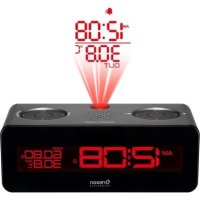
RRA320PNX - Alarm Clock OREGON SCIENTIFIC - Free user manual and instructions
Find the device manual for free RRA320PNX OREGON SCIENTIFIC in PDF.



| Product Type | Radio alarm clock with projection and outdoor sensor |
| Brand | Oregon Scientific |
| Model | RRA320PNX |
| Main unit dimensions | 183 x 67 x 81 mm |
| Main unit weight | 386 g (without batteries) |
| Outdoor sensor dimensions | 50 x 22 x 96 mm |
| Outdoor sensor weight | 62 g (without battery) |
| Main power supply | 5V 2A AC adapter |
| Backup power supply | 2 AAA 1.5V batteries (memory backup) |
| Sensor power supply | 1 AA 1.5V battery |
| Temperature range (sensor) | -20 °C to 60 °C |
| Humidity range (sensor) | 25% to 95% |
| FM radio frequency | 87.5 - 108 MHz |
| Sensor transmission range | 30 m (open area) |
| Number of sensor channels | 3 |
| Main features | Clock, two independent alarms, FM radio with 8 presets, projection of time and outdoor temperature, outdoor temperature/humidity sensor |
| Alarm | Two alarms with choice of beep or radio, 8-minute snooze |
| Radio | FM with auto scan and 8 preset stations, adjustable volume |
| Projection | Time and outdoor temperature, focus via wheel, 180° rotation |
| Display and backlight | Digital screen with adjustable backlight (HI/LO), can be turned off |
| Maintenance | Clean with a soft dry cloth, use new batteries of the required type |
| Safety | Do not look directly into the projector, follow WEEE recycling instructions |
| Included accessories | Outdoor sensor THGN132N, AC adapter |
| General information | Customer service: info@oregonscientific.fr, websites: oregonscientific.fr and global.oregonscientific.com |
| Applicable countries | All European countries, Switzerland, Norway |
Frequently Asked Questions - RRA320PNX OREGON SCIENTIFIC
User questions about RRA320PNX OREGON SCIENTIFIC
0 question about this device. Answer the ones you know or ask your own.
Ask a new question about this device
Download the instructions for your Alarm Clock in PDF format for free! Find your manual RRA320PNX - OREGON SCIENTIFIC and take your electronic device back in hand. On this page are published all the documents necessary for the use of your device. RRA320PNX by OREGON SCIENTIFIC.
USER MANUAL RRA320PNX OREGON SCIENTIFIC
FM Radio Projection Alarm Clock
with Outdoor Temperature Display
User Manual
RRA320PNX
二
||=
二
二
CONTENTS
EN....2
IT 10
FR....18
DE....25
ES 33
POR....40
NL 48
SWE 56
OVERVIEW
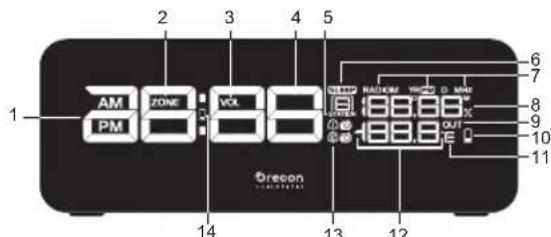
FRONT VIEW (FIG. 1)

- AM / PM: Indicates AM / PM (12 hour mode)
- Time zone offset
- Indicates radio volume
- Clock / Volume
- Radio station (logged)
- Sleep mode is ON
- Indicates Radio mode is ON and frequency is displayed
- Calendar / Radio frequency / Humidity
- Sensor reception indicator
- Sensor batteries low
- User selectable temperature units
- Temperature
- Beep / Radio Alarm 1/2
- M in unit batteries low / no battery
BACK VIEW (FIG. 2)
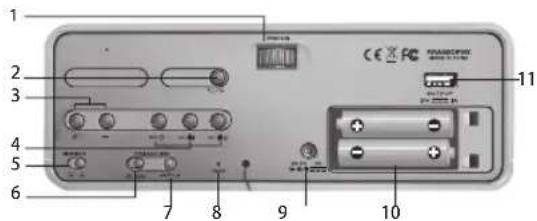
- FOCUS Wheel : Adjust projection focus
- °C/°F : Select the temperature unit
-
- / - : Increase / decrease values of the selected setting
- SET Ⓤ: Set the clock time; Toggle between date/humidity display
SET 📄1 / 📄2 : Set the alarm; View respective alarm status
- DIMMER : Select display brightness LO / HI
- PROJECTION ON/OFF : Enable / disable continuous projection
- 180° FLIP : Flip projected image 180°
- RESET : Reset unit to default settings
- AC / DC socket
- Battery compartment
- USB output port
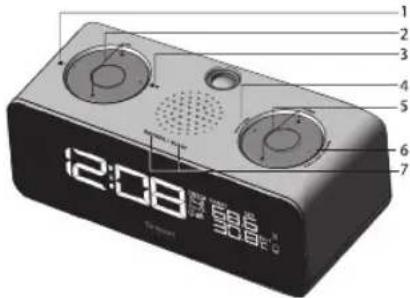
TOP VIEW (FIG. 3)

- ALARM 1 ON / OFF : Activate / deactivate Alarm 1 function
- VOL ▲: Adjust radio volume
- ALARM 2 ON / OFF : Activate / deactivate Alarm 2 function
- STATION: Change radio station
- TUNE ▲ /▼: Auto search / adjust radio frequency
- RADIO ON / OFF: Turn Radio On / Off
- SNOOZE / SLEEP: Alarm snooze or enable radio sleep; Press and hold to turn off the backlight; Activate the projection and backlight for 5 seconds.
BOTTOM VIEW (FIG. 4)

- SNOOZE / SLEEP buttons
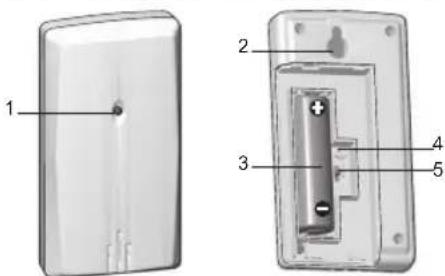
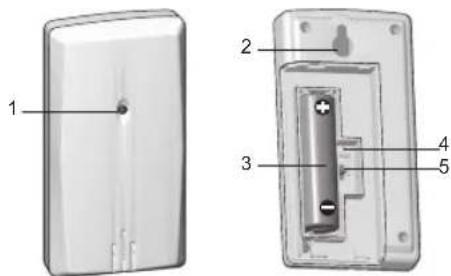
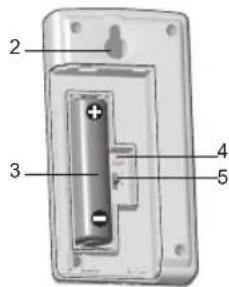
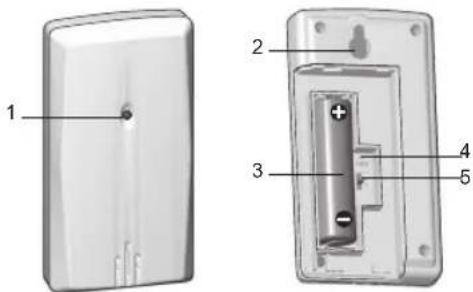
REMOTE SENSOR (FIG. 5)
FRONT VIEW BACK VIEW
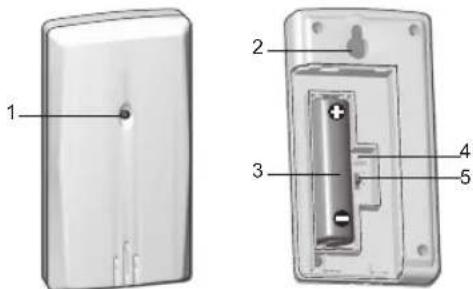
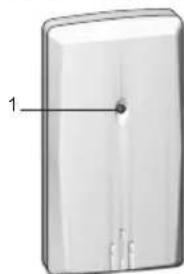
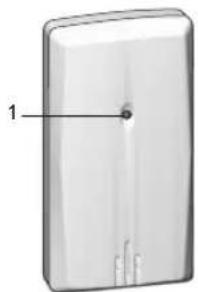
- LED status indicator: blinks when transmitting a reading
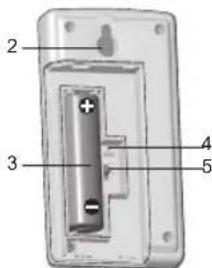
- Wall mount hole
- Battery compartment
- RESET: Reset unit to default settings
- Channel Switch

GETTING STARTED
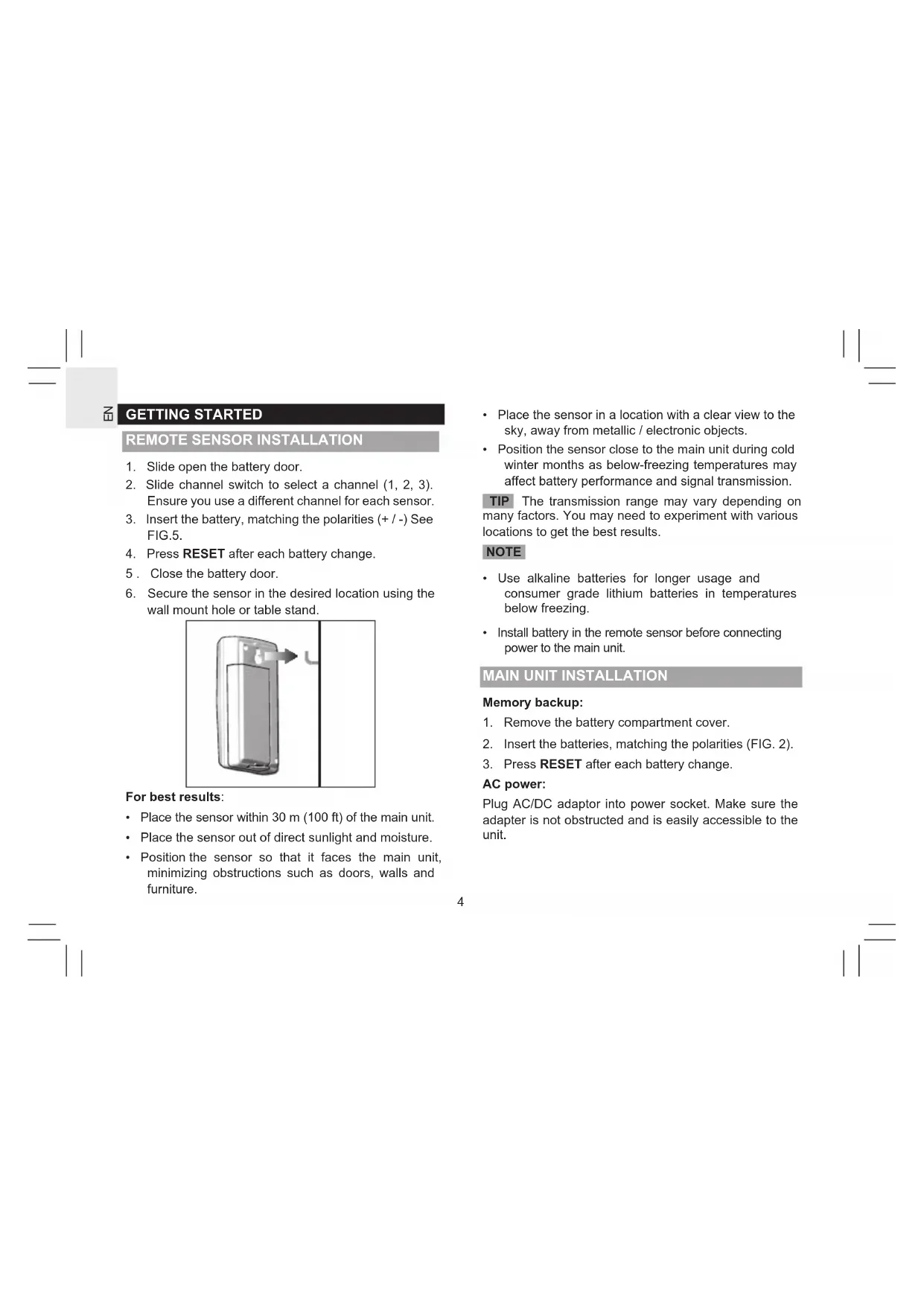
REMOTE SENSOR INSTALLATION
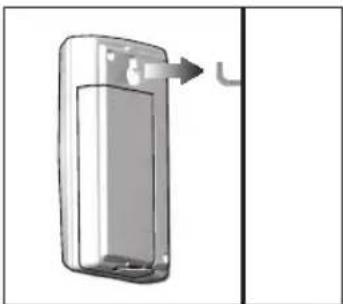
- Slide open the battery door.
- Slide channel switch to select a channel (1, 2, 3). Ensure you use a different channel for each sensor.
- Insert the battery, matching the polarities (+ / -) See FIG.5.
- Press RESET after each battery change.
- Close the battery door.
- Secure the sensor in the desired location using the wall mount hole or table stand.
For best results:
- Place the sensor within 30 m (100 ft) of the main unit.
- Place the sensor out of direct sunlight and moisture.
-
Position the sensor so that it faces the main unit, minimizing obstructions such as doors, walls and furniture.
-
Place the sensor in a location with a clear view to the sky, away from metallic / electronic objects.
- Position the sensor close to the main unit during cold winter months as below-freezing temperatures may affect battery performance and signal transmission.
TIP The transmission range may vary depending on many factors. You may need to experiment with various locations to get the best results.
NOTE
- Use alkaline batteries for longer usage and consumer grade lithium batteries in temperatures below freezing.
• Install battery in the remote sensor before connecting power to the main unit.
MAIN UNIT INSTALLATION
Memory backup:
- Remove the battery compartment cover.
- Insert the batteries, matching the polarities (FIG. 2).
- Press RESET after each battery change.
AC power:
Plug AC/DC adaptor into power socket. Make sure the adapter is not obstructed and is easily accessible to the unit.
NOTE
- When the main unit is connected to power, it will search and start receiving temperature / humidity data from the sensor automatically.
• To completely disconnect from power, the adapter should be disconnected from the main unit. - The main unit and adapter should not be exposed to wet conditions. No objects filled with liquid, such as vases, should be placed on the main unit and adapter.
- Batteries serve as a back-up power supply. To fully utilize all features, install adapter.
SET CLOCK
- Press and hold SET Ⓛ
- Press + or - to change the settings.
- Press SET to confirm and move to the next setting. The setting options are as follows: time-zone offset, 12/24 hr format, hour, minute, year, month-day / day-month, day and month.
NOTE You need manually adjust to Daylight Saving Time (DST) or back to standard time.
ALARM
To set the alarm:
- Press SET 🔊 or SET 🔔 to display desired set alarm time.
-
Press and hold SET 🔊1 or SET 🔊2 to enter respective setting.
-
Press + / - to change the settings
- Press 📂 to confirm and move to the next setting. The setting options are as follows: hour, minute, beep alarm radio alarm .
To adjust station and volume:
- If radio alarm is selected, press + / - to select the radio station and + / - to adjust the volume.
To silence the alarm:
- Press SNOOZE / SLEEP to silence it for 8 minutes OR
- Press SET 📄1/ SET 📄2, 📄1/ 📄2, to turn the alarm off and activate it again after 24 hours.
RADIO
To activate / deactivate radio:
- Press RADIO ON / OFF to turn radio ON / OFF.
To set radio station:
- For first time using, press RADIO ON/OFF to turn on the radio, the main unit will search the frequency and save to the preset station (1-8) automatically.
- To manually set the station, select a preset station, then press and hold TUNE ▲/ TUNE ▼ to auto search or press TUNE ▲/ TUNE ▼ to manually select frequency. The desired frequency will save to the corresponding station.
To adjust volume:
- Press VOL ▲ / VOL ▼ when in Radio Mode.
To adjust sleep timer setting:
- Press SNOOZE / SLEEP to activate.
- Press SNOOZE / SLEEP again to change the sleep time setting (120, 90, 60, 30, 15, OFF).
PROJECTION
This unit projects time and outdoor temperature information for your convenience.
For continuous projection:
- Slide PROJECTION switch to ON when adaptor is connected, to enable / disable.
To flip projected image by 180°:
- Press 180° FLIP.
To focus image :
- Turn FOCUS wheel.
NOTE If projection is illuminated, do not look directly into the projector.
BACKLIGHT
- Slide the DIMMER switch to HI or LO to adjust backlight level.
- Press and hold SNOOZE/SLEEP for 5 seconds to turn off the backlight.
- Press SNOOZE/SLEEP to activate the backlight and projection functions for 5 seconds, when the backlight is off or set to LO.
RESET
Press RESET to return to the default settings.
SPECIFICATIONS
| TYPE DESCRIPTION | |
| MAIN UNIT | |
| L x W x H | 183 x 67 x 81 mm(72 x 26.4 x 31.9 in) |
| Weight 386 g (13.6 oz) | without battery |
| FM 87.5 to 108 MHz | |
| Power | 5 V 2 A AC adaptor2 x UM-4 (AAA)1.5 V batteries (for backup) |
| REMOTE THERMO SENSOR (THGN132N) | |
| L x W x H | 50 x 22 x 96 mm(1.97 x 0.87 x 3.78 in) |
| Weight 62 g (2.22 oz) | without battery |
| Temperature range -20 °C to 60°C(-4 °F to 140 °F) | |
| Resolution 0.1°C (0.2 °F) | |
| Humidity range 25% - 95% | |
| Humidity resolution 1% | |
| Signal frequency 433 MHz | |
| Transmission range 30 m (98 ft) unobstructed | |
| No. of channels 3 | |
| Power 1 x UM-3 (AA) | 1.5 V battery |
PRECAUTIONS
- Use only fresh batteries of the required size and type. Do not mix old and new batteries, different types of batteries.
- Do not dispose old batteries as unsorted municipal waste. Collection of such waste separately for special treatment is necessary.
- If you do not plan to use the product for a long time, remove the batteries. Batteries can leak chemicals that can damage electronic parts.
- Do not subject the device to excessive force, shock, dust, temperature or humidity.
- Do not cover the ventilation holes with any items such as newspapers, curtains etc.
- Do not immerse the device in water. If you spill liquid over it, dry it immediately with a soft, lint-free cloth.
- Do not clean the device with abrasive or corrosive materials.
- Do not tamper with the device's internal components. Doing so invalidates the warranty.
- Images shown in this manual may differ from the actual display.
- When disposing of this product, ensure it is collected separately for special treatment.
- The contents of this manual may not be reproduced without the permission of the manufacturer.
NOTE The technical specifications for this product and the contents of the user manual are subject to change without notice.
NOTE Features and accessories will not be available in all countries. For more information, please contact your local retailer. To download an electronic version of the user manual, please visit http://global.oregonscientific.com/customerSupport.php.
ABOUT OREGON SCIENTIFIC
Visit our website www.oregonscientific.com to learn more about Oregon Scientific products.
For any inquiry, please contact our Customer Services at info@oregonscientific.com.
Oregon Scientific Global Distribution Limited reserves the right to interpret and construe any contents, terms and provisions in this user manual and to amend it, at its sole discretion, at any time without prior notice. To the extent that there is any inconsistency between the English version and any other language versions, the English version shall prevail.
EU-DECLARATION OF CONFORMITY
Hereby the manufacturer, Oregon Scientific Global Distribution Limited, declares that the radio equipment type FM Radio Projection Alarm Clock with Outdoor Temperature Display (Model: RRA320PNX) is in compliance with 2014/53/EU Directive. The full text of the EU Declaration of Conformity is available at the following internet address: http://global.oregonscientific.com/customerSupport.php.


Countries RED Approval Complied
All EU countries, Switzerland CH
and Norway
CH
N
FCC STATEMENT
This device complies with Part 15 of the FCC Rules. Operation is subject to the following two conditions: (1) This device may not cause harmful interference, and (2) This device must accept any interference received, including interference that may cause undesired operation.
WARNING: Changes or modifications to this unit not expressly approved by the party responsible for compliance could void the user's authority to operate the equipment.
NOTE: This equipment has been tested and found to comply with the limits for a Class B digital device, pursuant to Part 15 of the FCC Rules. These limits are designed to provide reasonable protection against harmful interference in a residential installation.
This equipment generates, uses and can radiate radio frequency energy and, if not installed and used in accordance with the instructions, may cause harmful interference to radio communications. However, there is no guarantee that interference will not occur in a particular installation. If this equipment does cause harmful interference to radio or television reception, which can be determined by turning the equipment off and on, the user is encouraged to try to correct the interference by one or more of the following measures:
• Reorient or relocate the receiving antenna.
- Increase the separation between the equipment and receiver.
- Connect the equipment into an outlet on a circuit different from that to which the receiver is connected.
- Consult the dealer or an experienced radio / TV technician for help.
DECLARATION OF CONFORMITY
The following information is not to be used as contact for support or sales. Please call our customer service number (listed on our website at www.oregonscientific.com, or on the warranty card for this product) for all inquiries instead.
We
Name: Oregon Scientific Inc.
Address: Brea Corporate Park 3020
Saturn St. Suite 200 Brea,
CA 92821
Telephone No.: 1 (888) 950-8889
declare that the product
Product No.: RRA320PNX
Product Name: FM Radio Projection Alarm Clock
with Outdoor Temperature Display
Manufacturer: Oregon Scientific
Global Distribution Limited
Address: Block C, 9/F, Kaiser Estate,
Phase 1,41 Man Yue St.,
Hung Hom, Kowloon,
Hong Kong
is in conformity with Part 15 of the FCC Rules.
Operation is subject to the following two conditions: 1)
This device may not cause harmful interference. 2) This device must accept any interference received, including interference that may cause undesired operation.
DISPOSAL INFORMATION FOR USERS
否

Pursuant to and in accordance with Article 14 of the Directive 2012/19/EU of the European Parliament on waste electrical and electronic equipment (WEEE), and pursuant to and in dance with Article 20 of the Directive 2013/56/EU the European Parliament on batteries and bulators and waste batteries.
The barred symbol of the rubbish bin shown on the equipment indicates that, at the end of its useful life, the product must be collected separately from other waste.
Please note that the batteries/rechargeable batteries must be removed from the equipment before it is given as waste. To remove the batteries/accumulators refer to the specifications in the user manual. Therefore, any products that have reached the end of their useful life must be given to waste disposal centers specializing in separate collection of waste electrical and electronic equipment, or given back to the dealer when purchasing a new WEEE, pursuant to and in accordance with Article 14 as implemented in the country.
The adequate separate collection for the subsequent start-up of the equipment sent to be recycled, treated and disposal of in an environmentally compatible way contributes to preventing possible negative effects on the environment and health and optimizes the recycling and reuse of components making up the apparatus. Abusive disposal of the product by the user involves application of the administrative sanctions according to the laws in force.
PANORAMICA
VISTA ANTERIORE (FIG.1)
VISTA DALL'ALTO (FIG.3)
- Tasto SNOOZE / SLEEP
SENSORE REMOTO (FIG.5)
VISTA ANTERIORE VISTA POSTERIORE
- Boutons SNOOZE / SLEEP
CAPTEUR DE TÉLÉCOMMANDE (FIG.5)
VUE AVANT VUE ARRIÈRE
Pour la projection continue:
EU – DÉCLARATION DE CONFORMITÉ
- SNOOZE / SLEEP Tasten
FERNBEDIENUNG (ABB. 5)
VORDERANSICHTR
ÜCKANSICHT
FERNSENSOR THERMO (THGN132N)
- SNOOZE / SLEEP botones
SENSOR REMOTO (FIG. 5)
VISTA DELANTERA
VISTA POSTERIOR
VISTA TRASEIRA

- SNOOZE/SLEEP knoppen
AFSTANDSBEDIENINGSENSOR (FIG.5)
VOORAANZICHTACHTERAANZICHT

- SNOOZE / SLEEP knappar
REMOTESENSOR (FIG.5)
FRAMSIDA BAKSIDA
För bästa resultat:
P/N: 300103968-00001-10
二
||=
二
二


- FM RADIO PROJECTION ALARM CLOCK
- USER MANUAL
- CONTENTS
- OVERVIEW
- GETTING STARTED
- REMOTE SENSOR INSTALLATION
- FOR BEST RESULTS
- NOTE
- MAIN UNIT INSTALLATION
- MEMORY BACKUP
- AC POWER
- SET CLOCK
- ALARM
- TO SET THE ALARM
- TO ADJUST STATION AND VOLUME
- TO SILENCE THE ALARM
- RADIO
- TO ACTIVATE / DEACTIVATE RADIO
- TO SET RADIO STATION
- TO ADJUST VOLUME
- TO ADJUST SLEEP TIMER SETTING
- PROJECTION
- FOR CONTINUOUS PROJECTION
- TO FLIP PROJECTED IMAGE BY 180°
- TO FOCUS IMAGE
- BACKLIGHT
- RESET
- PRECAUTIONS
- ABOUT OREGON SCIENTIFIC
- EU-DECLARATION OF CONFORMITY
- COUNTRIES RED APPROVAL COMPLIED
- FCC STATEMENT
- DECLARATION OF CONFORMITY
- WE
- DECLARE THAT THE PRODUCT
- DISPOSAL INFORMATION FOR USERS
- PANORAMICA
- POUR LA PROJECTION CONTINUE
- EU – DÉCLARATION DE CONFORMITÉ
- FERNBEDIENUNG (ABB. 5)
- SENSOR REMOTO (FIG. 5)
- REMOTESENSOR (FIG.5)
- FÖR BÄSTA RESULTAT
Brand : OREGON SCIENTIFIC
Model : RRA320PNX
Category : Alarm Clock