
EC101 - Alarm clock radio OREGON SCIENTIFIC - Free user manual and instructions
Find the device manual for free EC101 OREGON SCIENTIFIC in PDF.


| Product Type | Alarm Clock Radio |
| Brand | Oregon Scientific |
| Model | EC101 |
| Dimensions (approx) | 14.5 x 8.5 x 6 cm |
| Weight | 0.3 kg |
| Power Supply | AC adapter (DC 5V, 1A) or 3 AAA batteries (backup) |
| Display Type | LED digital display |
| Alarm Sound | Buzzer or FM radio |
| Radio Bands | FM 87.5 – 108 MHz |
| Snooze Function | Yes, 9 minutes |
| Backup Battery | Maintains time and alarm settings during power outage |
| Care and Cleaning | Wipe with dry cloth; avoid liquids; do not use abrasive cleaners |
| Safety Precautions | Keep away from water; do not expose to extreme temperatures |
| Spare Parts | AC adapter (model: ADS-5FS-05 05010EPCU) available; contact Oregon Scientific support |
| Repairability | Not user-serviceable; contact authorized service center |
| General Information | Alarm clock radio with FM radio and LED display; designed for bedside use |
Frequently Asked Questions - EC101 OREGON SCIENTIFIC
User questions about EC101 OREGON SCIENTIFIC
0 question about this device. Answer the ones you know or ask your own.
Ask a new question about this device
Download the instructions for your Alarm clock radio in PDF format for free! Find your manual EC101 - OREGON SCIENTIFIC and take your electronic device back in hand. On this page are published all the documents necessary for the use of your device. EC101 by OREGON SCIENTIFIC.
USER MANUAL EC101 OREGON SCIENTIFIC
EasyPlus Talk o'Clock
MODEL: EC101
USER MANUAL
INDEX
Overview 2
Front view 2
Bottom view 2
Back view....3
LCD display....3
Getting started....3
Main unit installation ....3
Clock 4
Clock reception 4
Manually set clock....4
Alarm....5
Radio 5
Projection....6
Audible time function ....6
Display brightness....6
Reset 6
Specifications....6
Precautions....6
About Oregon Scientific....7
EU Declaration of conformity....7
FCC Statement 8
OVERVIEW
FRONT VIEW
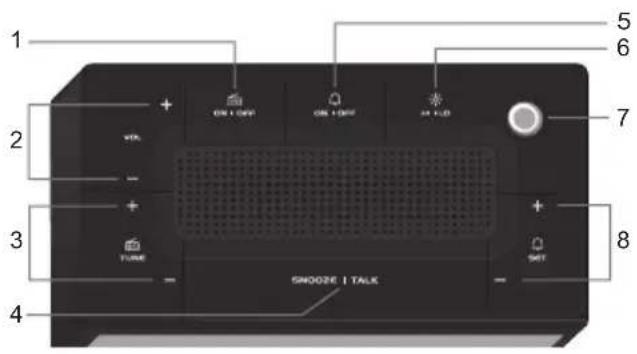
- RADIO ON / OFF: turn radio on / off
- VOL + / -: increase / decrease volume when in radio mode
- TUNE + / -: auto-search / adjust radio frequency when in radio mode
- SNOOZE / TALK: announce the time; activate snooze function
- ON / OFF: display alarm time; turn alarm on / off
- ⚙️ HI / LO: select display brightness
-
Projector
-
SET + / -: enter alarm setting; increase / decrease value of the alarm setting
BOTTOM VIEW
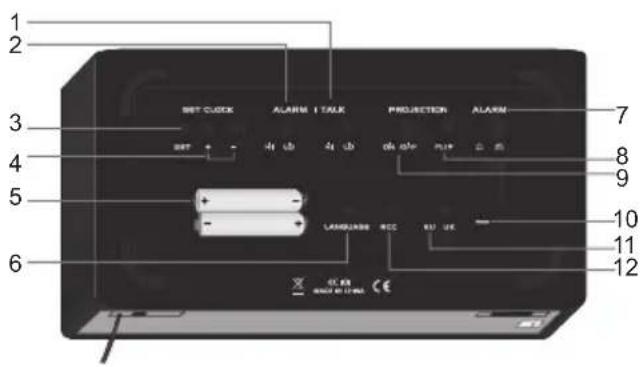
- TALK HI / LO: select volume
- ALARM HI / LO: select volume
- SET CLOCK: set time; confirm setting
- SET CLOCK + / -: increase / decrease value of the clock setting; toggle setting options
- Battery compartment
- LANGUAGE: display country; toggle between country options
- ALARM ☐ / ☑ select between beep alarm
and radio alarm
- FLIP: flip projection 180°
- PROJECTION ON / OFF: switch projection on / off
- RESET: reset unit to default settings
- EU / UK: select the nearest radio signal
- RCC: enable / disable clock reception
BACK VIEW
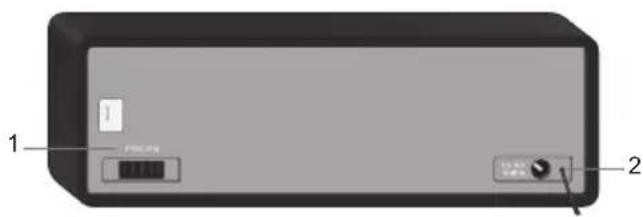
- FOCUS wheel: adjust projection focus
- Adaptor socket
LCD DISPLAY
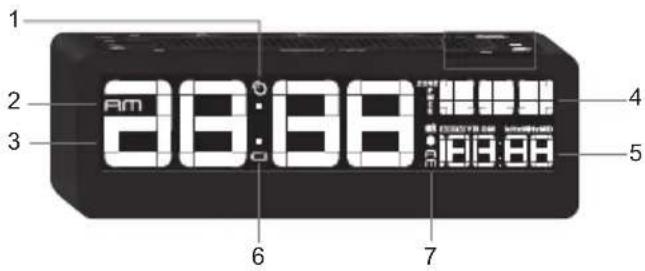
- radio controlled clock reception icon
- AM / PM: 12 hour clock
- Clock
- Day of the week
- Calendar
- ☐: main unit batteries low / no battery
- ☐: daily alarm is on
GETTING STARTED
MAIN UNIT INSTALLATION
- Slide EU / UK switch to select nearest radio signal (if applicable).
- Plug adaptor into socket.
NOTE
- Make sure the adaptor is not obstructed and is easily accessible to the unit.
• To completely disconnect from power, the adaptor should be disconnected from the mains. - The main unit and adaptor should not be exposed to wet conditions. No objects filled with liquid, such as vases, should be placed on the main unit and adaptor.
Insert batteries (for memory back-up only):
- Remove the battery compartment cover.
- Insert the batteries, matching the polarities.
NOTE Batteries should not be exposed to excessive heat such as sunshine or fire.
CLOCK
CLOCK RECEPTION
Once connected to a power source, the clock will automatically start scanning for the radio-controlled time signal.
To search for signal reception: Press RCC.
Reception takes 2-10 minutes. If the signal is weak, it can take up to 24 hours to get a valid signal.
Clock reception indicator
| No signal Weak | signal Strong ignal | ||
 |  |  |  |
In some cases, you may not receive the signal immediately. Due to the atmospheric disturbance, the best reception often occurs at night.
If signal reception is unsuccessful, place your unit next to a window, press RCC to attempt another signal search. Manually forcing another signal search will consume more battery power.
Daylight savings time (DST)
The clock has been programmed to automatically switch when daylight savings time is in effect.
MANUALLY SET CLOCK
If located outside the radio signal range, you can manually set the clock.
NOTE Once clock is within range and receives radio signal, clock will automatically synchronise and replace the time / date that was set manually.
- Press SET CLOCK.
- Press SET + / - to change the settings. Press and hold SET + / - to rapidly change values.
- Press SET CLOCK to confirm.
The settings order is: 12 / 24 hr format, time zone, time, year, calendar format (m / d), date.
Time zone offset sets the clock + / - 23 hours from the received clock signal time.
If you enter +1 in the time offset setting, this will give you your local time plus one hour. If you are in the US set the clock to:
| 0 | Pacific time | +1 | Mountain time |
| +2 | Central time | +3 | Easter time |
Select language to display weekday:
Press LANGUAGE repeatedly to select between ENG / FRE / GER / ITA / SPA.
To save setting, do not press any key for 5 seconds.
ALARM
To set the alarm:
- Press ⏻ SET + / - to enter alarm setting.
- Press ⏻ SET + / - repeatedly to adjust the alarm time.
To rapidly change value, press and hold key.
To save setting, do not press any key for 5 seconds.
indicates alarm is on.
Select between beep alarm or radio alarm:
- Slide ALARM / switch to select.
Adjust volume:
- Slide ALARM HI / LO to select.
To activate / deactivate alarm:
- Press ON / OFF.
To silence the alarm:
• Press SNOOZE / TALK to silence it for 8 minutes.
OR
- Press any key to turn the alarm off and activate it again after 24 hours.
RADIO
- Press and hold ON / OFF to turn radio on.
- Press and hold TUNE + / - to auto search or press TUNE + / - to adjust frequency marginally.
Adjust volume:
- Press VOL + / -.
For your convenience, the radio frequency will be stored in memory for the next time radio is turned on.
PROJECTION
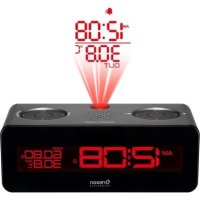
This unit projects time and alarm status onto a dark background.
Projection feature only operates when unit is connected to the mains.
To turn (continuous) projection on / off:
- Slide PROJECTION switch to ON / OFF.
To flip projected image by 180°:
- Press FLIP.
To focus image:
- Turn FOCUS wheel.
NOTE If projection is illuminated, do not look directly into the projector.
AUDIBLE TIME FUNCTION
To hear the time:
- Press SNOOZE / TALK.
To hear the day, press SNOOZE / TALK again while voice announces the time.
Adjust volume:
- Slide TALK HI / LO switch to select.
DISPLAY BRIGHTNESS
To adjust brightness:
- Press ⚙HI/LO.
RESET
Press RESET to return to default settings.
SPECIFICATIONS
| TYPE DESCRIPTION | |
| L x W x H 200 x 105 x 65 mm(7.9 x 4.1 x 2.6 in) | |
| Weight 514 g (18.1 oz) without battery | |
| Power AC / DC 6V adaptor 2 x UM - 4(AAA) 1.5 V batteries | |
PRECAUTIONS
- Do not subject the unit to excessive force, shock, dust,
temperature or humidity.
- Do not cover the ventilation holes with any items such as newspapers, curtains etc.
- Do not immerse the unit in water. If you spill liquid over it, dry it immediately with a soft, lint-free cloth.
- Do not clean the unit with abrasive or corrosive materials.
- Do not tamper with the unit's internal components. This invalidates the warranty.
- Only use fresh batteries. Do not mix new and old batteries.
- Images shown in this manual may differ from the actual display.
- When disposing of this product, ensure it is collected separately for special treatment and not as normal household waste.
- Placement of this product on certain types of wood may result in damage to its finish for which Oregon Scientific will not be responsible. Consult the furniture manufacturer's care instructions for information.
- The contents of this manual may not be reproduced without the permission of the manufacturer.
-
Do not dispose old batteries as unsorted municipal waste. Collection of such waste separately for special treatment is necessary.
-
Please note that some units are equipped with a battery safety strip. Remove the strip from the battery compartment before first use.
- Should there be any discrepancy between the English and other language versions, the English version shall apply and prevail.
NOTE The technical specifications for this product and the contents of the user manual are subject to change without notice.
NOTE Features and accessories will not be available in all countries. For more information, please contact your local retailer.
ABOUT OREGON SCIENTIFIC
Visit our website (www.oregonscientific.com) to learn more about Oregon Scientific products.
If you're in the US and would like to contact our Customer Care department directly, please visit: https://us.oregonscientific.com/service/support.asp
For international inquiries, please visit: https://us.oregonscientific.com/about/international.asp
EU-DECLARATION OF CONFORMITY
Hereby, Oregon Scientific, declares that this EasyPlus Talk
o'Clock (Model: EC101) is in compliance with the essential requirements and other relevant provisions of Directive 1999/5/EC. A copy of the signed and dated Declaration of Conformity is available on request via our Oregon Scientific Customer Service.

Countries RTTE Approval Complied
All EU countries, Switzerland CH
and Norway N
FCC STATEMENT
This device complies with Part 15 of the FCC Rules. Operation is subject to the following two conditions: (1) This device may not cause harmful interference, and (2) This device must accept any interference received, including interference that may cause undesired operation.
WARNING Changes or modifications not expressly approved by the party responsible for compliance could void the user's authority to operate the equipment.
NOTE This equipment has been tested and found to comply with the limits for a Class B digital device, pursuant
to Part 15 of the FCC Rules. These limits are designed to provide reasonable protection against harmful interference in a residential installation.
This equipment generates, uses and can radiate radio frequency energy and, if not installed and used in accordance with the instructions, may cause harmful interference to radio communications. However, there is no guarantee that interference will not occur in a particular installation. If this equipment does cause harmful interference to radio or television reception, which can be determined by turning the equipment off and on, the user is encouraged to try to correct the interference by one or more of the following measures:
• Reorient or relocate the receiving antenna.
- Increase the separation between the equipment and receiver.
- Connect the equipment into an outlet on a circuit different from that to which the receiver is connected.
- Consult the dealer or an experienced radio / TV technician for help.
DECLARATION OF CONFORMITY
The following information is not to be used as contact for support or sales. Please call our customer service number (listed on our website at www.oregonscientific.com), or on the warranty card for this product) for all inquiries instead.
We
Name: Oregon Scientific, Inc.
Address: 19861 SW 95th Ave., Tualatin,
Oregon 97062 USA
Telephone No.: 1-800-853-8883
Declare that the product
Product No.: EC101
Product Name: EasyPlus Talk o'Clock
Manufacturer: IDT Technology Limited
Address: Block C, 9/F, Kaiser Estate,
Phase 1, 41 Man Yue St.,
Hung Hom, Kowloon,
Hong Kong
is in conformity with Part 15 of the FCC Rules. Operation is subject to the following two conditions: 1) This device may not cause harmful interference, and 2) This device must accept any interference received, including interference that may cause undesired operation.
- EasyPlus Talk o'Clock
- MODEL: EC101
- USER MANUAL
- INDEX
- OVERVIEW
- FRONT VIEW
- BOTTOM VIEW
- BACK VIEW
- LCD DISPLAY
- GETTING STARTED
- MAIN UNIT INSTALLATION
- NOTE
- Insert batteries (for memory back-up only):
- CLOCK
- CLOCK RECEPTION
- Daylight savings time (DST)
- MANUALLY SET CLOCK
- Select language to display weekday:
- ALARM
- To set the alarm:
- Select between beep alarm or radio alarm:
- Adjust volume:
- To activate / deactivate alarm:
- To silence the alarm:
- OR
- RADIO
- PROJECTION
- AUDIBLE TIME FUNCTION
- DISPLAY BRIGHTNESS
- RESET
- PRECAUTIONS
- ABOUT OREGON SCIENTIFIC
- EU-DECLARATION OF CONFORMITY
- FCC STATEMENT
- DECLARATION OF CONFORMITY
- We
- Declare that the product
Brand : OREGON SCIENTIFIC
Model : EC101
Category : Alarm clock radio