DM 20 - Kitchen scale BEURER - Free user manual and instructions
Find the device manual for free DM 20 BEURER in PDF.


| Product type | Smart kitchen scale / Water consumption assistant |
| Brand | Beurer |
| Model | DM 20 |
| Dimensions (L x W x H) | 121 x 121 x 18.5 mm |
| Weight (without batteries) | Approx. 155 g |
| Power supply | 2 x 1.5 V AAA batteries |
| Maximum capacity | 3 kg (6.6 lb) |
| Graduation | 1 g |
| Measuring range | 60 – 3000 g |
| Display | LED |
| Wireless connection | Bluetooth Low Energy (BLE), frequency 2.400-2.480 GHz, max. power 0 dBm |
| App compatibility | iOS ≥ 10.0, Android ≥ 5.0, Bluetooth ≥ 4.0 |
| Protection rating | IP41 (protection against solid bodies >1 mm and vertical falling water droplets) |
| Main functions | Water consumption tracking, consumption goals (up to 5), LED reminder, color feedback, 14-day recording |
| Weighing surface (diameter) | 90 mm |
| Minimum container weight | 60 g |
| Care and cleaning | Clean with a damp cloth and a little dish soap; do not immerse, do not put in dishwasher, do not use solvents |
| Warranty | 3 years |
| Package contents | 1 water consumption assistant DM 20, 2 x 1.5 V AAA batteries, 1 instruction manual, 1 quick start guide |
| Country of manufacture | Germany (Beurer GmbH, Ulm) |
Frequently Asked Questions - DM 20 BEURER
User questions about DM 20 BEURER
0 question about this device. Answer the ones you know or ask your own.
Ask a new question about this device
Download the instructions for your Kitchen scale in PDF format for free! Find your manual DM 20 - BEURER and take your electronic device back in hand. On this page are published all the documents necessary for the use of your device. DM 20 by BEURER.
USER MANUAL DM 20 BEURER
natural_image
White circular device with 'beurer' label and two control buttons (no visible text beyond branding)natural_image
Glass of water with bubbles, placed on a digital kitchen scale (no text or symbols visible)https://www.beurer.com/web/we-landingpages/de/cedeclarationofconformity.php
12. Garantie
Read these instructions for use carefully and keep them for later use, be sure to make them accessible to other users and observe the information they contain.
Dear customer,
Thank you for choosing a product from our range. Our name stands for high-quality, thoroughly tested products for applications in the areas of heat, weight, blood pressure, body temperature, pulse, gentle therapy, massage, beauty, baby and air.
With kind regards,
Your Beurer team
TABLE OF CONTENTS
- Getting to know your device ....15
- Included in delivery....16
- Signs and symbols....16
- Warnings and safety notes....17
- Intended use.....18
- Device description....19
- Initial use ....19
7.1 Inserting the batteries....19
7.2 Initial start-up ....20
7.3 Starting use ....20
7.4 Activating drinking schedules......21
7.5 Data transfer to the app....21
7.6 Registering a new drink container .....22
7.7 Switching off the drink manager .....22
8. Cleaning and maintenance......22
9. What if there are problems? .....22
10. Disposal 23
11. Technical data 23
12. Warranty/service....24
1. Getting to know your device
Why is it important that we drink enough water?
The human body consists of approx. 60% water. Water acts as an important means of transport in our body; this is why it is important that we drink enough water. Our fluid balance ensures that blood flows in the body, the body temperature is regulated and toxins are expelled via urine. If we drink too little, our physical and mental performance is reduced and cramps, circulatory problems and headaches are more likely to occur.
The German Nutrition Society recommends the following standard values for water intake for young people and adults (with appropriate energy intake and average living conditions).
| Age | Water intake through | Water intake through drinks and solid food | |
| Drinks Solid food | |||
| ml / day ml / day ml / kg and day | |||
| 15-18 1530 920 40 | |||
| 19-24 1470 890 35 | |||
| 25-50 1410 860 35 | |||
| 51-65 1230 740 30 | |||
| 65<1310 680 30 | |||
| Pregnant women 1470 890 35 | |||
| Breastfeeding women 1710 1000 45 | |||
What can the drink manager do?
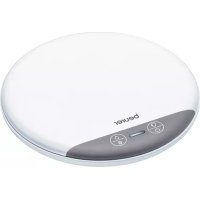
The drink manager is a coaster with integrated drink recording. The LED display reminds you to drink and indicates to you whether you are within or outside your daily limits for water consumption. Due to its handy size, you can take the drink manager almost anywhere.
Using the drink manager, you can easily record your drinking behaviour and you also have the option to transfer the measured values conveniently to your smartphone.
The drink manager has the following features:
• 3 kg/6.6 lb weight capacity
- 1g graduation
- LED display
• Minimum weight of drink container: 60 g
- Easy-to-clean surface
- Drip proof (IP41)
- Feedback function
- Drink reminder
• 14-day recording duration - 5 drinking schedules possible at the same time
- Transfer of measured values to the "beurer HealthManager" app
• Volume unit can be modified in the “beurer HealthManager” app
2. Included in delivery
Check that the exterior of the delivery cardboard packaging is intact and make sure that all contents are present. Before use, ensure that there is no visible damage to the device or accessories and that all packaging material has been removed. If you have any doubts, do not use the device and contact your retailer or the specified Customer Service address.
• 1 x drink manager DM 20
- 2 x 1.5 V AAA batteries
• 1 x set of these instructions for use
- 1 x quick guide
3. Signs and symbols
The following symbols are used on the device, in these instructions for use, on the packaging and on the type plate for the device:
 | WARNINGWarning notice indicating a risk of injury or damage to health. | |
 | IMPORTANTSafety note indicating possible damage to the device/accessory. | |
 | NoteNote on important information. | |
 | Read instructions for use. | |
 | This product satisfies the requirements of the applicable European and national directives. | |
| IP41 | Protected against solid foreign objects of a diameter ≥ 1.0 mm and against vertically falling drops of water | |
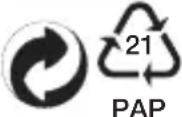 | Dispose of packaging in an environmentally friendly manner | |
 | Manufacturer | |
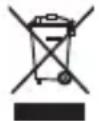 | Disposal in accordance with the Waste Electrical and Electronic Equipment EC Directive – WEEE. | |
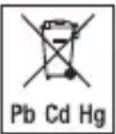 | Batteries must be disposed of through specially designated collection boxes, recycling points or electronics retailers. | |
 | Certification symbol for products that are exported to the Russian Federation and members of the CIS. | |
4. Warnings and safety notes

WARNING
Read the warnings and safety notes carefully. Non-observance of the following information may result in personal injury or material damage.
- Keep packaging material away from children. There is the risk of suffocation.
- Protect the drink manager from knocks, moisture, dust, chemicals, drastic changes in temperature and nearby sources of heat (ovens, heaters).
- The precision of the drink manager may be impaired by strong electromagnetic fields (e.g. mobile phones).
- The maximum load capacity of the drink manager is 3 kg/6.6 lb (1 g graduation).
- Do not place any objects on the drink manager when not in use.
- Never submerge the drink manager in water. Also, never rinse the drink manager in running water.
- Repairs may only be carried out by Beurer Customer Services or authorised retailers. Before submitting a complaint, please check the batteries first and replace them if necessary.
Notes on handling batteries
- If your skin or eyes come into contact with battery fluid, rinse the affected area with water and seek medical assistance.
Choking hazard! Small children may swallow and choke on batteries. Store batteries out of the reach all children. - Observe the plus (+) and minus (-) polarity signs.
- If a battery has leaked, put on protective gloves and clean the battery compartment with a dry cloth.
- Protect batteries from excessive heat.
Risk of explosion! Do not throw batteries into a fire. - Do not charge or short-circuit batteries.
- If the device is not to be used for a relatively long period, take the batteries out of the battery compartment.
- Use identical or equivalent battery types only.
• Always replace all batteries at the same time. - Do not use rechargeable batteries.
- Do not disassemble, open or crush the batteries.


5. Intended use
The drink manager is exclusively intended for weighing drink containers.
The drink manager is only intended for private use, and not for medical or commercial purposes. Please note that measuring tolerances are possible for technical reasons as this scale is not calibrated for use in a professional medical context.

WARNING
This device must only be used for the purpose for which it was designed and in the manner specified in the instructions for use. Any form of improper use can be dangerous. The manufacturer is not liable for damage resulting from improper or careless use.
6. Device description
natural_image
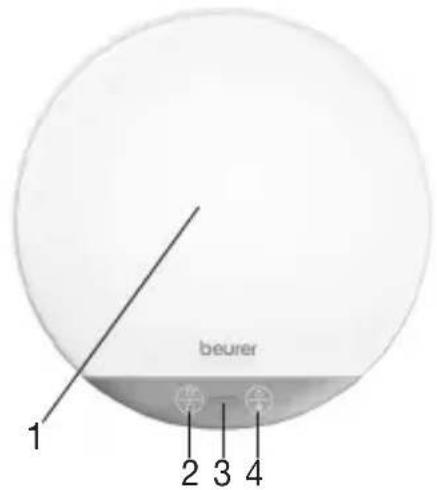
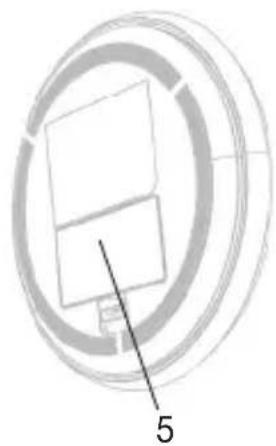
Pure mechanical component diagram without any text, numbers, or symbols| 1. Area to place drink container (e.g. drink bottle, glass or cup) |
| 2. ON/OFF/cup button |
| 3. LED display |
| 4. Bluetooth®/feedback button |
| 5. Battery compartment lid |
7. Initial use
7.1 Inserting the batteries
Before you can use the drink manager, you must first insert two 1.5 V AAA batteries into the battery compartment of the drink manager.
Proceed as follows:
- Open the battery compartment lid on the bottom of the drink manager.
- Insert two 1.5 V AAA batteries into the battery compartment. Make sure that the batteries are inserted the right way round (+ / -), as shown in the battery compartment.
- Close the battery compartment lid until you hear and feel it click into place.
- Place the drink manager on a firm, even surface. The LED display lights up red during calibration of the drink manager. Do not touch the drink manager until you hear the acoustic signal. If the LED display flashes red, you now have to connect the drink manager with the "beurer HealthManager" app. To do so, follow the instructions in the following section.

Note
If the LED display lights up red twice, you have to replace the batteries.
7.2 Initial start-up

Note
Carry out initial start-up before first use. Without initial start-up, the drink manager cannot be used. You have to carry out initial start-up after each time you replace the batteries.
Keep the smartphone close to the drink manager in order to maintain an active Bluetooth® connection during initial use.
- Activate Bluetooth ^® on your smartphone.
- Download the free “beurer HealthManager” app from the Apple App Store (iOS) or from Google Play (Android™).
- Open the "beurer HealthManager" app and add the drink manager in the app settings.
- Press and hold the Bluetooth ^® button on the drink manager for 3 seconds. The LED display on the drink manager starts to flash blue.
- The drink manager synchronises with the “beurer HealthManager” app. During synchronisation, the LED display on the drink manager lights up blue continuously.
- Once the synchronisation is complete, the blue LED display on the drink manager goes out.
7.3 Starting use
- To switch on the drink manager, press and hold the ON/OFF/cup button for 3 seconds. The LED display lights up red during calibration of the drink manager. Do not touch the drink manager until the LED display goes out and you hear the acoustic signal.
- Press the ON/OFF/cup button. The LED display starts to flash white.
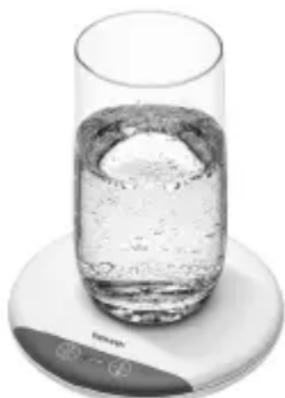
- Place your desired drink container (e.g. glass, cup or beaker) in the centre of the drink manager surface. Make sure that the drink container is completely full. Once the drink container has been registered, the white LED display goes out.
- If you now drink from the drink container and then place it back on the surface of the device, the drink manager automatically records the volume that has been drunk and the white LED display lights up briefly.
natural_image
Close-up of a glass with a floating object inside, placed on a digital kitchen scale (no text or symbols visible)Note
- Make sure that you place the drink container back on the surface of the drink manager after each sip you take. This is the only way to ensure drink recording with no gaps.
- The hydration manager automatically recognises any replenishment of the drinks container. If you want to change the drink container, follow the instructions in section 7.6.
7.4 Activating drinking schedules
You can create up to 5 drinking schedules via the “beurer HealthManager” app. To do so, follow the instructions in the “beurer HealthManager” app. Please be aware that the drinking schedules cannot overlap in time.
| Colour of the LED display Current progress of the drinking schedule | |
| green ≥100% | |
| orange 75%-99.9% | |
| red ≤74.9% | |
7.5 Data transfer to the app
You can transfer the measured values to your smartphone via Bluetooth® with the “beurer HealthManager” app. Keep the smartphone close to the drink manager in order to maintain an active Bluetooth® connection during data transfer. To transfer the recorded drink data from your drink manager to the “beurer HealthManager” app, proceed as follows:
- Activate Bluetooth ^® on your smartphone.
- Open the "beurer HealthManager" app.
- Press and hold the Bluetooth® button on the drink manager for 3 seconds. The LED display on the drink manager starts to flash blue.
- The drink manager automatically starts transferring the recorded drink data to the “beurer HealthManager” app. As long as the drink manager is connected, the LED display on the drink manager lights up blue continuously.
- Once the data transfer is complete, the blue LED display on the drink manager goes out.
Note
The drink manager records your drinking behaviour for a maximum of 14 days. Regularly transfer the recorded data to prevent data loss.
7.6 Registering a new drink container
- Press the ON/OFF/cup button. The LED display starts to flash white.
- Place the new drink container (e.g. glass, cup or beaker) in the centre of the drink manager surface. Make sure that the drink container is completely full.
- Once the new drink container has been registered successfully, the white LED display goes out and an acoustic signal sounds. If you now drink from the new drink container and then place it back on the surface of the device, the drink manager automatically detects the volume that has been drunk.
7.7 Switching off the drink manager
To switch off the drink manager, press and hold the ON/OFF/cup button for 3 seconds. An acoustic signal confirms that the drink manager has switched off.
8. Cleaning and maintenance
If dirty, clean the surface of the device with a damp cloth. You may also apply a small quantity of detergent if required.

IMPORTANT
- Never use harsh solvents or cleaning products!
- Never submerge the device in water!
- Do not clean the device in a dishwasher.
9. What if there are problems?
| Problem Solution | |
| The device will not switch on. The | batteries are empty. Replace the batteries. |
| The recorded data is not transferred to the smartphone. | 1. Completely close the app (including in the background).2. Switch Bluetooth® on the smartphone off and on again.3. Switch smartphone off and on again.4. Remove the batteries from the drink manager for a short period and reinsert them.5. See FAQs at www.beurer.com |
10. Disposal
For environmental reasons, do not dispose of the device in the household waste at the end of its useful life. Dispose of the device at a suitable local collection or recycling point in your country. Observe the local regulations for material disposal. Dispose of the device in accordance with EC Directive – WEEE (Waste Electrical and Electronic Equipment). If you have any questions, please contact the local authorities responsible for waste disposal.
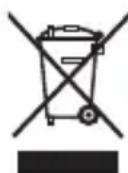
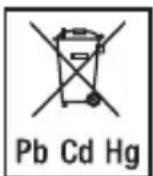
Empty, completely flat batteries must be disposed of through specially designated collection boxes, recycling points or electronics retailers. You are legally required to dispose of the batteries.
The codes below are printed on batteries containing harmful substances:
Pb = Battery contains lead
Cd = Battery contains cadmium
Hg = Battery contains mercury
- Technical data
| Drink manager dimensions (L x W x H) 121 x 121 x 18.5 mm | |
| Drink manager batteries 2 x 1.5 V alkaline AAA | |
| Weighing surface (diameter) 90 mm | |
| Weight Approx. 155 g (without batteries) | |
| Memory capacity Max. 14 days | |
| Max. weight capacity 3 kg/6.6 lb | |
| Measurement range 60 – 3000 g | |
| Graduation 1 g | |
| Data transfer via Bluetooth® wireless technology This product uses Bluetooth® low energy tech-nology, frequency band = 2400 GHz - 2480 GHz, transmission power max. 0 dBm, compatible with Bluetooth® ≥ 4.0 smartphones/tablets |
A list of compatible smartphones, information on software and details on the devices can be found at the following link: connect.beurer.com
System requirements for the "beurer HealthManager" app
iOS ≥ 10.0 Android™ ≥ 5.0 Bluetooth® ≥ 4.0
Subject to technical changes
We hereby confirm that this product complies with the European RED Directive 2014/53/EU. The CE Declaration of Conformity for this product can be found under:
https://www.beurer.com/web/we-landingpages/de/cedeclarationofconformity.php
12. Warranty/service
Beurer GmbH, Söflinger Straße 218, 89077 Ulm, Germany (hereinafter referred to as "Beurer") provides a warranty for this product, subject to the requirements below and to the extent described as follows.
The warranty conditions below shall not affect the seller's statutory warranty obligations which ensue from the sales agreement with the buyer.
The warranty shall apply without prejudice to any mandatory statutory provisions on liability.
Beurer guarantees the perfect functionality and completeness of this product.
The worldwide warranty period is 3 years, commencing from the purchase of the new, unused product from the seller.
The warranty only applies to products purchased by the buyer as a consumer and used exclusively for personal purposes in the context of domestic use.
German law shall apply.
During the warranty period, should this product prove to be incomplete or defective in functionality in accordance with the following provisions, Beurer shall carry out a repair or a replacement delivery free of charge, in accordance with these warranty conditions.
If the buyer wishes to make a warranty claim, they should approach their local retailer in the first instance: see the attached “International Service” list of service addresses.
The buyer will then receive further information about the processing of the warranty claim, e.g. where they can send the product and what documentation is required.
A warranty claim shall only be considered if the buyer can provide Beurer, or an authorised Beurer partner, with
- a copy of the invoice/purchase receipt, and
– the original product.
The following are explicitly excluded from this warranty:
– deterioration due to normal use or consumption of the product;
- accessories supplied with this product which are worn out or used up through proper use (e.g. batteries, rechargeable batteries, cuffs, seals, electrodes, light sources, attachments and nebuliser accessories);
- products that are used, cleaned, stored or maintained improperly and/or contrary to the provisions of the instructions for use, as well as products that have been opened, repaired or modified by the buyer or by a service centre not authorised by Beurer;
– damage that arises during transport between manufacturer and customer, or between service centre and customer;
– products purchased as seconds or as used goods;
– consequential damage arising from a fault in this product (however, in this case, claims may exist arising from product liability or other compulsory statutory liability provisions).
Repairs or an exchange in full do not extend the warranty period under any circumstances.
FRANÇAIS

natural_image
Pure diagram of a circular object with internal components and a labeled line (no text or symbols)natural_image
Glass of water with bubbles, placed on a digital kitchen scale (no text or symbols visible)https://www.beurer.com/web/we-landingpages/de/cedeclarationofconformity.php
12. Garantie/Maintenance
natural_image
Pure mechanical component diagram without any text, numbers, or symbolsnatural_image
Glass of water with bubbles, placed on a digital kitchen scale (no text or symbols visible)https://www.beurer.com/web/we-landingpages/de/cedeclarationofconformity.php
natural_image
Pure diagram of a circular mechanical component with concentric rings and a labeled section (no text or symbols beyond the number 5)natural_image
Glass of water with bubbles, placed on a digital kitchen scale (no text or symbols visible)https://www.beurer.com/web/we-landingpages/de/cedeclarationofconformity.php
natural_image
Pure diagram of a circular mechanical or electrical component with no text, numbers, or symbols visible.natural_image
Close-up of a glass of water with bubbles, placed on a digital kitchen scale (no text or symbols visible)https://www.beurer.com/web/we-landingpages/de/cedeclarationofconformity.php
12. Garanti/Servis
natural_image
Pure mechanical component diagram without any text, numbers, or symbolsnatural_image
Glass of water with bubbles, placed on a digital kitchen scale (no text or symbols visible)https://www.beurer.com/web/we-landingpages/de/cedeclarationofconformity.php.
natural_image
Close-up of a glass with a floating object inside, placed on a digital kitchen scale (no text or symbols visible)Wskazówka
https://www.beurer.com/web/we-landingpages/de/cedeclarationofconformity.php
The Bluetooth ^® word mark and logos are registered trademarks owned by Bluetooth SIG, Inc. and any use of such marks by Beurer GmbH is under license. Other trademarks and trade names are those of their respective owners.
Apple and the Apple logo are trademarks of Apple Inc., registered in the U.S. and other countries.
App Store is a service mark of Apple Inc., registered in the U.S. and other countries.
Google Play and the Google Play logo are trademarks of Google LLC.
Android is a trademark of Google LLC.

Beurer GmbH • Söflinger Str. 218 • 89077 Ulm (Germany) • www.beurer.com
www.beurer-gesundheitsratgeber.de • www.beurer-healthguide.com