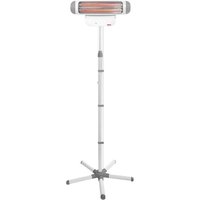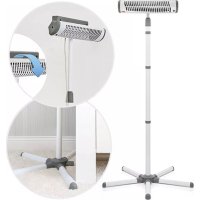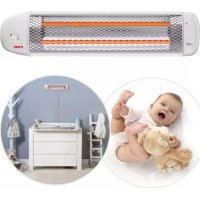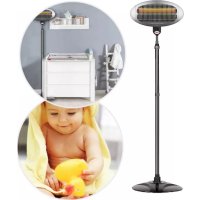
FeelWell 1926 - Heating Reer - Free user manual and instructions
Find the device manual for free FeelWell 1926 Reer in PDF.

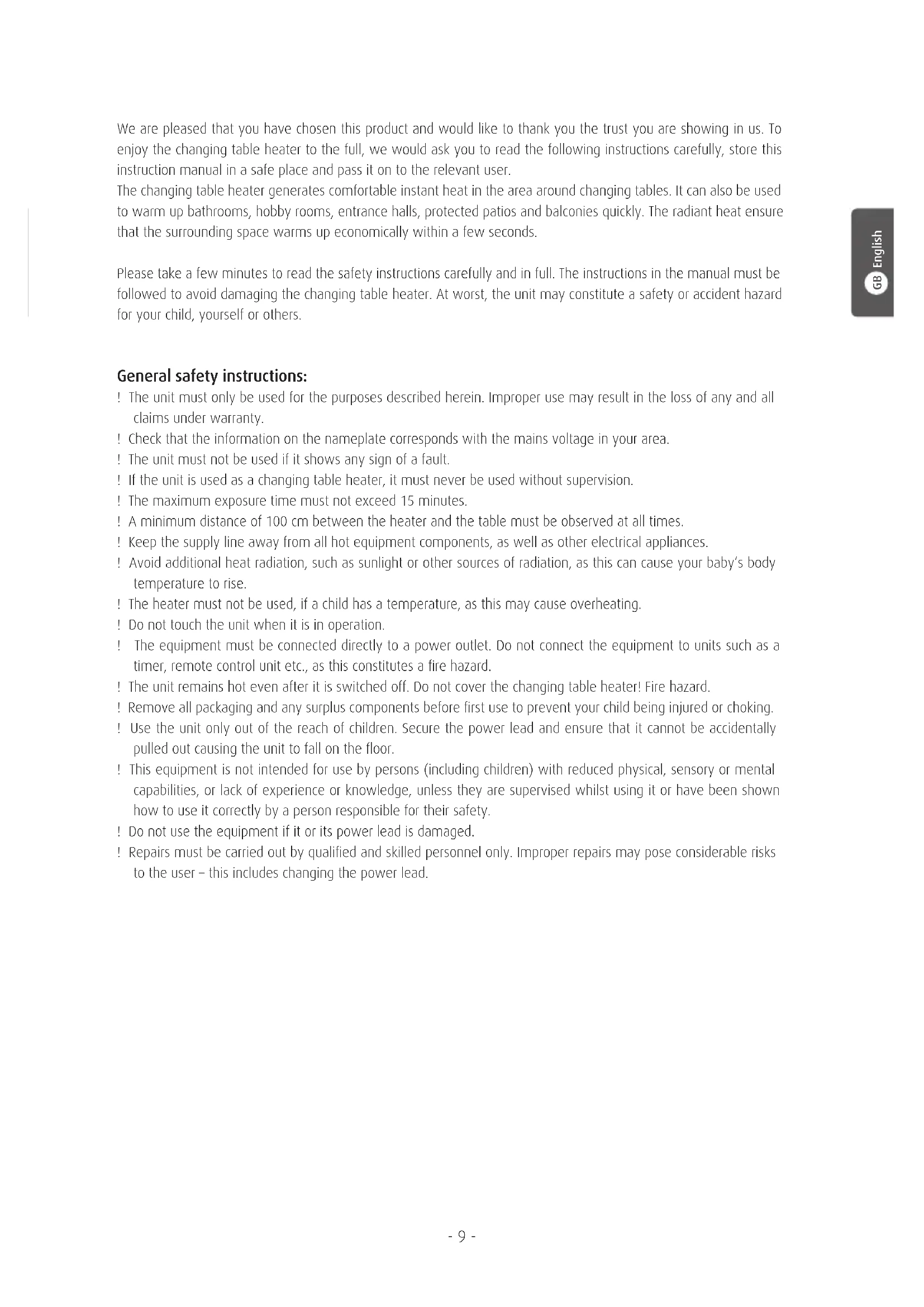


| Product type | Infrared radiant heater |
| Brand | Reer |
| Model | FeelWell 1926 |
| Main use | Changing table heating and sheltered spaces (bathroom, terrace, balcony) |
| Power supply | 230 V ~ 50 Hz |
| Power | 400 W / 800 W (2 levels) |
| Mounting type | Horizontal wall mounting (non-adjustable) |
| Cable length | 185 cm (with earth plug) |
| Protection class | I |
| Heating tubes | 2 infrared tubes |
| Display | Heating power display (0, 1, 2) |
| Timer | Adjustable automatic shut-off (10 minutes) |
| Minimum distance to changing table | 100 cm |
| Minimum distance to ceiling | 35 cm |
| Minimum distance to flammable materials | 65 cm |
| Maximum continuous use duration (changing table) | 15 minutes |
| Standards | IEC60601-2-21:2009 (medical standard) |
| Cleaning | Soft, dry or slightly damp cloth (exterior surfaces) |
| Maintenance | No special maintenance required |
| Repairs | By a professional only |
| Warranty | Keep proof of purchase, contact retailer |
Frequently Asked Questions - FeelWell 1926 Reer
User questions about FeelWell 1926 Reer
0 question about this device. Answer the ones you know or ask your own.
Ask a new question about this device
Download the instructions for your Heating in PDF format for free! Find your manual FeelWell 1926 - Reer and take your electronic device back in hand. On this page are published all the documents necessary for the use of your device. FeelWell 1926 by Reer.
USER MANUAL FeelWell 1926 Reer
natural_image
White portable air conditioner unit with mesh grille and 'recr' logo (no text or symbols on body)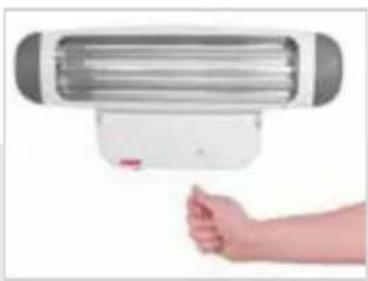
natural_image
Hand holding a white air conditioner unit with a gray panel, against a plain background (no text or symbols visible)
natural_image
Close-up of a mechanical device with directional arrows indicating motion or force (no text or symbols visible)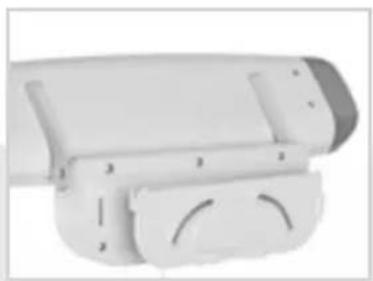
natural_image
White plastic mechanical component with mounting holes and a curved cutout (no text or symbols visible)DE GBeelWell - Wickeltisch-Wärmestrahler
Gebrauchsanleitung
ES FeelWell - radiador térmico de cambiador Manual de uso
FR FeelWell - pour table à langer
Notice d'utilisation
DK FeelWell - puslebord-varmestråler Brugsvejledning
PL FeelWell - promiennik ciepła do przewijaka dla niemowląt - Instrukcja obsługi
| Contents | General safety instructions | 08 | Safety instructions for wall installation | 10 |
| Technical specification | 09 | Putting into operation | 11 | |
| Items delivered, part description | 09 | Cleaning, maintenance | 12 | |
| Assembly | 10 | Warranty | 12 |
natural_image
Illustration of a smart security camera with mesh grille and display unit (no text or symbols)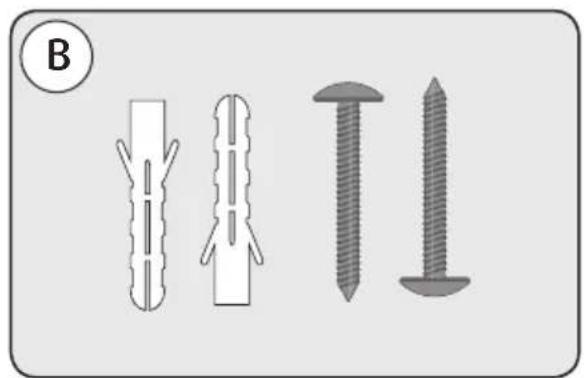
natural_image
Illustration of four different types of screw or fastener components, shown in line drawings without any text or symbols.Teilebezeichnung
natural_image
Diagram of a cylindrical device with a handle and internal components, labeled with number 1 (no text or symbols on the device itself)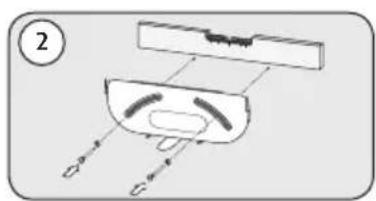
text_image
② D G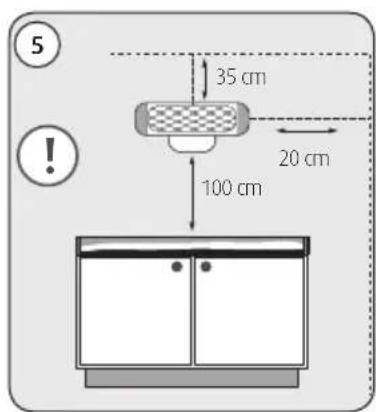
text_image
5 35 cm 20 cm 100 cm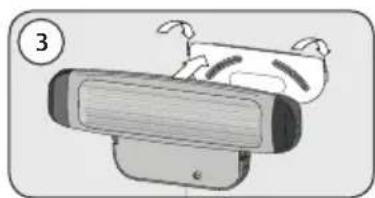
natural_image
Illustration of a cartoon character on a computer monitor with a numbered label (3), no text or symbols present.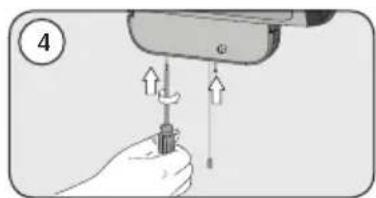
natural_image
Hand holding a screwdriver with arrows indicating force application (no text or symbols)flowchart
graph LR
    A["1: 230 V power plug"] --> B["2: Sensor connected to terminal"]
    B --> C["ON 400 W power rating"]
    C --> D["2: ON 800 W power rating"]
    D --> E["OFF: Off signal"]
natural_image
Symbol of a trash bin crossed with a diagonal line, no text or numbers presentWe are pleased that you have chosen this product and would like to thank you the trust you are showing in us. To enjoy the changing table heater to the full, we would ask you to read the following instructions carefully, store this instruction manual in a safe place and pass it on to the relevant user.
The changing table heater generates comfortable instant heat in the area around changing tables. It can also be used to warm up bathrooms, hobby rooms, entrance halls, protected patios and balconies quickly. The radiant heat ensure that the surrounding space warms up economically within a few seconds.
Please take a few minutes to read the safety instructions carefully and in full. The instructions in the manual must be followed to avoid damaging the changing table heater. At worst, the unit may constitute a safety or accident hazard for your child, yourself or others.
General safety instructions:
! The unit must only be used for the purposes described herein. Improper use may result in the loss of any and all claims under warranty.
! Check that the information on the nameplate corresponds with the mains voltage in your area.
! The unit must not be used if it shows any sign of a fault.
! If the unit is used as a changing table heater, it must never be used without supervision.
! The maximum exposure time must not exceed 15 minutes.
! A minimum distance of 100 cm between the heater and the table must be observed at all times.
! Keep the supply line away from all hot equipment components, as well as other electrical appliances.
! Avoid additional heat radiation, such as sunlight or other sources of radiation, as this can cause your baby's body temperature to rise.
! The heater must not be used, if a child has a temperature, as this may cause overheating.
! Do not touch the unit when it is in operation.
! The equipment must be connected directly to a power outlet. Do not connect the equipment to units such as a timer, remote control unit etc., as this constitutes a fire hazard.
! The unit remains hot even after it is switched off. Do not cover the changing table heater! Fire hazard.
! Remove all packaging and any surplus components before first use to prevent your child being injured or choking.
! Use the unit only out of the reach of children. Secure the power lead and ensure that it cannot be accidentally pulled out causing the unit to fall on the floor.
! This equipment is not intended for use by persons (including children) with reduced physical, sensory or mental capabilities, or lack of experience or knowledge, unless they are supervised whilst using it or have been shown how to use it correctly by a person responsible for their safety.
! Do not use the equipment if it or its power lead is damaged.
! Repairs must be carried out by qualified and skilled personnel only. Improper repairs may pose considerable risks to the user – this includes changing the power lead.
Technical specification
- rated voltage: 230 V AC
- output: 400 / 800 W
- mounting style: Power lead
-
protection class: 1
-
lead length: 185 cm (incl. safety plug)
- heat radiation and temperature distribution tested in accordance with the medical product standard (IEC60601-2-21:2009, AMD1:2016)
Items delivered
natural_image
Illustration of a smart security camera with mesh grille and attached sensor device (no text or symbols)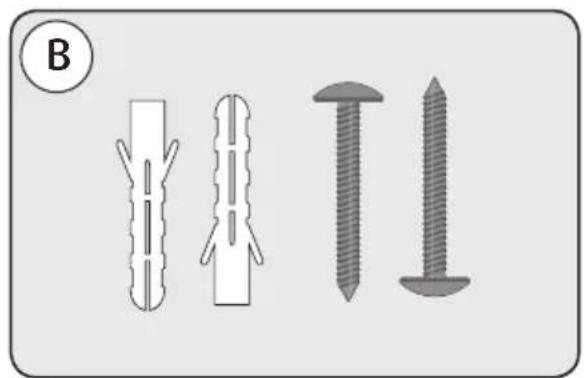
natural_image
Illustration of four different types of screw or fastener packages, shown in different orientations (no text or symbols)Part description
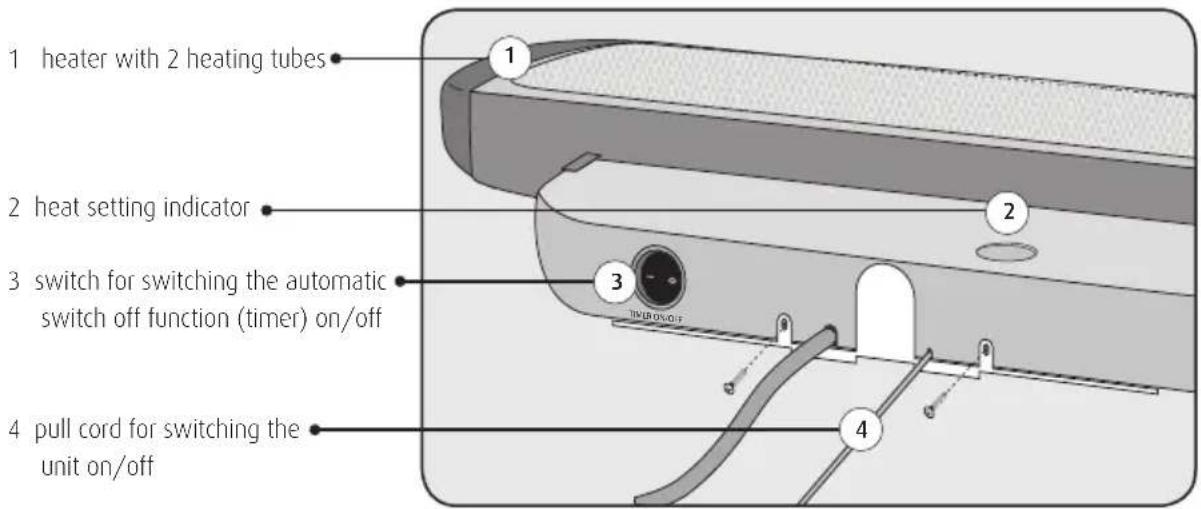
text_image
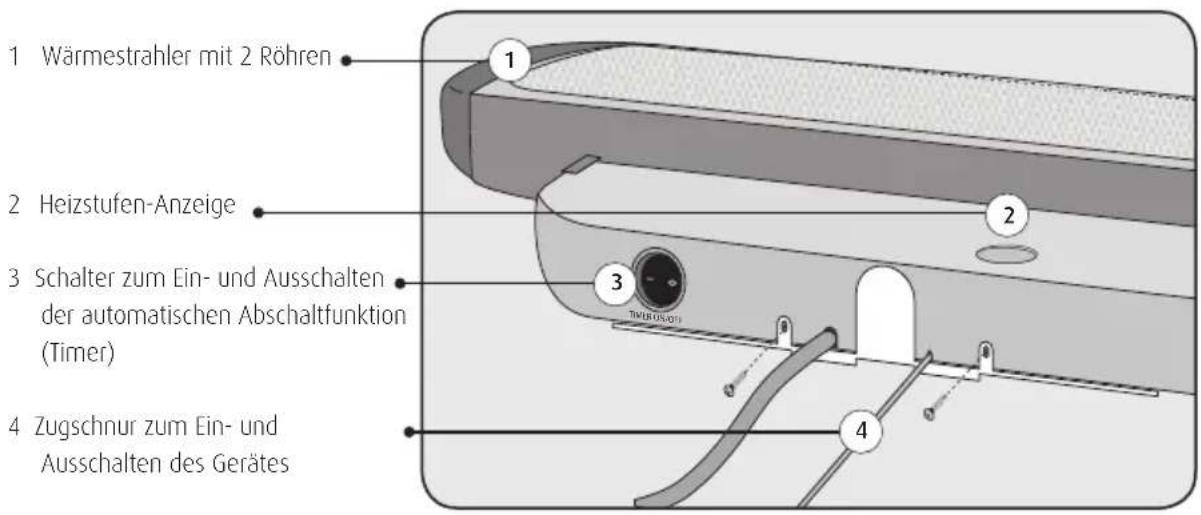
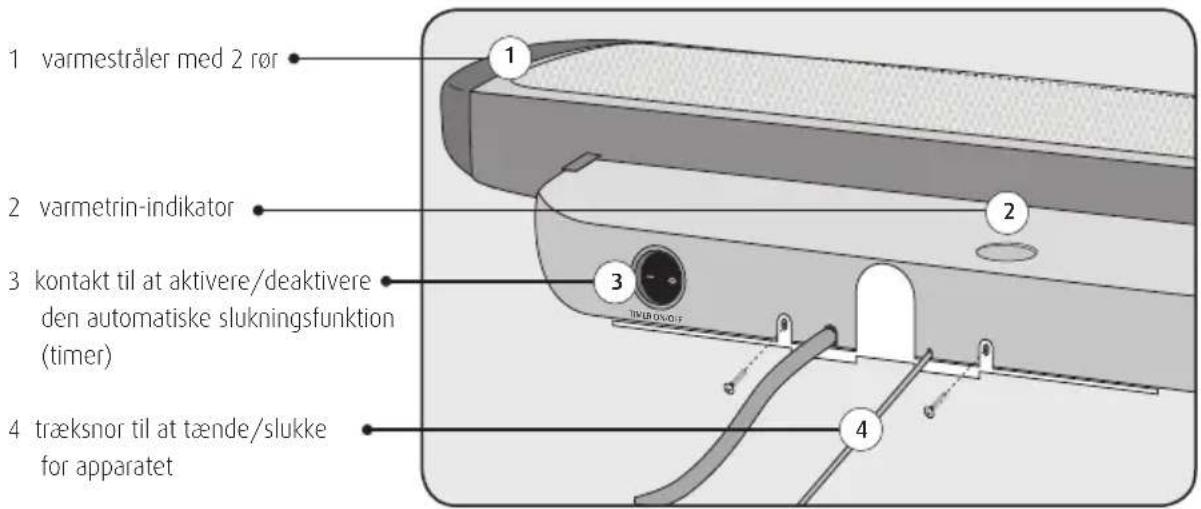
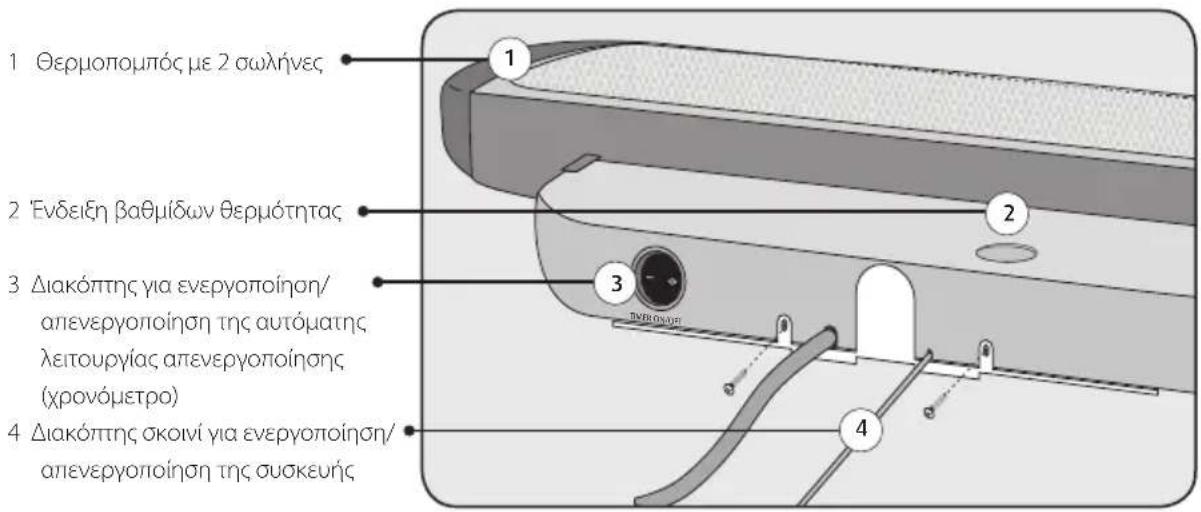
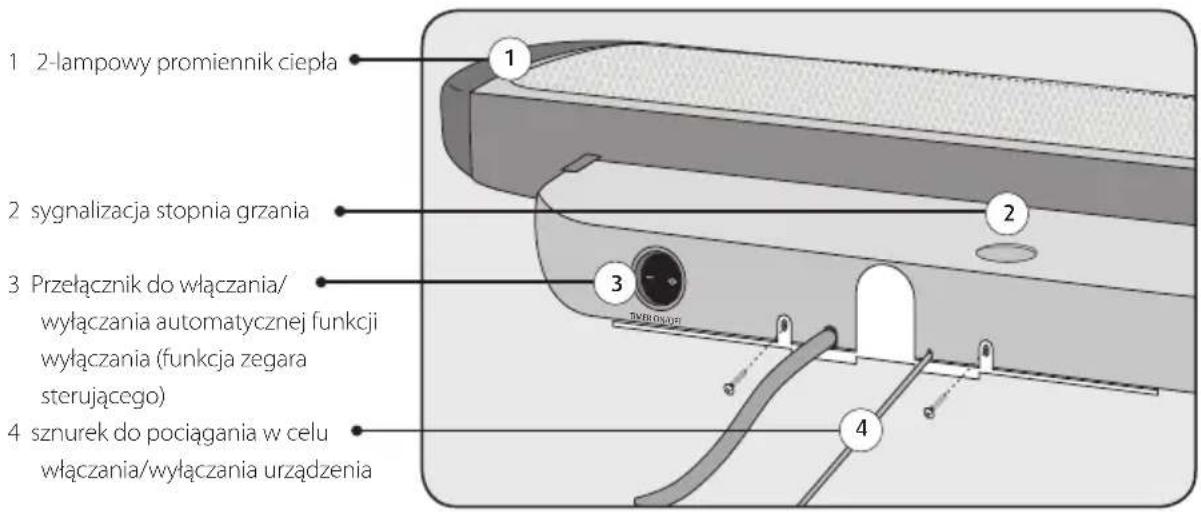
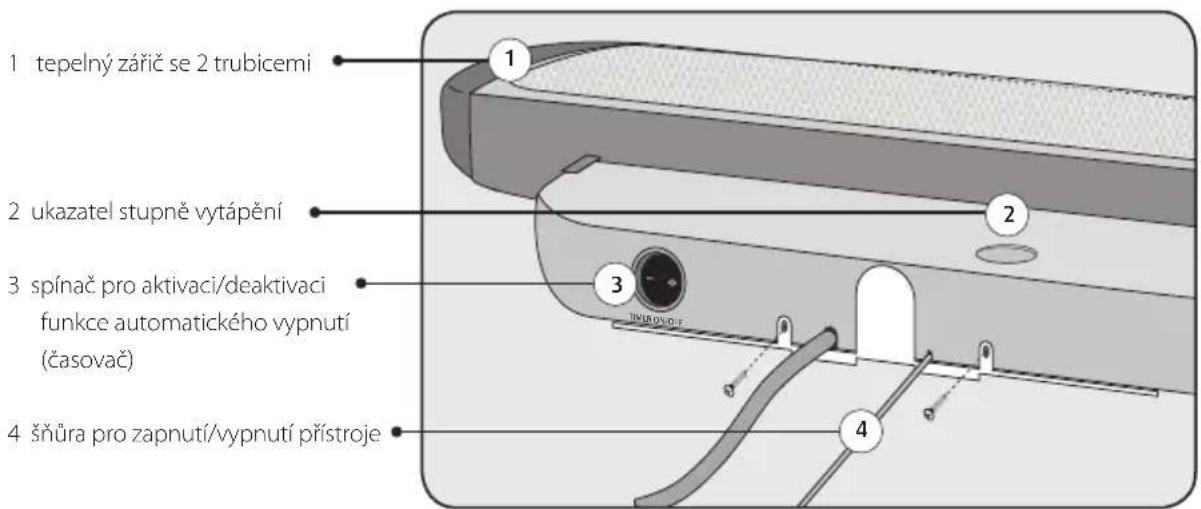
1 heater with 2 heating tubes 2 heat setting indicator 3 switch for switching the automatic switch off function (timer) on/off 4 pull cord for switching the unit on/offMontage
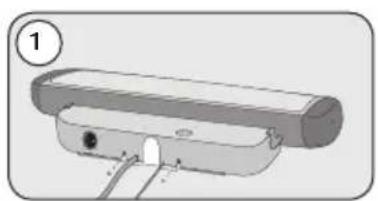
- Remove the assembly plate from the unit as shown in fig. 1.
- Hold the wall bracket on the wall taking into account the minimum distances (fig. 5) and mark the drill holes with a pencil. Use a spirit level to ensure the bracket is level.
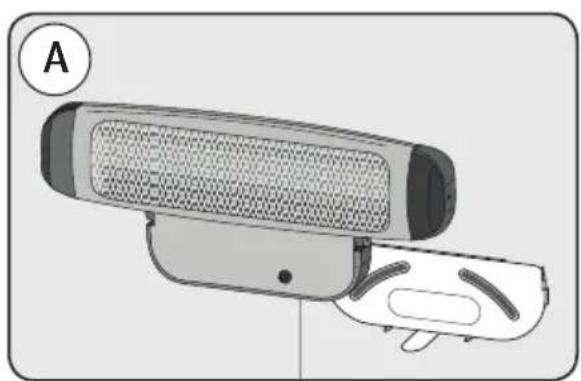
- Bolt the wall bracket to the wall (fig. 3) using the supplied screws and wall plugs.
- Slide the changing table heater into the relevant grooves on the wall bracket (fig. 3).
- Screw the changing table heater to the wall bracket (fig. 4) using the screws removed in fig. 1.
natural_image
Diagram of a cylindrical device with a handle and mounting holes, labeled with number 1 (no text or symbols on the device itself)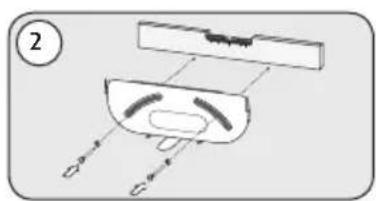
natural_image
Diagram of a mechanical or electronic component with labeled parts (no readable text or symbols)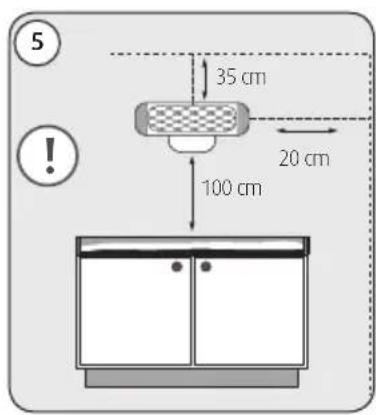
text_image
5 35 cm 20 cm 100 cm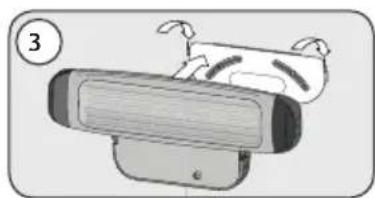
natural_image
Illustration of a cartoon-style robot with a face and limbs, no text or symbols present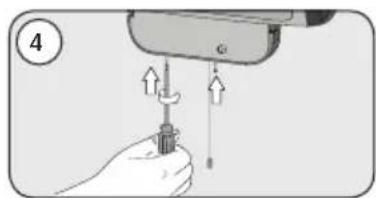
natural_image
Illustration of a hand using a screwdriver to lift a screw, showing motion arrows (no text or symbols)Safety instructions for wall installation:
- The changing table heater must be mounted on the wall in a stationary and level position. It must not be mounted on the ceiling!
- The changing table heater must not be mounted on wood, plastic or other flammable materials or under plug sockets.
- IMPORTANT! Minimum distances: The minimum distance between the heater and the changing table is 100 cm. A minimum distance of 35 cm between the heater and the ceiling must be observed at all times. The heater must be placed at least 65 cm away from furniture and flammable materials. Fire hazard in case of non-compliance!
- For installation in bathrooms or shower rooms, the regulations of the local utility company must be observed. The heater must be positioned in such a manner that the pull switch cannot be reached from the bath or shower.
- Never install the unit above a bath tub!
Putting into operation
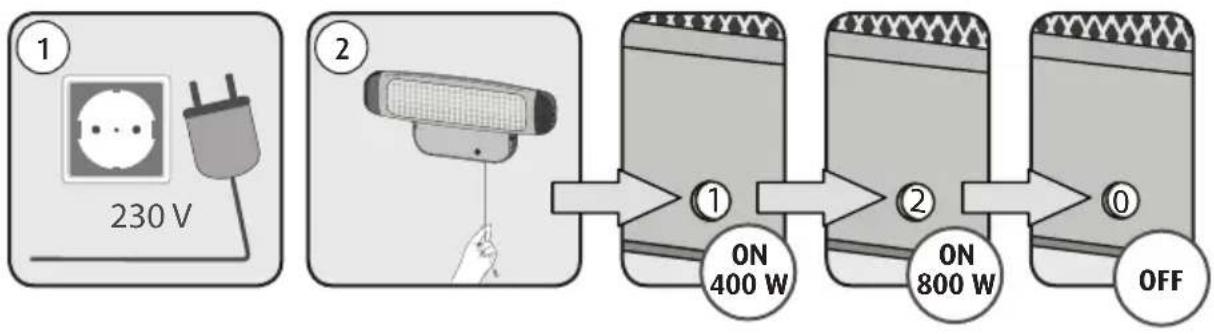
- Insert the mains plug into the power socket (fig. 1).
- Pull the pull cord (fig. 2) to switch the heater on. The heater has two heat settings: 400 W (level „1“) and 800 W (level „2“).
- Pull the cord again to change the heat setting or switch the unit off (level „0“).
flowchart
graph LR
    A["1: 230 V power plug"] --> B["2: Sensor with cable"]
    B --> C["ON 400 W power supply"]
    C --> D["2: ON 800 W power supply"]
    D --> E["OFF status"]
Automatic switch-off function
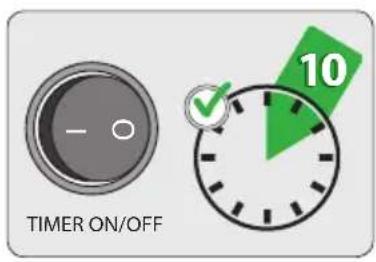
- To activate the automatic switch-off function, switch the timer switch on the bottom of the unit to the "ON" position. The unit switches off automatically after 10 minutes.
- There are 2 ways of switching the unit on after automatic switch-off:
- Move the rocker switch to the "Off" position or
- pull the pull cord, until the heat setting indicator shows „0“. If the pull cord is pulled again on heat setting „1“ or „2“, the unit is switched on again.
text_image
TIMER ON/OFF 10Troubleshooting
| Issue Possible causes | Remedial action | |
| No heat radiation despite heat setting indicator showing „1“ or „2“. | · The power plug is not connected properly.· The automatic switch-off function (timer) is activated. | · Check the power plug.· Turn the „Timer“ to „Off“ or switch the unit off and then on again by repeatedly pulling the pull cord. |
Cleaning, maintenance
- Before cleaning, ensure that the unit is switched off and cooled down (pull out the power plug). Clean the surface with a dry, slightly damp cloth. The reflector and heating tubes must be cleaned by skilled personnel only.
• This product does not require any special maintenance.
• Repairs must be carried out by skilled personnel only.
Warranty
Please retain your receipt, the user manual and part number.
Claims under warranty or under warranty commitments are to be processed by the dealer alone.
The technical specification, information and characteristics of the product described herein have been compiled to the best of our knowledge and belief and are correct at the time of printing. Any information provided by reer should be correct and authoritative. Nevertheless, reer does not accept liability for potential errors in this document and reserves the right to make changes to the product design and/or specifications without prior notice. Reproduction and disclosure of information contained in this copyright-protected document, in any form or by any means - graphical, electronic or mechanical by photocopying, recording on tape or storage in a data retrieval system - even in part, require prior written consent from reer.
natural_image
Symbol of a trash bin with no text or labelsEnvironmental protection:
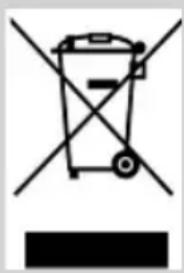
At the end of its life, this product must not be disposed of as normal domestic waste, but should be recycled at a collection point for electrical appliances. Please see the relevant symbol on the product, in the user manual and packaging. Materials can be recycled as specified. An important contribution to the protection of the environment can be made by reusing the unit, recycling its components or otherwise reusing old appliances. Please contact your local council to find out more about an appropriate disposal centre.

natural_image
Illustration of a smart security camera with mesh grille and display unit (no text or symbols)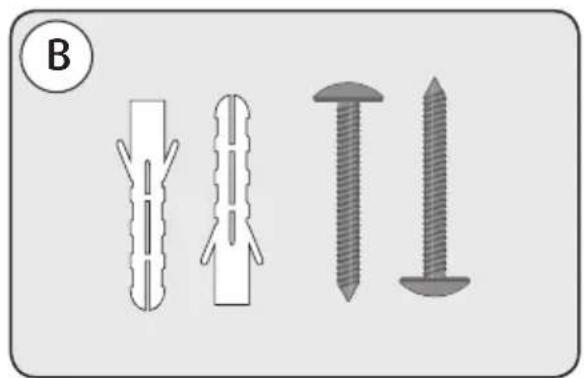
natural_image
Illustration of four different types of screw or fastener components, shown in separate vertical and horizontal views (no text or symbols)natural_image
Mechanical component diagram showing a cylindrical assembly with mounting holes and a curved housing (no text or symbols)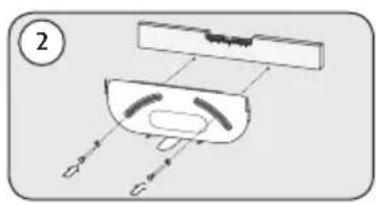
natural_image
Diagram of a mechanical component with labeled parts and directional arrows (no text or symbols)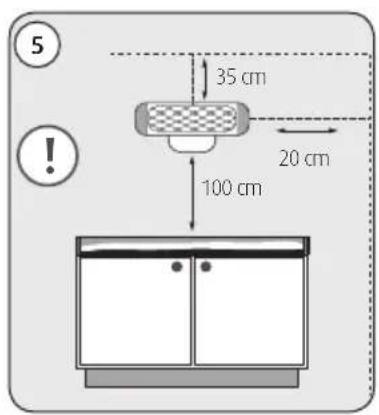
text_image
5 35 cm 20 cm 100 cm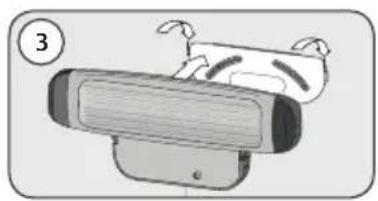
natural_image
Illustration of a cartoon-style airplane with wings and a seat, no text or symbols present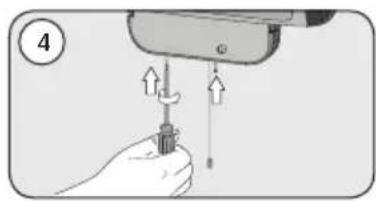
natural_image
Illustration of a hand using a screwdriver to lift a screw, with arrows indicating force direction (no text or symbols)flowchart
graph LR
    A["1: 230 V power plug"] --> B["2: Sensor with cable"]
    B --> C["ON 400 W power supply"]
    C --> D["2: ON 800 W power supply"]
    D --> E["OFF: Power output"]
Apagado automático
natural_image
Symbol of a trash bin crossed with no text or numbers, representing waste sorting or disposal (no text present)natural_image
Illustration of a smart security camera with mesh grille and display unit (no text or symbols)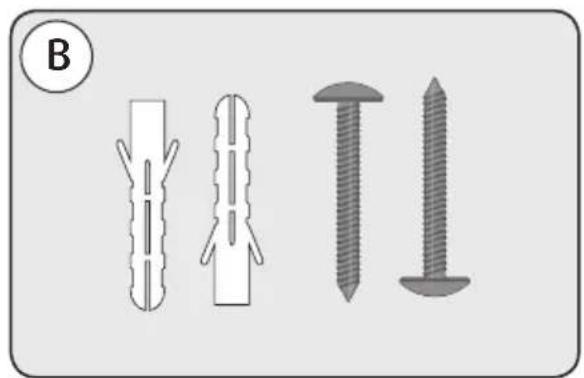
natural_image
Four types of screw and nut components shown in different orientations (no text or labels)natural_image
Diagram of a cylindrical device with a handle and labeled component (no text or symbols present)
natural_image
Diagram of a mechanical or electrical component with labeled parts (no readable text or symbols)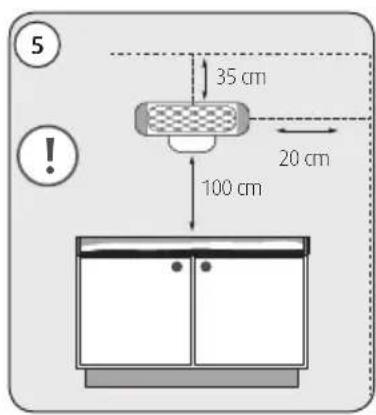
text_image
5 35 cm 20 cm 100 cm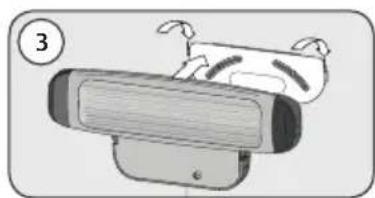
natural_image
Cartoon illustration of a robot-like device with a head and limbs, no text or symbols present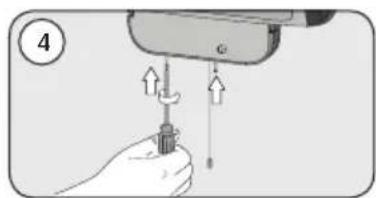
natural_image
Illustration of a hand using a screwdriver to lift a screw, with arrows indicating force direction (no text or symbols)natural_image
Symbol of a trash bin crossed with no text or numbers, representing waste sorting or disposal (no text present)natural_image
Illustration of a smart device with mesh grille and connector (no text or symbols)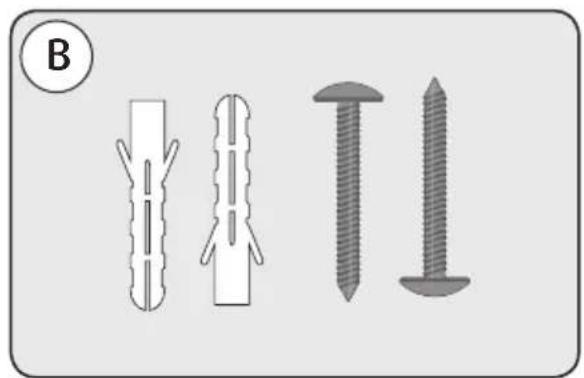
natural_image
Illustration of four different types of screw fasteners or fasteners, shown in separate diagrams with no text or symbols.natural_image
Diagram of a device with labeled component (1), showing internal components and wiring (no text or symbols)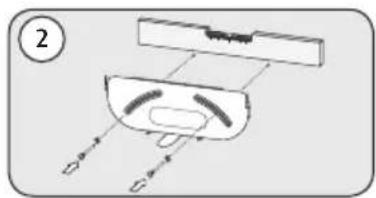
natural_image
Diagram of a device with labeled components and directional arrows, no readable text or symbols present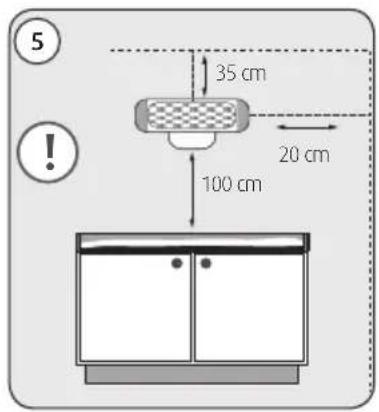
text_image
5 35 cm 20 cm 100 cm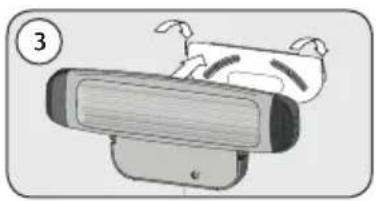
natural_image
Illustration of a cartoon-style robot with a head and limbs, no text or symbols present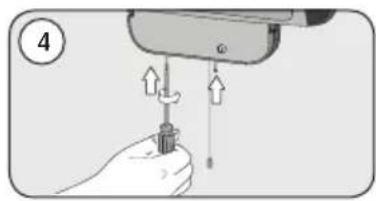
natural_image
Illustration of a hand holding a screwdriver with arrows indicating force application (no text or symbols)natural_image
Symbol of a trash bin crossed with a diagonal line, no text or numbers presentnatural_image
Illustration of a smart device with a mesh grille and attached sensor port (no text or symbols)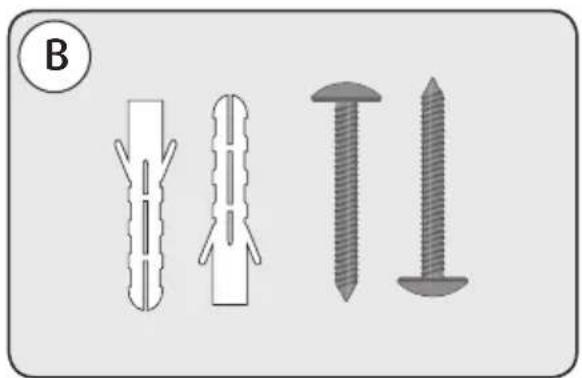
natural_image
Illustration of four different types of screw or nut components, shown in separate views (no text or symbols)
natural_image
Diagram of a cylindrical device with a handle and labeled component (no text or symbols present)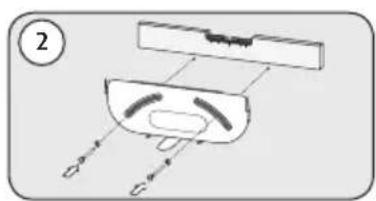
natural_image
Diagram of a mechanical or electrical component with labeled parts (no readable text or symbols)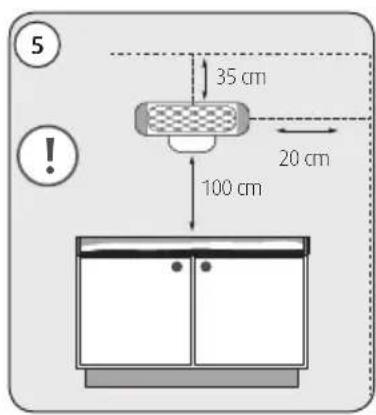
text_image
5 35 cm 20 cm 100 cm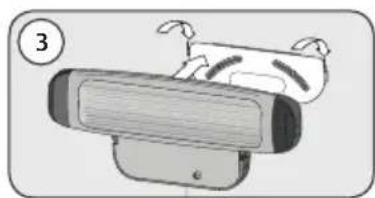
natural_image
Illustration of a cartoon-style robot with a face and limbs, no text or symbols present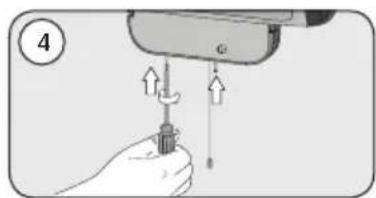
natural_image
Illustration of a hand using a screwdriver to lift a screw, with arrows indicating force direction (no text or symbols)flowchart
graph LR
    A["1: 230 V power plug"] --> B["2: Sensor with cable"]
    B --> C["ON 400 W power supply"]
    C --> D["2: ON 800 W power supply"]
    D --> E["OFF: Power output"]
natural_image
Symbol of a trash bin crossed with a diagonal line, no text or numbers presentnatural_image
Illustration of a smart device with a mesh grille and a curved handle, labeled 'A' in the top-left corner (no text or symbols on the device itself)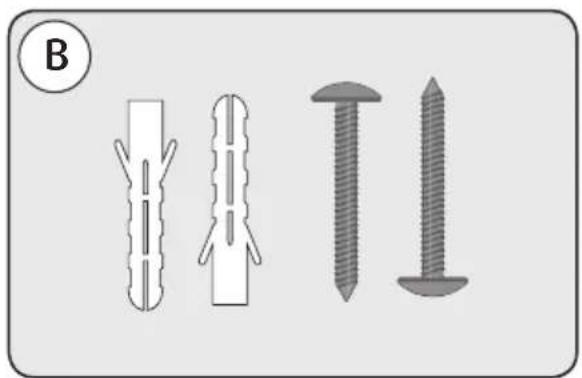
natural_image
Four different types of screw and nut components shown in line drawings (no text or symbols)Komponentbetegnelse
natural_image
Diagram of a mechanical component with a curved top and internal channels, labeled with number 1 (no text or symbols on the diagram itself)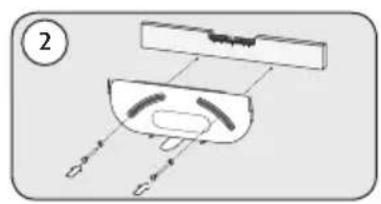
natural_image
Diagram of a mechanical component with labeled parts and directional arrows (no text or symbols)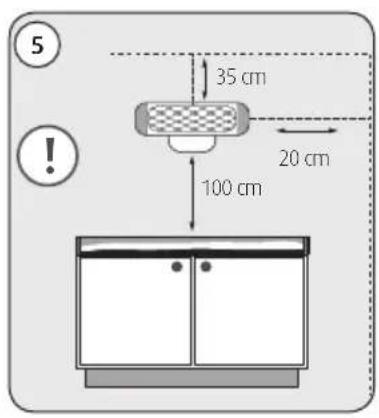
text_image
5 35 cm 20 cm 100 cm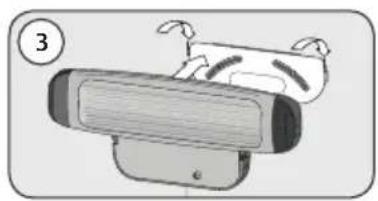
natural_image
Illustration of a cartoon-style robot with a head-mounted device and a small figure, no text or symbols present.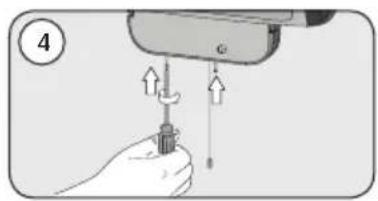
natural_image
Illustration of a hand holding a screwdriver with arrows indicating force application (no text or symbols)natural_image
Symbol of a trash bin with crossed lines indicating no waste or restriction, and a solid black rectangle below (no text or symbols)natural_image
Illustration of a smart security camera with mesh grille and display unit (no text or symbols)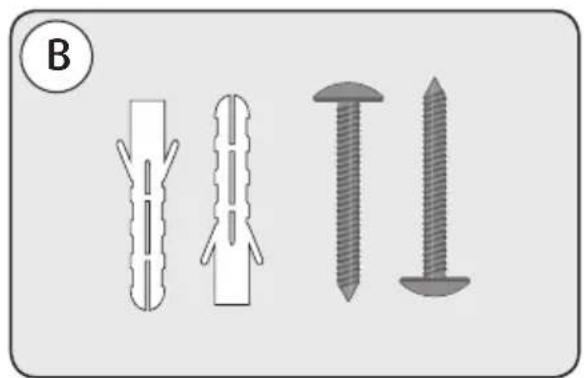
natural_image
Four types of screw and nut components shown in different orientations (no text or symbols)Χαρακτηρισμός μερών
natural_image
Diagram of a cylindrical device with a handle and labeled component (no text or symbols present)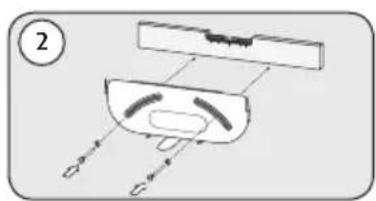
natural_image
Diagram of a mechanical or electrical component with labeled parts (no readable text or symbols)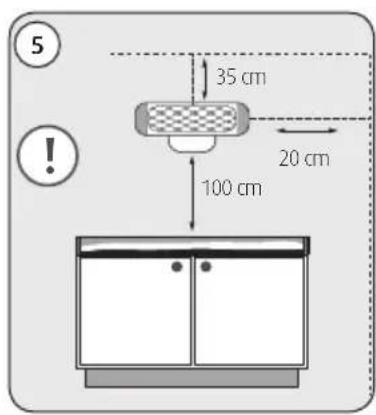
text_image
5 35 cm 20 cm 100 cm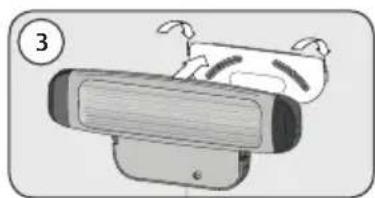
natural_image
Cartoon illustration of a robot-like device with a head and limbs, no text or symbols present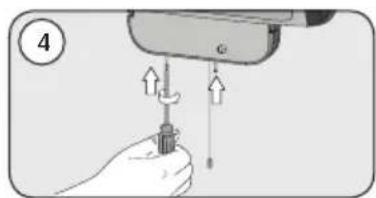
natural_image
Illustration of a hand using a screwdriver to lift a screw, with arrows indicating force direction (no text or symbols)natural_image
Symbol of a trash bin crossed with no text or numbers, representing waste sorting or disposal (no text present)natural_image
Illustration of a smart device with a mesh grille and attached sensor port (no text or symbols)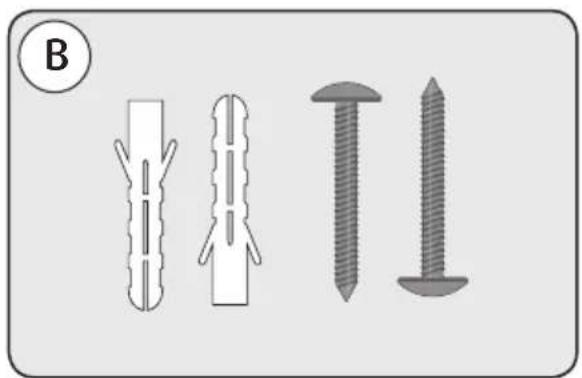
natural_image
Illustration of four different types of screw fasteners or fasteners, shown in separate diagrams with no text or symbols.Nazwa podzespołu
natural_image
Diagram of a cylindrical device with internal components and labeled parts (no text or symbols)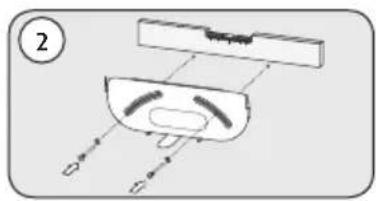
natural_image
Diagram of a device with labeled components and directional arrows, no readable text or symbols present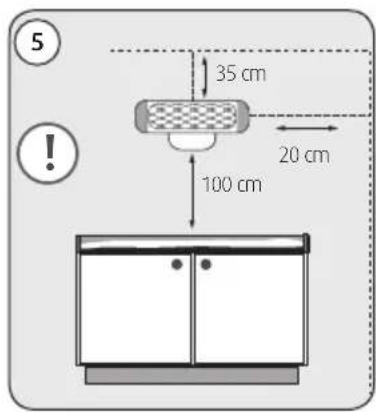
text_image
5 35 cm 20 cm 100 cm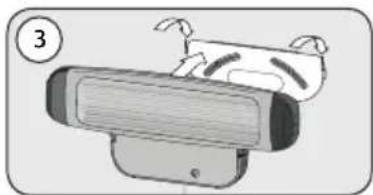
natural_image
Illustration of a cartoon-style robot with a face and limbs, no text or symbols present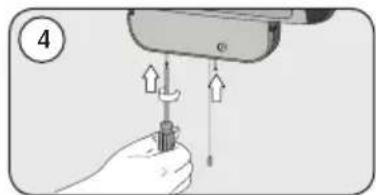
natural_image
Illustration of a hand holding a screwdriver with arrows indicating force application (no text or symbols)natural_image
Symbol of a trash bin crossed with no text or numbers, representing waste sorting or disposal (no text present)natural_image
Illustration of a smart device with a mesh grille and a handle, labeled 'A' in the top-left corner (no text or symbols on the device itself)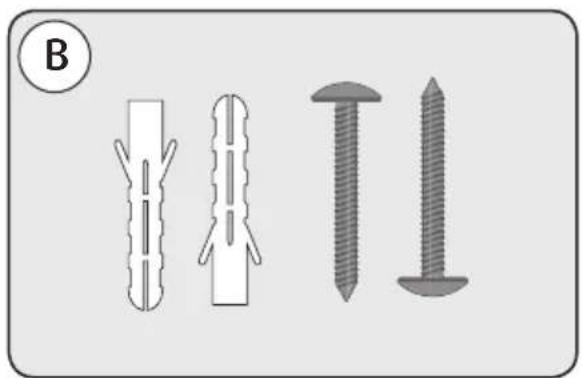
natural_image
Four types of screw and nut components shown in different orientations (no text or symbols)Popis částí
natural_image
Diagram of a cylindrical device with a handle and labeled component (no text or symbols present)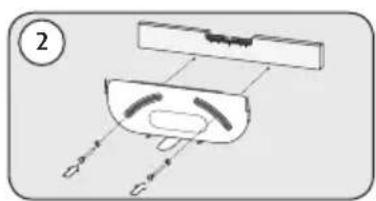
natural_image
Diagram of a mechanical or electrical component with labeled parts (no readable text or symbols)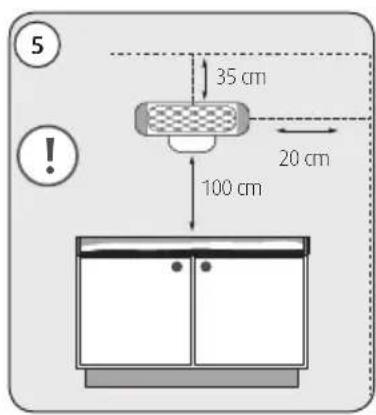
text_image
5 35 cm 20 cm 100 cm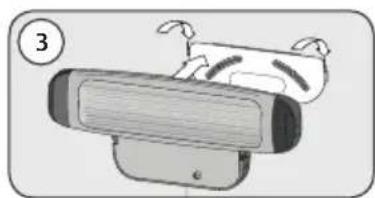
natural_image
Illustration of a cartoon-style robot with a face and limbs, no text or symbols present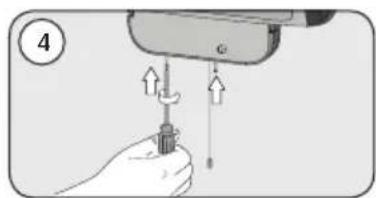
natural_image
Illustration of a hand using a screwdriver to lift a screw, with arrows indicating force direction (no text or symbols)flowchart
graph LR
    A["1: 230 V power plug"] --> B["2: Sensor with cable"]
    B --> C["ON 400 W power supply"]
    C --> D["2: ON 800 W power supply"]
    D --> E["OFF: Power output"]