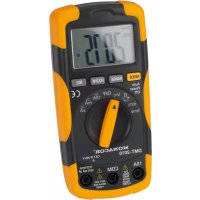
DMT2010 - Multimeter Monacor - Free user manual and instructions
Find the device manual for free DMT2010 Monacor in PDF.



| Product Type | Digital Multimeter |
| Brand | Monacor |
| Model | DMT2010 |
| Dimensions | 68 x 138 x 37 mm |
| Weight | 205 g |
| Power Supply | 9V battery (not included) |
| Display | LCD 3 3/4 digits, 21 mm |
| Measurement Rate | 2 measurements per second |
| Measurement Category | CAT III 250 V |
| DC Voltage | 400 mV to 600 V (accuracy ±0.5% to ±1.5%) |
| AC Voltage | 400 mV to 600 V, 50-400 Hz (accuracy ±1.2% to ±2.0%) |
| DC Current | 400 µA to 10 A (accuracy ±1.0% to ±2.5%) |
| AC Current | 400 µA to 10 A, 50-400 Hz (accuracy ±1.5% to ±3.0%) |
| Resistance | 400 Ω to 40 MΩ (accuracy ±1.0% to ±2.0%) |
| Capacitance | 40 nF to 100 µF (accuracy ±3.0% to ±5.0%) |
| Frequency | 5 Hz to 10 MHz (sensitivity >8V) |
| Temperature | -20°C to +760°C (type K probe not included) |
| Diode Test | Yes, forward voltage up to 0.999 V |
| Continuity Test | Yes, with buzzer (threshold <30 Ω) |
| Additional Functions | Manual range selection, relative value measurement, value hold, display backlight |
| Protection | Internal fuses 0.5A/250V and 10A/250V |
| Operating Temperature | 0°C to 50°C, humidity <70% |
| Maintenance and Cleaning | Dry, soft cloth, no chemicals |
| Spare Parts and Repairability | Fuses replaceable by a qualified technician; battery replaceable by the user |
| General Information | Supplied with test leads, warning stickers in 8 languages |
Frequently Asked Questions - DMT2010 Monacor
User questions about DMT2010 Monacor
0 question about this device. Answer the ones you know or ask your own.
Ask a new question about this device
Download the instructions for your Multimeter in PDF format for free! Find your manual DMT2010 - Monacor and take your electronic device back in hand. On this page are published all the documents necessary for the use of your device. DMT2010 by Monacor.
USER MANUAL DMT2010 Monacor
DIGITAL-MULTIMETER DIGITAL MULTIMETER
DMT-2010
Best.-Nr. 29.2040
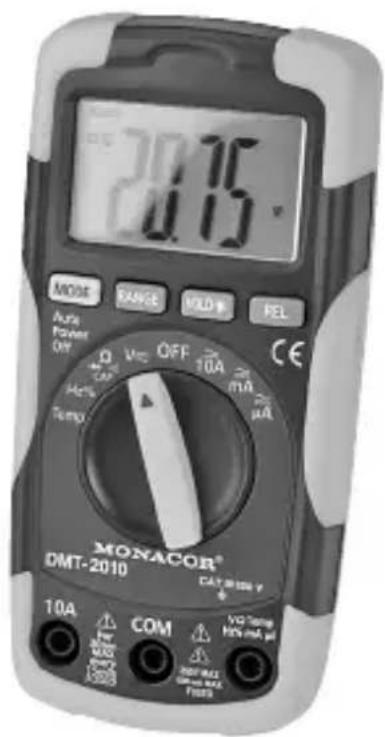
All operating elements and connections described can be found on page 2.
Contents
1 Operating Elements and Connections 15
2 Safety Notes 16
3 Applications 17
4 Operation 17
4.1 Connecting the test leads 17
5 Measuring 18
5.1 Measuring voltages 18
5.2 Measuring currents 18
5.3 Measuring resistances 19
5.4 Testing diodes 19
5.5 Testing the continuity 20
5.6 Measuring capacitances 20
5.7 Measuring frequencies / Measuring the duty cycle 21
5.8 Measuring temperatures 21
6 Additional Functions 22
6.1 Manual range selection 22
6.2 Measuring the relative value 22
6.3 Data hold function 23
6.4 Activating the display illumination 23
7 Replacing the Battery or the Fuses 23
8 Specifications 24
1 Operating Elements and Connections
1 LC display
2 Button "RANGE" for manual range selection
3 Button "MODE" to switch the measuring mode (e.g. DC or AC voltage measurement, frequency measurement or duty cycle)
4 Button "HOLD" to hold a measured value (press button briefly) and to activate the display illumination (keep button pressed for a while)
5 Button "REL" for measuring the relative value
6 Selector switch for the measuring functions
7 Jack for the red test lead for measuring currents exceeding 400mA to 10 A max.
8 Jack for the red test lead for measuring voltages, currents up to 400mA , resistances, diodes, capacitors, frequencies and for measuring the duty cycle; when measuring temperatures, connect the positive pole of a type K temperature sensor to this jack
9 Jack for the black test lead or, when measuring temperatures, for the negative pole of a type K temperature sensor
2 Safety Notes
The meter corresponds to all required directives of the EU and is therefore marked with
WARNING: With this meter, dangerous voltages can be measured. Particular attention should be paid when measuring voltages equal to or higher than 42V
- Wear protective gloves to protect yourself against electric shock.
- When applying the test tips, make sure that your fingers will be protected behind the collars of the tips.
- Never perform any measurements when the meter or the test leads are damaged. Always replace damaged test leads by original test leads.
Please observe the following items in any case:
- The unit is suitable for indoor use only. Protect it against dripping water and splash water, high air humidity and heat (admissible ambient temperature range 0 - 50°C ).
- For cleaning only use a dry, soft cloth; never use water or chemicals.
- No guarantee claims for the unit and no liability for any resulting personal damage or material damage will be accepted if the relevant safety regulations for handling voltages equal to or higher than 42V are not observed, if the meter is used for other purposes than originally intended, if it is not correctly connected or operated, if it is overloaded or not repaired in an expert way.
If the meter is to be put out of operation definitively, take it to a local recycling plant for a disposal which is not harmful to the environment.
3 Applications
This digital multimeter DMT-2010 with automatic range selection is suited for measuring voltages up to 250V = / , currents up to 10A = / , resistances up to 40MΩ , capacitances up to 100µF and frequencies up to 10MHz . Furthermore, it will measure the duty cycle of electric signals and the forward voltage of diodes. A buzzer is provided for testing the continuity.
4 Operation
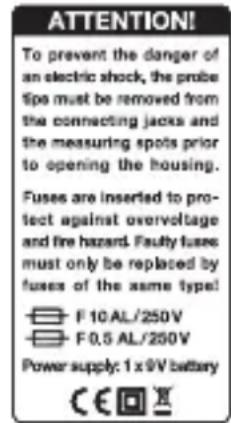
1) Caution labels in eight languages are supplied with the meter. Attach the corresponding label in your language (see figure on the right) to the field provided on the housing cover on the rear side of the meter!
2) To switch on the meter, set the selector switch (6) from the position "OFF" to the desired function. An indication will appear on the display (1). If the display remains dark or if the symbol appears, insert a new battery chapter 7.
3) To provide a more comfortable reading position, unfold the tilt stand on the rear side of the meter.
4) After operation, set the selector switch to "OFF". The meter will be switched off automatically if it is not used for approx. 30 minutes. To switch it on again, press a button or turn the selector switch.
If the meter is not used for a longer period, it is recommended to remove the battery to prevent any damage due to battery leakage.
4.1 Connecting the test leads
The test leads supplied with the meter will allow to perform all measurements except for temperature measurements ( chapter 5.8).
- Connect the black test lead to the jack "COM" (9).
- For measuring voltages, currents up to 400mA , resistances, diodes, capacitors and frequencies and for measuring the duty cycle, connect the red test lead to the jack "V Ω Temp Hz% mA " (8).
For measuring currents exceeding 400mA , connect the red test lead to the jack "10A" (7).
For measuring, remove the protective caps from the test tips and replace them after use.
WARNING: Measurements in circuits carrying more than 42V must only be made by persons able to recognize a hazard of contact and to take the required safety precautions. In case of measurements with a hazard of contact, avoid working on your own. Ask a second person to assist.
Caution: Before switching over to another measuring function, always remove the test tips from the object to be measured to prevent damage to the meter!
5.1 Measuring voltages
WARNING: Take into account unexpected voltages on objects to be measured. Capacitors, for example, may be dangerously charged even if the voltage source has been switched off.
- Never use this meter for measuring circuits with corona discharges (high voltage). Risk of electrocution!
- The maximum voltage to be measured must not exceed 250V = / otherwise you will risk your life!
Caution: When measuring voltages, do not connect the red test lead to the jack "10A" (7), otherwise the meter and the object to be measured may be damaged!
1) Set the selector switch (6) to the position "V"
2) Once the switch has been set to this position, the DC voltage measurement will be activated ("DC" will be displayed). For AC voltage measurements, press the button "MODE" (3) ["AC" will be displayed]. To return to DC voltage measurement, press the button "MODE" again.
3) Apply the test tips to the object to be measured and read the value on the display. If the red test tip is applied to the negative pole and the black tip to the positive pole when measuring DC voltages, there will be a minus sign in front of the value displayed.
5.2 Measuring currents
The current to be measured must not exceed 10 A!
- Currents between 400mA and 10A must not be measured for more than 30 seconds. There must be an interval of 15 minutes between
the individual measurements, otherwise the meter and the test leads may be damaged.
GB
1) For measurements up to 400mA , connect the red test lead to the jack "V Ω Temp Hz% mA " (8); for measurements exceeding 400mA to 10A , connect it to the jack "10A" (7). With unknown currents, start with the 10A range to be on the safe side.
2) According to the intensity of current, set the selector switch (6) to the following position:
for currents up to 4000µA position "μA"
for currents exceeding 4000µA to 400mA position "mA"
for currents exceeding 400mA to 10 A position "10A"
3) Once the switch has been set to one of the three current ranges, the mode "DC current measurement" will be activated ("DC" will be displayed). For AC current measurements, press the button "MODE" (3) ["AC" will be displayed]. To return to DC current measurement, press the button "MODE" again.
4) Insert the meter via the test leads into the circuit to be measured and read the value on the display. If the red test tip is applied to the negative pole and the black tip to the positive pole when measuring DC currents, there will be a minus sign in front of the value displayed.
5.3 Measuring resistances
- Never measure a resistor when voltage is applied; always measure it separately, otherwise the measurement will be inaccurate. For this purpose, it may be necessary to solder it out of the circuit.
1) Set the selector switch (6) to the position “ Ω → CAP ”. Once the switch has been set to this position, the mode “resistance measurement” will be activated.
2) Apply the test tips to the resistor and read the value on the display. As long as there is no resistor between the test tips, "OL" will be displayed to indicate an infinitely high value.
5.4 Testing diodes
- Never test a diode when voltage is applied; always test it separately, otherwise the measurement will be inaccurate. For this purpose, it may be necessary to solder the diode out of the circuit.
1) Set the selector switch (6) to the position “Ω CAP”.
2) To switch to diode test, press the button "MODE" (3) once (diode symbol will be displayed).
3) Apply the black test tip to the cathode of the diode and the red test tip to the anode. With a measurement current of approx. 0.3mA , a forward voltage up to 0.999V will be displayed. If a value around 0V is displayed, the diode has a short circuit. If "OL" is displayed, the diode is interrupted, reverse-biased (reverse the polarity of the diode) or has a higher forward voltage (e.g. LEDs).
5.5 Testing the continuity
- Never test the continuity when voltage is applied, otherwise the measurement will be inaccurate.
The continuity test will check the circuit for interruption.
1) Set the selector switch (6) to the position “Ω +CAP”.
2) To switch to continuity test, press the button "MODE" (3) twice (buzzer symbol will be displayed).
3) Apply the test tips to the measuring points. If the resistance value between the points is smaller than approx. 30Ω , the internal buzzer will sound. The resistance value will be displayed up to 400Ω . With higher values, the overload indication "OL" will appear.
5.6 Measuring capacitances
WARNING: Never measure a capacitor when it is charged or when operating voltage is applied; otherwise you will risk an electric shock. Furthermore, the measurement will be inaccurate.
Switch off the power supply and discharge the capacitor before soldering it out of the circuit.
1) Set the selector switch (6) to the position “Ω CAP”.
2) To switch to capacitance measurement, press the button "MODE" (3) three times ("nF" will be displayed).
3) Apply the test tips to the capacitor. With electrolytic capacitors, observe the polarity: Apply the red test tip to the positive pole, apply the black test tip to the negative pole. Read the value on the display. The measuring process may take a few seconds so that the accurate value will not be indicated immediately.
5.7 Measuring frequencies/Measuring the duty cycle

1) Set the selector switch (6) to the position "Hz%.
2) Once the switch has been set to the position "Hz%, the mode "frequency measurement" will be activated ("Hz" will be displayed). Although "AUTO" is not displayed, the range will be selected automatically.
To switch to duty cycle measurement, press the button "MODE" (3) ["%"] will be displayed]. The duty cycle (displayed in "%%") is the ratio between the period for which the signal is positive and the pulse duration, e. g.:
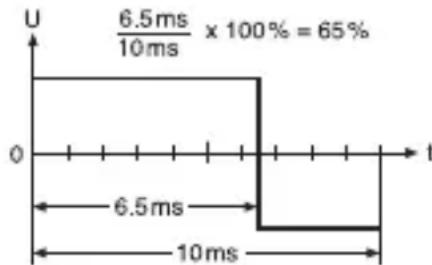
It will be possible to measure the duty cycle for the frequency range 5Hz - 150kHz . The period for which the signal is positive must be between 100 µs and 100 ms .
To return to frequency measurement, press the button "MODE".
3) Apply the test tips to the measuring points and read the value on the display.
5.8 Measuring temperatures
A type K temperature sensor (not supplied with the meter) will allow to measure the surface temperature of objects. Connect the sensor via banana plugs to the jacks of the meter.
The temperature measurement is not suitable for medical purposes!
WARNING: To avoid electric shock, do not apply the temperature sensor to any objects carrying voltage.
1) Set the selector switch (6) to the position "Temp".
2) The meter will indicate either Fahrenheit ("°F") or Celsius ("°C"). To change the temperature unit, open the housing cover on the rear side of the meter (Chapter 7), remove the battery, use a thin object to set the switch in the battery compartment to the corresponding position, reinsert the battery and screw down the cover.
3) Connect the positive pole of the sensor to the jack "V Ω Temp Hz% mA μA" (8) and the negative pole to the jack "COM" (9).
4) Apply the sensor to the object to be measured.
5) Once the value has stabilized (after approx. 30 seconds), read the temperature on the display.
6.1 Manual range selection
The optimum range for a measuring function will always be selected automatically when "AUTO" is displayed ("AUTO" will not be displayed when measuring frequencies chapter 5.7).
1) To hold a range selected automatically, press the button "RANGE" (2). "AUTO" will disappear.
2) Each time the button "RANGE" is pressed, the next higher range will be selected. This will reduce the resolution of the measured value, but it will prevent permanent switching if the measured value fluctuates between two ranges.
When the highest possible range has been reached and the button is pressed again, the smallest range will be selected. If the range is too small, "OL" (overload) will be displayed.
3) To return to automatic range selection, keep the button "RANGE" pressed for approx. 2 seconds until "AUTO" is displayed or select another measuring function with the selector switch (6).
Note: When measuring frequencies and capacitances, it will not be possible to deactivate the automatic range selection.
6.2 Measuring the relative value
This function will indicate deviations relative to a defined measured value. It will be available for measuring currents, voltages, resistances, capacitances and temperatures.
1) Perform a measurement. When the desired reference value is indicated, press the button "REL" (5). "REL" will be displayed.
If "OL" is displayed, it will not be possible to activate this function.
2) If the measured value changes, the deviation relative to the reference value will be displayed. When measuring the relative value, the automatic range selection will be deactivated (except for measuring capacitances).
3) To deactivate the relative value measurement, press the button "REL" once again. If required, keep the button "RANGE" pressed for approx. 2 seconds to activate the automatic range selection. The relative value measurement will also be deactivated when another measuring function is selected.
6.3 Data hold function
It will be possible to hold a measured value on the display, e. g. to be able to read the value more easily when the test tips have been removed from the object to be measured. For this purpose, press the button "HOLD" (4) briefly. "HOLD" will appear. To return to the present value, press the button "HOLD" briefly to deactivate the function ("HOLD" will disappear).
6.4 Activating the display illumination
To activate / deactivate the display illumination, keep the button "HOLD" (4) pressed for approx. 2 seconds.
Note: With this button, the function "Data hold" (chapter 6.3) will be activated / deactivated at the same time. Press the button briefly to deactivate or reactivate it.
7 Replacing the Battery or the Fuses
A If nothing is displayed or if the symbol (low battery) is displayed, insert a new 9 V battery.
B If it is not possible to measure currents, check the internal fuses and have them replaced by skilled personnel.
You will find the battery compartment and the fuse holders under the housing cover on the rear side of the meter.
WARNING: Before opening the housing, remove the test tips from the measuring points and the test leads from the jacks on the meter, otherwise you will risk an electric shock. Never operate the meter when it is open.
1) Fold up the tilt stand, release the two screws of the housing cover, then remove the cover.
2) To replace the battery, remove the old battery, connect the battery contacts to the new battery and insert it into the compartment.
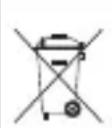
Used batteries must not be placed in the household waste, always take them to a special waste disposal, e. g. collection container at your retailer.
Replace a defective fuse by one of the same type only: range up to 400 mA F 0.5 AL/250 V range up to 10 A F 10 AL/250 V
3) Screw down the cover again before setting the meter into operation.

8Specifications
Data for measuring voltages, currents, resistances, capacitances and frequencies table on the next page
Display: 3 digits, 21 mm LCD
Measuring rate: 2 measurements per second
Measuring
category: . . . . . . . . . . . . . . . . . . . . . . . . . . . . . . . . . . . . . . . . . . . . . . . . . . . . . . . . . . . . . . . . . . . . . . . . . . . . . . . . . . . . . . .
Fuses: . . . . . . up to 400 mA: F 0.5 AL/250 V
400 mA to 10 A: F 10 AL/250 V
Overload
indication: . . . OL displayed
Diode test: . . . . display of the forward voltage up to 0.999 V,
measurement current 0.3mA approx.,
max. measurement voltage 1.5V approx.,
resolution 1mV
accuracy ± (10% + 5 digits)
Continuity
buzzer: . . . . . . response threshold < 30Ω approx.,
measurement current 0.3mA approx.
Duty cycle: . . . . measuring range 0.1 - 99.9 %,
resolution 0.1%
accuracy ± (1.2% + 2 digits),
frequency range 5Hz - 150kHz
sensitivity >8V
Temperature: .. measuring range -20 °C to +760 °C /4 °F to +1400 °F,
resolution 1°C / °F
accuracy ± (3% +5°C / 9°F)
Operating
conditions: . . . . 0 - 50 °C, relative humidity < 70 %
Power supply: .9 V battery (not supplied)
Dimensions: . . . 68 x 138 x 37 mm
Weight: 205 g
| Voltage/Current/Resistance/Capacitance/Frequency | |||
| Function Range Resolution Accuracy | |||
| DC voltage Input impedance 7.8 MΩ | 400 mV 0.1 mV ±(0.5 % + 2 digits) | ||
| 4 V 1 mV | ±(1.2 % + 2 digits)40 V 10 mV | ||
| 400 V 100 mV | |||
| 600 V 1 V ±(1.5 % + 2 digits) | |||
| AC voltage Input impedance 7.8 MΩ Frequency range 50 - 400 Hz | 400 mV 0.1 mV ±(1.5 % + 70 digits) | ||
| 4 V 1 mV ±(1.2 % + 3 digits) | |||
| 40 V 10 mV | ±(1.5 % + 3 digits) | ||
| 400 V 100 mV | |||
| 600 V 1 V ±(2.0 % + 4 digits) | |||
| DC current | 400 μA 0.1 μA ±(1.0 % + 3 digits) | ||
| 4000 μA 1 μA | ±(1.5 % + 3 digits)40 mA 10 μA | ||
| 400 mA 100 μA | |||
| 10 A 10 mA ±(2.5 % + 5 digits$) | |||
| AC current Frequency range 50 - 400 Hz | 400 μA 0.1 μA ±(1.5 % + 5 digits) | ||
| 4000 μA 1 μA | ±(1.8 % + 5 digits)40 mA 10 μA | ||
| 400 mA 100 μA | |||
| 10 A 10 mA ±(3.0 % + 7 digits$) | |||
| Resistance | 400 Ω | 0.1 Ω | ±(1.2 % + 4 digits) |
| 4 k Ω | 1 Ω | ±(1.0 % + 2 digits) | |
| 40 kΩ | 10 Ω | ±(1.2 % + 2 digits)400 kΩ 100 | |
| 4 M Ω 1 k Ω | |||
| 40 MΩ | 10 kΩ | ±(2.0 % + 3 digits) | |
| Capacitance | 40 nF | 10 pF | ±(5.0 % + 7 digits) |
| 400 nF | 0.1 nF | ±(3.0 % + 5 digits)4 μF 1nF | |
| 40 μF 10 nF | |||
| 100 μF 0.1 μF | ±(5.0 % + 5 digits) | ||
| Frequency Sensitivity > 8 V | 5 Hz | 0.001 Hz | ±(1.5 % + 5 digits) |
| 50 Hz 0.01 Hz | |||
| 500 Hz 0.1 Hz | |||
| 5 kHz | 1Hz | ±(1.2 % + 3 digits) | |
| 50 kHz | 10 Hz | ||
| 500 kHz | 100 Hz | ||
| 5 MHz 1 kHz | ±(1.5 % + 4 digits) | ||
| 10 MHz 10 kHz | |||
Subject to technical modification.
All rights reserved by MONACOR® INTERNATIONAL GmbH & Co. KG. No part of this instruction manual may be reproduced in any form or by any means for any commercial use.
Table des matieres
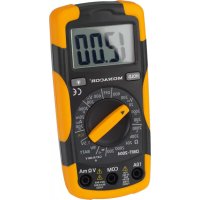
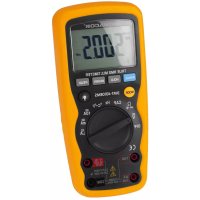
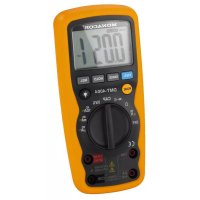
- DIGITAL-MULTIMETER DIGITAL MULTIMETER
- DMT-2010
- CONTENTS
- 1 OPERATING ELEMENTS AND CONNECTIONS
- 2 SAFETY NOTES
- 3 APPLICATIONS
- 4 OPERATION
- 4.1 CONNECTING THE TEST LEADS
- 5.1 MEASURING VOLTAGES
- 5.2 MEASURING CURRENTS
- 5.3 MEASURING RESISTANCES
- 5.4 TESTING DIODES
- 5.5 TESTING THE CONTINUITY
- 5.6 MEASURING CAPACITANCES
- 5.7 MEASURING FREQUENCIES/MEASURING THE DUTY CYCLE
- 5.8 MEASURING TEMPERATURES
- 6.1 MANUAL RANGE SELECTION
- 6.2 MEASURING THE RELATIVE VALUE
- 6.3 DATA HOLD FUNCTION
- 6.4 ACTIVATING THE DISPLAY ILLUMINATION
- 7 REPLACING THE BATTERY OR THE FUSES
- 8SPECIFICATIONS
- TABLE DES MATIERES
Brand : Monacor
Model : DMT2010
Category : Multimeter