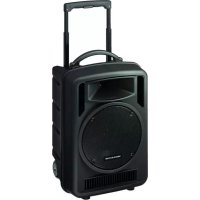
TXA1022CD - Loudspeaker Monacor - Free user manual and instructions
Find the device manual for free TXA1022CD Monacor in PDF.


| Product type | Portable amplified system with 2-way active speaker, class D amplifier, CD/MP3 player, Bluetooth receiver and UHF radio modules |
| Brand | Monacor |
| Model | TXA1022CD |
| Dimensions (W × H × D) | 360 × 580 × 320 mm |
| Weight | 19.2 kg |
| Mains power | 230 V / 50 Hz |
| Battery power | Internal lead-gel batteries 2 × 12 V / 4.5 Ah, battery life 4 to 6 h |
| Amplifier power (RMS / music) | 120 W / 170 W |
| Speakers | Woofer 25 cm (10 inch), tweeter 2.5 cm (1 inch) |
| Frequency range | 20 - 20,000 Hz |
| Audio inputs | 2 × mic (6.35 mm jack / XLR), 2 × line (RCA), 1 × aux (3.5 mm jack) |
| Audio outputs | Line (RCA), aux (3.5 mm jack) |
| Wireless connectivity | Bluetooth (A2DP), UHF 2-channel reception (863.1 - 864.9 MHz), UHF transmission (same band) |
| Integrated player | CD/MP3, USB, SD/SDHC card with infrared remote control |
| Equalizer | Bass (BASS) and treble (TREBLE) |
| Microphone priority function | Yes, with dedicated button |
| Operating temperature | 0 °C to 40 °C |
| Maintenance and cleaning | Use a dry, soft cloth. Do not use chemicals or water. |
| Safety | Do not open the device. Protect from water splashes and humidity. Disconnect in case of visible damage. |
| Spare parts / repairability | The batteries are internal and replaceable by a technician. The remote control uses a CR2025 battery. |
| General information | Compliant with European directives. Declaration of conformity available at www.monacor.com. |
Frequently Asked Questions - TXA1022CD Monacor
User questions about TXA1022CD Monacor
0 question about this device. Answer the ones you know or ask your own.
Ask a new question about this device
Download the instructions for your Loudspeaker in PDF format for free! Find your manual TXA1022CD - Monacor and take your electronic device back in hand. On this page are published all the documents necessary for the use of your device. TXA1022CD by Monacor.
USER MANUAL TXA1022CD Monacor
High-Power Amplifier System
These operating instructions are intended for users of the amplifier system (e.g. DJs, speakers at public and private events) and do not require any specific technical knowledge. Please read the instructions carefully prior to operation and keep them for later reference.
All control elements and connections described can be found on the fold-out page 3.
1 Applications
This active speaker system TXA-1022CD is a combination of a two-way speaker system and a class D amplifier and is especially designed for mains-independent operation. For power supply, the unit is equipped with two lead gel batteries that are charged when the unit is connected to the mains. Thus, the unit is ideally suited for mobile PA applications, e.g. at events and lectures.
The active speaker system is equipped with controllable inputs for the connection of two microphones and two audio sources with line signal level (e.g. CD / MP3 player) as well as with two outputs (e.g. for the connection of another active speaker system). Audio data of a Bluetooth audio source (e.g. smartphone) can be reproduced via the integrated Bluetooth receiver. Further equipment:
two-channel receiver module (2× 16 channels in the UHF frequency range 863.1 - 864.9MHz) for operation with two wireless transmitters; the transmitters of the series TXA-800, for example, may be used as wireless transmitters
audio player to replay CDs, USB storage media and memory cards
- transmitter module (16 channels in the UHF frequency range 863.1 - 864.9 MHz) for wireless transmission of the output signal to additional active speaker systems of the series TXA-800/-1020
1.1 Conformity and approval
Herewith, MONACOR INTERNATIONAL declare that the receiver module and the transmitter module of the unit TXA-1022CD comply with the directive 2014/53/EU. The EU declaration of conformity is available on the Internet:
www.monacor.com
The receiver module and the transmitter module are generally approved for operation in EU and EFTA countries; they are licence-free and require no registration.
2 Safety Notes
The unit corresponds to all relevant directives of the EU and is therefore marked with CC
WARNING
The unit uses dangerous mains voltage. Leave servicing to skilled personnel. Inexpert handling may result in electric shock.
The unit is suitable for indoor use only. Protect it against dripping water and splash water, high air humidity and heat (admissible ambient temperature range 0 - 40°C
- Do not place any vessel filled with liquid on the unit, e. g. a drinking glass.
- Do not operate the unit and immediately disconnect the mains plug from the socket
- if the unit or the mains cable is visibly damaged,
-
if a defect might have occurred after the unit was dropped or suffered a similar accident,
-
if malfunctions occur.
In any case the unit must be repaired by skilled personnel.
- Never pull the mains cable to disconnect the mains plug from the socket, always seize the plug.
For cleaning only use a dry, soft cloth; never use water or chemicals. - No guarantee claims for the unit and no liability for any resulting personal damage or material damage will be accepted if the unit is used for other purposes than originally intended, if it is not correctly connected or operated, or if it is not repaired in an expert way.

e unit is to be put out of operation nittively, take it to a local recycling it for a disposal which is not harmto the environment.
3 Overview
1 Display of the 2-channel receiver module, indicates the transmission channel and, by means of a segment bar, the strength of the radio signal received (left: receiver unit A, right: receiver unit B)
2 Power switch and volume control, for receiver unit A and receiver unit B of the 2-channel receiver module
3 Buttons to set the 2-channel receiver module: chapter 7.1
4 Status indicators for the rechargeable batteries
When operated with rechargeable batteries: The respective LED indicates the charging state of the batteries. When the LED "20%" starts flashing, recharge the batteries as soon as possible.
When connected to the mains: The LEDs light up continuously one after the other while the batteries are being recharged. When the batteries have been completely recharged, the LED "FULL" will light up.
5 POWER switch of the unit, will light up during operation
6 Tone controls: TREBLE for high frequencies and BASS for low frequencies
7 Volume control for the input signal of the jacks LINE IN (13)
8 Volume control for the input signal of the jack AUX IN (15) and for the integrated Bluetooth receiver
9 Volume control for the input signal of jack MIC 2 (17)
10 Volume control for the input signal of jack MIC 1 (18)
11 Control MASTER for the overall volume
12 Button VOICE PRIORITY with LED indicator for the microphone priority function: When the button is pressed (LED illuminated), the volume of the other audio sources will be substantially reduced during microphone announcements.
13 Input LINE IN (RCA jacks) to connect an audio source with line signal level, e. g. CD/ MP3 player
14 Outputs LINE OUT (RCA jacks) and AUX OUT (3.5 mm jack) to feed the mixed signal of the audio sources used to another active speaker system or to a recorder, for example
Note: The tone controls (6) and the control MASTER (11) will not have any effect on the output signals at these jacks.
15 Input AUX IN (3.5 mm jack) to connect an audio source with line signal level, e.g. CD/MP3 player
16 Button to switch the Bluetooth receiver on (keep pressed for a longer period of time) or off (press briefly) (7.2)
Button flashes:
no connection to the Bluetooth audio source. Button continuously illuminated: connection to Bluetooth audio source established
17 Input MIC2 (6.3 mm jack) to connect a microphone
18 Input MIC 1 (combined 6.3 mm jack / XLR jack) to connect a microphone
19 Mains jack for connection to a mains socket (230 V/ 50 Hz) via the mains cable provided
| MEMO REP1 ALL RAN PROOF A-B M3 CD II ▲▲▲▲▲▲▲▲▲▲▲▲▲▲▲▲▲▲▲▲▲▲▲▲▲▲▲▲▲▲▲▲▲▲▲▲▲▲▲▲▲▲▲▲▲▲▲▲▲▲▲▲▲▲▲▲▲▲▲▲▲▲▲▲▲▲▲▲▲▲▲▲▲▲▲▲▲▲▲▲▲▲▲▲▲▲▲▲▲▲▲▲▲▲▲▲▲▲▲▲▼ Display | |
| MP3 Media "M3" Audio CDs "CD" Replay ▼Pause : ■ number of the title in the folder and time played of the title (keeps flashing in the pause mode) When the player is stopped: When the player number of folders and titles, e. g. 10-57 10 folders, 57 titles | Replay ▼Pause : ■ number of the title and time played of the title (keeps flashing in the pause mode) is stopped: number of titles, e. g. 20-0000 20 titles |
| "REP1" repeat of the title "REP1 F" repeat of the folder "ALL" repeat of all titles "RAN" random replay "A→B" starts flashing when the start of a loop has been defined and is always indi- cated while the loop is replayed "PROG" while a title sequence is programmed. "MEMO" while the title sequence is replayed | |
20 POWER button to switch the player on/off
21 IR sensor for the signals of the remote control
| Control element | Function | ||
| on the remote control | |||
| on the player | |||
| Volume | |||
| to set the volume | |||
| 23 | |||
| MODE | to switch between CD, USB storage medium and memory card | ||
| MODE | |||
| 24 | |||
| PLAY | to start the replay and to switch between replay and pause | ||
| PLAY | |||
| Stop mode / Ejecting the CD | |||
| STOPJE | to stop the replay; in the stop mode: to eject the CD | ||
| EJECT | When the CD has been ejected and has not been removed, press this button to retract the CD again. | ||
| STOP | to stop the replay | ||
| 26 | |||
| FOLDER | to go to the next folder (▶) or to the previous folder (▲) | ||
| FOLDER | to go to the next folder | ||
| 27 | |||
| Skipping titles/ fast forward/reverse | |||
| PREV- SKIP-F.WC | →i: to go to the next title, i←: to go to the beginning of the title; each time the button is pressed again, the player will go back one title at a time fast forward/reverse: keep i←or i←pressed | ||
| REV. F.WD | →i: to go to the next title, i←: to go to the beginning of the title; each time the button is pressed again, the player will go back one title at a time | ||
| FB. FF | fast forward/reverse: briefly press ▷ or ▷. At the desired spot, press ▷. | ||
Notes
- Selecting folders and titles during replay/pause:
Select the folder (brief indication of folder number and time 00:00): the replay of title 1 in the folder will start. If required, go to another title.
Selecting folders and titles in the stop mode:
Select the folder and go to the desired title in the folder (indication of folder number and title number in the folder). Start the replay.
- Button When this button is pressed while the player is in the pause mode (during CD operation) or within a programmed title sequence, the player will immediately go back one title.
| Control element | Function | |
| on the remote control on the player | ||
| 28 | Continuous repeat/ ID3 tag feature | |
| REP1D3 | to switch between: - repeat of the title ("REP1") - repeat of the folder ("REP1 F") - repeat of all titles ("ALL") - no repeat To activate the ID3 tag feature*, keep the button pressed for 2 seconds during the replay: File name ("FILE"), title name ("TITLE"), artist ("ARTIST") and album ("ALBUM") will scroll through the display. To deactivate the feature, keep the button pressed again for 2 seconds. The feature will automatically be deactivated when the next title is reached or when a button is pressed. * for MP3 media only | |
| ID1 REP1 | ||
| 29 | Continuous random replay/ Confirming the title selection | |
| RANENT | to replay all titles in random order ("RAN"): on/off to confirm the title selection: see position 30 | |
| RAN | to replay all titles in random order ("RAN"): on/off | |
| ENTER | to confirm the title selection: see positions 30 and 33 | |
| 30 | Programming a title sequence | |
| PROGRAM PROG | 1. Press PROG ("PROG" will be indicated).2. Select the first title: - press 1←/→1 to go to the title; select the folder before selecting the title, if required or - use the numerical keys to enter the title number* and press RAN/ENT. or ENTER to confirm the title selection. 3. Proceed in the same way to program all other titles (10 max.).4. Press ▶ to start the title sequence ("MEMO" will be indicated).5. Press PROG to return to the normal replay mode: the title sequence will be deleted. If no repeat function has been activated ("REP1" and "ALL" are available), the player will stop when the title sequence has been replayed and the title sequence will be deleted. * for MP3 media with several folders: The number of the title on the medium, not the number in the folder! | |
| PROG | ||
| 31 | Muting the sound | |
| MUTE | to mute/unmute the sound | |
| 32 | Changing the speed (and the pitch) | |
| SPEED | HI(GH): to increase the speed in 10 steps LOW: to reduce the speed in 10 steps NOR: to return to normal speed Press HI(GH) or LOW repeatedly until the desired speed is reached. The display will briefly indicate the setting, e.g. | |
| LOW NCR | PH 05 normal speed increased by 5 steps PH-02 normal speed reduced by 2 steps | |
| 33 | Selecting a title via the title number | |
| 1...0 | Enter the title number* and press ENTER to confirm. * for MP3 media with several folders: The number of the title on the medium, not the number in the folder! | |
| 34 | Repeating a section within a title (continuous loop) | |
| A-B | Press the button at the start and at the end of the section. To exit the loop, press the button once again. | |
A CD slot: insert the CD until it is retracted automatically
B USB port to connect a USB flash drive or a USB hard disk with separate power supply
C Slot for an SD/SDHC memory card
3.2 Transmitter module AUDIO LINK TX
see figure ⑥
Wireless audio link mode: Via the transmitter module of an active speaker system TXA-1022CD (master unit), its output signal can be transferred to the receiver modules of other active speaker systems (slave units) of the series TXA-800 / -1020. At the receiver modules of the slave units, set the transmission channel and set the transmitter module of the master unit to the same channel. Please note: At the master unit, the receiver module and the transmitter module must be set to different channels; otherwise, there will be feedback.
Note: The tone controls (6) and the control MASTER (11) at the master unit will not have any effect on the output signal of the transmitter module.
| Control elements and display | |
| 35 | Display to indicate the transmission channel (CH 1 ... CH 16) |
| 36 | Transmission indicator; will light up when the transmitter module is switched on |
| 37 | Level indicators for the audio signal at the input of the transmitter module - yellow LED: will light up when a specific minimum level has been reached -red LED: overload indicator, should only light up briefly for signal peaks; if it lights up continuously, reduce the volume of the respective audio source(s) |
| 38 | Buttons for setting the transmission channel: 1. Press the button SET: The channel indication on the display will start flashing. 2. As long as the channel indication flashes (10 seconds), the arrow buttons can be used to select the channel. 3. Confirm the selected channel with the button SET (otherwise, the transmitter module will return to the previously set channel after 10 seconds). To briefly indicate the radio frequency during operation, keep one of the arrow buttons pressed: The display will indicate the frequency instead of the channel while the arrow button is pressed. |
| 39 | Power switch and volume control of the transmitter module |
4 Setting Up/Transporting
Place the unit as desired or mount it onto a PA speaker stand via the stand sleeve on its lower side.
For transporting, the unit is provided with a telescopic handle. Push down the unlock button at the lower side of the handle and extract/ retract the handle as desired.
5 Power Supply
5.1 Mainsoperation/ Recharging the batteries
To operate the unit via the mains and/or to recharge the internal batteries, connect the mains cable provided to the mains jack (19) and to a mainssocket(230V/50Hz).
When the unit is connected to the mains, the batteries will be automatically recharged: During the recharge, the LED indicators for the battery status (4) will light up continuously one after the other. It is not necessary to switch on the unit for recharging; however, it can be operated during the recharging process. Once the recharging process has been completed, the LED "FULL" will light up continuously.
After operation or after recharging the batteries, disconnect the unit from the mains to avoid unnecessary power consumption.
5.2 Battery operation
During battery operation, the respective LED (4) will indicate the charging state of the rechargeable batteries:
FULL 80-100% charged
80% less than 80% charged
50% less than 50% charged
20% less than 20% charged
Important: To prevent damage to the batteries due to deep discharge and to prevent a reduction of their lifetime, please observe the following notes:
Always fully recharge the batteries prior to initial operation and after longer storage.
- When the LED "20%" starts flashing, the batteries are almost discharged and should be recharged as soon as possible.
Fully recharge the batteries prior to longer storage and at least every two months during storage.
6 Audio Connections
Switch off the unit prior to making any connection.
6.1 Inputs
Two microphones can be connected: via an XLR plug or a 6.3 mm plug, to the jack MIC 1 (18) or, via a 6.3 mm plug, to the jack MIC 2 (17).
Audio units with line signal level (e.g. CD / MP3 player, mixer, tape deck, tuner) can be connected to the RCA jacks LINE IN (13) and the 3.5mm jack AUX IN (15). It is possible to connect both mono units and stereo units; in case of a stereo input signal, the left channel and the right channel are combined to a mono signal.
6.2 Outputs
Additional audio units such as a recorder or another active speaker system can be connected to the outputs LINE OUT and AUX OUT (14). At both outputs, the mixed signal of the audio sources will be available, unaffected by the tone controls (6) and the control MASTER (11). At each output jack - the two RCA jacks and the 3.5mm jack - a mono signal is available.
7 Operation

Never adjust the active speaker
system to a very high volume. Permanent high volumes may damage your hearing!
Your ear will get accustomed to high volumes which do not seem to be that high any more after some time. Therefore, do not further increase a high volume after getting used to it.
1) Prior to switching on the unit, set the control MASTER (11) to "MIN".
2) To switch the unit on and off, use the POWER switch (5). The switch will be illuminated when the unit is switched on. The battery status indicators (4) will indicate the charging status of the rechargeable batteries.
To prevent damage to the batteries by deep discharge during battery operation, a discharge protection will automatically switch off the unit when required. However, due to self-discharge of the batteries, a deep discharge may also occur when the unit is not
operated for a longer period of time. Therefore, always observe the box "Important" in chapter 5.2.
3) Switch on the audio sources that are to be audible and then adjust their volume with the corresponding controls (see below); use the control MASTER (11) to adjust the overall volume for the active speaker system.
Volume adjustment of the audio sources:
for the two receiver units of the 2-channel receiver module, use the corresponding volume control (2), CH.A or CH.B operation: see chapter 7.1
for the integrated audio player, use the VOLUME control (22) operation: see chapters 7.3 and 3.1
for a unit connected to the input AUX IN (15) and the Bluetooth receiver, use the volume control (8) of the operating panel AUX operation of the Bluetooth receiver: see chapter 7.2
Note: The control will determine the volume of the mixed signal of both sources when they are used at the same time.
- for a unit connected to the input LINE IN (13), use the volume control (7) of the operating panel LINE
for a microphone connected, use the volume control (10 or 9) above the corresponding input
Switch unused sources off or set their volume to minimum.
4) To operate the transmitter module: see chapter 3.2.
5) Use the high-frequency control TREBLE and the low-frequency control BASS (6) to adjust the tone of the active speaker system.
6) Use the button VOICE PRIORITY (12) to activate the microphone priority function. When the button is pressed (LED beneath the button illuminated), the volume of the music currently played will be substantially reduced while announcements via a microphone connected or a wireless microphone are being made. To deactivate the function, disengage the button again.
Note: The function will also have an effect on the output signal of the jacks LINE OUT and AUX OUT (14) as well as on the output signal of the transmitter module.
7.1 Operating the receiver module
Using the 2-channel receiver module and two appropriate transmitters (e.g. pocket transmitter TXA-800HSE, wireless microphone TXA-800HT), two transmission paths can be established.
1) The receiver units A and B of the module provide a control (2), CH.A and CH.B respectively, to adjust the volume and to switch them on and off. To switch a receiver unit on, advance the corresponding control from the position "OFF". The left half of the display (1) applies to receiver unit A, the right half applies to receiver unit B. When a receiver unit has been switched on, the corresponding half of the display will indicate the transmission channel. To indicate the radio frequency, press an arrow button ( for unit A, for unit B). The previous indication will reappear after 2 seconds.
2) Use the buttons (3) of the module to set the transmission channels, either manually or by means of an automatic scan. Leave the corresponding transmitters switched off for the time being.
Channel scan:
Keep the buttons and simultaneously pressed for approx. 1 second until SCRn appears on the display. The scan will start: The receiver units will be set to free channels without mutual interference. If no free channels are found, the channels set will be kept.
Manual channel selection:
If both receiver units A and B are switched on:
- Keep the button SET pressed until the channel indication for receiver unit A starts flashing on the display.
- Select the channel for receiver unit A with the button Δ or and then confirm with the button SET.
- The channel indication for receiver unit B starts flashing on the display. Select the channel for receiver unit B with the button Δ or and then confirm with the button SET.
If only one receiver unit A or B is switched on: Keep the button SET pressed until the channel indication starts flashing on the display. Select the channel with the button Δ or and then confirm with the button SET.
If a channel is not confirmed within 10 seconds with the button SET, the setting mode will be exited and the channel previously set will be kept.
Note: The receiver units cannot be set to the same channel.
If, with the transmitter switched off, the respective segment bar A or B on the display indicates reception, interference signals or signals from other transmitters are being received. In this case, select a different channel.
3) Switch the transmitters on and set them to the channels of the receiver module: Set one transmitter to the channel of receiver unit A and set the second transmitter to the channel of receiver unit B.
The respective segment bars on the display will indicate the strength of the radio signals received. Use the controls (2) to adjust the desired volume for each receiver unit.
If no reception is indicated or if the reception is poor, check if:
- the batteries of the transmitter are discharged.
the reception is disturbed by metal objects or other high-frequency sources.
the distance between the transmitter and the receiver module is too long.
the threshold value for interference suppression (squelch) is too high (see chapter 7.1.2).
7.1.1 Changing the group setting
(for operation with 2 receiver modules)
The unit can be extended by another 2-channel receiver module (available as article TXA-1020MR). To set the four transmission channels via channel scan, change the group setting of both receiver modules:
1) Switch off the receiver units A and B. Then keep the button SET pressed while switching on a receiver unit. The display will indicate the current group setting F(with the number flashing).
2) Use the button or to switch to F2
3) Press the button SET to exit the group setting mode. The squelch setting mode will be activated; to exit the mode, press the button SET.
Note: The setting modes will be automatically exited after 5 seconds if no button is pressed. Any settings made will be saved.
Perform the channel scan for the first receiver module, switch on the appropriate two transmitters and set them accordingly. Leave the two transmitters switched on so that channels already used will be skipped during the channel scan for the second receiver module. Then perform the channel scan for the second receiver module, switch on the two appropriate transmitters and set them accordingly.
7.1.2 Setting the squelch
The squelch function will mute the respective receiver unit when the level of the radio signal falls below the threshold value adjusted. Thus, interference signals will not cause noise when the transmitter is switched off or when its radio signal is insufficient: If the levels of the interference signals are below the threshold value, the receiver unit will be muted.
A high threshold value offers high interference resistance, but it will also reduce the transmission range. Thus, when the reception is good, a high threshold value can be used; however, when the transmitter and the receiver are far apart, a low threshold value is recommended.
1) Switch off the receiver units A and B. Then keep the button SET pressed while switching on a receiver unit. The display will indicate the group setting (For, with the number flashing).
2) Press the button SET to exit the group setting mode and to activate the squelch setting mode: for "Squelch") and the current value (flashing) will appear on the display.
3) Use the button or to set the value (level 7 = highest threshold value). Press the button SET to exit the squelch setting mode.
Note: The setting modes will be automatically exited after 5 seconds if no button is pressed. Any settings made will be saved.
7.2 Operating the Bluetooth receiver
The Bluetooth receiver can be used to establish a wireless connection to a Bluetooth audio source (e.g. smartphone, tablet PC, MP3 player) which allows the amplifier system to replay audio data.
Note: The Bluetooth source must be compatible with the A2DP protocol (Advanced Audio Distribution Profile); otherwise, no wireless connection will be possible.
1) To switch on the Bluetooth receiver, keep the button (16) pressed for approx. 2 seconds. The button will start flashing to indicate that there is no connection to the Bluetooth source and that the Bluetooth receiver is ready for "pairing" (linking the Bluetooth source to the Bluetooth receiver).
2) At the Bluetooth source, switch on the Bluetooth function and perform the "pairing" process (see the instructions of the Bluetooth source, if required). On the display of the Bluetooth source, the Bluetooth receiver is indicated as "TXA SERIES". The button will be continuously illuminated once the linkage has been established.
3) At the Bluetooth source, start the replay of audio data. The Bluetooth source can be operated as desired (title selection, volume adjustment, pause, etc.).
4) At the active speaker system, use the control AUX (8) to adjust the volume.
Note: The volume control will also apply to the unit that is connected to the AUX input (15); therefore, do not use this input during Bluetooth operation. Otherwise, both audio sources will be reproduced at the same time.
5) When the Bluetooth connection is disconnected (e.g. when the Bluetooth source is moved outside of the range of the wireless connection), the button will restart flashing, and the "pairing" process must be performed again.
6) To switch off the Bluetooth receiver, briefly press the button. The button will not be illuminated anymore.
7.3 Operating the CD / MP3 player
The player allows to replay not only standard audio CDs but also CDs, USB storage media and SD/SDHC memory cards with MP3 files.
Notes
- Depending on the CD type, the CD burner and the burning program used, problems may occur when CD-RWs are replayed.
- The player also supports the reproduction of WMA files.
- Due to the large number of storage device manufacturers and device drivers, it cannot be guaranteed that all storage media are compatible with this player.
- Cigarette smoke and dust will easily penetrate through all openings of the player and also settle on the optics of the laser sampling system. If this deposit causes reading errors and sound interruptions, the player must be cleaned by skilled personnel. Please note that there will be a charge on cleaning, even during the warranty period!
- The anti-shock memory of the player will be able to compensate temporary shocks or vibrations occurring during CD sampling; however, it will not be able to compensate continuous, severe vibrations. For CD operation, the unit must therefore always be used in a stationary way, i.e. it must be placed on a solid, immobile surface.
The IR remote control for the player is supplied with a battery. Prior to initial operation, remove the protective film from the battery holder. When pressing a button, always direct the remote control to the infrared sensor (21) of the player. There must be no obstacles between the sensor and the remote control.
If the remote control is not used for a longer time, remove the battery as a precaution so that the remote control will not be damaged in case the battery should leak.
Replacing the battery:
Push the latch of the battery holder to the right (arrow 1 in the figure below) and remove the holder (arrow 2). Remove the old battery and insert the new battery (3 V button cell, type CR 2025) into the holder with the positive pole pointing upwards. Push the holder back into the remote control.
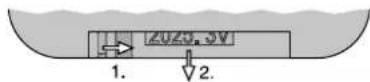

Batteries must not be placed in the household waste. Always take them to a special waste disposal (e.g. collection container at your retailer).
To switch the player on/off, use the POWER button (20).
Inserting a replay medium:
- Insert a CD with the lettering showing upwards into the CD slot (A) until it is retracted automatically.
- Connect a USB storage medium (USB flash drive or USB hard disk with separate power supply) to the USB port
- Insert a memory card (notched corner upward and contacts to the right) into the slot SD / SDHC (C) until it engages.
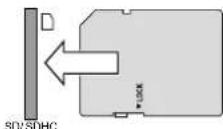
To remove the card, slightly push it into the slot until it disengages.
To switch between the replay media, use the button MODE (23). When a medium has been read in, it will be replayed automatically. If a USB storage medium or a memory card has been selected and is then removed, the player automatically switches over to the CD player mechanism. The same happens when a new CD is retracted.
Control options and information on the display indications can be found in chapter 3.1.
8 Specifications
Amplifier power
Rated power: 120 W
Music power: 170 W
Speakers: 25 cm (10") bass speaker and 2.5 cm (1") tweeter
Frequency range: 20-2000Hz
Input sensitivity: 6mV(MIC 1/2), 300mV(LINE/AUXIN)
Level LINE/AUX OUT: . . . . . 1 V
Connections
MIC 1: combined
XLR jack/6.3mm jack, bal.
MIC 2: 6.3 mm jack, bal.
LINEIN/OUT: RCA jacks
AUX IN/OUT: 3.5mm jacks
Tone control: .±10dB/100Hz(BASS)
±10dB/10kHz (TREBLE)
Ambient temperature: .0-40°C
Power supply:
Mains voltage: 230V/50Hz
Power consumption: .170 VA
Battery operation: . internal rechargeable
lead gel batteries
(2× 12V / 4.5Ah)
Operating time: 4-6 hours approx.
Dimensions (W× H× D) .. 360× 580× 320mm
Weight: 19.2 kg
8.1 Wireless transmission
Range: approx. 30 m
Transmitting power of
the transmitter module: . . . ≤ 10 mW (EIRP)
| Radio frequencies | |||
| Channel | Frequency Channel | Frequency | |
| 01 | 863.1 MHz | 09 | 863.2 MHz |
| 02 | 864.1 MHz | 10 | 864.2 MHz |
| 03 | 863.6 MHz | 11 | 863.7 MHz |
| 04 | 864.6 MHz | 12 | 864.7 MHz |
| 05 | 863.3 MHz | 13 | 863.4 MHz |
| 06 | 864.3 MHz | 14 | 864.4 MHz |
| 07 | 863.8 MHz | 15 | 863.9 MHz |
| 08 | 864.8 MHz | 16 | 864.9 MHz |
Note concerning multichannel operation:
The number of channels to be used in parallel depends on the conditions at the place of application (e.g. on interference due to other wireless systems or high-frequency sources such as fluorescent lamps). In ideal conditions, up to four channels can be operated at the same time without mutual interference. Two examples of a suitable channel selection for four wireless transmission paths:
Example 1:
channel 01-channel 03-channel 06-channel 12
Example 2:
channel 06-channel 09-channel 15-channel 16
Subject to technical modification.
MIC 1: prise combinée
XLR/jack6,35, sym.
MIC 2: jack 6,35, sym.
LINEIN/OUT: prises RCA
AUXIN/OUT: prises jack 3,5
Egaliseur: ±10dB/100Hz(BASS) ±10 dB/10 kHz (TREBL
Alimentation sector: 230V/50Hz
Consummation: .170 VA
Fonctionnement sur
accumulates: accumulates internes plomb gel (2× 12V / 4,5Ah)


- HIGH-POWER AMPLIFIER SYSTEM
- 1 APPLICATIONS
- 1.1 CONFORMITY AND APPROVAL
- 2 SAFETY NOTES
- WARNING
- 3 OVERVIEW
- NOTES
- 3.2 TRANSMITTER MODULE AUDIO LINK TX
- 4 SETTING UP/TRANSPORTING
- 5 POWER SUPPLY
- 5.1 MAINSOPERATION/ RECHARGING THE BATTERIES
- 5.2 BATTERY OPERATION
- 6 AUDIO CONNECTIONS
- 6.1 INPUTS
- 6.2 OUTPUTS
- 7 OPERATION
- 7.1 OPERATING THE RECEIVER MODULE
- CHANNEL SCAN
- MANUAL CHANNEL SELECTION
- 7.1.1 CHANGING THE GROUP SETTING
- (FOR OPERATION WITH 2 RECEIVER MODULES)
- 7.1.2 SETTING THE SQUELCH
- 7.2 OPERATING THE BLUETOOTH RECEIVER
- 7.3 OPERATING THE CD / MP3 PLAYER
- REPLACING THE BATTERY
- INSERTING A REPLAY MEDIUM
- 8 SPECIFICATIONS
- 8.1 WIRELESS TRANSMISSION
- NOTE CONCERNING MULTICHANNEL OPERATION
Brand : Monacor
Model : TXA1022CD
Category : Loudspeaker