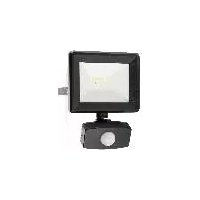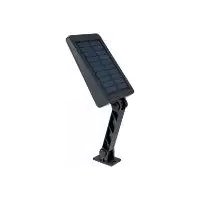
IAN 375304 - LED Spotlight Livarno Lux - Free user manual and instructions
Find the device manual for free IAN 375304 Livarno Lux in PDF.




| Product type | Solar LED projector with motion detector |
| Model | 1020-B / 1020-S (IAN 375304) |
| Power supply | Solar panel 300 mA, max. 1.5 W ; Li-ion battery 3.7 V, 1500 mAh |
| Battery type | Lithium-ion, non-replaceable |
| Number of LEDs | 56 LEDs, non-replaceable |
| Luminous flux | Max. 450 lm |
| Color temperature | 6500 K (cool white) |
| LED lifespan | Approx. 50,000 hours |
| Charging time | Approx. 7 to 8 hours (at 50,000 lux) |
| Lighting duration (detection) | 15 seconds |
| Motion sensor range | Max. 10 m |
| Detection angle | Approx. 120° |
| Recommended installation height | 2 to 4 m |
| Dimensions (model 1020-B) | Approx. 20 x 11 x 3 cm |
| Dimensions (model 1020-S) | Approx. 17.5 x 11 x 3.5 cm |
| Weight (model 1020-B) | Approx. 310 g |
| Weight (model 1020-S) | Approx. 300 g |
| Protection | Dust-tight and protected against omnidirectional water jets (IP6X?) |
| Protection class | III (safety extra-low voltage) |
| Usage | Outdoor only (garden, terrace) |
| Orientation | Vertical tilt up to 180° |
| Package contents | Projector, wall mount, mounting hardware (2 anchors, 2 screws), manual |
| Warranty | 3 years |
| Maintenance | Clean with a dry, lint-free cloth; keep solar panel clean |
| Spare parts | Not available (LEDs and battery non-replaceable) |
Frequently Asked Questions - IAN 375304 Livarno Lux
User questions about IAN 375304 Livarno Lux
0 question about this device. Answer the ones you know or ask your own.
Ask a new question about this device
Download the instructions for your LED Spotlight in PDF format for free! Find your manual IAN 375304 - Livarno Lux and take your electronic device back in hand. On this page are published all the documents necessary for the use of your device. IAN 375304 by Livarno Lux.
USER MANUAL IAN 375304 Livarno Lux
text_image
PDF ONLINE www.lidl-service.comLED SOLAR SPOTLIGHT WITH MOTION DETECTOR LED-SOLARSTRAHLER MIT BEWEGUNGSMELDER PROJECTEUR SOLAIRE À LED AVEC DÉTECTEUR DE MOUVEMENTS
CZ
SOLÁRNÍ LED REFLEKTOR S POHYBOVÝM SENZOREM
Operating and safety information
PL
REFLEKTOR SOLARNY LED Z SYGNALIZATOREM RUCHU
Before you start reading, please fold out the illustrations page and familiarise yourself with all of the item's functions.
NL BE
Explanation of symbols......46
Intended use....46
Specifications supplied....47
Description of parts 47
Technical data 47
Safety instructions 47
Risk of leakage from batteries/rechargeable batteries....48
Assembly and installation....48
Mounting the Spotlight......49
Positioning the Spotlight/solar panel 49
Charging the battery 50
Operation 50
Troubleshooting 50
Cleaning and storage.... 51
Disposal....51
Warranty 51
Service....52
PL
Wstep 60
EXPLOSIONSGEFAHR! Laden
Cd = Kadmium, Hg = Quecksilber, Pb = Blei
natural_image
Three black-and-white icons representing trash sorting, recycling, and waste sorting (no text or symbols)LED Solar Spotlight with Motion Sensor
- Introduction

Congratulations on the purchase of your new product. You have chosen a high-quality product. Please read these operating instructions thoroughly and carefully. These instructions are an essential part of the product and contain important information on first-time use and handling. Always observe all safety instructions. If you have any questions or are unsure how to operate the product, please contact your retailer or service centre. Please keep this manual in a safe place and pass it on to third parties where necessary. Name of product as referred to below: "Spotlight"
- Explanation of symbols

Read the operating instructions!

Issue date of instruction manual (month/year)

Date of manufacture (month/year)

Direct current

Risk of fatal injury and accidents for infants and children!

Observe warning notices and safety instructions!

Explosion hazard!

Wear protective gloves!

This symbol indicates that the product operates with safety extra-low voltage (SELV/PELV, protection class III).
IP65

Protected against ingress of dust (dust-proof, fully contactproof) and jet proofed from any direction.
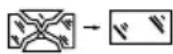
Any protective cover that is cracked or split must be replaced. If the product is damaged in any way, stop using it immediately and contact the service address indicated below.

Not suitable for indoor lighting

Motion detector field of view

Detection range Motion detector

Luminous power

Dispose of packaging and product in an environmentally friendly manner!

Risk of environmental damage from incorrect disposal of batteries/rechargeable batteries!
Packaging made of FSC certified wood mix

With the CE label, the manufacturer confirms that this product complies with the applicable European directives.
- Intended use
The product is intended for automatic illumination in outdoor areas (e.g. garden, patio, etc.). The product must not be installed indoors, as the battery cannot then be charged. The product is not suitable for
general indoor lighting in the home. This product is intended for use in private households only. Any type of use other than that described above or any modification of the product is prohibited and likely to cause damage or even personal injury. The manufacturer or retailer accepts no liability for loss or damage that occurs as a result of use other than intended or incorrect use.
- Specifications supplied
1 LED solar Spotlight with motion sensor
1 wall bracket (model 1020-S)
1 set of fixings (2 wall plugs and 2 screws)
1 instruction manual
• Description of parts
1 LED module
2 Solar panel
3 Guide holes (1020-B)
4 Motion sensor
5 Switch
6 Spotlight star knob (1020-B)
7 Screw
8 Wall plug
9 Spotlight star knob (1020-S)
10 Wall bracket star knob (1020-S)
11 Wall bracket (1020-S)
13 Guide holes (1020-S)
12 Screw for Spotlight star knob (1020-S)
- Technical data
Model number: 1020-B / 1020-S
Input voltage (spotlight): 3,7 V=5 W Solar panel: 300mA, max. 1.5W
Li-ion battery: 3,7 V 1500 mAh (non-replaceable)
Light source: 56 LEDs (non-replaceable) Motion sensor: Detection range: max. 10m Field of view: approx. 120°
Illumination time: 15 s
Luminous power: max. 450 lm
Charging time: approx. 7-8h at 50,000lux
LED service life: approx. 50,000h
Colour temperature: 6500K (cold white)
Recommended installation height: approx. 2-4m
Dimensions of spotlight (excluding wall bracket): approx. 20 x 11 x 3cm (Model 1020-B) approx. 17.5 x 11 x 3.5cm (Model 1020-S)
Max. projection area: approx. 119cm ^2 (Model 1020-B) approx. 118cm ^2 (Model 1020-S)
Weight: approx. 310 g (Model 1020-B) approx. 300 g (Model 1020-S)
- Safety instructions

Safety instructions

WARNING! RISK OF FATAL INJURY AND ACCIDENTS FOR INFANTS AND
CHILDREN! Never leave children unsupervised with the packaging material. There is a danger of suffocation from the packaging material. Children often underestimate the dangers. Always keep children away from the product.
This product can be used by children aged 8 years and over, as well as by persons with limited physical, sensory or mental
abilities or lacking in experience and knowledge if they have been supervised and instructed as to the safe use of the product and understand the resulting hazards. Do not let children play with the product. Cleaning and maintenance may not be carried out by children without proper supervision.
- Do not use the product if you notice any damage.
■ The manufacturer/distributor of this product accepts no responsibility whatsoever for personal injury or damage resulting from incorrect installation or use. - Do not immerse the product in water or any other liquids.
- Keep the product away from naked flames and hot surfaces.
■ The LED module is not replaceable.
■ The LEDs are not replaceable. Once the light source reaches the end of its service life, the product must be replaced.
RISK OF FATAL INJURY! Keep children away from the work area during installation. The product as supplied includes a number of screws and other small parts. These can be fatal if they are swallowed or inhaled.

Safety instructions for batteries/rechargeable batteries
RISK OF FATAL INJURY! Keep batteries/rechargeable batteries out of the reach of children. If swallowed, seek medical advice immediately!
PLEASE NOTE! The rechargeable battery is not replaceable. When it is worn out, the entire product must be disposed of.
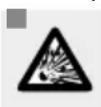
EXPLOSION HAZARD! Never recharge non-rechargeable batteries. Do not short-circuit and/
or open up batteries/rechargeable batteries. They could overheat, cause a fire or explode.
■ Never throw batteries/rechargeable batteries into fire or water.
- Do not expose the batteries/rechargeable batteries to mechanical stress.
● Risk of leakage from batteries/rechargeable batteries
- Avoid exposing (rechargeable) batteries to extreme conditions and temperatures, e.g. radiators or direct sunlight.
- Avoid contact with skin, eyes and mucous membranes! In the event of skin contact with battery acid, rinse the affected area immediately with plenty of clean water and seek medical advice immediately!

WEAR PROTECTIVE GLOVES!
Leaking or damaged batteries/rechargeable batteries can cause
chemical burns if they come into contact with the skin. Therefore, wear suitable protective gloves in such cases.
In the event that a battery leaks, remove it from the product immediately to avoid damage.
- Assembly and installation
Please note: remove all packaging material from the product. Decide prior to mounting where the product is to be mounted. Before drilling the fixing holes, satisfy yourself that there is no danger of drilling into or damaging gas or water pipes or electricity cables in the position where you are about to drill the holes. Use a drill to drill the holes into the masonry. Observe all safety instructions provided in the operation and safety manual for your drill. Otherwise there is a risk of serious or fatal injury from electric shock.
Please note: the fixings included are suitable for conventional solid masonry. You should check independently what kind of
fixings are best suited for the surface on which you intend to mount the light. If necessary, you should seek the advice of an expert.
When deciding where to mount the light, pay attention to the following:
☐ Ensure the product illuminates the desired area. Make sure that the motion sensor ^4 covers the desired area.
☐ The motion sensor has a maximum detection range of 10m with a field of view of approx. 120°.
☐ Ensure that the motion sensor is not in a position where street lighting will shine on it at night. This may impair the function.
☐ The recommended installation height is 2 to 4m. If possible, mount the Spotlight in a position where it will not be exposed to dirt or dust and is protected from rain (e.g. under a roof overhang) and other weathering effects.
Please note: the solar panel 2 should be positioned where it will be exposed to as much direct sunlight as possible. Even partial shade during the day can significantly impair the charging process.
Orientation:
The optimum alignment is facing south. Choose an orientation facing slightly to the west rather than slightly to the east.
Mounting the Spotlight
Transfer the positions of the guide holes /13 to the mounting point on the wall.
☐ Drill two holes (dia. 6mm) and insert the matching wall plugs 8 (see Figs. C and G).
Mounting model 1020-B
Screw the screw into the wall plugs 8, leaving a gap of approx. 3mm between the screw head and the wall (see Fig. C).
☐ Slot the guide holes ^3 over the screws and
then slide the Spotlight along the guides to fix it in place (see Fig. C).
☐ If necessary, adjust the gap between the screw heads and the mounting surface to provide a firm seating for the Spotlight.
Mounting model 1020-S
Screw the wall bracket firmly in place by inserting the screws 7 through the guide holes 13 into the wall plugs 8 and firmly tightening them (see Fig. G).
☐ Fix the Spotlight to the wall bracket by loosening the Spotlight star knob 9 and removing the screw 12.
☐ Align the holes in the Spotlight with the holes in the wall bracket and slot the screw 12 through the holes (see Fig. F).
☐ Screw the Spotlight star knows onto the screw and tighten it hand-tight. Check that the product is fixed firmly in place.
Positioning the Spotlight/solar panel
Positioning model 1020-B
The Spotlight can be adjusted horizontally (top/bottom) to an angle of up to 180^ (see Fig. D).
☐ Loosen the two Spotlight star knobs to adjust the Spotlight (see Fig. B).
☐ When the desired position is obtained, tighten the star knobs again. If necessary, use a screwdriver to hold the screw while tightening the star knob.
Positioning model 1020-S
The Spotlight can be adjusted horizontally (top/bottom) to an angle of up to 180^ (see Fig. H).
☐ Loosen the wall bracket star knob to adjust the height of the Spotlight (see Fig. H).
☐ When the desired position is obtained,
tighten the star knob again.
☐ Loosen the Spotlight star kno ^9 to adjust the angle (see Fig. H).
☐ When the desired position is obtained, tighten the star knob again. If necessary, use a screwdriver to hold the screw while tightening the star knob.
Please note: the motion sensor has a field of view of up to 120^ . Make sure that the motion sensor faces directly towards the desired detection zone.
Please note: to ensure the solar panel functions as effectively as possible, make sure that the surface of the solar panel 2 is not dirty.
Orientation:
The optimum alignment is facing south. Choose an orientation facing slightly to the west rather than slightly to the east.
- Charging the battery
☐ The battery is charged in all operating modes. To optimise initial charging, charge the product while it is turned off.
Please note: the battery is fully charged after it has been well exposed to sunlight for 7 to 8 hours. The duration of the charging process depends on the battery's charge level and the quality of the sunlight.
Operation
The product can be operated in three different modes. The operating mode is set by means of the switch 5.
Please note: the solar panel will turn on the product in twilight or darkness in the mode you have set.
Please note: battery charging via the solar panel does not depend on which mode is selected. The battery is charged continuously at all times.
Mode 1
Press and hold the switch for 3 seconds to switch to "Mode 1".
☐ The Spotlight will light up once and then switch to guide-light function (reduced brightness).
☐ If the motion sensor detects movement within its range, the Spotlight will light up at maximum brightness.
☐ After approx. 15 seconds, it switches back to guide-light function.
Mode 2
Press the switch again to switch to "Mode 2".
☐ The light will flicker twice and then switch off.
☐ If the motion sensor detects movement within its range, the Spotlight will light up at maximum brightness.
☐ After approx. 15 seconds, it will switch off again.
Mode 3
Press the switch again to switch to "Mode 3".
☐ The light will flicker 3 times. The guide-light function (reduced brightness) is then permanently active. The motion sensor is inactive in this mode.
Switching off the Spotlight
☐ To switch off the Spotlight, press the switch 5 for a fourth time.
- Troubleshooting
● = Fault
● = Cause
= Solution
● = The product fails to switch on.
● = The product is switched off.
○ = Press the switch 5 to turn on the product (see section "Operation").
● = The light is flickering.
- = The battery is almost fully discharged.
○ = Charge the battery (see section "Charging the battery").
- Cleaning and storage
☐ Switch the product off if you want to stop using it, store it away and/or clean it.
☐ Regularly inspect the motion sensor ^4 and the solar panel ^2 to make sure they are not dirty. Remove any dirt to ensure the product works correctly.
☐ Keep the product and especially the solar panel free of snow and ice in winter.
☐ Use only a dry, lint-free cloth for cleaning. If the product is very dirty, dampen the cloth slightly.
- Disposal

Note the labels on the packaging materials when sorting the waste; they are marked with abbreviations (a) and numbers (b) with the following meanings:
1-7: Plastics 20-22: Paper and cardboard 80-98: Composite materials
You can find out how to dispose of the used product by contacting your local district or city council.
The product and packaging materials are recyclable. Please dispose of them separately for better treatment of waste. The Triman logo is only applicable to France.
In the interest of environmental protection, when the product has reached the end of its useful life, do not dispose of it as general household waste but have it properly recycled. For information on recycling centres and their opening times, please contact your local council.
Faulty or used batteries must be recycled in accordance with Directive 2006/66/EC and its amendments. Return batteries and/or the product to the local recycling facilities provided.
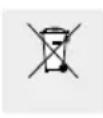
Risk of environmental damage from incorrect disposal of rechargeable batteries!
Batteries must not be disposed of as general household waste. They may contain toxic heavy metals and are subject to special waste treatment. The chemical symbols of the heavy metals are as follows:
Cd = cadmium, Hg = mercury, Pb = lead.
- Warranty
Dear customer, This product comes with a 3-year warranty from the date of purchase. In the event that this product is faulty, you have legal rights against the seller of the product. These statutory rights are not restricted by our warranty as set out below.
Warranty terms
The warranty period begins with the date of purchase. Please keep the original receipt in a safe place. It is required as proof of purchase. If a material or manufacturing defect occurs within three years of the date of purchase, we will repair or replace the product for you free of charge, or refund the purchase price, at our discretion. This warranty service is granted provided that the faulty device and the proof of purchase (receipt) are presented within three years, along with a brief written description of the fault and of when it occurred. If the fault is covered by our warranty, we will return the fixed product or send you a new one. No new warranty period shall begin upon repair or replacement of the product.
Warranty period and statutory warranty claims
The warranty period is not renewed after a


warranty service has been granted. This rule shall also apply for any replaced or repaired parts. Any damage or faults that already existed when buying the product must be reported immediately upon unpacking the product. A fee is charged for any repairs that are carried out after the end of the warranty period.
Warranty scope
The device was carefully manufactured according to the strictest quality guidelines and thoroughly tested before delivery. The warranty applies to material or manufacturing defects. This warranty does not apply to product parts that are subject to normal wear and tear and can therefore be regarded as wearing parts, or damage to fragile parts, such as switches, rechargeable batteries or parts that are made of glass. This warranty is void if the product has been damaged, improperly used or serviced. To ensure proper use, all instructions included in the manual must be followed carefully. All uses and actions that users are discouraged from or warned of in the manual must be avoided under all circumstances. The product is intended for private household use only, and not for commercial activities. The warranty is void, if the product is treated inappropriately, if force is applied, and in the case of any manipulation that is not carried out by our authorised service branch.
Warranty processing
To ensure your request is handled swiftly, please observe the following
Notes:
Please have the receipt and the article number (e.g. IAN 123456) ready as proof of purchase for all enquiries.
☐ Please refer to the type plate on the product, an engraving on the product, the cover of the manual (bottom left) or the sticker on the back or base of the product to find out the product number.
☐ In the case of any malfunctions or other defects, please call or email the service department indicated below as a first step.
☐ After your product has been registered as faulty, you can send it to the specified service address, free of charge. Please include the proof of purchase (receipt) and information about the defect and about when it occurred.
• Service
GB
Service Great Britain
Tel.: 00800 80040044
E-Mail: administration@mynetsend.de
IE NI
Service Ireland
Tel.: 00800 80040044
E-Mail: administration@mynetsend.de
CY
Service Cyprus
Tel.: 00800 80040044
E-Mail: administration@mynetsend.de
MT
Service Malta
Tel.: 00800 80040044
E-Mail: administration@mynetsend.de
IAN 375304\_2101
Please have the receipt and the article number (e.g. IAN 123456) ready as proof of purchase for all enquiries.
You can find an up-to-date version of the operating instructions at: www.citygate24.de den Kauf bereit.