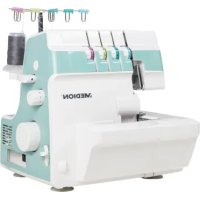
LIFE SO09 (MD 19169) - Sewing machine MEDION - Free user manual and instructions
Find the device manual for free LIFE SO09 (MD 19169) MEDION in PDF.


| Brand | Medion |
| Model | LIFE SO09 (MD 19169) |
| Type | Overlock machine (overlock sewing machine) |
| Dimensions (L x H x D) | 31 cm x 31 cm x 32 cm |
| Weight | 7.2 kg |
| Power supply | 220-240 V ~ 50 Hz |
| Power consumption | 91 W (motor 90 W, LED lamp 1 W) |
| Sewing speed | 1200 rpm (+150/-100) |
| Number of threads | 4, 3 or 2 (with converter) |
| Number of needles | 2 or 1 |
| Stitch length | 1 to 5 mm (adjustable) |
| Cut width | 3 to 4.5 mm (adjustable) |
| Presser foot height | 4 mm |
| Needle type | 2022 n° 75/11, 90/14, 100/16 |
| Foot pedal supplied | Type HKT72C |
| Protection class | II (double insulation) |
| Main functions | 4, 3, 2-thread overlock, rolled hem, safety chain stitch, differential feed, free arm |
| Package contents | Overlock machine, foot pedal, quick start guide, accessories (needles, tension discs, spare lower knife, seam guide, brush, tweezers, screwdriver, 2-thread converter, waste bin, protective cover, oil bottle, 4 spools of thread) |
| Maintenance and cleaning | Lint brush included; lubrication with special sewing machine oil |
| Safety | Safety switch on looper cover; disconnect before maintenance |
| Warranty | See Medion after-sales portal for conditions |
Frequently Asked Questions - LIFE SO09 (MD 19169) MEDION
User questions about LIFE SO09 (MD 19169) MEDION
0 question about this device. Answer the ones you know or ask your own.
Ask a new question about this device
Download the instructions for your Sewing machine in PDF format for free! Find your manual LIFE SO09 (MD 19169) - MEDION and take your electronic device back in hand. On this page are published all the documents necessary for the use of your device. LIFE SO09 (MD 19169) by MEDION.
USER MANUAL LIFE SO09 (MD 19169) MEDION
MEDION LIFE SO90 (MD 19169)
Inhaltsverzeichnis
6. Vor dem Gebrauch
6.3. Die Zubehörbox
7. Bedienung
7.1. Handrad
7.5. Fadentrenner

VORSICHT!
Quetschgefahr!
i
21.Diff erenzialtransport
21.2. Positiver Diff erenzialtransport
21.3.NegativerDiff erenzialtransport
i
7. Utilisation
7.1. Volant manuel
7.4. Guide à coudre
7.5. Coupe-fi I
7.6. Manipulation du pied-de-biche
i
21. Transportdiff érentiel
21.2. Transport diff érentiel positif
21.4. Réglage du transport diff érentiel
i
6. Vóór het gebruik
6.1. De spoeltafel instellen
7. Bediening
7.1. Handwiel
7.5. Draadsnijder
15. De steeklengte instellen
15.1. De steeklengte instellen
| Steken Steeklengte | |
| Normale naden 2,0 - 4,5 mm | (standaardinstelling: 3,0 mm) |
| Smalle zomen 1,0 - 2,0 mm | |
| Open zomen 1,0 - 2,0 mm | |
| Kantwerk 3,0 - 4,0 mm |
16. De snijbreedte instellen

VOORZICHTIG!
Beknellingsgevaar!
i
21.Diff erentieel transport
21.2. Positief diff erentieel transport
21.4. Diff erentieel transport instellen
i
6. Antes del uso
6.1. Ajuste de la placa de bobinas
6.2. Ajuste del portaconos telescópico
7. Manejo
7.1. Rueda
7.5. Cortahilos
18. Desenganche de la cuchilla superior

¡ATENCIÓN!
i
21. Transportediferencial
i
MEDION Service Center
ENAME, S.A
7. Funzionamento
7.1. Volantino
7.5. Tagliafi li
8. Infi lare i fi li
Aumentare la tensione del filo
Ridurre la tensione del filo
| Punti Lunghezza del punto | |
| Cuciture normali 2,0 - 4,5 mm | (Impostazione standard: 3,0 mm) |
| Orlature strette 1,0 - 2,0 mm | |
| Orlature a giorno 1,0 - 2,0 mm | |
| Cuciture di pizzi 3,0 - 4,0 mm | |
18. Sganciare la lama superiore

ATTENZIONE!
i
- About this user manual....217
1.1. Explanation of symbols....217
-
Proper use 217
-
Safety instructions....217
3.1. Keep children away from electrical appliances....217
3.2. Mains cable and power supply 218
3.3. Never carry out repairs yourself....218
3.4. General information....218
3.5. Handle the appliance with care....218
3.6. Cleaning and storage 218
- Package contents....219
- Appliance overview 220
- Before use....224
6.1. Adjusting the spool table 224
6.2. Setting the telescopic thread guide 224
6.3. The accessory box....224
6.4. Spool holder....225
6.5. Connecting the foot control 225
6.6. Mounting of the waste container 226
- Operation....226
7.1. Handwheel....226
7.2. Controlling the sewing speed 226
7.3. Looper cover and safety switch 226
7.4. Straightedge 227
7.5. Thread separator 227
7.6. Raising and lowering the presser foot.... 227
- Threading the threads....228
8.1. General information on threading 228
8.2. Threading the lower looper 229
8.3. Threading the upper looper....231
8.4. Threading the right needle 232
8.5. Threading the left needle....233
-
Testrun....234
-
Adjusting the thread tension....234
10.1. Correct thread tension 235
10.2. Adjusting the thread tension for needle threads 235
10.3. Adjusting the thread tension for looper threads 236
-
Overview of machine settings.... 237
-
Overview of yarn and needles....240
-
Changing the thread ....241
-
Handle....241
-
Setting the stitch length....241
15.1. Setting the stitch length 241
- Setting the cutting width 242
16.1. The ideal cutting width 242
16.2. The cutting width is too narrow....243
16.3. The cutting width is too wide....243
- Narrow and wide chainstitching with three threads....244
- Disengaging the upper knife 245
- Converting to two-thread operation....246
- Stitch finger control 247
- Differential feed 248
21.1. Functionality 248
21.2. Positive differential feed....248
21.3. Negative differential feed....249
21.4. Setting the differential feed 249
21.5. Setting the differential feed....249
22. Setting the presser foot pressure 250
23. Free arm....250
24. Replacing needles 251
25. Replacing knives....251
26. Troubleshooting 252
27. Storage.... 253
28. Cleaning and lubrication 253
29. Disposal 254
30. Technical specifications.... 254
30.1. Declaration of conformity 255
31. Service information.... 255
32. Legal Notice....255
1. About this user manual

Thank you for choosing our product. We hope you enjoy using this appliance.
Read the safety instructions carefully before using the appliance for the first time. Note the
warnings on the appliance and in the user manual.
Always keep the user manual close to hand. If you sell the appliance or give it away, please ensure that you also pass on this user manual. It is an essential component of the product.
1.1. Explanation of symbols
If a block of text is marked with one of the warning symbols listed below, the hazard described in that text must be avoided to prevent the potential consequences described there from occurring.

DANGER!
Warning: risk of fatal injury!

WARNING!
Warning: risk of possible fatal injury and/or serious irreversible injuries!

CAUTION!
Warning: risk of minor and/or moderate injuries!

NOTICE!
Follow these instructions to prevent damage to the appliance!

More detailed information about using the appliance!

Follow the instructions in the user manual!

Symbol for protection class II

Indoor use
2. Proper use
Your appliance can be used in a range of ways:
The overlock sewing machine can be used to sew together and neaten the seams on light to medium-weight material.
The material can be made of textile fibres, composite materials or lightweight leather.
- The appliance is only intended for private use and not for industrial/commercial use.
Please note that we shall not be liable in cases of improper use:
- Do not modify the appliance without our consent and do not use any auxiliary equipment that we have not approved or supplied.
- Only use replacement parts or accessories that we have supplied or approved.
- Comply with all the information in this user manual, especially the safety instructions. Any other use is considered improper and can cause personal injury or property damage.
- Do not use the appliance in extreme environmental conditions.
3. Safety instructions
3.1. Keep children away from electrical appliances
This appliance can be used by children aged 8 years and above, by people with reduced physical, sensory or mental capabilities, or people who lack experience and/or knowledge if proper supervision is provided or if these people have been instructed in how to use the appliance safely and have fully understood the possible dangers. Children must not be allowed to play with the appliance. Do not allow children to clean the appliance or perform maintenance tasks on it unless they are aged 8 years or older and properly supervised.
■ Do not allow children younger than 8 years old near the appliance and its power cable.

DANGER!
Risk of choking and suffocation!
Packaging film can be swallowed or used improperly, creating a risk of choking and suffocation.
- Keep packaging material such as plastic film or plastic bags away from children.
3.2. Mains cable and power supply
■ Only connect the appliance to an easily accessible mains socket (220–240 V \~ 50 Hz) that is close to where you have set up the appliance. The power socket must be easily accessible so that you can unplug the appliance from the mains quickly if necessary.
■ When unplugging, always hold the plug itself and never pull on the cable.
■ Fully unwind the cable during use.
■ The cable may not touch any hot surfaces.
■ Switch off the sewing machine and unplug the mains plug for the following tasks: threading the needle, replacing the needle, setting the presser foot, cleaning and maintenance work, at the end of sewing work and when work is interrupted.
3.3. Never carry out repairs yourself
■ If the appliance or power cable is damaged, remove the mains plug from the socket immediately.
■ If there is visible damage to the sewing machine, or mains cable, the appliance may not be used. This is to avoid hazards.

WARNING!
Risk of electric shock!
There is a risk of electric shock if repairs are not carried out by qualified personnel!
■ Never attempt to open or repair the appliance yourself.
In the event of a fault or damage to the power cable, contact our Service Centre or another suitable professional repair workshop to prevent hazards.
3.4. General information
■ The sewing machine must not get wet – there is a risk of electric shock!
■ Never leave the sewing machine unattended when switched on.
■ Do not use the machine outdoors.
■ The appliance may only be operated with the supplied type HKT72C foot control.
3.5. Handle the appliance with care
■ The sewing machine has suction feet for stability. Nevertheless, ensure that the machine is placed on a stable, level work surface and that all four feet are touching the work surface.
■ When the appliance is in use, the ventilation openings must remain free: do not allow any foreign objects (e.g. dust, pieces of thread etc.) to get into the openings.
■ Never place anything onto the foot pedal.
■ Use only the supplied accessories. Needles are available from specialist retailers.
■ Only use specialist sewing machine oil to lubricate the machine. Do not use any other liquids.
■ When sewing, ensure that you do not place your fingers under the needle holder.
■ Take care when operating the moving parts of the machine, particularly the needle and knife. There is also risk of injury when the machine is not connected to the power supply.
■ Do not use bent or blunt needles.
■ When sewing, do not hold the fabric tight and do not pull on the fabric. This could cause the needle to break.
■ Always place the needle in the highest position at the end of sewing work.
■ When leaving the machine and before maintenance work, always switch off the machine and pull the mains plug from the socket.
3.6. Cleaning and storage
■ Before cleaning, pull the plug out of the mains socket. Use a soft, dry cloth to clean the appliance. Avoid the use of chemical solutions and cleaning products because these may damage the appliance surface and/or the labels on it.
■ When storing the sewing machine, always cover it with the supplied cover to protect the machine from dust.
4. Package contents

DANGER!
Risk of choking and suffocation!
Packaging film can be swallowed or used improperly, creating a risk of choking and suffocation.
- Keep packaging material such as plastic film or plastic bags away from children.
Please check the package contents to ensure that all items are included. If anything is missing, please contact us within 14 days of purchase.
• Overlock sewing machine
• Foot control, type HKT72C
- Short manual
- Miscellaneous accessories in the accessory box (overview of contents on the following page)
5. Appliance overview
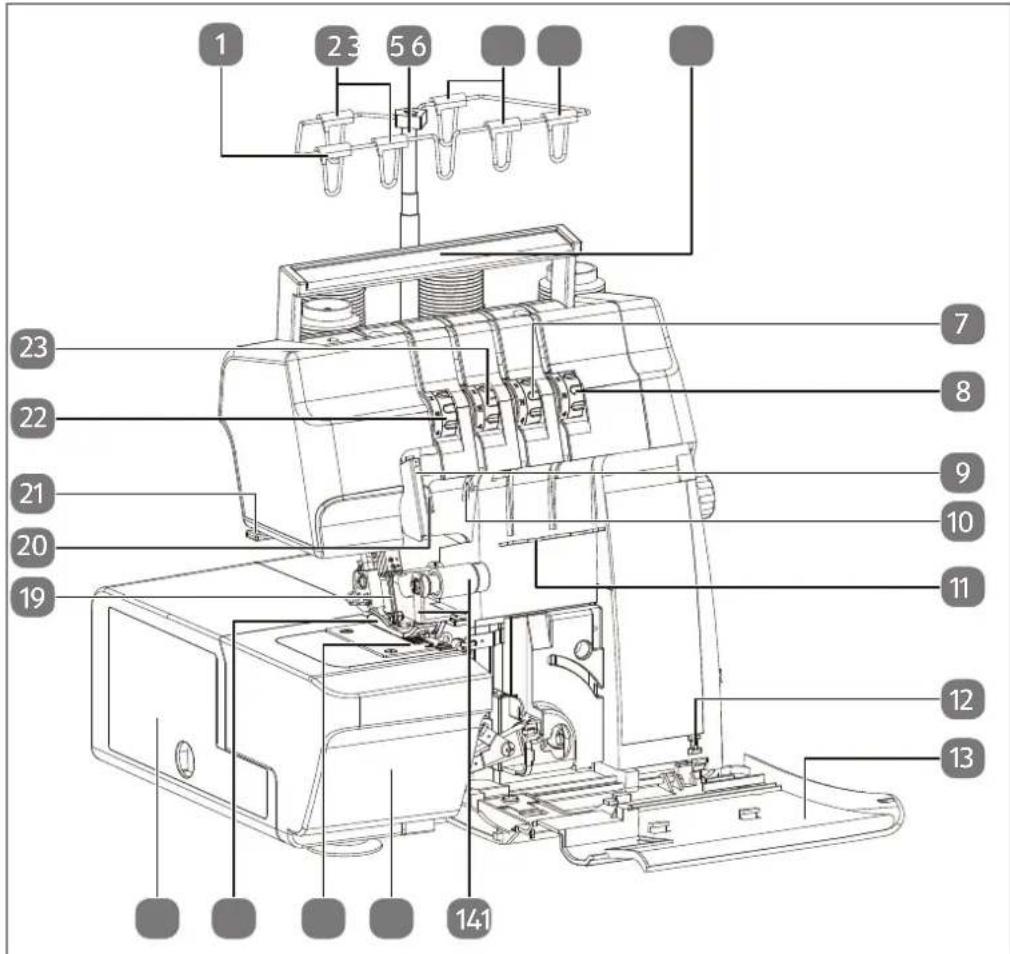
Abb. 1 - Front view
- Thread guide for left needle (blue)
- Thread guide for right needle (green)
- Telescopic thread guide
- Thread guide for upper looper (light green)
- Thread guide for lower looper (pink)
- Handle
- Thread tension selector for the upper looper (light green)
- Thread tension selector for the lower looper (pink)
- Front thread guide for both needle threads
- Front thread guide for the right needle thread
- Thread guide for looper threads
-
Safety switch (looper cover)
-
Looper cover
- Upper knife with fitting
- Removable work table (free arm)
- Throat plate The markings for the cutting widths (3,5; R, 4,5) are on the throat plate.
- Presser foot
- Accessory box
- Needles
- Front thread guide for the left needle thread
- Thread separator
- Thread tension selector for the left needle (blue)
- Thread tension selector for the right needle (green)
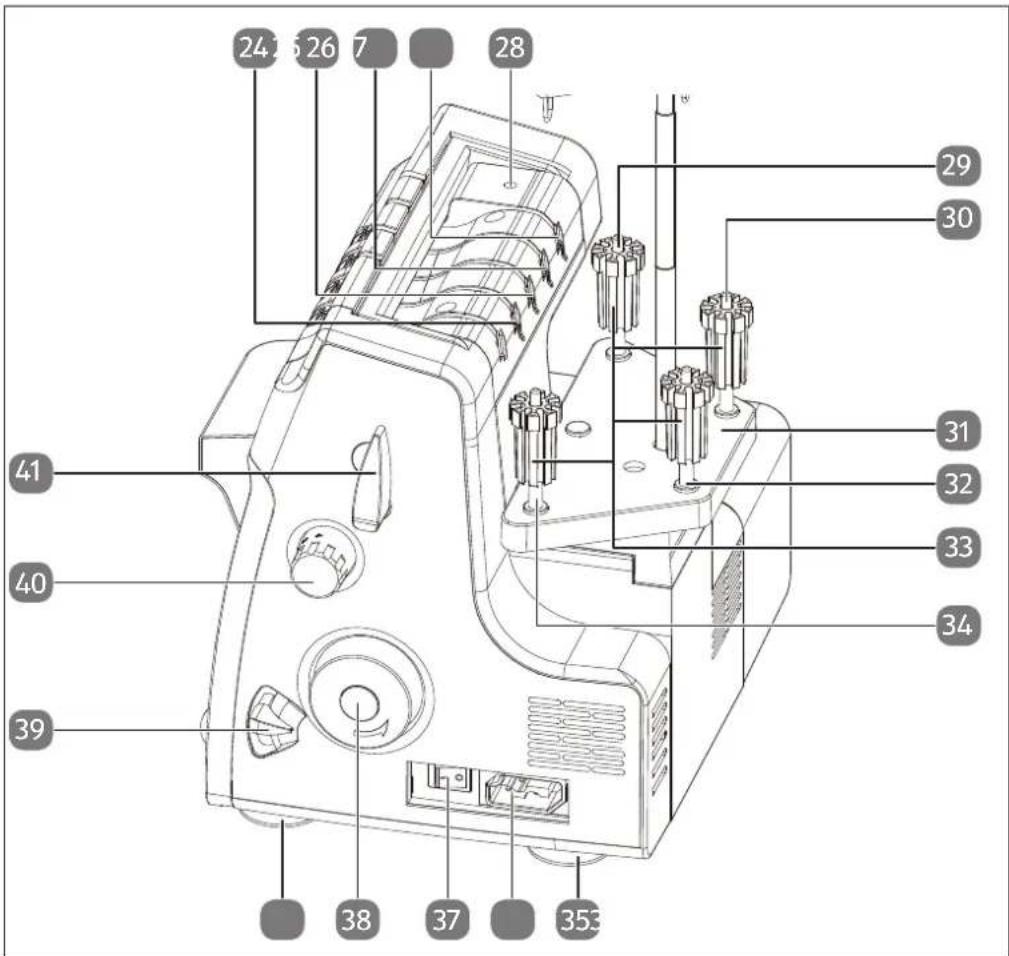
Abb. 2 - Rear view
- Rear thread guide for upper looper thread
- Rear thread guide for lower looper thread
- Rear thread guide for left needle
- Rear thread guide for right needle
- Setting screw for presser foot pressure
- Spool pin for left needle thread
- Spool pin for right needle thread
- Spool table
-
Spool pin for upper looper thread
-
Spool holders
- Spool pin for lower looper thread
- Suction feet
- Connector housing for foot control
- Mains switch
- Handwheel
- Differential feed control
- Stitch length control
- Lever for lifting the presser foot
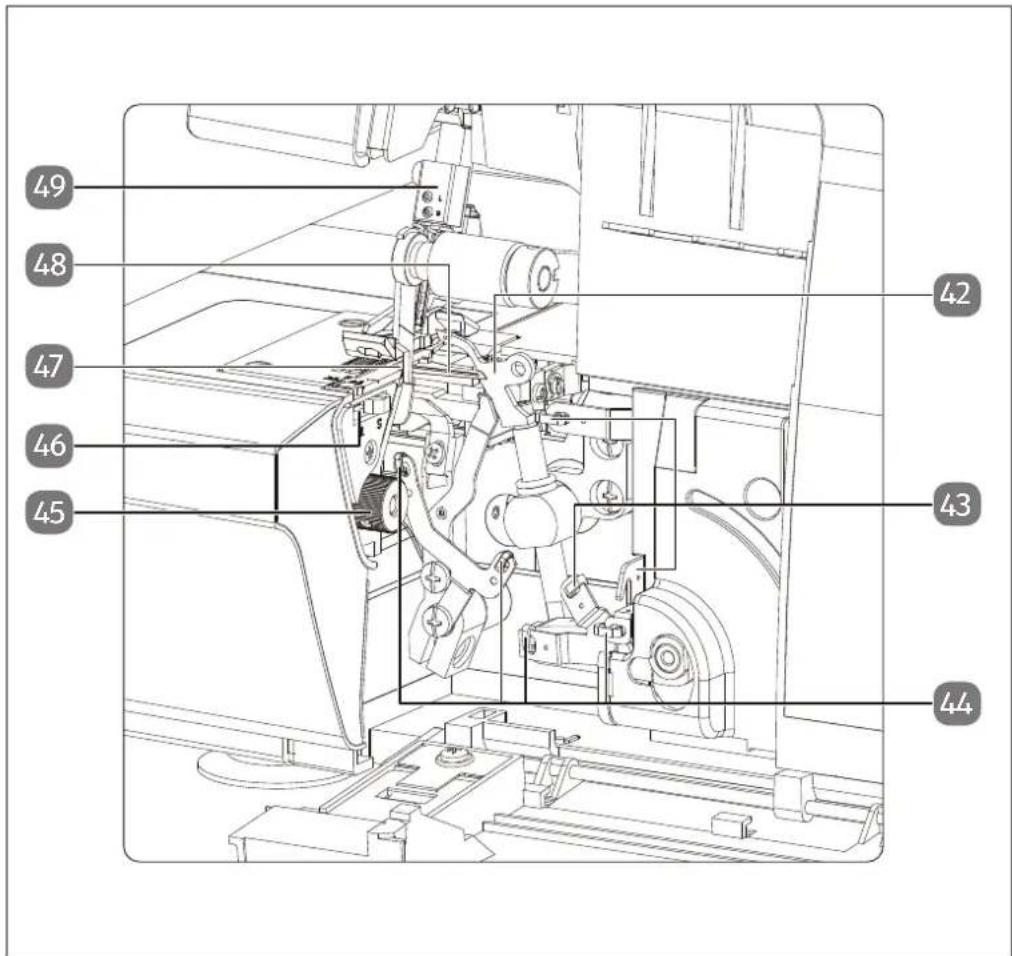
Abb. 3 - Sewing mechanics
-
Upper looper
-
Thread guide for the upper looper thread
-
Thread guide for the lower looper thread
-
Setting control for the cutting width
-
Stitch finger control
-
Lower knife
-
Lower looper
-
Needle holder
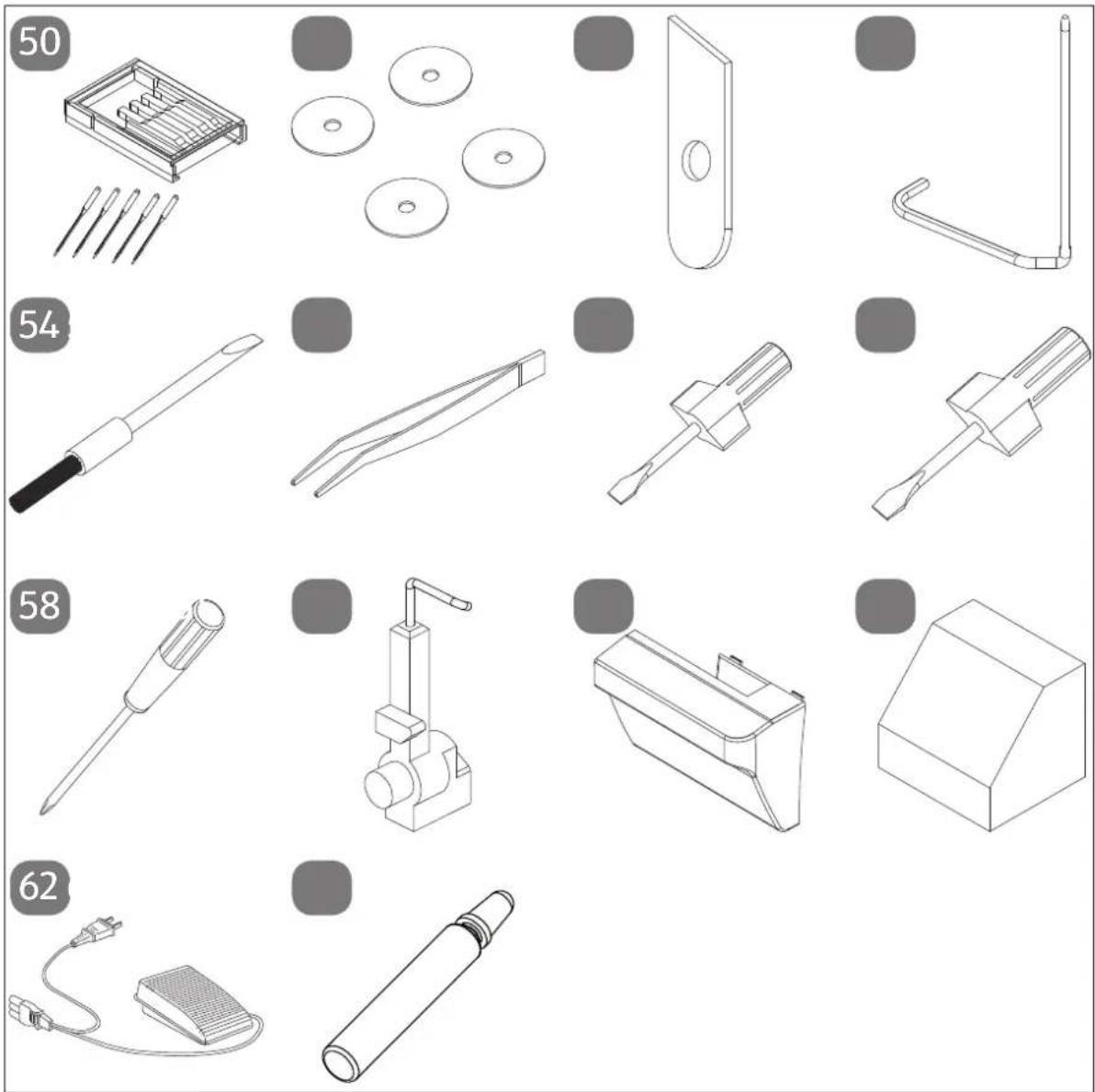
Abb. 4 – Contents of the accessory box
- Needle set
- Spool cap (4x)
- Lower replacement knife
- Straightedge
- Lint brush
- Tweezers
- Screwdriver (small)
-
Screwdriver (medium)
-
Screwdriver (large)
- Two-thread converter
- Waste container
- Cover
- Foot control
- Oil bottle (without contents)
not shown
Spool (4x pre-mounted)
6. Before use
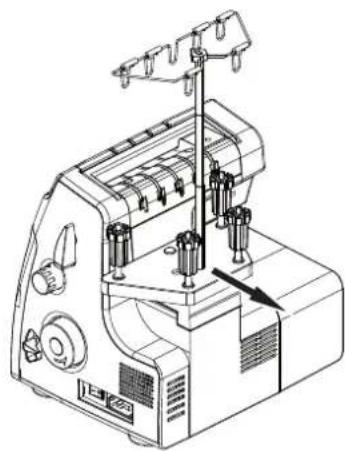
6.1. Adjusting the spool table
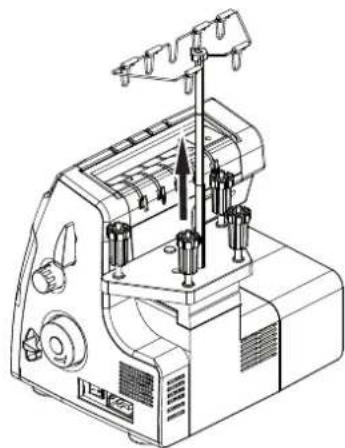
▶ Carefully pull the spool table (31) out to the rear.
6.2. Sett ing the telescopic thread guide
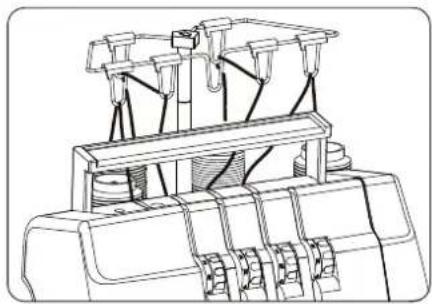
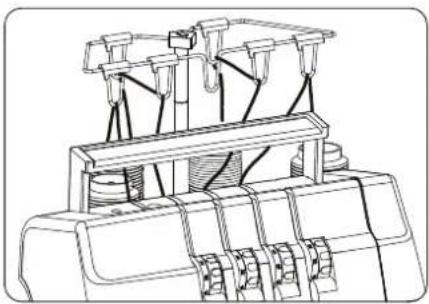
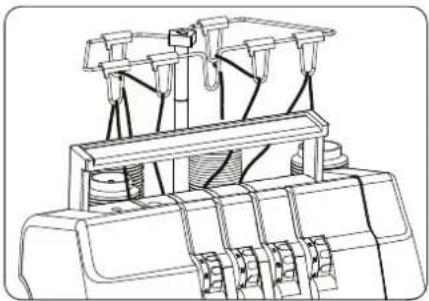
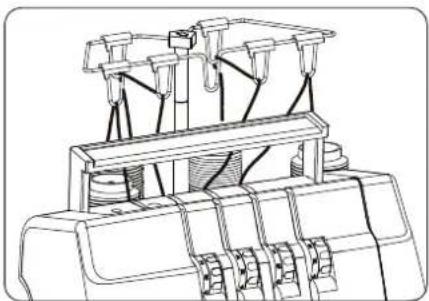
▶ Pull the telescopic thread guide (3) all the way out before threading.
▶ Turn the telescopic thread guide so that the thread guides are right above the spool pins (29, 30, 32, 34).
6.3. The accessory box
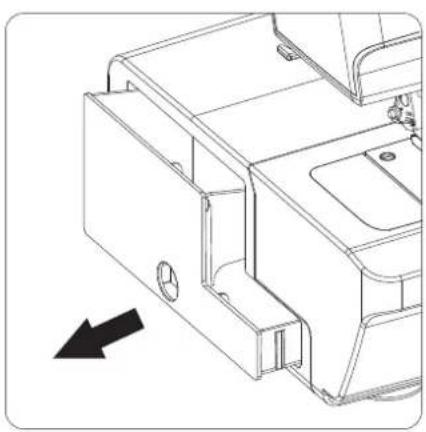
In the accessory box you will find all the accessories listed in section "4. Package contents" on page 219.
Carefully pull out the accessory box (18) to the left.
6.4. Spool holder
Both industrial and domestic spools can be used on this machine.
For large-diameter industrial spools, use the spool holder (33) with the wide end upwards; for small-diameter spools, use the spool holder with the narrow end upwards.
![graph TD A["Spool holder"] --> B["Spool cap"] B --> C["Spool pin"]](/content/2026/03/563127/images/0174b1def4c45fdb8006590c5210f3e914f74aa071efe6e8a8000b08bd62b54b.jpg)
In any case, use the spool cap (51) to ensure stability of the spool.
6.5. Connecting the foot control
Connect the coupling connector for the supplied foot control to the connector housing (36) on the machine and then plug the mains plug into the socket.
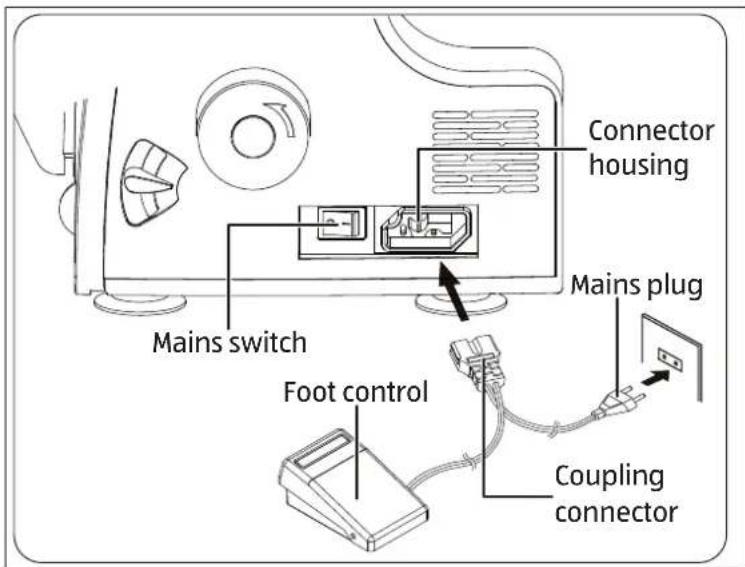
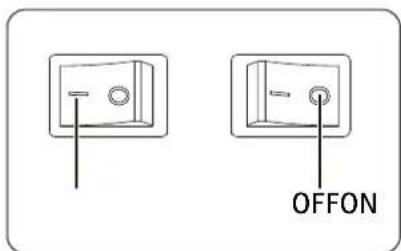
The mains switch (37) switches on both the machine and the sewing light. Use only the supplied foot control.
After finishing work or before maintenance work, always switch off the machine and pull the mains plug from the socket.
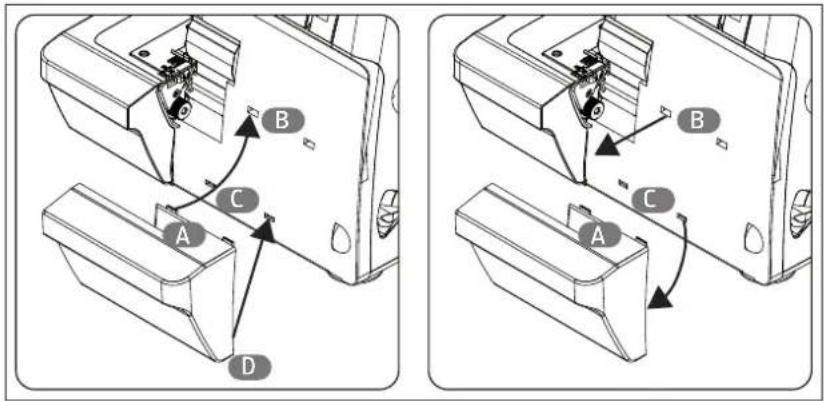
6.6. Mounting of the waste container
The waste container collects cut material when sewing, so that your workspace remains clean.
▶ Hook the tabs (A) into the two upper openings (B).
▶ Then gently press the tabs (D) (not shown) into the slots (C).
Once the sewing work is complete, remove the waste container by carefully pulling the bottom part of the waste container off the machine and then lifting the tabs (A) out of the openings (B).
7. Operation
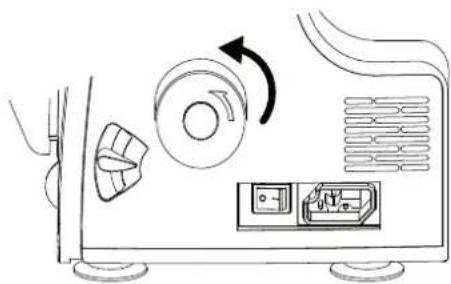
7.1. Handwheel
Always turn the handwheel (9) towards you.
7.2. Controlling the sewing speed
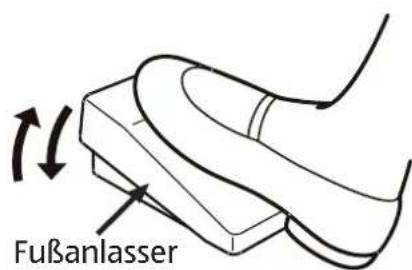
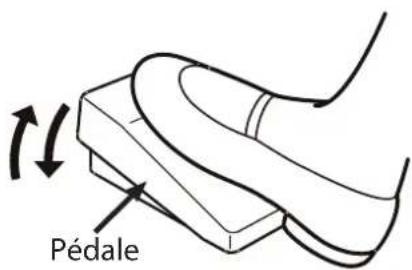
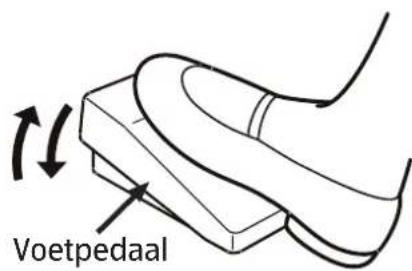
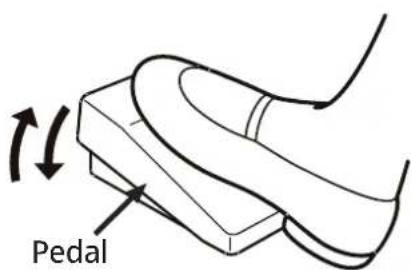
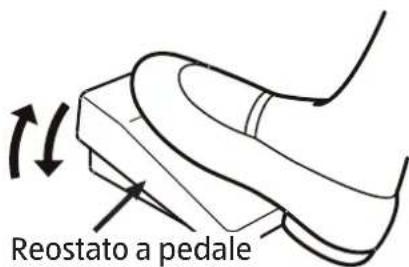
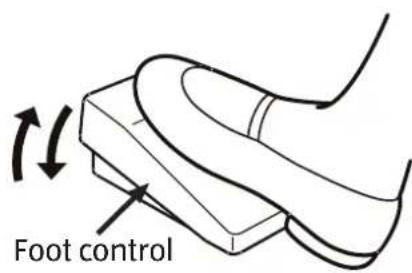
The sewing speed is controlled using the foot control (62). This means that the sewing speed can be changed by exerting more or less pressure on the foot control.
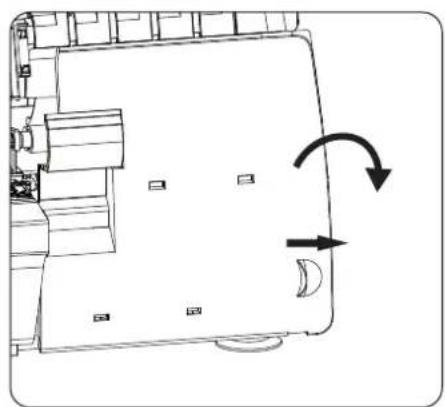
7.3. Looper cover and safety switch
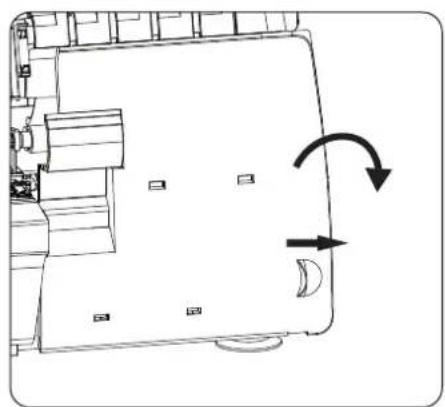
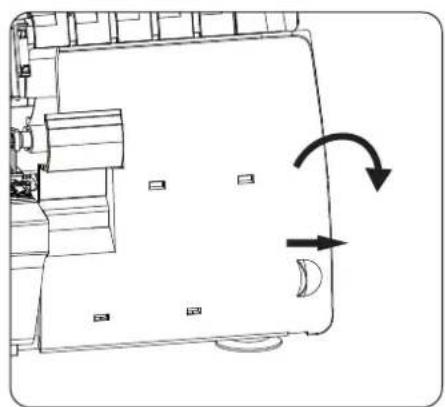
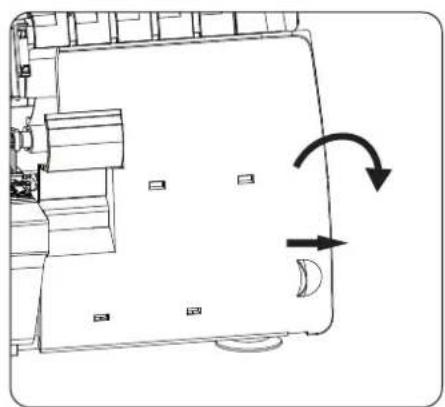
This machine is equipped with a micro safety switch. Operation is shut-off when the looper cover (13) is opened.
To open the looper cover, pull the cover to the right and fold the cover forward.
▶ Close the looper cover before beginning to sew.
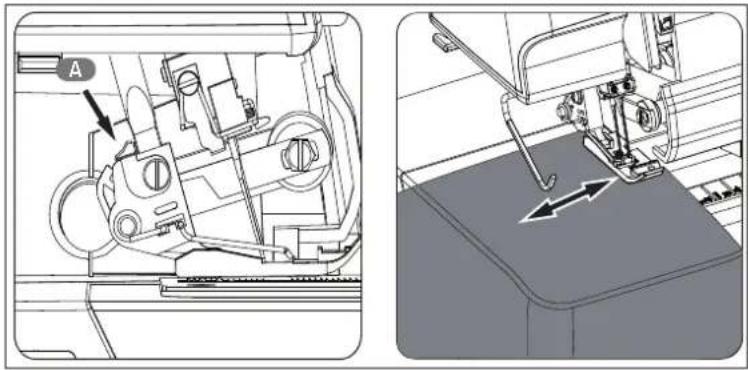
7.4. Straightedge
When using the straightedge (53), the fabric is cut and sewn at the same distance from the fabric edge.
▶ Slide the straightedge into the opening (A) behind the presser foot.
Adjust the width by pulling out or pushing in the straightedge.
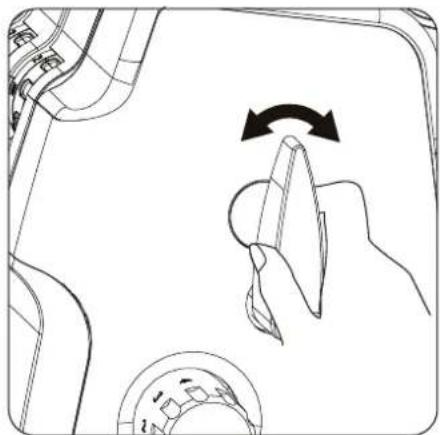
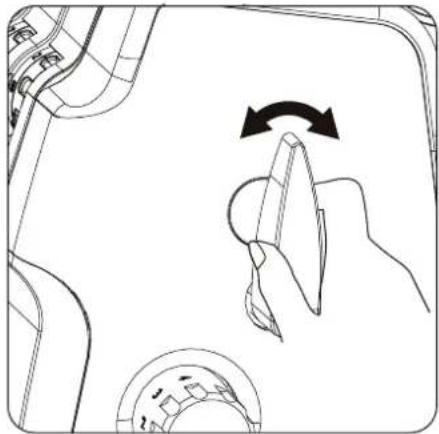
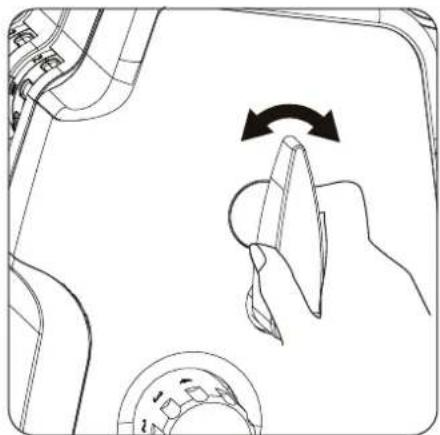
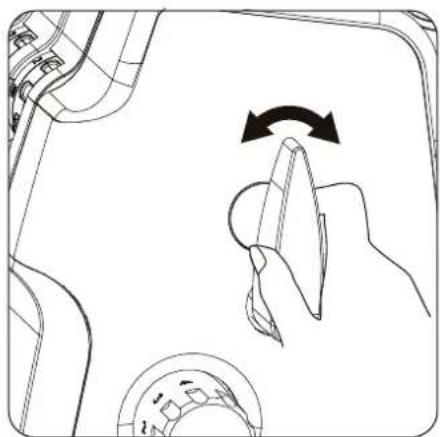
7.5. Thread separator
Cut the threads using the thread separator (21) on the back of the sewing machine or using scissors. Leave around 15 cm of the thread hanging behind the eye of the needle.
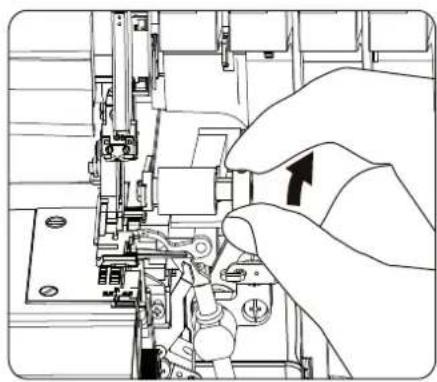
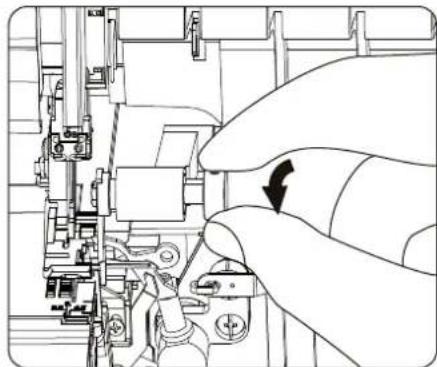
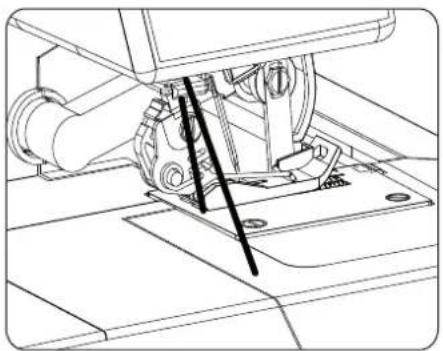
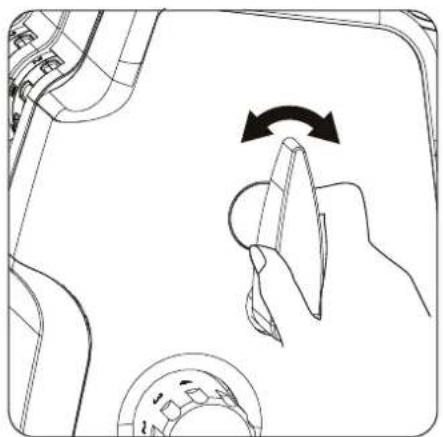
7.6. Raising and lowering the presser foot
▶ Raising or lowering the presser foot lever (41) moves the presser foot (17) up or down accordingly.
In order to sew thick fabric, the presser foot can be raised a little to allow extra clearance.
8. Threading the threads
8.1. General information on threading
Threading takes place in the following order:
- STEP 1 lower looper pink
- STEP 2 upper looper light green
- STEP 3 right needle green
- STEP 4 left needle blue
Correct threading is essential to ensure that stitching is even and to prevent the thread from tearing.
There is a practical guide to threading behind the looper cover (13) on the appliance.
In addition, the thread guides are marked in different colours.
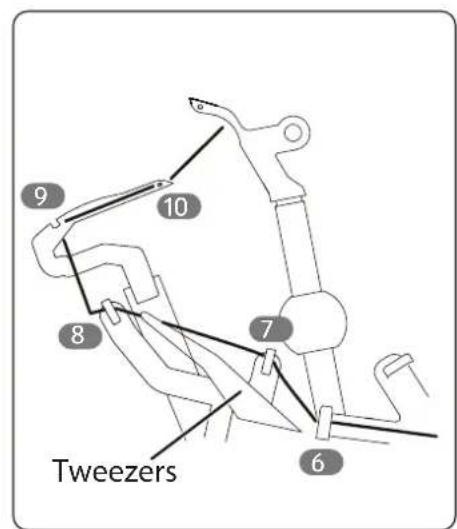
There is a pair of tweezers in the accessory box to help with threading.

If it is necessary to retrospectively thread one of the looper threads again (e.g. when the thread tears), first remove the threads from the needles to prevent the threads becoming entangled.
8.2. Threading the lower looper
- Open the looper cover.
- Turn the handwheel (38) towards you until the lower looper (48) is in a favourable position for threading.
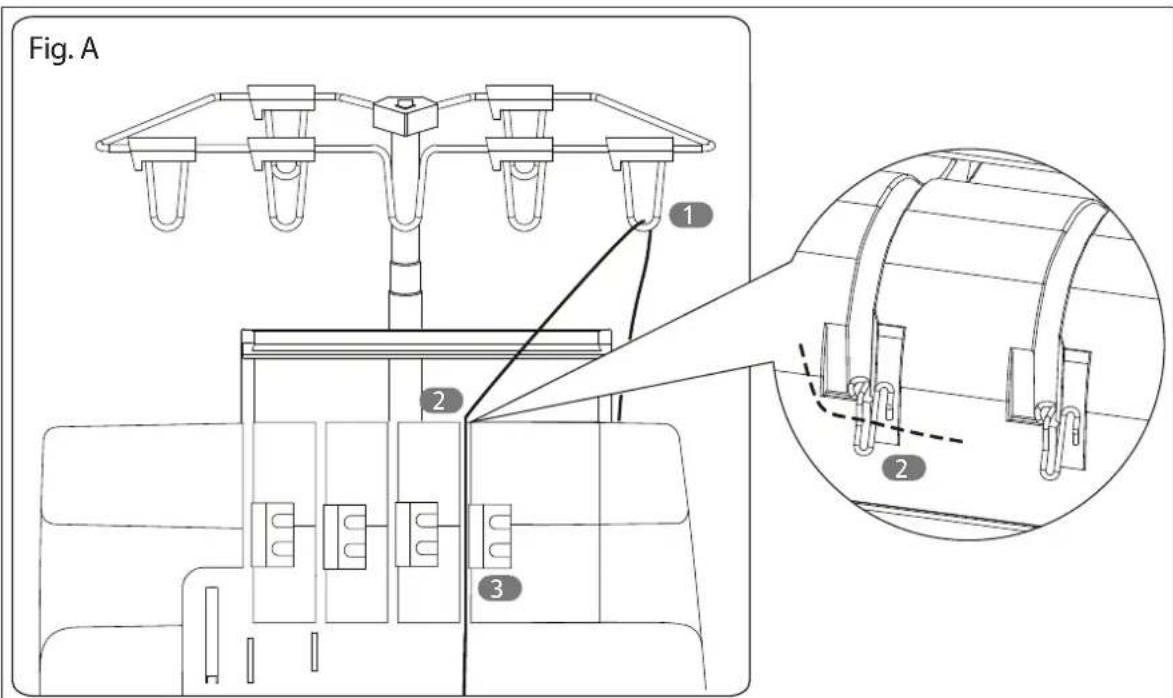
- Guide the thread through the eye on the telescopic thread guide (5). (Fig. A)
- Lift the handle (6) and guide the thread under the handle and tension the thread into the rear thread guide for the lower looper (27).
- Place the thread between the two discs on the thread tensioner (8).
i
The thread must be correctly positioned between the two discs on the thread tensioner.
-
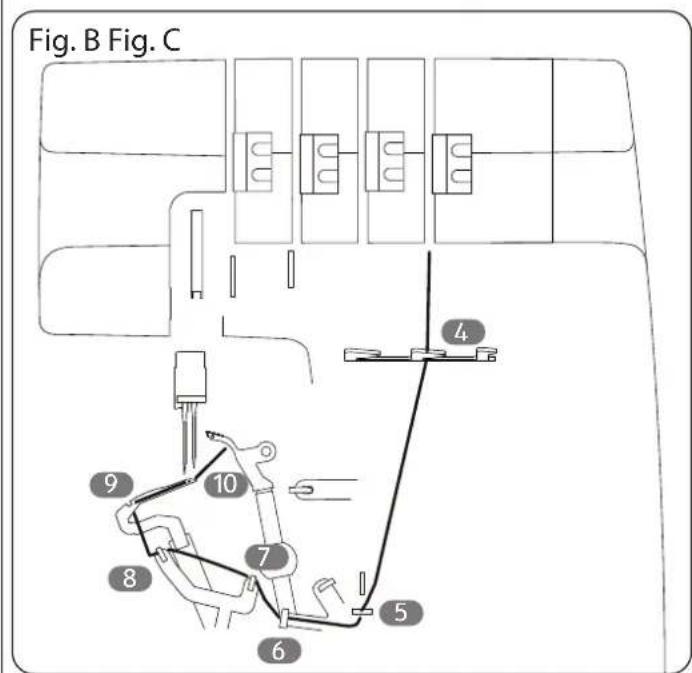
Insert the thread into the middle guide nose of the thread guide for the looper threads (11). (Fig. B)
-
From this point, follow the thread guide diagram in the machine and thread the thread into the four coloured thread guides (44). (Fig. C)
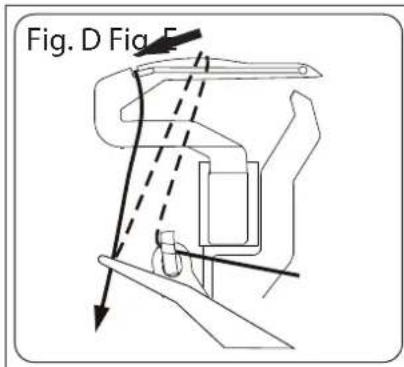
- Now place the thread over the lower looper and push the thread back onto the looper using the tweezers until the thread is in the rear eye of the looper. (Fig. D)
- Thread the thread into the eye of the lower looper from the front. (Fig. E)
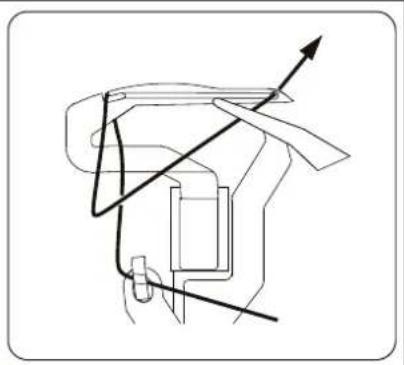
- Pull the end of the thread approx. 10 cm through the looper eyes and place the thread to the back under the presser foot.
8.3. Threading the upper looper
- Guide the thread through the eyes on the telescopic thread guide. (Fig. F)
- Lift the handle and guide the thread under the handle and tension the thread into the rear thread guide for the upper looper (26).
- Place the thread between the two discs on the thread tensioner (7).
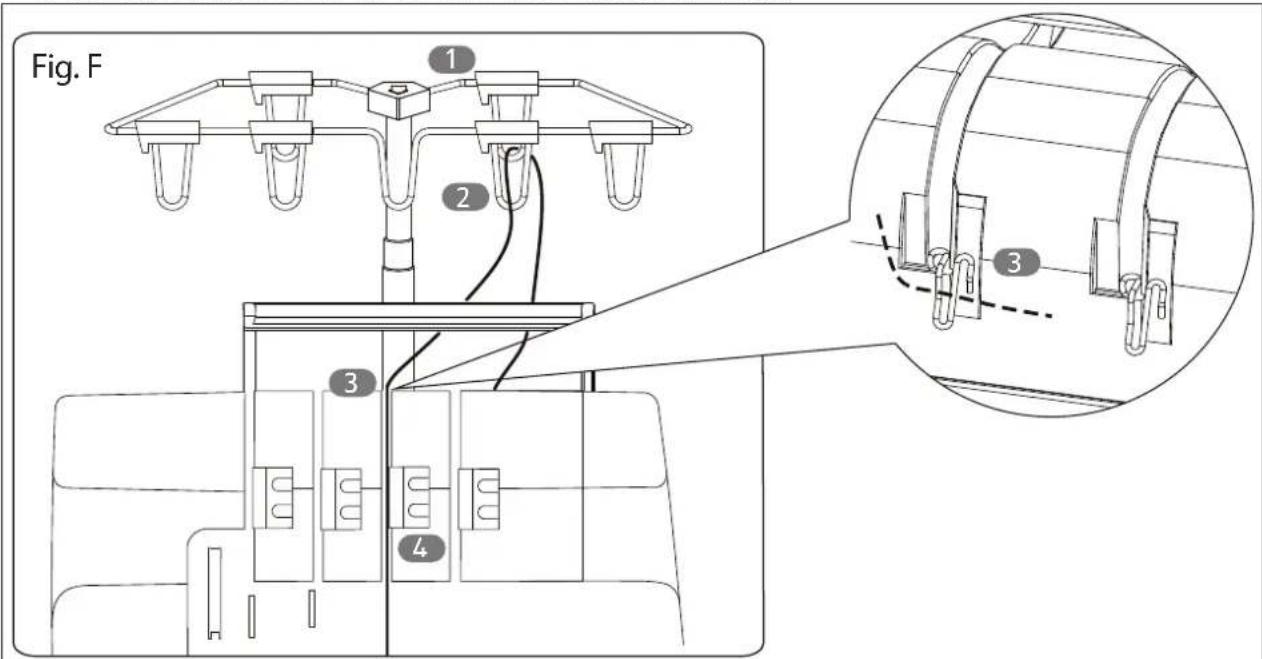
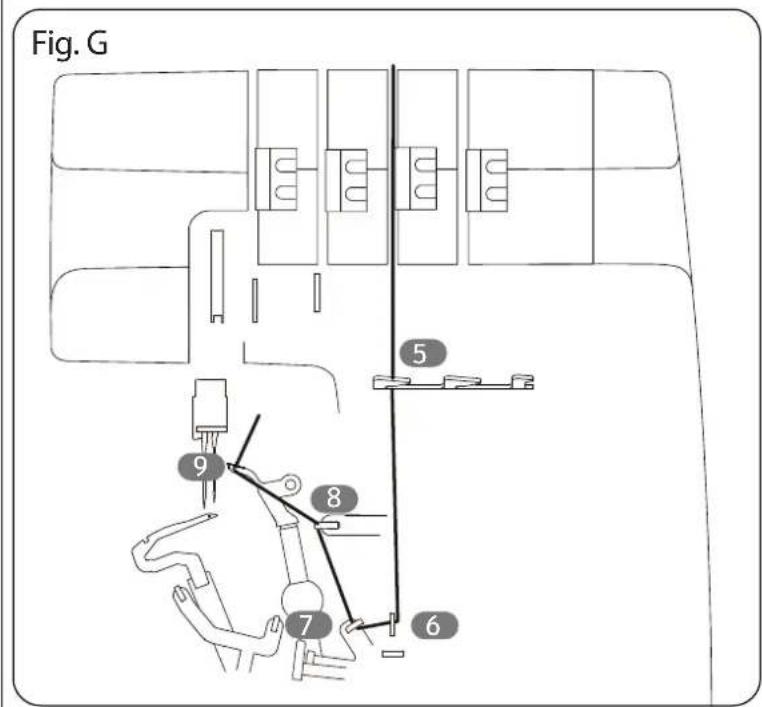
- Insert the thread into the left guide nose of the thread guide for the looper threads. (Fig. G)
- From this point, follow the thread guide diagram in the machine and thread the thread into the three coloured thread guides (43).
- To thread the thread into the upper looper (42), turn the handwheel until the looper is in a favourable position.
- Pull the end of the thread approx. 10 cm through the looper eyes and place the thread to the back under the presser foot.
- After threading, close the looper cover.
8.4. Threading the right needle
- Turn the handwheel towards you until the needles (19) are at the highest position.
- Guide the thread through the eyes (2) on the telescopic thread guide. (Fig. H)
- Lift the handle and guide the thread under the handle and tension the thread into the rear thread guide for the right needle (25).
- Place the thread between the two discs on the thread tensioner (23).
i
The thread must be correctly positioned between the two discs on the thread tensioner.
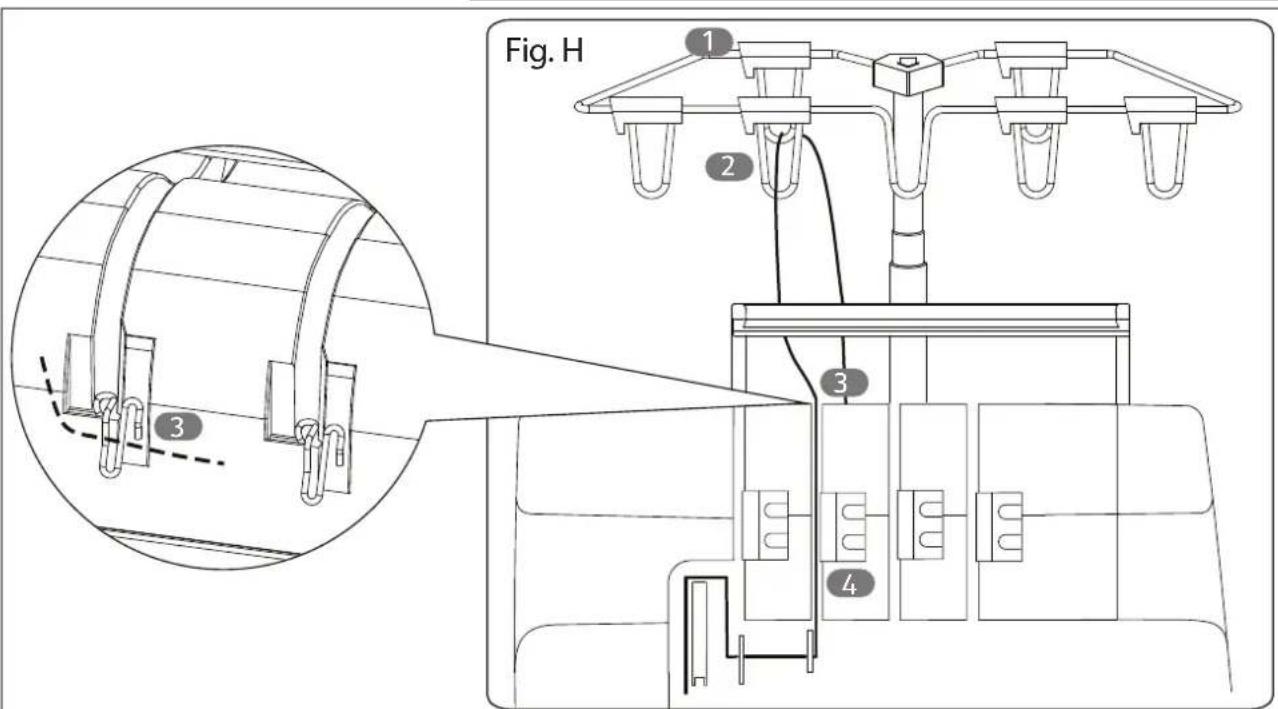
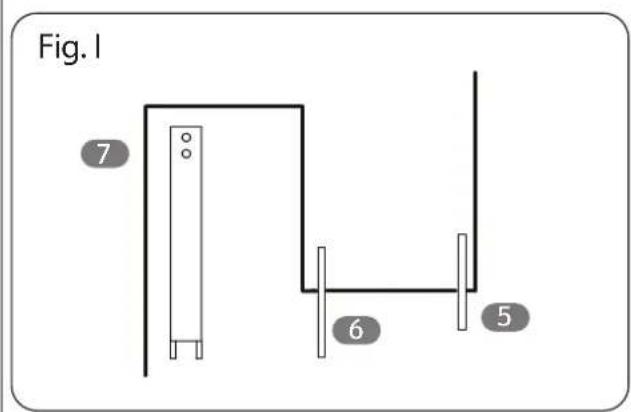
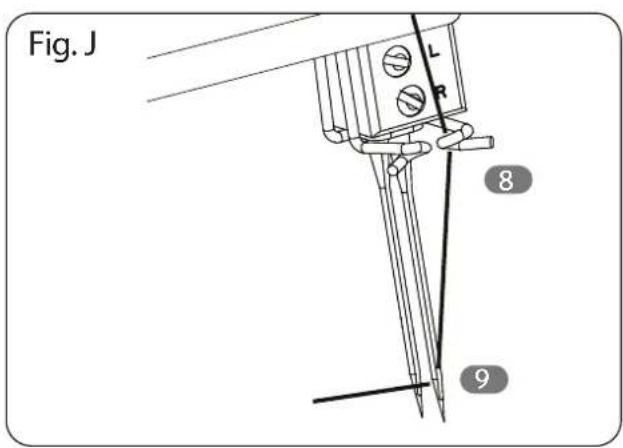
- Guide the thread under the thread guide for the right needle thread (10) and the two thread guides for the needle threads (20) and (9). (Fig. I)
- Then, as shown, guide the thread behind the thread guide of the needle holder and then from front to back through the relevant eye of the needle. (Fig. J)
- Pull the ends of the threads about 10 cm out from the eyes of the needles.
- Raise the presser foot (17) and slide the threads underneath; then lower the presser foot again.
8.5. Threading the left needle
- Turn the handwheel towards you until the needles are at the highest position.
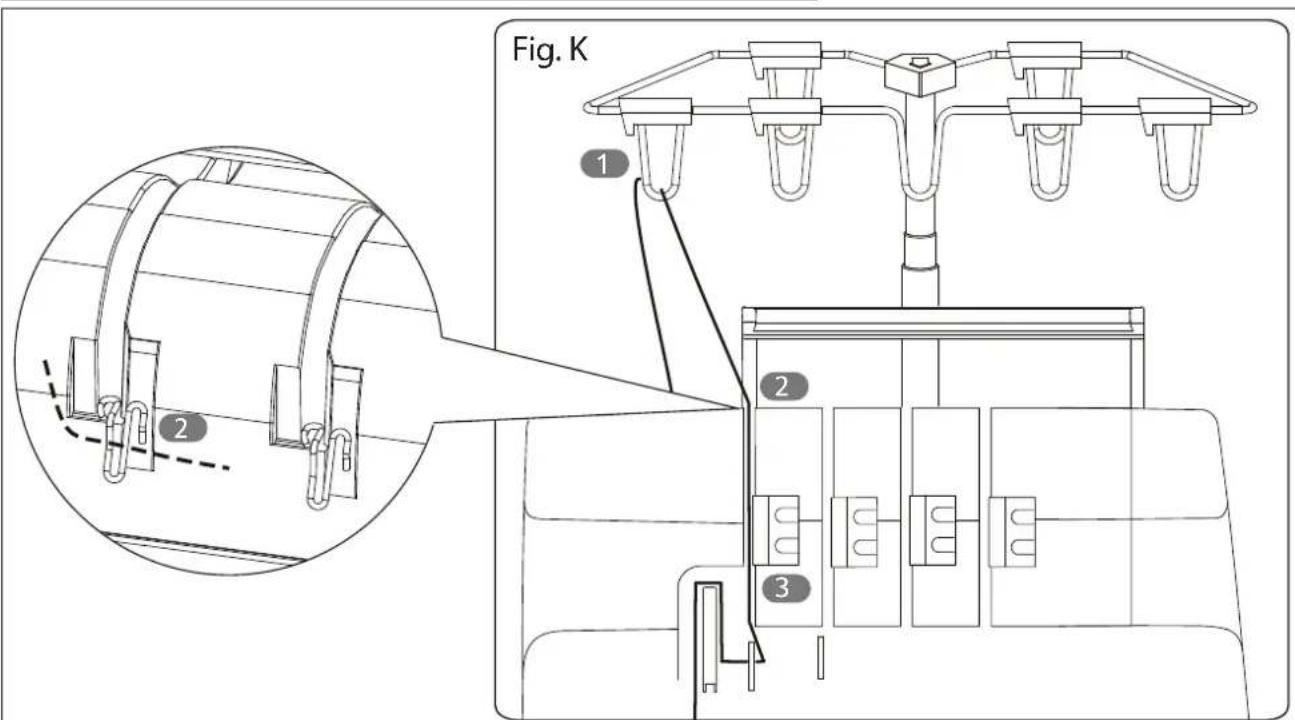
- Guide the thread through the eyes on the telescopic thread guide (1). (Fig. K)
- Lift the handle and guide the thread under the handle and tension the thread into the rear thread guide for the left needle (24).
- Place the thread between the two discs on the thread tensioner (22).

The thread must be correctly positioned between the two discs on the thread tensioner.
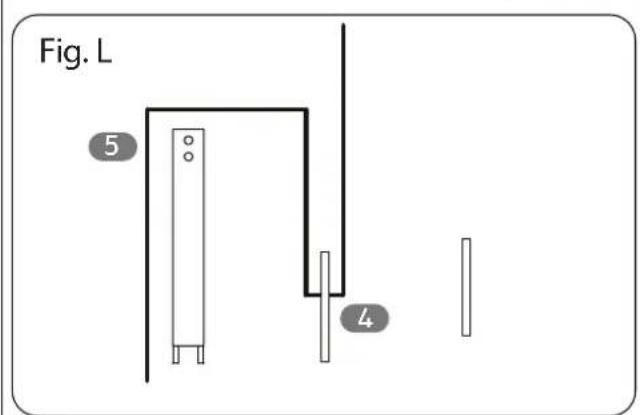
- Guide the thread under the two thread guides of the needle threads (20) and (9). (Fig. L)
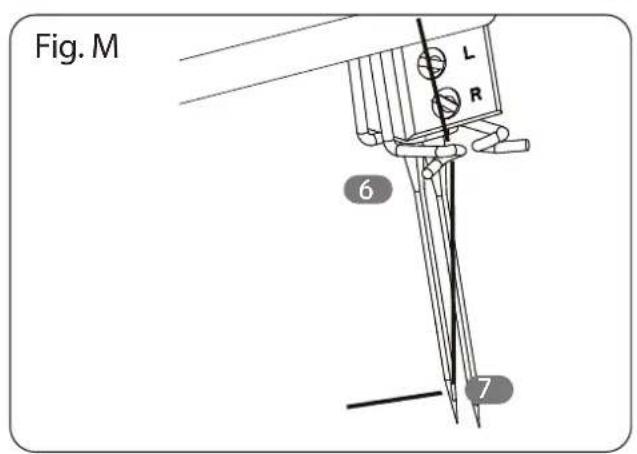
- Then, as shown, guide the thread behind the thread guide of the needle holder and then from front to back through the relevant eye of the needle. (Fig. M)
- Pull the ends of the threads about 10 cm out from the eyes of the needles.
- Raise the presser foot and slide the threads underneath; then lower the presser foot again.
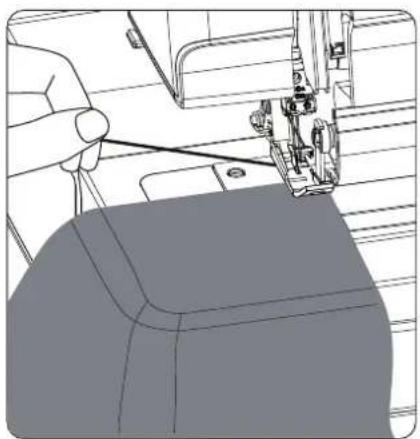
9. Test run
When yarn has been threaded for the first time, or yarn has been re-threaded after a torn thread during sewing, proceed as follows:
▶ Holding the ends of the threads between your left fingertips, turn the handwheel (38) slowly two or three times towards you and check whether the thread pulls.
Then, carefully sew a few stitches without feeding the fabric to check for tangled threads.
Place the fabric for the test run under the presser foot (17), lower the presser foot and begin to sew slowly.
The fabric is fed through automatically, only move the fabric further carefully.
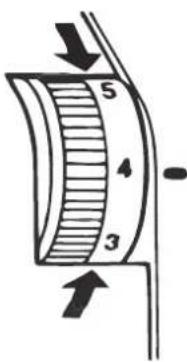
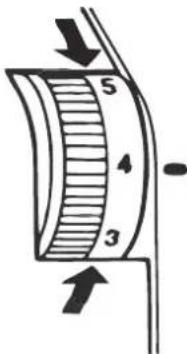
Increase thread tension
Reduce thread tension
When work is finished, continue sewing to form an approx. 5–6 cm long thread chain from the end of the fabric.
Cut the threads using the thread separator (21) on the side of the sewing machine or using scissors.
10. Adjusting the thread tension
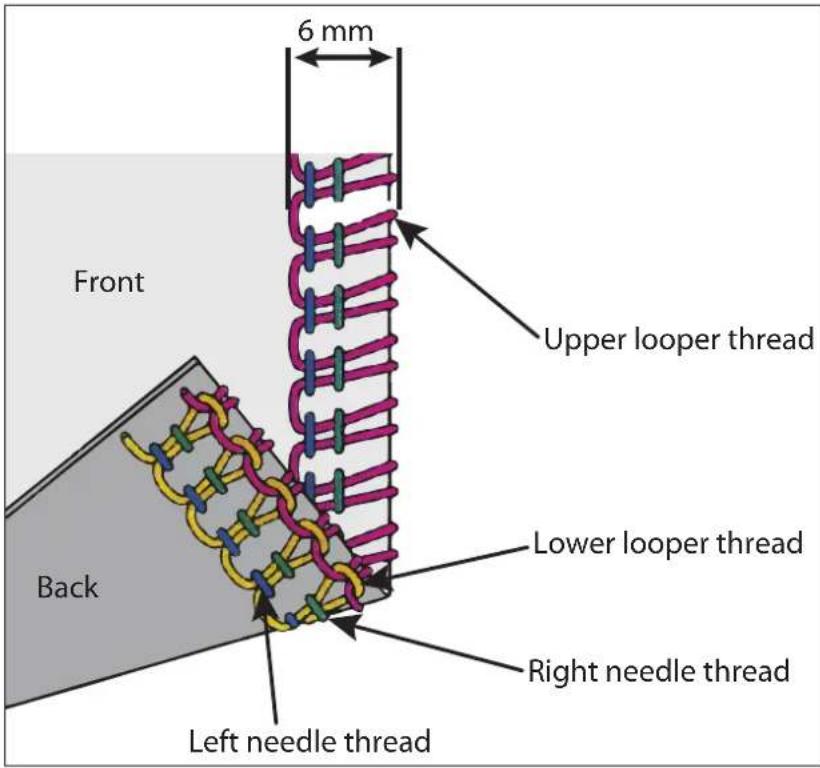
The required thread tension changes depending on the type and thickness of the thread and fabric.
▶ Check the seams and adjust the machine to the thread tension accordingly.
Thread tension:
▶ Turn the thread tension selectors (7, 8, 22, 23) to a lower number: there is less tension
▶ Turn the thread tension selectors to a higher number: there is more tension
10.1. Correct thread tension
10.2. Adjusting the thread tension for needle threads
The thread tension on the left needle is too loose.
The thread tension on the right needle is too loose.
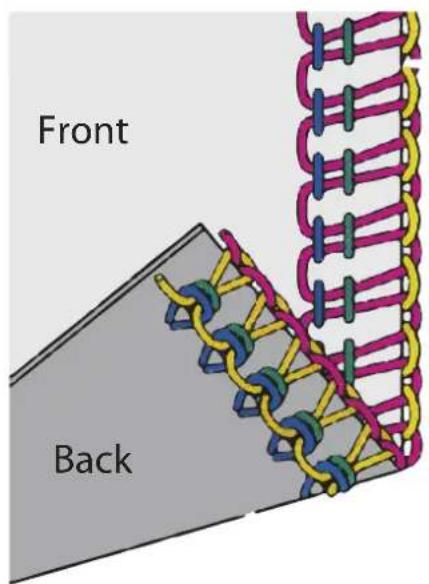
Tighten the left thread. Tighten the right thread.
10.3. Adjusting the thread tension for looper threads
The lower looper thread is too tight and/or the upper looper thread is too loose.
Loosen the tension of the lower looper thread and/or tighten the upper looper thread.
The upper looper thread is too tight and/or the lower looper thread is too loose.
Loosen the tension of the upper looper thread and/or tighten the lower looper thread.
- Overview of machine sett ings1
The best thread tension setting for one fabric may not be correct for another fabric.
The required thread tension depends on the stiffness and thickness of the fabric as well as the thread type and thickness.
You may find the following table helpful for finding the correct thread tension. This table details ideal sample settings that are not the same for all materials and yarns. Always test the settings on a sample first.
| Programme | Needle position* | Thread tension | Stitch length | Cutting width | Stitch finger position | 2-thread converter | ||||
| Blue Green | Bright green | Pink | ||||||||
| 4-thread overlock stitch | N | N | N | N | 2.5~3 3.5 S No | |||||
| 3-thread overlock stitch (wide) | N N N 2.5~3 | 3.5 S No | ||||||||
| 3-thread overlock stitch (narrow) | N N N 2.5~3 | 3.5 S No | ||||||||
| 3-thread overedge stitch (wide) | 3.5-4.5 2-N 7-8 F~2 3.5 S No | |||||||||
| Programme | Needle post- tion* | Thread tension | Sitch length | Cushing width | 2-thread converter | |||
| Blue Green | Bright green | Pink | ||||||
| Sitch length | ||||||||
| 3-thread overedge stitch (narrow) | 4-5-2-N 6.5-7.5 F~2.3.5 S No | |||||||
| 3-thread flaglock stitch (wide) | 1-2.3.5-4.5-5-6 2~2.5.3.5 S No | |||||||
| 3-thread flaglock stitch (narrow) | 2-N 6-7.5-6 F~2.3.5 S No | |||||||
| 2-thread flaglock stitch (wide) | 1-2.5-N 4-2~2.5.3.5 S Yes | |||||||
| 2-thread flaglock stitch (narrow) | 2-N 5-6 2~2.5.3.5 S Yes | |||||||
| Programme | Needle position* | Thread tension | Stitch length | Cutting width | Stitch finger position | 2-thread converter | ||||
| Blue Green | Bright green | Pink | ||||||||
| 2-thread overedge stitch (wide) | 3.5–4.5 2-N F~2 3.5 S Yes | |||||||||
| 2-thread overedge stitch (narrow) | 4–5 2-N F~2 3.5 S Yes | |||||||||
| 2-thread rolled hem stitch | 2-N 5–6 F~2 3.5 R Yes | |||||||||
- Overview of yarn and needles
| Fabrics Thread Needles Stitch length | |||
| Light cotton & linen:Organdy; batiste; gingham | Cotton no. 100 For general | sewing work:Type:2022 no. 75/11 or 80/12 | 2.0–3.5 mmStandard: 2.5 mm |
| Heavy cotton & linen:Oxford, jeans, cotton gabardine | Cotton no. 60Polyester no. 50–60 | For lightweight materials:Type:2022 no. 75/11 | 2.5–4.0 mmStandard: 3.0 mm |
| Lightweight wool:Worsted fabric, wool, poplin | Cotton no. 60Polyester no. 80 | 2.0–3.5 mmStandard: 2.5 mm | |
| Serge, flannel, gabardine Cotton no. 60 | Polyester no. 60–80 | 2.0–3.5 mmStandard: 2.5 mm | |
| Heavy wool:Velour, camel hair, astrakhan | Cotton no. 60Polyester no. 50–60 | For general sewing work:Type:2022 no. 80/12 or 90/14 | 2.5–4.0 mmStandard: 3.0 mm |
| Lightweight synthetics:Crêpe de chine, voile,georgette, satin | Cotton no. 80–120Polyester no. 80–100 | For lightweight materials:Type:2022 no. 75/11 or 80/12 | 2.0–3.5 mmStandard: 2.5 mm |
| Heavy synthetics:Taffeta, twill, jeans | Cotton no. 60Polyester no. 60 | For general sewing work:Type:2022 no. 80/12 or 90/14 | 2.5–4.0 mmStandard: 3.0 mm |
| Tricot fabric Cotton no. 60–80 | Polyester no. 60–80 | For lightweight materials:Type:2022 no. 75/11 or 80/12 | 2.0–3.5 mmStandard: 2.5 mm |
| Jersey Cotton no. 60 | Polyester no. 50–60 | 2.0–3.5 mmStandard: 2.5 mm | |
| Wool Bulked yarn; | Polyester no. 50–60 | 2.0–3.5 mmStandard: 2.5 mm | |
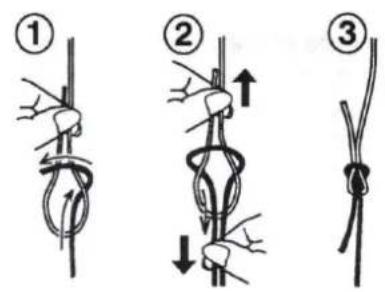
13. Changing the thread
The following approach makes changing the thread extremely simple, removing the need to completely re-thread.
▶ Cut the yarn above the spindle and knot the ends of the old and new thread using a sailor knot, as shown in the illustration.
▶ Raise the presser foot (17).
Put the needle bar in the lowest position by turning the handwheel (38) towards you. Carefully pull the free end of the yarn until the joining knot has passed through the eye of the needle and the looper eyes.
14.Handle
The handle (6) on the top of the appliance makes it easy and convenient for you to transport your machine.
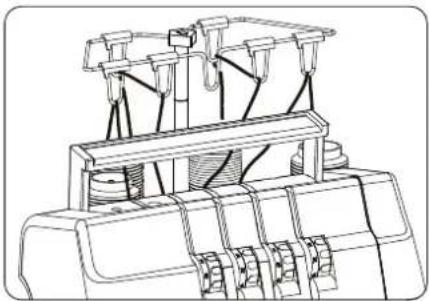
15. Set ing the stitch length
Turn the stitch length control (40) until the desired length is shown. The higher the number, the longer the stitch.
The stitch length can be set from 1 to 5 mm.
Almost all overlocking work is performed with a stitch length of 2.5 to 3.5 mm.
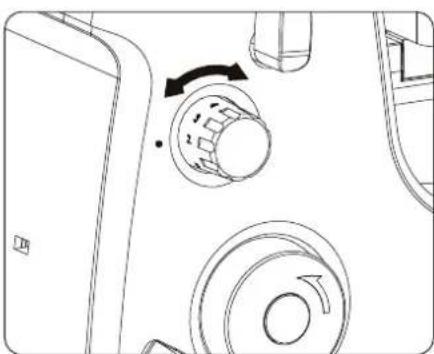
15.1. Set ing the stitch length
| Stitches Stitch length | |
| Regular stitches 2.0–4.5 mm | (Default setting: 3.0 mm) |
| Narrow edges 1.0–2.0 mm | |
| Hemstitches 1.0–2.0 mm | |
| Top stitching 3.0–4.0 mm |
Depending on the material, it may be necessary to vary the cutting width. Check each time which stitch width is suitable using a sample stitch. You can freely adjust the cutting width from 3 to 4.5 mm. To do so, proceed as follows:
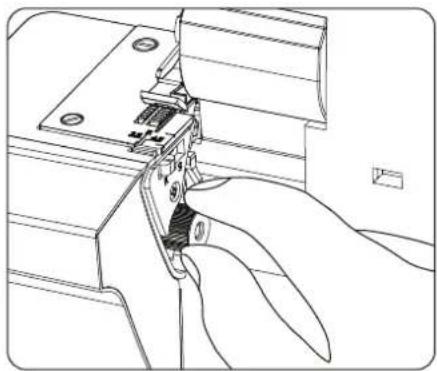
- Fold the looper cover (13) down.
- Bring the needles to the highest position by turning the handwheel (38).
- Position the upper knife (14) upwards, as described in section "18. Disengaging the upper knife" on page 245, this makes it easier to set the cutting width.
- Turn the cutting width setting control (45) to the desired setting.
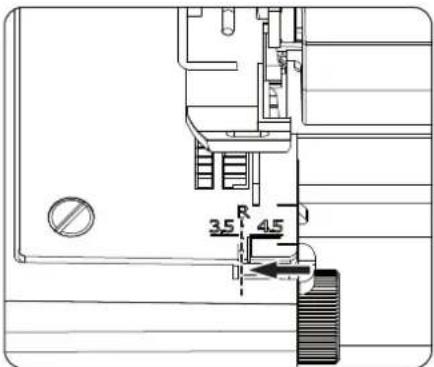
- The cutting width set is shown on the front edge of the throat plate. When the desired stitch width is set, the edge of the knife fitting and the respective cutting width marking on the throat plate line up.
- Position the upper knife back in its original position and close the looper cover.
16.1. The ideal cutting width
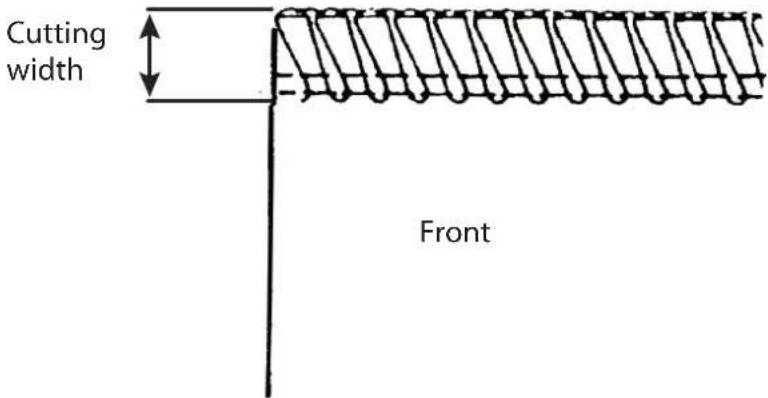
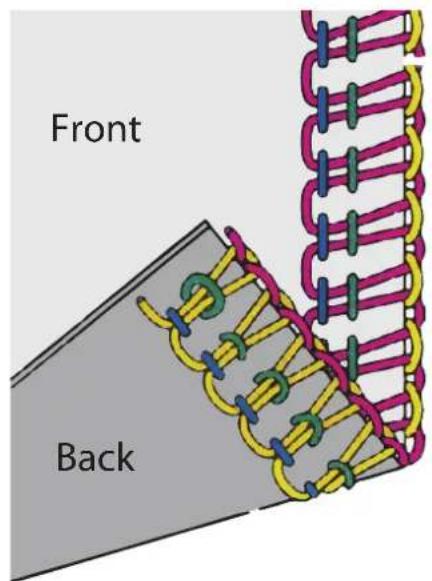
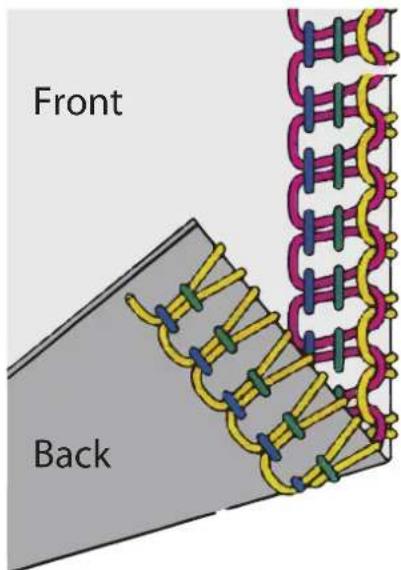
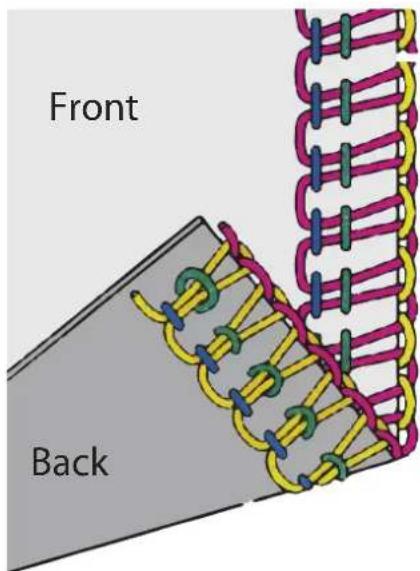
When the ideal cutting width is set, the loops of looper thread lie gently against the edge of the fabric.
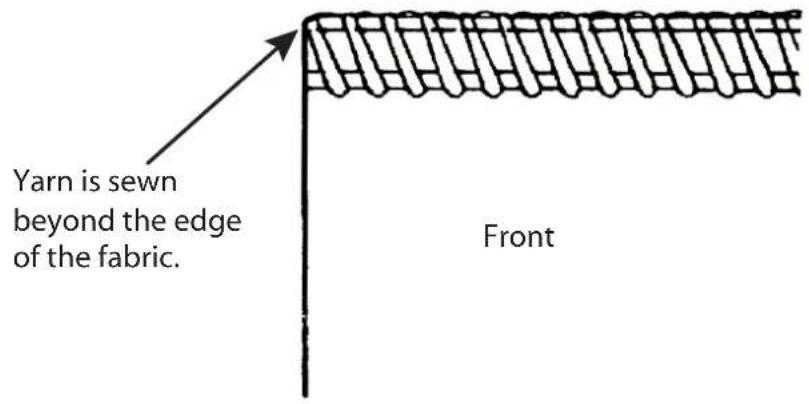
16.2. The cutting width is too narrow
The loops of the looper threads are too far over the edge of the fabric.
▶ Turning the cutting width setting control clockwise moves the lower knife to the right and increases the cutting width.
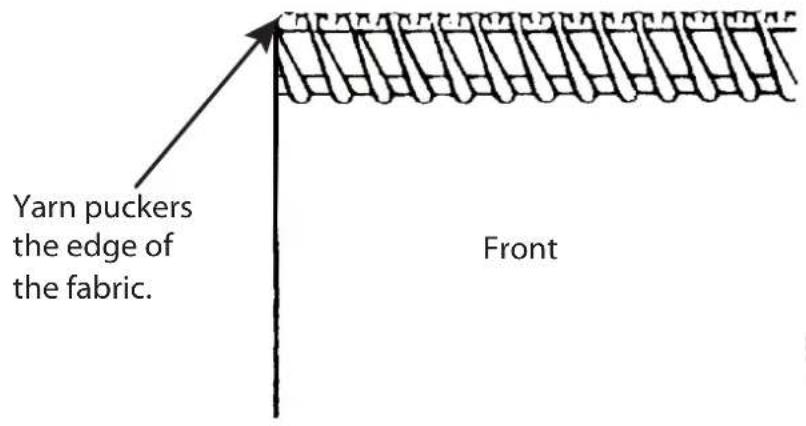
16.3. Thecutting width is too wide
The loops of the looper threads lie too close to the edge of the material and the material curls up.
▶ Turning the cutting width setting control anti-clockwise moves the lower knife to the left and reduces the cutting width.

SEWING TIP
The fact that the edge of the fabric curls up as the result of a cutting width that is too wide can be used for some sewing tasks and can create attractive stitching effects.
17. Narrow and wide chainstitching with three threads
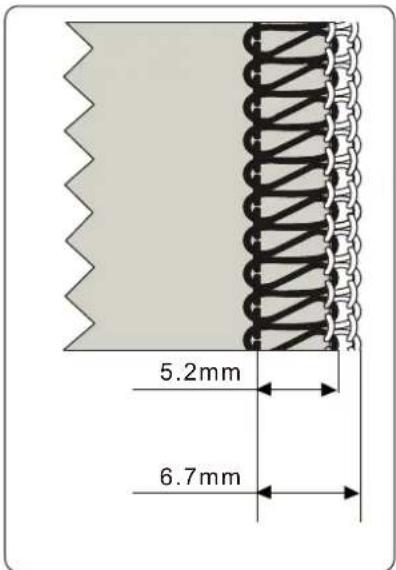
This machine can be converted from chaining four to three threads.
Remove either the left or right needle (depending on the required seam) and the corresponding thread (see also "24. Replacing needles" on page 251).
The machine is now ready for chaining with three threads.
If only the right needle is used, the cutting width can be adjusted between 3–4.5 mm.
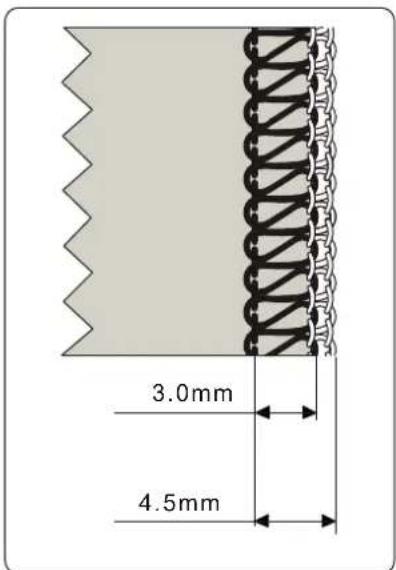
If only the left needle is used, the cutting width is between 5.2–6.7 mm.
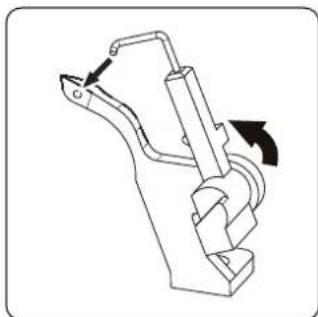
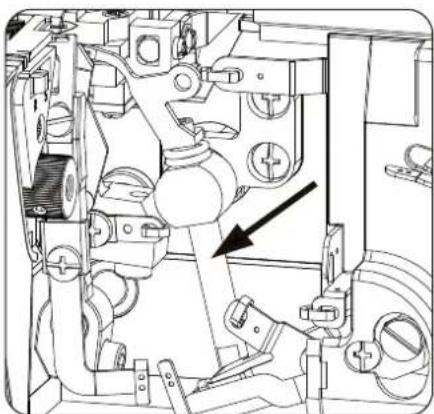
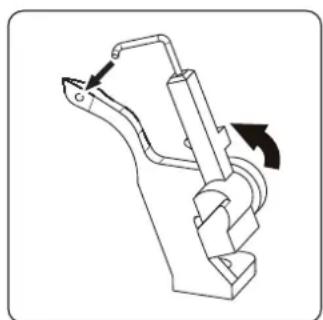
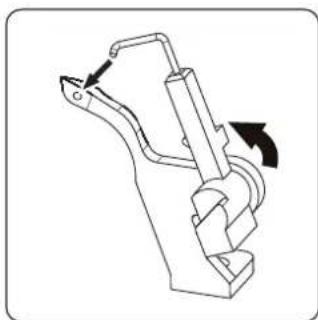
18. Disengaging the upper knife
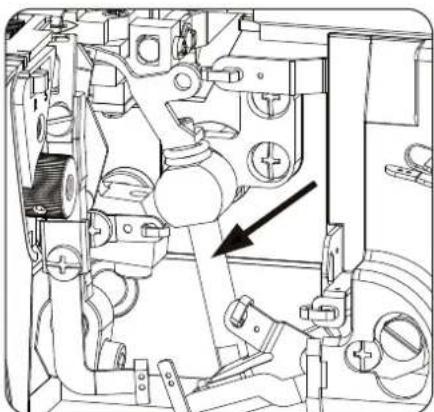
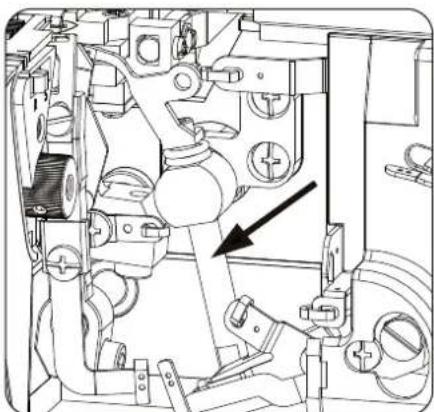
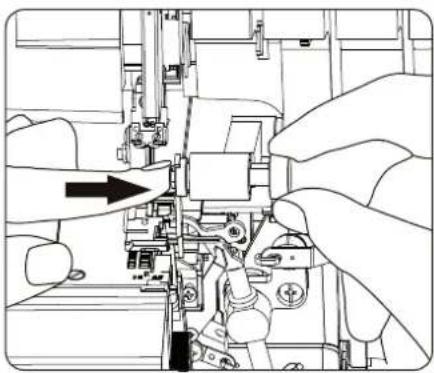
If you would like to sew without cutting the edges at the same time, you can disengage the upper knife.
- Switch off the machine and pull out the mains plug.
- Open the looper cover (13).
- Ensure that the stitch finger control (40) is set to "R".
-
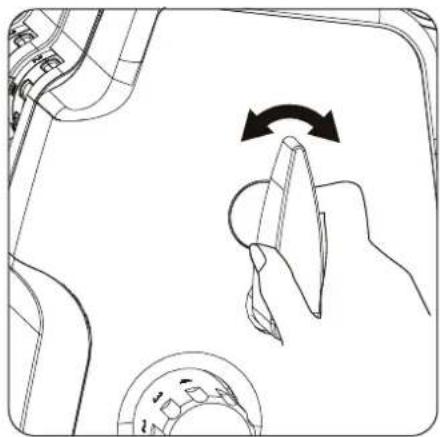
Use one hand to hold the free arm in place, and turn the dial for the knife fitting (14) to the right.
-
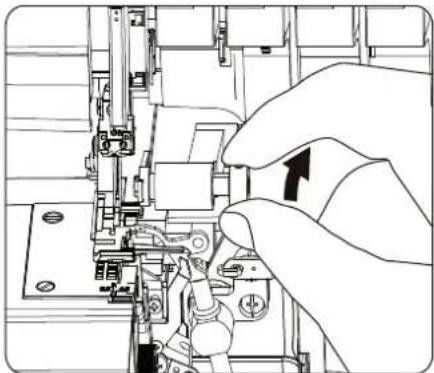
Then turn the knife fitting clockwise forwards until the knife has been rotated through 270°.
- Ensure that the pin in the knife fitting catches in the dial groove to ensure the safe hold.
-
Close the looper cover and continue your sewing work.
-
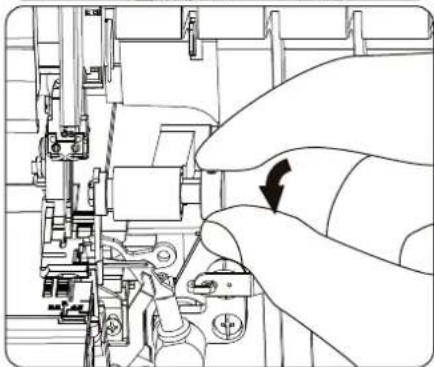
Proceed in the reverse order to re-engage the knife.

CAUTION!
Risk of crushing
The spring of the knife fitting dial is under high tension and the dial can therefore spring back when returning to the original position and there is a risk of crushing fingers.
■ Always hold the dial firmly and let it gently click into place in its original position.
19. Converting to two-thread operation
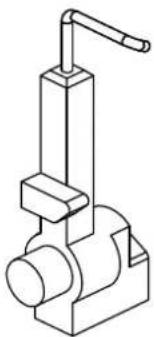
You can also use your machine solely as a two-thread machine. To do so, use the two-thread converter (59).
i
Please refer to the table in section "11. Overview of machine settings" on page 237 for the various applications of the two-thread converter.
- Switch off the machine and pull out the mains plug.
- Open the looper cover (13).
- Place the upper looper (42) in the highest position with the handwheel.
- Depending on the desired seam, remove the needle that is no longer required, and the threads for this needle and for the upper looper (see also "24. Replacing needles" on page 251).
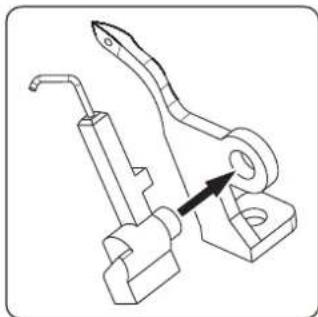
- Insert the two-thread converter in the recess on the upper looper.
-
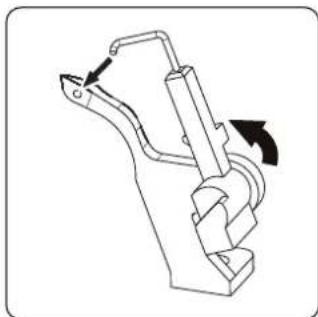
Then carefully turn the two-thread converter to the left and ensure that the point pin on the two-thread converter locks into place in the looper eye. If necessary, use the tweezers to help.
-
Follow the specified steps in the reverse order to remove the two-thread converter.
20. Stitch finger control
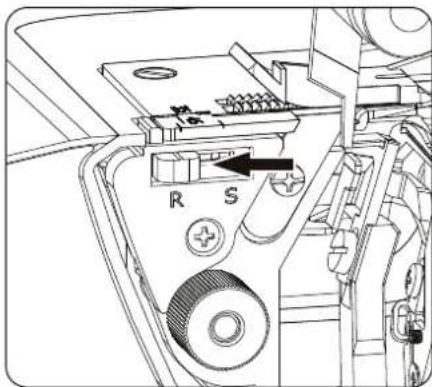
The stitch finger must be pulled back for rolled seams. To do so, set the stitch finger control to "R".
- Switch off the machine.
- Open the looper cover (13).
- Disengage the upper knife (14), as described in section "18. Disengaging the upper knife" on page 245.
- Slide the stitch finger control (46) to "R".
- Set the cutting width to "R".
- Set the upper knife back to the original position.
- Close the looper cover.
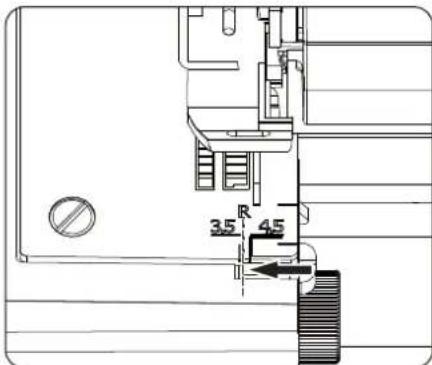
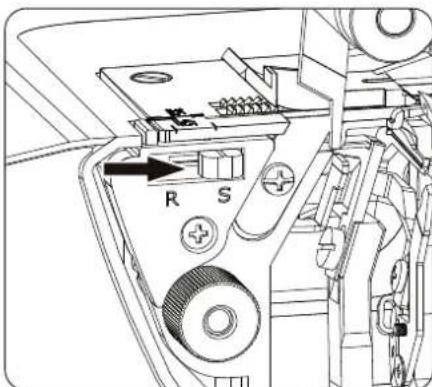
The stitch finger control must be set to "S" for all standard overlock stitches.
- Switch off the machine.
- Open the looper cover.
- Disengage the upper knife, as described in section "18. Disengaging the upper knife" on page 245.
- Slide the stitch finger control to "S".
- Set the upper knife back to the original position.
- Close the looper cover.
21.Diff erential feed
The differential feed prevents seams from becoming wavy on knit fabrics and prevents layers of fabric from slipping. It also prevents lightweight fabrics from puckering.
21.1. Functionality
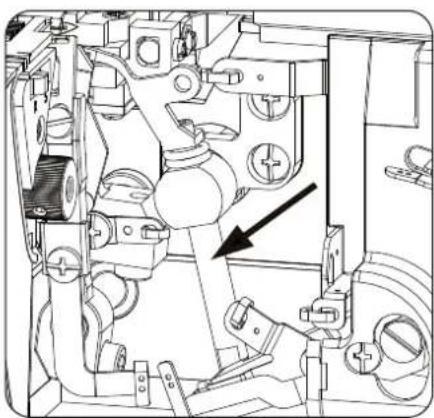
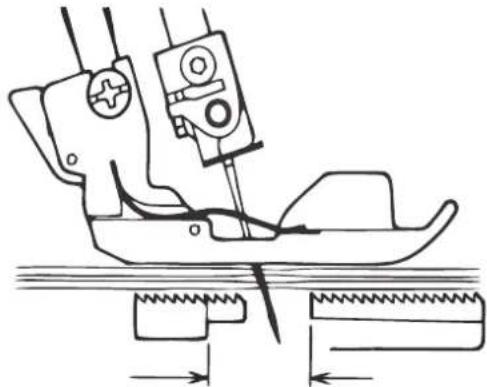
The machine has two sets of feed dogs, one front set (A) and one rear set (B). Both of these sets move independently. Due to the feed, both sets of feed dogs can move at different speeds.
The feed can be set from 0.7 (negative feed) to 2.0 (positive feed).
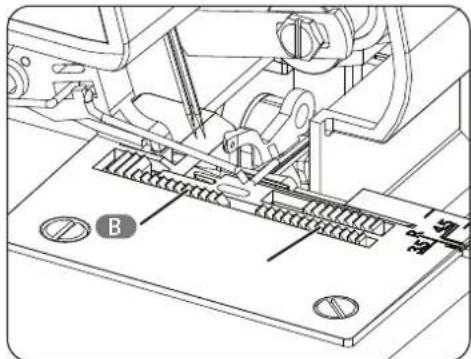
21.2. Positive differential feed
With positive differential feed, the front feed dogs (A) move further than the rear feed dogs (B). This "amasses" fabric under the presser foot, preventing the fabric from becoming wavy.
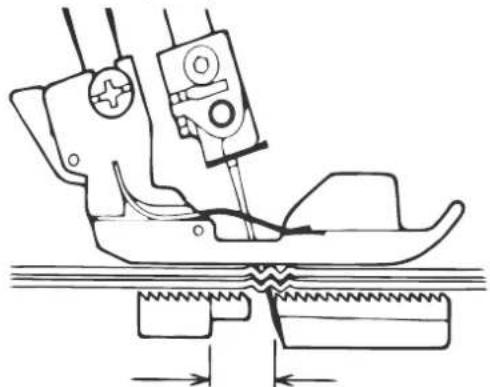
21.3.Negativediff erential feed
With negative differential feed, the front feed dogs (A) do not move as much as the rear feed dogs (B). This stretches fabric under the presser foot, offsetting unwanted puckering of the fabric.
21.4. Sett ing the diff erential feed
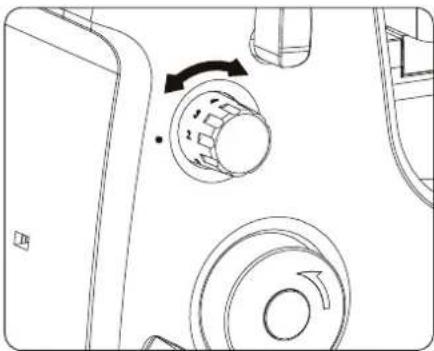
The differential feed is set by turning the differential feed control (39). The feed can also be set while sewing.
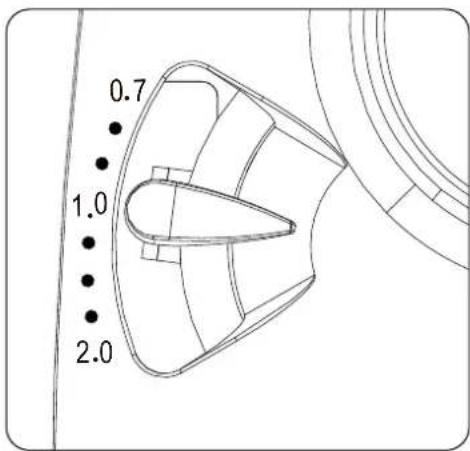
21.5. Setting the differential feed
Use the following table to select a setting:
| Application Feed type Setting | ||
| Non-wavy seams, desired puckering | Positive differential feed | 1–2 |
| No differential feed Neutral feed 1 | ||
| Pucker-free seams | Negative differential feed | 0.7–1 |
22. Sett ing the presser foot pressure
The presser foot pressure is set correctly for all common sewing tasks as standard and does not need to be adjusted.
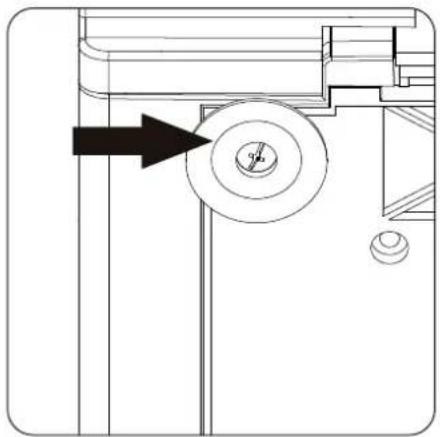
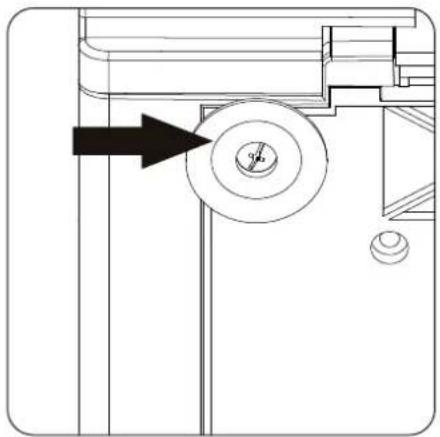
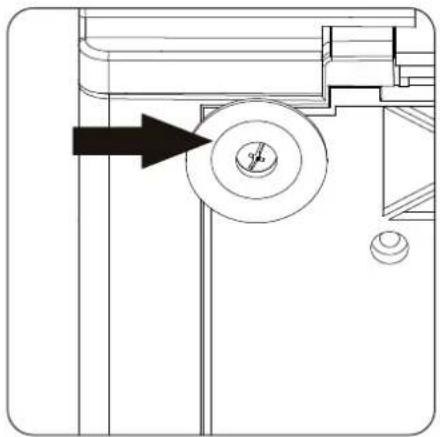
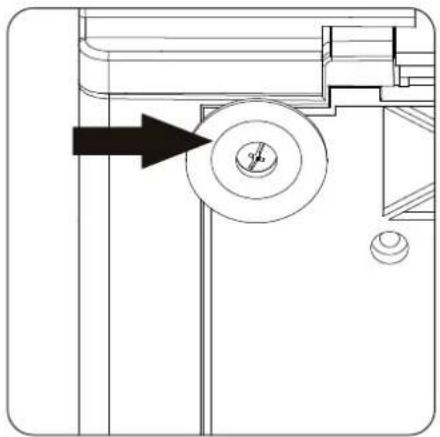
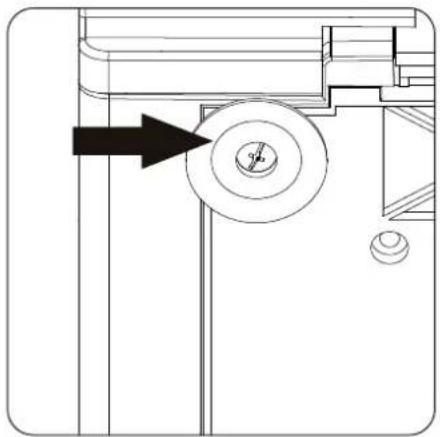
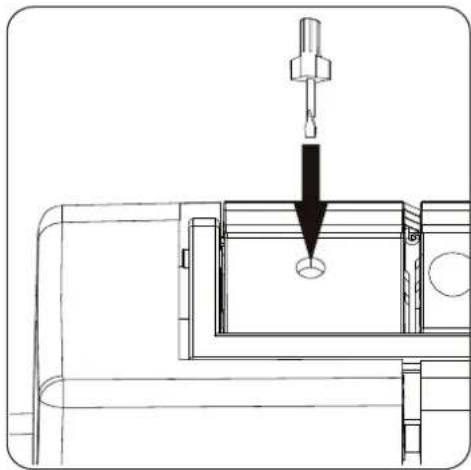
If it nevertheless becomes necessary to adjust the pressure of the presser foot, you can regulate this using the setting screw for the presser foot pressure (28) on top of the machine.
- Hold the handle up and guide a small screwdriver into the setting screw opening.
- Turn the screw clockwise to increase the pressure or anti-clockwise to decrease the pressure.
i
To restore the default setting, turn the screw clockwise until it strikes the upper cover. Then turn the screw anti-clockwise for 6 rotations. The default setting has now been restored.
23. Free arm
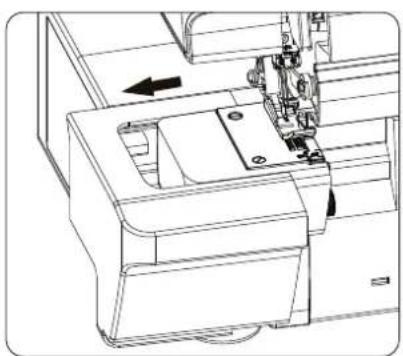
For sewing work on tubular material, such as sleeves or trouser legs, the attached work table can be removed to use the free arm.
The work table is removed by pushing it carefully to the left.
To attach the work table, carefully place the extension table onto the machine and push it to the right until it audibly clicks into place.
24. Replacing needles

This machine is equipped with type 2022 needles (for domestic and over-locking machines)

NOTICE!
Risk of damage!
Bent or blunt needles can cause damage to the machine and material.
■ Switch off the machine.
■ Replace the defective needle.
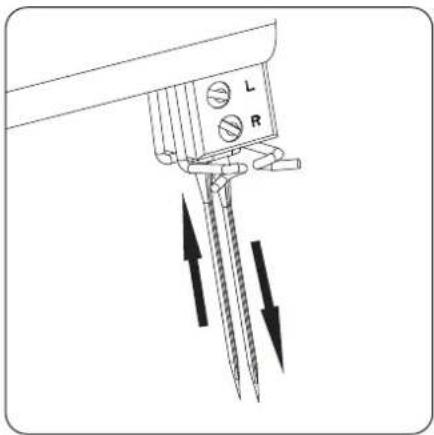
▶ Turn the handwheel (38) towards you until the needles (19) are in the highest position.
Loosen the clamp screws from the needles using the supplied small screwdriver from the accessory compartment and remove the needles: upper screw for the left needle and lower screw for the right needle.
▶ Push the new needles into the needle holder with the flat side facing to the back. When doing so, ensure that they are pushed in as far as possible.
▶ Tighten the needle clamp screw again.
Once the needles have been inserted correctly, the left needle is positioned slightly higher than the right. If the needles have not been inserted correctly, occasional stitches will be missed.
25. Replacing knives
Switch off the machine and pull out the mains plug before replacing the knives.
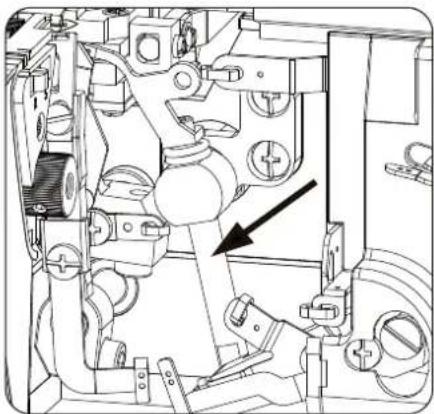
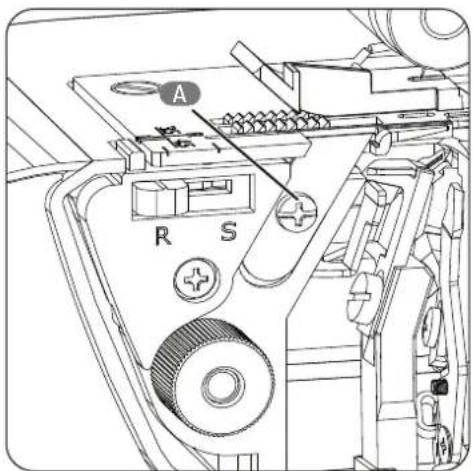
Replace the lower knife (47) in this way when it becomes blunt:
- Turn off the sewing machine.
- Open the looper cover (13).
- Disengage the upper knife (14), as described in section "18. Disengaging the upper knife" on page 245.
- Use the screwdriver from the accessory box to release the screw (A) on the lower knife.
- Insert a new lower knife and tighten the screw of the holder.
- Set the upper knife back to the original position.
- Close the looper cover.
26. Troubleshooting
Please read this section before contacting our Service Centre.
| Problem Cause Solution Page | |||
| Needles break Needles are bent, | blunt or the tip is damaged | Insert a new needle 251 | |
| Needles are inserted incorrectly | Insert the needles correctly in the holder | 251 | |
| The fabric was pulled too roughly | Guide the fabric gently using both hands | ||
| The thread breaks Yarn has not been threaded correctly | Thread the yarn correctly 228 | ||
| Thread tension is too high Adjust | the thread tension 234 | ||
| Needles are inserted incorrectly | Insert the needles correctly in the holder | ||
| Stitches are missed Needles are bent, blunt or the tip is damaged | Insert a new needle 251 | ||
| Needles are inserted incorrectly | Insert the needles correctly in the holder | ||
| Stitches are missed Yarn has not been threaded correctly | Thread the yarn again 228 | ||
| Incorrect needles inserted | Use the correct needles (type 130/705H) | ||
| Stitching is uneven Thread tension is incorrect | Adjust the thread tension 234 | ||
| Thread sticks | Check the flow of the individual threads | ||
| Seams pucker | Thread tension is too high Adjust | the thread tension 234 | |
| Yarn has not been threaded correctly | Thread the yarn correctly 228 | ||
| Yarn is stuck | Check the flow of the individual threads | 228 | |
| Fabric feed has not been adjusted | Set the feed to 0.7 | 248 | |
| Fabric is not cut cleanly | Upper knife is blunt or inserted incorrectly | Replace the knife or insert it correctly | 251 |
| The edge of the fabric puckers | Too much fabric in one stitch | Adjust the cut width | 242 |
| Lighting does not work | LED is defective | Contact our Service Centre. | |
27. Storage
Store the sewing machine in a dry location to prevent rust from forming on the metallic mechanical parts.
Always use the supplied cover to prevent dust from getting into the sewing machine.
28. Cleaning and lubrication
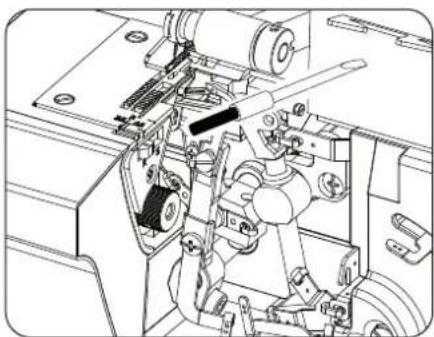
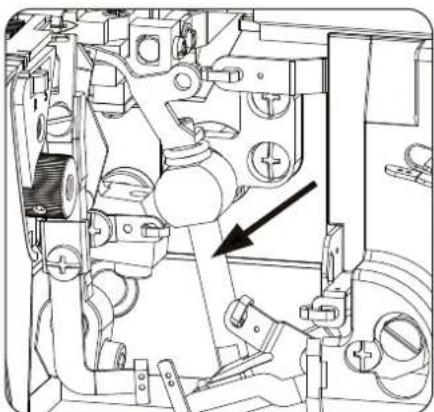
To ensure your machine works properly, you must clean the mechanism from time to time using the brush from the accessory box and oil the relevant points.
i
Use only high-quality sewing machine oil to oil this sewing machine. You can obtain this from specialist retailers.
Use a dry, soft cloth to clean the exterior housing. Do not use chemical solvents or cleaning products because these may damage the appliance's surface and/or labelling.
This machine requires only a little oil, because the main components are made of a special material.
- Disconnect the machine from the power supply before opening the machine.
-
Open the looper cover (13). Remove the accumulated dust and lint using the lint brush from the accessories.
-
Add a couple of drops of oil at the marked points. Use only high-quality sewing machine oil.
-
Close the free arm and the looper cover.
- For test purposes, now sew test fabric to check that the machine is working correctly. The excess oil is eliminated directly, without causing damage to your actual material.
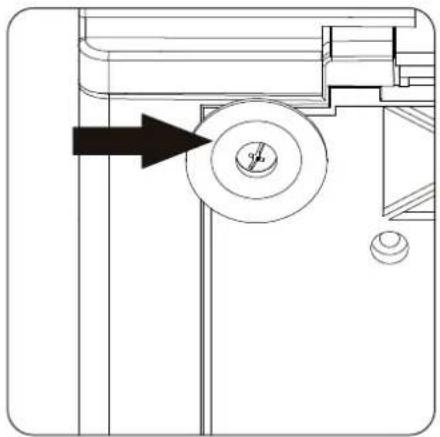
- Clean the suction feet (35) of the sewing machine at regular intervals with alcohol to maintain the suction power to ensure stability of the machine.
29. Disposal
Packaging
Your overlock sewing machine has been packaged to protect it from damage in transit. Packaging materials are raw materials and can therefore be reused or recycled.
APPLIANCE
All old appliances marked with the symbol shown must not be disposed of in normal household waste.
In accordance with Directive 2012/19/EU, the appliance must be properly disposed of at the end of its service life.
This involves separating the materials in the appliance for the purpose of recycling as well as minimising the environmental impact and negative effects on human health.
Take old appliances to an electrical scrap collection point or a recycling centre.
Contact your local waste disposal company or your local authority for more information on this subject.
30. Technical specifications
Voltage: AC 220–240 V \~ 50 Hz
Power consumption: Total output: 91 W
Motor:
Light:
(LED)
Foot control: Type: HKT72C
Rated voltage: 200–240 V \~ 50 Hz/0.5 A
Protection class II
Number of threads: 4 or 3
Number of needles: 2 or 1
Sewing speed: 1200 (+150/-100) UpM
Cutting width: 6.5 mm with 4 threads

Stitch length:
Presser foot height:
Needle:
Dimensions:
Weight:
6.5 mm or 3.5 mm for 3 threads
1-4 mm
4 mm
Type 2022 no. 75/11; 90/14; 100/16
31 cm x 32 cm x 31 cm (WxHxD)
7.2 kg

ID 1111226424
30.1. Declaration of conformity

Medion AG hereby declares that the product conforms to the following European requirements:
• EMC Directive 2014/30/EU
• Low Voltage Directive 2014/35/EU
• Ecodesign Directive 2009/125/EC
• RoHS Directive 2011/65/EU
31. Serviceinformation
Please contact our Customer Service team if your device ever stops working the way you want or expect it to. There are several ways for you to contact us:
- In our Service-Community, you can meet other users, as well as our staff, and you can exchange your experiences and pass on your knowledge there.
You will find our Service-Community at community.medion.com.
• Alternatively, use our contact form at www.medion.com/contact. - You can also contact our Service team via our hotline or by post.
| Opening times Hotline number UK | |
| Mon – Fri: 08.00 – 20.00Sat – Sun: 10.00 – 16.00 | 0333 3213106 |
| Service address | |
| MEDION Electronics Ltd.120 Faraday Park, Faraday Road, DorcanSwindon SN3 5JF, WiltshireUnited Kingdom | |

You can download this and many other sets of operating instructions from our service portal at www.medi-onservice.com.
We have stopped providing printed copies of our warranty terms and conditions as part of our commitment to sustainability, but you can access the warranty terms and conditions on our service portal.
You can also scan the QR code on the side of the screen, to download the operating instructions onto your mobile device from the service portal.
32. Legal Notice
Copyright 2024
Date: 11. April 2024
All rights reserved.
These operating instructions are protected by copyright.
Mechanical, electronic and any other forms of reproduction are prohibited without the written permission of the manufacturer.
Copyright is owned by the company:
MEDION AG
Am Zehnthof 77
45307 Essen
Germany
Please note that you cannot use the address above for returns. Please always contact our Customer Service team first.

- INHALTSVERZEICHNIS
- VOR DEM GEBRAUCH
- DIE ZUBEHÖRBOX
- BEDIENUNG
- HANDRAD
- FADENTRENNER
- VORSICHT
- QUETSCHGEFAHR
- I
- 21.DIFF ERENZIALTRANSPORT
- POSITIVER DIFF ERENZIALTRANSPORT
- 21.3.NEGATIVERDIFF ERENZIALTRANSPORT
- UTILISATION
- VOLANT MANUEL
- GUIDE À COUDRE
- COUPE-FI I
- MANIPULATION DU PIED-DE-BICHE
- TRANSPORTDIFF ÉRENTIEL
- TRANSPORT DIFF ÉRENTIEL POSITIF
- RÉGLAGE DU TRANSPORT DIFF ÉRENTIEL
- VÓÓR HET GEBRUIK
- DE SPOELTAFEL INSTELLEN
- BEDIENING
- HANDWIEL
- DRAADSNIJDER
- DE STEEKLENGTE INSTELLEN
- DE SNIJBREEDTE INSTELLEN
- VOORZICHTIG
- BEKNELLINGSGEVAAR
- 21.DIFF ERENTIEEL TRANSPORT
- POSITIEF DIFF ERENTIEEL TRANSPORT
- DIFF ERENTIEEL TRANSPORT INSTELLEN
- ANTES DEL USO
- AJUSTE DE LA PLACA DE BOBINAS
- AJUSTE DEL PORTACONOS TELESCÓPICO
- MANEJO
- RUEDA
- CORTAHILOS
- DESENGANCHE DE LA CUCHILLA SUPERIOR
- ¡ATENCIÓN
- TRANSPORTEDIFERENCIAL
- FUNZIONAMENTO
- VOLANTINO
- TAGLIAFI LI
- INFI LARE I FI LI
- SGANCIARE LA LAMA SUPERIORE
- ATTENZIONE
- ABOUT THIS USER MANUAL
- EXPLANATION OF SYMBOLS
- DANGER
- WARNING
- CAUTION
- NOTICE
- PROPER USE
- SAFETY INSTRUCTIONS
- KEEP CHILDREN AWAY FROM ELECTRICAL APPLIANCES
- RISK OF CHOKING AND SUFFOCATION
- MAINS CABLE AND POWER SUPPLY
- NEVER CARRY OUT REPAIRS YOURSELF
- RISK OF ELECTRIC SHOCK
- GENERAL INFORMATION
- HANDLE THE APPLIANCE WITH CARE
- CLEANING AND STORAGE
- PACKAGE CONTENTS
- APPLIANCE OVERVIEW
- NOT SHOWN
- BEFORE USE
- ADJUSTING THE SPOOL TABLE
- SETT ING THE TELESCOPIC THREAD GUIDE
- THE ACCESSORY BOX
- SPOOL HOLDER
- CONNECTING THE FOOT CONTROL
- MOUNTING OF THE WASTE CONTAINER
- OPERATION
- HANDWHEEL
- CONTROLLING THE SEWING SPEED
- LOOPER COVER AND SAFETY SWITCH
- STRAIGHTEDGE
- THREAD SEPARATOR
- RAISING AND LOWERING THE PRESSER FOOT
- THREADING THE THREADS
- GENERAL INFORMATION ON THREADING
- THREADING THE LOWER LOOPER
- THREADING THE UPPER LOOPER
- THREADING THE RIGHT NEEDLE
- THREADING THE LEFT NEEDLE
- TEST RUN
- ADJUSTING THE THREAD TENSION
- ADJUSTING THE THREAD TENSION FOR NEEDLE THREADS
- ADJUSTING THE THREAD TENSION FOR LOOPER THREADS
- CHANGING THE THREAD
- 14.HANDLE
- SET ING THE STITCH LENGTH
- THE IDEAL CUTTING WIDTH
- THE CUTTING WIDTH IS TOO NARROW
- THECUTTING WIDTH IS TOO WIDE
- SEWING TIP
- NARROW AND WIDE CHAINSTITCHING WITH THREE THREADS
- DISENGAGING THE UPPER KNIFE
- RISK OF CRUSHING
- CONVERTING TO TWO-THREAD OPERATION
- STITCH FINGER CONTROL
- 21.DIFF ERENTIAL FEED
- FUNCTIONALITY
- POSITIVE DIFFERENTIAL FEED
- 21.3.NEGATIVEDIFF ERENTIAL FEED
- SETT ING THE DIFF ERENTIAL FEED
- SETTING THE DIFFERENTIAL FEED
- SETT ING THE PRESSER FOOT PRESSURE
- FREE ARM
- REPLACING NEEDLES
- RISK OF DAMAGE
- REPLACING KNIVES
- TROUBLESHOOTING
- STORAGE
- CLEANING AND LUBRICATION
- DISPOSAL
- PACKAGING
- APPLIANCE
- TECHNICAL SPECIFICATIONS
- DECLARATION OF CONFORMITY
- SERVICEINFORMATION
- LEGAL NOTICE
Brand : MEDION
Model : LIFE SO09 (MD 19169)
Category : Sewing machine